
IME关于输入法横屏全屏显示问题-Android14
IME关于输入法横屏全屏显示问题-Android14
- 1、输入法全屏模式updateFullscreenMode
- 1.1 全屏模式判断
- 1.2 全屏模式布局设置
- 2、应用侧关闭输入法全屏模式
- 2.1 调用输入法的应用设置flag
- 2.2 继承InputMethodService.java的输入法应用覆盖onEvaluateFullscreenMode方法
InputMethodManagerService启动-Android12
1、输入法全屏模式updateFullscreenMode
frameworks/base/core/java/android/inputmethodservice/InputMethodService.java
1.1 全屏模式判断
boolean isFullscreen = mShowInputRequested && onEvaluateFullscreenMode();: 判断是否全屏显示输入法,其中mShowInputRequested请求一般就是 true 。onEvaluateFullscreenMode(): 默认横屏全屏模式显示,若在横屏下有EditorInfo.IME_FLAG_NO_FULLSCREEN或者EditorInfo.IME_INTERNAL_FLAG_APP_WINDOW_PORTRAIT不使用fullscreen-mode模式
/*** Override this to control when the input method should run in* fullscreen mode.  The default implementation runs in fullsceen only* when the screen is in landscape mode.  If you change what* this returns, you will need to call {@link #updateFullscreenMode()}* yourself whenever the returned value may have changed to have it* re-evaluated and applied.*/
public boolean onEvaluateFullscreenMode() {Configuration config = getResources().getConfiguration();if (config.orientation != Configuration.ORIENTATION_LANDSCAPE) {return false;}if (mInputEditorInfo != null&& ((mInputEditorInfo.imeOptions & EditorInfo.IME_FLAG_NO_FULLSCREEN) != 0// If app window has portrait orientation, regardless of what display orientation// is, IME shouldn't use fullscreen-mode.|| (mInputEditorInfo.internalImeOptions& EditorInfo.IME_INTERNAL_FLAG_APP_WINDOW_PORTRAIT) != 0)) {return false;}return true;
}
1.2 全屏模式布局设置
- 设置
mFullscreenArea的LayoutParams属性,全屏模式下lp.height = 0;、lp.weight = 1;- 添加
ExtractView,即布局frameworks/base/core/res/res/layout/input_method_extract_view.xml
/*** Re-evaluate whether the input method should be running in fullscreen* mode, and update its UI if this has changed since the last time it* was evaluated.  This will call {@link #onEvaluateFullscreenMode()} to* determine whether it should currently run in fullscreen mode.  You* can use {@link #isFullscreenMode()} to determine if the input method* is currently running in fullscreen mode.*/
public void updateFullscreenMode() {Trace.traceBegin(TRACE_TAG_WINDOW_MANAGER, "IMS.updateFullscreenMode");boolean isFullscreen = mShowInputRequested && onEvaluateFullscreenMode();boolean changed = mLastShowInputRequested != mShowInputRequested;if (mIsFullscreen != isFullscreen || !mFullscreenApplied) {changed = true;mIsFullscreen = isFullscreen;reportFullscreenMode();mFullscreenApplied = true;initialize();LinearLayout.LayoutParams lp = (LinearLayout.LayoutParams)mFullscreenArea.getLayoutParams();if (isFullscreen) {mFullscreenArea.setBackgroundDrawable(mThemeAttrs.getDrawable(com.android.internal.R.styleable.InputMethodService_imeFullscreenBackground));lp.height = 0;lp.weight = 1;} else {mFullscreenArea.setBackgroundDrawable(null);lp.height = LinearLayout.LayoutParams.WRAP_CONTENT;lp.weight = 0;}((ViewGroup)mFullscreenArea.getParent()).updateViewLayout(mFullscreenArea, lp);if (isFullscreen) {if (mExtractView == null) {View v = onCreateExtractTextView();if (v != null) {setExtractView(v);}}startExtractingText(false);}updateExtractFrameVisibility();}if (changed) {onConfigureWindow(mWindow.getWindow(), isFullscreen, !mShowInputRequested);mLastShowInputRequested = mShowInputRequested;}Trace.traceEnd(TRACE_TAG_WINDOW_MANAGER);
}
2、应用侧关闭输入法全屏模式
2.1 调用输入法的应用设置flag
设置
EditorInfo.IME_FLAG_NO_FULLSCREEN属性,而EditorInfo.IME_INTERNAL_FLAG_APP_WINDOW_PORTRAIT属性是framework内部使用。 即xml布局中android:imeOptions="flagNoFullscreen",或者代码设置mEdtView.setImeOptions(EditorInfo.IME_FLAG_NO_FULLSCREEN);
imeOptions属性并不只有IME_FLAG_NO_FULLSCREEN功能:
IME_ACTION_UNSPECIFIED actionUnspecified
IME_ACTION_NONE actionNone
IME_ACTION_GO actionGo
IME_ACTION_SEARCH actionSearch
IME_ACTION_SEND actionSend
IME_ACTION_NEXT actionNext
IME_ACTION_DONE actionDone
IME_ACTION_PREVIOUS actionPrevious
IME_FLAG_NO_PERSONALIZED_LEARNING flagNoPersonalizedLearning
IME_FLAG_NO_FULLSCREEN flagNoFullscreen
IME_FLAG_NAVIGATE_PREVIOUS flagNavigatePrevious
IME_FLAG_NAVIGATE_NEXT flagNavigateNext
IME_FLAG_NO_EXTRACT_UI flagNoExtractUi
IME_FLAG_NO_ACCESSORY_ACTION flagNoAccessoryAction
IME_FLAG_NO_ENTER_ACTION flagNoEnterAction
IME_FLAG_FORCE_ASCII flagForceAscii设置
imeOptions属性并不一定生效,假如输入法应用覆盖了onEvaluateFullscreenMode方法
frameworks/base/core/java/android/view/inputmethod/EditorInfo.java
/*** Flag of {@link #imeOptions}: used to request that the IME never go* into fullscreen mode.* By default, IMEs may go into full screen mode when they think* it's appropriate, for example on small screens in landscape* orientation where displaying a software keyboard may occlude* such a large portion of the screen that the remaining part is* too small to meaningfully display the application UI.* If this flag is set, compliant IMEs will never go into full screen mode,* and always leave some space to display the application UI.* Applications need to be aware that the flag is not a guarantee, and* some IMEs may ignore it.*/
public static final int IME_FLAG_NO_FULLSCREEN = 0x2000000;/*** Masks for {@link imeOptions}** <pre>* |-------|-------|-------|-------|*                              1111 IME_MASK_ACTION* |-------|-------|-------|-------|*                                   IME_ACTION_UNSPECIFIED*                                 1 IME_ACTION_NONE*                                1  IME_ACTION_GO*                                11 IME_ACTION_SEARCH*                               1   IME_ACTION_SEND*                               1 1 IME_ACTION_NEXT*                               11  IME_ACTION_DONE*                               111 IME_ACTION_PREVIOUS*         1                         IME_FLAG_NO_PERSONALIZED_LEARNING*        1                          IME_FLAG_NO_FULLSCREEN*       1                           IME_FLAG_NAVIGATE_PREVIOUS*      1                            IME_FLAG_NAVIGATE_NEXT*     1                             IME_FLAG_NO_EXTRACT_UI*    1                              IME_FLAG_NO_ACCESSORY_ACTION*   1                               IME_FLAG_NO_ENTER_ACTION*  1                                IME_FLAG_FORCE_ASCII* |-------|-------|-------|-------|</pre>*//*** Extended type information for the editor, to help the IME better* integrate with it.*/
public int imeOptions = IME_NULL;/*** A string supplying additional information options that are* private to a particular IME implementation.  The string must be* scoped to a package owned by the implementation, to ensure there are* no conflicts between implementations, but other than that you can put* whatever you want in it to communicate with the IME.  For example,* you could have a string that supplies an argument like* <code>"com.example.myapp.SpecialMode=3"</code>.  This field is can be* filled in from the {@link android.R.attr#privateImeOptions}* attribute of a TextView.*/
public String privateImeOptions = null;/*** Masks for {@link internalImeOptions}** <pre>*                                 1 IME_INTERNAL_FLAG_APP_WINDOW_PORTRAIT* |-------|-------|-------|-------|</pre>*//*** Same as {@link android.R.attr#imeOptions} but for framework's internal-use only.* @hide*/
public int internalImeOptions = IME_NULL;
frameworks/base/core/java/android/widget/TextView.java
case com.android.internal.R.styleable.TextView_imeOptions:createEditorIfNeeded();mEditor.createInputContentTypeIfNeeded();mEditor.mInputContentType.imeOptions = a.getInt(attr,mEditor.mInputContentType.imeOptions);break;/*** Change the editor type integer associated with the text view, which* is reported to an Input Method Editor (IME) with {@link EditorInfo#imeOptions}* when it has focus.* @see #getImeOptions* @see android.view.inputmethod.EditorInfo* @attr ref android.R.styleable#TextView_imeOptions*/
public void setImeOptions(int imeOptions) {createEditorIfNeeded();mEditor.createInputContentTypeIfNeeded();mEditor.mInputContentType.imeOptions = imeOptions;
}
frameworks/base/core/res/res/values/attrs.xml
<!-- Additional features you can enable in an IME associated with an editorto improve the integration with your application. The constantshere correspond to those defined by{@link android.view.inputmethod.EditorInfo#imeOptions}. --><attr name="imeOptions"><!-- There are no special semantics associated with this editor. --><flag name="normal" value="0x00000000" /><!-- There is no specific action associated with this editor, let theeditor come up with its own if it can.Corresponds to{@link android.view.inputmethod.EditorInfo#IME_NULL}. --><flag name="actionUnspecified" value="0x00000000" /><!-- This editor has no action associated with it.Corresponds to{@link android.view.inputmethod.EditorInfo#IME_ACTION_NONE}. --><flag name="actionNone" value="0x00000001" /><!-- The action key performs a "go"operation to take the user to the target of the text they typed.Typically used, for example, when entering a URL.Corresponds to{@link android.view.inputmethod.EditorInfo#IME_ACTION_GO}. --><flag name="actionGo" value="0x00000002" /><!-- The action key performs a "search"operation, taking the user to the results of searching for the textthe have typed (in whatever context is appropriate).Corresponds to{@link android.view.inputmethod.EditorInfo#IME_ACTION_SEARCH}. --><flag name="actionSearch" value="0x00000003" /><!-- The action key performs a "send"operation, delivering the text to its target. This is typically usedwhen composing a message.Corresponds to{@link android.view.inputmethod.EditorInfo#IME_ACTION_SEND}. --><flag name="actionSend" value="0x00000004" /><!-- The action key performs a "next"operation, taking the user to the next field that will accept text.Corresponds to{@link android.view.inputmethod.EditorInfo#IME_ACTION_NEXT}. --><flag name="actionNext" value="0x00000005" /><!-- The action key performs a "done"operation, closing the soft input method.Corresponds to{@link android.view.inputmethod.EditorInfo#IME_ACTION_DONE}. --><flag name="actionDone" value="0x00000006" /><!-- The action key performs a "previous"operation, taking the user to the previous field that will accept text.Corresponds to{@link android.view.inputmethod.EditorInfo#IME_ACTION_PREVIOUS}. --><flag name="actionPrevious" value="0x00000007" /><!-- Used to request that the IME should not update any personalized data such as typinghistory and personalized language model based on what the user typed on this textediting object. Typical use cases are:<ul><li>When the application is in a special mode, where user's activities are expectedto be not recorded in the application's history. Some web browsers and chatapplications may have this kind of modes.</li><li>When storing typing history does not make much sense. Specifying this flag intyping games may help to avoid typing history from being filled up with words thatthe user is less likely to type in their daily life. Another example is that whenthe application already knows that the expected input is not a valid word (e.g. apromotion code that is not a valid word in any natural language).</li></ul><p>Applications need to be aware that the flag is not a guarantee, and some IMEs maynot respect it.</p> --><flag name="flagNoPersonalizedLearning" value="0x1000000" /><!-- Used to request that the IME never gointo fullscreen mode. Applications need to be aware that the flag is nota guarantee, and not all IMEs will respect it.<p>Corresponds to{@link android.view.inputmethod.EditorInfo#IME_FLAG_NO_FULLSCREEN}. --><flag name="flagNoFullscreen" value="0x2000000" /><!-- Like flagNavigateNext, butspecifies there is something interesting that a backward navigationcan focus on. If the user selects the IME's facility to backwardnavigate, this will show up in the application as an actionPreviousat {@link android.view.inputmethod.InputConnection#performEditorAction(int)InputConnection.performEditorAction(int)}.<p>Corresponds to{@link android.view.inputmethod.EditorInfo#IME_FLAG_NAVIGATE_PREVIOUS}. --><flag name="flagNavigatePrevious" value="0x4000000" /><!-- Used to specify that there is somethinginteresting that a forward navigation can focus on. This is like usingactionNext, except allows the IME to be multiline (withan enter key) as well as provide forward navigation. Note that someIMEs may not be able to do this, especially when running on a smallscreen where there is little space. In that case it does not need topresent a UI for this option. Like actionNext, if theuser selects the IME's facility to forward navigate, this will show upin the application at{@link android.view.inputmethod.InputConnection#performEditorAction(int)InputConnection.performEditorAction(int)}.<p>Corresponds to{@link android.view.inputmethod.EditorInfo#IME_FLAG_NAVIGATE_NEXT}. --><flag name="flagNavigateNext" value="0x8000000" /><!-- Used to specify that the IME does not needto show its extracted text UI. For input methods that may be fullscreen,often when in landscape mode, this allows them to be smaller and let partof the application be shown behind. Though there will likely be limitedaccess to the application available from the user, it can make theexperience of a (mostly) fullscreen IME less jarring. Note that whenthis flag is specified the IME may <em>not</em> be set up to be ableto display text, so it should only be used in situations where this isnot needed.<p>Corresponds to{@link android.view.inputmethod.EditorInfo#IME_FLAG_NO_EXTRACT_UI}. --><flag name="flagNoExtractUi" value="0x10000000" /><!-- Used in conjunction with a custom action, this indicates that theaction should not be available as an accessory button when theinput method is full-screen.Note that by setting this flag, there can be cases where the actionis simply never available to the user. Setting this generally meansthat you think showing text being edited is more important than theaction you have supplied.<p>Corresponds to{@link android.view.inputmethod.EditorInfo#IME_FLAG_NO_ACCESSORY_ACTION}. --><flag name="flagNoAccessoryAction" value="0x20000000" /><!-- Used in conjunction with a custom action,this indicates that the action should not be available in-line asa replacement for the "enter" key. Typically this isbecause the action has such a significant impact or is not recoverableenough that accidentally hitting it should be avoided, such as sendinga message. Note that {@link android.widget.TextView} willautomatically set this flag for you on multi-line text views.<p>Corresponds to{@link android.view.inputmethod.EditorInfo#IME_FLAG_NO_ENTER_ACTION}. --><flag name="flagNoEnterAction" value="0x40000000" /><!-- Used to request that the IME should be capable of inputting ASCIIcharacters. The intention of this flag is to ensure that the usercan type Roman alphabet characters in a {@link android.widget.TextView}used for, typically, account ID or password input. It is expected that IMEsnormally are able to input ASCII even without being told so (such IMEsalready respect this flag in a sense), but there could be some cases theyaren't when, for instance, only non-ASCII input languages like Arabic,Greek, Hebrew, Russian are enabled in the IME. Applications need to beaware that the flag is not a guarantee, and not all IMEs will respect it.However, it is strongly recommended for IME authors to respect this flagespecially when their IME could end up with a state that has only non-ASCIIinput languages enabled.<p>Corresponds to{@link android.view.inputmethod.EditorInfo#IME_FLAG_FORCE_ASCII}. --><flag name="flagForceAscii" value="0x80000000" /></attr>
2.2 继承InputMethodService.java的输入法应用覆盖onEvaluateFullscreenMode方法
覆盖onEvaluateFullscreenMode方法,返false就可以了。如Android14上google输入法
LatinImeGoogle.apk
frameworks/base/core/java/android/inputmethodservice/InputMethodService.java
/*** Override this to control when the input method should run in* fullscreen mode.  The default implementation runs in fullsceen only* when the screen is in landscape mode.  If you change what* this returns, you will need to call {@link #updateFullscreenMode()}* yourself whenever the returned value may have changed to have it* re-evaluated and applied.*/
public boolean onEvaluateFullscreenMode() {Configuration config = getResources().getConfiguration();if (config.orientation != Configuration.ORIENTATION_LANDSCAPE) {return false;}if (mInputEditorInfo != null&& ((mInputEditorInfo.imeOptions & EditorInfo.IME_FLAG_NO_FULLSCREEN) != 0// If app window has portrait orientation, regardless of what display orientation// is, IME shouldn't use fullscreen-mode.|| (mInputEditorInfo.internalImeOptions& EditorInfo.IME_INTERNAL_FLAG_APP_WINDOW_PORTRAIT) != 0)) {return false;}return true;
}
相关文章:

IME关于输入法横屏全屏显示问题-Android14
IME关于输入法横屏全屏显示问题-Android14 1、输入法全屏模式updateFullscreenMode1.1 全屏模式判断1.2 全屏模式布局设置 2、应用侧关闭输入法全屏模式2.1 调用输入法的应用设置flag2.2 继承InputMethodService.java的输入法应用覆盖onEvaluateFullscreenMode方法 InputMethod…...

网络安全 | F5-Attack Signatures-Set详解
关注:CodingTechWork 创建和分配攻击签名集 可以通过两种方式创建攻击签名集:使用过滤器或手动选择要包含的签名。 基于过滤器的签名集仅基于在签名过滤器中定义的标准。基于过滤器的签名集的优点在于,可以专注于定义用户感兴趣的攻击签名…...

STranslate 中文绿色版即时翻译/ OCR 工具 v1.3.1.120
STranslate 是一款功能强大且用户友好的翻译工具,它支持多种语言的即时翻译,提供丰富的翻译功能和便捷的使用体验。STranslate 特别适合需要频繁进行多语言交流的个人用户、商务人士和翻译工作者。 软件功能 1. 即时翻译: 文本翻译ÿ…...

基于微信小程序的助农扶贫系统设计与实现(LW+源码+讲解)
专注于大学生项目实战开发,讲解,毕业答疑辅导,欢迎高校老师/同行前辈交流合作✌。 技术范围:SpringBoot、Vue、SSM、HLMT、小程序、Jsp、PHP、Nodejs、Python、爬虫、数据可视化、安卓app、大数据、物联网、机器学习等设计与开发。 主要内容:…...

我谈区域偏心率
偏心率的数学定义 禹晶、肖创柏、廖庆敏《数字图像处理(面向新工科的电工电子信息基础课程系列教材)》P312 区域的拟合椭圆看这里。 Rafael Gonzalez的二阶中心矩的表达不说人话。 我认为半长轴和半短轴不等于特征值,而是特征值的根号。…...

关于低代码技术架构的思考
我们经常会看到很多低代码系统的技术架构图,而且经常看不懂。是因为技术架构图没有画好,还是因为技术不够先进,有时候往往都不是。 比如下图: 一个开发者,看到的视角往往都是技术层面,你给用户讲React18、M…...

若依路由配置教程
1. 路由配置文件 2. 配置内容介绍 { path: "/tool/gen-edit", component: Layout, //在路由下,引用组件的名称,在页面中包括这个组件的内容(页面框架内容) hidden: true, //此页面的内容,在左边的菜单中不用显示。 …...

基于ESP8266的多功能环境监测与反馈系统开发指南
项目概述 本系统集成了物联网开发板、高精度时钟模块、环境传感器和可视化显示模块,构建了一个智能环境监测与反馈装置。通过ESP8266 NodeMCU作为核心控制器,结合DS3231实时时钟、DHT11温湿度传感器、光敏电阻和OLED显示屏,实现了环境参数的…...

【Elasticsearch】doc_values 可以用于查询操作
确实,doc values 可以用于查询操作,尽管它们的主要用途是支持排序、聚合和脚本中的字段访问。在某些情况下,Elasticsearch 也会利用 doc values 来执行特定类型的查询。以下是关于 doc values 在查询操作中的使用及其影响的详细解释ÿ…...

HTML5 Web Worker 的使用与实践
引言 在现代 Web 开发中,用户体验是至关重要的。如果页面在执行复杂计算或处理大量数据时变得卡顿或无响应,用户很可能会流失。HTML5 引入了 Web Worker,它允许我们在后台运行 JavaScript 代码,从而避免阻塞主线程,保…...
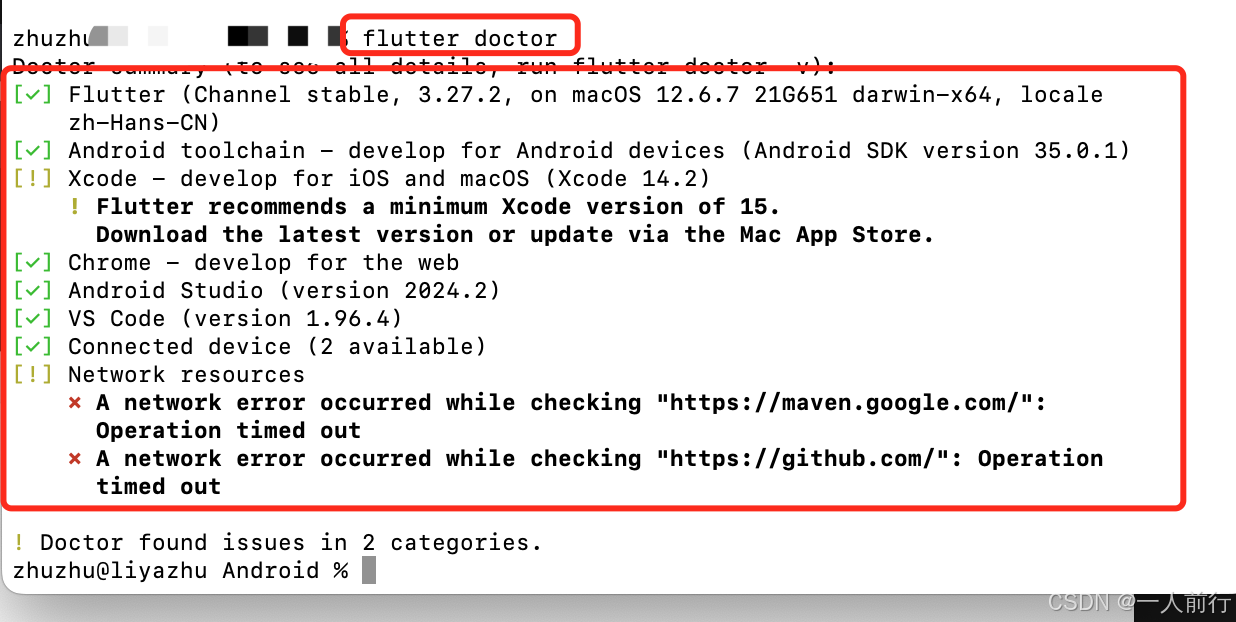
flutter_学习记录_00_环境搭建
1.参考文档 Mac端Flutter的环境配置看这一篇就够了 flutter的中文官方文档 2. 本人环境搭建的背景 本人的电脑的是Mac的,iOS开发,所以iOS开发环境本身是可用的;外加Mac电脑本身就会配置Java的环境。所以,后面剩下的就是&#x…...

自助设备系统设置——对接POS支付
输入管理员密码 一、录入POS网关信息 填写网关信息后保存,重新启动软件...

Calibre(阅读转换)-官方开源中文版[完整的电子图书馆系统,包括图书馆管理,格式转换,新闻,材料转换为电子书]
Calibre(阅读&转换)-官方开源中文版 链接:https://pan.xunlei.com/s/VOHbKYUwd3ASVXTi2Ok1vkK3A1?pwd92ny#...
)
2748. 美丽下标对的数目(Beautiful Pairs)
2748. 美丽下标对的数目(Beautiful Pairs) 题目分析 给定一个整数数组 nums,我们需要找出其中符合条件的“美丽下标对”。美丽下标对是指,数组中的某一对数字 nums[i] 和 nums[j](其中 0 ≤ i < j < nums.leng…...

【unity游戏开发之InputSystem——06】PlayerInputManager组件实现本地多屏的游戏(基于unity6开发介绍)
文章目录 PlayerInputManager 简介1、PlayerInputManager 的作用2、主要功能一、PlayerInputManager组件参数1、Notification Behavior 通知行为2、Join Behavior:玩家加入的行为3、Player Prefab 玩家预制件4、Joining Enabled By Default 默认启用加入5、Limit Number Of Pl…...

算法刷题Day29:BM67 不同路径的数目(一)
题目链接 描述 解题思路: 二维dp数组初始化。 dp[i][0] 1, dp[0][j] 1 。因为到达第一行第一列的每个格子只能有一条路。状态转移 dp[i][j] dp[i-1][j] dp[i][j-1] 代码: class Solution: def uniquePaths(self , m: int, n: int) -> int: #…...

c语言网 1130数字母
原题 题目描述 输入一个字符串,数出其中的字母的个数. 输入格式 一个字符串,不包含空格(长度小于100) 输出格式 字符串中的字母的个数 样例输入 复制 124lfdk54AIEJ92854&%$GJ 样例输出 复制 10 #include<iostream> #include<cc…...

UG二开UF-常用方法
1,带有星号的TAG用法 UF_OPER_ask_cutter_group(tag_t oper,tag_t * group) 2.使用string头文件 #include <afxwin.h> tag_t dj NULL; UF_OPER_ask_cutter_group(objects[0],&dj);//查询指定操作所在的刀具组tag 2࿰…...

美国本科申请文书PS写作中的注意事项
在完成了introduction之后,便可进入到main body的写作之中。美国本科申请文书PS的写作不同于学术论文写作,要求你提出论点进行论证之类。PS更多的注重对你自己的经历或者motivation的介绍和描述。而这一描述过程只能通过对你自己的过往的经历的展现才能体…...

内存泄漏的通用排查方法
本文聊一聊如何系统性地分析查找内存泄漏的具体方法,但不会具体到哪种语言和具体业务代码逻辑中,而是会从 Linux 系统上通用的一些分析方法来入手。这样,不论你使用什么开发语言,不论你在开发什么,它总能给你提供一些帮…...

【Python】第五弹---深入理解函数:从基础到进阶的全面解析
✨个人主页: 熬夜学编程的小林 💗系列专栏: 【C语言详解】 【数据结构详解】【C详解】【Linux系统编程】【MySQL】【Python】 目录 1、函数 1.1、函数是什么 1.2、语法格式 1.3、函数参数 1.4、函数返回值 1.5、变量作用域 1.6、函数…...

读书笔记--分布式服务架构对比及优势
本篇是在上一篇的基础上,主要对共享服务平台建设所依赖的分布式服务架构进行学习,主要记录和思考如下,供大家学习参考。随着企业各业务数字化转型工作的推进,之前在传统的单一系统(或单体应用)模式中&#…...
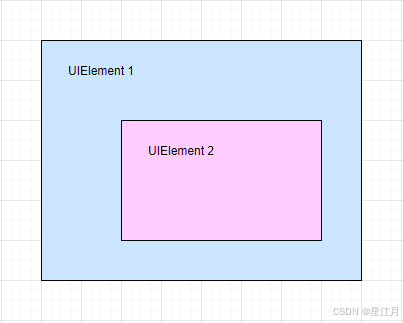
关于WPF中ComboBox文本查询功能
一种方法是使用事件(包括MVVM的绑定) <ComboBox TextBoxBase.TextChanged"ComboBox_TextChanged" /> 然而运行时就会发现,这个事件在疯狂的触发,很频繁 在实际应用中,如果关联查询数据库࿰…...

解析“in the wild”——编程和生活中的俚语妙用
解析“in the wild”——编程和生活中的俚语妙用 看下面的技术文章中遇到 in the wild这个词,想要研究一下,遂产生此文。 Are there ever pointers to pointers to pointers? There is an old programming joke which says you can rate C programmers…...
)
蓝桥杯练习日常|c/c++竞赛常用库函数(下)
书接上回......蓝桥杯算法日常|c\c常用竞赛函数总结备用-CSDN博客 目录 书接上回......https://blog.csdn.net/weixin_47011416/article/details/145290017 1、二分查找 2、lower_bound uper_bound 3、memset() 函数原型 参数说明 返回值 常见用…...

Mybatis-plus缓存
mybatis-plus缓存 MyBatis-Plus 是一个 MyBatis 的增强工具,在 MyBatis 的基础上提供了更多的便利性和强大的功能,包括但不限于分页、条件构造器、通用 Mapper、代码生成器等。MyBatis-Plus 也内置了基础的缓存功能,但需要注意的是ÿ…...

LockSupport概述、阻塞方法park、唤醒方法unpark(thread)、解决的痛点、带来的面试题
目录 ①. 什么是LockSupport? ②. 阻塞方法 ③. 唤醒方法(注意这个permit最多只能为1) ④. LockSupport它的解决的痛点 ⑤. LockSupport 面试题目 ①. 什么是LockSupport? ①. 通过park()和unpark(thread)方法来实现阻塞和唤醒线程的操作 ②. LockSupport是一个线程阻塞…...

基于 WPF 平台使用纯 C# 实现动态处理 json 字符串
一、引言 在当今的软件开发领域,数据的交换与存储变得愈发频繁,JSON(JavaScript Object Notation)作为一种轻量级的数据交换格式,以其简洁、易读、便于解析和生成的特点,被广泛应用于各种应用程序中。在 W…...

Rust:Rhai脚本编程示例
当然,以下是一个简单的Rhai脚本编程示例,展示了如何在Rust中使用Rhai执行脚本。 首先,你需要确保你的Rust项目中包含了rhai库。你可以在你的Cargo.toml文件中添加以下依赖项: [dependencies] rhai "0.19" # 请检查最…...

skynet 源码阅读 -- 启动主流程
Skynet 启动主流程分析 Skynet 是一个轻量级、高并发的服务器框架。它在启动时会进行一系列初始化操作,并启动多个不同功能的线程(Monitor、Timer、Worker、Socket),从而实现消息分发、定时器、网络I/O等核心功能。本文主要从 ma…...