
安卓(android)实现注册界面【Android移动开发基础案例教程(第2版)黑马程序员】
一、实验目的(如果代码有错漏,可查看源码)
1.掌握LinearLayout、RelativeLayout、FrameLayout等布局的综合使用。
2.掌握ImageView、TextView、EditText、CheckBox、Button、RadioGroup、RadioButton、ListView、RecyclerView等控件在项目中的综合使用。
3.掌握布局和控件的灵活运用,实现注册界面的布局设计。
二、实验条件
1.掌握了常见界面布局的特点及使用,熟悉XML方式和java代码方式编写界面布局。
2.掌握了ImageView、TextView、EditText、CheckBox、Button、RadioGroup、RadioButton等简单控件的使用。
三、实验内容
1.去掉默认标题栏:修改theme属性的值去掉默认标题栏。
2.实现注册功能: 获取界面控件创建文本样式;设置单选按钮的点击事件。
3.运行结果:运行程序,并在界面上输入注册信息;点击“提交”按钮,Toast提示注册成功。


四、实验指导
1.去掉默认标题栏
(1)依次进入创建项目下的app目录→src目录→main目录→res目录→values目录。

(2)打开themes.xml文件,修改应用的主题如下:
<style name="Theme.RegiserAppDemo" parent="Theme.AppCompat.NoActionBar"><!-- Primary brand color. --><!-- Secondary brand color. --><!-- Status bar color. -->……<!-- Customize your theme here. -->
</style>2.实现注册功能
(1)在value目录下创建styles.xml文件,定义界面中水平分割线、垂直分割线、TextView和EditText等控件的样式如下:
<?xml version="1.0" encoding="utf-8"?>
<resources><style name="hLine"><item name="android:layout_width">match_parent</item><item name="android:layout_height">1dp</item><item name="android:background">@android:color/white</item></style><style name="tvOne"><item name="android:layout_width">0dp</item><item name="android:layout_height">match_parent</item><item name="android:layout_weight">1</item><item name="android:drawablePadding">8dp</item><item name="android:gravity">center_horizontal</item><item name="android:paddingTop">40dp</item><item name="android:textColor">@android:color/white</item><item name="android:textSize">15dp</item></style><style name="tvTwo"><item name="android:layout_width">wrap_content</item><item name="android:layout_height">wrap_content</item><item name="android:layout_marginLeft">20dp</item><item name="android:textColor">@android:color/white</item><item name="android:textSize">15dp</item></style><style name="etOne"><item name="android:layout_width">match_parent</item><item name="android:layout_height">wrap_content</item><item name="android:layout_marginLeft">30dp</item><item name="android:background">@null</item><item name="android:textColor">@android:color/white</item></style></resources>
(2)在layout目录下的layout_main.xml文件中,引入界面需要的布局和控件,将第(1)步的样式文件引入设置,布局代码结构、代码图及设计预览图如下:
<?xml version="1.0" encoding="utf-8"?>
<RelativeLayout xmlns:android="http://schemas.android.com/apk/res/android"xmlns:tools="http://schemas.android.com/tools"android:layout_width="match_parent"android:layout_height="match_parent"android:background="@drawable/background_bg"><LinearLayoutandroid:layout_width="match_parent"android:layout_height="match_parent"android:orientation="vertical"tools:ignore="ExtraText"><TextViewandroid:id="@+id/tv_title"android:layout_width="match_parent"android:layout_height="50dp"android:background="@android:color/holo_blue_bright"android:gravity="center"android:text="注册"android:textColor="@android:color/white"android:textSize="20sp" /><LinearLayoutandroid:layout_width="match_parent"android:layout_height="130dp"android:orientation="horizontal"android:divider="@android:color/white"android:showDividers="middle"><TextViewstyle="@style/tvOne"android:drawableTop="@drawable/qq_icon"android:text="用QQ注册" /><TextViewstyle="@style/tvOne"android:drawableTop="@drawable/weixin_icon"android:text="用微信注册" /></LinearLayout><View style="@style/hLine" /><LinearLayoutandroid:layout_width="match_parent"android:layout_height="wrap_content"android:gravity="center"android:orientation="horizontal"android:padding="15dp"><ImageViewandroid:layout_width="wrap_content"android:layout_height="match_parent"android:src="@drawable/email_icon" /><TextViewandroid:layout_width="wrap_content"android:layout_height="wrap_content"android:layout_marginLeft="15dp"android:text="使用电子邮箱注册"android:textColor="@android:color/white"android:textSize="15sp" /></LinearLayout><View style="@style/hLine" /><LinearLayoutandroid:layout_width="match_parent"android:layout_height="wrap_content"android:orientation="horizontal"android:padding="15dp"><TextViewstyle="@style/tvTwo"android:text="名字" /><EditTextandroid:id="@+id/et_name"style="@style/etOne" /></LinearLayout><View style="@style/hLine" /><LinearLayoutandroid:layout_width="match_parent"android:layout_height="wrap_content"android:orientation="horizontal"android:padding="15dp"><TextViewstyle="@style/tvTwo"android:text="邮箱" /><EditTextandroid:id="@+id/et_email"style="@style/etOne"android:inputType="textEmailAddress" /></LinearLayout><View style="@style/hLine" /><LinearLayoutandroid:layout_width="match_parent"android:layout_height="wrap_content"android:orientation="horizontal"android:padding="15dp"><TextViewstyle="@style/tvTwo"android:text="密码" /><EditTextandroid:id="@+id/et_pwd"style="@style/etOne"android:inputType="textPassword" /></LinearLayout><View style="@style/hLine" /><LinearLayoutandroid:layout_width="match_parent"android:layout_height="wrap_content"android:orientation="horizontal"android:padding="15dp"><TextViewstyle="@style/tvTwo"android:text="性别" /><RadioGroupandroid:id="@+id/rg_sex"android:layout_width="match_parent"android:layout_height="match_parent"android:layout_marginLeft="50dp"android:orientation="horizontal"><RadioButtonandroid:id="@+id/rb_boy"android:layout_width="wrap_content"android:layout_height="wrap_content"android:text="男"android:textColor="@android:color/white"android:textSize="15sp" /><RadioButtonandroid:id="@+id/rb_girl"style="@style/tvTwo"android:layout_width="match_parent"android:text="女" /></RadioGroup></LinearLayout><View style="@style/hLine" /><LinearLayoutandroid:layout_width="match_parent"android:layout_height="wrap_content"android:orientation="horizontal"android:padding="15dp"><TextViewandroid:layout_width="wrap_content"android:layout_height="wrap_content"android:text="请选择兴趣爱好:"android:textColor="@android:color/white"android:textSize="15sp" /><CheckBoxandroid:id="@+id/cb_sing"android:layout_width="wrap_content"android:layout_height="wrap_content"android:text="唱歌"android:textColor="@android:color/white"android:textSize="15sp" /><CheckBoxandroid:id="@+id/cb_dance"android:layout_width="wrap_content"android:layout_height="wrap_content"android:text="跳舞"android:textColor="@android:color/white"android:textSize="15sp" /><CheckBoxandroid:id="@+id/cb_read"android:layout_width="wrap_content"android:layout_height="wrap_content"android:text="读书"android:textColor="@android:color/white"android:textSize="15sp" /></LinearLayout></LinearLayout><View style="@style/hLine" /><Viewandroid:id="@+id/v_line"android:layout_width="match_parent"android:layout_height="1dp"android:layout_above="@+id/btn_submit"android:background="@android:color/darker_gray" /><Buttonandroid:id="@+id/btn_submit"android:layout_width="match_parent"android:layout_height="50dp"android:layout_alignParentBottom="true"android:background="@android:color/transparent"android:gravity="center"android:text="提交"android:textColor="@android:color/white"android:textSize="18sp" /></RelativeLayout>
(3)在MainActivity.java文件中实现需求功能业务逻辑,代码如下:
package com.example.myapplication2022;import android.os.Bundle;
import android.text.TextUtils;
import android.util.Log;
import android.view.View;
import android.widget.Button;
import android.widget.CheckBox;
import android.widget.CompoundButton;
import android.widget.EditText;
import android.widget.RadioGroup;
import android.widget.Toast;import androidx.appcompat.app.AppCompatActivity;public class MainActivity extends AppCompatActivity implements View.OnClickListener, CompoundButton.OnCheckedChangeListener {private EditText et_name, et_email, et_pwd;private Button btn_submit;private String name, email, pwd, sex, hobbies;private RadioGroup rg_sex;private CheckBox cb_sing, cb_dance, cb_read;@Overrideprotected void onCreate(Bundle savedInstanceState) {super.onCreate(savedInstanceState);setContentView(R.layout.layout_main);init();}private void init() {// 初始化控件et_name = findViewById(R.id.et_name);et_email = findViewById(R.id.et_email);et_pwd = findViewById(R.id.et_pwd);rg_sex = findViewById(R.id.rg_sex);cb_sing = findViewById(R.id.cb_sing);cb_dance = findViewById(R.id.cb_dance);cb_read = findViewById(R.id.cb_read);btn_submit = findViewById(R.id.btn_submit);// 设置监听事件btn_submit.setOnClickListener(this);cb_sing.setOnCheckedChangeListener(this);cb_dance.setOnCheckedChangeListener(this);cb_read.setOnCheckedChangeListener(this);hobbies = new String();// 设置性别选项的监听事件rg_sex.setOnCheckedChangeListener(new RadioGroup.OnCheckedChangeListener() {@Overridepublic void onCheckedChanged(RadioGroup group, int checkedId) {switch (checkedId) {case R.id.rb_boy:sex = "男";break;case R.id.rb_girl:sex = "女";break;}}});}/*** 获取用户输入的信息*/private void getData() {name = et_name.getText().toString().trim();email = et_email.getText().toString().trim();pwd = et_pwd.getText().toString().trim();}@Overridepublic void onClick(View v) {switch (v.getId()) {case R.id.btn_submit:getData();if (TextUtils.isEmpty(name)) {Toast.makeText(MainActivity.this, "请输入名字", Toast.LENGTH_SHORT).show();} else if (TextUtils.isEmpty(email)) {Toast.makeText(MainActivity.this, "请输入邮箱", Toast.LENGTH_SHORT).show();} else if (TextUtils.isEmpty(pwd)) {Toast.makeText(MainActivity.this, "请输入密码", Toast.LENGTH_SHORT).show();} else if (TextUtils.isEmpty(sex)) {Toast.makeText(MainActivity.this, "请选择性别", Toast.LENGTH_SHORT).show();} else if (TextUtils.isEmpty(hobbies)) {Toast.makeText(MainActivity.this, "请选择兴趣爱好", Toast.LENGTH_SHORT).show();} else {Toast.makeText(MainActivity.this, "注册成功", Toast.LENGTH_SHORT).show();Log.i("MainActivity", "注册的用户信息:" +"名字:" + name +",邮箱:" + email +",性别:" + sex +",兴趣爱好:" + hobbies);}break;}}/*** 监听兴趣爱好的点击事件*/@Overridepublic void onCheckedChanged(CompoundButton buttonView, boolean isChecked) {String motion = buttonView.getText().toString(); // 获取选项的文本内容if (isChecked) {if (!hobbies.contains(motion)) {// 判断之前选择的内容是否与此次选择的不同hobbies = hobbies + motion;}} else {if (hobbies.contains(motion)) {hobbies = hobbies.replace(motion, ""); // 取消选择时移除}}}
}
3.运行结果

五、代码下载地址:
android: 实现注册界面、实现注册界面、饭堂小广播、音乐播放器、记事本、读取手机通讯录、学生管理系统 - Gitee.com
https://download.csdn.net/download/m0_63755691/90327318
相关文章:
安卓(android)实现注册界面【Android移动开发基础案例教程(第2版)黑马程序员】
一、实验目的(如果代码有错漏,可查看源码) 1.掌握LinearLayout、RelativeLayout、FrameLayout等布局的综合使用。 2.掌握ImageView、TextView、EditText、CheckBox、Button、RadioGroup、RadioButton、ListView、RecyclerView等控件在项目中的…...

SpringSecurity:There is no PasswordEncoder mapped for the id “null“
文章目录 一、情景说明二、分析三、解决 一、情景说明 在整合SpringSecurity功能的时候 我先是去实现认证功能 也就是,去数据库比对用户名和密码 相关的类: UserDetailsServiceImpl implements UserDetailsService 用于SpringSecurity查询数据库 Logi…...

微服务入门(go)
微服务入门(go) 和单体服务对比:里面的服务仅仅用于某个特定的业务 一、领域驱动设计(DDD) 基本概念 领域和子域 领域:有范围的界限(边界) 子域:划分的小范围 核心域…...

996引擎 - NPC-动态创建NPC
996引擎 - NPC-动态创建NPC 创建脚本服务端脚本客户端脚本添加自定义音效添加音效文件修改配置参考资料有个小问题,创建NPC时没有控制朝向的参数。所以。。。自己考虑怎么找补吧。 多重影分身 创建脚本 服务端脚本 Mir200\Envir\Market_Def\test\test001-3.lua -- NPC八门名…...

使用 MySQL JSON 查询筛选嵌套字段的值
在日常开发中,随着项目需求的不断复杂化,许多表字段可能会存储 JSON 格式的数据。例如,我们有一张 site_device 表,其中有一个名为 detail 的字段,保存了设备的详细信息。这些信息存储为 JSON 数据,如下所示…...
)
go-zero学习笔记(一)
基础环境搭建 安装go环境 网上文章比较多,不在赘述,我当时参考的文章是:https://blog.csdn.net/weixin_41287260/article/details/143661816 记得修改go env 中的环境变量, 主要是goproxy 改成七牛云的,这样下载代码库…...

maven、npm、pip、yum官方镜像修改文档
文章目录 Maven阿里云网易华为腾讯云 Npm淘宝腾讯云 pip清华源阿里中科大华科 Yum 由于各博客繁杂,本文旨在记录各常见镜像官网,及其配置文档。常用镜像及配置可评论后加入 Maven 阿里云 官方文档 setting.xml <mirror><id>aliyunmaven&l…...

【Docker】私有Docker仓库的搭建
一、准备工作 确保您的系统已安装Docker。如果没有安装,请参考Docker官方文档进行安装。 准备一个用于存储仓库数据的目录,例如/registry_data/。 二、拉取官方registry镜像 首先,我们需要从Docker Hub拉取官方的registry镜像。执行以下命…...
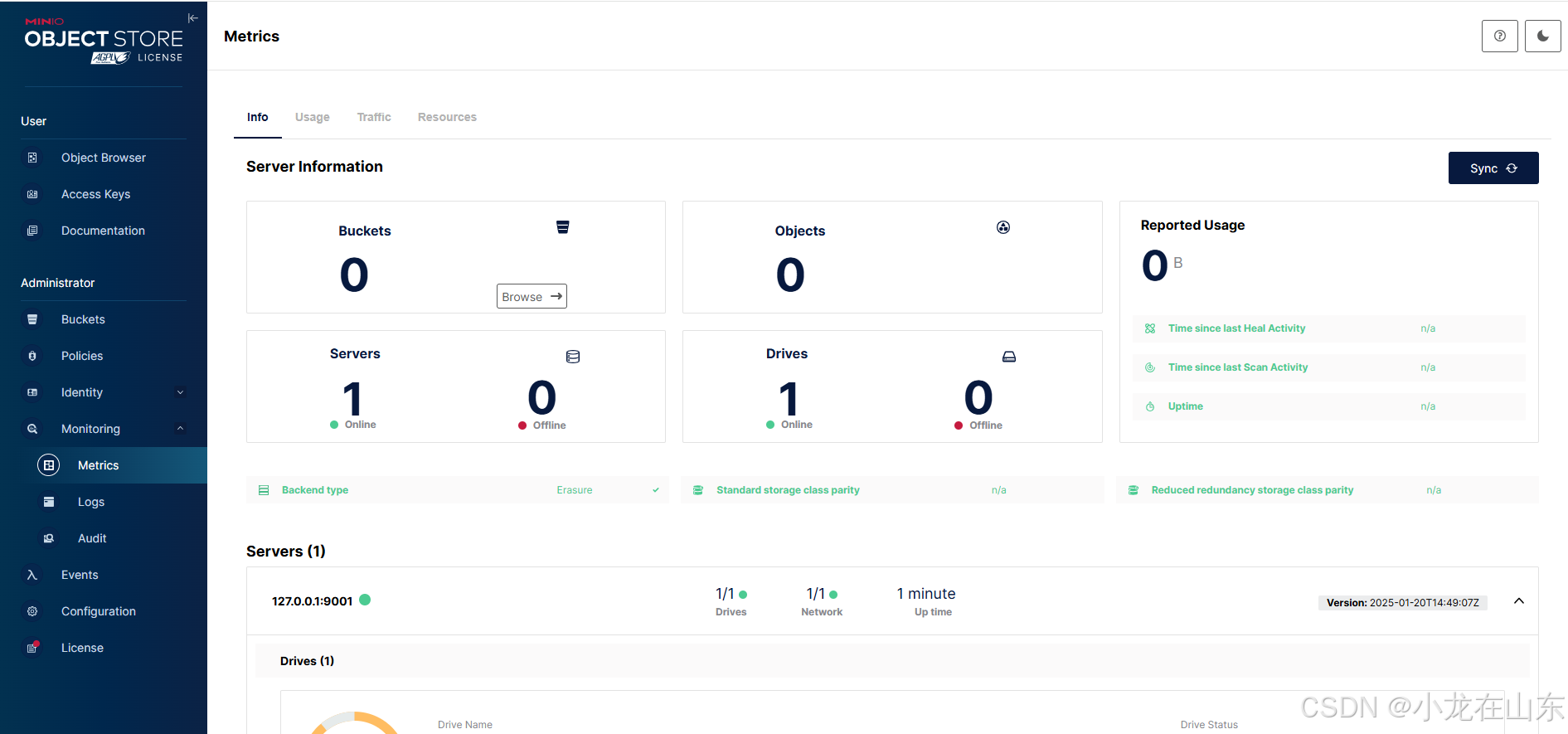
基于MinIO的对象存储增删改查
MinIO是一个高性能的分布式对象存储服务。Python的minio库可操作MinIO,包括创建/列出存储桶、上传/下载/删除文件及列出文件。 查看帮助信息 minio.exe --help minio.exe server --help …...

观察者模式和订阅发布模式的关系
有人把观察者模式等同于发布订阅模式,也有人认为这两种模式存在差异,本质上就是调度的方法不同。 发布订阅模式: 观察者模式: 相比较,发布订阅将发布者和观察者之间解耦。(发布订阅有调度中心处理)...

(2025 年最新)MacOS Redis Desktop Manager中文版下载,附详细图文
MacOS Redis Desktop Manager中文版下载 大家好,今天给大家带来一款非常实用的 Redis 可视化工具——Redis Desktop Manager(简称 RDM)。相信很多开发者都用过 Redis 数据库,但如果你想要更高效、更方便地管理 Redis 数据&#x…...

Baklib引领内容管理平台新时代优化创作流程与团队协作
内容概要 在迅速变化的数字化时代,内容管理平台已成为各种行业中不可或缺的工具。通过系统化的管理,用户能够有效地组织、存储和共享信息,从而提升工作效率和创意表达。Baklib作为一款新兴的内容管理平台,以其独特的优势和创新功…...
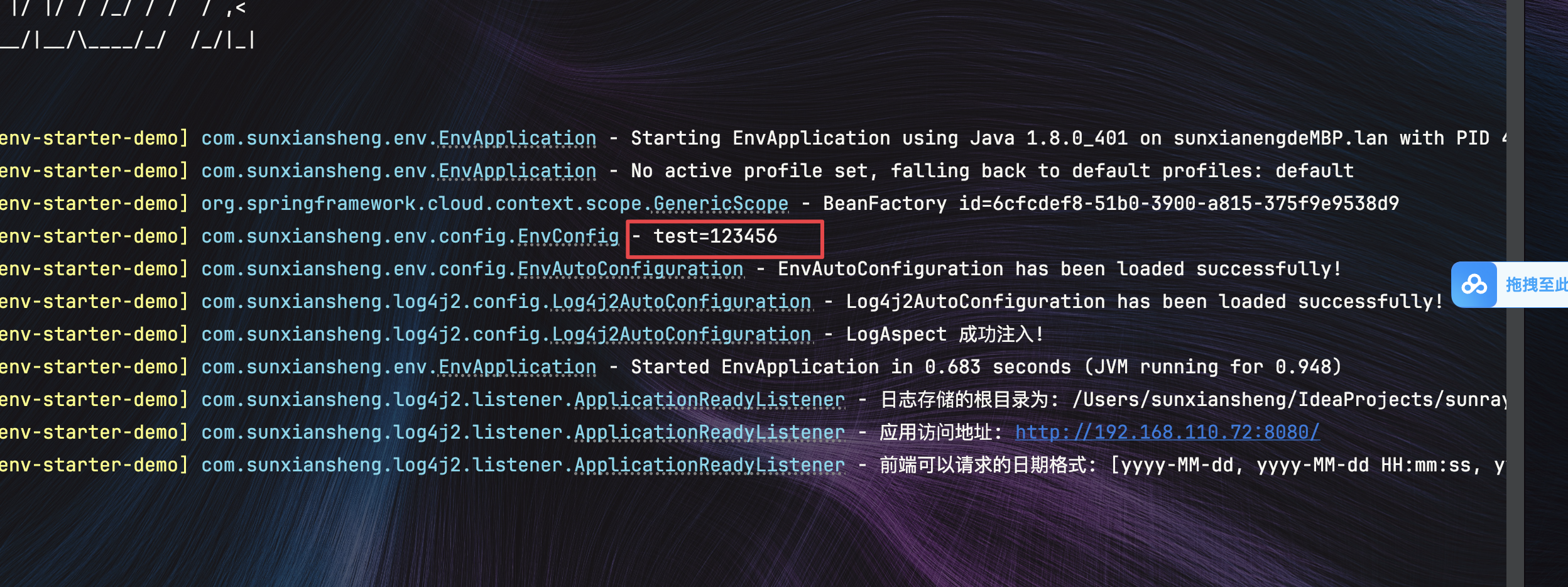
Java实现.env文件读取敏感数据
文章目录 1.common-env-starter模块1.目录结构2.DotenvEnvironmentPostProcessor.java 在${xxx}解析之前执行,提前读取配置3.EnvProperties.java 这里的path只是为了代码提示4.EnvAutoConfiguration.java Env模块自动配置类5.spring.factories 自动配置和注册Enviro…...

房屋租赁系统在数字化时代中如何重塑租赁服务与提升市场竞争力
内容概要 在当今快速发展的数字化时代,房屋租赁系统的作用愈发重要。随着市场需求的变化,租赁服务正面临着新的挑战与机遇。房屋租赁系统不仅仅是一个简单的管理工具,更是一个能够提升用户体验和市场竞争力的重要平台。其核心功能包括合同管…...

C++ ——— 学习并使用 priority_queue 类
目录 何为 priority_queue 类 学习并使用 priority_queue 类 实例化一个 priority_queue 类对象 插入数据 遍历堆(默认是大堆) 通过改变实例化的模板参数修改为小堆 何为 priority_queue 类 priority_queue 类为 优先级队列,其本质就是…...

【踩坑】解决Hugging-face下载问题
解决Hugging-face下载问题 问题1:couldnt connect to https://huggingface.co问题2:HTTPSConnectionPool(hostcdn-lfs-us-1.hf-mirror.com, port443)设置hf_transfer加快速度 问题3:requests.exceptions.ChunkedEncodingError: (Connection b…...

DeepSeek 模型全览:探索不同类别的模型
DeepSeek 是近年来备受关注的 AI 研究团队,推出了一系列先进的深度学习模型,涵盖了大语言模型(LLM)、代码生成模型、多模态模型等多个领域。本文将大概介绍 DeepSeek 旗下的不同类别的模型,帮助你更好地理解它们的特点…...

智能家居监控系统数据收集积压优化
亮点:RocketMQ 消息大量积压问题的解决 假设我们正在开发一个智能家居监控系统。该系统从数百万个智能设备(如温度传感器、安全摄像头、烟雾探测器等)收集数据,并通过 RocketMQ 将这些数据传输到后端进行处理和分析。 在某些情况下…...

Three.js实现3D动态心形与粒子背景的数学与代码映射解析
一、效果概述 本文通过Three.js构建了一个具有科技感的3D场景,主要包含两大视觉元素: 动态心形模型:采用数学函数生成基础形状,通过顶点操作实现表面弧度。星空粒子背景:随机分布的粒子群组形成空间层次感。复合动画…...

linux asio网络编程理论及实现
最近在B站看了恋恋风辰大佬的asio网络编程,质量非常高。在本章中将对ASIO异步网络编程的整体及一些实现细节进行完整的梳理,用于复习与分享。大佬的博客:恋恋风辰官方博客 Preactor/Reactor模式 在网络编程中,通常根据事件处理的触…...

多目标优化策略之一:非支配排序
多目标优化策略中的非支配排序是一种关键的技术,它主要用于解决多目标优化问题中解的选择和排序问题,确定解集中的非支配解(也称为Pareto解)。 关于什么是多目标优化问题,可以查看我的文章:改进候鸟优化算法之五:基于多目标优化的候鸟优化算法(MBO-MO)-CSDN博客 多目…...

电子电气架构 --- 在智能座舱基础上定义人机交互
我是穿拖鞋的汉子,魔都中坚持长期主义的汽车电子工程师。 老规矩,分享一段喜欢的文字,避免自己成为高知识低文化的工程师: 简单,单纯,喜欢独处,独来独往,不易合同频过着接地气的生活…...

Autosar-Os是怎么运行的?(时间保护)
写在前面: 入行一段时间了,基于个人理解整理一些东西,如有错误,欢迎各位大佬评论区指正!!! 1.功能概述 AUTOSAR OS 的四大可定制类型凸显了时间保护(Timing Protection)…...
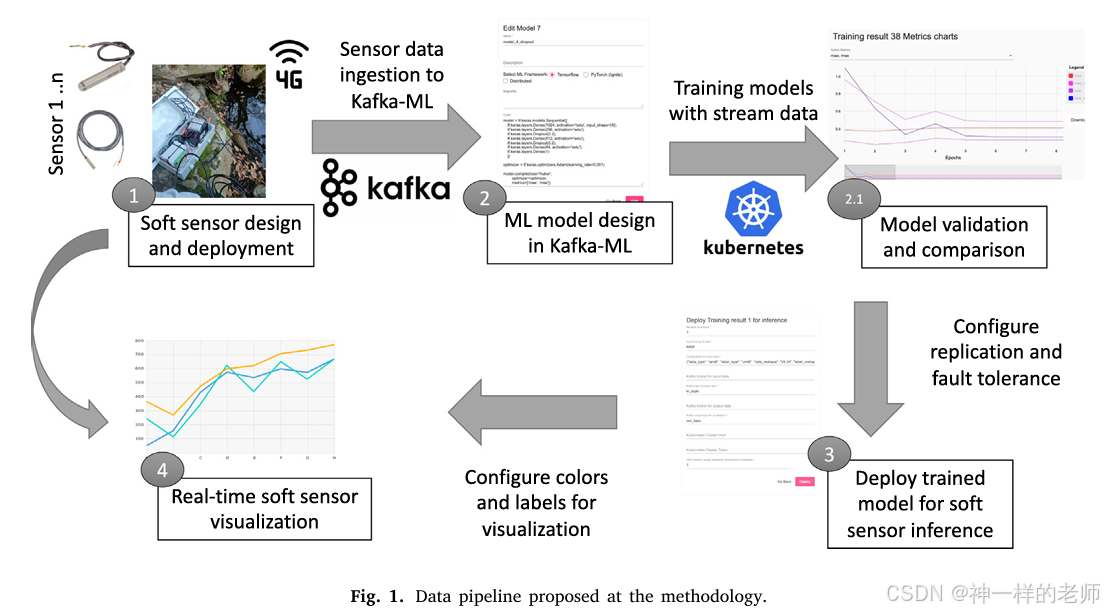
一种用于低成本水质监测的软传感器开源方法:以硝酸盐(NO3⁻)浓度为例
论文标题 A Soft Sensor Open-Source Methodology for Inexpensive Monitoring of Water Quality: A Case Study of NO3− Concentrations 作者信息 Antonio Jess Chaves, ITIS Software, University of Mlaga, 29071 Mlaga, Spain Cristian Martn, ITIS Software, Universi…...

5分钟带你获取deepseek api并搭建简易问答应用
目录 1、获取api 2、获取base_url和chat_model 3、配置模型参数 方法一:终端中临时将加入 方法二:创建.env文件 4、 配置client 5、利用deepseek大模型实现简易问答 deepseek-v3是截止博文撰写之日,无论是国内还是国际上发布的大模型中…...

算法基础学习——二分查找(附带Java模板)
有单调性的数列一定可以使用二分,没有单调性的题目也可能可以使用二分; (一)整数二分 二分的本质: 在某个整数区间内,存在某种性质使得区间内左半边的数都不满足该性质;而右半边的数都满足该性…...

如何使用formlinker,重构微软表单创建的数字生产力法则?
仅需三步:上传文件-下载文件-导入文件到微软表单 凌晨两点的格式炼狱:被浪费的300万小时人类创造力 剑桥大学的实验室曾捕捉到一组震撼数据:全球教育工作者每年花在调整试题格式上的时间,足够建造3座迪拜哈利法塔。当北京某高校的…...

python-leetcode-路径总和
112. 路径总和 - 力扣(LeetCode) # Definition for a binary tree node. # class TreeNode: # def __init__(self, val0, leftNone, rightNone): # self.val val # self.left left # self.right right class Solution:de…...

乐理笔记——DAY01
三分钟音乐社视频地址: 【四川音乐学院作曲硕士】零基础自学音乐学乐理合集-第二季(最终版)/已完结https://www.bilibili.com/video/BV14p4y1e7TV?spm_id_from333.788.videopod.episodes&vd_source0a2d366696f87e241adc64419bf12cab&am…...

使用DeepSeek技巧:提升内容创作效率与质量
一、引言 在当今快节奏的数字时代,内容创作的需求不断增加,无论是企业营销、个人博客还是学术研究,高效且高质量的内容生成变得至关重要。DeepSeek作为一款先进的人工智能写作助手,凭借其强大的语言生成能力,为创作者…...