
从0开始使用面对对象C语言搭建一个基于OLED的图形显示框架(基础图形库实现)
目录
基础图形库的抽象
抽象图形
抽象点
设计我们的抽象
实现我们的抽象
测试
抽象线
设计我们的抽象
实现我们的抽象
绘制垂直的和水平的线
使用Bresenham算法完成任意斜率的绘制
绘制三角形和矩形
矩形
三角形
实现
绘制圆,圆弧和椭圆
继续我们的测试
基础图形库的抽象
历经千辛万苦,我们终于可以开始行动起来,绘制图形了。我们将要绘制线,矩形,圆,椭圆等一系列基础的图形。问我其他的绘制呢?不必着急,我们慢慢来谈。
有没有发现我们现在的谈论越来越高层了?我们现在绘制图像的时候还会关心我用的是硬件IIC或者是软件SPI吗?不会,你甚至可能才意识到我们使用的是OLED!这就是抽象带给我们的好处。我们现在脑子里只有抽象的绘图设备这个概念。它可以绘制点,面。仅此而已。
本篇的代码在:MCU_Libs/OLED/library/Graphic/base at main · Charliechen114514/MCU_Libs (github.com)
抽象图形
抽象点
设计我们的抽象
我们即将迈出我们的第一步,那就是绘制一个点。
typedef uint16_t PointBaseType;
/*x: The x-coordinate of the pointy: The y-coordinate of the pointoperations: An instance of CCGraphic_BaseOperations that stores operations or behaviors related to the point, likely used for drawing or other graphical manipulations.
*/
typedef struct __CCGraphic_Point{PointBaseType x;PointBaseType y;
}CCGraphic_Point;
void CCGraphic_init_point(CCGraphic_Point* point, PointBaseType x, PointBaseType y);
void CCGraphic_draw_point(CCDeviceHandler* handler, CCGraphic_Point* point);一个点的基本组成,就是给定一个由两个数的组合——X和Y,长度上,笔者为了防止特大设备,使用了PointBaseType隔离了具体的长度大小。
小技巧:
当你发现一个问题很复杂的时候,最好的办法就是隔离!将大问题分解为若干的小问题,以笔者上面遇到的困难为例子。如何保证自己的点可以分布在满足设备宽度的平面上呢?答案是分解问题:点分布在平面上,使用的是对平面属性的PointBaseType上,他只知道自己属于这个类型,就一定不会超越所在的平面,不会出现绘图平面过大导致使用的数据类型发生溢出,至于如何保证不发生溢出呢?那是另一个问题,笔者使用的架构下,不会出现uint16_t不够使用的问题。但是如果的确出现了超大设备,我只需要轻而易举的定义一个HYPER_LARGE_DEVICE的宏,或者是面对资源极端紧张的嵌入式设备,定义一个HYPER_SMALL_DEVICE,就可以让所有的资源占用瞬间缩小一半
#ifdef  HYPER_LARGE_DEVICE
typedef uint32_t    PointBaseType;
#elif defined(HYPER_SMALL_DEVICE)
typedef uint8_t     PointBaseType;
#else
typedef uint16_t    PointBaseType;
#endif
而我其他的代码一行都不用动,轻而易举的完成了迁移。
实现我们的抽象
让我们看看我们的代码多么简洁吧!
#include "Graphic/base/CCGraphic_Point/CCGraphic_Point.h"
#include "Graphic/CCGraphic_device_adapter.h"
void CCGraphic_draw_point(CCDeviceHandler* handler, CCGraphic_Point* point)
{handler->operations.set_pixel_device_function(handler, point->x, point->y);
}
void CCGraphic_init_point(CCGraphic_Point* point, PointBaseType x, PointBaseType y)
{point->x = x;point->y = y;
}绘制一个点,就是调用了设备的绘制点的办法。你问我咋绘制的?啥?你需要关心吗?我不说你可能都不知道我是拿的LCD做测试呢(笑),但是,这里我需要严肃提醒的是——不要在关心实时性的绘图设备上这样做,让我们看一看调用链就好了:
CCGraphic_draw_point -> set_pixel_device_function(实际上就是setpixel_device_oled) -> oled_helper_setpixel
也就是说,我们多调用了两次functions来换取对任意设备的抽象。但是我也可以一行代码不改,就可以完全把调用链换成
CCGraphic_draw_point -> set_pixel_device_function(实际上就是setpixel_device_lcd) -> lcd_helper_setpixel
多简单!
测试
现在我们就可以开始测试了
OLED_HARD_IIC_Private_Config pvt_config;
OLED_Handle handle;
CCGraphic_OLED_Config config;
void on_test_init_hardiic_oled(CCDeviceHandler* device)
{bind_hardiic_handle(&pvt_config, &hi2c1, 0x78, HAL_MAX_DELAY);config.createType = OLED_HARD_IIC_DRIVER_TYPE;config.related_configs = &pvt_config;register_oled_paintdevice(device, &handle, &config);
}
void on_test_draw_points(CCDeviceHandler* handle)
{CCGraphic_Point point;CCGraphic_init_point(&point, 0, 0);for(uint8_t i = 0; i < 20; i++){point.x = i;point.y = i * 2;CCGraphic_draw_point(handle, &point);}handle->operations.update_device_function(handle);
}
// at main.c
CCDeviceHandler handler;
on_test_init_hardiic_oled(&handler);
on_test_draw_points(&handler);不出意外的话不会有任何问题。
抽象线
线的绘制开始有所讲究了,我们需要使用更好的,不涉及浮点数运算的办法来尽可能的回避耗费时间的浮点数运算。这隶属于计算机架构体系的内容,关于ARM,计算浮点数远远比计算整数的开销大(除非使用的是更贵的特化硬件)。现在,让我们开始绘制线线
设计我们的抽象
笔者建议你看到这里了,先自己构思一下如果是你,你如何抽象呢?
笔者先给你看看江科大的代码
void OLED_DrawLine(int16_t X0, int16_t Y0, int16_t X1, int16_t Y1)
{...
}
啥?你问我抽象呢?怎么是实现呢?我只能说——它的函数签名就是抽象咯(笑)。各种处理混在一起,是这样的代码非常难读的一个根本原因。
笔者揭晓我的抽象。
#include "Graphic/base/CCGraphic_Base.h"
#include "Graphic/base/CCGraphic_Point/CCGraphic_Point.h"
typedef struct __CCGraphic_Line{CCGraphic_Point p_left;CCGraphic_Point p_right;
}CCGraphic_Line;
void CCGraphic_init_line( CCGraphic_Line* line, CCGraphic_Point pl, CCGraphic_Point pr);
void CCGraphic_draw_line(CCDeviceHandler* handler, CCGraphic_Line* line);一个争论:
这样实现好不好啊?
typedef struct __CCGraphic_Line{CCGraphic_Point* p_left;CCGraphic_Point* p_right;
}CCGraphic_Line;
笔者思考过,事实上,笔者第一代的OLED框架(当然,远远没有现在的那么完善,也远远没有现在的好,甚至还有bug)就是这样实现的。我既然跟上面的实现不一致,那显然,有好处也就有坏处。
我们需要思考的是——我们的对象指针和对象本身表达的含义的区别是什么。关于这个说法,婆说婆有理,公说公有理,笔者这里给出的看法是:
对象本身在结构体中的声明是一种上层抽象对底层对象的强所属权,也就是说,对于每一个整个结构体模板刻出来的结构体对象的成员而言,内部所拥有的点都是独一无二的。换而言之:这就是我的资源,不是借的,更不是偷的!所以现在笔者采用的抽象,更加像是线对点宣誓了主权,这就是线组成的点,没有任何可以商量的余地。
对象指针则是一种弱的引用,表达的是一种借用。上面使用指针占用的抽象,更加像是:借来了两个点,然后用一下这两个点来描述了一下一根直线。用完了对象释放干净了,也就作罢了,但是点本身不会消失。就像我们用一根笔连起来了两个点,组成了一根线,现在我们只是把线擦除了,但是点还在呢!它还可以用来做别的事情。
从内存占用上来看,在ARM32体系上,我们都知道指针的大小是32位,4个字节,所以,我们一个sizeof就能得到使用指针抽象的线也就是8个字节。是一个恒定的大小。对于现在笔者采用的抽象,则是2倍的CCGraphic_Point大小,随着不同的PointBaseType, Line自身的大小也会发生波动,在uint8_t设备上,我们一共是4个字节大小,比指针描述的小,在uint16_t上则是不分伯仲,对于超大设备Line的大小就会膨胀为指针实现的两倍。
但是,另一方面,正如我所说的,这样的资源只是借用,他必须存在于哪个地方,问题来了,你能保证你所使用的点总是有效的吗?
CCGraphic_Line  l;
{CCGraphic_Point tl;CCGraphic_Point br;CCGraphic_init_line(&l, tl, br);
}
// 在这里使用还安全嘛?
CCGraphic_draw_line(&handle, &l);
你也许知道你使用的对象是有效的,但是客户程序员呢?他不知道啊?随后应用层的程序因为非法的内存访问崩溃了(进入了Hard_Fault),他还要幸幸苦苦看你的实现,然后沮丧的调试了一天发现是库作者这个家伙居然只是借用点!最后代来的时间的开销是任何人都无法接受的,这样不确定的风险分明更加的剧烈。
笔者想要说的是:每一个设计都有它的优点和缺点,作为一个合格的程序员,不管是嵌入式程序员,还是架构设计师,都需要明确的表达自己资源的所属权,以及,不要违反“最小惊讶原则”(例子:这个怎么资源突然非法了!为什么库没有帮助我维护???)
实现我们的抽象
规避浮点数运算!这个是我早就说了的。我们需要请出的算法就是Bresenham (montana.edu)算法,这个算法本质上使用的是DDA算法,一种整数微分思维。我们对得到的微分做一次取整,得到的就是整数的点(这是可以接受的,我们没办法在一个LCD或者是OLED上绘制坐标为(1.25, 4.75)的点,不是吗?)
为了化简,我们对绘制直线进行分类讨论
-
绘制一条垂直的线
-
绘制一条水平的线
-
绘制任意斜率的线
void CCGraphic_draw_line(CCDeviceHandler* handler, CCGraphic_Line* line)
{ // test if the verticalif(line->p_left.x == line->p_right.x) return __on_handle_vertical_line(handler, line);   if(line->p_left.y == line->p_right.y)return __on_handle_horizental_line(handler, line);return __pvt_BresenhamMethod_line(handler, line);
}
没想到吧,笔者就用了这几行,完成了这几个事情。好吧,我承认这样有点耍赖了。实际上内部还是颇为复杂,但是,绘制垂直还有水平的线是轻而易举的,试一试?来看看笔者的代码吧!
绘制垂直的和水平的线
/*draw the lines that matches the equal x
*/
static void __on_handle_vertical_line(CCDeviceHandler* handler,CCGraphic_Line* line
)
{PointBaseType max_y = max_uint16(line->p_left.y, line->p_right.y);PointBaseType min_y = min_uint16(line->p_left.y, line->p_right.y);CCGraphic_Point p;p.x = line->p_left.x;for(PointBaseType i = min_y; i <= max_y; i++){p.y = i;CCGraphic_draw_point(handler, &p);}
}
static void __on_handle_horizental_line(CCDeviceHandler* handler,CCGraphic_Line* line
)
{PointBaseType max_x = max_uint16(line->p_left.x, line->p_right.x);PointBaseType min_x = min_uint16(line->p_left.x, line->p_right.x);CCGraphic_Point p;p.y = line->p_left.y;for(PointBaseType i = min_x; i <= max_x; i++){p.x = i;CCGraphic_draw_point(handler, &p);}
}我下面来谈论一下一些要点:
解释一下max_uint16和min_uint16?
没啥好解释的啊?这个就是择取大者和小者,有啥好说的呢?
为什么变量没有像江科大那样一股脑堆在前面呢?
笔者可以给出充分的原因:我希望变量出现在它该出现的位置,比起来,你也不喜欢看变量一坨屎拉在了函数的前面,下面看实现的时候漫天找这个变量在哪里吧。没那个必要!但是这个需要看情况,如果作者实在不会哪怕一丁点的函数设计,把代码一股脑的堆到了一个函数里,那还不如江科大的变量写法!
为什么不考虑
{PointBaseType max_y = max_uint16(line->p_left.y, line->p_right.y);PointBaseType min_y = min_uint16(line->p_left.y, line->p_right.y);for(PointBaseType i = min_y; i <= max_y; i++){CCGraphic_Point p;p.x = line->p_left.x;p.y = i;CCGraphic_draw_point(handler, &p);}
}
这个是经典的效率之争。你相信所有的编译器,都会意识到:“哦我的天,这个程序员是一个白痴,p的X坐标永远不会改变,这个白痴为什么要重新赋值一个相同的值max_y - min_y + 1次呢?”嘛? 你不敢!,你永远也不知道使用你的代码的人,在用着怎样的老毕等编译器,他对这样的优化足够迟钝,以至于他对你那可怜的栈来来回回弹弹压压,让你的程序性能被砍到惊呼国骂。你敢打赌使用你库的代码的人,足够的现代嘛?那么,不如让我们的表述更加的明白
{PointBaseType max_x = max_uint16(line->p_left.x, line->p_right.x);PointBaseType min_x = min_uint16(line->p_left.x, line->p_right.x);CCGraphic_Point p;p.y = line->p_left.y;for(PointBaseType i = min_x; i <= max_x; i++){p.x = i;CCGraphic_draw_point(handler, &p);}
}
这样的代码的开销瞬间压到只剩下一次地址解引用和赋值操作了,一下子无论何种编译器,都能生成最为高效的字节码。
参数设计的时候,对于复杂抽象类型,使用指针还是使用结构体本身传递参数?
ARM32体系架构有16个寄存器,不同于x86老毕等,传递个结构体最后压内存去了,一些简单的POD类型(我们的Point就是一个简单的POD类型,只有数据没有方法)回直接解析内部的类型是整数,直接传送到寄存器中,将效率提升十几倍,而不用访问内存。这样看,对于一部分最为简单的结构体,直接传递对象本身不是一件特别耗操作的事情,但是,笔者仍然建议:如果你希望这个资源只是被借用一下,或者,表达传递的就是这个对象本身,他在ARM广阔的内存海洋是独一无二的话,使用指针,哪怕他就一个字节大小!
所以,为什么在函数前面的最前面添加static
可惜了我们的C语言程序设计表达私有只能使用static办法,这表明,这个函数只能在文件内部访问,实际上的函数签名会被独特标记,导致外部生成的签名无法对应于实际上被static修饰的函数,这也就意味着无法通过编译!他没办法认识这个被static修饰的函数。至于其他乱七八糟的什么重名问题,我负责的告诉你,不要指望所有编译器都会正确的反应你的UB行为,不然,你就会在“编译了半天发现被这个问题绊了一跤”和“这个程序的行为怎么这么诡异啊?不是跳转道我想要的函数”中二选一了,反正代价是你的一天被你的UB行为坑害(笑)
使用Bresenham算法完成任意斜率的绘制
// Bresenham's Line Algorithm, designed to avoid floating point calculations
// References: https://www.cs.montana.edu/courses/spring2009/425/dslectures/Bresenham.pdf
// https://www.bilibili.com/video/BV1364y1d7Lo
void __pvt_BresenhamMethod_line(CCDeviceHandler* handler, CCGraphic_Line* line)
{
#define __pvt_fast_draw_point(X, Y) \do { \p.x = X; \p.y = Y; \CCGraphic_draw_point(handler, &p); \} while(0)
// Define initial points for the line: p_left and p_right represent the endpointsint16_t startX = line->p_left.x;int16_t startY = line->p_left.y;int16_t endX = line->p_right.x;int16_t endY = line->p_right.y;
// Flags to indicate transformations of coordinatesuint8_t isYInverted = 0, isXYInverted = 0;{// If the start point's X coordinate is greater than the end point's X, swap the pointsif (startX > endX) {// Swap the X and Y coordinates for the start and end pointsswap_int16(&startX, &endX);swap_int16(&startY, &endY);}
// If the start point's Y coordinate is greater than the end point's Y, invert the Y coordinatesif (startY > endY) {// Invert Y coordinates to make the line direction consistent in the first quadrantstartY = -startY;endY = -endY;// Set the flag indicating Y coordinates were invertedisYInverted = 1;}
// If the line's slope (dy/dx) is greater than 1, swap X and Y coordinates for a shallower slopeif (endY - startY > endX - startX) {// Swap X and Y coordinates for both pointsswap_int16(&startX, &startY);swap_int16(&endX, &endY);// Set the flag indicating both X and Y coordinates were swappedisXYInverted = 1;}
// Calculate differences (dx, dy) and the decision variables for Bresenham's algorithmconst int16_t dx = endX - startX;const int16_t dy = endY - startY;const int16_t incrE = 2 * dy; // Increment for eastward movementconst int16_t incrNE = 2 * (dy - dx); // Increment for northeastward movement
int16_t decision = 2 * dy - dx; // Initial decision variableint16_t x = startX; // Starting X coordinateint16_t y = startY; // Starting Y coordinate
// Draw the starting point and handle coordinate transformations based on flagsCCGraphic_Point p;if (isYInverted && isXYInverted) {__pvt_fast_draw_point(y, -x);} else if (isYInverted) {__pvt_fast_draw_point(x, -y);} else if (isXYInverted) {__pvt_fast_draw_point(y, x);} else {__pvt_fast_draw_point(x, y);}
// Iterate through the X-axis to draw the rest of the linewhile (x < endX) {x++; // Increment X coordinateif (decision < 0) {decision += incrE; // Move eastward if decision variable is negative} else {y++; // Move northeastward if decision variable is positive or zerodecision += incrNE;}
// Draw each point along the line with coordinate transformation as neededif (isYInverted && isXYInverted) {__pvt_fast_draw_point(y, -x);} else if (isYInverted) {__pvt_fast_draw_point(x, -y);} else if (isXYInverted) {__pvt_fast_draw_point(y, x);} else {__pvt_fast_draw_point(x, y);}}}
#undef __pvt_fast_draw_point
}好长一大串,先不必着急,我一步步慢慢说。实际上,这个算法除了使用DDA以外,还用了化未知为已知的办法。我的意思是:
// If the start point's X coordinate is greater than the end point's X, swap the pointsif (startX > endX) {// Swap the X and Y coordinates for the start and end pointsswap_int16(&startX, &endX);swap_int16(&startY, &endY);}
// If the start point's Y coordinate is greater than the end point's Y, invert the Y coordinatesif (startY > endY) {// Invert Y coordinates to make the line direction consistent in the first quadrantstartY = -startY;endY = -endY;// Set the flag indicating Y coordinates were invertedisYInverted = 1;}首先,确保我们的线总是向正的,斜率总是大于0
// If the line's slope (dy/dx) is greater than 1, swap X and Y coordinates for a shallower slopeif (endY - startY > endX - startX) {// Swap X and Y coordinates for both pointsswap_int16(&startX, &startY);swap_int16(&endX, &endY);// Set the flag indicating both X and Y coordinates were swappedisXYInverted = 1;}上面则是在斜率大于1的基础上,将变换映射到介于0 < k < 1的范围上。
最后,使用核心算法直接绘制
// Calculate differences (dx, dy) and the decision variables for Bresenham's algorithmconst int16_t dx = endX - startX;const int16_t dy = endY - startY;const int16_t incrE = 2 * dy; // Increment for eastward movementconst int16_t incrNE = 2 * (dy - dx); // Increment for northeastward movement
int16_t decision = 2 * dy - dx; // Initial decision variableint16_t x = startX; // Starting X coordinateint16_t y = startY; // Starting Y coordinate
// Draw the starting point and handle coordinate transformations based on flagsCCGraphic_Point p;if (isYInverted && isXYInverted) {__pvt_fast_draw_point(y, -x);} else if (isYInverted) {__pvt_fast_draw_point(x, -y);} else if (isXYInverted) {__pvt_fast_draw_point(y, x);} else {__pvt_fast_draw_point(x, y);}
// Iterate through the X-axis to draw the rest of the linewhile (x < endX) {x++; // Increment X coordinateif (decision < 0) {decision += incrE; // Move eastward if decision variable is negative} else {y++; // Move northeastward if decision variable is positive or zerodecision += incrNE;}
// Draw each point along the line with coordinate transformation as neededif (isYInverted && isXYInverted) {__pvt_fast_draw_point(y, -x);} else if (isYInverted) {__pvt_fast_draw_point(x, -y);} else if (isXYInverted) {__pvt_fast_draw_point(y, x); // 对角对称,互换XY即可变换} else {__pvt_fast_draw_point(x, y);}}}这个代码就是直接翻译了我给的PDF的算法,下面来聊一聊算法之外的:
使用宏来化简我们的工作
#define __pvt_fast_draw_point(X, Y) \do { \p.x = X; \p.y = Y; \CCGraphic_draw_point(handler, &p); \} while(0)这个是一个简单的封装宏,为什么使用do..while请参考笔者之前的博客(协议篇)
C没有constexpr,没有模板,有的时候会显得十分贫瘠,所以,我们只好忍一下,使用宏完成重复的,0开销的工作。
绘制三角形和矩形
矩形
#ifndef CCGraphic_Rectangle_H
#define CCGraphic_Rectangle_H
#include "Graphic/base/CCGraphic_Base.h"
#include "Graphic/base/CCGraphic_Point/CCGraphic_Point.h"
typedef struct __CCGraphic_Rectangle{CCGraphic_Point top_left;CCGraphic_Point bottom_right;
}CCGraphic_Rectangle;
void CCGraphic_init_rectangle(CCGraphic_Rectangle* rect, CCGraphic_Point tl, CCGraphic_Point br);
void CCGraphic_draw_rectangle(CCDeviceHandler* handler, CCGraphic_Rectangle* rect);
void CCGraphic_drawfilled_rectangle(CCDeviceHandler* handler, CCGraphic_Rectangle* rect);
#endif三角形
#ifndef CCGraphic_Triangle_H
#define CCGraphic_Triangle_H
#include "Graphic/base/CCGraphic_Base.h"
#include "Graphic/base/CCGraphic_Point/CCGraphic_Point.h"
typedef struct __CCGraphic_Triangle
{CCGraphic_Point p1;CCGraphic_Point p2;CCGraphic_Point p3;
}CCGraphic_Triangle;
void CCGraphic_init_triangle(CCGraphic_Triangle* triangle, CCGraphic_Point p1,CCGraphic_Point p2,CCGraphic_Point p3
);
void CCGraphic_draw_triangle(CCDeviceHandler* handle,CCGraphic_Triangle* triangle
);
void CCGraphic_drawfilled_triangle(CCDeviceHandler* handle,CCGraphic_Triangle* triangle
);
#endif实现
我们还是使用Bresenham算法和Franklin算法完成我们对三角形和矩形的绘制
#include "Graphic/base/CCGraphic_Triangle/CCGraphic_Triangle.h"
#include "Graphic/base/CCGraphic_Line/CCGraphic_Line.h"
#include "Graphic/CCGraphic_device_adapter.h"
#include "Graphic/common/CCGraphic_Utils.h"
void CCGraphic_init_triangle(CCGraphic_Triangle* triangle, CCGraphic_Point p1,CCGraphic_Point p2,CCGraphic_Point p3
)
{triangle->p1 = p1;triangle->p2 = p2;triangle->p3 = p3;
}
void CCGraphic_draw_triangle(CCDeviceHandler* handle,CCGraphic_Triangle* triangle
)
{CCGraphic_Line line;CCGraphic_init_line(&line, triangle->p1, triangle->p2);CCGraphic_draw_line(handle, &line);handle->operations.update_device_function(handle);CCGraphic_init_line(&line, triangle->p2, triangle->p3);CCGraphic_draw_line(handle, &line);handle->operations.update_device_function(handle);CCGraphic_init_line(&line, triangle->p1, triangle->p3);CCGraphic_draw_line(handle, &line);
}
static uint8_t __pvt_is_in_triangle(int16_t* triangles_x,int16_t* triangles_y,CCGraphic_Point* p)
{uint8_t is_in = 0;/*此算法由W. Randolph Franklin提出*//*参考链接:https://wrfranklin.org/Research/Short_Notes/pnpoly.html*/for (uint8_t i = 0, j = 2; i < 3; j = i++){if (((triangles_y[i] > p->y) != (triangles_y[j] > p->y)) &&(p->x < (triangles_x[j] - triangles_x[i]) * (p->y - triangles_y[i]) / (triangles_y[j] - triangles_y[i]) + triangles_x[i])){is_in = !is_in;}}return is_in;
}
void CCGraphic_drawfilled_triangle(CCDeviceHandler* handle,CCGraphic_Triangle* triangle
)
{int16_t triangles_x[] = {triangle->p1.x, triangle->p2.x, triangle->p3.x};
int16_t triangles_y[] = {triangle->p1.y, triangle->p2.y, triangle->p3.y};
int16_t minX = find_int16min(triangles_x, 3);int16_t minY = find_int16min(triangles_y, 3);
int16_t maxX = find_int16max(triangles_x, 3);int16_t maxY = find_int16max(triangles_y, 3);CCGraphic_Point p;p.x = minX;p.y = minY;for(int16_t i = minX; i < maxX; i++){for(int16_t j = minY; j < maxY; j++){p.x = i;p.y = j;if(__pvt_is_in_triangle(triangles_x, triangles_y, &p)){CCGraphic_draw_point(handle, &p);}}}
}
#include "Graphic/base/CCGraphic_Rectangle/CCGraphic_Rectangle.h"
#include "Graphic/base/CCGraphic_Line/CCGraphic_Line.h"
void CCGraphic_init_rectangle(CCGraphic_Rectangle* rect, CCGraphic_Point tl, CCGraphic_Point br)
{rect->top_left = tl;rect->bottom_right = br;
}
void CCGraphic_draw_rectangle(CCDeviceHandler* handler, CCGraphic_Rectangle* rect)
{CCGraphic_Line l;CCGraphic_Point tmp;
// draw top, set tmp as the top_righttmp.x = rect->bottom_right.x;tmp.y = rect->top_left.y;CCGraphic_init_line(&l, rect->top_left, tmp);CCGraphic_draw_line(handler, &l);
// draw rightCCGraphic_init_line(&l, tmp, rect->bottom_right);CCGraphic_draw_line(handler, &l);
// draw lefttmp.x = rect->top_left.x;tmp.y = rect->bottom_right.y;CCGraphic_init_line(&l, rect->top_left, tmp);CCGraphic_draw_line(handler, &l);
// draw bottomCCGraphic_init_line(&l,tmp, rect->bottom_right);CCGraphic_draw_line(handler, &l);
}
void CCGraphic_drawfilled_rectangle(CCDeviceHandler* handler, CCGraphic_Rectangle* rect)
{CCGraphic_Point p;for(PointBaseType iterate_x = rect->top_left.x; iterate_x <= rect->bottom_right.x; iterate_x++){p.x = iterate_x;for(PointBaseType iterate_y = rect->top_left.y; iterate_y <= rect->bottom_right.y; iterate_y++){p.y = iterate_y;CCGraphic_draw_point(handler, &p);} }
}小问题:提示,矩形的填充绘制是可以优化,你认为应该如何优化呢?(提示:我们是不是用错了device的功能了?)(可以在评论区回答的)
绘制圆,圆弧和椭圆
没有什么特殊的,笔者出于一些人上不去github,先把代码放到这里。
MCU_Libs/OLED/library/Graphic/base at main · Charliechen114514/MCU_Libs (github.com)
#ifndef CCGraphic_Arc_H
#define CCGraphic_Arc_H
#include "Graphic/base/CCGraphic_Base.h"
#include "Graphic/base/CCGraphic_Point/CCGraphic_Point.h"
typedef struct __CCGraphic_Arc{CCGraphic_Point center;PointBaseType radius;int16_t start_degree;int16_t end_degree;
}CCGraphic_Arc;
void CCGraphic_init_CCGraphic_Arc(CCGraphic_Arc* handle,CCGraphic_Point center,PointBaseType radius,int16_t start_degree,int16_t end_degree
);
void CCGraphic_draw_arc(CCDeviceHandler* handler,CCGraphic_Arc* handle
);
void CCGraphic_drawfilled_arc(CCDeviceHandler* handler,CCGraphic_Arc* handle
);
#endif
#ifndef __CCGraphic_Circle_H
#define __CCGraphic_Circle_H
#include "Graphic/base/CCGraphic_Base.h"
#include "Graphic/base/CCGraphic_Point/CCGraphic_Point.h"
typedef struct __CCGraphic_Circle
{CCGraphic_Point center;PointBaseType radius;
}CCGraphic_Circle;
void CCGraphic_init_circle(CCGraphic_Circle* circle, CCGraphic_Point c, uint8_t radius);
void CCGraphic_draw_circle(CCDeviceHandler* handler, CCGraphic_Circle* circle);
void CCGraphic_drawfilled_circle(CCDeviceHandler* handler, CCGraphic_Circle* circle);
#endif
#ifndef CCGraphic_Ellipse_H
#define CCGraphic_Ellipse_H
#include "Graphic/base/CCGraphic_Base.h"
#include "Graphic/base/CCGraphic_Point/CCGraphic_Point.h"
typedef struct __CCGraphic_Ellipse{CCGraphic_Point center;PointBaseType X_Radius;PointBaseType Y_Radius;
}CCGraphic_Ellipse;
void CCGraphic_init_ellipse(CCGraphic_Ellipse* handle, CCGraphic_Point center,PointBaseType X_Radius,PointBaseType Y_Radius
);
void CCGraphic_draw_ellipse(CCDeviceHandler* handler,CCGraphic_Ellipse* ellipse
);
void CCGraphic_drawfilled_ellipse(CCDeviceHandler* handler,CCGraphic_Ellipse* ellipse
);
#endif实现如下
#include "Graphic/base/CCGraphic_Arc/CCGraphic_Arc.h"
#include <math.h>
void CCGraphic_init_CCGraphic_Arc(CCGraphic_Arc* handle,CCGraphic_Point center,PointBaseType radius,int16_t start_degree,int16_t end_degree
)
{handle->center = center;handle->end_degree = end_degree;handle->start_degree = start_degree;handle->radius = radius;
}
static uint8_t __pvt_is_in_angle(int16_t x, int16_t y, int16_t start, int16_t end)
{int16_t point_angle = (atan2(y, x) / 3.14 * 180);// 笔者的一个更加清晰的写法// if (start < end) //起始角度小于终止角度的情况// {// /*如果指定角度在起始终止角度之间,则判定指定点在指定角度*/// if (point_angle >= start && point_angle <= end)// {// return 1;// }// }// else //起始角度大于于终止角度的情况// {// /*如果指定角度大于起始角度或者小于终止角度,则判定指定点在指定角度*/// if (point_angle >= start || point_angle <= end)// {// return 1;// }// }// return 0;
return start < end ?(start < point_angle && point_angle < end):(start > point_angle || point_angle > end);
}
#define DRAW_OFFSET_POINT(offsetx, offsety) \do{\point.x = handle->center.x + (offsetx);\point.y = handle->center.y + (offsety);\CCGraphic_draw_point(handler, &point);\}while(0)
#define DRAW_IF_IN(offsetx, offsety) \do{\if (__pvt_is_in_angle((offsetx), (offsety), start_angle, end_angle)) {\DRAW_OFFSET_POINT(offsetx, offsety);\}\}while(0)
void CCGraphic_draw_arc(CCDeviceHandler* handler,CCGraphic_Arc* handle
)
{/*此函数借用Bresenham算法画圆的方法*/ int16_t x = 0;int16_t y = handle->radius;int16_t d = 1 - y;
CCGraphic_Point point;const int16_t start_angle = handle->start_degree;const int16_t end_angle = handle->end_degree;/*在画圆的每个点时,判断指定点是否在指定角度内,在,则画点,不在,则不做处理*/DRAW_IF_IN(x, y);DRAW_IF_IN(-x, -y);DRAW_IF_IN(y, x);DRAW_IF_IN(-y, -x);while (x < y) //遍历X轴的每个点{x ++;if (d < 0) //下一个点在当前点东方{d += 2 * x + 1;}else //下一个点在当前点东南方{y --;d += 2 * (x - y) + 1;}/*在画圆的每个点时,判断指定点是否在指定角度内,在,则画点,不在,则不做处理*/DRAW_IF_IN(x, y);DRAW_IF_IN(y, x);DRAW_IF_IN(-x, -y);DRAW_IF_IN(-y, -x);DRAW_IF_IN(x, -y);DRAW_IF_IN(y, -x);DRAW_IF_IN(-x, y);DRAW_IF_IN(-y, x);}
}
void CCGraphic_drawfilled_arc(CCDeviceHandler* handler,CCGraphic_Arc* handle
)
{/*此函数借用Bresenham算法画圆的方法*/ int16_t x = 0;int16_t y = handle->radius;int16_t d = 1 - y;
CCGraphic_Point point;const int16_t start_angle = handle->start_degree;const int16_t end_angle = handle->end_degree;point.x = x;point.y = y;/*在画圆的每个点时,判断指定点是否在指定角度内,在,则画点,不在,则不做处理*/DRAW_IF_IN(x, y);DRAW_IF_IN(-x, -y);DRAW_IF_IN(y, x);DRAW_IF_IN(-y, -x);
/*遍历起始点Y坐标*/for (int16_t j = -y; j < y; j ++){/*在填充圆的每个点时,判断指定点是否在指定角度内,在,则画点,不在,则不做处理*/DRAW_IF_IN(0, j);}while (x < y) //遍历X轴的每个点{x ++;if (d < 0) //下一个点在当前点东方{d += 2 * x + 1;}else //下一个点在当前点东南方{y --;d += 2 * (x - y) + 1;}/*在画圆的每个点时,判断指定点是否在指定角度内,在,则画点,不在,则不做处理*/DRAW_IF_IN(x, y);DRAW_IF_IN(y, x);DRAW_IF_IN(-x, -y);DRAW_IF_IN(-y, -x);DRAW_IF_IN(x, -y);DRAW_IF_IN(y, -x);DRAW_IF_IN(-x, y);DRAW_IF_IN(-y, x);
/*遍历中间部分*/for (int16_t j = -y; j < y; j ++){/*在填充圆的每个点时,判断指定点是否在指定角度内,在,则画点,不在,则不做处理*/DRAW_IF_IN(x, j);DRAW_IF_IN(-x, j);}/*遍历两侧部分*/for (int16_t j = -x; j < x; j ++){/*在填充圆的每个点时,判断指定点是否在指定角度内,在,则画点,不在,则不做处理*/DRAW_IF_IN(y, j);DRAW_IF_IN(-y, j);}}
}
#undef DRAW_OFFSET_POINT
#undef DRAW_IF_IN
#include "Graphic/base/CCGraphic_Ellipse/CCGraphic_Ellipse.h"
void CCGraphic_init_ellipse(CCGraphic_Ellipse* handle, CCGraphic_Point center,PointBaseType X_Radius,PointBaseType Y_Radius
)
{handle->center = center;handle->X_Radius = X_Radius;handle->Y_Radius = Y_Radius;
}
#define DRAW_OFFSET_POINT(offsetx, offsety) \do{\point.x = ellipse->center.x + (offsetx);\point.y = ellipse->center.y + (offsety);\CCGraphic_draw_point(handler, &point);\}while(0)
#define SQUARE(X) ((X) * (X))
void CCGraphic_draw_ellipse(CCDeviceHandler* handler,CCGraphic_Ellipse* ellipse
)
{const int16_t x_radius = ellipse->X_Radius;const int16_t y_radius = ellipse->Y_Radius;
// Bresenham's Ellipse Algorithm to avoid costly floating point calculations// Reference: https://blog.csdn.net/myf_666/article/details/128167392
int16_t x = 0;int16_t y = y_radius;const int16_t y_radius_square = SQUARE(y_radius);const int16_t x_radius_square = SQUARE(x_radius);
// Initial decision variable for the first region of the ellipsefloat d1 = y_radius_square + x_radius_square * (-y_radius + 0.5);
// Draw initial points on the ellipse (4 points due to symmetry)CCGraphic_Point point;DRAW_OFFSET_POINT(x, y);DRAW_OFFSET_POINT(-x, -y);DRAW_OFFSET_POINT(-x, y);DRAW_OFFSET_POINT(x, -y);
// Draw the middle part of the ellipse (first region)while (y_radius_square * (x + 1) < x_radius_square * (y - 0.5)) {if (d1 <= 0) { // Next point is to the east of the current pointd1 += y_radius_square * (2 * x + 3);} else { // Next point is southeast of the current pointd1 += y_radius_square * (2 * x + 3) + x_radius_square * (-2 * y + 2);y--;}x++;
// Draw ellipse arc for each point in the current regionDRAW_OFFSET_POINT(x, y);DRAW_OFFSET_POINT(-x, -y);DRAW_OFFSET_POINT(-x, y);DRAW_OFFSET_POINT(x, -y);}
// Draw the two sides of the ellipse (second region)float d2 = SQUARE(y_radius * (x + 0.5)) + SQUARE(x_radius * (y - 1)) - x_radius_square * y_radius_square;
while (y > 0) {if (d2 <= 0) { // Next point is to the east of the current pointd2 += y_radius_square * (2 * x + 2) + x_radius_square * (-2 * y + 3);x++;} else { // Next point is southeast of the current pointd2 += x_radius_square * (-2 * y + 3);}y--;
// Draw ellipse arc for each point on the sidesDRAW_OFFSET_POINT(x, y);DRAW_OFFSET_POINT(-x, -y);DRAW_OFFSET_POINT(-x, y);DRAW_OFFSET_POINT(x, -y);}
}
void CCGraphic_drawfilled_ellipse(CCDeviceHandler* handler,CCGraphic_Ellipse* ellipse
)
{const int16_t x_radius = ellipse->X_Radius;const int16_t y_radius = ellipse->Y_Radius;
// Bresenham's Ellipse Algorithm to avoid costly floating point calculations// Reference: https://blog.csdn.net/myf_666/article/details/128167392
int16_t x = 0;int16_t y = y_radius;const int16_t y_radius_square = SQUARE(y_radius);const int16_t x_radius_square = SQUARE(x_radius);
// Initial decision variable for the first region of the ellipsefloat d1 = y_radius_square + x_radius_square * (-y_radius + 0.5);CCGraphic_Point point;// Fill the ellipse by drawing vertical lines in the specified range (filled area)for (int16_t j = -y; j < y; j++) {// Draw vertical lines to fill the area of the ellipseDRAW_OFFSET_POINT(0, j);DRAW_OFFSET_POINT(0, j);}
// Draw initial points on the ellipse (4 points due to symmetry)DRAW_OFFSET_POINT(x, y);DRAW_OFFSET_POINT(-x, -y);DRAW_OFFSET_POINT(-x, y);DRAW_OFFSET_POINT(x, -y);
// Draw the middle part of the ellipse (first region)while (y_radius_square * (x + 1) < x_radius_square * (y - 0.5)) {if (d1 <= 0) { // Next point is to the east of the current pointd1 += y_radius_square * (2 * x + 3);} else { // Next point is southeast of the current pointd1 += y_radius_square * (2 * x + 3) + x_radius_square * (-2 * y + 2);y--;}x++;
// Fill the ellipse by drawing vertical lines in the current rangefor (int16_t j = -y; j < y; j++) {DRAW_OFFSET_POINT(x, j);DRAW_OFFSET_POINT(-x, j);}
// Draw ellipse arc for each point in the current regionDRAW_OFFSET_POINT(x, y);DRAW_OFFSET_POINT(-x, -y);DRAW_OFFSET_POINT(-x, y);DRAW_OFFSET_POINT(x, -y);}
// Draw the two sides of the ellipse (second region)float d2 = SQUARE(y_radius * (x + 0.5)) + SQUARE(x_radius * (y - 1)) - x_radius_square * y_radius_square;
while (y > 0) {if (d2 <= 0) { // Next point is to the east of the current pointd2 += y_radius_square * (2 * x + 2) + x_radius_square * (-2 * y + 3);x++;} else { // Next point is southeast of the current pointd2 += x_radius_square * (-2 * y + 3);}y--;
// Fill the ellipse by drawing vertical lines in the current rangefor (int16_t j = -y; j < y; j++) {DRAW_OFFSET_POINT(x, j);DRAW_OFFSET_POINT(-x, j);}
// Draw ellipse arc for each point on the sidesDRAW_OFFSET_POINT(x, y);DRAW_OFFSET_POINT(-x, -y);DRAW_OFFSET_POINT(-x, y);DRAW_OFFSET_POINT(x, -y);}
}
#undef DRAW_OFFSET_POINT
#undef SQUARE
#include "Graphic/base/CCGraphic_Circle/CCGraphic_Circle.h"
#include "Graphic/CCGraphic_device_adapter.h"
#include "Graphic/common/CCGraphic_Utils.h"
void CCGraphic_init_circle(CCGraphic_Circle* circle, CCGraphic_Point c, uint8_t radius)
{circle->center = c;circle->radius = radius;
}
#define DRAW_OFFSET_POINT(point, offsetx, offsety) \do { \point.x = circle->center.x + (offsetx); \point.y = circle->center.y + (offsety); \CCGraphic_draw_point(handler, &point);}while(0)
void CCGraphic_draw_circle(CCDeviceHandler* handler, CCGraphic_Circle* circle)
{/*参考文档:https://www.cs.montana.edu/courses/spring2009/425/dslectures/Bresenham.pdf*//*参考教程:https://www.bilibili.com/video/BV1VM4y1u7wJ*/CCGraphic_Point p;int16_t d = 1 - circle->radius;int16_t x = 0;int16_t y = circle->radius;
DRAW_OFFSET_POINT(p, x, y);DRAW_OFFSET_POINT(p, -x, -y);DRAW_OFFSET_POINT(p, y, x);DRAW_OFFSET_POINT(p, -y, -x);
while(x < y){x++;if(d < 0){ d += 2 * x + 1;}else {y--; d += 2 * (x - y) + 1;}DRAW_OFFSET_POINT(p, x, y);DRAW_OFFSET_POINT(p, y, x);DRAW_OFFSET_POINT(p, -x, -y);DRAW_OFFSET_POINT(p, -y, -x);DRAW_OFFSET_POINT(p, x, -y);DRAW_OFFSET_POINT(p, y, -x);DRAW_OFFSET_POINT(p, -x, y);DRAW_OFFSET_POINT(p, -y, x); }
}
void CCGraphic_drawfilled_circle(CCDeviceHandler* handler, CCGraphic_Circle* circle)
{CCGraphic_Point p;int16_t d = 1 - circle->radius;int16_t x = 0;int16_t y = circle->radius;
DRAW_OFFSET_POINT(p, x, y);DRAW_OFFSET_POINT(p, -x, -y);DRAW_OFFSET_POINT(p, y, x);DRAW_OFFSET_POINT(p, -y, -x);
for(int16_t i = -y; i < y; i++)DRAW_OFFSET_POINT(p, 0, i);
while(x < y){x++;if(d < 0){ d += 2 * x + 1;}else {y--; d += 2 * (x - y) + 1;}DRAW_OFFSET_POINT(p, x, y);DRAW_OFFSET_POINT(p, y, x);DRAW_OFFSET_POINT(p, -x, -y);DRAW_OFFSET_POINT(p, -y, -x);DRAW_OFFSET_POINT(p, x, -y);DRAW_OFFSET_POINT(p, y, -x);DRAW_OFFSET_POINT(p, -x, y);DRAW_OFFSET_POINT(p, -y, x); for(int16_t i = -y; i < y; i++){DRAW_OFFSET_POINT(p, x, i);DRAW_OFFSET_POINT(p, -x, i); }for(int16_t i = -x; i < x; i++){DRAW_OFFSET_POINT(p, y, i);DRAW_OFFSET_POINT(p, -y, i); } }
}
#undef DRAW_OFFSET_POINT现在我们可以上测试了
继续我们的测试
#include "Test/GraphicTest/graphic_test.h"
#include "Graphic/base/CCGraphic_Point/CCGraphic_Point.h"
#include "Graphic/base/CCGraphic_Line/CCGraphic_Line.h"
#include "Graphic/base/CCGraphic_Circle/CCGraphic_Circle.h"
#include "Graphic/base/CCGraphic_Rectangle/CCGraphic_Rectangle.h"
#include "Graphic/base/CCGraphic_Triangle/CCGraphic_Triangle.h"
#include "Graphic/base/CCGraphic_Ellipse/CCGraphic_Ellipse.h"
#include "Graphic/base/CCGraphic_Arc/CCGraphic_Arc.h"
void on_test_draw_points(CCDeviceHandler* handle)
{CCGraphic_Point point;CCGraphic_init_point(&point, 0, 0);for(uint8_t i = 0; i < 20; i++){point.x = i;point.y = i * 2;CCGraphic_draw_point(handle, &point);}handle->operations.update_device_function(handle);
}
void on_test_draw_line(CCDeviceHandler* handle)
{CCGraphic_Line l;CCGraphic_Point pleft;CCGraphic_Point pright;// try verticalpleft.x = 5;pleft.y = 0;pright.x = pleft.x;pright.y = 63;
CCGraphic_init_line(&l, pleft, pright);CCGraphic_draw_line(handle, &l);
// try horizontalpleft.x = 0;pleft.y = 5;pright.x = 120;pright.y = pleft.y;
CCGraphic_init_line(&l, pleft, pright);CCGraphic_draw_line(handle, &l);
// try differentpleft.x = 0;pleft.y = 10;pright.x = 105;pright.y = 63;
CCGraphic_init_line(&l, pleft, pright);CCGraphic_draw_line(handle, &l);handle->operations.update_device_function(handle);
}
void on_test_draw_circle(CCDeviceHandler* handle)
{CCGraphic_Circle c;CCGraphic_Point p;p.x = 64;p.y = 32;CCGraphic_init_circle(&c, p, 10);CCGraphic_drawfilled_circle(handle, &c);
p.x = 10;p.y = 32;CCGraphic_init_circle(&c, p, 5);CCGraphic_draw_circle(handle, &c);handle->operations.update_device_function(handle);
}
void on_test_draw_rectangle(CCDeviceHandler* handle)
{CCGraphic_Rectangle rect;CCGraphic_Point tl;CCGraphic_Point br;
tl.x = 5;tl.y = 5;
br.x = 20;br.y = 20;
CCGraphic_init_rectangle(&rect, tl, br);CCGraphic_draw_rectangle(handle, &rect);
tl.x = 21;tl.y = 21;
br.x = 50;br.y = 50; CCGraphic_init_rectangle(&rect, tl, br);CCGraphic_drawfilled_rectangle(handle, &rect);handle->operations.update_device_function(handle);
}
void on_test_draw_triangle(CCDeviceHandler* handle)
{CCGraphic_Triangle triangle;CCGraphic_Point p1;CCGraphic_Point p2;CCGraphic_Point p3;
p1.x = 10;p1.y = 10;
p2.x = 15;p2.y = 5;
p3.x = 80;p3.y = 40;
CCGraphic_init_triangle(&triangle, p1, p3, p2);CCGraphic_drawfilled_triangle(handle, &triangle);handle->operations.update_device_function(handle);
}
void on_test_draw_ellipse(CCDeviceHandler* handle)
{CCGraphic_Ellipse ellipse;CCGraphic_Point p;p.x = 20;p.y = 32;
CCGraphic_init_ellipse(&ellipse, p, 10, 30);CCGraphic_draw_ellipse(handle, &ellipse);
p.x = 80;p.y = 32;CCGraphic_init_ellipse(&ellipse, p, 40, 30);CCGraphic_drawfilled_ellipse(handle, &ellipse);handle->operations.update_device_function(handle);
}
void on_test_draw_arc(CCDeviceHandler* handle)
{CCGraphic_Arc arc;CCGraphic_Point p;p.x = 64;p.y = 32;CCGraphic_init_CCGraphic_Arc(&arc, p, 40, -20, 40);CCGraphic_draw_arc(handle, &arc);handle->operations.update_device_function(handle);
}在main.c中就可以这样调用
on_test_draw_points(handler);HAL_Delay(1000);on_test_draw_line(handler);HAL_Delay(1000);on_test_draw_circle(handler);HAL_Delay(1000);on_test_draw_rectangle(handler);HAL_Delay(1000);on_test_draw_triangle(handler);HAL_Delay(1000);on_test_draw_ellipse(handler);HAL_Delay(1000);on_test_draw_arc(handler);完整测试视频
目录导览
总览
协议层封装
OLED设备封装
绘图设备抽象
基础图形库封装
基础组件实现
动态菜单组件实现
相关文章:
)
从0开始使用面对对象C语言搭建一个基于OLED的图形显示框架(基础图形库实现)
目录 基础图形库的抽象 抽象图形 抽象点 设计我们的抽象 实现我们的抽象 测试 抽象线 设计我们的抽象 实现我们的抽象 绘制垂直的和水平的线 使用Bresenham算法完成任意斜率的绘制 绘制三角形和矩形 矩形 三角形 实现 绘制圆,圆弧和椭圆 继续我们的…...

hot100_21. 合并两个有序链表
将两个升序链表合并为一个新的 升序 链表并返回。新链表是通过拼接给定的两个链表的所有节点组成的。 示例 1: 输入:l1 [1,2,4], l2 [1,3,4] 输出:[1,1,2,3,4,4] 示例 2: 输入:l1 [], l2 [] 输出:[…...
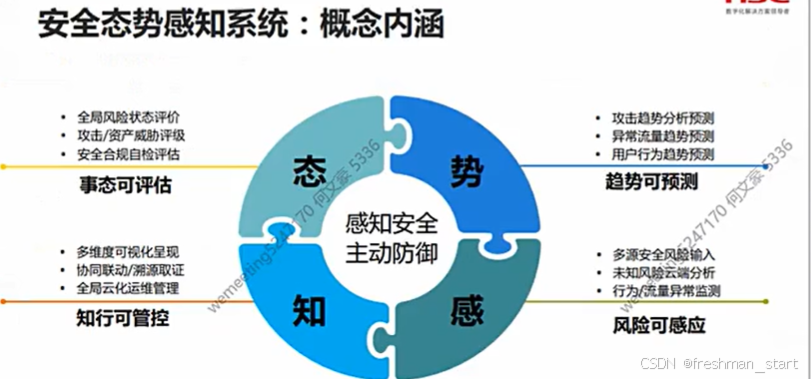
安全防护前置
就业概述 网络安全工程师/安全运维工程师/安全工程师 安全架构师/安全专员/研究院(数学要好) 厂商工程师(售前/售后) 系统集成工程师(所有计算机知识都要会一点) 学习目标 前言 网络安全事件 蠕虫病毒--&…...

01-六自由度串联机械臂(ABB)位置分析
ABB工业机器人(IRB2600)如下图所示(d1444.8mm,a1150mm,a2700mm,a3115mm,d4795mm,d685mm),利用改进DH法建模,坐标系如下所示: 利用改进…...
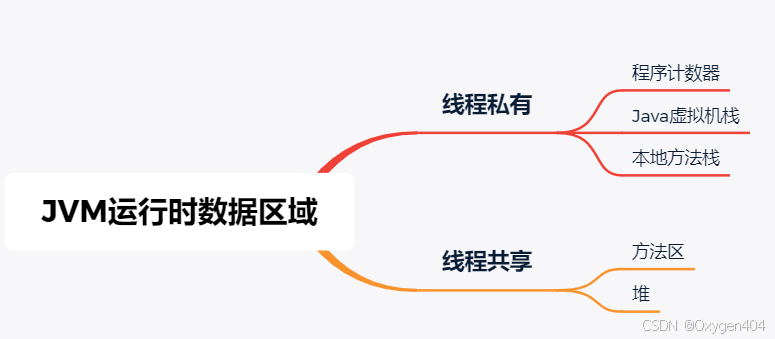
JVM运行时数据区域-附面试题
Java虚拟机在执行Java程序的过程中会把它所管理的内存划分为若干个不同的数据区域。这些区域 有各自的用途,以及创建和销毁的时间,有的区域随着虚拟机进程的启动而一直存在,有些区域则是 依赖用户线程的启动和结束而建立和销毁。 1. 程序计…...

Java线程池与Future_优化并发任务执行
1. 引言 1.1 并发编程的重要性 并发编程是现代软件开发中的关键部分,特别是在处理高并发、大数据和分布式系统时。通过并发编程,可以充分利用多核处理器的计算能力,提高系统的吞吐量和响应速度。 1.2 线程池与Future的作用 线程池:提供了对线程资源的有效管理和复用,减…...

HTML(快速入门)
欢迎大家来到我的博客~欢迎大家对我的博客提出指导,有错误的地方会改进的哦~点击这里了解更多内容 目录 一、前言二、HTML基础2.1 什么是HTML?2.2 认识HTML标签2.2.1 HTML标签当中的基本结构2.2.2 标签层次结构 2.3 HTML常见标签2.3.1 标题标签2.3.2 段落标签2.3.3…...

《苍穹外卖》项目学习记录-Day10订单状态定时处理
利用Cron表达式生成器生成Cron表达式 1.处理超时订单 查询订单表把超时的订单查询出来,也就是订单的状态为待付款,下单的时间已经超过了15分钟。 //select * from orders where status ? and order_time < (当前时间 - 15分钟) 遍历集合把数据库…...

WebForms SortedList 深度解析
WebForms SortedList 深度解析 引言 在Web开发领域,对于数据结构的理解与应用至关重要。其中,SortedList类在WebForms中是一个常用的数据结构,它能够帮助开发者高效地管理有序数据集合。本文将深入解析SortedList类在WebForms中的应用,包括其基本概念、常用方法、性能特点…...

AJAX综合案例——图书管理
黑马程序员视频地址: AJAX-Day02-10.案例_图书管理AJAX-Day02-10.案例_图书管理_总结_V1.0是黑马程序员前端AJAX入门到实战全套教程,包含学前端框架必会的(ajaxnode.jswebpackgit),一套全覆盖的第25集视频,…...

如何在Windows、Linux和macOS上安装Rust并完成Hello World
如何在Windows、Linux和macOS上安装Rust并完成Hello World 如果你刚刚开始学习Rust,第一步就是安装Rust并运行你的第一个程序!本文将详细介绍如何在Windows、Linux和macOS上安装Rust,并编写一个简单的“Hello, World!”程序。 1. 安装Rust …...

使用 Redis Streams 实现高性能消息队列
1. 引言 在后端开发中,消息队列是一个常见的组件,主要用于解耦系统、提高吞吐量以及实现异步处理。常见的消息队列包括 Kafka、RabbitMQ 以及 ActiveMQ,但 Redis Streams 作为 Redis 5.0 引入的新特性,也提供了一种高效、轻量的消…...

30.Word:设计并制作新年贺卡以及标签【30】
目录 NO1.2 NO3邮件合并-信函 NO4邮件合并-标签 NO1.2 另存为/F12:考生文件夹:Word.docx布局→页面设置对话框→页边距:上下左右→纸张:宽度/高度(先调页边距🆗)设计→页面颜色→填充效果→…...

Nginx开发01:基础配置
一、下载和启动 1.下载、使用命令行启动:Web开发:web服务器-Nginx的基础介绍(含AI文稿)_nginx作为web服务器,可以承担哪些基本任务-CSDN博客 注意:我配置的端口是81 2.测试连接是否正常 访问Welcome to nginx! 如果…...

数据分析系列--⑨RapidMiner训练集、测试集、验证集划分
一、数据集获取 二、划分数据集 1.导入和加载数据 2.数据集划分 2.1 划分说明 2.2 方法一 2.3 方法二 一、数据集获取 点击下载数据集 此数据集包含538312条数据. 二、划分数据集 1.导入和加载数据 2.数据集划分 2.1 划分说明 2.2 方法一 使用Filter Example Range算子. …...
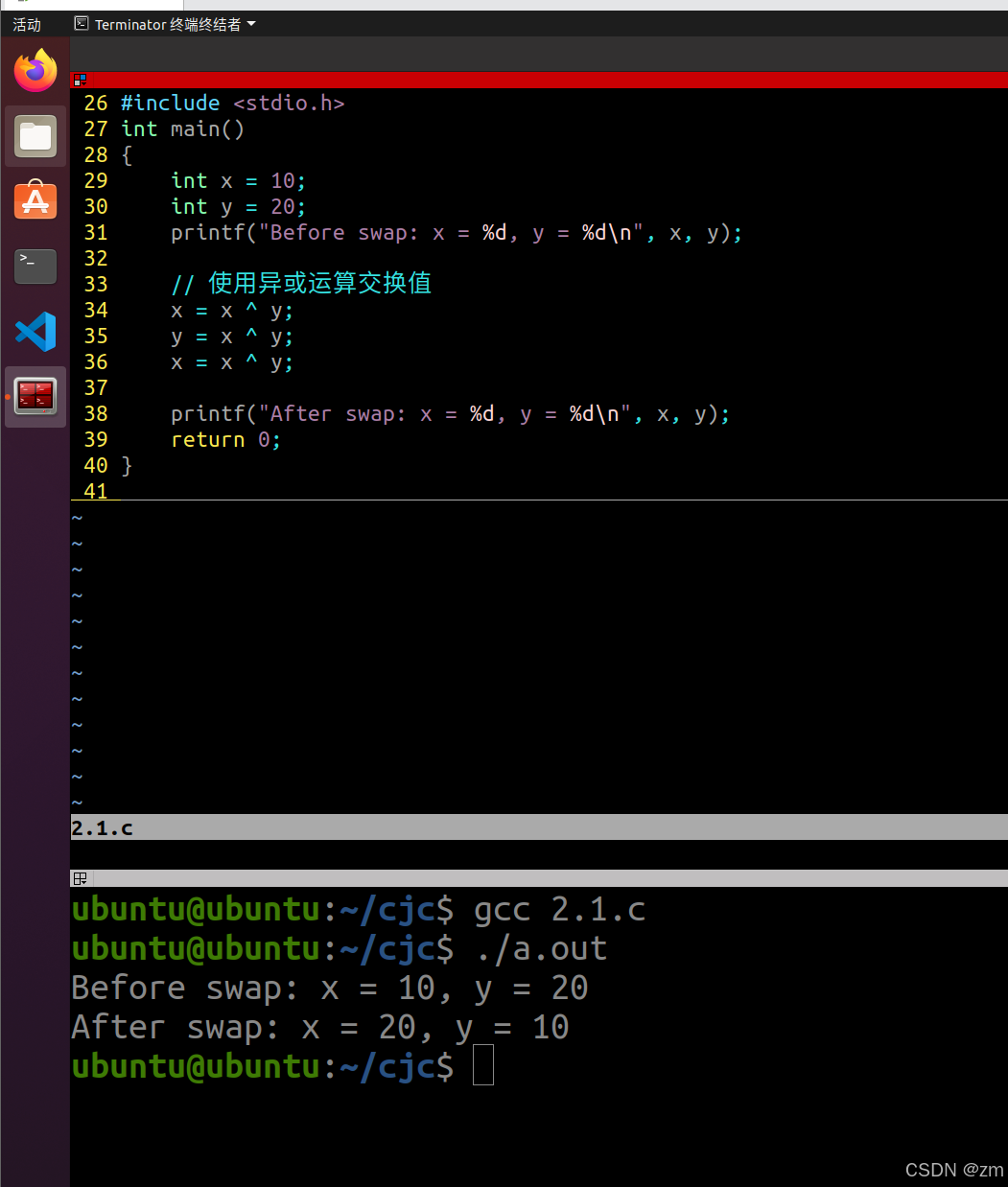
C基础寒假练习(6)
一、终端输入行数,打印倒金字塔 #include <stdio.h> int main() {int rows;printf("请输入倒金字塔的行数: ");scanf("%d", &rows);for (int i rows; i > 0; i--) {// 打印空格for (int j 0; j < rows - i; j) {printf(&qu…...

mysqldump+-binlog增量备份
注意:二进制文件删除必须使用help purge 不可用rm -f 会崩 一、概念 增量备份:仅备份上次备份以后变化的数据 差异备份:仅备份上次完全备份以后变化的数据 完全备份:顾名思义,将数据完全备份 其中,…...

《DeepSeek R1:大模型最简安装秘籍》
DeepSeek R1:AI 大模型界的新起之秀 在人工智能的璀璨星空中,大模型如繁星般闪耀,而 DeepSeek R1 无疑是其中一颗冉冉升起的新星,自问世以来便吸引了全球的目光,在人工智能领域占据了重要的一席之地。 从性能表现上看…...

FLTK - FLTK1.4.1 - demo - bitmap
文章目录 FLTK - FLTK1.4.1 - demo - bitmap概述笔记END FLTK - FLTK1.4.1 - demo - bitmap 概述 // 功能 : 演示位图数据在按钮上的显示 // * 以按钮为范围或者以窗口为范围移动 // * 上下左右, 文字和图像的相对位置 // 失能按钮,使能按钮 // 知识点 // FLTK可…...

数据库优化:提升性能的关键策略
1. 引言 在后端开发中,数据库的性能直接影响系统的稳定性和响应速度。随着业务增长,数据库查询变慢、负载过高等问题可能会影响用户体验。 本文将介绍数据库优化的关键策略,包括索引优化、查询优化、分库分表、缓存机制等,并结合…...

【Leetcode 每日一题】119. 杨辉三角 II
问题背景 给定一个非负索引 r o w I n d e x rowIndex rowIndex,返回「杨辉三角」的第 r o w I n d e x rowIndex rowIndex 行。 在「杨辉三角」中,每个数是它左上方和右上方的数的和。 数据约束 0 ≤ r o w I n d e x ≤ 33 0 \le rowIndex \le 33 …...

Java小白入门教程:HashSet
目录 一、定义 二、作用 1、存储唯一元素 2、快速查找 3、去除重复 三、使用场景 1、当你需要存储一系列唯一的元素,并且不关心元素的顺序时。 2、当你需要快速判断一个元素是否存在于集合中时。 四、语法及示例 1、创建HashSet 2、添加元素 3、检查元素…...

玩转大语言模型——使用langchain和Ollama本地部署大语言模型
系列文章目录 玩转大语言模型——使用langchain和Ollama本地部署大语言模型 玩转大语言模型——ollama导入huggingface下载的模型 玩转大语言模型——langchain调用ollama视觉多模态语言模型 玩转大语言模型——使用GraphRAGOllama构建知识图谱 玩转大语言模型——完美解决Gra…...

抖♬♬__ac_signature 算法逆向分析
和网页端一样,算法没有问题...

网络编程套接字(中)
文章目录 🍏简单的TCP网络程序服务端创建套接字服务端绑定服务端监听服务端获取连接服务端处理请求客户端创建套接字客户端连接服务器客户端发起请求服务器测试单执行流服务器的弊端 🍐多进程版的TCP网络程序捕捉SIGCHLD信号让孙子进程提供服务 …...

CodeForces 611:New Year and Domino ← 二维前缀和
【题目来源】 https://codeforces.com/contest/611/problem/C 【题目描述】 They say "years are like dominoes, tumbling one after the other". But would a year fit into a grid? I dont think so. Limak is a little polar bear who loves to play. He has r…...

十分钟快速上手 markdown
前言 本人利用寒假期间,将自己所学的markdown的知识,以及将自己常用的一些操作和注意事项记录下来,希望能够帮助大家 一、markdown是什么 Markdown 是一种轻量级标记语言,说白了就是可以让你利用最简单的语法达到最好的排版效果…...

Go语言中的Select
Select 在 Go 语言中,select 是一种用于处理多个通道操作的控制结构。它允许你同时监听多个通道上的通信操作(发送或接收),并根据哪个操作先完成来执行相应的代码块。select 是 Go 并发编程中的一个重要工具,常用于实…...

Vue.js组件开发-实现全屏图片文字缩放切换特效
使用 Vue 实现全屏图片文字缩放切换特效 步骤 创建 Vue 项目:使用 Vue CLI 来快速创建一个新的 Vue 项目。设计组件结构:创建一个包含图片和文字的组件,并实现缩放和切换效果。实现样式:使用 CSS 来实现全屏显示、缩放和切换动画…...

360嵌入式开发面试题及参考答案
解释一下 802.11ax 和 802.11ac/n 有什么区别 速度与带宽 802.11n 支持的最高理论速率为 600Mbps,802.11ac 进一步提升,单流最高可达 866.7Mbps,多流情况下能达到更高,如 1.3Gbps 等。而 802.11ax(Wi-Fi 6)引入了更多先进技术,理论最高速率可达 9.6Gbps,相比前两者有大…...