
Labelme转Voc、Coco
Q:在github找的cv代码基本都是根据现有且流行的公共数据集格式组织的训练数据集,这导致我使用labelme标注好之后需要我们重新组织数据集
labelme2coco
#!/usr/bin/env pythonimport argparse
import collections
import datetime
import glob
import json
import os
import os.path as osp
import sys
import uuidimport imgviz
import numpy as npimport labelmetry:import pycocotools.mask
except ImportError:print("Please install pycocotools:\n\n    pip install pycocotools\n")sys.exit(1)def main():parser = argparse.ArgumentParser(formatter_class=argparse.ArgumentDefaultsHelpFormatter)parser.add_argument("input_dir",default=r"data_annotated", help="input annotated directory")parser.add_argument("output_dir",default=r"data_coco", help="output dataset directory")parser.add_argument("--labels",default=r"labels.txt", help="labels file", required=True)parser.add_argument("--noviz", help="no visualization", action="store_true")args = parser.parse_args()if osp.exists(args.output_dir):print("Output directory already exists:", args.output_dir)sys.exit(1)os.makedirs(args.output_dir)os.makedirs(osp.join(args.output_dir, "JPEGImages"))if not args.noviz:os.makedirs(osp.join(args.output_dir, "Visualization"))print("Creating dataset:", args.output_dir)now = datetime.datetime.now()data = dict(info=dict(description=None,url=None,version=None,year=now.year,contributor=None,date_created=now.strftime("%Y-%m-%d %H:%M:%S.%f"),),licenses=[dict(url=None, id=0, name=None,)],images=[# license, url, file_name, height, width, date_captured, id],type="instances",annotations=[# segmentation, area, iscrowd, image_id, bbox, category_id, id],categories=[# supercategory, id, name],)class_name_to_id = {}for i, line in enumerate(open(args.labels).readlines()):class_id = i - 1  # starts with -1class_name = line.strip()if class_id == -1:assert class_name == "__ignore__"continueclass_name_to_id[class_name] = class_iddata["categories"].append(dict(supercategory=None, id=class_id, name=class_name,))out_ann_file = osp.join(args.output_dir, "annotations.json")label_files = glob.glob(osp.join(args.input_dir, "*.json"))for image_id, filename in enumerate(label_files):print("Generating dataset from:", filename)label_file = labelme.LabelFile(filename=filename)base = osp.splitext(osp.basename(filename))[0]out_img_file = osp.join(args.output_dir, "JPEGImages", base + ".jpg")img = labelme.utils.img_data_to_arr(label_file.imageData)imgviz.io.imsave(out_img_file, img)data["images"].append(dict(license=0,url=None,file_name=osp.relpath(out_img_file, osp.dirname(out_ann_file)),height=img.shape[0],width=img.shape[1],date_captured=None,id=image_id,))masks = {}  # for areasegmentations = collections.defaultdict(list)  # for segmentationfor shape in label_file.shapes:points = shape["points"]label = shape["label"]group_id = shape.get("group_id")shape_type = shape.get("shape_type", "polygon")mask = labelme.utils.shape_to_mask(img.shape[:2], points, shape_type)if group_id is None:group_id = uuid.uuid1()instance = (label, group_id)if instance in masks:masks[instance] = masks[instance] | maskelse:masks[instance] = maskif shape_type == "rectangle":(x1, y1), (x2, y2) = pointsx1, x2 = sorted([x1, x2])y1, y2 = sorted([y1, y2])points = [x1, y1, x2, y1, x2, y2, x1, y2]if shape_type == "circle":(x1, y1), (x2, y2) = pointsr = np.linalg.norm([x2 - x1, y2 - y1])# r(1-cos(a/2))<x, a=2*pi/N => N>pi/arccos(1-x/r)# x: tolerance of the gap between the arc and the line segmentn_points_circle = max(int(np.pi / np.arccos(1 - 1 / r)), 12)i = np.arange(n_points_circle)x = x1 + r * np.sin(2 * np.pi / n_points_circle * i)y = y1 + r * np.cos(2 * np.pi / n_points_circle * i)points = np.stack((x, y), axis=1).flatten().tolist()else:points = np.asarray(points).flatten().tolist()segmentations[instance].append(points)segmentations = dict(segmentations)for instance, mask in masks.items():cls_name, group_id = instanceif cls_name not in class_name_to_id:continuecls_id = class_name_to_id[cls_name]mask = np.asfortranarray(mask.astype(np.uint8))mask = pycocotools.mask.encode(mask)area = float(pycocotools.mask.area(mask))bbox = pycocotools.mask.toBbox(mask).flatten().tolist()data["annotations"].append(dict(id=len(data["annotations"]),image_id=image_id,category_id=cls_id,segmentation=segmentations[instance],area=area,bbox=bbox,iscrowd=0,))if not args.noviz:viz = imgif masks:labels, captions, masks = zip(*[(class_name_to_id[cnm], cnm, msk)for (cnm, gid), msk in masks.items()if cnm in class_name_to_id])viz = imgviz.instances2rgb(image=img,labels=labels,masks=masks,captions=captions,font_size=15,line_width=2,)out_viz_file = osp.join(args.output_dir, "Visualization", base + ".jpg")imgviz.io.imsave(out_viz_file, viz)with open(out_ann_file, "w") as f:json.dump(data, f)if __name__ == "__main__":main()
labelme2voc
#!/usr/bin/env pythonfrom __future__ import print_functionimport argparse
import glob
import os
import os.path as osp
import sysimport imgviz
import numpy as npimport labelmedef main():parser = argparse.ArgumentParser(formatter_class=argparse.ArgumentDefaultsHelpFormatter)parser.add_argument("input_dir", help="input annotated directory")parser.add_argument("output_dir",help="output dataset directory")parser.add_argument("--labels", help="labels file", required=True)parser.add_argument("--noviz", help="no visualization", action="store_true")args = parser.parse_args()if osp.exists(args.output_dir):print("Output directory already exists:", args.output_dir)sys.exit(1)os.makedirs(args.output_dir)os.makedirs(osp.join(args.output_dir, "JPEGImages"))os.makedirs(osp.join(args.output_dir, "SegmentationClass"))os.makedirs(osp.join(args.output_dir, "SegmentationClassPNG"))if not args.noviz:os.makedirs(osp.join(args.output_dir, "SegmentationClassVisualization"))os.makedirs(osp.join(args.output_dir, "SegmentationObject"))os.makedirs(osp.join(args.output_dir, "SegmentationObjectPNG"))if not args.noviz:os.makedirs(osp.join(args.output_dir, "SegmentationObjectVisualization"))print("Creating dataset:", args.output_dir)class_names = []class_name_to_id = {}for i, line in enumerate(open(args.labels).readlines()):class_id = i - 1  # starts with -1class_name = line.strip()class_name_to_id[class_name] = class_idif class_id == -1:assert class_name == "__ignore__"continueelif class_id == 0:assert class_name == "_background_"class_names.append(class_name)class_names = tuple(class_names)print("class_names:", class_names)out_class_names_file = osp.join(args.output_dir, "class_names.txt")with open(out_class_names_file, "w") as f:f.writelines("\n".join(class_names))print("Saved class_names:", out_class_names_file)for filename in glob.glob(osp.join(args.input_dir, "*.json")):print("Generating dataset from:", filename)label_file = labelme.LabelFile(filename=filename)base = osp.splitext(osp.basename(filename))[0]out_img_file = osp.join(args.output_dir, "JPEGImages", base + ".jpg")out_cls_file = osp.join(args.output_dir, "SegmentationClass", base + ".npy")out_clsp_file = osp.join(args.output_dir, "SegmentationClassPNG", base + ".png")if not args.noviz:out_clsv_file = osp.join(args.output_dir,"SegmentationClassVisualization",base + ".jpg",)out_ins_file = osp.join(args.output_dir, "SegmentationObject", base + ".npy")out_insp_file = osp.join(args.output_dir, "SegmentationObjectPNG", base + ".png")if not args.noviz:out_insv_file = osp.join(args.output_dir,"SegmentationObjectVisualization",base + ".jpg",)img = labelme.utils.img_data_to_arr(label_file.imageData)imgviz.io.imsave(out_img_file, img)cls, ins = labelme.utils.shapes_to_label(img_shape=img.shape,shapes=label_file.shapes,label_name_to_value=class_name_to_id,)ins[cls == -1] = 0  # ignore it.# class labellabelme.utils.lblsave(out_clsp_file, cls)np.save(out_cls_file, cls)if not args.noviz:clsv = imgviz.label2rgb(cls,imgviz.rgb2gray(img),label_names=class_names,font_size=15,loc="rb",)imgviz.io.imsave(out_clsv_file, clsv)# instance labellabelme.utils.lblsave(out_insp_file, ins)np.save(out_ins_file, ins)if not args.noviz:instance_ids = np.unique(ins)instance_names = [str(i) for i in range(max(instance_ids) + 1)]insv = imgviz.label2rgb(ins,imgviz.rgb2gray(img),label_names=instance_names,font_size=15,loc="rb",)imgviz.io.imsave(out_insv_file, insv)if __name__ == "__main__":main()
使用说明:
cd进入你的数据库(data_annotated文件夹所在位置),原始标注好文件(jpg、json)存放在data_annotated文件夹,先建立一个labels.txt文件内容为:
__ignore__
_background_
类别1
类别2
类别3
...

重要说明:
- 第一行必须是 __ignore__
- 第二行必须是 _background_
从第三行开始才是您的实际类别名称
- 每个类别占一行
- 不能有空行
- 注意下划线的数量:
- __ignore__ 是两个下划线
- _background_ 是一个下划线
然后根据你的需求选择下列命令之一
python labelme2voc.py data_annotated data_dataset_voc --labels labels.txt
python labelme2coco.py data_annotated data_dataset_coco --labels labels.txt
运行画面:

如果运行报错大概率是环境问题
环境参考:
Package Version
----------------------- --------------------
absl-py 2.1.0
asttokens 2.4.1
backcall 0.2.0
beautifulsoup4 4.12.3
cachetools 5.3.3
certifi 2024.2.2
charset-normalizer 3.3.2
colorama 0.4.6
coloredlogs 15.0.1
contourpy 1.1.1
cycler 0.12.1
Cython 3.0.9
decorator 5.1.1
executing 2.0.1
filelock 3.13.1
flatbuffers 24.3.7
fonttools 4.50.0
gdown 5.1.0
gitdb 4.0.11
GitPython 3.1.42
google-auth 2.29.0
google-auth-oauthlib 1.0.0
grpcio 1.62.1
humanfriendly 10.0
idna 3.6
imageio 2.34.0
imgviz 1.7.5
importlib_metadata 7.1.0
importlib_resources 6.4.0
ipython 8.12.3
jedi 0.19.1
kiwisolver 1.4.5
labelImg 1.8.6
labelme 5.4.1
lazy_loader 0.3
lxml 5.1.0
Markdown 3.6
MarkupSafe 2.1.5
matplotlib 3.7.5
matplotlib-inline 0.1.6
mpmath 1.3.0
natsort 8.4.0
networkx 3.1
numpy 1.24.4
oauthlib 3.2.2
onnxruntime 1.17.1
opencv-python 4.9.0.80
packaging 24.0
pandas 2.0.3
parso 0.8.3
pickleshare 0.7.5
pillow 10.2.0
pip 23.3.1
prompt-toolkit 3.0.43
protobuf 5.26.0
psutil 5.9.8
pure-eval 0.2.2
py-cpuinfo 9.0.0
pyasn1 0.5.1
pyasn1-modules 0.3.0
pycocotools-windows 2.0.0.2
Pygments 2.17.2
pyparsing 3.1.2
PyQt5 5.15.10
PyQt5-Qt5 5.15.2
PyQt5-sip 12.13.0
pyreadline3 3.4.1
PySocks 1.7.1
python-dateutil 2.9.0.post0
pytz 2024.1
PyWavelets 1.4.1
PyYAML 6.0.1
QtPy 2.4.1
requests 2.31.0
requests-oauthlib 2.0.0
rsa 4.9
scikit-image 0.21.0
scipy 1.10.1
seaborn 0.13.2
setuptools 68.2.2
six 1.16.0
smmap 5.0.1
soupsieve 2.5
stack-data 0.6.3
sympy 1.12
tensorboard 2.14.0
tensorboard-data-server 0.7.2
termcolor 2.4.0
thop 0.1.1.post2209072238
tifffile 2023.7.10
torch 1.8.0+cu111
torchaudio 0.8.0
torchvision 0.9.0+cu111
tqdm 4.66.2
traitlets 5.14.2
typing_extensions 4.10.0
tzdata 2024.1
ultralytics 8.1.34
urllib3 2.2.1
wcwidth 0.2.13
Werkzeug 3.0.1
wheel 0.41.2
zipp 3.18.1
相关文章:
Labelme转Voc、Coco
Q:在github找的cv代码基本都是根据现有且流行的公共数据集格式组织的训练数据集,这导致我使用labelme标注好之后需要我们重新组织数据集 labelme2coco #!/usr/bin/env pythonimport argparse import collections import datetime import glob import j…...

pytorch实现变分自编码器
人工智能例子汇总:AI常见的算法和例子-CSDN博客 变分自编码器(Variational Autoencoder, VAE)是一种生成模型,属于深度学习中的无监督学习方法。它通过学习输入数据的潜在分布(Latent Distribution)&…...

使用 Numpy 自定义数据集,使用pytorch框架实现逻辑回归并保存模型,然后保存模型后再加载模型进行预测,对预测结果计算精确度和召回率及F1分数
1. 导入必要的库 首先,导入我们需要的库:Numpy、Pytorch 和相关工具包。 import numpy as np import torch import torch.nn as nn import torch.optim as optim from sklearn.metrics import accuracy_score, recall_score, f1_score2. 自定义数据集 …...

JVM方法区
一、栈、堆、方法区的交互关系 二、方法区的理解: 尽管所有的方法区在逻辑上属于堆的一部分,但是一些简单的实现可能不会去进行垃圾收集或者进行压缩,方法区可以看作是一块独立于Java堆的内存空间。 方法区(Method Area)与Java堆一样,是各个…...

【Python】第七弹---Python基础进阶:深入字典操作与文件处理技巧
✨个人主页: 熬夜学编程的小林 💗系列专栏: 【C语言详解】 【数据结构详解】【C详解】【Linux系统编程】【MySQL】【Python】 目录 1、字典 1.1、字典是什么 1.2、创建字典 1.3、查找 key 1.4、新增/修改元素 1.5、删除元素 1.6、遍历…...

指导初学者使用Anaconda运行GitHub上One - DM项目的步骤
以下是指导初学者使用Anaconda运行GitHub上One - DM项目的步骤: 1. 安装Anaconda 下载Anaconda: 让初学者访问Anaconda官网(https://www.anaconda.com/products/distribution),根据其操作系统(Windows、M…...

在实际开发中,如何正确使用 INT(1) 和 INT(10)
在实际开发中,如何正确使用 INT(1) 和 INT(10) 前言 在数据库设计和开发过程中,数据类型的选择至关重要。 最近,我在工作中遇到了一个关于MySQL中INT类型的误解问题,这让我意识到很多开发者对INT类型的理解存在误区。 本文将深…...

像接口契约文档 这种工件,在需求 分析 设计 工作流里面 属于哪一个工作流
οゞ浪漫心情ゞο(20***328) 2016/2/18 10:26:47 请教一下,像接口契约文档 这种工件,在需求 分析 设计 工作流里面 属于哪一个工作流? 潘加宇(35***47) 17:17:28 你这相当于问用例图、序列图属于哪个工作流,看内容。 如果你的&quo…...

GAMES101学习笔记(六):Geometry 几何(基本表示方法、曲线与曲面、网格处理)
文章目录 几何的表示方法隐式几何 Implicit Geometry代数曲面(Algebraic surface)构造实体几何CSG(Constructive Solid Geometry)距离函数(Distance Function)水平集方法(Level Set Methods)分型几何(Fractal) 显式几何 Explicit Geometry点云(Point Cloud)多边形网格(Polygon …...

【Numpy核心编程攻略:Python数据处理、分析详解与科学计算】1.24 随机宇宙:生成现实世界数据的艺术
1.24 随机宇宙:生成现实世界数据的艺术 目录 #mermaid-svg-vN1An9qZ6t4JUcGa {font-family:"trebuchet ms",verdana,arial,sans-serif;font-size:16px;fill:#333;}#mermaid-svg-vN1An9qZ6t4JUcGa .error-icon{fill:#552222;}#mermaid-svg-vN1An9qZ6t4JUc…...

深入解析:一个简单的浮动布局 HTML 示例
深入解析:一个简单的浮动布局 HTML 示例 示例代码解析代码结构分析1. HTML 结构2. CSS 样式 核心功能解析1. 浮动布局(Float)2. 清除浮动(Clear)3. 其他样式 效果展示代码优化与扩展总结 在网页设计中,浮动…...

爬虫基础(三)Session和Cookie讲解
目录 一、前备知识点 (1)静态网页 (2)动态网页 (3)无状态HTTP 二、Session和Cookie 三、Session 四、Cookie (1)维持过程 (2)结构 正式开始说 Sessi…...

HTMLCSS :下雪了
这段代码创建了一个动态的雪花飘落加载动画,通过 CSS 技术实现了雪花的下落和消失效果,为页面添加了视觉吸引力和动态感。 大家复制代码时,可能会因格式转换出现错乱,导致样式失效。建议先少量复制代码进行测试,若未能…...

力扣 84. 柱状图中最大的矩形
🔗 https://leetcode.cn/problems/largest-rectangle-in-histogram 题目 给一个数组 num 表示位置 i 上圆柱的高度,求圆柱可以勾勒出的矩形的最大面积 思路 枚举圆柱 i,以该圆柱为高,计算其可以组成的矩形的最大面积。记录这过…...

【Windows Server实战】生产环境云和NPS快速搭建
前置条件 本文假定你已达成以下前提条件: 有域控DC。有证书服务器(AD CS)。已使用Microsoft Intune或者GPO为客户机申请证书。服务器上至少有两张网卡(如果用虚拟机做的测试环境,可以用一张HostOnly网卡做测试&#…...

RHCSA——搭建FTP文件共享服务器
一、实验目的 1、掌握vsftpd服务器的配置方法 2、熟悉FTP客户端工具的使用 3、掌握常见的FTP服务器的故障排除 二、实验项目背景 某企业像架构一台FTP服务器,为企业局域网中的计算机提供文件传送的任务,为财务部门、销售部门和OA系统提供异地数据备…...

IM 即时通讯系统-50-[特殊字符]cim(cross IM) 适用于开发者的分布式即时通讯系统
IM 开源系列 IM 即时通讯系统-41-开源 野火IM 专注于即时通讯实时音视频技术,提供优质可控的IMRTC能力 IM 即时通讯系统-42-基于netty实现的IM服务端,提供客户端jar包,可集成自己的登录系统 IM 即时通讯系统-43-简单的仿QQ聊天安卓APP IM 即时通讯系统-44-仿QQ即…...

SSH代理實用指南
SSH是一種安全的遠程訪問協議,用於遠程登錄和代理工具,是一種通過SSH協議實現的網路代理,常用於將網路流量通過安全的SSH通道進行轉發。與傳統的HTTP代理不同,SSH代理能夠在多種協議下工作(如HTTP、HTTPS、FTP等&#…...

Python在线编辑器
from flask import Flask, render_template, request, jsonify import sys from io import StringIO import contextlib import subprocess import importlib import threading import time import ast import reapp Flask(__name__)RESTRICTED_PACKAGES {tkinter: 抱歉&…...

ZZNUOJ(C/C++)基础练习1041——1050(详解版)
1041 : 数列求和2 题目描述 输入一个整数n,输出数列1-1/31/5-……前n项的和。 输入 输入只有一个整数n。 输出 结果保留2为小数,单独占一行。 样例输入 3 样例输出 0.87注意sum 1相当于sumsum1 注意sum * 1相当于sumsum*1 C语言版 #include<stdio.h> // 包含…...
--解释器实现详解)
JavaScript系列(51)--解释器实现详解
JavaScript解释器实现详解 🎯 今天,让我们深入探讨JavaScript解释器的实现。解释器是一个将源代码直接转换为结果的程序,通过理解其工作原理,我们可以更好地理解JavaScript的执行过程。 解释器基础概念 🌟 …...

浅析DDOS攻击及防御策略
DDoS(分布式拒绝服务)攻击是一种通过大量计算机或网络僵尸主机对目标服务器发起大量无效或高流量请求,耗尽其资源,从而导致服务中断的网络攻击方式。这种攻击方式利用了分布式系统的特性,使攻击规模更大、影响范围更广…...

深度学习 Pytorch 神经网络的学习
本节将从梯度下降法向外拓展,介绍更常用的优化算法,实现神经网络的学习和迭代。在本节课结束将完整实现一个神经网络训练的全流程。 对于像神经网络这样的复杂模型,可能会有数百个 w w w的存在,同时如果我们使用的是像交叉熵这样…...

【回溯】目标和 字母大小全排列
文章目录 494. 目标和解题思路:回溯784. 字母大小写全排列解题思路:回溯 494. 目标和 494. 目标和 给你一个非负整数数组 nums 和一个整数 target 。 向数组中的每个整数前添加 或 - ,然后串联起所有整数,可以构造一个 表达式…...

Linux系统上安装与配置 MySQL( CentOS 7 )
目录 1. 下载并安装 MySQL 官方 Yum Repository 2. 启动 MySQL 并查看运行状态 3. 找到 root 用户的初始密码 4. 修改 root 用户密码 5. 设置允许远程登录 6. 在云服务器配置 MySQL 端口 7. 关闭防火墙 8. 解决密码错误的问题 前言 在 Linux 服务器上安装并配置 MySQL …...

Miniconda 安装及使用
文章目录 前言1、Miniconda 简介2、Linux 环境说明2.1、安装2.2、配置2.3、常用命令2.4、常见问题及解决方案 前言 在 Python 中,“环境管理”是一个非常重要的概念,它主要是指对 Python 解释器及其相关依赖库进行管理和隔离,以确保开发环境…...

记录一次,PyQT的报错,多线程Udp失效,使用工具如netstat来检查端口使用情况。
1.问题 报错Exception in thread Thread-1: Traceback (most recent call last): File "threading.py", line 932, in _bootstrap_inner File "threading.py", line 870, in run File "main.py", line 456, in udp_recv IndexError: list…...

kamailio-ACC_JSON模块详解【后端语言go】
要确认 ACC_JSON 模块是否已经成功将计费信息推送到消息队列(MQueue),以及如何从队列中取值,可以按照以下步骤进行操作: 1. 确认 ACC_JSON 已推送到队列 1.1 配置 ACC_JSON 确保 ACC_JSON 模块已正确配置并启用。以下…...
群晖NAS安卓Calibre 个人图书馆
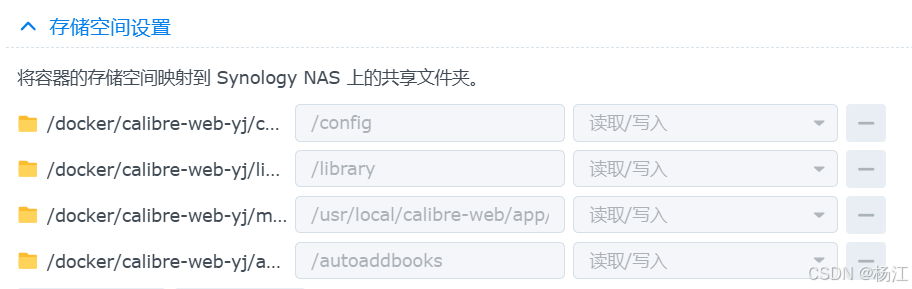
docker 下载镜像johngong/calibre-web,安装之 我是本地的/docker/xxx/metadata目录 映射到 /usr/local/calibre-web/app/cps/metadata_provider CALIBREDB_OTHER_OPTION 删除 CALIBRE_SERVER_USER calibre_server_user 缺省用户名口令 admin admin123 另外有个N…...

android主题设置为..DarkActionBar.Bridge时自定义DatePicker选中日期颜色
安卓自定义DatePicker选中日期颜色 背景:解决方案:方案一:方案二:实践效果: 背景: 最近在尝试用原生安卓实现仿element-ui表单校验功能,其中的的选择日期涉及到安卓DatePicker组件的使用&#…...