
自制虚拟机(C/C++)(三、做成标准GUI Windows软件,扩展指令集,直接支持img软盘)
开源地址:VMwork
要使终端不弹出,
#pragma comment(linker, "/subsystem:windows /ENTRY:mainCRTStartup")还要实现jmp near 0x01类似的
本次的main.cpp
#include <graphics.h>
#include <conio.h>
#include <windows.h>
#include <commdlg.h>
#include <iostream>
#include <fstream>
#include <sstream>
#include <vector>
#include <unordered_map>
#include <algorithm>
#include <thread>
#include <mutex>
#include <functional>
#include <vector>
#include <string>
#include <map>
#include <shlwapi.h>using namespace std;#pragma comment(linker, "/subsystem:windows /ENTRY:mainCRTStartup")void VM(const string& file);void ShowErrorDialog(const string& message) {MessageBox(GetHWnd(), message.c_str(), "VMwork 错误", MB_ICONERROR | MB_OK);
}string GetCurrentDirectoryPath() {char buffer[MAX_PATH] = {0};GetModuleFileNameA(NULL, buffer, MAX_PATH);string::size_type pos = string(buffer).find_last_of("\\/");return string(buffer).substr(0, pos);
}// 虚拟机配置结构体
struct VMConfig {string name;string filePath;  // 统一文件路径字段string fileType;  // "ASM" 或 "IMG"
};// 全局配置存储
map<string, VMConfig> vmConfigs;
const char* CONFIG_FILE = "vm.dll";// 图形界面尺寸参数
const int WIDTH = 800;
const int HEIGHT = 600;
const int BTN_WIDTH = 200;
const int BTN_HEIGHT = 40;// 当前操作状态
enum class AppState {MAIN_MENU,CREATE_VM,OPEN_VM,SETTINGS
};
AppState currentState = AppState::MAIN_MENU;char vmNameInput[64] = {0};
char asmPathInput[256] = {0};void InitGUI() {initgraph(WIDTH, HEIGHT);HWND hWnd = GetHWnd();SetWindowText(hWnd, "VMwork 虚拟机");ShowWindow(hWnd, SW_SHOWNORMAL);setbkcolor(WHITE);cleardevice();settextcolor(BLACK);settextstyle(30, 0, "宋体");
}void SaveConfig() {ofstream fout(CONFIG_FILE);for (auto& entry : vmConfigs) {auto& name = entry.first;auto& config = entry.second;fout << name << endl;fout << config.filePath << endl;fout << config.fileType << endl;}fout.close();
}void LoadConfig() {vmConfigs.clear();ifstream fin(CONFIG_FILE);string name, path, type;while (getline(fin, name) && getline(fin, path) && getline(fin, type)) {vmConfigs[name] = {name, path, type};}fin.close();
}void DrawMainMenu() {cleardevice();setbkcolor(WHITE);settextcolor(BLUE);settextstyle(30, 0, "宋体");outtextxy(100, 50, "VMwork 虚拟机");setfillcolor(LIGHTGRAY);fillroundrect(300, 150, 300 + BTN_WIDTH, 150 + BTN_HEIGHT, 5, 5);outtextxy(330, 155, "新建虚拟机");fillroundrect(300, 250, 300 + BTN_WIDTH, 250 + BTN_HEIGHT, 5, 5);outtextxy(330, 255, "打开虚拟机");fillroundrect(300, 350, 300 + BTN_WIDTH, 350 + BTN_HEIGHT, 5, 5);outtextxy(350, 355, "设置");
}string SelectFile() {OPENFILENAMEA ofn;char szFile[260] = {0};ZeroMemory(&ofn, sizeof(ofn));ofn.lStructSize = sizeof(ofn);ofn.lpstrFile = szFile;ofn.nMaxFile = sizeof(szFile);ofn.lpstrFilter = "IMG Files (*.img)\0*.img\0All Files (*.*)\0*.*\0";ofn.nFilterIndex = 1;ofn.Flags = OFN_PATHMUSTEXIST | OFN_FILEMUSTEXIST;if (GetOpenFileNameA(&ofn)) {return szFile;}return "";
}bool InputBox(const char* title, char* buffer, int bufferSize) {char prompt[10] = "";return InputBox(buffer, bufferSize, prompt, title);
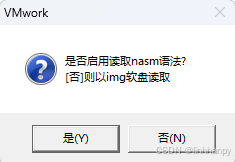
}void CreateVMProcess() {int fileType = MessageBox(GetHWnd(), "是否启用读取nasm语法?\n[否]则以img软盘读取", "VMwork", MB_YESNO | MB_ICONQUESTION);bool isASM = (fileType == IDYES);OPENFILENAMEA ofn;char szFile[260] = {0};ZeroMemory(&ofn, sizeof(ofn));ofn.lStructSize = sizeof(ofn);ofn.lpstrFile = szFile;ofn.nMaxFile = sizeof(szFile);ofn.lpstrFilter = isASM ? "ASM Files (*.asm)\0*.asm\0All Files (*.*)\0*.*\0" :"IMG Files (*.img)\0*.img\0All Files (*.*)\0*.*\0";ofn.nFilterIndex = 1;ofn.Flags = OFN_PATHMUSTEXIST | OFN_FILEMUSTEXIST;if (!GetOpenFileNameA(&ofn)) return;if (!InputBox("输入虚拟机名称", vmNameInput, sizeof(vmNameInput))) return;vmConfigs[vmNameInput] = {vmNameInput, szFile, isASM ? "ASM" : "IMG"};SaveConfig();
}void DisassembleImg(const string& imgPath, const string& asmPath) {string cmd = "cmd /c \"\"" + GetCurrentDirectoryPath() + "\\ndisasm.exe\" \"" + imgPath + "\" > \"" + asmPath + "\"\"";WinExec(cmd.c_str(), SW_HIDE);
}void ProcessAsm(const string& asmPath, const string& finalAsmPath) {string cmd = "cmd /c \"\"" + GetCurrentDirectoryPath() + "\\toasm.exe\" \"" + asmPath + "\" \"" + finalAsmPath + "\"\"";WinExec(cmd.c_str(), SW_HIDE);
}void OpenVMProcess() {LoadConfig();cleardevice();settextcolor(BLACK);outtextxy(50, 50, "选择虚拟机:");int y = 100;for (auto& entry : vmConfigs) {std::string text = entry.first + " (" + entry.second.filePath + ")";outtextxy(100, y, const_cast<char*>(text.c_str()));y += 50;}int choice = 0;while (true) {if (MouseHit()) {MOUSEMSG msg = GetMouseMsg();if (msg.uMsg == WM_LBUTTONDOWN) {int clickY = msg.y;int index = 0;for (auto& entry : vmConfigs) {int itemTop = 100 + index * 40;if (clickY > itemTop && clickY < itemTop + 50) {choice = index + 1;break;}index++;}}}if (choice!= 0) break;}if (choice > 0 && choice <= vmConfigs.size()) {auto it = vmConfigs.begin();advance(it, choice - 1);string selectedPath = it->second.filePath;string tempAsmPath = "temp.asm";string finalAsmPath = "final.asm";if (it->second.fileType == "IMG") {DisassembleImg(selectedPath, tempAsmPath);ProcessAsm(tempAsmPath, finalAsmPath);}else {finalAsmPath = selectedPath;}VM(finalAsmPath);}
}void SetVMProcess() {LoadConfig();cleardevice();settextcolor(BLACK);outtextxy(30, 50, "虚拟机");outtextxy(50, 90, "处理器  : 1");outtextxy(50, 130, "内存    : 64KB");outtextxy(50, 170, "启动方式: 软盘(引导扇区)");outtextxy(50, 210, "光盘    : 无");outtextxy(50, 250, "BIOS    : VMwork");outtextxy(50, 290, "方式    : .IMG/.ASM");while (1) {}
}void MainLoop() {AppState prevState = AppState::MAIN_MENU; while (true) {if (MouseHit()) {MOUSEMSG msg = GetMouseMsg();if (msg.uMsg == WM_LBUTTONDOWN) {// 主界面按钮处理if (currentState == AppState::MAIN_MENU) {if (msg.x > 300 && msg.x < 300 + BTN_WIDTH) {if (msg.y > 150 && msg.y < 150 + BTN_HEIGHT) {CreateVMProcess();} else if (msg.y > 250 && msg.y < 250 + BTN_HEIGHT) {OpenVMProcess();} else if (msg.y > 350 && msg.y < 350 + BTN_HEIGHT) {SetVMProcess(); }}}}}switch (currentState) {case AppState::MAIN_MENU:if (prevState!= AppState::MAIN_MENU) {//cleardevice();}DrawMainMenu();break;case AppState::CREATE_VM:if (prevState!= AppState::CREATE_VM) {//cleardevice();}DrawMainMenu();break;case AppState::OPEN_VM:if (prevState!= AppState::OPEN_VM) {//cleardevice();}DrawMainMenu();break;case AppState::SETTINGS:if (prevState!= AppState::SETTINGS) {//cleardevice();}DrawMainMenu();break;}prevState = currentState;Sleep(30);}
}// 寄存器声明
unsigned char al = 0, ah = 0, bl = 0, bh = 0, cl = 0, ch = 0, dl = 0, dh = 0, si = 0;
unsigned short ax = 0, bx = 0, cx = 0, dx = 0, sp = 0x8000, bp = 0;
unsigned int org = 0, end_times = 0, end_AA55 = 0;
bool ZF = false, CF = false, SF = false;unordered_map<string, size_t> labels;
size_t current_line = 0;
size_t new_current_line;
vector<string> program_lines;vector<unsigned char> memory(0x10000, 0);mutex fileMutex;int textX = 0;
int textY = 48;
const int CHAR_WIDTH = 8;
const int LINE_HEIGHT = 16;
bool graphicsInitialized = false;enum class InstructionError {INVALID_OPCODE,INVALID_OPERAND,LABEL_NOT_FOUND,UNKNOWN_INTERRUPT,OTHER_ERROR
};void printError(const InstructionError& error, const string& details = "") {//cerr << "ERROR: ";switch (error) {case InstructionError::INVALID_OPCODE: MessageBox(GetHWnd(), "无效的操作码", "运行时错误", MB_ICONERROR); break;case InstructionError::INVALID_OPERAND: MessageBox(GetHWnd(), "无效的操作数", "运行时错误", MB_ICONERROR); break;case InstructionError::LABEL_NOT_FOUND: MessageBox(GetHWnd(), "标签未找到", "运行时错误", MB_ICONERROR); break;case InstructionError::UNKNOWN_INTERRUPT: MessageBox(GetHWnd(), "未知的中断号", "运行时错误", MB_ICONERROR); break;case InstructionError::OTHER_ERROR: MessageBox(GetHWnd(), "未知错误", "运行时错误", MB_ICONERROR); break;}if (!details.empty()) cerr << " - " << details;cerr << endl;
}int parseImmediate(const string& immediateStr) {string result;bool inQuote = false;char quoteChar = '\0';for (size_t i = 0; i < immediateStr.size(); ++i) {char c = immediateStr[i];if (c == '\'' || c == '"') {if (!inQuote) {inQuote = true;quoteChar = c;} else if (c == quoteChar) {inQuote = false;}} else if (!inQuote && isspace(c)) {continue;}result += c;}if (result.empty()) return 0;if (result.length() == 3 && result[0] == '\'' && result[2] == '\'') {return static_cast<int>(result[1]);}else if (result.find("0x") == 0) {return stoi(result.substr(2), nullptr, 16);}else if (result.back() == 'h') {return stoi(result.substr(0, result.length() - 1), nullptr, 16);}else {return stoi(result);}
}int parseImmediate1(const string& immediateStr) {string processed = immediateStr;// 移除跳转修饰符(near/short/far)vector<string> modifiers = {"near ", "short ", "far "};for (const auto& mod : modifiers) {size_t pos = processed.find(mod);if (pos != string::npos) {processed.erase(pos, mod.length());break;}}// 处理段:偏移格式(仅取偏移部分)size_t colon = processed.find(':');if (colon != string::npos) {processed = processed.substr(colon + 1);}// 处理返回指令的立即数(ret 4 -> 解析4)size_t space = processed.find(' ');if (space != string::npos) {processed = processed.substr(0, space);}// 处理引号字符('A' -> 65)if (processed.length() == 3 && processed[0] == '\'' && processed[2] == '\'') {return static_cast<int>(processed[1]);}// 处理十六进制格式if (processed.find("0x") == 0) {return stoi(processed.substr(2), nullptr, 16);}// 处理h结尾的十六进制if (!processed.empty() && processed.back() == 'h') {return stoi(processed.substr(0, processed.length()-1), nullptr, 16);}// 处理二进制格式(新增支持)if (processed.find("0b") == 0) {return stoi(processed.substr(2), nullptr, 2);}// 处理符号(+/-)bool negative = false;if (!processed.empty()) {if (processed[0] == '+') {processed = processed.substr(1);} else if (processed[0] == '-') {negative = true;processed = processed.substr(1);}}// 最终数值转换try {int value = stoi(processed);return negative ? -value : value;} catch (...) {//throw invalid_argument("无法解析的立即数: " + immediateStr);MessageBox(GetHWnd(), ("无法解析的立即数: " + immediateStr).c_str(), "运行时错误", MB_ICONERROR);}
}unordered_map<string, unsigned char*> createRegister8BitMap() {return {{"al", &al}, {"ah", &ah}, {"bl", &bl}, {"bh", &bh},{"cl", &cl}, {"ch", &ch}, {"dl", &dl}, {"dh", &dh},{"si", &si}};
}unordered_map<string, unsigned short*> createRegister16BitMap() {return {{"ax", &ax}, {"bx", &bx}, {"cx", &cx}, {"dx", &dx},{"sp", &sp}, {"bp", &bp}};
}void UpdateTextPosition() {textX += CHAR_WIDTH;if (textX > 620) {textX = 0;textY += LINE_HEIGHT;}if (textY + LINE_HEIGHT > 480) {cleardevice();textX = 0;textY = 0;}
}void MovInstruction(const string& line) {string processedLine = line;replace(processedLine.begin(), processedLine.end(), ',', ' ');istringstream iss(processedLine);string opcode, dest, src;iss >> opcode >> dest >> src;auto reg8 = createRegister8BitMap();auto reg16 = createRegister16BitMap();auto parseOperand = [&](const string& op) -> int {if (reg8.count(op)) return *reg8[op];if (reg16.count(op)) return *reg16[op];return parseImmediate(op);};int value = parseOperand(src);if (reg8.count(dest)) {*reg8[dest] = static_cast<unsigned char>(value);}else if (reg16.count(dest)) {*reg16[dest] = static_cast<unsigned short>(value);}
}void AddInstruction(const string& line) {string processedLine = line;replace(processedLine.begin(), processedLine.end(), ',', ' ');istringstream iss(processedLine);string opcode, dest, src;iss >> opcode >> dest >> src;auto reg8 = createRegister8BitMap();auto reg16 = createRegister16BitMap();auto parseOperand = [&](const string& op) -> int {if (reg8.count(op)) return *reg8[op];if (reg16.count(op)) return *reg16[op];return parseImmediate(op);};int val1 = parseOperand(dest);int val2 = parseOperand(src);int result = val1 + val2;if (reg8.count(dest)) {*reg8[dest] = static_cast<unsigned char>(result);}else if (reg16.count(dest)) {*reg16[dest] = static_cast<unsigned short>(result);}ZF = (result == 0);SF = (result < 0);CF = (static_cast<unsigned>(result) < static_cast<unsigned>(val1));
}void SubInstruction(const string& line) {string processedLine = line;replace(processedLine.begin(), processedLine.end(), ',', ' ');istringstream iss(processedLine);string opcode, dest, src;iss >> opcode >> dest >> src;auto reg8 = createRegister8BitMap();auto reg16 = createRegister16BitMap();auto parseOperand = [&](const string& op) -> int {if (reg8.count(op)) return *reg8[op];if (reg16.count(op)) return *reg16[op];return parseImmediate(op);};int val1 = parseOperand(dest);int val2 = parseOperand(src);int result = val1 - val2;if (reg8.count(dest)) {*reg8[dest] = static_cast<unsigned char>(result);}else if (reg16.count(dest)) {*reg16[dest] = static_cast<unsigned short>(result);}ZF = (result == 0);SF = (result < 0);CF = (static_cast<unsigned>(val1) < static_cast<unsigned>(val2));
}void IncInstruction(const string& line) {istringstream iss(line);string opcode, operand;iss >> opcode >> operand;auto reg8 = createRegister8BitMap();auto reg16 = createRegister16BitMap();if (reg8.count(operand)) {*reg8[operand] += 1;ZF = (*reg8[operand] == 0);SF = (*reg8[operand] < 0);}else if (reg16.count(operand)) {*reg16[operand] += 1;ZF = (*reg16[operand] == 0);SF = (*reg16[operand] < 0);}
}void CmpInstruction(const string& line) {string processedLine = line;replace(processedLine.begin(), processedLine.end(), ',', ' ');istringstream iss(processedLine);string opcode, op1, op2;iss >> opcode >> op1 >> op2;auto reg8 = createRegister8BitMap();auto reg16 = createRegister16BitMap();auto parseOperand = [&](const string& op) -> int {if (reg8.count(op)) return *reg8[op];if (reg16.count(op)) return *reg16[op];return parseImmediate(op);};int val1 = parseOperand(op1);int val2 = parseOperand(op2);int result = val1 - val2;ZF = (result == 0);SF = (result < 0);CF = (static_cast<unsigned>(val1) < static_cast<unsigned>(val2));
}void JmpInstruction(const string& line) {istringstream iss(line);string opcode, modifier, operand;iss >> opcode >> modifier;// 处理跳转修饰符(short/near)if (modifier == "short" || modifier == "near" || modifier == "nearptr") {iss >> operand;} else {operand = modifier;}// 优先尝试标签跳转if (labels.count(operand)) {new_current_line = labels[operand];return;}// 尝试解析为数值跳转try {int offset = parseImmediate(operand);// 计算相对于下一条指令的偏移new_current_line = current_line + 1 + offset;} catch (...) {printError(InstructionError::LABEL_NOT_FOUND, "JMP指令中的目标未找到: " + operand);}
}void JeInstruction(const string& line) {istringstream iss(line);string opcode, modifier, operand;iss >> opcode >> modifier;if (modifier == "short" || modifier == "near" || modifier == "nearptr") {iss >> operand;} else {operand = modifier;}if (ZF) {if (labels.count(operand)) {new_current_line = labels[operand];} else {try {int offset = parseImmediate(operand);new_current_line = current_line + 1 + offset;} catch (...) {printError(InstructionError::LABEL_NOT_FOUND, "JE指令中的目标未找到: " + operand);}}} else {new_current_line = current_line + 1;}
}void JneInstruction(const string& line) {istringstream iss(line);string opcode, modifier, operand;iss >> opcode >> modifier;if (modifier == "short" || modifier == "near" || modifier == "nearptr") {iss >> operand;} else {operand = modifier;}if (!ZF) {if (labels.count(operand)) {new_current_line = labels[operand];} else {try {int offset = parseImmediate(operand);new_current_line = current_line + 1 + offset;} catch (...) {printError(InstructionError::LABEL_NOT_FOUND, "JNE指令中的目标未找到: " + operand);}}} else {new_current_line = current_line + 1;}
}void CallInstruction(const string& line) {istringstream iss(line);string opcode, modifier, operand;iss >> opcode;  // 读取call// 读取剩余部分作为操作数getline(iss, operand);operand = operand.substr(operand.find_first_not_of(" \t"), operand.find_last_not_of(" \t")+1);// 处理修饰符(如far)size_t space = operand.find(' ');if (space != string::npos) {operand = operand.substr(space+1);}// 压入返回地址sp -= 2;memory[sp] = (current_line + 1) & 0xFF;memory[sp + 1] = ((current_line + 1) >> 8) & 0xFF;try {int offset = parseImmediate1(operand);new_current_line = current_line + 1 + offset;} catch (...) {if (labels.count(operand)) {new_current_line = labels[operand];  // 修正拼写错误} else {// 使用图形界面提示错误MessageBox(GetHWnd(), ("CALL目标未找到: " + operand).c_str(), "VM错误", MB_ICONERROR);}}
}// 处理ret指令(支持立即数参数)
void RetInstruction(const string& line) {istringstream iss(line);string opcode, operand;iss >> opcode;  // 读取ret// 读取返回地址unsigned short return_addr = memory[sp] | (memory[sp + 1] << 8);sp += 2;// 处理带参数的ret(ret 4)if (iss >> operand) {int adjust = parseImmediate1(operand);sp += adjust;}new_current_line = return_addr;
}void PushInstruction(const std::string& line) {std::istringstream iss(line);std::string opcode, src;iss >> opcode >> src;auto reg16 = createRegister16BitMap(); unsigned short value = reg16.count(src)? *reg16[src] : parseImmediate(src);sp -= 2;memory[sp] = value & 0xFF;memory[sp + 1] = (value >> 8) & 0xFF;
}void PopInstruction(const std::string& line) {std::istringstream iss(line);std::string opcode, dest;iss >> opcode >> dest;auto reg16 = createRegister16BitMap(); if (reg16.count(dest)) {*reg16[dest] = memory[sp] | (memory[sp + 1] << 8);sp += 2;}
}void XorInstruction(const std::string& line) {std::string processedLine = line;std::replace(processedLine.begin(), processedLine.end(), ',', ' ');std::istringstream iss(processedLine);std::string opcode, dest, src;iss >> opcode >> dest >> src;auto reg8 = createRegister8BitMap(); auto reg16 = createRegister16BitMap(); auto parseOperand = [&](const std::string& op) -> int {if (reg8.count(op)) return *reg8[op];if (reg16.count(op)) return *reg16[op];return parseImmediate(op);};int val1 = parseOperand(dest);int val2 = parseOperand(src);int result = val1 ^ val2;if (reg8.count(dest)) {*reg8[dest] = static_cast<unsigned char>(result);}else if (reg16.count(dest)) {*reg16[dest] = static_cast<unsigned short>(result);}ZF = (result == 0);SF = (result < 0);CF = false;
}void PreprocessLabels() {for (size_t i = 0; i < program_lines.size(); ++i) {std::string line = program_lines[i];std::istringstream iss(line);std::string address;if (iss >> address) {// 去除地址中的冒号address.erase(std::remove(address.begin(), address.end(), ':'), address.end());labels[address] = i;}size_t colonPos = line.find(':');if (colonPos!= std::string::npos) {std::string label = line.substr(0, colonPos);labels[label] = i;program_lines[i] = line.substr(colonPos + 1);//std::cout << "Label found: " << label << " at line " << i << std::endl;}}
}void IntInstruction(const std::string& line) {std::string processedLine = line;std::replace(processedLine.begin(), processedLine.end(), ',', ' ');std::istringstream iss(processedLine);std::string opcode, interrupt;iss >> opcode >> interrupt;BYTE keyState[256];if (interrupt == "0x10" || interrupt == "10h") {if (ah == 0x0E) {if (!graphicsInitialized) {initgraph(640, 480);HWND hwnd = GetHWnd();SetWindowPos(hwnd, HWND_TOP, 100, 100, 0, 0, SWP_NOSIZE);setbkcolor(BLACK);cleardevice();settextcolor(CYAN);settextstyle(16, 0, _T("Courier New Bold"));graphicsInitialized = true;outtextxy(textX, 0, "  VMwork BIOS (PCI)");outtextxy(textX, 16, "  This VGA/VBE BIOS is released under the GNU LGPL");settextcolor(RGB(192, 192, 192));}// 处理特殊字符if (al == 0x0D) {outtextxy(textX, textY, " ");textY += LINE_HEIGHT;}else if (al == 0x0A) {outtextxy(textX, textY, " ");textX = 0;}else {char str[2] = { static_cast<char>(al) };outtextxy(textX, textY, " ");outtextxy(textX, textY, str);UpdateTextPosition();outtextxy(textX, textY, "|");}}if (ah == 0x02 && bh == 0) {textX = 0;textY = 0;}if (ax == 0x0600 && bx == 0x0700 && cx == 0 && dx == 0x184f) {setfillcolor(BLACK);bar(0, 0, 640, 480);}}else if (interrupt == "0x16" || interrupt == "16h") {if (ah == 0) {bool consoleAllocated = false;if (!consoleAllocated) {  // 确保只创建一次控制台AllocConsole();freopen("CONIN$", "r", stdin);freopen("CONOUT$", "w", stdout);system("title VMwork控制和调试终端(在此输入键盘事件):");consoleAllocated = true;}INPUT_RECORD inputRec;DWORD eventsRead;while (true) {if (ReadConsoleInput(GetStdHandle(STD_INPUT_HANDLE), &inputRec, 1, &eventsRead)) {if (inputRec.EventType == KEY_EVENT && inputRec.Event.KeyEvent.bKeyDown) {// 使用系统API转换字符BYTE keyState[256];GetKeyboardState(keyState);WORD charCode = 0;ToAscii(inputRec.Event.KeyEvent.wVirtualKeyCode,inputRec.Event.KeyEvent.wVirtualScanCode,keyState,&charCode,0);al = LOBYTE(charCode);  // 低字节是ASCII码if (LOBYTE(charCode) == '\n') {al = 0x0D;}break;}}Sleep(10);}}
}else {printError(InstructionError::UNKNOWN_INTERRUPT, "警告:未知的中断号: " + interrupt);}
}void OrgInstruction(const std::string& line) {std::string processedLine = line;std::replace(processedLine.begin(), processedLine.end(), ',', ' ');std::istringstream iss(processedLine);std::string opcode, interrupt;iss >> opcode >> interrupt;if (interrupt == "0x7c00" || interrupt == "0x7C00") {org = 0x7c00;} else {printError(InstructionError::INVALID_OPERAND, "ORG指令的操作数无效: " + interrupt);}
}void TimesInstruction(const std::string& line) {std::string processedLine = line;std::replace(processedLine.begin(), processedLine.end(), ',', ' ');std::istringstream iss(processedLine);std::string opcode, interrupt;iss >> opcode >> interrupt;if (interrupt == "510-($-$$) db 0" || interrupt == "510-($-$$)") {end_times = 1;} else {printError(InstructionError::INVALID_OPERAND, "TIMES指令的操作数无效: " + interrupt);}
}void DwInstruction(const std::string& line) {std::string processedLine = line;std::replace(processedLine.begin(), processedLine.end(), ',', ' ');std::istringstream iss(processedLine);std::string opcode, interrupt;iss >> opcode >> interrupt;if (interrupt == "0xAA55" || interrupt == "0xaa55") {end_AA55 = 1;} else {printError(InstructionError::INVALID_OPERAND, "DW指令的操作数无效: " + interrupt);}
}void VM(const std::string& asmPath) {HWND hWnd = initgraph(640, 480, SHOWCONSOLE);SetWindowText(hWnd, "VMwork 虚拟机运行中");setbkcolor(BLACK);cleardevice();// 显示加载动画settextcolor(WHITE);settextstyle(24, 0, "宋体");outtextxy(50, 200, "正在启动虚拟机...");for (int i = 0; i < 10; ++i) {setfillcolor(HSVtoRGB(i*36, 1, 1));solidcircle(100 + i*50, 300, 15);Sleep(100);}cleardevice();std::ifstream file(asmPath);if (!file.is_open()) {std::cerr << "无法打开文件: " << asmPath << std::endl;return;}std::string line;while (std::getline(file, line)) {size_t commentPos = line.find(';');if (commentPos!= std::string::npos) {line = line.substr(0, commentPos);}// 去除行首尾的空白字符while (!line.empty() && std::isspace(line.front())) {line.erase(line.begin());}while (!line.empty() && std::isspace(line.back())) {line.erase(line.length() - 1);}if (!line.empty()) {program_lines.push_back(line);}}file.close();for (auto& progLine : program_lines) {for (size_t i = 0; i < progLine.size(); ++i) {if (i < progLine.size() - 2 && progLine[i] == '\'' && progLine[i + 1] ==' ' && progLine[i + 2] == '\'') {progLine[i] = static_cast<char>(0x20);progLine.erase(i + 1, 2);  // 移除后面的空格和单引号}if (i < progLine.size() - 2 && progLine[i] == '\'' && progLine[i + 1] ==':' && progLine[i + 2] == '\'') {progLine[i] = '3';progLine[i + 1] = 'A';progLine[i + 2] = 'h';}if (i < progLine.size() - 2 && progLine[i] == '\'' && progLine[i + 1] ==',' && progLine[i + 2] == '\'') {progLine[i] = '2';progLine[i + 1] = 'C';progLine[i + 2] = 'h';}if (i < progLine.size() - 2 && progLine[i] == '\'' && progLine[i + 1] =='_' && progLine[i + 2] == '\'') {progLine[i] = '5';progLine[i + 1] = 'F';progLine[i + 2] = 'h';}}}PreprocessLabels();// 重置指令指针和新的指令指针new_current_line = current_line;while (current_line < program_lines.size()) {std::istringstream iss(program_lines[current_line]);std::string opcode;iss >> opcode;if (opcode == "mov") MovInstruction(program_lines[current_line]);else if (opcode == "int") IntInstruction(program_lines[current_line]);else if (opcode == "org") OrgInstruction(program_lines[current_line]);else if (opcode == "times") TimesInstruction(program_lines[current_line]);else if (opcode == "dw") DwInstruction(program_lines[current_line]);else if (opcode == "cmp") CmpInstruction(program_lines[current_line]);else if (opcode == "jmp") {std::string label;iss >> label;// 处理相对跳转地址表示法,假设这里的相对跳转是相对于当前行号(根据实际情况调整)if (label.find("0x") == 0) {try {size_t targetAddress = std::stoi(label.substr(2), nullptr, 16);// 如果找到地址标签,更新当前行号if (labels.count(label)) {new_current_line = labels[label];} else {// 处理相对地址size_t relativeAddress = targetAddress - (current_line - labels.begin()->second);new_current_line = current_line + relativeAddress;}} catch (const std::invalid_argument& e) {printError(InstructionError::LABEL_NOT_FOUND, "JMP指令中的非法地址标签: " + label);} catch (const std::out_of_range& e) {printError(InstructionError::LABEL_NOT_FOUND, "JMP指令中的地址标签超出范围: " + label);}} else {JmpInstruction(program_lines[current_line]);}}else if (opcode == "je" || opcode == "jz") JeInstruction(program_lines[current_line]);else if (opcode == "jne" || opcode == "jnz") JneInstruction(program_lines[current_line]);else if (opcode == "push") PushInstruction(program_lines[current_line]);else if (opcode == "pop") PopInstruction(program_lines[current_line]);else if (opcode == "xor") XorInstruction(program_lines[current_line]);else if (opcode == "call") CallInstruction(program_lines[current_line]);else if (opcode == "add") AddInstruction(program_lines[current_line]);else if (opcode == "sub") SubInstruction(program_lines[current_line]);else if (opcode == "inc") IncInstruction(program_lines[current_line]);else if (opcode == "hlt") break;if (opcode == "jmp" || opcode == "je" || opcode == "jne") {current_line = new_current_line;}else {current_line++;}new_current_line = current_line + 1; }if (graphicsInitialized) {_getch();//closegraph();}settextcolor(LIGHTGRAY);outtextxy(100, 200, "虚拟机已安全停止");outtextxy(100, 240, "点击任意键返回管理器");FlushMouseMsgBuffer();while (!MouseHit()) Sleep(100);closegraph();
}int main() {if (GetSystemMetrics(SM_CLEANBOOT) != 0) {MessageBox(NULL, "系统处于安全模式,无法启动虚拟机", "启动错误", MB_ICONSTOP);return 1;}// 设置当前目录if (!SetCurrentDirectoryA(GetCurrentDirectoryPath().c_str())) {MessageBox(NULL, "无法设置工作目录", "路径错误", MB_ICONERROR);return 1;}// 设置当前工作目录SetCurrentDirectoryA(GetCurrentDirectoryPath().c_str());// 初始化图形界面(直接初始化)initgraph(WIDTH, HEIGHT);HWND hWnd = GetHWnd();SetWindowText(hWnd, "VMwork 虚拟机管理器");ShowWindow(hWnd, SW_SHOWNORMAL);// 检查必要组件if (!PathFileExistsA("ndisasm.exe") || !PathFileExistsA("toasm.exe")) {MessageBox(hWnd, "缺少必要组件:ndisasm.exe 或 toasm.exe", "启动错误", MB_ICONERROR);return 1;}// 加载配置try {LoadConfig();} catch (...) {ShowErrorDialog("配置文件加载失败");}// 主循环MainLoop();// 保存配置SaveConfig();closegraph();return 0;
}
这样就可以让用户选择img和asm了
为程序加一个ico

ico.rc
1 ICON "VMwork.ico" toasm.py
import re
import sys
import chardetdef process_files(input_file_path, output_file_path):# 探测原始文件的编码with open(input_file_path, 'rb') as f:result = chardet.detect(f.read())encoding = result['encoding']pattern = re.compile(r'^([0-9A-Fa-f]{8})\s+([0-9A-Fa-f ]+)\s+(.*)$')with open(input_file_path, 'r', encoding=encoding) as input_file, open(output_file_path, 'w',encoding='utf - 8') as output_file:for line in input_file:line = line.rstrip()if match := pattern.match(line):addr_str, _, instr = match.groups()addr = int(addr_str, 16)output_file.write(f"0x{addr:x}:\n")output_file.write(f"{instr}\n")else:output_file.write(line + "\n")if __name__ == "__main__":if len(sys.argv)!= 3:print("Usage: python script_name.py input_file output_file")sys.exit(1)input_file_path = sys.argv[1]output_file_path = sys.argv[2]process_files(input_file_path, output_file_path)
写一个makefile
all:make icomake toasmcopy .\dist\toasm.exe .\make VMwork
VMwork:g++ -o VMwork main.cpp ico.res -std=c++11 -leasyx -lcomdlg32 -lshlwapi -lmsimg32 -mwindows -static-libgcc -static-libstdc++
ico:windres -O coff -o ico.res ico.rc
toasm:Pyinstaller -F toasm.py
这样就可以编译整个项目:
make顺带写一个README.md
###(c) 2025 Lin Honghan# VMwork Virtual Machine Manager## 📖 中文说明### 项目简介
VMwork 是一款基于Windows的虚拟机模拟器,提供图形化界面管理,支持运行汇编程序(.asm)和软盘镜像(.img)。模拟BIOS中断调用,实现基本的显示和输入功能。### 主要功能
- 🖥️ 图形界面管理虚拟机配置
- ⚙️ 支持汇编源码直接运行
- 💾 可加载/反编译.img软盘镜像
- ⌨️ 模拟BIOS键盘中断(INT 16h)
- 📺 模拟文本模式显示(INT 10h)
- 🔄 历史配置自动保存
- 🎨 彩色控制台输出支持### 运行要求
- Windows 7+ (或Linux)
- C/C++ 运行时库
- 管理员权限(部分功能需要)### 安装使用
1. 下载最新Release包
2. 解压到英文路径(避免空格)
3. 确保包含以下文件:- `VMwork.exe`- `ndisasm.exe`- `toasm.exe`
4. 双击运行`VMwork.exe`### 使用说明
1. **新建虚拟机**  - 选择.asm或.img文件- 输入虚拟机名称- 自动保存配置2. **运行虚拟机**  - 从列表选择配置- 进入全屏模拟模式- 按任意键返回管理器3. **键盘输入**  - 专用控制台窗口接收输入- 支持Shift/Caps Lock状态- Esc键退出程序### 注意事项
⚠️ 系统安全模式下不可用
⚠️ 路径不要包含中文或空格
⚠️ 杀毒软件可能误报(添加信任)
⚠️ 需要保留同目录工具程序### 代码结构
main.cpp
├── GUI/ # 图形界面模块├── VM/ # 虚拟机核心│ ├── BIOS/ # 中断模拟│ └── Parser/ # 指令解析├── config/ # 配置管理└── tools/ # 反编译工具### 问题反馈
提交Issue至[项目仓库](https://github.com/linhhanpy/VMwork)
或联系:lhh_88888888@qq.com---## 📖 English Documentation### Project Overview
VMwork is a Windows-based virtual machine emulator with GUI management. Supports running assembly programs (.asm) and floppy disk images (.img), emulating BIOS interrupts for basic display and input operations.### Key Features
- 🖥️ Graphical VM Configuration Management
- ⚙️ Direct Assembly Source Execution
- 💾 .IMG Floppy Image Loading/Disassembly
- ⌨️ BIOS Keyboard Interrupt Simulation (INT 16h)
- 📺 Text Mode Display Emulation (INT 10h)
- 🔄 Automatic Configuration Saving
- 🎨 Color Console Output Support### System Requirements
- Windows 7+ (or Linux)
- C/C++ Redistributable
- Administrator Privileges (for certain features)### Installation
1. Download latest Release package
2. Extract to English path (no spaces)
3. Verify required files:- `VMwork.exe`- `ndisasm.exe`- `toasm.exe`
4. Double-click `VMwork.exe`### Quick Start
1. **Create VM**  - Select .asm/.img file- Name your VM- Config auto-saves2. **Run VM**  - Select from config list- Enter full emulation mode- Press any key to return3. **Keyboard Input**  - Dedicated console window- Supports Shift/Caps Lock states- Esc to exit program### Important Notes
⚠️ Not compatible with Safe Mode
⚠️ Use ASCII-only paths
⚠️ Add exclusion in antivirus
⚠️ Keep tool files in same directory### Code Structure
main.cpp├── GUI/ # Graphical Interface├── VM/ # VM Core│ ├── BIOS/ # Interrupt Emulation│ └── Parser/ # Instruction Parsing├── config/ # Configuration└── tools/ # Disassembly Tools
放几张效果图




此时的目录

相关文章:
自制虚拟机(C/C++)(三、做成标准GUI Windows软件,扩展指令集,直接支持img软盘)
开源地址:VMwork 要使终端不弹出, #pragma comment(linker, "/subsystem:windows /ENTRY:mainCRTStartup") 还要实现jmp near 0x01类似的 本次的main.cpp #include <graphics.h> #include <conio.h> #include <windows.h> #includ…...

[c语言日寄]C语言类型转换规则详解
【作者主页】siy2333 【专栏介绍】⌈c语言日寄⌋:这是一个专注于C语言刷题的专栏,精选题目,搭配详细题解、拓展算法。从基础语法到复杂算法,题目涉及的知识点全面覆盖,助力你系统提升。无论你是初学者,还是…...

Rust 的基本类型有哪些,他们存在堆上还是栈上,是否可以COPY?
Rust 的基本类型主要包括以下几类: 1. 整数类型(Integer) Rust 提供了有符号和无符号的整数类型: 有符号整数(i8, i16, i32, i64, i128, isize)无符号整数(u8, u16, u32, u64, u128, usize&a…...

oracle 19C RAC打补丁到19.26
oracle 19CRAC打补丁到19.26 本文只保留简介命令和每个命令大概的用时,方便大家直接copy使用,并了解每个命令的预期时间,减少命令执行期的等待焦虑。 1.本次所需的补丁如下 p6880880_190000_Linux-x86-64.zip (.43的opatch&…...

利用Spring Batch简化企业级批处理应用开发
1. 引言 1.1 批处理的重要性 在现代企业系统中,批处理任务用于处理大量数据,如报表生成、数据迁移、日终结算等。这些任务通常不需要实时响应,但需要高效、可靠地完成。批处理可以显著提高系统性能,减少实时系统的负载,并确保数据的完整性和一致性。 1.2 Spring Batch简…...

三、js笔记
(一)JavaScript概述 1、发展历史 ScriptEase.(客户端执行的语言):1992年Nombas开发出C-minus-minus(C--)的嵌入式脚本语言(最初绑定在CEnvi软件中).后将其改名ScriptEase.(客户端执行的语言)Javascript:Netscape(网景)接收Nombas的理念,(Brendan Eich)在其Netscape Navigat…...

C# 语言基础全面解析
.NET学习资料 .NET学习资料 .NET学习资料 一、引言 C# 是一种功能强大、面向对象且类型安全的编程语言,由微软开发,广泛应用于各种类型的软件开发,从桌面应用、Web 应用到游戏开发等领域。本文将全面介绍 C# 语言的基础知识,帮…...

基于SpringBoot的青年公寓服务平台的设计与实现(源码+SQL脚本+LW+部署讲解等)
专注于大学生项目实战开发,讲解,毕业答疑辅导,欢迎高校老师/同行前辈交流合作✌。 技术范围:SpringBoot、Vue、SSM、HLMT、小程序、Jsp、PHP、Nodejs、Python、爬虫、数据可视化、安卓app、大数据、物联网、机器学习等设计与开发。 主要内容:…...

Bash 基础与进阶实践指南
目录 Bash 简介与基础基本命令与文件操作权限管理与用户管理重定向与管道变量与环境变量通配符与正则表达式Shell 脚本结构与控制流常用内建命令与技巧文本处理常用命令作业控制与进程管理别名与函数实用技巧与注意事项更多 Bash 进阶话题参考资源 1. Bash 简介与基础 1.1 什…...

深入探讨:服务器如何响应前端请求及后端如何查看前端提交的数据
深入探讨:服务器如何响应前端请求及后端如何查看前端提交的数据 一、服务器如何响应前端请求 前端与后端的交互主要通过 HTTP 协议实现。以下是详细步骤: 1. 前端发起 HTTP 请求 GET 请求:用于从服务器获取数据。POST 请求:用…...

使用LLaMA-Factory对AI进行认知的微调
使用LLaMA-Factory对AI进行认知的微调 引言1. 安装LLaMA-Factory1.1. 克隆仓库1.2. 创建虚拟环境1.3. 安装LLaMA-Factory1.4. 验证 2. 准备数据2.1. 创建数据集2.2. 更新数据集信息 3. 启动LLaMA-Factory4. 进行微调4.1. 设置模型4.2. 预览数据集4.3. 设置学习率等参数4.4. 预览…...

Kafka分区策略实现
引言 Kafka 的分区策略决定了生产者发送的消息会被分配到哪个分区中,合理的分区策略有助于实现负载均衡、提高消息处理效率以及满足特定的业务需求。 轮询策略(默认) 轮询策略是 Kafka 默认的分区策略(当消息没有指定键时&…...

在无sudo权限Linux上安装 Ollama 并使用 DeepSeek-R1 模型
本教程将指导你如何在 Linux 系统上安装 Ollama(一个本地运行大型语言模型的工具),并加载 DeepSeek-R1 模型。DeepSeek-R1 是一个高性能的开源语言模型,适用于多种自然语言处理任务。 DeepSeek-R1 简介 DeepSeek-R1 是 DeepSeek …...

Vue.js `v-memo` 性能优化技巧
Vue.js v-memo 性能优化技巧 今天我们来聊聊 Vue 3.2 引入的一个性能优化指令:v-memo。如果你在处理大型列表或复杂组件时,遇到性能瓶颈,那么 v-memo 可能会成为你的得力助手。 什么是 v-memo? v-memo 是 Vue 3.2 新增的内置指…...

蓝桥杯思维训练营(一)
文章目录 题目总览题目详解翻之一起做很甜的梦 蓝桥杯的前几题用到的算法较少,大部分考察的都是思维能力,方法比较巧妙,所以我们要积累对应的题目,多训练 题目总览 翻之 一起做很甜的梦 题目详解 翻之 思维分析:一开…...

HBase-2.5.10 伪分布式环境搭建【Mac】
文章目录 前言一、搭建单节点Zookeeper1. 解压zookeeper2. 配置环境变量3. 修改配置文件4. 启动zk 二、搭建伪分布式Hbase1. 解压hbase2. 配置环境变量3. 修改配置4. 启动HBase 前言 搭建hbase伪分布式环境 提示:以下是本篇文章正文内容,下面案例仅供参…...
Transformer介绍)
【小白学AI系列】NLP 核心知识点(五)Transformer介绍
Transformer Transformer 是一种基于自注意力机制(Self-Attention Mechanism)的深度学习模型,首次由 Vaswani 等人于 2017 年在论文《Attention is All You Need》中提出。与 RNN 和 LSTM 不同,Transformer 不需要依靠序列顺序进…...

纯后训练做出benchmark超过DeepseekV3的模型?
论文地址 https://arxiv.org/pdf/2411.15124 模型是AI2的,他们家也是玩开源的 先看benchmark,几乎是纯用llama3 405B后训练去硬刚出一个gpt4o等级的LLamA405 我们先看之前的机遇Lllama3.1 405B进行全量微调的模型 Hermes 3,看着还没缘模型…...

OpenAI深夜反击:o3-mini免费上线,能否撼动DeepSeek的地位?
还在为寻找合适的 AI 模型而烦恼吗?chatTools 平台为您精选 o1、GPT4o、Claude、Gemini 等顶尖 AI 模型,满足您不同的 AI 应用需求。立即体验强大的 AI 能力! 深夜反击,OpenAI祭出o3-mini 在DeepSeek异军突起,搅动AI行…...

【Linux-网络】初识计算机网络 Socket套接字 TCP/UDP协议(包含Socket编程实战)
🎬 个人主页:谁在夜里看海. 📖 个人专栏:《C系列》《Linux系列》《算法系列》 ⛰️ 道阻且长,行则将至 目录 📚一、初识计算机网络 📖 背景 📖 网络协议 🔖OSI七层…...

使用ollama在本地部署一个deepseek大模型
文章目录 为什么选择本地化部署需要用到什么作者使用的什么环境如何根据自己的电脑或服务器配置选择自己能部署的大模型 一、Ollama1、下载Ollama2、安装Ollama 二、DeepSeek R11、下载DeepSeek R12、安装DeepSeek R1 三、ChatBox AI1、下载ChatBox AI2、安装ChatBox AI3、连接…...

10 Flink CDC
10 Flink CDC 1. CDC是什么2. CDC 的种类3. 传统CDC与Flink CDC对比4. Flink-CDC 案例5. Flink SQL 方式的案例 1. CDC是什么 CDC 是 Change Data Capture(变更数据获取)的简称。核心思想是,监测并捕获数据库的变动(包括数据或数…...

【含文档+PPT+源码】基于微信小程序连锁药店商城
项目介绍 本课程演示的是一款基于微信小程序连锁药店商城,主要针对计算机相关专业的正在做毕设的学生与需要项目实战练习的 Java 学习者。 1.包含:项目源码、项目文档、数据库脚本、软件工具等所有资料 2.带你从零开始部署运行本套系统 3.该项目附带的…...

使用 EXISTS 解决 SQL 中 IN 查询数量过多的问题
在 SQL 查询中,当我们面对需要在 IN 子句中列举大量数据的场景时,查询的性能往往会受到显著影响。这时候,使用 EXISTS 可以成为一种优化的良方。 问题的来源 假设我们有两个表,orders 和 customers,我们需要查询所有…...

[免费]微信小程序智能商城系统(uniapp+Springboot后端+vue管理端)【论文+源码+SQL脚本】
大家好,我是java1234_小锋老师,看到一个不错的微信小程序智能商城系统(uniappSpringboot后端vue管理端),分享下哈。 项目视频演示 【免费】微信小程序智能商城系统(uniappSpringboot后端vue管理端) Java毕业设计_哔哩哔哩_bilibili 项目介绍…...

UE学习日志#19 C++笔记#5 基础复习5 引用1
C中的引用(reference)是另一个变量的别名。对引用的所有修改都会更改其引用的变量的值。可以将引用视为隐式指针,它省去了获取变量地址和解引用指针的麻烦。另外,可以将引用视为原始变量的另一个名称。可以创建独立的引用变量&…...

PHP代码审计学习02
目录 代码审计一般思路 Beescms代码审计(upload) Finecms基于前台MVC任意文件上传挖掘思路 CLTPHP基于thinkphp5框架的文件上传挖掘思路 今天来看PHP有框架MVC类,文件上传,断点调试挖掘。 同样还是有关键字搜索和功能点抓包两…...

2025年02月02日Github流行趋势
项目名称:oumi 项目地址url:https://github.com/oumi-ai/oumi 项目语言:Python 历史star数:1416 今日star数:205 项目维护者:xrdaukar, oelachqar, taenin, wizeng23, kaisopos 项目简介:构建最…...

vue入门到实战 三
目录 3.1 v-bind 3.1.1 v-bind指令用法 编辑3.1.2 使用v-bind绑定class 3.1.3 使用v-bind绑定style 3.2.1 v-if指令 3.2.1 v-if指令 3.2.2 v-show指令 3.3 列表渲染指令v-for 3.3.1 基本用法 3.3.2 数组更新 3.3.3 过滤与排序 3.4 事件处理 3.4.1 使用v-on指令…...

[创业之路-271]:站在管理的角度看计算机操作系统,OS是技术思想与管理思想的完美融合,是物理世界和数字化虚拟世界的桥梁
一、前言: Operating System,站在终端用户的角度,翻译成了"操作系统",但站在计算机系统本身角度,翻译成"运营系统"更合适,是指它是负责运营计算机所有的硬件(物理…...