
NetCore Consul动态伸缩+Ocelot 网关 缓存 自定义缓存 + 限流、熔断、超时 等服务治理


网关 OcelotGeteway

网关 Ocelot配置文件

{//===========================单地址多实例==负载均衡==Consul=  实现动态伸缩============================"Routes": [{// 上游  》》 接受的请求//上游请求方法,可以设置特定的 HTTP 方法列表或设置空列表以允许其中任何方法"UpstreamHttpMethod": [ "Get", "Post" ],"UpstreamPathTemplate": "/P5001/{url}",           //下游》》对接受的请求 进行转发//下游路径模板"DownstreamPathTemplate": "/api/{url}","DownstreamScheme": "http",//支持Consul的服务发现 的配置 就是下面的  GlobalConfiguration配置"UseServiceDiscovery": true,//consul的服务名称 "ServiceName": "Zen",//能负载均衡,但是不能动态伸缩 consul"LoadBalancerOptions": {//RoundRobin>>轮询   LeastConnection  >>最少连接数的服务器  NoLoadBalance"Type": "RoundRobin"}}],"GlobalConfiguration": {//网关对外地址"BaseUrl": "Http://localhost:6299","ServiceDiscoveryProvider": {"Schema": "https","Host": "127.0.0.1","Port": 8500,"Type": "Consul" //由consul提供服务发现,每次请求去consul}     }
}
网关以webapi 为例

using Ocelot.DependencyInjection;
using Ocelot.Middleware;
using Ocelot.Provider.Consul;namespace OcelotGateway
{public class Program{public static void Main(string[] args){var builder = WebApplication.CreateBuilder(args);// Add services to the container.//配置文件数据源builder.Configuration.AddJsonFile("Configuration.json", true,true);builder.Services.AddControllers();// Learn more about configuring Swagger/OpenAPI at https://aka.ms/aspnetcore/swashbucklebuilder.Services.AddEndpointsApiExplorer();builder.Services.AddSwaggerGen();builder.Services.AddOcelot().AddConsul();var app = builder.Build();// Configure the HTTP request pipeline.if (app.Environment.IsDevelopment()){app.UseSwagger();app.UseSwaggerUI();}//接受请求,转发app.UseOcelot();            //app.UseHttpsRedirection();//app.UseAuthorization();//app.MapControllers();app.Run();}}
}
实际的提供服务的程序 以webapi为例

ConsulHelper
public static class ConsulHelper{/// <summary>/// Consul注册/// </summary>/// <param name="configuration"></param>public static void ConsulRegist(this IConfiguration configuration){//找ConsulConsulClient client = new ConsulClient(c => {c.Address = new Uri("http://localhost:8500");c.Datacenter = "dc1";});string ip = string.IsNullOrWhiteSpace(configuration["ip"]) ? "localhost" : configuration["ip"];int port = string.IsNullOrWhiteSpace(configuration["weight"]) ? 1 : int.Parse(configuration["port"]);int weight = string.IsNullOrWhiteSpace(configuration["weight"]) ? 1 : int.Parse(configuration["weight"]);client.Agent.ServiceRegister(new AgentServiceRegistration(){//唯一的 ID = "service" + Guid.NewGuid(),//分组Name = "Zen",Address = ip,Port = port,Tags = new string[] { weight.ToString() },//心跳Check = new AgentServiceCheck(){//间隔多久一次Interval = TimeSpan.FromSeconds(12),//控制器HTTP = $"http://{ip}:{port}/Api/Health/Index",//检测等等时间Timeout = TimeSpan.FromSeconds(5),//失败后多久移除DeregisterCriticalServiceAfter = TimeSpan.FromSeconds(120)}});//命令行参数获取Console.WriteLine($"注册成功:{ip}{port}-weight:{weight}");}}
Program 中

using Microsoft.AspNetCore.Authentication.JwtBearer;
using Microsoft.IdentityModel.Tokens;
using Microsoft.OpenApi.Models;
using System.Net;
using System.Text;namespace WebAPI
{public class Program{public static void Main(string[] args){var builder = WebApplication.CreateBuilder(args);// Add services to the container.builder.Services.AddControllers();// Learn more about configuring Swagger/OpenAPI at https://aka.ms/aspnetcore/swashbucklebuilder.Services.AddEndpointsApiExplorer();builder.Services.AddSwaggerGen(options=>{options.AddSecurityDefinition("Bearer", new OpenApiSecurityScheme{Description = "请录入Token,格式:Bearer xxxx   Bearer 后面必须有个空格",Name = "Authorization",In = ParameterLocation.Header,Type = SecuritySchemeType.ApiKey,BearerFormat = "JWT",Scheme = "Bearer"});//添加安全要求options.AddSecurityRequirement(new OpenApiSecurityRequirement {{new OpenApiSecurityScheme{Reference =new OpenApiReference{Type = ReferenceType.SecurityScheme,Id ="Bearer"}},new string[]{ }}});});// 开启Bearer 认证builder.Services.AddAuthentication("Bearer") // 配置 JWT Bearer 选项.AddJwtBearer("Bearer", option =>{option.Authority = "https://localhost:2025";option.TokenValidationParameters = new TokenValidationParameters{// 验证发行者//ValidateIssuer = true,// 验证受众ValidateAudience = false,// 验证令牌有效期//ValidateLifetime = true,// 验证签名密钥//ValidateIssuerSigningKey = true,// 发行者//ValidIssuer = builder.Configuration["TokenParameter:Issuer"],// 受众// ValidAudience = builder.Configuration["JokenParameter:Audience"],// 签名密钥//IssuerSigningKey = new SymmetricSecurityKey(Encoding.UTF8.GetBytes(builder.Configuration["TokenParameter:Secret"])),//AudienceValidator = (m, n, z) =>//{//    //自定义验证逻辑//    return true;//}};});builder.Services.AddAuthorization(options =>{options.AddPolicy(name: "ApiScope", configurePolicy: policy =>{//需要认证的用户policy.RequireAuthenticatedUser();policy.RequireClaim("scope", "sample_api");});});var app = builder.Build();// Configure the HTTP request pipeline.if (app.Environment.IsDevelopment()){app.UseSwagger();app.UseSwaggerUI();}app.MapWhen(context => context.Request.Path.Equals("/api/Health/Index"),applicationBuilder => applicationBuilder.Run(async context =>{Console.WriteLine($"This is Health Check");context.Response.StatusCode = (int)HttpStatusCode.OK;await context.Response.WriteAsync("OK");}));app.UseAuthentication();app.UseAuthorization();app.MapControllers();//程序启动时执行   ------  且只执行一次app.Configuration.ConsulRegist();app.Run();}}
}
1、启动Consul
consul agent -dev
参考资料
2、启动webapi实际的服务
dotnet run --urls=“http://:2501" --port=2501 --ip=“localhost” --weight=2
dotnet run --urls="http://:2502” --port=2502 --ip=“localhost” --weight=2
dotnet run --urls=“http://*:2503” --port=2503 --ip=“localhost” --weight=2
3、启动网关 Ocelot
dotnet run --urls=“http://localhost:6299”
源码


网关Ocelot + Cache 缓存


》》Ocelot program
using Ocelot.DependencyInjection;
using Ocelot.Middleware;
using Ocelot.Provider.Consul;
using Ocelot.Cache.CacheManager;
namespace OcelotGateway
{public class Program{public static void Main(string[] args){var builder = WebApplication.CreateBuilder(args);// Add services to the container.//配置文件数据源builder.Configuration.AddJsonFile("Configuration.json", true,true);builder.Services.AddControllers();// Learn more about configuring Swagger/OpenAPI at https://aka.ms/aspnetcore/swashbucklebuilder.Services.AddEndpointsApiExplorer();builder.Services.AddSwaggerGen();builder.Services.AddOcelot().AddConsul().AddCacheManager(x => {x.WithDictionaryHandle();//字典缓存});var app = builder.Build();// Configure the HTTP request pipeline.if (app.Environment.IsDevelopment()){app.UseSwagger();app.UseSwaggerUI();}//接受请求,转发app.UseOcelot();            //app.UseHttpsRedirection();//app.UseAuthorization();//app.MapControllers();app.Run();}}
}
》》》Ocelot 的配置文件
//缓存针对具体那个路由的
{"Routes": [{"UpstreamPathTemplate": "/T/{url}", //上游 网关地址   "UpstreamHttpMethod": [], // 空代表任意方式   【“Get” ,"Post"】"DownstreamPathTemplate": "/api/{url}", //服务地址>>真实的提供服务的"DownstreamSchema": "Http","UseServiceDiscovery": true, //开启服务发现 "ServiceName": "Zen", //Consul 服务名称"LoadBalancerOptions": {"Type": "RoundRobin" //轮询      LeastConnection  》最少连接数的服务器   NoLoadBalance  不负载},//鉴权//"AuthenticationOptins": {//    "AuthenticationProviderKey": "UserGatewayKey",//    "AllowedScope": []//},"FileCacheOptions": {"TtlSeconds": 15, //Ttl   Time To live"Region": "UserCache" //可以调用Api缓存清理}}], "GlobalConfiguration": {//网关对外地址"BaseUrl": "Http://localhost:6299","ServiceDiscoveryProvider": {"Schema": "https","Host": "127.0.0.1","Port": 8500,"Type": "Consul" //由consul提供服务发现,每次请求去consul}//"ServiceDiscoveryProvider": {//    "Host": "localhost",//    "Port": 8500,//    "Type": "PollConsul", //由consul提供服务发现//    "PollingInterval": 1000 //轮询consul  频率毫秒--down掉是不知道的//    //“Token":"footoken"/ /需要ACL的话//}}
}
自定义缓存

》》》
using Consul;
using Ocelot.Cache;namespace OcelotGateway.OcelotExtend
{/// <summary>/// 自定义的缓存扩展/// </summary>public class CustomCacheExtend : IOcelotCache<CachedResponse>{private readonly ILogger<CustomCacheExtend> logger;public CustomCacheExtend(ILogger<CustomCacheExtend> logger){this.logger = logger;}/// <summary>/// 存放缓存数据的字典,当然可以缓存在Redis 、Mongodb/// 可以提取出去 /// </summary>private class CacheDataModel{public required CachedResponse CachedResponse { get; set; }public DateTime Timeout { get; set; }public string Region { get; set; }}private static Dictionary<string,CacheDataModel> CustomCacheExtendDictionay=new Dictionary<string,CacheDataModel>();/// <summary>/// 没做过期处理,所以需要/// </summary>/// <param name="key"></param>/// <param name="value"></param>/// <param name="ttl"></param>/// <param name="region"></param>public void Add(string key, CachedResponse value, TimeSpan ttl, string region){this.logger.LogWarning($" This is {nameof(CustomCacheExtend)}.{nameof(Add)}");//CustomCacheExtendDictionay.Add(key, new CacheDataModel()//{//    CachedResponse = value,//    Region = region,//    Timeout = DateTime.Now.Add(ttl)//});CustomCacheExtendDictionay[key] = new CacheDataModel(){CachedResponse = value,Region = region,Timeout = DateTime.Now.Add(ttl)};//throw new NotImplementedException();}public void AddAndDelete(string key, CachedResponse value, TimeSpan ttl, string region){throw new NotImplementedException();}public void ClearRegion(string region){this.logger.LogWarning($"This is {nameof(CustomCacheExtend)}.{nameof(ClearRegion)}");var keyList=CustomCacheExtendDictionay.Where(kv=>kv.Value.Region.Equals(region)).Select(kv=>kv.Key);foreach (var key in keyList){CustomCacheExtendDictionay.Remove(key);}//throw new NotImplementedException();}public CachedResponse Get(string key, string region){this.logger.LogWarning($"This is {nameof(CustomCacheExtend)}.{nameof(Get)}");if (CustomCacheExtendDictionay.ContainsKey(key)&& CustomCacheExtendDictionay[key] != null&& CustomCacheExtendDictionay[key].Timeout > DateTime.Now&& CustomCacheExtendDictionay[key].Region.Equals(region)){return CustomCacheExtendDictionay[key].CachedResponse;}elsereturn null;//throw new NotImplementedException();}public bool TryGetValue(string key, string region, out CachedResponse value){throw new NotImplementedException();}}
}
网关 Ocelot 服务治理》》 限流


{"Routes": [{"DownstreamPathTemplate": "/api/{url}", //服务地址 --url 变量"DownstreamSchema": "http","UpstreamPathTemplate": "/T/{url}", //网关地址   --url变量"UpstreamHttpMethod": [ "Get", "Post" ],"UseServiceDiscovery": true,"ServiceName": "zen", //Consul 服务名称"LoadBalancerOptions": {"Type": "RoundRobin" //轮询},"RateLimitOptions": {"ClientWhitelist": [ "xx", "yy" ], //白名单 ClientId 区分大小写"EnableRateLimiting": true,//过期时间"Period": "5m", //1s   ,5m.1h,1d"PeriodTimespan": 30, //多少秒之后客户端可以重试"Limit": 5 //统计时间段内允许的最大请求数量},//"AuthenticationOptions": {//    "AuthenticationProviderKey": "UserGatewayKey",//    "AllowedScopes": []//},//"QoSOptions": {//    "ExceptionsAllowedBeforeBreaking": 3, //允许多少异常请求//    "DurationOfBreak": 10000, //熔断的时间   单位  ms//    "TimeoutValue": 2000 //单位ms   如果下游请求的处理时间超过多少则自如将请求设置为超时  默认90s//},//"FileCacheOptions": {//    "TtlSeconds": 15,//    "Region": "UserCache" //可以调用Api清理//}}],"GlobalConfiguration": {//网关对外地址"BaseUrl": "Http://localhost:6299","ServiceDiscoveryProvider": {"Schema": "https","Host": "127.0.0.1","Port": 8500,"Type": "Consul" //由consul提供服务发现,每次请求去consul},"RateLimitOptions": {"QuotaExceededMessage": "Too Many requests , maybe later ? ", //当请求过载被截断时返回的消息"HttpStatusCode": 666 ,//当请求过载被截断时返回的http status"ClientIdHeader": "Client_id"    //用来识别客户端的请求头    ,   默认是 ClientId}}
}
源码
Ocelot 配置文件
{===========================单地址======================================"Routes": [    {        // 上游  》》 接受的请求        //上游请求方法,可以设置特定的 HTTP 方法列表或设置空列表以允许其中任何方法        "UpstreamHttpMethod": [ "Get", "Post" ],        "UpstreamPathTemplate": "/T5726/{url}",        //下游》》对接受的请求 进行转发        //下游路径模板        "DownstreamPathTemplate": "/api/{url}",        "DownstreamScheme": "http",        "DownstreamHostAndPorts": [            {                "Host": "localhost",                "Port": 1005            }        ]    }]//===========================单地址====鉴权==================================//"Routes": [//    {//        // 上游  》》 接受的请求//        //上游请求方法,可以设置特定的 HTTP 方法列表或设置空列表以允许其中任何方法//        "UpstreamHttpMethod": [ "Get", "Post" ],//        "UpstreamPathTemplate": "/xx/{url}",//        //下游》》对接受的请求 进行转发//        //下游路径模板//        "DownstreamPathTemplate": "/api/{url}",//        "DownstreamScheme": "http",//        "DownstreamHostAndPorts": [//            {//                "Host": "localhost",//                "Port": 1005//            }//        ],//        "AuthenticationOptins": {//            "AuthenticationProviderKey": "UserGatewayKey",//            "AllowedScopes": []//        }//    }//]//===========================单地址====全匹配=================================//"Routes": [//    {//        // 上游  》》 接受的请求//        //上游请求方法,可以设置特定的 HTTP 方法列表或设置空列表以允许其中任何方法//        "UpstreamHttpMethod": [ "Get", "Post" ],//        //冲突的还可以加权重 Priority//        "UpstreamPathTemplate": "/{url}",//        //下游》》对接受的请求 进行转发//        //下游路径模板//        "DownstreamPathTemplate": "/{url}",//        "DownstreamScheme": "http",//        "DownstreamHostAndPorts": [//            {//                "Host": "localhost",//                "Port": 1005//            }//        ]//    }//]========================多地址多实例===路由冲突+权重匹配======================================//"Routes": [//    {//        // 上游  》》 接受的请求//        //上游请求方法,可以设置特定的 HTTP 方法列表或设置空列表以允许其中任何方法//        "UpstreamHttpMethod": [ "Get", "Post" ],//        "UpstreamPathTemplate": "/{url}",//        "Priority": 1, //默认是0 //        //下游》》对接受的请求 进行转发//        //下游路径模板//        "DownstreamPathTemplate": "/{url}",//        "DownstreamScheme": "http",//        "DownstreamHostAndPorts": [//            {//                "Host": "localhost",//                "Port": 1005//            }//        ]//    },//    {//        // 上游  》》 接受的请求//        //上游请求方法,可以设置特定的 HTTP 方法列表或设置空列表以允许其中任何方法//        "UpstreamHttpMethod": [ "Get", "Post" ],//        "UpstreamPathTemplate": "/{url}",//        "Priority": 1, //默认是0 //        //下游》》对接受的请求 进行转发//        //下游路径模板//        "DownstreamPathTemplate": "/{url}",//        "DownstreamScheme": "http",//        "DownstreamHostAndPorts": [//            {//                "Host": "localhost",//                "Port": 1006//            }//        ]//    }//]===========================路由冲突+权重匹配======================================//"Routes": [//    {//        // 上游  》》 接受的请求//        //上游请求方法,可以设置特定的 HTTP 方法列表或设置空列表以允许其中任何方法//        "UpstreamHttpMethod": [ "Get", "Post" ],//        "UpstreamPathTemplate": "/{url}",//        "Priority": 1, //默认是0 //        //下游》》对接受的请求 进行转发//        //下游路径模板//        "DownstreamPathTemplate": "/{url}",//        "DownstreamScheme": "http",//        "DownstreamHostAndPorts": [//            {//                "Host": "localhost",//                "Port": 1005//            }//        ]//    },//    {//        // 上游  》》 接受的请求//        //上游请求方法,可以设置特定的 HTTP 方法列表或设置空列表以允许其中任何方法//        "UpstreamHttpMethod": [ "Get", "Post" ],//        "UpstreamPathTemplate": "/{url}",//        "Priority": 1, //默认是0 //        //下游》》对接受的请求 进行转发//        //下游路径模板//        "DownstreamPathTemplate": "/{url}",//        "DownstreamScheme": "http",//        "DownstreamHostAndPorts": [//            {//                "Host": "localhost",//                "Port": 1006//            }//        ]//    }//]//===========================单地址多实例==负载均衡===============================//"Routes": [//    {//        // 上游  》》 接受的请求//        //上游请求方法,可以设置特定的 HTTP 方法列表或设置空列表以允许其中任何方法//        "UpstreamHttpMethod": [ "Get", "Post" ],//        "UpstreamPathTemplate": "/P5001/{url}",//        //能负载均衡,但是不能动态伸缩 consul//        "LoadBalancerOptions": {//            //RoundRobin>>轮询   LeastConnection  >>最少连接数的服务器  NoLoadBalance//            "Type": "RoundRobin"//        },//        //"LoadBalancerOptions": {//        //    //粘粘性//        //    "Type": "CookieStickySessions",//        //    "Key": "Asp.Net_SessionId",//        //    "Expiry": 180000//        //},//        //下游》》对接受的请求 进行转发//        //下游路径模板//        "DownstreamPathTemplate": "/api/{url}",//        "DownstreamScheme": "http",//        //无法动态伸缩   ==》consul  可以 //        "DownstreamHostAndPorts": [//            {//                "Host": "localhost",//                "Port": 1005//            },//            {//                "Host": "localhost",//                "Port": 1006//            },//            {//                "Host": "localhost",//                "Port": 1007//            }//        ]//    }       //]//===========================单地址多实例==负载均衡==Consul=  实现动态伸缩============================//"Routes": [//    {//        // 上游  》》 接受的请求//        //上游请求方法,可以设置特定的 HTTP 方法列表或设置空列表以允许其中任何方法//        "UpstreamHttpMethod": [ "Get", "Post" ],//        "UpstreamPathTemplate": "/P5001/{url}",//        //"LoadBalancerOptions": {//        //    //粘粘性//        //    "Type": "CookieStickySessions",//        //    "Key": "Asp.Net_SessionId",//        //    "Expiry": 180000//        //},//        //下游》》对接受的请求 进行转发//        //下游路径模板//        "DownstreamPathTemplate": "/api/{url}",//        "DownstreamScheme": "http",//        //支持Consul的服务发现 的配置 就是下面的  GlobalConfiguration配置//        "UseServiceDiscovery": true,//        //consul的服务名称 //        "ServiceName": "Zen",//        //能负载均衡,但是不能动态伸缩 consul//        "LoadBalancerOptions": {//            //RoundRobin>>轮询   LeastConnection  >>最少连接数的服务器  NoLoadBalance//            "Type": "RoundRobin"//        }//    }//],//"GlobalConfiguration": {//    //网关对外地址//    "BaseUrl": "Http://localhost:6299",//    "ServiceDiscoveryProvider": {//        "Schema": "https",//        "Host": "127.0.0.1",//        "Port": 8500,//        "Type": "Consul" //由consul提供服务发现,每次请求去consul//    }//    //"ServiceDiscoveryProvider": {//    //    "Host": "localhost",//    //    "Port": 8500,//    //    "Type": "PollConsul", //由consul提供服务发现//    //    "PollingInterval": 1000 //轮询consul  频率毫秒--down掉是不知道的//    //    //“Token":"footoken"/ /需要ACL的话//    //}//}//********************************Consul   +   Cache  缓存 ***************************//"Routes": [//    {//        "UpstreamPathTemplate": "/T/{url}", //上游 网关地址   //        "UpstreamHttpMethod": [], // 空代表任意方式   【“Get” ,"Post"】//        "DownstreamPathTemplate": "/api/{url}", //服务地址>>真实的提供服务的//        "DownstreamSchema": "Http",//        "UseServiceDiscovery": true, //开启服务发现 //        "ServiceName": "Zen", //Consul 服务名称//        "LoadBalancerOptions": {//            "Type": "RoundRobin" //轮询      LeastConnection  》最少连接数的服务器   NoLoadBalance  不负载//        },//        //鉴权//        //"AuthenticationOptins": {//        //    "AuthenticationProviderKey": "UserGatewayKey",//        //    "AllowedScope": []//        //},//        "FileCacheOptions": {//            "TtlSeconds": 15, //Ttl   Time To live//            "Region": "UserCache" //可以调用Api缓存清理//        }//    }//], //"GlobalConfiguration": {//    //网关对外地址//    "BaseUrl": "Http://localhost:6299",//    "ServiceDiscoveryProvider": {//        "Schema": "https",//        "Host": "127.0.0.1",//        "Port": 8500,//        "Type": "Consul" //由consul提供服务发现,每次请求去consul//    }//    //"ServiceDiscoveryProvider": {//    //    "Host": "localhost",//    //    "Port": 8500,//    //    "Type": "PollConsul", //由consul提供服务发现//    //    "PollingInterval": 1000 //轮询consul  频率毫秒--down掉是不知道的//    //    //“Token":"footoken"/ /需要ACL的话//    //}//}//**************************单地址  +  Ids4****************************8//"Routes": [//    {//        "DownstreamPathTemplate": "/api/{url}", // 服务地址  --url变量//        "DownstreamSchema": "http",//        "DownstreamHostAndPorts": [//            {//                "Host": "127.0.0.1",//                "Port": 5726, //服务端口//            }//        ],//        "UpstreamPathTemplate": "/T/{url}", //官网 地址  --url变量//        "UpstreamHttpMethod": [ "Get", "Post" ],//        "AuthenticationOptions": {//            "AuthenticationProviderKey": "UserGatewayKey",//            "AllowedScopes": []//        }//    }//]//************************** 超时 限流 熔断 降级 Consul Polly ********************"Routes": [{"DownstreamPathTemplate": "/api/{url}", //服务地址 --url 变量"DownstreamSchema": "http","UpstreamPathTemplate": "/T/{url}", //网关地址   --url变量"UpstreamHttpMethod": [ "Get", "Post" ],"UseServiceDiscovery": true,"ServiceName": "zen", //Consul 服务名称"LoadBalancerOptions": {"Type": "RoundRobin" //轮询},"RateLimitOptions": {"ClientWhitelist": [ "xx", "yy" ], //白名单 ClientId 区分大小写"EnableRateLimiting": true,//过期时间"Period": "5m", //1s   ,5m.1h,1d"PeriodTimespan": 30, //多少秒之后客户端可以重试"Limit": 5 //统计时间段内允许的最大请求数量},//"AuthenticationOptions": {//    "AuthenticationProviderKey": "UserGatewayKey",//    "AllowedScopes": []//},//"QoSOptions": {//    "ExceptionsAllowedBeforeBreaking": 3, //允许多少异常请求//    "DurationOfBreak": 10000, //熔断的时间   单位  ms//    "TimeoutValue": 2000 //单位ms   如果下游请求的处理时间超过多少则自如将请求设置为超时  默认90s//},//"FileCacheOptions": {//    "TtlSeconds": 15,//    "Region": "UserCache" //可以调用Api清理//}}],"GlobalConfiguration": {//网关对外地址"BaseUrl": "Http://localhost:6299","ServiceDiscoveryProvider": {"Schema": "https","Host": "127.0.0.1","Port": 8500,"Type": "Consul" //由consul提供服务发现,每次请求去consul},"RateLimitOptions": {"QuotaExceededMessage": "Too Many requests , maybe later ? ", //当请求过载被截断时返回的消息"HttpStatusCode": 666 ,//当请求过载被截断时返回的http status"ClientIdHeader": "Client_id"    //用来识别客户端的请求头    ,   默认是 ClientId}}
}
相关文章:
NetCore Consul动态伸缩+Ocelot 网关 缓存 自定义缓存 + 限流、熔断、超时 等服务治理
网关 OcelotGeteway 网关 Ocelot配置文件 {//单地址多实例负载均衡Consul 实现动态伸缩"Routes": [{// 上游 》》 接受的请求//上游请求方法,可以设置特定的 HTTP 方法列表或设置空列表以允许其中任何方法"UpstreamHttpMethod": [ "Get", &quo…...

ubuntu 本地部署deepseek r1 蒸馏模型
本文中的文件路径或网络代理需要根据自身环境自行删改 一、交互式chat页面 1.1 open-webui 交互窗口部署:基于docker安装,且支持联网搜索 Open WebUI 是一个可扩展、功能丰富且用户友好的自托管 AI 平台,旨在完全离线操作。它支持各种 LLM…...

go语言中的反射
为什么会引入反射 有时我们需要写一个函数,这个函数有能力统一处理各种值类型,而这些类型可能无法共享同一个接口,也可能布局未知,也有可能这个类型在我们设计函数时还不存在,这个时候我们就可以用到反射。 空接口可…...

旅行社项目展示微信小程序功能模块和开发流程
旅行社当前旅游线路的程序(微信小程序),旨在帮助旅行社更高效地管理线下活动预订,同时为客户提供便捷的报名和查看功能。适用于短途游、团队建设等活动,支持在线预订、缴费及订单管理,可根据用户需求定制更多个性化服务,为公司提升品牌知名度与客户体验。通过简洁明了的…...

JUC学习笔记02
文章目录 JUC笔记2练习题:手写线程池代码解释:AdvancedThreadPool 类:WorkerThread 内部类:AdvancedThreadPoolExample 类: 线程池的思考CPU密集型IO密集型 练习题:手写自动重试机练习题:手写定…...
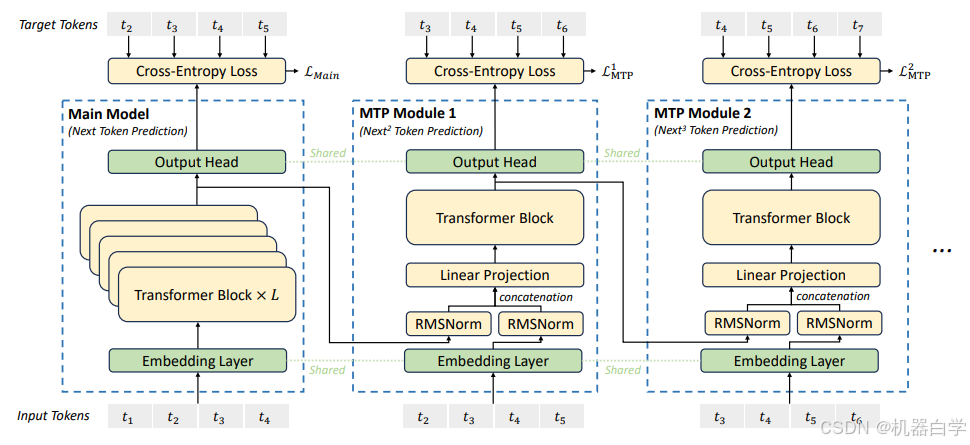
【论文翻译】DeepSeek-V3论文翻译——DeepSeek-V3 Technical Report——第一部分:引言与模型架构
论文原文链接:DeepSeek-V3/DeepSeek_V3.pdf at main deepseek-ai/DeepSeek-V3 GitHub 特别声明,本文不做任何商业用途,仅作为个人学习相关论文的翻译记录。本文对原文内容直译,一切以论文原文内容为准,对原文作者表示…...

python编程-类结构,lambda语法,原始字符串
一个类的基本结构包括以下部分: 类名:用来描述具有相同属性和方法的对象的集合。 属性:类变量或实例变量,用于处理类及其实例对象的相关数据。 方法:在类中定义的函数,用于执行特定操作。 构造器ÿ…...

C++:代码常见规范1
头文件包含 (1)先系统头文件,后用户头文件:这是一个良好的编程习惯。系统头文件通常包含标准库的定义,而用户头文件则包含项目特定的定义。将系统头文件放在前面可以避免因用户头文件中的定义与系统头文件冲突而导致的问题。 #include <…...

C++(进阶五)--STL--用一颗红黑树封装map和set
目录 1.红黑树源码(简略版) 2.模板参数的控制 3.红黑树的结点 4.迭代器的实现 正向迭代器 反向迭代器 5.set的模拟实现 6.map的模拟实现 7.封装完成后的代码 RBTree.h mymap.h myset.h 1.红黑树源码(简略版) 下面我们…...

DeepSeek服务器繁忙问题的原因分析与解决方案
一、引言 随着人工智能技术的飞速发展,DeepSeek 等语言模型在众多领域得到了广泛应用。然而,在春节这段时间的使用过程中,用户常常遭遇服务器繁忙的问题,这不仅影响了用户的使用体验,也在一定程度上限制了模型的推广和…...

《手札·开源篇》数字化转型助力永磁电机企业降本增效:快速设计软件如何让研发效率提升40%?
数字化转型助力永磁电机企业降本增效:快速设计软件如何让研发效率提升40%? 一、痛点:传统研发模式正在吃掉企业的利润 永磁电机行业面临两大挑战: 研发周期长:一款新电机从设计到量产需6-12个月,电磁计算…...

飞算JavaAI :AI + 时代下的行业趋势引领者与推动者
在科技飞速发展的当下,AI 时代正以前所未有的速度重塑着各个行业的格局,而软件开发领域更是这场变革的前沿阵地。在众多创新力量之中,飞算JavaAI 脱颖而出,宛如一颗璀璨的新星,凭借其独树一帜的特性与强大功能&#x…...

【重新认识C语言----结构体篇】
目录 -----------------------------------------begin------------------------------------- 引言 1. 结构体的基本概念 1.1 为什么需要结构体? 1.2 结构体的定义 2. 结构体变量的声明与初始化 2.1 声明结构体变量 2.2 初始化结构体变量 3. 结构体成员的访…...

解决错误:CondaHTTPError: HTTP 000 CONNECTION FAILED for url
解决错误:CondaHTTPError: HTTP 000 CONNECTION FAILED for url 查看channels:vim ~/.condarcshow_channel_urls: true channels:- http://mirrors.tuna.tsinghua.edu.cn/anaconda/cloud/conda-forge/- http://mirrors.tuna.tsinghua.edu.cn/anaconda/cloud/msys2/…...

使用令牌桶算法通过redis实现限流
令牌桶算法是一种常用的限流算法,它可以平滑地控制请求的处理速率。在 Java 中结合 Redis 实现令牌桶算法,可以利用 Redis 的原子操作来保证多节点环境下的限流效果。 一 实现思路 初始化令牌桶:在 Redis 中存储令牌桶的相关信息࿰…...

Docker的进程和Cgroup概念
Docker的进程和Cgroup概念 容器里的进程组织或关系0号进程:containerd-shim1号进程:容器内的第一个进程进程收到信号后的三种反应两个特权信号在容器内执行 kill 命令的行为 Cgroup 介绍CPU Cgroup 中与 CFS 相关的参数Kubernetes 中的资源管理memory cg…...

Day68:类的多态
在面向对象编程(OOP)中,多态(Polymorphism)是指不同类的对象对同一消息作出响应的能力。换句话说,多态允许不同类的对象使用相同的方法名,但实现不同的行为。多态是通过继承和方法重写来实现的,通常可以分为方法重写和接口重载。 在 Python 中,多态常常通过方法重写来…...

一种解决SoC总线功能验证完备性的技术
1. 前言 通过总线将各个IP通过总线连接起来的SoC芯片是未来的大趋势,也是缩短芯片开发周期,抢先进入市场的常用方法。如何确保各个IP是否正确连接到总线上,而且各IP的地址空间分配是否正确,是一件很棘手的事情。本文提出了一种新…...

【Linux系统】线程:线程库 / 线程栈 / 线程库源码阅读学习
一、线程库 1、线程库介绍:命名与设计 命名:线程库通常根据其实现目的和平台特性进行命名。例如,POSIX标准定义了Pthreads(POSIX Threads),这是一个广泛使用的线程库规范,适用于多种操作系统。此…...

深度剖析 Redis:缓存穿透、击穿与雪崩问题及实战解决方案
一、缓存基本使用逻辑 在应用程序中,为了提高数据访问效率,常常会使用缓存。一般的缓存使用逻辑是:根据 key 去 Redis 查询是否有数据,如果命中就直接返回缓存中的数据;如果缓存不存在,则查询数据库&#…...

如何使用el-table的多选框
对el-table再次封装,使得功能更加强大! 本人在使用el-table时,因为用到分页,导致上一页勾选的数据在再次返回时,没有选中,故在原有el-table组件的基础之上再次进行了封装。 1.首先让某些不需要勾选的列表进…...

【工具变量】上市公司企业渐进式创新程度及渐进式创新锁定数据(1991-2023年)
测算方式: 参考顶刊《经济研究》孙雅慧(2024)老师的做法,用当期创新和往期创新的内容重叠度作为衡量渐进式创新程度的合理指标。通过搜集海量专利摘要,测算当前专利申请和既有专利的内容相似度,反映企业在…...

LM Studio 部署本地大语言模型
一、下载安装 1.搜索:lm studio LM Studio - Discover, download, and run local LLMs 2.下载 3.安装 4.更改成中文 二、下载模型(软件内下载) 1.选择使用代理,否则无法下载 2.更改模型下载目录 默认下载位置 C:\Users\用户名\.lmstudio\models 3.搜…...

嵌入式工程师面试经验分享与案例解析
嵌入式工程师岗位受到众多求职者的关注。面试流程严格,技术要求全面,涵盖C/C编程、数据结构与算法、操作系统、嵌入式系统开发、硬件驱动等多个方向。本文将结合真实案例,深入剖析嵌入式工程师的面试流程、常见问题及应对策略,帮助…...

英特尔至强服务器CPU销量创14年新低,AMD取得进展
过去几年是英特尔56年历史上最艰难的时期之一。该公司在晶圆代工、消费级处理器和服务器芯片等各个领域都面临困境。随着英特尔重组其晶圆代工业务,新的分析显示其服务器业务的现状和未来前景不容乐观。 英特尔最近发布的10-K文件显示:“数据中心和人工…...

判断您的Mac当前使用的是Zsh还是Bash:echo $SHELL、echo $0
要判断您的Mac当前使用的是Zsh还是Bash,可以使用以下方法: 查看默认Shell: 打开“终端”应用程序,然后输入以下命令: echo $SHELL这将显示当前默认使用的Shell。例如,如果输出是/bin/zsh,则说明您使用的是Z…...

使用Springboot实现MQTT通信
目录 一、MQ协议 MQTT 特点 MQTT 工作原理 MQTT 主要应用场景 MQTT 配置与注意事项 二、MQTT服务器搭建 三、参考案例 MQTT(Message Queuing Telemetry Transport)是一种基于发布/订阅模型的轻量级消息传输协议,常用于物联网ÿ…...

植物大战僵尸融合版(电脑/安卓)
《植物大战僵尸融合版》是一款由B站UP主“蓝飘飘fly”制作的同人策略塔防游戏,基于经典《植物大战僵尸》玩法,加入了独特的植物融合系统。 出于方便,软件是便携版,解压后双击即可畅玩。 游戏主页依旧是植物大战僵尸经典界面。右下…...

02DevOps基础环境准备
准备两台Linux的操作系统,最简单的方式就是在本机上使用虚拟机搭建两个操作系统(实际生产环境是两台服务器,虚拟机的方式用于学习使用) 我搭建的两台服务器的ip分别是192.168.1.10、192.168.1.11 192.168.1.10服务器用于安装doc…...

苍穹外卖-day12(工作台、数据导出)
工作台Apache POI导出运营数据Excel报表 功能实现:工作台、数据导出 工作台效果图: 数据导出效果图: 在数据统计页面点击数据导出:生成Excel报表 1. 工作台 1.1 需求分析和设计 1.1.1 产品原型 工作台是系统运营的数据看板&…...