
Vue(4)
一.组件的三大组成部分-注意点说明

(1)scoped样式冲突
默认情况:写在组件中的样式会全局生效 → 因此很容易造成多个组件之间的样式冲突
①全局样式:默认组件中的样式会作用到全局
②局部样式:可以给组件加上scoped属性,可以让样式只作用于当前组件
<template><div class="base-one">BaseOne</div>
</template><script>
export default {}
</script><style scoped>
/* 1.style中的样式 默认是作用到全局的2.加上scoped可以让样式变成局部样式组件都应该有独立的样式,推荐加scoped(原理)-----------------------------------------------------scoped原理:1.给当前组件模板的所有元素,都会添加上一个自定义属性data-v-hash值data-v-5f6a9d56  用于区分开不通的组件2.css选择器后面,被自动处理,添加上了属性选择器div[data-v-5f6a9d56]
*/
div{border: 3px solid blue;margin: 30px;
}
</style>
<template><div class="base-one">BaseTwo</div>
</template><script>
export default {}
</script><style scoped>div{border: 3px solid red;margin: 30px;}
</style>
(2)data一个函数
一个组件的data选项必须是一个函数 → 保证每个各组件实例,维护独立的一份数据对象
每次创建新的组件实例,都会新执行一次data函数,得到一个新对象
<template><div class="base-count"><button @click="count--">-</button><span>{{ count }}</span><button @click="count++">+</button></div>
</template><script>
export default {// data() {//   console.log('函数执行了')//   return {//     count: 100,//   }// },data: function () {return {count: 100,}},
}
</script><style>
.base-count {margin: 20px;
}
</style>
(3)什么是组件通信
组件通信,就是指组件与组件之前的数据传递
组件的数据的独立的,无法直接访问其他组件的数据
想用其他组件的数据 → 组件通信
不同组件关系和组件通信方案分类
组件关系分类
1.父子关系 2.非父子关系
组件通信解决方案
父子通信流程图:
1.父组件通过props将数据传递给子组件
<template><div class="son" style="border:3px solid #000;margin:10px"><!-- 3.直接使用props的值 -->我是Son组件 {{title}}</div>
</template><script>
export default {name: 'Son-Child',// 2.通过props来接受props:['title']
}
</script><style></style>
<template><div class="app" style="border: 3px solid #000; margin: 10px">我是APP组件<!-- 1.给组件标签,添加属性方式 赋值 --><Son :title="myTitle"></Son></div>
</template><script>
import Son from './components/Son.vue'
export default {name: 'App',data() {return {myTitle: '学前端,就来黑马程序员',}},components: {Son,},
}
</script><style>
</style>
2.子组件利用$emit通知父组件修改更新
<template><div class="son" style="border: 3px solid #000; margin: 10px">我是Son组件 {{ title }}<button @click="changeFn">修改title</button></div>
</template><script>
export default {name: 'Son-Child',props: ['title'],methods: {changeFn() {// 通过this.$emit() 向父组件发送通知this.$emit('changTitle','传智教育')},},
}
</script><style>
</style>
<template><div class="app" style="border: 3px solid #000; margin: 10px">我是APP组件<!-- 2.父组件对子组件的消息进行监听 --><Son :title="myTitle" @changTitle="handleChange"></Son></div>
</template><script>
import Son from './components/Son.vue'
export default {name: 'App',data() {return {myTitle: '学前端,就来黑马程序员',}},components: {Son,},methods: {// 3.提供处理函数,提供逻辑handleChange(newTitle) {this.myTitle = newTitle},},
}
</script><style>
</style>

二.props讲解
prop定义:组件上注册的一些自定义属性
prop作用:向子组件传递数据
<template><div class="userinfo"><h3>我是个人信息组件</h3><div>姓名:{{username}}</div><div>年龄:{{age}}</div><div>是否单身:{{isSingle}}</div><div>座驾:{{car.brand}}</div><div>兴趣爱好:{{hobby.join('、')}}</div></div>
</template><script>
export default {props:['username','age','isSingle','car','hobby']
}
</script><style>
.userinfo {width: 300px;border: 3px solid #000;padding: 20px;
}
.userinfo > div {margin: 20px 10px;
}
</style>
<template><div class="app"><UserInfo:username="username":age="age":isSingle="isSingle":car="car":hobby="hobby"></UserInfo></div>
</template><script>
import UserInfo from './components/UserInfo.vue'
export default {data() {return {username: '小帅',age: 28,isSingle: true,car: {brand: '宝马',},hobby: ['篮球', '足球', '羽毛球'],}},components: {UserInfo,},
}
</script><style>
</style>
props校验:为组件的prop指定验证要求,不符合要求,控制带就会有错误提示 → 帮助开发者,快速发现错误
语法:
props:{校验的属性名:类型},
①类型校验
②非空校验
<template><div class="base-progress"><div class="inner" :style="{ width: w + '%' }"><span>{{ w }}%</span></div></div>
</template><script>
export default {// 1.基础写法(类型校验)// props: {//   w: Number,// },// 2.完整写法(类型、默认值、非空、自定义校验)props: {w: {type: Number,required: true,default: 0,validator(val) {// console.log(val)if (val >= 100 || val <= 0) {console.error('传入的范围必须是0-100之间')return false} else {return true}},},},
}
</script><style scoped>
.base-progress {height: 26px;width: 400px;border-radius: 15px;background-color: #272425;border: 3px solid #272425;box-sizing: border-box;margin-bottom: 30px;
}
.inner {position: relative;background: #379bff;border-radius: 15px;height: 25px;box-sizing: border-box;left: -3px;top: -2px;
}
.inner span {position: absolute;right: 0;top: 26px;
}
</style>
③默认值
<template><div class="base-progress"><div class="inner" :style="{ width: w + '%' }"><span>{{ w }}%</span></div></div>
</template><script>
export default {props: {w: Number,},
}
</script><style scoped>
.base-progress {height: 26px;width: 400px;border-radius: 15px;background-color: #272425;border: 3px solid #272425;box-sizing: border-box;margin-bottom: 30px;
}
.inner {position: relative;background: #379bff;border-radius: 15px;height: 25px;box-sizing: border-box;left: -3px;top: -2px;
}
.inner span {position: absolute;right: 0;top: 26px;
}
</style>
<template><div class="app"><BaseProgress :w="width"></BaseProgress></div>
</template><script>
import BaseProgress from './components/BaseProgress.vue'
export default {data() {return {width: 30,}},components: {BaseProgress,},
}
</script><style>
</style>
④自定义校验
props:{校验的属性名:{type:类型,required:true,default:默认值,validator(value){return 是否通过校验}}},
prop & data、单向数据流
共同点:都可以给组件提供数据
区别:
data的数据是自己的 → 随便改
prop的数据是外部的 → 不能直接改,要遵循单向数据流
<template><div class="base-count"><button @click="handleSub">-</button><span>{{ count }}</span><button @click="handleAdd">+</button></div>
</template><script>
export default {// 1.自己的数据随便修改  (谁的数据 谁负责)// data () {//   return {//     count: 100,//   }// },// 2.外部传过来的数据 不能随便修改props: {count: {type: Number,},},methods: {handleSub() {this.$emit('changeCount', this.count - 1)},handleAdd() {this.$emit('changeCount', this.count + 1)},},
}
</script><style>
.base-count {margin: 20px;
}
</style>
组件通信案例:小黑记事本 - 组件版
TodoFooter.vue
<template><!-- 统计和清空 --><footer class="footer"><!-- 统计 --><span class="todo-count">合 计:<strong> {{ list.length }} </strong></span><!-- 清空 --><button class="clear-completed" @click="clear">清空任务</button></footer>
</template><script>
export default {props: {list: {type: Array,},},methods:{clear(){this.$emit('clear')}}
}
</script><style>
</style>
TodoHeader
<template><!-- 输入框 --><header class="header"><h1>小黑记事本</h1><input placeholder="请输入任务" class="new-todo" v-model="todoName" @keyup.enter="handleAdd"/><button class="add" @click="handleAdd">添加任务</button></header>
</template><script>
export default {data(){return {todoName:''}},methods:{handleAdd(){// console.log(this.todoName)this.$emit('add',this.todoName)this.todoName = ''}}
}
</script><style></style>
TodoMain.vue
<template><!-- 列表区域 --><section class="main"><ul class="todo-list"><li class="todo" v-for="(item, index) in list" :key="item.id"><div class="view"><span class="index">{{ index + 1 }}.</span><label>{{ item.name }}</label><button class="destroy" @click="handleDel(item.id)"></button></div></li></ul></section>
</template><script>
export default {props: {list: {type: Array,},},methods: {handleDel(id) {this.$emit('del', id)},},
}
</script><style>
</style>
APP.vue
<template><!-- 主体区域 --><section id="app"><TodoHeader @add="handleAdd"></TodoHeader><TodoMain :list="list" @del="handelDel"></TodoMain><TodoFooter :list="list" @clear="clear"></TodoFooter></section>
</template><script>
import TodoHeader from './components/TodoHeader.vue'
import TodoMain from './components/TodoMain.vue'
import TodoFooter from './components/TodoFooter.vue'// 渲染功能:
// 1.提供数据: 提供在公共的父组件 App.vue
// 2.通过父传子,将数据传递给TodoMain
// 3.利用 v-for渲染// 添加功能:
// 1.手机表单数据  v-model
// 2.监听事件(回车+点击都要添加)
// 3.子传父,讲任务名称传递给父组件 App.vue
// 4.进行添加 unshift(自己的数据自己负责)
// 5.清空文本框输入的内容
// 6.对输入的空数据 进行判断// 删除功能
// 1.监听事件(监听删除的点击) 携带id
// 2.子传父,讲删除的id传递给父组件的App.vue
// 3.进行删除filter(自己的数据 自己负责)// 底部合计:父传子  传list 渲染
// 清空功能:子传父  通知父组件 → 父组件进行更新
// 持久化存储:watch深度监视list的变化 -> 往本地存储 ->进入页面优先读取本地数据
export default {data() {return {list: JSON.parse(localStorage.getItem('list')) || [{ id: 1, name: '打篮球' },{ id: 2, name: '看电影' },{ id: 3, name: '逛街' },],}},components: {TodoHeader,TodoMain,TodoFooter,},watch: {list: {deep: true,handler(newVal) {localStorage.setItem('list', JSON.stringify(newVal))},},},methods: {handleAdd(todoName) {// console.log(todoName)this.list.unshift({id: +new Date(),name: todoName,})},handelDel(id) {// console.log(id);this.list = this.list.filter((item) => item.id !== id)},clear() {this.list = []},},
}
</script><style>
html,
body {margin: 0;padding: 0;
}
body {background: #fff;
}
button {margin: 0;padding: 0;border: 0;background: none;font-size: 100%;vertical-align: baseline;font-family: inherit;font-weight: inherit;color: inherit;-webkit-appearance: none;appearance: none;-webkit-font-smoothing: antialiased;-moz-osx-font-smoothing: grayscale;
}body {font: 14px 'Helvetica Neue', Helvetica, Arial, sans-serif;line-height: 1.4em;background: #f5f5f5;color: #4d4d4d;min-width: 230px;max-width: 550px;margin: 0 auto;-webkit-font-smoothing: antialiased;-moz-osx-font-smoothing: grayscale;font-weight: 300;
}:focus {outline: 0;
}.hidden {display: none;
}#app {background: #fff;margin: 180px 0 40px 0;padding: 15px;position: relative;box-shadow: 0 2px 4px 0 rgba(0, 0, 0, 0.2), 0 25px 50px 0 rgba(0, 0, 0, 0.1);
}
#app .header input {border: 2px solid rgba(175, 47, 47, 0.8);border-radius: 10px;
}
#app .add {position: absolute;right: 15px;top: 15px;height: 68px;width: 140px;text-align: center;background-color: rgba(175, 47, 47, 0.8);color: #fff;cursor: pointer;font-size: 18px;border-radius: 0 10px 10px 0;
}#app input::-webkit-input-placeholder {font-style: italic;font-weight: 300;color: #e6e6e6;
}#app input::-moz-placeholder {font-style: italic;font-weight: 300;color: #e6e6e6;
}#app input::input-placeholder {font-style: italic;font-weight: 300;color: gray;
}#app h1 {position: absolute;top: -120px;width: 100%;left: 50%;transform: translateX(-50%);font-size: 60px;font-weight: 100;text-align: center;color: rgba(175, 47, 47, 0.8);-webkit-text-rendering: optimizeLegibility;-moz-text-rendering: optimizeLegibility;text-rendering: optimizeLegibility;
}.new-todo,
.edit {position: relative;margin: 0;width: 100%;font-size: 24px;font-family: inherit;font-weight: inherit;line-height: 1.4em;border: 0;color: inherit;padding: 6px;box-shadow: inset 0 -1px 5px 0 rgba(0, 0, 0, 0.2);box-sizing: border-box;-webkit-font-smoothing: antialiased;-moz-osx-font-smoothing: grayscale;
}.new-todo {padding: 16px;border: none;background: rgba(0, 0, 0, 0.003);box-shadow: inset 0 -2px 1px rgba(0, 0, 0, 0.03);
}.main {position: relative;z-index: 2;
}.todo-list {margin: 0;padding: 0;list-style: none;overflow: hidden;
}.todo-list li {position: relative;font-size: 24px;height: 60px;box-sizing: border-box;border-bottom: 1px solid #e6e6e6;
}.todo-list li:last-child {border-bottom: none;
}.todo-list .view .index {position: absolute;color: gray;left: 10px;top: 20px;font-size: 22px;
}.todo-list li .toggle {text-align: center;width: 40px;/* auto, since non-WebKit browsers doesn't support input styling */height: auto;position: absolute;top: 0;bottom: 0;margin: auto 0;border: none; /* Mobile Safari */-webkit-appearance: none;appearance: none;
}.todo-list li .toggle {opacity: 0;
}.todo-list li .toggle + label {/*Firefox requires `#` to be escaped - https://bugzilla.mozilla.org/show_bug.cgi?id=922433IE and Edge requires *everything* to be escaped to render, so we do that instead of just the `#` - https://developer.microsoft.com/en-us/microsoft-edge/platform/issues/7157459/*/background-image: url('data:image/svg+xml;utf8,%3Csvg%20xmlns%3D%22http%3A//www.w3.org/2000/svg%22%20width%3D%2240%22%20height%3D%2240%22%20viewBox%3D%22-10%20-18%20100%20135%22%3E%3Ccircle%20cx%3D%2250%22%20cy%3D%2250%22%20r%3D%2250%22%20fill%3D%22none%22%20stroke%3D%22%23ededed%22%20stroke-width%3D%223%22/%3E%3C/svg%3E');background-repeat: no-repeat;background-position: center left;
}.todo-list li .toggle:checked + label {background-image: url('data:image/svg+xml;utf8,%3Csvg%20xmlns%3D%22http%3A//www.w3.org/2000/svg%22%20width%3D%2240%22%20height%3D%2240%22%20viewBox%3D%22-10%20-18%20100%20135%22%3E%3Ccircle%20cx%3D%2250%22%20cy%3D%2250%22%20r%3D%2250%22%20fill%3D%22none%22%20stroke%3D%22%23bddad5%22%20stroke-width%3D%223%22/%3E%3Cpath%20fill%3D%22%235dc2af%22%20d%3D%22M72%2025L42%2071%2027%2056l-4%204%2020%2020%2034-52z%22/%3E%3C/svg%3E');
}.todo-list li label {word-break: break-all;padding: 15px 15px 15px 60px;display: block;line-height: 1.2;transition: color 0.4s;
}.todo-list li.completed label {color: #d9d9d9;text-decoration: line-through;
}.todo-list li .destroy {display: none;position: absolute;top: 0;right: 10px;bottom: 0;width: 40px;height: 40px;margin: auto 0;font-size: 30px;color: #cc9a9a;margin-bottom: 11px;transition: color 0.2s ease-out;
}.todo-list li .destroy:hover {color: #af5b5e;
}.todo-list li .destroy:after {content: '×';
}.todo-list li:hover .destroy {display: block;
}.todo-list li .edit {display: none;
}.todo-list li.editing:last-child {margin-bottom: -1px;
}.footer {color: #777;padding: 10px 15px;height: 20px;text-align: center;border-top: 1px solid #e6e6e6;
}.footer:before {content: '';position: absolute;right: 0;bottom: 0;left: 0;height: 50px;overflow: hidden;box-shadow: 0 1px 1px rgba(0, 0, 0, 0.2), 0 8px 0 -3px #f6f6f6,0 9px 1px -3px rgba(0, 0, 0, 0.2), 0 16px 0 -6px #f6f6f6,0 17px 2px -6px rgba(0, 0, 0, 0.2);
}.todo-count {float: left;text-align: left;
}.todo-count strong {font-weight: 300;
}.filters {margin: 0;padding: 0;list-style: none;position: absolute;right: 0;left: 0;
}.filters li {display: inline;
}.filters li a {color: inherit;margin: 3px;padding: 3px 7px;text-decoration: none;border: 1px solid transparent;border-radius: 3px;
}.filters li a:hover {border-color: rgba(175, 47, 47, 0.1);
}.filters li a.selected {border-color: rgba(175, 47, 47, 0.2);
}.clear-completed,
html .clear-completed:active {float: right;position: relative;line-height: 20px;text-decoration: none;cursor: pointer;
}.clear-completed:hover {text-decoration: underline;
}.info {margin: 50px auto 0;color: #bfbfbf;font-size: 15px;text-shadow: 0 1px 0 rgba(255, 255, 255, 0.5);text-align: center;
}.info p {line-height: 1;
}.info a {color: inherit;text-decoration: none;font-weight: 400;
}.info a:hover {text-decoration: underline;
}/*Hack to remove background from Mobile Safari.Can't use it globally since it destroys checkboxes in Firefox
*/
@media screen and (-webkit-min-device-pixel-ratio: 0) {.toggle-all,.todo-list li .toggle {background: none;}.todo-list li .toggle {height: 40px;}
}@media (max-width: 430px) {.footer {height: 50px;}.filters {bottom: 10px;}
}</style>
三.非父子通信(拓展)
(1) event bus 事件总线
作用:非父子组件之间,进行简易消息传递。(复杂场景 → Vuex)
1.创建一个都能访问到的事件总线(空Vue实例) → utils / EventBus . js
import Vue from 'vue'const Bus = new Vue()export default Bus
2.A组件(接收方),监听Bus实例的事件
created() {Bus.$on('sendMsg', (msg) => {// console.log(msg)this.msg = msg})}
3.B组件(发送方),触发Bus实例的事件
Bus.$emit('sendMsg', '今天天气不错,适合旅游')
(2)provide & inject:跨层级共享数据
1.父组件provide提供数据
export default {provide() {return {// 简单类型 是非响应式的color: this.color,// 复杂类型 是响应式的userInfo: this.userInfo,}},
2.子 / 孙组件inject取值使用
export default {inject: ['color', 'userInfo'],
}
四.v-model
(1)原理:v-model本质上是一个语法糖。例如应用在输入框上,就是value属性和input事件的合写
作用:提供数据的双向绑定
①数据变,视图跟着变:value
②视图变,数据跟着变@input
注意:$event用于在模板中,获取时间的形象
<template><div class="app"><input type="text" v-model="msg1" /><br /><!-- v-model的底层其实就是:value和 @input的简写 --><input type="text" :value="msg2" @input="msg2 = $event.target.value" /></div>
</template>
<script>
export default {data() {return {msg1: '',msg2: '',}},
}
</script>
(2)表单类组件封装 & v-model简化代码
1.表单类组件封装 → 实现子组件和父组件数据的双向绑定
①父传子:数据应该是负组件props传递过来的,v-model拆解绑定数据
②子传父:监听输入,子传父传值给父组件修改
父组件:
<BaseSelect :cityId="selectId" @事件名="selectId=$event"></BaseSelect>
子组件:
<select :value="value" @change="selectCity">
props: {value: String,},
methods: {selectCity(e) {this.$emit('input', e.target.value)},},
2.父组件v-model简化代码,实线子组件和父组件数据的双向绑定
①子组件中:props通过value接收,事件触发input
②父组件中:v-model给组件直接绑数据(:value + @input )
父组件:
<BaseSelect :value="selectId" @input="selectId=$event"></BaseSelect>
子组件:
<select :value="value" @change="handleChange">
props: {value: String,},
methods: {handleChange(e) {this.$emit('input', e.target.value)},},
五.sync修饰符
作用:可以实现子组件与父组件数据的双向绑定,简化代码
特点:prop属性名,可以自定义,非固定为value
场景:封装弹框类的基础组件,visible属性true显示false隐藏
<!-- isShow.sync => :isShow="isShow" @update:isShow="isShow=$event" --><BaseDialog :isShow.sync="isShow"></BaseDialog>
props: {isShow: Boolean,},methods:{closeDialog(){this.$emit('update:isShow',false)}
六.ref 和 $refs
作用:利用ref和$refs可以用于获取dom元素或组件实例
特点:查找范围 → 当前组件内(更精准稳定)
①获取dom
1.目标标签 - 添加ref属性
<div ref="ChartRef">子组件</div>
2.恰当时机,通过this . $refs . xxx,获取目标标签
mounted() {// 基于准备好的dom,初始化echarts实例// document.querySelector 会查找项目中所有的元素// $refs只会在当前组件查找盒子// var myChart = echarts.init(document.querySelector('.base-chart-box'))var myChart = echarts.init(this.$refs.baseChartBox)// 绘制图表}
②获取组件
1.目标标签 - 添加ref属性
<BaseForm ref="baseForm">子组件</BaseForm>
2.恰当时机,通过this . $refs . xxx,获取目标标签,就可以调用组件对象里面的方法
this.$refs.baseForm.组件方法()
七.Vue异步更新、$nextTick
1.点击编辑,显示编辑框
2.让编辑框,立即获取焦点
相关文章:
Vue(4)
一.组件的三大组成部分-注意点说明 (1)scoped样式冲突 默认情况:写在组件中的样式会全局生效 → 因此很容易造成多个组件之间的样式冲突 ①全局样式:默认组件中的样式会作用到全局 ②局部样式:可以给组件加上scoped属…...

4G核心网的演变与创新:从传统到虚拟化的跨越
4G核心网 随着移动通信技术的不断发展,4G核心网已经经历了从传统的硬件密集型架构到现代化、虚拟化网络架构的重大转型。这一演变不仅提升了网络的灵活性和可扩展性,也为未来的5G、物联网(LOT)和边缘计算等技术的发展奠定了基础。…...

探讨如何在AS上构建webrtc(2)从sdk/android/Build.gn开始
全文七千多字,示例代码居多别担心,没有废话,不建议跳读。 零、梦开始的地方 要发美梦得先入睡,要入睡得找能躺平的地方。那么能躺平编译webrtc-android的地方在哪?在./src/sdk/android/Build.gn。Build.gn是Build.nin…...

C语言时间相关宏定义
在C语言中,预处理器提供了一些与时间相关的宏定义,用于在编译时获取日期、时间等信息。除了 __TIMESTAMP__ 和 __DATE__,还有以下相关的宏定义: __DATE__ 当前编译日期的字符串,格式为 "Mmm dd yyyy"&#x…...

【Linux基础】Linux下常用的系统命令
一、前言 本文主要总结了工作中常用的linux指令,有遇到新的命令会不定期更新。 二、系统监控和进程管理指令 2.1 ps命令 作用:查看当前进程信息。 常用选项: -e: 显示所有进程,包括其他用户的进程。-f: 显示更详细的进程信息…...

Spring Boot 线程池自定义拒绝策略:解决任务堆积与丢失问题
如何通过自定义线程池提升系统稳定性 背景 在高并发系统中,线程池管理至关重要。默认线程池可能导致: 资源浪费(创建过多线程导致 OOM)任务堆积(队列满后任务被拒绝)任务丢失(默认拒绝策略丢…...

人工智能D* Lite 算法-动态障碍物处理、多步预测和启发式函数优化
在智能驾驶领域,D* Lite 算法是一种高效的动态路径规划算法,适用于处理环境变化时的路径重规划问题。以下将为你展示 D* Lite 算法的高级用法,包含动态障碍物处理、多步预测和启发式函数优化等方面的代码实现。 代码实现 import heapq impo…...

C#常用集合优缺点对比
先上结论: 在C#中,链表、一维数组、字典、List<T>和ArrayList是常见的数据集合类型,它们各有优缺点,适用于不同的场景。以下是它们的比较: 1. 一维数组 (T[]) 优点: 性能高:数组在内存中…...

多线程下jdk1.7的头插法导致的死循环问题
20250208 多线程下jdk1.7的头插法导致的死循环问题 多线程下jdk1.7的头插法导致的死循环问题 【新版Java面试专题视频教程,java八股文面试全套真题深度详解(含大厂高频面试真题)】 jdk1.7在hashmap扩容时使用的是头插法,所以扩容…...
MySQL的深度分页如何优化?
大家好,我是锋哥。今天分享关于【MySQL的深度分页如何优化?】面试题。希望对大家有帮助; MySQL的深度分页如何优化? 1000道 互联网大厂Java工程师 精选面试题-Java资源分享网 MySQL在处理深度分页(即查询页数较大时,通常是查询…...

uniapp中使用uCharts折线图X轴数据间隔显示
1、先看官网 https://www.ucharts.cn/ 2、设置代码 "xAxisDemo3":function(val, index, opts){if(index % 2 0){return val}else {return }}, 再在数据中引入设置好样式...

VMware下Linux和macOS安装VSCode一些总结
本文介绍VMware下Linux和macOS安装VSCode的一些内容,包括VSCode编译器显示中文以及安装.NET环境和Python环境。 VSCode下载地址:Download Visual Studio Code - Mac, Linux, Windows 一.Linux系统下 1.安装中文包 按 Ctrl Shift P 打开命令面板。输…...

公司配置内网穿透方法笔记
一、目的 公司内部有局域网,局域网上有ftp服务器,有windows桌面服务器; 在内网环境下,是可以访问ftp服务器以及用远程桌面登录windows桌面服务器的; 现在想居家办公时,也能访问到公司内网的ftp服务器和win…...

【Windows/C++/yolo开发部署02:正确方法】将自定义实例分割模型导出为 ONNX 格式
【完整项目下载地址】: 【TensorRT部署YOLO项目:实例分割+目标检测】+【C++和python两种方式】+【支持linux和windows】资源-CSDN文库 目录 写在前面 环境准备 安装必要的库 下载模型并开始转换 解决依赖问题 安装 ONNX 降级 Protobuf 最终转换 总结 写在前面 在…...
国产编辑器EverEdit - 编辑辅助功能介绍
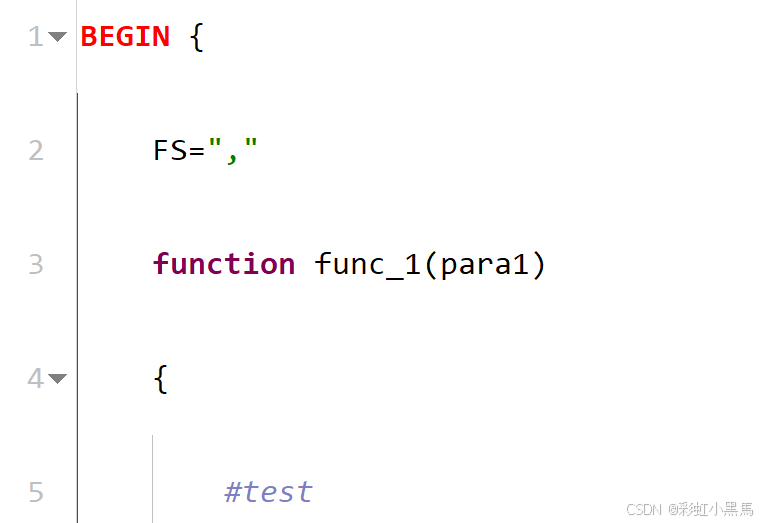
1 编辑辅助功能 1.1 各编辑辅助选项说明 1.1.1 行号 打开该选项时,在编辑器主窗口左侧显示行号,如下图所示: 1.1.2 文档地图 打开该选项时,在编辑器主窗口右侧靠近垂直滚动条的地方显示代码的缩略图,如下图所示&…...

Jupyter Notebook自动保存失败等问题的解决
一、未生成配置文件 需要在命令行中,执行下面的命令自动生成配置文件 jupyter notebook --generate-config 执行后会在 C:\Users\用户名\.jupyter目录中生成文件 jupyter_notebook_config.py 二、在网页端打开Jupyter Notebook后文件保存失败;运行代码…...

Shapefile格式文件解析和显示
Java实现GIS SHP文件格式的解析和显示,JDK19下编译,awt图形系统显示。 SHP文件对应的属性存储在DBF格式数据库中,解析见:DBASE DBF数据库文件解析_数据库文件在线解析-CSDN博客 解析SHP文件代码: public static Shap…...

大语言模型需要的可观测性数据的关联方式
可观测性数据的关联方式及其优缺点 随着现代分布式架构和微服务的普及,可观测性(Observability)已经成为确保系统健康、排查故障、优化性能的重要组成部分。有效的可观测性数据关联方式不仅能够帮助我们实时监控系统的运行状态,还…...

wordpressAI工具,已接入Deepseek 支持自动生成文章、生成图片、生成长尾关键词、前端AI窗口互动、批量采集等
基于关键词或现有内容生成SEO优化的文章,支持多种AI服务(如OpenAI、百度文心一言、智谱AI等),并提供定时任务、内容采集、关键词生成等功能。 核心功能 文章生成 关键词生成:根据输入的关键词生成高质量文章。 内容…...

解构赋值在 TypeScript 中的妙用:以 Babylon.js 的 loadModel 函数为例
在现代 JavaScript 和 TypeScript 开发中,解构赋值(Destructuring Assignment)是一种非常实用的特性,它能够让代码更加简洁、易读且高效。今天,我们就通过一个实际的例子——在 Babylon.js 中加载 3D 模型的 loadMod…...

mysql8安装时提示-缺少Microsoft Visual C++ 2019 x64 redistributable
MySQL8.0安装包mysql-8.0.1-winx64进行安装,提示:This application requires Visual Studio 2019 x64Redistributable, Please install the Redistributable then runthis installer again。出现这个错误是因为我们电脑缺少Microsoft Visual C 这个程序&…...

物品匹配问题-25寒假牛客C
登录—专业IT笔试面试备考平台_牛客网 这道题看似是在考察位运算,实则考察的是n个物品,每个物品有ai个,最多能够得到多少个物品的配对.观察题目可以得到,只有100,111,010,001(第一位是ci,第二位是ai,第三位是bi)需要进行操作,其它都是已经满足条件的对,可以假设对其中两个不同…...

学习数据结构(6)单链表OJ上
1.移除链表元素 解法一:(我的做法)在遍历的同时移除,代码写法比较复杂 解法二:创建新的链表,遍历原链表,将非val的节点尾插到新链表,注意,如果原链表结尾是val节点需要将…...
03/29 使用 海康SDK 对接时使用的 MysqlUtils
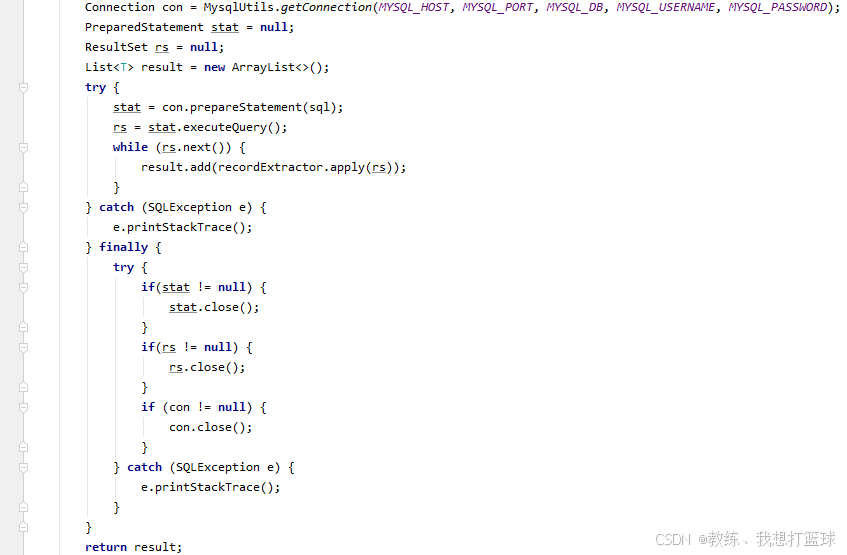
前言 最近朋友的需求, 是需要使用 海康sdk 连接海康设备, 进行数据的获取, 比如 进出车辆, 进出人员 这一部分是 资源比较贫瘠时的一个 Mysql 工具类 测试用例 public class MysqlUtils {public static String MYSQL_HOST "192.168.31.9";public static int MY…...

全志A133 android10 thermal温控策略配置调试
一,功能介绍 Thermal简称热控制系统,其功能是通过temperature sensor(温度传感器)测量当前CPU、GPU等设备的温度值,然后根据此温度值,影响CPU、GPU等设备的调频策略,对CPU、GPU等设备的最大频率…...

知识图谱智能应用系统:数据存储架构与流程解析
在当今数字化时代,知识图谱作为一种强大的知识表示和管理工具,正逐渐成为企业、科研机构以及各类智能应用的核心技术。知识图谱通过将数据转化为结构化的知识网络,不仅能够高效地存储和管理海量信息,还能通过复杂的查询和推理,为用户提供深度的知识洞察。然而,构建一个高…...

mac下生成.icns图标
笔记原因: 今日需要在mac下开发涉及图标文件的使用及icons文件的生成,所以记录一下。 网络上都是一堆命令行需要打印太麻烦了,写一个一键脚本。 步骤一 将需要生成的png格式文件重命名为“pic.png” mv xxxx.png pic.png 步骤二 下载我…...

Dev-cpp C语言编写和调用dll
Dev-cpp新建DLL项目。 dllmain.cpp #include "dll.h" #include <windows.h>int add(int a, int b) { return a b; } dll.h #ifndef _DLL_H_ #define _DLL_H_extern "C" __declspec(dllexport) int add(int a, int b);#endif 调用DLL&#…...
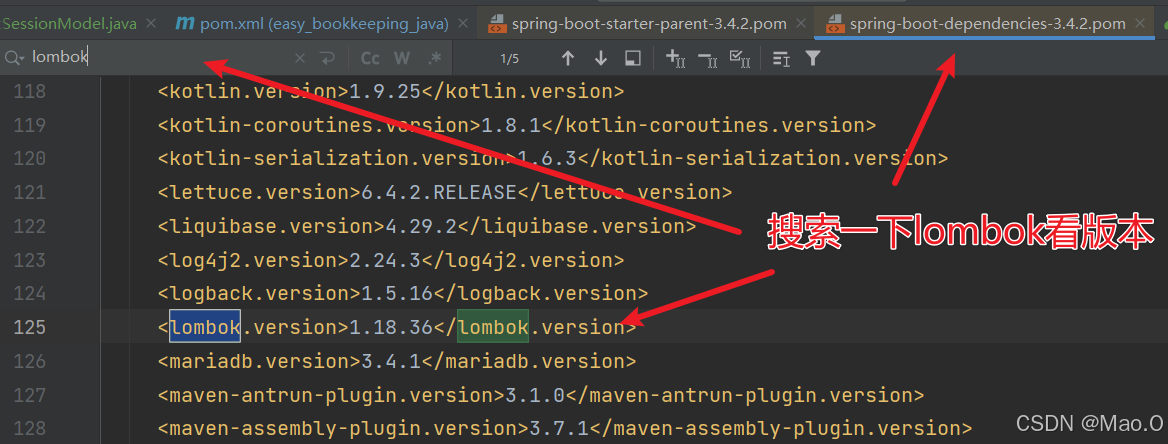
IDEA编写SpringBoot项目时使用Lombok报错“找不到符号”的原因和解决
目录 概述|背景 报错解析 解决方法 IDEA配置解决 Pom配置插件解决 概述|背景 报错发生背景:在SpringBoot项目中引入Lombok依赖并使用后出现"找不到符号"的问题。 本文讨论在上述背景下发生的报错原因和解决办法,如果仅为了解决BUG不论原…...

差速驱动机器人MPC算法实现-C++
差速驱动机器人,其运动学模型需要考虑线速度和角速度。MPC(模型预测控制)需要建立预测模型,并在每个控制周期内求解优化问题。 差速驱动机器人的运动学方程通常包括位置(x, y)和航向角θ,线速度…...