
Android车机DIY开发之软件篇(十二) AOSP12下载编译
Android车机DIY开发之软件篇(十二) AOSP12下载编译
sudo apt-get update
sudo apt-get install git-core gnupg flex bison gperf build-essential zip curl zlib1g-dev gcc-multilib g+±multilib libc6-dev-i386 lib32ncurses5-dev libx11-dev lib32z-dev ccache libgl1-mesa-dev libxml2-utils xsltproc unzip python-pyelftools python3-pyelftools device-tree-compiler libfdt-dev libfdt1 libssl-dev liblz4-tool python-dev libncurses5 make
sudo rm -rf /usr/bin/python
sudo ln -s /usr/bin/python2 /usr/bin/python
git config --global user.name “赵川”
git config --global user.email"zc1508890767@gmail.com"
sudo apt-get install libqt5x11extras5
mkdir ~/bin
PATH=~/bin:$PATH
curl https://mirrors.tuna.tsinghua.edu.cn/git/git-repo > ~/bin/repo
chmod a+x ~/bin/repo
repo的运行过程中会尝试访问官方的git源更新repo自己,如果想使用tuna的镜像源进行更新,可以将如下内容复制到你的~/.bashrc里
export REPO_URL=‘https://mirrors.tuna.tsinghua.edu.cn/git/git-repo/’
cd …
source ~/.bashrc
cd AOSP12/
repo init -u https://aosp.tuna.tsinghua.edu.cn/platform/manifest -b android-12.0.0_r13
repo sync
source build/envsetup.sh
lunch
build_build_var_cache
lunch 72
make
emulator -gpu swiftshader_indirect
emulator -gpu off
emulator -wipe-data -gpu swiftshader_indirect
emulator -no-snapshot-load
1. aosp_akita-trunk_staging-userdebug
2. aosp_arm-trunk_staging-eng
3. aosp_arm64-trunk_staging-eng
4. aosp_bluejay-trunk_staging-userdebug
5. aosp_bluejay_car-trunk_staging-userdebug
6. aosp_caiman-trunk_staging-userdebug
7. aosp_cf_arm64_auto-trunk_staging-userdebug
8. aosp_cf_arm64_phone-trunk_staging-userdebug
9. aosp_cf_riscv64_phone-trunk_staging-userdebug
10. aosp_cf_x86_64_auto-trunk_staging-userdebug
11. aosp_cf_x86_64_auto_mdnd-trunk_staging-userdebug
12. aosp_cf_x86_64_foldable-trunk_staging-userdebug
13. aosp_cf_x86_64_only_phone_hsum-trunk_staging-userdebug
14. aosp_cf_x86_64_pc-trunk_staging-userdebug
15. aosp_cf_x86_64_phone-trunk_staging-userdebug
16. aosp_cf_x86_64_tv-trunk_staging-userdebug
17. aosp_cf_x86_tv-trunk_staging-userdebug
18. aosp_cheetah-trunk_staging-userdebug
19. aosp_cheetah_car-trunk_staging-userdebug
20. aosp_cheetah_hwasan-trunk_staging-userdebug
21. aosp_cloudripper-trunk_staging-userdebug
22. aosp_comet-trunk_staging-userdebug
23. aosp_felix-trunk_staging-userdebug
24. aosp_husky-trunk_staging-userdebug
25. aosp_husky_car-trunk_staging-userdebug
26. aosp_komodo-trunk_staging-userdebug
27. aosp_lynx-trunk_staging-userdebug
28. aosp_oriole-trunk_staging-userdebug
29. aosp_oriole_car-trunk_staging-userdebug
30. aosp_panther-trunk_staging-userdebug
31. aosp_panther_car-trunk_staging-userdebug
32. aosp_panther_hwasan-trunk_staging-userdebug
33. aosp_raven-trunk_staging-userdebug
34. aosp_raven_car-trunk_staging-userdebug
35. aosp_ravenclaw-trunk_staging-userdebug
36. aosp_redfin_car-trunk_staging-userdebug
37. aosp_ripcurrent-trunk_staging-userdebug
38. aosp_ripcurrent24-trunk_staging-userdebug
39. aosp_ripcurrentpro-trunk_staging-userdebug
40. aosp_shiba-trunk_staging-userdebug
41. aosp_slider-trunk_staging-userdebug
42. aosp_sunfish_car-trunk_staging-userdebug
43. aosp_tangorpro-trunk_staging-userdebug
44. aosp_tangorpro_car-trunk_staging-userdebug
45. aosp_tokay-trunk_staging-userdebug
46. aosp_trout_arm64-trunk_staging-userdebug
47. aosp_trout_x86_64-trunk_staging-userdebug
48. aosp_whitefin-trunk_staging-userdebug
49. aosp_x86-trunk_staging-eng
50. aosp_x86_64-trunk_staging-eng
51. arm_krait-trunk_staging-eng
52. arm_v7_v8-trunk_staging-eng
53. armv8-trunk_staging-eng
54. armv8_cortex_a55-trunk_staging-eng
55. armv8_kryo385-trunk_staging-eng
56. db845c-trunk_staging-userdebug
57. gsi_car_arm64-trunk_staging-userdebug
58. gsi_car_x86_64-trunk_staging-userdebug
59. hikey-trunk_staging-userdebug
60. hikey64_only-trunk_staging-userdebug
61. hikey960-trunk_staging-userdebug
62. hikey960_tv-trunk_staging-userdebug
63. hikey_tv-trunk_staging-userdebug
64. poplar-trunk_staging-eng
65. poplar-trunk_staging-user
66. poplar-trunk_staging-userdebug
67. qemu_trusty_arm64-trunk_staging-userdebug
68. riscv64-trunk_staging-eng
69. sdk_car_arm64-trunk_staging-userdebug
70. sdk_car_cw_x86_64-trunk_staging-userdebug
71. sdk_car_md_x86_64-trunk_staging-userdebug
72. sdk_car_x86_64-trunk_staging-userdebug
73. silvermont-trunk_staging-eng
74. yukawa-trunk_staging-userdebug
Android Studio for Platform 使用方法
下载地址
sudo dpkg -i XXXX.deb
cd /opt/android-studio-for-platform/bin
./studio.sh
Repo checkout,选择你的AOSP源码根目录。
Lunch target,选择你的lunch目标,比如模拟器的话就填写sdk_phone_x86_64。
Module Path,选择你要调试的模块,比如调试frameworks模块的话,就添加选择frameworks。
Project name,填写你的项目名。
Location,这是你的Android Studio For Platform存储项目信息的路径。
点击右上角的Attach Debugger To Android Process
ADB 使用方法
export PATH=~/Android/Sdk/platform-tools:$PATH
如果需要移植生效写入~/.bashrc 然后 source ~/.bashrc
adb devices
adb shell
相关文章:
 AOSP12下载编译)
Android车机DIY开发之软件篇(十二) AOSP12下载编译
Android车机DIY开发之软件篇(十二) AOSP12下载编译 sudo apt-get update sudo apt-get install git-core gnupg flex bison gperf build-essential zip curl zlib1g-dev gcc-multilib gmultilib libc6-dev-i386 lib32ncurses5-dev libx11-dev lib32z-dev ccache libgl1-mesa-…...

docker 导出导入
1第一步骤docker save docker save -o database-export-4.1.0.tar database-export-4.1.0.jar:latest 2检查镜像ls -l, 注意:文件可能没有其他文件导出权限:chmod 644 database-export-4.1.0.tar 3在新的服务器导入: docker load -i databa…...

OSPF高级特性(3):安全特效
引言 OSPF的基础我们已经结束学习了,接下来我们继续学习OSPF的高级特性。为了方便大家阅读,我会将高级特性的几篇链接放在末尾,所有链接都是站内的,大家点击即可阅读: OSPF基础(1):工…...

基于SSM的农产品供销小程序+LW示例参考
1.项目介绍 系统角色:管理员、农户功能模块:用户管理、农户管理、产品分类管理、农产品管理、咨询管理、订单管理、收藏管理、购物车、充值、下单等技术选型:SSM,Vue(后端管理web),uniapp等测试…...

自然语言处理NLP入门 -- 第二节预处理文本数据
在自然语言处理(NLP)中,数据的质量直接影响模型的表现。文本预处理的目标是清理和标准化文本数据,使其适合机器学习或深度学习模型处理。本章介绍几种常见的文本预处理方法,并通过 Python 代码进行示例。 2.1 文本清理…...

android launcher拖动图标释放错位
由于为了设备流畅把所有动画效果设置为0.5,不设置为0是因为锁屏在开机时会有闪黑屏的现象。在此背景下,测试发现在拖动桌面图标时,在图标动画过程中错位时释放图标,则图标会留在错位的位置,不会自动对齐。 原因就是动…...

小结:OSPF的网络类型,LSA
OSPF(Open Shortest Path First)是一个基于链路状态的内部网关协议(IGP)。以下是对OSPF网络类型、LSA类型、序列号与Age作用,以及相关配置指令的详细讲解。 一、OSPF的网络类型 OSPF支持多种网络类型,不同…...

Unity URP的2D光照简介
官网工程,包括2d光照,动画,动效介绍: https://unity.com/cn/blog/games/happy-harvest-demo-latest-2d-techniques https://docs.unity3d.com/6000.0/Documentation/Manual/urp/Lights-2D-intro.html 人物脸部光照细节和脚上的阴影…...

笔试题笔记#3
1 一道bfs,唯一不同的是要对单链表中后继节点的编号排序 #include<bits/stdc.h> using namespace std;const int N10000;vector<int> headofNode[N]; int n,m; int d; bool st[N]; int parent[N]; vector<int> ans;void PrintAns(int i){//cout…...

Jenkins 部署 之 Mac 一
Jenkins 部署 之 Mac 一 一.Jenkins 部署依赖 JDK 环境 查看 Mac JDK 环境,如果没有安装,先安装 打开终端输入命令:java -version Mac安装配置 JDK 二. 检查 HomeBrew 安装 检查 HomeBrew 是否安装,终端输入命令:brew -v Mac安装HomeB…...

iOS Swift算法之KDF2
后端用Java开发的,用到了org.bouncycastle.crypto.generators.KDF2BytesGenerator,一开始在网上各种搜,没找到相关的接口或第三方库,白白浪费了几天时间,后面才想到照着Java代码自己实现,于是乎参考BaseKDF…...

钉钉位置偏移解决,钉钉虚拟定位打卡
虚拟定位打卡工具 一,介绍免费获取工具 一,介绍 提到上班打卡,职场人的内心戏估计能拍成一部连续剧。打卡,这俩字仿佛自带“紧箍咒”,让无数打工人又爱又恨。想象一下,你气喘吁吁地冲进办公室,…...

windows基于cpu安装pytorch运行faster-whisper-large-v3实现语音转文字
1.创建虚拟环境 conda create -n faster-whisper python3.10 conda activate faster-whisper 2.安装cpu版本的pytorch pip3 install torch torchvision torchaudio -i https://pypi.tuna.tsinghua.edu.cn/simple 3.验证pytorch安装结果 (faster-whisper) H:\big-model\faste…...

写一个鼠标拖尾特效
思路和逻辑 要实现鼠标拖尾特效,我们需要: 监听鼠标移动事件,获取鼠标的当前位置。在每次鼠标移动时,绘制一个小圆点或其他形状在鼠标的当前位置。将所有绘制的圆点连接起来,形成一条“尾巴”。使用动画效果让尾巴看…...

《深度LSTM vs 普通LSTM:训练与效果的深度剖析》
在深度学习领域,长短期记忆网络(LSTM)以其出色的处理序列数据能力而备受瞩目。而深度LSTM作为LSTM的扩展形式,与普通LSTM在训练和效果上存在着一些显著的不同。 训练方面 参数数量与计算量:普通LSTM通常只有一层或较少…...

【使用 rimraf 闪电删除 node_modules 目录】
使用 rimraf 闪电删除 node_modules 目录 你是否还在为删除项目下庞大的 node_modules 苦苦挣扎。删除失败,权限不足,响应半天后,响应半天后的失败。快来试试 rimraf 闪电般删除吧! 为什么需要专门工具删除 node_modulesÿ…...

使用DeepSeek和Kimi快速自动生成PPT
目录 步骤1:在DeepSeek中生成要制作的PPT主要大纲内容。 (1)在DeepSeek网页端生成 (2)在本地部署DeepSeek后,使用chatBox生成PPT内容 步骤2:将DeepSeek成的PPT内容复制到Kimi中 步骤3&…...

Webpack包
黑马程序员视频地址: Node.js与Webpack-16.Webpack简介以及体验 前言: 本篇中部分标题后标有数字,代表学习顺序 ,同时也可以作为使用顺序参考 webpack包 基础认识 初步使用 下载webpack包和webpack-cli包 注意点: 1…...
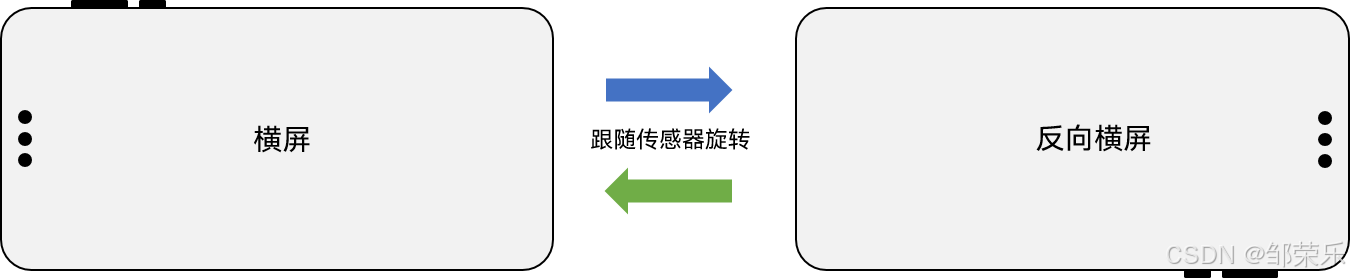
鸿蒙HarmonyOS NEXT开发:横竖屏切换开发实践
文章目录 一、概述二、窗口旋转说明1、配置module.json5的orientation字段2、调用窗口的setPreferredOrientation方法 四、性能优化1、使用自定义组件冻结2、对图片使用autoResize3、排查一些耗时操作 四、常见场景示例1、视频类应用横竖屏开发2、游戏类应用横屏开发 五、其他常…...
)
flink判断两个事件之间有没有超时(不使用CEP)
1.为啥不使用cep呢,cep的超时时间设置不好配置化,无法满足扩展要求 2.超时怎么界定。A事件发生后,过了N时间,还没有收到B事件,算超时。 代码如下: import com.alibaba.fastjson.JSONObject; import lombo…...

数学建模与MATLAB实现:稳定状态模型与资源管理策略
引言 在实际问题中,动态过程的瞬时性态往往难以直接分析,而研究其稳定状态的特征则更具实际意义。本章介绍如何通过微分方程稳定性理论,结合再生资源管理、种群竞争等案例,分析系统的平衡点及稳定性,为实际决策提供数…...

爬虫代码中如何设置请求间隔?
在爬虫代码中设置请求间隔是确保爬虫稳定运行并避免对目标服务器造成过大压力的重要措施。合理设置请求间隔可以有效降低被目标网站封禁IP的风险,同时也有助于爬虫程序的稳定运行。以下是几种常见的方法来设置请求间隔: 一、使用time.sleep() time.sle…...

基于Spring Security 6的OAuth2 系列之十五 - 高级特性--客户端认证方式
之所以想写这一系列,是因为之前工作过程中使用Spring Security OAuth2搭建了网关和授权服务器,但当时基于spring-boot 2.3.x,其默认的Spring Security是5.3.x。之后新项目升级到了spring-boot 3.3.0,结果一看Spring Security也升级…...
:getPopupContainer=“p=>p.parentNode“)
bug-ant下拉框解决下拉框跟随表单容器(指定下拉框挂载容器):getPopupContainer=“p=>p.parentNode“
1.前言 getPopupContainer是Ant Design Vue(简称Antd)的<a-select>组件的一个属性,用于指定下拉框的挂载容器。默认情况下,下拉框会挂载到body元素上,但有时你可能需要将下拉框挂载到其他元素上,例如…...

驱动开发系列35 - Linux Graphics GEM Buffer Object 介绍
一:概述 在 Linux 内核中,DRM(Direct Rendering Manager)模块 是用于管理显示硬件和图形渲染的核心框架。它负责协调用户空间应用程序(例如 X Server、Wayland Compositors、Mesa 等)和 GPU 硬件之间的通信,是 Linux 图形子系统的重要组成部分。 GEM (Graphics Executio…...

网络安全检测思路
对于主机的安全检测,我们通常直接采用nmap或者类似软件进行扫描,然后针对主机操作系统及其 开放端口判断主机的安全程度,这当然是一种方法,但这种方法往往失之粗糙,我仔细考虑了一下,觉 得按下面的流程进行…...

vue error Expected indentation of 2 spaces but found 4 indent
问题的原因在于eslint的风格样式缩进检测,eslint给出的规则是2个缩进,但我们通常是4个缩进,这就造成了报错。 关闭eslint的缩进不同报错:.eslintrc.js indent:off, 全部配置: module.exports {root: true,parserOpt…...

回环地址127.0.0.1跟自身IP有什么区别?
区别比较显著: 1.从定义上看: 127.0.0.1:这个地址被称为回环地址(Loopback Address),是用于本地通信的特殊IP地址,指向计算机自身。它用于测试和调试网络应用程序,无论设备是否连接…...

SQL CASE表达式的用法
SQL CASE表达式的用法 一、CASE表达式的基础语法简单CASE表达式搜索CASE表达式 二、简单CASE表达式的应用示例三、搜索CASE表达式的应用示例四、CASE表达式在聚合函数中的应用五、嵌套CASE表达式的应用 今天在也无力用到了CASE表达式,于是有了这篇博客,C…...

排序合集之快排详解(二)
摘要:快速排序是一种在实践中广泛使用的高效排序算法。它基于分治策略,平均时间复杂度为O(n log n),使其成为处理大型数据集的理想选择。本文将深入探讨快速排序的各种实现方式、优化技巧以及非递归实现,并通过C语言代码示例进行详…...