
在nodejs中使用RabbitMQ(三)Routing、Topics、Headers
示例一、Routing
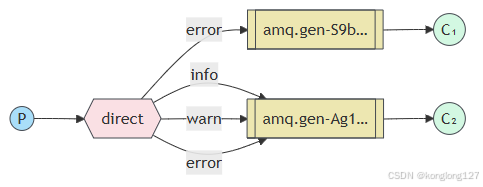
exchange类型direct,根据消息的routekey将消息直接转发到指定队列。producer.ts 生产者主要发送消息,consumer.ts负责接收消息,同时也都可以创建exchange交换机,创建队列,为队列绑定exchange,为避免重复简化代码,提高可维护性,队列相关操作移动到消费者端。队列,exchange交换机推荐在启动程序前手动创建好。
producer.ts
import RabbitMQ from 'amqplib/callback_api';function start() {RabbitMQ.connect("amqp://admin:admin1234@localhost:5672?heartbeat=60", function (err0, conn) {if (err0) {console.error("[AMQP]", err0.message);return setTimeout(start, 1000);}conn.on("error", function (err1) {if (err1.message !== "Connection closing") {console.error("[AMQP] conn error", err1.message);}});conn.on("close", function () {console.error("[AMQP] reconnecting");return setTimeout(start, 1000);});console.log("[AMQP] connected");conn.createChannel(async (err2, channel) => {if (err2) {console.error("[AMQP]", err2.message);return setTimeout(start, 1000);}const exchangeName = 'exchange1';channel.assertExchange(exchangeName,'direct',{durable: true},(err, ok) => {if (err) {console.log('exchange路由转发创建失败', err);} else {let args = ['info', 'warn', 'error'];for (let i = 0; i < 10; ++i) {// console.log('message send!', channel.sendToQueue(//   queueName,//   Buffer.from(`发送消息,${i}${Math.ceil(Math.random() * 100000)}`),//   { persistent: true, correlationId: 'ooooooooooooooo' },// 消息持久化,重启后存在//   // (err: any, ok: Replies.Empty)=>{}// ));const routeKey = args[Math.floor(Math.random() * 3)];console.log('消息发送是否成功', channel.publish(exchangeName,routeKey,Buffer.from(`发送消息,${i}${Math.ceil(Math.random() * 100000)},${routeKey}`),{ persistent: true },));}}});});setTimeout(() => {conn.close();process.exit(0);}, 1000);});
}start();
consumer.ts
import RabbitMQ, { type Replies } from 'amqplib/callback_api';RabbitMQ.connect('amqp://admin:admin1234@localhost:5672', (err0, conn) => {if (err0) {console.error(err0);return;}conn.createChannel(function (err1, channel) {const queueName = 'queue1';channel.assertQueue(queueName, { durable: true }, (err2) => {if (err2) {console.log('队列创建失败', err2);return;}console.log('[*] waiting...');// 一次只有一个未确认消息,防止消费者过载channel.prefetch(1);channel.bindQueue(queueName, 'exchange1', 'info', {}, (err3, ok) => {console.log(queueName, '队列绑定结果', err3, ok);});channel.bindQueue(queueName, 'exchange1', 'warn', {}, (err3, ok) => {console.log(queueName, '队列绑定结果', err3, ok);});channel.bindQueue(queueName, 'exchange1', 'error', {}, (err3, ok) => {console.log(queueName, '队列绑定结果', err3, ok);});channel.consume(queueName,function (msg) {console.log('接收到的消息', msg?.content.toString());/*// 手动确认取消channel.ack(msg); noAck:false,// 自动确认消息// if (msg) {//   channel.ack(msg);// } */},{noAck: true, // 是否自动确认消息// noAck: false},(err3: any, ok: Replies.Empty) => {console.log(err3, ok);},);});});conn.on("error", function (err1) {if (err1.message !== "Connection closing") {console.error("[AMQP] conn error", err1.message);}});conn.on("close", function () {console.error("[AMQP] reconnecting");});
});
consumer2.ts
import RabbitMQ from 'amqplib';const conn = await RabbitMQ.connect('amqp://admin:admin1234@localhost:5672');conn.on("error", function (err1) {if (err1.message !== "Connection closing") {console.error("[AMQP] conn error", err1.message);}
});conn.on("close", function () {console.error("[AMQP] reconnecting");
});const channel = await conn.createChannel();const queueName = 'queue2';await channel.assertQueue(queueName, { durable: true });console.log('[*] waiting...');// 一次只有一个未确认消息,防止消费者过载
await channel.prefetch(1);await channel.bindQueue(queueName, 'exchange1', 'error', {});channel.consume(queueName,function (msg) {console.log('接收到的消息', msg?.content.toString());/*// 手动确认取消channel.ack(msg); noAck:false,// 自动确认消息// if (msg) {//   channel.ack(msg);// } */},{noAck: true, // 是否自动确认消息// noAck: false},
);
示例二、Topic
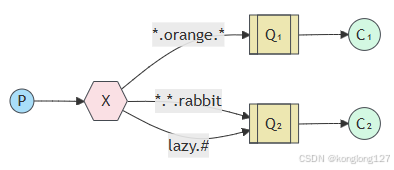
exchange的topic类型和direct类似,使用的仍然是routeKey进行匹配转发,topic支持通过*和#进行模糊查询。*代码一个具体单词,#代码0或多个单词。
producer.ts
import RabbitMQ from 'amqplib';async function start() {const conn = await RabbitMQ.connect("amqp://admin:admin1234@localhost:5672?heartbeat=60");conn.on("error", function (err1) {if (err1.message !== "Connection closing") {console.error("[AMQP] conn error", err1.message);}});conn.on("close", function () {console.error("[AMQP] reconnecting");return setTimeout(start, 1000);});try {const channel = await conn.createChannel();console.log("[AMQP] connected");const exchangeName = 'exchange4';await channel.assertExchange(exchangeName, 'topic', { durable: true });let args = ['123.orange.456', '123.456.rabbit', 'lazy', 'lazy.123', 'lazy.123.456'];for (let i = 0; i < 20; ++i) {// console.log('message send!', channel.sendToQueue(//   queueName,//   Buffer.from(`发送消息,${i}${Math.ceil(Math.random() * 100000)}`),//   { persistent: true, correlationId: 'ooooooooooooooo' },// 消息持久化,重启后存在//   // (err: any, ok: Replies.Empty)=>{}// ));const routeKey = args[Math.floor(Math.random() * args.length)];console.log('消息发送是否成功', channel.publish(exchangeName,routeKey,Buffer.from(`发送消息,${i}${Math.ceil(Math.random() * 100000)},${routeKey}`),{ persistent: true },));}} catch (err) {console.error("[AMQP]", err);return setTimeout(start, 1000);}setTimeout(() => {conn.close();process.exit(0);}, 1000);
}start();
consumer.ts
import RabbitMQ from 'amqplib';const conn = await RabbitMQ.connect('amqp://admin:admin1234@localhost:5672');conn.on("error", function (err1) {if (err1.message !== "Connection closing") {console.error("[AMQP] conn error", err1.message);}
});conn.on("close", function () {console.error("[AMQP] reconnecting");
});const channel = await conn.createChannel();const queueName = 'queue1';channel.assertQueue(queueName, { durable: true });console.log('[*] waiting...');// 一次只有一个未确认消息,防止消费者过载
await channel.prefetch(1);// *代码一个具体单词,#代码0或多个单词
await channel.bindQueue(queueName, 'exchange4', '*.orange.*', {});channel.consume(queueName, function (msg) {console.log('接收到的消息', msg?.content.toString());// 手动确认取消channel.ack(msg);设置noAck:false,// 自动确认消息noAck:true,不需要channel.ack(msg);try {if (msg) {channel.ack(msg);}} catch (err) {if (msg) {// 第二个参数,false拒绝当前消息// 第二个参数,true拒绝小于等于当前消息// 第三个参数,3false从队列中清除// 第三个参数,4true从新在队列中排队channel.nack(msg, false, false);}console.log(err);}
}, {// noAck: true, // 是否自动确认消息,为true不需要调用channel.ack(msg);noAck: false
});
consumer2.ts
import RabbitMQ, { type Replies } from 'amqplib/callback_api';RabbitMQ.connect('amqp://admin:admin1234@localhost:5672', (err0, conn) => {if (err0) {console.error(err0);return;}conn.createChannel(function (err1, channel) {const queueName = 'queue2';channel.assertQueue(queueName, { durable: true });console.log('[*] waiting...');// 一次只有一个未确认消息,防止消费者过载channel.prefetch(1);channel.bindQueue(queueName, 'exchange4', '*.*.rabbit', {}, (err, ok) => {console.log(queueName, '队列绑定结果', err, ok);});channel.bindQueue(queueName, 'exchange4', 'lazy.#', {}, (err, ok) => {console.log(queueName, '队列绑定结果', err, ok);});channel.consume(queueName, function (msg) {console.log('接收到的消息', msg?.content.toString());// 手动确认取消channel.ack(msg);设置noAck:false,// 自动确认消息noAck:true,不需要channel.ack(msg);try {if (msg) {channel.ack(msg);}} catch (err) {if (msg) {// 第二个参数,false拒绝当前消息// 第二个参数,true拒绝小于等于当前消息// 第三个参数,3false从队列中清除// 第三个参数,4true从新在队列中排队channel.nack(msg, false, false);}console.log(err);}}, {// noAck: true, // 是否自动确认消息,为true不需要调用channel.ack(msg);noAck: false});// return,error事件不会把消息重新放回队列channel.on('return', (msg) => {console.error('消息发送失败:', msg);});channel.on('error', (err) => {console.error('通道发生错误:', err);});});conn.on("error", function (err1) {if (err1.message !== "Connection closing") {console.error("[AMQP] conn error", err1.message);}});conn.on("close", function () {console.error("[AMQP] reconnecting");});
});
示例三、Headers
exchange类型headers,根据传递的头部信息进行转发,头部信息类型为object对象。在头部信息中要设置x-match属性,'x-match': 'any', any,下方消息匹配上一个就可以。all,下方消息要全部匹配。
producer.ts
import RabbitMQ from 'amqplib/callback_api';function start() {RabbitMQ.connect("amqp://admin:admin1234@localhost:5672?heartbeat=60", function (err0, conn) {if (err0) {console.error("[AMQP]", err0.message);return setTimeout(start, 1000);}conn.on("error", function (err1) {if (err1.message !== "Connection closing") {console.error("[AMQP] conn error", err1.message);}});conn.on("close", function () {console.error("[AMQP] reconnecting");return setTimeout(start, 1000);});console.log("[AMQP] connected");conn.createChannel(async (err2, channel) => {if (err2) {console.error("[AMQP]", err2.message);return setTimeout(start, 1000);}const exchangeName = 'exchange5';channel.assertExchange(exchangeName,'headers',{durable: true},(err, ok) => {if (err) {console.log('exchange路由转发创建失败', err);} else {let args = [{// 'x-match': 'any', // any,下方消息匹配上一个就可以; all,下方消息要全部匹配'loglevel': 'info',// 'buslevel': 'product',// 'syslevel': 'admin'},{// 'x-match': 'any', // any,下方消息匹配上一个就可以; all,下方消息要全部匹配// 'loglevel': 'info','buslevel': 'product','syslevel': 'admin'},{// 'x-match': 'any', // any,下方消息匹配上一个就可以; all,下方消息要全部匹配// 'loglevel': 'info','buslevel': 'product',// 'syslevel': 'admin'},{// 'x-match': 'all', // any,下方消息匹配上一个就可以; all,下方消息要全部匹配'loglevel': 'info','buslevel': 'product','syslevel': 'admin'},];for (let i = 0; i < 20; ++i) {// console.log('message send!', channel.sendToQueue(//   queueName,//   Buffer.from(`发送消息,${i}${Math.ceil(Math.random() * 100000)}`),//   { persistent: true, correlationId: 'ooooooooooooooo' },// 消息持久化,重启后存在//   // (err: any, ok: Replies.Empty)=>{}// ));const routeKey = args[Math.floor(Math.random() * args.length)];console.log('消息发送是否成功', routeKey, channel.publish(exchangeName,'',Buffer.from(`发送消息,${i}${Math.ceil(Math.random() * 100000)},${JSON.stringify(routeKey)}`),{persistent: true,headers: routeKey},));}}});});setTimeout(() => {conn.close();process.exit(0);}, 1000);});
}start();
consumer.ts
import RabbitMQ, { type Replies } from 'amqplib/callback_api';RabbitMQ.connect('amqp://admin:admin1234@localhost:5672', (err0, conn) => {if (err0) {console.error(err0);return;}conn.createChannel(function (err1, channel) {const queueName = 'queue1';channel.assertQueue(queueName, { durable: true });console.log('[*] waiting...');// 一次只有一个未确认消息,防止消费者过载channel.prefetch(1);// *代码一个具体单词,#代码0或多个单词channel.bindQueue(queueName,'exchange5','',{'x-match': 'any', // any,下方消息匹配上一个就可以; all,下方消息要全部匹配'loglevel': 'info','buslevel': 'product','syslevel': 'admin'},(err, ok) => {console.log(queueName, '队列绑定结果', err, ok);},);channel.consume(queueName, function (msg) {console.log('接收到的消息', msg?.content.toString());// 手动确认取消channel.ack(msg);设置noAck:false,// 自动确认消息noAck:true,不需要channel.ack(msg);try {if (msg) {channel.ack(msg);}} catch (err) {if (msg) {// 第二个参数,false拒绝当前消息// 第二个参数,true拒绝小于等于当前消息// 第三个参数,3false从队列中清除// 第三个参数,4true从新在队列中排队channel.nack(msg, false, false);}console.log(err);}}, {// noAck: true, // 是否自动确认消息,为true不需要调用channel.ack(msg);noAck: false}, (err: any, ok: Replies.Empty) => {console.log(err, ok);});// return,error事件不会把消息重新放回队列channel.on('return', (msg) => {console.error('消息发送失败:', msg);});channel.on('error', (err) => {console.error('通道发生错误:', err);});});conn.on("error", function (err1) {if (err1.message !== "Connection closing") {console.error("[AMQP] conn error", err1.message);}});conn.on("close", function () {console.error("[AMQP] reconnecting");});
});
consumer2.ts
import RabbitMQ, { type Replies } from 'amqplib/callback_api';RabbitMQ.connect('amqp://admin:admin1234@localhost:5672', (err0, conn) => {if (err0) {console.error(err0);return;}conn.createChannel(function (err1, channel) {const queueName = 'queue2';channel.assertQueue(queueName, { durable: true });console.log('[*] waiting...');// 一次只有一个未确认消息,防止消费者过载channel.prefetch(1);channel.bindQueue(queueName,'exchange5','',{'x-match': 'all', // any,下方消息匹配上一个就可以; all,下方消息要全部匹配'loglevel': 'info','buslevel': 'product','syslevel': 'admin'},(err, ok) => {console.log(queueName, '队列绑定结果', err, ok);},);channel.consume(queueName,function (msg) {console.log('接收到的消息', msg?.content.toString());/*// 手动确认取消channel.ack(msg); noAck:false,// 自动确认消息// if (msg) {//   channel.ack(msg);// } */},{noAck: true, // 是否自动确认消息// noAck: false},(err: any, ok: Replies.Empty) => {console.log(err, ok);},);// return,error事件不会把消息重新放回队列channel.on('return', (msg) => {console.error('消息发送失败:', msg);});channel.on('error', (err) => {console.error('通道发生错误:', err);});});conn.on("error", function (err1) {if (err1.message !== "Connection closing") {console.error("[AMQP] conn error", err1.message);}});conn.on("close", function () {console.error("[AMQP] reconnecting");});
});
相关文章:
在nodejs中使用RabbitMQ(三)Routing、Topics、Headers
示例一、Routing exchange类型direct,根据消息的routekey将消息直接转发到指定队列。producer.ts 生产者主要发送消息,consumer.ts负责接收消息,同时也都可以创建exchange交换机,创建队列,为队列绑定exchangeÿ…...

浏览器扩展实现网址自动替换
作为一个开发爱好者,不能顺畅访问github是很痛苦的,这种状况不知道何时能彻底解决。 目前也有很多方案可以对应这种囧况,我此前知道有一个网站kkgithub,基本上把github的静态内容都搬了过来,我们如果需要访问某个githu…...

《open3d qt 网格泊松采样成点云》
open3d qt 网格泊松采样成点云 效果展示二、流程三、代码效果展示 效果好一点,速度慢一点。 二、流程 创建动作,链接到槽函数,并把动作放置菜单栏 参照前文 三、代码 1、槽函数实现 void on_actionMeshPossionSample_triggered()//泊松采样 void MainWindow::...

从算法到落地:DeepSeek如何突破AI工具的同质化竞争困局
🎁个人主页:我们的五年 🔍系列专栏:Linux网络编程 🌷追光的人,终会万丈光芒 🎉欢迎大家点赞👍评论📝收藏⭐文章 Linux网络编程笔记: https://blog.cs…...

阿里云一键部署DeepSeek-V3、DeepSeek-R1模型
目录 支持的模型列表 模型部署 模型调用 WebUI使用 在线调试 API调用 关于成本 FAQ 点击部署后服务长时间等待 服务部署成功后,调用API返回404 请求太长导致EAS网关超时 部署完成后,如何在EAS的在线调试页面调试 模型部署之后没有“联网搜索…...

python学opencv|读取图像(六十六)使用cv2.minEnclosingCircle函数实现图像轮廓圆形标注
【1】引言 前序学习过程中,已经掌握了使用cv2.boundingRect()函数实现图像轮廓矩形标注,相关文章链接为:python学opencv|读取图像(六十五)使用cv2.boundingRect()函数实现图像轮廓矩形标注-CSDN博客 这篇文章成功在图…...

嵌入式经常用到串口,如何判断串口数据接收完成?
说起通信,首先想到的肯定是串口,日常中232和485的使用比比皆是,数据的发送、接收是串口通信最基础的内容。这篇文章主要讨论串口接收数据的断帧操作。 空闲中断断帧 一些mcu(如:stm32f103)在出厂时就已经在…...

面试真题 | B站C++渲染引擎
一、基础与语法 自我介绍 请简要介绍自己的背景、专业技能和工作经验。实习介绍 详细描述你在实习期间参与的项目、职责和成果。二、智能指针相关问题回答 unique_ptr 是如何实现的?它有哪些特点和优势? unique_ptr 是C++11引入的一种智能指针,用于管理动态分配的内存资源…...

系统不是基于UEFI的win11,硬盘格式MBR,我如何更改为GPT模式添加UEFI启动?
我的系统不是基于UEFI的win11,硬盘格式MBR,我如何更改为GPT模式添加UEFI启动? 相当于你的Windows 11系统从MBR转换为GPT,并添加UEFI启动支持,你需要执行以下步骤: 备份数据 首先,强烈建议你备份…...

Vue2/Vue3分别如何使用computed
computed 是 Vue 中用于定义计算属性的功能,它会根据依赖的数据动态计算并缓存结果。Vue 2 和 Vue 3 中的 computed 使用方式有所不同,以下是详细说明: Vue2中的computed 在 Vue 2 中,computed 是通过选项式 API 实现的ÿ…...

操作系统知识速记:实现线程同步的方式
操作系统知识速记:实现线程同步的方式 在当今的多核和多线程世界里,线程同步是确保数据一致性和提高系统性能的关键。 互斥锁(Mutex) 互斥锁是实现线程安全的基础。它通过确保同一时间只有一个线程能访问共享资源来防止数据竞争。…...

用vue3写一个好看的wiki前端页面
以下是一个使用 Vue 3 Element Plus 实现的 Wiki 风格前端页面示例,包含现代设计、响应式布局和常用功能: <template><div class"wiki-container"><!-- 头部导航 --><el-header class"wiki-header"><d…...

从图像中提取的每行数字作为一张完整的图片,而不是每个数字单独成为一张图片
具体实现思路: 提取行区域:先通过轮廓或空白区域分割出每行数字。确保每行是一个整体:在提取每行时,确保提取区域的宽度包含该行所有的数字(即避免单独分割每个数字)。保存每一行作为一张图片:…...

【Elasticsearch】通过运行时字段在查询阶段动态覆盖索引字段
在 Elasticsearch 中,Override field values at query time是指通过运行时字段(runtime fields)在查询阶段动态覆盖索引字段的值,而无需修改原始索引数据。这种功能特别适用于以下场景: 1. 动态修改字段值:…...

文心一言4月起全面免费,6月底开源新模型:AI竞争进入新阶段?
名人说:莫听穿林打叶声,何妨吟啸且徐行。—— 苏轼 Code_流苏(CSDN)(一个喜欢古诗词和编程的Coder😊) 目录 一、文心一言免费化的背后:AI成本与应用的双重驱动1️⃣成本下降,推动文心一言普及2…...

基于斜坡单元的机器学习模型预测滑坡易发性,考虑条件因素的异质性
1、引用 Chang Z, Catani F, Huang F, et al. Landslide susceptibility prediction using slope unit-based machine learning models considering the heterogeneity of conditioning factors[J]. Journal of Rock Mechanics and Geotechnical Engineering, 2023…...

面向对象程序设计-实验七
6-1 计算捐款总量 这里需要设计一个捐款人类Donator及一个相关函数getMaxName( ),Donator类中包含捐款人的姓名及其捐款额 代码清单: #include <iostream> using namespace std; class Donator { private: string name; float money; //单位&…...
:从入门到精通的完整指南)
如何学习Elasticsearch(ES):从入门到精通的完整指南
如何学习Elasticsearch(ES):从入门到精通的完整指南 嘿,小伙伴们!如果你对大数据搜索和分析感兴趣,并且想要掌握Elasticsearch这一强大的分布式搜索引擎,那么你来对地方了!本文将为…...

Java面试宝典:说下Spring Bean的生命周期?
Java面试宝典专栏范围:JAVA基础,面向对象编程(OOP),异常处理,集合框架,Java I/O,多线程编程,设计模式,网络编程,框架和工具等全方位面试题详解 每…...

early bird inject
基本原理 本质是利用windows系统的apc机制,以及涉及到windows进程启动的流程. 因为线程初始化阶段LdrInitializeThunk函数会调用NtTestAlert函数,这个函数执行后,所有apc队列中的例程都会执行.因此我们在主线程初始化之前向主线程的apc队列中加入恶意代码即可实现…...

Spring Boot 的约定优于配置:简化开发的艺术
# Spring Boot 的约定优于配置:简化开发的艺术 在现代软件开发中,Spring Boot 凭借其“约定优于配置”(Convention Over Configuration,简称 CoC)的理念,极大地简化了 Spring 应用的开发流程。本文将深入探…...

WSL Ubuntu 安装 CUDA 教程
WSL Ubuntu 安装 CUDA 教程 1. 概述2. 准备工作3. 删除旧的 GPG 密钥4. 安装 CUDA Toolkit4.1 使用 WSL-Ubuntu 包安装(推荐) 5. 设置环境变量6. 注意事项7. 参考链接8. 总结 1. 概述 随着 WSL 2 的推出,Windows 用户现在可以在 Windows 子系…...

docker运行perplexica
序 本文主要研究一下如何用docker运行perplexica 步骤 git clone git clone https://github.com/ItzCrazyKns/Perplexica.gitapp.dockerfile FROM docker.1ms.run/node:20.18.0-alpineARG NEXT_PUBLIC_WS_URLws://127.0.0.1:3001 ARG NEXT_PUBLIC_API_URLhttp://127.0.0.1…...

15、Python面试题解析:列表推导式-条件推导与嵌套推导
1. 列表推导式简介 列表推导式(List Comprehension)是 Python 中一种简洁的创建列表的方式。它允许我们通过一行代码生成列表,通常比传统的 for 循环更简洁、更易读。 基本语法 [表达式 for 元素 in 可迭代对象]表达式:对元素的…...

uvm错误记录4
如下所示,奇怪的是penable莫名其妙的出X。可问题,我发送激励了。 仔细定位发现,39行用的是vif中的penable, 问题是都是赋值,却出现同时赋值多次,这是因为nonblocking和blocking同时触发导致的,因此…...
)
正则表达式(Regular expresssion)
正则表达式 匹配单次 . :匹配任意一个字符 [ ] :匹配[ ]里举例的任意一个字符 /d :匹配数字0-9 /D :匹配非数字 /s :匹配空白或tab建 /S :匹配非空白 /w :…...

React 中级教程
1. useState 与 setState 深入理解 import React, { useState } from react;const Counter = () => {const [count, setCount] = useState(0);const increment = () => {setCount(count + 1); // setState 会异步更新};return (<div><p>Count: {count}</…...

3dtiles——Cesium ion for Autodesk Revit Add-In插件
一、说明: Cesium已经支持3dtiles的模型格式转换; 可以从Cesium官方Aesset中上传gltf等格式文件转换为3dtiles; 也可以下载插件(例如revit-cesium插件)转换并自动上传到Cesium官方Aseet中。 Revit转3dtiles插件使用…...

高级 Conda 使用:环境导出、共享与优化
1. 引言 在 Conda 的基础包管理功能中,我们了解了如何安装、更新和卸载包。但对于开发者来说,如何更好地管理环境、导出环境配置、共享环境,以及如何优化 Conda 的使用效率,才是提高工作效率的关键。本篇博客将进一步深入 Conda …...

函数perror 和全局变量errno
#include <stdio.h> #include <errno.h> #include <fcntl.h>int main() {int fd open("nonexistent_file.txt", O_RDONLY);if (fd -1) {perror("Failed to open file");}return 0; }控制台有如下输出 Failed to open file: No such f…...