
Visionpro 齿轮测量
效果展示
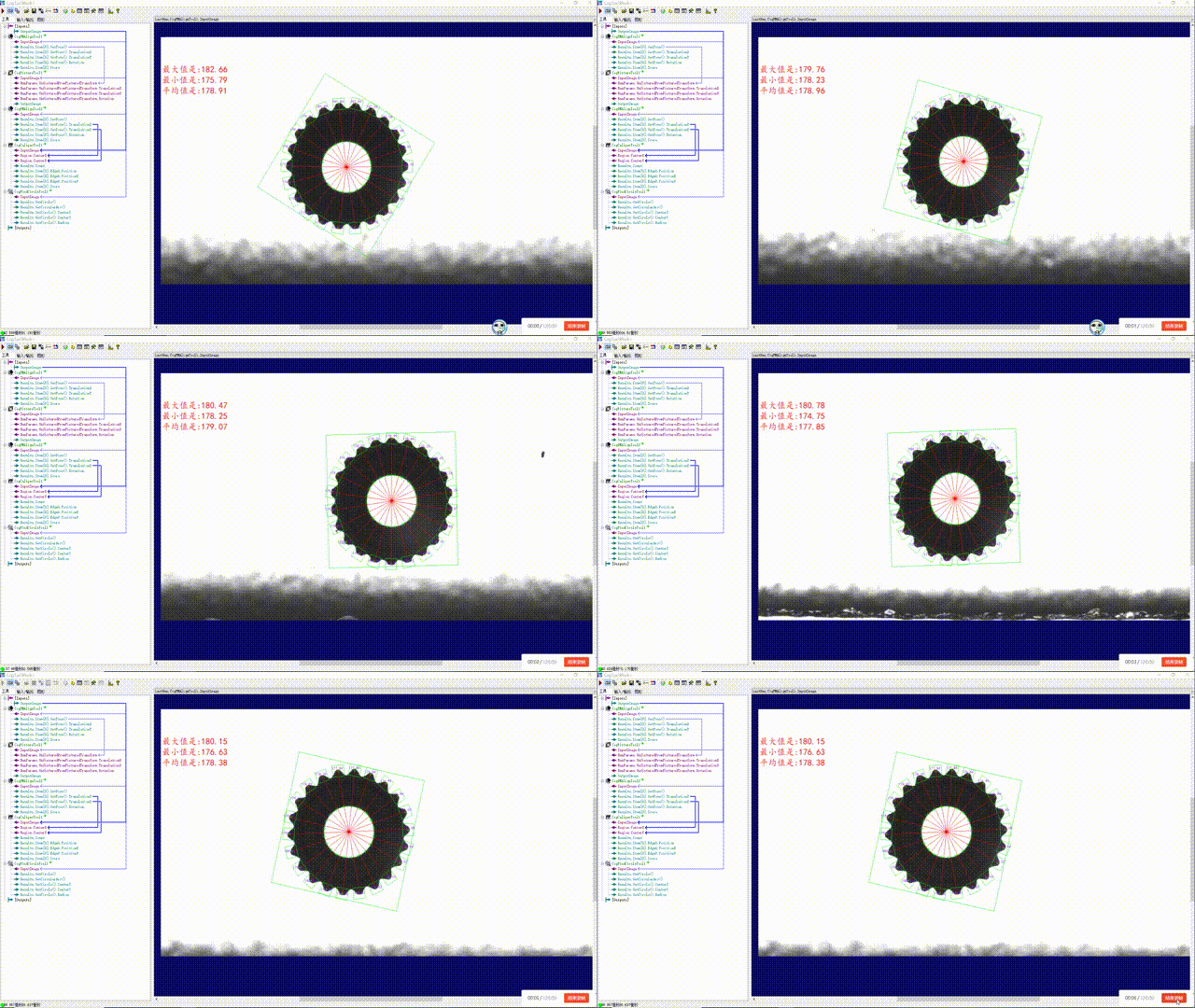
一、题目要求
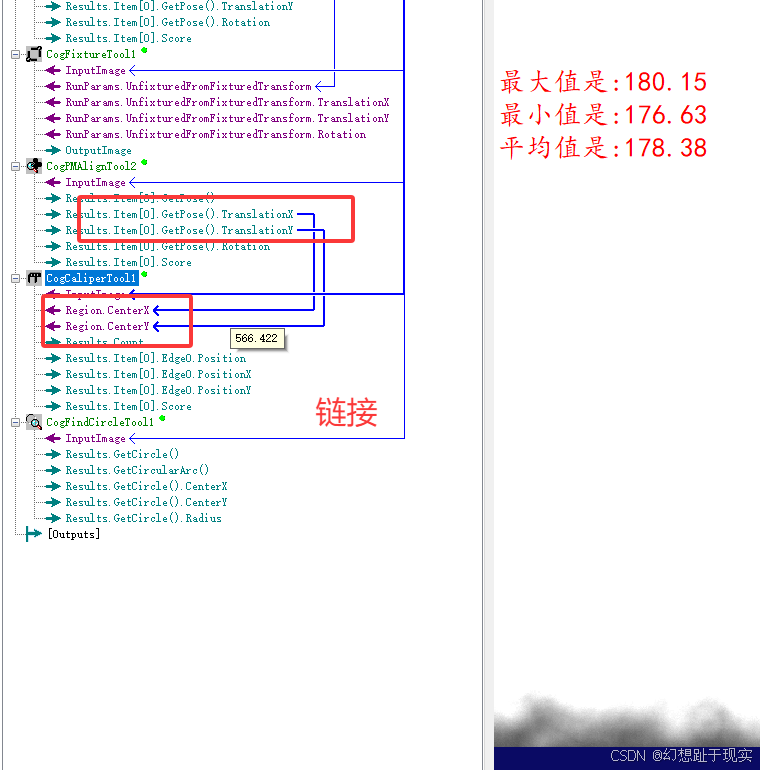
求出最大值,最小值,平均值
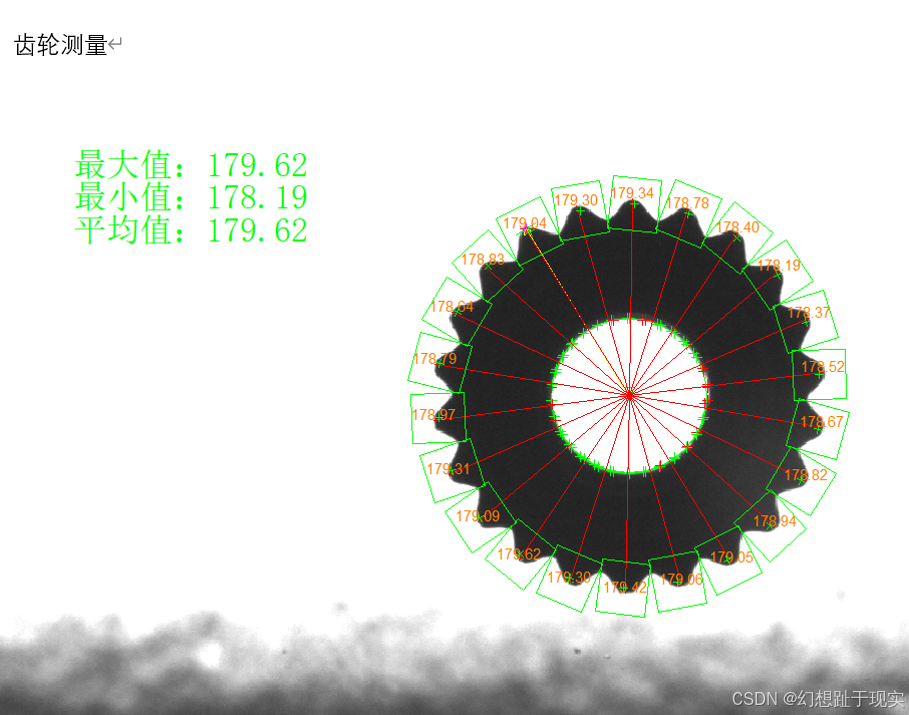
二、分析
1.首先要进行模板匹配
2.划清匹配范围
3.匹配小三角的模板匹配
4.卡尺
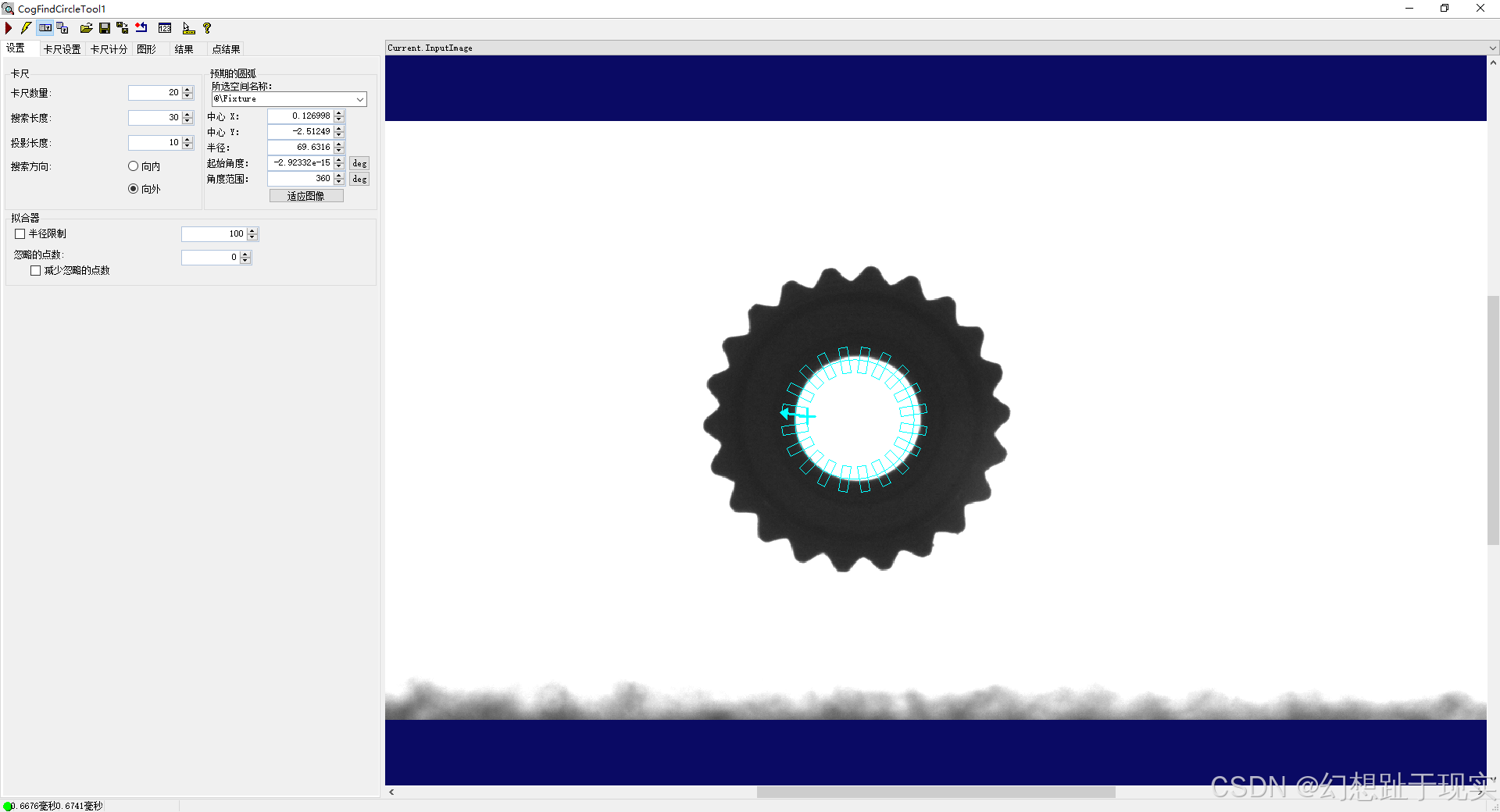
5.用找圆工具
工具
1.CogPMAlignTool
2.CogCaliperTool
3.CogFindCircleTool
4.CogFixtureTool
三、模板匹配工具
1.搜索区域
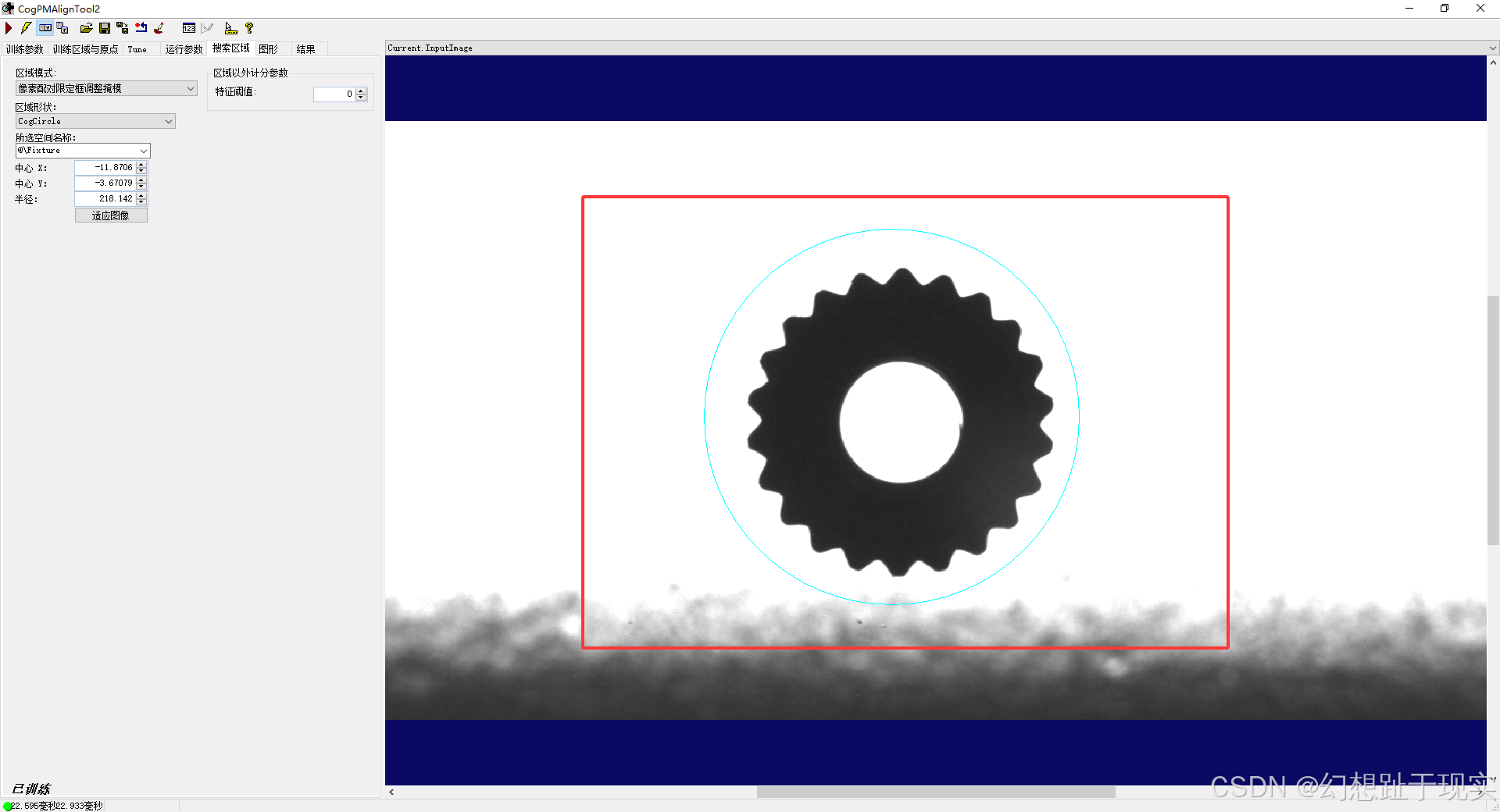
2.齿轮匹配
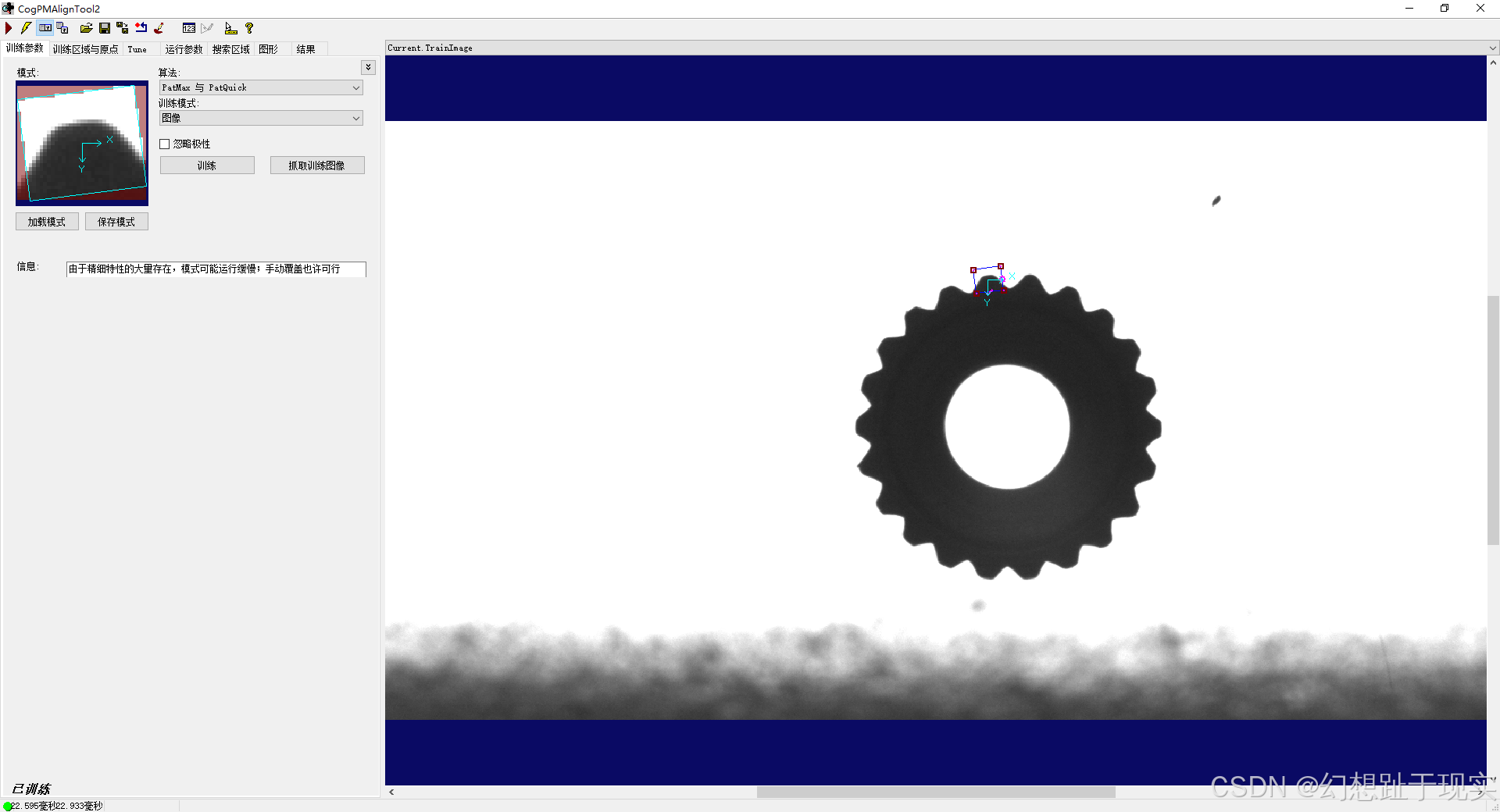
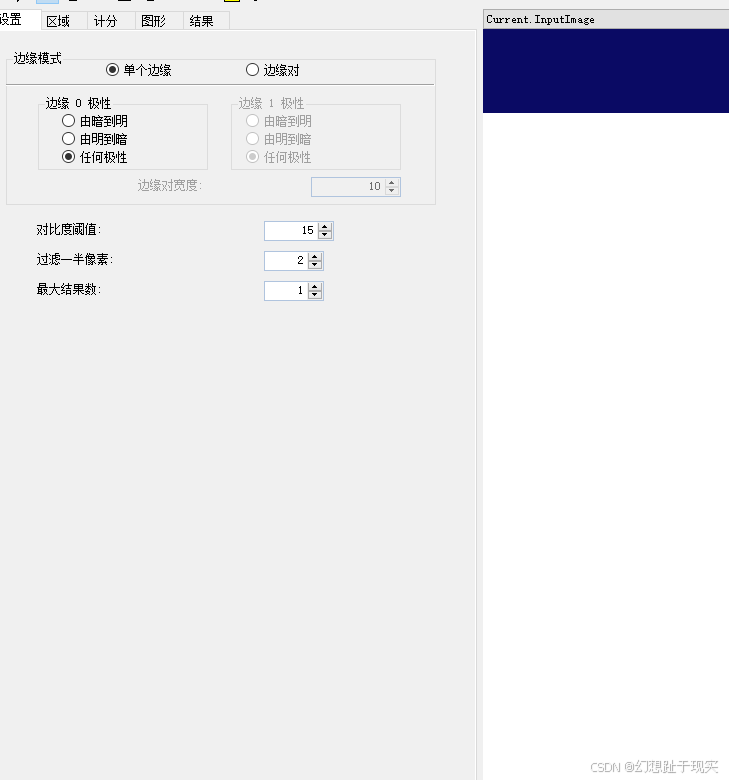
3.设置参数
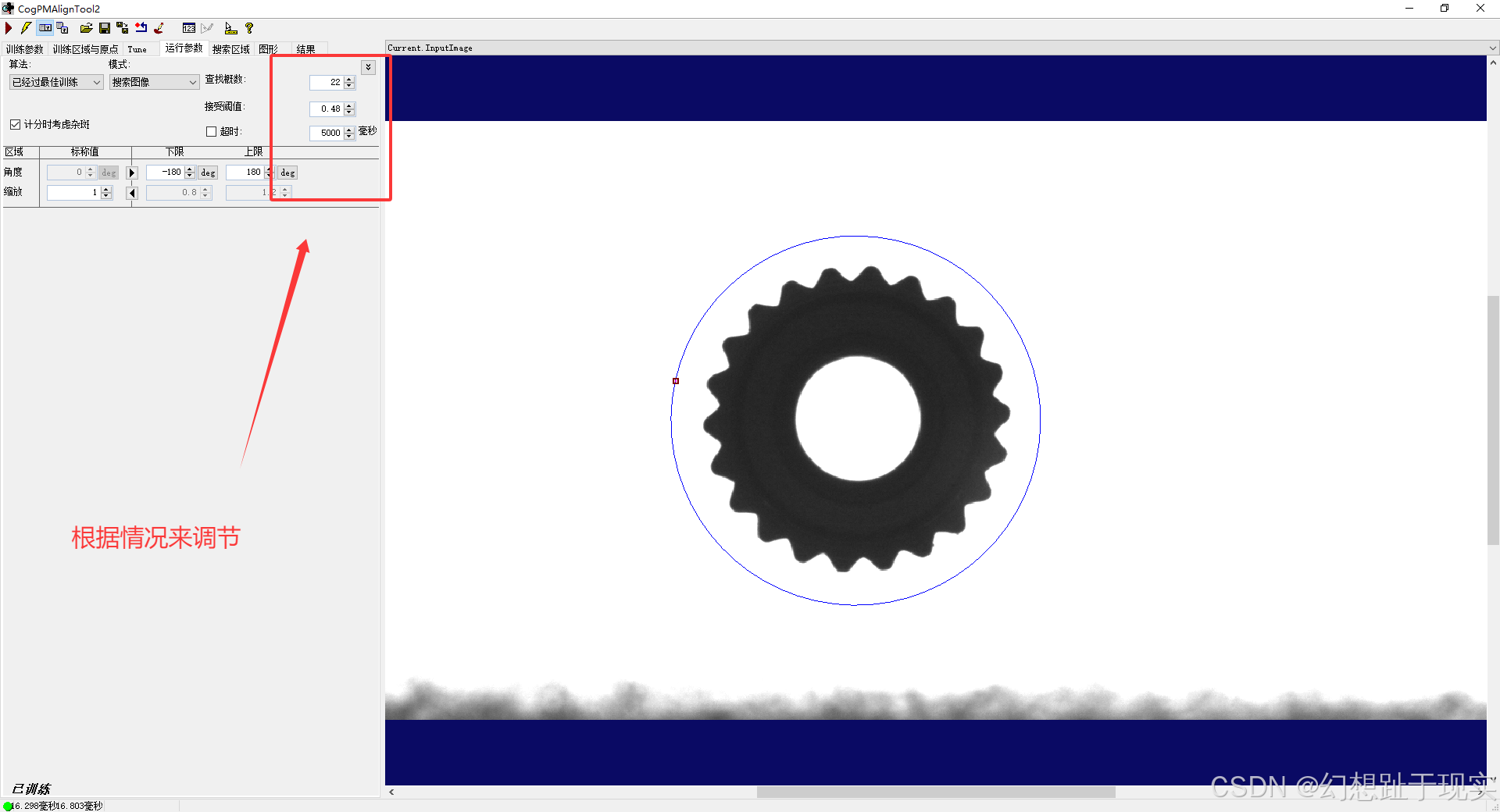
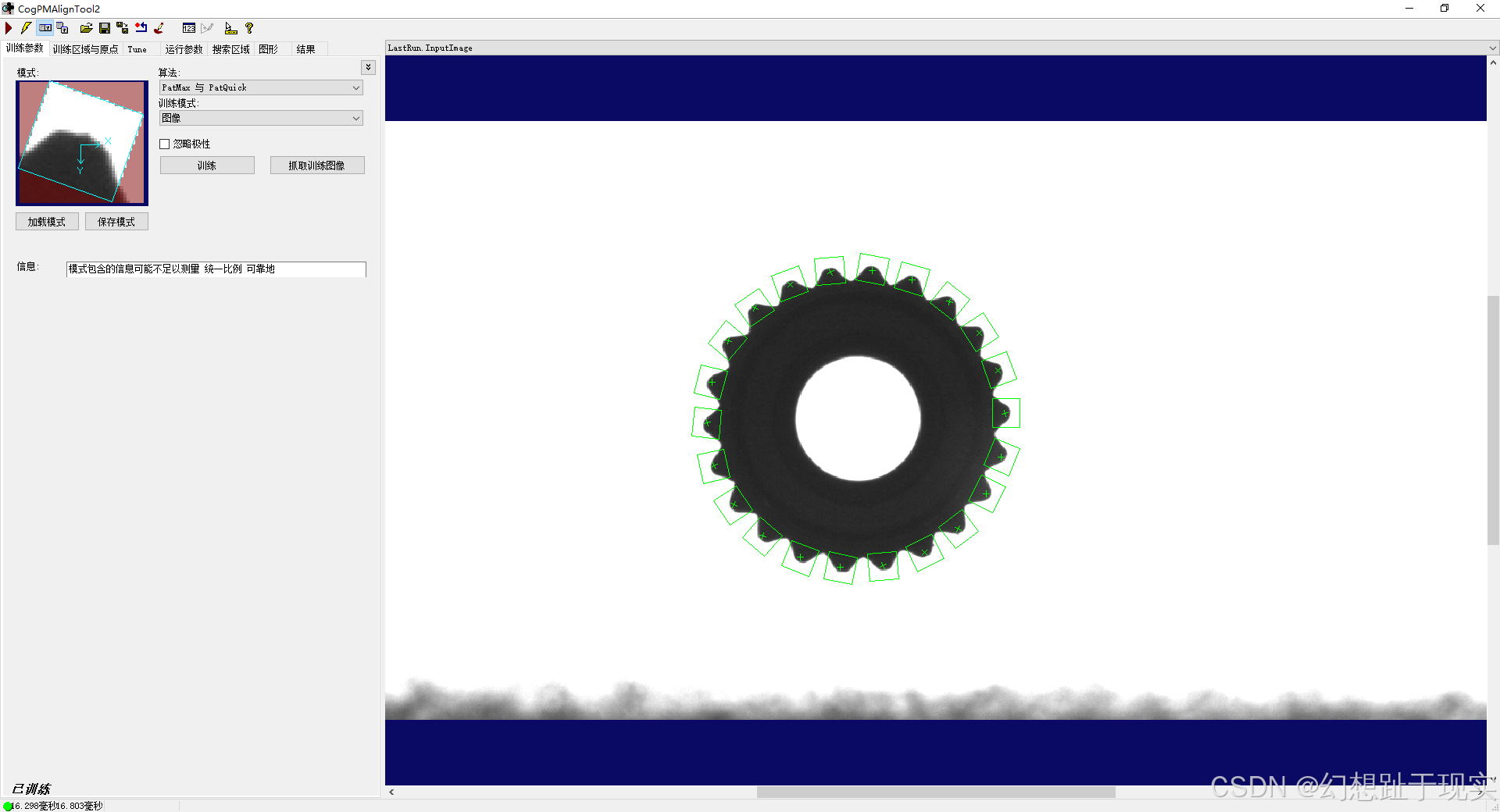
4.卡尺设置
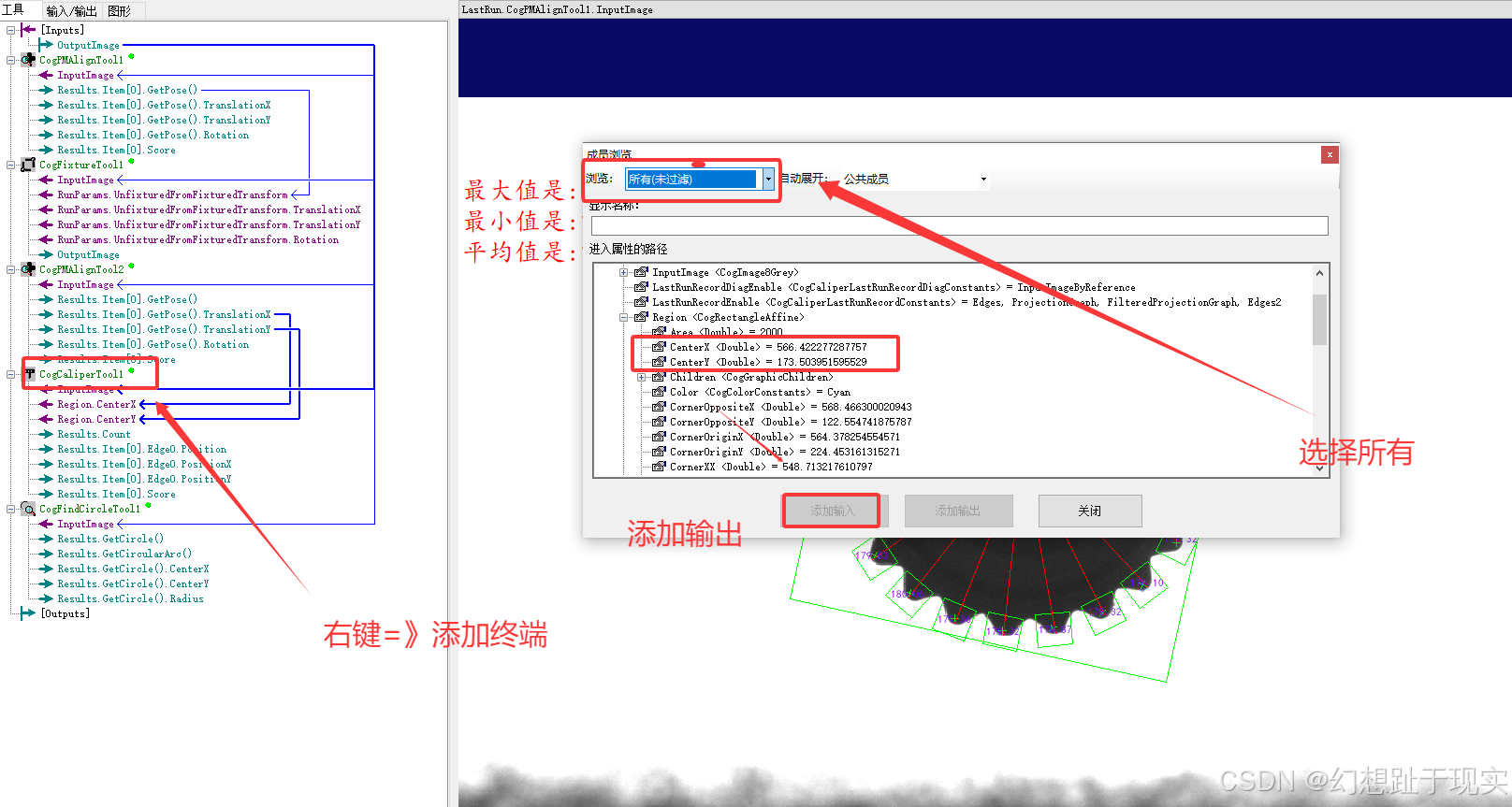
5.找圆工具
四、代码分析
1.声明集合,文字显示工具,线段
CogGraphicCollection dt = new CogGraphicCollection();CogGraphicLabel label;CogLineSegment line;
2.将工具进行实例化
dt.Clear();CogPMAlignTool pma = mToolBlock.Tools["CogPMAlignTool2"]as CogPMAlignTool;CogCaliperTool caliper = mToolBlock.Tools["CogCaliperTool1"]as CogCaliperTool;CogFindCircleTool find = mToolBlock.Tools["CogFindCircleTool1"]as CogFindCircleTool;3.解决实例化问题
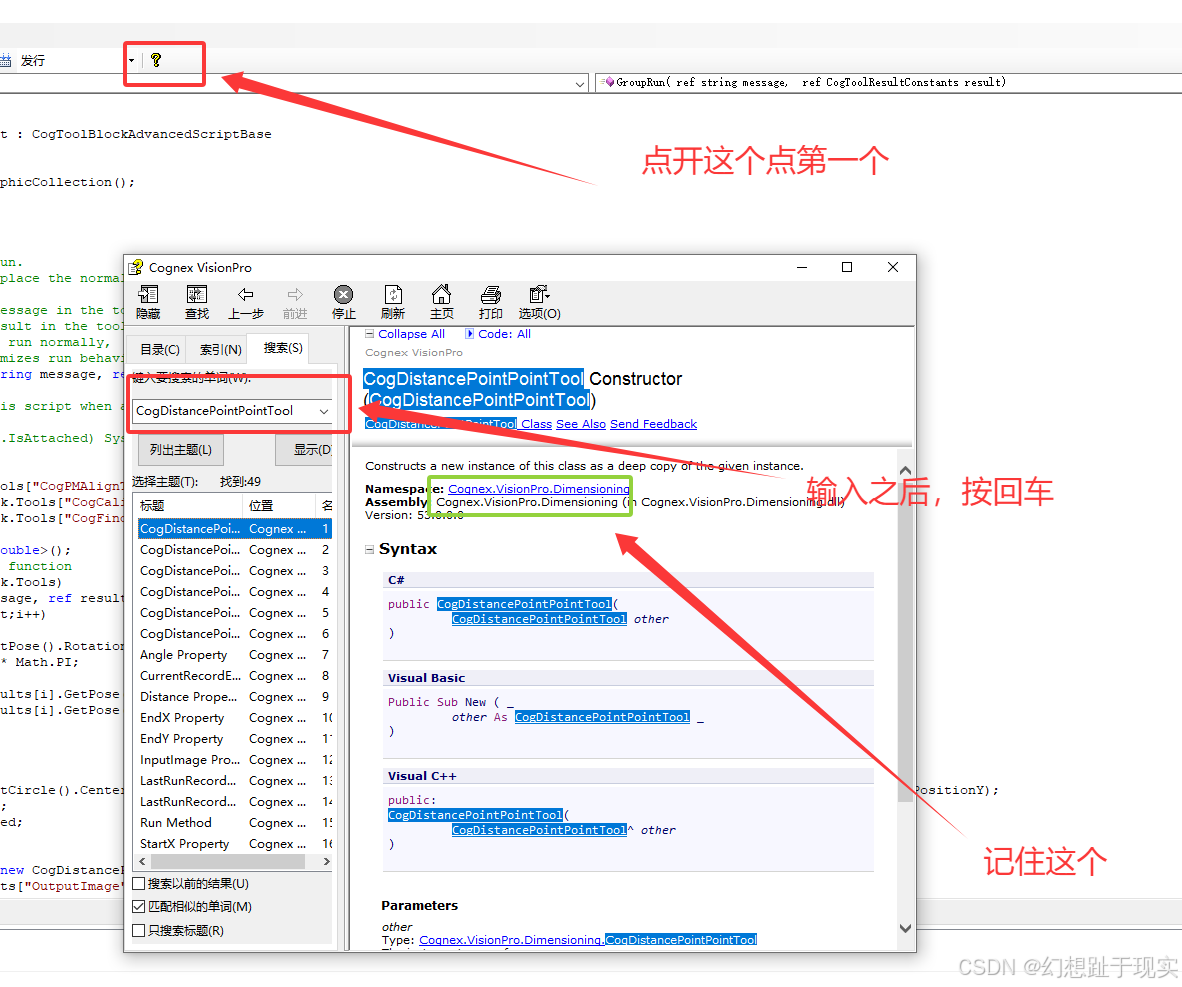
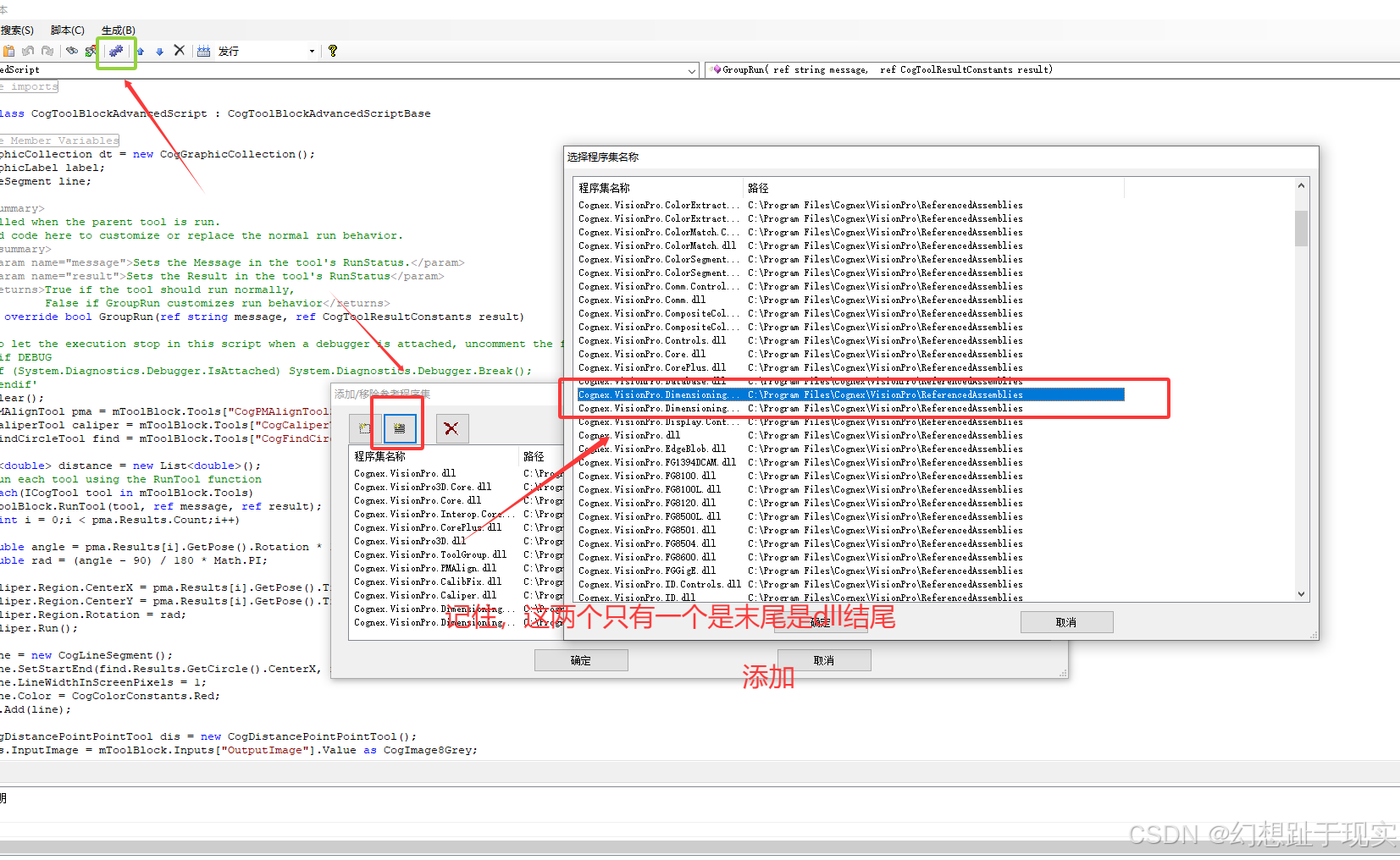
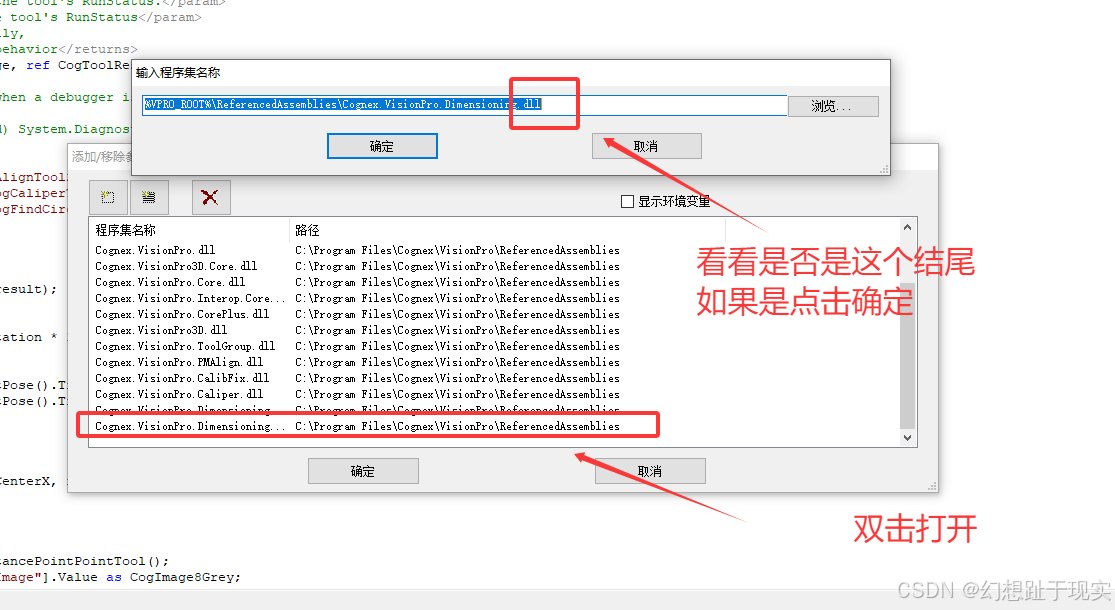
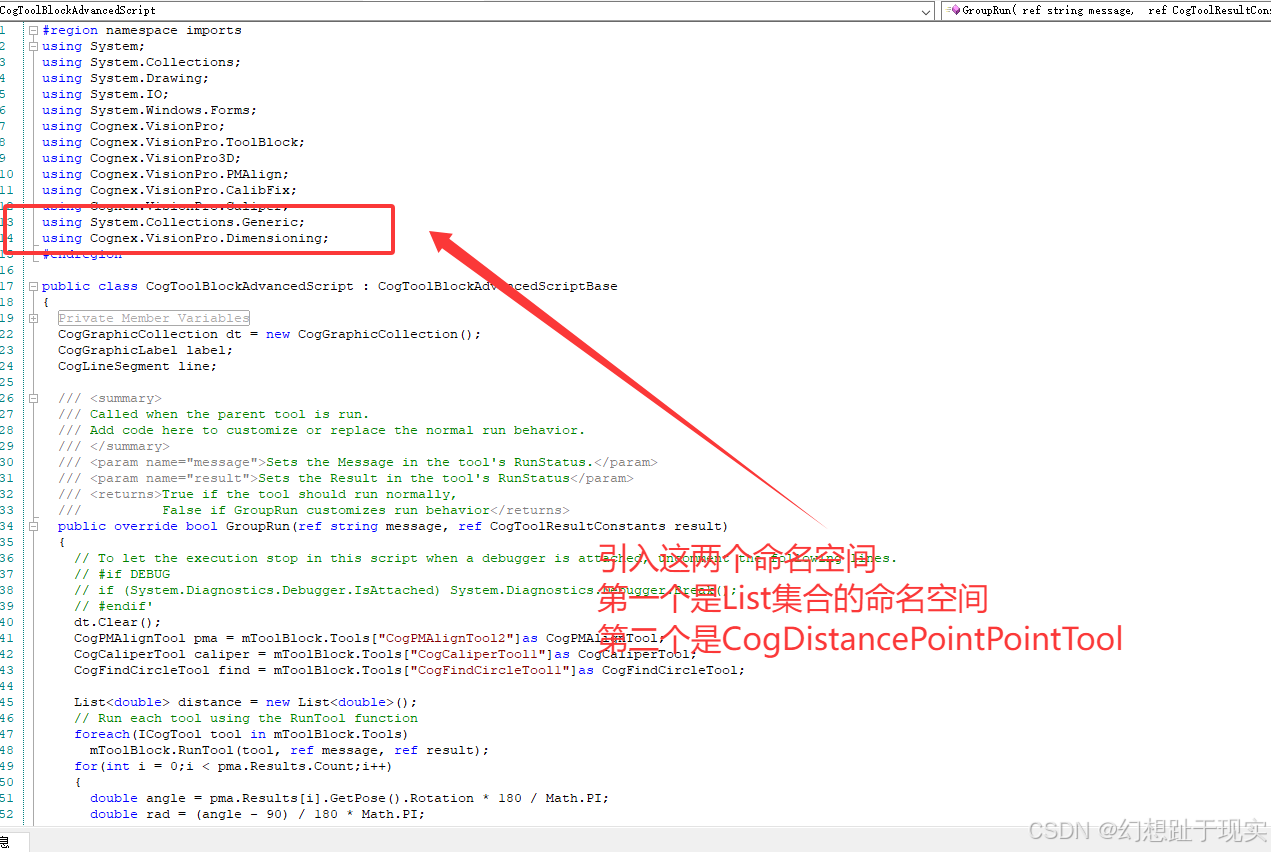
4.声明List 弧度转角度(角度转弧度)遍历卡尺数量
公式: 弧度=角度/180*Math.PI
角度=弧度*180/MathPI
List<double> distance = new List<double>();for(int i = 0;i < pma.Results.Count;i++){double angle = pma.Results[i].GetPose().Rotation * 180 / Math.PI;double rad = (angle - 90) / 180 * Math.PI;caliper.Region.CenterX = pma.Results[i].GetPose().TranslationX;caliper.Region.CenterY = pma.Results[i].GetPose().TranslationY;caliper.Region.Rotation = rad;caliper.Run();5.卡尺找到的地方声明线段
line = new CogLineSegment();line.SetStartEnd(find.Results.GetCircle().CenterX, find.Results.GetCircle().CenterY, caliper.Results[0].Edge0.PositionX, caliper.Results[0].Edge0.PositionY);line.LineWidthInScreenPixels = 1;line.Color = CogColorConstants.Red;dt.Add(line);6.实例化点到点的距离工具 链接
CogDistancePointPointTool dis = new CogDistancePointPointTool();dis.InputImage = mToolBlock.Inputs["OutputImage"].Value as CogImage8Grey;dis.StartX = find.Results.GetCircle().CenterX;dis.StartY = find.Results.GetCircle().CenterY;dis.EndX = caliper.Results[0].Edge0.PositionX;dis.EndY = caliper.Results[0].Edge0.PositionY;dis.Run();distance.Add(dis.Distance);7.放置每个角的长度位置
label = new CogGraphicLabel();label.Font = new Font("楷体", 8);label.Color = CogColorConstants.Purple;label.SetXYText(caliper.Results[0].Edge0.PositionX, caliper.Results[0].Edge0.PositionY, dis.Distance.ToString("F2"));dt.Add(label);五、找出最大,最小,平均值
double Max = 0;double Small = distance[0];double total = 0;double average;for(int i = 0;i < distance.Count;i++){if(distance[i] > Max){Max = distance[i];}if(distance[i] < Small){Small = distance[i];}total += distance[i];}average = total / distance.Count;CogGraphicLabel label1 = new CogGraphicLabel();CogGraphicLabel label2 = new CogGraphicLabel();CogGraphicLabel label3 = new CogGraphicLabel();label1.SetXYText(100, 100, "最大值是:" + Max.ToString("F2"));label2.SetXYText(100, 130, "最小值是:" + Small.ToString("F2"));label3.SetXYText(100, 160, "平均值是:" + average.ToString("F2"));label1.Color = CogColorConstants.Red;label1.Font = new Font("楷体", 20);label2.Color = CogColorConstants.Red;label2.Font = new Font("楷体", 20);label3.Color = CogColorConstants.Red;label3.Font = new Font("楷体", 20);dt.Add(label1);dt.Add(label2);dt.Add(label3);
六、实现在图片工具图上
foreach(ICogGraphic s in dt){mToolBlock.AddGraphicToRunRecord(s, lastRecord, "CogPMAlignTool1.InputImage", "");}七、愚公搬代码
#region namespace imports
using System;
using System.Collections;
using System.Drawing;
using System.IO;
using System.Windows.Forms;
using Cognex.VisionPro;
using Cognex.VisionPro.ToolBlock;
using Cognex.VisionPro3D;
using Cognex.VisionPro.PMAlign;
using Cognex.VisionPro.CalibFix;
using Cognex.VisionPro.Caliper;
using System.Collections.Generic;
using Cognex.VisionPro.Dimensioning;
#endregionpublic class CogToolBlockAdvancedScript : CogToolBlockAdvancedScriptBase
{#region Private Member Variablesprivate Cognex.VisionPro.ToolBlock.CogToolBlock mToolBlock;#endregionCogGraphicCollection dt = new CogGraphicCollection();CogGraphicLabel label;CogLineSegment line;/// <summary>/// Called when the parent tool is run./// Add code here to customize or replace the normal run behavior./// </summary>/// <param name="message">Sets the Message in the tool's RunStatus.</param>/// <param name="result">Sets the Result in the tool's RunStatus</param>/// <returns>True if the tool should run normally,///          False if GroupRun customizes run behavior</returns>public override bool GroupRun(ref string message, ref CogToolResultConstants result){// To let the execution stop in this script when a debugger is attached, uncomment the following lines.// #if DEBUG// if (System.Diagnostics.Debugger.IsAttached) System.Diagnostics.Debugger.Break();// #endif'dt.Clear();CogPMAlignTool pma = mToolBlock.Tools["CogPMAlignTool2"]as CogPMAlignTool;CogCaliperTool caliper = mToolBlock.Tools["CogCaliperTool1"]as CogCaliperTool;CogFindCircleTool find = mToolBlock.Tools["CogFindCircleTool1"]as CogFindCircleTool;List<double> distance = new List<double>();// Run each tool using the RunTool functionforeach(ICogTool tool in mToolBlock.Tools)mToolBlock.RunTool(tool, ref message, ref result);for(int i = 0;i < pma.Results.Count;i++){double angle = pma.Results[i].GetPose().Rotation * 180 / Math.PI;double rad = (angle - 90) / 180 * Math.PI;caliper.Region.CenterX = pma.Results[i].GetPose().TranslationX;caliper.Region.CenterY = pma.Results[i].GetPose().TranslationY;caliper.Region.Rotation = rad;caliper.Run();line = new CogLineSegment();line.SetStartEnd(find.Results.GetCircle().CenterX, find.Results.GetCircle().CenterY, caliper.Results[0].Edge0.PositionX, caliper.Results[0].Edge0.PositionY);line.LineWidthInScreenPixels = 1;line.Color = CogColorConstants.Red;dt.Add(line);CogDistancePointPointTool dis = new CogDistancePointPointTool();dis.InputImage = mToolBlock.Inputs["OutputImage"].Value as CogImage8Grey;dis.StartX = find.Results.GetCircle().CenterX;dis.StartY = find.Results.GetCircle().CenterY;dis.EndX = caliper.Results[0].Edge0.PositionX;dis.EndY = caliper.Results[0].Edge0.PositionY;dis.Run();distance.Add(dis.Distance);label = new CogGraphicLabel();label.Font = new Font("楷体", 8);label.Color = CogColorConstants.Purple;label.SetXYText(caliper.Results[0].Edge0.PositionX, caliper.Results[0].Edge0.PositionY, dis.Distance.ToString("F2"));dt.Add(label);}double Max = 0;double Small = distance[0];double total = 0;double average;for(int i = 0;i < distance.Count;i++){if(distance[i] > Max){Max = distance[i];}if(distance[i] < Small){Small = distance[i];}total += distance[i];}average = total / distance.Count;CogGraphicLabel label1 = new CogGraphicLabel();CogGraphicLabel label2 = new CogGraphicLabel();CogGraphicLabel label3 = new CogGraphicLabel();label1.SetXYText(100, 100, "最大值是:" + Max.ToString("F2"));label2.SetXYText(100, 130, "最小值是:" + Small.ToString("F2"));label3.SetXYText(100, 160, "平均值是:" + average.ToString("F2"));label1.Color = CogColorConstants.Red;label1.Font = new Font("楷体", 20);label2.Color = CogColorConstants.Red;label2.Font = new Font("楷体", 20);label3.Color = CogColorConstants.Red;label3.Font = new Font("楷体", 20);dt.Add(label1);dt.Add(label2);dt.Add(label3);return false;}#region When the Current Run Record is Created/// <summary>/// Called when the current record may have changed and is being reconstructed/// </summary>/// <param name="currentRecord">/// The new currentRecord is available to be initialized or customized.</param>public override void ModifyCurrentRunRecord(Cognex.VisionPro.ICogRecord currentRecord){}#endregion#region When the Last Run Record is Created/// <summary>/// Called when the last run record may have changed and is being reconstructed/// </summary>/// <param name="lastRecord">/// The new last run record is available to be initialized or customized.</param>public override void ModifyLastRunRecord(Cognex.VisionPro.ICogRecord lastRecord){foreach(ICogGraphic s in dt){mToolBlock.AddGraphicToRunRecord(s, lastRecord, "CogPMAlignTool1.InputImage", "");}}#endregion#region When the Script is Initialized/// <summary>/// Perform any initialization required by your script here/// </summary>/// <param name="host">The host tool</param>public override void Initialize(Cognex.VisionPro.ToolGroup.CogToolGroup host){// DO NOT REMOVE - Call the base class implementation first - DO NOT REMOVEbase.Initialize(host);// Store a local copy of the script hostthis.mToolBlock = ((Cognex.VisionPro.ToolBlock.CogToolBlock)(host));}#endregion}
相关文章:
Visionpro 齿轮测量
效果展示 一、题目要求 求出最大值,最小值,平均值 二、分析 1.首先要进行模板匹配 2.划清匹配范围 3.匹配小三角的模板匹配 4.卡尺 5.用找圆工具 工具 1.CogPMAlignTool 2.CogCaliperTool 3.CogFindCircleTool 4.CogFixtureTool 三、模板匹…...

Ubuntu20.04部署stable-diffusion-webui环境小记
Ubuntu20.04部署stable-diffusion-webui环境小记 文章目录 前言后视镜视角查看安装文档聊聊我踩的那些坑python3.11的安装执行sudo apt update报错显卡驱动内存优化网络问题无法打开系统设置和网络设置查询GPU使用情况 总结 Stable Diffusion web UI A web interface for Stabl…...

索引以及索引底层数据结构
一、什么是索引? 索引(index)是数据库高效获取数据的数据结构(有序)。在数据之外,数据库系统还维护着满足特定查找算法的数据结构(B树),这些数据结构以某种方式指向真在…...

开业盛典活动策划方案拆解
道叔来给大家详细剖析咱们方案库里刚收录的这份《蜀大侠火锅店武侠风开业盛典活动策划方案》了,保证让你看完直呼过瘾,收获满满! 一、主题创意:武侠风,直击人心 首先,咱们得夸一下这活动的主题——“XXX‘…...

API 接口自动化
HTTP协议 - 白月黑羽 HTTP协议简介 如果客户端是浏览器,如何在chrome浏览器中查看 请求和响应的HTTP消息?按f12-》network 清除当前信息 响应的消息体在Response里看 点preview,可以看响应的消息体展开的格式 HTTP请求消息 请求头 reques…...

安全测试|SSRF请求伪造
前言 SSRF漏洞是一种在未能获取服务器权限时,利用服务器漏洞,由攻击者构造请求,服务器端发起请求的安全漏洞,攻击者可以利用该漏洞诱使服务器端应用程序向攻击者选择的任意域发出HTTP请求。 很多Web应用都提供了从其他的服务器上…...

ML.NET库学习008:使用ML.NET进行心脏疾病预测模型开发
文章目录 ML.NET库学习008:使用ML.NET进行心脏疾病预测模型开发1. 项目主要目的和原理2. 项目概述实现的主要功能:主要流程步骤:关键技术: 3. 主要功能和步骤数据加载与路径处理模型训练与评估模型保存与加载 4. 代码中的数据结构…...
和rtc_tm_to_time64())
了解rtc_time64_to_tm()和rtc_tm_to_time64()
rtc_time64_to_tm()和rtc_tm_to_time64()主要用于RTC的驱动程序,在Linux外部RTC驱动中较常见。 打开“drivers/rtc/lib.c” /* * rtc_time64_to_tm - Converts time64_t to rtc_time. * Convert seconds since 01-01-1970 00:00:00 to Gregorian date. */ //将ti…...

verilog程序设计及SystemVerilog验证
1.Verilog测试程序设计基础 1.1Testbench及其结构 在仿真的时候Testbench用来产生测试激励给待验证设计( Design Under Verification, DUV),或者称为待测设计(Design UnderTest, DUT) 。 测试程序的一般结构: Testbench是一个测试平台,信号…...

智能编程助手功能革新与价值重塑之:GitHub Copilot
引言: GitHub Copilot 的最新更新为开发者带来了显著变化,其中 Agent Mode 功能尤为引人注目。该模式能够自动识别并修复代码错误、自动生成终端命令,并具备多级任务推理能力,这使得开发者在开发复杂功能时,可大幅减少…...

物联网行业通识:从入门到深度解析
物联网行业通识:从入门到深度解析 (图1:物联网生态示意图) 一、引言:万物互联时代的到来 根据IDC最新预测,到2025年全球物联网设备连接数将突破410亿,市场规模达1.1万亿美元。物联网ÿ…...

ABP - 事件总线之分布式事件总线
ABP - 事件总线之分布式事件总线 1. 分布式事件总线的集成1.2 基于 RabbitMQ 的分布式事件总线 2. 分布式事件总线的使用2.1 发布2.2 订阅2.3 事务和异常处理 3. 自己扩展的分布式事件总线实现 事件总线可以实现代码逻辑的解耦,使代码模块之间功能职责更清晰。而分布…...

【硬件设计细节】缓冲驱动器使用注意事项
一、缓冲驱动器核心功能与选型原则 信号增强与隔离 驱动能力匹配:根据负载电流需求选择缓冲器,例如CMOS缓冲器驱动能力通常为4-8mA,需搭配大电流负载时选用图腾柱输出或专用驱动芯片(如TI的SN74LVC系列)。电压域转换&…...
- 创建画布)
驱动开发系列38 - Linux Graphics 3D 绘制流程(一)- 创建画布
一:概述 当应用程序创建 OpenGL 上下文时,它通常需要申请帧缓冲(Framebuffer,即画布)。在 X11 体系下,应用程序不会直接向内核的 DRM 模块请求创建帧缓冲,而是通过 X 服务器进行申请。 虽然从技术上讲,应用程序可以直接使用 DRM 接口创建帧缓冲对象(BO),但为了将其与…...

再谈SpringCloud Gateway源码
再谈SpringCloud Gateway源码 一、整体请求流程二、前置对象准备1、实例化HandlerMapping2、实例化Route3、实例化WebHandler 三、实践业务扩展点1、定义扩展Route对象2、Filter能做什么3、定义扩展Filter对象4、定义父类Filter简化请求参数处理 前言: 之前有阅读过…...

把 CSV 文件摄入到 Elasticsearch 中 - CSVES
在我们之前的很多文章里,我有讲到这个话题。在今天的文章中,我们就提重谈。我们使用一种新的方法来实现。这是一个基于 golang 的开源项目。项目的源码在 https://github.com/githubesson/csves/。由于这个原始的代码并不支持 basic security 及带有安全…...

3.【线性代数】——矩阵乘法和逆矩阵
三 矩阵乘法和逆矩阵 1. 矩阵乘法1.1 常规方法1.2 列向量组合1.3 行向量组合1.4 单行和单列的乘积和1.5 块乘法 2. 逆矩阵2.1 逆矩阵的定义2.2 奇异矩阵2.3 Gauss-Jordan 求逆矩阵2.3.1 求逆矩阵 ⟺ \Longleftrightarrow ⟺解方程组2.3.2 Gauss-Jordan求逆矩阵 1. 矩阵乘法 1.…...

SpringCloud面试题----如何对 Spring Cloud 微服务进行性能优化
架构层面 合理划分微服务 单一职责原则:确保每个微服务只负责单一的业务功能,这样可以降低服务的复杂度,提高可维护性和可扩展性。例如,将用户认证、订单管理、商品管理等不同功能拆分成独立的微服务。避免服务间过度耦合:减少微服务之间的依赖关系,避免因为某个服务的变…...

使用llama.cpp在gpu和cpu上运行deepseek-r1 7b的性能对比
使用deepseek-r1 7b模型的q5km量化版本进行测试, gpu上的token解码速度是cpu的近8倍. 测试环境: ubuntu22.04 x86llama.cpp cpu intel 10750h 4.41 tokens / s model size params backend threads test t/s qwen2 7B Q5_K - Medium 5.07 GiB 7.62 B CPU 6 pp512 …...

BMS项目-面试及答疑整理
1. SOC计算用的什么原理实现的? bms目前计算SOC使用的安时积分+开路电压首先得对电池有一个抽象得概念,把电池比作游泳池,电量比作游泳池里面的水,电流比作流入和流出得水流,那么充电也就是往游泳池里面灌入水流安时积分:对水流进行一个实时监测,比如1S一次监测,那么每…...

【virtiofs】ubuntu24.04+qemu7.0调试virtiofs
文章目录 编译qemu编译buildroot编译linux-6.8.1编译virtiofsd启动脚本qemu调试方法环境: win11 + vmware17 ubuntu24.04 buildroot git clone git://git.busybox.net/buildroot linux-6.8.1 https://mirrors.edge.kernel.org/pub/linux/kernel/v6.x/linux-6.8.1.tar.gz virti…...

【第2章:神经网络基础与实现——2.1 前馈神经网络的结构与工作原理】
老铁们好!今天我们要来一场长达两万字的超详细技术探险,我会像拆解乐高积木一样把前馈神经网络(Feedforward Neural Network)的每个零件摆在台面上,用最接地气的方式让你彻底搞懂这个深度学习基石的工作原理。准备好了吗?我们开始吧! 第一章:神经网络的 “乐高积木” 1…...

ARINC 429详解
ARINC 429 是航空电子系统中广泛应用的一种串行数据总线标准,由航空无线电公司(ARINC)于1977年制定(ARINC 429规范)。它定义了航空电子设备之间数据传输的电气特性、协议格式和通信规则,是民航和军用飞机中…...

C进阶 数据的存储
目录 前言 一,VS的知识储备 二,有趣的scanf()读取 三,数据的存储 引言 四,整数存储 五,小数存储 总结 前言 这里将深入计算机,看计算机是如何进行数据的存储的,怎么在计算机里面筑巢 为…...

第二十二章 P - R 开头的术语
文章目录 第二十二章 P - R 开头的术语程序员模式 (programmer mode)项目 (project)属性 (property)属性排序 (property collation)属性方法 (property method)公有 (public) 以 Q 开头的术语查询 (query)查询接口 (query interface) 以 R 开头的术语范围指示符 (range indicat…...

【C语言】第一期——数据类型变量常量
目录 1 字面量 2 整数类型 2.1 整数类型的取值范围 2.1.1 sizeof 运算符 2.2 GB、MB、KB、B之间的关系 2.3 定义整数类型的变量并打印 2.4 整数类型代码演示 3 浮点类型 3.1 浮点类型的取值范围 3.2 定义浮点类型变量并打印 3.3 保留2位小数点 4 char字符型 4.1…...

【c++】【Linux】【进程】线程终止/崩溃 会导致进程终止/崩溃 吗?
【c】【Linux】【进程】线程终止/崩溃 会导致进程终止/崩溃 吗? 1.线程终止会导致进程终止吗? 在操作系统中,线程是进程的基本执行单元,一个进程可以包含一个或多个线程。 当一个子线程终止时,进程并不会因此自动终…...
)
宝藏软件系列 篇一:My APK(Android)
文章目录 系列文章官方网站特色功能同类软件 系列文章 官方网站 My APK 官方版本是在 谷歌商店 中上架的。 官方下载地址:Google Play 商店页面。(需要外网) 2025.2最新版本的CSDN本地下载地址(因为是Android App Bundle&…...

springcloud集成gateway
本篇文章只介绍gateway模块的搭建步骤,并无gateway详细介绍 gateway详解请查看:SpringCloudGateway官方文档详解 前置处理 父模块中已指定版本 不知道如何选择版本看这篇: 手把手教你梳理springcloud与springboot与springcloudalibaba的版本…...

pandas(13 Caveats Gotchas和SQL比较)
前面内容:pandas(12 IO工具和稀松数据) 目录 一、Caveats警告 & Gotchas预见 1.1 在Pandas中使用if/Truth语句 1.2 位运算布尔 1.3 isin操作 1.4 重新索引reindex和 loc&iloc 使用注意事项 1.5 loc和iloc 二、Python Pandas 与SQL的比较 2.1 数…...