
【一文读懂】WebRTC协议
WebRTC(Web Real-Time Communication)协议
WebRTC(Web Real-Time Communication)是一种支持浏览器和移动应用程序之间进行 实时音频、视频和数据通信 的协议。它使得开发者能够在浏览器中实现高质量的 P2P(点对点)实时通信,而无需安装插件或第三方软件。WebRTC 主要用于视频通话、语音聊天、在线协作和数据传输等应用场景。
核心功能
WebRTC 提供了以下几个关键功能:
- 音视频通信:WebRTC 支持通过浏览器进行音频和视频的实时传输,用户之间可以进行高质量的语音和视频通话。
- P2P 数据传输:WebRTC 不仅支持音视频流,还支持点对点的数据通道(Data Channel)传输,适合进行文件传输、屏幕共享和实时协作。
- 低延迟:WebRTC 专门优化了数据传输过程,以减少通信中的延迟,使得实时通信更加顺畅。
工作原理
WebRTC 使用了一系列底层协议和技术来实现点对点通信。WebRTC 的工作流程通常包括以下几个关键步骤:
- 建立连接(Signaling)
- 在 WebRTC 中,信令(Signaling) 是客户端用于交换通信所需的元数据(如网络信息、音视频编解码信息、媒体能力等)的一种过程。信令不是 WebRTC 协议的一部分,但它是 WebRTC 通信的必要步骤。
- 信令的内容包括:协商媒体(音视频)格式、网络路径、设备信息等。
- 通常,信令使用 WebSockets、HTTP 或其他协议进行实现。
- 信令过程包括:
- Offer(提议):发起方创建会话请求,发送给接收方。
- Answer(应答):接收方回应发起方的请求,确认会话设置。
- ICE candidates(ICE 候选者):每个端点通过收集网络候选地址来交换,以帮助建立最佳的 P2P 连接。
- 网络连接(ICE、STUN 和 TURN)
- ICE(Interactive Connectivity Establishment):用于在 NAT 后的网络环境中建立端到端的连接。ICE 是 WebRTC 连接的关键组成部分,它帮助客户端发现并连接到彼此。
- STUN(Session Traversal Utilities for NAT):STUN 服务器帮助客户端了解自己在 NAT 后的公网 IP 地址。
- TURN(Traversal Using Relays around NAT):TURN 服务器在 P2P 连接无法直接建立时提供数据转发服务,确保通信的可靠性。TURN 作为最后的解决方案,通常会导致更高的延迟,因此只有在需要时才使用。
- 媒体流传输(RTP/RTCP)
- RTP(Real-Time Transport Protocol):RTP 是 WebRTC 用于音频和视频流的传输协议。它允许在网络中实时地传输数据包,并为这些数据包添加时间戳,确保音视频数据的正确顺序。
- RTCP(Real-Time Control Protocol):RTCP 用于监控 RTP 会话的质量,并提供流控制和同步。
- 数据传输(DataChannel)
- RTCDataChannel:WebRTC 支持数据通道(DataChannel),使得浏览器间可以通过 P2P 传输任意数据(包括文本、文件、图像等)。数据通道提供了低延迟的点对点数据传输能力,常用于文件传输、屏幕共享等应用。
关键技术
WebRTC 由多种技术组成,其中最重要的包括:
-
getUserMedia:用于获取用户的音频和视频输入设备(如麦克风和摄像头)的权限。它会返回一个包含音视频流的对象。
navigator.mediaDevices.getUserMedia({ video: true, audio: true }).then(stream => {// 显示视频流const videoElement = document.getElementById('my-video');videoElement.srcObject = stream;}).catch(error => console.log('Error accessing media devices: ', error)); -
RTCPeerConnection:用于建立、维护和管理 P2P 连接。它负责处理网络连接、音视频编解码、带宽管理等任务。
const peerConnection = new RTCPeerConnection(configuration); peerConnection.addStream(localStream); // 添加本地音视频流// 建立连接后,发送媒体流 peerConnection.createOffer().then(offer => peerConnection.setLocalDescription(offer)).then(() => {// 将 offer 发送给接收方}); -
RTCDataChannel:用于建立点对点的数据传输通道,可以传输任意类型的数据。
javascript复制编辑const dataChannel = peerConnection.createDataChannel('chat');
dataChannel.onopen = () => console.log('Data channel open');
dataChannel.onmessage = (event) => console.log('Received message: ', event.data);// 发送数据
dataChannel.send('Hello, WebRTC!');
应用场景
- 视频通话:WebRTC 可以用于构建视频会议应用,如 Zoom、Google Meet 等。
- 语音通话:WebRTC 支持语音通话,广泛应用于 IP 电话、语音助手等。
- 文件传输:通过 RTCDataChannel,WebRTC 可以用于点对点的文件传输。
- 实时协作:WebRTC 用于多人在线编辑、白板共享等实时协作工具。
- 直播:WebRTC 可以支持低延迟的视频直播,适用于游戏直播、网络教学等领域。
实现过程
1. 获取音视频流(getUserMedia)
getUserMedia 是 WebRTC 中用于访问用户音频和视频设备的 API。通过它,你可以获取麦克风和摄像头的权限,从而获取用户的音视频流。
示例:获取视频和音频流
navigator.mediaDevices.getUserMedia({ video: true, audio: true }).then(stream => {// 获取视频流后,可以将其显示在视频标签上const videoElement = document.getElementById('localVideo');videoElement.srcObject = stream;// 创建 RTCPeerConnection 实例(将在后面讨论)const peerConnection = new RTCPeerConnection();// 将本地流添加到连接stream.getTracks().forEach(track => peerConnection.addTrack(track, stream));}).catch(error => {console.error('Error accessing media devices.', error);});
getUserMedia:请求用户设备的音视频流。- 返回的
MediaStream可以用于显示、录制或传输。
2. 创建点对点连接(RTCPeerConnection)
WebRTC 使用 RTCPeerConnection 来管理媒体流的传输。它代表了与另一个客户端的点对点连接。
示例:创建 RTCPeerConnection 并添加本地流
const peerConnection = new RTCPeerConnection({iceServers: [{ urls: 'stun:stun.l.google.com:19302' } // 使用 STUN 服务器]
});// 添加本地流到连接
navigator.mediaDevices.getUserMedia({ video: true, audio: true }).then(stream => {const localVideo = document.getElementById('localVideo');localVideo.srcObject = stream;stream.getTracks().forEach(track => peerConnection.addTrack(track, stream));});
- STUN 服务器:STUN(Session Traversal Utilities for NAT)帮助客户端发现自己的公共 IP 地址,用于 NAT 穿透。
3. 信令交换(Signal)
WebRTC 协议并不直接定义信令交换的方式,因此你需要自己实现信令交换。信令过程用于交换连接的元数据,如会话描述(SDP)和 ICE 候选者等。
- 创建 Offer(发起方)
peerConnection.createOffer().then(offer => {return peerConnection.setLocalDescription(offer); // 设置本地 SDP}).then(() => {// 将 offer 发送给对方(通过信令服务器)signalingServer.send({ type: 'offer', offer: peerConnection.localDescription });});
- SDP(Session Description Protocol):描述了音视频流的编码、传输等信息。
- 设置 Answer(接收方)
接收方收到 Offer 后,创建 Answer 并回复:
signalingServer.on('offer', offer => {peerConnection.setRemoteDescription(new RTCSessionDescription(offer)).then(() => peerConnection.createAnswer()).then(answer => {return peerConnection.setLocalDescription(answer);  // 设置本地 SDP}).then(() => {// 将 answer 发送给发起方signalingServer.send({ type: 'answer', answer: peerConnection.localDescription });});
});
- 交换 ICE 候选者
在连接过程中,客户端会收集并交换 ICE 候选者(候选网络路径)。这些候选者用于寻找最佳的连接路径。
peerConnection.onicecandidate = event => {if (event.candidate) {// 发送 ICE 候选者到对方signalingServer.send({ type: 'ice-candidate', candidate: event.candidate });}
};// 接收对方的 ICE 候选者
signalingServer.on('ice-candidate', candidate => {peerConnection.addIceCandidate(new RTCIceCandidate(candidate));
});
- 建立连接并处理媒体流
当信令交换完成并且 ICE 候选者交换完毕后,WebRTC 将会建立一个完整的点对点连接,音视频流会开始传输。
示例:显示远端视频流
peerConnection.ontrack = event => {const remoteVideo = document.getElementById('remoteVideo');remoteVideo.srcObject = event.streams[0];  // 获取远程流并显示
};
5. 数据通道(RTCDataChannel)
WebRTC 还支持 RTCDataChannel,用于在两个客户端之间进行低延迟的点对点数据传输(例如文件传输、聊天信息等)。
示例:创建并使用数据通道
const dataChannel = peerConnection.createDataChannel('chat');// 监听数据通道的消息
dataChannel.onmessage = event => {console.log('Received message:', event.data);
};// 发送数据
dataChannel.send('Hello from WebRTC!');
6. 断开连接
当通信结束时,你可以通过关闭 PeerConnection 来断开连接并释放资源。
peerConnection.close();
WebRTC-Streamer开源项目
项目介绍
WebRTC-Streamer 是一个开源工具集,旨在简化实时音视频数据流的传输与集成,主要通过 WebRTC 技术实现低延迟的音视频流传输。开发者无需深入理解复杂的底层协议即可轻松将实时音视频功能集成到自己的应用中。该项目特别设计了高效的音视频流处理功能,支持多种数据来源,如 V4L2 捕获设备、RTSP 流、屏幕捕捉 等,适用于多种实时传输场景。
快速启动
WebRTC-Streamer 提供了简便的集成方式。以下是一个通过 HTML 和 JavaScript 快速搭建基本实时音视频流服务的示例代码:
<html>
<head><script src="libs/adapter.min.js"></script><script src="webrtcstreamer.js"></script>
</head>
<body>
<script>
var webRtcServer;
window.onload = function() {webRtcServer = new WebRtcStreamer(document.getElementById("video"), location.protocol+"//" + location.hostname + ":8000");webRtcServer.connect("rtsp://wowzaec2demo.streamlock.net/vod/mp4:BigBuckBunny_115k.mov");
}
window.onbeforeunload = function() {if (webRtcServer !== null) {webRtcServer.disconnect();}
}
</script>
<video id="video" controls autoplay muted></video>
</body>
</html>
代码解析:
- 引入了
adapter.min.js和webrtcstreamer.js两个必要的 JavaScript 库。 - 创建一个
WebRtcStreamer实例,指定本地服务器地址及目标 RTSP 视频流地址。 - 页面加载时自动连接至 RTSP 流,播放视频。
- 页面卸载时,断开连接,释放资源。
应用案例与最佳实践
示例 1:直播演示
- 使用 WebRTC-Streamer 可以通过简化的 Web 组件方式轻松展示来自 RTSP 源的实时视频流。
<webrtc-streamer url="rtsp://wowzaec2demo.streamlock.net/vod/mp4:BigBuckBunny_115k.mov">
示例 2:地图上的直播流
- 配合 Google Map API,WebRTC-Streamer 可以在地图上显示多个实时视频流,适用于 监控、交通管理 等领域。
其它生态项目
WebRTC-Streamer 还支持一系列相关生态项目,以扩展其功能和适用范围:
- webrtc-streamer-card:为 Home Assistant 提供的卡片插件,允许从 WebRTC-Streamer 服务中拉取零延迟视频流,适用于智能家居。
- rpi-webrtc-streamer:面向 树莓派 系列微控制器的 WebRTC 流媒体软件包,支持在边缘设备上实现高效的音视频处理。
- Live555 Integration:通过整合 Live555 Media Server,增强 WebRTC-Streamer 在处理非标准音视频格式方面的能力,扩展其应用场景。
附录:WebRTC-Streamer项目地址
https://gitcode.com/gh_mirrors/we/webrtc-streamer/?utm_source=artical_gitcode&index=bottom&type=card&webUrl&isLogin=1
附录:webrtcstreamer.js源码
// webrtcstreamer.js
var WebRtcStreamer = (function() {/** * Interface with WebRTC-streamer API* @constructor* @param {string} videoElement - id of the video element tag* @param {string} srvurl -  url of webrtc-streamer (default is current location)*/var WebRtcStreamer = function WebRtcStreamer (videoElement, srvurl) {if (typeof videoElement === "string") {this.videoElement = document.getElementById(videoElement);} else {this.videoElement = videoElement;}this.srvurl           = srvurl || location.protocol+"//"+window.location.hostname+":"+window.location.port;this.pc               = null;    this.mediaConstraints = { offerToReceiveAudio: true, offerToReceiveVideo: true };this.iceServers = null;this.earlyCandidates = [];}WebRtcStreamer.prototype._handleHttpErrors = function (response) {if (!response.ok) {throw Error(response.statusText);}return response;}/** * Connect a WebRTC Stream to videoElement * @param {string} videourl - id of WebRTC video stream* @param {string} audiourl - id of WebRTC audio stream* @param {string} options -  options of WebRTC call* @param {string} stream  -  local stream to send*/WebRtcStreamer.prototype.connect = function(videourl, audiourl, options, localstream) {this.disconnect();// getIceServers is not already receivedif (!this.iceServers) {console.log("Get IceServers");fetch(this.srvurl + "/api/getIceServers").then(this._handleHttpErrors).then( (response) => (response.json()) ).then( (response) =>  this.onReceiveGetIceServers(response, videourl, audiourl, options, localstream)).catch( (error) => this.onError("getIceServers " + error ))} else {this.onReceiveGetIceServers(this.iceServers, videourl, audiourl, options, localstream);}}/** * Disconnect a WebRTC Stream and clear videoElement source*/WebRtcStreamer.prototype.disconnect = function() {		if (this.videoElement?.srcObject) {this.videoElement.srcObject.getTracks().forEach(track => {track.stop()this.videoElement.srcObject.removeTrack(track);});}if (this.pc) {fetch(this.srvurl + "/api/hangup?peerid=" + this.pc.peerid).then(this._handleHttpErrors).catch( (error) => this.onError("hangup " + error ))try {this.pc.close();}catch (e) {console.log ("Failure close peer connection:" + e);}this.pc = null;}}    /** GetIceServers callback*/WebRtcStreamer.prototype.onReceiveGetIceServers = function(iceServers, videourl, audiourl, options, stream) {this.iceServers       = iceServers;this.pcConfig         = iceServers || {"iceServers": [] };try {            this.createPeerConnection();var callurl = this.srvurl + "/api/call?peerid=" + this.pc.peerid + "&url=" + encodeURIComponent(videourl);if (audiourl) {callurl += "&audiourl="+encodeURIComponent(audiourl);}if (options) {callurl += "&options="+encodeURIComponent(options);}if (stream) {this.pc.addStream(stream);}// clear early candidatesthis.earlyCandidates.length = 0;// create Offerthis.pc.createOffer(this.mediaConstraints).then((sessionDescription) => {console.log("Create offer:" + JSON.stringify(sessionDescription));this.pc.setLocalDescription(sessionDescription).then(() => {fetch(callurl, { method: "POST", body: JSON.stringify(sessionDescription) }).then(this._handleHttpErrors).then( (response) => (response.json()) ).catch( (error) => this.onError("call " + error )).then( (response) =>  this.onReceiveCall(response) ).catch( (error) => this.onError("call " + error ))}, (error) => {console.log ("setLocalDescription error:" + JSON.stringify(error)); });}, (error) => { alert("Create offer error:" + JSON.stringify(error));});} catch (e) {this.disconnect();alert("connect error: " + e);}	    }WebRtcStreamer.prototype.getIceCandidate = function() {fetch(this.srvurl + "/api/getIceCandidate?peerid=" + this.pc.peerid).then(this._handleHttpErrors).then( (response) => (response.json()) ).then( (response) =>  this.onReceiveCandidate(response)).catch( (error) => this.onError("getIceCandidate " + error ))}/** create RTCPeerConnection */WebRtcStreamer.prototype.createPeerConnection = function() {console.log("createPeerConnection  config: " + JSON.stringify(this.pcConfig));this.pc = new RTCPeerConnection(this.pcConfig);var pc = this.pc;pc.peerid = Math.random();		pc.onicecandidate = (evt) => this.onIceCandidate(evt);pc.onaddstream    = (evt) => this.onAddStream(evt);pc.oniceconnectionstatechange = (evt) => {  console.log("oniceconnectionstatechange  state: " + pc.iceConnectionState);if (this.videoElement) {if (pc.iceConnectionState === "connected") {this.videoElement.style.opacity = "1.0";}			else if (pc.iceConnectionState === "disconnected") {this.videoElement.style.opacity = "0.25";}			else if ( (pc.iceConnectionState === "failed") || (pc.iceConnectionState === "closed") )  {this.videoElement.style.opacity = "0.5";} else if (pc.iceConnectionState === "new") {this.getIceCandidate();}}}pc.ondatachannel = function(evt) {  console.log("remote datachannel created:"+JSON.stringify(evt));evt.channel.onopen = function () {console.log("remote datachannel open");this.send("remote channel openned");}evt.channel.onmessage = function (event) {console.log("remote datachannel recv:"+JSON.stringify(event.data));}}pc.onicegatheringstatechange = function() {if (pc.iceGatheringState === "complete") {const recvs = pc.getReceivers();recvs.forEach((recv) => {if (recv.track && recv.track.kind === "video") {console.log("codecs:" + JSON.stringify(recv.getParameters().codecs))}});}}try {var dataChannel = pc.createDataChannel("ClientDataChannel");dataChannel.onopen = function() {console.log("local datachannel open");this.send("local channel openned");}dataChannel.onmessage = function(evt) {console.log("local datachannel recv:"+JSON.stringify(evt.data));}} catch (e) {console.log("Cannor create datachannel error: " + e);}	console.log("Created RTCPeerConnnection with config: " + JSON.stringify(this.pcConfig) );return pc;}/** RTCPeerConnection IceCandidate callback*/WebRtcStreamer.prototype.onIceCandidate = function (event) {if (event.candidate) {if (this.pc.currentRemoteDescription)  {this.addIceCandidate(this.pc.peerid, event.candidate);					} else {this.earlyCandidates.push(event.candidate);}} else {console.log("End of candidates.");}}WebRtcStreamer.prototype.addIceCandidate = function(peerid, candidate) {fetch(this.srvurl + "/api/addIceCandidate?peerid="+peerid, { method: "POST", body: JSON.stringify(candidate) }).then(this._handleHttpErrors).then( (response) => (response.json()) ).then( (response) =>  {console.log("addIceCandidate ok:" + response)}).catch( (error) => this.onError("addIceCandidate " + error ))}/** RTCPeerConnection AddTrack callback*/WebRtcStreamer.prototype.onAddStream = function(event) {console.log("Remote track added:" +  JSON.stringify(event));this.videoElement.srcObject = event.stream;var promise = this.videoElement.play();if (promise !== undefined) {promise.catch((error) => {console.warn("error:"+error);this.videoElement.setAttribute("controls", true);});}}/** AJAX /call callback*/WebRtcStreamer.prototype.onReceiveCall = function(dataJson) {console.log("offer: " + JSON.stringify(dataJson));var descr = new RTCSessionDescription(dataJson);this.pc.setRemoteDescription(descr).then(() =>  { console.log ("setRemoteDescription ok");while (this.earlyCandidates.length) {var candidate = this.earlyCandidates.shift();this.addIceCandidate(this.pc.peerid, candidate);				}this.getIceCandidate()}, (error) => { console.log ("setRemoteDescription error:" + JSON.stringify(error)); });}	/** AJAX /getIceCandidate callback*/WebRtcStreamer.prototype.onReceiveCandidate = function(dataJson) {console.log("candidate: " + JSON.stringify(dataJson));if (dataJson) {for (var i=0; i<dataJson.length; i++) {var candidate = new RTCIceCandidate(dataJson[i]);console.log("Adding ICE candidate :" + JSON.stringify(candidate) );this.pc.addIceCandidate(candidate).then( () =>      { console.log ("addIceCandidate OK"); }, (error) => { console.log ("addIceCandidate error:" + JSON.stringify(error)); } );}this.pc.addIceCandidate();}}/** AJAX callback for Error*/WebRtcStreamer.prototype.onError = function(status) {console.log("onError:" + status);}return WebRtcStreamer;})();if (typeof window !== 'undefined' && typeof window.document !== 'undefined') {window.WebRtcStreamer = WebRtcStreamer;}if (typeof module !== 'undefined' && typeof module.exports !== 'undefined') {module.exports = WebRtcStreamer;}
相关文章:

【一文读懂】WebRTC协议
WebRTC(Web Real-Time Communication)协议 WebRTC(Web Real-Time Communication)是一种支持浏览器和移动应用程序之间进行 实时音频、视频和数据通信 的协议。它使得开发者能够在浏览器中实现高质量的 P2P(点对点&…...

【弹性计算】容器、裸金属
容器、裸金属 1.容器和云原生1.1 容器服务1.2 弹性容器实例1.3 函数计算 2.裸金属2.1 弹性裸金属服务器2.2 超级计算集群 1.容器和云原生 容器技术 起源于虚拟化技术,Docker 和虚拟机和谐共存,用户也找到了适合两者的应用场景,二者对比如下图…...

【个人开发】deepspeed+Llama-factory 本地数据多卡Lora微调
文章目录 1.背景2.微调方式2.1 关键环境版本信息2.2 步骤2.2.1 下载llama-factory2.2.2 准备数据集2.2.3 微调模式2.2.3.1 zero-3微调2.2.3.2 zero-2微调2.2.3.3 单卡Lora微调 2.3 踩坑经验2.3.1 问题一:ValueError: Undefined dataset xxxx in dataset_info.json.2…...

两步在 Vite 中配置 Tailwindcss
第一步:安装依赖 npm i -D tailwindcss tailwindcss/vite第二步:引入 tailwindcss 更改配置 // src/main.js import tailwindcss/index// vite.config.js import vue from vitejs/plugin-vue import tailwindcss from tailwindcss/viteexport default …...

使用 HTML CSS 和 JAVASCRIPT 的黑洞动画
使用 HTML CSS 和 JAVASCRIPT 的黑洞动画 <!DOCTYPE html> <html lang"en"> <head><meta charset"UTF-8"><meta name"viewport" content"widthdevice-width, initial-scale1.0"><title>Black Ho…...

计算机视觉-尺度不变区域
一、尺度不变性 1.1 尺度不变性 找到一个函数,实现尺度的选择特性。 1.2 高斯偏导模版求边缘 1.3 高斯二阶导 用二阶过零点检测边缘 高斯二阶导有两个参数:方差和窗宽(给定方差可以算出窗宽) 当图像与二阶导高斯滤波核能匹配…...

SNARKs 和 UTXO链的未来
1. 引言 SNARKs 经常被视为“解决”扩容问题的灵丹妙药。虽然 SNARKs 可以提供令人难以置信的好处,但也需要承认其局限性——SNARKs 无法解决区块链目前面临的现有带宽限制。 本文旨在通过对 SNARKs 对比特币能做什么和不能做什么进行(相对)…...
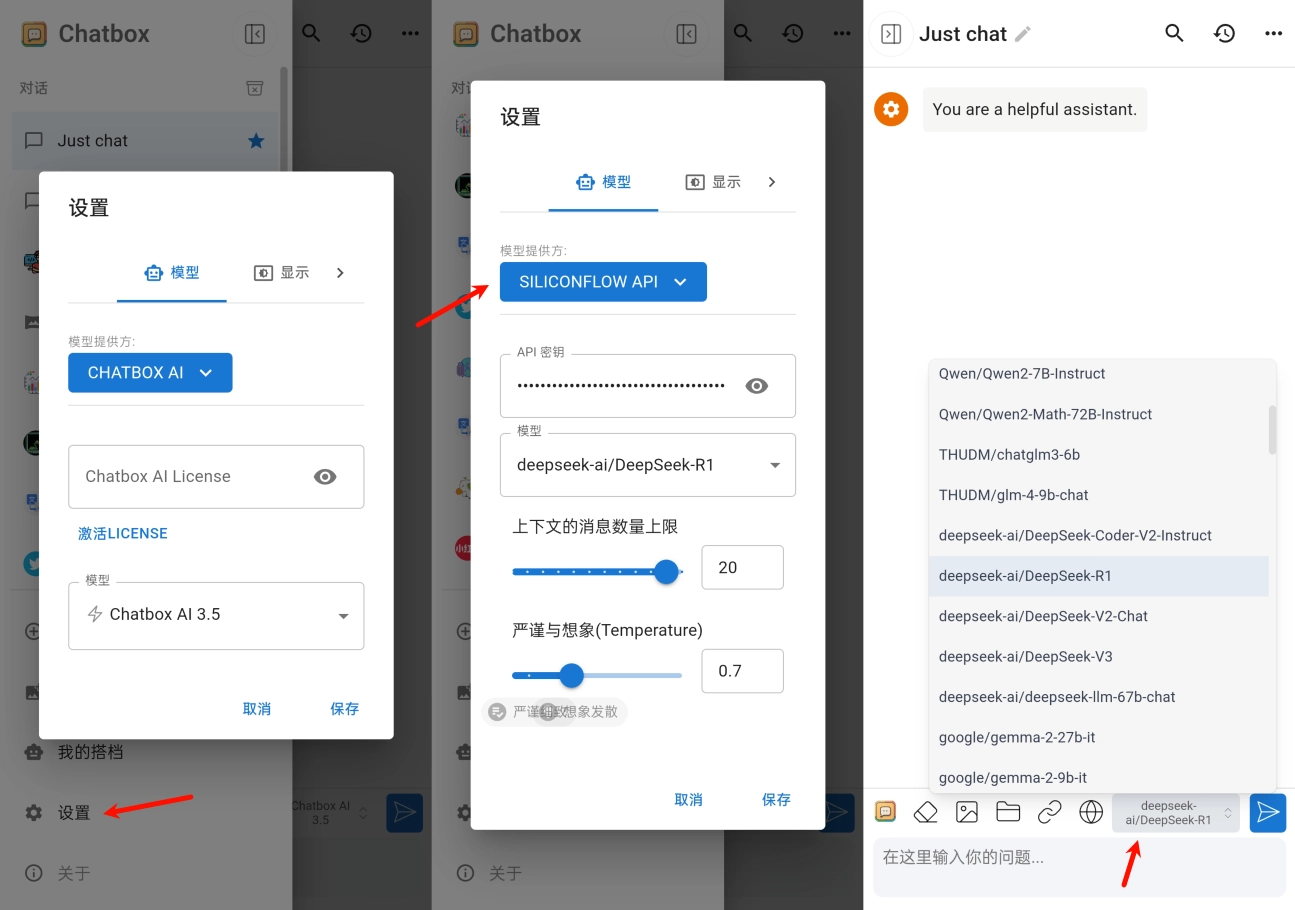
DeepSeek 通过 API 对接第三方客户端 告别“服务器繁忙”
本文首发于只抄博客,欢迎点击原文链接了解更多内容。 前言 上一期分享了如何在本地部署 DeepSeek R1 模型,但通过命令行运行的本地模型,问答的交互也要使用命令行,体验并不是很好。这期分享几个第三方客户端,涵盖了桌…...

性格测评小程序07用户登录
目录 1 创建登录页2 在首页检查登录状态3 搭建登录功能最终效果总结 小程序注册功能开发好了之后,就需要考虑登录的问题。首先要考虑谁作为首页,如果把登录页作为首页,比较简单,每次访问的时候都需要登录。 如果把功能页作为首页&…...

红队视角出发的k8s敏感信息收集——日志与监控系统
针对 Kubernetes 日志与监控系统 的详细攻击视角分析,聚焦 集群审计日志 和 Prometheus/Grafana 暴露 的潜在风险及利用方法 攻击链示例 1. 攻击者通过容器逃逸进入 Pod → 2. 发现未认证的 Prometheus 服务 → 3. 查询环境变量标签获取数据库密码 → 4. 通过审…...

deepseek多列数据对比,联想到excel的高级筛选功能
目录 1 业务背景 2 deepseek提示词输入 3 联想分析 4 EXCEL高级搜索 1 业务背景 系统上线的时候经常会遇到一个问题,系统导入的数据和线下的EXCEL数据是否一致,如果不一致,如何快速找到差异值,原来脑海第一反应就是使用公…...

国产编辑器EverEdit - “切换文件类型”的使用场景
1 “切换文件类型”的使用场景 1.1 应用背景 一般的编辑器都是通过扩展名映射到对应的语法高亮规则的,比如:文件test.xml中的扩展名“xml"对应XML的语法高亮,在编辑器中打开test.xml就会给不同标识符显示不同的颜色。 但有时一些应用程…...

VSCode 接入DeepSeek V3大模型,附使用说明
VSCode 接入DeepSeek V3大模型,附使用说明 由于近期 DeepSeek 使用人数激增,服务器压力较大,官网已 暂停充值入口 ,且接口响应也开始不稳定,建议使用第三方部署的 DeepSeek,如 硅基流动 或者使用其他模型/插件,如 豆包免费AI插件 MarsCode、阿里免费AI插件 TONGYI Lin…...

JavaScript 内置对象-数组对象
在JavaScript中,数组(Array)是一种非常重要的数据结构,它允许我们以列表的形式存储多个值,并提供了丰富的内置方法来操作这些值。无论是处理简单的数值集合还是复杂的对象数组,数组对象都能提供强大的支持。…...

在linux系统中安装Anaconda,并使用conda
系统 : ubuntu20.04 显卡:NVIDIA GTX1650 目录 安装Anaconda第一步:下载合适版本的Anconda1. 查看自己Linux的操作系统及架构命令:uname -a2. 下载合适版本的Anconda 第二步:安装Aanconda1. 为.sh文件设置权限2. 执行.sh文件2.1 .…...

机械学习基础-5.分类-数据建模与机械智能课程自留
data modeling and machine intelligence - CLASSIFICATION 为什么我们不将回归技术用于分类?贝叶斯分类器(The Bayes Classifier)逻辑回归(Logistic Regression)对逻辑回归的更多直观理解逻辑 /sigmoid 函数的导数我们…...

静态页面在安卓端可以正常显示,但是在ios打开这个页面就需要刷新才能显示全图片
这个问题可能有几个原因导致,我来分析一下并给出解决方案: 首要问题是懒加载实现方式的兼容性问题。当前的懒加载实现可能在 iOS 上不够稳定。建议修改图片懒加载的实现方式: // 使用 Intersection Observer API 实现懒加载 function initLazyLoading() {const imageObserver…...

代码随想录刷题攻略---动态规划---子序列问题1---子序列
子序列(不连续)和子序列(连续)的问题 例题1: 最长递增子序列 给你一个整数数组 nums ,找到其中最长严格递增子序列的长度。 子序列是由数组派生而来的序列,删除(或不删除)数组中的…...

八股取士--dockerk8s
一、Docker 基础 Docker 和虚拟机的区别是什么? 答案: 虚拟机(VM):虚拟化硬件,每个 VM 有独立操作系统,资源占用高,启动慢。Docker:容器化应用,共享宿主机内核…...
)
ubuntu系统下KVM设置桥接网络(失败)
20250216 - 概述 因实验需求,需要设置KVM下的虚拟机采用桥接模式进行通信,这种方式将使虚拟机与主机类似使用同一网段的IP。实际上,为了实现这个功能,我已经在自己mac上VMware使用过,虚拟机获得了自己独立的IP。 但…...
测试用例CAPL代码全解析④】)
【ISO 14229-1:2023 UDS诊断(会话控制0x10服务)测试用例CAPL代码全解析④】
ISO 14229-1:2023 UDS诊断【会话控制0x10服务】_TestCase04 作者:车端域控测试工程师 更新日期:2025年02月15日 关键词:UDS诊断、0x10服务、诊断会话控制、ECU测试、ISO 14229-1:2023 TC10-004测试用例 用例ID测试场景验证要点参考条款预期…...

OpenAI 放王炸,将发布整合多项技术的 GPT-5,并免费无限使用,该模型有哪些技术亮点
对于 ChatGPT 的免费用户,将可以无限制地访问 GPT-5,但仅限于标准的智能级别。该级别会设定滥用限制,以防止不当使用(意思就是你得付费嘛)。 OpenAI CEO Sam Altman 今天在 X 上透露了 GPT-4.5 和 GPT-5 的最新发展计划。 OpenAI 将发布代…...
C 语言版--销售预测项目案例分享
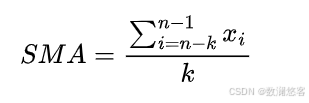
以下是一个 C 语言销售预测项目案例,该项目模拟根据历史销售数据使用简单的移动平均法来预测未来的销售额。移动平均法是一种常见且基础的时间序列预测方法,它通过计算一定时间段内数据的平均值来预测未来的值。 项目需求 给定一系列历史销售数据,使用简单移动平均法预测下…...

用deepseek学大模型05-线性回归
deepseek.com:多元线性回归的目标函数,损失函数,梯度下降 标量和矩阵形式的数学推导,pytorch真实能跑的代码案例以及模型,数据,预测结果的可视化展示, 模型应用场景和优缺点,及如何改进解决及改进方法数据推…...

DC-7靶机渗透测试全过程
目录 前期准备 一、渗透测试 1.IP地址查询 2.端口地址收集 3.网页信息收集 社工收集信息 Drush直接修改账户密码 下载PHP插件 反弹shell 二、总结 前期准备 攻击机 : kali windows11 靶机: DC-7(调至NAT模式) 一、渗透测试 1.IP地址查询 …...

什么是服务的雪崩、熔断、降级的解释以及Hystrix和Sentinel服务熔断器的解释、比较
1.什么是服务雪崩? 定义:在微服务中,假如一个或者多个服务出现故障,如果这时候,依赖的服务还在不断发起请求,或者重试,那么这些请求的压力会不断在下游堆积,导致下游服务的负载急剧…...

解决IDEA报错:java 找不到符号
问题:IIDEA编译项目一直报 例如 java: 找不到符号 符号: 方法 getUserId()异常 的错误 解决方法: 1、刷新maven 2、clean package...

基于SpringBoot的医院药房管理系统【源码+答辩PPT++项目部署】高质量论文1-1.5W字
作者简介:✌CSDN新星计划导师、Java领域优质创作者、掘金/华为云/阿里云/InfoQ等平台优质作者、专注于Java技术领域和学生毕业项目实战,高校老师/讲师/同行前辈交流。✌ 主要内容:🌟Java项目、Python项目、前端项目、PHP、ASP.NET、人工智能…...

Ubuntu22.04通过Docker部署Jeecgboot
程序发布环境包括docker、mysql、redis、maven、nodejs、npm等。 一、安装docker 1、用如下命令卸载旧Docker: for pkg in docker.io docker-doc docker-compose docker-compose-v2 podman-docker containerd runc; do sudo apt-get remove $pkg; done 2、安装APT环境依赖包…...

基于Ubuntu+vLLM+NVIDIA T4高效部署DeepSeek大模型实战指南
一、 前言:拥抱vLLM与T4显卡的强强联合 在探索人工智能的道路上,如何高效地部署和运行大型语言模型(LLMs)一直是一个核心挑战。尤其是当我们面对资源有限的环境时,这个问题变得更加突出。原始的DeepSeek-R1-32B模型虽…...