
Liunx(CentOS-6-x86_64)系统安装MySql(5.6.50)
一:安装Liunx(CentOS-6-x86_64)
安装Liunx(CentOS-6-x86_64)
二:下载MySql(5.6.50)
MySql下载官网

二:安装MySql
2.1 将mysql上传到Liunx
文件地址 /usr/local/
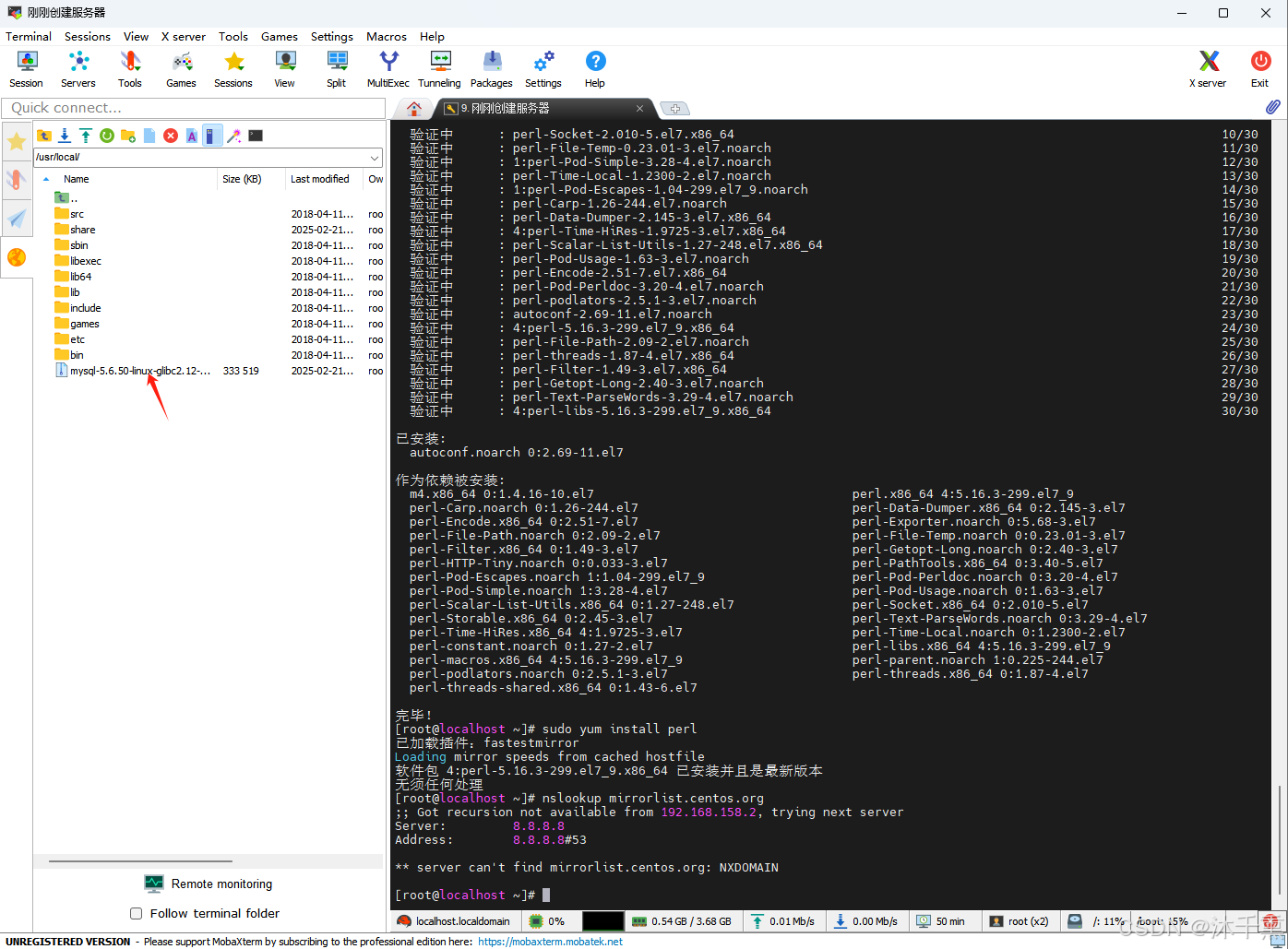
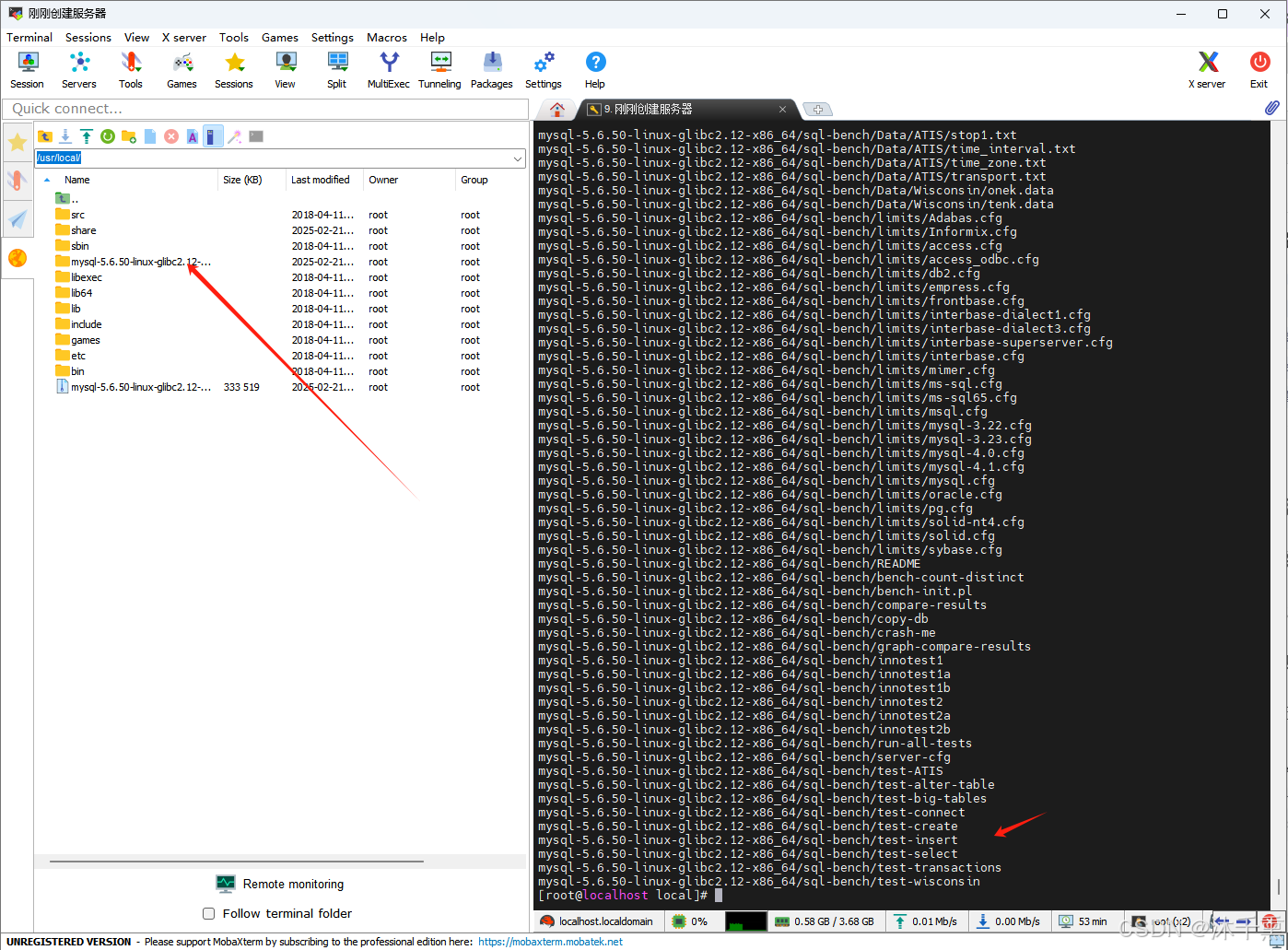
2.2 解压安装MySql
cd /usr/local/
tar zxvf mysql-5.6.50-linux-glibc2.12-x86_64.tar.gz -C /usr/local
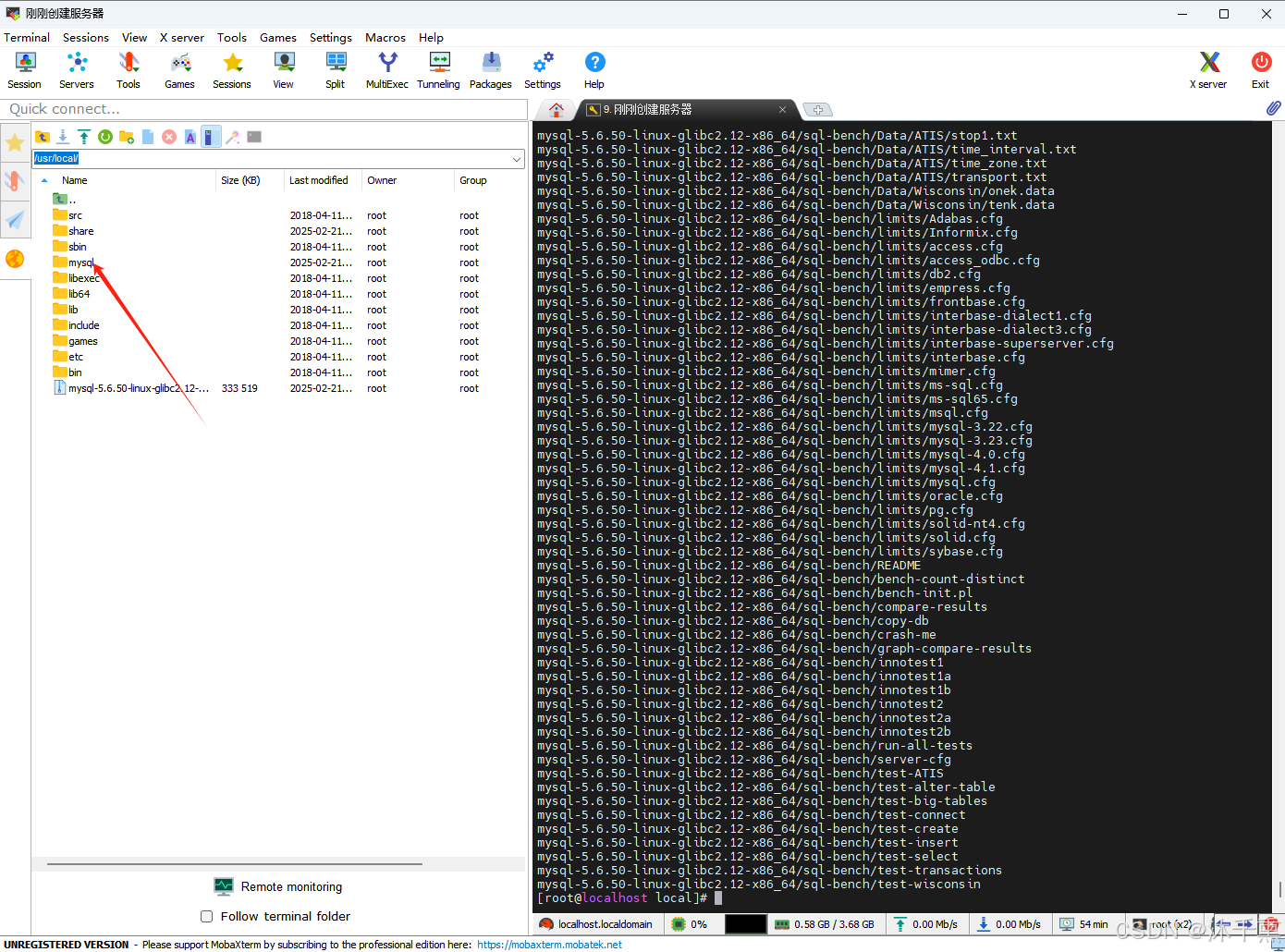
2.3 修改解压后包的名称(方便后续的使用)
2.4 配置my.cnf文件的文件
vim /etc/my.cnf
my.cnf文件内容全部替换成下面的
[mysqld]
# 设置3306端口
port=3306
# 设置mysql的安装目录
basedir=/usr/local/mysql
# 设置mysql数据库的数据的存放目录
datadir=/usr/local/mysql/data
# 允许最大连接数
max_connections=200
# 允许连接失败的次数。
max_connect_errors=10
# 服务端使用的字符集默认为utf8mb4
character-set-server=utf8mb4
# 创建新表时将使用的默认存储引擎
default-storage-engine=INNODB
# 默认使用“mysql_native_password”插件认证
#mysql_native_password
default_authentication_plugin=mysql_native_password
[mysql]
# 设置mysql客户端默认字符集
default-character-set=utf8mb4
[client]
# 设置mysql客户端连接服务端时默认使用的端口
port=3306
default-character-set=utf8mb4
2.4 创建MySQL用户组
groupadd mysql创建MySQL用户组
useradd -r -g mysql mysql添加MySQL用户并添加到MySQL用户组
chown mysql:mysql -R /usr/local/mysql/data/赋予权限
2.5 将 MySQL 的 bin 目录添加到 PATH
export PATH=/usr/local/mysql/bin:$PATH
source ~/.bashrc
2.6 将初始化 MySQL
cd /usr/local/mysql/scripts/
./mysql_install_db --user=mysql --basedir=/usr/local/mysql --datadir=/usr/local/mysql/data
初始化成功的打印内容,其中打印内容中会有初始密码记得保存记录
里面的打印的初始密码/usr/local/mysql/bin/mysqladmin -u root password 'new-password'/usr/local/mysql/bin/mysqladmin -u root -h localhost.localdomain password 'new-password'
Installing MySQL system tables...2025-02-21 16:51:26 0 [Warning] TIMESTAMP with implicit DEFAULT va                                                                 lue is deprecated. Please use --explicit_defaults_for_timestamp server option (see documentation fo                                                                 r more details).
2025-02-21 16:51:26 0 [Note] Ignoring --secure-file-priv value as server is running with --bootstra                                                                 p.
2025-02-21 16:51:26 0 [Note] /usr/local/mysql/bin/mysqld (mysqld 5.6.50) starting as process 31405                                                                  ...
2025-02-21 16:51:26 31405 [Note] InnoDB: Using atomics to ref count buffer pool pages
2025-02-21 16:51:26 31405 [Note] InnoDB: The InnoDB memory heap is disabled
2025-02-21 16:51:26 31405 [Note] InnoDB: Mutexes and rw_locks use GCC atomic builtins
2025-02-21 16:51:26 31405 [Note] InnoDB: Memory barrier is not used
2025-02-21 16:51:26 31405 [Note] InnoDB: Compressed tables use zlib 1.2.11
2025-02-21 16:51:26 31405 [Note] InnoDB: Using Linux native AIO
2025-02-21 16:51:26 31405 [Note] InnoDB: Using CPU crc32 instructions
2025-02-21 16:51:26 31405 [Note] InnoDB: Initializing buffer pool, size = 128.0M
2025-02-21 16:51:26 31405 [Note] InnoDB: Completed initialization of buffer pool
2025-02-21 16:51:26 31405 [Note] InnoDB: The first specified data file ./ibdata1 did not exist: a n                                                                 ew database to be created!
2025-02-21 16:51:26 31405 [Note] InnoDB: Setting file ./ibdata1 size to 12 MB
2025-02-21 16:51:26 31405 [Note] InnoDB: Database physically writes the file full: wait...
2025-02-21 16:51:26 31405 [Note] InnoDB: Setting log file ./ib_logfile101 size to 48 MB
2025-02-21 16:51:26 31405 [Note] InnoDB: Setting log file ./ib_logfile1 size to 48 MB
2025-02-21 16:51:27 31405 [Note] InnoDB: Renaming log file ./ib_logfile101 to ./ib_logfile0
2025-02-21 16:51:27 31405 [Warning] InnoDB: New log files created, LSN=45781
2025-02-21 16:51:27 31405 [Note] InnoDB: Doublewrite buffer not found: creating new
2025-02-21 16:51:27 31405 [Note] InnoDB: Doublewrite buffer created
2025-02-21 16:51:27 31405 [Note] InnoDB: 128 rollback segment(s) are active.
2025-02-21 16:51:27 31405 [Warning] InnoDB: Creating foreign key constraint system tables.
2025-02-21 16:51:27 31405 [Note] InnoDB: Foreign key constraint system tables created
2025-02-21 16:51:27 31405 [Note] InnoDB: Creating tablespace and datafile system tables.
2025-02-21 16:51:27 31405 [Note] InnoDB: Tablespace and datafile system tables created.
2025-02-21 16:51:27 31405 [Note] InnoDB: Waiting for purge to start
2025-02-21 16:51:27 31405 [Note] InnoDB: 5.6.50 started; log sequence number 0
2025-02-21 16:51:27 31405 [Note] RSA private key file not found: /usr/local/mysql/data//private_key                                                                 .pem. Some authentication plugins will not work.
2025-02-21 16:51:27 31405 [Note] RSA public key file not found: /usr/local/mysql/data//public_key.p                                                                 em. Some authentication plugins will not work.
2025-02-21 16:51:27 31405 [Note] Binlog end
2025-02-21 16:51:27 31405 [Note] InnoDB: FTS optimize thread exiting.
2025-02-21 16:51:27 31405 [Note] InnoDB: Starting shutdown...
2025-02-21 16:51:29 31405 [Note] InnoDB: Shutdown completed; log sequence number 1625977
OKFilling help tables...2025-02-21 16:51:29 0 [Warning] TIMESTAMP with implicit DEFAULT value is depr                                                                 ecated. Please use --explicit_defaults_for_timestamp server option (see documentation for more deta                                                                 ils).
2025-02-21 16:51:29 0 [Note] Ignoring --secure-file-priv value as server is running with --bootstra                                                                 p.
2025-02-21 16:51:29 0 [Note] /usr/local/mysql/bin/mysqld (mysqld 5.6.50) starting as process 31443                                                                  ...
2025-02-21 16:51:29 31443 [Note] InnoDB: Using atomics to ref count buffer pool pages
2025-02-21 16:51:29 31443 [Note] InnoDB: The InnoDB memory heap is disabled
2025-02-21 16:51:29 31443 [Note] InnoDB: Mutexes and rw_locks use GCC atomic builtins
2025-02-21 16:51:29 31443 [Note] InnoDB: Memory barrier is not used
2025-02-21 16:51:29 31443 [Note] InnoDB: Compressed tables use zlib 1.2.11
2025-02-21 16:51:29 31443 [Note] InnoDB: Using Linux native AIO
2025-02-21 16:51:29 31443 [Note] InnoDB: Using CPU crc32 instructions
2025-02-21 16:51:29 31443 [Note] InnoDB: Initializing buffer pool, size = 128.0M
2025-02-21 16:51:29 31443 [Note] InnoDB: Completed initialization of buffer pool
2025-02-21 16:51:29 31443 [Note] InnoDB: Highest supported file format is Barracuda.
2025-02-21 16:51:29 31443 [Note] InnoDB: 128 rollback segment(s) are active.
2025-02-21 16:51:29 31443 [Note] InnoDB: Waiting for purge to start
2025-02-21 16:51:29 31443 [Note] InnoDB: 5.6.50 started; log sequence number 1625977
2025-02-21 16:51:29 31443 [Note] RSA private key file not found: /usr/local/mysql/data//private_key                                                                 .pem. Some authentication plugins will not work.
2025-02-21 16:51:29 31443 [Note] RSA public key file not found: /usr/local/mysql/data//public_key.p                                                                 em. Some authentication plugins will not work.
2025-02-21 16:51:29 31443 [Note] Binlog end
2025-02-21 16:51:29 31443 [Note] InnoDB: FTS optimize thread exiting.
2025-02-21 16:51:29 31443 [Note] InnoDB: Starting shutdown...
2025-02-21 16:51:30 31443 [Note] InnoDB: Shutdown completed; log sequence number 1625987
OKTo start mysqld at boot time you have to copy
support-files/mysql.server to the right place for your systemPLEASE REMEMBER TO SET A PASSWORD FOR THE MySQL root USER !
To do so, start the server, then issue the following commands:/usr/local/mysql/bin/mysqladmin -u root password 'new-password'/usr/local/mysql/bin/mysqladmin -u root -h localhost.localdomain password 'new-password'Alternatively you can run:/usr/local/mysql/bin/mysql_secure_installationwhich will also give you the option of removing the test
databases and anonymous user created by default.  This is
strongly recommended for production servers.See the manual for more instructions.You can start the MySQL daemon with:cd . ; /usr/local/mysql/bin/mysqld_safe &You can test the MySQL daemon with mysql-test-run.plcd mysql-test ; perl mysql-test-run.plPlease report any problems at http://bugs.mysql.com/The latest information about MySQL is available on the web athttp://www.mysql.comSupport MySQL by buying support/licenses at http://shop.mysql.comNew default config file was created as /usr/local/mysql/my.cnf and
will be used by default by the server when you start it.
You may edit this file to change server settingsWARNING: Default config file /etc/my.cnf exists on the system
This file will be read by default by the MySQL server
If you do not want to use this, either remove it, or use the
--defaults-file argument to mysqld_safe when starting the server
三:启动MySql
cd /usr/local/mysql/support-files/
./mysql.server start
启动成功的打印内容
[root@localhost scripts]# cd /usr/local/mysql/support-files/
[root@localhost support-files]# ./mysql.server start
Starting MySQL.Logging to '/usr/local/mysql/data/localhost.localdomain.err'.
. SUCCESS!
[root@localhost support-files]#
四:登录配置MySql
4.1:登录MySQL
cd /usr/local/mysql/bin/
./mysql -u root
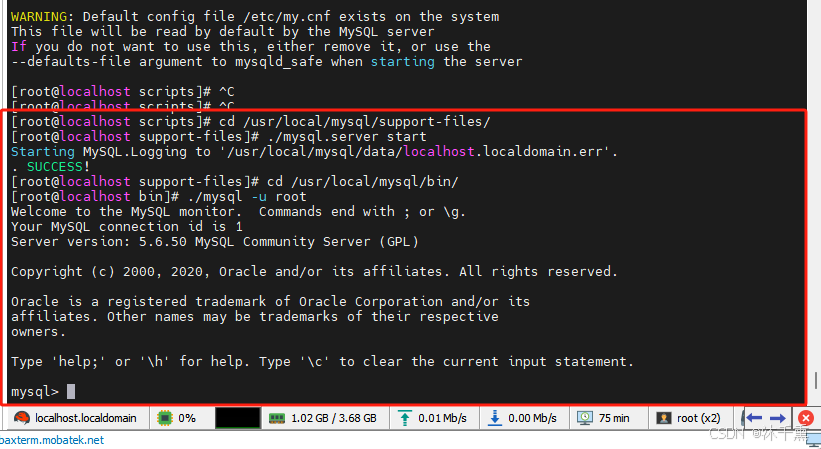
使用sql验证一下
SELECT VERSION();

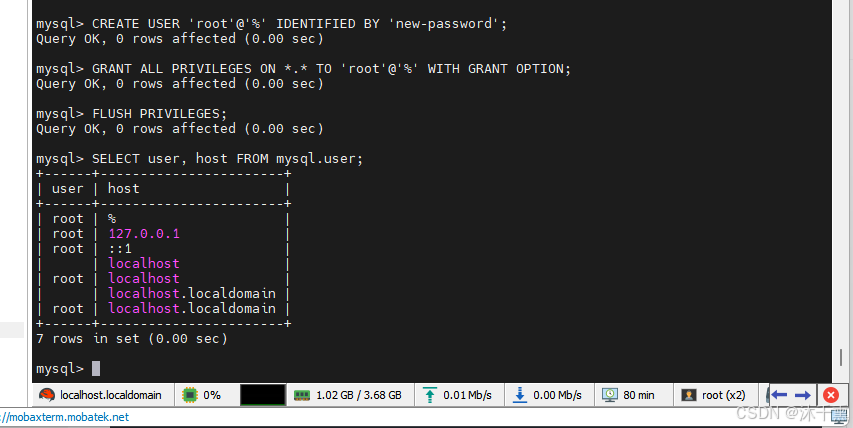
4.2:检查 root 用户的权限:确保 root 用户的主机是 localhost 或 %(允许远程登录)。
SELECT user, host FROM mysql.user;
其中没有%(远程登录链接的权限)

4.3:创建新用户并授予权限(远程链接的权限)
FLUSH PRIVILEGES; 是刷新权限
CREATE USER 'root'@'%' IDENTIFIED BY 'new-password';
GRANT ALL PRIVILEGES ON *.* TO 'root'@'%' WITH GRANT OPTION;
FLUSH PRIVILEGES;
五:设置MySql开机自启动
复制 MySQL 提供的启动脚本到系统目录:
cp /usr/local/mysql/support-files/mysql.server /etc/init.d/mysqld
赋予脚本可执行权限:
chmod +x /etc/init.d/mysqld
添加到开机启动
chkconfig --add mysqld
chkconfig mysqld on

六:开启3306端口防火墙,远程链接数据库
6.1:开启3306端口防火墙
添加3306端口规则
firewall-cmd --zone=public --add-port=3306/tcp --permanent
重新加载防火墙规则
firewall-cmd --reload
验证规则是否生效,如果返回 yes,说明端口已开放
firewall-cmd --zone=public --query-port=3306/tcp
最好打印yes就是将3306端口开放了

6.2:远程链接数据库


七:报错
7.1:使用 sudo yum install 进行下载插件的错误
http://mirrorlist.centos.org/?release=7&arch=x86_64&repo=os&infra=stock error was 14: curl 注意:
原因
如果报下面的报错信息是因为 没有配置仓库
解决方法
在 Liunx教程中。3.配置仓库(用于yum下载)这个节点操作一遍
报错信息
已加载插件:fastestmirror
Loading mirror speeds from cached hostfile
Could not retrieve mirrorlist http://mirrorlist.centos.org/?release=7&arch=x86_64&repo=os&infra=stock error was
14: curl#6 - "Could not resolve host: mirrorlist.centos.org; 未知的错误"One of the configured repositories failed (未知),and yum doesn't have enough cached data to continue. At this point the onlysafe thing yum can do is fail. There are a few ways to work "fix" this:1. Contact the upstream for the repository and get them to fix the problem.2. Reconfigure the baseurl/etc. for the repository, to point to a workingupstream. This is most often useful if you are using a newerdistribution release than is supported by the repository (and thepackages for the previous distribution release still work).3. Run the command with the repository temporarily disabledyum --disablerepo=<repoid> ...4. Disable the repository permanently, so yum won't use it by default. Yumwill then just ignore the repository until you permanently enable itagain or use --enablerepo for temporary usage:yum-config-manager --disable <repoid>orsubscription-manager repos --disable=<repoid>5. Configure the failing repository to be skipped, if it is unavailable.Note that yum will try to contact the repo. when it runs most commands,so will have to try and fail each time (and thus. yum will be be muchslower). If it is a very temporary problem though, this is often a nicecompromise:yum-config-manager --save --setopt=<repoid>.skip_if_unavailable=trueCannot find a valid baseurl for repo: base/7/x86_64
7.2 ./mysql_install_db 命令报错
错误信息
FATAL ERROR: please install the following Perl modules before executing ./mysql_install_db:
Data::Dumper
解决方式 安装 autoconf
yum -y install autoconf
7.3 mysql_install_db 失败 报 Table ‘mysql.plugin’ doesn’t exist,
解决方式
重新初始化数据目录。
7.4 忘记 root 密码
停止 MySQL 服务,然后以跳过权限检查的方式启动:
mysqld_safe --skip-grant-tables &
登录 MySQL 并重置密码:
UPDATE mysql.user SET Password=PASSWORD('new_password') WHERE User='root';
FLUSH PRIVILEGES;
7.5 -bash: ./mysql_install_db: /usr/bin/perl: 坏的解释器: 没有那个文件或目录
问题原因
mysql_install_db 是一个 Perl 脚本,需要 Perl 解释器来运行。
解决方法
安装 Perl
sudo yum install perl
7.6 nslookup mirrorlist.centos.org 这个命令无法使用,显示没有这个命令
解决方法
安装 bind-utils
sudo yum install bind-utils
相关文章:
Liunx(CentOS-6-x86_64)系统安装MySql(5.6.50)
一:安装Liunx(CentOS-6-x86_64) 安装Liunx(CentOS-6-x86_64) 二:下载MySql(5.6.50) MySql下载官网 二:安装MySql 2.1 将mysql上传到Liunx 文件地址 /usr/local/ 2…...

Java Web开发实战与项目——开发一个在线论坛系统
在线论坛系统是一个常见的Web应用,通常具有用户注册、帖子发布、评论互动、消息推送等基本功能。开发这样一个系统,既涉及到前后端的技术栈选择,也需要考虑性能、扩展性等实际问题。本文将从设计论坛模块、实现消息推送与实时更新功能、以及优…...

ubuntu24.04无法安装向日葵,提示依赖libgconf-2-4怎么办?
在向日葵官方下载的deb包,目前是SunloginClient_15.2.0.63062_amd64.deb,执行安装代码,如下: sudo < /span > dpkg< /span > -i< /span > SunloginClient_15< /span >.2< /span >.0< /span >…...

C++ 设计模式-访问者模式
C++访问者模式 一、模式痛点:当if-else成为维护噩梦 开发动物园管理系统,最初的需求很简单: class Animal {}; class Cat : public Animal {}; class Dog : public Animal {};// 处理动物叫声 void makeSound(Animal* a) {if (auto c = dynamic_cast<Cat*>(a)) {st…...

Kubernetes 使用 Kube-Prometheus 构建指标监控 +飞书告警
1 介绍 Prometheus Operator 为 Kubernetes 提供了对 Prometheus 机器相关监控组件的本地部署和管理方案,该项目的目的是为了简化和自动化基于 Prometheus 的监控栈配置,主要包括以下几个功能: Kubernetes 自定义资源:使用 Kube…...

《Operating System Concepts》阅读笔记:p62-p75
《Operating System Concepts》学习第 10 天,p62-p75 总结,总计 14 页。 一、技术总结 1. system call (1) 定义 The primary interface between processes and the operating system, providing a means to invoke services made available by th…...

Node.js中不支持require和import两种导入模块的混用
最近在整理Node.js相关的知识点,发现通过Node.js支持的两个模块导入语句require和import在同时使用时会发生错误,而且错误非常诡异。 例如,在先使用require导入模块,在使用import导入模块时,出现require无法识别&#…...

WPF的页面设计和实用功能实现
目录 一、TextBlock和TextBox 1. 在TextBlock中实时显示当前时间 二、ListView 1.ListView显示数据 三、ComboBox 1. ComboBox和CheckBox组合实现下拉框多选 四、Button 1. 设计Button按钮的边框为圆角,并对指针悬停时的颜色进行设置 一、TextBlock和TextBox…...

window安装MySQL5.7
1、下载MySQL5.7.24 浏览器打开: https://dev.mysql.com/get/Downloads/MySQL-5.7/mysql-5.7.24-winx64.zip 2、解压缩 下载下来的是一个压缩包,解压到你想放到的目录下面,我放的是“C:\MySQL” 3、配置MySQL环境变量 计算机右键 - 属性 …...

数据结构:哈希表(二)
目录 一、哈希表 1、概念 二、哈希冲突 1、概念 2、冲突避免 (1)哈希函数设计 (2)负载因子调节 3、冲突解决 (1)闭散列 1、线性探测 2、二次探测 (2)开散列 4、哈希桶实…...

blender笔记2
一、物体贴地 物体->变换->对齐物体 ->对齐弹窗(对齐模式:反方,相对于:场景原点,对齐:z)。 之后可以设置原点->原点--3d游标 二、面上有阴影 在编辑模式下操作过后,物体面有阴影。 数据-&g…...

1.21作业
1 unserialize3 当序列化字符串中属性个数大于实际属性个数时,不会执行反序列化 外部如果是unserialize()会调用wakeup()方法,输出“bad request”——构造url绕过wakeup 类型:public class&…...

深入浅出:理解闭包在JavaScript中的应用
什么是闭包 闭包(Closure)是 JavaScript 中的一个重要概念,也是函数式编程中的核心特性之一。简单来说,闭包是指一个函数能够访问并记住其词法作用域(Lexical Scope),即使这个函数在其词法作用…...

【Quest开发】全身跟踪(一)
软件:Unity 2022.3.51f1c1、vscode、Meta XR All in One SDK V72 硬件:Meta Quest3 最终效果:能像meta的操作室沉浸场景一样根据头盔移动来推断用户姿势,实现走路、蹲下、手势匹配等功能 需要借助UnityMovement这个包 GitHub …...

【QT中的一些高级数据结构,持续更新中...】
QT中有一些很精妙、便捷的设计,在了解这些数据的同时,我们可以学到如何更好的设计代码。本贴持续更新中,欢迎关注和收藏 一 QScopedPointer主要特点:示例代码 二 Q_DISABLE_COPY 一 QScopedPointer QScopedPointer 是 Qt 中的一种…...

最新版本Exoplayer扩展FFmpeg音频软解码保姆级教程
ExoPlayer 是一个开源的 Android 媒体播放库,由 Google 开发和维护,用于替代 Android 系统自带的 MediaPlayer。它提供了更强大的功能、更好的性能和更高的灵活性,适用于各种复杂的媒体播放场景。所以被广泛用于各种播放器场景。 最近项目中…...

JS:页面事件
文章目录 一、页面加载事件二、页面滚动事件三、页面尺寸事件总结 一、页面加载事件 有时候我们会把script的内容放在body前,这时候代码的执行在元素的加载之前,会导致页面元素未加载而报错 解决办法是调用Window的load加载事件,将所有操作放…...

✨ 索引有哪些缺点以及具体有哪些索引类型
索引的定义与原理 索引是数据库中用于提高数据检索效率的数据结构。它就像是书籍的目录,通过目录可以快速定位到所需内容的页码,而在数据库中,索引可以帮助数据库系统快速找到符合查询条件的数据行,而不必对整个表进行扫描。 其…...

C++ ——继承
体现的是代码复用的思想 1、子类继承父类,子类就拥有了父类的特性(成员方法和成员属性) 2、已存在的类被称为“基类”或者“父类”或者“超类”;新创建的类被称为“派生类”或者“子类” 注意: (1&#…...

vue,vue3 keepalive没有效果,无法缓存页面include无效,keep-alive
keepalive没有效果,无法缓存页面? 问题大概是组件的name值不对应,vue2修改组件文件的name值,vue3保持组件文件名称和路由页面配置的name一致就可以了,如果vue3不想保持一致,必须手动在文件后面添加export..…...

DeepSeek智能测试知识库助手PRO版:多格式支持+性能优化
前言 测试工程师在管理测试资产时,需要面对多种文档格式、大量文件分类及知识库的构建任务。为了解决这些问题,我们升级了 DeepSeek智能测试知识库助手,不仅支持更多文档格式,还加入了 多线程并发处理 和 可扩展格式支持,大幅提升处理性能和灵活性。 主要功能亮点: 多格…...

【ELK】【Elasticsearch】数据查询方式
1. 简单查询(URI Search) 通过 URL 参数直接进行查询,适合简单的搜索场景。 示例: bash 复制 GET /index_name/_search?qfield_name:search_value 说明: index_name:索引名称。 field_name…...

Kotlin 优雅的接口实现
1. 日常遇到的冗余的接口方法实现 日常开发中,经常会要实现接口,但是很多场景中,只需要用到其中一两个方法,例如 ActivityLifecycleCallbacks,它有很多个接口需要实现,但是很多时候我们只需要用到其中的一…...

go 通过ssh连接linux golang.org/x/crypto/ssh
ssh.Dial golang.org/x/crypto/ssh package mainimport ("bytes""log""os""strings""golang.org/x/term""golang.org/x/crypto/ssh" )// go ssh 连接ssh // 参考blog: // // https://www.cnblogs.c…...

纯手工搭建整套CI/CD流水线指南
目录 一、前言 二、环境准备 1、服务器开荒(192.168.1.200) 2、离线资源清单(提前用U盘拷好) 三、硬核安装:比拧螺丝还细的步骤 Step1:搭建GitLab(注意!这是只内存饕餮…...

智能硬件新时代,EasyRTC开启物联音视频新纪元
在万物互联的时代浪潮中,智能硬件正以前所未有的速度融入我们的生活,从智能家居的便捷控制,到智能穿戴设备的健康监测,再到工业物联网的高效管理,智能硬件的应用场景不断拓展。而在这个智能硬件蓬勃发展的背后…...

Rust编程语言入门教程(八)所有权 Stack vs Heap
Rust 系列 🎀Rust编程语言入门教程(一)安装Rust🚪 🎀Rust编程语言入门教程(二)hello_world🚪 🎀Rust编程语言入门教程(三) Hello Cargo…...
)
spring 狂神说的详细笔记(完整版)
最近在B站找教程视频自学java框架(SSM),最后发现自己迷上了狂神说,不得不说秦疆老师 讲得太好了,通俗易懂,而且在听他的课你会不由衷得到一些思想的启发和转变,而且教程视频 还是无偿免费的&…...

交易所开发:数字市场的核心动力
数字资产交易所作为连接用户与市场的核心枢纽,已成为推动数字经济发展的关键引擎。其开发不仅需要技术创新,还需兼顾用户体验、合规安全与生态构建,以下是交易所开发的核心要素与实践路径分析: 一、交易所的核心定位与技术架构…...
)
C++ 课程设计 汇总(含源码)
C 课程设计 [C课程设计 个人账务管理系统(含源码)](https://arv000.blog.csdn.net/article/details/145601695)[C课程设计 运动会分数统计(含源码)](https://arv000.blog.csdn.net/article/details/145601819)[C 课程设计打印万年历(含源码&a…...