
Linux firewalld 常用命令
本文参考RedHat官网文章How to configure a firewall on Linux with firewalld。
Firewalld 是守护进程名,对应命令为firewall-cmd。帮助详见以下命令:
$ firewall-cmd --helpUsage: firewall-cmd [OPTIONS...]General Options-h, --help Prints a short help text and exits-V, --version Print the version string of firewalld-q, --quiet Do not print status messagesStatus Options--state Return and print firewalld state--reload Reload firewall and keep state information--complete-reload Reload firewall and lose state information--runtime-to-permanentCreate permanent from runtime configuration--reset-to-defaultsReset configuration to firewalld's default configuration--check-config Check permanent configuration for errorsLog Denied Options--get-log-denied Print the log denied value--set-log-denied=<value>Set log denied valuePermanent Options--permanent Set an option permanentlyUsable for options marked with [P]Zone Options--get-default-zone Print default zone for connections and interfaces--set-default-zone=<zone>Set default zone--get-active-zones Print currently active zones--get-zones Print predefined zones [P]--get-services Print predefined services [P]--get-icmptypes Print predefined icmptypes [P]--get-zone-of-interface=<interface>Print name of the zone the interface is bound to [P]--get-zone-of-source=<source>[/<mask>]|<MAC>|ipset:<ipset>Print name of the zone the source is bound to [P]--list-all-zones List everything added for or enabled in all zones [P]--new-zone=<zone> Add a new zone [P only]--new-zone-from-file=<filename> [--name=<zone>]Add a new zone from file with optional name [P only]--delete-zone=<zone> Delete an existing zone [P only]--load-zone-defaults=<zone>Load zone default settings [P only]--zone=<zone> Use this zone to set or query options, else default zoneUsable for options marked with [Z]--info-zone=<zone> Print information about a zone--path-zone=<zone> Print file path of a zone [P only]Policy Options--get-policies Print predefined policies--get-active-policiesPrint currently active policies--list-all-policies List everything added for or enabled in all policies--new-policy=<policy>Add a new empty policy--new-policy-from-file=<filename> [--name=<policy>]Add a new policy from file with optional name override [P only]--delete-policy=<policy>Delete an existing policy--load-policy-defaults=<policy>Load policy default settings--policy=<policy> Use this policy to set or query optionsUsable for options marked with [O]--info-policy=<policy>Print information about a policy--path-policy=<policy>Print file path of a policyIPSet Options--get-ipset-types Print the supported ipset types--new-ipset=<ipset> --type=<ipset type> [--option=<key>[=<value>]]..Add a new ipset [P only]--new-ipset-from-file=<filename> [--name=<ipset>]Add a new ipset from file with optional name [P only]--delete-ipset=<ipset>Delete an existing ipset [P only]--load-ipset-defaults=<ipset>Load ipset default settings [P only]--info-ipset=<ipset> Print information about an ipset--path-ipset=<ipset> Print file path of an ipset [P only]--get-ipsets Print predefined ipsets--ipset=<ipset> --set-description=<description>Set new description to ipset [P only]--ipset=<ipset> --get-descriptionPrint description for ipset [P only]--ipset=<ipset> --set-short=<description>Set new short description to ipset [P only]--ipset=<ipset> --get-shortPrint short description for ipset [P only]--ipset=<ipset> --add-entry=<entry>Add a new entry to an ipset [P]--ipset=<ipset> --remove-entry=<entry>Remove an entry from an ipset [P]--ipset=<ipset> --query-entry=<entry>Return whether ipset has an entry [P]--ipset=<ipset> --get-entriesList entries of an ipset [P]--ipset=<ipset> --add-entries-from-file=<entry>Add a new entries to an ipset [P]--ipset=<ipset> --remove-entries-from-file=<entry>Remove entries from an ipset [P]IcmpType Options--new-icmptype=<icmptype>Add a new icmptype [P only]--new-icmptype-from-file=<filename> [--name=<icmptype>]Add a new icmptype from file with optional name [P only]--delete-icmptype=<icmptype>Delete an existing icmptype [P only]--load-icmptype-defaults=<icmptype>Load icmptype default settings [P only]--info-icmptype=<icmptype>Print information about an icmptype--path-icmptype=<icmptype>Print file path of an icmptype [P only]--icmptype=<icmptype> --set-description=<description>Set new description to icmptype [P only]--icmptype=<icmptype> --get-descriptionPrint description for icmptype [P only]--icmptype=<icmptype> --set-short=<description>Set new short description to icmptype [P only]--icmptype=<icmptype> --get-shortPrint short description for icmptype [P only]--icmptype=<icmptype> --add-destination=<ipv>Enable destination for ipv in icmptype [P only]--icmptype=<icmptype> --remove-destination=<ipv>Disable destination for ipv in icmptype [P only]--icmptype=<icmptype> --query-destination=<ipv>Return whether destination ipv is enabled in icmptype [P only]--icmptype=<icmptype> --get-destinationsList destinations in icmptype [P only]Service Options--new-service=<service>Add a new service [P only]--new-service-from-file=<filename> [--name=<service>]Add a new service from file with optional name [P only]--delete-service=<service>Delete an existing service [P only]--load-service-defaults=<service>Load icmptype default settings [P only]--info-service=<service>Print information about a service--path-service=<service>Print file path of a service [P only]--service=<service> --set-description=<description>Set new description to service [P only]--service=<service> --get-descriptionPrint description for service [P only]--service=<service> --set-short=<description>Set new short description to service [P only]--service=<service> --get-shortPrint short description for service [P only]--service=<service> --add-port=<portid>[-<portid>]/<protocol>Add a new port to service [P only]--service=<service> --remove-port=<portid>[-<portid>]/<protocol>Remove a port from service [P only]--service=<service> --query-port=<portid>[-<portid>]/<protocol>Return whether the port has been added for service [P only]--service=<service> --get-portsList ports of service [P only]--service=<service> --add-protocol=<protocol>Add a new protocol to service [P only]--service=<service> --remove-protocol=<protocol>Remove a protocol from service [P only]--service=<service> --query-protocol=<protocol>Return whether the protocol has been added for service [P only]--service=<service> --get-protocolsList protocols of service [P only]--service=<service> --add-source-port=<portid>[-<portid>]/<protocol>Add a new source port to service [P only]--service=<service> --remove-source-port=<portid>[-<portid>]/<protocol>Remove a source port from service [P only]--service=<service> --query-source-port=<portid>[-<portid>]/<protocol>Return whether the source port has been added for service [P only]--service=<service> --get-source-portsList source ports of service [P only]--service=<service> --add-helper=<helper>Add a new helper to service [P only]--service=<service> --remove-helper=<helper>Remove a helper from service [P only]--service=<service> --query-helper=<helper>Return whether the helper has been added for service [P only]--service=<service> --get-service-helpersList helpers of service [P only]--service=<service> --set-destination=<ipv>:<address>[/<mask>]Set destination for ipv to address in service [P only]--service=<service> --remove-destination=<ipv>Disable destination for ipv i service [P only]--service=<service> --query-destination=<ipv>:<address>[/<mask>]Return whether destination ipv is set for service [P only]--service=<service> --get-destinationsList destinations in service [P only]--service=<service> --add-include=<service>Add a new include to service [P only]--service=<service> --remove-include=<service>Remove a include from service [P only]--service=<service> --query-include=<service>Return whether the include has been added for service [P only]--service=<service> --get-includesList includes of service [P only]Options to Adapt and Query Zones and Policies--list-all List everything added for or enabled [P] [Z] [O]--timeout=<timeval> Enable an option for timeval time, where timeval isa number followed by one of letters 's' or 'm' or 'h'Usable for options marked with [T]--set-description=<description>Set new description [P only] [Z] [O]--get-description Print description [P only] [Z] [O]--get-target Get the target [P only] [Z] [O]--set-target=<target>Set the target [P only] [Z] [O]--set-short=<description>Set new short description [Z] [O]--get-short Print short description [P only] [Z] [O]--list-services List services added [P] [Z]--add-service=<service>Add a service [P] [Z] [O] [T]--remove-service=<service>Remove a service [P] [Z] [O]--query-service=<service>Return whether service has been added [P] [Z] [O]--list-ports List ports added [P] [Z] [O]--add-port=<portid>[-<portid>]/<protocol>Add the port [P] [Z] [O] [T]--remove-port=<portid>[-<portid>]/<protocol>Remove the port [P] [Z] [O]--query-port=<portid>[-<portid>]/<protocol>Return whether the port has been added [P] [Z] [O]--list-protocols List protocols added [P] [Z] [O]--add-protocol=<protocol>Add the protocol [P] [Z] [O] [T]--remove-protocol=<protocol>Remove the protocol [P] [Z] [O]--query-protocol=<protocol>Return whether the protocol has been added [P] [Z] [O]--list-source-ports List source ports added [P] [Z] [O]--add-source-port=<portid>[-<portid>]/<protocol>Add the source port [P] [Z] [O] [T]--remove-source-port=<portid>[-<portid>]/<protocol>Remove the source port [P] [Z] [O]--query-source-port=<portid>[-<portid>]/<protocol>Return whether the source port has been added [P] [Z] [O]--list-icmp-blocks List Internet ICMP type blocks added [P] [Z] [O]--add-icmp-block=<icmptype>Add an ICMP block [P] [Z] [O] [T]--remove-icmp-block=<icmptype>Remove the ICMP block [P] [Z] [O]--query-icmp-block=<icmptype>Return whether an ICMP block has been added [P] [Z] [O]--list-forward-ports List IPv4 forward ports added [P] [Z] [O]--add-forward-port=port=<portid>[-<portid>]:proto=<protocol>[:toport=<portid>[-<portid>]][:toaddr=<address>[/<mask>]]Add the IPv4 forward port [P] [Z] [O] [T]--remove-forward-port=port=<portid>[-<portid>]:proto=<protocol>[:toport=<portid>[-<portid>]][:toaddr=<address>[/<mask>]]Remove the IPv4 forward port [P] [Z] [O]--query-forward-port=port=<portid>[-<portid>]:proto=<protocol>[:toport=<portid>[-<portid>]][:toaddr=<address>[/<mask>]]Return whether the IPv4 forward port has been added [P] [Z] [O]--add-masquerade Enable IPv4 masquerade [P] [Z] [O] [T]--remove-masquerade Disable IPv4 masquerade [P] [Z] [O]--query-masquerade Return whether IPv4 masquerading has been enabled [P] [Z] [O]--list-rich-rules List rich language rules added [P] [Z] [O]--add-rich-rule=<rule>Add rich language rule 'rule' [P] [Z] [O] [T]--remove-rich-rule=<rule>Remove rich language rule 'rule' [P] [Z] [O]--query-rich-rule=<rule>Return whether a rich language rule 'rule' has beenadded [P] [Z] [O]Options to Adapt and Query Zones--add-icmp-block-inversionEnable inversion of icmp blocks for a zone [P] [Z]--remove-icmp-block-inversionDisable inversion of icmp blocks for a zone [P] [Z]--query-icmp-block-inversionReturn whether inversion of icmp blocks has been enabledfor a zone [P] [Z]--add-forward Enable forwarding of packets between interfaces andsources in a zone [P] [Z] [T]--remove-forward Disable forwarding of packets between interfaces andsources in a zone [P] [Z]--query-forward Return whether forwarding of packets between interfacesand sources has been enabled for a zone [P] [Z]Options to Adapt and Query Policies--get-priority Get the priority [P only] [O]--set-priority=<priority>Set the priority [P only] [O]--list-ingress-zonesList ingress zones that are bound to a policy [P] [O]--add-ingress-zone=<zone>Add the ingress zone to a policy [P] [O]--remove-ingress-zone=<zone>Remove the ingress zone from a policy [P] [O]--query-ingress-zone=<zone>Query whether the ingress zone has been adedd to apolicy [P] [O]--list-egress-zonesList egress zones that are bound to a policy [P] [O]--add-egress-zone=<zone>Add the egress zone to a policy [P] [O]--remove-egress-zone=<zone>Remove the egress zone from a policy [P] [O]--query-egress-zone=<zone>Query whether the egress zone has been adedd to apolicy [P] [O]Options to Handle Bindings of Interfaces--list-interfaces List interfaces that are bound to a zone [P] [Z]--add-interface=<interface>Bind the <interface> to a zone [P] [Z]--change-interface=<interface>Change zone the <interface> is bound to [P] [Z]--query-interface=<interface>Query whether <interface> is bound to a zone [P] [Z]--remove-interface=<interface>Remove binding of <interface> from a zone [P] [Z]Options to Handle Bindings of Sources--list-sources List sources that are bound to a zone [P] [Z]--add-source=<source>[/<mask>]|<MAC>|ipset:<ipset>Bind the source to a zone [P] [Z]--change-source=<source>[/<mask>]|<MAC>|ipset:<ipset>Change zone the source is bound to [Z]--query-source=<source>[/<mask>]|<MAC>|ipset:<ipset>Query whether the source is bound to a zone [P] [Z]--remove-source=<source>[/<mask>]|<MAC>|ipset:<ipset>Remove binding of the source from a zone [P] [Z]Helper Options--new-helper=<helper> --module=<module> [--family=<family>]Add a new helper [P only]--new-helper-from-file=<filename> [--name=<helper>]Add a new helper from file with optional name [P only]--delete-helper=<helper>Delete an existing helper [P only]--load-helper-defaults=<helper>Load helper default settings [P only]--info-helper=<helper> Print information about an helper--path-helper=<helper> Print file path of an helper [P only]--get-helpers Print predefined helpers--helper=<helper> --set-description=<description>Set new description to helper [P only]--helper=<helper> --get-descriptionPrint description for helper [P only]--helper=<helper> --set-short=<description>Set new short description to helper [P only]--helper=<helper> --get-shortPrint short description for helper [P only]--helper=<helper> --add-port=<portid>[-<portid>]/<protocol>Add a new port to helper [P only]--helper=<helper> --remove-port=<portid>[-<portid>]/<protocol>Remove a port from helper [P only]--helper=<helper> --query-port=<portid>[-<portid>]/<protocol>Return whether the port has been added for helper [P only]--helper=<helper> --get-portsList ports of helper [P only]--helper=<helper> --set-module=<module>Set module to helper [P only]--helper=<helper> --get-moduleGet module from helper [P only]--helper=<helper> --set-family={ipv4|ipv6|}Set family for helper [P only]--helper=<helper> --get-familyGet module from helper [P only]Direct Options--direct First option for all direct options--get-all-chainsGet all chains [P]--get-chains {ipv4|ipv6|eb} <table>Get all chains added to the table [P]--add-chain {ipv4|ipv6|eb} <table> <chain>Add a new chain to the table [P]--remove-chain {ipv4|ipv6|eb} <table> <chain>Remove the chain from the table [P]--query-chain {ipv4|ipv6|eb} <table> <chain>Return whether the chain has been added to the table [P]--get-all-rulesGet all rules [P]--get-rules {ipv4|ipv6|eb} <table> <chain>Get all rules added to chain in table [P]--add-rule {ipv4|ipv6|eb} <table> <chain> <priority> <arg>...Add rule to chain in table [P]--remove-rule {ipv4|ipv6|eb} <table> <chain> <priority> <arg>...Remove rule with priority from chain in table [P]--remove-rules {ipv4|ipv6|eb} <table> <chain>Remove rules from chain in table [P]--query-rule {ipv4|ipv6|eb} <table> <chain> <priority> <arg>...Return whether a rule with priority has been added tochain in table [P]--passthrough {ipv4|ipv6|eb} <arg>...Pass a command through (untracked by firewalld)--get-all-passthroughsGet all tracked passthrough rules [P]--get-passthroughs {ipv4|ipv6|eb} <arg>...Get tracked passthrough rules [P]--add-passthrough {ipv4|ipv6|eb} <arg>...Add a new tracked passthrough rule [P]--remove-passthrough {ipv4|ipv6|eb} <arg>...Remove a tracked passthrough rule [P]--query-passthrough {ipv4|ipv6|eb} <arg>...Return whether the tracked passthrough rule has beenadded [P]Lockdown Options--lockdown-on Enable lockdown.--lockdown-off Disable lockdown.--query-lockdown Query whether lockdown is enabledLockdown Whitelist Options--list-lockdown-whitelist-commandsList all command lines that are on the whitelist [P]--add-lockdown-whitelist-command=<command>Add the command to the whitelist [P]--remove-lockdown-whitelist-command=<command>Remove the command from the whitelist [P]--query-lockdown-whitelist-command=<command>Query whether the command is on the whitelist [P]--list-lockdown-whitelist-contextsList all contexts that are on the whitelist [P]--add-lockdown-whitelist-context=<context>Add the context context to the whitelist [P]--remove-lockdown-whitelist-context=<context>Remove the context from the whitelist [P]--query-lockdown-whitelist-context=<context>Query whether the context is on the whitelist [P]--list-lockdown-whitelist-uidsList all user ids that are on the whitelist [P]--add-lockdown-whitelist-uid=<uid>Add the user id uid to the whitelist [P]--remove-lockdown-whitelist-uid=<uid>Remove the user id uid from the whitelist [P]--query-lockdown-whitelist-uid=<uid>Query whether the user id uid is on the whitelist [P]--list-lockdown-whitelist-usersList all user names that are on the whitelist [P]--add-lockdown-whitelist-user=<user>Add the user name user to the whitelist [P]--remove-lockdown-whitelist-user=<user>Remove the user name user from the whitelist [P]--query-lockdown-whitelist-user=<user>Query whether the user name user is on the whitelist [P]Panic Options--panic-on Enable panic mode--panic-off Disable panic mode--query-panic Query whether panic mode is enabledFirewalld 使用区域(Zone)的概念来划分与系统交互的流量。网络接口被分配给一个或多个区域,每个区域包含允许的端口和服务列表。默认区域也可用于管理与任何区域都不匹配的流量。
如果配置了服务,则守护进程的启用,启停、重启和查看命令如下:
sudo systemctl enable firewalld
sudo systemctl start firewalld
sudo systemctl stop firewalld
sudo systemctl restart firewalld
sudo systemctl status firewalld
如果没配置服务,也可以用以下的命令查看状态:
sudo firewall-cmd --state
查看区域和默认区域:
$ sudo firewall-cmd --get-zones
block dmz drop external home internal nm-shared public trusted work$ sudo firewall-cmd --get-default-zone
public
在以下做出改变之前,先保存下当前状态:
$ sudo firewall-cmd --list-all
public (active)target: defaulticmp-block-inversion: nointerfaces: eth0sources:services: cockpit dhcpv6-client sshports:protocols:forward: yesmasquerade: noforward-ports:source-ports:icmp-blocks:rich rules:
允许端口,例如postgresql的5432端口:
# 临时添加
sudo firewall-cmd --add-port=5432/tcp
# 永久添加
sudo firewall-cmd --add-port=5432/tcp --permanent
# 使改变生效
sudo firewall-cmd --reload
确认生效:
$ sudo firewall-cmd --list-ports
5432/tcp
删除刚添加的端口:
sudo firewall-cmd --remove-port=5432/tcp --permanent
# 此时执行sudo firewall-cmd --list-ports,输出为5432/tcp
sudo firewall-cmd --reload
# 此时执行sudo firewall-cmd --list-ports,输出为空
如果系统定义了服务,则可以添加服务,其实和加端口意思一样:
$ grep postgres /etc/services
postgres        5432/tcp        postgresql      # POSTGRES
postgres        5432/udp        postgresql      # POSTGRES$ sudo firewall-cmd --list-services
cockpit dhcpv6-client ssh$ sudo firewall-cmd --add-service postgresql
success$ sudo firewall-cmd --list-services
cockpit dhcpv6-client postgresql ssh
以上端口和服务都是限制目标的,也可以限制源:
$ sudo firewall-cmd --zone=internal --add-source=172.16.1.0/24 --permanent
最后,推荐两个命令速查表:
- Advanced Linux commands cheat sheet
- Advanced Linux Commands Cheat Sheet
相关文章:

Linux firewalld 常用命令
本文参考RedHat官网文章How to configure a firewall on Linux with firewalld。 Firewalld 是守护进程名,对应命令为firewall-cmd。帮助详见以下命令: $ firewall-cmd --helpUsage: firewall-cmd [OPTIONS...]General Options-h, --help Pr…...

《网络安全入门实战手册》
0经验转行网络安全,个人分享一下学习中总结的文档,以下为目录可以点击标题看对应文章,欢迎评论区讨论,后期会发更多安全相关的学习资料等。希望跟大家一起进步。 第1章:网络安全基础知识 1、什么是网络安全ÿ…...

SQLMesh 系列教程7- 详解 seed 模型
SQLMesh 是一个强大的数据建模和管道管理工具,允许用户通过 SQL 语句定义数据模型并进行版本控制。Seed 模型是 SQLMesh 中的一种特殊模型,主要用于初始化和填充基础数据集。它通常包含静态数据,如参考数据和配置数据,旨在为后续的…...

windows11那些事
一.windows11简介 Windows11是微软公司于2021年发布的桌面端操作系统,它带来了许多新的功能和改进,旨在提升用户体验和工作效率。以下是一些关于Windows 11的基础知识和使用技巧: 通用搜索:通过任务栏上的搜索或按Windows…...

VividTalk:南京大学、阿里巴巴等机构联合研发的开源3D说话人生成框架
目录 一、前言二、项目概述三、技术架构四、优势特点五、性能评估六、应用场景七、结论与展望 一、前言 在当今人工智能飞速发展的时代,人机交互的方式正不断创新和优化。VividTalk作为南京大学、阿里巴巴、字节跳动和南开大学联合开发的一项开创性技术,…...

pyside6学习专栏(三):自定义QLabel标签扩展类QLabelEx
标签是界面设计中最常用的控件,本文演示了如何基于PySide6的QLabex控件类扩展定义QLabelEX类,以实现更少的编码完成各种图像、彩色文本、动画的加载和显示,丰富界面显示 本示例演示了QLabel和其扩展类QLabelEx分别显示文本、图像、动画的使用…...

后“智驾平权”时代,谁为安全冗余和体验升级“买单”
线控底盘,正在成为新势力争夺下一个技术普及红利的新赛点。 尤其是进入2025年,比亚迪、长安等一线传统自主品牌率先开启高阶智驾的普及战,加上此前已经普及的智能座舱,舱驾智能的「科技平权」进一步加速行业启动「线控底盘」上车窗…...

springboot408-基于Java的樱洵宾馆住宿管理系统(源码+数据库+纯前后端分离+部署讲解等)
💕💕作者: 爱笑学姐 💕💕个人简介:十年Java,Python美女程序员一枚,精通计算机专业前后端各类框架。 💕💕各类成品Java毕设 。javaweb,ssm…...

C语言中 %* 的用法总结
C语言中 %* 的用法总结 一、scanf 中的 %* 作用:跳过输入字段,读取数据但不存储到变量。语法:%*[格式] 示例格式:%*d(跳过一个整数)、%*s(跳过一个字符串)。 适用场景:…...

EasyRTC:基于WebRTC与P2P技术,开启智能硬件音视频交互的全新时代
在数字化浪潮的席卷下,智能硬件已成为我们日常生活的重要组成部分,从智能家居到智能穿戴,从工业物联网到远程协作,设备间的互联互通已成为不可或缺的趋势。然而,高效、低延迟且稳定的音视频交互一直是智能硬件领域亟待…...
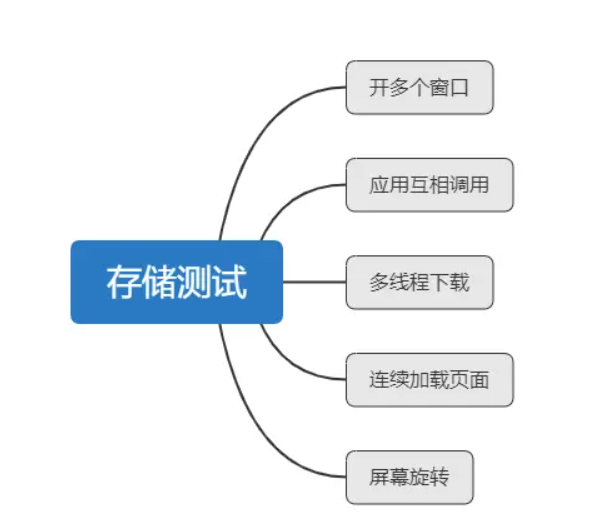
鸿蒙NEXT应用App测试-通用测试
注意:大家记得学完通用测试记得再学鸿蒙专项测试 https://blog.csdn.net/weixin_51166786/article/details/145768653 注意:博主有个鸿蒙专栏,里面从上到下有关于鸿蒙next的教学文档,大家感兴趣可以学习下 如果大家觉得博主文章…...

transfmer学习认识
整体架构 1.自注意机制 1.1.softmax 在机器学习和深度学习中,softmax 函数是一个常用的激活函数,用于将一个向量转换为一个概率分布。softmax 函数的公式如下: 
ragflow-RAPTOR到底是什么?请通俗的解释!
RAPTOR有两种不同的含义,具体取决于上下文: RAPTOR作为一种信息检索技术 RAPTOR是一种基于树状结构的信息检索系统,全称为“Recursive Abstractive Processing for Tree-Organized Retrieval”(递归抽象处理树组织检索)…...

人工智能(AI)的不同维度分类
人工智能(AI)的分类 对机器学习进行分类的方式多种多样,可以根据算法的特性、学习方式、任务类型等不同维度进行分类这些分类都不是互斥的: 1、按数据模态不同:图像,文本,语音,多态等 2、按目标函数不同:判别式模型…...

三、linux字符驱动详解
在上一节完成NFS开发环境的搭建后,本节将探讨Linux字符设备驱动的开发。字符设备驱动作为Linux内核的重要组成部分,主要负责管理与字符设备(如串口、键盘等)的交互,并为用户空间程序提供统一的读写操作接口。 驱动代码…...

谈谈 ES 6.8 到 7.10 的功能变迁(1)- 性能优化篇
前言 ES 7.10 可能是现在比较常见的 ES 版本。但是对于一些相迭代比较慢的早期业务系统来说,ES 6.8 是一个名副其实的“钉子户”。 借着工作内升级调研的任务东风,我整理从 ES 6.8 到 ES 7.10 ELastic 重点列出的新增功能和优化内容。将分为 6 个篇幅给…...

我用Ai学Android Jetpack Compose之LinearProgressIndicator
本篇,我们来学习LinearProgressIndicator,答案来自 通义千问 Q:我想学习LinearProgressIndicator,麻烦你介绍一下 当然可以!LinearProgressIndicator 是 Jetpack Compose 中的一个组件,用于显示线性进度条。它非常适…...
)
代码随想录算法训练营day40(补0208)
买卖股票专栏 1.买卖股票最佳时机 贪心法,好想 题目 121. 买卖股票的最佳时机 给定一个数组 prices ,它的第 i 个元素 prices[i] 表示一支给定股票第 i 天的价格。 你只能选择 某一天 买入这只股票,并选择在 未来的某一个不同的日子 卖…...

在群晖上使用Docker安装思源笔记
最近一段时间,docker的镜像地址都失效了,在群晖系统中,无论是早期版本的docker,还是最新版本中的Container Manager,注册表中都无法链接到docker的镜像,于是,就花了点时间查找资料&#x…...

【废物研究生刷算法】字符串
文章目录 1. 反转字符串2. 替换数字3. 反转字符串中的单词4. 右旋字符串总结1、字符串处理函数2、字符串切片 如果使用python处理字符串,有很多py内置的函数可以使用,主要还是记住这些处理方法。 1. 反转字符串 class Solution:def reverseStr(self, s, …...

断开ssh连接程序继续运行
在使用 SSH 远程连接服务器时,我们常希望在断开连接后仍然让程序继续运行,以下是几种常见的方法: 1. 使用 screen 或 tmux screen 和 tmux 是两款非常强大的终端复用工具,它们允许你在后台运行会话,即使断开 SSH 连接…...

Kafka客户端连接服务端异常 Can‘t resolve address: VM-12-16-centos:9092
前置条件: 已在CentOs上搭建好kafka节点服务器,已启动kafka服务已在Springboot项目中引入kafka客户端配置,kafka.bootstrap-serverip:port,并启动客户端服务 异常过程: 在客户端Springboot服务启动过程,控…...

视频mp4垂直拼接 水平拼接
视频mp4垂直拼接 水平拼接 pinjie_v.py import imageio import numpy as np import os import cv2def pinjie_v(dir1,dir2,out_dir):os.makedirs(out_dir, exist_okTrue)# 获取目录下的所有视频文件video_files_1 [f for f in os.listdir(dir1) if f.endswith(.mp4)]video_fi…...

idea-代码补全快捷键
文章目录 前言idea-代码补全快捷键1. 基本补全2. 类型匹配补全3. 后缀补全4. 代码补全 前言 如果您觉得有用的话,记得给博主点个赞,评论,收藏一键三连啊,写作不易啊^ _ ^。 而且听说点赞的人每天的运气都不会太差,…...
?如果没有多头会怎么样?)
Transformer为什么需要多头注意力(Multi-Head Attention)?如果没有多头会怎么样?
直接回答 关键点: Transformer 中的多头注意力(Multi-Head Attention)允许模型同时关注输入数据的不同方面,提升性能。 如果没有多头,模型可能无法捕捉复杂关系,表现会下降。 什么是多头注意力ÿ…...

我们来学人工智能 -- DeepSeek客户端
DeepSeek客户端 题记使用后记系列文章 题记 我选择了 Cherry Studio是国内产品由CherryHQ团队开源是一个平台在这里,有豆包、kimi、通义千问的入口当然,最主要是作为大模型的UI正如标题,这里,作为DeepSeep的客户端 使用 下载本…...
(二分查找)(一次二分查找+挨个搜索;两次二分查找))
LeetCode 热题 100_在排序数组中查找元素的第一个和最后一个位置(65_34_中等_C++)(二分查找)(一次二分查找+挨个搜索;两次二分查找)
LeetCode 热题 100_在排序数组中查找元素的第一个和最后一个位置(65_34) 题目描述:输入输出样例:题解:解题思路:思路一(一次二分查找挨个搜索):思路二(两次二…...

洛谷 P1102 A-B 数对(详解)c++
题目链接:P1102 A-B 数对 - 洛谷 1.题目分析 2.算法原理 解法一:暴力 - 两层for循环 因为这道题需要你在数组中找出来两个数,让这两个数的差等于定值C就可以了,一层for循环枚举A第二层for循环枚举B,求一下看是否等于…...

计算机视觉:主流数据集整理
第一章:计算机视觉中图像的基础认知 第二章:计算机视觉:卷积神经网络(CNN)基本概念(一) 第三章:计算机视觉:卷积神经网络(CNN)基本概念(二) 第四章:搭建一个经典的LeNet5神经网络(附代码) 第五章࿱…...

2025软件测试面试常问的题(详细解析)
🍅 点击文末小卡片,免费获取软件测试全套资料,资料在手,涨薪更快 测试技术面试题 1、什么是兼容性测试?兼容性测试侧重哪些方面? 参考答案: 兼容测试主要是检查软件在不同的硬件平台、软件平…...