
AI智算-k8s+SGLang实战:DeepSeek-r1:671b满血版多机多卡私有化部署全攻略
k8s+SGLang实战:DeepSeek-r1:671b满血版多机多卡私有化部署全攻略
- 前言
- 环境准备
- 1. 模型下载
- 2.软硬件环境介绍
- 正式部署
- 1. 部署LWS API
- 2. 通过 LWS 部署DeepSeek-r1模型
- 3. 查看显存占用情况
- 4. 服务对外暴露
- 5. 测试部署效果
- 5.1 通过 curl
- 5.2 通过 OpenWebUI
- a. 部署 OpenWebUI
- b. 通过Ingress暴露 OpenWebUI
- c. 访问 OpenWebUI
- 后续计划
- 参考资料
前言
随着 DeepSeek AI 大模型的崛起,近期私有化部署逐渐成为行业趋势。常见的部署方式之一是使用 Ollama,这对于个人用户和本地开发环境而言,具有较好的兼容性,尤其是支持各种 GPU 硬件和大模型的兼容性,且无需复杂的配置就能够启动。然而,相比于专业的推理引擎,如 SGLang、vLLM,Ollama 在性能上存在一定差距。
今天,阿程将介绍如何结合云原生K8s、SGLang、LeaderWorkerSet 和 Volcano 等技术栈,来高效部署分布式 DeepSeek-r1 满血版推理集群。通过这一架构,可以充分利用云原生技术的优势,确保模型的高性能推理以及集群的灵活扩展性。
选型SGLang推理引擎的理由:


环境准备
1. 模型下载
本次阿程部署的是企业级满血版的Deepseek-R1 671B。
方式一:通过HuggingFace 下载
仓库地址:https://huggingface.co/deepseek-ai/DeepSeek-R1
方式二:通过 ModelScope 下载 (阿程通过此方式下载)
仓库地址:https://modelscope.cn/models/deepseek-ai/DeepSeek-R1/files
1、安装ModelScope
pip3 install modelscope 2、下载完整模型repo
mkdir /file_CPU_01/modelServing/DeepSeek-R1 -p
nohup modelscope download --model deepseek-ai/DeepSeek-R1 --local_dir /file_CPU_01/modelServing/DeepSeek-R1/ &
在Linux环境下载后的完整DeepSeek-R1模型大小为638G

2.软硬件环境介绍
硬件配置
| 服务器 | 数量(台) | CPU(核) | 内存(TB) | 系统版本 | RDMA |
|---|---|---|---|---|---|
| NVIDIA H100 80GB HBM3 | 2 | 192 | 2.0Ti | Ubuntu 22.04.5 LTS | 4 * IB(400 Gb/sec ) |
软件平台
| 软件名称 | 版本 | 备注 |
|---|---|---|
| Kubernetes | v1.30.6 | 容器编排引擎 |
| GPU Operator | v24.9.1 | 自动化管理配置GPU驱动程序 |
| Volcano | v1.9.0 | 调度引擎 |
| NVIDIA Driver | 560.35.03 | GPU驱动 |
| NVIDIA-Fabric Manager | 560.35.03 | NVSwitch互联 |
| CUDA | 12.6 | |
| MLNX_OFED | 24.10-0.7.0.0 | IB驱动 |
| NCCL | 2.21.5 | GPU多卡通信 |
| SGLang | v0.4.2.post4-cu125 | LLM推理引擎 |
| LeaderWorkerSet | v0.5.1 | PodGroup Deploy API |
| open-webui | v0.5.10 | AI聊天互动工具 |
正式部署
云原生分布式推理集群部署拓扑:

1. 部署LWS API
Github项目地址:
https://github.com/kubernetes-sigs/lws
在企业分布式推理架构中,需要多个 Pod 共同组成一个推理服务,同时不同 Pod 还具有不同的主从角色(在 sglang 和 vllm 中称为head 和 worker 节点)。Kubernetes 原生提供了如 Deployments、StatefulSet 等资源管理对象,能够很好管理单个 Pod 的生命周期和扩缩容。但是对于多机多卡分布式推理需要跨多个 Pod 部署资源并对多个 Pod 进行扩缩容的场景,就无法使用 Deployments 或 StatefulSet 。
为了应对这个挑战,Kubernetes 社区在 StatefulSet 的基础上提出了 Leader-Worker Set (LWS) API ,LWS API 提供了一种原生的方式来管理分布式推理任务中常见的 Leader-Worker 模式,其中 Leader Pods 通常负责协调任务、Worker Pods 则负责执行实际的推理任务或计算工作。LWS API 能够确保 Leader Pods 在完全就绪之前,不会启动 Worker Pods。同时可以单独定义 Leader 和 Worker 所需的 Pod 数量.
使用 LWS API 的主要优势包括:
- 简化分布式推理的部署:通过
LWS API,提供了一个声明式的API,用户只需定义Leader和Worker的配置,Kubernetes控制器会自动处理其生命周期管理。用户可以更轻松地部署复杂的分布式推理工作负载,而无需手动管理Leader和Worker的依赖关系和副本数量; - 无缝水平扩容:分布式推理的服务需要多个
Pods共同提供服务,在进行扩容时也需要以多个Pod一组为原子单位进行扩展,LWS可以与k8s HPA无缝对接,将LWS作为HPA扩容的Target,实现推理服务整组扩容; - 拓扑感知调度 :在分布式推理中,不同
Pod之间需要进行大量数据交互。为了减少通信延时LWS API结合了拓扑感知调度,保证能够保证Leader和Worker Pod能够调度到RDMA网络中拓扑距离尽可能接近的节点上。

1. 安装 LWS API 的 CRD
~# VERSION=v0.5.1
~# kubectl apply --server-side -f https://github.com/kubernetes-sigs/lws/releases/download/$VERSION/manifests.yaml2. 检查LWS 资源
~# kubectl get pods -n lws-system
NAME                                     READY   STATUS    RESTARTS   AGE
lws-controller-manager-7474f46db-xb8br   1/1     Running   0          14h
lws-controller-manager-7474f46db-xkcf2   1/1     Running   0          14h~# kubectl get svc -n lws-system
NAME                                     TYPE        CLUSTER-IP      EXTERNAL-IP   PORT(S)    AGE
lws-controller-manager-metrics-service   ClusterIP   10.233.35.119   <none>        8443/TCP   14h
lws-webhook-service                      ClusterIP   10.233.4.24     <none>        443/TCP    14h~# kubectl api-resources |grep -i lws
leaderworkersets                    lws                      leaderworkerset.x-k8s.io/v1                 true         LeaderWorkerSet
2. 通过 LWS 部署DeepSeek-r1模型
Deploy Manifest Yaml 如下:
apiVersion: leaderworkerset.x-k8s.io/v1
kind: LeaderWorkerSet
metadata:name: sglanglabels:app: sglang
spec:replicas: 1startupPolicy: LeaderCreatedrolloutStrategy:type: RollingUpdaterollingUpdateConfiguration:maxSurge: 0maxUnavailable: 2leaderWorkerTemplate:size: 2restartPolicy: RecreateGroupOnPodRestartleaderTemplate:metadata:labels:role: leaderspec:containers:- name: sglang-headimage: ccr.ccs.tencentyun.com/kason/sglang:v0.4.2.post4-cu125imagePullPolicy: IfNotPresentworkingDir: /sgl-workspacecommand: ["sh", "-c"]args:- >cd /sgl-workspace && python3 -m sglang.launch_server--model-path /root/.cache/modelscope/DeepSeek-R1--served-model-name deepseek-r1--tp 16--dist-init-addr $LWS_LEADER_ADDRESS:20000--nnodes $LWS_GROUP_SIZE--node-rank 0--trust-remote-code--context-length 131072--enable-metrics--host 0.0.0.0--port 8000env:- name: GLOO_SOCKET_IFNAMEvalue: eth0- name: NCCL_IB_HCAvalue: "mlx5_0,mlx5_1,mlx5_4,mlx5_5"- name: NCCL_P2P_LEVELvalue: "NVL"- name: NCCL_IB_GID_INDEXvalue: "0"- name: NCCL_IB_CUDA_SUPPORTvalue: "1"- name: NCCL_IB_DISABLEvalue: "0"- name: NCCL_SOCKET_IFNAMEvalue: "eth0"#value: "ibs13,ibs11,ibs15,ibs17"- name: NCCL_DEBUGvalue: "INFO"- name: NCCL_NET_GDR_LEVELvalue: "2"- name: POD_NAMEvalueFrom:fieldRef:fieldPath: metadata.name- name: SGLANG_USE_MODELSCOPEvalue: "true"ports:- containerPort: 8000name: httpprotocol: TCP- containerPort: 20000name: distributedprotocol: TCPresources:limits:cpu: "128"memory: "1Ti"nvidia.com/gpu: "8"rdma/ib: "4"requests:cpu: "128"memory: "1Ti"nvidia.com/gpu: "8"rdma/ib: "4"securityContext:capabilities:add:- IPC_LOCK- SYS_PTRACEvolumeMounts:- mountPath: /root/.cache/modelscopename: modelscope-cache- mountPath: /dev/shmname: shm-volume- name: localtimemountPath: /etc/localtimereadOnly: truereadinessProbe:tcpSocket:port: 8000initialDelaySeconds: 120periodSeconds: 30volumes:- name: modelscope-cachehostPath:path: /file_CPU_01/modelServing- name: shm-volumeemptyDir:sizeLimit: 512Gimedium: Memory- name: localtimehostPath:path: /etc/localtimetype: FileschedulerName: volcanoworkerTemplate:metadata:name: sglang-workerspec:containers:- name: sglang-workerimage: ccr.ccs.tencentyun.com/kason/sglang:v0.4.2.post4-cu125imagePullPolicy: IfNotPresentworkingDir: /sgl-workspacecommand: ["sh", "-c"]args:- >cd /sgl-workspace && python3 -m sglang.launch_server--model-path /root/.cache/modelscope/DeepSeek-R1--served-model-name deepseek-r1--tp 16--dist-init-addr $LWS_LEADER_ADDRESS:20000--nnodes $LWS_GROUP_SIZE--node-rank $LWS_WORKER_INDEX--trust-remote-code--context-length 131072--enable-metrics--host 0.0.0.0--port 8000env:- name: GLOO_SOCKET_IFNAMEvalue: eth0- name: NCCL_IB_HCAvalue: "mlx5_0,mlx5_1,mlx5_4,mlx5_5"- name: NCCL_P2P_LEVELvalue: "NVL"- name: NCCL_IB_GID_INDEXvalue: "0"- name: NCCL_IB_CUDA_SUPPORTvalue: "1"- name: NCCL_IB_DISABLEvalue: "0"- name: NCCL_SOCKET_IFNAMEvalue: "eth0"#value: "ibs13,ibs11,ibs15,ibs17"- name: NCCL_DEBUGvalue: "INFO"- name: NCCL_NET_GDR_LEVELvalue: "2"- name: SGLANG_USE_MODELSCOPEvalue: "true"- name: LWS_WORKER_INDEXvalueFrom:fieldRef:fieldPath: metadata.labels['leaderworkerset.sigs.k8s.io/worker-index']ports:- containerPort: 8000name: httpprotocol: TCP- containerPort: 20000name: distributedprotocol: TCPresources:limits:cpu: "128"memory: "1Ti"nvidia.com/gpu: "8"rdma/ib: "4"requests:cpu: "128"memory: "1Ti"nvidia.com/gpu: "8"rdma/ib: "4"securityContext:capabilities:add:- IPC_LOCK- SYS_PTRACEvolumeMounts:- mountPath: /root/.cache/modelscopename: modelscope-cache- mountPath: /dev/shmname: shm-volume- name: localtimemountPath: /etc/localtimereadOnly: truevolumes:- name: modelscope-cachehostPath:path: /file_CPU_01/modelServing- name: shm-volumeemptyDir:sizeLimit: 512Gimedium: Memory- name: localtimehostPath:path: /etc/localtimetype: FileschedulerName: volcano
~# kubectl apply -f deepseek-r1-lws-sglang.yaml~# kubectl get lws -n sre-tools
NAME     AGE
sglang   13h~# kubectl get pods -n sre-tools |grep sglang
sglang-0                                 1/1     Running   0          15h
sglang-0-1                               1/1     Running   0          15h##查看日志
~# kubectl logs -n sre-tools sglang-0
INFO 02-13 22:10:34 __init__.py:190] Automatically detected platform cuda.
[2025-02-13 22:10:40] server_args=ServerArgs(model_path='/root/.cache/modelscope/DeepSeek-R1', tokenizer_path='/root/.cache/modelscope/DeepSeek-R1', tokenizer_mode='auto', load_format='auto', trust_remote_code=True, dtype='auto', kv_cache_dtype='auto', quantization_param_path=None, quantization=None, context_length=131072, device='cuda', served_model_name='deepseek-r1', chat_template=None, is_embedding=False, revision=None, skip_tokenizer_init=False, host='0.0.0.0', port=8000, mem_fraction_static=0.79, max_running_requests=None, max_total_tokens=None, chunked_prefill_size=8192, max_prefill_tokens=16384, schedule_policy='lpm', schedule_conservativeness=1.0, cpu_offload_gb=0, prefill_only_one_req=False, tp_size=16, stream_interval=1, stream_output=False, random_seed=824694846, constrained_json_whitespace_pattern=None, watchdog_timeout=300, download_dir=None, base_gpu_id=0, log_level='info', log_level_http=None, log_requests=False, show_time_cost=False, enable_metrics=True, decode_log_interval=40, api_key=None, file_storage_pth='sglang_storage', enable_cache_report=False, dp_size=1, load_balance_method='round_robin', ep_size=1, dist_init_addr='sglang-0.sglang.sre-tools:20000', nnodes=2, node_rank=0, json_model_override_args='{}', lora_paths=None, max_loras_per_batch=8, lora_backend='triton', attention_backend='flashinfer', sampling_backend='flashinfer', grammar_backend='outlines', speculative_draft_model_path=None, speculative_algorithm=None, speculative_num_steps=5, speculative_num_draft_tokens=64, speculative_eagle_topk=8, enable_double_sparsity=False, ds_channel_config_path=None, ds_heavy_channel_num=32, ds_heavy_token_num=256, ds_heavy_channel_type='qk', ds_sparse_decode_threshold=4096, disable_radix_cache=False, disable_jump_forward=False, disable_cuda_graph=False, disable_cuda_graph_padding=False, disable_outlines_disk_cache=False, disable_custom_all_reduce=False, disable_mla=False, disable_overlap_schedule=False, enable_mixed_chunk=False, enable_dp_attention=False, enable_ep_moe=False, enable_torch_compile=False, torch_compile_max_bs=32, cuda_graph_max_bs=160, cuda_graph_bs=None, torchao_config='', enable_nan_detection=False, enable_p2p_check=False, triton_attention_reduce_in_fp32=False, triton_attention_num_kv_splits=8, num_continuous_decode_steps=1, delete_ckpt_after_loading=False, enable_memory_saver=False, allow_auto_truncate=False, enable_custom_logit_processor=False, tool_call_parser=None, enable_hierarchical_cache=False)
INFO 02-13 22:10:43 __init__.py:190] Automatically detected platform cuda.
INFO 02-13 22:10:43 __init__.py:190] Automatically detected platform cuda.
INFO 02-13 22:10:44 __init__.py:190] Automatically detected platform cuda.
INFO 02-13 22:10:44 __init__.py:190] Automatically detected platform cuda.
INFO 02-13 22:10:44 __init__.py:190] Automatically detected platform cuda.
INFO 02-13 22:10:44 __init__.py:190] Automatically detected platform cuda.
INFO 02-13 22:10:44 __init__.py:190] Automatically detected platform cuda.
INFO 02-13 22:10:44 __init__.py:190] Automatically detected platform cuda.
INFO 02-13 22:10:44 __init__.py:190] Automatically detected platform cuda.
[2025-02-13 22:10:49 TP7] MLA optimization is turned on. Use triton backend.
[2025-02-13 22:10:49 TP7] Init torch distributed begin.
[2025-02-13 22:10:50 TP0] MLA optimization is turned on. Use triton backend.
[2025-02-13 22:10:50 TP0] Init torch distributed begin.
[2025-02-13 22:10:51 TP6] MLA optimization is turned on. Use triton backend.
[2025-02-13 22:10:51 TP6] Init torch distributed begin.
[2025-02-13 22:10:51 TP5] MLA optimization is turned on. Use triton backend.
[2025-02-13 22:10:51 TP5] Init torch distributed begin.
[2025-02-13 22:10:51 TP1] MLA optimization is turned on. Use triton backend.
[2025-02-13 22:10:51 TP1] Init torch distributed begin.
[2025-02-13 22:10:51 TP2] MLA optimization is turned on. Use triton backend.
[2025-02-13 22:10:51 TP2] Init torch distributed begin.
[2025-02-13 22:10:51 TP4] MLA optimization is turned on. Use triton backend.
[2025-02-13 22:10:51 TP4] Init torch distributed begin.
[2025-02-13 22:10:51 TP3] MLA optimization is turned on. Use triton backend.
[2025-02-13 22:10:51 TP3] Init torch distributed begin.
[2025-02-13 22:10:57 TP0] sglang is using nccl==2.21.5
[2025-02-13 22:10:57 TP3] sglang is using nccl==2.21.5
[2025-02-13 22:10:57 TP6] sglang is using nccl==2.21.5
[2025-02-13 22:10:57 TP5] sglang is using nccl==2.21.5
[2025-02-13 22:10:57 TP2] sglang is using nccl==2.21.5
[2025-02-13 22:10:57 TP7] sglang is using nccl==2.21.5
[2025-02-13 22:10:57 TP4] sglang is using nccl==2.21.5
[2025-02-13 22:10:57 TP1] sglang is using nccl==2.21.5
sglang-0:99:99 [0] NCCL INFO NCCL_SOCKET_IFNAME set by environment to eth0
sglang-0:99:99 [0] NCCL INFO Bootstrap : Using eth0:10.233.73.96<0>
sglang-0:99:99 [0] NCCL INFO cudaDriverVersion 12060
NCCL version 2.21.5+cuda12.4
[2025-02-13 22:11:02 TP1] Custom allreduce is disabled because this process group spans across nodes.
[2025-02-13 22:11:02 TP0] Custom allreduce is disabled because this process group spans across nodes.
[2025-02-13 22:11:02 TP3] Custom allreduce is disabled because this process group spans across nodes.
[2025-02-13 22:11:02 TP2] Custom allreduce is disabled because this process group spans across nodes.
[2025-02-13 22:11:02 TP5] Custom allreduce is disabled because this process group spans across nodes.
[2025-02-13 22:11:02 TP4] Custom allreduce is disabled because this process group spans across nodes.
[2025-02-13 22:11:02 TP6] Custom allreduce is disabled because this process group spans across nodes.
[2025-02-13 22:11:02 TP7] Custom allreduce is disabled because this process group spans across nodes.
sglang-0:103:103 [4] NCCL INFO cudaDriverVersion 12060
sglang-0:103:103 [4] NCCL INFO NCCL_SOCKET_IFNAME set by environment to eth0
sglang-0:103:103 [4] NCCL INFO Bootstrap : Using eth0:10.233.73.96<0>
sglang-0:103:103 [4] NCCL INFO Plugin Path : /opt/hpcx/nccl_rdma_sharp_plugin/lib/libnccl-net.so
sglang-0:103:103 [4] NCCL INFO P2P plugin IBext_v8
sglang-0:103:103 [4] NCCL INFO NCCL_SOCKET_IFNAME set by environment to eth0
sglang-0:103:103 [4] NCCL INFO NET/IB : Using [0]mlx5_0:1/IB/SHARP [1]mlx5_1:1/IB/SHARP [2]mlx5_4:1/IB/SHARP [3]mlx5_5:1/IB/SHARP [RO]; OOB eth0:10.233.73.96<0>
sglang-0:103:103 [4] NCCL INFO Using non-device net plugin version 0
sglang-0:103:103 [4] NCCL INFO Using network IBext_v8
......
sglang-0:100:1012 [1] NCCL INFO Setting affinity for GPU 1 to ffff,ffffffff,00000000,0000ffff,ffffffff
sglang-0:100:1012 [1] NCCL INFO comm 0x5568e6555af0 rank 1 nRanks 16 nNodes 2 localRanks 8 localRank 1 MNNVL 0
sglang-0:100:1012 [1] NCCL INFO Trees [0] 2/-1/-1->1->0 [1] 2/-1/-1->1->0 [2] 2/-1/-1->1->0 [3] 2/-1/-1->1->0
sglang-0:100:1012 [1] NCCL INFO P2P Chunksize set to 131072
sglang-0:100:1012 [1] NCCL INFO Channel 00/0 : 1[1] -> 14[6] [send] via NET/IBext_v8/0(0)/GDRDMA
sglang-0:100:1012 [1] NCCL INFO Channel 02/0 : 1[1] -> 14[6] [send] via NET/IBext_v8/0(0)/GDRDMA
sglang-0:100:1012 [1] NCCL INFO Channel 01/0 : 1[1] -> 0[0] via P2P/IPC
sglang-0:100:1012 [1] NCCL INFO Channel 03/0 : 1[1] -> 0[0] via P2P/IPC
......
sglang-0:106:1010 [7] NCCL INFO threadThresholds 8/8/64 | 128/8/64 | 512 | 512
[2025-02-13 22:11:06 TP1] Load weight begin. avail mem=78.37 GB
[2025-02-13 22:11:06 TP5] Load weight begin. avail mem=78.37 GB
[2025-02-13 22:11:06 TP6] Load weight begin. avail mem=78.26 GB
[2025-02-13 22:11:06 TP4] Load weight begin. avail mem=78.15 GB
[2025-02-13 22:11:06 TP2] Load weight begin. avail mem=78.26 GB
[2025-02-13 22:11:06 TP7] Load weight begin. avail mem=78.38 GB
[2025-02-13 22:11:06 TP3] Load weight begin. avail mem=78.38 GB
[2025-02-13 22:11:06 TP0] Load weight begin. avail mem=78.15 GB
[2025-02-13 22:11:06 TP6] Detected fp8 checkpoint. Please note that the format is experimental and subject to change.
[2025-02-13 22:11:06 TP2] Detected fp8 checkpoint. Please note that the format is experimental and subject to change.
[2025-02-13 22:11:06 TP3] Detected fp8 checkpoint. Please note that the format is experimental and subject to change.
[2025-02-13 22:11:06 TP4] Detected fp8 checkpoint. Please note that the format is experimental and subject to change.
[2025-02-13 22:11:06 TP1] Detected fp8 checkpoint. Please note that the format is experimental and subject to change.
[2025-02-13 22:11:06 TP7] Detected fp8 checkpoint. Please note that the format is experimental and subject to change.
[2025-02-13 22:11:06 TP0] Detected fp8 checkpoint. Please note that the format is experimental and subject to change.
[2025-02-13 22:11:06 TP5] Detected fp8 checkpoint. Please note that the format is experimental and subject to change.
sglang-0:106:1010 [7] NCCL INFO 4 coCache shape torch.Size([163840, 64])
Loading safetensors checkpoint shards:   0% Completed | 0/162 [00:00<?, ?it/s]
Loading safetensors checkpoint shards:   1% Completed | 1/162 [00:00<02:09,  1.24it/s]
Loading safetensors checkpoint shards:   1% Completed | 2/162 [00:01<02:12,  1.20it/s]
Loading safetensors checkpoint shards:   2% Completed | 3/162 [00:02<02:14,  1.19it/s]
Loading safetensors checkpoint shards:   2% Completed | 4/162 [00:03<02:11,  1.20it/s]
Loading safetensors checkpoint shards:   3% Completed | 5/162 [00:04<02:07,  1.23it/s]
Loading safetensors checkpoint shards:   4% Completed | 6/162 [00:04<02:06,  1.24it/s]
......
Loading safetensors checkpoint shards:  99% Completed | 161/162 [01:34<00:00,  1.44it/s]
Loading safetensors checkpoint shards: 100% Completed | 162/162 [01:35<00:00,  1.48it/s]
Loading safetensors checkpoint shards: 100% Completed | 162/162 [01:35<00:00,  1.70it/s]
......
sglang-0:103:2984 [4] NCCL INFO Channel 01/0 : 14[6] -> 4[4] [receive] via NET/IBext_v8/2/GDRDMA
sglang-0:103:2984 [4] NCCL INFO Channel 03/0 : 14[6] -> 4[4] [receive] via NET/IBext_v8/2/GDRDMA
sglang-0:103:2984 [4] NCCL INFO Channel 01/0 : 4[4] -> 14[6] [send] via NET/IBext_v8/2/GDRDMA
sglang-0:103:2984 [4] NCCL INFO Channel 03/0 : 4[4] -> 14[6] [send] via NET/IBext_v8/2/GDRDMA
sglang-0:103:2984 [4] NCCL INFO Connected all trees
sglang-0:103:2984 [4] NCCL INFO threadThresholds 8/8/64 | 128/8/64 | 512 | 512
100%|██████████| 23/23 [01:30<00:00,  3.92s/it]
[2025-02-13 22:14:23] INFO:     Started server process [1]
[2025-02-13 22:14:23] INFO:     Waiting for application startup.
[2025-02-13 22:14:23] INFO:     Application startup complete.
[2025-02-13 22:14:23] INFO:     Uvicorn running on http://0.0.0.0:8000 (Press CTRL+C to quit)      #启动成功
sglang-0:103:2984 [4] NCCL [2025-02-13 22:14:24] INFO:     127.0.0.1:33198 - "GET /get_model_info HTTP/1.1" 200 OK
[2025-02-13 22:14:31] INFO:     127.0.0.1:33208 - "POST /generate HTTP/1.1" 200 OK
[2025-02-13 22:14:31] The server is fired up and ready to roll!
3. 查看显存占用情况

4. 服务对外暴露
apiVersion: v1
kind: Service
metadata:name: sglang-api-svc labels:app: sglang
spec:selector:leaderworkerset.sigs.k8s.io/name: sglangrole: leaderports:- protocol: TCPport: 8000targetPort: httpname: httptype: NodePort      #这里临时通过NodePort测试
~# kubectl apply -f deepseek-r1-svc.yaml -n sre-tools#check
~# kubectl get svc -n sre-tools |grep sglang
sglang               ClusterIP   None            <none>        <none>            13h
sglang-api-svc       NodePort    10.233.57.205   <none>        8000:32169/TCP    13h
到此已完成了 DeepSeek R1 大模型的部署和服务对外暴露。接下来通过本地 curl 命令调用 API 或者 终端软件工具来测试部署效果。
5. 测试部署效果
5.1 通过 curl
curl -X POST http://10.0.xx.xx:32169/v1/chat/completions -H "Content-Type: application/json" -d '{"model": "/model","messages": [{"role": "user","content": "你好,你是谁?"}],"stream": false,"temperature": 0.7
}'

5.2 通过 OpenWebUI
a. 部署 OpenWebUI
apiVersion: v1
kind: PersistentVolumeClaim
metadata:name: open-webui-data-pvc
spec:accessModes:- ReadWriteOnceresources:requests:storage: 100GistorageClassName: nfs-client---
apiVersion: apps/v1
kind: Deployment
metadata:name: open-webui-deployment
spec:replicas: 1selector:matchLabels:app: open-webuitemplate:metadata:labels:app: open-webuispec:containers:- name: open-webuiimage: ccr.ccs.tencentyun.com/kason/open-webui:mainimagePullPolicy: Alwaysports:- containerPort: 8080env:- name: OPENAI_API_BASE_URLvalue: "http://10.0.xx.xxx:32169/v1"   # 替换为SGLang API- name: ENABLE_OLLAMA_API # 禁用 Ollama API,只保留 OpenAI APIvalue: "False"volumeMounts:- name: open-webui-datamountPath: /app/backend/datavolumes:- name: open-webui-datapersistentVolumeClaim:claimName: open-webui-data-pvc---
apiVersion: v1
kind: Service
metadata:name: open-webui-service
spec:type: ClusterIPports:- port: 3000targetPort: 8080 selector:app: open-webui
b. 通过Ingress暴露 OpenWebUI
apiVersion: networking.k8s.io/v1
kind: Ingress
metadata:name: open-webui-ingress
spec:rules:- host: open-webui.xxxx-sh.comhttp:paths:- backend:service:name: open-webui-serviceport:number: 3000path: /pathType: Prefixtls:- hosts:- open-webui.xxxx-sh.comsecretName: xxxx-tls
c. 访问 OpenWebUI
在浏览器访问相应的地址即可进入 OpenWebUI 页面。首次进入会提示创建管理员账号密码,创建完毕后即可登录,然后默认会使用前面下载好的大模型进行对话。


还有一些其他可视化交互工具,例如:
1.Chatbox AI:https://chatboxai.app/zh
2.Cherry Studio:https://cherry-ai.com


地表最强LLM推理引擎-SGLang:Generation Throughput (Token / s):1095(Max)
Ollama运行的话稳定会保持在 30~32 tokens/s
后续计划
截至目前,已成功部署并上线了一个相较官网版更加稳定、且具备自主可控性的DeepSeek-r1模型应用。希望这个博文对您有所帮助。
下一步,阿程将对已部署的模型进行压测,深入探索系统的性能极限,并进一步研究如何在生产环境中进行性能优化。此外,还将着力补充模型的可观测性、实现自动化弹性扩缩容,以及加速模型推理等优化措施。敬请期待后续更新!
参考资料
• ModelScope:https://modelscope.cn/docs
• Hugging Face:https://huggingface.co
• SGLang:https://docs.sglang.ai/index.html
• Ollama:https://ollama.com
• vLLM:https://docs.vllm.ai
• LWS:https://github.com/kubernetes-sigs/lws
• OpenWebUI:https://openwebui.com
• https://mp.weixin.qq.com/s/u5r4P9m9E5aDJSdm4aZ5RA
• https://mp.weixin.qq.com/s/uDhUSEC_6OX7nY5yCOSMDA
• 其他issue:https://github.com/ollama/ollama/issues/8249#issuecomment-2656319540 , https://github.com/ollama/ollama/issues/8599#issuecomment-2655763219
原文链接🔗:

相关文章:
AI智算-k8s+SGLang实战:DeepSeek-r1:671b满血版多机多卡私有化部署全攻略
k8sSGLang实战:DeepSeek-r1:671b满血版多机多卡私有化部署全攻略 前言环境准备1. 模型下载2.软硬件环境介绍 正式部署1. 部署LWS API2. 通过 LWS 部署DeepSeek-r1模型3. 查看显存占用情况4. 服务对外暴露5. 测试部署效果5.1 通过 curl5.2 通过 OpenWebUIa. 部署 Ope…...

zlib编译https://www.cnblogs.com/MrOuqs/p/5751485.html
vs2015零基础编译zlib从失败到成功 vs2015零基础编译zlib从失败到成功_zlib vs2015-CSDN博客 c如何将文件夹打包成zip...

【蓝桥杯单片机】第十三届省赛第二场
一、真题 二、模块构建 1.编写初始化函数(init.c) void Cls_Peripheral(void); 关闭led led对应的锁存器由Y4C控制关闭蜂鸣器和继电器 2.编写LED函数(led.c) void Led_Disp(unsigned char ucLed); 将ucLed取反的值赋给P0 开启锁存器 关闭锁存…...

【安装及调试旧版Chrome + 多版本环境测试全攻略】
👨💻 安装及调试旧版Chrome 多版本环境测试全攻略 🌐 (新手友好版 | 覆盖安装/运行/调试全流程) 🕰️ 【背景篇】为什么我们需要旧版浏览器测试? 🌍 🌐 浏览器世界的“…...

从零开始玩转TensorFlow:小明的机器学习故事 5
图像识别的挑战 1 故事引入:小明的“图像识别”大赛 小明从学校里听说了一个有趣的比赛:“美食图像识别”。参赛者需要训练计算机,看一张食物照片(例如披萨、苹果、汉堡等),就能猜出这是什么食物。听起来…...

sql的索引与性能优化相关
之前面试的时候,由于在简历上提到优化sql代码,老是会被问到sql索引和性能优化问题,用这个帖子学习记录一下。 1.为什么要用索引 ------------------------------------------------------------------------------------------------------…...

Snapshot Compressed Imaging:打破传统成像的新视界
在我们的日常生活中,拍照、拍视频已经成为记录生活的常规操作。无论是用手机捕捉美丽的风景,还是用相机拍摄珍贵的瞬间,传统的成像方式似乎已经满足了我们大部分的需求。但你是否想过,在某些特殊的场景下,传统成像技术可能会遇到一些难题,而一种名为 Snapshot Compressed…...

git 命令 设置别名
在 Git 中,你可以通过配置别名来简化常用的命令。这样,你可以使用更短或更易记的命令来完成相同的操作。要设置 Git 命令的别名,你可以使用 git config 命令。 全局设置 如果你想为所有 Git 仓库设置别名,可以使用 --global 选项…...

在Spark中如何配置Executor内存以优化性能
在Spark中,配置Executor内存以优化性能是一个关键步骤。以下是一些具体的配置方法和建议: 一、Executor内存配置参数 在Spark中,Executor的内存配置主要通过以下几个参数进行: --executor-memory 或 spark.executor.memory&…...

Go语言--语法基础2--下载安装
2、下载安装 1、下载源码包: go1.18.4.linux-amd64.tar.gz。 官方地址:https://golang.google.cn/dl/ 云盘地址:链接: https://pan.baidu.com/s/1N2jrRHaPibvmmNFep3VYag 提 取码: zkc3 2、将下载的源码包解压…...
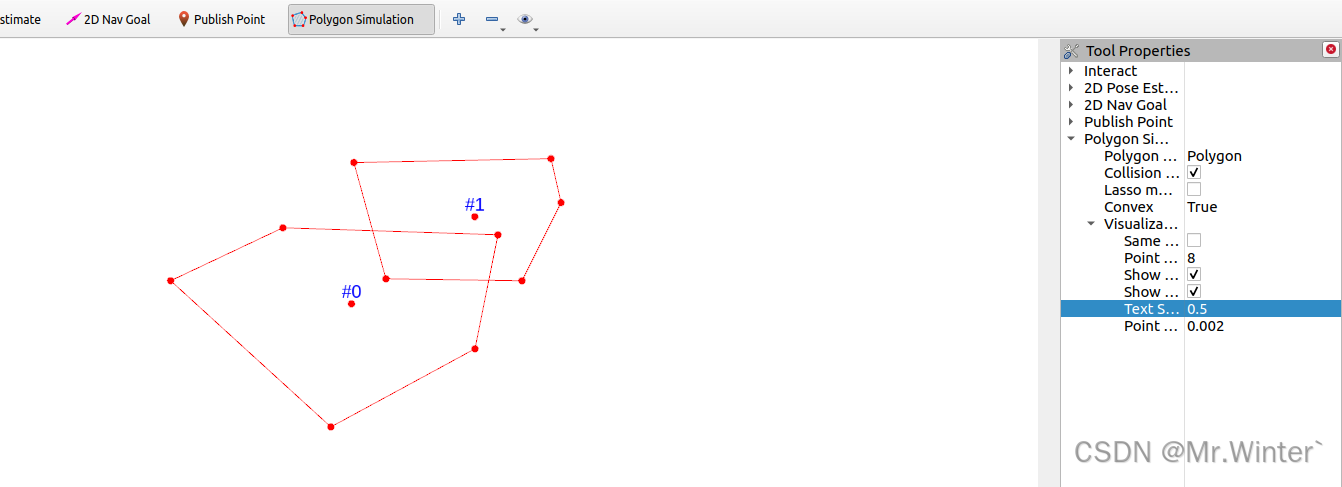
碰撞检测 | 图解凸多边形分离轴定理(附ROS C++可视化)
目录 0 专栏介绍1 凸多边形碰撞检测2 多边形判凸算法3 分离轴定理(SAT)4 算法仿真与可视化4.1 核心算法4.2 仿真实验 0 专栏介绍 🔥课设、毕设、创新竞赛必备!🔥本专栏涉及更高阶的运动规划算法轨迹优化实战,包括:曲线…...

计算机网络真题练习(高软29)
系列文章目录 计算机网络阶段练习 文章目录 系列文章目录前言一、真题练习总结 前言 计算机网络的阶段练习题,带解析答案。 一、真题练习 总结 就是高软笔记,大佬请略过!...

DPVS-1:编译安装DPVS (ubuntu22.04)
操作系统 rootubuntu22:~# lsb_release -a No LSB modules are available. Distributor ID: Ubuntu Description: Ubuntu 22.04.3 LTS Release: 22.04 Codename: jammy rootubuntu22:~# 前置软件准备 apt install git apt install meson apt install gcc ap…...

将 SELinux 永久设置为 Permissive
要将 SELinux 永久设置为 Permissive 模式,可以按照以下步骤操作: 1. 检查当前 SELinux 状态 首先,确认当前 SELinux 的状态: sestatus输出示例: SELinux status: enabled SELinuxfs mount: …...

EasyRTC:全平台支持与自研算法驱动的智能音视频通讯解决方案
在智能硬件的浪潮中,设备之间的互联互通已成为提升用户体验的核心需求。无论是智能家居、智能办公,还是工业物联网,高效的音视频通讯和交互能力是实现智能化的关键。然而,传统音视频解决方案往往面临平台兼容性差、交互体验不佳以…...

Elasticsearch 自动补全搜索 - autocomplete
作者:来自 Elastic Amit Khandelwal 探索处理自动完成的不同方法,从基础到高级,包括输入时搜索、查询时间、完成建议器和索引时间。 在本文中,我们将介绍如何避免严重的性能错误、Elasticsearch 默认解决方案为何不适用以及重要的…...

快速入门Springboot+vue——MybatisPlus多表查询及分页查询
学习自哔哩哔哩上的“刘老师教编程”,具体学习的网站为:7.MybatisPlus多表查询及分页查询_哔哩哔哩_bilibili,以下是看课后做的笔记,仅供参考。 多表查询 多表查询[Mybatis中的]:实现复杂关系映射,可以使…...

工程师 - VSCode的AI编码插件介绍: MarsCode
豆包 MarsCode MarsCode AI: Coding Assistant Code and Innovate Faster with AI 豆包 MarsCode - 编程助手 安装完成并使能后,会在下方状态栏上显示MarsCode AI。 安装完并重启VSCode后,要使用这个插件,需要注册一下账号。然后授权VSCod…...

VOS3000线路对接、路由配置与路由分析操作教程
一、VOS3000简介 VOS3000是一款常用的VoIP运营平台,支持多种线路对接和路由配置,适合新手快速上手。本教程将带你了解如何对接线路、配置路由以及进行路由分析。 二、线路对接 准备工作 获取线路信息:从供应商处获取线路的IP地址、端口、用…...

学习Linux准备2
使用win10系统带的wsl配置ubuntu系统,通过wsl功能我们可以更简单更轻松的获得Linux系统环境。 首先开启Windows自带的wsl功能 打开控制面板,选中启用或关闭Windows功能 这里我们点击进入 将上图红√点击上,点击确定,然后重新启动…...

Java IO 和 NIO 的基本概念和 API
一、 Java IO (Blocking IO) 基本概念: Java IO 是 Java 平台提供的用于进行输入和输出操作的 API。Java IO 基于 流 (Stream) 的模型,数据像水流一样从一个地方流向另一个地方。Java IO 主要是 阻塞式 I/O (Blocking I/O),即线程在执行 I/O …...

【数据结构】快指针和慢指针
一、 给你单链表的头结点 head ,请你找出并返回链表的中间结点。如果有两个中间结点,则返回第二个中间结点。 要求:只遍历一遍链表 可以使用快慢指针:fast 一次走两步,slow 一次走一步。当 fast NULL(偶数个结点)或…...

四、综合案例(Unity2D)
一、2D渲染 1、2D相机基本设置 上面是透视,下面是正交 2、图片资源 在Unity中,常规图片导入之后,一般不在Unity中直接使用,而是转为精灵图Sprite 将图片更改为即可使用Unity内置的图片切割功能 无论精灵图片是单个的还是多个的…...
)
全面汇总windows进程通信(三)
在Windows操作系统下,实现进程间通信(IPC, Inter-Process Communication)有几种常见的方法,包括使用管道(Pipe)、共享内存(Shared Memory)、消息队列(Message Queue)、命名管道(Named Pipe)、套接字(Socket)等。本文介绍如下几种: RPC(远程过程调用,Remote Pr…...

Caffeine:高性能的Java本地缓存库
文章目录 引言什么是Caffeine?Caffeine的主要特点Caffeine的使用方法Caffeine与Google Guava Cache的对比Caffeine与Ehcache的对比总结 引言 在现代软件开发中,缓存是提高应用性能的重要手段之一。通过缓存,可以减少对数据库或其他外部系统的…...

Codes 开源免费研发项目管理平台 2025年第一个大版本3.0.0 版本发布及创新的轻IPD实现
Codes 简介 Codes 是国内首款重新定义 SaaS 模式的开源项目管理平台,支持云端认证、本地部署、全部功能开放,并且对 30 人以下团队免费。它通过创新的方式简化研发协同工作,使敏捷开发更易于实施。并提供低成本的敏捷开发解决方案࿰…...

flowable 全生命周期涉及到的api及mysql表
要了解Flowable从流程创建到审批过程中涉及的API和MySQL表。之前对工作流引擎有一些基础了解,但具体到Flowable的细节可能不太熟悉。需要先回忆一下Flowable的基本概念,比如流程定义、流程实例、任务、执行实例等,然后逐步思考每个步骤会用到…...

Golang | 每日一练 (3)
💢欢迎来到张胤尘的技术站 💥技术如江河,汇聚众志成。代码似星辰,照亮行征程。开源精神长,传承永不忘。携手共前行,未来更辉煌💥 文章目录 Golang | 每日一练 (3)题目参考答案map 实现原理hmapb…...

【java】类声明的两种形式
在 Java 中,类的声明有两种形式: public class Test class Test 它们的区别主要在于访问权限和文件名的要求。下面我会详细解释这两种形式的区别。 1. public class Test 访问权限: public 表示这个类是公共的,可以被其他包&am…...

VSCode 中设置 Git 忽略仅因时间戳修改导致的文件变更【使用deepseek生成的一篇文章】
在 VSCode 中设置 Git 忽略仅因时间戳修改导致的文件变更,可通过以下步骤实现: 确认是否为纯时间戳修改 首先确认文件的修改是否仅涉及时间戳,使用终端运行: git diff -- <file>若输出为空但 Git 仍提示修改,可…...