
Android级联选择器,下拉菜单
近期android开发,遇到的需求,分享二个android可能用到的小组件


下拉选择器:它的实现,主要是需要监听它依附的组件当前距离屏幕顶端的位置。
在显示下拉菜单中,如果需要点击上面有响应。可通过activity拿到decorview(activity.window.decorView),然后把下拉的view添加到decorView,然后设置该菜单距离顶端的上边距。如果需要先点击屏幕让菜单先消失,可搞一个全屏的下拉菜单,距顶端高度搞一个透明的view来填充(设置一个点击事件,处理decorView.remove该下拉组件)
object DropDownItemsUtils {const val DROP_DOWN_ID = -1000fun showDropDownView(activity: Activity,marginTopPx:Float,list:List<String>,selectIndex:Int = -1,onItemClick: ((pos: Int?) -> Unit)?=null){val decorView = activity.window.decorView as ViewGroupdecorView.findViewById<View>(DROP_DOWN_ID)?.let {decorView.removeView(it)}val composeView = ComposeView(activity).apply {setViewCompositionStrategy(ViewCompositionStrategy.DisposeOnViewTreeLifecycleDestroyed)setContent{DropDownItems(modifier = Modifier.fillMaxWidth().wrapContentHeight(), list = list, selectIndex = selectIndex) {decorView.removeView(this@apply)onItemClick?.invoke(it)}}id = DROP_DOWN_ID}val lp = FrameLayout.LayoutParams(-1,-1)lp.topMargin = marginTopPx.toInt()decorView.addView(composeView,lp)}fun dismissDropDownView(activity: Activity){val decorView = activity.window.decorView as ViewGroupdecorView.findViewById<View>(DROP_DOWN_ID)?.let {decorView.removeView(it)}}
}级联选择器:它的承载容器是一个底部弹窗的 DialogFragment,显示的内容目前我用compose实现,已选的级联它横向显示采用的LazyRow,列表项使用LazyColumn实现。具体实现如下。
data class LevelsItem(val text:String,var list:List<LevelsItem>? = null,var parentId:String? = null,var level:Int? = null,val tag:Any? = null //LevelsItem,是从服务端给的数据模型转的,实际可以再转化的时候,将该tag    //设置为服务端给的模型.如下我转换的代码
)
/**fun convertMotorcadeRespToLevelsItem(list: List<MotorcadeResp>): List<LevelsItem> {return list.map { motorcadeResp ->LevelsItem(text = motorcadeResp.name ?: "", // Map name to textparentId = motorcadeResp.parentId,level = motorcadeResp.departmentLevel,list = motorcadeResp.childDepartment?.let { convertMotorcadeRespToLevelsItem(it) }, // Recursively map childDepartmenttag = motorcadeResp // Set the original MotorcadeResp as tag)}}
*/
/*** 级联选择,可以自行选择。自行点击确定,完成选择成功*/
class LevelsSelector1Dialog : BottomDialogFragment() {private val SELECTSTR: String = "-10000000"var title: String? = nullvar list: List<LevelsItem> = ArrayList()var onConfirm: ((LevelsItem?) -> Unit)? = null//用来横向显示tab项列表的itemprivate var currentSelectItem: SnapshotStateList<LevelsItem> = mutableStateListOf()//记录当前选择的值,最后用来点击确定,来回调给调用方使用的private var currentSelectItemVal: SnapshotStateList<LevelsItem> = mutableStateListOf()override fun onCreateView(inflater: LayoutInflater,container: ViewGroup?,savedInstanceState: Bundle?): View {return ComposeView(requireContext()).apply {setViewCompositionStrategy(ViewCompositionStrategy.DisposeOnViewTreeLifecycleDestroyed)setContent {WelcomeAssistantTheme {LevelsSelectorScreen()}}}}@Preview(widthDp = 375, heightDp = 812)@Composableprivate fun LevelsSelectorScreen() {currentSelectItem.clear()//横向tab,添加一个默认项 “请选择"currentSelectItem.add(LevelsItem(SELECTSTR, list))val height =(0.64f * requireContext().resources.displayMetrics.heightPixels) / LocalDensity.current.densityBox(modifier = Modifier.fillMaxWidth().height(height.dp).background(color = Color.White,shape = RoundedCornerShape(topStart = 24.dp,topEnd = 24.dp,bottomStart = 0.dp,bottomEnd = 0.dp)).padding(16.dp)) {Image(painterResource(R.mipmap.ic_levels_selector_close),modifier = Modifier.clickable {dismiss()}.size(24.dp).align(Alignment.TopEnd),contentDescription = null)Text(modifier = Modifier.padding(top = 24.dp, bottom = 16.dp).align(Alignment.TopCenter),text = title ?: "",style = buildMSDBTextStyle(fontSize = 20.sp, color = ff0A1733))val listItems = remember {mutableStateOf(list)}val currentSelectTabIndex = remember {mutableIntStateOf(0)}LazyRow(modifier = Modifier.padding(top = 68.dp).fillMaxWidth().height(30.dp),) {itemsIndexed(currentSelectItem) {index, selectItem ->Column {if (SELECTSTR == selectItem.text) {Text(modifier = Modifier.padding(end = 24.dp).singleClickable {if(currentSelectTabIndex.intValue == index){return@singleClickable}currentSelectTabIndex.intValue = indexlistItems.value =currentSelectItem[index - 1].list ?: ArrayList()},text = stringResource(R.string.levels_select),style = buildMSDNTextStyle(color = FF9DA2AD, fontSize = 16.sp))} else {Text(modifier = Modifier.padding(end = 24.dp).widthIn(max = 110.dp).singleClickable {if(currentSelectTabIndex.intValue == index){return@singleClickable}if (index >= 1) {listItems.value =currentSelectItem[index - 1].list ?: ArrayList()} else {listItems.value =currentSelectItem[currentSelectItem.size - 1].list?: ArrayList()}currentSelectTabIndex.intValue = index},text = selectItem.text,style = buildMSDBTextStyle(color = ff0A1733,fontSize = 16.sp,),overflow = TextOverflow.Ellipsis,maxLines = 1)}if(currentSelectTabIndex.intValue == index) {Box(modifier = Modifier.align(Alignment.CenterHorizontally).padding(end = 24.dp).height(3.dp).width(24.dp).background(color = FF306DF4, shape = RoundedCornerShape(3.dp)))}}}}LazyColumn(modifier = Modifier.padding(top = 108.dp, bottom = 70.dp).fillMaxSize()) {var currentLevelSelectItem: LevelsItem? = nullitemsIndexed(listItems.value) {i, levelsItem ->var isAlreadySelectItem = currentSelectItemVal.contains(levelsItem)if (isAlreadySelectItem) {currentLevelSelectItem = levelsItem}Row(modifier = Modifier.fillMaxWidth().padding(vertical = 12.dp).singleClickable {//子item会有很多,可以判断当前item的父id是否相同val index = currentSelectItem.indexOfFirst {it.parentId == levelsItem.parentId}//可选项是否还有子列表if (levelsItem.list.isNullOrEmpty()) {//级联最后的那个列表if (currentLevelSelectItem != null) {currentSelectItemVal.removeRange(currentSelectItemVal.indexOf(currentLevelSelectItem),currentSelectItemVal.size)}isAlreadySelectItem = trueif(index > 0){currentSelectItem.removeAt(index)}currentSelectItemVal.add(levelsItem)} else {//可以点出下一个级联if (index < 0) {currentSelectItem.add(currentSelectItem.size - 1,levelsItem)} else {currentSelectItem.removeAt(index)currentSelectItem.add(index,levelsItem)}currentSelectTabIndex.intValue += 1listItems.value = levelsItem.list ?: ArrayList()if (!isAlreadySelectItem) {if (currentLevelSelectItem != null) {currentSelectItemVal.removeRange(currentSelectItemVal.indexOf(currentLevelSelectItem), currentSelectItemVal.size)}currentSelectItemVal.add(levelsItem)}}}) {Row(modifier = Modifier.fillMaxWidth()) {Text(modifier = Modifier.weight(1f),text = levelsItem.text,style = buildMSDNTextStyle(color = if (isAlreadySelectItem) FF306DF4 else ff0A1733,fontSize = 16.sp))if (isAlreadySelectItem) {Image(modifier = Modifier.size(24.dp),painter = painterResource(R.mipmap.ic_dialog_levels_check),contentDescription = null)}}}}}Spacer(modifier = Modifier.align(alignment = Alignment.BottomCenter).padding(bottom = 69.5.dp).height(0.5.dp).fillMaxSize().background(color = FFF2F3F4))Box(modifier = Modifier.align(alignment = Alignment.BottomCenter).padding(start = 16.dp, end = 16.dp, bottom = 16.dp).fillMaxWidth().height(40.dp).background(color = FF306DF4, RoundedCornerShape(24.dp)).singleClickable {if (currentSelectItemVal.size > 0) {onConfirm?.invoke(currentSelectItemVal[currentSelectItemVal.size - 1])} else {onConfirm?.invoke(null)}dismiss()},contentAlignment = Alignment.Center) {Text(text = stringResource(R.string.dialog_confirm_position_txt),style = TextStyle(color = Color.White, fontSize = 14.sp))}}}}相关文章:
Android级联选择器,下拉菜单
近期android开发,遇到的需求,分享二个android可能用到的小组件 下拉选择器:它的实现,主要是需要监听它依附的组件当前距离屏幕顶端的位置。 在显示下拉菜单中,如果需要点击上面有响应。可通过activity拿到decorview(ac…...

【每日八股】MySQL篇(一):概述
关系的三个范式是什么? 第一范式(1NF):用来确保每列的原子性,要求每列都是不可再分的最小数据单元。 概括:表中的每一列都是不可分割的最小原子值,且每一行都是唯一的。 第二范式(…...

大白话Vue2和Vue3双向数据绑定的原理
大白话Vue2和Vue3双向数据绑定的原理 下面用大白话来给你详细介绍一下Vue2和Vue3双向数据绑定的原理: Vue2双向数据绑定原理 Vue2的双向数据绑定主要是通过Object.defineProperty()这个方法来实现的,就好像有一个小管家在帮你看着数据和页面。 数据劫…...
Remainder Problem CF1207F
题目:题目链接 题目大意 题目描述 给你一个长度为 500000 的序列,初值为 0 ,你要完成 q 次操作,操作有如下两种: 1 x y : 将下标为 x 的位置的值加上 y2 x y : 询问所有下标模 x 的结果为 y 的位置的值之和 输入格…...
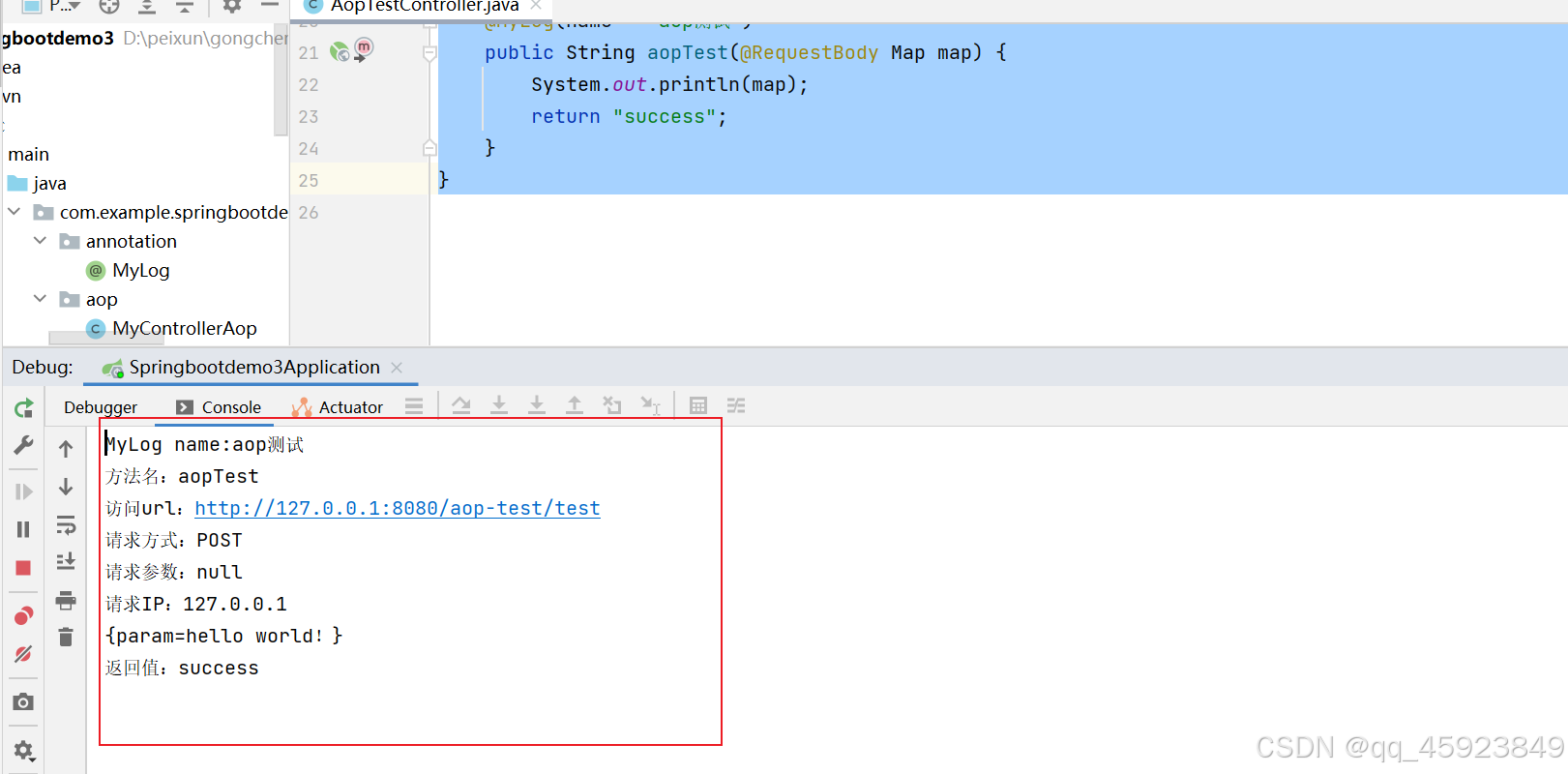
SpringBoot之自定义简单的注解和AOP
1.引入依赖 <!-- AOP依赖--> <dependency><groupId>org.aspectj</groupId><artifactId>aspectjweaver</artifactId><version>1.9.8</version> </dependency>2.自定义一个注解 package com.example.springbootdemo3.an…...

2.2 添加注释
版权声明:本文为博主原创文章,转载请在显著位置标明本文出处以及作者网名,未经作者允许不得用于商业目的。 注释是为了方便理解代码含义而添加的简短的解释性说明。在编译时,编辑器不会将注释加入最终生成的文件中,不…...

自由学习记录(38)
python语法 def def print_receipt (store_name, items, total_price, cashier"Self-Checkout", payment_method"Credit Card"): Python 的 函数定义 语法 def print_receipt(...) → 定义了一个名为 print_receipt 的函数。store_name, items, total_…...

【SQL实验】触发器
下载素材文件”tsgl”、“成绩管理”,将tsgl.bak和成绩管理.bak数据库还原到库中【导入操作在之前的文章中详细讲过】 触发器 1、为图书表设置更新触发器,根据总编号来更新书名、作者、出版社、分类号和单价(根据总编号找到相应记录,然后更新书名、作者…...

C语言:二维数组在内存中是怎么存储的
目录 1. 二维数组的定义: 2. 行主序存储: 具体内存排列: 3. 如何通过指针访问数据: 4. 总结: 在 C 语言中,二维数组是按 行主序(row-major order) 存储的。也就是说,…...

CPU多级缓存机制
目录 一、前置知识 ---- CPU的核心 1.1. 单核与多核CPU 二、CPU多级缓存机制 三. 缓存的基本结构/缓存的存储结构 四、CPU缓存的运作流程/工作原理 五、CPU多级缓存机制的工作原理【简化版】 5.1. 缓存访问的过程 (5.1.1) L1缓存(一级缓存)访问 …...

Ansible剧本-playbook
Ansible剧本-playbook 1 playbook基础1.1 简介1.2 playbook的组成结构Task 任务列表任务报错,如何继续执行响应事件Handler 1.3 常用选项执行playbookplaybook查询帮助信息校验playbook语法测试playbook能否正常运行 2 变量 的定义方式2.1 定义规则2.2 vars 变量2.3…...

神经网络八股(3)
1.什么是梯度消失和梯度爆炸 梯度消失是指梯度在反向传播的过程中逐渐变小,最终趋近于零,这会导致靠前层的神经网络层权重参数更新缓慢,甚至不更新,学习不到有用的特征。 梯度爆炸是指梯度在方向传播过程中逐渐变大,…...

SmartMediakit之音视频直播技术的极致体验与广泛应用
引言 在数字化时代,音视频直播技术已经深入到各个行业和领域,成为信息传递和交流的重要手段。视沃科技自2015年成立以来,一直致力于为传统行业提供极致体验的音视频直播技术解决方案,其旗下的大牛直播SDK凭借强大的功能和卓越的性…...

【R包】tidyplots----取代ggplot2的科研绘图利器
文章目录 介绍安装Usage文档参考 介绍 tidyplots----取代ggplot2的科研绘图利器。tidyplots的目标是简化为科学论文准备出版的情节的创建。它允许使用一致和直观的语法逐渐添加,删除和调整情节组件。 安装 You can install the released version of tidyplots fro…...

DeepSeek 15天指导手册——从入门到精通 PDF(附下载)
DeepSeek使用教程系列--DeepSeek 15天指导手册——从入门到精通pdf下载: https://pan.baidu.com/s/1PrIo0Xo0h5s6Plcc_smS8w?pwd1234 提取码: 1234 或 https://pan.quark.cn/s/2e8de75027d3 《DeepSeek 15天指导手册——从入门到精通》以系统化学习路径为核心&…...

C++知识点总结与复习
c中常见的关键字(面试题中经常出现) const 总结常见用法: const int a; //定义了常量整形的变量 a; 常量表示不可修改,定义的时候必须初始化。除此之外,和 int a;使用一样。 const int * p;//定义了指向常量整形变量的指针。…...

微信小程序实现拉卡拉支付
功能需求:拉卡拉支付(通过跳转拉卡拉平台进行支付),他人支付(通过链接进行平台跳转支付) 1.支付操作 //支付 const onCanStartPay async (obj) > {uni.showLoading({mask: true})// 支付接口获取需要传…...
)
全面汇总windows进程通信(二)
在Windows操作系统下,实现进程间通信(IPC, Inter-Process Communication)有几种常见的方法,包括使用管道(Pipe)、共享内存(Shared Memory)、消息队列(Message Queue)、命名管道(Named Pipe)、套接字(Socket)等。本文介绍如下几种: 信号量(Semaphore)和互斥量(…...

Unity 第三人称人物切动画时人物莫名旋转
前提: 使用Starter Asset包中的第三人称插件包. 在给3D角色的动画器增加新动画时, 发现进入新动画会让角色莫名转动. 观察后发现是动画强行将朝向掰"正", 人物动画在进行时朝向会一直变化, 这使得动作非常的怪异. 对系动画进行以下处理后, 将可以解决这种不自然: 选…...

启动Redis报错记录
突然启动Redis就报了个错:‘Could not create server TCP listening socket 127.0.0.1:6379: bind: 操作成功完成。‘ 查了下解决方案,应该是6379端口已绑定,服务没有关闭。 需要输入命令redis-cli 再输入shutdown 但又出现了新的问题&…...

vue2响应式数据原理
1. 核心原理 Vue 2 的响应式系统基于 Object.defineProperty,通过 依赖收集 和 派发更新 来实现数据的响应式 依赖收集:在读取数据时,记录哪些函数(或组件)依赖了该数据。派发更新:在修改数据时ÿ…...

OpenBMC:BmcWeb实例化App
BmcWeb是OpenBMC的一个核心模块,对外负责响应Redfish请求,并且由于OpenBMC的Web使用的Redfish api,所以BmcWeb也是Web的后台。 1.main函数 //src\webserver_main.cpp #include "webserver_run.hpp"int main(int /*argc*/, char** /*argv*/) noexcept(false) {re…...
 数据库系统的基本概念)
二级公共基础之数据库设计基础(一) 数据库系统的基本概念
目录 前言 一、数据库、数据管理系统和数据库系统 1.数据 2.数据库 3.数据库管理系统 1.数据库管理系统的定义 2.数据库管理系统的功能 1.数据定义功能 2.数据操作功能 3.数据存取控制 4.数据完整性管理 5.数据备份和恢复 6.并发控制 4.数…...

自然语言处理NLP 04案例——苏宁易购优质评论与差评分析
上一篇文章,我们爬取了苏宁易购平台某产品的优质评价和差评,今天我们对优质评价与差评进行分析 selenium爬取苏宁易购平台某产品的评论-CSDN博客 目录 1. 数据加载 2. 中文分词 3. 停用词处理 4. 数据标注与合并 5. 数据集划分 6. 文本特征提取 …...

图片爬取案例
修改前的代码 但是总显示“失败” 原因是 修改之后的代码 import requests import os from urllib.parse import unquote# 原始URL url https://cn.bing.com/images/search?viewdetailV2&ccidTnImuvQ0&id5AE65CE4BE05EE7A79A73EEFA37578E87AE19421&thidOIP.TnI…...

leetcode_动态规划/递归 70. 爬楼梯
70. 爬楼梯 假设你正在爬楼梯。需要 n 阶你才能到达楼顶。 每次你可以爬 1 或 2 个台阶。你有多少种不同的方法可以爬到楼顶呢? 思路: 考虑: 假设现在已经爬到了某一阶台阶,那是如何到达这里的呢?可能是从前一阶台阶爬上来的&am…...

VoIP之音频3A技术
音频3A技术是改善语音通话质量的三种关键技术的简称,包括声学回声消除(Acoustic Echo Cancellation, AEC)、自动增益控制(Automatic Gain Control, AGC)、自噪声抑制(Automatic Noise Suppression, ANS&…...

SpringBoot 03 Web开发
SpringBoot 代替了SSM整合,避免了版本依赖冲突,不在需要手写配置文件 前言 springboot提供了starter场景启动器(web,Tomcat,jdbc),自带相关组件实现自动配置 场景启动器 一、自动配置 1.自动…...

官方文档学习TArray容器
一.TArray中的元素相等 1.重载一下 元素中的 运算符,有时需要重载排序。接下来,我们将id 作为判断结构体的标识。 定义结构体 USTRUCT() struct FXGEqualStructInfo {GENERATED_USTRUCT_BODY() public:FXGEqualStructInfo(){};FXGEqualStructInfo(in…...

Web刷题之PolarDN(中等)
1.到底给不给flag呢 代码审计 一道典型的php变量覆盖漏洞 相关知识 什么是变量覆盖漏洞 自定义的参数值替换原有变量值的情况称为变量覆盖漏洞 经常导致变量覆盖漏洞场景有:$$使用不当,extract()函数使用不当,parse_str()函数使用不当&…...