
DeepSeek 助力 Vue3 开发:打造丝滑的页眉(Header)
前言:哈喽,大家好,今天给大家分享一篇文章!并提供具体代码帮助大家深入理解,彻底掌握!创作不易,如果能帮助到大家或者给大家一些灵感和启发,欢迎收藏+关注哦 💕



目录
- DeepSeek 助力 Vue3 开发:打造丝滑的页眉(Header)
- 📚前言
- 📚页面效果
- 📚指令输入
- 属性定义
- 1. 文本内容相关
- 2. 样式相关
- 3. 导航相关
- 4. 响应式相关
- 事件定义
- 1. 导航点击事件
- 2. logo 点击事件
- 其他
- 1. 组件结构设计
- 2. 响应式设计
- 3. 动画效果
- 4. 可访问性
- 📚think
- 📘组件代码
- 📚代码测试
- 📚测试代码正常跑通,附其他基本代码
- 📘编写路由 src\router\index.js
- 📘编写展示入口 src\App.vue
- 📚页面效果
- 📚相关文章
📚📗📕📘📖🕮💡📝🗂️✍️🛠️💻🚀🎉🏗️🌐🖼️🔗📊👉🔖⚠️🌟🔐⬇️·正文开始⬇️·🎥😊🎓📩😺🌈🤝🤖📜📋🔍✅🧰❓📄📢📈 🙋0️⃣1️⃣2️⃣3️⃣4️⃣5️⃣6️⃣7️⃣8️⃣9️⃣🔟🆗*️⃣#️⃣
DeepSeek 助力 Vue3 开发:打造丝滑的页眉(Header)
📚前言
DeepSeek 的发展将对 AI 行业格局产生深远影响,推动行业的创新和发展。其开源策略和技术优势将吸引更多的开发者和企业参与到 AI 技术的研发和应用中,促进 AI 技术的普及和推广。越来越多的中小企业将能够利用 DeepSeek 的技术,开发出具有创新性的 AI 应用,推动 AI 技术在各个行业的落地生根。同时,DeepSeek 的出现也将加剧 AI 行业的竞争,促使其他企业加大研发投入,不断提升技术水平,从而推动整个行业的技术进步。在激烈的竞争环境下,企业将不断探索新的技术和应用场景,推动 AI 技术向更高水平发展。
📚页面效果

📚指令输入
已经创建好了一个基于Vue3的组合式API的项目(Composition API),并能正常运行起来,请帮我用 Vue3的组合式API(Composition API) 生成一个 页眉(Header) 的功能组件,所有代码都保存在components/Header 下的文件夹中。功能组件的script标签中只有setup属性,使用普通 JavaScript 实现,不使用TypeScript。
功能要有,如下属性:
属性定义
1. 文本内容相关
title:用于设置页眉的标题文本,类型为字符串,这样可以方便在不同页面显示不同的标题。subtitle:可选属性,用于显示副标题,类型为字符串,丰富页眉的信息展示。logoSrc:用于指定页眉中显示的 logo 图片的源地址,类型为字符串,方便用户自定义品牌标识。
2. 样式相关
backgroundColor:用于设置页眉的背景颜色,类型为字符串,可以接受十六进制颜色码、RGB 颜色值等,方便进行视觉风格的定制。textColor:用于设置页眉内文本的颜色,类型为字符串,同样可以接受多种颜色表示方式。height:设置页眉的高度,类型可以是字符串(包含单位,如'60px')或数字(默认单位为px),方便控制页眉的布局。
3. 导航相关
navItems:用于传递导航菜单项的数据,类型为数组,数组中的每个元素可以是包含label(菜单项文本)和href(链接地址)等属性的对象,方便生成导航菜单。isSticky:布尔类型,用于控制页眉是否固定在页面顶部,方便实现粘性导航效果。
4. 响应式相关
breakpoint:用于指定响应式布局的断点,类型为数字或字符串(如'768px'),当屏幕宽度小于该值时,可能会改变页眉的显示方式,如切换为汉堡菜单。
事件定义
1. 导航点击事件
nav-click:当用户点击导航菜单项时触发,事件参数可以传递被点击菜单项的数据,方便在父组件中进行页面跳转或其他操作。
2. logo 点击事件
logo-click:当用户点击页眉中的 logo 时触发,可用于实现返回首页等功能。
其他
1. 组件结构设计
- 考虑将导航菜单拆分为独立的子组件,提高代码的可维护性和复用性。
- 可以将搜索框等常见的页眉元素也作为可配置的部分,方便用户根据需求添加或移除。
2. 响应式设计
- 使用 CSS 媒体查询或 Vue 的响应式 API 实现不同屏幕尺寸下的自适应布局,确保在各种设备上都有良好的显示效果。
3. 动画效果
- 为页眉的显示和隐藏添加过渡动画,如淡入淡出、滑动等,提升用户体验。
- 当导航菜单项被点击时,可以添加一些交互动画,如变色、放大等。
4. 可访问性
- 确保页眉中的文本和图标都有适当的
alt属性和aria-label,提高屏幕阅读器等辅助设备的可访问性。 - 保证导航菜单可以通过键盘进行操作,方便残障人士使用。
你有更好的建议也可以添加,要注明。组件定义好后给出5个及以上的调用示例。
下面是现有目录
vueAndDeepseek/
├── src/ # 源代码目录
│ ├── assets/ # 静态资源
│ │ ├── base.css
│ │ ├── main.css
│ │ └── logo.svg
│ ├── components/ # 组件目录
│ │ ├── HelloWorld.vue
│ │ ├── TheWelcome.vue
│ │ ├── WelcomeItem.vue
│ │ ├── Progress/
│ │ │ └── Progress.vue
│ │ ├── Accordion/
│ │ ├── BackToTop/
│ │ ├── Card/
│ │ ├── InfiniteScroll/
│ │ ├── Notification/
│ │ ├── Timeline/
│ │ ├── Switch/
│ │ ├── Tabs/
│ │ ├── Sidebar/
│ │ ├── Breadcrumbs/
│ │ ├── MasonryLayout/
│ │ ├── Rating/
│ │ ├── ColorPicker/
│ │ ├── RightClickMenu/
│ │ ├── RangePicker/
│ │ ├── Navbar/
│ │ ├── FormValidation/
│ │ ├── CopyToClipboard/
│ │ ├── ClickAnimations/
│ │ ├── ThumbnailList/
│ │ ├── KeyboardShortcuts/
│ │ ├── CommentSystem/
│ │ ├── QRCode/
│ │ ├── RadioButton/
│ │ ├── Slider/
│ │ ├── ScrollAnimations/
│ │ ├── TextInput/
│ │ ├── Divider/
│ │ ├── Checkbox/
│ │ ├── TagInput/
│ │ ├── DropdownSelect/
│ │ ├── List/
│ │ ├── Header/
│ │ ├── DatePicker/
│ │ └── icons/
│ ├── router/ # 路由配置
│ │ └── index.js
│ ├── stores/ # Pinia 状态管理
│ │ └── counter.js
│ ├── views/ # 页面组件
│ │ ├── ProgressView.vue
│ │ ├── TabsView.vue
│ │ ├── SwitchView.vue
│ │ ├── TimelineView.vue
│ │ ├── NotificationView.vue
│ │ ├── CardView.vue
│ │ ├── InfiniteScrollView.vue
│ │ ├── BackToTopView.vue
│ │ ├── AccordionView.vue
│ │ ├── SidebarView.vue
│ │ ├── BreadcrumbsView.vue
│ │ ├── MasonryLayoutView.vue
│ │ ├── RatingView.vue
│ │ ├── ColorPickerView.vue
│ │ ├── RightClickMenuView.vue
│ │ ├── RangePickerView.vue
│ │ ├── NavbarView.vue
│ │ ├── FormValidationView.vue
│ │ ├── CopyToClipboardView.vue
│ │ ├── ClickAnimationsView.vue
│ │ ├── ThumbnailListView.vue
│ │ ├── KeyboardShortcutsView.vue
│ │ ├── CommentSystemView.vue
│ │ ├── QRCodeView.vue
│ │ ├── RadioButtonView.vue
│ │ ├── SliderView.vue
│ │ ├── ScrollAnimationsView.vue
│ │ ├── TextInputView.vue
│ │ ├── DividerView.vue
│ │ ├── CheckboxView.vue
│ │ ├── TagInputView.vue
│ │ ├── DropdownSelectView.vue
│ │ ├── ListView.vue
│ │ ├── HeaderView.vue
│ │ ├── DatePickerView.vue
│ │ └── AboutView.vue
│ ├── App.vue # 根组件
│ └── main.js # 应用入口
├── public/ # 公共资源目录
├── index.html # HTML 模板
├── package.json # 项目配置
├── vite.config.js # Vite 配置
└── node_modules/ # 依赖包目录
📚think
📘组件代码
我帮你创建一个结构清晰、功能完善的Header组件。根据你的需求,我会做以下额外优化:
- 增加移动端汉堡菜单功能
- 添加导航菜单的键盘可访问性
- 实现平滑的过渡动画
- 增加默认样式和安全的props验证
以下是组件代码:
📂 components/Header/
├── 📄 Header.vue
└── 📄 HeaderNav.vue
components/Header/HeaderNav.vue
<script setup>
defineProps({items: {type: Array,default: () => [],validator: value => value.every(item => item.label && item.href)}
})const emit = defineEmits(['navClick'])const handleClick = (item, event) => {emit('navClick', { item, event })
}
</script><template><nav role="navigation" aria-label="Main navigation"><ul class="nav-list"><li v-for="(item, index) in items" :key="index"class="nav-item"><a:href="item.href"class="nav-link"@click.prevent="handleClick(item, $event)"@keydown.enter="handleClick(item, $event)":aria-label="`Go to ${item.label}`"role="button"tabindex="0">{{ item.label }}</a></li></ul></nav>
</template><style scoped>
.nav-list {list-style: none;padding: 0;margin: 0;display: flex;gap: 1.5rem;
}.nav-link {text-decoration: none;transition: color 0.3s ease;cursor: pointer;
}.nav-link:hover {opacity: 0.8;
}@media (max-width: 768px) {.nav-list {flex-direction: column;gap: 1rem;}
}
</style>
components/Header/Header.vue
<script setup>
import { ref, computed, watch, onMounted, onBeforeUnmount } from 'vue'
import HeaderNav from './HeaderNav.vue'const props = defineProps({title: {type: String,required: true},subtitle: String,logoSrc: String,backgroundColor: String,textColor: String,height: [String, Number],navItems: {type: Array,default: () => []},isSticky: Boolean,breakpoint: {type: [String, Number],default: 768}
})const emit = defineEmits(['logoClick', 'navClick'])const isMobile = ref(false)
const isMenuOpen = ref(false)const headerStyles = computed(() => ({backgroundColor: props.backgroundColor || 'transparent',color: props.textColor || 'inherit',height: typeof props.height === 'number' ? `${props.height}px` : props.height,position: props.isSticky ? 'sticky' : 'static'
}))const normalizedBreakpoint = computed(() => {const bp = props.breakpointreturn typeof bp === 'string' ? parseInt(bp) : bp
})const checkViewport = () => {const width = window.innerWidthisMobile.value = width < normalizedBreakpoint.valueif (!isMobile.value) isMenuOpen.value = false
}const handleLogoClick = (event) => {emit('logoClick', event)
}const handleNavClick = (payload) => {emit('navClick', payload)if (isMobile.value) isMenuOpen.value = false
}onMounted(() => {checkViewport()window.addEventListener('resize', checkViewport)
})onBeforeUnmount(() => {window.removeEventListener('resize', checkViewport)
})watch(() => props.breakpoint, checkViewport)
</script><template><header class="header":style="headerStyles":class="{ 'sticky-header': isSticky }"><div class="header-content"><div class="brand-section"><imgv-if="logoSrc":src="logoSrc"alt="Site Logo"class="logo"@click="handleLogoClick"@keydown.enter="handleLogoClick"tabindex="0"role="button"/><div class="title-section"><h1 class="title">{{ title }}</h1><h2 v-if="subtitle" class="subtitle">{{ subtitle }}</h2></div></div><HeaderNavv-if="!isMobile":items="navItems"@navClick="handleNavClick"class="desktop-nav"/><buttonv-if="isMobile"class="hamburger"@click="isMenuOpen = !isMenuOpen"aria-label="Toggle navigation menu"><div class="hamburger-box"><div class="hamburger-inner" :class="{ active: isMenuOpen }"></div></div></button></div><Transition name="slide-down"><div v-if="isMobile && isMenuOpen"class="mobile-nav-container"><HeaderNav:items="navItems"@navClick="handleNavClick"class="mobile-nav"/></div></Transition></header>
</template><style scoped>
.header {top: 0;left: 0;right: 0;z-index: 100;transition: all 0.3s ease;box-shadow: 0 2px 10px rgba(0,0,0,0.1);
}.sticky-header {position: sticky;
}.header-content {display: flex;justify-content: space-between;align-items: center;padding: 0 2rem;height: 100%;
}.brand-section {display: flex;align-items: center;gap: 1rem;
}.logo {height: 40px;cursor: pointer;transition: transform 0.3s ease;
}.logo:hover {transform: scale(1.05);
}.title-section {display: flex;flex-direction: column;
}.title {margin: 0;font-size: 1.5rem;
}.subtitle {margin: 0;font-size: 0.9rem;opacity: 0.8;
}.hamburger {background: none;border: none;padding: 0.5rem;cursor: pointer;
}.hamburger-box {width: 30px;height: 24px;position: relative;
}.hamburger-inner {position: absolute;width: 100%;height: 2px;background-color: currentColor;transition: all 0.3s ease;
}.hamburger-inner::before,
.hamburger-inner::after {content: '';position: absolute;width: 100%;height: 2px;background-color: currentColor;transition: all 0.3s ease;
}.hamburger-inner::before {top: -8px;
}.hamburger-inner::after {top: 8px;
}.hamburger-inner.active {background-color: transparent;
}.hamburger-inner.active::before {transform: translateY(8px) rotate(45deg);
}.hamburger-inner.active::after {transform: translateY(-8px) rotate(-45deg);
}.mobile-nav-container {background-color: inherit;padding: 1rem;
}.slide-down-enter-active,
.slide-down-leave-active {transition: all 0.3s ease;max-height: 500px;overflow: hidden;
}.slide-down-enter-from,
.slide-down-leave-to {max-height: 0;opacity: 0;
}@media (max-width: 768px) {.header-content {padding: 0 1rem;}.title {font-size: 1.2rem;}
}
</style>
以下是5个使用示例:
- 基础用法
<Headertitle="我的网站"logoSrc="/logo.png":navItems="[{ label: '首页', href: '/' },{ label: '关于', href: '/about' }]"
/>
- 带副标题和样式定制
<Headertitle="产品中心"subtitle="探索我们的解决方案"backgroundColor="#2c3e50"textColor="#ecf0f1":height="80":isSticky="true"
/>
- 响应式断点配置
<Headertitle="响应式示例":breakpoint="1024":navItems="[{ label: '服务', href: '/services' },{ label: '联系', href: '/contact' }]"
/>
- 事件处理
<Headertitle="交互示例"@logo-click="handleLogoClick"@nav-click="handleNavClick":navItems="[{ label: '博客', href: '/blog' },{ label: '文档', href: '/docs' }]"
/>
- 完整配置示例
<Headertitle="完整示例"subtitle="欢迎访问我们的平台"logoSrc="/logo.png"backgroundColor="linear-gradient(135deg, #667eea 0%, #764ba2 100%)"textColor="#ffffff"height="100px":isSticky="true":breakpoint="'1024px'":navItems="[{ label: '产品', href: '/products' },{ label: '定价', href: '/pricing' },{ label: '支持', href: '/support' }]"@logo-click="goToHome"@nav-click="handleNavigation"
/>
优化建议:
- 性能优化:添加防抖处理窗口resize事件
- 可访问性:为移动菜单添加点击外部关闭功能
- 扩展性:添加插槽系统来支持自定义内容区域
- SEO优化:确保导航链接在服务器端渲染时可用
- 安全增强:对传入的logoSrc进行安全验证防止XSS攻击
如果需要实现这些额外功能,可以进一步扩展组件逻辑。
📚代码测试
运行正常
📚测试代码正常跑通,附其他基本代码
- 添加路由
- 页面展示入口
📘编写路由 src\router\index.js
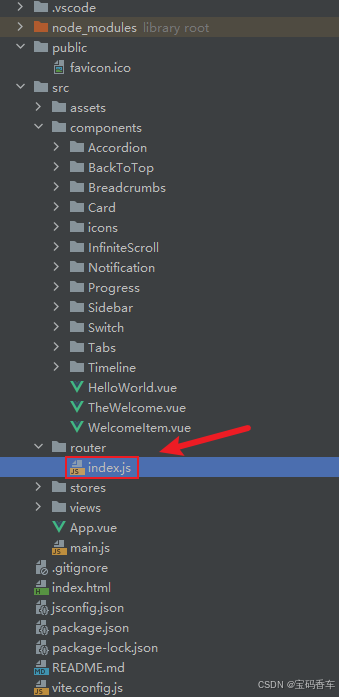
import { createRouter, createWebHistory } from 'vue-router'
import RightClickMenuView from '../views/RightClickMenuView.vue'
import RangePickerView from '../views/RangePickerView.vue'const router = createRouter({history: createWebHistory(import.meta.env.BASE_URL),routes: [{path: '/',name: 'progress',component:  () => import('../views/ProgressView.vue'),},{path: '/tabs',name: 'tabs',// route level code-splitting// this generates a separate chunk (About.[hash].js) for this route// which is lazy-loaded when the route is visited.// 标签页(Tabs)component: () => import('../views/TabsView.vue'),},{path: '/accordion',name: 'accordion',// 折叠面板(Accordion)component: () => import('../views/AccordionView.vue'),},{path: '/timeline',name: 'timeline',// 时间线(Timeline)component: () => import('../views/TimelineView.vue'),},{path: '/backToTop',name: 'backToTop',component: () => import('../views/BackToTopView.vue')},{path: '/notification',name: 'notification',component: () => import('../views/NotificationView.vue')},{path: '/card',name: 'card',component: () => import('../views/CardView.vue')},{path: '/infiniteScroll',name: 'infiniteScroll',component: () => import('../views/InfiniteScrollView.vue')},{path: '/switch',name: 'switch',component: () => import('../views/SwitchView.vue')},{path: '/sidebar',name: 'sidebar',component: () => import('../views/SidebarView.vue')},{path: '/breadcrumbs',name: 'breadcrumbs',component: () => import('../views/BreadcrumbsView.vue')},{path: '/masonryLayout',name: 'masonryLayout',component: () => import('../views/MasonryLayoutView.vue')},{path: '/rating',name: 'rating',component: () => import('../views/RatingView.vue')},{path: '/datePicker',name: 'datePicker',component: () => import('../views/DatePickerView.vue')},{path: '/colorPicker',name: 'colorPicker',component: () => import('../views/ColorPickerView.vue')},{path: '/rightClickMenu',name: 'rightClickMenu',component: RightClickMenuView},{path: '/rangePicker',name: 'rangePicker',component: () => import('../views/RangePickerView.vue')},{path: '/navbar',name: 'navbar',component: () => import('../views/NavbarView.vue')},{path: '/formValidation',name: 'formValidation',component: () => import('../views/FormValidationView.vue')},{path: '/copyToClipboard',name: 'copyToClipboard',component: () => import('../views/CopyToClipboardView.vue')},{path: '/clickAnimations',name: 'clickAnimations',component: () => import('../views/ClickAnimationsView.vue')},{path: '/thumbnailList',name: 'thumbnailList',component: () => import('../views/ThumbnailListView.vue')},{path: '/keyboardShortcuts',name: 'keyboardShortcuts',component: () => import('../views/KeyboardShortcutsView.vue')},{path: '/commentSystem',name: 'commentSystem',component: () => import('../views/CommentSystemView.vue')},{path: '/qRCode',name: 'qRCode',component: () => import('../views/QRCodeView.vue')},{path: '/radioButton',name: 'radioButton',component: () => import('../views/RadioButtonView.vue')},{path: '/slider',name: 'slider',component: () => import('../views/SliderView.vue')},{path: '/scrollAnimations',name: 'scrollAnimations',component: () => import('../views/ScrollAnimationsView.vue')},{path: '/textInputView',name: 'textInputView',component: () => import('../views/TextInputView.vue')},{path: '/divider',name: 'divider',component: () => import('../views/DividerView.vue')},{path: '/checkbox',name: 'checkbox',component: () => import('../views/CheckboxView.vue')},{path: '/tagInput',name: 'tagInput',component: () => import('../views/TagInputView.vue')},{path: '/dropdownSelect',name: 'dropdownSelect',component: () => import('../views/DropdownSelectView.vue')},{path: '/list',name: 'list',component: () => import('../views/ListView.vue')},{path: '/header',name: 'header',component: () => import('../views/HeaderView.vue')}],
})export default router
📘编写展示入口 src\App.vue
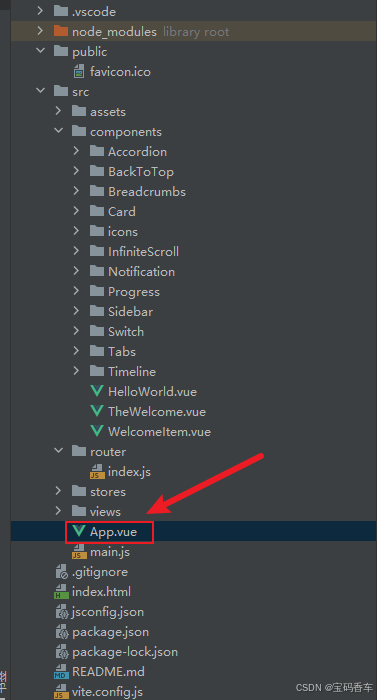
<script setup>
import { RouterLink, RouterView } from 'vue-router'
import HelloWorld from './components/HelloWorld.vue'
</script><template><header><img alt="Vue logo" class="logo" src="@/assets/logo.svg" width="125" height="125" /><div class="wrapper"><HelloWorld msg="You did it!" /><nav><RouterLink to="/">Progress</RouterLink><RouterLink to="/tabs">Tabs</RouterLink><RouterLink to="/accordion">Accordion</RouterLink><RouterLink to="/timeline">Timeline</RouterLink><RouterLink to="/backToTop">BackToTop</RouterLink><RouterLink to="/notification">Notification</RouterLink><RouterLink to="/card">Card</RouterLink><RouterLink to="/infiniteScroll">InfiniteScroll</RouterLink><RouterLink to="/switch">Switch</RouterLink><RouterLink to="/sidebar">Sidebar</RouterLink><RouterLink to="/breadcrumbs">Breadcrumbs</RouterLink><RouterLink to="/masonryLayout">MasonryLayout</RouterLink><RouterLink to="/rating">Rating</RouterLink><RouterLink to="/datePicker">DatePicker</RouterLink><RouterLink to="/colorPicker">ColorPicker</RouterLink><RouterLink to="/rightClickMenu">RightClickMenu</RouterLink><RouterLink to="/rangePicker">RangePicker</RouterLink><RouterLink to="/navbar">Navbar</RouterLink><RouterLink to="/formValidation">FormValidation</RouterLink><RouterLink to="/copyToClipboard">CopyToClipboard</RouterLink><RouterLink to="/clickAnimations">ClickAnimations</RouterLink><RouterLink to="/thumbnailList">ThumbnailList</RouterLink><RouterLink to="/keyboardShortcuts">KeyboardShortcuts</RouterLink><RouterLink to="/commentSystem">CommentSystem</RouterLink><RouterLink to="/qRCode">QRCode</RouterLink><RouterLink to="/radioButton">RadioButton</RouterLink><RouterLink to="/slider">Slider</RouterLink><RouterLink to="/scrollAnimations">ScrollAnimations</RouterLink><RouterLink to="/textInputView">TextInput</RouterLink><RouterLink to="/divider">Divider</RouterLink><RouterLink to="/checkbox">Checkbox</RouterLink><RouterLink to="/tagInput">TagInput</RouterLink><RouterLink to="/dropdownSelect">DropdownSelect</RouterLink><RouterLink to="/list">List</RouterLink><RouterLink to="/header">Header</RouterLink></nav></div></header><RouterView />
</template><style scoped>
header {line-height: 1.5;max-height: 100vh;
}.logo {display: block;margin: 0 auto 2rem;
}nav {width: 100%;font-size: 12px;text-align: center;margin-top: 2rem;
}nav a.router-link-exact-active {color: var(--color-text);
}nav a.router-link-exact-active:hover {background-color: transparent;
}nav a {display: inline-block;padding: 0 1rem;border-left: 1px solid var(--color-border);
}nav a:first-of-type {border: 0;
}@media (min-width: 1024px) {header {display: flex;place-items: center;padding-right: calc(var(--section-gap) / 2);}.logo {margin: 0 2rem 0 0;}header .wrapper {display: flex;place-items: flex-start;flex-wrap: wrap;}nav {text-align: left;margin-left: -1rem;font-size: 1rem;padding: 1rem 0;margin-top: 1rem;}
}
</style>
📚页面效果
📚相关文章
-
DeepSeek 助力 Vue 开发:打造丝滑的右键菜单(RightClickMenu)https://blog.csdn.net/qq_33650655/article/details/145706658
-
DeepSeek 助力 Vue 开发:打造丝滑的范围选择器(Range Picker)https://blog.csdn.net/qq_33650655/article/details/145713572
-
DeepSeek 助力 Vue 开发:打造丝滑的导航栏(Navbar)https://blog.csdn.net/qq_33650655/article/details/145732421
-
DeepSeek 助力 Vue 开发:打造丝滑的表单验证(Form Validation)https://blog.csdn.net/qq_33650655/article/details/145735582
-
DeepSeek 助力 Vue 开发:打造丝滑的复制到剪贴板(Copy to Clipboard)https://blog.csdn.net/qq_33650655/article/details/145739569
-
DeepSeek 助力 Vue 开发:打造丝滑的点击动画(Click Animations)https://blog.csdn.net/qq_33650655/article/details/145766184
-
DeepSeek 助力 Vue 开发:打造丝滑的缩略图列表(Thumbnail List)https://blog.csdn.net/qq_33650655/article/details/145776679
-
DeepSeek 助力 Vue 开发:打造丝滑的 键盘快捷键(Keyboard Shortcuts) https://blog.csdn.net/qq_33650655/article/details/145780227
-
DeepSeek 助力 Vue 开发:打造丝滑的评论系统(Comment System)https://blog.csdn.net/qq_33650655/article/details/145781104
-
DeepSeek 助力 Vue 开发:打造丝滑的二维码生成(QR Code)https://blog.csdn.net/qq_33650655/article/details/145797928
-
DeepSeek 助力 Vue 开发:打造丝滑的单选按钮(Radio Button)https://blog.csdn.net/qq_33650655/article/details/145810620
-
DeepSeek 助力 Vue 开发:打造丝滑的滑块(Slider)https://blog.csdn.net/qq_33650655/article/details/145817161
-
DeepSeek 助力 Vue 开发:打造丝滑的滚动动画(Scroll Animations)https://blog.csdn.net/qq_33650655/article/details/145818571
-
DeepSeek 助力 Vue 开发:打造丝滑的文本输入框(Text Input)https://blog.csdn.net/qq_33650655/article/details/145837003
-
DeepSeek 助力 Vue 开发:打造丝滑的分割线(Divider)https://blog.csdn.net/qq_33650655/article/details/145849100
-
DeepSeek 助力 Vue 开发:打造丝滑的 复选框(Checkbox)https://blog.csdn.net/qq_33650655/article/details/145855695
-
DeepSeek 助力 Vue3 开发:打造丝滑的标签输入(Tag Input)https://blog.csdn.net/qq_33650655/article/details/145858574
-
DeepSeek 助力 Vue3 开发:打造丝滑的下拉选择框(Dropdown Select)https://blog.csdn.net/qq_33650655/article/details/145861882
-
DeepSeek 助力 Vue3 开发:打造丝滑的列表(List)https://blog.csdn.net/qq_33650655/article/details/145866384
到此这篇文章就介绍到这了,更多精彩内容请关注本人以前的文章或继续浏览下面的文章,创作不易,如果能帮助到大家,希望大家多多支持宝码香车~💕,若转载本文,一定注明本文链接。

更多专栏订阅推荐:
👍 html+css+js 绚丽效果
💕 vue
✈️ Electron
⭐️ js
📝 字符串
✍️ 时间对象(Date())操作
相关文章:
DeepSeek 助力 Vue3 开发:打造丝滑的页眉(Header)
前言:哈喽,大家好,今天给大家分享一篇文章!并提供具体代码帮助大家深入理解,彻底掌握!创作不易,如果能帮助到大家或者给大家一些灵感和启发,欢迎收藏关注哦 💕 目录 Deep…...

常用空间数据结构对比
空间数据结构是用来组织和查询多维空间数据的算法结构。它们在地理信息系统 (GIS)、计算机图形学、机器人导航、机器学习等领域非常重要。以下是几种常见空间数据结构的对比: 1. 四叉树(Quadtree) 适用场景:二维空间数据&#x…...

PHP应用程序设计:一个实际的例子(3)
使应用程序适用于网络 如果你正好计划用P H P开发你自己的服务程序(或者其他一些相似的东西),请重新思考一下。你可能已经对这些思想有些迷惑了:实现一个聊天服务程序意味着实现一个网络服务程序。这是我们实际上介绍给大家的东西…...

RabbitMQ 的介绍与使用
一. 简介 1> 什么是MQ 消息队列(Message Queue,简称MQ),从字面意思上看,本质是个队列,FIFO先入先出,只不过队列中存放的内容是message而已。 其主要用途:不同进程Process/线程T…...

spring boot 连接FTP实现文件上传
spring boot 连接FTP实现文件上传 maven: <!--ftp--><dependency><groupId>commons-net</groupId><artifactId>commons-net</artifactId><version>3.8.0</version></dependency>接口示例: ApiO…...

OpenCV给图像添加噪声
操作系统:ubuntu22.04 OpenCV版本:OpenCV4.9 IDE:Visual Studio Code 编程语言:C11 算法描述 如果你已经有了一张干净的图像,并希望通过编程方式向其添加噪声,可以使用 OpenCV 来实现这一点。以下是一个简单的例子&a…...

Elasticsearch:使用阿里云 AI 服务进行嵌入和重新排名
作者:来自 Elastic Toms Mura 将阿里云 AI 服务功能与 Elastic 结合使用。 更多阅读,请参阅 “Elasticsearch:使用阿里 infererence API 及 semantic text 进行向量搜索”。 在本文中,我们将介绍如何将阿里云 AI 功能与 Elastics…...

管理后台环境配置
后端配置及启动 a. 软件安装 1. Java sdk 1.8 2. maven 3.6 3. intellij IDEA 2024 4. Visual C Redistributable 5. mongodb 7.0 6. mysql 8.0 双击安装:mysql-installer-community-8.0.41.0.msi 版本选择:Full,包括服务器和客户端 …...

数字IC低功耗后端设计实现之power gating和isolation技术
考虑低功耗设计需求,下图中间那个功能模块是需要做power domain的,即这个模块需要插MTCMOS。需要开启时,外面的VDD会和这个模块的LOCAL VDD形成通路,否则就是断开即power off状态。 这些低功耗设计实现经验,你真的懂了…...

【网络编程】几个常用命令:ping / netstat / xargs / pidof / watch
ping:检测网络联通 1. ping 的基本功能2. ping 的工作原理3. ping 的常见用法4. ping 的输出解释5. ping 的应用场景6. 注意事项 netstat:查看网络状态 1. netstat 的基本功能2. 常见用法3. 示例4. 输出字段解释5. netstat 的替代工具6. 注意事项 xargs&…...

sqlilab 46 关(布尔、时间盲注)
sqlilabs 46关(布尔、时间盲注) 46关有变化了,需要我们输入sort,那我们就从sort1开始 递增测试: 发现测试到sort4就出现报错: 我们查看源码: 从图中可看出:用户输入的sort值被用于查…...
)
视觉应用工程师(面试)
视觉应用工程师(面试) 1.自我介绍、会的技能、项目 2.相机和机械手调试过程 检查硬件,看软件驱动是否链接,调节相机和镜头保证能够识别这个物料,看接口和通讯是否正常,如:波特率,数…...

redis restore 命令的用法
Redis 的 RESTORE 命令用于将序列化后的数据(通常由 DUMP 命令生成)恢复为 Redis 的键值。它在数据迁移、备份恢复和跨实例同步等场景中非常有用。以下是详细说明: 作用 数据恢复 将 DUMP 命令生成的序列化数据重新加载到 Redis 中ÿ…...

当AI重构认知:技术狂潮下的教育沉思录
备注:文章未Deepseek R1模型辅助生成,如有不妥请谅解。 以下使原文: 我有三个娃,各间隔4到5岁,经历过搜索引擎,短视频,短剧,本身曾经也是教育专业出生,任何事务都有两面性…...

《Effective Objective-C》阅读笔记(下)
目录 内存管理 理解引用计数 引用计数工作原理 自动释放池 保留环 以ARC简化引用计数 使用ARC时必须遵循的方法命名规则 变量的内存管理语义 ARC如何清理实例变量 在dealloc方法中只释放引用并解除监听 编写“异常安全代码”时留意内存管理问题 以弱引用避免保留环 …...

穷举vs暴搜vs深搜vs回溯vs剪枝(典型算法思想)—— OJ例题算法解析思路
回溯算法的模版 void backtrack(vector<int>& path, vector<int>& choice, ...) {// 满⾜结束条件if (/* 满⾜结束条件 */) {// 将路径添加到结果集中res.push_back(path);return;}// 遍历所有选择for (int i 0; i < choices.size(); i) {// 做出选择…...

【Java项目】基于Spring Boot的校园博客系统
【Java项目】基于Spring Boot的校园博客系统 技术简介:采用Java技术、Spring Boot框架、MySQL数据库等实现。 系统简介:校园博客系统是一个典型的管理系统,主要功能包括管理员:首页、个人中心、博主管理、文章分类管理、文章信息…...
计算机毕业设计SpringBoot+Vue.js图书进销存管理系统(源码+文档+PPT+讲解)
温馨提示:文末有 CSDN 平台官方提供的学长联系方式的名片! 温馨提示:文末有 CSDN 平台官方提供的学长联系方式的名片! 温馨提示:文末有 CSDN 平台官方提供的学长联系方式的名片! 作者简介:Java领…...

算法-数据结构(图)-迪杰斯特拉最短逻辑算法( Dijkstra)
迪杰斯特拉算法(Dijkstras Algorithm) 是一种用于计算单源最短路径的经典算法,由荷兰计算机科学家 艾兹赫尔迪杰斯特拉(Edsger W. Dijkstra) 于1956年提出。它的主要目标是找到从图中的某个源节点到所有其他节点的最短…...

C语言【进阶篇】之指针——涵盖基础、数组与高级概念
目录 🚀前言🤔指针是什么🌟指针基础💯内存与地址💯指针变量💯 指针类型💯const 修饰指针💯指针运算💯野指针和 assert 断言 💻数组与指针💯数组名…...

关于命令行下的 git( git add、git commit、git push)
文章目录 关于 gitgit 的概念git 操作(git add、git commit、git push 三板斧)安装 git新建仓库及配置git clone.gitignoregit addgit commitgit push其他 git 指令git pull(把远端的东西拉到本地进行同步)其他指令 关于 git git…...

DaoCloud 亮相 2025 GDC丨开源赋能 AI 更多可能
2025 年 2 月 21 日至 23 日,上海徐汇西岸,2025 全球开发者先锋大会以 “模塑全球,无限可能” 的主题,围绕云计算、机器人、元宇宙等多元领域,探讨前沿技术创新、应用场景拓展和产业生态赋能,各类专业论坛、…...

极速探索 HarmonyOS NEXT:开启国产操作系统开发的新篇章
极速探索 HarmonyOS NEXT:开启国产操作系统开发的新篇章 一、引言二、HarmonyOS NEXT 是什么?背景核心特性 三、HarmonyOS NEXT 的发展历程从 LiteOS 到 HarmonyOS 的逐步演进HarmonyOS NEXT 5.0 的发布 四、HarmonyOS NEXT 对科技的影响技术突破开发者生…...

火狐浏览器多开指南:独立窗口独立IP教程
无论是跨境电商从业者需要管理多个店铺账号,还是海外社交媒体营销人员要运营多个社交平台账号,亦或是从事多账号广告投放的人员,都面临着一个共同的挑战 —— 如何高效管理多个账号,并确保每个账号的独立性。 在这种情况下&#…...

内容中台是什么?内容管理平台解析
内容中台的核心价值 现代企业数字化转型进程中,内容中台作为中枢系统,通过构建统一化的内容管理平台实现数据资产的高效整合与智能调度。其核心价值体现在打破传统信息孤岛,将分散于CRM、ERP等系统的文档、知识库、产品资料进行标准化归集&a…...

1.2 Kaggle大白话:Eedi竞赛Transformer框架解决方案02-GPT_4o生成训练集缺失数据
目录 0. 本栏目竞赛汇总表1. 本文主旨2. AI工程架构3. 数据预处理模块3.1 配置数据路径和处理参数3.2 配置API参数3.3 配置输出路径 4. AI并行处理模块4.1 定义LLM客户端类4.2 定义数据处理函数4.3 定义JSON保存函数4.4 定义数据分片函数4.5 定义分片处理函数4.5 定义文件名排序…...

iOS指纹归因详解
iOS 指纹归因(Fingerprint Attribution)详解 1. 指纹归因的概念 指纹归因(Fingerprint Attribution)是一种无 ID 归因(ID-less Attribution)技术,主要用于广告跟踪、用户识别或流量分析。它基…...

sql server笔记
创建数据库 use master gocreate database stuuuuu//删除数据库if db_id ($$$) is not nullDrop database [$$$] go//新建表USE [studyTest] GOSET ANSI_NULLS ON GOSET QUOTED_IDENTIFIER ON GOCREATE TABLE [dbo].[Table_1]([id] [int] NULL,[name] [varchar](10) NULL ) ON…...

uni小程序wx.switchTab有时候跳转错误tab问题,解决办法
在一个子页面里面使用uni.switchTab或者wx.switchTab跳转到tab菜单的时候,先发送了一个请求,然后执行跳转到tab菜单,但是这个时候,出错了........也是非常的奇怪,不加请求就没问题......但是业务逻辑就是要先执行某个请…...

【第十节】C++设计模式(结构型模式)-Flyweight( 享元)模式
目录 一、问题背景 二、模式选择 三、代码实现 四、总结讨论 一、问题背景 享元模式(Flyweight Pattern)在对象存储优化中的应用 在面向对象系统的设计与实现中,创建对象是最常见的操作之一。然而,如果一个应用程序使用了过多…...