
DeepSeek 助力 Vue3 开发:打造丝滑的网格布局(Grid Layout)
前言:哈喽,大家好,今天给大家分享一篇文章!并提供具体代码帮助大家深入理解,彻底掌握!创作不易,如果能帮助到大家或者给大家一些灵感和启发,欢迎收藏+关注哦 💕



目录
- DeepSeek 助力 Vue3 开发:打造丝滑的网格布局(Grid Layout)
- 📚前言
- 📚页面效果
- 📚指令输入
- 属性定义
- 1. 布局相关属性
- 2. 响应式属性
- 3. 样式属性
- 事件定义
- 1. 交互事件
- 其他
- 1. 插槽使用
- 2. 响应式设计
- 3. 可访问性
- 4. 文档和示例
- 📚think
- 📘组件代码
- 📚代码测试
- 📚整理后主要代码
- 📘调用 \src\views\FloatingActionButtonView.vue
- 📚测试代码正常跑通,附其他基本代码
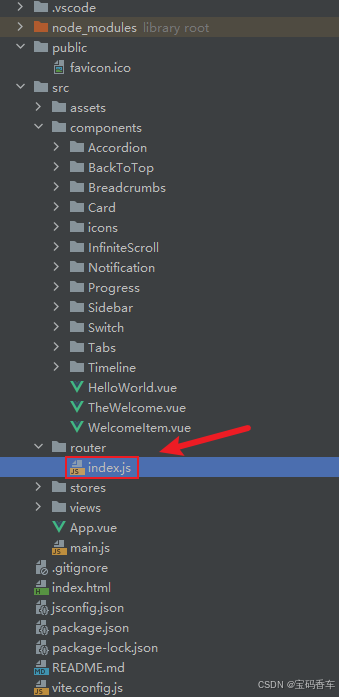
- 📘编写路由 src\router\index.js
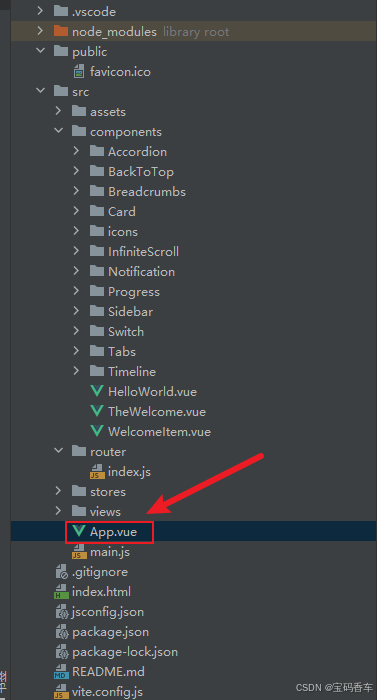
- 📘编写展示入口 src\App.vue
- 📚页面效果
- 📚相关文章
📚📗📕📘📖🕮💡📝🗂️✍️🛠️💻🚀🎉🏗️🌐🖼️🔗📊👉🔖⚠️🌟🔐⬇️·正文开始⬇️·🎥😊🎓📩😺🌈🤝🤖📜📋🔍✅🧰❓📄📢📈 🙋0️⃣1️⃣2️⃣3️⃣4️⃣5️⃣6️⃣7️⃣8️⃣9️⃣🔟🆗*️⃣#️⃣
DeepSeek 助力 Vue3 开发:打造丝滑的网格布局(Grid Layout)
📚前言
在应用方面,DeepSeek 已广泛渗透到金融、公募基金、电信、汽车等多个行业,为各行业的数字化转型和智能化升级提供了强大的支持。在金融领域,DeepSeek 帮助银行实现智能合同质检、信贷风控和自动化估值对账等功能,有效提升了业务效率和风险防范能力;在公募基金行业,DeepSeek 助力基金公司提升投资研究、产品销售和风控合规等业务的效率和质量,为投资者提供更优质的服务。
📚页面效果

📚指令输入
已经创建好了一个基于Vue3的组合式API的项目(Composition API),并能正常运行起来,请帮我用 Vue3的组合式API(Composition API) 生成一个 网格布局(Grid Layout) 的功能组件,所有代码都保存在components/GridLayout 下的文件夹中。功能组件的script标签中只有setup属性,使用普通 JavaScript 实现,不使用TypeScript。
功能要有,如下属性:
属性定义
1. 布局相关属性
columns- 类型:
Number | String - 描述:定义网格的列数。可以是具体的数字,也可以是如
1fr 2fr这样的 CSS 网格列模板定义。
- 类型:
rows- 类型:
Number | String - 描述:定义网格的行数。同样可以是具体数字或 CSS 网格行模板定义。
- 类型:
column-gap- 类型:
String - 描述:列与列之间的间距,值为 CSS 长度单位,如
10px、1em等。
- 类型:
row-gap- 类型:
String - 描述:行与行之间的间距,值为 CSS 长度单位。
- 类型:
gap- 类型:
String - 描述:统一设置行和列的间距,是
column-gap和row-gap的简写。
- 类型:
justify-content- 类型:
String - 描述:定义网格项在水平方向的对齐方式,可选值有
start、end、center、space-between等。
- 类型:
align-content- 类型:
String - 描述:定义网格项在垂直方向的对齐方式,可选值有
start、end、center、space-between等。
- 类型:
justify-items- 类型:
String - 描述:定义网格内每个项目在水平方向的对齐方式,可选值有
start、end、center等。
- 类型:
align-items- 类型:
String - 描述:定义网格内每个项目在垂直方向的对齐方式,可选值有
start、end、center等。
- 类型:
2. 响应式属性
breakpoints- 类型:
Object - 描述:用于响应式布局,根据不同的屏幕宽度调整网格的列数、间距等属性。例如:
{ sm: 2, md: 3, lg: 4 }表示在小屏幕时显示 2 列,中屏幕显示 3 列,大屏幕显示 4 列。
- 类型:
3. 样式属性
class- 类型:
String | Array | Object - 描述:为网格容器添加额外的 CSS 类名,方便自定义样式。
- 类型:
style- 类型:
String | Object - 描述:为网格容器添加内联样式。
- 类型:
事件定义
1. 交互事件
click- 描述:当网格容器被点击时触发。
mouseenter- 描述:鼠标进入网格容器时触发。
mouseleave- 描述:鼠标离开网格容器时触发。
其他
1. 插槽使用
- 提供默认插槽,允许用户在网格内放置任意内容。
- 可以考虑提供具名插槽,用于特殊位置的内容放置,如网格的头部、底部等。
2. 响应式设计
- 结合 Vue 3 的响应式原理,根据
breakpoints属性动态调整网格布局。 - 可以使用
@media查询或第三方库(如vueuse中的响应式工具)来实现响应式效果。
3. 可访问性
- 确保网格布局在不同设备和浏览器上都有良好的可访问性,遵循 WCAG 标准。
- 为网格容器和网格项添加适当的 ARIA 属性,提高屏幕阅读器的支持。
4. 文档和示例
- 提供详细的文档,说明每个属性和事件的使用方法。
- 提供多个示例,展示不同场景下的网格布局效果,方便用户快速上手。
你有更好的建议也可以添加,要注明。组件定义好后给出5个及以上的调用示例,示例中添加完整的数据和事件,确保每个示例是独立的。
下面是现有目录
DeepSeekAndVue/
├── src/ # 源代码目录
│ ├── assets/ # 静态资源
│ │ ├── base.css
│ │ ├── main.css
│ │ └── logo.svg
│ ├── components/ # 组件目录
│ │ ├── HelloWorld.vue
│ │ ├── TheWelcome.vue
│ │ ├── WelcomeItem.vue
│ │ ├── Progress/
│ │ │ └── Progress.vue
│ │ ├── Accordion/
│ │ ├── BackToTop/
│ │ ├── Card/
│ │ ├── InfiniteScroll/
│ │ ├── Notification/
│ │ ├── Timeline/
│ │ ├── Switch/
│ │ ├── Tabs/
│ │ ├── Sidebar/
│ │ ├── Breadcrumbs/
│ │ ├── MasonryLayout/
│ │ ├── Rating/
│ │ ├── ColorPicker/
│ │ ├── RightClickMenu/
│ │ ├── RangePicker/
│ │ ├── Navbar/
│ │ ├── FormValidation/
│ │ ├── CopyToClipboard/
│ │ ├── ClickAnimations/
│ │ ├── ThumbnailList/
│ │ ├── KeyboardShortcuts/
│ │ ├── CommentSystem/
│ │ ├── QRCode/
│ │ ├── RadioButton/
│ │ ├── Slider/
│ │ ├── ScrollAnimations/
│ │ ├── TextInput/
│ │ ├── Divider/
│ │ ├── Checkbox/
│ │ ├── TagInput/
│ │ ├── DropdownSelect/
│ │ ├── List/
│ │ ├── Header/
│ │ ├── Footer/
│ │ ├── Pagination/
│ │ ├── FloatingActionButton/
│ │ ├── GridLayout/
│ │ ├── DatePicker/
│ │ └── icons/
│ ├── router/ # 路由配置
│ │ └── index.js
│ ├── stores/ # Pinia 状态管理
│ │ └── counter.js
│ ├── views/ # 页面组件
│ │ ├── ProgressView.vue
│ │ ├── TabsView.vue
│ │ ├── SwitchView.vue
│ │ ├── TimelineView.vue
│ │ ├── NotificationView.vue
│ │ ├── CardView.vue
│ │ ├── InfiniteScrollView.vue
│ │ ├── BackToTopView.vue
│ │ ├── AccordionView.vue
│ │ ├── SidebarView.vue
│ │ ├── BreadcrumbsView.vue
│ │ ├── MasonryLayoutView.vue
│ │ ├── RatingView.vue
│ │ ├── ColorPickerView.vue
│ │ ├── RightClickMenuView.vue
│ │ ├── RangePickerView.vue
│ │ ├── NavbarView.vue
│ │ ├── FormValidationView.vue
│ │ ├── CopyToClipboardView.vue
│ │ ├── ClickAnimationsView.vue
│ │ ├── ThumbnailListView.vue
│ │ ├── KeyboardShortcutsView.vue
│ │ ├── CommentSystemView.vue
│ │ ├── QRCodeView.vue
│ │ ├── RadioButtonView.vue
│ │ ├── SliderView.vue
│ │ ├── ScrollAnimationsView.vue
│ │ ├── TextInputView.vue
│ │ ├── DividerView.vue
│ │ ├── CheckboxView.vue
│ │ ├── TagInputView.vue
│ │ ├── DropdownSelectView.vue
│ │ ├── ListView.vue
│ │ ├── HeaderView.vue
│ │ ├── FooterView.vue
│ │ ├── PaginationView.vue
│ │ ├── FloatingActionButtonView.vue
│ │ ├── GridLayoutView.vue
│ │ ├── DatePickerView.vue
│ │ └── AboutView.vue
│ ├── App.vue # 根组件
│ └── main.js # 应用入口
├── public/ # 公共资源目录
├── index.html # HTML 模板
├── package.json # 项目配置
├── vite.config.js # Vite 配置
└── node_modules/ # 依赖包目录
📚think
📘组件代码
📚代码测试
报错
ui报错
D:/phpstudy_pro/WWW/vues/DeepSeekAndVue/src/views/GridLayoutView.vue:63:22
61 |    >
62 |      <template v-for="(card, index) in cards">
63 |        <CardComponent :key="index" :data="card" />|                        ^
64 |      </template>
65 |      <template #footer>
控制台报错
index.js:208 GET http://localhost:5173/src/views/GridLayoutView.vue net::ERR_ABORTED 500 (Internal Server Error)
component @ index.js:208
extractComponentsGuards @ vue-router.js?v=c715b44f:1464
(匿名) @ vue-router.js?v=c715b44f:2483
Promise.then(异步)
navigate @ vue-router.js?v=c715b44f:2481
pushWithRedirect @ vue-router.js?v=c715b44f:2384
push @ vue-router.js?v=c715b44f:2320
navigate @ vue-router.js?v=c715b44f:1549
callWithErrorHandling @ chunk-U3LI7FBV.js?v=c715b44f:2263
callWithAsyncErrorHandling @ chunk-U3LI7FBV.js?v=c715b44f:2270
invoker @ chunk-U3LI7FBV.js?v=c715b44f:11202
显示另外 9 个框架
收起
vue-router.js?v=c715b44f:48 [Vue Router warn]: uncaught error during route navigation:
warn @ vue-router.js?v=c715b44f:48
triggerError @ vue-router.js?v=c715b44f:2610
(匿名) @ vue-router.js?v=c715b44f:2393
Promise.catch(异步)
pushWithRedirect @ vue-router.js?v=c715b44f:2384
push @ vue-router.js?v=c715b44f:2320
navigate @ vue-router.js?v=c715b44f:1549
callWithErrorHandling @ chunk-U3LI7FBV.js?v=c715b44f:2263
callWithAsyncErrorHandling @ chunk-U3LI7FBV.js?v=c715b44f:2270
invoker @ chunk-U3LI7FBV.js?v=c715b44f:11202
显示另外 9 个框架
收起
vue-router.js?v=c715b44f:2612 TypeError: Failed to fetch dynamically imported module: http://localhost:5173/src/views/GridLayoutView.vue
原因,需要添数据。没有数据导致。在 上添加 key 属性:确保在 v-for 循环中为每个元素提供唯一的 key,以帮助 Vue 更好地跟踪元素。
📚整理后主要代码
📘调用 \src\views\FloatingActionButtonView.vue
<script setup>
import { ref } from 'vue'
import FloatingActionButton from '@/components/FloatingActionButton/FloatingActionButton.vue'// 示例 5: 使用自定义 SVG 图标
const icon5 = ref(`<svg xmlns="http://www.w3.org/2000/svg" width="20" height="17" fill="currentColor"><pathd="M11 2.253a1 1 0 1 0-2 0h2zm-2 13a1 1 0 1 0 2 0H9zm.447-12.167a1 1 0 1 0 1.107-1.666L9.447 3.086zM1 2.253L.447 1.42A1 1 0 0 0 0 2.253h1zm0 13H0a1 1 0 0 0 1.553.833L1 15.253zm8.447.833a1 1 0 1 0 1.107-1.666l-1.107 1.666zm0-14.666a1 1 0 1 0 1.107 1.666L9.447 1.42zM19 2.253h1a1 1 0 0 0-.447-.833L19 2.253zm0 13l-.553.833A1 1 0 0 0 20 15.253h-1zm-9.553-.833a1 1 0 1 0 1.107 1.666L9.447 14.42zM9 2.253v13h2v-13H9zm1.553-.833C9.203.523 7.42 0 5.5 0v2c1.572 0 2.961.431 3.947 1.086l1.107-1.666zM5.5 0C3.58 0 1.797.523.447 1.42l1.107 1.666C2.539 2.431 3.928 2 5.5 2V0zM0 2.253v13h2v-13H0zm1.553 13.833C2.539 15.431 3.928 15 5.5 15v-2c-1.92 0-3.703.523-5.053 1.42l1.107 1.666zM5.5 15c1.572 0 2.961.431 3.947 1.086l1.107-1.666C9.203 13.523 7.42 13 5.5 13v2zm5.053-11.914C11.539 2.431 12.928 2 14.5 2V0c-1.92 0-3.703.523-5.053 1.42l1.107 1.666zM14.5 2c1.573 0 2.961.431 3.947 1.086l1.107-1.666C18.203.523 16.421 0 14.5 0v2zm3.5.253v13h2v-13h-2zm1.553 12.167C18.203 13.523 16.421 13 14.5 13v2c1.573 0 2.961.431 3.947 1.086l1.107-1.666zM14.5 13c-1.92 0-3.703.523-5.053 1.42l1.107 1.666C11.539 15.431 12.928 15 14.5 15v-2z"/></svg>`)</script><template><div class="button-container"><h2>1. 基本用法</h2><FloatingActionButtonicon="fas fa-plus"position="top-right":offsetX="20":offsetY="120"@click="() => console.log('Button 1 clicked!')"/><!-- 自定义颜色和位置 --><h2>2. 自定义颜色和位置</h2><FloatingActionButtonicon="fas fa-share"color="#4CAF50"textColor="#ffffff"position="top-right":offsetX="20":offsetY="220"/><h2>3. 方形大号按钮</h2><FloatingActionButtonicon="fas fa-download"size="large"shape="square"tooltip="下载文件"position="top-right":offsetX="20":offsetY="320"/><h2>4. 禁用状态</h2><!-- 禁用状态 --><FloatingActionButtonicon="fas fa-gear":disabled="true"animation-type="scale"position="top-right":offsetX="20":offsetY="420"/><h2>5. SVG 图标 </h2><FloatingActionButton:icon="icon5"color="#17a2b8"textColor="#fff"text = "5"position="top-right":offsetX="20":offsetY="520"size="small"@click="() => console.log('Button 5 clicked!')"/></div>
</template><style scoped>
.button-container {position: relative; /* 使容器成为定位上下文 */
}h2 {margin-top: 0; /* 移除标题顶部的默认间距 */
}/* 绝对定位按钮 */
.fab {position: absolute; /* 绝对定位 */bottom: 20px; /* 距离底部20px */right: 20px; /* 距离右侧20px */
}
</style>
📚测试代码正常跑通,附其他基本代码
- 添加路由
- 页面展示入口
📘编写路由 src\router\index.js
import { createRouter, createWebHistory } from 'vue-router'
import RightClickMenuView from '../views/RightClickMenuView.vue'
import RangePickerView from '../views/RangePickerView.vue'const router = createRouter({history: createWebHistory(import.meta.env.BASE_URL),routes: [{path: '/',name: 'progress',component:  () => import('../views/ProgressView.vue'),},{path: '/tabs',name: 'tabs',// route level code-splitting// this generates a separate chunk (About.[hash].js) for this route// which is lazy-loaded when the route is visited.// 标签页(Tabs)component: () => import('../views/TabsView.vue'),},{path: '/accordion',name: 'accordion',// 折叠面板(Accordion)component: () => import('../views/AccordionView.vue'),},{path: '/timeline',name: 'timeline',// 时间线(Timeline)component: () => import('../views/TimelineView.vue'),},{path: '/backToTop',name: 'backToTop',component: () => import('../views/BackToTopView.vue')},{path: '/notification',name: 'notification',component: () => import('../views/NotificationView.vue')},{path: '/card',name: 'card',component: () => import('../views/CardView.vue')},{path: '/infiniteScroll',name: 'infiniteScroll',component: () => import('../views/InfiniteScrollView.vue')},{path: '/switch',name: 'switch',component: () => import('../views/SwitchView.vue')},{path: '/sidebar',name: 'sidebar',component: () => import('../views/SidebarView.vue')},{path: '/breadcrumbs',name: 'breadcrumbs',component: () => import('../views/BreadcrumbsView.vue')},{path: '/masonryLayout',name: 'masonryLayout',component: () => import('../views/MasonryLayoutView.vue')},{path: '/rating',name: 'rating',component: () => import('../views/RatingView.vue')},{path: '/datePicker',name: 'datePicker',component: () => import('../views/DatePickerView.vue')},{path: '/colorPicker',name: 'colorPicker',component: () => import('../views/ColorPickerView.vue')},{path: '/rightClickMenu',name: 'rightClickMenu',component: RightClickMenuView},{path: '/rangePicker',name: 'rangePicker',component: () => import('../views/RangePickerView.vue')},{path: '/navbar',name: 'navbar',component: () => import('../views/NavbarView.vue')},{path: '/formValidation',name: 'formValidation',component: () => import('../views/FormValidationView.vue')},{path: '/copyToClipboard',name: 'copyToClipboard',component: () => import('../views/CopyToClipboardView.vue')},{path: '/clickAnimations',name: 'clickAnimations',component: () => import('../views/ClickAnimationsView.vue')},{path: '/thumbnailList',name: 'thumbnailList',component: () => import('../views/ThumbnailListView.vue')},{path: '/keyboardShortcuts',name: 'keyboardShortcuts',component: () => import('../views/KeyboardShortcutsView.vue')},{path: '/commentSystem',name: 'commentSystem',component: () => import('../views/CommentSystemView.vue')},{path: '/qRCode',name: 'qRCode',component: () => import('../views/QRCodeView.vue')},{path: '/radioButton',name: 'radioButton',component: () => import('../views/RadioButtonView.vue')},{path: '/slider',name: 'slider',component: () => import('../views/SliderView.vue')},{path: '/scrollAnimations',name: 'scrollAnimations',component: () => import('../views/ScrollAnimationsView.vue')},{path: '/textInputView',name: 'textInputView',component: () => import('../views/TextInputView.vue')},{path: '/divider',name: 'divider',component: () => import('../views/DividerView.vue')},{path: '/checkbox',name: 'checkbox',component: () => import('../views/CheckboxView.vue')},{path: '/tagInput',name: 'tagInput',component: () => import('../views/TagInputView.vue')},{path: '/dropdownSelect',name: 'dropdownSelect',component: () => import('../views/DropdownSelectView.vue')},{path: '/list',name: 'list',component: () => import('../views/ListView.vue')},{path: '/header',name: 'header',component: () => import('../views/HeaderView.vue')},{path: '/footer',name: 'footer',component: () => import('../views/FooterView.vue')},{path: '/pagination',name: 'pagination',component: () => import('../views/PaginationView.vue')},{path: '/floatingActionButton',name: 'floatingActionButton',component: () => import('../views/FloatingActionButtonView.vue')},{path: '/gridLayout',name: 'gridLayout',component: () => import('../views/GridLayoutView.vue')}],
})export default router
📘编写展示入口 src\App.vue
<script setup>
import { RouterLink, RouterView } from 'vue-router'
import HelloWorld from './components/HelloWorld.vue'
</script><template><header><img alt="Vue logo" class="logo" src="@/assets/logo.svg" width="125" height="125" /><div class="wrapper"><HelloWorld msg="You did it!" /><nav><RouterLink to="/">Progress</RouterLink><RouterLink to="/tabs">Tabs</RouterLink><RouterLink to="/accordion">Accordion</RouterLink><RouterLink to="/timeline">Timeline</RouterLink><RouterLink to="/backToTop">BackToTop</RouterLink><RouterLink to="/notification">Notification</RouterLink><RouterLink to="/card">Card</RouterLink><RouterLink to="/infiniteScroll">InfiniteScroll</RouterLink><RouterLink to="/switch">Switch</RouterLink><RouterLink to="/sidebar">Sidebar</RouterLink><RouterLink to="/breadcrumbs">Breadcrumbs</RouterLink><RouterLink to="/masonryLayout">MasonryLayout</RouterLink><RouterLink to="/rating">Rating</RouterLink><RouterLink to="/datePicker">DatePicker</RouterLink><RouterLink to="/colorPicker">ColorPicker</RouterLink><RouterLink to="/rightClickMenu">RightClickMenu</RouterLink><RouterLink to="/rangePicker">RangePicker</RouterLink><RouterLink to="/navbar">Navbar</RouterLink><RouterLink to="/formValidation">FormValidation</RouterLink><RouterLink to="/copyToClipboard">CopyToClipboard</RouterLink><RouterLink to="/clickAnimations">ClickAnimations</RouterLink><RouterLink to="/thumbnailList">ThumbnailList</RouterLink><RouterLink to="/keyboardShortcuts">KeyboardShortcuts</RouterLink><RouterLink to="/commentSystem">CommentSystem</RouterLink><RouterLink to="/qRCode">QRCode</RouterLink><RouterLink to="/radioButton">RadioButton</RouterLink><RouterLink to="/slider">Slider</RouterLink><RouterLink to="/scrollAnimations">ScrollAnimations</RouterLink><RouterLink to="/textInputView">TextInput</RouterLink><RouterLink to="/divider">Divider</RouterLink><RouterLink to="/checkbox">Checkbox</RouterLink><RouterLink to="/tagInput">TagInput</RouterLink><RouterLink to="/dropdownSelect">DropdownSelect</RouterLink><RouterLink to="/list">List</RouterLink><RouterLink to="/header">Header</RouterLink><RouterLink to="/footer">Footer</RouterLink><RouterLink to="/pagination">Pagination</RouterLink><RouterLink to="/floatingActionButton">FloatingActionButton</RouterLink><RouterLink to="/gridLayout">GridLayout</RouterLink></nav></div></header><RouterView />
</template><style scoped>
header {line-height: 1.5;max-height: 100vh;
}.logo {display: block;margin: 0 auto 2rem;
}nav {width: 100%;font-size: 12px;text-align: center;margin-top: 2rem;
}nav a.router-link-exact-active {color: var(--color-text);
}nav a.router-link-exact-active:hover {background-color: transparent;
}nav a {display: inline-block;padding: 0 1rem;border-left: 1px solid var(--color-border);
}nav a:first-of-type {border: 0;
}@media (min-width: 1024px) {header {display: flex;place-items: center;padding-right: calc(var(--section-gap) / 2);}.logo {margin: 0 2rem 0 0;}header .wrapper {display: flex;place-items: flex-start;flex-wrap: wrap;}nav {text-align: left;margin-left: -1rem;font-size: 1rem;padding: 1rem 0;margin-top: 1rem;}
}
</style>
📚页面效果
📚相关文章
-
DeepSeek 助力 Vue 开发:打造丝滑的右键菜单(RightClickMenu)https://blog.csdn.net/qq_33650655/article/details/145706658
-
DeepSeek 助力 Vue 开发:打造丝滑的范围选择器(Range Picker)https://blog.csdn.net/qq_33650655/article/details/145713572
-
DeepSeek 助力 Vue 开发:打造丝滑的导航栏(Navbar)https://blog.csdn.net/qq_33650655/article/details/145732421
-
DeepSeek 助力 Vue 开发:打造丝滑的表单验证(Form Validation)https://blog.csdn.net/qq_33650655/article/details/145735582
-
DeepSeek 助力 Vue 开发:打造丝滑的复制到剪贴板(Copy to Clipboard)https://blog.csdn.net/qq_33650655/article/details/145739569
-
DeepSeek 助力 Vue 开发:打造丝滑的点击动画(Click Animations)https://blog.csdn.net/qq_33650655/article/details/145766184
-
DeepSeek 助力 Vue 开发:打造丝滑的缩略图列表(Thumbnail List)https://blog.csdn.net/qq_33650655/article/details/145776679
-
DeepSeek 助力 Vue 开发:打造丝滑的 键盘快捷键(Keyboard Shortcuts) https://blog.csdn.net/qq_33650655/article/details/145780227
-
DeepSeek 助力 Vue 开发:打造丝滑的评论系统(Comment System)https://blog.csdn.net/qq_33650655/article/details/145781104
-
DeepSeek 助力 Vue 开发:打造丝滑的二维码生成(QR Code)https://blog.csdn.net/qq_33650655/article/details/145797928
-
DeepSeek 助力 Vue 开发:打造丝滑的单选按钮(Radio Button)https://blog.csdn.net/qq_33650655/article/details/145810620
-
DeepSeek 助力 Vue 开发:打造丝滑的滑块(Slider)https://blog.csdn.net/qq_33650655/article/details/145817161
-
DeepSeek 助力 Vue 开发:打造丝滑的滚动动画(Scroll Animations)https://blog.csdn.net/qq_33650655/article/details/145818571
-
DeepSeek 助力 Vue 开发:打造丝滑的文本输入框(Text Input)https://blog.csdn.net/qq_33650655/article/details/145837003
-
DeepSeek 助力 Vue 开发:打造丝滑的分割线(Divider)https://blog.csdn.net/qq_33650655/article/details/145849100
-
DeepSeek 助力 Vue 开发:打造丝滑的 复选框(Checkbox)https://blog.csdn.net/qq_33650655/article/details/145855695
-
DeepSeek 助力 Vue3 开发:打造丝滑的标签输入(Tag Input)https://blog.csdn.net/qq_33650655/article/details/145858574
-
DeepSeek 助力 Vue3 开发:打造丝滑的下拉选择框(Dropdown Select)https://blog.csdn.net/qq_33650655/article/details/145861882
-
DeepSeek 助力 Vue3 开发:打造丝滑的列表(List)https://blog.csdn.net/qq_33650655/article/details/145866384
-
DeepSeek 助力 Vue3 开发:打造丝滑的页眉(Header)https://blog.csdn.net/qq_33650655/article/details/145885122
-
DeepSeek 助力 Vue3 开发:打造丝滑的页脚(Footer)https://blog.csdn.net/qq_33650655/article/details/145886306
-
DeepSeek 助力 Vue3 开发:打造丝滑的分页(Pagination)https://blog.csdn.net/qq_33650655/article/details/145886824
-
DeepSeek 助力 Vue3 开发:打造丝滑的悬浮按钮(Floating Action Button)
https://blog.csdn.net/qq_33650655/article/details/145888339
到此这篇文章就介绍到这了,更多精彩内容请关注本人以前的文章或继续浏览下面的文章,创作不易,如果能帮助到大家,希望大家多多支持宝码香车~💕,若转载本文,一定注明本文链接。

更多专栏订阅推荐:
👍 html+css+js 绚丽效果
💕 vue
✈️ Electron
⭐️ js
📝 字符串
✍️ 时间对象(Date())操作
相关文章:
DeepSeek 助力 Vue3 开发:打造丝滑的网格布局(Grid Layout)
前言:哈喽,大家好,今天给大家分享一篇文章!并提供具体代码帮助大家深入理解,彻底掌握!创作不易,如果能帮助到大家或者给大家一些灵感和启发,欢迎收藏关注哦 💕 目录 Deep…...

lvgl运行机制分析
lv_timer_handler() 是 LVGL 的“心脏”:这个函数会依次做以下事情: 处理定时器(如动画、延迟回调)。 读取输入设备(如触摸屏、按键的状态)。 刷新脏区域(仅重绘屏幕上发生变化的区域…...

ffmpeg avformat_open_input的作用
1. avformat_open_input 的作用 avformat_open_input 是 FFmpeg 中用于打开输入文件或输入设备的函数。它的主要作用是初始化输入文件或设备的上下文(AVFormatContext),并准备好从输入源读取数据。 2. avformat_open_input 的功能 打开输入文…...

leaflet扩展插件esri-leaflet.js
esri-leaflet.js是一个开源的JavaScript库,它允许开发者在Leaflet地图上轻松地使用Esri的服务,如ArcGIS Online和ArcGIS Server的图层。以下是对esri-leaflet.js插件的详细介绍: 一、主要功能 esri-leaflet.js的主要功能是将Esri的地图服务…...

8 SpringBoot进阶(上):AOP(面向切面编程技术)、AOP案例之统一操作日志
文章目录 前言1. AOP基础1.1 AOP概述: 什么是AOP?1.2 AOP快速入门1.3 Spring AOP核心中的相关术语(面试)2. AOP进阶2.1 通知类型2.1.1 @Around:环绕通知,此注解标注的通知方法在目标方法前、后都被执行(通知的代码在业务方法之前和之后都有)2.1.2 @Before:前置通知,此…...

day01_Java基础
文章目录 day01_Java基础一、今日课程内容二、Java语言概述(了解)1、Java语言概述2、为什么要学习Java语言3、Java平台版本说明4、Java特点 三、Java环境搭建(操作)1、JDK和JRE的概述2、JDK的下载和安装3、IDEA的安装4、IDEA的启动…...

cursor 弹出在签出前,请清理仓库工作树 窗口
问题出现的背景:是因为我有两台电脑开发,提交后,另一个电脑的代码是旧的,这个时候我想拉取最新的代码,就会出现如下弹窗,因为这个代码暂存区有记录或者工作区有代码的修改,所以有冲突࿰…...

详解直方图均衡化
直方图均衡化(Histogram Equalization) 是图像处理中一种常用的对比度增强技术,通过调整图像的灰度分布,使得图像的直方图尽可能均匀分布,从而提高图像的对比度和细节表现。以下是直方图均衡化的原理详解: …...

MyBatis-Plus 自动填充功能
MyBatis-Plus(MP) 提供了一个非常强大的功能——自动填充功能。该功能可以在执行插入或更新操作时,自动为某些字段赋值,免去手动设置这些字段的麻烦。常见的应用场景包括 创建时间 和 更新时间 字段的自动填充,帮助开发…...

认知动力学视角下的生命优化系统:多模态机器学习框架的哲学重构
认知动力学视角下的生命优化系统:多模态机器学习框架的哲学重构 一、信息熵与生命系统的耗散结构 在热力学第二定律框架下,生命系统可视为负熵流的耗散结构: d S d i S d e S dS d_iS d_eS dSdiSdeS 其中 d i S d_iS diS为内部熵…...

Kibana:Spotify Wrapped 第二部分:深入挖掘数据
作者:来自 Elastic Philipp Kahr 我们将比以往更深入地探究你的 Spotify 数据并探索你甚至不知道存在的联系。 在由 Iulia Feroli 撰写的本系列的第一部分中,我们讨论了如何获取 Spotify Wrapped 数据并在 Kibana 中对其进行可视化。在第 2 部分中&#…...
C++—类与对象(中)
目录 1、类的6个默认成员函数 2、构造函数 构造函数的特性 3、初始化列表 4、析构函数 概念 5、拷贝构造函数 6、运算符重载 7、赋值运算符重载 赋值运算符重载格式 8、前置和后置重载 9、const修饰的成员 10、取地址及const取地址重载 1、类的6个默认成员函数 一…...

MySQL 事务笔记
MySQL 事务笔记 目录 事务简介事务操作事务四大特性并发事务问题事务隔离级别总结 事务简介 事务(Transaction)是数据库操作的逻辑单元,由一组不可分割的SQL操作组成。主要用于保证: 多个操作的原子性(要么全部成功…...

红黑树和 STL —— set和map 【复习笔记】
1. 二叉搜索树 1.1 二叉搜索树的概念 相比较前文的堆,二叉搜索树并不需要必须是一棵完全二叉树 二叉搜索树(二叉排序树或二叉查找树,简称BST)是具有以下特性的二叉树: 1. 若它的左子树非空,则左子树上所…...

网络空间安全(7)攻防环境搭建
一、搭建前的准备 硬件资源:至少需要两台计算机,一台作为攻击机,用于执行攻击操作;另一台作为靶机,作为被攻击的目标。 软件资源: 操作系统:如Windows、Linux等,用于安装在攻击机和…...

HarmonyOS学习第11天:布局秘籍RelativeLayout进阶之路
布局基础:RelativeLayout 初印象 在 HarmonyOS 的界面开发中,布局是构建用户界面的关键环节,它决定了各个组件在屏幕上的位置和排列方式。而 RelativeLayout(相对布局)则是其中一种功能强大且灵活的布局方式࿰…...

【2025年2月28日稳定版】小米路由器4C刷机Immortalwrt 23.05.4系统搭载mentohust 0.3.1插件全记录
小米路由器4C刷机Immortalwrt系统搭载mentohust插件全记录 首先将路由器按住后面的reset,用一个针插进去然后等待5s左右,松开,即可重置路由器。 然后要用物理网线物理连接路由器Lan口和电脑,并将路由器WAN口连接至网口。确保电脑…...

【SpringBoot+Vue】博客项目开发二:用户登录注册模块
后端用户模块开发 制定参数交互约束 当前,我们使用MybatisX工具快速生成的代码中,包含了一个实体类,这个类中包含我们数据表中的所有字段。 但因为有些字段,是不应该返回到前端的,比如用户密码,或者前端传…...

idea + Docker + 阿里镜像服务打包部署
一、下载docker desktop软件 官网下载docker desktop,需要结合wsl使用 启动成功的画面(如果不是这个画面例如一直处理start或者是stop需要重新启动,不行就重启电脑) 打包成功的镜像在这里,如果频繁打包会导致磁盘空间被占满,需…...
)
从入门到精通:Linux 权限管理(rwx/chmod/chown)
目录 1. 引言:为什么需要文件权限? 2. 基础概念:理解 rwx 权限 (1)权限的三种角色 (2)权限的三种类型 (3)权限的两种表示法 (4) 目录的 rwx…...

虚拟机如何设置ip
在虚拟机中设置IP地址的具体步骤会因虚拟机软件(如VMware、VirtualBox等)和操作系统(如Windows、Linux等)的不同而有所差异。以下是几种常见虚拟机软件和操作系统的IP设置方法。 --- 一、VMware中的IP设置 1.Windows虚拟机 1. 打…...

自然语言处理:稀疏向量表示
介绍 大家好,我是博主。今天又来和大家分享自然语言处理领域的知识了。原本我计划这次分享NLP中文本表示的相关内容,不过在整理分享计划的过程中,发现这部分知识里包含一些涉及复杂数学原理和抽象概念的内容。对于刚接触NLP的小伙伴们来说&a…...

ubuntu 20.04 安装labelmg
1. 下载安装包 下载链接:下载链接 2. 安装启动 # 创建labelImg的环境 conda create -n labelImg# 激活labelImg环境 source activate labelImg安装依赖 pip install pyqt5-dev-tools -i https://pypi.tuna.tsinghua.edu.cn/simple/cd requirements/pip install -…...

Redis版本的EOL策略与升级路径(刷到别划走)
各位看官,刷到就点进来,大数据已经抓到你喽~😊 前言 在软件行业做服务端开发的我们,多多少少都会接触到Redis,用它来缓存数据、实现分布式锁等,相关八股文烂熟于心,但是往往会忽略具…...

ExpMoveFreeHandles函数分析和备用空闲表的关系
第一部分:ExpMoveFreeHandles和备用空闲表的关系 ULONG ExpMoveFreeHandles ( IN PHANDLE_TABLE HandleTable ) { ULONG OldValue, NewValue; ULONG Index, OldIndex, NewIndex, FreeSize; PHANDLE_TABLE_ENTRY Entry, FirstEntry; EXHAND…...

[预订酒店]
预订酒店 真题目录: 点击去查看 E 卷 100分题型 题目描述 放暑假了,小明决定到某旅游景点游玩,他在网上搜索到了各种价位的酒店(长度为n的数组A),他的心理价位是x元,请帮他筛选出k个最接近x元的酒店(n>=k>0),并由低到高打印酒店的价格。 输入描述 第一行:n,…...
java项目之基于ssm的学籍管理系统(源码+文档)
项目简介 基于ssm的学籍管理系统实现了以下功能: 学生信息管理: 学生信息新增 学生信息修改 学籍异动管理: 学籍异动添加 学籍异动删除 学籍异动修改 学生学业管理: 学生学业添加 学生学业修改 学生学业删除 学院信息管理&am…...

SpringBoot+Redis+Mybatis-plus黑马点评
短信登录 基于Session实现登录 流程: 发送短信验证码-->短信验证码注册登录-->校验登录状态(保存用户到ThreadLocal,方便后续使用) 不能每次请求服务都要进行登录状态校验,解决办法:拦截器 在Sp…...

算法-二叉树篇23-二叉搜索树中的插入操作
二叉搜索树中的插入操作 力扣题目链接 题目描述 给定二叉搜索树(BST)的根节点 root 和要插入树中的值 value ,将值插入二叉搜索树。 返回插入后二叉搜索树的根节点。 输入数据 保证 ,新值和原始二叉搜索树中的任意节点值都不同…...

[STM32]从零开始的STM32 BSRR、BRR、ODR寄存器讲解
一、前言 学习STM32一阵子以后,相信大家对STM32 GPIO的控制也有一定的了解了。之前在STM32 LED的教程中也教了大家如何使用寄存器以及库函数控制STM32的引脚从而点亮一个LED,之前的寄存器只是作为一个引入,并没有深层次的讲解,在教…...