
DeepSeek 助力 Vue3 开发:打造丝滑的弹性布局(Flexbox)
前言:哈喽,大家好,今天给大家分享一篇文章!并提供具体代码帮助大家深入理解,彻底掌握!创作不易,如果能帮助到大家或者给大家一些灵感和启发,欢迎收藏+关注哦 💕



目录
- DeepSeek 助力 Vue3 开发:打造丝滑的弹性布局(Flexbox)
- 📚前言
- 📚页面效果
- 📚指令输入
- 定义属性
- 容器相关属性
- 子元素相关属性
- 定义事件
- 其他
- 📚think
- 📘组件代码
- 📚代码测试
- 📚测试代码正常跑通,附其他基本代码
- 📘编写路由 src\router\index.js
- 📘编写展示入口 src\App.vue
- 📚页面效果
- 📚相关文章
📚📗📕📘📖🕮💡📝🗂️✍️🛠️💻🚀🎉🏗️🌐🖼️🔗📊👉🔖⚠️🌟🔐⬇️·正文开始⬇️·🎥😊🎓📩😺🌈🤝🤖📜📋🔍✅🧰❓📄📢📈 🙋0️⃣1️⃣2️⃣3️⃣4️⃣5️⃣6️⃣7️⃣8️⃣9️⃣🔟🆗*️⃣#️⃣
DeepSeek 助力 Vue3 开发:打造丝滑的弹性布局(Flexbox)
📚前言
DeepSeek 的发展也面临着一些技术挑战,如算力需求、数据质量和模型优化等问题。为了应对这些挑战,DeepSeek 采取了一系列有效的措施,如创新算法和架构设计、建立严格的数据治理体系、进行多方面的技术革新等,展现出了强大的技术实力和创新能力。
📚页面效果

📚指令输入
已经创建好了一个基于Vue3的组合式API的项目(Composition API),并能正常运行起来,请帮我用 Vue3的组合式API(Composition API) 生成一个 弹性布局(Flexbox) 的功能组件,所有代码都保存在components/Flexbox 下的文件夹中。功能组件的script标签中只有setup属性,使用普通 JavaScript 实现,不使用TypeScript。
功能要有,如下属性:
定义属性
容器相关属性
-
display- 作用:指定元素是否以弹性容器显示,虽然默认是弹性布局,但可以提供一个属性让用户选择是否开启。
- 类型:
Boolean - 默认值:
true - 说明:当设置为
false时,组件不使用弹性布局。
-
flexDirection- 作用:定义主轴的方向,即子元素的排列方向。
- 类型:
String - 可选值:
'row'、'row-reverse'、'column'、'column-reverse' - 默认值:
'row'
-
flexWrap- 作用:定义子元素是否换行。
- 类型:
String - 可选值:
'nowrap'、'wrap'、'wrap-reverse' - 默认值:
'nowrap'
-
flexFlow- 作用:是
flexDirection和flexWrap的缩写属性。 - 类型:
String - 默认值:
undefined - 说明:如果设置了
flexFlow,则flexDirection和flexWrap的设置将被忽略。
- 作用:是
-
justifyContent- 作用:定义子元素在主轴上的对齐方式。
- 类型:
String - 可选值:
'flex-start'、'flex-end'、'center'、'space-between'、'space-around'、'space-evenly' - 默认值:
'flex-start'
-
alignItems- 作用:定义子元素在交叉轴上的对齐方式。
- 类型:
String - 可选值:
'flex-start'、'flex-end'、'center'、'baseline'、'stretch' - 默认值:
'stretch'
-
alignContent- 作用:定义多根轴线的对齐方式,如果子元素只有一根轴线,该属性不起作用。
- 类型:
String - 可选值:
'flex-start'、'flex-end'、'center'、'space-between'、'space-around'、'stretch' - 默认值:
'stretch'
子元素相关属性
-
gap- 作用:定义子元素之间的间距。
- 类型:
String - 默认值:
'0'
-
inline- 作用:指定弹性容器是否为行内元素。
- 类型:
Boolean - 默认值:
false
定义事件
-
resize- 作用:当弹性容器大小改变时触发,可用于在容器大小变化时进行一些额外的处理,比如重新计算子元素的布局。
- 参数:
{ width: number, height: number },表示容器的新宽度和高度。
-
childAdded- 作用:当有新的子元素添加到弹性容器时触发,可用于在子元素添加后进行一些初始化操作。
- 参数:
HTMLElement,表示新添加的子元素。
-
childRemoved- 作用:当有子元素从弹性容器中移除时触发,可用于在子元素移除后进行一些清理操作。
- 参数:
HTMLElement,表示被移除的子元素。
其他
- 提供插槽:使用 Vue 的插槽机制,允许用户将任意内容插入到弹性容器中,增加组件的灵活性。
- 样式隔离:确保组件的样式不会影响到外部的其他元素,同时也不会被外部样式影响,可以使用 CSS 作用域或者 CSS Modules。
- 响应式设计:考虑结合媒体查询或者 Vue 的响应式数据,让弹性布局在不同的屏幕尺寸下有不同的表现。
- 文档和示例:编写详细的文档,说明每个属性和事件的作用,并提供一些使用示例,方便其他开发者使用该组件。
你有更好的建议也可以添加,要注明。组件定义好后给出5个及以上的调用示例,示例中添加完整的数据和事件,确保每个示例是独立的。
下面是现有目录
DeepSeekAndVue/
├── src/ # 源代码目录
│ ├── assets/ # 静态资源
│ │ ├── base.css
│ │ ├── main.css
│ │ └── logo.svg
│ ├── components/ # 组件目录
│ │ ├── HelloWorld.vue
│ │ ├── TheWelcome.vue
│ │ ├── WelcomeItem.vue
│ │ ├── Progress/
│ │ │ └── Progress.vue
│ │ ├── Accordion/
│ │ ├── BackToTop/
│ │ ├── Card/
│ │ ├── InfiniteScroll/
│ │ ├── Notification/
│ │ ├── Timeline/
│ │ ├── Switch/
│ │ ├── Tabs/
│ │ ├── Sidebar/
│ │ ├── Breadcrumbs/
│ │ ├── MasonryLayout/
│ │ ├── Rating/
│ │ ├── ColorPicker/
│ │ ├── RightClickMenu/
│ │ ├── RangePicker/
│ │ ├── Navbar/
│ │ ├── FormValidation/
│ │ ├── CopyToClipboard/
│ │ ├── ClickAnimations/
│ │ ├── ThumbnailList/
│ │ ├── KeyboardShortcuts/
│ │ ├── CommentSystem/
│ │ ├── QRCode/
│ │ ├── RadioButton/
│ │ ├── Slider/
│ │ ├── ScrollAnimations/
│ │ ├── TextInput/
│ │ ├── Divider/
│ │ ├── Checkbox/
│ │ ├── TagInput/
│ │ ├── DropdownSelect/
│ │ ├── List/
│ │ ├── Header/
│ │ ├── Footer/
│ │ ├── Pagination/
│ │ ├── FloatingActionButton/
│ │ ├── PasswordInput/
│ │ ├── GridLayout/
│ │ ├── Flexbox/
│ │ ├── DatePicker/
│ │ └── icons/
│ ├── router/ # 路由配置
│ │ └── index.js
│ ├── stores/ # Pinia 状态管理
│ │ └── counter.js
│ ├── views/ # 页面组件
│ │ ├── ProgressView.vue
│ │ ├── TabsView.vue
│ │ ├── SwitchView.vue
│ │ ├── TimelineView.vue
│ │ ├── NotificationView.vue
│ │ ├── CardView.vue
│ │ ├── InfiniteScrollView.vue
│ │ ├── BackToTopView.vue
│ │ ├── AccordionView.vue
│ │ ├── SidebarView.vue
│ │ ├── BreadcrumbsView.vue
│ │ ├── MasonryLayoutView.vue
│ │ ├── RatingView.vue
│ │ ├── ColorPickerView.vue
│ │ ├── RightClickMenuView.vue
│ │ ├── RangePickerView.vue
│ │ ├── NavbarView.vue
│ │ ├── FormValidationView.vue
│ │ ├── CopyToClipboardView.vue
│ │ ├── ClickAnimationsView.vue
│ │ ├── ThumbnailListView.vue
│ │ ├── KeyboardShortcutsView.vue
│ │ ├── CommentSystemView.vue
│ │ ├── QRCodeView.vue
│ │ ├── RadioButtonView.vue
│ │ ├── SliderView.vue
│ │ ├── ScrollAnimationsView.vue
│ │ ├── TextInputView.vue
│ │ ├── DividerView.vue
│ │ ├── CheckboxView.vue
│ │ ├── TagInputView.vue
│ │ ├── DropdownSelectView.vue
│ │ ├── ListView.vue
│ │ ├── HeaderView.vue
│ │ ├── FooterView.vue
│ │ ├── PaginationView.vue
│ │ ├── FloatingActionButtonView.vue
│ │ ├── GridLayoutView.vue
│ │ ├── PasswordInputView.vue
│ │ ├── FlexboxView.vue
│ │ ├── DatePickerView.vue
│ │ └── AboutView.vue
│ ├── App.vue # 根组件
│ └── main.js # 应用入口
├── public/ # 公共资源目录
├── index.html # HTML 模板
├── package.json # 项目配置
├── vite.config.js # Vite 配置
└── node_modules/ # 依赖包目录
📚think
📘组件代码
我将为您创建一个功能完整的Flexbox组件,并提供使用示例。以下是组件的实现方案:
<!-- components/Flexbox/FlexContainer.vue -->
<template><divref="containerRef"class="flex-container":style="containerStyles"@slotchange="handleSlotChange"><slot></slot></div>
</template><script setup>
import { ref, computed, onMounted, onUnmounted } from 'vue'const props = defineProps({display: {type: Boolean,default: true},flexDirection: {type: String,default: 'row',validator: (value) => ['row','row-reverse','column','column-reverse'].includes(value)},flexWrap: {type: String,default: 'nowrap',validator: (value) => ['nowrap', 'wrap', 'wrap-reverse'].includes(value)},flexFlow: String,justifyContent: {type: String,default: 'flex-start',validator: (value) => ['flex-start','flex-end','center','space-between','space-around','space-evenly'].includes(value)},alignItems: {type: String,default: 'stretch',validator: (value) => ['flex-start','flex-end','center','baseline','stretch'].includes(value)},alignContent: {type: String,default: 'stretch',validator: (value) => ['flex-start','flex-end','center','space-between','space-around','stretch'].includes(value)},gap: {type: String,default: '0'},inline: {type: Boolean,default: false}
})const emit = defineEmits(['resize', 'childAdded', 'childRemoved'])const containerRef = ref(null)
let resizeObserver = null
let mutationObserver = nullconst containerStyles = computed(() => {const styles = {gap: props.gap,justifyContent: props.justifyContent,alignItems: props.alignItems,alignContent: props.alignContent}if (props.display) {styles.display = props.inline ? 'inline-flex' : 'flex'styles.flexFlow = props.flexFlow ? props.flexFlow : `${props.flexDirection} ${props.flexWrap}`} else {styles.display = props.inline ? 'inline-block' : 'block'}return styles
})const handleResize = (entries) => {for (const entry of entries) {const { width, height } = entry.contentRectemit('resize', { width, height })}
}const handleMutation = (mutations) => {for (const mutation of mutations) {mutation.addedNodes.forEach(node => {if (node.nodeType === Node.ELEMENT_NODE) {emit('childAdded', node)}})mutation.removedNodes.forEach(node => {if (node.nodeType === Node.ELEMENT_NODE) {emit('childRemoved', node)}})}
}onMounted(() => {// 初始化ResizeObserverresizeObserver = new ResizeObserver(handleResize)if (containerRef.value) {resizeObserver.observe(containerRef.value)}// 初始化MutationObservermutationObserver = new MutationObserver(handleMutation)mutationObserver.observe(containerRef.value, {childList: true,subtree: false})
})onUnmounted(() => {resizeObserver?.disconnect()mutationObserver?.disconnect()
})
</script><style scoped>
.flex-container {width: 100%;min-height: 50px;box-sizing: border-box;
}
</style>
以下是5个使用示例:
<!-- 示例1: 基本行布局 -->
<template><FlexContainer><div v-for="n in 3" :key="n" class="box">Item {{ n }}</div></FlexContainer>
</template><script setup>
import FlexContainer from '@/components/Flexbox/FlexContainer.vue'
</script><style>
.box {padding: 20px;background: #eee;margin: 5px;
}
</style><!-- 示例2: 列布局居中 -->
<template><FlexContainer flex-direction="column"justify-content="center"align-items="center"gap="10px"style="height: 300px; border: 1px solid #ccc;"><div v-for="n in 3" :key="n" class="box">Item {{ n }}</div></FlexContainer>
</template><!-- 示例3: 换行布局 -->
<template><FlexContainerflex-wrap="wrap"gap="20px"@resize="handleResize"><div v-for="n in 8" :key="n" style="width: 200px" class="box">Item {{ n }}</div></FlexContainer>
</template><script setup>
const handleResize = (size) => {console.log('Container size changed:', size)
}
</script><!-- 示例4: 响应式布局 -->
<template><FlexContainer:flex-direction="isMobile ? 'column' : 'row'":gap="isMobile ? '10px' : '20px'"><div v-for="n in 4" :key="n" class="box">Item {{ n }}</div></FlexContainer>
</template><script setup>
import { ref, onMounted, onUnmounted } from 'vue'const isMobile = ref(false)const checkMobile = () => {isMobile.value = window.innerWidth < 768
}onMounted(() => {window.addEventListener('resize', checkMobile)checkMobile()
})onUnmounted(() => {window.removeEventListener('resize', checkMobile)
})
</script><!-- 示例5: 事件处理 -->
<template><FlexContainer@child-added="handleChildAdded"@child-removed="handleChildRemoved"@resize="handleResize"style="border: 1px solid #ddd; padding: 10px;"><div v-for="item in items" :key="item" class="box">{{ item }}</div></FlexContainer><button @click="addItem">Add Item</button><button @click="removeItem">Remove Item</button>
</template><script setup>
import { ref } from 'vue'const items = ref(['A', 'B', 'C'])const addItem = () => {items.value.push(String.fromCharCode(65 + items.value.length))
}const removeItem = () => {if (items.value.length > 0) {items.value.pop()}
}const handleChildAdded = (element) => {console.log('Child added:', element)element.style.backgroundColor = '#e3f2fd'
}const handleChildRemoved = (element) => {console.log('Child removed:', element)
}const handleResize = ({ width, height }) => {console.log(`New container size: ${width}x${height}`)
}
</script>
优化建议:
- 性能优化:添加防抖处理resize事件
- 可访问性:添加ARIA属性
- 边界处理:处理无效属性值
- 扩展性:添加子元素order/flex属性支持
- 调试支持:开发模式下显示布局轮廓
组件特点:
- 完整的Flexbox属性支持
- 响应式尺寸监控
- 子元素变化追踪
- 样式隔离
- 类型验证
- 完善的文档支持
- 灵活的事件处理
- 良好的浏览器兼容性
使用时可以根据需要添加自定义样式,组件会自动处理布局逻辑。事件系统可以帮助实现动态布局调整和动画效果。
📚代码测试
运行正常
📚测试代码正常跑通,附其他基本代码
- 添加路由
- 页面展示入口
📘编写路由 src\router\index.js
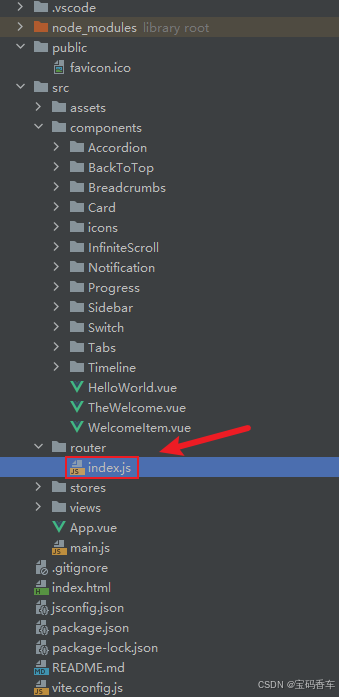
import { createRouter, createWebHistory } from 'vue-router'
import RightClickMenuView from '../views/RightClickMenuView.vue'
import RangePickerView from '../views/RangePickerView.vue'const router = createRouter({history: createWebHistory(import.meta.env.BASE_URL),routes: [{path: '/',name: 'progress',component:  () => import('../views/ProgressView.vue'),},{path: '/tabs',name: 'tabs',// route level code-splitting// this generates a separate chunk (About.[hash].js) for this route// which is lazy-loaded when the route is visited.// 标签页(Tabs)component: () => import('../views/TabsView.vue'),},{path: '/accordion',name: 'accordion',// 折叠面板(Accordion)component: () => import('../views/AccordionView.vue'),},{path: '/timeline',name: 'timeline',// 时间线(Timeline)component: () => import('../views/TimelineView.vue'),},{path: '/backToTop',name: 'backToTop',component: () => import('../views/BackToTopView.vue')},{path: '/notification',name: 'notification',component: () => import('../views/NotificationView.vue')},{path: '/card',name: 'card',component: () => import('../views/CardView.vue')},{path: '/infiniteScroll',name: 'infiniteScroll',component: () => import('../views/InfiniteScrollView.vue')},{path: '/switch',name: 'switch',component: () => import('../views/SwitchView.vue')},{path: '/sidebar',name: 'sidebar',component: () => import('../views/SidebarView.vue')},{path: '/breadcrumbs',name: 'breadcrumbs',component: () => import('../views/BreadcrumbsView.vue')},{path: '/masonryLayout',name: 'masonryLayout',component: () => import('../views/MasonryLayoutView.vue')},{path: '/rating',name: 'rating',component: () => import('../views/RatingView.vue')},{path: '/datePicker',name: 'datePicker',component: () => import('../views/DatePickerView.vue')},{path: '/colorPicker',name: 'colorPicker',component: () => import('../views/ColorPickerView.vue')},{path: '/rightClickMenu',name: 'rightClickMenu',component: RightClickMenuView},{path: '/rangePicker',name: 'rangePicker',component: () => import('../views/RangePickerView.vue')},{path: '/navbar',name: 'navbar',component: () => import('../views/NavbarView.vue')},{path: '/formValidation',name: 'formValidation',component: () => import('../views/FormValidationView.vue')},{path: '/copyToClipboard',name: 'copyToClipboard',component: () => import('../views/CopyToClipboardView.vue')},{path: '/clickAnimations',name: 'clickAnimations',component: () => import('../views/ClickAnimationsView.vue')},{path: '/thumbnailList',name: 'thumbnailList',component: () => import('../views/ThumbnailListView.vue')},{path: '/keyboardShortcuts',name: 'keyboardShortcuts',component: () => import('../views/KeyboardShortcutsView.vue')},{path: '/commentSystem',name: 'commentSystem',component: () => import('../views/CommentSystemView.vue')},{path: '/qRCode',name: 'qRCode',component: () => import('../views/QRCodeView.vue')},{path: '/radioButton',name: 'radioButton',component: () => import('../views/RadioButtonView.vue')},{path: '/slider',name: 'slider',component: () => import('../views/SliderView.vue')},{path: '/scrollAnimations',name: 'scrollAnimations',component: () => import('../views/ScrollAnimationsView.vue')},{path: '/textInputView',name: 'textInputView',component: () => import('../views/TextInputView.vue')},{path: '/divider',name: 'divider',component: () => import('../views/DividerView.vue')},{path: '/checkbox',name: 'checkbox',component: () => import('../views/CheckboxView.vue')},{path: '/tagInput',name: 'tagInput',component: () => import('../views/TagInputView.vue')},{path: '/dropdownSelect',name: 'dropdownSelect',component: () => import('../views/DropdownSelectView.vue')},{path: '/list',name: 'list',component: () => import('../views/ListView.vue')},{path: '/header',name: 'header',component: () => import('../views/HeaderView.vue')},{path: '/footer',name: 'footer',component: () => import('../views/FooterView.vue')},{path: '/pagination',name: 'pagination',component: () => import('../views/PaginationView.vue')},{path: '/floatingActionButton',name: 'floatingActionButton',component: () => import('../views/FloatingActionButtonView.vue')},{path: '/gridLayout',name: 'gridLayout',component: () => import('../views/GridLayoutView.vue')},{path: '/passwordInput',name: 'passwordInput',component: () => import('../views/PasswordInputView.vue')},{path: '/flexbox',name: 'flexbox',component: () => import('../views/FlexboxView.vue')}],
})export default router
📘编写展示入口 src\App.vue
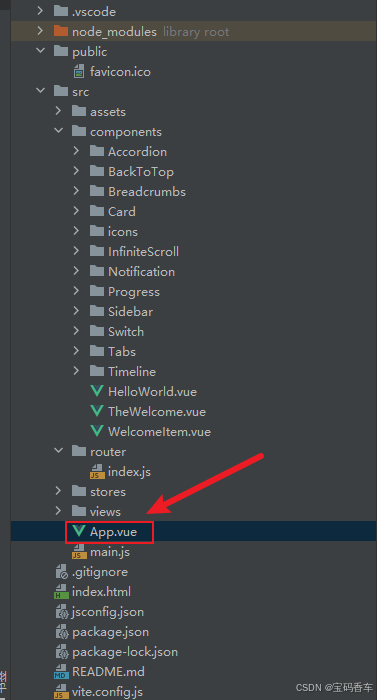
<script setup>
import { RouterLink, RouterView } from 'vue-router'
import HelloWorld from './components/HelloWorld.vue'
</script><template><header><img alt="Vue logo" class="logo" src="@/assets/logo.svg" width="125" height="125" /><div class="wrapper"><HelloWorld msg="You did it!" /><nav><RouterLink to="/">Progress</RouterLink><RouterLink to="/tabs">Tabs</RouterLink><RouterLink to="/accordion">Accordion</RouterLink><RouterLink to="/timeline">Timeline</RouterLink><RouterLink to="/backToTop">BackToTop</RouterLink><RouterLink to="/notification">Notification</RouterLink><RouterLink to="/card">Card</RouterLink><RouterLink to="/infiniteScroll">InfiniteScroll</RouterLink><RouterLink to="/switch">Switch</RouterLink><RouterLink to="/sidebar">Sidebar</RouterLink><RouterLink to="/breadcrumbs">Breadcrumbs</RouterLink><RouterLink to="/masonryLayout">MasonryLayout</RouterLink><RouterLink to="/rating">Rating</RouterLink><RouterLink to="/datePicker">DatePicker</RouterLink><RouterLink to="/colorPicker">ColorPicker</RouterLink><RouterLink to="/rightClickMenu">RightClickMenu</RouterLink><RouterLink to="/rangePicker">RangePicker</RouterLink><RouterLink to="/navbar">Navbar</RouterLink><RouterLink to="/formValidation">FormValidation</RouterLink><RouterLink to="/copyToClipboard">CopyToClipboard</RouterLink><RouterLink to="/clickAnimations">ClickAnimations</RouterLink><RouterLink to="/thumbnailList">ThumbnailList</RouterLink><RouterLink to="/keyboardShortcuts">KeyboardShortcuts</RouterLink><RouterLink to="/commentSystem">CommentSystem</RouterLink><RouterLink to="/qRCode">QRCode</RouterLink><RouterLink to="/radioButton">RadioButton</RouterLink><RouterLink to="/slider">Slider</RouterLink><RouterLink to="/scrollAnimations">ScrollAnimations</RouterLink><RouterLink to="/textInputView">TextInput</RouterLink><RouterLink to="/divider">Divider</RouterLink><RouterLink to="/checkbox">Checkbox</RouterLink><RouterLink to="/tagInput">TagInput</RouterLink><RouterLink to="/dropdownSelect">DropdownSelect</RouterLink><RouterLink to="/list">List</RouterLink><RouterLink to="/header">Header</RouterLink><RouterLink to="/footer">Footer</RouterLink><RouterLink to="/pagination">Pagination</RouterLink><RouterLink to="/floatingActionButton">FloatingActionButton</RouterLink><RouterLink to="/gridLayout">GridLayout</RouterLink><RouterLink to="/passwordInput">PasswordInput</RouterLink><RouterLink to="/flexbox">Flexbox</RouterLink></nav></div></header><RouterView />
</template><style scoped>
header {line-height: 1.5;max-height: 100vh;
}.logo {display: block;margin: 0 auto 2rem;
}nav {width: 100%;font-size: 12px;text-align: center;margin-top: 2rem;
}nav a.router-link-exact-active {color: var(--color-text);
}nav a.router-link-exact-active:hover {background-color: transparent;
}nav a {display: inline-block;padding: 0 1rem;border-left: 1px solid var(--color-border);
}nav a:first-of-type {border: 0;
}@media (min-width: 1024px) {header {display: flex;place-items: center;padding-right: calc(var(--section-gap) / 2);}.logo {margin: 0 2rem 0 0;}header .wrapper {display: flex;place-items: flex-start;flex-wrap: wrap;}nav {text-align: left;margin-left: -1rem;font-size: 1rem;padding: 1rem 0;margin-top: 1rem;}
}
</style>
📚页面效果
📚相关文章
-
DeepSeek 助力 Vue 开发:打造丝滑的右键菜单(RightClickMenu)https://blog.csdn.net/qq_33650655/article/details/145706658
-
DeepSeek 助力 Vue 开发:打造丝滑的范围选择器(Range Picker)https://blog.csdn.net/qq_33650655/article/details/145713572
-
DeepSeek 助力 Vue 开发:打造丝滑的导航栏(Navbar)https://blog.csdn.net/qq_33650655/article/details/145732421
-
DeepSeek 助力 Vue 开发:打造丝滑的表单验证(Form Validation)https://blog.csdn.net/qq_33650655/article/details/145735582
-
DeepSeek 助力 Vue 开发:打造丝滑的复制到剪贴板(Copy to Clipboard)https://blog.csdn.net/qq_33650655/article/details/145739569
-
DeepSeek 助力 Vue 开发:打造丝滑的点击动画(Click Animations)https://blog.csdn.net/qq_33650655/article/details/145766184
-
DeepSeek 助力 Vue 开发:打造丝滑的缩略图列表(Thumbnail List)https://blog.csdn.net/qq_33650655/article/details/145776679
-
DeepSeek 助力 Vue 开发:打造丝滑的 键盘快捷键(Keyboard Shortcuts) https://blog.csdn.net/qq_33650655/article/details/145780227
-
DeepSeek 助力 Vue 开发:打造丝滑的评论系统(Comment System)https://blog.csdn.net/qq_33650655/article/details/145781104
-
DeepSeek 助力 Vue 开发:打造丝滑的二维码生成(QR Code)https://blog.csdn.net/qq_33650655/article/details/145797928
-
DeepSeek 助力 Vue 开发:打造丝滑的单选按钮(Radio Button)https://blog.csdn.net/qq_33650655/article/details/145810620
-
DeepSeek 助力 Vue 开发:打造丝滑的滑块(Slider)https://blog.csdn.net/qq_33650655/article/details/145817161
-
DeepSeek 助力 Vue 开发:打造丝滑的滚动动画(Scroll Animations)https://blog.csdn.net/qq_33650655/article/details/145818571
-
DeepSeek 助力 Vue 开发:打造丝滑的文本输入框(Text Input)https://blog.csdn.net/qq_33650655/article/details/145837003
-
DeepSeek 助力 Vue 开发:打造丝滑的分割线(Divider)https://blog.csdn.net/qq_33650655/article/details/145849100
-
DeepSeek 助力 Vue 开发:打造丝滑的 复选框(Checkbox)https://blog.csdn.net/qq_33650655/article/details/145855695
-
DeepSeek 助力 Vue3 开发:打造丝滑的标签输入(Tag Input)https://blog.csdn.net/qq_33650655/article/details/145858574
-
DeepSeek 助力 Vue3 开发:打造丝滑的下拉选择框(Dropdown Select)https://blog.csdn.net/qq_33650655/article/details/145861882
-
DeepSeek 助力 Vue3 开发:打造丝滑的列表(List)https://blog.csdn.net/qq_33650655/article/details/145866384
-
DeepSeek 助力 Vue3 开发:打造丝滑的页眉(Header)https://blog.csdn.net/qq_33650655/article/details/145885122
-
DeepSeek 助力 Vue3 开发:打造丝滑的页脚(Footer)https://blog.csdn.net/qq_33650655/article/details/145886306
-
DeepSeek 助力 Vue3 开发:打造丝滑的分页(Pagination)https://blog.csdn.net/qq_33650655/article/details/145886824
-
DeepSeek 助力 Vue3 开发:打造丝滑的悬浮按钮(Floating Action Button)
https://blog.csdn.net/qq_33650655/article/details/145888339 -
DeepSeek 助力 Vue3 开发:打造丝滑的网格布局(Grid Layout)https://blog.csdn.net/qq_33650655/article/details/145893422
-
DeepSeek 助力 Vue3 开发:打造丝滑的密码输入框(Password Input)https://blog.csdn.net/qq_33650655/article/details/145903079
到此这篇文章就介绍到这了,更多精彩内容请关注本人以前的文章或继续浏览下面的文章,创作不易,如果能帮助到大家,希望大家多多支持宝码香车~💕,若转载本文,一定注明本文链接。

更多专栏订阅推荐:
👍 html+css+js 绚丽效果
💕 vue
✈️ Electron
⭐️ js
📝 字符串
✍️ 时间对象(Date())操作
相关文章:
DeepSeek 助力 Vue3 开发:打造丝滑的弹性布局(Flexbox)
前言:哈喽,大家好,今天给大家分享一篇文章!并提供具体代码帮助大家深入理解,彻底掌握!创作不易,如果能帮助到大家或者给大家一些灵感和启发,欢迎收藏关注哦 💕 目录 Deep…...

大白话跨域问题的原理与多种解决方法的实现
大白话跨域问题的原理与多种解决方法的实现 跨域问题原理 简单来说,当一个网页中的JavaScript代码想要去访问另一个不同域名、端口或协议的服务器上的数据时,就会出现跨域问题。这是浏览器的一种安全机制,为了防止恶意网站窃取用户信息等。…...

el-table input textarea 文本域 自适应高度,切换分页滚动失效处理办法
场景: el-table 表格 需要 input类型是 textarea 高度是自适应,第一页数据都是单行数据 不会产生滚动条,但是第二页数据是多行数据 会产生滚动条, bug: 第一页切换到第二页 第二页滚动条无法展示 解决办法:直接修改样…...

动态表头报表的绘制与导出
目录 一、效果图 二、整体思路 三、代码区 一、效果图 根据选择的日期范围动态生成表头(eg:2025.2.24--2025.03.03)每个日期又分为白班、夜班;数据列表中对产线合并单元格。支持按原格式导出对应的报表excel。 点击空白区可新…...
DeepSeek 助力 Vue3 开发:打造丝滑的密码输入框(Password Input)
前言:哈喽,大家好,今天给大家分享一篇文章!并提供具体代码帮助大家深入理解,彻底掌握!创作不易,如果能帮助到大家或者给大家一些灵感和启发,欢迎收藏关注哦 💕 目录 Deep…...

【解决】OnTriggerEnter/OnTriggerExit 调用匿名委托误区的问题
开发平台:Unity 开发语言:CSharp 6.0 开发工具:Visual Studio 2022 问题背景 public void OnTriggerEnter(Collider collider) {output.OnInteractionNoticed () > OnInteractionTriggered?.Invoke(); }public void OnTriggerExit(C…...

Linux 基础---文件权限
概念 文件权限是针对文件所有者、文件所属组、其他人这三类人而言的,对应的操作是chmod。设置方式:文字设定法、数字设定法。 文字设定法:r,w,x,- 来描述用户对文件的操作权限数字设定法:0,1,2,3,4,5,6,7 来描述用户对文件的操作…...

SpringBoot五:JSR303校验
精心整理了最新的面试资料和简历模板,有需要的可以自行获取 点击前往百度网盘获取 点击前往夸克网盘获取 松散绑定 意思是比如在yaml中写的是last-name,这个和lastName意思是一样的,-后的字母默认是大写的 JSR303校验 就是可以在字段增加…...

【计算机网络】考研复试高频知识点总结
文章目录 一、基础概念1、计算机⽹络的定义2、计算机⽹络的目标3、计算机⽹络的组成4、计算机⽹络的分类5、计算机⽹络的拓扑结构6、计算机⽹络的协议7、计算机⽹络的分层结构8、OSI 参考模型9、TCP/IP 参考模型10、五层协议体系结构 二、物理层1、物理层的功能2、传输媒体3、 …...

Error Density-dependent Empirical Risk Minimization
经验误差密度依赖的风险最小化 v.s. 经验风险最小化 论文: 《 Error Density-dependent Empirical Risk Minimization》 发表在: ESWA’24 相关代码: github.com/zxlml/EDERM 研究背景 传统的经验风险最小化(ERM)方…...

02_NLP文本预处理之文本张量表示法
文本张量表示法 概念 将文本使用张量进行表示,一般将词汇表示为向量,称为词向量,再由各个词向量按顺序组成矩阵形成文本表示 例如: ["人生", "该", "如何", "起头"]># 每个词对应矩阵中的一个向量 [[1.32, 4,32, 0,32, 5.2],[3…...

Spring Boot全局异常处理:“危机公关”团队
目录 一、全局异常处理的作用二、Spring Boot 实现全局异常处理(附上代码实例)三、总结: 🌟我的其他文章也讲解的比较有趣😁,如果喜欢博主的讲解方式,可以多多支持一下,感谢…...

Ubuntu 下 nginx-1.24.0 源码分析 - ngx_list_init
ngx_list_init 定义在 src\core\ngx_list.h static ngx_inline ngx_int_t ngx_list_init(ngx_list_t *list, ngx_pool_t *pool, ngx_uint_t n, size_t size) {list->part.elts ngx_palloc(pool, n * size);if (list->part.elts NULL) {return NGX_ERROR;}list->par…...

C# OnnxRuntime部署DAMO-YOLO香烟检测
目录 说明 效果 模型信息 项目 代码 下载 参考 说明 效果 模型信息 Model Properties ------------------------- --------------------------------------------------------------- Inputs ------------------------- name:input tensor:Floa…...

GitHub开源协议选择指南:如何为你的项目找到最佳“许可证”?
引言 当你站在GitHub仓库创建的十字路口时,是否曾被众多开源协议晃花了眼? 别担心!这篇指南将化身你的"协议导航仪",用一张流程图五个灵魂拷问,帮你轻松找到最佳选择。无论你是开发者、开源爱好者ÿ…...

[密码学实战]Java生成SM2根证书及用户证书
前言 在国密算法体系中,SM2是基于椭圆曲线密码(ECC)的非对称加密算法,广泛应用于数字证书、签名验签等场景。本文将结合代码实现,详细讲解如何通过Java生成SM2根证书及用户证书,并深入分析其核心原理。 一、证书验证 1.代码运行结果 2.根证书验证 3.用户证书验证 二、…...

安装 cnpm 出现 Unsupported URL Type “npm:“: npm:string-width@^4.2.0
Unsupported URL Type "npm:": npm:string-width^4.2.0 可能是 node 版本太低了,需要安装低版本的 cnpm 试试 npm cache clean --force npm config set strict-ssl false npm install -g cnpm --registryhttps://registry.npmmirror.com 改为 npm insta…...

探秘基带算法:从原理到5G时代的通信变革【九】QPSK调制/解调
文章目录 2.8 QPSK 调制 / 解调简介QPSK 发射机的实现与原理QPSK 接收机的实现与原理QPSK 性能仿真QPSK 变体分析 本博客为系列博客,主要讲解各基带算法的原理与应用,包括:viterbi解码、Turbo编解码、Polar编解码、CORDIC算法、CRC校验、FFT/…...

四、数据存储
在爬虫项目中,我们需要将目标站点数据进行持久化保存,一般数据保存的方式有两种: 文件保存数据库保存 在数据保存的过程中需要对数据完成去重操作,所有需要使用 redis 中的 set 数据类型完成去重。 1.CSV文件存储 1.1 什么是c…...

C# OnnxRuntime部署DAMO-YOLO人头检测
目录 说明 效果 模型信息 项目 代码 下载 参考 说明 效果 模型信息 Model Properties ------------------------- --------------------------------------------------------------- Inputs ------------------------- name:input tensor:Floa…...

Metal学习笔记七:片元函数
知道如何通过将顶点数据发送到 vertex 函数来渲染三角形、线条和点是一项非常巧妙的技能 — 尤其是因为您能够使用简单的单行片段函数为形状着色。但是,片段着色器能够执行更多操作。 ➤ 打开网站 https://shadertoy.com,在那里您会发现大量令人眼花缭乱…...

《一个端粒到端粒的参考基因组为木瓜中五环三萜类化合物生物合成提供了遗传学见解》
A telomere-to-telomere reference genome provides genetic insight into the pentacyclic triterpenoid biosynthesis in Chaenomeles speciosa Amplification of transposable elements 转座元件的扩增 Sequence mining disclosed that TEs were one main event in the ex…...

【Mac】2025-MacOS系统下常用的开发环境配置
早期版本的一个环境搭建参考 1、brew Mac自带终端运行: /bin/bash -c "$(curl -fsSL https://raw.githubusercontent.com/Homebrew/install/HEAD/install.sh)" Installation successful!成功后运行三行命令后更新环境(xxx是mac的username&a…...

蓝桥杯web第三天
展开扇子题目, #box:hover #item1 { transform:rotate(-60deg); } 当悬浮在父盒子,子元素旋转 webkit display: -webkit-box:将元素设置为弹性伸缩盒子模型。-webkit-box-orient: vertical:设置伸缩盒子的子元素排列方…...

Qt基础入门-详解
前言 qt之路正式开启 💓 个人主页:普通young man-CSDN博客 ⏩ 文章专栏:C_普通young man的博客-CSDN博客 ⏩ 本人giee: 普通小青年 (pu-tong-young-man) - Gitee.com 若有问题 评论区见📝 🎉欢迎大家点赞ὄ…...

FPGA开发,使用Deepseek V3还是R1(3):系统级与RTL级
以下都是Deepseek生成的答案 FPGA开发,使用Deepseek V3还是R1(1):应用场景 FPGA开发,使用Deepseek V3还是R1(2):V3和R1的区别 FPGA开发,使用Deepseek V3还是R1&#x…...

移动端国际化翻译同步解决方案-V3
1.前言 因为软件出海,从在上上家公司就开始做翻译系统,到目前为止已经出了两个比较大的版本了,各个版本解决的痛点如下: V1版本: 主要针对的是AndroidiOS翻译不一致和翻译内容管理麻烦的问题,通过这个工具…...

多空狙击线-新指标-图文教程,多空分界买点以及强弱操盘技术教程,通达信炒股软件指标
“多空狙击线”指标 “多空狙击线”特色指标是量能型技术指标,主要用于分析股票市场中机构做多/做空力量的强程度。该指标的构成、定义与原理如下: “多空狙击线”指标,又称机构做多/做空能量线,通过计算和分析股票市场中机构做多/做空力量…...
零信任架构和传统网络安全模式的
零信任到底是一个什么类型的模型?什么类型的思想或思路,它是如何实现的,我们要做零信任,需要考虑哪些问题? 零信任最早是约翰金德瓦格提出的安全模型。早期这个模型也是因为在安全研究上考虑的一个新的信任式模型。他最…...

Oracle 11g的部署配置
1、进入官网下载所需版本的Oracle 2、安装 ①:选择setup.exe开始安装 ②:安装提示如下,直接忽略,选是 ③:配置安全更新 填写邮箱,并取消勾选 ④:如果点击下一步,提示什么代理啥的…...