
【Linux】权限相关知识点
思考
我们平时使用Linux创建文件或目录时的默认权限是多少?
[root@localhost test]# mkdir dir
[root@localhost test]# touch file
[root@localhost test]# ll
total 0
drwxr-xr-x 2 root root 6 Mar  8 15:23 dir   #755
-rw-r--r-- 1 root root 0 Mar  8 15:23 file  #644
可以看到文件创建时获得的权限是644
目录创建时获得的权限是755
通过对上面问题的思考,我们现在引入下面的概念:
umask
默认情况下内核给文件分配的权限是666,给目录分配的权限是777
而用户创建文件或目录时,会与umask的掩码相减获得对应的权限值
如下所示掩码值为0022
那么创建文件时就是,666-022=644
创建目录时为,777-022=755
[root@localhost test]# umask
0022
[root@localhost test]# umask -S
u=rwx,g=rx,o=rx
接下来我们试着修改umask的值,再去创建文件和目录会发生什么?
[root@localhost test]# umask 0777
[root@localhost test]# mkdir new_dir
[root@localhost test]# touch new_file
[root@localhost test]# ll
total 0
drwxr-xr-x 2 root root 6 Mar  8 15:23 dir
-rw-r--r-- 1 root root 0 Mar  8 15:23 file
d--------- 2 root root 6 Mar  8 15:45 new_dir
---------- 1 root root 0 Mar  8 15:49 new_file
可以看到新的文件于目录的权限全部为000了。
umask的值,默认是在/etc/profile中的脚本初始化后得到的
cat /etc/profileif [ $UID -gt 199 ] && [ "`/usr/bin/id -gn`" = "`/usr/bin/id -un`" ]; thenumask 002
elseumask 022
fi
chmod
格式1:
用户类别
u: 所有者(user)
g: 所属组(group)
o: 其他用户(others)
a: 所有用户(等同于 ugo,默认值)
操作符
+: 添加权限
-: 移除权限
=: 直接设置权限(覆盖原有权限)
chmod u+x file        # 给所有者添加执行权限
chmod go-w file       # 移除组和其他用户的写权限
chmod a=rw file       # 所有用户设置为读写权限
chmod -R o+rX dir     # 递归给其他用户添加读权限,目录加执行权限
格式2:
权限计算
将权限对应的数值相加:
r (读) = 4
w (写) = 2
x (执行) = 1
chmod nnn 文件或目录
chmod 777 dir_file
目录权限:
目录的 x 权限表示可进入(cd),r 权限表示可列出内容。
若目录无 x 权限,即使有 r 权限也无法读取内部文件列表。
chown
必须是root
用户和组必须存在
格式:
chown 所有者 文件
chown :所属组 文件
chown 所有者:所属组 文件chown luobozi:atri /home/ytl
chgrp
必须是root或者文件的所有者
必须是新的组的成员
格式:
chgrp 所属组 文件
查看常见目录的权限
[root@localhost perm]# ll /home
total 0
drwx------ 2 kotonghitoli bondband  62 Mar  7 14:57 gdyg
drwx------ 2 luobozi      luobozi   62 Mar  7 10:50 luobozi
drwx------ 2 luobozi_1    luobozi_1 62 Mar  7 16:17 luobozi_1
drwx------ 2 luobozi_2    luobozi_2 62 Mar  7 16:17 luobozi_2
drwx------ 2 luobozi_3    luobozi_3 62 Mar  7 16:17 luobozi_3
drwx------ 2 luobozi_4    luobozi_4 62 Mar  7 16:17 luobozi_4
drwx------ 2 luobozi_5    luobozi_5 62 Mar  7 16:17 luobozi_5
[root@localhost perm]# ll -d /
dr-xr-xr-x. 22 root root 4096 Mar  8 16:28 /
[root@localhost perm]# ll -d /root
dr-xr-x---. 15 root root 4096 Mar  8 15:23 /root
[root@localhost perm]# ll -d /tmp/
drwxrwxrwt. 9 root root 255 Mar  8 16:30 /tmp/
sudo授权
在Linux中root用户的权限最大
普通用户的权限很小,那么如何让普通用户也具有一定的权限呢?
修改配置文件,使得普通用户可以使用sudo提权
1.创建一个king用户,使他可以使用sudo提权执行所有命令
root@localhost ~]# useradd king
[root@localhost ~]# echo "123456" |passwd king --stdin
Changing password for user king.
passwd: all authentication tokens updated successfully.#添加如下内容
vim /etc/sudoers
king    ALL=(ALL)       ALL#使用sudo 提权查看root的家目录
su - king
Last login: Sat Mar  8 17:13:00 CST 2025 on pts/1
[king@localhost ~]$ sudo ls /root
[sudo] password for king:
2025-1-14  anaconda-ks.cfg    dbbackup    functions  grep_file  shell  shell_bk_db   while_read.sh
2.定义命令别名USERADMINS包含useradd、userdel、passwd、groupadd、groupdel命令
#添加如下内容
vim /etc/sudoers
Cmnd_Alias USERADMINS = /usr/sbin/useradd, /usr/sbin/userdel, /usr/bin/passwd,/usr/sbin/groupadd,/usr/sbin/groupdel
3.新建用户组k,里面的成员有mikoto、reisi、weissman
设置sudoers文件允许k组里的成员可以使用USERADMINS命令别名里的命令,在任何机器上
[root@localhost ~]# groupadd k
[root@localhost ~]# useradd mikoto -G k
[root@localhost ~]# useradd reisi -G k
[root@localhost ~]# useradd weissman -G k
[root@localhost ~]# echo "123456" |passwd mikoto --stdin
[root@localhost ~]# echo "123456" |passwd reisi --stdin
[root@localhost ~]# echo "123456" |passwd weissman --stdin
vim  /etc/sudoers
%k ALL = USERADMINS
验证是否成功:
[root@localhost ~]# su - weissman
[weissman@localhost ~]$ sudo useradd neko -G weissmanWe trust you have received the usual lecture from the local System
Administrator. It usually boils down to these three things:#1) Respect the privacy of others.#2) Think before you type.#3) With great power comes great responsibility.[sudo] password for weissman:
[weissman@localhost ~]$ id neko
uid=3013(neko) gid=3015(neko) groups=3015(neko),3012(weissman)
selinux
是Linux系统里的安全子系统(security linux)
它可以限制哪些进程能访问哪些类型的文件
默认情况下它是开启状态,一般情况下我们都是将它关闭的,修改配置文件永久关闭
[root@localhost ~]# cat /etc/selinux/config # This file controls the state of SELinux on the system.
# SELINUX= can take one of these three values:
#     enforcing - SELinux security policy is enforced.
#     permissive - SELinux prints warnings instead of enforcing.
#     disabled - No SELinux policy is loaded.
SELINUX=disabled
# SELINUXTYPE= can take one of three values:
#     targeted - Targeted processes are protected,
#     minimum - Modification of targeted policy. Only selected processes are protected.
#     mls - Multi Level Security protection.
SELINUXTYPE=targeted [root@localhost ~]# setenforce 0 临时关闭命令
[root@localhost ~]# getenforce
Disabled
chattr
设置文件的隐藏属性
选项 [+-] 加是授予 减是取消
-R 递归修改
+i 锁定文件,任何人都不能改动,包括root用户
+a 设置文件只能增加,不能修改和删除
[root@localhost ~]# mkdir test1
[root@localhost ~]# chattr +i test1/
[root@localhost ~]# lsattr -d test1
----i----------- test1
[root@localhost ~]# mkdir test1/dir1
mkdir: cannot create directory ‘test1/dir1’: Permission denied
[root@localhost ~]# chattr -i test1
[root@localhost ~]# mkdir test1/dir1
[root@localhost ~]# ll test1
total 0
drwxr-xr-x 2 root root 6 Mar  8 18:05 dir1
lsattr
查看文件的隐藏属性
-R 递归修改
-d 查看目录本身的属性
[root@localhost ~]# lsattr -d test1
----i----------- test1
SET位权限特别权限位
SUID (4): 文件以所有者权限执行(如 /usr/bin/passwd)。
SGID (2): 目录中新文件继承组权限。
粘滞位 (1): 仅文件所有者可删除目录内文件(如 /tmp)。
suid:如果摸个文件具有suid权限位,普通用户在执行这个命令的时候,会以文件拥有者身份去执行
粘滞位(sticky)
使用chmod修改set位
[root@localhost ~]# ll /bin/passwd
-rwsr-xr-x. 1 root root 27856 Apr  1  2020 /bin/passwd
#可以看到passwd的执行位置就是s
修改mkdir的suid权限位置
注意观察属主的执行位置的权限变化
第1位(可选)
(SUID=4,SGID=2,粘滞位=1)
[root@localhost ~]# chmod u+s /bin/mkdir
[root@localhost ~]# ll /bin/mkdir
-rwsr-xr-x. 1 root root 79768 Aug 20  2019 /bin/mkdir[root@localhost ~]# chmod 0755 /bin/mkdir
[root@localhost ~]# ll /bin/mkdir
-rwxr-xr-x. 1 root root 79768 Aug 20  2019 /bin/mkdir[root@localhost ~]# chmod 4755 /bin/mkdir
[root@localhost ~]# ll /bin/mkdir
-rwsr-xr-x. 1 root root 79768 Aug 20  2019 /bin/mkdir
ACL访问控制列表
一个文件/目录的访问控制列表,可以针对任意指定的用户/组使用权限字符分配rwx权限
setfacl
格式 setfacl 选项 规则 文件
-m 新增或修改ACL中的规则
-b 删除所有ACL规则
-x 删除指定的ACL规则
setfacl -m user:(uid/name):(perms)  #指定某个使用者的权限
setfacl -m group:(uid/name):(perms) #指定某一个群组的权限
setfacl -m other::(perms)  #指定其它使用者的权限
setfacl -m mask::(perms)   #设定有效的最大权限
user、group、other、mask简写为:u,g,o,m
perms使用rwx
[root@localhost test]# setfacl -m u:luobozi:rw test.txt
[root@localhost test]# getfacl test.txt
# file: test.txt
# owner: root
# group: root
user::rw-
user:luobozi:rw-
group::r--
mask::rw-
other::r--
getfacl
格式:getfacl 文件
[root@localhost test]# getfacl test.txt
# file: test.txt
# owner: root
# group: root
user::rw-
user:luobozi:rw-
group::r--
mask::rw-
other::r--
acl练习
- 创建三个组
homura 、silver、scepter4 - 创建三个用户,
anna属于homura组,seri属于scepter4组,neko属于silver组 - 在根目录下创建新目录
sword,再将/etc/passwd文件复制到sword目录下 - 设置权限,passwd文件能被homura组读写,seri这个用户能读写执行,neko这个用户不能进行任何操作。
[root@localhost test]# groupadd homura
[root@localhost test]# groupadd silver
[root@localhost test]# groupadd scepter4
[root@localhost test]# useradd -G homura anna
[root@localhost test]# useradd -G scepter4 seri
[root@localhost test]# useradd -G silver neko[root@localhost sword]# mkdir /sword
[root@localhost ~]# chmod 777 /sword/
[root@localhost sword]# cp /etc/passwd /sword[root@localhost sword]# setfacl -m g:homura:rw passwd
[root@localhost sword]# setfacl -m u:seri:rwx passwd
[root@localhost sword]# setfacl -m u:neko:--- passwd[root@localhost sword]# getfacl passwd
# file: passwd
# owner: root
# group: root
user::rw-
user:seri:rwx
user:neko:---
group::r--
group:homura:rw-
mask::rwx
other::r--
验证结果
[root@localhost sword]# su neko
neko@localhost sword]$ echo "hellp" >> passwd
bash: passwd: Permission denied
[neko@localhost sword]$ cat passwd
cat: passwd: Permission denied[root@localhost sword]# su seri
[seri@localhost sword]$ ./passwd   #可以执行
./passwd: line 1: root:x:0:0:root:/root:/bin/bash: No such file or directory
[seri@localhost sword]$ echo "hello" >> passwd
[seri@localhost sword]$ tail -1 passwd
hello[root@localhost sword]# su anna
[anna@localhost sword]$ ./passwd   #无法执行
bash: ./passwd: Permission denied
[anna@localhost sword]$ echo "hello,anna" >> passwd
[anna@localhost sword]$ tail -1 passwd
hello,anna
相关文章:

【Linux】权限相关知识点
思考 我们平时使用Linux创建文件或目录时的默认权限是多少? [rootlocalhost test]# mkdir dir [rootlocalhost test]# touch file [rootlocalhost test]# ll total 0 drwxr-xr-x 2 root root 6 Mar 8 15:23 dir #755 -rw-r--r-- 1 root root 0 Mar 8 15:23 f…...

Vue项目通过内嵌iframe访问另一个vue页面,获取token适配后端鉴权(以内嵌若依项目举例)
1. 改造子Vue项目进行适配(ruoyi举例) (1) 在路由文件添加需要被外链的vue页面配置 // 若依项目的话是 router/index.js文件 {path: /contrast,component: () > import(/views/contrast/index),hidden: true },(2) 开放白名单 // 若依项目的话是 permission.js 文件 cons…...

vue3 vite项目安装eslint
npm install eslint -D 安装eslint库 npx eslint --init 初始化配置,按项目实际情况选 自动生成eslint.config.js,可以添加自定义rules 安装ESLint插件 此时打开vue文件就会标红有问题的位置 安装prettier npm install prettier eslint-config-pr…...

Python Flask框架学习汇编
1、入门级: 《Python Flask Web 框架入门》 这篇博文条理清晰,由简入繁,案例丰富,分十五节详细讲解了Flask框架,强烈推荐! 《python的简单web框架flask【附例子】》 讲解的特别清楚,每一步都…...
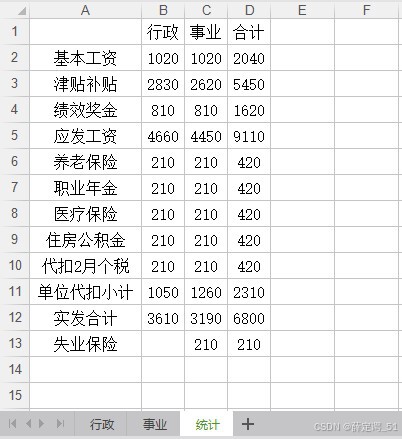
Excel·VBA江西省预算一体化工资表一键处理
每月制作工资表导出为Excel后都需要调整格式,删除0数据的列、对工资表项目进行排序、打印设置等等,有些单位还分有“行政”、“事业”2个工资表就需要操作2次。显然,这种重复操作的问题,可以使用VBA代码解决 目录 代码使用说明1&a…...

【A2DP】SBC 编解码器互操作性要求详解
目录 一、SBC编解码器互操作性概述 二、编解码器特定信息元素(Codec Specific Information Elements) 2.1 采样频率(Sampling Frequency) 2.2 声道模式(Channel Mode) 2.3 块长度(Block Length) 2.4 子带数量(Subbands) 2.5 分配方法(Allocation Method) 2…...

redis数据类型以及底层数据结构
redis数据类型以及底层数据结构 String:字符串类型,底层就是动态字符串,使用sds数据结构 Map:有两种数据结构:1.压缩列表:当hash结构中存储的元素个数小于了512个。并且元 …...

R软件线性模型与lmer混合效应模型对生态学龙类智力测试数据层级结构应用
全文链接:https://tecdat.cn/?p40925 在生态与生物学研究中,数据常呈现复杂结构特征。例如不同种群、采样点或时间序列的观测数据间往往存在相关性(点击文末“阅读原文”获取完整代码、数据、文档)。 传统线性模型在处理这类非独…...

打造智能聊天体验:前端集成 DeepSeek AI 助你快速上手
DeepSeek AI 聊天助手集成指南 先看完整效果: PixPin_2025-02-19_09-15-59 效果图: 目录 项目概述功能特点环境准备项目结构组件详解 ChatContainerChatInputMessageBubbleTypeWriter 核心代码示例使用指南常见问题 项目概述 基于 Vue 3 TypeScrip…...

C语言-语法
数据类型 字符串 C中字符串拼接不用+号,直接使用空格。 char* str = "hello" "world"; 换行链接,加上\就不会报错 char* longStr = "00000000000000000000000000000\ 00000000000000000000000000000"; typedef C 语言提供了 typedef …...

Unity组件TrailRenderer屏幕滑动拖尾
Unity组件TrailRenderer屏幕滑动拖尾 介绍制作总结 介绍 今天要做一个拖动效果,正好用到了TrailRenderer这个组件,正好分享一下 效果参考如下: 制作 1.创建空物体TrailObject添加组件TrailRenderer 下面的材质可以根据自己想要制作的效果去…...

基于昇腾MindIE与GPUStack的大模型容器化部署从入门到入土
引言 昇腾MindIE作为华为面向大模型推理的高性能引擎,结合GPUStack的集群管理能力,能够实现多机多卡的高效资源调度与模型服务化部署。本文将以DeepSeek R1-32B模型为例,详细解析从环境准备到服务验证的全流程实践,涵盖昇腾NPU驱…...

大模型信息整理
1. Benchmarks Reasoning, conversation, Q&A benchmarks HellaSwagBIG-Bench HardSQuADIFEvalMuSRMMLU-PROMT-BenchDomain-specific benchmarks GPQAMedQAPubMedQAMath benchmarks GSM8KMATHMathEvalSecurity-related benchmarks PyRITPurple Llama CyberSecEval2. 国内外…...

【Tools】Windows下Git 2.48安装教程详解
00. 目录 文章目录 00. 目录01. Git简介02. Git参考资料03. Git安装04. Git测试05. 附录 01. Git简介 Git(读音为/gɪt/。)是一个开源的分布式版本控制系统,可以有效、高速的处理从很小到非常大的项目版本管理。 [1] Git 是 Linus Torvalds 为了帮助管理 Linux 内核…...

【linux网络编程】套接字编程API详细介绍
在C语言中,套接字(Socket)编程主要用于网络通信,尤其是在基于TCP/IP协议的应用程序开发中。常用的套接字编程API主要基于Berkeley Sockets(伯克利套接字)接口,这些函数通常在<sys/socket.h&g…...

护网中shiro常问的问题
1. 漏洞原理 Apache Shiro 是一个强大的 Java 安全框架,提供身份验证、授权、加密及会话管理功能。Shiro 使用 rememberMe 机制来存储用户会话信息,该机制依赖于加密后的 Cookie。当攻击者能够控制 Cookie 并且服务器使用了不安全的反序列化机制时&…...

fastapi房产销售系统
说明: 我希望用fastapi写几个接口,查询房产交易系统的几条数据,然后在postman里面测试 查询客户所有预约记录(含房源信息)需要对应销售经理查询客户所有订单(含房源信息)统计销售经理名下所有房…...

swift -(5) 汇编分析结构体、类的内存布局
一、结构体 在 Swift 标准库中,绝大多数的公开类型都是结构体,而枚举和类只占很小一部分 比如Bool、 Int、 Double、 String、 Array、 Dictionary等常见类型都是结构体 ① struct Date { ② var year: Int ③ var month: Int ④ …...
软件工程笔记下
从程序到软件☆ 章节 知识点 概论☆ 软件的定义,特点,生存周期。软件工程的概论。软件危机。 1.☆软件:软件程序数据文档 (1)软件:是指在计算机系统的支持下,能够完成特定功能与性能的包括…...

ElementUI 级联选择器el-cascader启用选择任意一级选项,选中后关闭下拉框
1、启用选择任意一级选项 在 el-cascader 标签上加上配置项: :props"{ checkStrictly: true }"例如: <el-cascaderref"selectedArrRef"v-model"selectedArr":options"optionsList":props"{ checkStri…...

【项目日记(九)】细节优化与对比测试
前言 上面我们对申请和释放的过程都已写完,并进行了单线程的联调。本期我们来对一些细节进行优化以及与malloc 进行对比测试。 目录 前言 一、大于256KB的内存申请问题 • 申请过程 • 释放过程 • 简单测试 二、使用定长内存池脱离使用new 三、优化释放对…...

PyTorch系列教程:编写高效模型训练流程
当使用PyTorch开发机器学习模型时,建立一个有效的训练循环是至关重要的。这个过程包括组织和执行对数据、参数和计算资源的操作序列。让我们深入了解关键组件,并演示如何构建一个精细的训练循环流程,有效地处理数据处理,向前和向后…...

10 【HarmonyOS NEXT】 仿uv-ui组件开发之Avatar头像组件开发教程(一)
温馨提示:本篇博客的详细代码已发布到 git : https://gitcode.com/nutpi/HarmonyosNext 可以下载运行哦! 目录 第一篇:Avatar 组件基础概念与设计1. 组件概述2. 接口设计2.1 形状类型定义2.2 尺寸类型定义2.3 组件属性接口 3. 设计原则4. 使用…...

C++编程指南24 - 避免线程频繁的创建和销毁
一:概述 线程的创建和销毁是昂贵的操作,尤其在多线程程序中频繁创建和销毁线程时,可能会导致性能问题。 二:示例 这段代码中,dispatcher 每收到一个 Message 就创建一个新的线程来处理这个消息。这种方式虽然简单&…...

C语言——【全局变量和局部变量】
🚀个人主页:fasdfdaslsfadasdadf 📖收入专栏:C语言 🌍文章目入 1.🚀 全局变量2.🚀 局部变量3.🚀 局部和全局变量,名字相同呢? 1.🚀 全局变量 全局变量&…...

浅谈 DeepSeek 对 DBA 的影响
引言: 在人工智能技术飞速发展的背景下,DeepSeek 作为一款基于混合专家模型(MoE)和强化学习技术的大语言模型,正在重塑传统数据库管理(DBA)的工作模式。通过结合其强大的自然语言处理能力、推理…...

Web服务器配置
配置虚拟主机:启动XAMPP的Apache,在htdocs目录中创建www.php.test目录 创建index.html,内容为“Welcome www.php.test”,访问两个虚拟主机 访问权限控制 在Apache的主配置文件httpd.conf中,默认已经添加了一些目录的…...

DeepSeek-R1本地化部署(Mac)
一、下载 Ollama 本地化部署需要用到 Ollama,它能支持很多大模型。官方网站:https://ollama.com/ 点击 Download 即可,支持macOS,Linux 和 Windows;我下载的是 mac 版本,要求macOS 11 Big Sur or later,Ol…...

Java面试第九山!《SpringBoot框架》
引言 你是否经历过这样的场景?想快速开发一个Java Web应用,却被XML配置、依赖冲突、服务器部署搞得焦头烂额。Spring Boot的诞生,正是为了解决这些"配置地狱"问题。 对比项Spring Boot传统 Spring配置复杂度自动配置,…...

Java 中数据脱敏的实现
数据脱敏 首先,要思考一个问题,SpringBoot 查询到的一条数据是一个 Java 对象,为什么返回给前端时候,前端拿到的却是 JSON 格式的数据呢? 是因为 SpringBoot 默认采用了 Jackson 作为序列化器,而 Jackson…...