
iTextSharp-PDF批量导出
HTML转PDF批量导出速度太慢且使用Spire.pdf.dll限制页签10后需要开通会员才能使用-做出优化
环境:U9 - UI插件
需求:选择需要导出的客户查询对应对账数据批量导出PDF并弹出下载框保存到默认位置
using System;
using System.Collections.Generic;
using System.Collections.Specialized;
using System.Data;
using System.IO;
using System.Linq;
using System.Text;
using System.Threading.Tasks;
using System.Web.UI;
using System.Web.UI.WebControls;
using UFIDA.U9.AP.Payment;
using UFIDA.U9.Cust.HuaRui.QueryCustomerUIModel;
using UFIDA.U9.FI.AP.Payment.PayBillUIModel;
using UFIDA.U9.UI.PDHelper;
using UFSoft.UBF.AopFrame.Lock;
using UFSoft.UBF.Business;
using UFSoft.UBF.UI;
using UFSoft.UBF.UI.ControlModel;
using UFSoft.UBF.UI.WebControlAdapter;
using UFSoft.UBF.Util.DataAccess;
using static UFIDA.U9.Cust.HuaRui.HuaRExtendUIPlug.TemplateClass;namespace UFIDA.U9.Cust.HuaRui.HuaRExtendUIPlug
{public partial class QueryCustomerUIFormWebPart : UFSoft.UBF.UI.Custom.ExtendedPartBase{private UFIDA.U9.Cust.HuaRui.QueryCustomerUIModel.QueryCustomerUIFormWebPart _part;IUFButton BtnFresh;public override void AfterInit(UFSoft.UBF.UI.IView.IPart Part, EventArgs args){_part = Part as UFIDA.U9.Cust.HuaRui.QueryCustomerUIModel.QueryCustomerUIFormWebPart;if (_part == null)return;#region 添加按钮IUFButton BtnTransfer = new UFWebButtonAdapter();BtnTransfer.Text = "批量导出";BtnTransfer.AutoPostBack = true;BtnTransfer.ID = "BtnTransfer";BtnTransfer.Width = 100;BtnTransfer.Height = 20;IUFCard card = (IUFCard)_part.GetUFControlByName(_part.TopLevelContainer, "Card0");card.Controls.Add(BtnTransfer);CommonFunction.Layout(card, BtnTransfer, 0, 0);BtnTransfer.Click += new EventHandler(BtnTransfer_Click);#endregionbase.AfterInit(Part, args);}private void BtnTransfer_Click(object sender, EventArgs e){try{_part.OnDataCollect(this);_part.IsDataBinding = true;_part.IsConsuming = true;_part.Model.ClearErrorMessage();if (_part.Model.QueryCustomerLine.SelectRecords.Count == 0){_part.Model.ErrorMessage.Message = "请选择数据!";return;}#region 生成HTML文件转PDF复制到指定文件夹string filePathUrl = "";//文件地址var basePath = AppDomain.CurrentDomain.BaseDirectory;string destinationPath = basePath + @"\FileZipTemp\";string destinationPathZip = basePath + @"\FileZip\";string FileName = "货款对账单-" + DateTime.Now.ToString("yyyyMMdd") + DateTime.Now.Hour.ToString() + DateTime.Now.Minute.ToString() + DateTime.Now.Second.ToString();if (!Directory.Exists(destinationPath)){Directory.CreateDirectory(destinationPath);}if (!Directory.Exists(destinationPathZip)){Directory.CreateDirectory(destinationPathZip);}string CustomersName = string.Empty;string str = string.Empty;if (_part.Model.QueryCustomerLine.SelectRecords.Count > 1){foreach (QueryCustomerLineRecord rd in _part.Model.QueryCustomerLine.SelectRecords){str += ",N'" + rd.CustomerName + "'";}str = str.Substring(1);CustomersName = "(CustomersName in (" + str + "))";}else{foreach (QueryCustomerLineRecord rd in _part.Model.QueryCustomerLine.SelectRecords){CustomersName = "(CustomersName = N'" + rd.CustomerName + "')";}}DataSet ds = new DataSet();string procBomName = "Cust_HuaRui_ProvideAccountNew";DataParamList lstBom = new DataParamList();lstBom.Add(DataParamFactory.CreateInput("CustomersName", CustomersName));lstBom.Add(DataParamFactory.CreateInput("ContarctsState", null));lstBom.Add(DataParamFactory.CreateInput("UserID", PDContext.Current.UserCode));lstBom.Add(DataParamFactory.CreateInput("SOBAccountingPeriod", null));DataAccessor.RunSP(procBomName, lstBom, out ds);List<ProvideAccount> ProvideAccount = CommonHelper.DataTable2List<ProvideAccount>(ds.Tables[0]);if (ds.Tables[0].Rows.Count == 0){_part.Model.ErrorMessage.Message = "所选客户没有货款对账相关内容!";return;}var Customers = ProvideAccount.GroupBy(x => x.CustomersName).Select(x => x.Key).ToList();//调用模版提供的默认实现.--默认实现可能会调用相应的Action.foreach (var customer in Customers){var list = ProvideAccount.Where(x => x.CustomersName == customer).ToList();if (list.Count == 0){continue;}//StringBuilder htmlContent = HtmlTOPdf(list, customer);//string htmlFilePathUrl = destinationPathZip + "\\" + FileName;//if (!Directory.Exists(htmlFilePathUrl))//{//    Directory.CreateDirectory(htmlFilePathUrl);//}string pdfFilePathUrl = destinationPath + "\\" + FileName;if (!Directory.Exists(pdfFilePathUrl)){Directory.CreateDirectory(pdfFilePathUrl);}//指定输出文件路径//string htmlName = customer + DateTime.Now.ToString("yyyyMMdd") + ".html";string pdfName = customer + DateTime.Now.ToString("yyyyMMdd") + ".pdf";//string htmlPath = Path.Combine(htmlFilePathUrl, htmlName);string pdfPath = Path.Combine(pdfFilePathUrl, pdfName);将HTML内容写入文件//File.WriteAllText(htmlPath, htmlContent.ToString());从.html文件中获取HTML字符串//string htmlString = File.ReadAllText(htmlPath);指定插件路径//string pluginPath = "D:\\yonyou\\U9V60\\Portal\\plugins";设置插件//HtmlConverter.PluginPath = pluginPath;将HTML字符串转换为PDF//HtmlConverter.Convert(htmlString, pdfPath, true, 100000, new Size(803, 1188), new PdfMargins(0), Spire.Pdf.HtmlConverter.LoadHtmlType.SourceCode);PdfHelper.CreatePDF(pdfPath, list, customer);}#endregion 服务端生成ZIP文件并下载#region 服务端生成ZIP文件并下载string tempZipFilePath = Path.GetTempFileName();string tempZipFilePath1 = "";string tempZipFilePathZip = "";string script = "";try{if (!Directory.Exists(destinationPathZip)){Directory.CreateDirectory(destinationPathZip);}var safePath = Path.GetFullPath(Path.Combine(Directory.GetCurrentDirectory(), destinationPath));if (!Directory.Exists(safePath)){Directory.CreateDirectory(safePath);}// 创建临时ZIP文件//string guid = Guid.NewGuid().ToString();tempZipFilePath1 = Path.Combine(Path.GetTempPath(), FileName + ".zip");System.IO.Compression.ZipFile.CreateFromDirectory(safePath, tempZipFilePath1);File.Copy(tempZipFilePath1, Path.Combine(destinationPathZip, FileName + ".zip"), true);//拼接链接script = @"../\FileZip/" + FileName + @"" + ".zip";//延迟删除文件名称tempZipFilePathZip = destinationPathZip + FileName + @"" + ".zip";script = string.Format("window.open('{0}'); ", script);AtlasHelper.RegisterAtlasStartupScript((Control)_part.TopLevelContainer, _part.GetType(), "downbload", script, true);}finally{// 清理临时文件File.Delete(tempZipFilePath);File.Delete(tempZipFilePath1);}#endregion 服务端生成ZIP文件并下载#region 删除服务端生成的临时文件夹string folderPath = destinationPath; // 替换为你想要删除的文件夹路径try{// 递归删除文件夹及其所有内容Directory.Delete(folderPath, true);var timer = new System.Timers.Timer();timer.Interval = 15000;timer.Elapsed += (sender1, e1) =>{if (!string.IsNullOrEmpty(destinationPathZip))DeleteDirectoryContents(destinationPathZip);timer.Stop();}; timer.Start();//Directory.Delete(destinationPathZip, true);}catch (Exception ex){// 处理任何可能的异常,例如权限问题、路径不存在等//Console.WriteLine("删除文件夹时发生错误: " + ex.Message);_part.Model.ErrorMessage.Message = "删除文件夹时发生错误!";return;}#endregion 删除服务端生成的临时文件夹}catch (Exception ex){_part.Model.ErrorMessage.Message = ex.Message;return;}}public static void DeleteDirectoryContents(string path){foreach (string item in Directory.GetFileSystemEntries(path)){if (File.GetAttributes(item).HasFlag(FileAttributes.Directory)){// 递归删除子目录DeleteDirectoryContents(item);}else{// 删除文件File.Delete(item);}}// 删除空文件夹//Directory.Delete(path);}}
}
需要的帮助类:
1、生成PDF
using iTextSharp.text.pdf.draw;
using iTextSharp.text;
using iTextSharp.text.pdf;
using System;
using System.IO;
using System.Data;
using UFIDA.U9.Cust.HuaRui.HuaRExtendUI;
using System.Collections.Generic;
using System.Linq;namespace UFIDA.U9.Cust.HuaRui.HuaRExtendUIPlug
{public class PdfHelper{private static void SetImg(PdfWriter writer, string path, float fitWidth, float fitHeight, float absoluteX, float absoluteY){try{Image image = Image.GetInstance(path);image.Alignment = Element.ALIGN_MIDDLE;image.ScaleToFit(fitWidth, fitHeight);image.SetAbsolutePosition(absoluteX, absoluteY);writer.DirectContent.AddImage(image);}catch (Exception e){Console.WriteLine(e.Message);throw e;}}public static void CreatePDF(string fileName, List<ProvideAccount> list, string CustomerName){try{Document document = new Document(new Rectangle(803, 1188), 30F, 30F, 100F, 100F);//fileName = Path.GetFullPath("../..") + @"\PdfFiles\" + fileName + ".pdf";PdfWriter writer = PdfWriter.GetInstance(document, new FileStream(fileName, FileMode.Create));// 定义页眉和页脚页码事件PDFBuilder builder = new PDFBuilder();builder.CustomerName = CustomerName;//设置页面监听事件writer.PageEvent = builder;document.Open();//换行Paragraph newLine = new Paragraph("\n");float tableWidthPercentage = 100f; //表格的整体宽度//表格背景色BaseColor green = new BaseColor(175, 215, 136);BaseColor blue = new BaseColor(148, 170, 214);//所需字体string fontPath = Path.GetFullPath("../..") + @"\fonts\";string timesPath = fontPath + "TIMES.TTF";string timesBdPath = fontPath + "TIMESBD.TTF";BaseFont bf = BaseFont.CreateFont(timesPath, BaseFont.IDENTITY_H, BaseFont.EMBEDDED);BaseFont blodbf = BaseFont.CreateFont(timesBdPath, BaseFont.IDENTITY_H, BaseFont.EMBEDDED);Font coverFont = new Font(blodbf, 30, Font.NORMAL);Font titleFont = new Font(blodbf, 16, Font.NORMAL);Font coverTiletFontMarked = new Font(blodbf, 16f, Font.NORMAL, new BaseColor(148, 170, 214));Font textFontBold = new Font(blodbf, 10.5f, Font.NORMAL);Font textFont = new Font(bf, 10.5f, Font.NORMAL);Font textFontGray = new Font(blodbf, 10.5f, Font.NORMAL, new BaseColor(215, 215, 215));Font chapterFont = new Font(blodbf, 14f, Font.NORMAL);//设置字体,支持中文BaseFont bfChinese = BaseFont.CreateFont("C:\\WINDOWS\\Fonts\\msyh.ttc,1", BaseFont.IDENTITY_H, BaseFont.NOT_EMBEDDED);iTextSharp.text.Font fontChinese = new iTextSharp.text.Font(bfChinese, 7, iTextSharp.text.Font.NORMAL, new BaseColor(0, 0, 0));//获取datatable数据DataTable Data = GetDataTableList(list);PdfPTable dataTb = new PdfPTable(Data.Columns.Count);dataTb.SetWidths(new float[] { 0.04f, 0.06f, 0.06f, 0.06f, 0.08f, 0.06f, 0.06f, 0.06f, 0.06f, 0.06f, 0.06f, 0.08f, 0.06f, 0.06f, 0.06f, 0.06f, 0.06f, 0.06f, 0.06f });// 每个单元格占多宽dataTb.WidthPercentage = tableWidthPercentage;dataTb.DefaultCell.BorderColor = BaseColor.LIGHT_GRAY;dataTb.DefaultCell.Padding = 1;dataTb.DefaultCell.BorderWidth = 1;dataTb.DefaultCell.HorizontalAlignment = Element.ALIGN_CENTER; // 设置单元格内容水平居中dataTb.DefaultCell.VerticalAlignment = Element.ALIGN_MIDDLE; // 设置单元格内容垂直居中//将datatable表头转换成PDFTable的表头foreach (DataColumn dc in Data.Columns){dataTb.AddCell(new Phrase(dc.ColumnName.ToString(), fontChinese));}//插入数据for (int i = 0; i < Data.Rows.Count; i++){for (int j = 0; j < Data.Columns.Count; j++){dataTb.AddCell(new Phrase(Data.Rows[i][j].ToString(), fontChinese));}}document.Add(dataTb);document.Add(newLine);document.Close();}catch (Exception ex){throw new Exception("PDF生成失败-错误信息:" + ex.Message);}}/// <summary>/// 创建默认dataTable数据/// </summary>/// <returns></returns>public static DataTable GetDataTableList(List<ProvideAccount> list){DataTable dt = new DataTable();dt.Columns.Add("序号", typeof(string));//添加列  dt.Columns.Add("合同日期", typeof(string));//添加列 dt.Columns.Add("合同编码", typeof(string));//添加列 dt.Columns.Add("客户PO号", typeof(string));//添加列 dt.Columns.Add("项目名称", typeof(string));//添加列 dt.Columns.Add("最终合同金额", typeof(string));//添加列 dt.Columns.Add("出库金额", typeof(string));//添加列 dt.Columns.Add("已开票金额", typeof(string));//添加列 dt.Columns.Add("已付款金额", typeof(string));//添加列 dt.Columns.Add("应收金额", typeof(string));//添加列 dt.Columns.Add("逾期金额", typeof(string));//添加列 dt.Columns.Add("付款方式", typeof(string));//添加列 dt.Columns.Add("到期时间", typeof(string));//添加列 dt.Columns.Add("发货完成", typeof(string));//添加列 dt.Columns.Add("合同状态", typeof(string));//添加列 dt.Columns.Add("业务员", typeof(string));//添加列 dt.Columns.Add("业务单元", typeof(string));//添加列 dt.Columns.Add("历史合同编号", typeof(string));//添加列 dt.Columns.Add("初始合同金额", typeof(string));//添加列 //循环添加行的数据int num = 1;foreach (var item in list){DataRow dtRow = dt.NewRow();dtRow["序号"] = num;dtRow["合同日期"] = item.CreatedOn;dtRow["合同编码"] = item.HisCRMDocNo;dtRow["客户PO号"] = item.CustomerPO;dtRow["项目名称"] = item.ProjectName;dtRow["最终合同金额"] = item.ContractAmount;dtRow["出库金额"] = item.ShipSumMoney;dtRow["已开票金额"] = item.InvoicedAmount;dtRow["已付款金额"] = item.BalanceAmount;dtRow["应收金额"] = item.BusinessReceivaBalance;dtRow["逾期金额"] = item.AnticipatoryRight;dtRow["付款方式"] = item.ConfirmTermName;dtRow["到期时间"] = item.EstimatedPayDate;dtRow["发货完成"] = item.IsCompletedShip;dtRow["合同状态"] = item.contarctsState;dtRow["业务员"] = item.OperatorsName;dtRow["业务单元"] = item.BusinessUnit;dtRow["历史合同编号"] = item.CRMDocNo;dtRow["初始合同金额"] = item.OriginalContractAmount;dt.Rows.Add(dtRow);num++;}//添加合计行DataRow dtRow2 = dt.NewRow();dtRow2["序号"] = "";dtRow2["合同日期"] = "";dtRow2["合同编码"] = "";dtRow2["客户PO号"] = "";dtRow2["项目名称"] = "合计";dtRow2["最终合同金额"] = list.Sum(x => x.ContractAmount);dtRow2["出库金额"] = list.Sum(x => x.ShipSumMoney);dtRow2["已开票金额"] = list.Sum(x => x.InvoicedAmount);dtRow2["已付款金额"] = list.Sum(x => x.BalanceAmount);dtRow2["应收金额"] = list.Sum(x => x.BusinessReceivaBalance);dtRow2["逾期金额"] = list.Sum(x => x.AnticipatoryRight);dtRow2["付款方式"] = "";dtRow2["到期时间"] = "";dtRow2["发货完成"] = "";dtRow2["合同状态"] = "";dtRow2["业务员"] = "";dtRow2["业务单元"] = "";dtRow2["历史合同编号"] = "";dtRow2["初始合同金额"] = list.Sum(x => x.OriginalContractAmount);dt.Rows.Add(dtRow2);return dt;}private static PdfPCell GetCell(Phrase phrase, BaseColor color, int colSpan, int rowSpan){PdfPCell cells = new PdfPCell(phrase);cells.UseAscender = true;cells.MinimumHeight = 20f;cells.HorizontalAlignment = Element.ALIGN_CENTER;cells.VerticalAlignment = 5;cells.Colspan = colSpan;cells.Rowspan = rowSpan;cells.NoWrap = false;if (color != null){cells.BackgroundColor = color;}return cells;}}
}
2、设置页眉和页脚
using System;
using System.IO;
using iTextSharp.text.pdf;
using iTextSharp.text;namespace UFIDA.U9.Cust.HuaRui.HuaRExtendUIPlug
{public class PDFBuilder : PdfPageEventHelper{public string CustomerName;// 模板public PdfTemplate total;// 基础字体对象public BaseFont bf = null;// 利用基础字体生成的字体对象,一般用于生成中文文字public Font fontDetail = null;/// <summary>/// 文档打开时创建模板/// </summary>/// <param name="writer"></param>/// <param name="document"></param>public override void OnOpenDocument(PdfWriter writer, Document document){total = writer.DirectContent.CreateTemplate(50, 50);// 共 页 的矩形的长宽高}/// <summary>/// 关闭每页的时候,写入页眉,页脚。/// </summary>/// <param name="writer"></param>/// <param name="document"></param>public override void OnEndPage(PdfWriter writer, Document document){this.AddPage(writer, document);}public static void SetImg(PdfWriter writer, string path, float fitWidth, float fitHeight, float absoluteX, float absoluteY){try{Image image = Image.GetInstance(path);image.Alignment = Element.ALIGN_MIDDLE;image.ScaleToFit(fitWidth, fitHeight);image.SetAbsolutePosition(absoluteX, absoluteY);writer.DirectContent.AddImage(image);}catch (Exception e){Console.WriteLine(e.Message);throw e;}}/// <summary>/// 加分页/// </summary>/// <param name="writer"></param>/// <param name="document"></param>public void AddPage(PdfWriter writer, Document document){if (document.PageNumber >=1){string fontPath = Path.GetFullPath("../..") + @"\fonts\";try{string timesPath = fontPath + "TIMES.TTF";bf = BaseFont.CreateFont(timesPath, BaseFont.IDENTITY_H, BaseFont.EMBEDDED);}catch (Exception e){Console.WriteLine(e.Message);throw e;}BaseFont blodf = null;try{string timesBdPath = fontPath + "TIMESBD.TTF";blodf = BaseFont.CreateFont(timesBdPath, BaseFont.IDENTITY_H, BaseFont.EMBEDDED);}catch (Exception e){Console.WriteLine(e.Message);throw e;}//设置字体,支持中文BaseFont bfChinese = BaseFont.CreateFont("C:\\WINDOWS\\Fonts\\msyh.ttc,1", BaseFont.IDENTITY_H, BaseFont.NOT_EMBEDDED);iTextSharp.text.Font fontChinese = new iTextSharp.text.Font(bfChinese, 16, iTextSharp.text.Font.BOLD, new BaseColor(0, 0, 0));iTextSharp.text.Font fontChinese1 = new iTextSharp.text.Font(bfChinese, 7, iTextSharp.text.Font.NORMAL, new BaseColor(0, 0, 0));//Phrase pageNumberPh = new Phrase("page " + (document.PageNumber - 1), fontChinese);float center = document.PageSize.Right / 2;//页面的水平中点float headerleft = document.PageSize.GetLeft(50);//页面的z左边距float right = document.PageSize.GetRight(90);//页面的z左边距float top = document.PageSize.Top - 36;float bottom = document.PageSize.Bottom + 10;float x = document.PageSize.Width / 3;float y = document.PageSize.Top - 30;Phrase header = new Paragraph("浙江华睿科技股份有限公司货款对账表", fontChinese);Paragraph header1 = new Paragraph("致:" + CustomerName, fontChinese1);Paragraph header2 = new Paragraph("现将浙江华睿科技股份有限公司与贵单位的经济业务往来情况知会贵单位,请核对并按照协议约定时间支付货款,到期货款请尽快支付", fontChinese1);Paragraph header3 = new Paragraph("贵公司往来货款情况明细如下:(单位:元 对账截止:", fontChinese1);Paragraph header4 = new Paragraph(DateTime.Now.ToString("yyyy-MM-dd"), fontChinese1);ColumnText.ShowTextAligned(writer.DirectContent, Element.ALIGN_LEFT, header, x, y, 0); //页眉标题ColumnText.ShowTextAligned(writer.DirectContent, Element.ALIGN_LEFT, header1, headerleft, y - 20, 0); //页眉内容ColumnText.ShowTextAligned(writer.DirectContent, Element.ALIGN_LEFT, header2, headerleft, y - 35, 0); //页眉ColumnText.ShowTextAligned(writer.DirectContent, Element.ALIGN_LEFT, header3, headerleft, y - 50, 0); //页眉ColumnText.ShowTextAligned(writer.DirectContent, Element.ALIGN_RIGHT, header4, right + 20, y - 50, 0); //页眉//ColumnText.ShowTextAligned(writer.DirectContent, Element.ALIGN_CENTER, pageNumberPh, center, bottom - 20, 0); //页码Phrase pageNumberPh = new Phrase("说明:多页账单请盖骑缝章,谢谢配合", fontChinese1);Paragraph header11 = new Paragraph("浙江华睿科技股份有限公司(盖章)", fontChinese1);Paragraph header12 = new Paragraph("(盖章)", fontChinese1);Paragraph header13 = new Paragraph(CustomerName, fontChinese1);Paragraph header21 = new Paragraph("日期:", fontChinese1);Paragraph header22 = new Paragraph("日期:", fontChinese1);Paragraph header31 = new Paragraph("对账人(签字):", fontChinese1);Paragraph header32 = new Paragraph("对账人(签字):", fontChinese1);Paragraph header41 = new Paragraph("不符原因:", fontChinese1);ColumnText.ShowTextAligned(writer.DirectContent, Element.ALIGN_CENTER, pageNumberPh, center, bottom + 70, 0); //页脚ColumnText.ShowTextAligned(writer.DirectContent, Element.ALIGN_LEFT, header11, headerleft, bottom + 45, 0); //页脚内容ColumnText.ShowTextAligned(writer.DirectContent, Element.ALIGN_LEFT, header12, x + 120, bottom + 45, 0); //页脚内容ColumnText.ShowTextAligned(writer.DirectContent, Element.ALIGN_LEFT, header13, right - 60, bottom + 45, 0); //页脚内容ColumnText.ShowTextAligned(writer.DirectContent, Element.ALIGN_LEFT, header21, headerleft, bottom + 30, 0); //页脚内容ColumnText.ShowTextAligned(writer.DirectContent, Element.ALIGN_LEFT, header22, x + 120, bottom + 30, 0); //页脚内容ColumnText.ShowTextAligned(writer.DirectContent, Element.ALIGN_LEFT, header31, headerleft, bottom + 15, 0); //页脚内容ColumnText.ShowTextAligned(writer.DirectContent, Element.ALIGN_LEFT, header32, x + 120, bottom + 15, 0); //页脚内容ColumnText.ShowTextAligned(writer.DirectContent, Element.ALIGN_LEFT, header41, x + 120, bottom, 0); //页脚内容}}/// <summary>/// 关闭文档时,替换模板,完成整个页眉页脚组件/// </summary>/// <param name="writer"></param>/// <param name="document"></param>public override void OnCloseDocument(PdfWriter writer, Document document){// 关闭文档的时候,将模板替换成实际的 Y 值,至此,page x of y 制作完毕,完美兼容各种文档size。total.BeginText();total.SetFontAndSize(bf, 9);// 生成的模版的字体、颜色string foot2 = " " + (writer.PageNumber) + " 页"; //页脚内容拼接  如  第1页/共2页total.ShowText(foot2);// 模版显示的内容total.EndText();total.ClosePath();}}
}
相关文章:

iTextSharp-PDF批量导出
HTML转PDF批量导出速度太慢且使用Spire.pdf.dll限制页签10后需要开通会员才能使用-做出优化 环境:U9 - UI插件 需求:选择需要导出的客户查询对应对账数据批量导出PDF并弹出下载框保存到默认位置 using System; using System.Collections.Generic; us…...

基于Matlab设计GUI图像处理交互界面
Image-Processing-GUI 项目说明 本博文提供了完整的代码和使用教程,适合新入门的朋友参考,完整代码资源文件请转至文末的下载链接。 本项目是《Matlab实践》中图像处理软件题目,本项目实现的具体内容如下 基于Matlab设计GUI交互界面图像的…...

osg安装编译第三方,完整详细过程。 libtiff/tif config.vc.hdoes not exist
第三方安装包下载地址 GitHub - bjornblissing/osg-3rdparty-cmake: CMake scripts for building OpenSceneGraph third party libraries. 在计算机中的布局 D:\CPlus\osg\src\osg-3rdparty\osg-3rdparty-cmake三层布局,src 放置源码 执行里面的批处理文件&#…...
个人总结)
红队OPSEC(安全运营)个人总结
OPSEC又称:运营安全,是指在红队的视角下,蓝队对我方的威胁。 OPSEC漏洞的五个流程: 关键信息识别:指红队的关键信息不泄露,包括但不限于红队的攻击意图,能力,人员,活动及…...

RSA算法:开启现代密码学的数学之钥
一、RSA算法简介 RSA(Rivest-Shamir-Adleman)是当今应用最广泛的非对称加密算法,由三位科学家Ron Rivest、Adi Shamir和Leonard Adleman于1977年提出。它的核心思想是利用数论中的难题,构建一对数学上关联的密钥——公钥用于加密…...

【从0到1构建实时聊天系统:Spring Boot + Vue3 + WebSocket全栈实战】
一、项目架构 技术栈清单: 后端:Spring Boot 3.0 WebSocket STOMP前端:Vue3 Pinia WebSocket Client部署:Nginx Docker Compose 二、核心功能实现 1. WebSocket双向通信 // 后端配置类 Configuration EnableWebSocketMes…...
)
HTML 超链接(简单易懂较详细)
在 HTML 中,超链接是通过 <a> 标签(anchor tag)创建的。超链接允许用户通过点击文本、图像或其他元素跳转到另一个网页、文件或页面的特定部分。本文将详细介绍 HTML 超链接的语法、属性和应用场景。 一、基本语法 <a href"U…...

《Android应用性能优化全解析:常见问题与解决方案》
目录 一、UI卡顿/掉帧 二、内存泄漏(Memory Leak) 三、ANR(Application Not Responding) 四、列表滑动卡顿(RecyclerView/ListView) 五、冷启动耗时过长 六、内存抖动(Memory Churn&#x…...

常见HTTP 状态码及意义
HTTP状态码是服务器响应客户端请求时返回的三位数字代码,它们分为五个类别,每个类别代表不同类型的响应。 1xx - 信息性状态码 这些状态码表示请求已被接收,继续处理。 100 Continue: 客户端应继续其请求。这个临时响应用于通知客户端&…...

Android Compose Surface 完全指南:从入门到花式操作
今天咱们来聊聊 Compose 世界里那个既基础又强大的组件——Surface。这个看似简单的矩形区域,实际藏着不少宝藏玩法,准备好你的 IDE,咱们发车! 一、Surface 是什么? 简单说,Surface 就是个自带背景和样式…...

Deepin通过二进制方式升级部署高版本 Docker
一、背景: 在Deepin系统中通过二进制方式升级部署高版本 Docker,下面将详细介绍二进制方式升级部署高版本 Docker 的具体步骤。 二、操作步骤 1.根据需求下载二进制文件,下载地址如下: https://mirrors.tuna.tsinghua.e…...

python中time模块的常用方法及应用
Python 的 time 模块是自带的标准模块,不需要额外安装,可以直接通过import time的方式导入并使用其中的函数和类。该模块提供了与时间相关的各种功能,以下是一些常用方法及其应用场景和示例: ### 1. time.time() - **功能**&…...

【RTSP】客户端(一):RTSP协议实现
概述 RTSP主要功能总结 RTSP本质是一个应用层协议,主要用于控制实时数据的传递,例如音视频流。RTSP的传输方式与HTTP类似,与HTTP不同在于RTSP主要用于控制传输媒体服务器上的流媒体会话。所以其是一个 客户端-服务器模型,客户端需…...
SpringBoot(一)--搭建架构5种方法
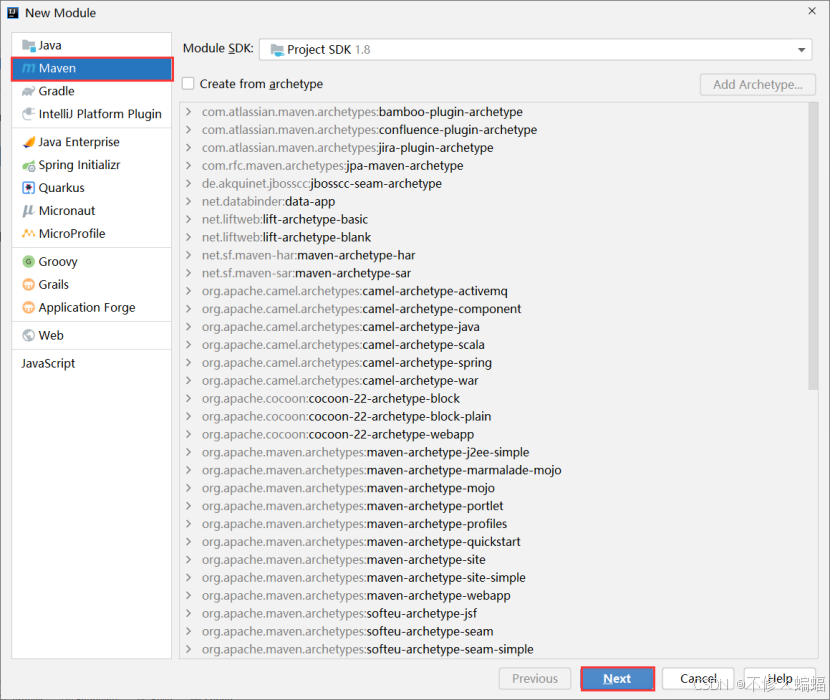
目录 一、⭐Idea从spring官网下载打开 2021版本idea 1.打开创建项目 2.修改pom.xml文件里的版本号 2017版本idea 二、从spring官网下载再用idea打开 三、Idea从阿里云的官网下载打开 编辑 四、Maven项目改造成springboot项目 五、从阿里云官网下载再用idea打开 Spri…...

面试之《commonjs,requirejs和es6 Module的区别》
设计理念 CommonJS:是为服务器端环境设计的模块化规范,以同步加载模块为核心思想。服务器端读取文件速度快,同步加载不会造成明显性能问题,方便开发者在代码执行前就确定模块间的依赖关系,便于管理和维护。RequireJS&…...
【工控】线扫相机小结 第五篇
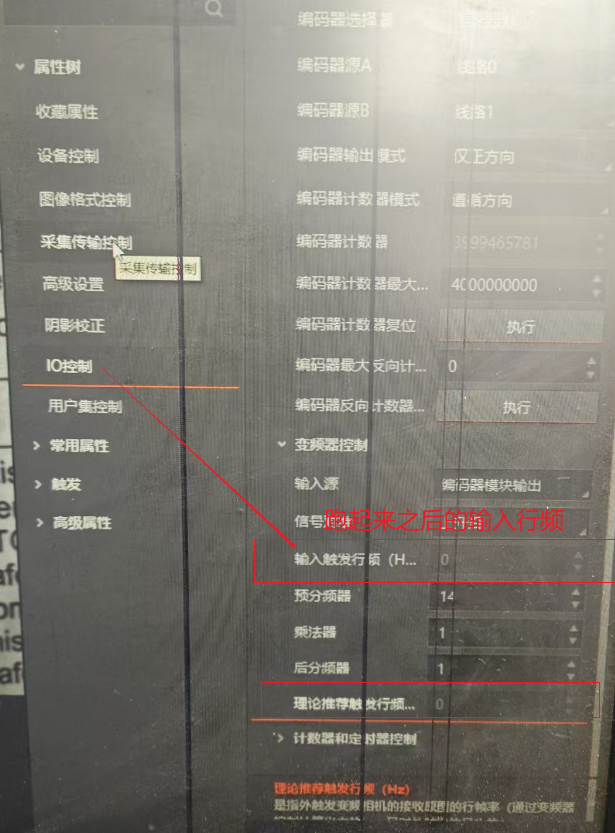
背景介绍 线扫相机通过光栅尺的脉冲触发, 我在调试线扫过程中,发现图像被拉伸,预设调节分配器。图像正常后,我提高的相机的扫描速度(Y轴动的更快了)。 动的更快的发现,图像变短了(以…...

【STM32F103C8T6】DMA数据转运ADC多通道
前言 本节为代码部分,知识点在这【江协科技STM32】DMA直接存储器存储-学习笔记-CSDN博客 查看数据地址: uint8_t aa 0x88;int main(void) {OLED_Init();OLED_ShowHexNum(1,1,aa,4); //显示十六进制数 OLED_ShowHexNum(2,1,(uint32_t)&aa,8);wh…...
)
[Web]ServletContext域(Application)
简介 Web应用的Application域的实现是通过ServletContext对象实现的。整个Web应用程序的所有资源共享这个域。生命周期与Web应用程序相同,即当前Web应用程序启动时(以服务器视角而非访客视角)出生,Web应用服务程序关闭时停止。 通…...

计算机网络--访问一个网页的全过程
文章目录 访问一个网页的全过程应用层在浏览器输入URL网址http://www.aspxfans.com:8080/news/index.aspboardID5&ID24618&page1#r_70732423通过DNS获取IP地址生成HTTP请求报文应用层最后 传输层传输层处理应用层报文建立TCP连接传输层最后 网络层网络层对TCP报文进行处…...

JVM G1垃圾回收器详细解析
G1内存布局 Garbage First(简称G1)收集器摒弃了传统垃圾收集器的严格的内存划分,而是采用了基于Region的内存布局形式和局部回收的设计思路。 G1垃圾收集器把Java堆划分为2048个大小相等的独立的Region,每个Region大小取值范围为1-32MB,且必…...

OpenGL中绘制图形元素的实现(使用visual studio(C++)绘制一个矩形)
目标:使用OpenGL提供的函数绘制矩形、线段、三角形等基本图形元素 所需效果 实验步骤 1、配置OpenGL(详情参见OpenGL的配置) 2、头文件引入 #include <gl/glut.h> 3、编写方法体 1>矩形实现 //绘制矩形 void DisplayRectangl…...

datax-coud部署
centos7系统环境安装 jdk1.8安装 cd /usr/local 上传jdk文件到/usr/local目录下解压缩 tar -zxvf jdk-8u261-linux-x64.tar.gz# 配置环境变量 vim /etc/profileexport JAVA_HOME=/usr/local/jdk1.8.0_261 export CLASSPATH=$JAVA_HOME/lib:$JAVA_HOME/lib export PATH=$JAVA_…...

数据库---sqlite3
数据库: 数据库文件与普通文件区别: 1.普通文件对数据管理(增删改查)效率低 2.数据库对数据管理效率高,使用方便 常用数据库: 1.关系型数据库: 将复杂的数据结构简化为二维表格形式 大型:Oracle、DB2 中型:MySql、SQLServer …...

Android StrictMode 使用与原理深度解析
Android StrictMode 是 Android 系统提供的一种开发者工具,用于检测应用主线程中不合理的耗时操作(如磁盘 I/O、网络请求等)和内存泄漏问题。通过配置策略和惩罚机制,它帮助开发者在早期发现潜在性能问题,提升应用流畅…...
)
js和java中方法重载(js本身是不支持方法重载,方便对比学习)
js如果需要实现方法重载 示例 1:根据参数数量实现重载 function overloadExample() {if (arguments.length 1) {console.log(一个参数:, arguments[0]);} else if (arguments.length 2) {console.log(两个参数:, arguments[0], arguments[1]);} else {console.l…...

代理模式的C++实现示例
核心思想 代理模式(Proxy Pattern)是一种结构型设计模式,其核心思想是为其他对象提供一个代理或占位符,以控制对这个对象的访问。代理对象通常会在客户端和目标对象之间起到中介作用,可以在不改变目标对象的情况下&am…...

【阿里云】控制台使用指南:从创建ECS到系统诊断测评
前言 随着云计算技术的快速发展,越来越多的企业和开发者开始使用云服务来部署和管理应用程序。在众多云服务提供商中,阿里云(Alibaba Cloud)凭借其强大的基础设施和丰富的服务,成为了众多用户的首选。本文旨在介绍如何…...

简易的微信聊天网页版【项目测试报告】
文章目录 一、项目背景二、项目简介登录功能好友列表页面好友会话页面 三、测试工具和环境四、测试计划测试用例部分人工手动测试截图web自动化测试测试用例代码框架配置内容代码文件(Utils.py)登录页面代码文件(WeChatLogin.py)好…...
- DRM A733 多显主副显绑定)
显示篇(2)- DRM A733 多显主副显绑定
通过hal层根据优先级绑定,优先级越高送显越靠前。(sdk默认mipi优先级最高为主显) 1.双显 如edp主mipi副,edp优先级搞。 更改如下 diff --git a/hwc-hal/drm/drmConnector.cpp b/hwc-hal/drm/drmConnector.cpp --- a/hwc-hal/d…...

基于腾讯云高性能HAI-CPU的跨境电商客服助手全链路解析
跨境电商的背景以及痛点 根据Statista数据,2025年全球跨境电商市场规模预计达6.57万亿美元,年增长率保持在12.5% 。随着平台规则趋严(如亚马逊封店潮),更多卖家选择自建独立站,2024年独立站占比已达35%。A…...