
SpringBoot项目实战(初级)
目录
一、数据库搭建
二、代码开发
1.pom.xml
2.thymeleaf模块处理的配置类
3.application配置文件
4.配置(在启动类中)
5.编写数据层
②编写dao层
③编写service层
接口
实现类
注意
补充(注入的3个注解)
1.@AutoWired(类型注入)
2.@Qualifier(名称注入)
3.@Qualifier
④编写controller层
前端页面
1.add.html
2.header.html
3.index.html
4.login.html
5.main.html
7.update.html
css
1.header.css
2.login.css
4.style.css
controller代码
⑤编写拦截类
三、测试
搭建一个简单的登录拦截页面。
首先,先来看一下最终的目录结构:

一、数据库搭建
这里演示案例用的是MySQL数据库,并且数据库名称和表格结构如下所示 :
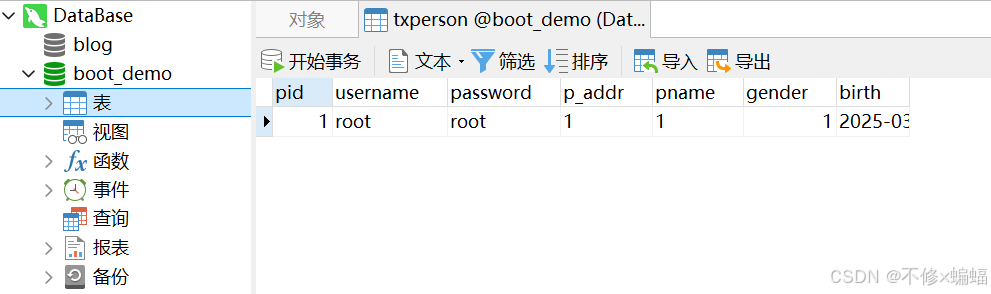
可以通过手动图形点击的方式实现;或是打开一个查询页面,然后输入下面的SQL语句:
-- 创建数据库(如果尚未存在)
CREATE DATABASE IF NOT EXISTS boot_demo;
-- 使用数据库
USE boot_demo;
-- 创建表格
CREATE TABLE IF NOT EXISTS txperson (pid INT PRIMARY KEY,username VARCHAR(255) NOT NULL,password VARCHAR(255) NOT NULL,p_addr INT,pname VARCHAR(255),gender INT,birth DATE
);
二、代码开发
首先创建一个springboot项目,详细步骤参见下面这篇文章(任选里面一种即可):
SpringBoot(一)--搭建架构5种方法_springboot框架搭建-CSDN博客文章浏览阅读2.2k次,点赞19次,收藏39次。Spring Boot 是基于 Spring 框架,以约定优于配置、自动配置为核心,可快速构建独立运行的应用,为微服务等开发提供便利的开发框架。前面已经对SSM(Spring,SpringMVC,MyBatis)每个框架做了讲解,SpringBoot就是基于这个框架一个更简单、更有利于开发。_springboot框架搭建
https://blog.csdn.net/m0_74977981/article/details/146139845?spm=1001.2014.3001.5502
1.pom.xml
首先导入项目所需要的依赖;这是在搭建一个项目后开始写代码之前的第一步骤。
怎么在maven中央仓库找到自己需要的代码和版本参见下面这篇文章的这一部分:
SSM项目的基本目录结构_ssm框架项目的工程目录-CSDN博客文章浏览阅读662次,点赞19次,收藏21次。一个完整的SSM(Spring+SpringMVC+MyBatis)项目理应包含以下几个目录结构:上面是一个普通的maven项目。_ssm框架项目的工程目录https://blog.csdn.net/m0_74977981/article/details/145968984?spm=1001.2014.3001.5502#t17这里我的jdk版本的1.8即Java8;springboot框架是2.7.0版本,老规矩我会将演示案例的pom.xml文件内容展示出来:
<?xml version="1.0" encoding="UTF-8"?>
<project xmlns="http://maven.apache.org/POM/4.0.0" xmlns:xsi="http://www.w3.org/2001/XMLSchema-instance"xsi:schemaLocation="http://maven.apache.org/POM/4.0.0 https://maven.apache.org/xsd/maven-4.0.0.xsd"><modelVersion>4.0.0</modelVersion><parent><groupId>org.springframework.boot</groupId><artifactId>spring-boot-starter-parent</artifactId><version>2.7.0</version><relativePath/> <!-- lookup parent from repository --></parent><groupId>cn.tx.springboot</groupId><artifactId>tx_sys</artifactId><version>0.0.1-SNAPSHOT</version><name>tx_sys</name><description>Demo project for Spring Boot</description><dependencies><dependency><groupId>org.springframework.boot</groupId><artifactId>spring-boot-starter-web</artifactId></dependency><dependency><groupId>org.springframework.boot</groupId><artifactId>spring-boot-starter-test</artifactId><scope>test</scope></dependency><dependency><groupId>org.springframework.boot</groupId><artifactId>spring-boot-devtools</artifactId><optional>true</optional></dependency><dependency><groupId>org.springframework.boot</groupId><artifactId>spring-boot-starter-thymeleaf</artifactId></dependency><!--导入jquery--><dependency><groupId>org.webjars</groupId><artifactId>jquery</artifactId><version>3.3.1</version></dependency><dependency><groupId>org.mybatis.spring.boot</groupId><artifactId>mybatis-spring-boot-starter</artifactId><version>1.3.1</version></dependency><dependency><groupId>com.alibaba</groupId><artifactId>druid</artifactId><version>1.0.9</version></dependency><dependency><groupId>log4j</groupId><artifactId>log4j</artifactId><version>1.2.17</version></dependency><dependency><groupId>mysql</groupId><artifactId>mysql-connector-java</artifactId><scope>runtime</scope></dependency><dependency><groupId>net.sourceforge.nekohtml</groupId><artifactId>nekohtml</artifactId><version>1.9.22</version></dependency></dependencies><build><plugins><plugin><groupId>org.springframework.boot</groupId><artifactId>spring-boot-maven-plugin</artifactId></plugin></plugins></build></project>
2.thymeleaf模块处理的配置类
package cn.tx.springboot.srcConfig;import cn.tx.springboot.interceptor.LoginInterceptor;
import org.springframework.context.annotation.Configuration;
import org.springframework.web.servlet.config.annotation.InterceptorRegistry;
import org.springframework.web.servlet.config.annotation.ViewControllerRegistry;
import org.springframework.web.servlet.config.annotation.WebMvcConfigurer;import java.util.ArrayList;
import java.util.List;/*** Spring MVC 配置类* 用于配置视图控制器和拦截器*/
@Configuration
public class TxMvcConfig implements WebMvcConfigurer {/*** 添加视图控制器* 用于直接将请求映射到视图页面,而不需要通过Controller类处理** @param registry 视图控制器注册器*/@Overridepublic void addViewControllers(ViewControllerRegistry registry) {// 将 /index 请求映射到 index 视图页面registry.addViewController("/index").setViewName("index");// 将 /menu 请求映射到 menu 视图页面registry.addViewController("/menu").setViewName("menu");// 将 /header 请求映射到 header 视图页面registry.addViewController("/header").setViewName("header");// 将 /login 请求映射到 login 视图页面registry.addViewController("/login").setViewName("login");// 将 /add 请求映射到 add 视图页面registry.addViewController("/add").setViewName("add");}/*** 添加拦截器* 配置一个登录拦截器,用于拦截请求并执行登录验证逻辑** @param registry 拦截器注册器*/@Overridepublic void addInterceptors(InterceptorRegistry registry) {// 创建一个排除路径的列表List<String> excludePatterns = new ArrayList<>();// 添加不需要拦截的路径excludePatterns.add("/css/**");       // 排除所有以 /css/ 开头的静态资源路径excludePatterns.add("/images/**");    // 排除所有以 /images/ 开头的静态资源路径excludePatterns.add("/webjars/**");   // 排除所有以 /webjars/ 开头的路径excludePatterns.add("/login");        // 排除登录页面路径excludePatterns.add("/toLogin");      // 排除跳转到登录页面的路径// 注册登录拦截器// 拦截所有请求路径,但排除上述定义的路径registry.addInterceptor(new LoginInterceptor()).addPathPatterns("/**")       // 拦截所有路径.excludePathPatterns(excludePatterns); // 排除指定路径}
}这段代码中使用了addViewController方法,它是ViewControllerRegistry接口提供的一个方法,用于将请求路径映射到视图名称(这么用主要是因为可以在一个方法中实现多条路径的映射)。具体语法如下:
registry.addViewController("/path").setViewName("viewName");3.application配置文件
接着在配置文件配置好链接数据库的信息:
spring:datasource:username: rootpassword: 2020url: jdbc:mysql://localhost:3306/boot_demo?serverTimezone=GMT%2B8driver-class-name: com.mysql.cj.jdbc.Drivertype: com.alibaba.druid.pool.DruidDataSourceinitialSize: 5minIdle: 5maxActive: 20maxWait: 60000timeBetweenEvictionRunsMillis: 60000minEvictableIdleTimeMillis: 300000validationQuery: SELECT 1 FROM DUALtestWhileIdle: truetestOnBorrow: falsetestOnReturn: falsepoolPreparedStatements: truefilters: stat,wall,log4jmaxPoolPreparedStatementPerConnectionSize: 20useGlobalDataSourceStat: trueconnectionProperties: druid.stat.mergeSql=true;druid.stat.slowSqlMillis=500mvc:format:date: yyyy-MM-dd
这里面的配置项解析参见:SpringBoot 第三课(Ⅰ) 数据层开发-CSDN博客
除此之外,这里额外注意一点:

注意框起来的.cj. 在配置驱动时会遇见这个问题,有的加cj,有的不加cj,但是在某些时刻好像都是正确的,这就涉及到一些版本问题了:
MySQL现在三个版本:5.6(低版本);5.7(低版本);8.0(高版本)
但是能不能用cj,取决于jar包,并不是MySQL的版本决定的。
如果你需要使用
com.mysql.cj.jdbc.Driver,那么你需要引入 MySQL Connector/J 8.x 的依赖;同理如果是引入5.x的依赖,那么在配置文件这里就不用加cj。
4.配置(在启动类中)
可以选择加一个config包,里面写配置类;也可以写在springboot的项目启动类中,在这里我采用将配置写进启动类中(因为我这个演示的项目逻辑比较简单,一般情况下不建议这么做):
package cn.tx.springboot;import com.alibaba.druid.pool.DruidDataSource;
import com.alibaba.druid.support.http.StatViewServlet;
import com.alibaba.druid.support.http.WebStatFilter;
import org.mybatis.spring.annotation.MapperScan;
import org.mybatis.spring.boot.autoconfigure.ConfigurationCustomizer;
import org.springframework.boot.SpringApplication;
import org.springframework.boot.autoconfigure.SpringBootApplication;
import org.springframework.boot.context.properties.ConfigurationProperties;
import org.springframework.boot.web.servlet.FilterRegistrationBean;
import org.springframework.boot.web.servlet.ServletRegistrationBean;
import org.springframework.context.annotation.Bean;import java.util.Arrays;
import java.util.HashMap;
import java.util.Map;@MapperScan("cn.tx.springboot.dao")  //在驱动类标注好mapper的文件包,这样就不用在每个dao接口文件中标注@Mapper了
@SpringBootApplication
public class TxSysApplication {public static void main(String[] args) {SpringApplication.run(TxSysApplication.class, args);}@ConfigurationProperties(prefix = "spring.datasource")@Beanpublic DruidDataSource getDruidDataSource(){return new DruidDataSource();}@Beanpublic ServletRegistrationBean statViewServlet(){ServletRegistrationBean bean = new ServletRegistrationBean(new StatViewServlet(),"/druid/*");Map<String,String> initParams = new HashMap<>();initParams.put("loginUsername","root");initParams.put("loginPassword","root");initParams.put("allow","");//默认就是允许所有访问initParams.put("deny","192.168.15.21");bean.setInitParameters(initParams);return bean;}//2、配置一个web监控的filter@Beanpublic FilterRegistrationBean webStatFilter(){FilterRegistrationBean bean;bean = new FilterRegistrationBean();bean.setFilter(new WebStatFilter());Map<String,String> initParams = new HashMap<>();initParams.put("exclusions","*.js,*.css,/druid/*");bean.setInitParameters(initParams);bean.setUrlPatterns(Arrays.asList("/*"));return bean;}@Beanpublic ConfigurationCustomizer getCustomizer(){return new ConfigurationCustomizer() {@Overridepublic void customize(org.apache.ibatis.session.Configuration configuration) {configuration.setMapUnderscoreToCamelCase(true);}};}
}
5.编写数据层
①编写实体类
package cn.tx.springboot.model;import java.util.Date;public class TxPerson {private int pid;private String username;private String password;private String pAddr;private String pname;private int gender;private Date birth;public TxPerson() {}public TxPerson(int pid, String username, String password, String addr, int gender, Date birth) {this.pid = pid;this.username = username;this.password = password;this.pAddr = pAddr;this.gender = gender;this.birth = birth;}public int getPid() {return pid;}public void setPid(int pid) {this.pid = pid;}public String getPname() {return pname;}public void setPname(String pname) {this.pname = pname;}public String getUsername() {return username;}public void setUsername(String username) {this.username = username;}public String getPassword() {return password;}public void setPassword(String password) {this.password = password;}public String getpAddr() {return pAddr;}public void setpAddr(String pAddr) {this.pAddr = pAddr;}public int getGender() {return gender;}public void setGender(int gender) {this.gender = gender;}public Date getBirth() {return birth;}public void setBirth(Date birth) {this.birth = birth;}@Overridepublic String toString() {return "TxPerson{" +"pid=" + pid +", username='" + username + '\'' +", password='" + password + '\'' +", pAddr='" + pAddr + '\'' +", pname='" + pname + '\'' +", gender=" + gender +", birth=" + birth +'}';}
}
②编写dao层
这里选用SQL全注解的形式编写dao接口文件:
package cn.tx.springboot.dao;import cn.tx.springboot.model.TxPerson;
import org.apache.ibatis.annotations.*;
import org.springframework.stereotype.Service;
import org.springframework.ui.Model;import java.util.List;
import java.util.Map;//@Mapper
/*** IDEA在注入处报错(报红),因为找不到注入的对象,因为类是动态创建的,但是程序可以正确的执行。* 为了避免报错,可以在被注入dao接口上添加 @Repository 注解* */
@Repositorypublic interface PersonDao {@Select("select * from txperson")public List<TxPerson> select();@Select("select * from txperson where pid=#{pid}")public TxPerson getPersonById(int pid);@Update("update txperson set " +"username=#{username}," +"password=#{password}," +"pname=#{pname}," +"p_addr=#{pAddr}," +"gender=#{gender}," +"birth=#{birth} " +"where pid=#{pid}")public void updatePerson(TxPerson txPerson);@Options(useGeneratedKeys = true,keyProperty = "pid")@Insert("insert into txperson(pid, username,password,pname, p_addr,gender, birth)" +" values(#{pid}, #{username},#{password},#{pname}, #{pAddr},#{gender}, #{birth})")public void insert(TxPerson P);@Delete("delete from txperson where pid=#{pid}")public int delete(int pid);@Select("select * from txperson where username=#{username} and password=#{password}")public TxPerson getPersonUsepass(Map map);
}
可以看见在这个文件中,我将@Mapper注释掉了,但是项目启动后仍旧能够正常运行起来,这是因为我在启动类中标注了扫描路径。

注:其实可以发现,这么编写相较于Spring框架的编写格式来说,省去了编写Mapper.xml文件(因为将sql语句直接赋予给dao接口了),这么编写大大节省的代码量。
但是这么写还是不够精简,后面为了方便项目开发,将引进MyBatisPlus技术,实现省略简单SQL语句的编写。
③编写service层
接口
package cn.tx.springboot.service;import cn.tx.springboot.model.TxPerson;
import org.apache.ibatis.annotations.Delete;
import org.apache.ibatis.annotations.Insert;
import org.apache.ibatis.annotations.Options;
import org.apache.ibatis.annotations.Select;
import org.springframework.stereotype.Service;
import org.springframework.transaction.annotation.Transactional;import java.util.List;
import java.util.Map;@Transactional
public interface PersonService {public List<TxPerson> select();//修改首先通过id获取要修改的数据public TxPerson getPersonById(int pid);//在通过修改方法修改public void  updatePerson(TxPerson txPerson);public void insert(TxPerson P);public int delete(int pid);public TxPerson getPersonUsepass(Map map);
}
实现类
在service层的实现类中,一个方法中甚至可以调用多个dao的接口方法来实现一个业务逻辑方法(当然我这里展示的逻辑都比较简单)
package cn.tx.springboot.service.impl;import cn.tx.springboot.dao.PersonDao;
import cn.tx.springboot.model.TxPerson;
import cn.tx.springboot.service.PersonService;
import org.springframework.beans.factory.annotation.Autowired;
import org.springframework.stereotype.Service;import java.util.List;
import java.util.Map;@Service
public class PersonServiceImpl implements PersonService {@Autowiredprivate PersonDao personDao;@Overridepublic List<TxPerson> select() {List<TxPerson> list = personDao.select();return list;}@Overridepublic TxPerson getPersonById(int pid) {return personDao.getPersonById(pid);}@Overridepublic void updatePerson(TxPerson txPerson) {personDao.updatePerson(txPerson);}@Overridepublic void insert(TxPerson P) {personDao.insert(P);}@Overridepublic int delete(int pid) {return personDao.delete(pid);}@Overridepublic TxPerson getPersonUsepass(Map map) {TxPerson txPerson = personDao.getPersonUsepass(map);return txPerson;}
}
注意
controller层要注入service层(当然service的实现类注入dao“接口”同理;---@Autowired是进行注入的注释)
但是显而易见接口是不能被注入的,这里被注入的其实是实现这个接口的实体类。

注入(图Ⅰ) 补充(注入的3个注解)
提到这里就不得不多说一嘴有关实现注入的3个注解:
1.@AutoWired(类型注入)
什么叫类型注入?顾名思义,就是只用填写类型,不用明确指出名字。前面已经提了,接口是不能被注入的,本质上注入的都是实现类。
在Ⅰ图中我这么直接写是可以的,这是因为我的实现类层中只有一个实现类(参见图Ⅱ)

图Ⅱ 一旦我在impl中再创建一个实现PersonService接口的实现类,图Ⅰ中的部分就将报错,这是因为同类型(即同样是实现PersonService接口的情况)下,有两个实现类了,导致@AutoWired注解注入混乱,因此报错。
2.@Qualifier(名称注入)
这个就很容易理解了,在使用这个注解时表明要注入的实体类的名称,而不是只标注它们实现接口的名称这么泛泛。
上面这两种注入方式(@AutoWired和@Qualifier)都是由Spring框架提供的,其中@AutoWired用到最多。
3.@Qualifier
可以按照名称再按照类型,并且是Jdk封装的,利用反射机制(不建议使用这个注解,主要还是上面那两种居多。)
④编写controller层
在编写controller之前,先将前端页面信息展示:
首先目录一共有这么几个页面:

前端页面
1.add.html
<!DOCTYPE html PUBLIC "-//W3C//DTD XHTML 1.0 Transitional//EN" "http://www.w3.org/TR/xhtml1/DTD/xhtml1-transitional.dtd">
<html lang="en" xmlns:th="http://www.thymeleaf.org">
<head>
<meta http-equiv="Content-Type" content="text/html; charset=utf-8" />
<title>Untitled Document</title>
<style type="text/css">
body {font-family: Arial, Helvetica, sans-serif; font-size:12px; text-align:center;}
a { text-decoration: none;}
#all {widht: 100%; text-align:center; margin:auto;}
main {width: 96%; line-height: 1.8; margin:auto; border:1px #ccc dashed; text-align: left; text-indent: 2em;}
.mt{width: 1000px;border:1px solid #aca7a7 ;border-collapse: collapse;
}
.mt td{border: 1px solid #aca7a7;
}</style>
</head><body>
<div id="all"><form th:action="@{/insert}" method="post"><table class="mt"><tr><td>用户名</td><td><input type="text" name="username"/></td><td>密码</td><td><input type="text" name="password"/></td><td>姓名</td><td><input type="text" name="pname"/></td><td>地址</td><td><input type="text" name="pAddr"/></td><td>性别</td><td><select name="gender"><option value="1">男</option><option value="2">女</option></select></td><td>生日</td><td><input type="text" name="birth"/></td><td><input type="submit" value="提交"/></td></tr></table></form>
</div>
</body>
</html>
2.header.html
<!DOCTYPE html PUBLIC "-//W3C//DTD XHTML 1.0 Transitional//EN" "http://www.w3.org/TR/xhtml1/DTD/xhtml1-transitional.dtd">
<html lang="en" xmlns:th="http://www.thymeleaf.org">
<head>
<meta http-equiv="Content-Type" content="text/html; charset=utf-8" />
<title>Admin Header</title><link href="css/header.css" rel="stylesheet" type="text/css" />
<script type="text/javascript" language="javascript" src="js/jquery-1.3.2.min.js"></script>
<script type="text/javascript">
var oplist = new Array('about', 'user', 'news', 'mars', 'jielong', 'box', 'school', 'config', 'other');
$(document).ready(function() {$('#nav').find("a").click(function() {var id = $(this).attr('id');$.each(oplist, function(i, n) {$('#'+n).attr('class', 'inactive');});$(this).parents("li").attr('class', 'active');});
});
</script>
</head><body>
<div id="all"><div id="banner"><h1>Springboot实训</h1></div><div id="nav"><ul><li class="inactive" id="other"><a href="menu.html" target="menu">管理操作</a></li><li class="inactive" id="about"><a href="menu.html" target="menu">管理操作</a></li><li class="inactive" id="user"><a href="menu.html" target="menu">管理操作</a></li><li class="inactive" id="news"><a href="menu.html" target="menu">管理操作</a></li><li class="inactive" id="mars"><a href="menu.html" target="menu">管理操作</a></li><li class="inactive" id="jielong"><a href="menu.html" target="menu">管理操作</a></li><li class="inactive" id="box"><a href="menu.html" target="menu">管理操作</a></li><li class="inactive" id="school"><a href="menu.html" target="menu">火柴学堂</a></li><li class="active" id="config"><a href="menu.html" target="menu">站点设置</a></li></ul></div><div id="main"><div id="welcome"><span th:if="${session.user != null}" th:text="${session.user.username}+'欢迎你回来!'"></span><a target="_top" th:if="${session.user == null}"  th:href="@{/login}">请登录</a><img src="images/clock.gif" /> 学习是最好的投资</div><div id="adminop"><ul><li><a href="#">站点首页</a></li><li><a href="javascript:parent.location.reload();">管理首页</a></li><li><a href="javascript:parent.location.reload();">退出管理</a></li><li><a href="#">站点首页</a></li></ul></div></div>
</div>
</body>
</html>
3.index.html
<!DOCTYPE html PUBLIC "-//W3C//DTD XHTML 1.0 Transitional//EN" "http://www.w3.org/TR/xhtml1/DTD/xhtml1-transitional.dtd">
<html lang="en" xmlns:th="http://www.thymeleaf.org">
<head>
<meta http-equiv="Content-Type" content="text/html; charset=utf-8" />
<title>青城博雅教育首页</title>
</head><frameset cols="*" rows="136, *" id="frame_main"  border="0"><frame th:src="@{/header}" noresize="noresize" name="header"><frameset cols="240, *"><frame th:src="@{/menu}" name="menu" /><frame th:src="@{/main}" name="main"></frameset>
</frameset><noframes><body>
</body>
</noframes></html>
4.login.html
<!DOCTYPE html PUBLIC "-//W3C//DTD XHTML 1.0 Transitional//EN" "http://www.w3.org/TR/xhtml1/DTD/xhtml1-transitional.dtd">
<html lang="en" xmlns:th="http://www.thymeleaf.org">
<head>
<meta http-equiv="Content-Type" content="text/html; charset=UTF-8" />
<title>用户登录</title>
<link href="css/login.css" rel="stylesheet" type="text/css" /><script th:src="@{/webjars/jquery/3.3.1/jquery.js}"></script><script>function login() {$("form").submit();}</script>
</head>
<body><div id="login"><div id="top"><div id="top_left"><img src="images/login_03.gif" /></div><div id="top_center"></div></div><form th:action="@{/toLogin}" method="post"><div id="center"><div id="center_left"></div><div id="center_middle"><div style="text-align: center; color: red" th:text="${tip}"></div><div id="user">用 户<input type="text" name="username" /></div><div id="password">密   码<input type="password" name="password" /></div><div id="btn"><a href="#" onclick="login()">登录</a><a href="#">清空</a></div></div><div id="center_right"></div></div></form><div id="down"><div id="down_left"><div id="inf"><span class="inf_text">版本信息</span><span class="copyright">v2.0</span></div></div><div id="down_center"></div></div></div>
</body>
</html>
5.main.html
<!DOCTYPE html PUBLIC "-//W3C//DTD XHTML 1.0 Transitional//EN" "http://www.w3.org/TR/xhtml1/DTD/xhtml1-transitional.dtd">
<html lang="en" xmlns:th="http://www.thymeleaf.org">
<head>
<meta http-equiv="Content-Type" content="text/html; charset=utf-8" />
<title>Untitled Document</title>
<style type="text/css">
body {font-family: Arial, Helvetica, sans-serif; font-size:12px; text-align:center;}
a { text-decoration: none;}
#all {widht: 100%; text-align:center; margin:auto;}
main {width: 96%; line-height: 1.8; margin:auto; border:1px #ccc dashed; text-align: left; text-indent: 2em;}
.mt{width: 1000px;border:1px solid #aca7a7 ;border-collapse: collapse;
}
.mt td{border: 1px solid #aca7a7;
}</style>
</head><body>
<div id="all"><div><a th:href="@{/add}">添加</a></div><table class="mt"><tr><td>用户名</td><td>姓名</td><td>地址</td><td>性别</td><td>生日</td><td>操作</td></tr><tr th:each="p:${list}"><td th:text="${p.username}"></td><td th:text="${p.pname}"></td><td th:text="${p.pAddr}"></td><td th:text="${p.gender==1}?'男':'女'"></td><td th:text="${#calendars.format(p.birth,'yyyy-MM-dd')}"></td><td><a th:href="@{/getPerson(pid=${p.pid})}">修改</a><a th:href="@{/delete(pid=${p.pid})}" >删除</a></td></tr></table></div>
</body>
</html>
6.menu.html
<!DOCTYPE html PUBLIC "-//W3C//DTD XHTML 1.0 Transitional//EN" "http://www.w3.org/TR/xhtml1/DTD/xhtml1-transitional.dtd">
<html lang="en" xmlns:th="http://www.thymeleaf.org">
<head>
<meta http-equiv="Content-Type" content="text/html; charset=utf-8" />
<title>无标题文档</title><link href="css/menu.css" rel="stylesheet" type="text/css" />
</head><body>
<div id="all"><div id="menu"><ul><li><img src="images/li.jpg" /> <a href="/main" target="main">员工管理</a></li><li><img src="images/li.jpg" /> <a href="" target="main">部门管理</a></li><li><img src="images/li.jpg" /> <a href="" target="main">绩效管理</a></li><li><img src="images/li.jpg" /> <a href="" target="main">财务管理</a></li></ul></div>
</div>
</body>
</html>
7.update.html
<!DOCTYPE html PUBLIC "-//W3C//DTD XHTML 1.0 Transitional//EN" "http://www.w3.org/TR/xhtml1/DTD/xhtml1-transitional.dtd">
<html lang="en" xmlns:th="http://www.thymeleaf.org">
<head>
<meta http-equiv="Content-Type" content="text/html; charset=utf-8" />
<title>Untitled Document</title>
<style type="text/css">
body {font-family: Arial, Helvetica, sans-serif; font-size:12px; text-align:center;}
a { text-decoration: none;}
#all {widht: 100%; text-align:center; margin:auto;}
main {width: 96%; line-height: 1.8; margin:auto; border:1px #ccc dashed; text-align: left; text-indent: 2em;}
.mt{width: 1000px;border:1px solid #aca7a7 ;border-collapse: collapse;
}
.mt td{border: 1px solid #aca7a7;
}</style>
</head><body>
<div id="all"><form th:action="@{/updatePerson}" method="post"><input type="hidden" name="pid" th:value="${p.pid}"/><table class="mt"><tr><td>用户名</td><td><input type="text" name="username"  th:value="${p.username}"/></td><td>密码</td><td><input type="text" name="password"  th:value="${p.password}"/></td><td>姓名</td><td><input type="text" name="pname"  th:value="${p.pname}"/></td><td>地址</td><td><input type="text" name="pAddr"  th:value="${p.pAddr}"/></td><td>性别</td><td><select name="gender"><option value="1" th:selected="${p.gender}==1">男</option><option value="2" th:selected="${p.gender}==2">女</option></select></td><td>生日</td><td><input type="text" name="birth" th:value="${#calendars.format(p.birth,'yyy-MM-dd')}"/></td><td><input type="submit" value="提交"/></td></tr></table></form>
</div>
</body>
</html>
css
1.header.css
body {background: #686868; font-family:Arial, Helvetica, sans-serif; font-size:12px; margin:0px; margin-bottom:2px;border-bottom: 1px #ccc solid;}
h1 {color: #FFF;}
a {color: #FFF; text-decoration: none;/*防止滤镜下链接失效*/position:relative;}
ul { list-style:none;}
#all {width: 100%;}
#banner {margin-top: 8px; margin-left: 32px;}
#main {width: 100%; margin-bottom: 2px; background:#eeeeee; margin-left: 0px; margin-right:0px; height: 30px; color: #000; line-height: 2.4;overflow: auto;}
#main a {color:#000;}
#welcome { float:left; width: 40%; font-weight: 800; padding-left: 8px; position:relative;}
#adminop { float:left; width: 59%; position:relative; text-align:right; line-height:1; *line-height:2.2;}
#adminop ul li {float: right; width: 80px;}
#nav {width: 100%; clear: both;}
#nav ul li {float: right; width:82px; height:25px; line-height: 2.1; text-align: center;}
.inactive { background-image/**/:url(../images/admin/nav_bg_inactive2.png) !important;background: none; margin-left: 2px; margin-right:2px;filter:progid:DXImageTransform.Microsoft.AlphaImageLoader(src=images/admin/nav_bg_inactive2.png);}
.inactive a {color: #000;}
.active {background:url(../images/admin/nav_bg_active2.png) !important;background: none; margin-left: 2px; margin-right:2px;filter:progid:DXImageTransform.Microsoft.AlphaImageLoader(src=images/admin/nav_bg_active2.png);}
.active a {color:#fff;}
.blankgray {background:#bbb; height:2px; width:100%; margin:0; padding:0; clear:both; font-size:2px;}
2.login.css
body{margin:0; padding:0; font-size:9pt;}
#login{margin:auto; width:975px; height:368px; margin-top:120px;}
#top_left{width:691px; height:89px; float:left;}
#top_left img {margin-left:33px;}
#top_center{width:248px; height:89px; background:url(../images/03.jpg); float:left;}#center_left{width:691px; height:190px; background:url(../images/04.jpg); float:left;}
#center_middle{width:248px; height:220px; float:left; background:url(../images/login_13.gif) repeat-y;}
#center_right{width:36px; height:190px; float:right; background:url(../images/login_11.gif);}#down_left{width:691px; height:89px; float:left; margin-top:15px;}
#down_center{width:248px; height:89px; background:url(../images/login_16.gif); float:left;}
#inf{width:691px; height:38px; background:url(../images/login_18.gif) no-repeat; }
.inf_text{display:block; width:100px; height:20px; font-size:16px; font-weight:bolder; color:#fff; margin-left:17px; margin-top:12px; float:left;}
.copyright{display:block; float:left; margin-left:17px; margin-top:15px;}#user{ margin-left:40px; margin-top:45px; height:25px;}
#password{margin-left:40px; margin-top:25px; height:25px;}
input{width:120px; height:18px; border:solid 1px #aca7a7; font-size:9pt;}
#btn{margin-left:30px; margin-top:40px;height:25px; margin-right:28px; text-align:center;}
#btn a{display:block; line-height:25px; background: url(../images/bt_bg.gif); border: solid 1px #b6b6b6; width:65px; float:left; margin-left:15px; text-decoration:none; color:#000;}
3.menu.css
html, body {height:100%;overflow:hidden;} /*为兼容ie7,ff*/
body {font-family:Arial, Helvetica, sans-serif; font-size:12px; margin:0px; text-align:center; border-right:1px #ccc solid;}
a {color: #000; text-decoration: none;}
#menu img {_margin-top: 12px;}/*没办法,ie6对list-style-image支持不好*/
#all {width: 100%;height:100%;}
#menu {width: 96%;}
#menu ul {padding:0; margin: 0; list-style: none;}
#menu ul li {background-image:url(../images/match/public/images/menu_bg.gif); background-repeat: repeat-x; background-position:center; height: 32px;;margin-top: 2px; margin-bottom: 2px; border:1px #ccc solid; line-height: 2.8;}
4.style.css
@CHARSET "UTF-8";
.pro{height: 8px;background-color: #4C4C4C;width: 500px;cursor: pointer;}.playball{height: 8px;width: 8px;background-color: orange;position: relative;}.time{width: 500px;height: 20px;border: 1px solid black;
}
controller代码
package cn.tx.springboot.controller;import cn.tx.springboot.model.TxPerson;
import cn.tx.springboot.service.PersonService;
import org.springframework.beans.factory.annotation.Autowired;
import org.springframework.stereotype.Controller;
import org.springframework.stereotype.Repository;
import org.springframework.ui.Model;
import org.springframework.web.bind.annotation.GetMapping;
import org.springframework.web.bind.annotation.Mapping;
import org.springframework.web.bind.annotation.RequestMapping;import javax.servlet.http.HttpSession;
import java.util.HashMap;
import java.util.List;
import java.util.Map;@Controller
//@Repository
public class TxPersonController {@AutowiredPersonService personService;@RequestMapping("/main")public String  main(Model model){List<TxPerson> list = personService.select();model.addAttribute("list",list);return "main";}@RequestMapping("/insert")public String  insert(TxPerson person){personService.insert(person);return "redirect:main";}@RequestMapping("/getPerson")public String  getPerson(int pid,Model model){TxPerson person = personService.getPersonById(pid);model.addAttribute("p",person);return "update";}@RequestMapping("/updatePerson")public String  update(TxPerson person){personService.updatePerson(person);return "redirect:main";}@RequestMapping("/delete")public String  delete(int pid){personService.delete(pid);return "redirect:main";}@RequestMapping("/toLogin")public String  login(String username, String password, HttpSession session, Model model){Map<String, String> map = new HashMap<String, String>();map.put("username", username);map.put("password", password);TxPerson txPerson = personService.getPersonUsepass(map);model.addAttribute("p",txPerson);if (txPerson!=null){session.setAttribute("user",txPerson);return "index";}else {model.addAttribute("tip","用户名或密码错误!");return "login";}}
}
⑤编写拦截类
package cn.tx.springboot.interceptor;import cn.tx.springboot.model.TxPerson;
import org.springframework.web.context.request.WebRequestInterceptor;
import org.springframework.web.servlet.HandlerInterceptor;import javax.servlet.http.HttpServletRequest;
import javax.servlet.http.HttpServletResponse;public class LoginInterceptor implements HandlerInterceptor {@Overridepublic boolean preHandle(HttpServletRequest request, HttpServletResponse response, Object handler) throws Exception {TxPerson user = (TxPerson) request.getSession().getAttribute("user");if(user!=null){return true;}response.sendRedirect(request.getContextPath()+"/login");return false;}
}
三、测试
实现上面的过程后就可以访问页面了(随便访问一个controller中对应的路径即可,因为在配置中配置了跳转路径,所以不登录直接访问,访问任何页面都会被跳转到login.html页面)

注意: 我没有提供项目中的图片信息,所以打开可能并不是这个页面(图片自行下载微调前端即可)
相关文章:
SpringBoot项目实战(初级)
目录 一、数据库搭建 二、代码开发 1.pom.xml 2.thymeleaf模块处理的配置类 3.application配置文件 4.配置(在启动类中) 5.编写数据层 ②编写dao层 ③编写service层 接口 实现类 注意 补充(注入的3个注解) 1.AutoWir…...

Linux NFS、自动挂载与系统启动管理指南
1. NFS客户端挂载导出的目录的方式 NFS(网络文件系统) 允许将远程服务器的目录挂载到本地,像访问本地文件一样操作远程文件。挂载方式主要有两种: 手动挂载:使用 mount 命令(临时生效,重启后丢…...

uniapp实现全局拖拽按钮
要先引入 “vue3-draggable-resizable”: “^1.6.5” 1.创建DragComponent组件 <template><!-- 抽屉组件 --><div class"drag-container" id"dragBox" :style"{ zIndex: zIndex }"><Vue3DraggableResizable :initW"…...

SOFABoot-10-聊一聊 sofatboot 的十个问题
前言 大家好,我是老马。 sofastack 其实出来很久了,第一次应该是在 2022 年左右开始关注,但是一直没有深入研究。 最近想学习一下 SOFA 对于生态的设计和思考。 sofaboot 系列 SOFABoot-00-sofaboot 概览 SOFABoot-01-蚂蚁金服开源的 s…...

计算机网络——总结
01. 网络的发展及体系结构 网络演进历程 从1969年ARPANET的4个节点发展到如今覆盖全球的互联网,网络技术经历了电路交换到分组交换、有线连接到无线覆盖的革命性变革。5G时代的到来使得网络传输速度突破10Gbps,物联网设备数量突破百亿级别。 网络体系…...
Umi-OCR- OCR 文字识别工具,支持截图、批量图片排版解析
Umi-OCR 是免费开源的离线 OCR 文字识别软件。无需联网,解压即用,支持截图、批量图片、PDF 扫描件的文字识别,能识别数学公式、二维码,可生成双层可搜索 PDF。内置多语言识别库,界面支持多语言切换,提供命令…...

高速网络包处理,基础网络协议上内核态直接处理数据包,XDP技术的原理
文章目录 预备知识TCP/IP 网络模型(4层、7层)iptables/netfilterlinux网络为什么慢 DPDKXDPBFPeBPFXDPXDP 程序典型执行流通过网络协议栈的入包XDP 组成 使用 GO 编写 XDP 程序明确流程选择eBPF库编写eBPF代码编写Go代码动态更新黑名单 预备知识 TCP/IP…...

C++:背包问题习题
1. 货币系统 1371. 货币系统 - AcWing题库 给定 V 种货币(单位:元),每种货币使用的次数不限。 不同种类的货币,面值可能是相同的。 现在,要你用这 V 种货币凑出 N 元钱,请问共有多少种不同的…...

数据可信安全流通实战,隐语开源社区Meetup武汉站开放报名
隐语开源社区 Meetup 系列再出发!2025 年将以武汉为始发站,聚焦"技术赋能场景驱动",希望将先进技术深度融入数据要素流转的各个环节,推动其在实际应用场景中落地生根,助力释放数据要素的最大潜能!…...

java使用Apache POI 操作word文档
项目背景: 当我们对一些word文档(该文档包含很多的标题比如 1.1 ,1.2 , 1.2.1.1, 1.2.2.3)当我们删除其中一项或者几项时,需要手动的对后续的进行补充。该功能主要是对标题进行自动的补充。 具…...

【 C/C++ 包管理工具】vcpkg安装+使用
【 C/C 包管理工具】vcpkg安装使用 Vcpkg 是由 Microsoft 和 C 社区维护的免费开源 C/C 包管理器,可在 Windows、macOS 和 Linux 上运行。 可以很方便的安装管理 C/C 库。 1. 安装 不要安装到Program Files这种有空格的路径下,否则后面安装库可能出现…...

免费开源的NAS解决方案:TrueNAS
TrueNAS是业内知名的FreeNAS系统的升级版,是一款开源的网络存储系统,具有高性能、稳定性和易用性等优点。 TrueNAS目前有三个版本,分别是TrueNAS CORE、TrueNAS ENTERPRISE、TrueNAS SCALE。其中,TrueNAS CORE基于FreeBSD开发&…...

LeetCode热题100精讲——Top1:两数之和【哈希】
你好,我是安然无虞。 文章目录 题目背景两数之和C解法Python解法 题目背景 如果大家对于 哈希 类型的概念并不熟悉, 可以先看我之前为此专门写的算法详解: 蓝桥杯算法竞赛系列第九章巧解哈希题,用这3种数据类型足矣 两数之和 题目链接:两数…...

github上传操作简单说明
前期准备 0.下载git(如果已经有了就不用了) 1.在GitHub上新建一个存储库 2.先在本地创建一个目录作为本地库目录,在目录里打开git bash进行上传 上传过程 echo "# Garbled_repair" >> README.md 作用:创建一个…...

GitLens with `Commit Graph`
文章目录 GitLens with Commit Graph GitLens with Commit Graph 想要更直观地查看 Git 提交历史?我打包了一个支持 Commit Graph 的 GitLens 版本,让你轻松在 VSCode 中查看分支、合并、变更记录等内容,一目了然! 📌…...

Rocky9.5基于sealos快速部署k8s集群
首先需要下载 Sealos 命令行工具,sealos 是一个简单的 Golang 二进制文件,可以安装在大多数 Linux 操作系统中。 以下是一些基本的安装要求: 每个集群节点应该有不同的主机名。主机名不要带下划线。 所有节点的时间需要同步。 需要在 K8s …...

阿里云服务器环境部署 四 MySQL主从配置
安装MySQL 导入mysql镜像 docker load -i /opt/dockerinstall/mysql/mysql-8.1.0.tar docker run --privilegedtrue --name mysql8 --restartunless-stopped -e MYSQL_ROOT_PASSWORD123456 -p 3306:3306 -v /usr/local/mysql/logs:/var/log/mysql -v /usr/local/mysql/d…...

GPT-5 将免费向所有用户开放?
GPT-5 将免费向所有用户开放? 硅谷知名分析师 Ben Thompson 最近与 OpenAI CEO Sam Altman 进行了一场深度对谈,其中Sam Altman透漏GPT-5将免费向大家发放。 OpenAI 这波操作可不是一时冲动,而是被逼出来的。DeepSeek 这个新秀横空出世&am…...

web客户端存储,IndexDB相关讲解
IndexDB详细讲解 IndexedDB 是浏览器提供的一种底层 API,用于在客户端存储大量结构化数据。相比 Web Storage(localStorage/sessionStorage),它支持更复杂的数据结构、事务处理、索引查询等高级功能。以下是一个系统化的讲解: 一、核心概念 1、数据库(Database) 每…...

excel文件有两列,循环读取文件两列赋值到字典列表。字典的有两个key,分别为question和answer。将最终结果输出到json文件
import pandas as pd import json# 1. 读取 Excel 文件(假设列名为 question 和 answer) try:df pd.read_excel("input.xlsx", usecols["question", "answer"]) # 明确指定列 except Exception as e:print(f"读取文…...

项目日记 -云备份 -服务器配置信息模块
博客主页:【夜泉_ly】 本文专栏:【项目日记-云备份】 欢迎点赞👍收藏⭐关注❤️ 代码已上传 gitee 目录 前言配置信息文件文件配置类getInstance 获得实例readConfigFile 读取配置信息文件 测试 #mermaid-svg-ewlCpjdOf0q0VTLI {font-family:…...

gralloc usage flags
下面这些示例主要说明了 gralloc usage flags 在图像处理和多媒体应用中如何影响性能和正确性。让我们逐个详细分析每个问题的 根因 和 修复方案,并深入解析 gralloc 标志对 缓存管理 和 数据流 的影响。 ✅ Example 1: 长曝光快照耗时异常 📌 问题描述…...

Mysql配套测试之查询篇
🏝️专栏:Mysql_猫咪-9527的博客-CSDN博客 🌅主页:猫咪-9527-CSDN博客 “欲穷千里目,更上一层楼。会当凌绝顶,一览众山小。” 目录 条件查询简单测试: 1.查询英语成绩不及格的同学(<60) 2…...

mysql——第二课
学生表 CREATE TABLE student (id int(11) NOT NULL AUTO_INCREMENT,name varchar(255) COLLATE utf8mb4_bin DEFAULT NULL,sex varchar(255) COLLATE utf8mb4_bin DEFAULT NULL,age int(11) DEFAULT NULL,c_id int(10) DEFAULT NULL,PRIMARY KEY (id),KEY c_id (c_id),CONSTR…...

Python网络编程入门
一.Socket 简称套接字,是进程之间通信的一个工具,好比现实生活中的插座,所有的家用电器要想工作都是基于插座进行,进程之间要想进行网络通信需要Socket,Socket好比数据的搬运工~ 2个进程之间通过Socket进行相互通讯&a…...

arm linux下的读写信号量rw_semphore的实现
本文基于arm linux 5.10来介绍内核中使用的读写信号量rw remphore的实现代码。 内核中信号量结构体struct rw_semaphore的定义在include/linux/rwsem.h 32位architectures下,结构体struct rw_semaphore中的count的使用如下: 先来看信号量的定义和初始化…...

完整的类在JVM中的生命周期详解
首先给出一个示例代码: 示例的目标是展示一个多功能的类结构,包含继承、接口实现、静态成员、本地方法、线程安全等特性,同时模拟一个简单的“计算器”场景,计算并管理数字。(尽量将所有的 Java 组件和关键字都给出&am…...

Flutter中常用命令
1.检测flutter运行环境 flutter doctor 2.升级flutter flutter upgrade 3.查看flutter 版本 flutter --version 4.查看连接的设备 flutter devices 5.运行flutter项目 flutter run 或者在vscode中按FnF5 6.打包 flutter build apk //默认打release包 7.开…...

C#里使用libxl的数字格式
由于EXCEL里可以表示不同的数字格式, 比如表示货币数字时,与表示普通序号的数字就不一样。 还有科学计算表示的数字使用小数点位数与普通货币也不一样。 如下所示: 要使用这些格式, 下面创建一个例子来演示保存这些数字格式: private void button11_Click(object send…...

c#难点整理2
1.对象池的使用 就是先定义一系列的对象,用一个,调一个。 public class ObjectPool<T> where T : new(){private Queue<T> pool; // 用于存储对象的队列private int maxSize; // 对象池的最大容量// 构造函数public ObjectPool(int maxSi…...