
deepseek v3 0324实现工作流编辑器
HTML 工作流编辑器
以下是一个简单的工作流编辑器的HTML实现,包含基本的拖拽节点、连接线和可视化编辑功能:

<!DOCTYPE html>
<html lang="zh-CN">
<head><meta charset="UTF-8"><meta name="viewport" content="width=device-width, initial-scale=1.0"><title>工作流编辑器</title><style>body {font-family: Arial, sans-serif;margin: 0;padding: 0;overflow: hidden;background-color: #f5f5f5;}#toolbar {background-color: #333;color: white;padding: 10px;display: flex;justify-content: space-between;}#node-palette {width: 200px;background-color: #eee;height: calc(100vh - 60px);float: left;padding: 10px;overflow-y: auto;}.node-type {background-color: white;border: 1px solid #ccc;padding: 8px;margin-bottom: 10px;cursor: move;border-radius: 4px;text-align: center;}#editor-container {width: calc(100% - 220px);height: calc(100vh - 60px);float: right;position: relative;overflow: hidden;}#editor-surface {width: 2000px;height: 2000px;background-color: white;background-image: linear-gradient(#eee 1px, transparent 1px),linear-gradient(90deg, #eee 1px, transparent 1px);background-size: 20px 20px;position: relative;}.workflow-node {position: absolute;width: 120px;height: 60px;background-color: #4CAF50;color: white;border-radius: 6px;display: flex;align-items: center;justify-content: center;cursor: move;user-select: none;box-shadow: 0 2px 5px rgba(0,0,0,0.2);}.workflow-node.input {background-color: #2196F3;}.workflow-node.output {background-color: #f44336;}.workflow-node.decision {background-color: #FFC107;color: #333;}.connector {width: 12px;height: 12px;background-color: #333;border-radius: 50%;position: absolute;cursor: pointer;}.input-connector {left: -6px;top: 50%;transform: translateY(-50%);}.output-connector {right: -6px;top: 50%;transform: translateY(-50%);}.connection {position: absolute;pointer-events: none;z-index: -1;}button {padding: 8px 12px;margin: 0 5px;background-color: #4CAF50;color: white;border: none;border-radius: 4px;cursor: pointer;}button:hover {background-color: #45a049;}</style>
</head>
<body><div id="toolbar"><div><button id="save-btn">保存</button><button id="load-btn">加载</button><button id="clear-btn">清空</button></div><div><span id="status">就绪</span></div></div><div id="node-palette"><h3>节点类型</h3><div class="node-type input" draggable="true" data-type="input">输入节点</div><div class="node-type" draggable="true" data-type="process">处理节点</div><div class="node-type decision" draggable="true" data-type="decision">决策节点</div><div class="node-type output" draggable="true" data-type="output">输出节点</div></div><div id="editor-container"><div id="editor-surface"></div></div><script>document.addEventListener('DOMContentLoaded', function() {const editorSurface = document.getElementById('editor-surface');const nodePalette = document.getElementById('node-palette');const statusDisplay = document.getElementById('status');let selectedConnector = null;let nodes = [];let connections = [];// 从调色板拖拽节点nodePalette.querySelectorAll('.node-type').forEach(nodeType => {nodeType.addEventListener('dragstart', function(e) {e.dataTransfer.setData('text/plain', this.getAttribute('data-type'));});});// 在编辑面上放置节点editorSurface.addEventListener('dragover', function(e) {e.preventDefault();});editorSurface.addEventListener('drop', function(e) {e.preventDefault();const type = e.dataTransfer.getData('text/plain');if (!type) return;const rect = editorSurface.getBoundingClientRect();const x = e.clientX - rect.left;const y = e.clientY - rect.top;createNode(type, x, y);updateStatus(`已创建 ${type} 节点`);});// 创建节点function createNode(type, x, y) {const node = document.createElement('div');node.className = `workflow-node ${type}`;node.style.left = `${x}px`;node.style.top = `${y}px`;let label = '';switch(type) {case 'input': label = '输入'; break;case 'output': label = '输出'; break;case 'decision': label = '决策'; break;default: label = '处理';}node.textContent = label;// 添加连接点if (type !== 'input') {const inputConnector = document.createElement('div');inputConnector.className = 'connector input-connector';node.appendChild(inputConnector);inputConnector.addEventListener('mousedown', startConnection);}if (type !== 'output') {const outputConnector = document.createElement('div');outputConnector.className = 'connector output-connector';node.appendChild(outputConnector);outputConnector.addEventListener('mousedown', startConnection);}// 使节点可拖动makeDraggable(node);editorSurface.appendChild(node);nodes.push({element: node,x, y,type,id: Date.now().toString()});return node;}// 使节点可拖动function makeDraggable(element) {let offsetX, offsetY, isDragging = false;element.addEventListener('mousedown', function(e) {if (e.target.classList.contains('connector')) return;isDragging = true;const rect = element.getBoundingClientRect();offsetX = e.clientX - rect.left;offsetY = e.clientY - rect.top;element.style.zIndex = '10';e.preventDefault();});document.addEventListener('mousemove', function(e) {if (!isDragging) return;const rect = editorSurface.getBoundingClientRect();let x = e.clientX - rect.left - offsetX;let y = e.clientY - rect.top - offsetY;// 限制在编辑面内x = Math.max(0, Math.min(x, editorSurface.offsetWidth - element.offsetWidth));y = Math.max(0, Math.min(y, editorSurface.offsetHeight - element.offsetHeight));element.style.left = `${x}px`;element.style.top = `${y}px`;// 更新节点位置数据const node = nodes.find(n => n.element === element);if (node) {node.x = x;node.y = y;}// 更新连接线updateConnections();});document.addEventListener('mouseup', function() {isDragging = false;element.style.zIndex = '';});}// 开始创建连接function startConnection(e) {e.stopPropagation();selectedConnector = e.target;document.addEventListener('mousemove', drawTempConnection);document.addEventListener('mouseup', endConnection);}// 绘制临时连接线function drawTempConnection(e) {// 在实际应用中,这里会绘制一条临时连接线}// 结束连接创建function endConnection(e) {document.removeEventListener('mousemove', drawTempConnection);document.removeEventListener('mouseup', endConnection);if (!selectedConnector) return;const targetElement = document.elementFromPoint(e.clientX, e.clientY);if (!targetElement || !targetElement.classList.contains('connector')) {selectedConnector = null;return;}const sourceConnector = selectedConnector;const targetConnector = targetElement;// 检查是否可以连接(输入只能连输出,反之亦然)if ((sourceConnector.classList.contains('input-connector') && targetConnector.classList.contains('input-connector')) ||(sourceConnector.classList.contains('output-connector') && targetConnector.classList.contains('output-connector'))) {updateStatus("无法连接: 输入只能连接输出,输出只能连接输入");selectedConnector = null;return;}// 确定源和目标(输出->输入)let fromConnector, toConnector;if (sourceConnector.classList.contains('output-connector')) {fromConnector = sourceConnector;toConnector = targetConnector;} else {fromConnector = targetConnector;toConnector = sourceConnector;}createConnection(fromConnector, toConnector);selectedConnector = null;}// 创建永久连接function createConnection(fromConnector, toConnector) {const connection = document.createElement('div');connection.className = 'connection';editorSurface.appendChild(connection);const fromNode = fromConnector.parentElement;const toNode = toConnector.parentElement;const connectionObj = {element: connection,from: fromNode,to: toNode,fromConnector,toConnector};connections.push(connectionObj);updateConnection(connectionObj);updateStatus("已创建连接");}// 更新连接线位置function updateConnection(connection) {const fromRect = connection.from.getBoundingClientRect();const toRect = connection.to.getBoundingClientRect();const editorRect = editorSurface.getBoundingClientRect();const fromX = fromRect.left - editorRect.left + (connection.fromConnector.classList.contains('output-connector') ? fromRect.width : 0);const fromY = fromRect.top - editorRect.top + fromRect.height / 2;const toX = toRect.left - editorRect.left + (connection.toConnector.classList.contains('input-connector') ? 0 : toRect.width);const toY = toRect.top - editorRect.top + toRect.height / 2;// 简单的贝塞尔曲线连接const path = `M ${fromX} ${fromY} C ${(fromX + toX) / 2} ${fromY}, ${(fromX + toX) / 2} ${toY}, ${toX} ${toY}`;connection.element.innerHTML = `<svg width="${editorSurface.offsetWidth}" height="${editorSurface.offsetHeight}"><path d="${path}" stroke="#333" stroke-width="2" fill="none" marker-end="url(#arrowhead)" /></svg>`;}// 更新所有连接线function updateConnections() {connections.forEach(updateConnection);}// 工具栏按钮功能document.getElementById('save-btn').addEventListener('click', function() {const workflow = {nodes: nodes.map(node => ({id: node.id,type: node.type,x: node.x,y: node.y})),connections: connections.map(conn => ({from: nodes.findIndex(n => n.element === conn.from),to: nodes.findIndex(n => n.element === conn.to)}))};localStorage.setItem('workflow', JSON.stringify(workflow));updateStatus("工作流已保存");});document.getElementById('load-btn').addEventListener('click', function() {const saved = localStorage.getItem('workflow');if (!saved) {updateStatus("没有找到保存的工作流");return;}// 清空当前工作流editorSurface.innerHTML = '';nodes = [];connections = [];const workflow = JSON.parse(saved);// 重新创建节点workflow.nodes.forEach(nodeData => {const node = createNode(nodeData.type, nodeData.x, nodeData.y);const nodeObj = nodes[nodes.length - 1];nodeObj.id = nodeData.id;});// 重新创建连接workflow.connections.forEach(connData => {const fromNode = nodes[connData.from].element;const toNode = nodes[connData.to].element;const fromConnector = fromNode.querySelector('.output-connector');const toConnector = toNode.querySelector('.input-connector');if (fromConnector && toConnector) {createConnection(fromConnector, toConnector);}});updateStatus("工作流已加载");});document.getElementById('clear-btn').addEventListener('click', function() {editorSurface.innerHTML = '';nodes = [];connections = [];updateStatus("工作流已清空");});// 状态更新function updateStatus(message) {statusDisplay.textContent = message;setTimeout(() => {if (statusDisplay.textContent === message) {statusDisplay.textContent = "就绪";}}, 3000);}// 添加箭头标记定义const svgDefs = document.createElementNS('http://www.w3.org/2000/svg', 'svg');svgDefs.style.position = 'absolute';svgDefs.style.width = '0';svgDefs.style.height = '0';svgDefs.style.overflow = 'hidden';const defs = document.createElementNS('http://www.w3.org/2000/svg', 'defs');const marker = document.createElementNS('http://www.w3.org/2000/svg', 'marker');marker.setAttribute('id', 'arrowhead');marker.setAttribute('markerWidth', '10');marker.setAttribute('markerHeight', '7');marker.setAttribute('refX', '9');marker.setAttribute('refY', '3.5');marker.setAttribute('orient', 'auto');const arrow = document.createElementNS('http://www.w3.org/2000/svg', 'polygon');arrow.setAttribute('points', '0 0, 10 3.5, 0 7');arrow.setAttribute('fill', '#333');marker.appendChild(arrow);defs.appendChild(marker);svgDefs.appendChild(defs);document.body.appendChild(svgDefs);});</script>
</body>
</html>
功能说明
这个工作流编辑器包含以下功能:
- 节点调色板:提供不同类型的节点(输入、处理、决策、输出)
- 拖拽创建节点:可以从调色板拖拽节点到编辑区域
- 节点连接:可以通过连接点创建节点之间的连线
- 节点拖动:可以拖动已创建的节点
- 基本工具栏:包含保存、加载和清空功能
- 状态显示:显示当前操作状态
扩展建议
要使这个编辑器更实用,你可以考虑添加:
- 节点属性编辑功能
- 更复杂的连接线样式(带箭头、标签等)
- 撤销/重做功能
- 工作流验证
- 导出为JSON或其他格式
- 缩放和平移功能
- 网格对齐和吸附功能
这个示例使用了纯HTML/CSS/JavaScript实现,对于更复杂的工作流编辑器,你可能需要考虑使用专门的库如jsPlumb、GoJS或React Flow等。
相关文章:
deepseek v3 0324实现工作流编辑器
HTML 工作流编辑器 以下是一个简单的工作流编辑器的HTML实现,包含基本的拖拽节点、连接线和可视化编辑功能: <!DOCTYPE html> <html lang"zh-CN"> <head><meta charset"UTF-8"><meta name"viewp…...

【NLP 面经 3】
目录 一、Transformer与RNN对比 多头自注意力机制工作原理 相比传统 RNN 在处理长序列文本的优势 应对过拟合的改进方面 二、文本分类任务高维稀疏文本效果不佳 特征工程方面 核函数选择方面 模型参数调整方面 三、NER中,RNN模型效果不佳 模型架构方面 数据处理方面…...

20250331-智谱-沉思
背景 收到GLM沉思的消息,立马试用下。感觉真的太及时了。 (背景:为了客户的需求“AI辅助写作”实验了2款开源workflow,2款在线workflow,好几款多智能体框架后,心中无底之际。。。) 1. GLM(开启…...
Java EE(17)——网络原理——IP数据报结构IP协议解析(简述)
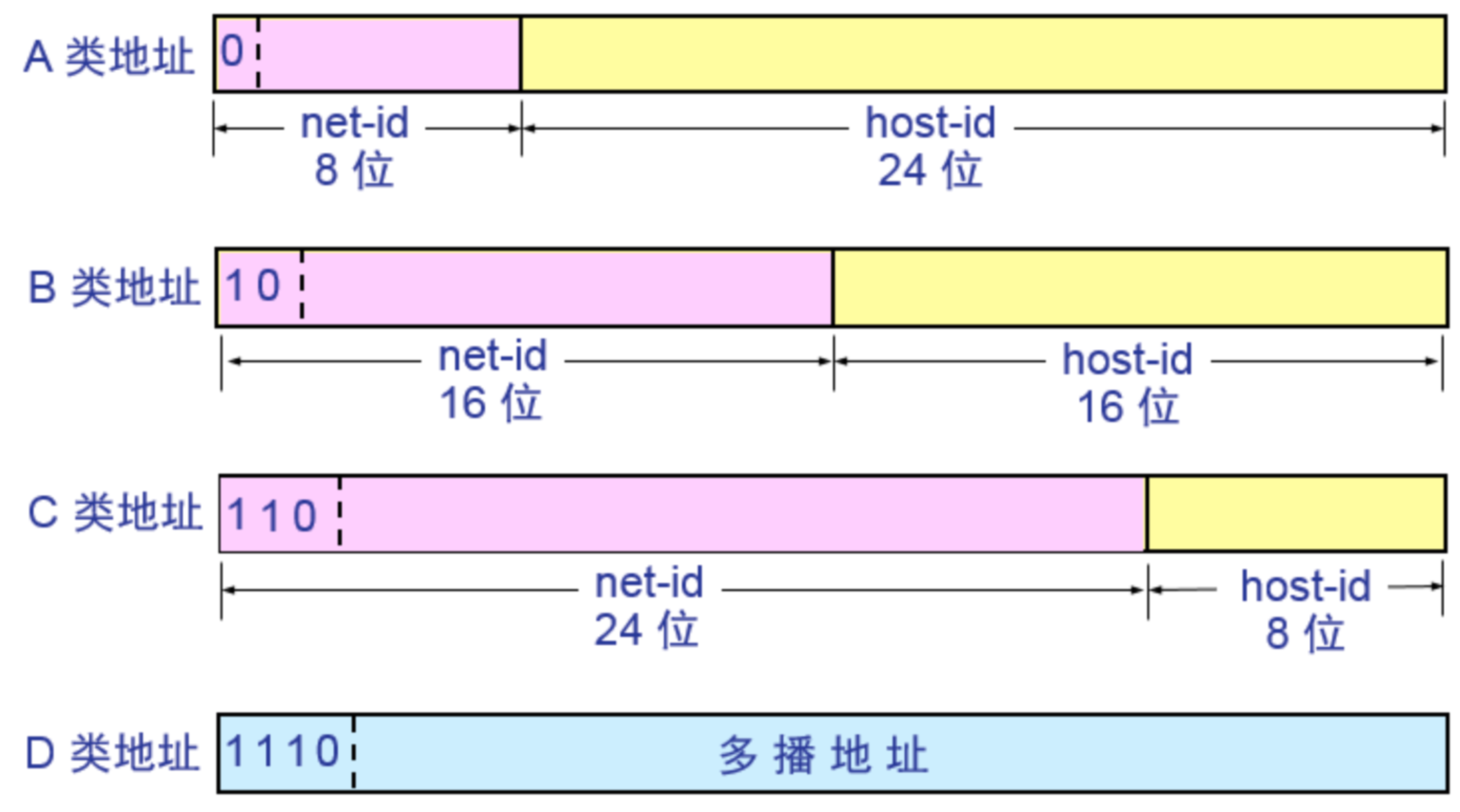
一.IP数据报结构 (1)版本:指明协议的版本,IPv4就是4,IPv6就是6 (2)首部长度:单位是4字节,表示IP报头的长度范围是20~60字节 (3)8位区分服务:实际上只有4位TOS有效,分别是最小延时,最…...
26考研|高等代数:线性空间
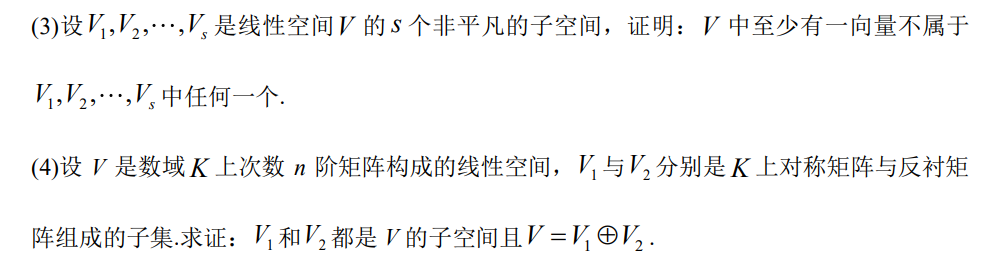
线性空间这一章在整个高等代数学习过程中是非常精华的部分,在学习这一章的过程中会有部分的概念较为抽象,一定要抓紧抓牢对于概念的理解,反复阅读与感受,同时也可以根据已知的解析几何中介绍的二维空间或者三维空间进行类推比较&a…...
(蓝桥杯常考点)-图论)
基础算法篇(3)(蓝桥杯常考点)-图论
前言 这期是蓝桥杯常考点的最后一章了,其中的dijkstra算法更是蓝桥杯中的高频考点 图的基本相关概念 有向图和无向图 自环和重边 稠密图和稀疏图 对于不带权的图,一条路径的路径长度是指该路径上各边权值的总和 对于带权的图,一条路径长度时…...

git错误:fatal: detected dubious ownership in repository at xxxxxx
1、报错说明 这个错误通常是由于Git仓库目录的拥有者或权限问题引起的。Git检测到仓库目录的所有权可能存在不一致或不安全的情况。 通常导致此报错的可能原因: (1)文件或目录的拥有者不一致: 仓库目录中的某些文件或子目录可能…...
【Linux】进程间通信(IPC)-- 无名管道、命名管道
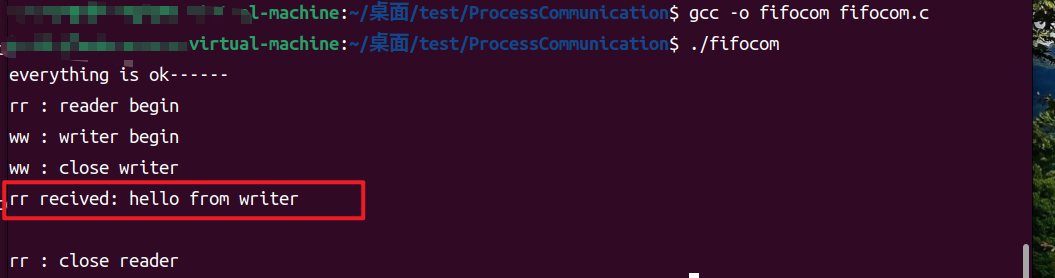
IPC机制 实现进程间通信 在多个进程间传输数据或共享信息的机制。 数据交换,共享资源,进程同步,消息传递。 IPC实现原理:通信进程能够访问相同的内存区域。 方法: 管道:无名管道pipe、命名管道FIFO S…...
每日一题-力扣-2278. 字母在字符串中的百分比 0331
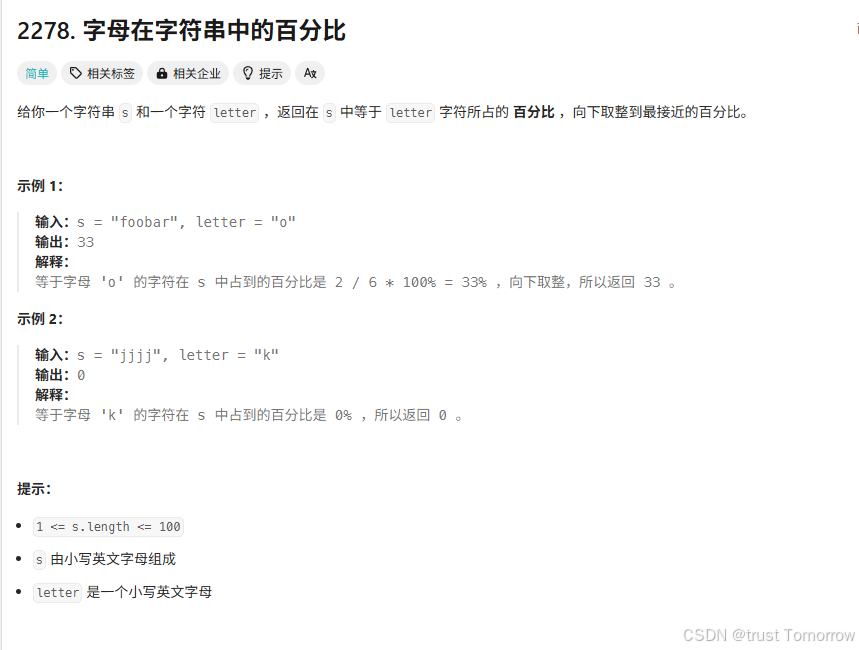
字母在字符串中的百分比求解方案 | 力扣 2278 题解 问题描述 给定一个字符串 s 和一个字母 letter,我们需要计算 letter 在 s 中出现的百分比,并将结果向下取整。例如,如果字符串是 "foobar",字母是 "o"&…...

【分布式】深入剖析 Sentinel 限流:原理、实现
在当今分布式系统盛行的时代,流量的剧增给系统稳定性带来了巨大挑战。Sentinel 作为一款强大的流量控制组件,在保障系统平稳运行方面发挥着关键作用。本文将深入探讨 Sentinel 限流的原理、实现方案以及其优缺点,助力开发者更好地运用这一工具…...
)
[leetcode]2492. 两个城市间路径的最小分数(并查集 排序后建边)
题目链接 题意 给定一个 n n n个点 m m m条边的无向图 每条边有边权 求1-n的路径中最小的边权是多少 每条路可以重复走 思路 把边按边权降序排序 用并查集维护连通性 遍历每条边 每次合并边的起点和终点 如果1和n联通 并且这条边在1和n的这个连通块中 就对ans取min Code…...

关于CodeJava的学习笔记——11
一、GUI 1、最简单的GUI 只有一个按钮的GUI import java.awt.*; import javax.swing.*; public class SimpleGUI{JFrame frame;Button bt;public SimpleGUI(){frame new JFrame("标题栏内容");bt new Button("点我啊");frame.add(bt);frame.setSize(8…...

首个物业plus系列展 2025上海国际智慧物业博览会开幕
AI赋能服务升级!首个“物业plus”系列展 2025上海国际智慧物业博览会盛大开幕 3月31日,2025上海国际智慧物业博览会(简称“上海物博会”)在上海新国际博览中心N4馆隆重开幕。本届展会由广州旭杨国际展览有限公司主办,…...

嵌入式八股文学习——虚函数相关知识学习
虚函数 什么是虚函数?虚函数示例解析代码解析: 使用虚函数的注意事项1. 虚函数的声明与定义2. 派生类中的虚函数 哪些函数不能声明为虚函数1. 普通函数(非成员函数)2. 构造函数3. 内联成员函数4. 静态成员函数5. 友元函数总结 纯虚…...
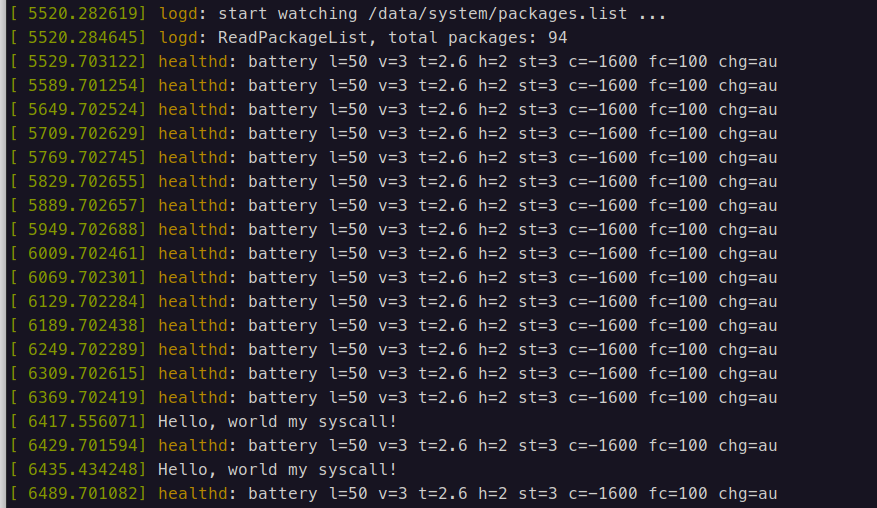
rk3586开发版新增系统调用(Android13)
一、前言 最近想学一下kernel和hal,所以买了一块板子,带了个摄像头和屏幕,1100,学习投资了。这个Android内核定一个系统调用感觉是真的麻烦,主要是有一层bionic C,一开始不熟悉的时候还是花了点时间去配置。 二、kernel修改 include/uapi/asm-generic…...

OCR第三个方案:PP-OCRv4的初步探索
一、PP-OCR历史简要回顾 先请出PP-OCR官网,理解上有出入的,以官网为准。 1.1 PP-OCR系列历史 PP-OCRv1(2020):首创3.5M超轻量模型,奠定两阶段架构基础(检测方向分类识别)PP-OCRv2…...
——ESP32部分)
物联网开发项目:AS608+ESP32S3+Vue构建指纹识别系统(二)——ESP32部分
一、前言 接着上一篇文章介绍的关于AS608模块的介绍以及关于指纹特征库的提取与导入分析,如果亲自上手了的话,那么对于Arduino IDE和AS608的基本操作已经熟悉了。 在这一个月之中,抛开中途有事耽误了,终于是基本上完成了我们整个项…...
:竞价结算规则、底价策略与内部排名解析)
程序化广告行业(46/89):竞价结算规则、底价策略与内部排名解析
程序化广告行业(46/89):竞价结算规则、底价策略与内部排名解析 大家好!在之前的几篇博客中,我们已经深入探讨了程序化广告的多个重要方面,从基础概念到实际操作流程。我写这些博客的目的,就是希…...
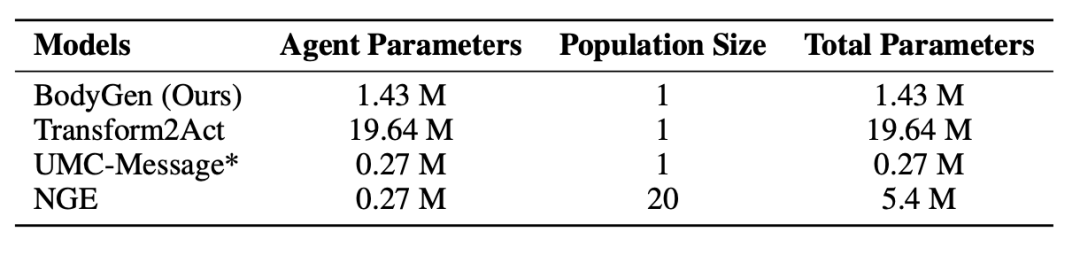
ICLR 2025 Spotlight:让机器人实现「自主进化」,蚂蚁数科、清华提出具身协同框架 BodyGen
最近,全球 AI 和机器学习顶会 ICLR 2025 公布了论文录取结果:由蚂蚁数科与清华大学联合团队提出的全新具身协同框架 BodyGen 成功入选 Spotlight(聚光灯/特别关注)论文。 论文出自蚂蚁数科与清华大学兴军亮老师团队合作的科研项目…...
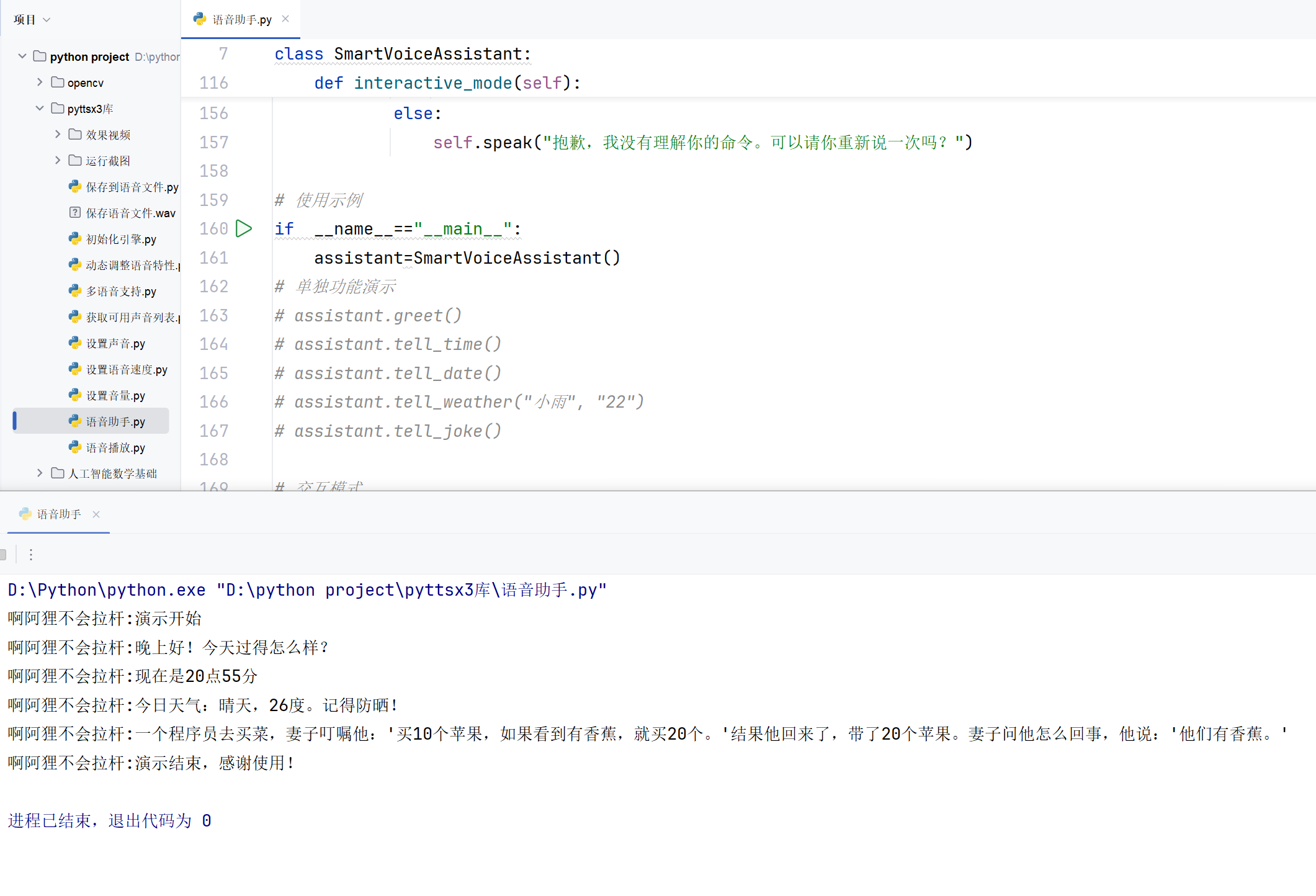
第十九章:Python-pyttsx3 库实现文本转语音功能
前言 在开发语音交互应用或需要文本转语音功能的项目时,pyttsx3 是一个非常实用的 Python 库。它支持离线语音合成,无需联网即可将文本转换为语音。本文将详细介绍 pyttsx3 的功能、用法以及常见问题的解决方法,并通过示例代码帮助你快速上手…...

Unity 2022.3.x部分Android设备播放视频黑屏问题
Android平台视频兼容性问题很多…类似的黑屏问题真的很头大,总结一些常见问题: 1. 视频文件不支持压缩 如果使用AssetBundle加载视频,这个AssetBundle压缩格式要选None。有人可能会说最新版Unity已经支持bundle压缩下播放视频,稳…...

vLLM 部署 openai whisper 模型实现语音转文字
vLLM 部署 openai whisper 模型实现语音转文字 1. 安装 vLLM2. 启动 openai whisper 模型 1. 安装 vLLM pip install vllm vllm[audio] --pre --extra-index-url https://wheels.vllm.ai/nightly --upgrade2. 启动 openai whisper 模型 CUDA_VISIBLE_DEVICES0 \ VLLM_WORKER_…...

【Zabbix技术系列文章】第④篇——Zabbix 数据可视化
在当今数字化运维时代,面对海量的监控数据,如何从中快速获取有价值的信息至关重要。Zabbix 的数据可视化功能为我们提供了直观、高效的解决方案,它能将复杂的监控数据转化为清晰易懂的图表和仪表盘,助力运维人员迅速发现问题、分析…...

表格数据导出为Excel
环境及插件配置:(理论上vue2应该也可以使用,没有试验过) "vue": "^3.2.36", "webpack": "^5.94.0", "webpack-cli": "^5.1.4", "file-saver": "^2.…...

Faster-Whisper —— 为语音识别加速的利器
Faster-Whisper —— 为语音识别加速的利器 在语音识别技术迅速发展的今天,OpenAI 的 Whisper 模型因其强大的多语言识别能力和优异的准确率而受到广泛关注。然而,高精度模型往往伴随着高昂的计算开销和较长的推理时间,这对于需要实时或大规…...
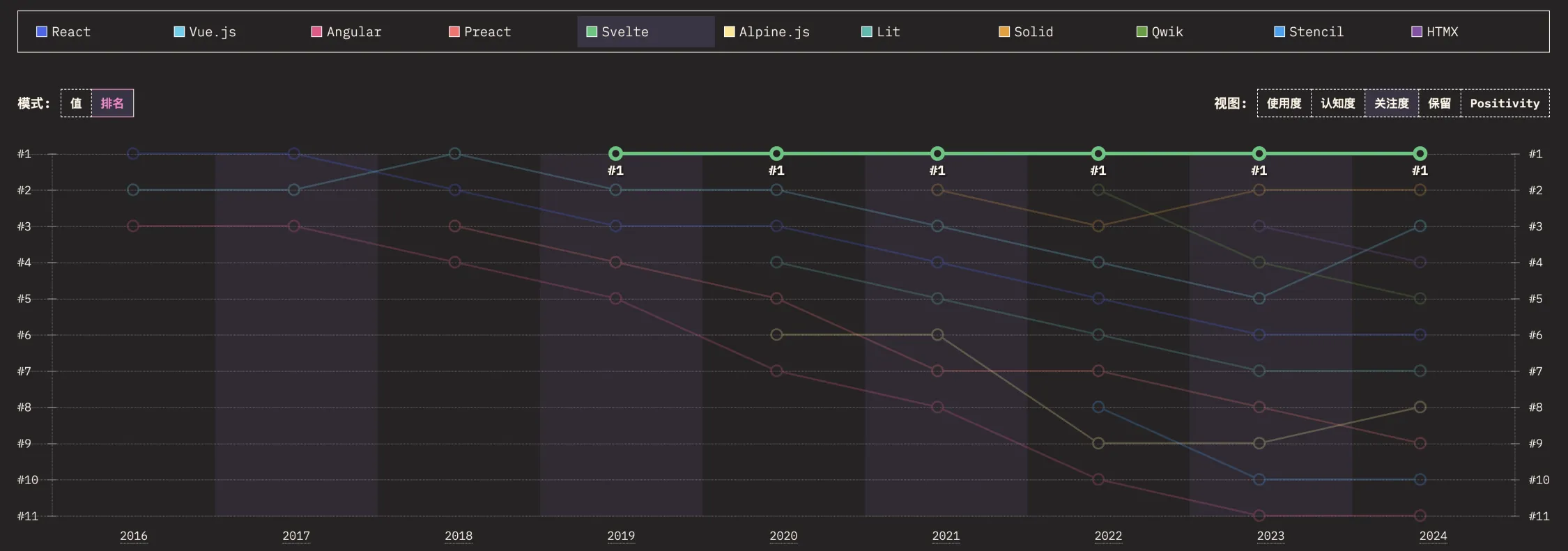
SvelteKit 最新中文文档教程(16)—— Service workers
前言 Svelte,一个语法简洁、入门容易,面向未来的前端框架。 从 Svelte 诞生之初,就备受开发者的喜爱,根据统计,从 2019 年到 2024 年,连续 6 年一直是开发者最感兴趣的前端框架 No.1: Svelte …...

Flutter项目之构建打包分析
目录: 1、准备部分2、构建Android包2.1、配置修改部分2.2、编译打包 3、构建ios包3.1、配置修改部分3.2、编译打包 1、准备部分 2、构建Android包 2.1、配置修改部分 2.2、编译打包 执行flutter build apk命令进行打包。 3、构建ios包 3.1、配置修改部分 3.2、编译…...
24、网络编程基础概念
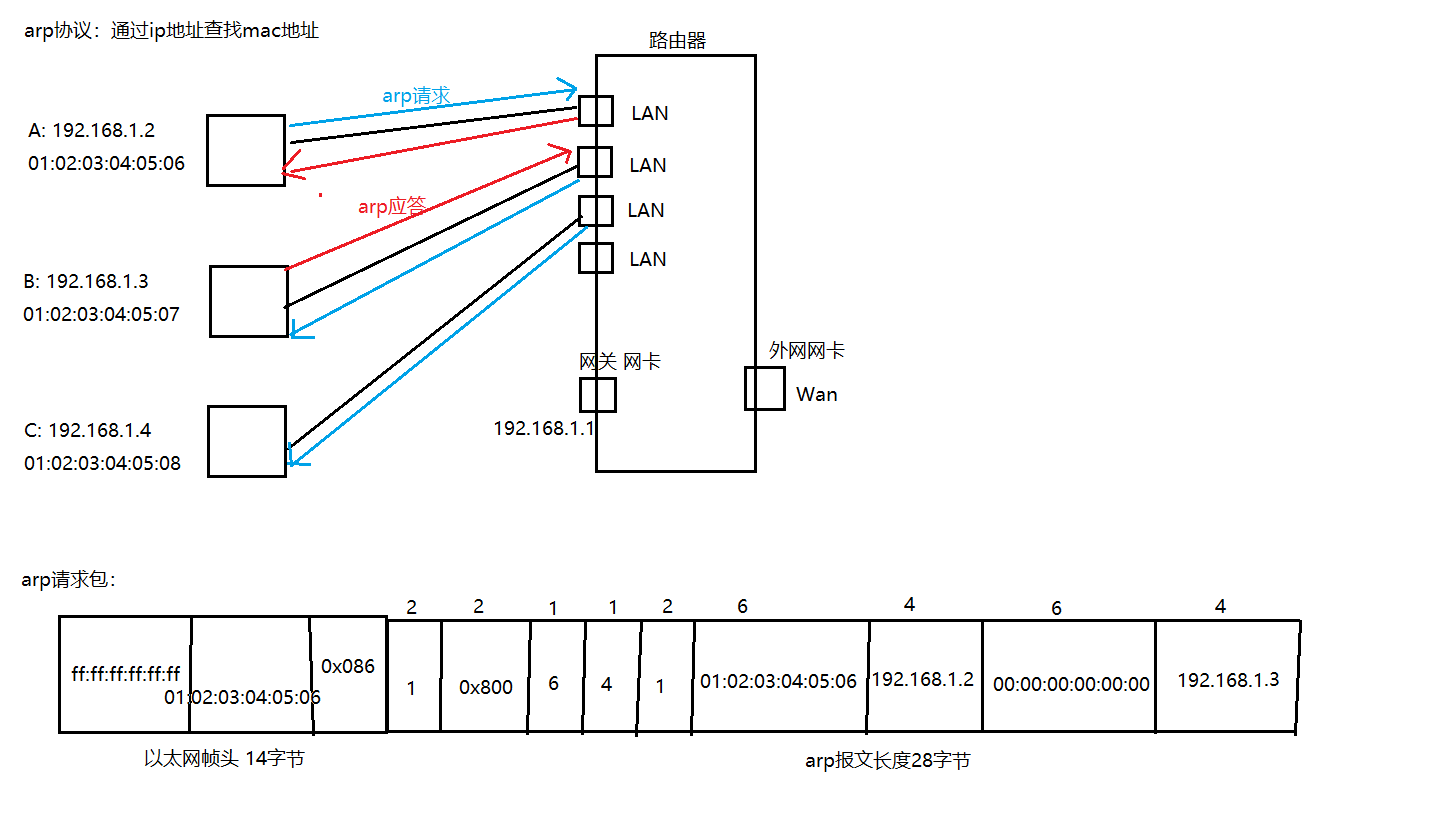
网络编程基础概念 网络结构模式MAC地址IP地址子网掩码端口网络模型协议网络通信的过程(封装与解封装) 网络结构模式 C/S结构,由客户机和服务器两部分组成,如QQ、英雄联盟 B/S结构,通过浏览器与服务器进程交互…...
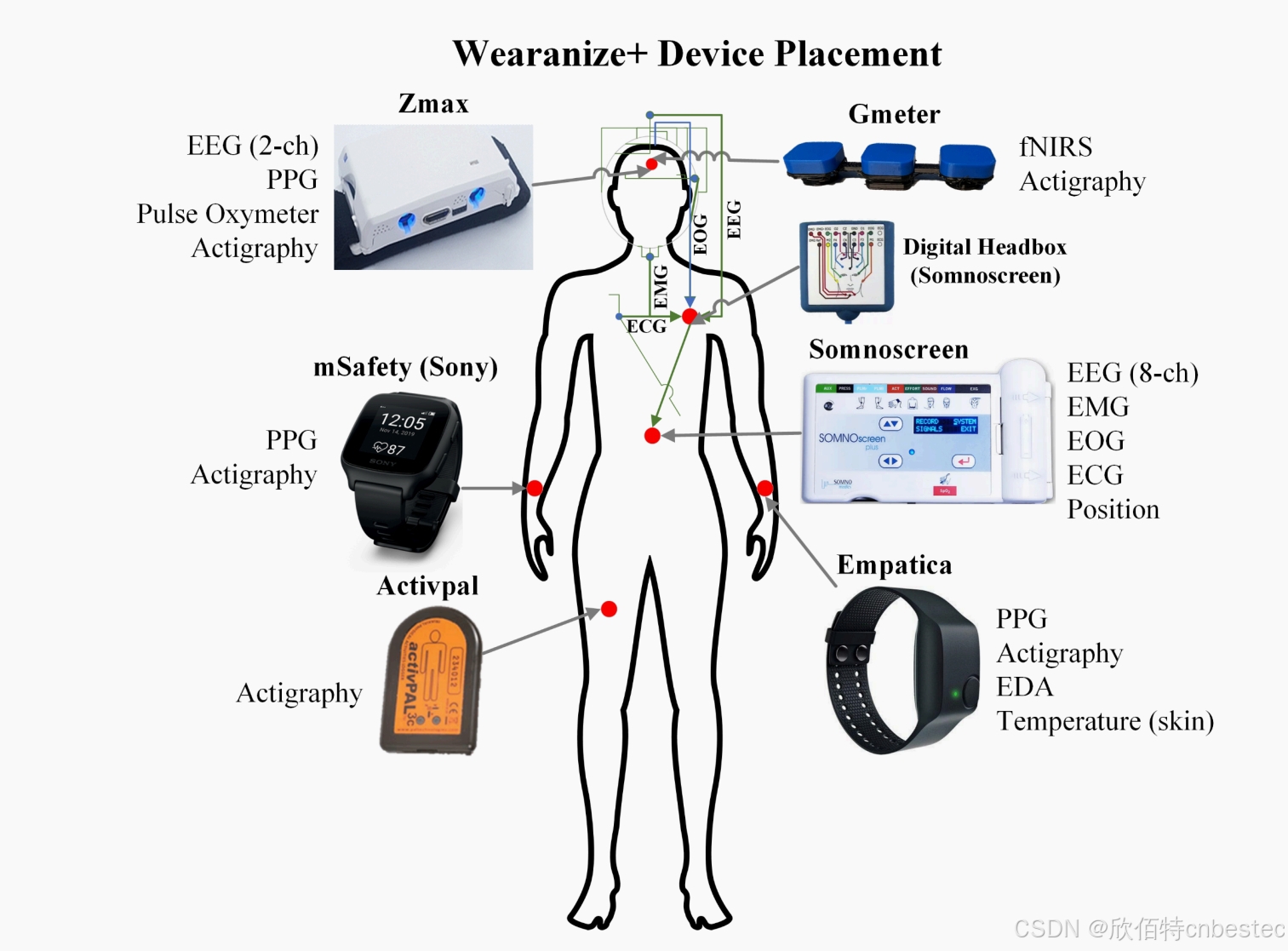
Mentalab Explore Pro携手 Wearanize + 数据集,推动睡眠科学研究
在神经科学和睡眠研究的领域,精确监测大脑活动是获取深入见解的关键。传统多导睡眠监测(PSG)设备虽然提供了详尽的数据,但其操作的复杂性和成本限制了其在更广泛场景中的应用。可穿戴技术的兴起提供了一种新的数据收集方式&#x…...

基于 RK3588 的 YOLO 多线程推理多级硬件加速引擎框架设计(代码框架和实现细节)
一、前言 接续上一篇文章,这个部分主要分析代码框架的实现细节和设计理念。 基于RK3588的YOLO多线程推理多级硬件加速引擎框架设计(项目总览和加速效果)-CSDN博客https://blog.csdn.net/plmm__/article/details/146542002?spm1001.2014.300…...