
开发体育赛事直播系统主播认证功能技术实现方案
该体育直播系统系统由东莞梦幻网络科技开发,使用 ThinkPHP 作为后端,Vue.js 作为 PC/H5 端框架,Java 和 Objective-C 分别用于安卓和 iOS 开发。
1、前端实现 (Vue.js)
<template><div class="anchor-certification"><div class="header"><h1>主播认证</h1></div><div class="form-container"><el-form :model="form" :rules="rules" ref="form" label-width="120px"><!-- 直播信息 --><el-form-item label="直播赛事" prop="liveType"><el-checkbox-group v-model="form.liveType"><el-checkbox label="足球"></el-checkbox><el-checkbox label="篮球"></el-checkbox><el-checkbox label="电竞"></el-checkbox><el-checkbox label="其他"></el-checkbox></el-checkbox-group></el-form-item><el-form-item label="直播经验" prop="experience"><el-select v-model="form.experience" placeholder="请选择"><el-option label="1个月" value="1"></el-option><el-option label="3个月" value="3"></el-option><el-option label="6个月" value="6"></el-option><el-option label="1年" value="12"></el-option><el-option label="2年" value="24"></el-option><el-option label="3年以上" value="36"></el-option></el-select></el-form-item><!-- 个人信息 --><el-form-item label="姓名" prop="realName"><el-input v-model="form.realName" placeholder="请输入您的真实姓名"></el-input></el-form-item><el-form-item label="身份证号" prop="idCard"><el-input v-model="form.idCard" placeholder="请输入您身份证号码"></el-input></el-form-item><el-form-item label="身份照片" prop="idCardPhoto"><el-uploadaction="/api/upload/idCard":limit="1":on-success="handleIdCardSuccess":before-upload="beforeIdCardUpload":file-list="idCardFileList"><el-button size="small" type="primary">点击上传</el-button><div slot="tip" class="el-upload__tip">请上传身份证正面照片,支持jpg/png格式,大小不超过5MB</div></el-upload></el-form-item><!-- 联系方式 --><el-form-item label="联系方式"><el-input v-model="form.qq" placeholder="QQ号"></el-input><el-input v-model="form.wechat" placeholder="微信号"></el-input><el-input v-model="form.phone" placeholder="电话号码"></el-input></el-form-item><!-- 个人简介 --><el-form-item label="个人简介" prop="introduction"><el-inputtype="textarea":rows="5"v-model="form.introduction"placeholder="请填写您的个人简介,不少于15字":minlength="15"></el-input><div class="intro-tips"><p>建议包含以下内容:</p><p>1. 主播经验几年</p><p>2. 在哪些平台上担任过主播</p><p>3. 曾经获得过哪些荣誉</p><p>4. 擅长直播哪类赛事(足球、篮球、电竞、娱乐、其他)</p></div></el-form-item><!-- 邀请人 --><el-form-item label="邀请人"><el-input v-model="form.inviter" placeholder="请输入邀请人(选填)"></el-input><el-input v-model="form.inviterPhone" placeholder="+86 请输入邀请人电话(选填)"></el-input></el-form-item><!-- 验证码 --><el-form-item label="验证码" prop="captcha"><el-input v-model="form.captcha" placeholder="请输入验证码" style="width: 200px"></el-input><el-button @click="getCaptcha" :disabled="captchaDisabled">{{ captchaBtnText }}</el-button></el-form-item><!-- 协议 --><el-form-item prop="agreed"><el-checkbox v-model="form.agreed">我已阅读并同意<a href="/protocol/anchor" target="_blank">《体育直播协议》</a></el-checkbox></el-form-item><!-- 提交按钮 --><el-form-item><el-button type="primary" @click="submitForm" :loading="submitting">提交认证</el-button></el-form-item></el-form></div><div class="footer"><div class="links"><a href="#">关于我们</a><a href="#">联系方式</a><a href="#">帮助中心</a></div><div class="copyright">Copyright © 2020-2025 龙牙直播 ALL Rights Reserved</div></div></div>
</template><script>
export default {data() {return {form: {liveType: [],experience: '',realName: '',idCard: '',idCardPhoto: '',qq: '',wechat: '',phone: '',introduction: '',inviter: '',inviterPhone: '',captcha: '',agreed: false},rules: {liveType: [{ type: 'array', required: true, message: '请至少选择一项直播赛事', trigger: 'change' }],experience: [{ required: true, message: '请选择直播经验', trigger: 'change' }],realName: [{ required: true, message: '请输入真实姓名', trigger: 'blur' }],idCard: [{ required: true, message: '请输入身份证号码', trigger: 'blur' },{ pattern: /(^\d{15}$)|(^\d{18}$)|(^\d{17}(\d|X|x)$)/, message: '身份证号格式不正确' }],idCardPhoto: [{ required: true, message: '请上传身份证照片', trigger: 'blur' }],introduction: [{ required: true, message: '请输入个人简介', trigger: 'blur' },{ min: 15, message: '个人简介不能少于15个字符', trigger: 'blur' }],captcha: [{ required: true, message: '请输入验证码', trigger: 'blur' }],agreed: [{ validator: (rule, value, callback) => {if (!value) {callback(new Error('请阅读并同意协议'));} else {callback();}}, trigger: 'change' }]},idCardFileList: [],captchaDisabled: false,captchaBtnText: '获取验证码',countdown: 60,submitting: false};},methods: {handleIdCardSuccess(response, file) {this.form.idCardPhoto = response.data.url;},beforeIdCardUpload(file) {const isJPG = file.type === 'image/jpeg' || file.type === 'image/png';const isLt5M = file.size / 1024 / 1024 < 5;if (!isJPG) {this.$message.error('上传头像图片只能是 JPG/PNG 格式!');}if (!isLt5M) {this.$message.error('上传头像图片大小不能超过 5MB!');}return isJPG && isLt5M;},getCaptcha() {if (!this.form.phone) {this.$message.error('请输入手机号码');return;}// 调用API获取验证码this.$http.post('/api/captcha/sms', { phone: this.form.phone }).then(() => {this.$message.success('验证码已发送');this.startCountdown();}).catch(error => {this.$message.error(error.message || '验证码发送失败');});},startCountdown() {this.captchaDisabled = true;this.captchaBtnText = `${this.countdown}秒后重新获取`;const timer = setInterval(() => {this.countdown -= 1;this.captchaBtnText = `${this.countdown}秒后重新获取`;if (this.countdown <= 0) {clearInterval(timer);this.captchaDisabled = false;this.captchaBtnText = '获取验证码';this.countdown = 60;}}, 1000);},submitForm() {this.$refs.form.validate(valid => {if (valid) {this.submitting = true;this.$http.post('/api/anchor/certification', this.form).then(response => {this.$message.success('提交成功,请等待审核');this.$router.push('/certification/result');}).catch(error => {this.$message.error(error.message || '提交失败');}).finally(() => {this.submitting = false;});} else {return false;}});}}
};
</script><style scoped>
.anchor-certification {max-width: 800px;margin: 0 auto;padding: 20px;
}.header {text-align: center;margin-bottom: 30px;
}.form-container {background: #fff;padding: 30px;border-radius: 5px;box-shadow: 0 2px 12px 0 rgba(0, 0, 0, 0.1);
}.intro-tips {color: #999;font-size: 12px;margin-top: 5px;
}.footer {margin-top: 30px;text-align: center;color: #999;font-size: 12px;
}.links {margin-bottom: 10px;
}.links a {margin: 0 10px;color: #999;text-decoration: none;
}.links a:hover {color: #409EFF;
}
</style>
2、后端实现 (PHP/ThinkPHP)
<?php
namespace app\api\controller;use think\Controller;
use think\Request;
use think\Validate;class AnchorCertification extends Controller
{// 提交主播认证public function submit(){$request = Request::instance();$data = $request->post();// 验证规则$rules = ['liveType' => 'require|array','experience' => 'require','realName' => 'require|chs','idCard' => 'require|idCard','idCardPhoto' => 'require|url','introduction' => 'require|min:15','captcha' => 'require','agreed' => 'require|accepted'];// 验证消息$messages = ['liveType.require' => '请选择直播赛事','experience.require' => '请选择直播经验','realName.require' => '请输入真实姓名','realName.chs' => '姓名只能为中文','idCard.require' => '请输入身份证号码','idCard.idCard' => '身份证号格式不正确','idCardPhoto.require' => '请上传身份证照片','idCardPhoto.url' => '身份证照片URL格式不正确','introduction.require' => '请输入个人简介','introduction.min' => '个人简介不能少于15个字符','captcha.require' => '请输入验证码','agreed.require' => '请阅读并同意协议','agreed.accepted' => '请阅读并同意协议'];$validate = new Validate($rules, $messages);if (!$validate->check($data)) {return json(['code' => 400,'message' => $validate->getError()]);}// 验证验证码if (!$this->checkCaptcha($data['phone'], $data['captcha'])) {return json(['code' => 400,'message' => '验证码错误或已过期']);}// 保存认证信息$certification = ['user_id' => $request->userId, // 从token中获取的用户ID'live_type' => implode(',', $data['liveType']),'experience' => $data['experience'],'real_name' => $data['realName'],'id_card' => $data['idCard'],'id_card_photo' => $data['idCardPhoto'],'qq' => $data['qq'] ?? '','wechat' => $data['wechat'] ?? '','phone' => $data['phone'] ?? '','introduction' => $data['introduction'],'inviter' => $data['inviter'] ?? '','inviter_phone' => $data['inviterPhone'] ?? '','status' => 0, // 0-待审核 1-已通过 2-已拒绝'create_time' => time(),'update_time' => time()];try {$id = db('anchor_certification')->insertGetId($certification);return json(['code' => 200,'message' => '提交成功,请等待审核','data' => ['id' => $id]]);} catch (\Exception $e) {return json(['code' => 500,'message' => '提交失败: ' . $e->getMessage()]);}}// 获取验证码public function sendCaptcha(){$request = Request::instance();$phone = $request->post('phone');if (empty($phone)) {return json(['code' => 400,'message' => '请输入手机号码']);}if (!preg_match('/^1[3-9]\d{9}$/', $phone)) {return json(['code' => 400,'message' => '手机号码格式不正确']);}// 生成验证码$captcha = mt_rand(100000, 999999);// 保存验证码到缓存,有效期5分钟cache('captcha_' . $phone, $captcha, 300);// TODO: 实际项目中这里应该调用短信服务发送验证码// $this->sendSms($phone, $captcha);return json(['code' => 200,'message' => '验证码已发送']);}// 验证验证码private function checkCaptcha($phone, $captcha){$cacheCaptcha = cache('captcha_' . $phone);if ($cacheCaptcha && $cacheCaptcha == $captcha) {// 验证成功后删除验证码cache('captcha_' . $phone, null);return true;}return false;}// 上传身份证照片public function uploadIdCard(){$file = request()->file('file');if (empty($file)) {return json(['code' => 400,'message' => '请选择上传文件']);}// 验证文件类型和大小$info = $file->validate(['size' => 5242880, // 5MB'ext' => 'jpg,jpeg,png'])->move(ROOT_PATH . 'public' . DS . 'uploads' . DS . 'idcards');if ($info) {$url = '/uploads/idcards/' . $info->getSaveName();return json(['code' => 200,'message' => '上传成功','data' => ['url' => $url]]);} else {return json(['code' => 400,'message' => $file->getError()]);}}
}
3、安卓实现 (Java)
// AnchorCertificationActivity.java
public class AnchorCertificationActivity extends AppCompatActivity {private EditText etRealName, etIdCard, etQQ, etWechat, etPhone, etIntroduction, etInviter, etInviterPhone, etCaptcha;private CheckBox cbFootball, cbBasketball, cbEsports, cbOther;private Spinner spExperience;private ImageView ivIdCard;private Button btnGetCaptcha, btnSubmit;private CheckBox cbAgree;private String idCardPhotoUrl;private int countdown = 60;private boolean isCountdownRunning = false;@Overrideprotected void onCreate(Bundle savedInstanceState) {super.onCreate(savedInstanceState);setContentView(R.layout.activity_anchor_certification);initViews();setupSpinner();}private void initViews() {etRealName = findViewById(R.id.et_real_name);etIdCard = findViewById(R.id.et_id_card);etQQ = findViewById(R.id.et_qq);etWechat = findViewById(R.id.et_wechat);etPhone = findViewById(R.id.et_phone);etIntroduction = findViewById(R.id.et_introduction);etInviter = findViewById(R.id.et_inviter);etInviterPhone = findViewById(R.id.et_inviter_phone);etCaptcha = findViewById(R.id.et_captcha);cbFootball = findViewById(R.id.cb_football);cbBasketball = findViewById(R.id.cb_basketball);cbEsports = findViewById(R.id.cb_esports);cbOther = findViewById(R.id.cb_other);spExperience = findViewById(R.id.sp_experience);ivIdCard = findViewById(R.id.iv_id_card);ivIdCard.setOnClickListener(v -> uploadIdCard());btnGetCaptcha = findViewById(R.id.btn_get_captcha);btnGetCaptcha.setOnClickListener(v -> getCaptcha());btnSubmit = findViewById(R.id.btn_submit);btnSubmit.setOnClickListener(v -> submitCertification());cbAgree = findViewById(R.id.cb_agree);}private void setupSpinner() {ArrayAdapter<CharSequence> adapter = ArrayAdapter.createFromResource(this,R.array.experience_options, android.R.layout.simple_spinner_item);adapter.setDropDownViewResource(android.R.layout.simple_spinner_dropdown_item);spExperience.setAdapter(adapter);}private void uploadIdCard() {Intent intent = new Intent(Intent.ACTION_GET_CONTENT);intent.setType("image/*");startActivityForResult(intent, 1);}@Overrideprotected void onActivityResult(int requestCode, int resultCode, @Nullable Intent data) {super.onActivityResult(requestCode, resultCode, data);if (requestCode == 1 && resultCode == RESULT_OK && data != null) {Uri uri = data.getData();try {Bitmap bitmap = MediaStore.Images.Media.getBitmap(getContentResolver(), uri);ivIdCard.setImageBitmap(bitmap);// 实际上传逻辑uploadImageToServer(uri);} catch (IOException e) {e.printStackTrace();Toast.makeText(this, "图片加载失败", Toast.LENGTH_SHORT).show();}}}private void uploadImageToServer(Uri uri) {// 这里实现实际上传逻辑,使用OkHttp或其他网络库// 上传成功后保存返回的URL到idCardPhotoUrl}private void getCaptcha() {String phone = etPhone.getText().toString().trim();if (phone.isEmpty()) {Toast.makeText(this, "请输入手机号码", Toast.LENGTH_SHORT).show();return;}if (!Patterns.PHONE.matcher(phone).matches()) {Toast.makeText(this, "手机号码格式不正确", Toast.LENGTH_SHORT).show();return;}// 调用API获取验证码getCaptchaFromServer(phone);// 开始倒计时startCountdown();}private void getCaptchaFromServer(String phone) {// 使用Retrofit或Volley调用API// 成功回调后显示提示Toast.makeText(this, "验证码已发送", Toast.LENGTH_SHORT).show();}private void startCountdown() {isCountdownRunning = true;btnGetCaptcha.setEnabled(false);new CountDownTimer(60000, 1000) {@Overridepublic void onTick(long millisUntilFinished) {btnGetCaptcha.setText(countdown + "秒后重新获取");countdown--;}@Overridepublic void onFinish() {btnGetCaptcha.setEnabled(true);btnGetCaptcha.setText("获取验证码");countdown = 60;isCountdownRunning = false;}}.start();}private void submitCertification() {String realName = etRealName.getText().toString().trim();String idCard = etIdCard.getText().toString().trim();String introduction = etIntroduction.getText().toString().trim();String captcha = etCaptcha.getText().toString().trim();// 验证必填项if (realName.isEmpty()) {Toast.makeText(this, "请输入真实姓名", Toast.LENGTH_SHORT).show();return;}if (idCard.isEmpty() || !validateIdCard(idCard)) {Toast.makeText(this, "请输入正确的身份证号码", Toast.LENGTH_SHORT).show();return;}if (idCardPhotoUrl == null || idCardPhotoUrl.isEmpty()) {Toast.makeText(this, "请上传身份证照片", Toast.LENGTH_SHORT).show();return;}if (introduction.isEmpty() || introduction.length() < 15) {Toast.makeText(this, "个人简介不能少于15字", Toast.LENGTH_SHORT).show();return;}if (captcha.isEmpty()) {Toast.makeText(this, "请输入验证码", Toast.LENGTH_SHORT).show();return;}if (!cbAgree.isChecked()) {Toast.makeText(this, "请阅读并同意协议", Toast.LENGTH_SHORT).show();return;}// 收集直播类型List<String> liveTypes = new ArrayList<>();if (cbFootball.isChecked()) liveTypes.add("足球");if (cbBasketball.isChecked()) liveTypes.add("篮球");if (cbEsports.isChecked()) liveTypes.add("电竞");if (cbOther.isChecked()) liveTypes.add("其他");if (liveTypes.isEmpty()) {Toast.makeText(this, "请至少选择一项直播赛事", Toast.LENGTH_SHORT).show();return;}// 收集其他信息String experience = spExperience.getSelectedItem().toString();String qq = etQQ.getText().toString().trim();String wechat = etWechat.getText().toString().trim();String phone = etPhone.getText().toString().trim();String inviter = etInviter.getText().toString().trim();String inviterPhone = etInviterPhone.getText().toString().trim();// 提交到服务器submitToServer(liveTypes, experience, realName, idCard, idCardPhotoUrl, qq, wechat, phone, introduction, inviter, inviterPhone, captcha);}private boolean validateIdCard(String idCard) {// 简单的身份证验证return idCard.matches("(^\\d{15}$)|(^\\d{18}$)|(^\\d{17}(\\d|X|x)$");}private void submitToServer(List<String> liveTypes, String experience, String realName, String idCard, String idCardPhoto, String qq, String wechat, String phone, String introduction, String inviter, String inviterPhone, String captcha) {// 使用Retrofit或Volley提交数据// 显示加载中ProgressDialog progressDialog = new ProgressDialog(this);progressDialog.setMessage("提交中...");progressDialog.setCancelable(false);progressDialog.show();// 构造请求体JSONObject requestBody = new JSONObject();try {requestBody.put("liveType", new JSONArray(liveTypes));requestBody.put("experience", experience);requestBody.put("realName", realName);requestBody.put("idCard", idCard);requestBody.put("idCardPhoto", idCardPhoto);requestBody.put("qq", qq);requestBody.put("wechat", wechat);requestBody.put("phone", phone);requestBody.put("introduction", introduction);requestBody.put("inviter", inviter);requestBody.put("inviterPhone", inviterPhone);requestBody.put("captcha", captcha);requestBody.put("agreed", true);} catch (JSONException e) {e.printStackTrace();}// 实际网络请求// 成功回调progressDialog.dismiss();Toast.makeText(this, "提交成功,请等待审核", Toast.LENGTH_SHORT).show();finish();}
}
4、iOS实现 (Objective-C)
// AnchorCertificationViewController.h
#import <UIKit/UIKit.h>@interface AnchorCertificationViewController : UIViewController <UINavigationControllerDelegate, UIImagePickerControllerDelegate>@end// AnchorCertificationViewController.m
#import "AnchorCertificationViewController.h"@interface AnchorCertificationViewController ()@property (weak, nonatomic) IBOutlet UITextField *realNameField;
@property (weak, nonatomic) IBOutlet UITextField *idCardField;
@property (weak, nonatomic) IBOutlet UITextField *qqField;
@property (weak, nonatomic) IBOutlet UITextField *wechatField;
@property (weak, nonatomic) IBOutlet UITextField *phoneField;
@property (weak, nonatomic) IBOutlet UITextView *introductionView;
@property (weak, nonatomic) IBOutlet UITextField *inviterField;
@property (weak, nonatomic) IBOutlet UITextField *inviterPhoneField;
@property (weak, nonatomic) IBOutlet UITextField *captchaField;@property (weak, nonatomic) IBOutlet UIButton *footballBtn;
@property (weak, nonatomic) IBOutlet UIButton *basketballBtn;
@property (weak, nonatomic) IBOutlet UIButton *esportsBtn;
@property (weak, nonatomic) IBOutlet UIButton *otherBtn;@property (weak, nonatomic) IBOutlet UIPickerView *experiencePicker;
@property (weak, nonatomic) IBOutlet UIImageView *idCardImageView;
@property (weak, nonatomic) IBOutlet UIButton *getCaptchaBtn;
@property (weak, nonatomic) IBOutlet UIButton *submitBtn;
@property (weak, nonatomic) IBOutlet UIButton *agreeBtn;@property (strong, nonatomic) NSArray *experienceOptions;
@property (strong, nonatomic) NSString *idCardPhotoUrl;
@property (assign, nonatomic) NSInteger countdown;
@property (strong, nonatomic) NSTimer *countdownTimer;@end@implementation AnchorCertificationViewController- (void)viewDidLoad {[super viewDidLoad];[self setupUI];[self setupData];
}- (void)setupUI {self.introductionView.layer.borderWidth = 1.0;self.introductionView.layer.borderColor = [UIColor lightGrayColor].CGColor;self.introductionView.layer.cornerRadius = 5.0;self.idCardImageView.userInteractionEnabled = YES;UITapGestureRecognizer *tap = [[UITapGestureRecognizer alloc] initWithTarget:self action:@selector(uploadIdCard)];[self.idCardImageView addGestureRecognizer:tap];self.experiencePicker.delegate = self;self.experiencePicker.dataSource = self;
}- (void)setupData {self.experienceOptions = @[@"1个月", @"3个月", @"6个月", @"1年", @"2年", @"3年以上"];self.countdown = 60;
}- (IBAction)liveTypeSelected:(UIButton *)sender {sender.selected = !sender.selected;
}- (IBAction)getCaptchaTapped:(id)sender {NSString *phone = self.phoneField.text;if (phone.length == 0) {[self showAlertWithTitle:@"提示" message:@"请输入手机号码"];return;}// 简单的手机号验证NSString *phoneRegex = @"^1[3-9]\\d{9}$";NSPredicate *phoneTest = [NSPredicate predicateWithFormat:@"SELF MATCHES %@", phoneRegex];if (![phoneTest evaluateWithObject:phone]) {[self showAlertWithTitle:@"提示" message:@"手机号码格式不正确"];return;}[self getCaptchaFromServer:phone];[self startCountdown];
}- (void)getCaptchaFromServer:(NSString *)phone {// 实际项目中这里应该调用API获取验证码[self showAlertWithTitle:@"提示" message:@"验证码已发送"];
}- (void)startCountdown {self.getCaptchaBtn.enabled = NO;self.countdownTimer = [NSTimer scheduledTimerWithTimeInterval:1.0 target:self selector:@selector(updateCountdown) userInfo:nil repeats:YES];
}- (void)updateCountdown {if (self.countdown > 0) {[self.getCaptchaBtn setTitle:[NSString stringWithFormat:@"%ld秒后重新获取", (long)self.countdown] forState:UIControlStateDisabled];self.countdown--;} else {[self.countdownTimer invalidate];self.countdownTimer = nil;self.getCaptchaBtn.enabled = YES;[self.getCaptchaBtn setTitle:@"获取验证码" forState:UIControlStateNormal];self.countdown = 60;}
}- (void)uploadIdCard {UIImagePickerController *picker = [[UIImagePickerController alloc] init];picker.delegate = self;picker.sourceType = UIImagePickerControllerSourceTypePhotoLibrary;picker.allowsEditing = YES;[self presentViewController:picker animated:YES completion:nil];
}- (void)imagePickerController:(UIImagePickerController *)picker didFinishPickingMediaWithInfo:(NSDictionary<UIImagePickerControllerInfoKey,id> *)info {UIImage *image = info[UIImagePickerControllerEditedImage] ?: info[UIImagePickerControllerOriginalImage];self.idCardImageView.image = image;// 实际上传逻辑[self uploadImageToServer:image];[picker dismissViewControllerAnimated:YES completion:nil];
}- (void)uploadImageToServer:(UIImage *)image {// 这里实现实际上传逻辑,使用AFNetworking或其他网络库// 上传成功后保存返回的URL到self.idCardPhotoUrl
}- (IBAction)submitTapped:(id)sender {NSString *realName = self.realNameField.text;NSString *idCard = self.idCardField.text;NSString *introduction = self.introductionView.text;NSString *captcha = self.captchaField.text;// 验证必填项if (realName.length == 0) {[self showAlertWithTitle:@"提示" message:@"请输入真实姓名"];return;}if (idCard.length == 0 || ![self validateIdCard:idCard]) {[self showAlertWithTitle:@"提示" message:@"请输入正确的身份证号码"];return;}if (self.idCardPhotoUrl.length == 0) {[self showAlertWithTitle:@"提示" message:@"请上传身份证照片"];return;}if (introduction.length < 15) {[self showAlertWithTitle:@"提示" message:@"个人简介不能少于15字"];return;}if (captcha.length == 0) {[self showAlertWithTitle:@"提示" message:@"请输入验证码"];return;}if (!self.agreeBtn.selected) {[self showAlertWithTitle:@"提示" message:@"请阅读并同意协议"];return;}// 收集直播类型NSMutableArray *liveTypes = [NSMutableArray array];if (self.footballBtn.selected) [liveTypes addObject:@"足球"];if (self.basketballBtn.selected) [liveTypes addObject:@"篮球"];if (self.esportsBtn.selected) [liveTypes addObject:@"电竞"];if (self.otherBtn.selected) [liveTypes addObject:@"其他"];if (liveTypes.count == 0) {[self showAlertWithTitle:@"提示" message:@"请至少选择一项直播赛事"];return;}// 收集其他信息NSInteger selectedRow = [self.experiencePicker selectedRowInComponent:0];NSString *experience = self.experienceOptions[selectedRow];NSString *qq = self.qqField.text;NSString *wechat = self.wechatField.text;NSString *phone = self.phoneField.text;NSString *inviter = self.inviterField.text;NSString *inviterPhone = self.inviterPhoneField.text;// 提交到服务器[self submitToServerWithLiveTypes:liveTypes experience:experience realName:realName idCard:idCard idCardPhoto:self.idCardPhotoUrl qq:qq wechat:wechat phone:phone introduction:introduction inviter:inviter inviterPhone:inviterPhone captcha:captcha];
}- (BOOL)validateIdCard:(NSString *)idCard {NSString *regex = @"(^\\d{15}$)|(^\\d{18}$)|(^\\d{17}(\\d|X|x)$";NSPredicate *predicate = [NSPredicate predicateWithFormat:@"SELF MATCHES %@", regex];return [predicate evaluateWithObject:idCard];
}- (void)submitToServerWithLiveTypes:(NSArray *)liveTypes experience:(NSString *)experience realName:(NSString *)realName idCard:(NSString *)idCard idCardPhoto:(NSString *)idCardPhoto qq:(NSString *)qq wechat:(NSString *)wechat phone:(NSString *)phone introduction:(NSString *)introduction inviter:(NSString *)inviter inviterPhone:(NSString *)inviterPhone captcha:(NSString *)captcha {// 显示加载中UIAlertController *loadingAlert = [UIAlertController alertControllerWithTitle:nil message:@"提交中..." preferredStyle:UIAlertControllerStyleAlert];[self presentViewController:loadingAlert animated:YES completion:nil];// 构造请求参数NSDictionary *params = @{@"liveType": liveTypes,@"experience": experience,@"realName": realName,@"idCard": idCard,@"idCardPhoto": idCardPhoto,@"qq": qq ?: @"",@"wechat": wechat ?: @"",@"phone": phone ?: @"",@"introduction": introduction,@"inviter": inviter ?: @"",@"inviterPhone": inviterPhone ?: @"",@"captcha": captcha,@"agreed": @YES};// 实际网络请求// 使用AFNetworking或NSURLSession// 成功回调[loadingAlert dismissViewControllerAnimated:YES completion:^{[self showAlertWithTitle:@"提示" message:@"提交成功,请等待审核"];
5、数据库设计 (MySQL)
CREATE TABLE `anchor_certification` (`id` INT PRIMARY KEY AUTO_INCREMENT,`name` VARCHAR(50) NOT NULL COMMENT '主播真实姓名',`identity_card` VARCHAR(18) NOT NULL COMMENT '身份证号码',`identity_photo_front` VARCHAR(255) NOT NULL COMMENT '身份证正面照片路径',`identity_photo_back` VARCHAR(255) NOT NULL COMMENT '身份证反面照片路径',`identity_photo_handheld` VARCHAR(255) NOT NULL COMMENT '手持身份证照片路径',`contact_type` ENUM('QQ', '微信', '电话') DEFAULT NULL COMMENT '联系方式类型',`contact_value` VARCHAR(50) DEFAULT NULL COMMENT '联系方式内容',`live_experience` ENUM('1个月', '3个月', '1年', '3年', '5年以上') NOT NULL COMMENT '直播经验',`live_type` SET('足球', '篮球', '电竞', '娱乐', '其他') NOT NULL COMMENT '擅长的直播类型',`personal_intro` TEXT NOT NULL COMMENT '个人简介',`invite_code` VARCHAR(20) DEFAULT NULL COMMENT '邀请人邀请码',`status` ENUM('待审核', '已通过', '已拒绝') DEFAULT '待审核' COMMENT '审核状态',`created_at` TIMESTAMP DEFAULT CURRENT_TIMESTAMP COMMENT '创建时间',`updated_at` TIMESTAMP DEFAULT CURRENT_TIMESTAMP ON UPDATE CURRENT_TIMESTAMP COMMENT '更新时间'
) ENGINE=InnoDB DEFAULT CHARSET=utf8mb4 COMMENT='主播认证信息表';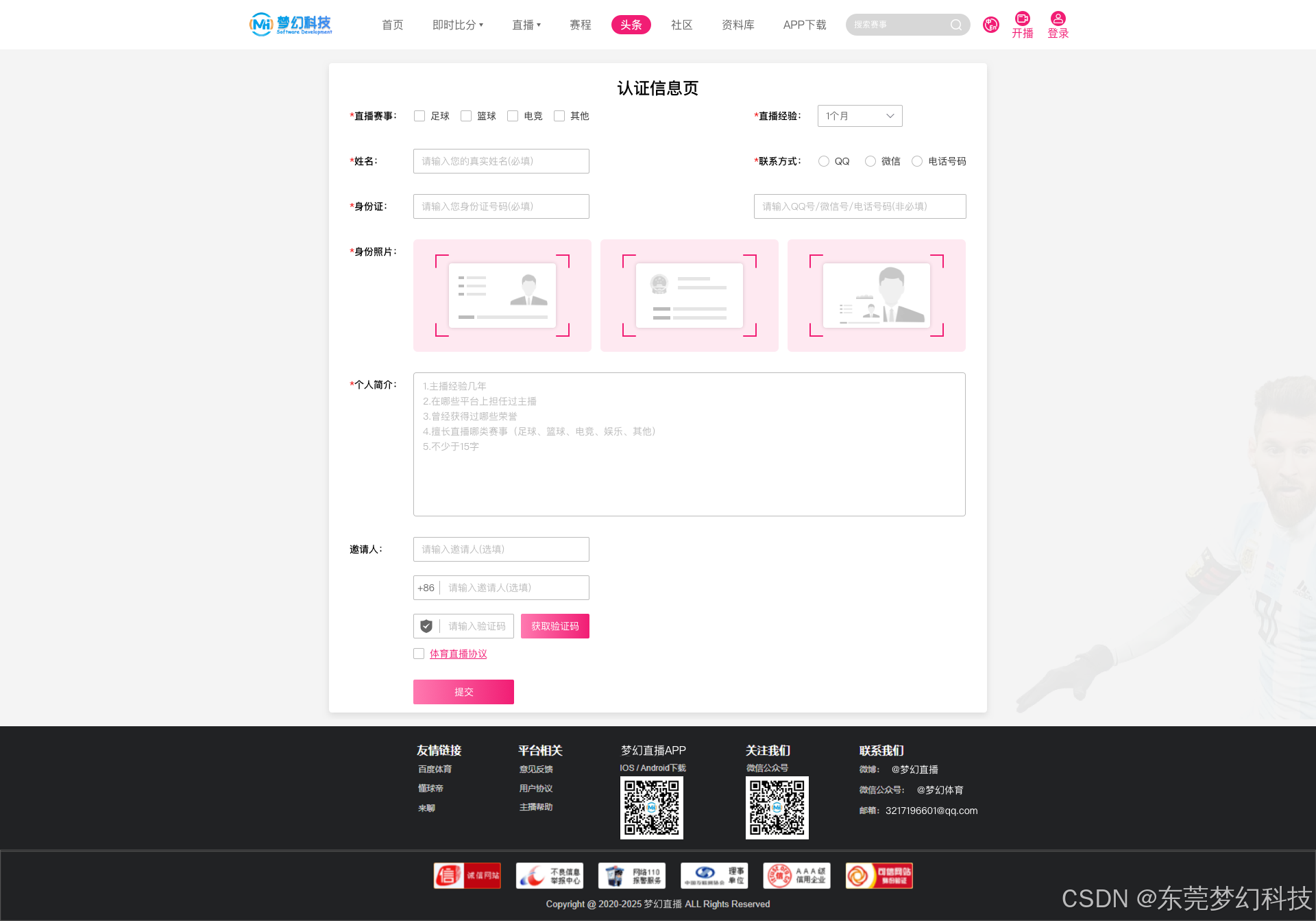
相关文章:
开发体育赛事直播系统主播认证功能技术实现方案
该体育直播系统系统由东莞梦幻网络科技开发,使用 ThinkPHP 作为后端,Vue.js 作为 PC/H5 端框架,Java 和 Objective-C 分别用于安卓和 iOS 开发。 1、前端实现 (Vue.js) <template><div class"anchor-certification">…...
国产三维CAD「皇冠CAD」在汽车零部件领域建模教程:刹车片
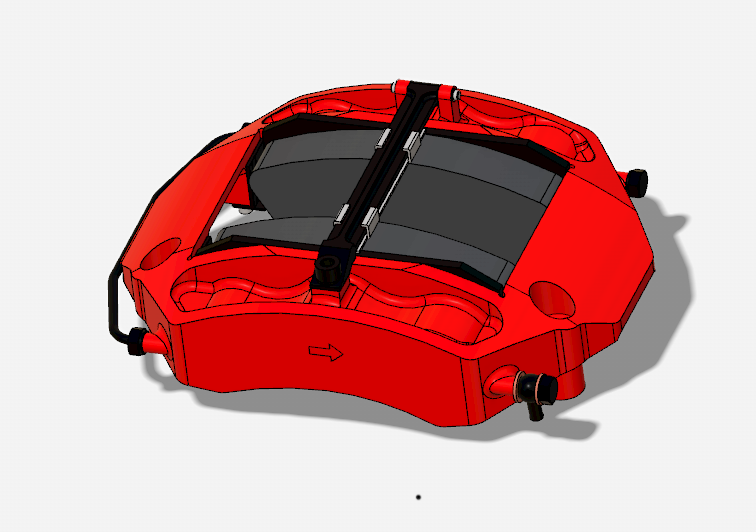
本教程深度融合三维皇冠CAD(CrownCAD)的MBD(Model-Based Definition)设计理念,通过参数化建模、智能约束管理、动态装配验证等功能,实现数据驱动设计,精准解决了汽车制动系统中精密制动组件的设…...

基于指针的线程池
使用原线程池 当 push 和 pop的对象过大时,消耗时延过高,需优化线程池 采用 std::move() unique_ptr的方法,能极大的减少时延, 实际就是避免了多次拷贝,直接使用指针。 代码实现 ThreadPool…...

GitHub与Gitee各是什么?它们的区别与联系是什么?
李升伟 整理 GitHub 介绍 GitHub 是一个基于 Git 的代码托管平台,主要用于版本控制和协作开发。它支持多人协作,提供代码托管、问题跟踪、代码审查、项目管理等功能。GitHub 是全球最大的开源社区,许多知名开源项目都在此托管。 主要功能&…...
SpringMvc获取请求数据
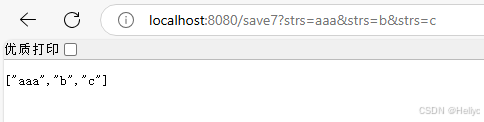
基本参数 RequestMapping("save5") ResponseBody public User save5(String name, int age) {User user new User();user.setName(name);user.setAge(age);return user; } 在url中将name与age进行编写,通过框架可以提取url中的name与age,这…...

简述竞赛经历在考研复试中的作用
文章目录 前言拟录取情况baichuicxyAshy佬齐总结回首展望 前言 随着就业形式的不断变化,竞赛奖项在就业中能起到的作用在逐步减弱。想拿到头部大厂实习面试资格,最低要区域赛银牌起步,当然这也仅仅是面试资格。 那么,竞赛经历在…...

大语言模型开发框架——LangChain
什么是LangChain LangChain是一个开发由语言模型驱动的应用程序的框架,它提供了一套工具、组件和接口,可以简化构建高级语言模型应用程序的过程。利用LangChain可以使应用程序具备两个能力: 上下文感知 将语言模型与上下文(提示…...

Nginx 核心配置详解与性能优化最佳实践
1.什么是 Nginx? Nginx 是一个高性能的 Web 服务器和反向代理服务器。它轻量、高效,被广泛用于现代 Web 开发中。 2.为什么前端需要了解 Nginx? ★ 了解 本地开发:可以模拟生产环境 部署前端项目:作为静态文件服务器…...
机器学习的一百个概念(7)独热编码
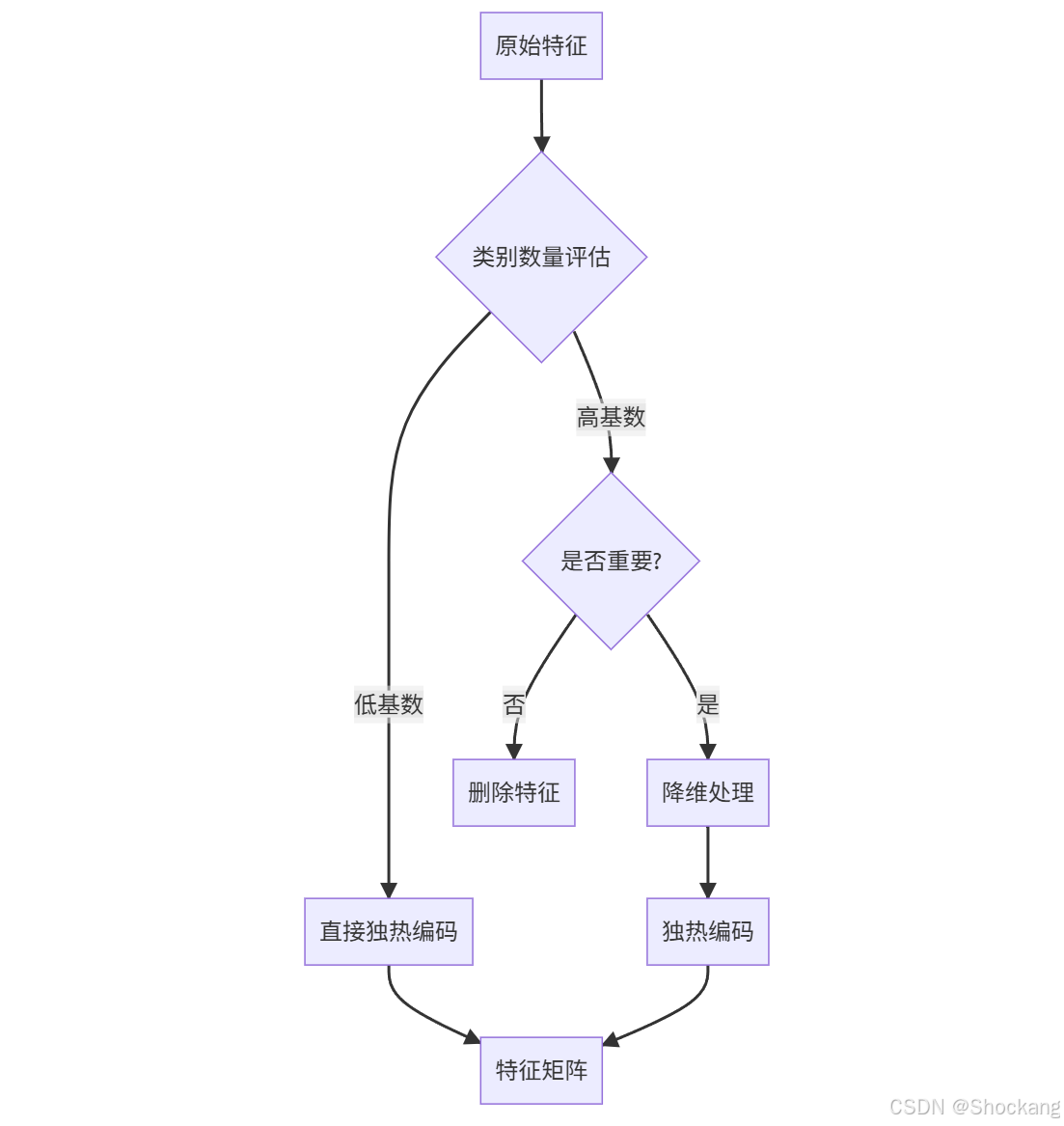
前言 本文隶属于专栏《机器学习的一百个概念》,该专栏为笔者原创,引用请注明来源,不足和错误之处请在评论区帮忙指出,谢谢! 本专栏目录结构和参考文献请见[《机器学习的一百个概念》 ima 知识库 知识库广场搜索&…...

用LLama factory时报类似Process 2504721 got signal: 1的解决方法
之前用nohup来远程跑LLama factory微调脚本,是没有问题的,但今天发现运行类似下面这个命令时, nohup llamafactory-cli train examples/train_qlora/qwen_lora.yaml 只要一关闭ssh session,就会终止训练,报类似&…...

解决 Git 通过 SSH 克隆仓库时自动转换为 HTTPS 的问题
解决 Git 通过 SSH 克隆仓库时自动转换为 HTTPS 的问题 在使用 Git 通过 SSH 协议克隆私有仓库时,如果遇到类似以下错误: fatal: unable to access https://itlab.stack.net:stack.git/: Could not resolve host: gitlab.stack这通常是因为 Git 配置错…...
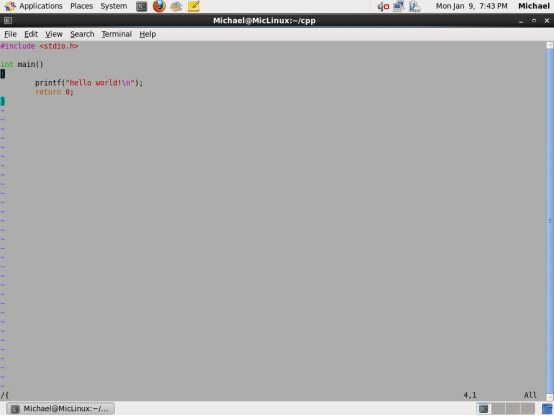
从实用的角度聊聊Linux下文本编辑器VIM
本文从实用的角度聊聊Vim的常用命令。何为实用?我举个不实用的例子大家就明白了,用vim写代码。;) “vim是从 vi 发展出来的一个文本编辑器。代码补全、编译及错误跳转等方便编程的功能特别丰富,在程序员中被广泛使用,和Emacs并列成…...

多电机显示并排序
多电机显示并排序 要实现根据后端传递过来的驱动电机数据的数量来显示不同数量的数据列表,我们可以使用 Vue 的 v-for 指令来遍历 driveMotorData 数组,并为每个驱动电机生成一个数据列表。这样,无论后端传来多少个驱动电机的数据࿰…...

佳能imageRUNNER 2206N基本参数及管理员密码
基本参数: 产品类型 激光数码复合机 颜色类型 黑白 涵盖功能 复印/打印/扫描 速度类型 低速 最大原稿尺寸 A3 复印/打印方式 激光静电转印方式 感光材料 OPC 显影系统 干式单组分显影 定影…...
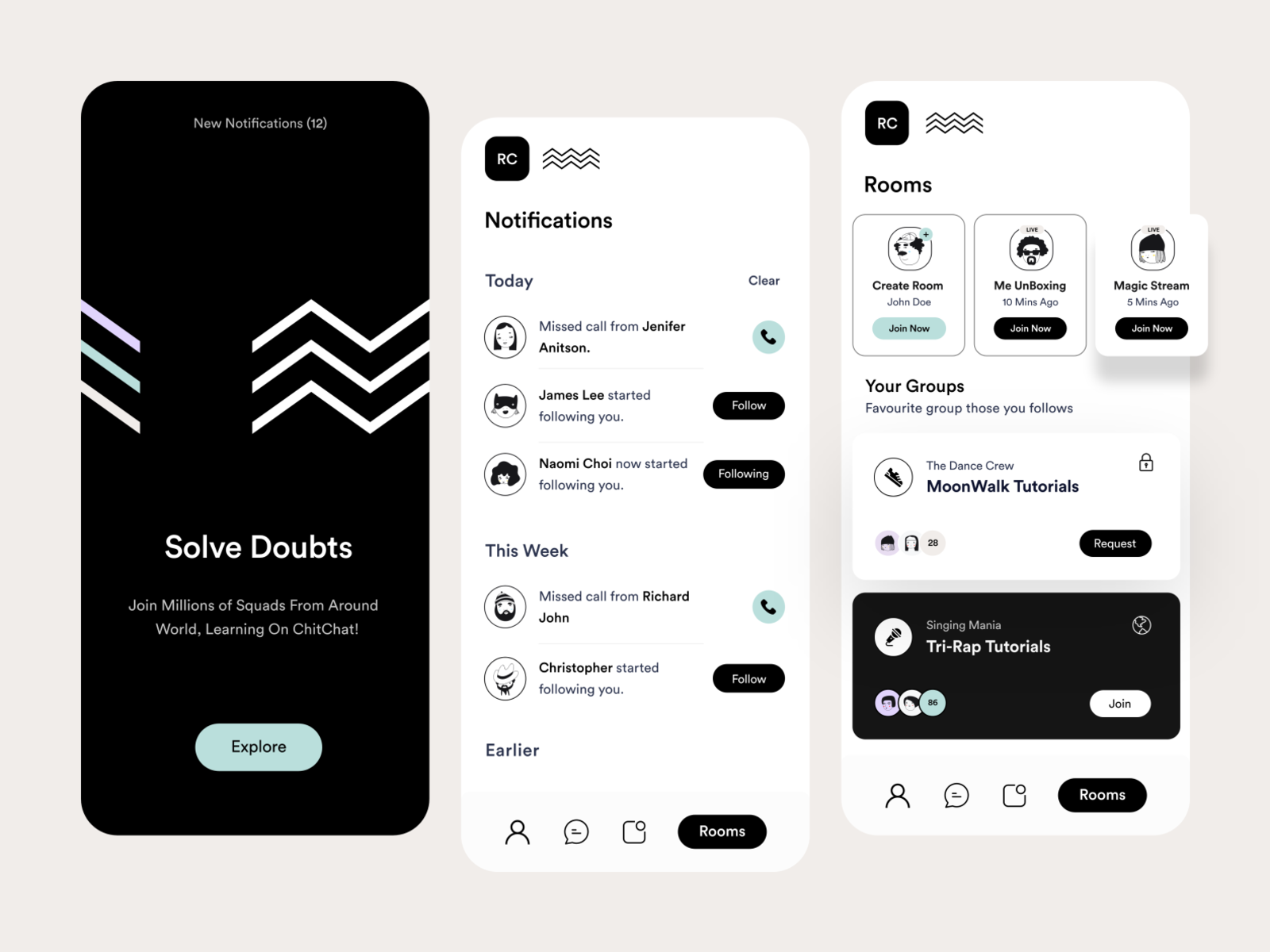
社交类 APP 设计:打造高用户粘性的界面
在当今数字化时代,社交类APP已成为人们日常生活中不可或缺的一部分。然而,随着市场竞争的加剧,如何通过设计提升用户粘性成为社交类APP成功的关键。本文将从设计的关键要素、用户界面优化、功能创新、个性化体验以及持续优化等方面࿰…...
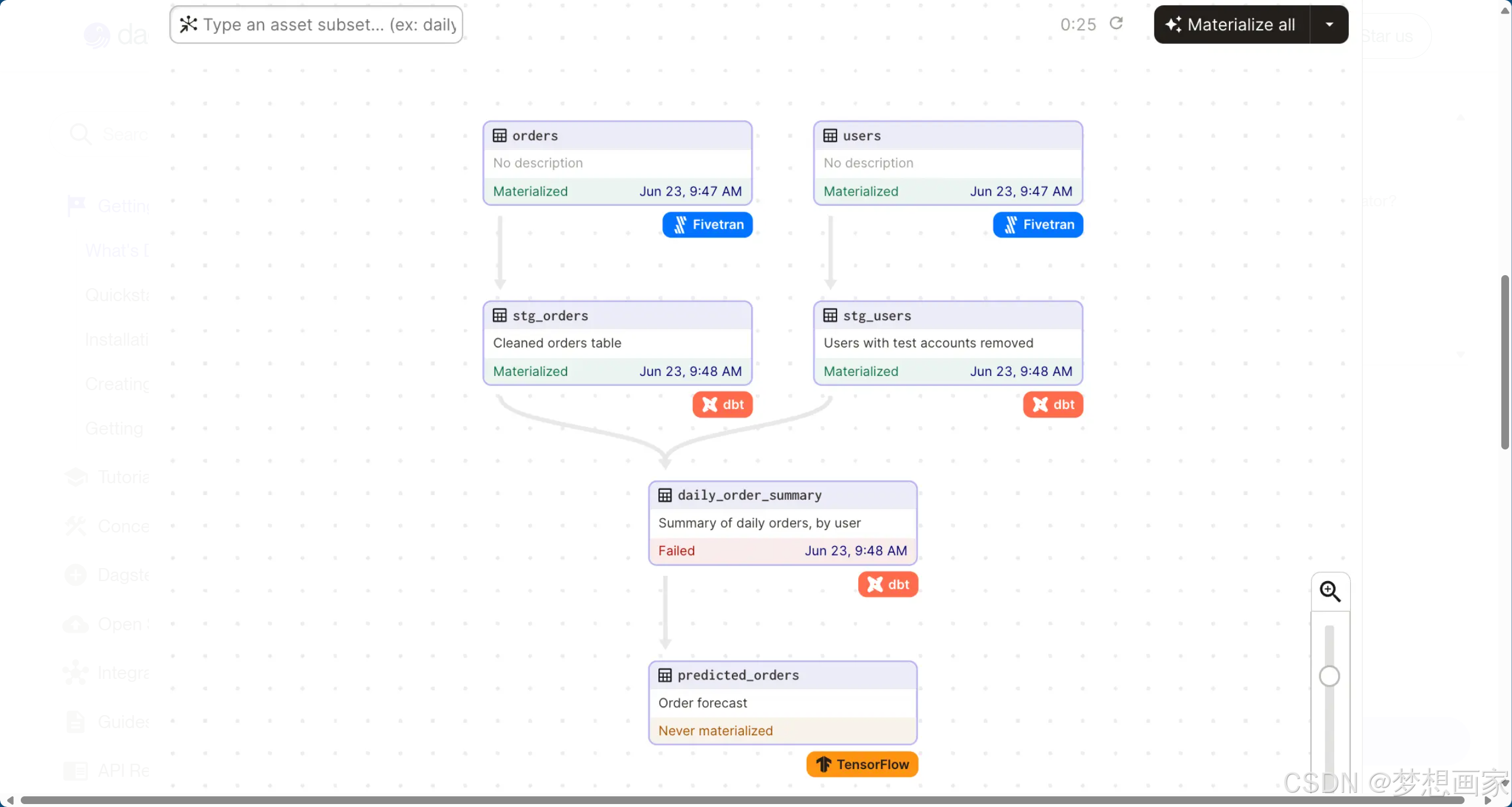
数据编排与Dagster:解锁现代数据管理的核心工具
在数据驱动的时代,如何高效管理复杂的数据管道、确保数据质量并实现团队协作?本文深入探讨数据编排的核心概念,解析其与传统编排器的差异,并聚焦开源工具Dagster如何以“资产为中心”的理念革新数据开发流程,助力企业构…...

网络安全中的“后门”:概念、类型、作用与攻防技术
目录 什么是后门? 后门的常见类型 2.1 按植入方式分类 2.2 按功能分类 后门在安全测试中的作用 后门的玩法与免杀技术 4.1 常见后门技术 4.2 如何实现免杀(Bypass AV) 如何检测和防御后门? 总结 1. 什么是后门ÿ…...

AI | 大模型入门介绍
以下是关于AI大模型中蒸馏、量化、MoE和MHA技术的介绍: 1. 模型蒸馏(Model Distillation) • 定义:模型蒸馏是一种将大型复杂模型(教师模型)的知识转移到小型简单模型(学生模型)的技…...

Jmeter的压测使用
Jmeter基础功能回顾 一、创建Jmeter脚本 1、录制新建 (1)适用群体:初学者 2、手动创建 (1)需要了解Jmeter的常用组件 元件:多个类似功能组件的容器(类似于类) 各元件作用 组件…...

kubernetes》》k8s》》Deployment》》ClusterIP、LoadBalancer、Ingress 内部访问、外边访问
Nginx部署 K8s 集群内外访问服务的方式 节点 Kubernetes 集群中的服务器(指单台) 集群 Kubernetes 管理的一组服务器的集合 边界路由器 为局域网和Internet路由数据包的路由器,执行防火墙保护局域网络 集群网络 遵循Kubernetes网络模型实现集…...

Transformer 通关秘籍8:词向量如何表示近义词?
上一节已经完成了 token 到词向量的转换。那么,使用转换后的词嵌入向量便可以表示 token 之间的语义了吗?便可以表示两个单词是否是近义词,是否是反义词了吗? 是的。 接下来先通过一个例子,来直观地理解一下词嵌入向…...

Vue + Scss项目中实现自定义颜色主题的动态切换
当时面试的时候遇到面试官问的一个问题如何实现自定义颜色主题切换,当时我做的只是elementUIPlus提供的暗黑和默认主题切换 theme.scss // 增加自定义主题类型 $themes: (light: (/* 原有配置保持不变 */),dark: (/* 原有配置保持不变 */),custom: () // 空映射…...

搭建qemu环境
1.安装qemu apt install qemu-system2.编译内核 设置gcc软链接sudo ln -s arm-linux-gnueabihf-gcc arm-linux-gccsudo ln -s arm-linux-gnueabihf-ld arm-linux-ldsudo ln -s arm-linux-gnueabihf-nm arm-linux-nmsudo ln -s arm-linux-gnueabihf-objcopy arm-linux-objc…...
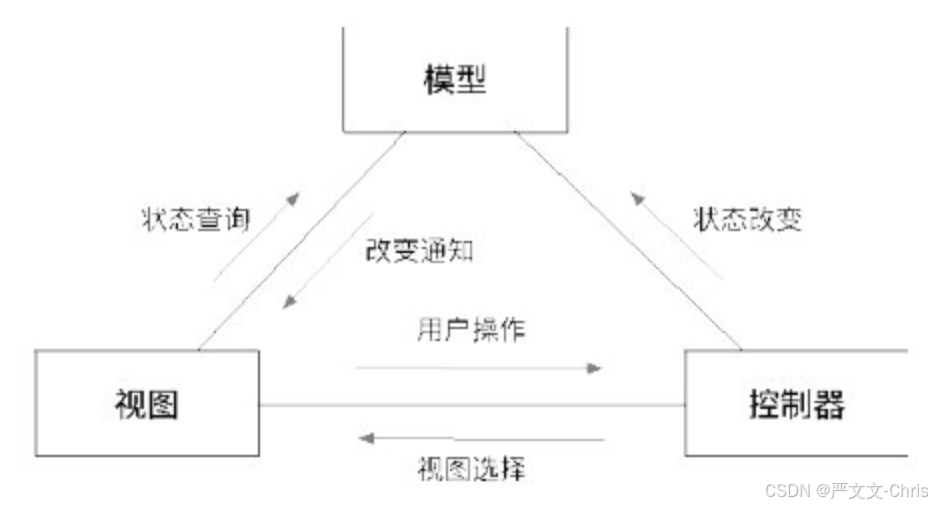
【MVC简介-产生原因、演变历史、核心思想、组成部分、使用场景】
MVC简介 产生原因: MVC(Model-View-Controller)模式诞生于20世纪70年代,由Trygve Reenskaug在施乐帕克研究中心(Xerox PARC)为Smalltalk语言设计,目的是解决图形用户界面(GUI&…...

基于NebulaGraph构建省市区乡镇街道知识图谱(二)
上次我们有讲到构建知识图谱,但是在实际使用的时候会发现某些乡镇街道丢失的问题,因为VID必须全局唯一,覆盖导致原因,另外在全国大批量导入时速度非常慢,为此,我们重新优化表结构与导入语法。 1. 表及索引…...
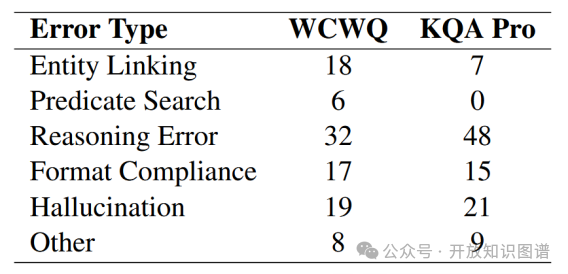
论文浅尝 | Interactive-KBQA:基于大语言模型的多轮交互KBQA(ACL2024)
转载至:何骏昊 开放知识图谱 原文地址:论文浅尝 | Interactive-KBQA:基于大语言模型的多轮交互KBQA(ACL2024) 笔记整理:何骏昊,东南大学硕士,研究方向为语义解析 论文链接ÿ…...

线性规划工具推荐篇 开源+商用 按需取用
一、开源免费工具 1. GLPK (GNU Linear Programming Kit) 特点: 支持线性规划(LP)、混合整数规划(MIP)使用MathProg语言建模,可通过glpsol命令行求解适合中小规模问题,性能低于商业求解器 适用…...

linux -- php 扩展之xlswriter
xlswriter - PHP 最强性能 Excel 扩展 linux 安装 完整编译安装步骤 ## 下载wget https://pecl.php.net/get/xlswriter tar -zxvf xlswriter cd xlswriterphpize # 执行配置 ./configure # 编译 make make install ./configure 如果报错,就指定配置路径 …...

Dockerfile文件构建镜像Anaconda+Python教程
文章目录 前言Dockerfile 核心模块解析**一、Dockerfile基础镜像选择二、系统基础配置1、时区设置2、镜像源替换 三、系统依赖安装四、复制本地文件五、指定路径六、Anaconda环境配置1、anaconda环境安装2、配置虚拟环境3、创建conda虚拟环境4、启动和安装环境 七、完整dockerf…...
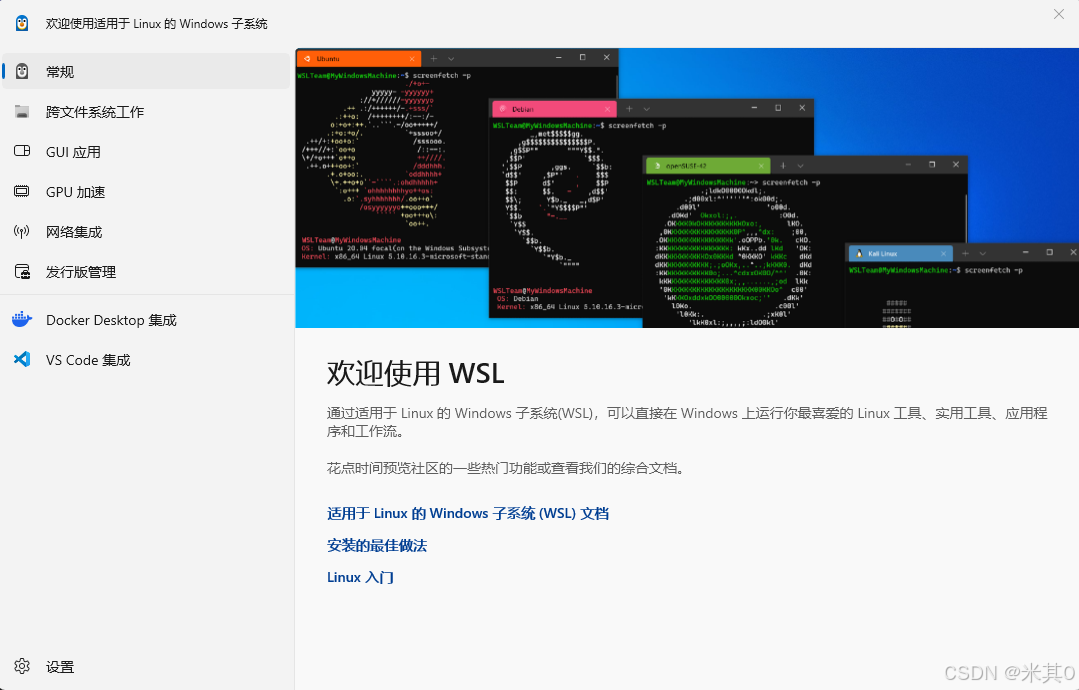
本地部署大模型-web界面(ollama + open-webui)
一、安装ollama 二、安装部署open-webui 1、项目运行环境 (1)配置python环境—官方下载链接 可通过命令行直接更改python镜像源为阿里云镜像源: >pip config set global.index-url http://mirrors.aliyun.com/pypi/simple/也可手动修…...