
【C++】从零实现Json-Rpc框架(2)
目录
JsonCpp库
1.1- Json数据格式
1.2 - JsonCpp介绍
• 序列化接口
• 反序列化接口
1.3 - Json序列化实践
JsonCpp使用
Muduo库
2.1 - Muduo库是什么
2.2 - Muduo库常见接口介绍
TcpServer类基础介绍
EventLoop类基础介绍
TcpConnection类基础介绍
TcpClient类基础介绍
Buffer类基础介绍
2.3 - Muduo库快速上手
英译汉TCP服务器
编辑
英译汉客户端
Makefile
项目汇总:uyeonashi的博客-CSDN博客
项目源码:https://gitee.com/uyeonashi/project
本篇文章是对第三方库的介绍和使用(JsonCpp库,Muduo库)!
JsonCpp库
1.1- Json数据格式
Json 是一种数据交换格式,它采用完全独立于编程语言的文本格式来存储和表示数据。
例如: 我们想表示一个同学的学生信息
C 代码表示:
char *name = "xx";
int age = 18;
float score[3] = {88.5, 99, 58};
Json 表示:
{"姓名" : "xx","年龄" : 18,"成绩" : [88.5, 99, 58],"爱好" :{"书籍" : "西游记","运动" : "打篮球"}
}
Json 的数据类型包括对象,数组,字符串,数字等。
- 对象:使用花括号{ } 括起来的表示一个对象
- 数组:使用中括号[ ] 括起来的表示一个数组
- 字符串:使用常规双引号" " 括起来的表示一个字符串
- 数字:包括整形和浮点型,直接使用
1.2 - JsonCpp介绍
Jsoncpp 库主要是用于实现Json 格式数据的序列化和反序列化,它实现了将多个数据对象组织成为json 格式字符串,以及将Json 格式字符串解析得到多个数据对象的功能。
Jsoncpp的介绍:3个类
Json::Value类:中间数据存储类
如果要将数据进行序列化,就需要先存储到Json::Value对象当中
如果要将数据进行反序列化,就是解析后,将数据对象放入到Json::Value对象当中
先看一下Json 数据对象类的表示
class Json::Value
{Value &operator=(const Value &other); //Value重载了[]和=,因此所有的赋值和获取数据都可以通过Value& operator[](const std::string& key);//简单的方式完成 val["name"] ="xx";Value& operator[](const char* key);Value removeMember(const char* key);//移除元素const Value& operator[](ArrayIndex index) const; //val["score"][0]Value& append(const Value& value);//添加数组元素val["score"].append(88);ArrayIndex size() const;//获取数组元素个数 val["score"].size();std::string asString() const;//转string string name = val["name"].asString();const char* asCString() const;//转char* char *name = val["name"].asCString();Int asInt() const;//转int int age = val["age"].asInt();float asFloat() const;//转float float weight = val["weight"].asFloat();bool asBool() const;//转 bool bool ok = val["ok"].asBool();
};
Jsoncpp 库主要借助三个类以及其对应的少量成员函数完成序列化及反序列化
• 序列化接口
Json::StreamWriter类:用于进行数控序列化
Json::StreamWriter::write() 序列化函数
Json::StreamWriterBuilder类:Json::StreamWriter工厂类 — 用于生成Json::StreamWriter对象
class JSON_API StreamWriter
{virtual int write(Value const& root, std::ostream* sout) = 0;
}
class JSON_API StreamWriterBuilder : public StreamWriter::Factory
{virtual StreamWriter* newStreamWriter() const;
}
• 反序列化接口
Json::CharReader类:反序列化类
Json::CharReader::parse() 反序列化函数
Json::CharReaderBuilder类:Json::CharReader工厂类 — 用于生产Json::CharReader对象
class JSON_API CharReader
{virtual bool parse(char const* beginDoc, char const* endDoc,Value* root, std::string* errs) = 0;
}
class JSON_API CharReaderBuilder : public CharReader::Factory
{virtual CharReader* newCharReader() const;
}
1.3 - Json序列化实践
JsonCpp使用
#include<iostream>
#include<memory>
#include<string>
#include<sstream>
#include<jsoncpp/json/json.h>//实现数据的序列化
bool serialize(const Json::Value &val,std::string &body)
{std::stringstream ss;//先实例化一个工厂类对象Json::StreamWriterBuilder swb;//通过工厂生产派生类对象std::unique_ptr<Json::StreamWriter> sw(swb.newStreamWriter());int ret = sw->write(val,&ss);if(ret != 0){std::cout << "json serialize failed\n";return false;}body = ss.str();return true;
}//实现json的反序列化
bool unserialize(const std::string &body,Json::Value &val)
{//实例化工厂对象Json::CharReaderBuilder crb;//生产Charreader对象std::string errs;std::unique_ptr<Json::CharReader> cr(crb.newCharReader());bool ret = cr->parse(body.c_str(),body.c_str()+body.size(),&val,&errs);if(ret == false){std::cout << "Json unserialize failed: " << errs << std::endl;return false;}return true;
}int main()
{const char *name = "小明";int age = 18;const char *sex = "男";float score[3] = {88,77.5,66};Json::Value student;student["姓名"] = name;student["年龄"] = age;student["性别"] = sex;student["成绩"].append(score[0]);student["成绩"].append(score[1]);student["成绩"].append(score[2]);Json::Value fav;fav["书籍"] = "西游记";fav["运动"] = "打篮球";student["爱好"] = fav;std::string body;serialize(student,body);std::cout << body << std::endl;std::string str = R"({"姓名":"小黑","年龄":19,"成绩":[32,45.5,56]})";Json::Value stu;bool ret = unserialize(str,stu);if(ret == false)return -1;std::cout << "姓名: " << stu["姓名"].asString() << std::endl;std::cout << "年龄:"  << stu["年龄"].asInt() << std::endl;int sz = stu["成绩"].size();for(int i = 0; i < sz; i++){std::cout << "成绩:" << stu["成绩"][i].asFloat() << std::endl;} return 0;
}
编译运行程序查看序列化和反序列化结果
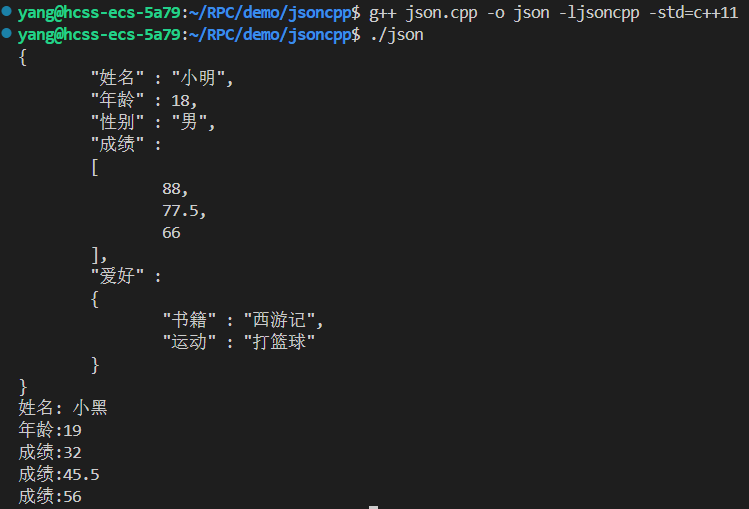
并在在这将其封装了一下,方便我们后边的使用
Muduo库
2.1 - Muduo库是什么
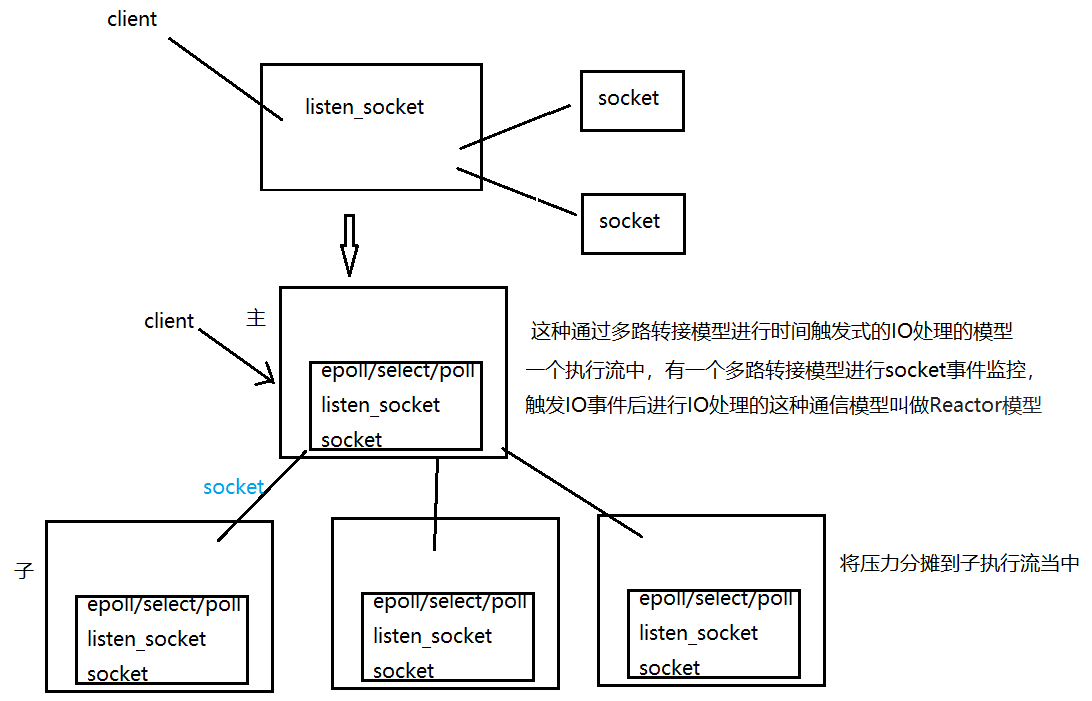
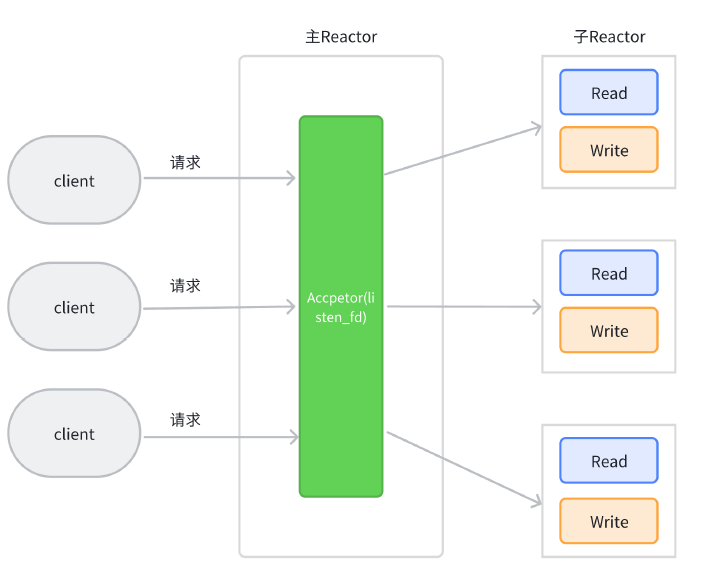
Muduo由陈硕大佬开发,是一个基于非阻塞IO和事件驱动的C++高并发TCP网络编程库。 它是一款基于主从Reactor模型的网络库,其使用的线程模型是one loop per thread, 所谓one loop per thread指的是:
- 一个线程只能有一个事件循环(EventLoop), 用于响应计时器和IO事件
- 一个文件描述符只能由一个线程进行读写,换句话说就是一个TCP连接必须归属于某EventLoop管理
2.2 - Muduo库常见接口介绍
TcpServer类基础介绍
TcpServer{
void start(); //启动服务
setConnectionCallback(); //设置连接建立 / 关闭时的回调函数
setMessageCallback();//设置消息处理回调函数
};
typedef std::shared_ptr<TcpConnection> TcpConnectionPtr;
typedef std::function<void (const TcpConnectionPtr&)> ConnectionCallback;
typedef std::function<void (const TcpConnectionPtr&,Buffer*,Timestamp)> MessageCallback;
class InetAddress : public muduo::copyable
{
public:InetAddress(StringArg ip, uint16_t port, bool ipv6 = false);
};class TcpServer : noncopyable
{
public:enum Option{kNoReusePort,kReusePort,};TcpServer(EventLoop* loop,const InetAddress& listenAddr,const string& nameArg,Option option = kNoReusePort);void setThreadNum(int numThreads);void start();/// 当一个新连接建立成功的时候被调用void setConnectionCallback(const ConnectionCallback& cb){ connectionCallback_ = cb; }/// 消息的业务处理回调函数---这是收到新连接消息的时候被调用的函数void setMessageCallback(const MessageCallback& cb){ messageCallback_ = cb; }
};
EventLoop类基础介绍
EvenLoop{
void loop(); //开始事件监控事件循环
void quit(); //停止循环
Timerld runAfter(delay,cb); //定时任务
};
class EventLoop : noncopyable
{
public:// Loops forever.// Must be called in the same thread as creation of the object.void loop();// Quits loop.// This is not 100% thread safe, if you call through a raw pointer,///better to call through shared_ptr<EventLoop> for 100% safety.void quit();TimerId runAt(Timestamp time, TimerCallback cb);// Runs callback after @c delay seconds.// Safe to call from other threads.TimerId runAfter(double delay, TimerCallback cb);// Runs callback every @c interval seconds.// Safe to call from other threads.TimerId runEvery(double interval, TimerCallback cb);// Cancels the timer.// Safe to call from other threads.void cancel(TimerId timerId);
private:std::atomic<bool> quit_;std::unique_ptr<Poller> poller_;mutable MutexLock mutex_;std::vector<Functor> pendingFunctors_ GUARDED_BY(mutex_);
};
TcpConnection类基础介绍
TcpConnection{
void send(std::string &msg); //发送数据
bool connected(); //判断当前连接是否连接正常
shutdown down(); //关闭连接
}
class TcpConnection : noncopyable,public std::enable_shared_from_this<TcpConnection>
{
public:
// Constructs a TcpConnection with a connected sockfd
//
// User should not create this object.TcpConnection(EventLoop* loop,const string& name,int sockfd,const InetAddress& localAddr,const InetAddress& peerAddr);bool connected() const { return state_ == kConnected; }bool disconnected() const { return state_ == kDisconnected; }void send(string&& message); // C++11void send(const void* message, int len);void send(const StringPiece& message);// void send(Buffer&& message); // C++11void send(Buffer* message); // this one will swap datavoid shutdown(); // NOT thread safe, no simultaneous callingvoid setContext(const boost::any& context){ context_ = context; }const boost::any& getContext() const{ return context_; }boost::any* getMutableContext(){ return &context_; }void setConnectionCallback(const ConnectionCallback& cb){ connectionCallback_ = cb; }void setMessageCallback(const MessageCallback& cb){ messageCallback_ = cb; }
private:enum StateE { kDisconnected, kConnecting, kConnected, kDisconnecting };EventLoop* loop_;ConnectionCallback connectionCallback_;MessageCallback messageCallback_;WriteCompleteCallback writeCompleteCallback_;boost::any context_;
};
TcpClient类基础介绍
TcpClient{
void connect(); //连接服务器
void disconnect(); //关闭连接
TcpConnectionPtr connection() const; // 获取客户端对应的TcpConnection连接
Muduo库的客户端也是通过Eventloop进行IO事件监控IO处理的
void setConnectionCallback(ConnectionCallback cb); //连接建立成功 / 关闭的回调处理
void setMessageCallback(MessageCallback cb); //收到消息的回调处理
}
CountDownLatch{ //做计数同步操作的类
void wait(); //计数大于0则阻塞
countDown(); //计数--,为0时唤醒wait
}
因为Client的connect接口是一个非阻塞操作,所以可能出现移走以外情况:connect连接还没有完全建立的情况下,调用connection接口获取连接,send发送数据
class TcpClient : noncopyable
{
public:// TcpClient(EventLoop* loop);// TcpClient(EventLoop* loop, const string& host, uint16_t port);TcpClient(EventLoop* loop,const InetAddress& serverAddr,const string& nameArg);~TcpClient(); // force out-line dtor, for std::unique_ptr members.void connect();//连接服务器void disconnect();//关闭连接void stop();//获取客⼾端对应的通信连接Connection对象的接⼝,发起connect后,有可能还没有连接建⽴成功TcpConnectionPtr connection() const{MutexLockGuard lock(mutex_);return connection_;}// 连接服务器成功时的回调函数void setConnectionCallback(ConnectionCallback cb){ connectionCallback_ = std::move(cb); }// 收到服务器发送的消息时的回调函数void setMessageCallback(MessageCallback cb){ messageCallback_ = std::move(cb); }
private:EventLoop* loop_;ConnectionCallback connectionCallback_;MessageCallback messageCallback_;WriteCompleteCallback writeCompleteCallback_;TcpConnectionPtr connection_ GUARDED_BY(mutex_);
};/*需要注意的是,因为muduo库不管是服务端还是客⼾端都是异步操作,对于客⼾端来说如果我们在连接还没有完全建⽴成功的时候发送数据,这是不被允许的。因此我们可以使⽤内置的CountDownLatch类进⾏同步控制*/class CountDownLatch : noncopyable{public:explicit CountDownLatch(int count);void wait(){MutexLockGuard lock(mutex_);while (count_ > 0){condition_.wait();}}void countDown(){MutexLockGuard lock(mutex_);--count_;if (count_ == 0){condition_.notifyAll();}}int getCount() const;private:mutable MutexLock mutex_;Condition condition_ GUARDED_BY(mutex_);int count_ GUARDED_BY(mutex_);};
Buffer类基础介绍
Buffer {
size_t readableBytes(); //获取缓冲区可读数据大小
const char* peek(); // 获取缓冲区的起始地址
int32_t peeklnt32() const; //尝试从缓冲区获取4字节数据,进行网络字节序转换为整形,但数据并不从缓冲区删除
void retrieventlnt32(); //数据读取位置向后偏移4字节,本质上就是删除起始位置的4字节数据
int32_t readlnt32();
string retrieveAllAsString(); //从缓冲区取出所有数据,当做string返回,并删除缓冲区中的数据
string retrieveAsString(size_t len),从缓冲区中取出len长度的数据,当做string返回,并删除缓冲区中的数据
}
class Buffer : public muduo::copyable
{public:static const size_t kCheapPrepend = 8;static const size_t kInitialSize = 1024;explicit Buffer(size_t initialSize = kInitialSize): buffer_(kCheapPrepend + initialSize),readerIndex_(kCheapPrepend),writerIndex_(kCheapPrepend);void swap(Buffer& rhs)size_t readableBytes() constsize_t writableBytes() constconst char* peek() constconst char* findEOL() constconst char* findEOL(const char* start) constvoid retrieve(size_t len)void retrieveInt64()void retrieveInt32()void retrieveInt16()void retrieveInt8()string retrieveAllAsString()string retrieveAsString(size_t len)void append(const StringPiece& str)void append(const char* /*restrict*/ data, size_t len)void append(const void* /*restrict*/ data, size_t len)char* beginWrite()const char* beginWrite() constvoid hasWritten(size_t len)void appendInt64(int64_t x)void appendInt32(int32_t x)void appendInt16(int16_t x)void appendInt8(int8_t x)int64_t readInt64()int32_t readInt32()int16_t readInt16()int8_t readInt8()int64_t peekInt64() constint16_t peekInt16() constint8_t peekInt8() constvoid prependInt64(int64_t x)void prependInt32(int32_t x)void prependInt16(int16_t x)void prependInt8(int8_t x)void prepend(const void* /*restrict*/ data, size_t len)
private:std::vector<char> buffer_;size_t readerIndex_;size_t writerIndex_;static const char kCRLF[];
};
2.3 - Muduo库快速上手
我们使用Muduo网络库来实现一个简单英译汉服务器和客户端 快速上手Muduo库
英译汉TCP服务器
包含头文件时指定路径
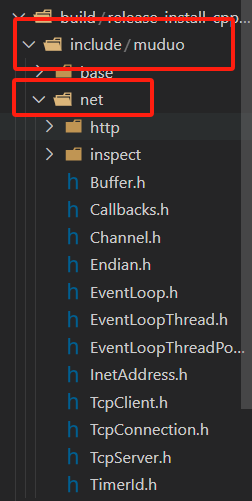
// 实现一个翻译服务器,客户端发来一个英语单词,返回一个汉语词典#include <muduo/net/TcpServer.h>
#include <muduo/net/EventLoop.h>
#include <muduo/net/TcpConnection.h>
#include <muduo/net/Buffer.h>
#include <iostream>
#include <string>
#include <unordered_map>class DictServer
{
public:DictServer(int port): _server(&_baseloop, muduo::net::InetAddress("0.0.0.0", port), "DictServer", muduo::net::TcpServer::kReusePort){//设置连接事件(连接建立/管理)的回调_server.setConnectionCallback(std::bind(&DictServer::onConnection, this, std::placeholders::_1));//设置连接消息的回调_server.setMessageCallback(std::bind(&DictServer::onMessage, this, std::placeholders::_1, std::placeholders::_2, std::placeholders::_3));}void start(){_server.start(); //先开始监听_baseloop.loop();//开始死循环执行事件监控}private:void onConnection(const muduo::net::TcpConnectionPtr &conn){if (conn->connected())std::cout << "连接建立!\n";elsestd::cout << "连接断开!\n";}void onMessage(const muduo::net::TcpConnectionPtr &conn, muduo::net::Buffer *buf, muduo::Timestamp){static std::unordered_map<std::string, std::string> dict_map = {{"hello", "你好"},{"world", "世界"},{"bite", "比特"}};std::string msg = buf->retrieveAllAsString();std::string res;auto it = dict_map.find(msg);if (it != dict_map.end()){res = it->second;}else{res = "未知单词";}conn->send(res);}private:muduo::net::EventLoop _baseloop;muduo::net::TcpServer _server;
};int main()
{DictServer server(9090);server.start();return 0;
}
英译汉客户端
#include <muduo/net/TcpClient.h>
#include <muduo/net/EventLoop.h>
#include <muduo/net/TcpConnection.h>
#include <muduo/net/EventLoopThread.h>
#include <muduo/net/Buffer.h>
#include <muduo/base/CountDownLatch.h>
#include <memory>
#include <iostream>
#include <string>class DictClient
{
public:DictClient(const std::string &sip, int sport):_baseloop(_loopthread.startLoop()) ,_downlatch(1), _client(_baseloop, muduo::net::InetAddress(sip, sport), "DictClient"){// 设置连接事件(连接建立/管理)的回调_client.setConnectionCallback(std::bind(&DictClient::onConnection, this, std::placeholders::_1));// 设置连接消息的回调_client.setMessageCallback(std::bind(&DictClient::onMessage, this,std::placeholders::_1, std::placeholders::_2, std::placeholders::_3));//连接服务器_client.connect();_downlatch.wait();}bool send(const std::string &msg){if(_conn->connected() == false){std::cout << "链接已断开,发送数据失败!\n";return false;}_conn->send(msg);//_baseloop.loop();  //开始事件循环监控 -- 内部是个死循环,客户端不能直接使用return true;}private:void onConnection(const muduo::net::TcpConnectionPtr &conn){if (conn->connected()){std::cout << "连接建立!\n";_downlatch.countDown(); // 计数--,为0时唤醒阻塞_conn = conn;}else{std::cout << "连接断开!\n";_conn.reset();}}void onMessage(const muduo::net::TcpConnectionPtr &conn, muduo::net::Buffer *buf, muduo::Timestamp){std::string res = buf->retrieveAllAsString();std::cout << res << std::endl;}private:muduo::net::TcpConnectionPtr _conn;muduo::CountDownLatch _downlatch;muduo::net::EventLoopThread _loopthread;muduo::net::EventLoop *_baseloop;muduo::net::TcpClient _client;
};int main()
{DictClient client("127.0.0.1",9090);while(1){std::string msg;std::cin >> msg;client.send(msg);}return 0;
}
Makefile
CFLAG=-I ../../build/release-install-cpp11/include/
LFLAF=-L ../../build/release-install-cpp11/lib -lmuduo_net -lmuduo_base -pthread
all: server client
server:server.cppg++ $(CFLAG) -o $@ $^ $(LFLAF) -std=c++11
client:client.cppg++ $(CFLAG) -o $@ $^ $(LFLAF) -std=c++11
C++11 异步操作
3.1 - std::future
介绍
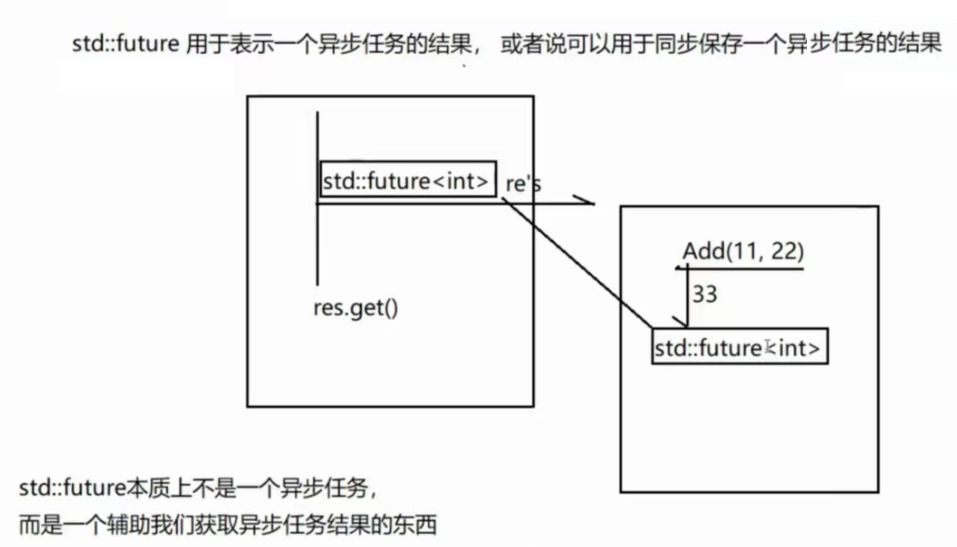
std::future是C++11标准库中的一个模板类,它表示一个异步操作的结果。当我们在多线程编程中使用异步任务时,std::future可以帮助我们在需要的时候获取任务的执行结果。std::future的一个重要特性是能够阻塞当前线程,直到异步操作完成,从而确保我们在获取结果时不会遇到未完成的操作。
应用场景
- 异步任务: 当我们需要在后台执行一些耗时操作时,如网络请求或计算密集型任务等,std::future可以用来表示这些异步任务的结果。通过将任务与主线程分离,我们可以实现任务的并行处理,从而提高程序的执行效率
- 并发控制: 在多线程编程中,我们可能需要等待某些任务完成后才能继续执行其他操作。通过使用std::future,我们可以实现线程之间的同步,确保任务完成后再获取结果并继续执行后续操作
- 结果获取:std::future提供了一种安全的方式来获取异步任务的结果。我们可以使用std::future::get()函数来获取任务的结果,此函数会阻塞当前线程,直到异步操作完成。这样,在调用get()函数时,我们可以确保已经获取到了所需的结果
用法示例
使用 std::async关联异步任务
std::async是一种将任务与std::future关联的简单方法。它创建并运行一个异步任务,并返回一个与该任务结果关联的std::future对象。默认情况下,std::async是否启动一个新线程,或者在等待future时,任务是否同步运行都取决于你给的 参数。这个参数为std::launch类型:
std::launch::deferred 表明该函数会被延迟调用,直到在future上调用get()或者wait()才会开始执行任务
std::launch::async 表明函数会在自己创建的线程上运行
std::launch::deferred | std::launch::async 内部通过系统等条件自动选择策略
#include <iostream>
#include <thread>
#include <future>int Add(int num1, int num2)
{std::cout << "into add!\n";return num1 + num2;
}int main()
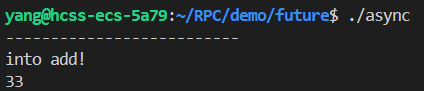
{//std::launch::async策略:内部创建一个线程执行函数,函数运行结果通过future获取//std::launch::deferred策略:同步策略,获取结果的时候再去执行任务//std::future<int> res = std::async(std::launch::deferred, Add, 11, 22);std::future<int> res = std::async(std::launch::async, Add, 11, 22);//进行了一个异步非阻塞调用std::this_thread::sleep_for(std::chrono::seconds(1));std::cout << "--------------------------\n";//std::future<int>::get()  用于获取异步任务的结果,如果还没有结果就会阻塞std::cout << res.get() << std::endl;return 0;
}
使用std::packaged_task和std::future配合
std::packaged_task就是将任务和 std::feature 绑定在一起的模板,是一种对任务的封装。我们可以通过std::packaged_task对象获取任务相关联的std::feature对象,通过调用get_future()方法获得。
std::packaged_task的模板参数是函数签名。
可以把std::future和std::async看成是分开的, 而 std::packaged_task则是一个整体。
#include<iostream>
#include<future>
#include<thread>
#include<memory>int Add(int num1, int num2)
{std::cout << "into add!\n";return num1 + num2;
}int main()
{//1. 封装任务auto task = std::make_shared<std::packaged_task<int(int, int)>>(Add);//2. 获取任务包关联的future对象std::future<int> res = task->get_future();std::thread thr([&task](){(*task)(11,22);});//4. 获取结果std::cout << res.get() << std::endl;thr.join();return 0;
}
使用std::promise和std::future配合
std::promise提供了一种设置值的方式,它可以在设置之后通过相关联的std::future对象进行读取。换种说法就是之前说过std::future可以读取一个异步函数的返回值了, 但是要等待就绪, 而std::promise就提供一种 方式手动让 std::future就绪
#include<iostream>
#include<future>
#include<thread>
#include<memory>int Add(int num1,int num2)
{std::cout << "into add!\n";return num1+num2;
}int main()
{//1.在使用的时候,先实例化一个指定结果的promise对象std::promise<int> pro;//2. 通过promise对象获取关联future对象std::future<int> res = pro.get_future();//3. 在任意位置给promise设置数据,就可以通过关联的future获取到这个设置的数据了std::thread thr([&pro](){int sum = Add(11,22);pro.set_value(sum);});std::cout << res.get() << std::endl;thr.join();return 0;
}
std::future本质上不是一个异步任务,而是一个辅助我们获取异步任务结果的东西
std::future并不能单独使用,需要搭配一些能够执行异步任务的模版类或函数一起使用
异步任务搭配使用
- std::async函数模版:异步执行一个函数,返回一个future对象用于获取函数结果
- std::packaged_task类模版:为一个函数生成一个异步任务结果(可调用对象),用于在其他线程中执行
- std::promise类模版:实例化的对象可以返回一个future,在其他线程中相promise对象设置数据,其他线程的关联future就可以获取数据
std::async是一个模版函数,内部会创建线程执行异步操作
std::packaged_task是一个模版类,是一个任务包,是对一个函数进行二次封装,封装乘一个课调用对象作为任务放到其他线程执行的
任务包封装好了以后,可以在任意位置进行调用,通过关联的future来获取执行结果
本篇完,下篇见!
相关文章:
【C++】从零实现Json-Rpc框架(2)
目录 JsonCpp库 1.1- Json数据格式 1.2 - JsonCpp介绍 • 序列化接口 • 反序列化接口 1.3 - Json序列化实践 JsonCpp使用 Muduo库 2.1 - Muduo库是什么 2.2 - Muduo库常见接口介绍 TcpServer类基础介绍 EventLoop类基础介绍 TcpConnection类基础介绍 TcpClient…...

蓝桥云客--回文数组
0回文数组 - 蓝桥云课 问题描述 小蓝在无聊时随机生成了一个长度为 n 的整数数组,数组中的第 i 个数为 ai,他觉得随机生成的数组不太美观,想把它变成回文数组,也就是对于任意 i∈[1,n] 满足 aian−i1。小蓝一次操作可以指…...

FastAPI依赖注入:链式调用与多级参数传递
title: FastAPI依赖注入:链式调用与多级参数传递 date: 2025/04/05 18:43:12 updated: 2025/04/05 18:43:12 author: cmdragon excerpt: FastAPI的依赖注入系统通过链式调用和多级参数传递实现组件间的解耦和复用。核心特性包括解耦性、可复用性、可测试性和声明式依赖解析…...

【STM32单片机】#5 定时中断
主要参考学习资料: B站江协科技 STM32入门教程-2023版 细致讲解 中文字幕 开发资料下载链接:https://pan.baidu.com/s/1h_UjuQKDX9IpP-U1Effbsw?pwddspb 单片机套装:STM32F103C8T6开发板单片机C6T6核心板 实验板最小系统板套件科协 实验&…...

OrbStack 作为 Mac 用户的 Docker 替代方案
推荐使用 OrbStack 作为 Mac 用户的 Docker 替代方案 在现代开发环境中,容器化技术已经成为了软件开发的重要组成部分。对于 Mac 用户来说,Docker Desktop 是一个广泛使用的工具,但它并不是唯一的选择。本文将推荐 OrbStack 作为 Docker Desktop 的替代方案,并探讨其优势。…...

运行小程序报错
[ app.json 文件内容错误] app.json: ["tabBar"]["list"] 不能超过 5 项(env: Windows,mp,1.06.2206090; lib: 3.7.12) 他的意思大概是,微信小程序 app.json 文件中的 tabBar.list 配置项超过了 5 项。这是微信小程序的限制,tabBar…...
)
Nature Electronics|一种透气、可拉伸的液态金属基3D电子皮肤系统(健康监测/可穿戴电子/透汗透气性电子/电子皮肤/柔性电子/集成电路)
一、 摘要 穿戴式和皮肤电子设备的发展要求高密度可伸展电子系统能够与软组织共形,持续运行并提供长期的生物相容性。大多数可拉伸电子系统的集成密度低,并且与外部印刷电路板连接,这限制了功能,降低了用户体验并阻碍了长期可用性。在此,作者提出了一种可渗透的三维集成电…...

深入剖析丝杆升降机工作原理,解锁工业传动奥秘
丝杆升降机,在工业设备的大舞台上扮演着不可或缺的角色,被广泛应用于机械制造、自动化生产线、建筑施工等众多领域。它能够精准实现重物的升降、定位等操作,为各类工业生产提供了稳定可靠的支持。想要深入了解丝杆升降机,就必须探…...
【51单片机】2-3【I/O口】震动传感器控制LED灯
1.硬件 51最小系统LED灯模块震动传感器模块 2.软件 #include "reg52.h"sbit led1 P3^7;//根据原理图(电路图),设备变量led1指向P3组IO口的第7口 sbit vibrate P3^3;//震动传感器DO接P3.3口void Delay2000ms() //11.0592MHz {…...

TortoiseSVN设置忽略清单
1.TortoiseSVN > Properties(如果安装了 TortoiseSVN)。 2. 在弹出的属性窗口中,点击 New > Other。 4. 在 Property name 中输入 svn:ignore 。 5. 在 Property value 中输入要忽略的文件夹或文件名称,例如: #…...

大模型持续学习方案解析:灾难性遗忘的工业级解决方案
引言 随着大型语言模型(LLMs)如 GPT 系列、BERT 等在自然语言处理领域取得突破性进展,它们强大的理解和生成能力已经渗透到各行各业。然而,这些模型通常是在海量静态数据集上进行一次性预训练的。现实世界是动态变化的࿰…...

《UNIX网络编程卷1:套接字联网API》第7章:套接字选项深度解析
《UNIX网络编程卷1:套接字联网API》第7章:套接字选项深度解析 一、套接字选项核心原理 1.1 选项层级体系 套接字选项按协议层级划分(图1): SOL_SOCKET:通用套接字层选项IPPROTO_IP:IPv4协议层…...

Debian编译安装mysql8.0.41源码包 笔记250401
Debian编译安装mysql8.0.41源码包 以下是在Debian系统上通过编译源码安装MySQL 8.0.41的完整步骤,包含依赖管理、编译参数优化和常见问题处理: 准备工作 1. 安装编译依赖 sudo apt update sudo apt install -y \cmake gcc g make libssl-dev …...

医疗思维图与数智云融合:从私有云到思维图的AI架构迭代(代码版)
医疗思维图作为AI架构演进的重要方向,其发展路径从传统云计算向融合时空智能、大模型及生态开放的“思维图”架构迭代,体现了技术与场景深度融合的趋势。 以下是其架构迭代的核心路径与关键特征分析: 一、从“智慧云”到“思维图”的架构演进逻辑 以下是针对医疗信息化领域…...

【计算机网络应用层】
文章目录 计算机网络应用层详解一、前言二、应用层的功能三、常见的应用层协议1. HTTP/HTTPS(超文本传输协议)2. DNS(域名系统)3. FTP(文件传输协议)4. SMTP/POP3/IMAP(电子邮件协议)…...
【JS】接雨水题解
题目 思路 首先我们要明确如何计算每条柱子的接水量: 每条柱子对应接到的雨水量该柱子左边最大值和右边最大值中的较小值-该柱子本身的高度。举例:第二条柱子自身高度为0,左边最大值为1,右边最大值为3,取较小值1-自身…...

线代[12]|《高等几何》陈绍菱(1984.9)(文末有对三大空间的分析及一个合格数学系毕业生的要求)
文章目录 一、概述二、平面仿射几何的基本概念三、平面射影几何的基本概念四、变换群和几何学五、二次曲线的射影理论、仿射理论和度量理论六、射影几何公理基础七、非欧几里得几何概要八、自我测试题九、欧氏解析几何、仿射解析几何、射影解析几何与其他(博主借助A…...

第3课:状态管理与事件处理
第3课:状态管理与事件处理 学习目标 掌握useState Hook的使用理解组件事件处理机制实现表单输入与状态绑定完成任务添加功能原型 一、useState基础 1. 创建第一个状态 新建src/Counter.js: import { useState } from react;function Counter() {co…...

提升移动端用户体验:解决输入框被软键盘遮挡的有效方法
解决移动端输入框被软键盘覆盖的问题 在开发移动端网页时,如果页面包含输入框,则可能会遇到输入框被弹出的软键盘遮挡的问题。为了解决这个问题,我们需要理解两种常见的情况以及相应的解决策略。 浏览器未主动聚焦到输入框 现代浏览器和移…...
核心知识点详解)
哈希表(Hashtable)核心知识点详解
1. 基本概念 定义:通过键(Key)直接访问值(Value)的数据结构,基于哈希函数将键映射到存储位置。 核心操作: put(key, value):插入键值对 get(key):获取键对应的值 remo…...

多分类交叉熵
1. 基本概念:熵与交叉熵 要理解多分类交叉熵损失的由来,首先需要掌握信息论中的两个基础概念:熵(Entropy)和交叉熵(Cross-Entropy)。 熵(Entropy) 熵衡量一个随机变量的…...
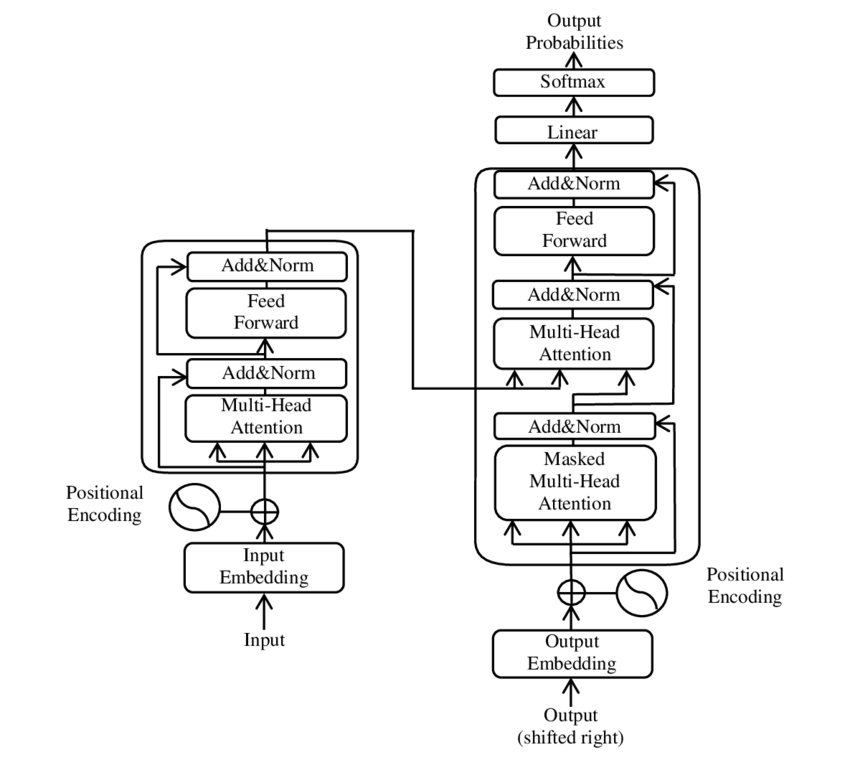
【速写】Transformer-encoder-decoder深度解析
文章目录 一、理论分析1. Transformers概述2. Transformer的输入部分具体是如何构成?2.1 单词 Embedding2.2 位置 Embedding 3 自注意力原理3.1 自注意力结构3.2 QKV的计算3.3 自注意力的输出3.4 多头注意力 4 Encoder结构4.1 AddNorm4.2 前馈4.3 组成Encoder 二、代…...
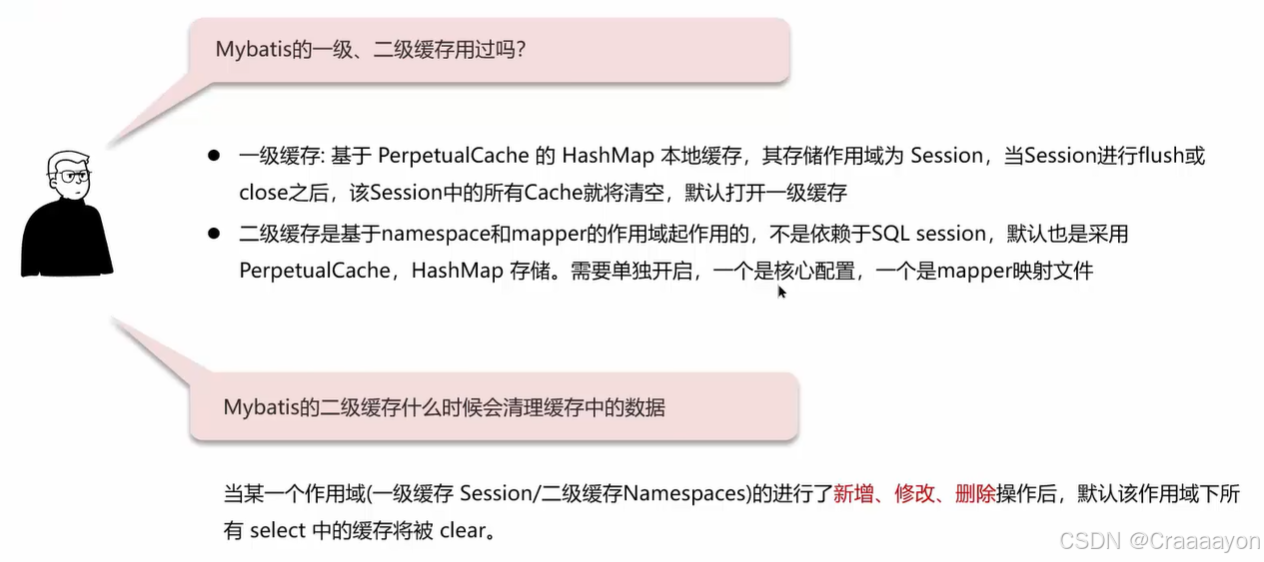
MyBatis八股文-执行流程、延迟加载、一级与二级缓存
(一)执行流程 mybatis-config.xml核心配置文件的作用: 在MyBatis框架的核心配置文件中需要去指定当前的环境配置、指定需要操作的是哪个数据库,并且输入当前的用户名与密码,只有配置了他才能真正操作数据库。同时还去加载了SQL映射文件&#…...
)
Protobuf 的快速使用(四)
Protobuf 还常⽤于通讯协议、服务端数据交换场景。那么在这个⽰例中,我们将实现⼀个⽹络版本的通讯录,模拟实现客⼾端与服务端的交互,通过 Protobuf 来实现各端之间的协议序列化。需求如下: 客⼾端可以选择对通讯录进⾏以下操作&…...

SQL ServerAlways On 可用性组配置失败
问题现象: 配置 Always On 可用性组时,报错 “无法将数据库加入可用性组”(错误 41158),或提示 “WSFC 群集资源无法联机”(错误 19471)。 快速诊断 验证 WSFC 群集状态: # 检查群集…...

Mysql explain中列的解析
EXPLAIN列的解释: table:显示这一行的数据是关于哪张表的 type:这是重要的列,显示连接使用了何种类型。从最好到最差的连接类型为const、eq_reg、ref、range、indexhe和ALL possible_keys:查询可以利用的索引&#…...
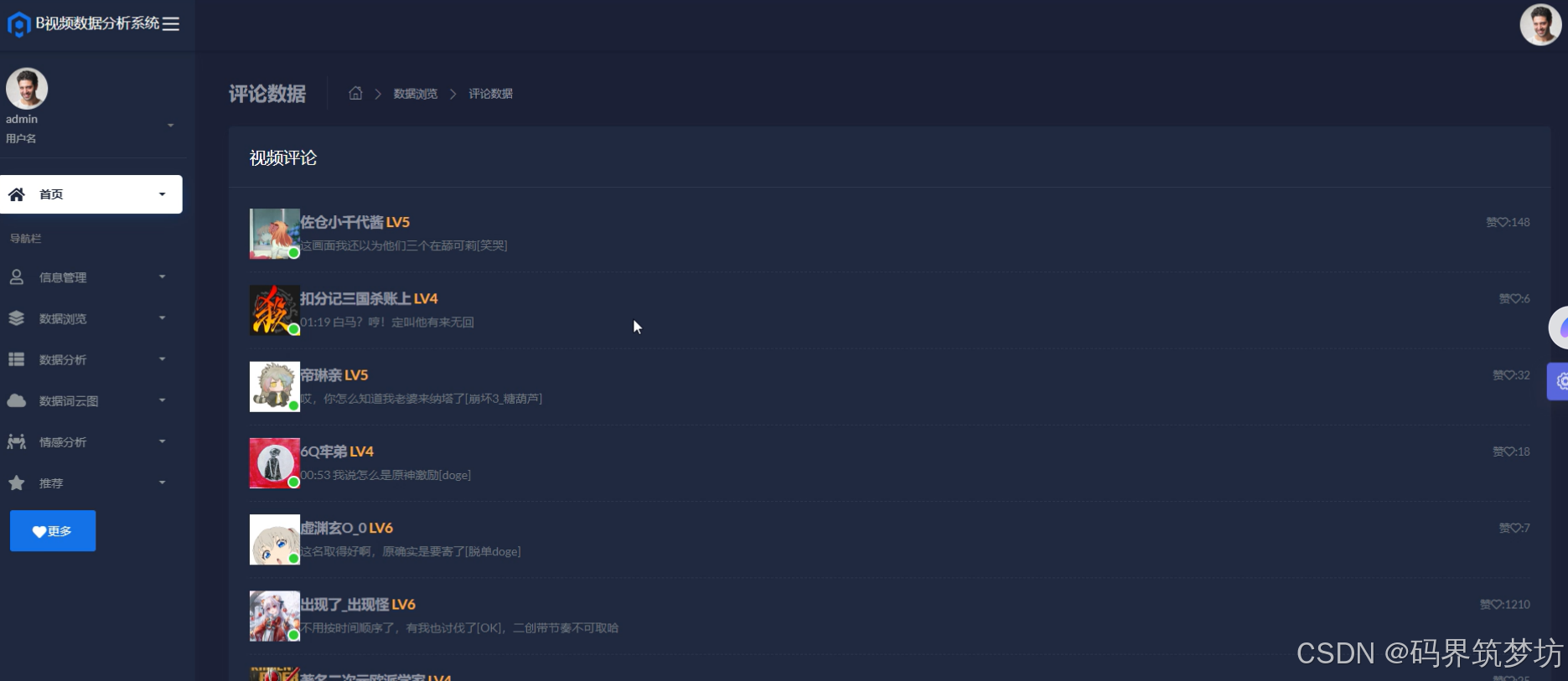
基于Spark的哔哩哔哩舆情数据分析系统
【Spark】基于Spark的哔哩哔哩舆情数据分析系统 (完整系统源码开发笔记详细部署教程)✅ 目录 一、项目简介二、项目界面展示三、项目视频展示 一、项目简介 本项目基于Python和Django框架进行开发,为了便于广大用户针对舆情进行个性化分析处…...

【Linux】日志模块实现详解
📢博客主页:https://blog.csdn.net/2301_779549673 📢博客仓库:https://gitee.com/JohnKingW/linux_test/tree/master/lesson 📢欢迎点赞 👍 收藏 ⭐留言 📝 如有错误敬请指正! &…...

yum list查询时部分包查找不到流程分析
以下是针对 yum list available -c xxx.repo(对应 DNF 的命令行操作)的详细流程解读,包括参数解析、配置初始化、元数据加载、数据库查询,以及读取不到特定包的场景分析。 1. 命令行参数解析与入口函数 代码入口: dnf.cli.main.m…...
MySQL 分库分表:应对数据增长挑战的有效策略)
MySQL篇(六)MySQL 分库分表:应对数据增长挑战的有效策略
MySQL篇(六)MySQL 分库分表:应对数据增长挑战的有效策略 MySQL篇(六)MySQL 分库分表:应对数据增长挑战的有效策略一、引言二、为什么需要分库分表2.1 性能瓶颈2.2 存储瓶颈2.3 高并发压力 三、分库分表的方…...