
Spring Boot 3.4.3 和 Spring Security 6.4.2 实现基于内存和 MySQL 的用户认证
在 Web 应用开发中,用户认证是保障系统安全的基础需求。Spring Boot 3.4.3 结合 Spring Security 6.4.2 提供了强大的安全框架支持,可以轻松实现基于内存或数据库的用户认证功能。本文将详细介绍如何在 Spring Boot 3.4.3 中集成 Spring Security 6.4.2,通过内存和 MySQL 两种方式实现用户认证,并附上完整代码示例,助你在2025年的项目中快速构建安全的认证系统。
1. Spring Security 简介
1.1 什么是 Spring Security?
Spring Security 是 Spring 生态中的安全框架,提供认证、授权和防护功能。Spring Security 6.4.2 支持 Lambda 风格的配置,与 Spring Boot 3.4.3 无缝集成,适合现代 Java 开发。
1.2 认证方式
- 内存认证:将用户信息存储在内存中,适合测试或简单应用。
- 数据库认证:通过 MySQL 等数据库存储用户信息,适合生产环境。
1.3 本文目标
- 实现基于内存的用户认证。
- 配置 MySQL 数据库认证。
- 提供登录和受保护接口示例。
2. 项目实战
以下是基于 Spring Boot 3.4.3 和 Spring Security 6.4.2 实现内存和 MySQL 用户认证的完整步骤。
2.1 添加 Maven 依赖
在 pom.xml 中添加必要的依赖:
<?xml version="1.0" encoding="UTF-8"?>
<project xmlns="http://maven.apache.org/POM/4.0.0"xmlns:xsi="http://www.w3.org/2001/XMLSchema-instance"xsi:schemaLocation="http://maven.apache.org/POM/4.0.0 http://maven.apache.org/xsd/maven-4.0.0.xsd"><modelVersion>4.0.0</modelVersion><parent><groupId>org.springframework.boot</groupId><artifactId>spring-boot-starter-parent</artifactId><version>3.4.3</version></parent><groupId>cn.itbeien</groupId><artifactId>springboot-security-auth</artifactId><properties><maven.compiler.source>17</maven.compiler.source><maven.compiler.target>17</maven.compiler.target><project.build.sourceEncoding>UTF-8</project.build.sourceEncoding></properties><dependencies><!-- Spring Boot Web --><dependency><groupId>org.springframework.boot</groupId><artifactId>spring-boot-starter-web</artifactId></dependency><!-- Spring Security --><dependency><groupId>org.springframework.boot</groupId><artifactId>spring-boot-starter-security</artifactId></dependency><!-- MySQL 和 JPA --><dependency><groupId>com.mysql</groupId><artifactId>mysql-connector-j</artifactId></dependency><dependency><groupId>org.springframework.boot</groupId><artifactId>spring-boot-starter-data-jpa</artifactId></dependency></dependencies>
</project>
说明:
spring-boot-starter-security:提供认证和授权支持。spring-boot-starter-data-jpa和mysql-connector-j:用于 MySQL 数据库集成。
2.2 配置内存认证
Security 配置类
package cn.joyous.config;import org.springframework.context.annotation.Bean;
import org.springframework.context.annotation.Configuration;
import org.springframework.security.config.annotation.web.builders.HttpSecurity;
import org.springframework.security.config.annotation.web.configuration.EnableWebSecurity;
import org.springframework.security.core.userdetails.User;
import org.springframework.security.core.userdetails.UserDetailsService;
import org.springframework.security.provisioning.InMemoryUserDetailsManager;
import org.springframework.security.web.SecurityFilterChain;@Configuration
@EnableWebSecurity
public class SecurityConfig {@Beanpublic SecurityFilterChain securityFilterChain(HttpSecurity http) throws Exception {http.authorizeHttpRequests(auth -> auth.requestMatchers("/public").permitAll() // 公开接口.anyRequest().authenticated() // 其他需认证).formLogin(form -> form.defaultSuccessUrl("/home") // 登录成功跳转).logout(logout -> logout.logoutSuccessUrl("/public") // 退出后跳转);return http.build();}@Beanpublic UserDetailsService userDetailsService() {var user = User.withUsername("admin").password("{noop}123456") // {noop} 表示明文密码.roles("USER").build();return new InMemoryUserDetailsManager(user);}
}
说明:
InMemoryUserDetailsManager:内存存储用户。{noop}:不加密密码,仅用于测试。
2.3 配置 MySQL 认证
数据源配置
在 application.yml 中配置 MySQL:
spring:datasource:url: jdbc:mysql://localhost:3306/auth_db?useSSL=false&serverTimezone=UTCusername: rootpassword: 123456driver-class-name: com.mysql.cj.jdbc.Driverjpa:hibernate:ddl-auto: update # 自动建表show-sql: true
用户实体类
package cn.joyous.entity;import jakarta.persistence.Entity;
import jakarta.persistence.Id;
import lombok.Data;@Entity
@Data
public class User {@Idprivate Long id;private String username;private String password;private String role;
}
用户 Repository
package cn.joyous.repository;import cn.itbeien.entity.User;
import org.springframework.data.jpa.repository.JpaRepository;/*** @author itbeien*/
public interface UserRepository extends JpaRepository<User, Long> {User findByUsername(String username);
}
自定义 UserDetailsService
package cn.joyous.service;import cn.joyous.repository.UserRepository;
import org.springframework.beans.factory.annotation.Autowired;
import org.springframework.security.core.userdetails.UserDetails;
import org.springframework.security.core.userdetails.UserDetailsService;
import org.springframework.security.core.userdetails.UsernameNotFoundException;
import org.springframework.stereotype.Service;import java.util.List;@Service
public class CustomUserDetailsService implements UserDetailsService {@Autowiredprivate UserRepository userRepository;@Overridepublic UserDetails loadUserByUsername(String username) throws UsernameNotFoundException {User user = userRepository.findByUsername(username);if (user == null) {throw new UsernameNotFoundException("用户不存在");}return org.springframework.security.core.userdetails.User.withUsername(user.getUsername()).password(user.getPassword()).roles(user.getRole()).build();}
}
更新 Security 配置
package cn.joyous.config;import cn.joyous.service.CustomUserDetailsService;
import org.springframework.beans.factory.annotation.Autowired;
import org.springframework.context.annotation.Bean;
import org.springframework.context.annotation.Configuration;
import org.springframework.security.config.annotation.web.builders.HttpSecurity;
import org.springframework.security.config.annotation.web.configuration.EnableWebSecurity;
import org.springframework.security.web.SecurityFilterChain;@Configuration
@EnableWebSecurity
public class SecurityConfig {@Autowiredprivate CustomUserDetailsService userDetailsService;@Beanpublic SecurityFilterChain securityFilterChain(HttpSecurity http) throws Exception {http.authorizeHttpRequests(auth -> auth.requestMatchers("/public").permitAll().anyRequest().authenticated()).formLogin(form -> form.defaultSuccessUrl("/home")).logout(logout -> logout.logoutSuccessUrl("/public"));return http.build();}@Beanpublic UserDetailsService userDetailsService() {return userDetailsService;}
}
2.4 创建控制器
提供测试接口:
package cn.joyous.controller;import org.springframework.security.core.annotation.AuthenticationPrincipal;
import org.springframework.security.core.userdetails.UserDetails;
import org.springframework.web.bind.annotation.GetMapping;
import org.springframework.web.bind.annotation.RestController;@RestController
public class HomeController {@GetMapping("/public")public String publicEndpoint() {return "这是一个公开接口";}@GetMapping("/home")public String home(@AuthenticationPrincipal UserDetails userDetails) {return "欢迎, " + userDetails.getUsername() + "!";}
}
2.5 数据库准备
创建 auth_db 数据库,插入测试数据:
INSERT INTO user (id, username, password, role) VALUES (1, 'admin', '{noop}123456', 'USER');
2.6 启动与测试
- 启动 Spring Boot 应用。
- 访问
http://localhost:8080/public,无需登录。 - 访问
http://localhost:8080/home,跳转到登录页。 - 输入
admin和123456,登录后显示欢迎信息。
3. 进阶功能(可选)
-
密码加密
使用 BCrypt 加密密码:@Bean public PasswordEncoder passwordEncoder() {return new BCryptPasswordEncoder(); }更新用户密码为加密值:
INSERT INTO user (id, username, password, role) VALUES (1, 'admin', '$2a$10$...', 'USER'); -
自定义登录页
添加 Thymeleaf 模板login.html并配置:.formLogin(form -> form.loginPage("/login").permitAll()) -
角色权限
配置基于角色的访问控制:.authorizeHttpRequests(auth -> auth.requestMatchers("/admin/**").hasRole("ADMIN").requestMatchers("/user/**").hasRole("USER").anyRequest().authenticated() )
4. 总结
Spring Boot 3.4.3 和 Spring Security 6.4.2 结合内存和 MySQL 认证,为开发者提供了灵活的安全方案。本文从内存认证到数据库认证,覆盖了实现步骤。
相关文章:

Spring Boot 3.4.3 和 Spring Security 6.4.2 实现基于内存和 MySQL 的用户认证
在 Web 应用开发中,用户认证是保障系统安全的基础需求。Spring Boot 3.4.3 结合 Spring Security 6.4.2 提供了强大的安全框架支持,可以轻松实现基于内存或数据库的用户认证功能。本文将详细介绍如何在 Spring Boot 3.4.3 中集成 Spring Security 6.4.2&…...

多款CANFD芯片单粒子效应对比分析
一、引言 随着航天、工业自动化等领域的快速发展,通信芯片在各种复杂环境下的可靠性变得至关重要。单粒子效应(Single Event Effect,SEE)是空间辐射环境中影响半导体器件性能的重要因素之一。CANFD(Controller Area Network with…...
解决Win11耳机没有声音的问题
方法一:更新驱动程序(有效) 进入 “设置”(快捷键:WinX),点击 “Windows 更新” → “高级选项” 点击 “可选更新” ,然后点击 “驱动程序更新” 【注】:更新后可能会出…...
【spring02】Spring 管理 Bean-IOC,基于 XML 配置 bean
文章目录 🌍一. bean 创建顺序🌍二. bean 对象的单例和多例❄️1. 机制❄️2. 使用细节 🌍三. bean 的生命周期🌍四. 配置 bean 的后置处理器 【这个比较难】🌍五. 通过属性文件给 bean 注入值🌍六. 基于 X…...

内网渗透(杂项集合) --- 中的多协议与漏洞利用技术(杂项知识点 重点) 持续更新
目录 1. NetBIOS 名称的网络协议在局域网中内网渗透中起到什么作用 2. 使用 UDP 端口耗尽技术强制所有 DNS 查找失败,这个技术如何应用在局域网内网渗透测试中 3. 在本地创建一个 HTTP 服务来伪造 WPAD 服务器 什么是 WPAD 服务器?这个服务器是干嘛的…...

el-tabs添加按钮增加点击禁止样式
前置文章 一、vue使用element-ui自定义样式思路分享【实操】 二、vue3&ts&el-tabs多个tab表单校验 现状确认 点击添加按钮,没有点击样式,用户感知不明显没有限制最大的tab添加数量,可以无限添加 调整目标&代码编写 调整目标…...
LINUX 5 vim cat zip unzip
dd u撤销 ctrlr取消撤销 q!刚才的操作不做保存 刚才是编辑模式 现在是可视化模式 多行注释...

PDFBox渲染生成pdf文档
使用PDFBox可以渲染生成pdf文档,并且自定义程度高,只是比较麻烦,pdf的内容位置都需要手动设置x(横向)和y(纵向)绝对位置,但是每个企业的单据都是不一样的,一般来说都会设…...
Batch Normalization:深度学习训练的加速引擎
引言 在深度学习的发展历程中,训练深度神经网络一直是一项极具挑战性的任务。随着网络层数的增加,梯度消失、梯度爆炸以及训练过程中的内部协变量偏移(Internal Covariate Shift)问题愈发严重,极大地影响了模型的收敛…...
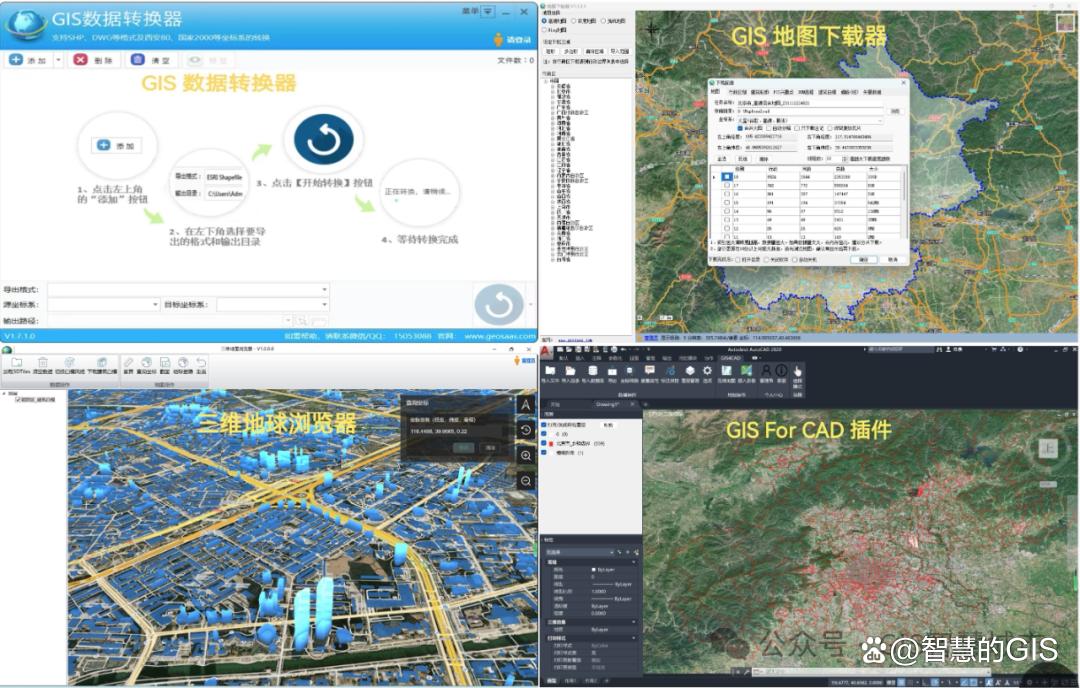
低空经济基础设施建设方向与展望
随着科技的不断进步,低空经济正逐渐成为推动国家经济发展的新引擎。低空经济,指的是在低空范围内进行的各种经济活动,包括但不限于无人机物流、空中交通管理、低空旅游、农业监测等。本文将探讨低空经济基础设施建设的方向与未来展望。 1. 低…...
如何保证RabbitMQ消息的可靠传输?
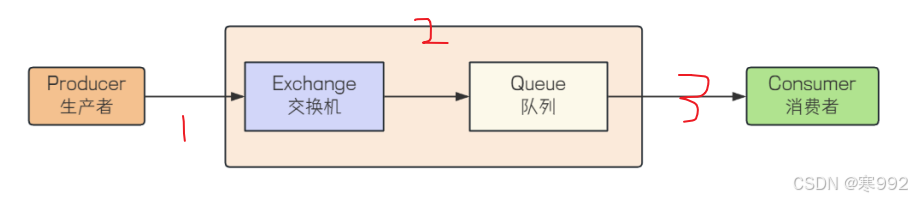
在这个图中,消息可能丢失的场景是1,2,3 1.在生产者将消息发送给RabbitMQ的时候,消息到底有没有正确的到达服务器呢,RabbitMQ提供了两种解决方案: a. 通过事务机制实现(比较消耗性能࿰…...
)
Kotlin语言进阶:协程、Flow、Channel详解(二)
Kotlin语言进阶:协程、Flow、Channel详解(二) 一、Flow基础 1.1 什么是Flow Flow是Kotlin提供的用于处理异步数据流的解决方案,它建立在协程之上,具有以下特点: 冷流特性:只有在收集时才会开始发射数据背压处理:自动处理生产者和消费者速度不匹配的问题组合操作:提…...
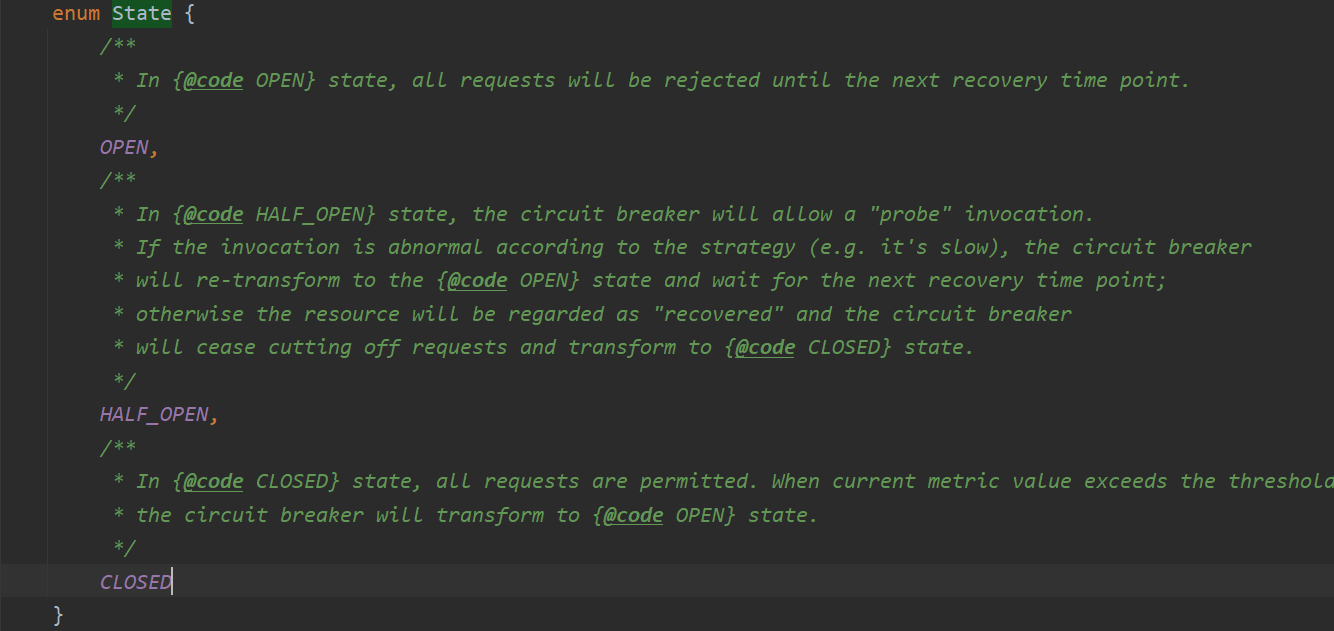
Sentinel核心源码分析(上)
文章目录 前言一、客户端与Spring Boot整合二、SphU.entry2.1、构建责任链2.2、调用责任链2.2.1、NodeSelectorSlot2.2.2、ClusterBuilderSlot2.2.3、LogSlot2.2.4、StatisticSlot2.2.5、AuthoritySlot2.2.6、SystemSlot2.2.7、FlowSlot2.2.7.1、selectNodeByRequesterAndStrat…...
Systemd安全加密备份系统与智能通知
实训背景 你是一家金融科技公司的系统架构师,需为敏感数据设计一套安全备份系统,满足以下需求: 加密存储:自动解密插入的LUKS加密USB设备,挂载到安全目录。备份验证:备份完成后校验文件完整性,…...

6.0 使用Qt+ OpenCV+Python加载图片
本例作为python图像处理的入门课程1,使用Qt+ OpenCV+Python加载图片。 主要有如下几个地方需要注意: 1. OpenCV 默认使用 BGR 格式,而 Qt 使用 RGB。显示前需要转换:cv2.cvtColor(img, cv2.COLOR_BGR2RGB),一般使用某个QLabel控件进行显示。 pic = cv2.cvtColor(pic, cv2.C…...
)
深度学习篇---网络分析(1)
文章目录 前言1. ImprovedResBlock(改进的残差块)结构组成卷积层1卷积层2跳跃连接(Downsample) 前向传播流程主路径跳跃路径残差连接 2. EnhancedCNN(主模型)2.1 初始特征提取层功能参数变化 2.2 残差块堆叠…...
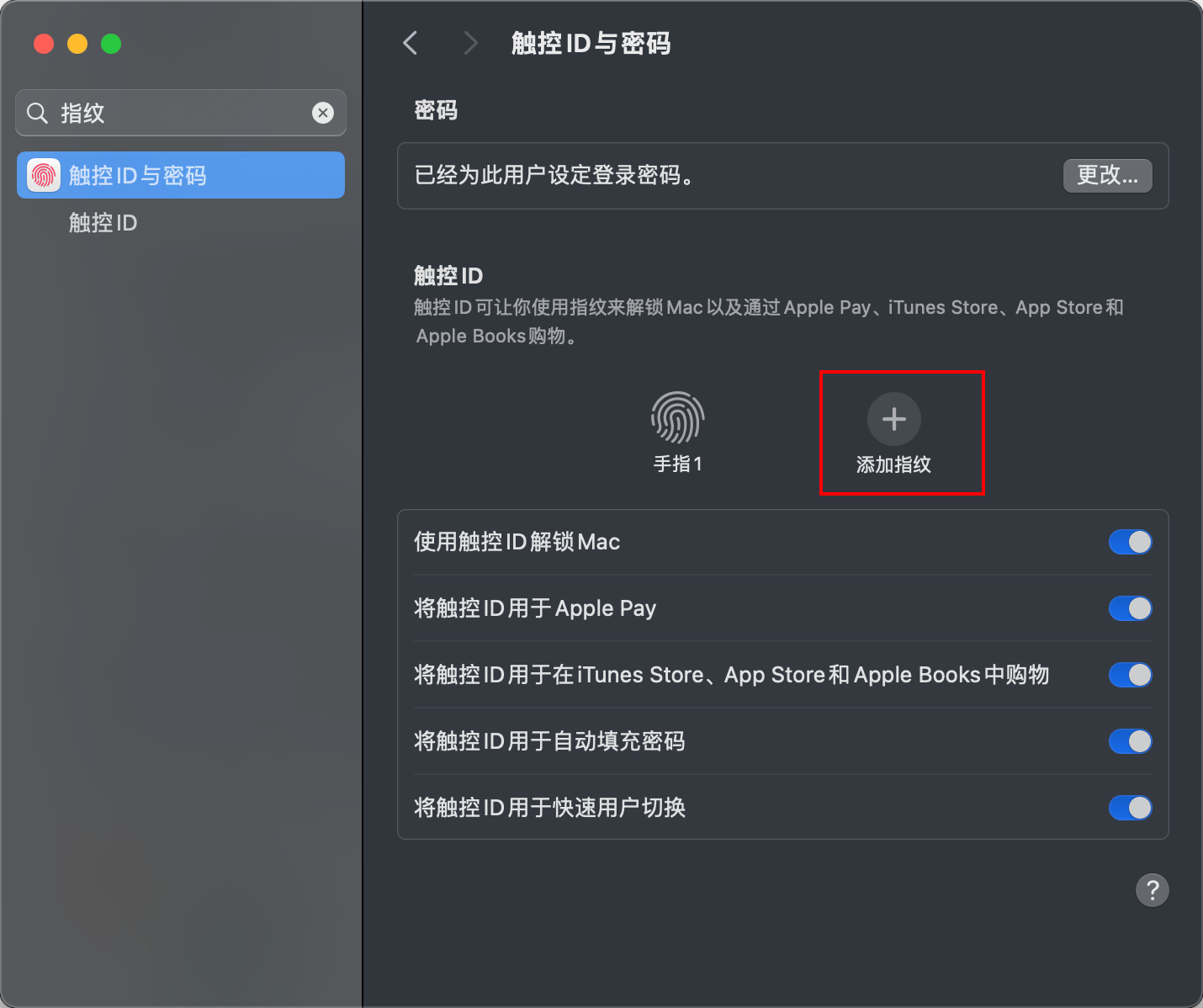
【Mac 从 0 到 1 保姆级配置教程 11】- Mac 基础配置 Finder、触控板、常用快捷键等
文章目录 前言配置 Finder1. 把我们的家目录请出来2. 显示文件扩展名3. 展示隐藏文件4. 显示路径栏和状态栏5. 固定文件夹到工具栏 基础快捷键1. Finder 导航快捷键2. 文件操作快捷键3. 视图和显示快捷键4. 搜索和选择快捷键5. 实用技巧6. 关于文件创建 配置触控板1. 右键设置2…...

C++Primer - 动态内存管理
欢迎阅读我的 【CPrimer】专栏 专栏简介:本专栏主要面向C初学者,解释C的一些基本概念和基础语言特性,涉及C标准库的用法,面向对象特性,泛型特性高级用法。通过使用标准库中定义的抽象设施,使你更加适应高级…...
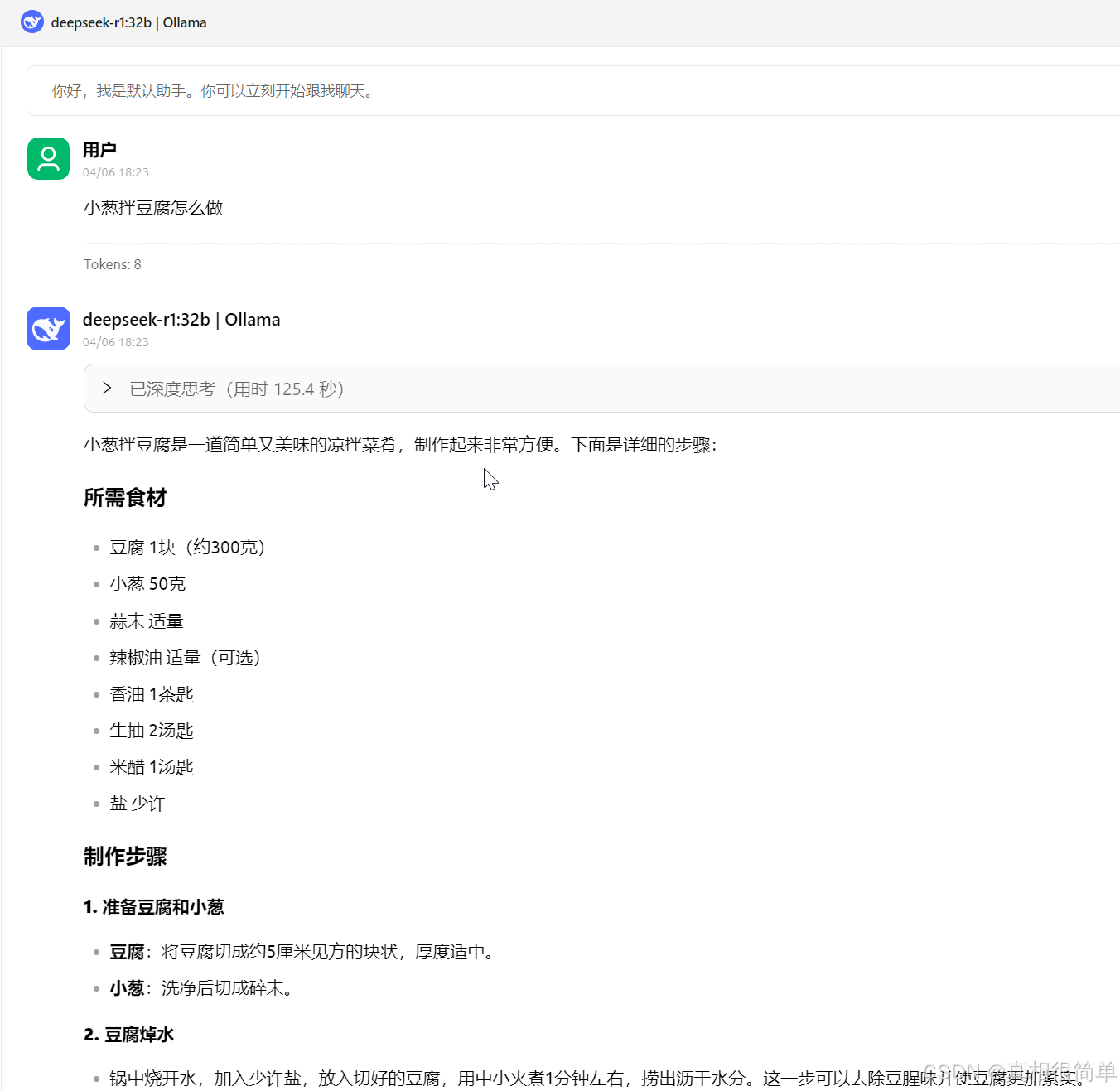
DeepSeek本地部署(Ollama)
1. Ollama 安装 Ollama 官网地址: https://ollama.com/安装包网盘地址: https://pan.baidu.com 2. Deepseek 部署 根据自己电脑配置和应用需求选择不同模型,配置不足会导致运行时候卡顿。 版本安装指令模型大小硬盘(存储)显卡…...

Amodal3R ,南洋理工推出的 3D 生成模型
Amodal3R 是一款先进的条件式 3D 生成模型,能够从部分可见的 2D 物体图像中推断并重建完整的 3D 结构与外观。该模型建立在基础的 3D 生成模型 TRELLIS 之上,通过引入掩码加权多头交叉注意力机制与遮挡感知注意力层,利用遮挡先验知识优化重建…...

第二期:深入理解 Spring Web MVC [特殊字符](核心注解 + 进阶开发)
前言: 欢迎来到 Spring Web MVC 深入学习 的第二期!在第一期中,我们介绍了 Spring Web MVC 的基础知识,学习了如何 搭建开发环境、配置 Spring MVC、编写第一个应用,并初步了解了 控制器、视图解析、请求处理流程 等核…...
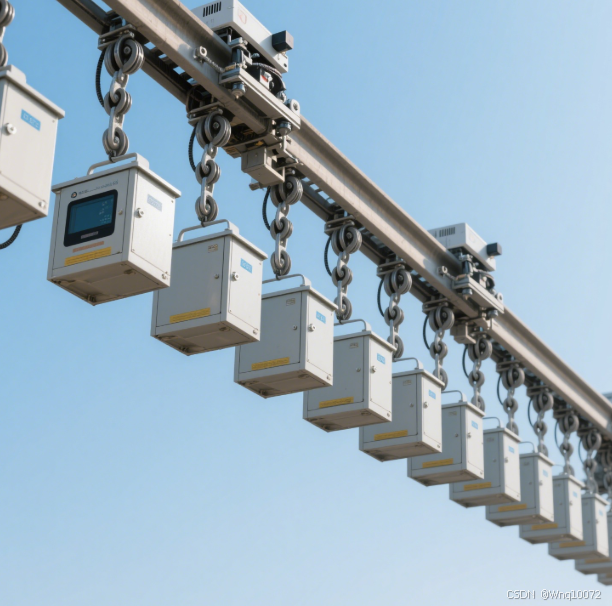
论伺服电机在轨道式巡检机器人中的优势及应用实践
一、引言 1.1 研究背景与意义 在现代工业生产、电力系统、轨道交通等诸多领域,保障设施设备的安全稳定运行至关重要。轨道式巡检机器人作为一种高效、智能的巡检工具,正逐渐在这些领域崭露头角。它能够沿着预设轨道,对目标区域进行全方位…...

开源软件与自由软件:一场理念与实践的交锋
在科技的世界里,“开源软件”和“自由软件”这两个词几乎无人不知。很多人或许都听说过,它们的代码是公开的,可以供所有人查看、修改和使用。然而,若要细究它们之间的区别,恐怕不少朋友会觉得云里雾里。今天࿰…...
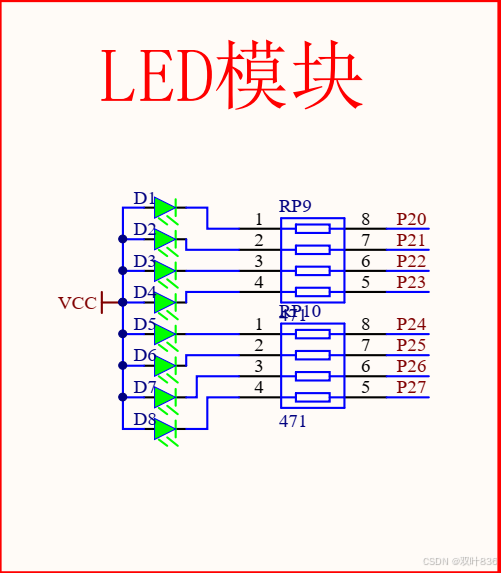
(51单片机)独立按键控制流水灯LED流向(独立按键教程)(LED使用教程)
源代码 如上图将7个文放在Keli5 中即可,然后烧录在单片机中就行了 烧录软件用的是STC-ISP,不知道怎么安装的可以去看江科大的视频: 【51单片机入门教程-2020版 程序全程纯手打 从零开始入门】https://www.bilibili.com/video/BV1Mb411e7re?…...

开发指南111-关闭所有打开的子窗口
门户系统是通过window.open通过单点登录的模式打开子系统的,这就要求门户系统退出时,关闭所有打开的子系统。 平台处理这一问题的核心原理如下: 主窗口定义: allChildWindows:[], //所有子窗口 pushChildWindow(childWindow){ …...
react-router children路由报错
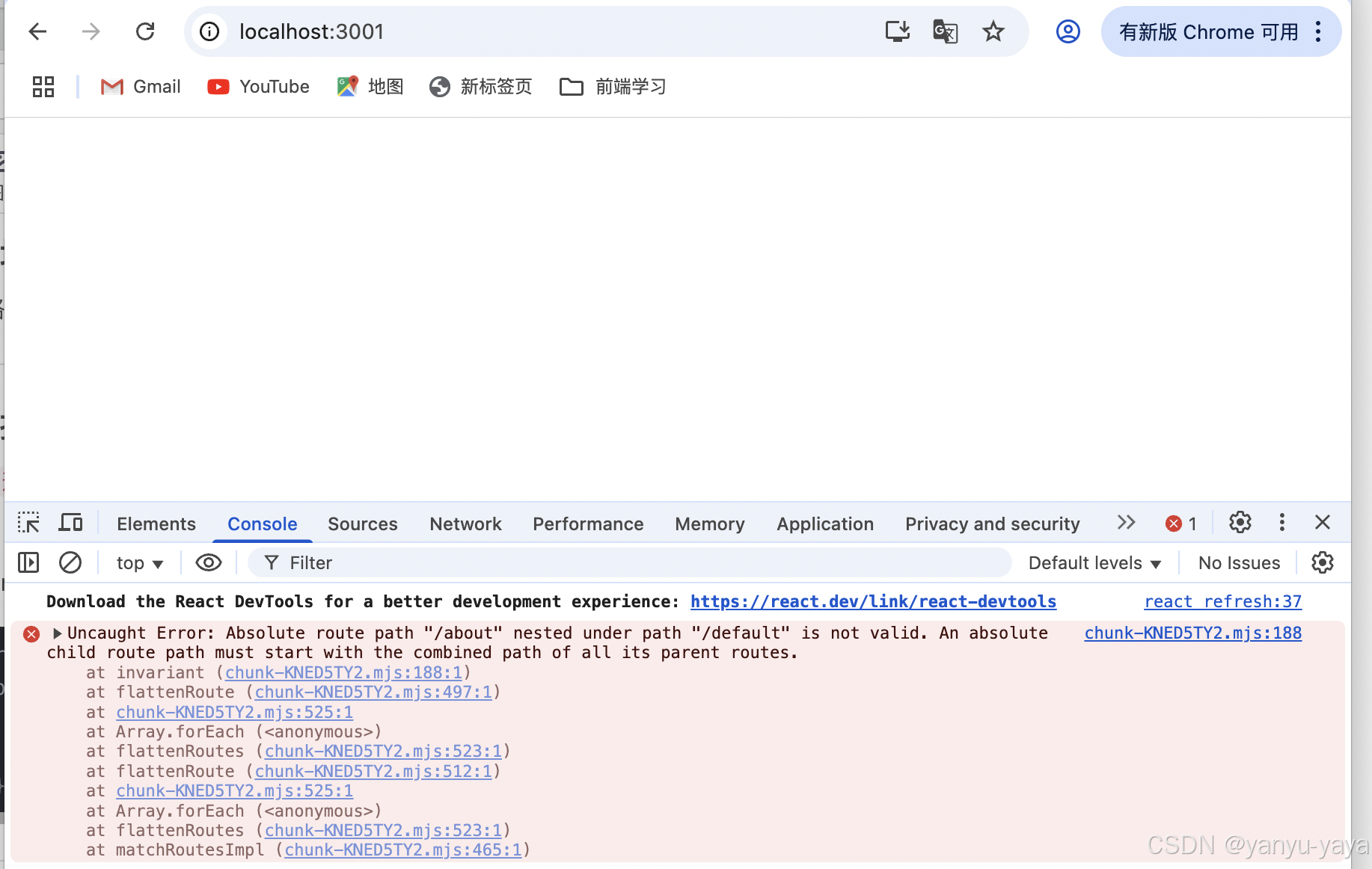
项目场景: 写个路由页面,引发的问题 问题描述 报错: An absolute child route path must start with the combined path of all its parent routes. 代码: import { createBrowserRouter } from "react-router-dom";…...

双向链表示例
#include <stdio.h> #include <stdlib.h>// 定义双向链表节点结构体 typedef struct list {int data; // 数据部分struct list *next; // 指向下一个节点的指针struct list *prev; // 指向前一个节点的指针 } list_t;// 初始化链表,将链表的…...

Socket编程TCP
Socket编程TCP 1、V1——EchoServer单进程版2、V2——EchoServer多进程版3、V3——EchoServer多线程版4、V4——EchoServer线程池版5、V5——多线程远程命令执行6、验证TCP——Windows作为client访问Linux7、connect的断线重连 1、V1——EchoServer单进程版 在TcpServer.hpp中实…...

当网页受到DDOS网络攻击有哪些应对方法?
分布式拒绝服务攻击也是人们较为熟悉的DDOS攻击,这类攻击会通过大量受控制的僵尸网络向目标服务器发送请求,以此来消耗服务器中的资源,致使用户无法正常访问,当网页受到分布式拒绝服务攻击时都有哪些应对方法呢? 建立全…...
文件映射mmap与管道文件
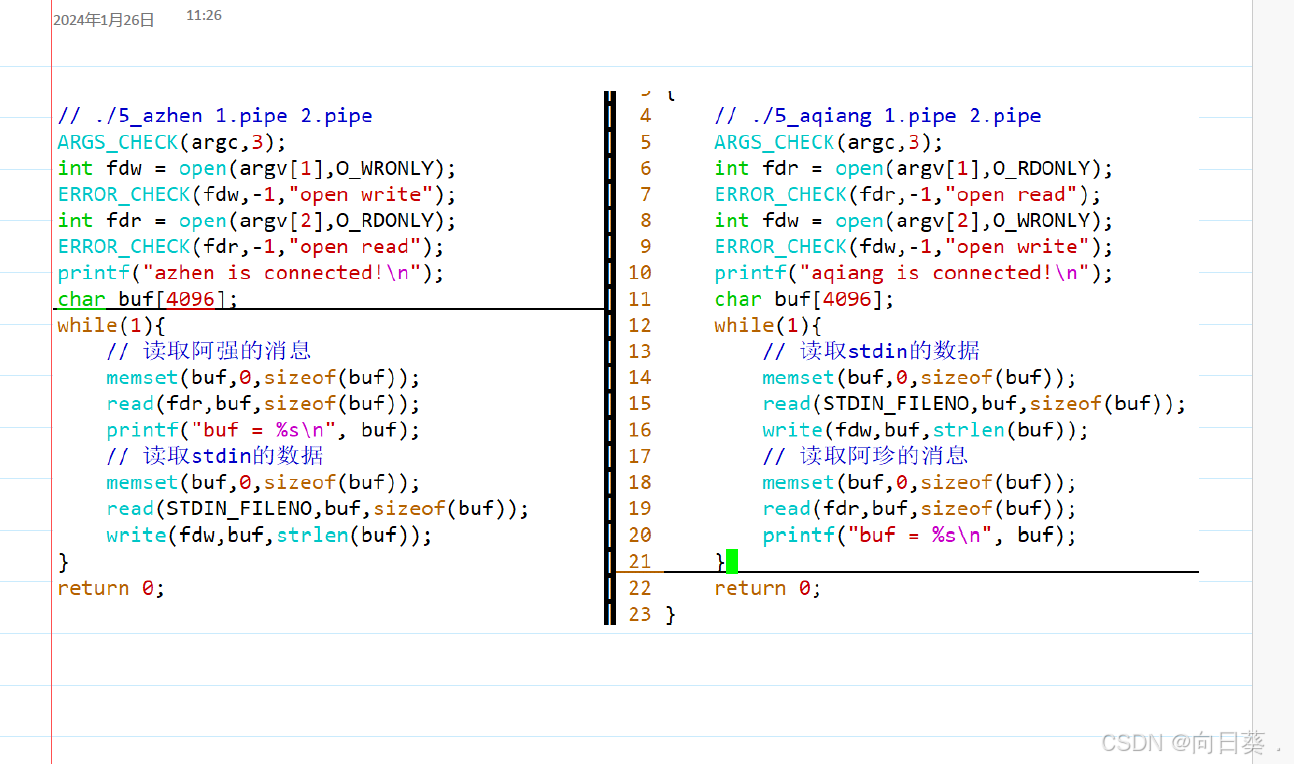
在用户态申请内存,内存内容和磁盘内容建立一一映射 读写内存等价于读写磁盘 支持随机访问 简单来说,把磁盘里的数据与内存的用户态建立一一映射关系,让读写内存等价于读写磁盘,支持随机访问。 管道文件:进程间通信机…...