
【springsecurity oauth2授权中心】简单案例跑通流程
项目被拆分开,需要一个授权中心使得每个项目都去授权中心登录获取用户权限。而单一项目里权限使用的是spring-security来控制的,每个controller方法上都有
@PreAuthorize("hasAuthority('hello')")注解来控制权限,想以最小的改动来实现,就学习了一下spring-boot-starter-oauth2-authorization-server发现可以满足我的要求,下面是最简单的一个能跑通的案例。
创建项目
创建一个maven项目,新建两个模块
- authorization-server
- resource-server
创建好结构如下图
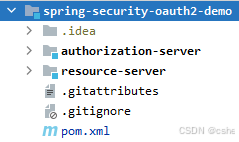
根目录下的pom.xml内容
<?xml version="1.0" encoding="UTF-8"?>
<project xmlns="http://maven.apache.org/POM/4.0.0" xmlns:xsi="http://www.w3.org/2001/XMLSchema-instance"xsi:schemaLocation="http://maven.apache.org/POM/4.0.0 https://maven.apache.org/xsd/maven-4.0.0.xsd"><modelVersion>4.0.0</modelVersion><parent><groupId>org.springframework.boot</groupId><artifactId>spring-boot-starter-parent</artifactId><version>3.2.4</version><relativePath/> <!-- lookup parent from repository --></parent><groupId>com.example</groupId><artifactId>spring-security-oauth2-demo</artifactId><version>0.0.1-SNAPSHOT</version><name>spring-security-oauth2-demo</name><description>spring-security-oauth2-demo</description><packaging>pom</packaging><modules><module>authorization-server</module><module>resource-server</module></modules><properties><java.version>17</java.version></properties><dependencies><dependency><groupId>org.springframework.boot</groupId><artifactId>spring-boot-starter-security</artifactId></dependency><dependency><groupId>org.springframework.boot</groupId><artifactId>spring-boot-starter-web</artifactId></dependency><dependency><groupId>org.springframework.boot</groupId><artifactId>spring-boot-starter-webflux</artifactId></dependency><dependency><groupId>org.springframework.boot</groupId><artifactId>spring-boot-configuration-processor</artifactId><optional>true</optional></dependency><dependency><groupId>org.projectlombok</groupId><artifactId>lombok</artifactId><optional>true</optional></dependency><dependency><groupId>org.springframework.boot</groupId><artifactId>spring-boot-starter-test</artifactId><scope>test</scope></dependency><dependency><groupId>org.springframework.security</groupId><artifactId>spring-security-test</artifactId><scope>test</scope></dependency></dependencies><build><plugins><plugin><groupId>org.apache.maven.plugins</groupId><artifactId>maven-compiler-plugin</artifactId><configuration><annotationProcessorPaths><path><groupId>org.springframework.boot</groupId><artifactId>spring-boot-configuration-processor</artifactId></path><path><groupId>org.projectlombok</groupId><artifactId>lombok</artifactId></path></annotationProcessorPaths></configuration></plugin><plugin><groupId>org.springframework.boot</groupId><artifactId>spring-boot-maven-plugin</artifactId><configuration><excludes><exclude><groupId>org.projectlombok</groupId><artifactId>lombok</artifactId></exclude></excludes></configuration></plugin></plugins></build></project>
授权中心
模块 authorization-server 为授权中心 pom.xml内容
<?xml version="1.0" encoding="UTF-8"?>
<project xmlns="http://maven.apache.org/POM/4.0.0" xmlns:xsi="http://www.w3.org/2001/XMLSchema-instance"xsi:schemaLocation="http://maven.apache.org/POM/4.0.0 https://maven.apache.org/xsd/maven-4.0.0.xsd"><modelVersion>4.0.0</modelVersion><parent><groupId>com.example</groupId><artifactId>spring-security-oauth2-demo</artifactId><version>0.0.1-SNAPSHOT</version></parent><artifactId>authorization-server</artifactId><name>authorization-server</name><description>authorization-server</description><properties><java.version>17</java.version></properties><dependencies><dependency><groupId>org.springframework.boot</groupId><artifactId>spring-boot-starter-oauth2-authorization-server</artifactId></dependency></dependencies><build><plugins><plugin><groupId>org.springframework.boot</groupId><artifactId>spring-boot-maven-plugin</artifactId></plugin></plugins></build></project>
application.yml
server:port: 9000servlet:session:cookie:name: AuthorizationServerspring:security:user:name: adminpassword: adminlogging:level:root: INFOorg.springframework.web: DEBUGorg.springframework.security: DEBUGorg.springframework.security.oauth2: DEBUG创建配置类 AuthorizationServerConfig
import org.springframework.context.annotation.Bean;
import org.springframework.context.annotation.Configuration;
import org.springframework.core.annotation.Order;
import org.springframework.security.config.Customizer;
import org.springframework.security.config.annotation.web.builders.HttpSecurity;
import org.springframework.security.config.annotation.web.configuration.EnableWebSecurity;
import org.springframework.security.core.GrantedAuthority;
import org.springframework.security.core.userdetails.User;
import org.springframework.security.core.userdetails.UserDetails;
import org.springframework.security.core.userdetails.UserDetailsService;
import org.springframework.security.crypto.password.NoOpPasswordEncoder;
import org.springframework.security.crypto.password.PasswordEncoder;
import org.springframework.security.oauth2.core.AuthorizationGrantType;
import org.springframework.security.oauth2.core.ClientAuthenticationMethod;
import org.springframework.security.oauth2.core.oidc.OidcScopes;
import org.springframework.security.oauth2.server.authorization.client.InMemoryRegisteredClientRepository;
import org.springframework.security.oauth2.server.authorization.client.RegisteredClient;
import org.springframework.security.oauth2.server.authorization.client.RegisteredClientRepository;
import org.springframework.security.oauth2.server.authorization.config.annotation.web.configuration.OAuth2AuthorizationServerConfiguration;
import org.springframework.security.oauth2.server.authorization.config.annotation.web.configurers.OAuth2AuthorizationServerConfigurer;
import org.springframework.security.oauth2.server.authorization.settings.AuthorizationServerSettings;
import org.springframework.security.oauth2.server.authorization.settings.ClientSettings;
import org.springframework.security.oauth2.server.authorization.settings.OAuth2TokenFormat;
import org.springframework.security.oauth2.server.authorization.settings.TokenSettings;
import org.springframework.security.oauth2.server.authorization.token.JwtEncodingContext;
import org.springframework.security.oauth2.server.authorization.token.OAuth2TokenCustomizer;
import org.springframework.security.provisioning.InMemoryUserDetailsManager;
import org.springframework.security.web.SecurityFilterChain;
import org.springframework.security.web.authentication.LoginUrlAuthenticationEntryPoint;import java.time.Duration;
import java.util.Collection;
import java.util.List;
import java.util.UUID;
import java.util.stream.Collectors;@Configuration
@EnableWebSecurity
public class AuthorizationServerConfig {@Bean@Order(1)public SecurityFilterChain authorizationServerSecurityFilterChain(HttpSecurity http) throws Exception {OAuth2AuthorizationServerConfiguration.applyDefaultSecurity(http);http.getConfigurer(OAuth2AuthorizationServerConfigurer.class).oidc(Customizer.withDefaults());http.exceptionHandling(exceptions ->exceptions.authenticationEntryPoint(new LoginUrlAuthenticationEntryPoint("/login"))).oauth2ResourceServer(oauth2 -> oauth2.jwt(Customizer.withDefaults()));return http.build();}@Bean@Order(2)public SecurityFilterChain defaultSecurityFilterChain(HttpSecurity http) throws Exception {http.authorizeHttpRequests(authorize -> authorize.anyRequest().authenticated()).formLogin(Customizer.withDefaults());return http.build();}@Beanpublic UserDetailsService userDetailsService() {UserDetails user = User.withUsername("user").password("password").authorities("hello", "user").build();return new InMemoryUserDetailsManager(user);}@Beanpublic PasswordEncoder passwordEncoder() {return NoOpPasswordEncoder.getInstance();}@Beanpublic RegisteredClientRepository registeredClientRepository() {RegisteredClient client = RegisteredClient.withId(UUID.randomUUID().toString()).clientId("client").clientSecret("secret").clientAuthenticationMethod(ClientAuthenticationMethod.CLIENT_SECRET_BASIC).authorizationGrantType(AuthorizationGrantType.AUTHORIZATION_CODE).authorizationGrantType(AuthorizationGrantType.REFRESH_TOKEN).redirectUri("http://localhost:8081/login/oauth2/code/client").scope(OidcScopes.OPENID).scope("user").clientSettings(ClientSettings.builder().requireAuthorizationConsent(true).build()).tokenSettings(TokenSettings.builder().accessTokenFormat(OAuth2TokenFormat.SELF_CONTAINED).accessTokenTimeToLive(Duration.ofHours(2)).build()).build();return new InMemoryRegisteredClientRepository(client);}@Beanpublic AuthorizationServerSettings authorizationServerSettings() {return AuthorizationServerSettings.builder().issuer("http://localhost:9000").build();}@Beanpublic OAuth2TokenCustomizer<JwtEncodingContext> jwtCustomizer() {return context -> {if (context.getTokenType().getValue().equals("access_token")) {Collection<? extends GrantedAuthority> authorities = context.getPrincipal().getAuthorities();List<String> authorityNames = authorities.stream().map(GrantedAuthority::getAuthority).collect(Collectors.toList());context.getClaims().claim("authorities", authorityNames);}};}
}
资源服务器
模块 resource-server 为资源服务器,pom.xml如下
<?xml version="1.0" encoding="UTF-8"?>
<project xmlns="http://maven.apache.org/POM/4.0.0" xmlns:xsi="http://www.w3.org/2001/XMLSchema-instance"xsi:schemaLocation="http://maven.apache.org/POM/4.0.0 https://maven.apache.org/xsd/maven-4.0.0.xsd"><modelVersion>4.0.0</modelVersion><parent><groupId>com.example</groupId><artifactId>spring-security-oauth2-demo</artifactId><version>0.0.1-SNAPSHOT</version></parent><artifactId>resource-server</artifactId><name>resource-server</name><description>resource-server</description><properties><java.version>17</java.version></properties><dependencies><dependency><groupId>org.springframework.boot</groupId><artifactId>spring-boot-starter-oauth2-resource-server</artifactId></dependency></dependencies><build><plugins><plugin><groupId>org.springframework.boot</groupId><artifactId>spring-boot-maven-plugin</artifactId></plugin></plugins></build></project>
application.yml
server:port: 8081servlet:session:cookie:name: ResourceServerlogging:level:root: infoorg.springframework.web: debugorg.springframework.security: debugorg.springframework.security.oauth2: debug
写三个接口,两个需要不同权限,一个仅需要登录即可访问
import org.springframework.security.access.prepost.PreAuthorize;
import org.springframework.security.core.Authentication;
import org.springframework.security.core.context.SecurityContextHolder;
import org.springframework.web.bind.annotation.GetMapping;
import org.springframework.web.bind.annotation.RestController;@RestController
public class DemoController {@GetMapping("/api/hello")@PreAuthorize("hasAuthority('hello')")public String hello() {return "Hello, you have 'hello' authority!";}@GetMapping("/api/user")@PreAuthorize("hasRole('user')")public String user() {return "Hello, you have 'user' role!";}@GetMapping("/api/test")public String test() {Authentication authentication = SecurityContextHolder.getContext().getAuthentication();return "Hello World";}
}
添加配置类
import org.springframework.context.annotation.Bean;
import org.springframework.context.annotation.Configuration;
import org.springframework.security.config.annotation.method.configuration.EnableMethodSecurity;
import org.springframework.security.config.annotation.web.builders.HttpSecurity;
import org.springframework.security.config.annotation.web.configuration.EnableWebSecurity;
import org.springframework.security.oauth2.server.resource.authentication.JwtAuthenticationConverter;
import org.springframework.security.oauth2.server.resource.authentication.JwtGrantedAuthoritiesConverter;
import org.springframework.security.web.SecurityFilterChain;@Configuration
@EnableWebSecurity
@EnableMethodSecurity
public class ResourceServerConfig {@Beanpublic SecurityFilterChain securityFilterChain(HttpSecurity http) throws Exception {http.authorizeHttpRequests(authorize -> authorize.anyRequest().authenticated()).oauth2ResourceServer(oauth2 -> oauth2.jwt(jwt -> jwt.jwkSetUri("http://localhost:9000/oauth2/jwks").jwtAuthenticationConverter(jwtAuthenticationConverter()) // 使用自定义转换器));return http.build();}@Beanpublic JwtAuthenticationConverter jwtAuthenticationConverter() {JwtGrantedAuthoritiesConverter grantedAuthoritiesConverter = new JwtGrantedAuthoritiesConverter();grantedAuthoritiesConverter.setAuthoritiesClaimName("authorities"); // 指定JWT中权限字段名grantedAuthoritiesConverter.setAuthorityPrefix(""); // 去掉默认的"SCOPE_"前缀JwtAuthenticationConverter jwtAuthenticationConverter = new JwtAuthenticationConverter();jwtAuthenticationConverter.setJwtGrantedAuthoritiesConverter(grantedAuthoritiesConverter);return jwtAuthenticationConverter;}}
测试
先启动授权服务器,再启动资源服务器,然后将参数拼接好在浏览器里直接访问
http://localhost:9000/oauth2/authorize?response_type=code&client_id=client&redirect_uri=http://localhost:8081/login/oauth2/code/client&scope=user
回车后会打开登录页面
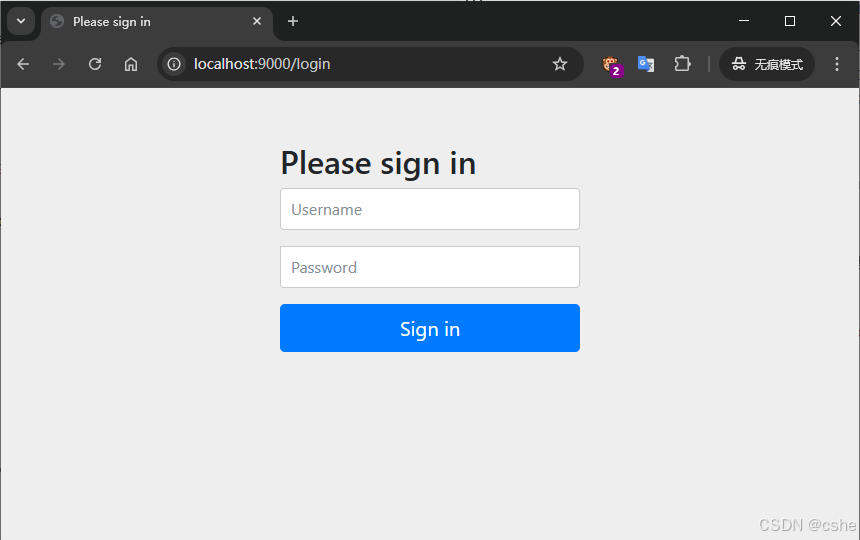
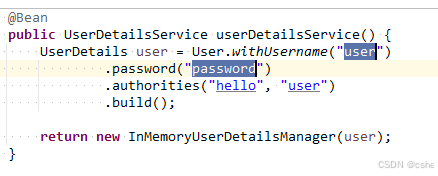
输入授权服务器配置类里配置的用户名和密码进行登录
用户名和密码验证成功后会跳转到下一个确认授权页面,勾上需要授权的用户信息点击确定
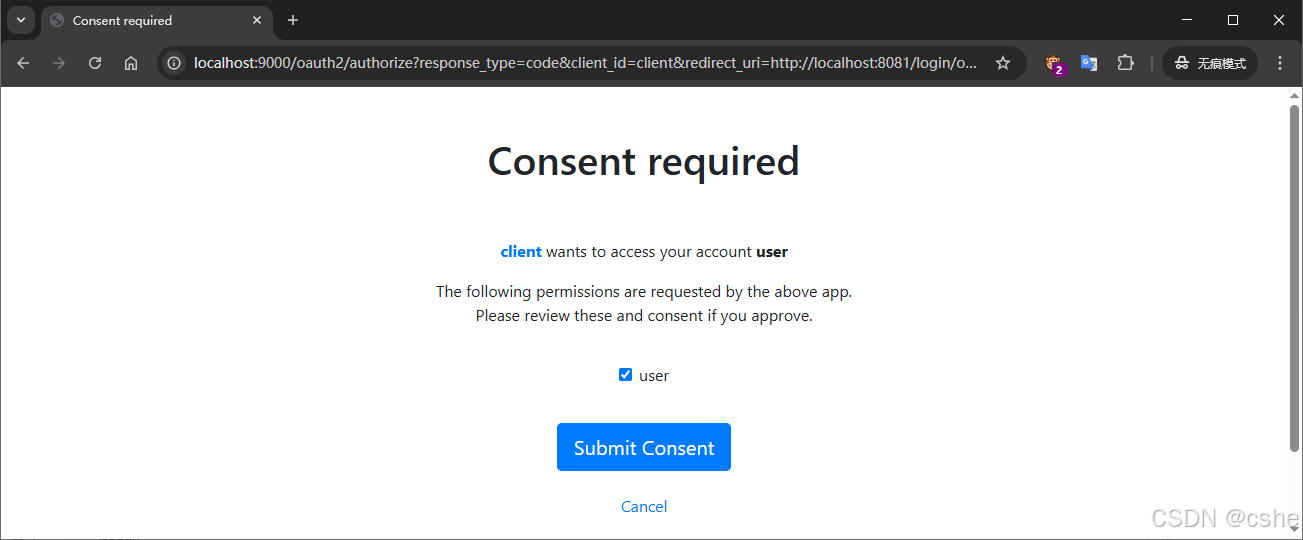
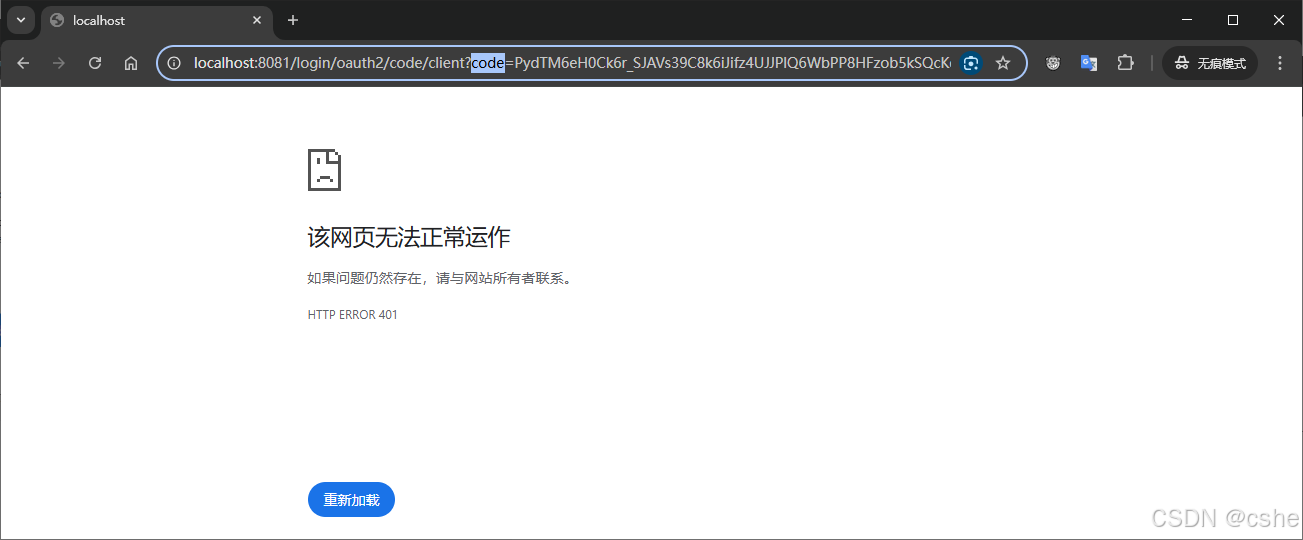
确定后授权服务器会生成一个code,并通过回调地址传给请求方(我这用的是浏览器,可以在浏览器地址栏里看到)
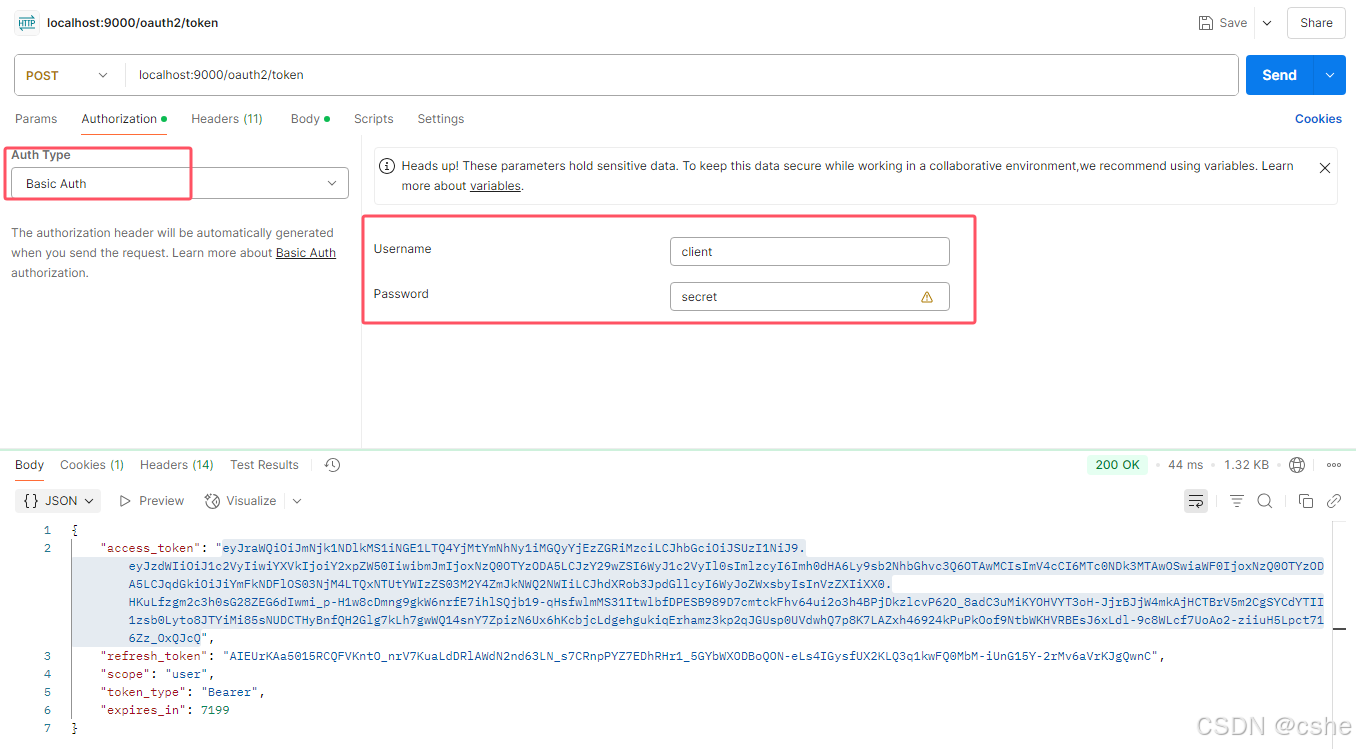
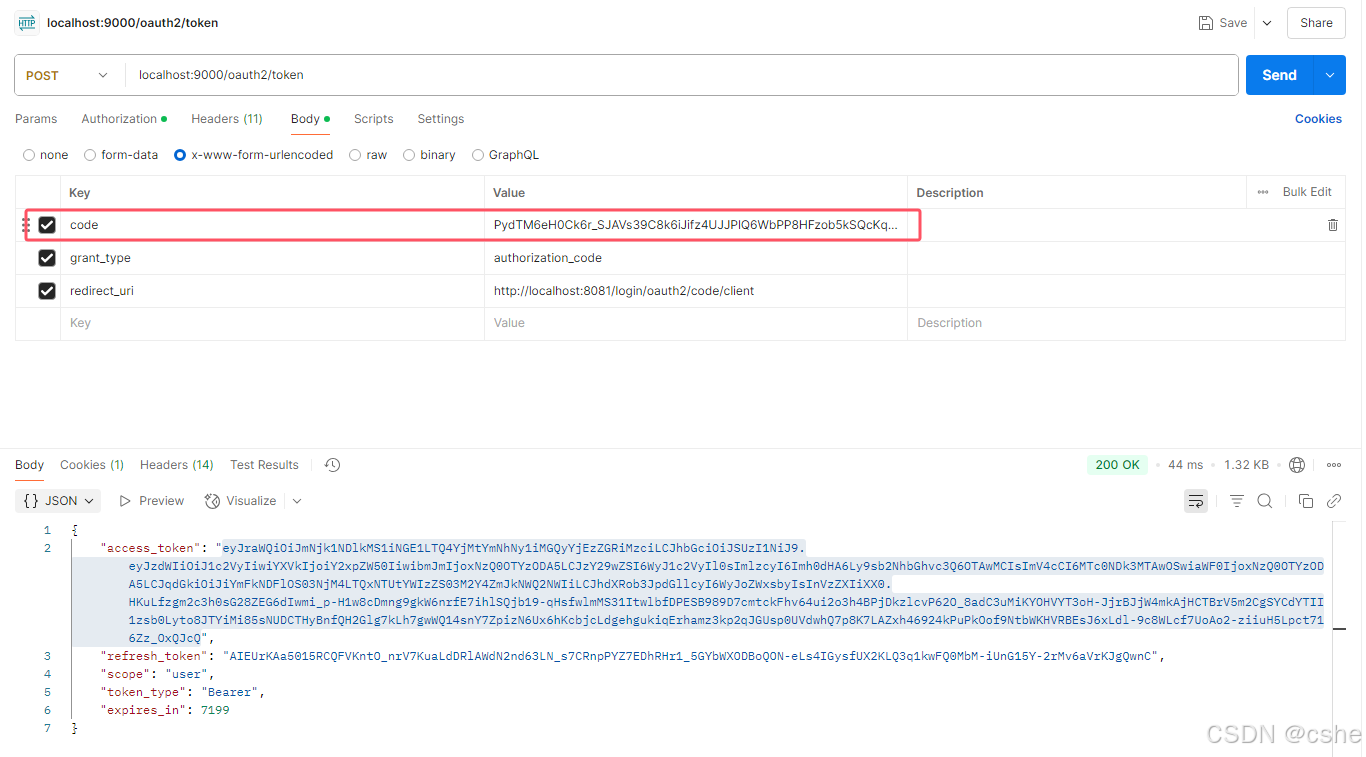
拿到code后,打开postman,请求授权服务器的 /oauth2/token 接口用code换access_token
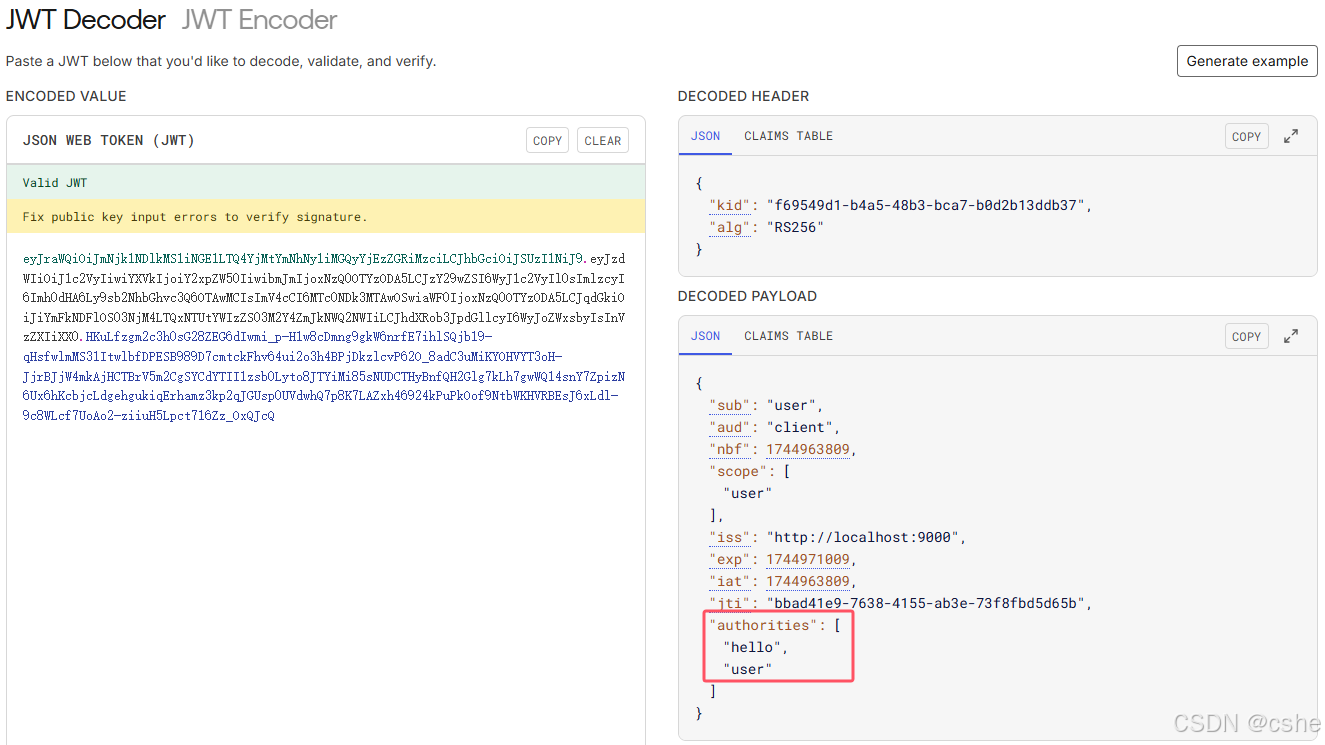
前面在资源服务器的配置类里将用户登录后的权限信息一块打包进jwt里,所以access_token里现在就有权限信息,可以打开 jwt.io 进行查看
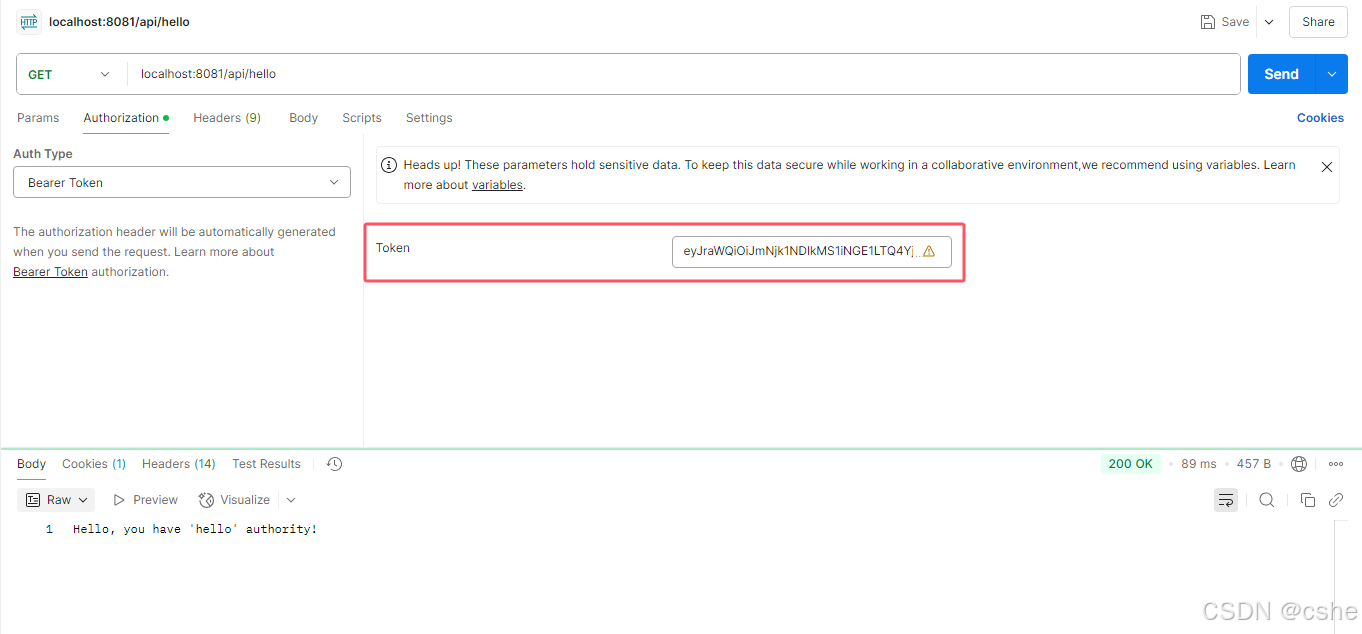
在postman里请求一个资源服务器的接口 /api/hello
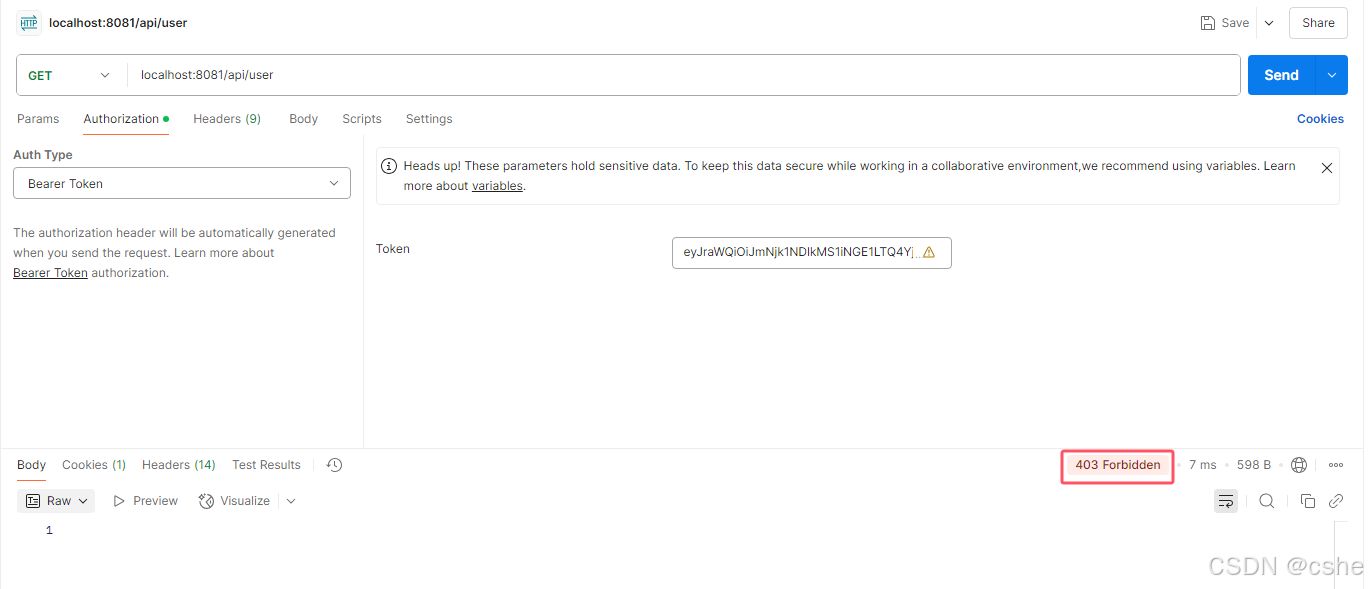
再请求接口 /api/user 因为用户只有 user权限而没有 user 角色,但/api/user 接口配置的是必须要有 user 角色才能访问,所以响应结果就是403了
总结
- 这是一个最简单的使用
spring-boot-starter-oauth2-authorization-server实现的授权中心 - 资源服务器之前如果使用的是springsecurity做的权限控制,几乎不需要修改代码
- 流程跑通后,后面完善起来就很快了
相关文章:
【springsecurity oauth2授权中心】简单案例跑通流程
项目被拆分开,需要一个授权中心使得每个项目都去授权中心登录获取用户权限。而单一项目里权限使用的是spring-security来控制的,每个controller方法上都有 PreAuthorize("hasAuthority(hello)") 注解来控制权限,想以最小的改动来实…...

golang channel源码
解析 数据结构 hchan:channel 数据结构 qcount:当前 channel 中存在多少个元素; dataqsize: 当前 channel 能存放的元素容量; buf:channel 中用于存放元素的环形缓冲区; elemsize:channel 元素…...

小刚说C语言刷题——1033 判断奇偶数
1.题目描述 输入一个整数,判断是否为偶数。是输出 y e s ,否则输出n o。 输入 输入只有一行,包括 1个整数(该整数在 1∼10000的范围内)。 输出 输出只有一行。(注意输出格式,具体请看下方提…...

2025TGCTF Web WP复现
AAA 偷渡阴平 <?php$tgctf2025$_GET[tgctf2025];if(!preg_match("/0|1|[3-9]|\~|\|\|\#|\\$|\%|\^|\&|\*|\(|\)|\-|\|\|\{|\[|\]|\}|\:|\|\"|\,|\<|\.|\>|\/|\?|\\\\/i", $tgctf2025)){//hint:你可以对着键盘…...

基于DeepSeek的考研暑假日志分析
注:我去年考研时写了日志,大致记录了我每天的主要活动。由于过于琐碎,一直没有翻看。突发奇想,现在利用deepseek总结其中规律。 从你的日志中可以总结出以下规律和活动兴衰起落: 一、学习活动规律与演变 …...

「GitHub热榜」AIGC系统源码:AI问答+绘画+PPT+音乐生成一站式
—零门槛搭建私有化AI内容工厂,源码开放商业落地指南 为什么全栈AIGC系统成为企业刚需? 1. 传统方案的致命缺陷 痛点 使用ChatGPTMidjourneyCanva 本全栈方案 工具割裂 需切换5平台 一个系统全搞定 成本 年费50万 一次部署永久免费 数据安全 …...

AWS上构建基于自然语言的数值和符号计算系统
我想要实现一个通过使用C#、Semantic Kernel库、OpenAI GPT 4的API和以下使用C#开源库MathNet实现通过中文自然语言提示词中包含LATEX代码输入到系统,通过以下符号和数值计算和其它符号和数值计算程序输出计算结果和必要步骤的应用,这样的数学计算使用程序直接产生结果,可以…...
【C++】 —— 笔试刷题day_19
一、小易的升级之路 题目解析 小易现在要打游戏,现在游戏角色的初始能力值为a,我们会遇到n个怪,这些怪物的防御值为b1、b2、b3...,如果我们的能力值要高于或者等于怪物的防御值,那我们的能力值就会加bi;如…...
)
解决 Spring Boot 多数据源环境下事务管理器冲突问题(非Neo4j请求标记了 @Transactional 尝试启动Neo4j的事务管理器)
0. 写在前面 到底遇到了什么问题? 简洁版: 在 Oracle 与 Neo4j 共存的多数据源项目中,一个仅涉及 Oracle 操作的请求,却因为 Neo4j 连接失败而报错。根本原因是 Spring 的默认事务管理器错误地指向了 Neo4j,导致不相…...

Oracle日志系统之重做日志和归档日志
Oracle日志系统之重做日志和归档日志 重做日志归档日志 本文讨论Oracle日志系统中对数据恢复非常重要的两个日志:重做日志和归档日志。 重做日志 重做日志,英文名Redo Log,顾名思义,是用来数据重做的,主要使用场景是事…...
Kubernetes》》K8S》》Pod的健康检查
K8s概念总结 》》》Pod的生命周期阶段 Pod的生命周期可以简单描述:首先Pod被创建,紧接着Pod被调度到Node节点进行部署。 Pod是非常忠诚的,一旦被分配到Node节点后,就不会离开这个Node节点,直到它被删除,删除…...

计算机视觉——基于使用 OpenCV 与 Python 实现相机标定畸变校正
概述 相机标定是一种旨在通过确定相机的内参(焦距、光学中心、畸变系数)和外参(相机的位置和方向),提高图像在现实世界中的几何精度的过程。该过程可以纠正相机拍摄的图像中的畸变,使相机能够准确感知现实…...

Python作业4 文本词云统计,生成词云
编写程序,统计两会政府工作报告热词频率,并生成词云。 2025两会政府工作报告 import jieba import wordcloud from collections import Counter import re# 读取文件 with open("gov.txt", "r", encoding"gbk") as f:t …...
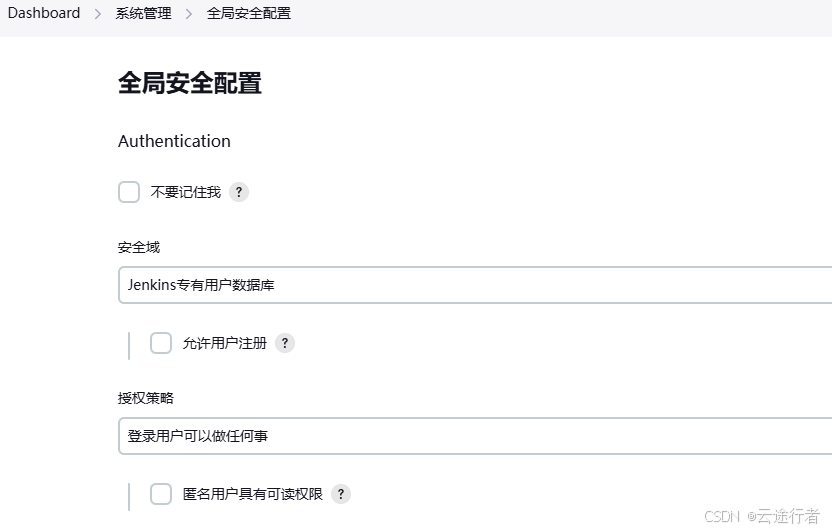
Jenkins 2.492.2 LTS 重置管理员密码
文章目录 1. Jenkins 关闭用户认证2. jenkins 修改密码 如果忘记了 Jenkins 的管理员密码的话,也不用担心,只要你有权限访问 Jenkins 的根目录,就可以轻松地重置密码。 1. Jenkins 关闭用户认证 // 查看 jenkins 家目录(使用 doc…...

1. python开发小笔记
本文件记录一些实用的python小知识,会一直更新 1. import路径 1.1 python的import搜索路径可以用sys.path查看: import sys print(sys.path) 1.2 python的搜索目录有: 本脚本所在目录环境变量PYTHONPATH指定的目录标准库目录,通…...
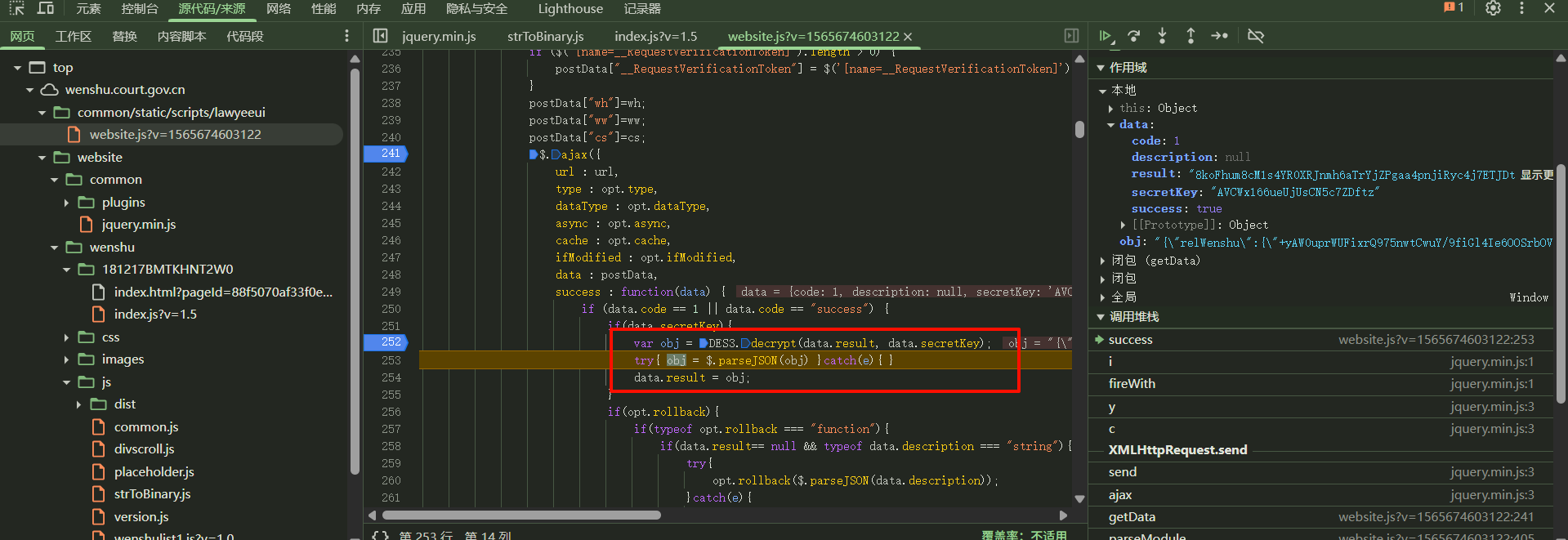
【裁判文书网DES3数据解密】逆向分析
点击翻页,出现请求,可以看到请求参数有个ciphertext密文,响应数据也是密文 打上断点,点击翻页,断住 可以看到postData里面的ciphertext已经生成 往前跟栈,可以发现是var ciphertext cipher(); funct…...

探索 JavaScript 中的 Promise 高级用法与实战
在现代 Web 开发中,异步编程已成为不可或缺的一部分。JavaScript 作为 Web 开发的核心语言,提供了多种处理异步操作的方式,其中 Promise 对象因其简洁、强大的特性而备受青睐。本文将深入探讨 Promise 的高级用法,并结合实际案例&…...

【dify实战】agent结合deepseek实现基于自然语言的数据库问答、Echarts可视化展示、Excel报表下载
使用dify agent实现数据库智能问答,echarts可视化展示,excel报表下载 观看视频,您将学会 在dify下如何快速的构建一个agent,来完成数据分析工作;如何在AI的回复中展示可视化的图表;如何在AI 的回复中加入E…...

C++学习:六个月从基础到就业——面向对象编程:接口设计
C学习:六个月从基础到就业——面向对象编程:接口设计 本文是我C学习之旅系列的第十五篇技术文章,重点讨论在C中进行接口设计的原则、技术和最佳实践。查看完整系列目录了解更多内容。 引言 在面向对象的软件开发中,良好的接口设计…...
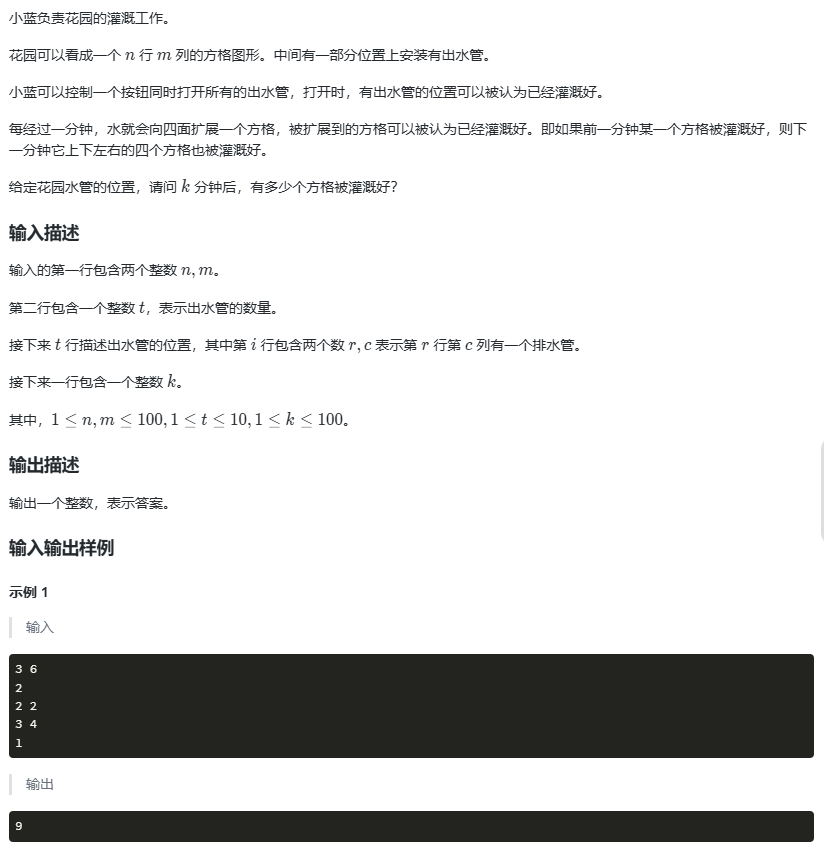
花园灌溉问题
#include <bits/stdc.h> using namespace std;// 设置最大行列数(题目限制 n, m ≤ 100) const int N 104;// 标记某个格子是否已经被水浇灌 bool used[N][N];// 队列,用于 BFS,存储当前水源的位置 queue<pair<int,i…...
《AI大模型应知应会100篇》第22篇:系统提示词(System Prompt)设计与优化
第22篇:系统提示词(System Prompt)设计与优化 摘要 在大语言模型(LLM)应用中,系统提示词(System Prompt)是控制模型行为的核心工具之一。它不仅定义了模型的身份、角色和行为规范,还直接影响输…...

Jsp技术入门指南【六】jsp脚本原理及隐式对象
Jsp技术入门指南【六】jsp脚本原理及隐式对象 前言一、JSP 脚本元素1.1 声明1.2 表达式1.3 脚本标签 二、JSP 的隐式对象是什么三、隐式对象详解outrequestsessionapplicationconfigexception 前言 在之前的博客中,我们已经介绍了JSP的环境搭建、编译文件查找以及生…...

transient关键字深度解析
Java transient 关键字深度解析 1. 核心概念 (1) 基本定义 作用:标记字段不参与序列化 适用场景: 敏感数据(如密码、密钥) 临时计算字段 依赖运行时环境的字段(如Thread对象) (2) 语法示例 java public class User implements Serializable {private String username…...
Jsp技术入门指南【五】详细讲解jsp结构页面
Jsp技术入门指南【五】详细讲解jsp结构页面 前言一、JSP页面的结构二、JSP页面的部件1. 指令(核心控制部件)2. 动作(页面交互部件,了解即可)3. 脚本(Java逻辑嵌入部件) 三、JSP指令详解1.1 JSP指…...
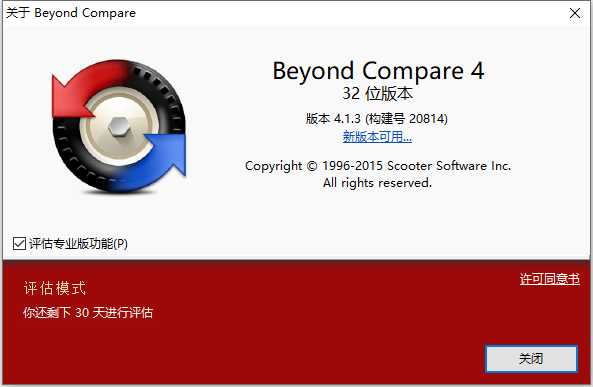
Beyond Compare 30天评估到期 解决方法
Beyond Compare 30天评估到期 解决方法 一、问题二、解决办法2.1 第一步:打开注册表2.2 第二步:删除cacheID 三、效果 一、问题 Beyond Compare提示评估到期,重装也无效,只需简单两步,轻轻松松出困境。 二、解决办法…...

探索蓝桥杯:嵌入式开发技巧分享与实践
在信息技术飞速发展的今天,嵌入式系统作为物联网和智能设备的核心技术之一,正扮演着愈发重要的角色。蓝桥杯作为国内知名的科技竞赛平台,为广大学生和科技爱好者提供了展示自己嵌入式开发能力的舞台。在这场竞赛中,参赛者不仅需要…...
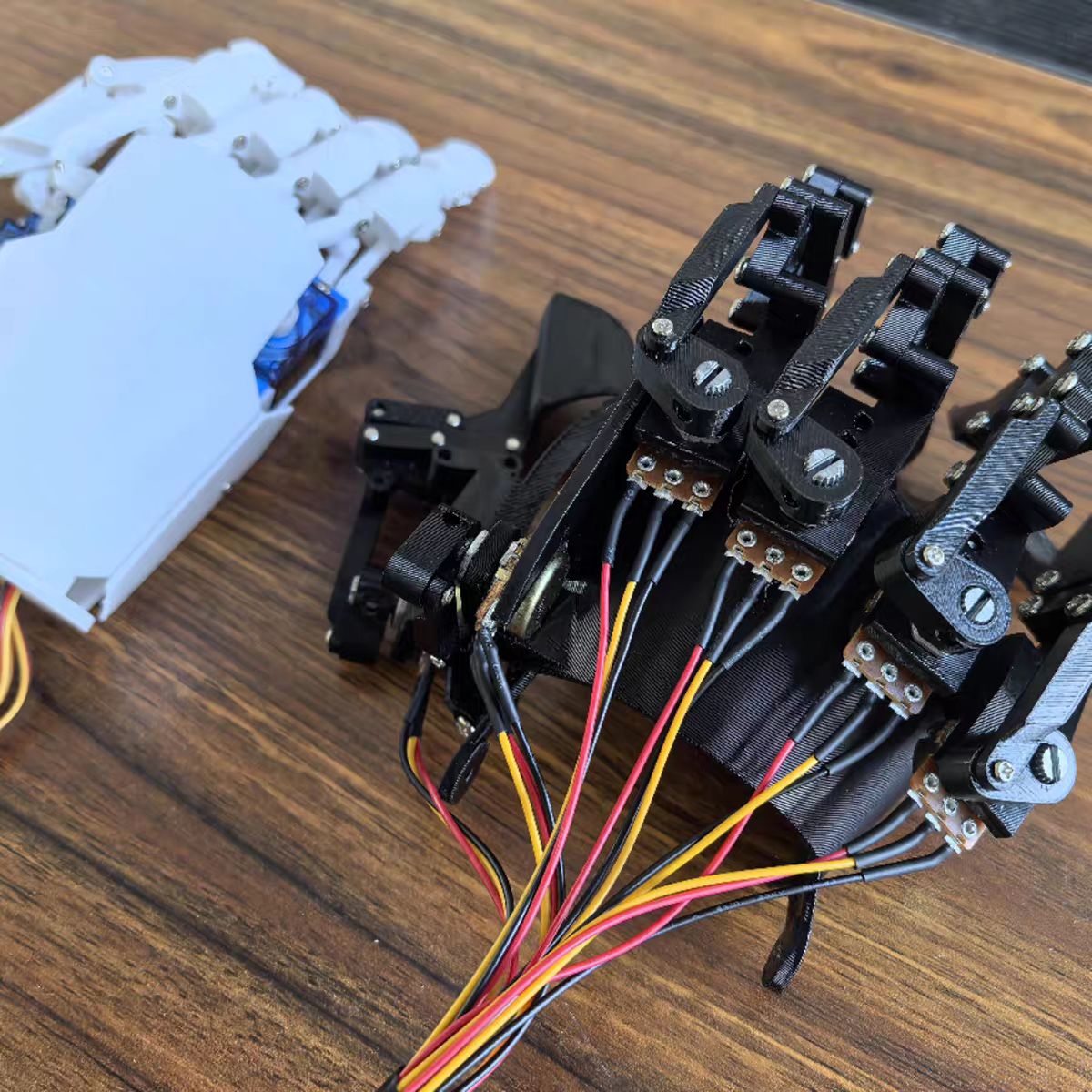
Arduino无线体感机器手——问题汇总
文章不介绍具体参数,有需求可去网上搜索。 特别声明:不论年龄,不看学历。既然你对这个领域的东西感兴趣,就应该不断培养自己提出问题、思考问题、探索答案的能力。 提出问题:提出问题时,应说明是哪款产品&a…...

学习设计模式《一》——简单工厂
一、基础概念 1.1、接口 简单的说:接口是【用来实现类的行为定义、约束类的行为】(即:定义可以做什么);接口可以包含【实例方法】、【属性】、【事件】、【索引器】或这四种成员类型的任意组合。 接口的优点࿱…...

python有序列表
您的代码整体结构良好,但存在一些关键错误和优化点。以下是对代码的详细评价及改进建议:---### 主要问题1. **add方法中的链表断裂问题**- **问题描述**:当向链表中间插入节点时,未正确设置新节点的next,导致后续节点丢…...

使用Lombok @Builder 收参报错提示没有无参构造方法的原因与解决办法
使用Lombok Builder 收参报错提示没有无参构造方法的原因与解决办法 类上加了Builder之后接口接收前端传来的参数报错:(no Creators, like default constructor, exist): cannot deserialize from Object value (no delegate- or property-based Creator) 1.解决办法…...