
Vue+Notification 自定义消息通知组件 支持数据分页 实时更新
效果图:
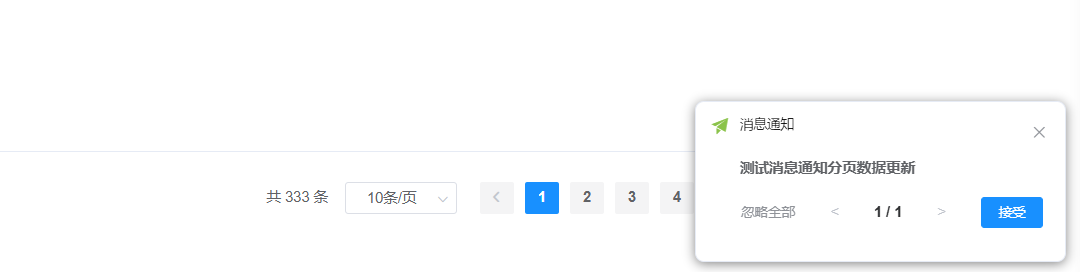
message.vue 消息组件 子组件
<template><div class="custom-notification"><div class="content"><span @click="gotoMessageList(currentMessage.split('=')[1])">{{ currentMessage.split('=')[0] }}</span></div><div class="footer"><div class="left-buttons"><el-button size="mini" type="text"  @click="handleIgnoreAll">忽略全部</el-button></div><div class="pagination"><el-paginationsmall:key="paginationKey":current-page.sync="currentPage":page-size="1":total="localNoticeList.length"layout="prev,slot, next"prev-text="<"next-text=">"@prev-click="currentPage--"@next-click="currentPage++"><span class="pagination-text">{{ currentPage }} / {{ totalPages }}</span></el-pagination></div><div class="right-button"><el-button type="primary" size="mini" @click="handleAccept(currentMessage.split('=')[1])">接受</el-button></div></div></div>
</template><script>export default {props: {messages: {type: Array,default: () => []},total:{type:Number,default:0},noticeList:{type:Array,default:()=>[]}},data() {return {localNoticeList: [], // 新增本地副本currentPage: 1,totalPage: 5,paginationKey: 0  // 分页组件独立key}},watch: {noticeList: {deep:true,immediate: true,handler(newVal) {this.localNoticeList = JSON.parse(JSON.stringify(newVal))// 当消息更新时自动重置页码this.currentPage = Math.min(this.currentPage, newVal.length)this.paginationKey++  // 强制分页组件重置// this.updateList(this.localNoticeList)}}},computed: {totalPages() {return this.localNoticeList.length || 1},currentMessage() {return this.localNoticeList[this.currentPage - 1]?.messageTitle +'='+this.localNoticeList[this.currentPage - 1]?.messageId || ''}},methods: {handleLater() {// 稍后提醒逻辑this.$emit('later')},handleIgnoreAll() {// 忽略全部 将消息全部设为已读this.$emit('ignore-all',this.localNoticeList) // 触发父级关闭事件},handleAccept(msgId) {//接收this.$emit('gotoMessageList',msgId)},gotoMessageList(msgId){this.$emit('gotoMessageList',msgId)},// 通过事件通知父组件updateList(newList) {this.$emit('update-list', newList)}}}
</script><style scoped>.custom-notification {padding: 15px 0px 15px 0px;width: 270px;}.header {display: flex;align-items: center;margin-bottom: 12px;}.content{cursor: pointer;font-weight: bold;font-size: 13px;}.header i {margin-right: 8px;font-size: 16px;}.footer {display: flex;justify-content: space-between;align-items: center;margin-top: 15px;}.pagination {display: flex;align-items: center;gap: 8px;}.pagination i {cursor: pointer;color: #606266;}.left-buttons .el-button--text {color: #909399;}.pagination-text{text-align: center;}
</style>
消息父组件:
<template><div><el-badge :value="total" class="item" style="line-height: 40px; position: relative;"><span @click="bellClick"><el-iconclass="el-icon-bell"style="font-size: 20px; cursor: pointer; transform: translateY(1.1px)"></el-icon></span></el-badge><!-- 添加或修改我的消息对话框 --><el-dialog title="我的消息" :visible.sync="open" width="500px" append-to-body><el-form ref="form" :model="form" :rules="rules" label-width="80px"><el-form-item label="消息标题" prop="messageTitle"><el-input disabled v-model="form.messageTitle" placeholder="请输入消息标题" /></el-form-item><el-form-item label="消息内容"><editor :readOnly="true" v-model="form.messageContent" :min-height="192" /></el-form-item></el-form><div slot="footer" class="dialog-footer"><el-button @click="cancel">关闭</el-button></div></el-dialog><!--  word预览弹窗  --><el-dialog fullscreen title="word预览" :visible.sync="dialogVisibleWord" append-to-body><vue-office-docx :src="previewWordOffice" @rendered="renderedHandler" @error="errorHandler" /></el-dialog><!--    doc预览  --><el-dialog fullscreen title="word预览" :visible.sync="DocSync" append-to-body><VueOfficePdf :src="docSrc"  /></el-dialog><el-dialog:title="msg.messageTitle":visible.sync="messageVisible"width="800px"append-to-bodyclass="my-message__dialog"@close="closeMsgModel"><div><span class="contentImg" v-html="msg.messageContent"></span></div><div class="my-message__filebox" v-if="fileList.length > 0"><div>附件:</div><ul class="my-message__ul"><li class="my-message__li" v-for="(item, index) in fileList" :key="index"><div class="my-message__li--title">{{ item.name }}</div><div class="my-message__li--opt"><el-buttonstyle="color: green"@click.stop="handleShow(index, item)"type="text"icon="el-icon-view"size="mini"v-if="getFileExtension(item.name) !== 'zip' && getFileExtension(item.name) !== 'rar'">查看</el-button></div></li></ul></div><div slot="footer" class="dialog-footer"><el-button @click.stop="closeMsgModel">关闭</el-button></div></el-dialog>
<!--    <custom-notification></custom-notification>--></div>
</template><script>
import Vue from 'vue'
import { mapGetters } from 'vuex';//引入VueOfficeDocx组件
import VueOfficeDocx from '@vue-office/docx';
import { listMyUnreadNotice, getSysmessage, listSysmessage } from '@/api/system/sysmessage';
import { fileDownload, previewDocumentAPI } from '@/api/files/files';
import XLSX from 'xlsx';
import events from '@/utils/events';
import VueOfficePdf from '@vue-office/pdf';
import Notification from 'element-ui/lib/notification'
import CustomNotification from '@/components/Bell/component/message'
export default {name: 'index',components: { VueOfficePdf, VueOfficeDocx,CustomNotification },data() {return {DocSync:false,docSrc:'',baseUrl: 'http://' + window.location.host + process.env.VUE_APP_BASE_API,dialogVisibleWord: false,previewWordOffice: '',noticeList: [],noticeListNew:[],//pollInterval: null,// 轮询定时器lastCheckTime: null,// 最后检查时间notificationKey:0,isFirstCheck: true,// 首次检查标志templateVisible: false,messageVisible:false,showAllBtn: false,msg:{},form: {},rules: {},open: false,queryParams: {id: null,status: '0'},fileList: [],total: 0,totalNew:0,notificationInstance:null //通知示例};},computed: {...mapGetters(['isDot', 'id'])},created() {// on接收   emit发送this.clearPolling()this.getUnRead(); //查询是否有未读消息通知this.getUnReadNew(); //初始化调用获取未读消息events.$on('noticePush', this.getUnRead);events.$on('noticePushByMsg', this.getUnRead);this.$nextTick(() => {events.$on('noticeCheckByMsg', this.getUnRead);// events.$on('noticeCancel',this.cancel);});events.$on('noticePush',this.getUnReadNew)},mounted() {},beforeDestroy() {// this.clearPolling()},// 关闭定时器deactivated(){// this.clearPolling()},methods: {// 跳转链接clickSpan() {// 点击跳转我的消息页this.$router.push('/task/myMessage');},/**word预览组件回调函数 */renderedHandler() {console.log('渲染完成');},errorHandler() {console.log('渲染失败');},/** 查询是否存在未读消息 根据当前用户匹配消息表中得ID  */getUnRead() {this.queryParams.id = this.id;// 查询未读消息listSysmessage(this.queryParams).then((res) => {if (res.code == 200) {if (res.rows.length > 0) {// 这里的total  要请求我的代办的接口 然后加起来this.total = res.total;this.noticeList = res.rows;this.$store.dispatch('app/setIsDot', true);} else {this.total = null;this.noticeList = [];this.$store.dispatch('app/setIsDot', false);}this.$emit('getUnRead', this.noticeList);}});},//查询未读消息重构 添加定时任务 每隔20分钟调用一次/** 核心查询方法 */async getUnReadNew() {try {const params = {id: this.id, // 用户IDstatus:0,}const { code, rows, total } = await listSysmessage(params)if (code === 200) {this.handleNewMessages(rows, total)this.lastCheckTime = new Date()}} catch (error) {console.error('消息检查失败:', error)}},/** 处理新消息逻辑 */handleNewMessages(rows, total) {// 数据同步this.noticeListNew = rowsthis.totalNew = rows.length//total// 仅当有新消息时触发通知if (rows.length > 0) {if (this.notificationInstance) {// 手动创建组件实例// 通过 key 变化强制更新组件this.notificationKey = Date.now()// const NotificationComponent = new Vue({//   render: h => h(CustomNotification, {//     props: {//       noticeList: [...this.noticeListNew],//       total: this.noticeListNew.length//     },//     on: {//       // 事件监听...//     }//   })// }).$mount()// // 保存组件实例引用// this.customNotificationInstance = NotificationComponent.$children[0]// this.customNotificationInstance = this.notificationInstance.$children[0]//已有弹窗时仅更新数据this.customNotificationInstance.$set(this.customNotificationInstance,'noticeList',[...rows])this.customNotificationInstance.$forceUpdate()} else {this.showNotification()}}this.$emit('update:noticeList', rows)window.clearInterval(this.pollInterval)this.setupPolling()// 启动轮询 后台发送消息时 自动触发},/** 判断是否有新消息 */hasNewMessages(newRows) {return newRows.some(item =>!this.noticeListNew.find(old => old.messageId === item.messageId))},/** 轮询控制 */setupPolling() {// 5分钟调用一次 60000 * 5 300000this.clearPolling() // 清除已有定时器this.pollInterval = window.setInterval(() => {this.getUnReadNew()},300000)},/** 销毁定时器*/clearPolling() {if (this.pollInterval) {window.clearInterval(this.pollInterval)this.pollInterval = null}},bellClick() {this.getUnRead();},cancel() {this.open = false;this.getUnRead();},cancelTempDialog() {this.templateVisible = false;this.getUnRead();},// 查看更多showAll() {this.$router.push({ path: '/monitor/myMessage' });},//查看消息 弹窗显示handleRead(data) {const messageId = data.messageId;getSysmessage(messageId).then((response) => {this.form = response.data;// this.form.messageTitle = data.messageTitle// this.form.messageContent = data.messageContentif (this.form.fileJSON && JSON.parse(this.form.fileJSON)) {this.fileList = JSON.parse(this.form.fileJSON);} else {this.fileList = [];}if (this.form.messageType === '3') {this.templateVisible = true;} else {this.open = true;this.title = '查看我的消息';}});},toLink(url) {if (url) {if (url.indexOf('http://') > -1 || url.indexOf('https://') > -1) {window.open(url);} else {this.$router.push({ path: url });}}this.cancelTempDialog();},handleDownLoad(index, file) {const param = {code: file.code,fileName: file.name};fileDownload(param).then((response) => {if (response) {const url = window.URL.createObjectURL(new Blob([response]));const link = document.createElement('a');link.href = url;link.setAttribute('download', file.name); // 设置下载的文件名document.body.appendChild(link);link.click();document.body.removeChild(link);}}).catch((error) => {});},//  预览async handleShow(index, file) {const param = {code: file.code,fileName: file.name};const type = file.name.split('.')[file.name.split('.').length - 1];await fileDownload(param).then(async (response) => {if (type === 'pdf' || type === 'PDF') {//pdf预览let blob = new Blob([response], {type: 'application/pdf'});let fileURL = window.URL.createObjectURL(blob);window.open(fileURL, '_blank'); //这里是直接打开新窗口} else if (type === 'txt' || type === 'TXT') {//txt预览// 将文件流转换为文本const text = await response.text();// 在新窗口中打开文本内容const newWindow = window.open();newWindow.document.write(`<pre>${text}</pre>`);} else if (type === 'xls' || type === 'xlsx') {//excel预览// 将文件流转换为ArrayBufferconst arrayBuffer = await response.arrayBuffer();// 使用xlsx插件解析ArrayBuffer为Workbook对象const workbook = XLSX.read(arrayBuffer, { type: 'array' });// 获取第一个Sheetconst sheetName = workbook.SheetNames[0];const sheet = workbook.Sheets[sheetName];// 将Sheet转换为HTML表格const html = XLSX.utils.sheet_to_html(sheet);// 添加表格线样式const styledHtml = `<style>table {border-collapse: collapse;}td, th {border: 1px solid black;padding: 8px;}</style>${html}`;// 在新窗口中打开HTML内容const newWindow = window.open();setTimeout(() => {newWindow.document.title = sheetName;}, 0);newWindow.document.write(styledHtml);} else if (type === 'doc' || type === 'docx') {if (type === 'doc') {// doc预览 需要转码 定时任务this.handleMany(file.code,type)}else{// docx预览const fileUrl = window.URL.createObjectURL(response);this.previewWordOffice = fileUrl;this.dialogVisibleWord = true;}}else if (type === 'png' || type === 'jpg') {const fileURL = window.URL.createObjectURL(response);this.qrCode = fileURL;this.dialogVisible = true;console.log(fileURL, 'fileURL的值为-----------');this.saveFile = file;}}).catch((error) => {});},//  doc 预览handleMany(code,type) {previewDocumentAPI({code: code}).then(response => {let fileURLfileURL = this.baseUrl + response.msgif (type === 'doc' || type === 'docx') {this.docSrc = fileURLthis.DocSync = true}})},showNotification() {// 如果已有通知实例且未关闭,先关闭if (this.notificationInstance) {this.$notify.closeAll()}const h = this.$createElementconst notificationNode = h(CustomNotification, {key: this.notificationKey, // 添加唯一keyprops: {noticeList: [...this.noticeListNew], // 传递消息列表total:this.noticeListNew.length},on: {// 添加事件监听'update-list': this.handleListUpdate,'close-notification': () => this.$notify.closeAll(),'later': () => {this.$notify.closeAll()},'ignore-all': (localNoticeList) => {const msgList = localNoticeListmsgList & msgList.forEach((item)=>{this.readMessageAll(item.messageId)})this.$notify.closeAll()this.getUnRead()},'accept': () => {console.log('接受处理逻辑')},close: () => {this.notificationInstance = null},'gotoMessageList': (msgId) => {this.readMessage(msgId)this.getUnRead()//阅读了那一条 根据ID匹配然后进行过滤this.noticeListNew = this.noticeListNew.filter(item=> item.messageId !== Number(msgId))if(this.noticeListNew.length > 0){this.customNotificationInstance.$set(this.customNotificationInstance,'noticeList',[...this.noticeListNew])this.customNotificationInstance.$forceUpdate()}else{this.$notify.closeAll()}}}})this.notificationInstance = this.$notify.info({title: '消息通知',message: notificationNode,customClass:'bellClass',position: 'bottom-right',duration:60000,onClose: () => {this.notificationInstance = null}});// 获取组件实例this.customNotificationInstance = notificationNode.componentInstance},// 处理列表更新事件handleListUpdate(newList) {this.noticeListNew = newList},//查看消息 弹窗显示readMessage(msgId) {const messageId = msgId;getSysmessage(messageId).then((response) => {this.messageVisible = truethis.msg = response.data;// this.form.messageTitle = data.messageTitle// this.form.messageContent = data.messageContentif (this.msg.fileJSON && JSON.parse(this.msg.fileJSON)) {this.fileList = JSON.parse(this.msg.fileJSON);} else {this.fileList = [];}});},//批量已读readMessageAll(msgId) {const messageId = msgId;getSysmessage(messageId).then((response) => {});},getFileExtension(filename) {// 获取最后一个点的位置const lastDotIndex = filename.lastIndexOf('.')// 如果没有点或者点在第一个位置,返回空字符串if (lastDotIndex === -1 || lastDotIndex === 0) {return ''}// 截取点后的字符串作为后缀return filename.substring(lastDotIndex + 1)},closeMsgModel(){this.messageVisible = false}}
};
</script><style rel="stylesheet/scss" lang="scss" scoped>
.my-message {::v-deep .el-checkbox__label {vertical-align: middle;}&__editor {::v-deep .ql-toolbar {display: none;}::v-deep .ql-container {// border-top: 1px solid #ccc !important;border: none !important;}::v-deep .ql-editor {max-height: 500px;}}&__ul {list-style-type: none;// border: 1px solid #ccc;// border-radius: 5px;}&__filebox {margin-top: 10px;padding-left: 20px;padding-right: 20px;background: #e6f7ff;border-radius: 5px;}&__dialog {::v-deep .el-dialog__body {padding-bottom: 0px !important;}}&__li {width: 100%;display: flex;justify-content: space-between;margin-bottom: 5px;&--opt {padding-right: 10px;}}
}::v-deep .el-badge__content.is-fixed {transform: translateY(-22%) translateX(100%);
}::v-deep .el-badge__content {font-size: 11px;padding: 0 5px;
}
::v-deep .is-fullscreen {.el-dialog__body {/* padding: 15px 20px !important; */color: #606266;font-size: 14px;word-break: break-all;height: calc(100vh - 40px);overflow: auto;}
}</style>
<style>.bellClass .el-notification__icon::before {content: '\e7ba'; /* 需要更换的图标编码 */color: #8BC34A; /* 图标颜色 */}.bellClass {/*border: 1px solid #8bc34a57; !* 修改边框样式 f55e00 *!*/box-shadow: 0 2px 10px 0 rgb(0 0 0 / 48%) !important;}.el-notification__title {color: #000; /* 修改标题字体颜色 */font-size:12px;font-weight: 100;}.bellClass .el-notification__icon {height: 20px;width: 20px;font-size: 18px;transform: translateY(-2px);}.bellClass .el-notification__group {margin-left: 8px;margin-right: 8px;}
</style>
核心代码:
这个显示通知的核心方法, 自定义消息组件 通过$createElement创建Vnode挂载到message中,
数据传递的话通过props传递,通过on自定义事件
showNotification() {// 如果已有通知实例且未关闭,先关闭if (this.notificationInstance) {this.$notify.closeAll()}const h = this.$createElementconst notificationNode = h(CustomNotification, {key: this.notificationKey, // 添加唯一keyprops: {noticeList: [...this.noticeListNew], // 传递消息列表total:this.noticeListNew.length},on: {// 添加事件监听'update-list': this.handleListUpdate,'close-notification': () => this.$notify.closeAll(),'later': () => {this.$notify.closeAll()},'ignore-all': (localNoticeList) => {const msgList = localNoticeListmsgList & msgList.forEach((item)=>{this.readMessageAll(item.messageId)})this.$notify.closeAll()this.getUnRead()},'accept': () => {console.log('接受处理逻辑')},close: () => {this.notificationInstance = null},'gotoMessageList': (msgId) => {this.readMessage(msgId)this.getUnRead()//阅读了那一条 根据ID匹配然后进行过滤this.noticeListNew = this.noticeListNew.filter(item=> item.messageId !== Number(msgId))if(this.noticeListNew.length > 0){this.customNotificationInstance.$set(this.customNotificationInstance,'noticeList',[...this.noticeListNew])this.customNotificationInstance.$forceUpdate()}else{this.$notify.closeAll()}}}})this.notificationInstance = this.$notify.info({title: '消息通知',message: notificationNode,customClass:'bellClass',position: 'bottom-right',duration:60000,onClose: () => {this.notificationInstance = null}});// 获取组件实例this.customNotificationInstance = notificationNode.componentInstance},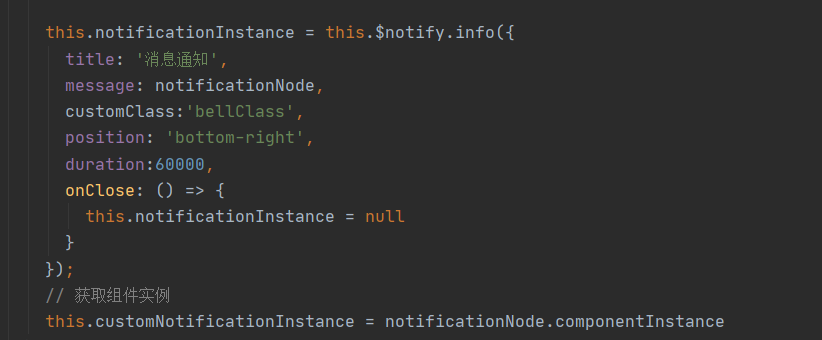
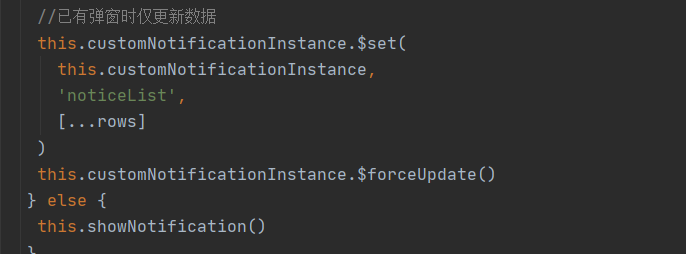
获取当前弹窗的实例时数据通信的关键!
/** 处理新消息逻辑 */handleNewMessages(rows, total) {// 数据同步this.noticeListNew = rowsthis.totalNew = rows.length//total// 仅当有新消息时触发通知if (rows.length > 0) {if (this.notificationInstance) {// 手动创建组件实例// 通过 key 变化强制更新组件this.notificationKey = Date.now()// const NotificationComponent = new Vue({// render: h => h(CustomNotification, {// props: {// noticeList: [...this.noticeListNew],// total: this.noticeListNew.length// },// on: {// // 事件监听...// }// })// }).$mount()// // 保存组件实例引用// this.customNotificationInstance = NotificationComponent.$children[0]// this.customNotificationInstance = this.notificationInstance.$children[0]//已有弹窗时仅更新数据this.customNotificationInstance.$set(this.customNotificationInstance,'noticeList',[...rows])this.customNotificationInstance.$forceUpdate()} else {this.showNotification()}}this.$emit('update:noticeList', rows)window.clearInterval(this.pollInterval)this.setupPolling()// 启动轮询 后台发送消息时 自动触发},已有弹窗只更新数据 不弹窗
相关文章:
Vue+Notification 自定义消息通知组件 支持数据分页 实时更新
效果图: message.vue 消息组件 子组件 <template><div class"custom-notification"><div class"content"><span click"gotoMessageList(currentMessage.split()[1])">{{ currentMessage.split()[0] }}</…...
不规则曲面上两点距离求取
背景 在CT中求皮肤上两点间的弧长。由于人体表面并不是规则的曲面,不可能用圆的弧长求取方法来计算出两点间的弧长。 而在不规则的曲面上求两点的距离,都可以用类似测地线距离求取的方式来求取(积分),而转化为搜索路…...

Redis面试问题缓存相关详解
Redis面试问题缓存相关详解 一、缓存三兄弟(穿透、击穿、雪崩) 1. 穿透 问题描述: 缓存穿透是指查询一个数据库中不存在的数据,由于缓存不会保存这样的数据,每次都会穿透到数据库,导致数据库压力增大。例…...
性能比拼: Elixir vs Go
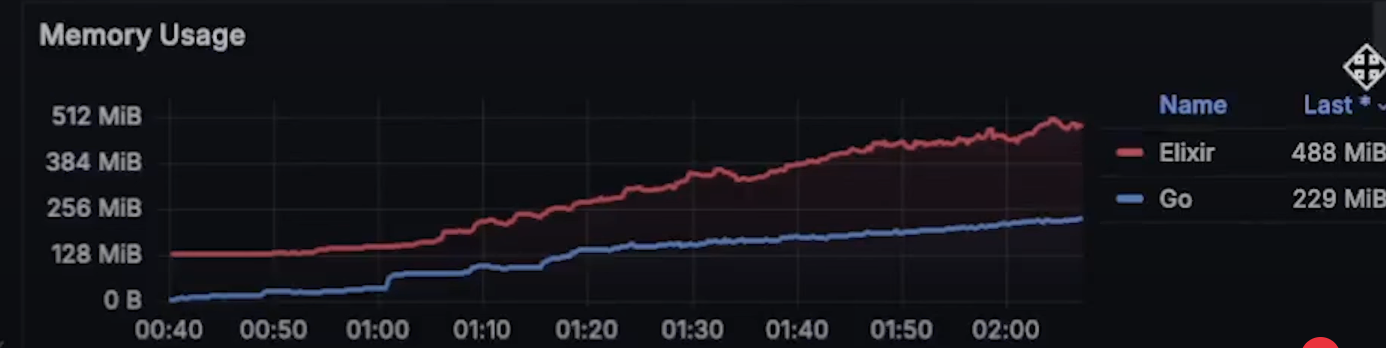
本内容是对知名性能评测博主 Anton Putra Elixir vs Go (Golang) Performance (Latency - Throughput - Saturation - Availability) 内容的翻译与整理, 有适当删减, 相关指标和结论以原作为准 对比 Elixir 和 Go 简介 许多人长期以来一直要求我对比 Elixir 和 Go。在本视频…...
:深入理解精益分析的核心要点)
精益数据分析(6/126):深入理解精益分析的核心要点
精益数据分析(6/126):深入理解精益分析的核心要点 在创业和数据驱动的时代浪潮中,我们都在不断探索如何更好地利用数据推动业务发展。我希望通过和大家分享对《精益数据分析》的学习心得,一起在这个充满挑战和机遇的领…...
【Linux网络与网络编程】11.数据链路层mac帧协议ARP协议
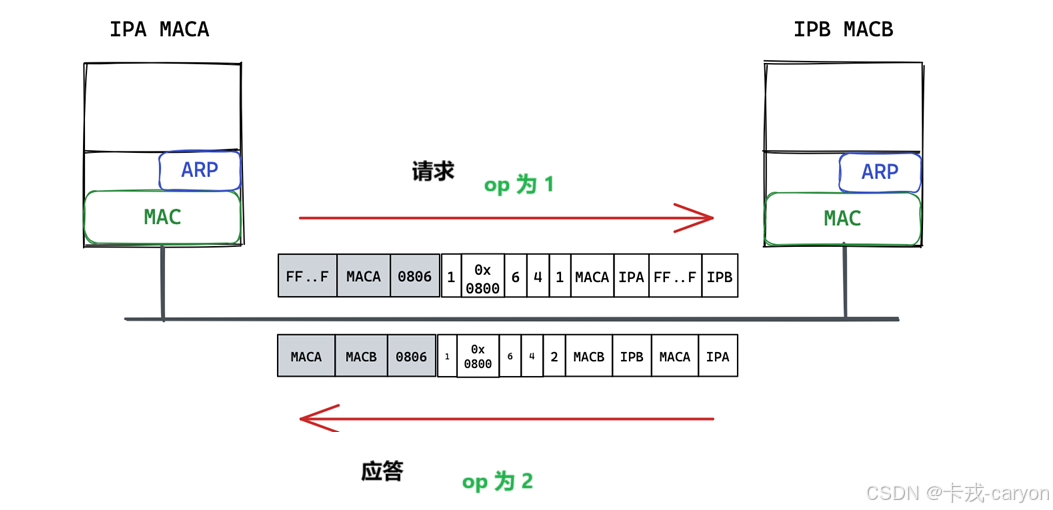
前面在介绍网络层时我们提出来过一个问题:主机是怎么把数据交给路由器的?那里我们说这是由数据链路层来做的。 网络上的报文在物理结构上是以mac帧的形式流动的,但在逻辑上是以IP流动的,IP的流动是需要mac帧支持的。 数据链路层解…...

JAVA设计模式:注解+模板+接口
1.基础组件 1.1注解类控制代码执行启动、停止、顺序 /*** author : test* description : 数据同步注解* date : 2025/4/18*/ Target({ElementType.TYPE}) Retention(RetentionPolicy.RUNTIME) Documented public interface SyncMeta {/*** 执行服务名称* return*/String name…...

Linux系统编程 day6 进程间通信mmap
父子共享的信息:文件描述符,mmap建立的共享映射区(MAP_SHARED) mmap父子间进程通信 var的时候 :读时共享,写时复制 父进程先创建映射区,指定共享MAP_SHARED权限 , fork创建子进程…...

【MySQL】MySQL建立索引不知道注意什么?
基本原则: 1.选择性原则: 选择高选择性的列建立索引(该列有大量不同的值) 2.适度原则:不是越多越好,每个索引都会增加写入开销 列选择注意事项: 1.常用查询条件列:WHERE字句中频繁使用的列 2.连接操作列…...
:SM4 对称加密算法)
定制一款国密浏览器(9):SM4 对称加密算法
上一章介绍了 SM3 算法的移植要点,本章介绍对称加密算法 SM4 的移植要点。 SM4 算法相对 SM3 算法来说复杂一些,但还是比较简单的算法,详细算法说明参考《GMT 0002-2012 SM4分组密码算法》这份文档。铜锁开源项目的实现代码在 sm4.c 文件中,直接拿过来编译就可以。 但需要…...
对微服务的数据一致性和恢复性有何影响?如何选择?)
Redis 的持久化机制(RDB, AOF)对微服务的数据一致性和恢复性有何影响?如何选择?
Redis 的持久化机制(RDB 和 AOF)对于保证 Redis 服务重启或崩溃后数据的恢复至关重要,这直接影响到依赖 Redis 的微服务的数据一致性和恢复能力。 1. RDB (Redis Database Backup) 机制: 在指定的时间间隔内,将 Redis 在内存中的…...
lottie深入玩法
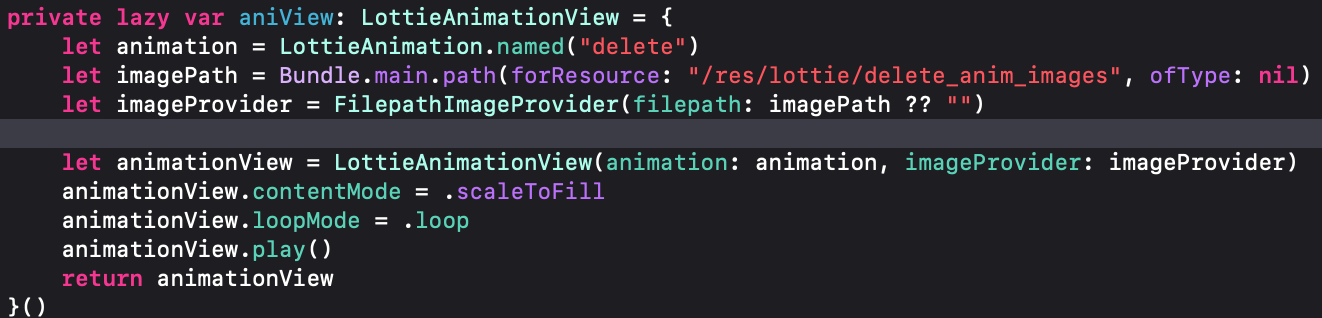
A、json文件和图片资源分开 delete 是json资源名字 /res/lottie/delete_anim_images是图片资源文件夹路径 JSON 中引用的图片名,必须与实际图片文件名一致 B、json文件和图片资源分开,并且图片加载不固定 比如我有7张图片,分别命名1~7&…...
)
Android学习总结之算法篇七(图和矩阵)
有向图的深度优先搜索(DFS)和广度优先搜索(BFS)的示例,以此来模拟遍历 GC Root 引用链这种有向图结构: 一、深度优先搜索(DFS) import java.util.*;public class GraphDFS {privat…...

docker 大模型
使用 Docker 实现大模型的步骤指南 在今天的文章中,我们将指导刚入行的小白如何使用 Docker 来运行大模型。Docker 是一个开放源代码的平台,允许开发者自动化应用程序的部署、扩展和管理。通过将大模型放入 Docker 容器中,我们可以确保其在各…...

热门与冷门并存,25西电—电子工程学院(考研录取情况)
1、电子工程学院各个方向 2、电子工程学院近三年复试分数线对比 学长、学姐分析 由表可看出: 1、电子科学与技术25年相较于24年上升20分 2、信息与通信工程、控制科学与工程、新一代电子信息技术(专硕)25年相较于24年下降25分 3、25vs24推…...
Warcraft Logs [Classic] [WCL] BOSS ID query
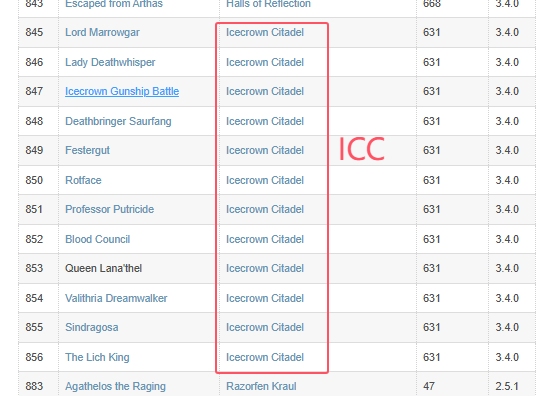
Warcraft Logs [Classic] [WCL] BOSS ID query 所有副本BOSSID查询 https://wowpedia.fandom.com/wiki/DungeonEncounterID#Retail IDNameMapInstanceIDPatch227High Interrogator GerstahnBlackrock Depths230228Lord RoccorBlackrock Depths230229Houndmaster GrebmarBlackro…...

python录屏工具实现
python录屏工具实现 实现一 按Ctrl+Shift+8开始录制,按Ctrl+Shift+9结束录制,视频保存到“ d:\录屏视频”目录中。 先看用了哪些库 import cv2: 引入 OpenCV 库,这是一个开源计算机视觉库,用于图像和视频处理。在这个程序中,它用于创建视频文件、处理图像等。需要安装ope…...
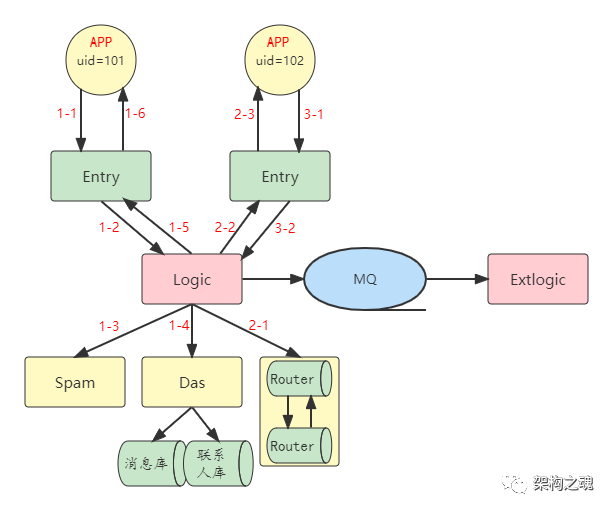
架构师面试(三十一):IM 消息收发逻辑
问题 今天聊一下 IM 系统最核心的业务逻辑。 在上一篇短文《架构师面试(三十):IM 分层架构》中详细分析过,IM 水平分层架构包括:【入口网关层】、【业务逻辑层】、【路由层】和【数据访问层】;除此之外&a…...
基于若依框架前后端分离的项目部署
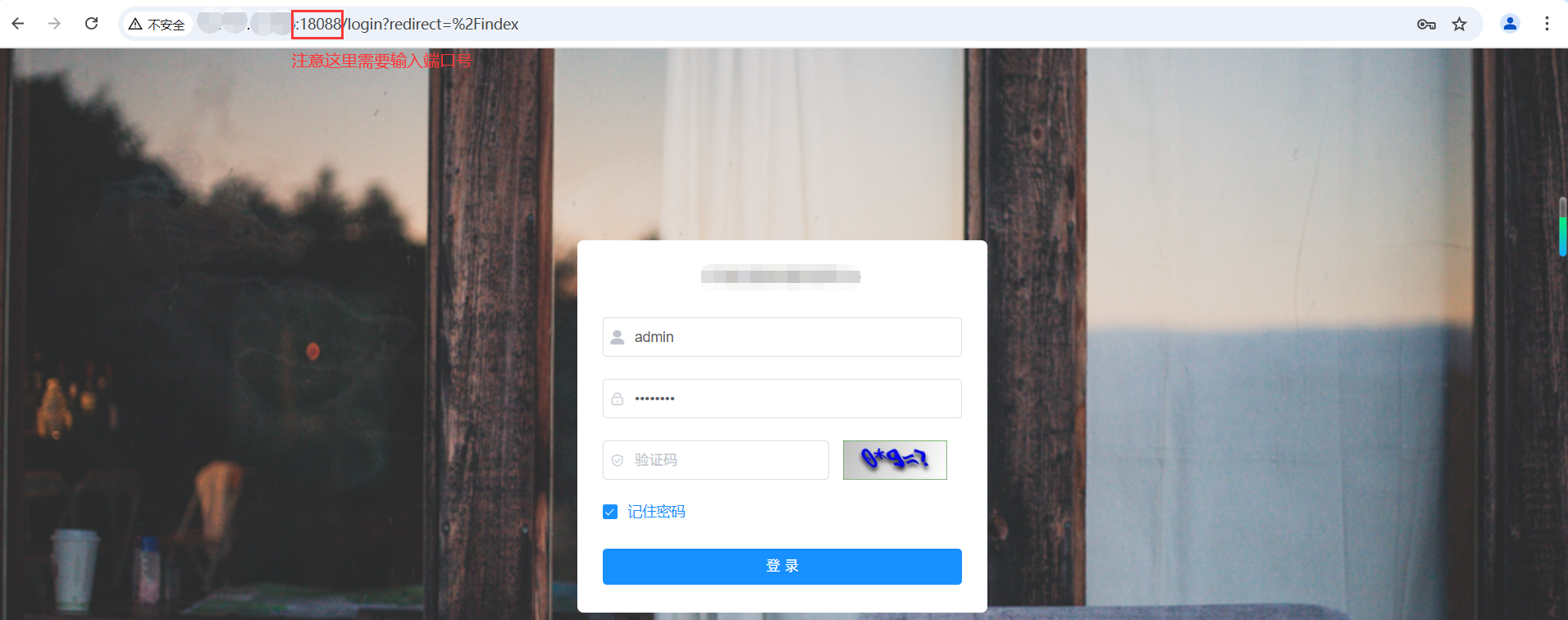
文章目录 单项目的部署项目目录后端打包上传前端打包上传配置nginx服务器打开防火墙完成 两个项目的部署两个项目介绍后端打包并上传前端打包并上传nginx配置服务器端口开放完成 腾讯云服务器 之 环境搭建 单项目的部署 项目目录 后端打包上传 查看端口号 在ruoyi-admin的appl…...
黑马Java基础笔记-1
JVM,JDK和JRE JDK是java的开发环境 JVM虚拟机:Java程序运行的地方 核心类库:Java已经写好的东西,我们可以直接用。 System.out.print中的这些方法就是核心库中的所包含的 开发工具: javac(编译工具)、java&…...
面向新一代扩展现实(XR)应用的物联网框架
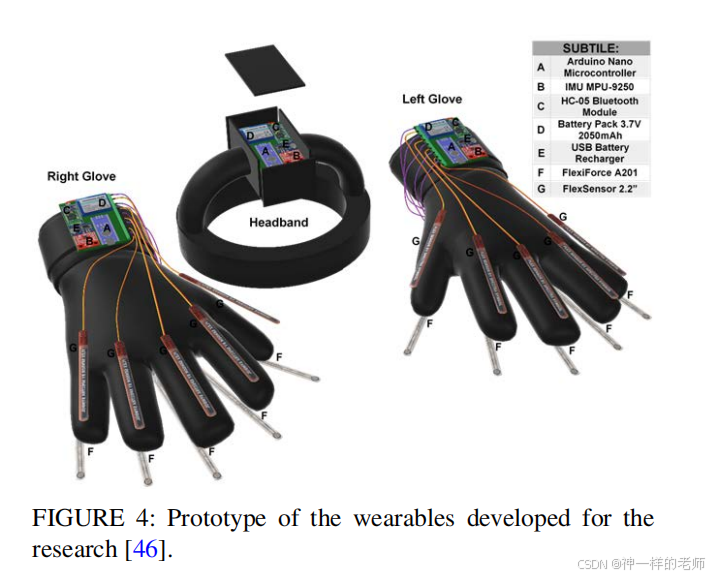
中文标题: 面向新一代扩展现实(XR)应用的物联网框架 英文标题: Towards an IoT Framework for the New Generation of XR Applications 作者信息 Joo A. Dias,UNIDCOM - IADE,欧洲大学,里斯本&…...
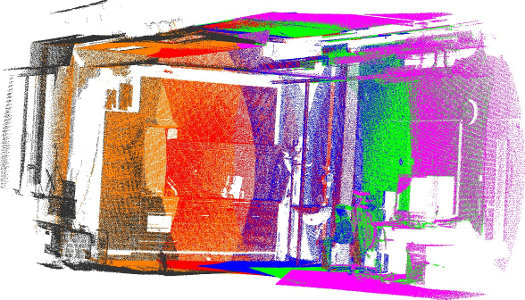
pcl各模块
参考资料: https://github.com/Ewenwan/MVision/blob/master/PCL_APP/1_%E7%82%B9%E4%BA%91%E6%BB%A4%E6%B3%A2filter.md 点云库PCL各模块学习 语雀 各模块依赖关系: 模块: common pcl_common中主要是包含了PCL库常用的公共数据结构和方…...
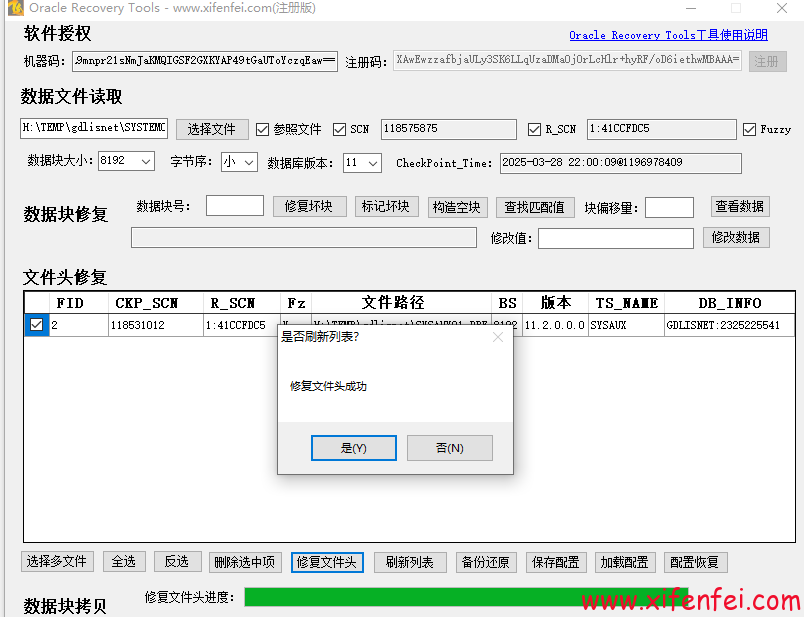
Oracle Recovery Tools修复ORA-600 6101/kdxlin:psno out of range故障
数据库异常断电,然后启动异常,我接手该库,尝试recover恢复 SQL> recover database; ORA-10562: Error occurred while applying redo to data block (file# 2, block# 63710) ORA-10564: tablespace SYSAUX ORA-01110: ???????? 2: H:\TEMP\GDLISNET\SYSAUX01.DBF O…...

Python网络编程从入门到精通:Socket核心技术+TCP/UDP实战详解
引言 网络编程是构建现代分布式系统的核心能力,而Socket作为通信的基石,其重要性不言而喻。本文将从零开始,通过清晰的代码示例、原理剖析和对比分析,带你彻底掌握Python中的Socket编程技术,涵盖TCP可靠连接、UDP高效…...
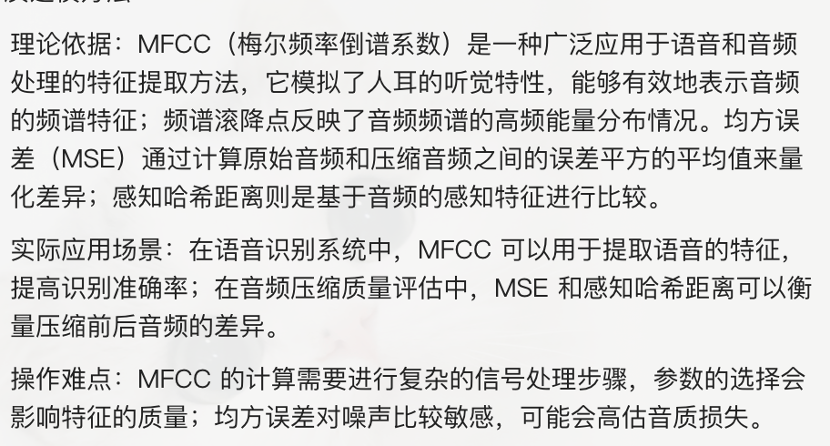
2025MathorcupC题 音频文件的高质量读写与去噪优化 保姆级教程讲解|模型讲解
2025Mathorcup数学建模挑战赛(妈妈杯)C题保姆级分析完整思路代码数据教学 C题:音频文件的高质量读写与去噪优化 随着数字媒体技术的迅速发展,音频处理成为信息时代的关键技术之一。在日常生活中,从录音设备捕捉的原始…...
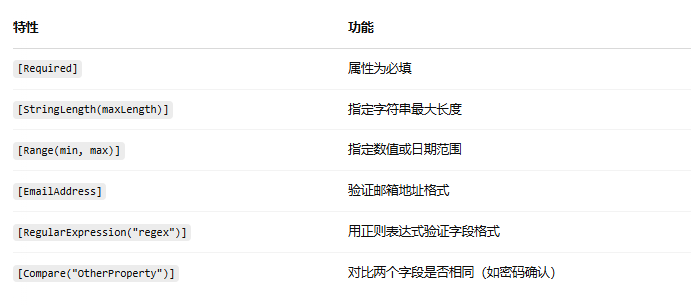
.net core web api 数据验证(DataAnnotations)
目录 一、什么是 DataAnnotations? 二、扩展验证逻辑(自定义验证器) 一、什么是 DataAnnotations? DataAnnotations 是一组特性(Attributes),用于在模型类上定义验证规则。主要用于属性级别的…...

【工具-Krillin AI】视频翻译、配音、语音克隆于一体的一站式视频多语言转换工具~
Krillin AI 是全能型音视频本地化与增强解决工具。这款简约而强大的工具,集音视频翻译、配音、语音克隆于一身,支持横竖屏格式输出,确保在所有主流平台(哔哩哔哩,小红书,抖音,视频号,…...

ICPR-2025 | 让机器人在未知环境中 “听懂” 指令精准导航!VLTNet:基于视觉语言推理的零样本目标导航
作者:Congcong Wen, Yisiyuan Huang, Hao Huang ,Yanjia Huang, Shuaihang Yuan, YuHao, HuiLin and Yi Fang 单位:纽约大学阿布扎比分校具身人工智能与机器人实验室,纽约大学阿布扎比分校人工智能与机器人中心,纽约大学坦登工程…...
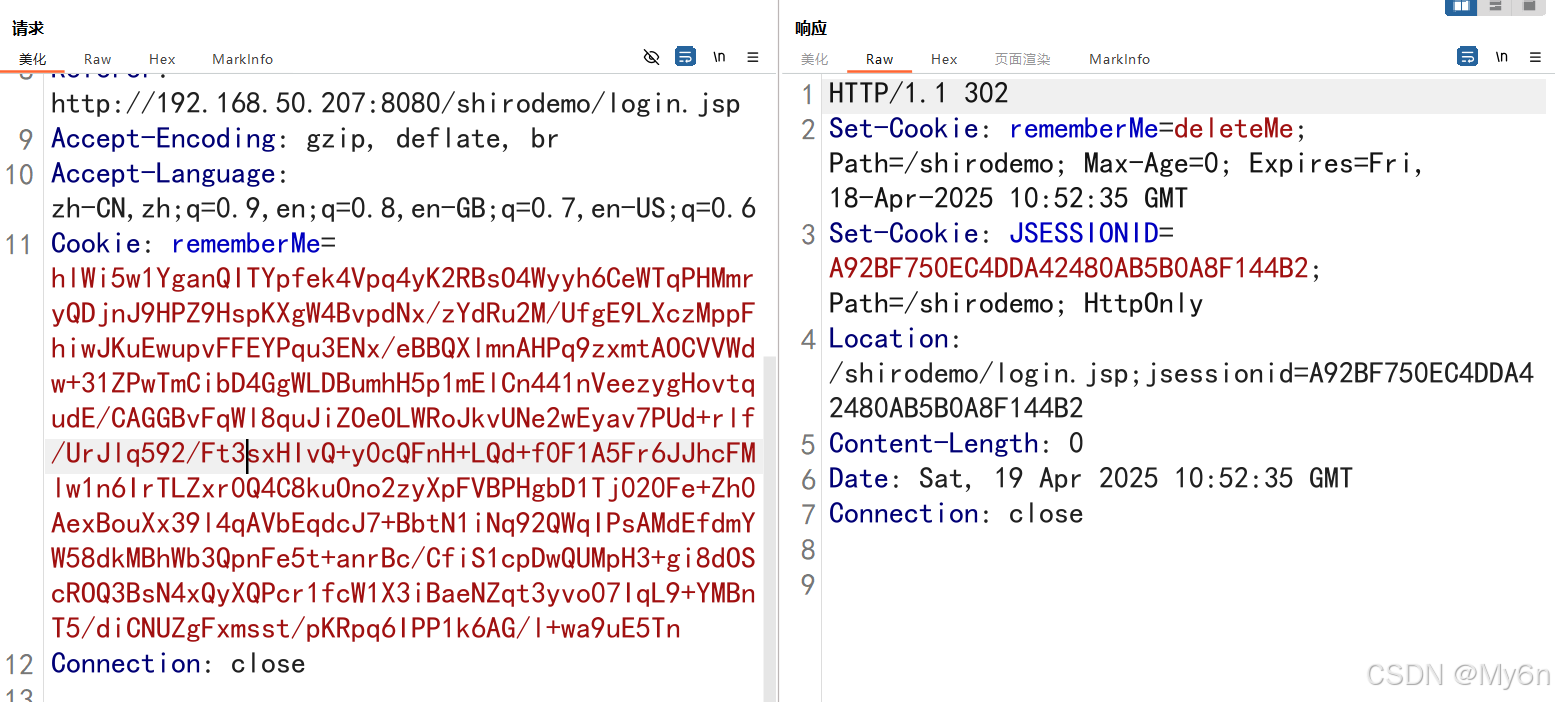
Shiro-550 动调分析与密钥正确性判断
一、Shiro 简介 Apache Shiro是一个开源安全框架,用于构建 Java 应用程序,提供身份验证、授权、加密和会话管理等功能。 二、Shiro-550(CVE-2016-4437) 1、漏洞原理 Shiro 在用户登陆时提供可选项 RememberMe,若勾选…...
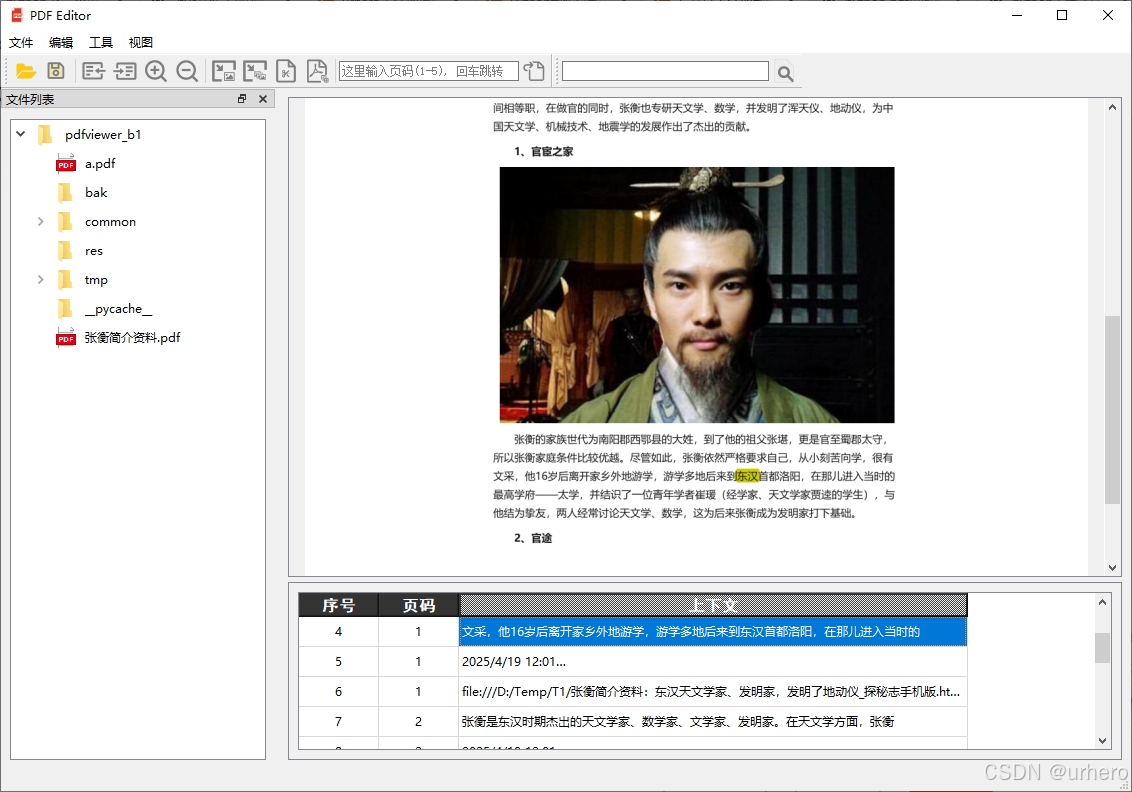
Python制作简易PDF查看工具PDFViewerV1.0查找功能优化
原文说明 为不破坏原文结构,因此功能优化不在原文中维护了。关于这款工具原文请通过下面链接访问。Python制作简易PDF查看工具PDFViewerV1.0 这款小工具基本功能已经可以作为一款文档浏览器使用,但还有一些美中不足的地方,本文将介绍对文本查…...