
基于树莓派的智能家居项目整理
一、功能介绍
二、设计框图
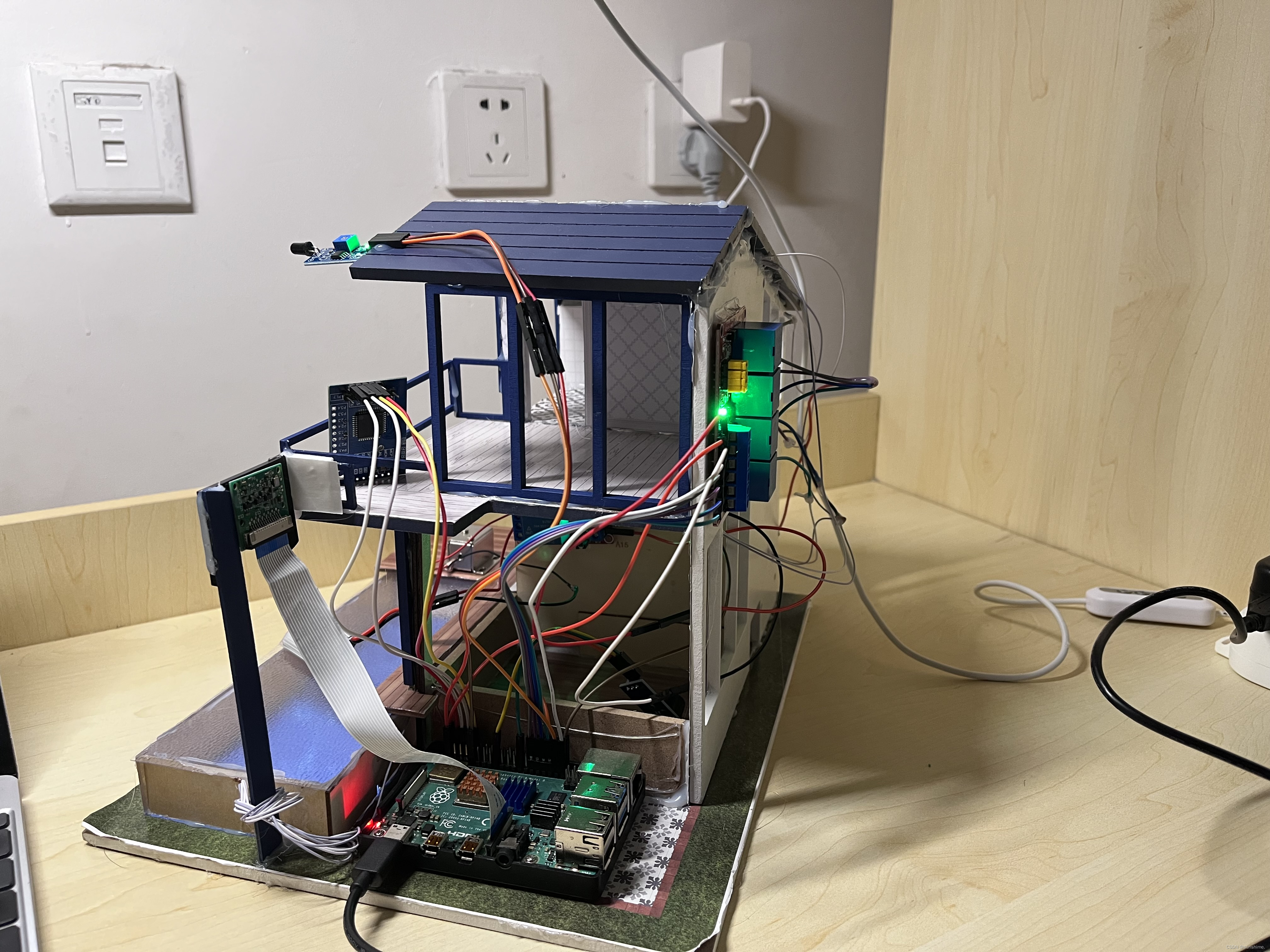
三、实物展示
四、程序
一、功能介绍
硬件:树莓派3B、LD3320语音识别模块、pi 摄像头、继电器组、小灯、火焰传感器、蜂鸣器、电 磁锁
项目框架:
采用了简单工厂模式的一个设计方式。稳定,拓展性更强,在C语言中,因为没有接口、类这一说法,所以这里采用了结构体来“等效替换”。有四个灯,所以我创建了四个灯控制.c程序。每一个程序文件中,都有一个设备结构体,每个程序文件的函数实现方法不同,当有新设备进入只需要在创建一个.c文件,改变函数实现方法即可。初始化的时候,通过链表将各个模块连接起来(头插法)。在要使用某个模块时,只需要使用链表遍历,找到所需模块去调用功能
具体功能是:
1、可通过ld3320语音模块的口令模式,口令+具体控制,通过串口把控制指令传给树莓派,来控 制客厅、餐厅、二楼、浴室的灯,以及 人脸识别功能。
2、也可以通过socket客户端来发指令来控制灯的开关,电磁锁
3、火灾报警,当火焰传感器检测到火焰的时候,蜂鸣器会报警。
4、视频监控采用开源mjpg-Streamer来实现的,程序执行时创建一个视频监控的线程,用system函数调用启动脚本运行,监控画面可在http://172.20.10.8:8080去看到
5、人脸识别开锁,人脸识别功能是使用的翔云平台的人脸识别解决方案,需要安装libcurl 和 openSSl库来支持https协议,通过系统调用wget +http://172.20.10.8:8080/?action=snapshot -O ./huyu1.jpg 指令到树莓派的监控页面"去截取一帧保存到本地,获取图片的base64编码,工程文件夹下也有一张照片,huyu.jpg格式,相当于采集的人脸。也是获取图片的base64编码,通过sprintf函数将访问翔云需要的两张图片的base64编码与Key、secret、typeId、format拼接在一起,通过https协议去访问翔云平台, 识别成功后会将识别结果返回,通过回调函数readData将返回的字符串读到readBuff里,通过strstr去readbuff里找有没有字符’是’,如果识别成功就去控制电磁锁打开。
二、设计框图
四、程序
control Device
#include <wiringPi.h>
#include <stdio.h>
#include <stdlib.h>struct Devices
{char name[128];int status;int pinName;int (*open)(int pinName);int (*close)(int pinName);int (*deviceInit)(int pinName);void (*justDoOnce)();char* (*getFace)();char* (*getPicFromOCRBase64)(); int (*readStaus)(int pinName);int (*changeStatus)(int status);struct Devices* next;
};struct Devices* addbathroomLink(struct Devices* head);
struct Devices* addupstairLink(struct Devices* head);
struct Devices* addrestaurantLink(struct Devices* head);
struct Devices* addlivingroomLink(struct Devices* head);
struct Devices* addcameraToDeviceLink(struct Devices *head);
struct Devices* addfiretoLink(struct Devices* head);
struct Devices* addBeepToDeviceLink(struct Devices *phead)	;
inoutcommand
#include <stdlib.h>
#include <wiringPi.h>struct inputcommander{char commandName[128]; char deviceName[128];char command[32];int (*init)(struct inputcommander*voicer ,char* ipAddress,char* port);int (*getCommand)(struct inputcommander* voicer);char log[1024];int fd;char port[12];char ipAddress[32];int sfd;struct inputcommander*next;};struct inputcommander* addvoiceControlInputLink(struct inputcommander* phead);struct inputcommander* addsockControlLink(struct inputcommander* phead);
bathroom
#include "controDevice.h"int bathroomLightopen(int pinName){digitalWrite(pinName,LOW);}int bathroomLightclose(int pinName){digitalWrite(pinName,HIGH);}int bathroomLightInit(int pinName){pinMode(pinName,OUTPUT);digitalWrite(pinName,HIGH);
}struct Devices bathroomLight = {.name="bathroomLight",.pinName=22,	.open=bathroomLightopen,.close=bathroomLightclose,.deviceInit=bathroomLightInit};struct Devices* addbathroomLink(struct Devices* head){if(head==NULL){return &bathroomLight;}else{bathroomLight.next=head;head=&bathroomLight;return head;}
}
livinglight
#include "controDevice.h"int livingroomLightopen(int pinName){digitalWrite(pinName,LOW);}int livingroomLightclose(int pinName){digitalWrite(pinName,HIGH);}int livingroomLightInit(int pinName){pinMode(pinName,OUTPUT);digitalWrite(pinName,HIGH);}int livingroomLightChangestatus(int status){}struct Devices livingroomLight = {.name="livingroomLight",.pinName=24,	.open=livingroomLightopen,.close=livingroomLightclose,.deviceInit=livingroomLightInit,.changeStatus=livingroomLightChangestatus
};struct Devices* addlivingroomLink(struct Devices* head){if(head==NULL){return &livingroomLight;}else{livingroomLight.next=head;head=&livingroomLight;return head;}
}
restraut light
#include "controDevice.h"int restaurantLightopen(int pinName){digitalWrite(pinName,LOW);}int restaurantLightclose(int pinName){digitalWrite(pinName,HIGH);}int restaurantLighttInit(int pinName){pinMode(pinName,OUTPUT);digitalWrite(pinName,HIGH);}int restaurantLightChangestatus(int status){}struct Devices restaurantLight = {.name="restaurantLight",.pinName=23,	.open=restaurantLightopen,.close=restaurantLightclose,.deviceInit=restaurantLighttInit,.changeStatus=restaurantLightChangestatus
};struct Devices* addrestaurantLink(struct Devices* head){if(head==NULL){return &restaurantLight;}else{restaurantLight.next=head;head=&restaurantLight;return head;}
}
upstair light
#include "controDevice.h"int upstairLightopen(int pinName){digitalWrite(pinName,LOW);}int upstairLightclose(int pinName){digitalWrite(pinName,HIGH);}int upstairLightInit(int pinName){pinMode(pinName,OUTPUT);digitalWrite(pinName,HIGH);}int upstairLightChangestatus(int status){}struct Devices upstairLight = {.name="upstairLight",.pinName=21,	.open=upstairLightopen,.close=upstairLightclose,.deviceInit=upstairLightInit,.changeStatus=upstairLightChangestatus
};struct Devices* addupstairLink(struct Devices* head){if(head==NULL){return &upstairLight;}else{upstairLight.next=head;head=&upstairLight;return head;}
}
filre
#include "controDevice.h"int firetoInit(int pinName){           //初始化函数pinMode(pinName,INPUT);                      	//配置引脚为输入引脚digitalWrite(pinName,HIGH);                       //引脚输出高电平,即默认为关闭状态}int firetostatusread(int pinName){                    //读取火焰传感器状态函数return digitalRead(pinName);                    	//读取高低电平,返回0或1}struct Devices fireto = {                                 //火焰传感器设备链表节点.name="fire",.pinName=25,	.deviceInit=firetoInit,.readStaus=firetostatusread
};struct Devices* addfiretoLink(struct Devices* head){               //头插法将设备节点加入设备工厂链表函数if(head==NULL){return &fireto;}else{fireto.next=head;head=&fireto;return head;}
}
bee
#include "controDevice.h"int beepInit(int pinName)					//初始化函数
{pinMode(pinName,OUTPUT);					//配置引脚为输出引脚digitalWrite(pinName,HIGH);				//引脚输出高电平,即默认为关闭状态
}int beepOpen(int pinName)					//打开蜂鸣器函数
{digitalWrite(pinName,LOW);
}int beepClose(int pinName)					//关闭蜂鸣器函数
{digitalWrite(pinName,HIGH);
}struct Devices beep = {			//蜂鸣器设备链表节点.name = "beep",.pinName = 7,					//树莓派gpio引脚29.deviceInit = beepInit,.open = beepOpen,.close = beepClose
};struct Devices* addBeepToDeviceLink(struct Devices *phead)			//头插法将设备节点加入设备工厂链表函数
{if(phead == NULL){return &beep;}else{beep.next = phead;phead = &beep;return phead;}
}
camera
#include "controDevice.h"
#include <stdio.h>
#include <unistd.h>
#include <string.h>
#include <stdlib.h>
#include <curl/curl.h>
#include <sys/types.h>
#include <sys/stat.h>
#include <fcntl.h>
#include <sys/types.h>
#include <unistd.h>
#define SWITCH1 21char ocrRetBuf[1024] = {'\0'};//全局变量,用来接收从OCR后台返回的数据size_t readData1(void *ptr, size_t size, size_t nmemb, void *stream)
//回调函数,把从后台的数据拷贝给ocrRetBuf
{strncpy(ocrRetBuf,ptr,1024);printf("data reviver\n");
}char *getPicFromOCRBase641(char *Filepath)
{int fd;int filelen;char cmd[128]={'\0'};sprintf(cmd,"base64 %s > tmpFile",Filepath);system(cmd);fd=open("./tmpFile",O_RDWR);filelen=lseek(fd,0,SEEK_END);lseek(fd,0,SEEK_SET);char *bufpic=(char *)malloc(filelen+2);memset(bufpic,'\0',filelen+2);read(fd,bufpic,filelen+128);system("rm -rf tmpFile");close(fd);return bufpic;}char*getFace1(){printf("pai zhao zhong\n");system("raspistill -q 5 -t 1 -o pic.jpg");while(access("./pic.jpg",F_OK) != 0); //判断是否拍照完毕printf("paizhao wan bi\n");char* base64BufFaceRec = getPicFromOCRBase641("./pic.jpg");system("rm pic.jpg");return base64BufFaceRec;   //返回刚才拍照的base64}void postUrl(){CURL *curl;CURLcode res;//分开定义,然后字符串拼接char* key	 = "P5bruv7dU4YRH7JHNxuCeb";	//翔云平台购买人脸识别后的keychar* secret = "0c4c02a1161e43bf9de539d6487260c8";	//翔云平台购买人脸识别后的secretint   typeId = 21;	char* format = "xml";char* base64BufPic1 = getFace1();char* base64BufPic2 = getPicFromOCRBase641("PYD.jpg");int len = strlen(key)+strlen(secret)+strlen(base64BufPic1)+strlen(base64BufPic2)+128;//分配空间不够会导致栈溢出char* postString = (char* )malloc(len);memset(postString,'\0',len);//因为postString是一个指针,不能用sizeof来计算其指向的大小sprintf(postString,"img1=%s&img2=%s&key=%s&secret=%s&typeId=%d&format=%s",base64BufPic1,base64BufPic2,key,secret,typeId,format);//根据平台的传参格式编写curl = curl_easy_init();if(curl){curl_easy_setopt(curl, CURLOPT_POSTFIELDS, postString);  //指定post内容,传入参数  curl_easy_setopt(curl, CURLOPT_URL, "https://netocr.com/api/faceliu.do");// 指定urlcurl_easy_setopt(curl, CURLOPT_WRITEFUNCTION,readData1);  //回调函数readDate读取返回值res = curl_easy_perform(curl);			//类似于状态码printf("OK:%d\n",res);if(strstr(ocrRetBuf,"是") != NULL){    //判断翔云后台返回的字符串中有没有“是”printf("the same person\n");pinMode(SWITCH1,OUTPUT);digitalWrite(SWITCH1,LOW);}else{printf("different person\n");digitalWrite(SWITCH1,HIGH);}curl_easy_cleanup(curl);}}struct Devices camera = {.name = "camera",.justDoOnce = postUrl,.getFace = getFace1,.getPicFromOCRBase64 = getPicFromOCRBase641,//.readData = readData1};struct Devices* addcameraToDeviceLink(struct Devices *head)
{if(head == NULL){return &camera;}else{camera.next = head;head = &camera;}
}
socket
#include <wiringSerial.h>
#include <stdio.h>
#include <unistd.h>
#include <stdlib.h>
#include <wiringPi.h>
#include <string.h>
#include <sys/types.h>
#include <sys/socket.h>
#include <netinet/in.h>
#include <arpa/inet.h>
#include "inoutCommand.h"int SocketInit(struct inputcommander* Socketlnits,char*ipAddress,char*port){  int s_fd;struct sockaddr_in s_addr;memset(&s_addr,0,sizeof(struct sockaddr_in));s_fd = socket(AF_INET, SOCK_STREAM,0);if(s_fd == -1){perror("socket");exit(-1);}s_addr.sin_family =AF_INET;s_addr.sin_port = htons(atoi(Socketlnits->port));inet_aton(Socketlnits->ipAddress , &s_addr.sin_addr);bind(s_fd , (struct sockaddr*)&s_addr , sizeof(struct sockaddr_in));listen(s_fd,10);printf("socket server Listening >>>\n");Socketlnits->sfd=s_fd;return s_fd;}struct inputcommander socketControl = {.commandName="socketserver",.command={'\0'},.port = "8124",.ipAddress ="192.168.43.165",.init = SocketInit,.log = {'\0'},.next = NULL
};struct inputcommander* addsockControlLink(struct inputcommander* phead){if(phead==NULL){return &socketControl;}else{socketControl.next=phead;phead=&socketControl;return phead;}}
voice control
#include "inoutCommand.h"
#include <wiringSerial.h>
#include <stdio.h>
#include <unistd.h>
#include <stdlib.h>
#include <wiringPi.h>
#include <string.h>int voicegetCommand(struct inputcommander* voicer){int nread =0;memset(voicer->command,'\0',sizeof(voicer->command));nread = read(voicer->fd, voicer->command, sizeof(voicer->command));if(nread==0){printf(" voice device read over times\n");}else{return nread;}
}int voiceInit(struct inputcommander* voicer,char*ipAddress,char*port){int fd;if((fd = serialOpen(voicer->deviceName,9600))<0){printf("voicelnit open error\n");return (-1);}printf("voicelnit...contun...\n");voicer->fd=fd;return fd;}struct inputcommander voiceControl = {.commandName="voice",.deviceName="/dev/ttyAMA0",.command={'\0'},.init = voiceInit,.getCommand = voicegetCommand,.log = {'\0'},.next = NULL
};struct inputcommander* addvoiceControlInputLink(struct inputcommander* phead){if(phead==NULL){return &voiceControl;}else{voiceControl.next=phead;phead=&voiceControl;return phead;}
}
main
#include <stdio.h>
#include <string.h>
#include <stdlib.h>
#include "inoutCommand.h"
#include "controDevice.h"
#include<unistd.h>
#include<pthread.h>
#include<wiringPi.h>
#include<wiringSerial.h>
#include<sys/types.h>
#include<sys/socket.h>
#include<arpa/inet.h>
#include<netinet/in.h>#define SWITCH1 21		//四盏灯对应的引脚
#define SWITCH2 22
#define SWITCH3 23
#define SWITCH4 24
#define SWITCH5 25struct Devices* tem=NULL;
struct inputcommander* commandhead=NULL; struct inputcommander*socketHeadler = NULL;int c_fd;struct Devices* findDeviceByName(char* name,struct Devices* phead){struct Devices*tmp=phead;if(phead==NULL){return NULL;}else{while(tmp!=NULL){if(strcmp(tmp->name,name)==0){return tmp;}  tmp=tmp->next;}return NULL;}
}struct inputcommander* findcommandByName(char* name,struct inputcommander* phead){struct inputcommander*tmp=phead;if(phead==NULL){return NULL;}else{while(tmp!=NULL){if(strcmp(tmp->commandName,name)==0){return tmp;}  tmp=tmp->next;}return NULL;}
}void *fireAlarmThread(void *data)				//“火灾报警器线程”执行的函数
{int status;struct Devices *firetmp = NULL;struct Devices *buztmp = NULL;firetmp = findDeviceByName("fire",tem);		//寻找“火焰传感器”链表节点,返回给firetmpbuztmp = findDeviceByName("beep",tem);				//寻找“蜂鸣器”链表节点,返回给buztmpwhile(1){status = firetmp->readStaus(firetmp->pinName);			//读取“火焰传感器”状态buztmp->deviceInit(buztmp->pinName);if(status == 0){			   //检测到火焰或强光源printf("have fire\n");buztmp->open(buztmp->pinName);		//打开蜂鸣器delay(1000);						//延时1000毫秒=1秒}if(status == 1){						//未检测到火焰、强光源或解除警报buztmp->close(buztmp->pinName);		//关闭蜂鸣器}}
}void *cameraThread_func(void* data)//起线程的函数有格式要求
{struct Devices *cameraTemp;cameraTemp = findDeviceByName("camera", tem); 	//设备都要从工厂里面取出来if(cameraTemp == NULL){  //防止段错误的必需判断,当给指针赋值是,一定要考虑NULL的情况,否则后续操作都是空谈printf("find camera error\n");pthread_exit(NULL); //在线程中不用return}printf("222\n");cameraTemp->justDoOnce(); //调用postUrl函数
}void* read_Thread(void* datas){int n_read;memset(socketHeadler->command,'\0',sizeof(socketHeadler->command));n_read = read(c_fd,socketHeadler->command,sizeof(socketHeadler->command));if(n_read == -1){perror("read");}else if(n_read>0){printf("\n socker read number:%d , contixt:%s\n",n_read,socketHeadler->command);if(strstr(socketHeadler->command,"KS") != NULL){printf("open lock\n");pinMode(SWITCH1,OUTPUT);digitalWrite(SWITCH1,LOW);}if(strstr(socketHeadler->command,"KYS") != NULL){		pinMode(SWITCH2,OUTPUT);digitalWrite(SWITCH2,LOW);}if(strstr(socketHeadler->command,"GYS") != NULL){digitalWrite(SWITCH2,HIGH);}if(strstr(socketHeadler->command,"KKT") != NULL){		//对socket收到的指令进行分析,并执行对应的操作pinMode(SWITCH4,OUTPUT);digitalWrite(SWITCH4,LOW);}if(strstr(socketHeadler->command,"GKT") != NULL){digitalWrite(SWITCH4,HIGH);}if(strstr(socketHeadler->command,"KCT") != NULL){		//对socket收到的指令进行分析,并执行对应的操作pinMode(SWITCH3,OUTPUT);digitalWrite(SWITCH3,LOW);}if(strstr(socketHeadler->command,"GCT") != NULL){digitalWrite(SWITCH3,HIGH);}if(strstr(socketHeadler->command,"GS") != NULL){digitalWrite(SWITCH1,HIGH);}else{printf("Input error! \n");}}
}void* voiceThread(void* datas){int nread;struct inputcommander* voiceHead=findcommandByName("voice",commandhead);if(voiceHead==NULL){printf(" no voice \n");pthread_exit(NULL);}else{printf("%s find voice \n",voiceHead->commandName);if(voiceHead->init(voiceHead, NULL ,NULL)<0){printf("voice init error!!!\n");pthread_exit(NULL);}else{printf(" %s init successful!\n",voiceHead->commandName);}while(1){nread = voiceHead->getCommand(voiceHead);if(nread == 0){printf("waiting...\n");}else{printf("do divece control : %s\n",voiceHead->command);if(strstr(voiceHead->command,"XJ") != NULL){		//一级指令,printf("收到:\n");	}else if(strstr(voiceHead->command,"KYSD") != NULL){		pinMode(SWITCH2,OUTPUT);digitalWrite(SWITCH2,LOW);}else if(strstr(voiceHead->command,"GYSD") != NULL){digitalWrite(SWITCH2,HIGH);}else if(strstr(voiceHead->command,"KCTD") != NULL){pinMode(SWITCH3,OUTPUT);digitalWrite(SWITCH3,LOW);}else if(strstr(voiceHead->command,"GCTD") != NULL){digitalWrite(SWITCH3,HIGH);}else if(strstr(voiceHead->command,"KKTD") != NULL){pinMode(SWITCH4,OUTPUT);digitalWrite(SWITCH4,LOW);}else if(strstr(voiceHead->command,"GKTD") != NULL){digitalWrite(SWITCH4,HIGH);}else if(strstr(voiceHead->command,"KS") != NULL){pthread_t cameraThread;printf("1111\n");system("sudo killall -TERM motion");delay(3000);	pthread_create(&cameraThread,NULL,cameraThread_func,NULL);}}}  }
}void* socketThread(void* datas){int n_read = 0;pthread_t readThread;struct sockaddr_in c_addr;memset(&c_addr,0,sizeof(struct sockaddr_in));int clen = sizeof(struct sockaddr_in);socketHeadler=findcommandByName("socketserver",commandhead);if(socketHeadler ==NULL){printf("NO find socketserver!\n");pthread_exit(NULL);}else{printf("find socketserver!\n");          }socketHeadler->init(socketHeadler,NULL,NULL);while(1){c_fd=accept(socketHeadler->sfd,(struct sockaddr*)&c_addr,&clen);pthread_create(&readThread,NULL,read_Thread,NULL);  }
}void * video_thread(void *datas){system("sudo motion");
printf(" chest ... \n");//pthread_exit(NULL);	}int main(){if(wiringPiSetup() == -1){				  printf("wiringPiSetup failed!\n");return -1; }char name[128];pthread_t voice_thread;
pthread_t socket_thread;
pthread_t fireAlarm_thread;
pthread_t videoThread;//设备工厂初始化
tem=addbathroomLink(tem);
tem=addupstairLink(tem);
tem=addrestaurantLink(tem);
tem=addlivingroomLink(tem);tem= addfiretoLink(tem);
tem=addBeepToDeviceLink(tem);		tem=addcameraToDeviceLink(tem);commandhead=addvoiceControlInputLink(commandhead);
commandhead=addsockControlLink(commandhead);pthread_create(&voice_thread , NULL , voiceThread , NULL);
pthread_create(&socket_thread , NULL , socketThread , NULL);
pthread_create(&fireAlarm_thread,NULL,fireAlarmThread,NULL);pthread_create(&videoThread, NULL, video_thread, NULL);pthread_join(voice_thread,NULL);
pthread_join(socket_thread,NULL);
pthread_join(fireAlarm_thread,NULL);pthread_join(videoThread,NULL);return 0;
}
相关文章:
基于树莓派的智能家居项目整理
一、功能介绍 二、设计框图 三、实物展示 四、程序 一、功能介绍硬件:树莓派3B、LD3320语音识别模块、pi 摄像头、继电器组、小灯、火焰传感器、蜂鸣器、电 磁锁 项目框架: 采用了简单工厂模式的一个设计方式。稳定,拓展性…...

《洛阳冬冷》
——洛阳的冬天太冷,最暖不过你的眼神。 ******* 她拿了个画着几丛竹子的小团扇子一路分花拂柳地往前走,后面一水儿的侍女不敢出声,只得地默默跟着她。她一张脸本来生得就好看,这一怒起来竟然还更加的好看了。此时她走得太急&…...
YOLOv5简介
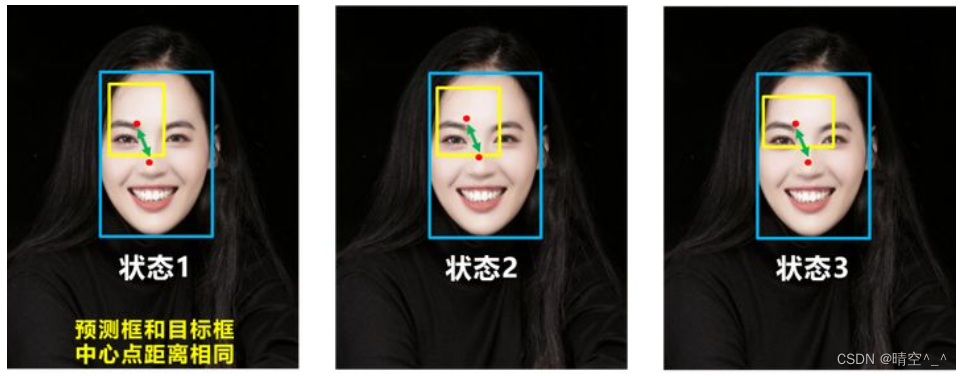
YOLOv5 一、输入端 1. Mosaic数据增强: CutMix 数据增强:随机生成一个裁剪框Box,裁剪掉A图中的相应位置,然后用B图相应位置的ROI放到A中被裁剪的区域中形成新的样本。采用加权求和的方式计算损失,将A区域中被cut掉的…...

【面向对象语言三大特性之 “继承”】
目录 1.继承的概念及定义 1.1继承的概念 1.2 继承定义 1.2.1定义格式 1.2.2继承关系和访问限定符 1.2.3继承基类成员访问方式的变化 2.基类和派生类对象赋值转换 3.继承中的作用域 4.派生类的默认成员函数 5.继承与友元 6. 继承与静态成员 7.复杂的菱形继承及菱形虚拟…...
Ambari2.7.5集群搭建详细流程
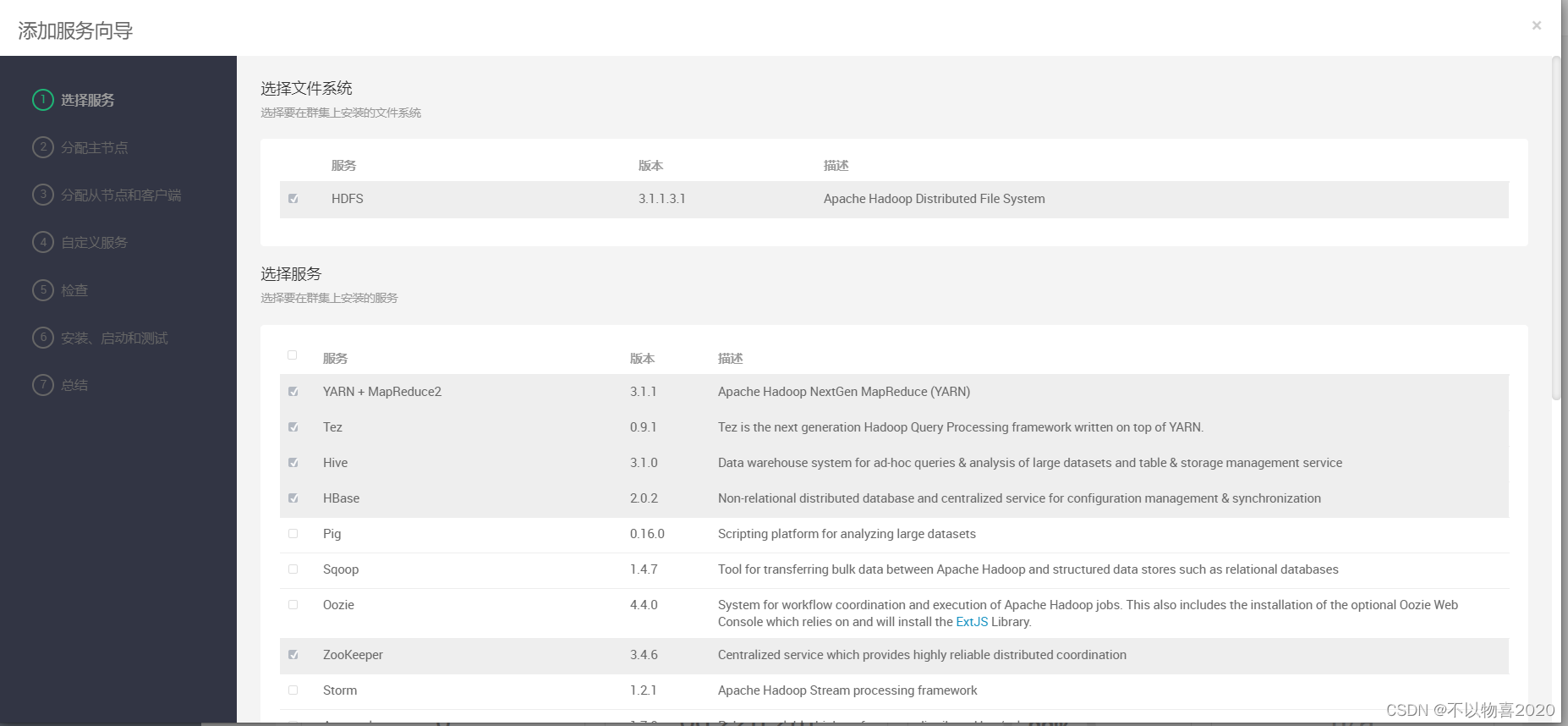
0 说明 本文基于本地虚拟机从零开始搭建ambari集群 1 前置条件 1.1 本地虚拟机环境 节点角色ambari-1ambari-server ambari-agentambari-2ambari-agentambari-3ambari-agent 1.2 安装包 1.3 修改主机名并配置hosts文件 hostnamectl set-hostname ambari-1 hostnamectl se…...

房产|1月全国70城房价出炉!疫情放开后你关心的城市房价有何变化
2023年1月份,70个大中城市中新房销售价格环比上涨城市个数增加;一线城市新房销售价格环比同比转涨、二三线城市环比降势趋缓,二三线城市同比下降。 | 新房/二手房12月-1月环比上涨城市数量变化 70个大中城市中,新房环比上涨城市…...

秒验 重新定义“一键登录”
现如今,一般APP在注册登录时,仍然要经历填写用户名、密码、绑定手机号等一系列传统流程,有的人认为可以通过第三方登录避免这些流程,但仍旧要经历手机验证码的环节,而且存在验证码被拦截的风险,短信费用也很…...

ZenBuster:一款功能强大的多线程跨平台URL枚举工具
关于ZenBuster ZenBuster是一款功能强大的多线程跨平台URL枚举工具,该工具基于Python开发,同时还具备暴力破解功能。 该工具适用于安全专业人员,可以在渗透测试或CTF比赛中为广大研究人员提供帮助,并收集和目标相关的各种信息。…...
2023年美赛ICM问题E:光污染 这题很好做啊!
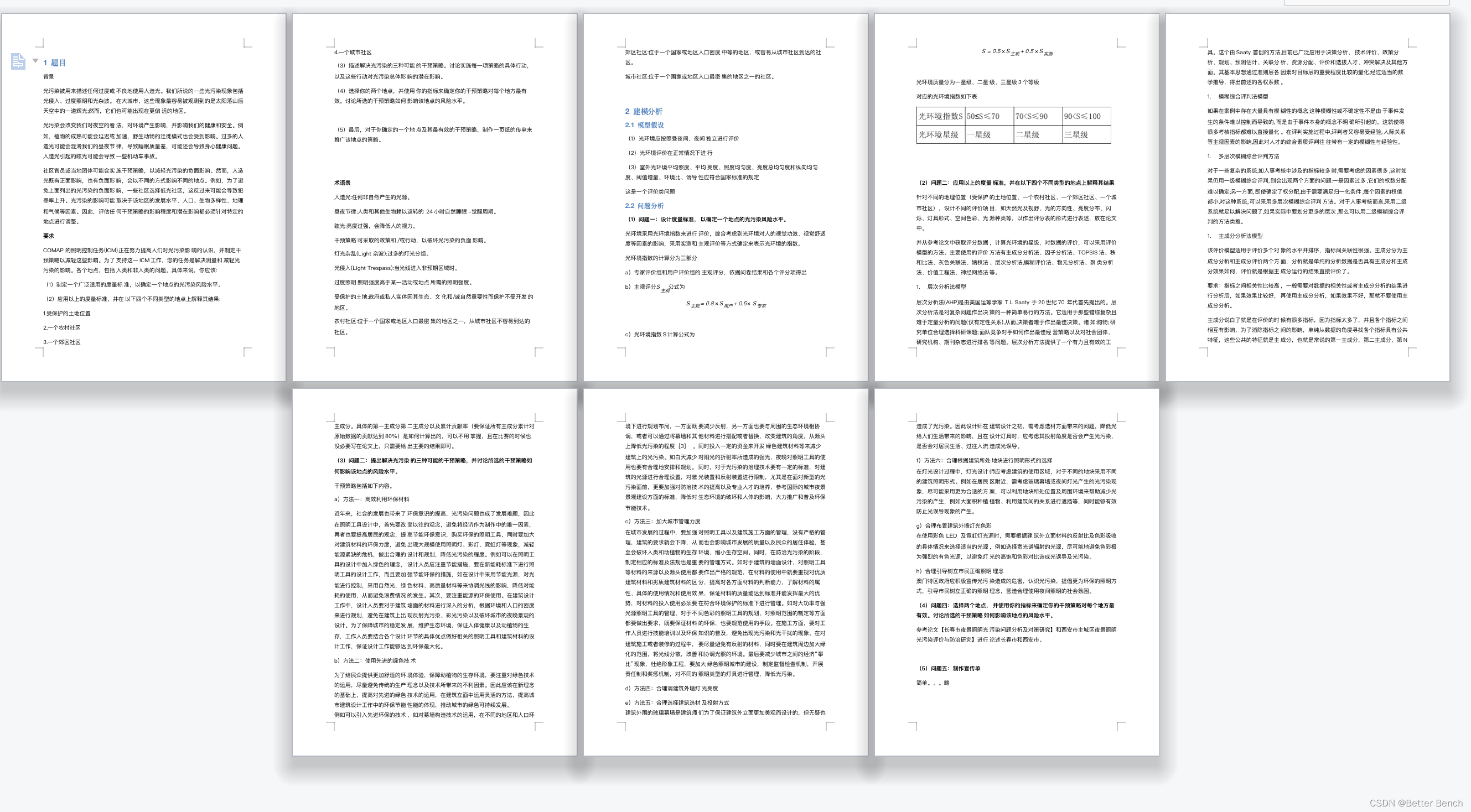
2023年美赛ICM问题E:光污染 这题很好做啊! 我看到DS数模的分析,看似头头是道,实则GouPi不通,我出一个,用于大家…...
)
InVEST模型 | 01 InVEST模型安装(Windows10)
除了在Python Anaconda环境中进行安装InVEST模型Python安装,平时最常使用的安装方式是通过.exe直接进行安装,本节介绍的就是直接下载安装的步骤: 打开InVEST模型下载页面 链接为:https://naturalcapitalproject.stanford.edu/…...
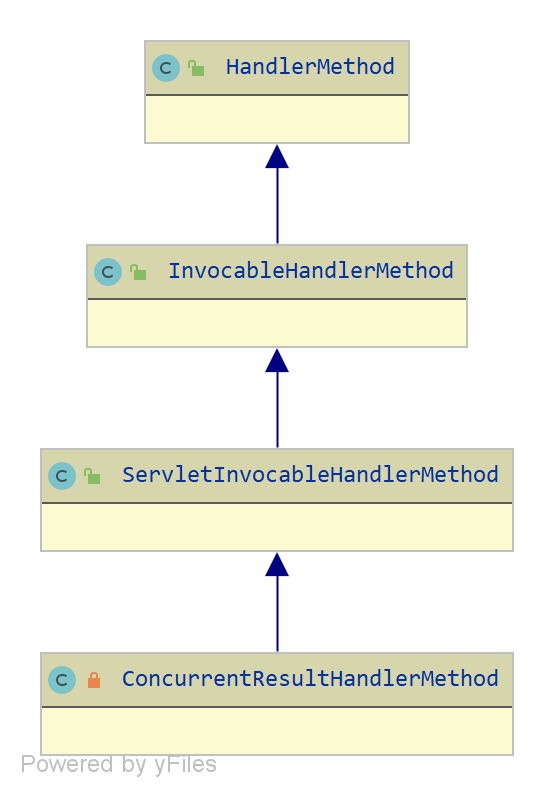
spring-web InvocableHandlerMethod 源码分析
说明 本文基于 jdk 8, spring-framework 5.2.x 编写。author JellyfishMIX - github / blog.jellyfishmix.comLICENSE GPL-2.0 类层次 HandlerMethod,处理器的方法的封装对象。HandlerMethod 只提供了处理器的方法的基本信息,不提供调用逻辑。 Invoca…...
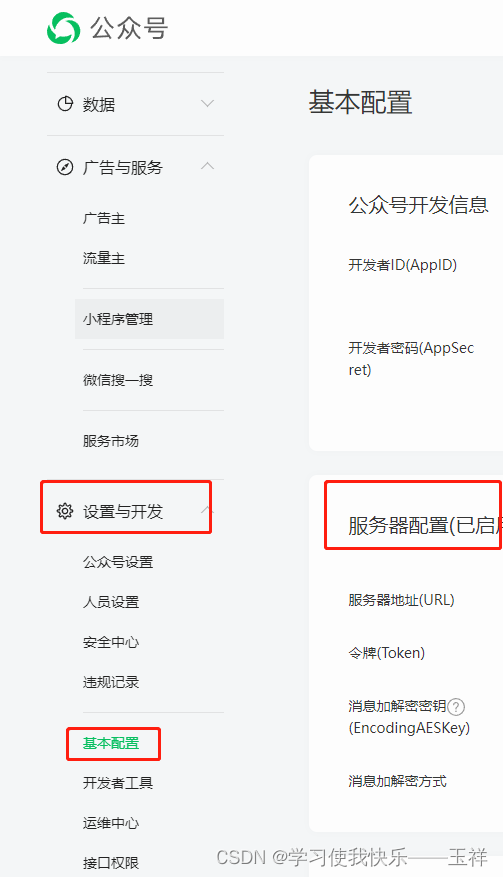
一分钟了解微信公众号服务器配置自动回复
1、建一个web服务工程 2、开放任意一个接口, 比如 /aaa/bbb/ccc 把接口路径配置在这里,ip为公网ip或域名,其他的参数默认,对入门选手没啥用 3、该接口允许get和post两种方式访问,接口需要对于访问方式编写两套逻辑…...
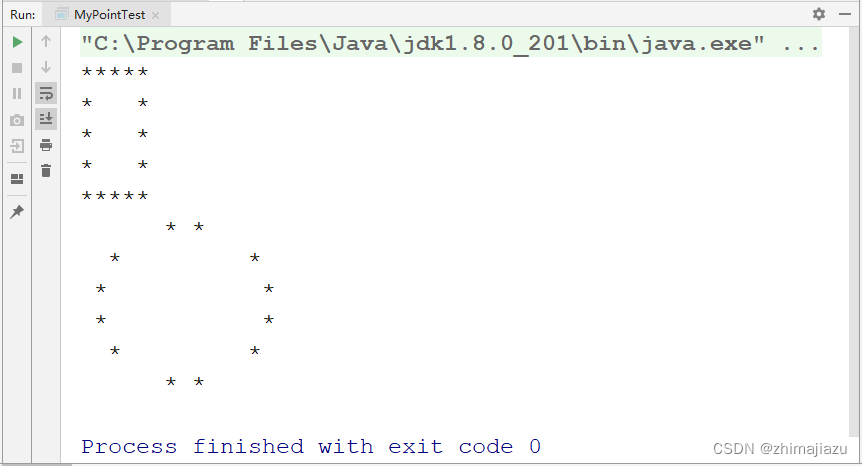
打印不同的图形-课后程序(JAVA基础案例教程-黑马程序员编著-第四章-课后作业)
【案例4-1】打印不同的图形 记得 关注,收藏,评论哦,作者将持续更新。。。。 【案例介绍】 案例描述 本案例要求编写一个程序,可以根据用户要求在控制台打印出不同的图形。例如,用户自定义半径的圆形和用户自定义边长的…...

14. QT_OPenGL中引入顶点着色器和片段着色器
1. 说明: 着色器是OPenGL中非常重要的一部分,在有了模型后,如果未给模型添加着色器,那么渲染效果会折扣很多。着色器中使用到的语言是GLSL(OPenGL Shader Language),可以通过这篇文章GLSL基本语法进行了解。 效果展示:…...
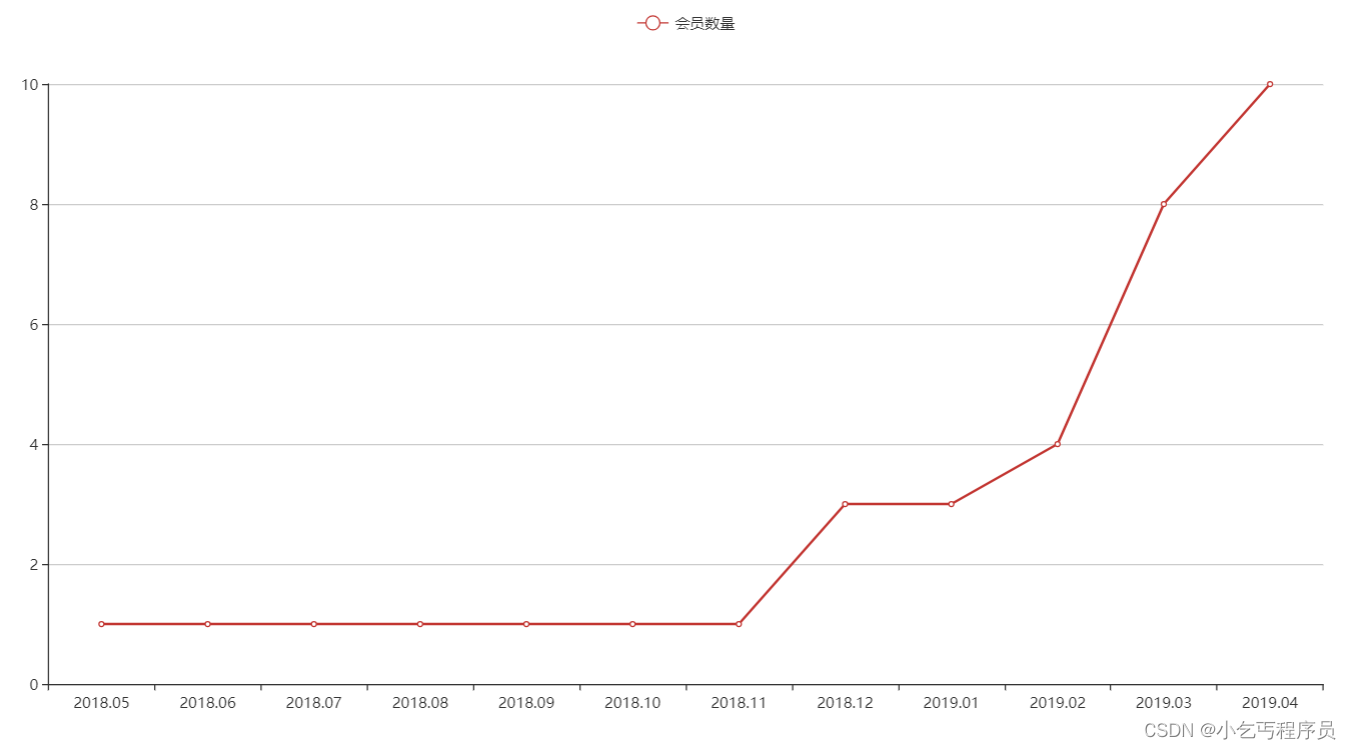
ecaozzz
2. 图形报表ECharts 2.1 ECharts简介 ECharts缩写来自Enterprise Charts,商业级数据图表,是百度的一个开源的使用JavaScript实现的数据可视化工具,可以流畅的运行在 PC 和移动设备上,兼容当前绝大部分浏览器(IE8/9/10/…...
应用部署初探:6个保障安全的最佳实践
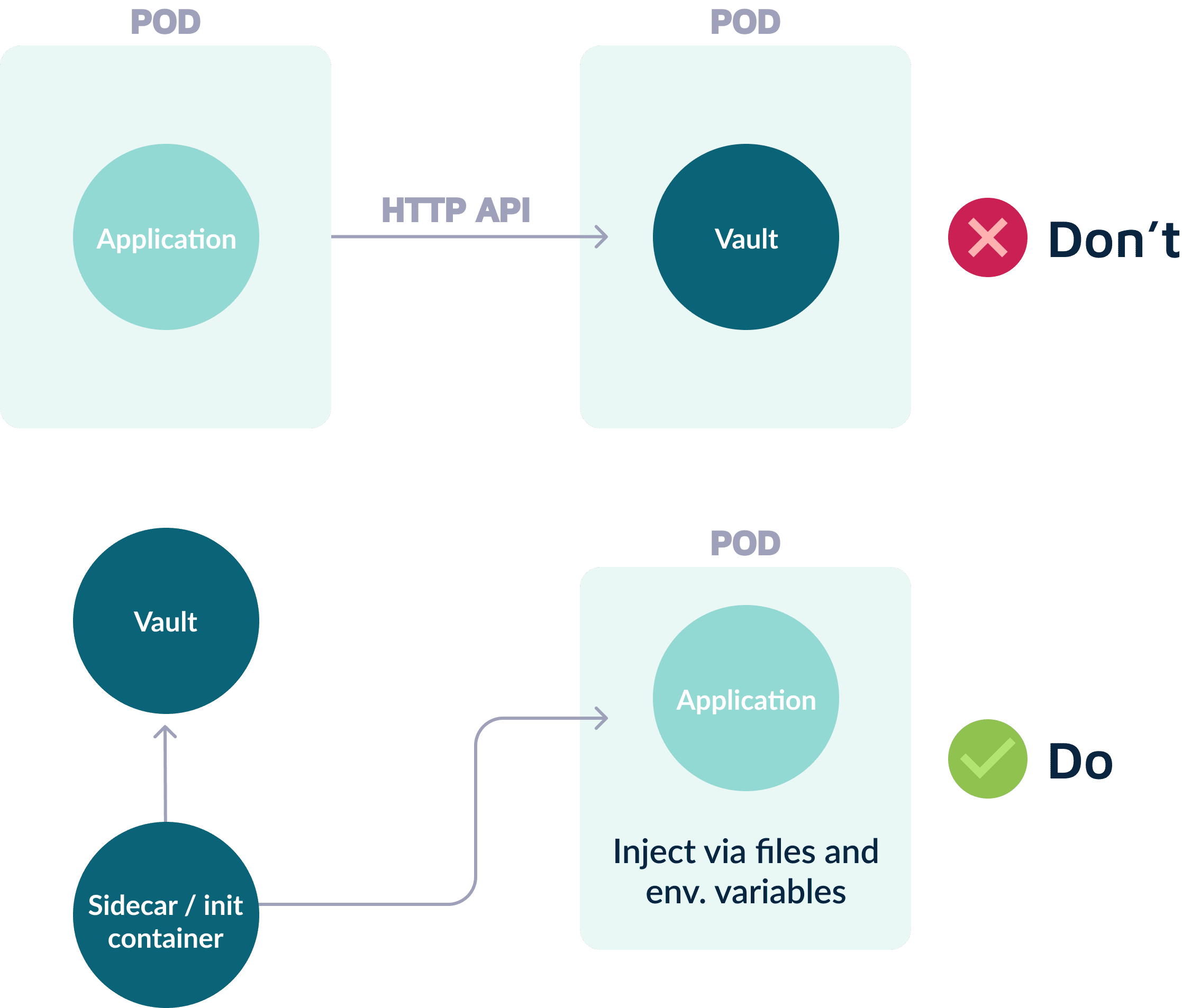
在之前的文章中,我们了解了应用部署的阶段以及常见的部署模式,包括微服务架构的应用应该如何部署等基本内容。本篇文章将介绍如何安全地部署应用程序。 安全是软件开发生命周期(SDLC)中的关键部分,同时也需要成为 S…...
转转测试环境docker化实践
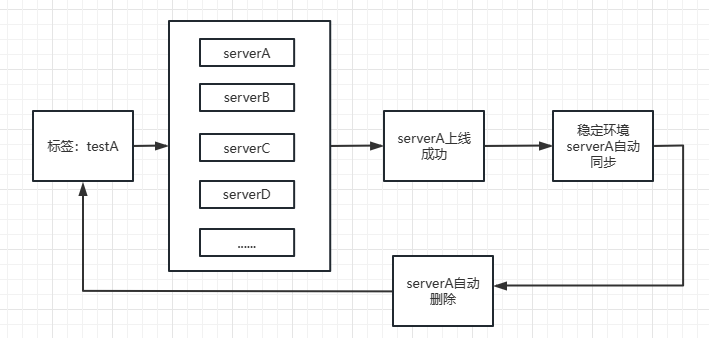
测试环境对于任何一个软件公司来讲,都是核心基础组件之一。转转的测试环境伴随着转转的发展也从单一的几套环境发展成现在的任意的docker动态环境docker稳定环境环境体系。期间环境系统不断的演进,去适应转转集群扩张、新业务的扩展,走了一些…...

linux 之 ps命令介绍
哈喽,大家好,我是有勇气的牛排(全网同名)🐮 有问题的小伙伴欢迎在文末评论,点赞、收藏是对我最大的支持!!!。 前言 如过想实现对进程监控,就需要使用到ps命…...

Server端的Actor,分工非常的明确,但是只将Actor作为一部手机来用,真的合适吗?
这是一篇介绍PowerJob,Server端Actor的文章,如果感兴趣可以请点个关注,大家互相交流一下吧。 server端一共有两个Actor,一个是处理worker传过来的信息,一个是server之间的信息传递。 处理Worker的Actor叫做WorkerRequ…...
2023年美赛C题 预测Wordle结果Predicting Wordle Results这题太简单了吧
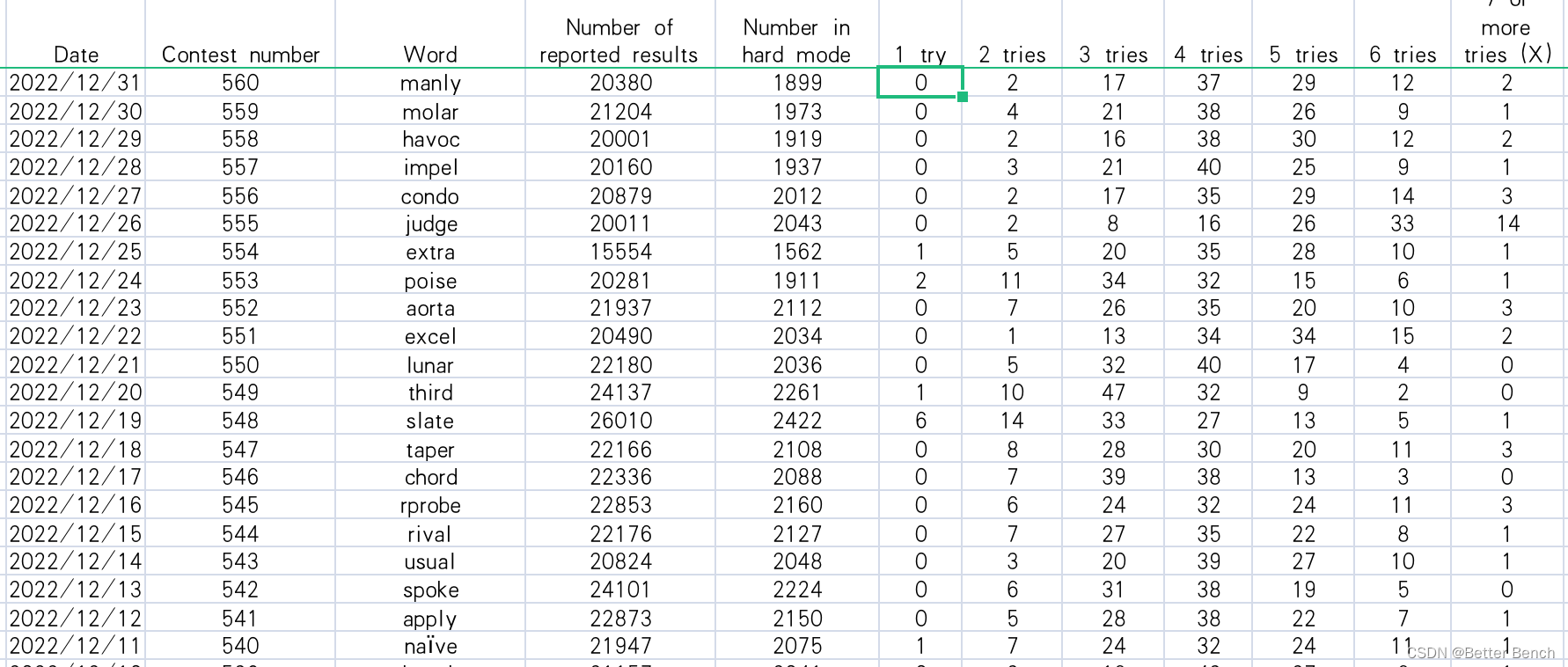
2023年美赛C题 预测Wordle结果Predicting Wordle Results 更新时间:2023-2-17 11:30 1 题目 2023年MCM 问题C:预测Wordle结果 Wordle是纽约时报目前每天提…...
)
Sora 2 + After Effects 24.4终极联动教程:含LUT自动映射、运动追踪反哺、动态遮罩同步(附独家.jsx插件)
更多请点击: https://intelliparadigm.com 第一章:Sora 2与After Effects 24.4深度整合概览 Adobe After Effects 24.4 正式引入对 OpenAI Sora 2 模型输出格式的原生支持,标志着生成式视频工作流首次在专业后期平台中实现端到端闭环。该整…...

AI创业从模型竞赛到场景落地:2026年生态爆发与实战指南
1. 从HumanX 2026归来:我眼中的AI创业生态爆发图景刚从HumanX 2026的会场回来,整个人还沉浸在那种高速迭代、热气腾腾的氛围里。如果你问我最大的感受是什么,我会毫不犹豫地说:AI创业的“场景化落地”竞赛,已经进入了白…...
)
ConcurrentHashMap详细讲解(java)
文章目录前言一、 为什么用ConcurrentHashMap1.1 什么是 ConcurrentHashMap1.2 为什么用ConcurrentHashMap二、 并发和锁的基础知识2.1 缘起:硬件的“木桶效应”与 JMM 的诞生2.2 并发编程的三大核心危机2.2.1 可见性问题:CPU 缓存引发的“盲区”2.2.2 原…...

基于Node.js的Gemini CLI蓝图:构建高效AI命令行工具
1. 项目概述:一个让Gemini API在命令行中“活”起来的蓝图 如果你和我一样,日常工作中大量时间都泡在终端里,那么你肯定理解那种感觉:为了调用一个AI模型,不得不频繁地在浏览器、API文档和命令行之间来回切换ÿ…...

研究生必备|5款主流文献引用工具深度测评:从课程论文到毕业答辩,哪款能让你省下20小时格式调整时间?
凌晨3点,你盯着Word里200多条参考文献发呆:导师刚通知改用APA格式,而你手动调了一整天的GB/T 7714全得推倒重来。投稿被拒,只因参考文献格式不符合期刊要求。课程论文、小论文、开题报告、毕业大论文……每一次都是格式地狱。本文…...
)
给IPC相机调图像,别再瞎调了!一份保姆级的ISP线性模式调试顺序图(附避坑要点)
IPC相机图像调试实战指南:从线性模式到专业级画质优化 刚接触IPC相机图像调试的工程师们,常常会陷入参数迷宫——面对AE、AWB、Gamma、3DNR等数十个模块,该从何处入手?调试顺序的错误可能导致反复返工,甚至影响最终成像…...

Cursor-Learner:基于编辑器历史数据,自动生成个性化AI编程助手Prompt
1. 项目概述:一个帮你“诊断”编程习惯的智能助手 如果你和我一样,每天都在和 Cursor 或 WindSurf 这类 AI 驱动的代码编辑器打交道,那你肯定也遇到过这样的困惑:为什么有时候 AI 助手能精准地理解你的意图,写出漂亮的…...

windows系统安装wsl安装opencode教程
使用 AI 助手(OpenCode)在 WSL2 中高效安全工作教程 背景 在 AI 极大发展的现在,AI 可以帮助我们完成很多工作。那么怎么让 AI 帮我们高效、安全地工作呢?以下是教程。 同时,大模型在 Windows 里面直接执行脚本时错…...

SAP资产会计进阶:深入理解AS91、AB01与ABLDT在期初数据处理中的角色与联动
SAP资产会计核心事务代码解析:AS91、AB01与ABLDT的协同逻辑与实战应用 在SAP S4 HANA资产模块的实施与运维中,期初数据处理往往是项目成败的关键节点。不同于日常资产操作,期初数据迁移涉及历史价值追溯、折旧逻辑重建以及多系统数据对齐等复…...

从玩具车到智能体:用STC89C52给小车装上‘眼睛’和‘触角’的传感器融合实战
从玩具车到智能体:STC89C52多传感器融合的决策系统设计 当一辆普通的玩具车被赋予环境感知能力,它便开始了向智能体的进化。在这个项目中,我们使用STC89C52单片机作为"大脑",通过超声波模块和漫反射光电传感器构建了一…...