
6-Ngnix配置反向代理
1.前提
虚拟机能连接外网
仿真http应用需在本虚拟机启用(原因:只有一台虚拟机做测试)
http_8080和http_8081要启用(http测试应用)
[root@cent79-2 ~]# ls -l http_*
-rwxr-xr-x 1 root root 6391676 Jul 19 13:39 http_8080
-rwxr-xr-x 1 root root 6391676 Jul 19 13:39 http_8081
[root@cent79-2 ~]# ./http_8080 &
[1] 1490
[root@cent79-2 ~]# ./http_8081 &
[2] 1496
[root@cent79-2 ~]# netstat -antulp |grep 8080
tcp6       0      0 :::8080                 :::*                    LISTEN      1490/./http_8080
[root@cent79-2 ~]# netstat -antulp |grep 8081
tcp6       0      0 :::8081                 :::*                    LISTEN      1496/./http_8081
[root@cent79-2 ~]# curl 192.168.10.156:8080
{"text":"I am one!"}
[root@cent79-2 ~]# curl 192.168.10.156:8081
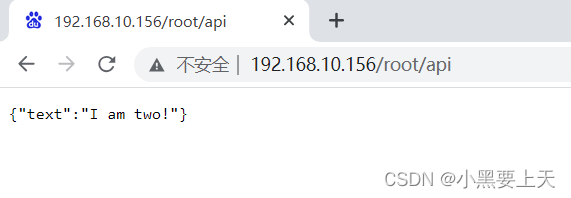
{"text":"I am two!"}
[root@cent79-2 ~]#
2.Ngnix配置反向代理
2.1.Nginx配置单个反向代理
1>.编辑nginx配置文件nginx.conf,添加反向代理配置
| user nginx nginx; worker_processes 2; worker_rlimit_nofile 1024; error_log /var/log/nginx/error.log notice; pid /var/run/nginx.pid; events { use epoll; worker_connections 1024; multi_accept on; } http { include /etc/nginx/mime.types; default_type application/octet-stream; log_format main '$remote_addr - $remote_user [$time_local] "$request" ' '$status $body_bytes_sent "$http_referer" ' '"$http_user_agent" "$http_x_forwarded_for"'; access_log /var/log/nginx/access.log main; sendfile on; tcp_nopush on; autoindex on; keepalive_timeout 65; #gzip on; include /etc/nginx/conf.d/*.conf; server { listen 80; server_name 192.168.10.156; location / { proxy_pass http://www.baidu.com; } } } |
2>.nginx语法验证
命令:
nginx -t
| [root@cent79-2 ~]# nginx -t nginx: the configuration file /etc/nginx/nginx.conf syntax is ok nginx: configuration file /etc/nginx/nginx.conf test is successful [root@cent79-2 ~]# |
3>.重启nginx
命令:
systemctl restart nginx
systemctl status nginx
| [root@cent79-2 ~]# systemctl restart nginx [root@cent79-2 ~]# systemctl status nginx ● nginx.service - nginx - high performance web server Loaded: loaded (/usr/lib/systemd/system/nginx.service; enabled; vendor preset: disabled) Active: active (running) since Thu 2023-07-20 20:16:16 CST; 3s ago Docs: http://nginx.org/en/docs/ Process: 2504 ExecStop=/bin/sh -c /bin/kill -s TERM $(/bin/cat /var/run/nginx.pid) (code=exited, status=0/SUCCESS) Process: 2509 ExecStart=/usr/sbin/nginx -c /etc/nginx/nginx.conf (code=exited, status=0/SUCCESS) Main PID: 2510 (nginx) CGroup: /system.slice/nginx.service ├─2510 nginx: master process /usr/sbin/nginx -c /etc/nginx/nginx.conf ├─2511 nginx: worker process └─2512 nginx: worker process Jul 20 20:16:15 cent79-2 systemd[1]: Starting nginx - high performance web server... Jul 20 20:16:16 cent79-2 systemd[1]: Started nginx - high performance web server. [root@cent79-2 ~]# |
4>.反向代理验证
地址:
http://192.168.10.156

转向为:

2.2.Nginx配置反向代理集群
1>.编辑nginx配置文件nginx.conf,添加反向代理配置
| user nginx nginx; worker_processes 2; worker_rlimit_nofile 1024; error_log /var/log/nginx/error.log notice; pid /var/run/nginx.pid; events { use epoll; worker_connections 1024; multi_accept on; } http { include /etc/nginx/mime.types; default_type application/octet-stream; log_format main '$remote_addr - $remote_user [$time_local] "$request" ' '$status $body_bytes_sent "$http_referer" ' '"$http_user_agent" "$http_x_forwarded_for"'; access_log /var/log/nginx/access.log main; sendfile on; tcp_nopush on; autoindex on; keepalive_timeout 65; #gzip on; include /etc/nginx/conf.d/*.conf;
upstream www.ztj.com { server 192.168.10.156:8080 weight=1 max_fails=2 fail_timeout=15s; server 192.168.10.156:8081 weight=1 max_fails=2 fail_timeout=15s; } server { listen 80; server_name 192.168.10.156; location / { proxy_pass http://www.ztj.com; } } } |
2>.nginx语法验证
命令:
nginx -t
| [root@cent79-2 ~]# nginx -t nginx: the configuration file /etc/nginx/nginx.conf syntax is ok nginx: configuration file /etc/nginx/nginx.conf test is successful [root@cent79-2 ~]# |
3>.重启nginx
命令:
systemctl restart nginx
systemctl status nginx
| [root@cent79-2 ~]# systemctl restart nginx [root@cent79-2 ~]# systemctl status nginx ● nginx.service - nginx - high performance web server Loaded: loaded (/usr/lib/systemd/system/nginx.service; enabled; vendor preset: disabled) Active: active (running) since Thu 2023-07-20 20:32:50 CST; 4s ago Docs: http://nginx.org/en/docs/ Process: 2673 ExecStop=/bin/sh -c /bin/kill -s TERM $(/bin/cat /var/run/nginx.pid) (code=exited, status=0/SUCCESS) Process: 2678 ExecStart=/usr/sbin/nginx -c /etc/nginx/nginx.conf (code=exited, status=0/SUCCESS) Main PID: 2679 (nginx) CGroup: /system.slice/nginx.service ├─2679 nginx: master process /usr/sbin/nginx -c /etc/nginx/nginx.conf ├─2680 nginx: worker process └─2681 nginx: worker process Jul 20 20:32:50 cent79-2 systemd[1]: Stopped nginx - high performance web server. Jul 20 20:32:50 cent79-2 systemd[1]: Starting nginx - high performance web server... Jul 20 20:32:50 cent79-2 systemd[1]: Started nginx - high performance web server. [root@cent79-2 ~]# |
4>.反向代理集群验证
命令:curl 192.168.10.156
| [root@cent79-2 ~]# curl 192.168.10.156 {"text":"I am one!"} [root@cent79-2 ~]# curl 192.168.10.156 {"text":"I am two!"} [root@cent79-2 ~]# |
2.3.Nginx配置基于context的反向代理(重点)
1>.编辑nginx配置文件nginx.conf,添加反向代理配置
| user nginx nginx; worker_processes 2; worker_rlimit_nofile 1024; error_log /var/log/nginx/error.log notice; pid /var/run/nginx.pid; events { use epoll; worker_connections 1024; multi_accept on; } http { include /etc/nginx/mime.types; default_type application/octet-stream; log_format main '$remote_addr - $remote_user [$time_local] "$request" ' '$status $body_bytes_sent "$http_referer" ' '"$http_user_agent" "$http_x_forwarded_for"'; access_log /var/log/nginx/access.log main; sendfile on; tcp_nopush on; autoindex on; keepalive_timeout 65; #gzip on; include /etc/nginx/conf.d/*.conf;
server { listen 80; server_name 192.168.10.156; location / { proxy_pass http://www.baidu.com; }
location /root { proxy_pass http://127.0.0.1:8080; location /root/api { proxy_pass http://127.0.0.1:8081; } } } } |
2>.nginx语法验证
命令:
nginx -t
| [root@cent79-2 ~]# nginx -t nginx: the configuration file /etc/nginx/nginx.conf syntax is ok nginx: configuration file /etc/nginx/nginx.conf test is successful [root@cent79-2 ~]# |
3>.重启nginx
命令:
systemctl restart nginx
systemctl status nginx
| [root@cent79-2 ~]# systemctl restart nginx [root@cent79-2 ~]# systemctl status nginx ● nginx.service - nginx - high performance web server Loaded: loaded (/usr/lib/systemd/system/nginx.service; enabled; vendor preset: disabled) Active: active (running) since Thu 2023-07-20 20:39:33 CST; 2s ago Docs: http://nginx.org/en/docs/ Process: 2713 ExecStop=/bin/sh -c /bin/kill -s TERM $(/bin/cat /var/run/nginx.pid) (code=exited, status=0/SUCCESS) Process: 2718 ExecStart=/usr/sbin/nginx -c /etc/nginx/nginx.conf (code=exited, status=0/SUCCESS) Main PID: 2719 (nginx) CGroup: /system.slice/nginx.service ├─2719 nginx: master process /usr/sbin/nginx -c /etc/nginx/nginx.conf ├─2720 nginx: worker process └─2721 nginx: worker process Jul 20 20:39:33 cent79-2 systemd[1]: Starting nginx - high performance web server... Jul 20 20:39:33 cent79-2 systemd[1]: Started nginx - high performance web server. [root@cent79-2 ~]# |
4>.反向代理context验证
http://192..168.10.156

http://192..168.10.156/root

http://192..168.10.156/root/api
相关文章:
6-Ngnix配置反向代理
1.前提 虚拟机能连接外网 仿真http应用需在本虚拟机启用(原因:只有一台虚拟机做测试) http_8080和http_8081要启用(http测试应用) [rootcent79-2 ~]# ls -l http_* -rwxr-xr-x 1 root root 6391676 Jul 19 13:39 http_8080 -rwxr-xr-x 1 …...
构建 LVS-DR 群集、配置nginx负载均衡。
目录 一、基于 CentOS 7 构建 LVS-DR 群集 1、准备四台虚拟机 2、配置负载调度器(192.168.2.130) 3、部署共享存储(192.168.2.133) 4、配置两个Web服务器(192.168.2.131、192.168.2.132) 测试集群 二…...

【UE4的垃圾回收】
UE4的垃圾回收 1 UObjects及子类1.1 UObjects类包含UObjects成员(UPROPERTY)1.2 UObjects类包含非UObjects成员 2 非UObject及子类2.1 非UObjects类包含UObjects成员12.2 非UObjects类包含UObjects成员22.3 非UOjbects类包含非UObjects成员 3 UStructs4 …...

nginx负载均衡的几种配置方式介绍
一.负载均衡含义简介 二.nginx负载均衡配置方式 准备三台设备: 2.190均衡服务器,2.191web服务器1,2.160web服务器2,三台设备均安装nginx,两台web服务器均有网页内容 1.一般轮询负载均衡 (1)…...
uniapp发布插件显示components/xxx文件没找到,插件格式不正确
uniapp发布插件显示components/xxx文件没找到,插件格式不正确 将插件文件这样一起选中,然后右键压缩成zip文件,而不是外层文件压缩...
Kubernetes(K8s)入门
一、Kubernetes是什么 Kubernetes是什么? 首先,它是一个全新的基于容器技术的分布式架构领先方案。这个方案虽然还很新,但它是谷歌十几年以来大规模应用容器技术的经验积累和升华的一个重要成果。确切地说,Kubernetes是谷歌严格保密十几年的…...

[前端系列第3弹]JS入门教程:从零开始学习JavaScript
本文将带领大家,从零开始学习JavaScript,fighting~ 目录 一、JavaScript简介 二、变量和数据类型 三、注释和分号 四、算术运算符 五、表达式和语句 六、代码块和作用域 七、函数(最重要) 一、JavaScript简介 JavaScript&…...
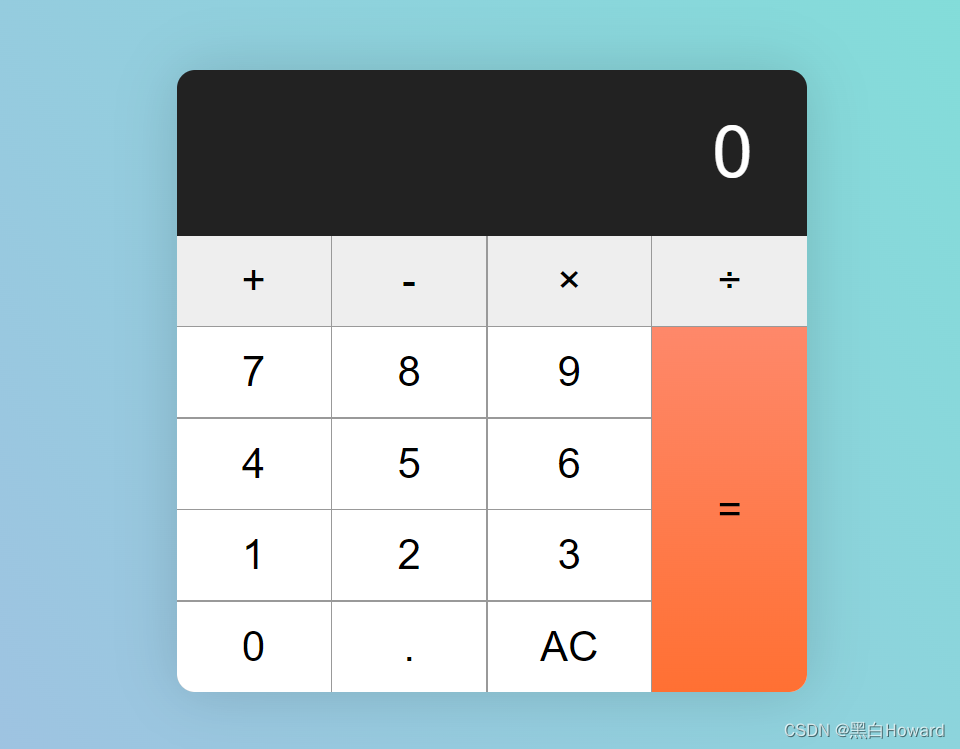
html 计算器界面
其他链接: https://www.freecodecamp.org/news/how-to-build-an-html-calculator-app-from-scratch-using-javascript-4454b8714b98/ https://codepen.io/pen/tour/welcome/start 下面展示一些 内联代码片。 <!DOCTYPE html> <html lang"en">…...
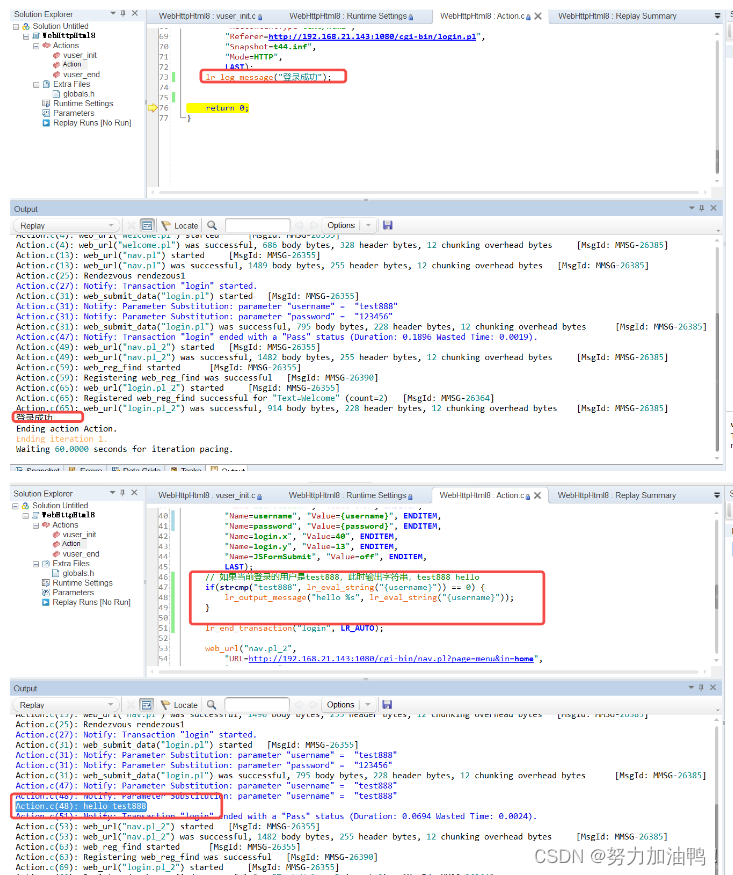
性能测试工具——LoadRunner(1)
一、LoadRunner三大组件 1.1每个组件是干什么的 VUG:录制脚本(编写脚本) Controller:设计场景,运行场景 Analysis:产生性能测试报告 1.2三大组件之间的关系 二、LoadRunner脚本录制 2.1了解WebTours系统 启动WebTours…...
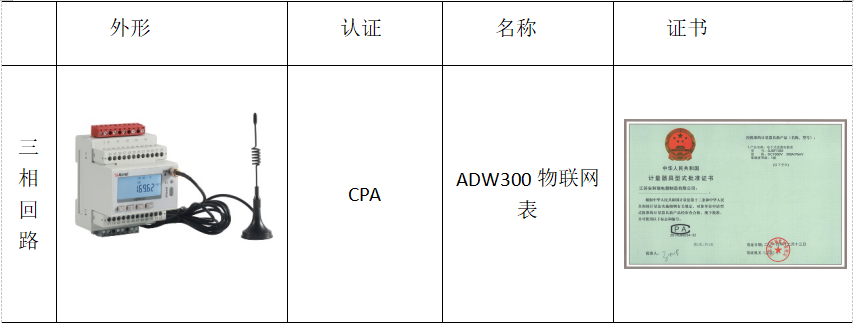
安科瑞物联网表在虚拟电厂的应用
安科瑞 崔丽洁 应用场景 一般应用于控制中心 功能 能计量当前组合有功电能,正向有功电能,反向有功电能,正向无功电能,反向无功电能; ADW300支持RS485通讯、LORA通讯、NB、4G及Wifi通讯; 三套时段表,一年可以…...

XSS和CSRF
web安全策略和同源策略的意义 如果登陆了一个网站,不小心又打开另一个恶意网站,如果没有安全策略,则他可以对已登录的网站进行任意的dom操作、伪造接口请求等,因此安全策略是必要的; 浏览器的同源策略限制了非同源的域…...

2.物联网LWIP网络
一。创建工程 1.Cubemx创建工程 (1)操作系统的时钟配置 (2)配置ETH 注意:根据底板原理图,不是核心板原理图 (3)配置USART1串口,配置为异步通信 注意:配置结…...

tomcat多实例与动静分离
实验:在一台虚拟机上配置多台tomcat 1.配置 tomcat 环境变量 vim /etc/profile.d/tomcat.sh source /etc/profile.d/tomcat.sh 2.修改 tomcat2 中的 server.xml 文件,要求各 tomcat 实例配置不能有重复的端口号 vim /usr/local/tomcat/tomcat2/conf/…...

K8S下SpringCloud应用无损下线
废话不多说直接上代码,一种2个步骤 步骤一: 添加以下代码到SpringCloud应用中 import cn.hutool.extra.spring.SpringUtil; import com.alibaba.cloud.nacos.registry.NacosAutoServiceRegistration; import lombok.RequiredArgsConstructor; import lo…...
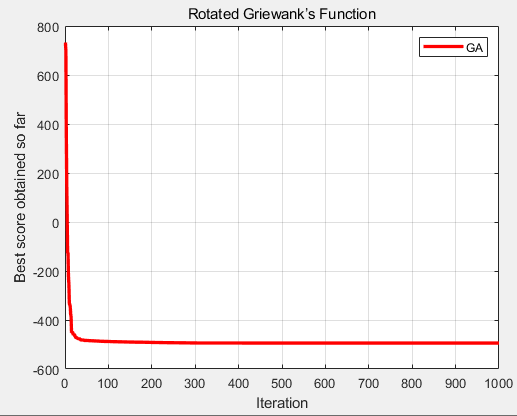
CEC2013(MATLAB):遗传算法(Genetic Algorithm,GA)求解CEC2013的28个函数
一、遗传算法GA 遗传算法(Genetic Algorithm,GA)起源于对生物系统所进行的计算机模拟研究,是一种随机全局搜索优化方法,它模拟了自然选择和遗传中发生的复制、交叉(crossover)和变异(mutation)等现象,从任…...

Linux tar包安装 Prometheus 和 Grafana
0. 介绍 用tar包的方式安装 Prometheus 和 Grafana Prometheus:开源的监控方案Grafana:将Prometheus的数据可视化平台 1. Prometheus 1. 下载 与 解压 官网下载: https://prometheus.io/download/#prometheus上传至机器解压命令:tar -xzf prometheus-*.tar.gz 2. 启动与暂…...
新一代分布式融合存储,数据场景All In One
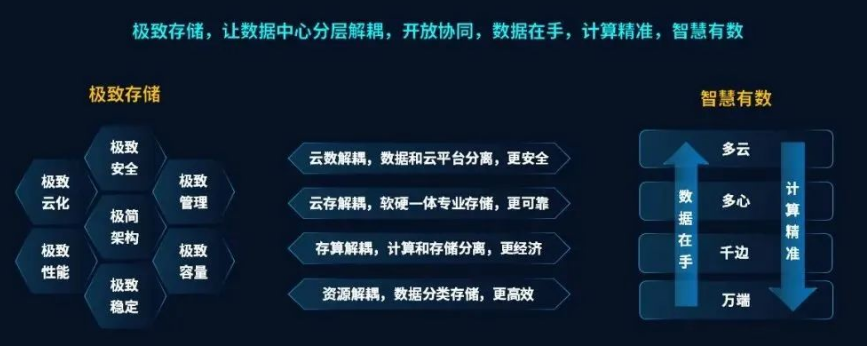
1、摘要 2023年5月11日,浪潮信息全国巡展广州站正式启航。会上,重磅发布新一代分布式融合存储AS13000G7,其采用极致融合架构设计理念,实现同一套存储满足四种非结构化数据的“All In One”高效融合,数据存力提升300%&a…...

CGroupAndroid实践篇】三、Android CGroup控制组初始化
前面已经提到,android在init阶段,通过init trigger来触发控制组节点的创建,包括foreground,background,top-app,rt,system,dex2opt,system-background,nnapi-hal,camera-daemon,restricted等。 我们来看下android在init.rc中,是如何创建这些控制组节点的,如下:…...
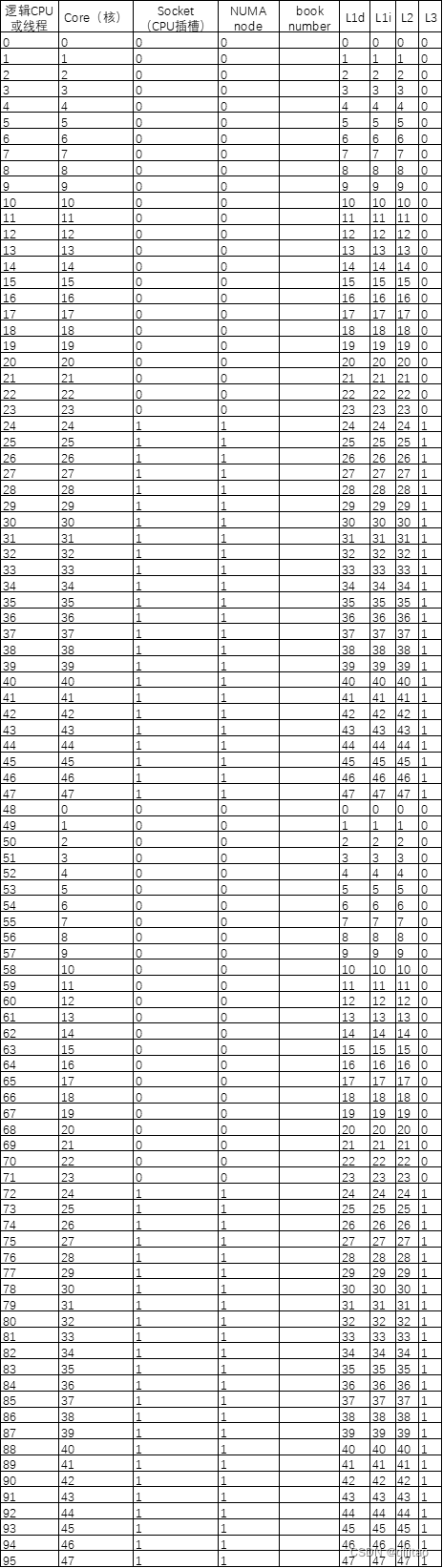
lscpu的各个参数是什么意思?
$ lscpu Architecture: x86_64 #架构 CPU op-mode(s): 32-bit, 64-bit #运行方式 Byte Order: Little Endian #字节顺序 CPU(s): 96 #逻辑cpu数 On-line CPU(s) list: 0-95 #在线cpu Thread(s) per core: 2 #每个核包含线程…...
Linux学习————redis服务
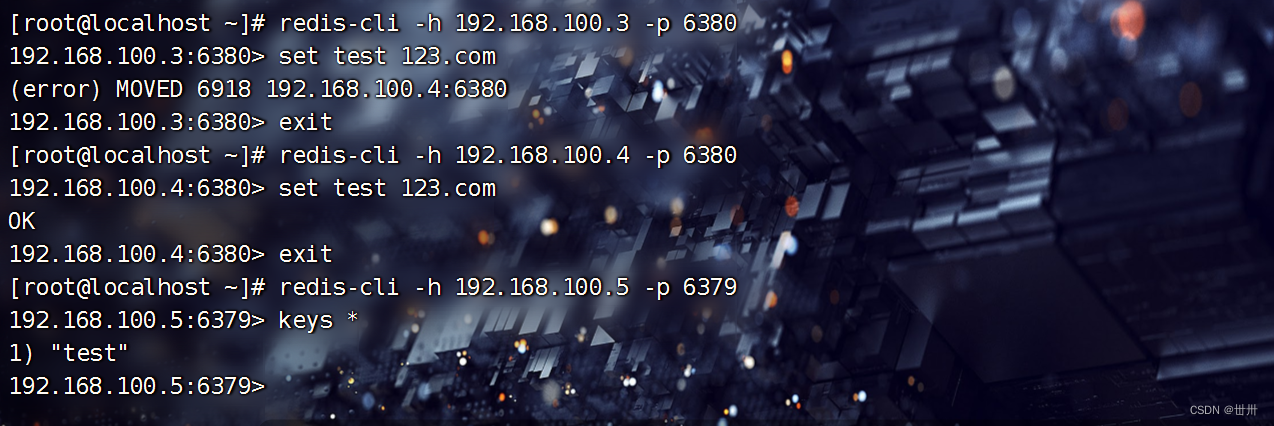
目录 一、redis主从服务 一、redis主从服务概念 二、redis主从服务作用 三、缺点 四、主从复制流程 五、搭建主从服务 配置基础环境 下载epel源,下载redis编辑 二、哨兵模式 一、概念 二、作用 三、缺点 四、结构 五、搭建 修改哨兵配置文件 启动服务…...

从静态到动态:用sd-webui-animatediff解锁AI视频创作的魔法配方 [特殊字符]
从静态到动态:用sd-webui-animatediff解锁AI视频创作的魔法配方 🎬 【免费下载链接】sd-webui-animatediff AnimateDiff for AUTOMATIC1111 Stable Diffusion WebUI 项目地址: https://gitcode.com/gh_mirrors/sd/sd-webui-animatediff 想象一下&…...

NVIDIA vGPU 18.0技术解析:虚拟化与AI加速的融合
1. NVIDIA vGPU 18.0技术解析:虚拟化平台上的AI加速革命在数据中心和云计算领域,GPU虚拟化技术正经历着前所未有的变革。NVIDIA最新发布的Virtual GPU(vGPU)18.0版本,将AI计算能力深度整合到虚拟桌面基础设施ÿ…...

Rocky9.2修改静态IP
目录通过NetworkManager配置IP通过NetworkManager配置IP 开启NetworkManager服务 systemctl start NetworkManager && systemctl enable NetworkManager && systemctl status NetworkManager打开网卡配置文件,修改ipv4部分即可 vim /etc/Network…...

Path of Building终极指南:5分钟掌握流放之路最强离线构建工具
Path of Building终极指南:5分钟掌握流放之路最强离线构建工具 【免费下载链接】PathOfBuilding Offline build planner for Path of Exile. 项目地址: https://gitcode.com/GitHub_Trending/pa/PathOfBuilding Path of Building(简称PoB…...

如何快速掌握火灾模拟:Fire Dynamics Simulator 完全指南
如何快速掌握火灾模拟:Fire Dynamics Simulator 完全指南 【免费下载链接】fds Fire Dynamics Simulator 项目地址: https://gitcode.com/gh_mirrors/fd/fds Fire Dynamics Simulator(FDS)是由美国国家标准与技术研究院(NI…...

QQ音乐解析终极指南:2025年高效免费音乐获取完整解决方案
QQ音乐解析终极指南:2025年高效免费音乐获取完整解决方案 【免费下载链接】MCQTSS_QQMusic QQ音乐解析 项目地址: https://gitcode.com/gh_mirrors/mc/MCQTSS_QQMusic 还在为QQ音乐无法下载心爱歌曲而烦恼吗?想要随时随地畅听高品质音乐却受限于平…...

3步搞定喜马拉雅VIP音频下载:这款跨平台工具让你轻松保存付费内容
3步搞定喜马拉雅VIP音频下载:这款跨平台工具让你轻松保存付费内容 【免费下载链接】xmly-downloader-qt5 喜马拉雅FM专辑下载器. 支持VIP与付费专辑. 使用GoQt5编写(Not Qt Binding). 项目地址: https://gitcode.com/gh_mirrors/xm/xmly-downloader-qt5 还在…...

【C++26反射元编程实战指南】:3步接入、5大避坑点、100%编译期类型自省能力落地
更多请点击: https://intelliparadigm.com 第一章:C26反射元编程的演进脉络与核心价值 C26 将首次将编译期反射(compile-time reflection)以核心语言特性形式正式纳入标准,标志着元编程范式从模板元编程(T…...

腾讯云代理商:腾讯云一键部署Hermes Agent 两大方案指南
2026年,AI Agent成为技术圈的热门赛道,而Hermes Agent凭借“自主学习、技能沉淀”的核心优势,成为众多开发者的首选智能体框架——它能自动从交互中提炼技能,越用越聪明,还能无缝对接多平台,实现724小时在线…...

零基础玩转Qwen3语义雷达:手把手教你构建自定义知识库
零基础玩转Qwen3语义雷达:手把手教你构建自定义知识库 1. 从关键词到语义:为什么你需要一个“懂你”的搜索工具? 想象一下这个场景:你正在整理一份关于“健康饮食”的文档库,里面包含了“苹果富含维生素”、“香蕉能…...