
SpringSecurity 初始化解析
文章目录
- 前言
- 加载SpringSecurity配置
- 解析配置
- SpringSecurity 解析器
- security:http 解析
- FilterChainProxy的注册过程
- 创建 SpringSecurity 过滤器
- 总结
前言
通过上文分析知道了SpringSecurity对一个请求的具体处理流程。不知道大家是否跟我一样都有几个疑问:
- FilterChainProxy什么时候创建的?
- 过滤器链和对应的过滤器什么时候创建的?
- 怎么把自定义的过滤器添加到过滤器链中?
- 请求和过滤器的匹配规则是什么?
如果有的话,本文将为你解答或消除它们。
加载SpringSecurity配置
上文提到Spring的初始化会加载解析SpringSecurity的配置文件,现在来分析下。
首先系统启动的时候会触发在 web.xml中配置的ContextLoaderListener监听器

然后会执行对应的initWebApplicationContext方法
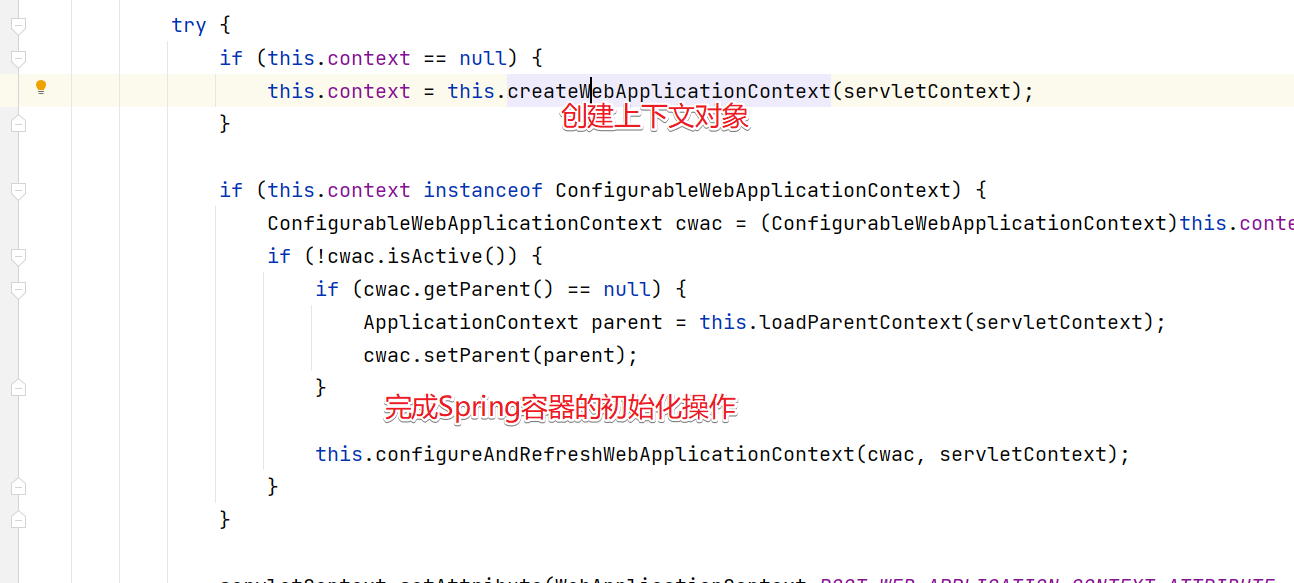
然后进入configureAndRefreshWebApplicationContext方法中。
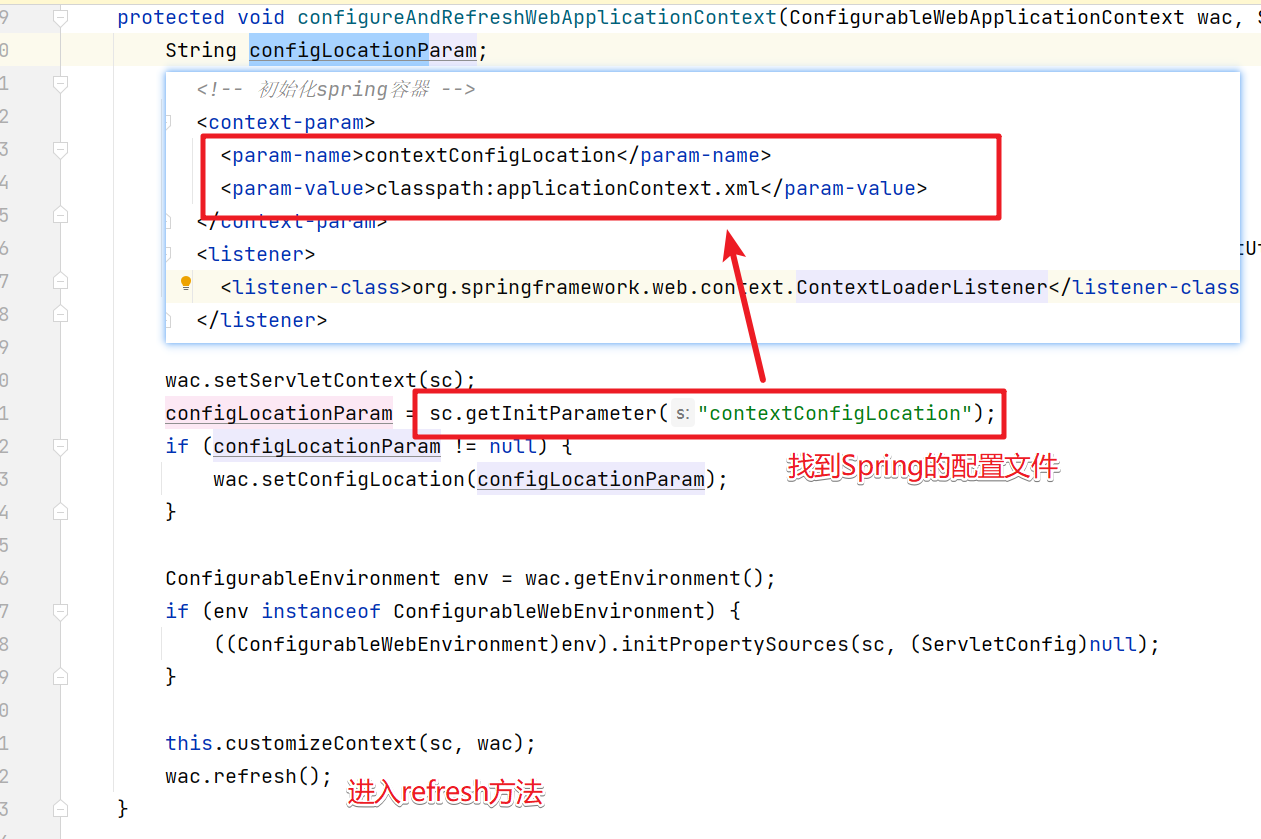
refresh()方法
@Overridepublic void refresh() throws BeansException, IllegalStateException {synchronized (this.startupShutdownMonitor) {// Prepare this context for refreshing./*** * 1、设置容器的启动时间* 2、设置活跃状态为true* 3、设置关闭状态为false* 4、获取Environment对象,并加载当前系统的属性值到Environment对象中* 5、准备监听器和事件的集合对象,默认为空的集合*/prepareRefresh();// Tell the subclass to refresh the internal bean factory.// 创建容器对象:DefaultListableBeanFactory// 加载xml配置文件的属性值到当前工厂中,最重要的就是BeanDefinitionConfigurableListableBeanFactory beanFactory = obtainFreshBeanFactory();// Prepare the bean factory for use in this context.// beanFactory的准备工作,对各种属性进行填充prepareBeanFactory(beanFactory);try {// Allows post-processing of the bean factory in context subclasses.// 子类覆盖方法做额外的处理,此处我们自己一般不做任何扩展工作,但是可以查看web中的代码,是有具体实现的postProcessBeanFactory(beanFactory);// Invoke factory processors registered as beans in the context.// 调用各种beanFactory处理器invokeBeanFactoryPostProcessors(beanFactory);// Register bean processors that intercept bean creation.// 注册bean处理器,这里只是注册功能,真正调用的是getBean方法registerBeanPostProcessors(beanFactory);// Initialize message source for this context.// 为上下文初始化message源,即不同语言的消息体,国际化处理,在springmvc的时候通过国际化的代码重点讲initMessageSource();// Initialize event multicaster for this context.// 初始化事件监听多路广播器initApplicationEventMulticaster();// Initialize other special beans in specific context subclasses.// 留给子类来初始化其他的beanonRefresh();// Check for listener beans and register them.// 在所有注册的bean中查找listener bean,注册到消息广播器中registerListeners();// Instantiate all remaining (non-lazy-init) singletons.// 初始化剩下的单实例(非懒加载的)finishBeanFactoryInitialization(beanFactory);// Last step: publish corresponding event.// 完成刷新过程,通知生命周期处理器lifecycleProcessor刷新过程,同时发出ContextRefreshEvent通知别人finishRefresh();}catch (BeansException ex) {if (logger.isWarnEnabled()) {logger.warn("Exception encountered during context initialization - " +"cancelling refresh attempt: " + ex);}// Destroy already created singletons to avoid dangling resources.// 为防止bean资源占用,在异常处理中,销毁已经在前面过程中生成的单件beandestroyBeans();// Reset 'active' flag.// 重置active标志cancelRefresh(ex);// Propagate exception to caller.throw ex;}finally {// Reset common introspection caches in Spring's core, since we// might not ever need metadata for singleton beans anymore...resetCommonCaches();}}}
配置文件的加载解析需要进入obtainFreshBeanFactory()方法中加载配置文件。
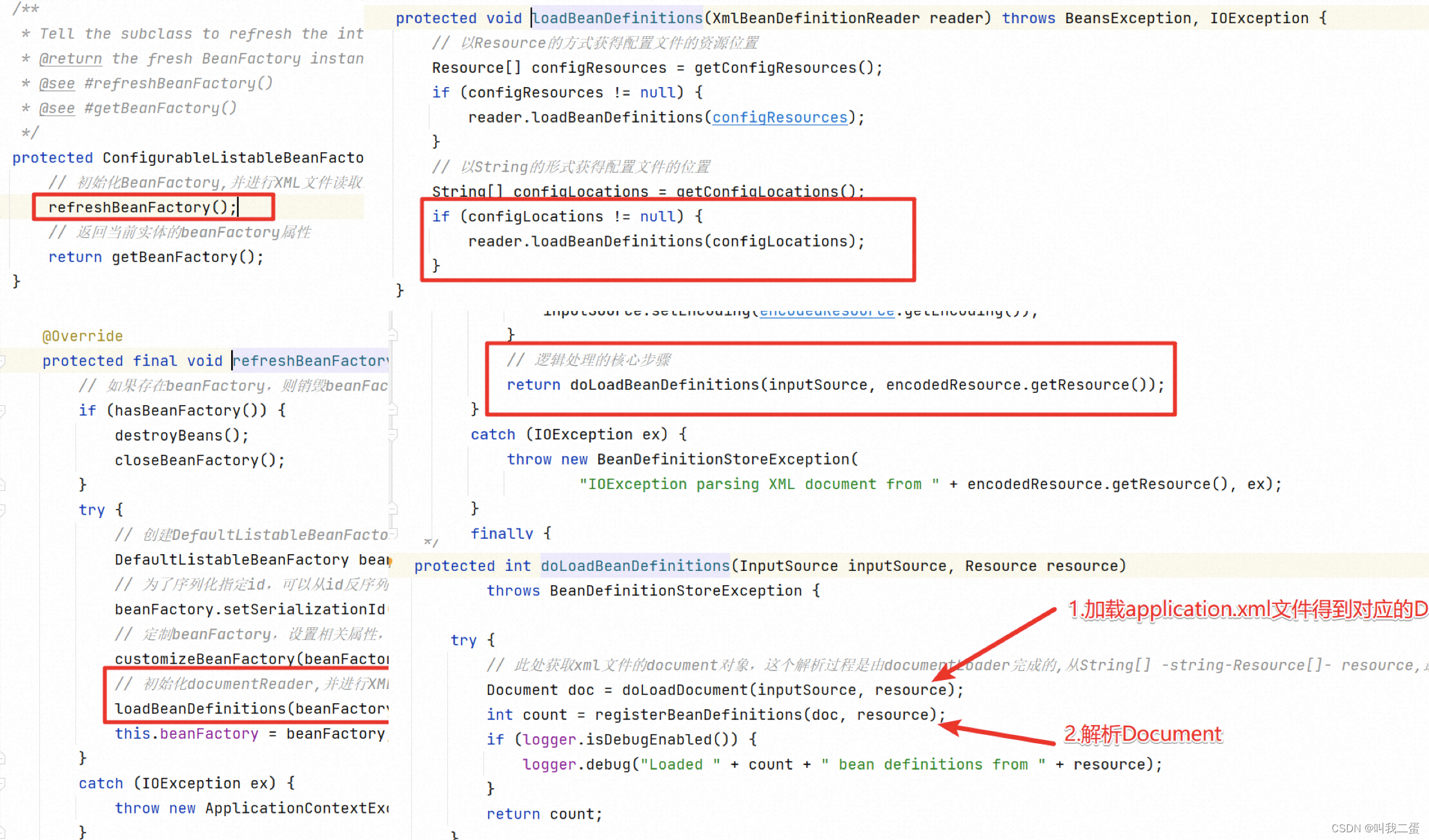
解析配置
最终会进入registerBeanDefinitions方法解析配置文件
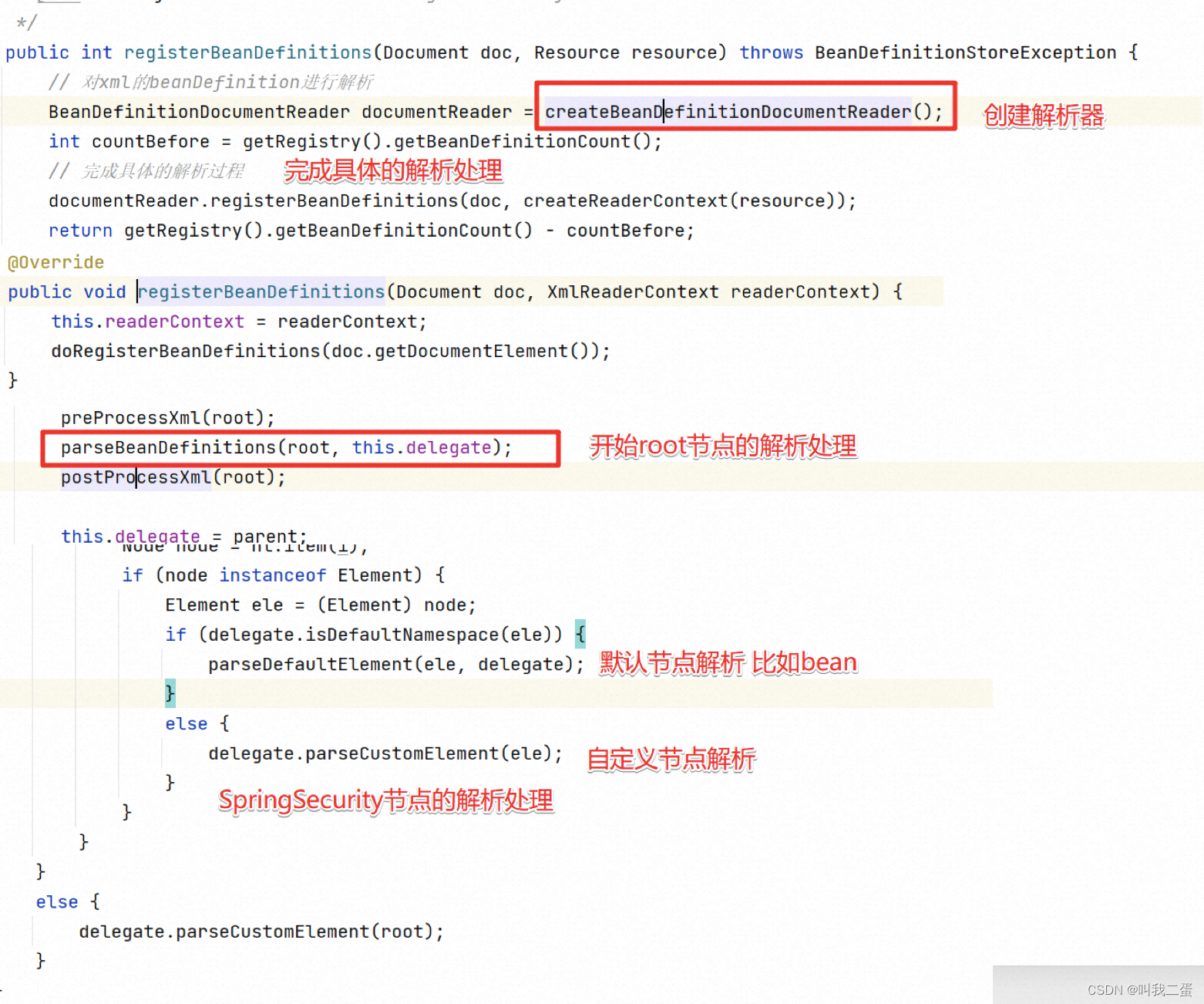
parseDefaultElement方法会完成Spring中提供的默认方法解析,具体如下:
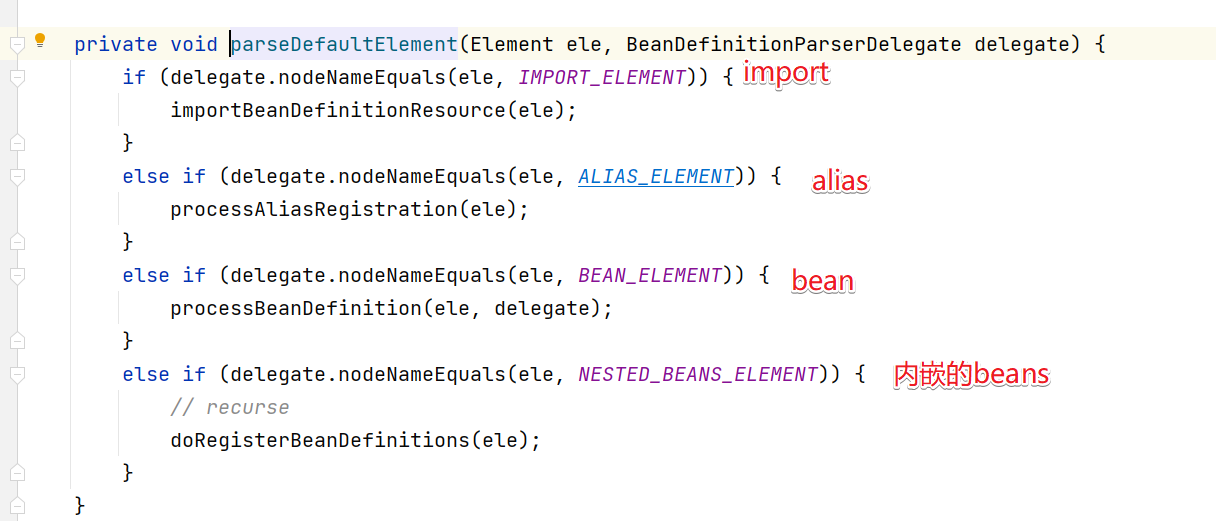
而SpringSecurity的解析是先进入import中,然后进入到parseCustomElement()方法来解析。
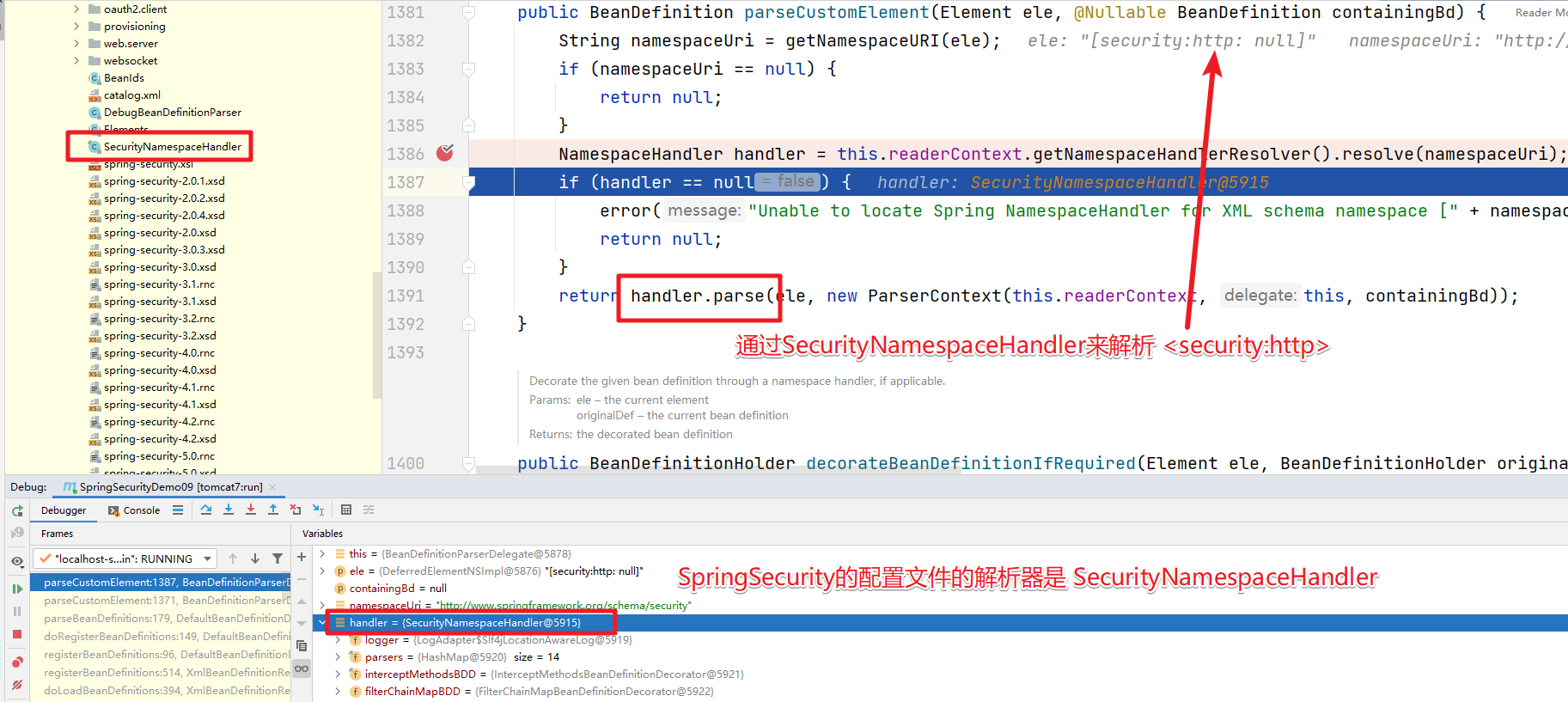
SpringSecurity 解析器
在SpringSecurity的配置文件中使用了几个标签。
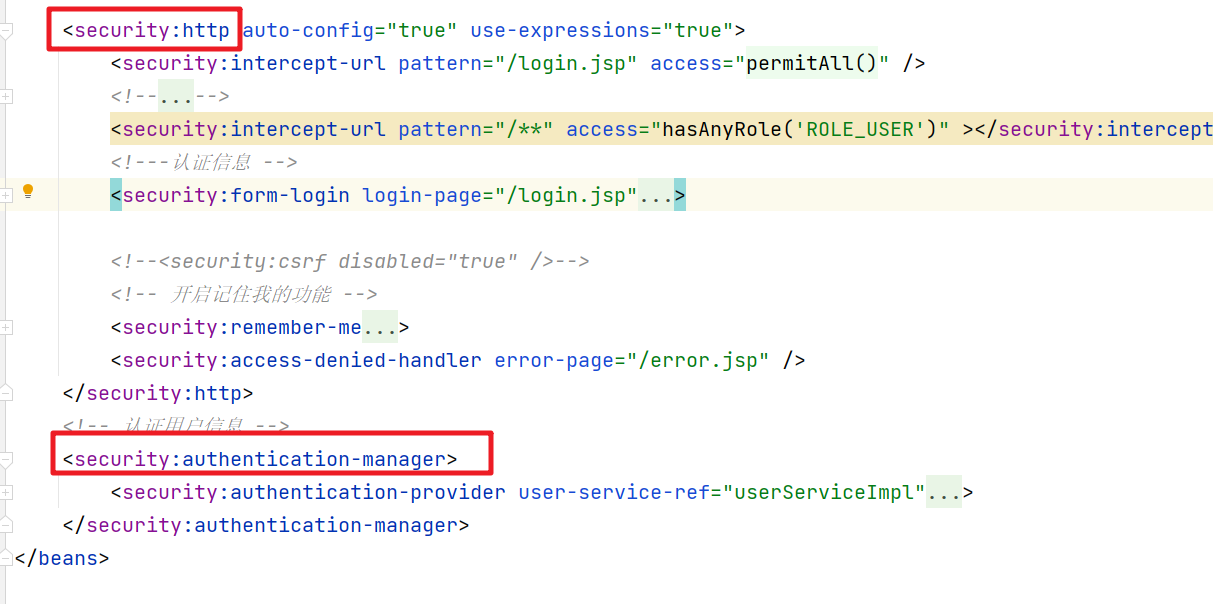
每个标签都有对应的解析器。
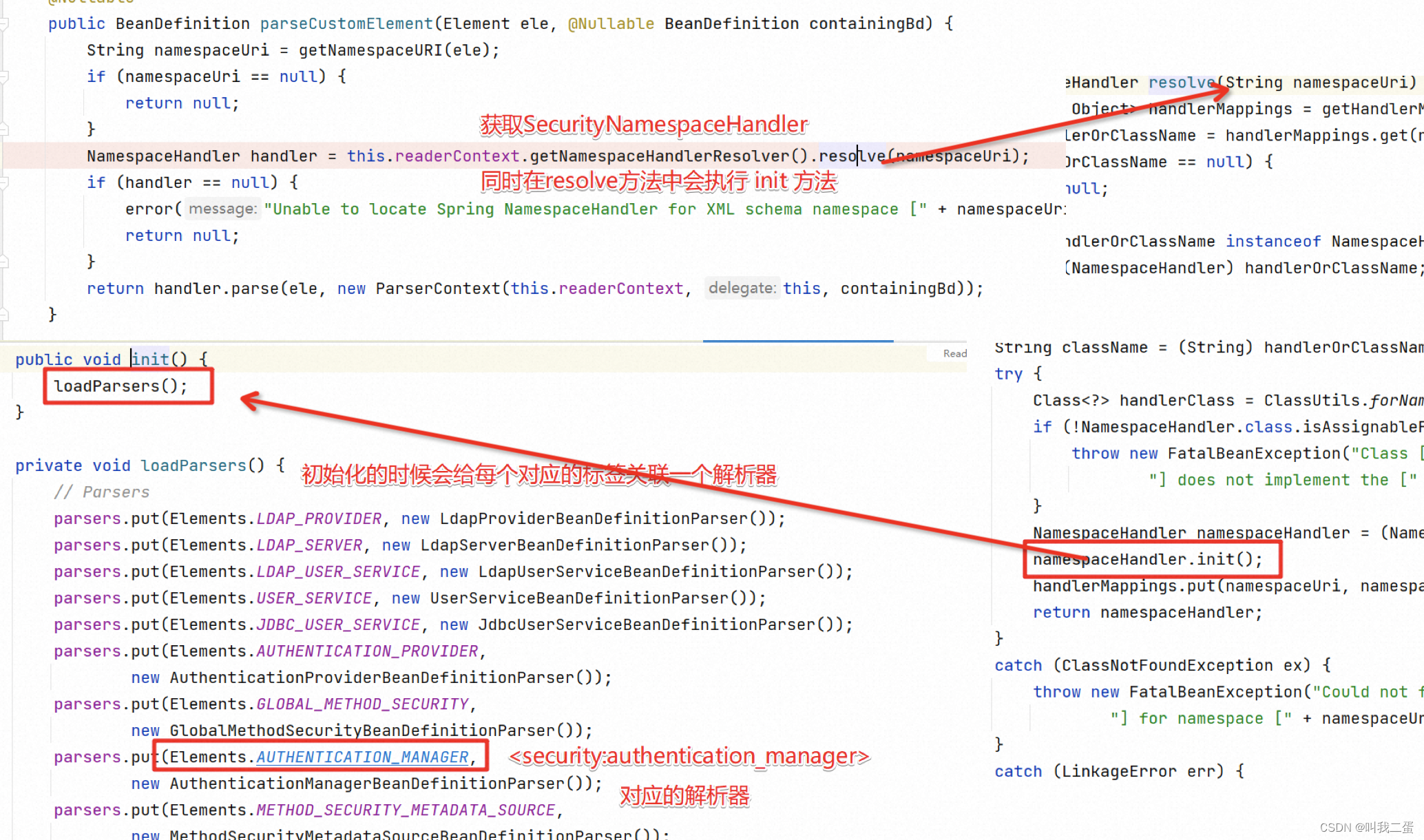
在SecurityNamespaceHandler中的 parsers中保存的就是节点对应的解析器。

security:http 解析
解析器会先解析security:http标签了,下面的逻辑也很清晰:
- 先判断是否合法
- 然后获取标签名称
- 根据标签名称获取对应的解析器
- 然后通过解析器来解析标签
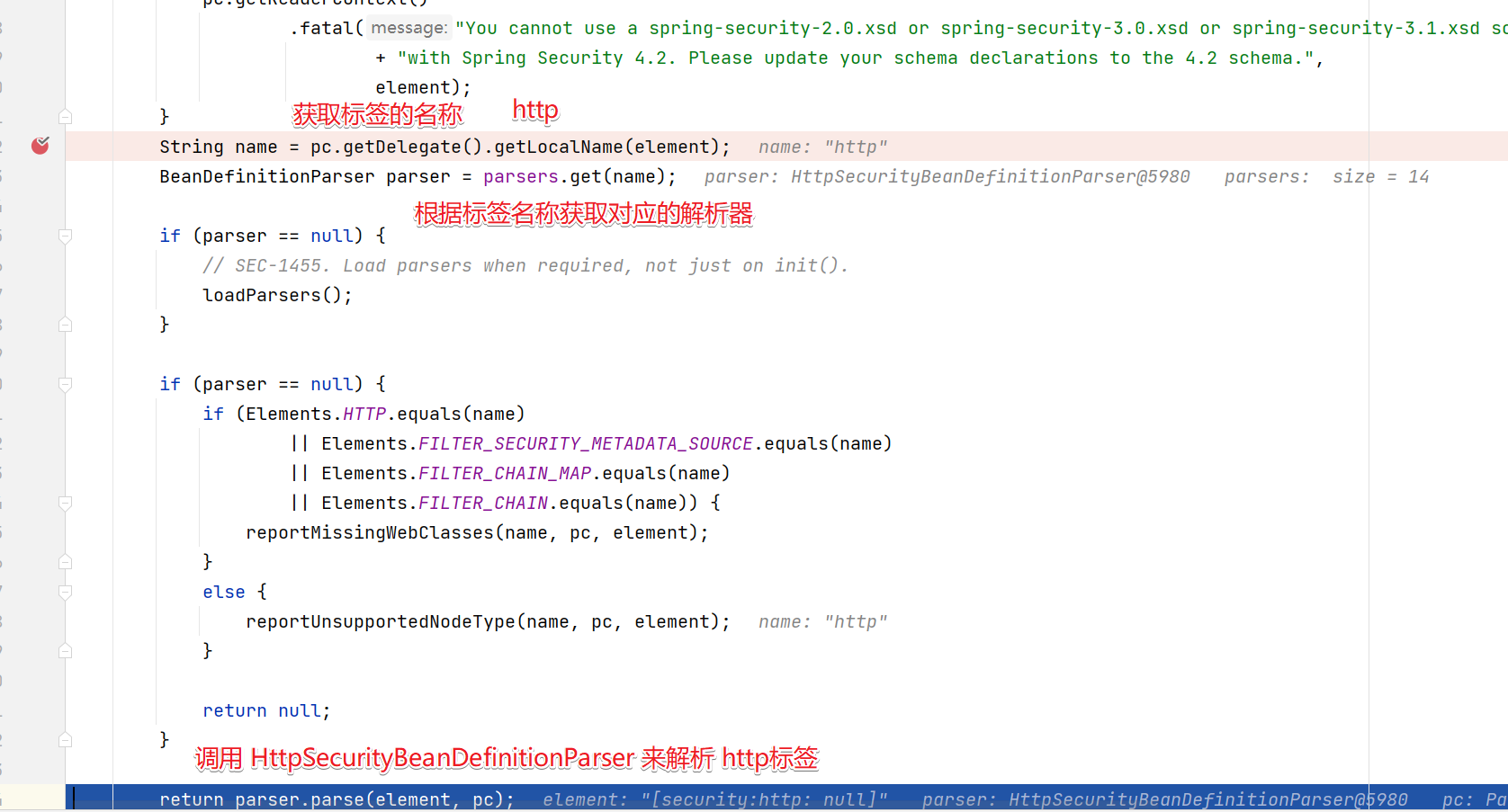
进入HttpSecurityBeanDefinitionParser中看看解析http标签做了什么事情。
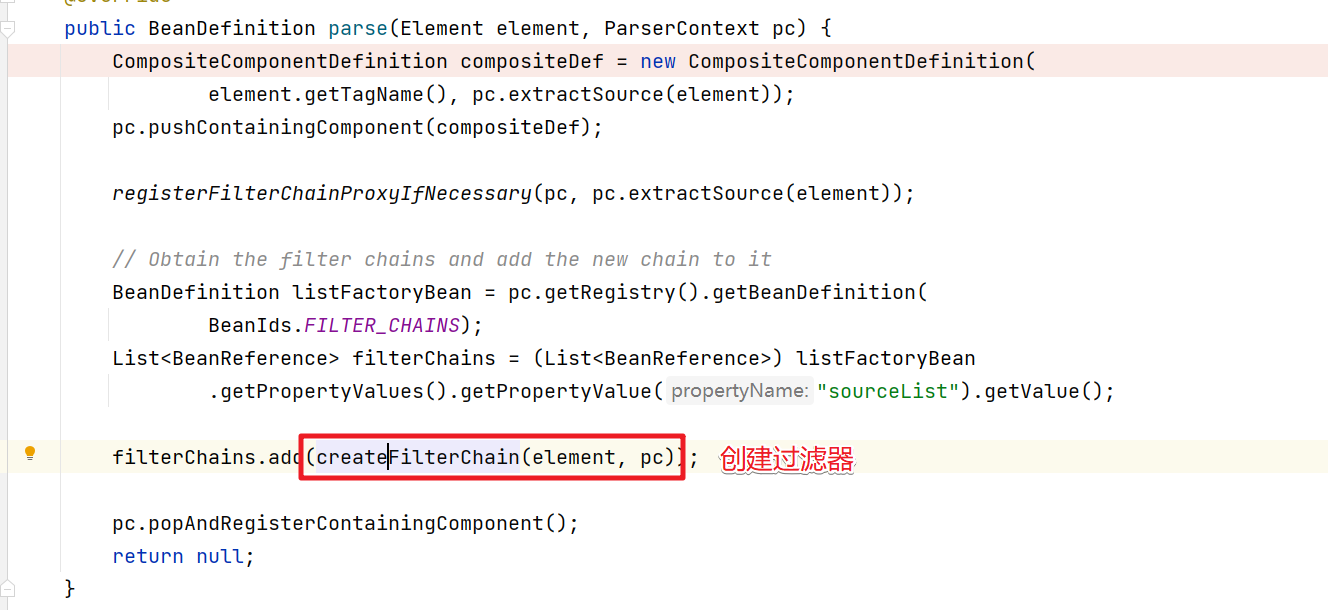
@Overridepublic BeanDefinition parse(Element element, ParserContext pc) {// CompositeComponentDefinition 保存内嵌的BeanDefinitionCompositeComponentDefinition compositeDef = new CompositeComponentDefinition(element.getTagName(), pc.extractSource(element));// compositeDef定义保存在了 父容器中pc.pushContainingComponent(compositeDef);// 完成FilterChainProxy的注册registerFilterChainProxyIfNecessary(pc, pc.extractSource(element));// Obtain the filter chains and add the new chain to itBeanDefinition listFactoryBean = pc.getRegistry().getBeanDefinition(BeanIds.FILTER_CHAINS);List<BeanReference> filterChains = (List<BeanReference>) listFactoryBean.getPropertyValues().getPropertyValue("sourceList").getValue();// createFilterChain(element, pc) 创建对应的过滤器并添加到了filterChains这个过滤器链中filterChains.add(createFilterChain(element, pc));pc.popAndRegisterContainingComponent();return null;}
上面代码的几个关键点:
- CompositeComponentDefinition保存配置文件中的嵌套的BeanDefinition信息
- 完成了FilterChainProxy的注册
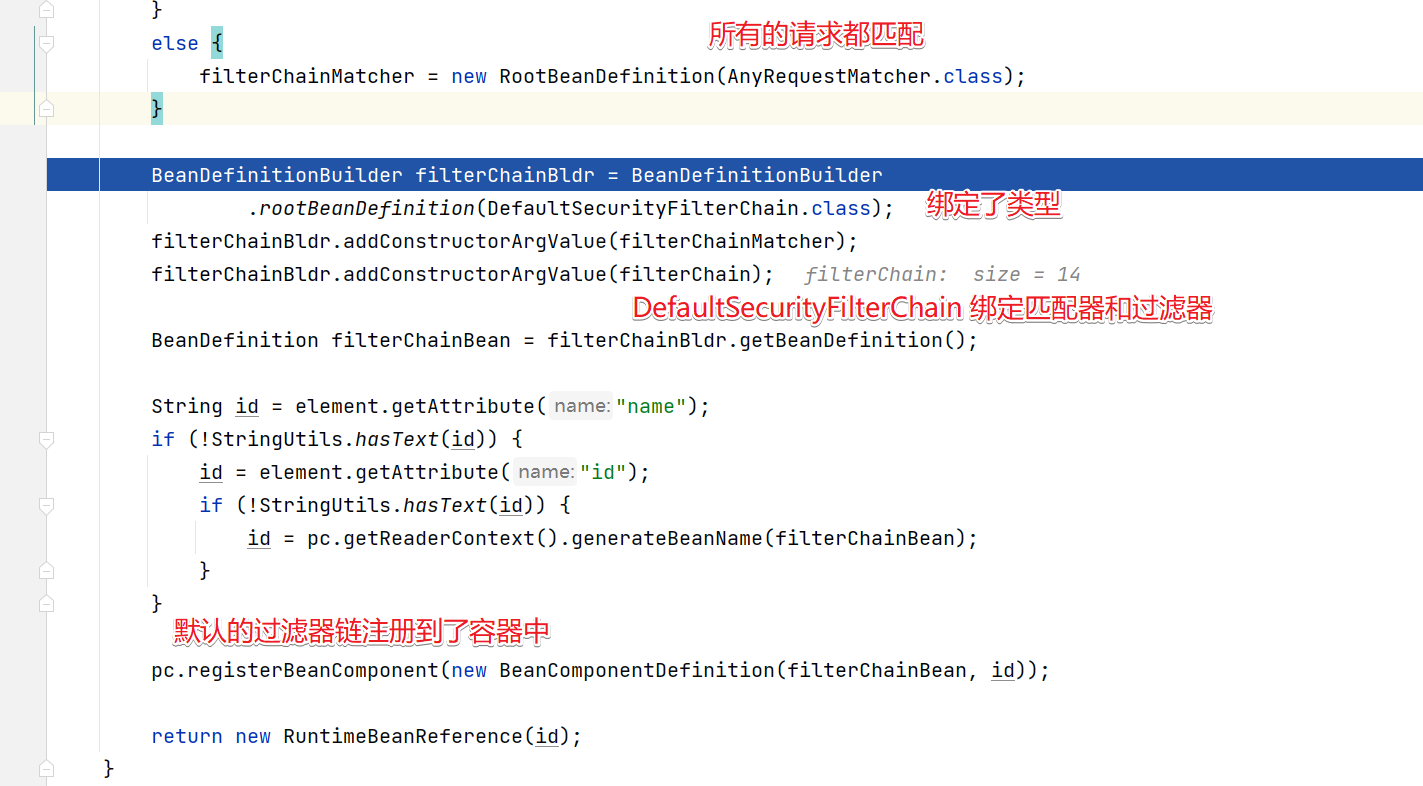
- 完成了处理请求的过滤器和过滤器链的处理
FilterChainProxy的注册过程
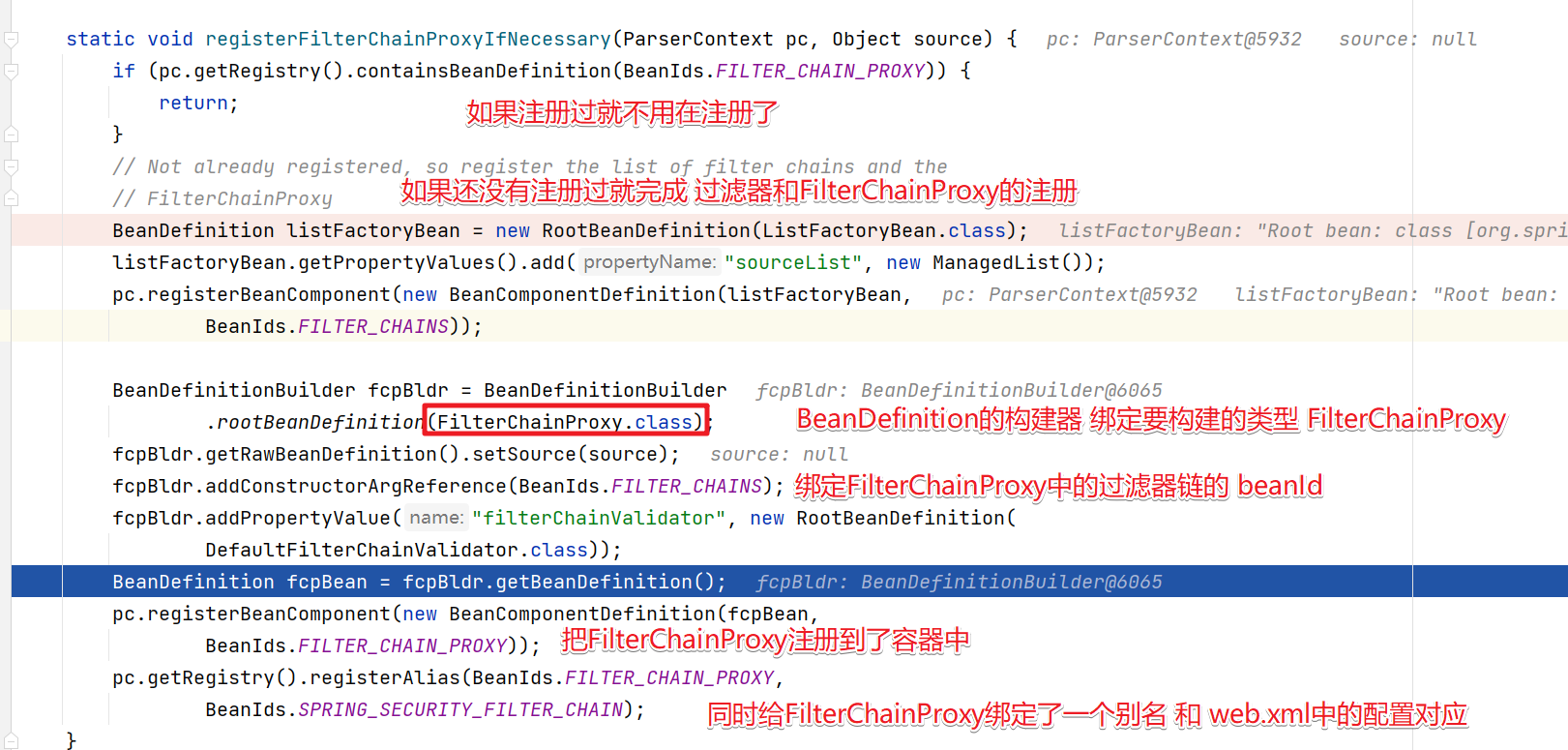
SpringSecurity在BeanId中定义了相关的固定beanId值。
public abstract class BeanIds {private static final String PREFIX = "org.springframework.security.";/*** The "global" AuthenticationManager instance, registered by the* <authentication-manager> element*/public static final String AUTHENTICATION_MANAGER = PREFIX + "authenticationManager";/** External alias for FilterChainProxy bean, for use in web.xml files */public static final String SPRING_SECURITY_FILTER_CHAIN = "springSecurityFilterChain";public static final String CONTEXT_SOURCE_SETTING_POST_PROCESSOR = PREFIX+ "contextSettingPostProcessor";public static final String USER_DETAILS_SERVICE = PREFIX + "userDetailsService";public static final String USER_DETAILS_SERVICE_FACTORY = PREFIX+ "userDetailsServiceFactory";public static final String METHOD_ACCESS_MANAGER = PREFIX+ "defaultMethodAccessManager";public static final String FILTER_CHAIN_PROXY = PREFIX + "filterChainProxy";public static final String FILTER_CHAINS = PREFIX + "filterChains";public static final String METHOD_SECURITY_METADATA_SOURCE_ADVISOR = PREFIX+ "methodSecurityMetadataSourceAdvisor";public static final String EMBEDDED_APACHE_DS = PREFIX+ "apacheDirectoryServerContainer";public static final String CONTEXT_SOURCE = PREFIX + "securityContextSource";public static final String DEBUG_FILTER = PREFIX + "debugFilter";
}
创建 SpringSecurity 过滤器
接下来看看SpringSecurity中默认的过滤器是如何创建
private BeanReference createFilterChain(Element element, ParserContext pc) {// 判断是否需要Security拦截boolean secured = !OPT_SECURITY_NONE.equals(element.getAttribute(ATT_SECURED));if (!secured) {// 如果没配置pattern属性并且配置了request-matcher-ref为空 添加错误信息if (!StringUtils.hasText(element.getAttribute(ATT_PATH_PATTERN)) && !StringUtils.hasText(ATT_REQUEST_MATCHER_REF)) {pc.getReaderContext().error("The '" + ATT_SECURED + "' attribute must be used in combination with" + " the '" + ATT_PATH_PATTERN + "' or '" + ATT_REQUEST_MATCHER_REF + "' attributes.", pc.extractSource(element));}for (int n = 0; n < element.getChildNodes().getLength(); n++) {// 如果有子节点则添加错误信息if (element.getChildNodes().item(n) instanceof Element) {pc.getReaderContext().error("If you are using <http> to define an unsecured pattern, " + "it cannot contain child elements.", pc.extractSource(element));}}// 创建过滤器链return createSecurityFilterChainBean(element, pc, Collections.emptyList());}// portMapper、portResolver主要提供给SSL相关类使用final BeanReference portMapper = createPortMapper(element, pc);final BeanReference portResolver = createPortResolver(portMapper, pc);// 新建一个空的authenticationProviders集合 ManagedList<BeanReference> authenticationProviders = new ManagedList<BeanReference>();// 通过空的authenticationProviders集合产生一个AuthenticationManager的bean定义BeanReference authenticationManager = createAuthenticationManager(element, pc, authenticationProviders);// 是否全采用默认配置boolean forceAutoConfig = isDefaultHttpConfig(element);// 看下面HttpConfigurationBuilder httpBldr = new HttpConfigurationBuilder(element, forceAutoConfig, pc, portMapper, portResolver, authenticationManager);// 看下面AuthenticationConfigBuilder authBldr = new AuthenticationConfigBuilder(element, forceAutoConfig, pc, httpBldr.getSessionCreationPolicy(), httpBldr.getRequestCache(), authenticationManager, httpBldr.getSessionStrategy(), portMapper, portResolver, httpBldr.getCsrfLogoutHandler());// 配置logoutHandlershttpBldr.setLogoutHandlers(authBldr.getLogoutHandlers());httpBldr.setEntryPoint(authBldr.getEntryPointBean());httpBldr.setAccessDeniedHandler(authBldr.getAccessDeniedHandlerBean());// 向AuthenticationProviders中添加provider  authenticationProviders.addAll(authBldr.getProviders());List<OrderDecorator> unorderedFilterChain = new ArrayList<OrderDecorator>();// 向FilterChain链中添加filters  unorderedFilterChain.addAll(httpBldr.getFilters());unorderedFilterChain.addAll(authBldr.getFilters());// 添加自定义的Filter,也就是custom-filter标签定义的Filter  unorderedFilterChain.addAll(buildCustomFilterList(element, pc));// 对过滤器进行排序Collections.sort(unorderedFilterChain, new OrderComparator());// 校验过滤器是否有效checkFilterChainOrder(unorderedFilterChain, pc, pc.extractSource(element));// The list of filter beansList<BeanMetadataElement> filterChain = new ManagedList<BeanMetadataElement>();for (OrderDecorator od : unorderedFilterChain) {filterChain.add(od.bean);}// 创建SecurityFilterChain return createSecurityFilterChainBean(element, pc, filterChain);
}
先看HttpConfigurationBuilder的构造方法
public HttpConfigurationBuilder(Element element, boolean addAllAuth, ParserContext pc, BeanReference portMapper, BeanReference portResolver, BeanReference authenticationManager) {this.httpElt = element;this.addAllAuth = addAllAuth;this.pc = pc;this.portMapper = portMapper;this.portResolver = portResolver;this.matcherType = MatcherType.fromElement(element);// 获取子标签intercept-urlinterceptUrls = DomUtils.getChildElementsByTagName(element, Elements.INTERCEPT_URL);for (Element urlElt : interceptUrls) {// 判断子标签intercept-url是否配置了filters属性// 如果配置了filters属性添加错误消息,因为Security已经不再支持filters属性了if (StringUtils.hasText(urlElt.getAttribute(ATT_FILTERS))) {pc.getReaderContext().error("The use of \"filters='none'\" is no longer supported. Please define a" + " separate <http> element for the pattern you want to exclude and use the attribute" + " \"security='none'\".", pc.extractSource(urlElt));}}// 获取标签create-session属性String createSession = element.getAttribute(ATT_CREATE_SESSION);if (StringUtils.hasText(createSession)) {sessionPolicy = createPolicy(createSession);} else {// 默认策略sessionPolicy = SessionCreationPolicy.IF_REQUIRED;}// 创建一系列过滤器createCsrfFilter();createSecurityContextPersistenceFilter();createSessionManagementFilters();createWebAsyncManagerFilter();createRequestCacheFilter();createServletApiFilter(authenticationManager);createJaasApiFilter();createChannelProcessingFilter();createFilterSecurityInterceptor(authenticationManager);createAddHeadersFilter();
}
然后进入AuthenticationConfigBuilder中来查看,发向其实也创建了很多的过滤器
public AuthenticationConfigBuilder(Element element, boolean forceAutoConfig, ParserContext pc, SessionCreationPolicy sessionPolicy, BeanReference requestCache, BeanReference authenticationManager, BeanReference sessionStrategy, BeanReference portMapper, BeanReference portResolver, BeanMetadataElement csrfLogoutHandler) {this.httpElt = element;this.pc = pc;this.requestCache = requestCache;// 是否自动配置autoConfig = forceAutoConfig | "true".equals(element.getAttribute(ATT_AUTO_CONFIG));// 是否允许sessionthis.allowSessionCreation = sessionPolicy != SessionCreationPolicy.NEVER && sessionPolicy != SessionCreationPolicy.STATELESS;this.portMapper = portMapper;this.portResolver = portResolver;this.csrfLogoutHandler = csrfLogoutHandler;// 创建一系列过滤器createAnonymousFilter();createRememberMeFilter(authenticationManager);createBasicFilter(authenticationManager);createFormLoginFilter(sessionStrategy, authenticationManager);createOpenIDLoginFilter(sessionStrategy, authenticationManager);createX509Filter(authenticationManager);createJeeFilter(authenticationManager);createLogoutFilter();createLoginPageFilterIfNeeded();createUserDetailsServiceFactory();createExceptionTranslationFilter();
}
创建SecurityFilterChain
总结
通过以上的分析可以知道,在Spring初始化的时候根据SpringSecurity的相关配置按照其解析器将相关的过滤器加载到了Spring Bean中,在此后的请求中就可以使用到SpringSecurity相关的过滤器。
相关文章:
SpringSecurity 初始化解析
文章目录 前言加载SpringSecurity配置解析配置SpringSecurity 解析器security:http 解析FilterChainProxy的注册过程创建 SpringSecurity 过滤器总结 前言 通过上文分析知道了SpringSecurity对一个请求的具体处理流程。不知道大家是否跟我一样都有几个疑问: Filte…...

ip netns网络空间使用
SNAT 源地址转发 执行ip netns exec route_br_ens192_0 iptables -nL POSTROUTING -t nat --line-numbers 输出如下: Chain POSTROUTING (policy ACCEPT) num target prot opt source destination 1 SNAT all -- 0.0.0.0/…...
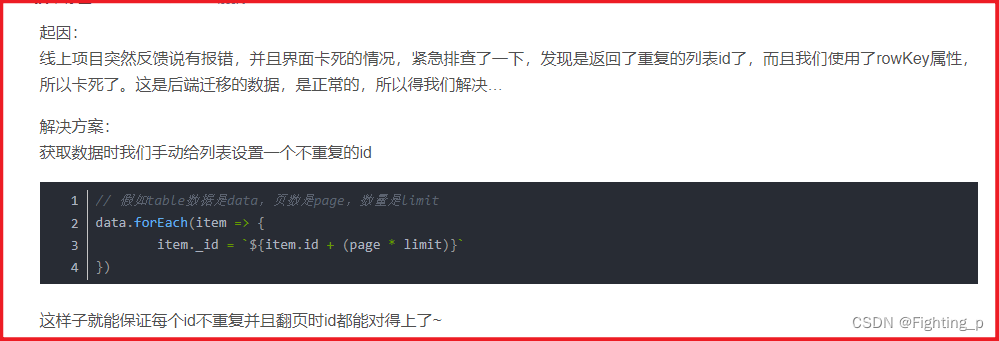
解决 Cannot read property ‘key‘ of undefined
目录 问题解决1解决2最终 问题 现场环境分页查询某些条件项查询时,分页接口获取成功但是数据不渲染,页面像是卡住了: 报错 Cannot read property key of undefined 解决1 有人说 使用的el-pagination在格式化代码的时候layout属性的参数会多加…...

「聊设计模式」之工厂方法模式(Factory Method)
🏆本文收录于《聊设计模式》专栏,专门攻坚指数级提升,助你一臂之力,早日登顶🚀,欢迎持续关注&&收藏&&订阅! 前言 设计模式是指在软件设计中,经过总结和提炼的&#…...
局部变量,全局变量与内存
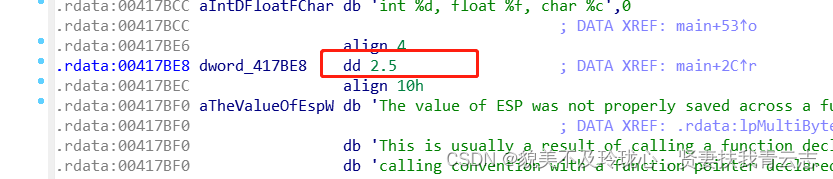
本文会使用IDA分析局部变量,全局变量在内存的存储 目录 使用IDA分析局部变量 使用IDA分析全局变量 总结 使用IDA分析局部变量 #include <stdio.h>int main() {int nNum 1;float fNum 2.5;char ch A;printf("int %d, float %f, char %c", nNu…...

Python爬虫异常处理实用技巧分享
当我们编写爬虫程序时,经常会遇到各种各样的异常情况,比如网络连接失败、页面解析错误、请求被拒绝等等。这些异常情况可能导致程序中断或者无法正常运行,给我们的数据采集工作带来一定的困扰。所以,掌握一些实用的异常处理技巧对…...

【性能测试】Jmeter —— jmeter计数器
jmeter计数器 如果需要引用的数据量较大,且要求不能重复或者需要递增,那么可以使用计数器来实现 如:新增功能,要求名称不能重复 1,新增计数器 计数器:允许用户创建一个在线程组之内都可以被引用的计数器…...

Python 布尔类型和比较运算符
视频版教程 Python3零基础7天入门实战视频教程 布尔( bool)表达现实生活中的逻辑,即真和假,True表示真,False表示假。 实例: # 布尔类型定义 b1 True b2 False print(f"b1{b1},类型是{type(b1)}") prin…...
蓝牙核心规范(V5.4)10.1-BLE 入门笔记(1)
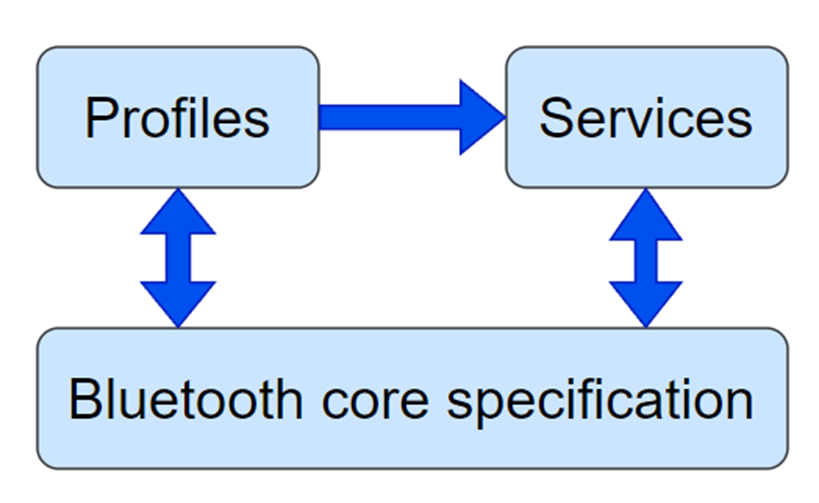
ble 规范 深入了解蓝牙LE需要熟悉相关的规格。蓝牙LE的架构、程序和协议由一项关键规范完全定义,称为蓝牙核心规范。产品如何使用蓝牙以实现互操作性由两种特殊类型称为配置文件和服务的规范集合所涵盖。图1展示了BLE规范类型及其相互关系。 1.1 蓝牙核心规范 蓝牙核心规范是…...
Java高级之泛型、自定义泛型、通配符的使用
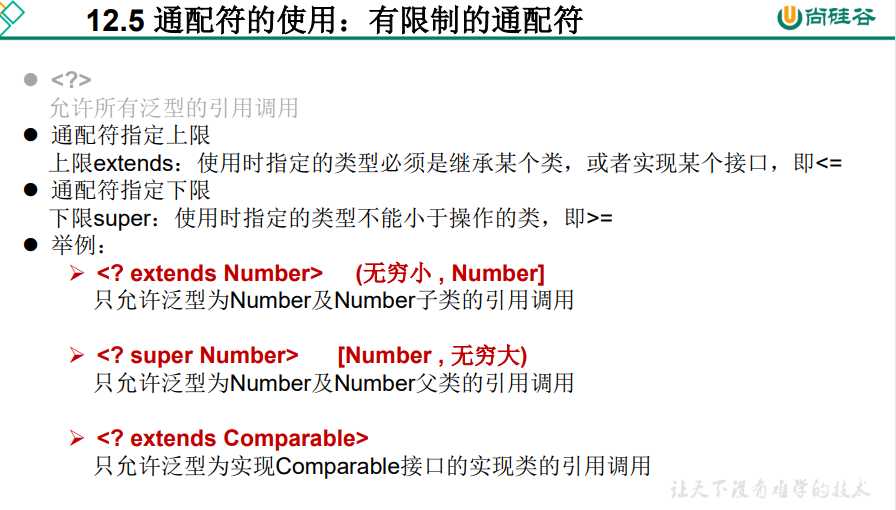
泛型与File 文章目录 一、为什么要有泛型?1.1、什么是泛型?1.2、泛型的设计背景1.3、泛型的概念 二、在集合中使用泛型三、自定义泛型结构2.1、泛型方法的使用 四、泛型在继承上的体现五、通配符的使用5.1、通配符的使用5.2、有限制条件的通配符的使用 …...

代码随想录二刷day32
提示:文章写完后,目录可以自动生成,如何生成可参考右边的帮助文档 文章目录 前言一、力扣122. 买卖股票的最佳时机 II二、力扣55. 跳跃游戏三、力扣45. 跳跃游戏 II 前言 一、力扣122. 买卖股票的最佳时机 II class Solution {public int ma…...

linux基础篇
文章目录 linux基础篇1.Linux文件系统结构:2.常用的Linux指令:3.Shell指令:4.Linux服务管理:5.Linux磁盘挂载:其他 linux基础篇 1.Linux文件系统结构: 根目录 /bin目录:二进制可执行文件存放处boot目录:启…...
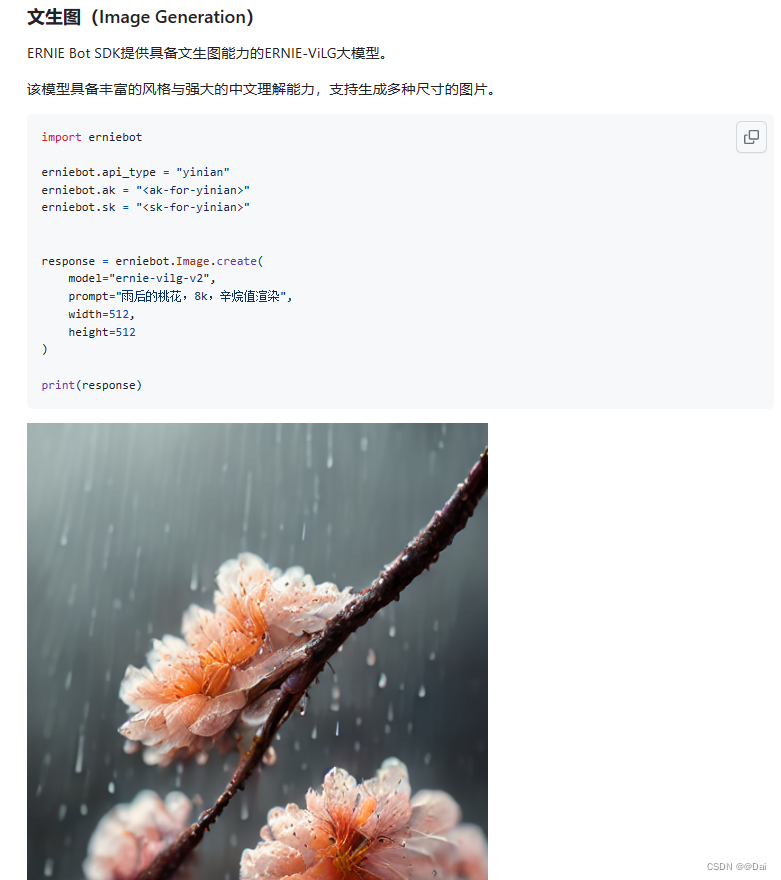
文心一言插件开发全流程,ERNIE-Bot-SDK可以调用文心一言的能力
文心一言插件开发 前言插件插件是什么工作原理申请开发权限 开始第一步:安装python第二步:搭建项目manifest 描述文件:ai-plugin.json插件服务描述文件:openapi.yaml开发自己的plugin-server 第三步:上传插件 SDK相关链…...
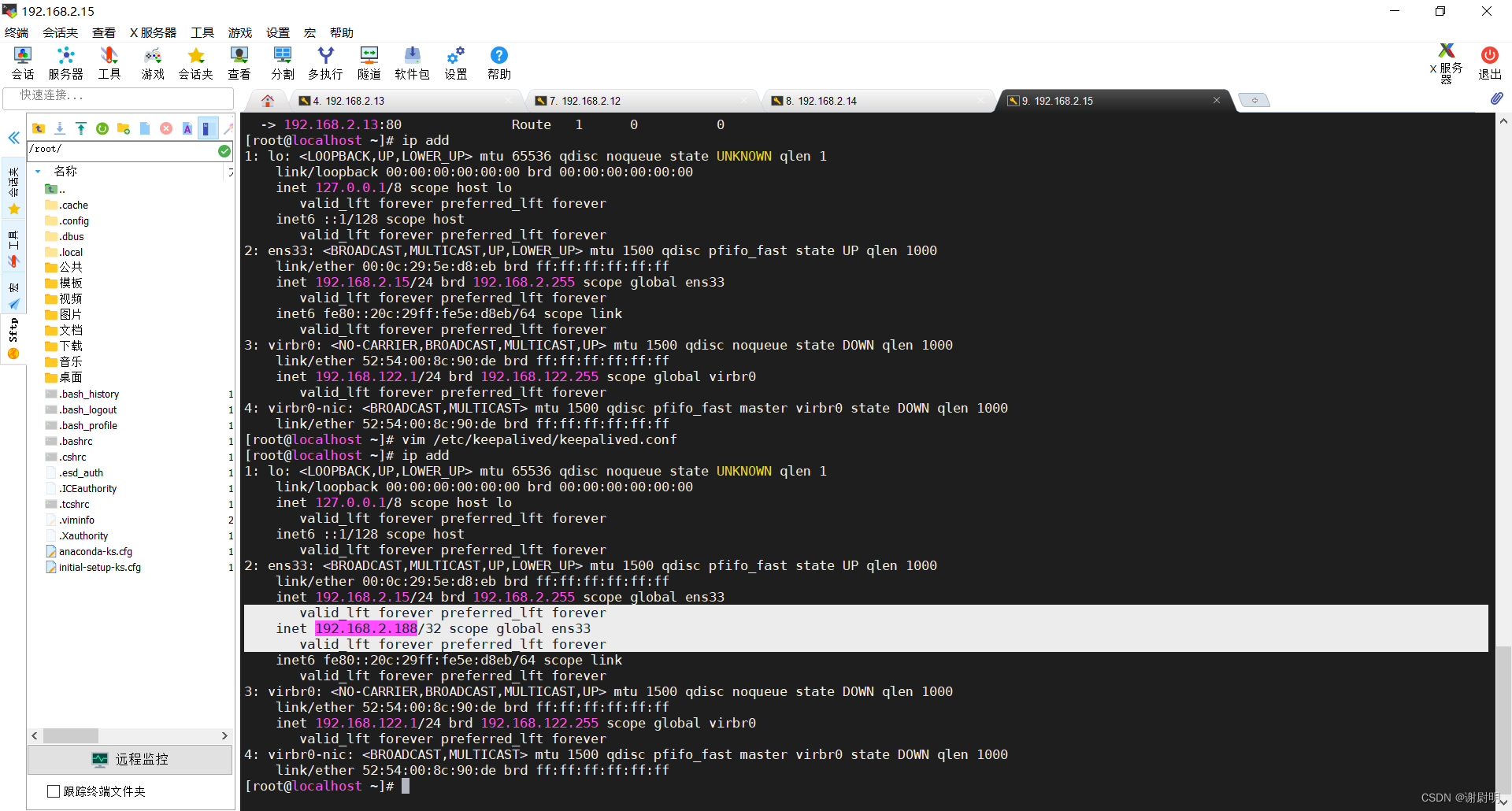
Keepalived+LVS负载均衡
Keepalived 是一个用于实现高可用性的开源软件,它基于 VRRP(Virtual Router Redundancy Protocol)协议,允许多台服务器协同工作,以确保在某个服务器出现故障时服务的连续性。Keepalived 的核心思想是将多台服务器配置成…...
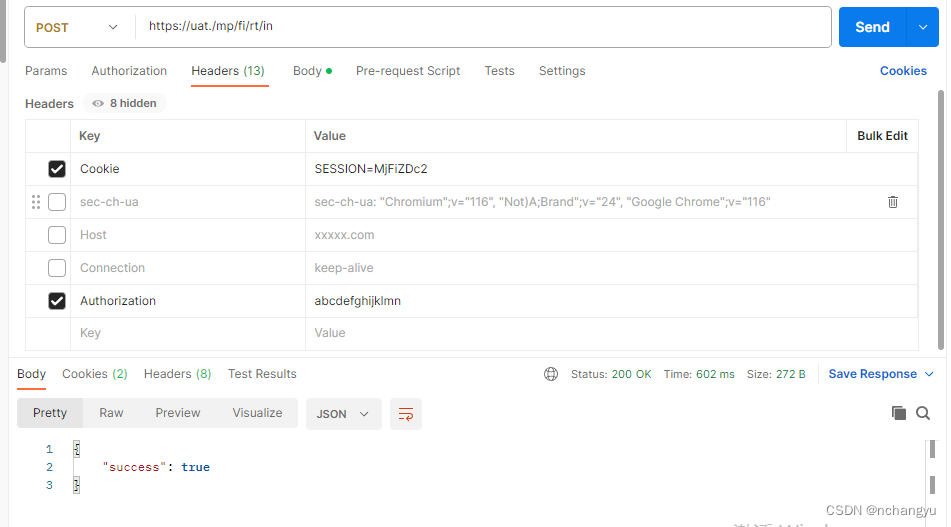
接口测试学习
1、curl 命令 无参:curl -X POST -H"Authorization: abcdefghijklmn" https://xxx.xxxxx.com/xxxx 有参:curl -X POST -H"Authorization:abcdefghijklmn " -H"Content-Type:application/json" https://xxx.xxxxx.com/…...
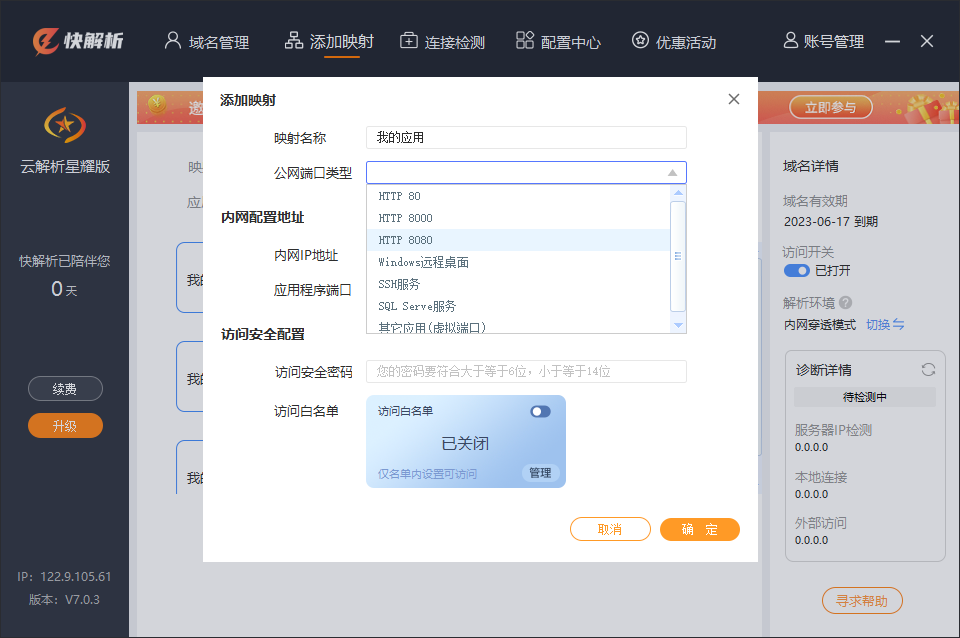
怎么用外网访问自己的网站?快解析内网端口映射来实现
想要访问服务器上的网站需要直接或间接访问服务器IP地址,但是如果服务器没有公网IP地址,那么就需要借助外网进行访问。当我们需要远程访问内网的Web服务器时,我们需要使用一些技术来实现此目的。这就需要通过使用类似快解析内网端口映射方式进…...
zabbix学习1--zabbix6.x单机
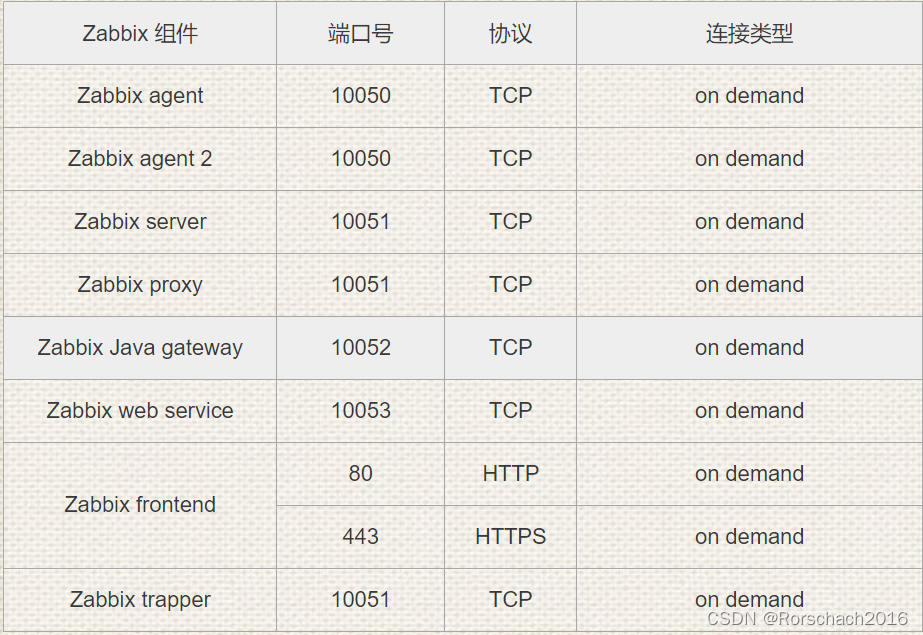
文章目录 1. 环境2. MYSQL8.02.1 单节点2.2 配置主从 3. 依赖组件4. zabbix-server5. agent5.1 yum5.2 编译 附录my.cnfJDK默认端口号 1. 环境 进入官网查看所需部署环境配置以及应用版本要求https://www.zabbix.com/documentation/current/zh/manual/installation/requiremen…...

Flink 的 Kafka Table API Connector
Flink datastream connectors 和 Flink table api connectors 的区别: Flink DataStream Connectors和Table API Connectors是Flink中用于连接外部数据源的两种不同的连接器。 1. Flink DataStream Connectors: - Flink DataStream Connectors是用于将外部数据源连…...

tcpdump 命令
一、TCPDUMP指定IP 在网络流量分析过程中,我们经常需要对指定的IP进行抓取和分析。使用TCPDUMP指定IP非常简单,只需要通过命令行参数-i指定需要抓取的网卡,并使用host参数指定目标IP地址即可:tcpdump -i eth0 host 192.168.0.1 上…...

哪些测试项目可以使用自动化测试?
通常,软件测试v的测试方式分为人工测试和自动化测试,人工测试是由测试人员编写并执行测试用例,然后观察测试结果与预期结果是否一致的过程;自动化测试是通过测试工具来代替或辅助人工去验证系统功能是否有问题的过程。 采用自动化测试需要满…...

Go语言规则同步器airulesync:自动化聚合与更新网络过滤规则
1. 项目概述:一个自动同步上游规则的“规则同步器”如果你和我一样,长期在维护自己的网络过滤规则集,无论是用于广告屏蔽、隐私保护还是内容过滤,那么你一定对“规则更新”这件事深有体会。手动去各个开源项目的主页查看更新、下载…...
)
【UWB-IMU、UWB定位】【UWB-IMU】融合仅具有测距和6轴IMU传感器数据的位置信息研究(Matlab代码实现)
💥💥💞💞欢迎来到本博客❤️❤️💥💥 🏆博主优势:🌞🌞🌞博客内容尽量做到思维缜密,逻辑清晰,为了方便读者。 ⛳️座右铭&a…...

计算机视觉工程师必须掌握的颜色空间选型指南
1. 项目概述:为什么计算机视觉工程师必须懂颜色理论你有没有遇到过这样的情况:模型在训练集上准确率98%,一到测试集就掉到72%?调试半天发现,不是数据标注错了,也不是网络结构有问题,而是训练图像…...

FPGA开发实战:从问题定位到系统化解决,构建硬件设计核心能力
1. 项目概述:当FPGA问题来袭,你的第一反应是什么?如果你正在设计一个嵌入式系统,或者在调试一块数字电路板时,遇到了一个用微控制器(MCU)难以解决的时序、并行处理或接口协议问题,你…...

终极指南:用WarcraftHelper彻底解决魔兽争霸III现代系统兼容性问题
终极指南:用WarcraftHelper彻底解决魔兽争霸III现代系统兼容性问题 【免费下载链接】WarcraftHelper Warcraft III Helper , support 1.20e, 1.24e, 1.26a, 1.27a, 1.27b 项目地址: https://gitcode.com/gh_mirrors/wa/WarcraftHelper 还在为魔兽争霸III在Wi…...

终极开源语音AI工具包:Sherpa-Onnx一站式解决方案
终极开源语音AI工具包:Sherpa-Onnx一站式解决方案 【免费下载链接】sherpa-onnx Speech-to-text, text-to-speech, speaker diarization, speech enhancement, source separation, and VAD using next-gen Kaldi with onnxruntime without Internet connection. Sup…...

一人一书一时代:《凰标》是海棠山铁哥的东方文明宣言@凤凰标志
一人执笔,一书立世,一作定时代。 ——《凰标》题记一、破题:当网文只剩“爽点”,谁来承载文明?行业通病《凰标》回应娱乐至死以笔墨思考时代碎片叙事构建完整文明体系功利写作以文载道,以书传文明 二、个人…...

对象变更记录objectlog工具
文章目录前言演示代码演示环境引入项目项目框架操作步骤设计介绍参考仓库前言 系统基于mybatis-plus, springboot环境 对于重要的一些数据,我们需要记录一条记录的所有版本变化过程,做到持续追踪,为后续问题追踪提供思路。下面展示预期效果(根…...

工业意识:03 组态软件怎么选?WinCC、FactoryTalk、国产一篇讲透
03 组态软件怎么选?WinCC、FactoryTalk、国产一篇讲透 前面咱们把SCADA聊成“千里眼”,MES聊成“透明玻璃房”,现在终于到最爽的部分——画面组态!简单说,就是用鼠标拖拖拽拽,在电脑上搭出那些监控大屏:仪表盘、按钮、趋势图、报警灯、3D管道……全连上PLC变量,点一下…...

Unlock Music:3种创新用法让你重新掌控被加密的音乐收藏
Unlock Music:3种创新用法让你重新掌控被加密的音乐收藏 【免费下载链接】unlock-music 在浏览器中解锁加密的音乐文件。原仓库: 1. https://github.com/unlock-music/unlock-music ;2. https://git.unlock-music.dev/um/web 项目地址: htt…...