
Untiy UDP局域网 异步发送图片
同步画面有问题,传图片吧
using System.Text;
using System.Net.Sockets;
using System.Collections;
using System.Collections.Generic;
using UnityEngine;
using UnityEngine.Events;
using System.Net;
using System;
using System.Threading.Tasks;
using System.Threading;public class UdpNet : MonoBehaviour
{public static UdpNet Instance { get; private set; }/// <summary>/// 默认发送数据最大长度,UDP一次性最大发送长度为65536,也就是64kb/// </summary>const int DEFAULT_SIZE = 60000;public UdpClient udpClient;/// <summary>/// 是否可以发送数据/// </summary>public bool isSend;/// <summary>/// 要发送的数据缓存队列/// </summary>private Queue<NetData> datasBuffer;/// <summary>/// 当前发送的数据/// </summary>private NetData curSendData;/// <summary>/// 数据接收注册方法/// </summary>public UnityAction<byte[]> ReceiveDataAction;/// <summary>/// UDP是否开启/// </summary>public bool IsConnect { get; private set; }/// <summary>/// 数据接收缓存队列/// </summary>public Queue<NetData> receiveBufferQueue;/// <summary>/// 当前接收的缓存数据/// </summary>private NetData curReceiveData;/// <summary>/// 当前发送的数据长度/// </summary> <summary>private int byteLen;/// <summary>/// 当前接收的数据长度/// </summary> <summary>private int receiveLen;public int Port;/// <summary>/// 开启UDP/// </summary>/// <param name="port"></param>public void Init(int port){if (udpClient != null){//Debug.LogWarning("已开启UDP控制端");return;}Port = port;udpClient = new UdpClient(port);datasBuffer = new Queue<NetData>();receiveBufferQueue = new Queue<NetData>();isSend = true;IsConnect = true;ReceiveFile();}/// <summary>/// 关闭UDP/// </summary>void Close(){if (udpClient != null){udpClient.Close();udpClient.Dispose();udpClient = null;IsConnect = false;isSend = false;datasBuffer.Clear();curSendData = null;curReceiveData = null;receiveBufferQueue.Clear();//Debug.Log("UdpNet 已关闭");}}#region Mono方法void Awake(){Instance = this;// Init(Port);}private void Update(){if (!IsConnect){return;}if (isSend && datasBuffer.Count > 0 && curSendData == null){isSend = false;curSendData = datasBuffer.Dequeue();byteLen = 0;int len = curSendData.byteArray.length;if (curSendData.byteArray.length > DEFAULT_SIZE){len = DEFAULT_SIZE;}byteLen += len;byte[] bytes = curSendData.byteArray.Read(len);udpClient.BeginSend(bytes, len, curSendData.iPEndPoint, SendFileAysncCallBack, curSendData);}if (receiveBufferQueue.Count > 0){ReceiveDataAction?.Invoke(receiveBufferQueue.Dequeue().byteArray.bytes);}}void OnDestroy(){Close();}#endregion#region 发送消息public void SendMsg(string msg, string ip, int port){byte[] data = Encoding.UTF8.GetBytes(msg);SendBytes(data, ip, port);}public void SendMsg(string msg, IPEndPoint iPEndPoint){byte[] data = Encoding.UTF8.GetBytes(msg);SendBytes(data, iPEndPoint);}public void SendBytes(byte[] data, string ip, int port){IPEndPoint iPEndPoint = new IPEndPoint(IPAddress.Parse(ip), port);SendBytes(data, iPEndPoint);}public void SendBytes(byte[] data, IPEndPoint iPEndPoint){byte[] bytes = Encode(data);//Debug.Log(bytes.Length);ByteArray byteArray = new ByteArray(bytes);datasBuffer.Enqueue(new NetData(byteArray, iPEndPoint));}private void SendFileAysncCallBack(IAsyncResult ar){try{int count = udpClient.EndSend(ar);if (ar.IsCompleted){curSendData.byteArray.readIdx += count;}else{Debug.Log("发送未成功,重新发送");}if (curSendData.byteArray.length == 0){isSend = true;//Debug.Log("发送完毕,共发送数据: " + byteLen);curSendData = null;return;}int len = curSendData.byteArray.length;if (curSendData.byteArray.length > DEFAULT_SIZE){len = DEFAULT_SIZE;}byte[] bytes;lock (curSendData){bytes = curSendData.byteArray.Read(len);}byteLen += len;//Debug.Log(len);RunThread(bytes, len);}catch (System.Exception e){Debug.LogError(e.Message);Close();return;}}//延迟1毫秒发送已缓解udp无法接收完全的问题async void RunThread(byte[] bytes, int len){await Task.Run(() =>{Thread.Sleep(1);udpClient.BeginSend(bytes, len, curSendData.iPEndPoint, SendFileAysncCallBack, curSendData);});}#endregion#region 接收消息private void ReceiveFile(){udpClient.BeginReceive(ReceiveFileAsyncBackCall, null);}private void ReceiveFileAsyncBackCall(IAsyncResult ar){IPEndPoint remoteIp = null;byte[] data = udpClient.EndReceive(ar, ref remoteIp);receiveLen += data.Length;if (curReceiveData == null){int len = Decode(data, out byte[] conData);curReceiveData = new NetData(new ByteArray(len), remoteIp);// curReceiveData.byteArray.Write(data, 4, data.Length - 4);curReceiveData.byteArray.Write(conData, 0, conData.Length);//Debug.Log($"当前接收数据长度: {receiveLen},总接收数据长度: {receiveLen}, 当前剩余容量: {curReceiveData.byteArray.remain}");}else{int dataLen = data.Length;if (data.Length > curReceiveData.byteArray.remain){dataLen = curReceiveData.byteArray.remain;}curReceiveData.byteArray.Write(data, 0, dataLen);//Debug.Log($"当前接收数据长度: {data.Length},总接收数据长度: {receiveLen}, 当前剩余容量: {curReceiveData.byteArray.remain}");}if (curReceiveData.byteArray.remain == 0){receiveBufferQueue.Enqueue(curReceiveData);//Debug.Log("接收完毕: " + curReceiveData.byteArray.writeIdx);curReceiveData = null;}ReceiveFile();}#endregionprivate static byte[] Encode(byte[] data){byte[] bytes = new byte[data.Length + 4];byte[] byteLen = BitConverter.GetBytes(data.Length);Array.Copy(byteLen, 0, bytes, 0, 4);Array.Copy(data, 0, bytes, 4, data.Length);//Debug.Log(bytes.Length);return bytes;}private static int Decode(byte[] data, out byte[] bytes){byte[] byteLen = new byte[4];Array.Copy(data, 0, byteLen, 0, 4);int len = BitConverter.ToInt32(byteLen);bytes = new byte[data.Length - 4];//Debug.Log("总数据长度: " + (len + 4));//Debug.Log("数据内容长度: " + len);Array.Copy(data, 4, bytes, 0, bytes.Length);return len;}public class NetData{public NetData(ByteArray byteArray, IPEndPoint iPEndPoint){this.byteArray = byteArray;this.iPEndPoint = iPEndPoint;}public ByteArray byteArray;public IPEndPoint iPEndPoint;}
}
using UnityEngine.UI;
using System;[Serializable]
public class ByteArray
{//默认大小const int DEFAULT_SIZE = 4096;//初始大小int initSize = 0;//缓冲区public byte[] bytes;//读写位置public int readIdx = 0;public int writeIdx = 0;//容量private int capacity = 0;//剩余空间public int remain { get { return capacity - writeIdx; } }//数据长度public int length { get { return writeIdx - readIdx; } }//构造函数public ByteArray(int size = DEFAULT_SIZE){bytes = new byte[size];capacity = size;initSize = size;readIdx = 0;writeIdx = 0;}//构造函数public ByteArray(byte[] defaultBytes){bytes = defaultBytes;capacity = defaultBytes.Length;initSize = defaultBytes.Length;readIdx = 0;writeIdx = defaultBytes.Length;}//重设尺寸public void ReSize(int size){if (size < length) return;if (size < initSize) return;int n = 1;while (n < size) n *= 2;capacity = n;byte[] newBytes = new byte[capacity];Array.Copy(bytes, readIdx, newBytes, 0, writeIdx - readIdx);bytes = newBytes;writeIdx = length;readIdx = 0;}//写入数据public int Write(byte[] bs, int offset, int count){// UnityEngine.Debug.Log($"remain: {remain} - bs.Length: {bs.Length} - offset: {offset} - count{count} - bytes.Length: {bytes.Length} - writeIdx: {writeIdx}");if (remain < count){ReSize(length + count);}Array.Copy(bs, offset, bytes, writeIdx, count);writeIdx += count;return count;}//读取数据public int Read(byte[] bs, int offset, int count){count = Math.Min(count, length);Array.Copy(bytes, 0, bs, offset, count);readIdx += count;CheckAndMoveBytes();return count;}//读取数据public byte[] Read(int count){// UnityEngine.Debug.Log($"当前数据长度为 {length},从 {readIdx} 开始读取长度为 {count} 的数据, 剩余数据长度为 {writeIdx - readIdx - count}");byte[] bs = new byte[count];Array.Copy(bytes, readIdx, bs, 0, count);// readIdx += count;return bs;}//检查并移动数据public void CheckAndMoveBytes(){if (length < 8){MoveBytes();}}//移动数据public void MoveBytes(){Array.Copy(bytes, readIdx, bytes, 0, length);writeIdx = length;readIdx = 0;}//读取Int16public Int16 ReadInt16(){if (length < 2) return 0;Int16 ret = BitConverter.ToInt16(bytes, readIdx);readIdx += 2;CheckAndMoveBytes();return ret;}//读取Int32public Int32 ReadInt32(){if (length < 4) return 0;Int32 ret = BitConverter.ToInt32(bytes, readIdx);readIdx += 4;CheckAndMoveBytes();return ret;}//打印缓冲区public override string ToString(){return BitConverter.ToString(bytes, readIdx, length);}//打印调试信息public string Debug(){return string.Format("readIdx({0}) writeIdx({1}) bytes({2})",readIdx,writeIdx,BitConverter.ToString(bytes, 0, capacity));}
}
using System;
using System.Collections;
using System.Collections.Generic;
using System.Text;
using UnityEngine;
using UnityEngine.UI;
//接收视频画面
public class : MonoBehaviour
{public RawImage rawImage;public int port = 8889;// Start is called before the first frame updatevoid Start(){UdpNet.Instance.Init(port);UdpNet.Instance.ReceiveDataAction += ReceiveDataAction;}private void ReceiveDataAction(byte[] arg0){if (arg0.Length < 1000){Debug.Log(Encoding.UTF8.GetString(arg0));return;}Texture2D texture2D = new Texture2D(10, 10);texture2D.LoadImage(arg0);texture2D.Apply();rawImage.texture = texture2D;Resources.UnloadUnusedAssets();}// Update is called once per framevoid Update(){}
}
using System.Collections;
using System.Collections.Generic;
using System.Net;
using UnityEngine;
using UnityEngine.UI;
//发送视频画面
public class SendWebCameraVideo: MonoBehaviour
{public string deviceName;public WebCamTexture webCam;public RawImage rawImage;public int frames = 30;public string ToIP = "127.0.0.1";public int ToPort = 8889;public int Port = 7777;private IPEndPoint iPEndPoint;public float maxTime;public float timer;public bool send;// Start is called before the first frame updatevoid Start(){UdpNet.Instance.Init(Port);WebCamDevice[] devices = WebCamTexture.devices;deviceName = devices[0].name;RectTransform rawRect = rawImage.GetComponent<RectTransform>();webCam = new WebCamTexture(deviceName, (int)rawRect.sizeDelta.x, (int)rawRect.sizeDelta.y, frames);//设置宽、高和帧率 rawImage.texture = webCam;//渲染脚本所在有RawImage组件的物体maxTime = 1f / frames;iPEndPoint = new IPEndPoint(IPAddress.Parse(ToIP), ToPort);UdpNet.Instance.SendMsg("gogogo", iPEndPoint);}// Update is called once per framevoid Update(){timer += Time.deltaTime;if (timer >= maxTime && send){// send = false;timer = 0;byte[] data = TextureToTexture2D(rawImage.texture).EncodeToJPG();UdpNet.Instance.SendBytes(data, iPEndPoint);// Resources.UnloadUnusedAssets();}}public void Play(){webCam.Play();send = true;}public void Pause(){send = false;webCam.Pause();}/// 运行模式下Texture转换成Texture2Dprivate Texture2D TextureToTexture2D(Texture texture){Texture2D texture2D = new Texture2D(texture.width, texture.height, TextureFormat.RGBA32, false);RenderTexture currentRT = RenderTexture.active;RenderTexture renderTexture = RenderTexture.GetTemporary(texture.width, texture.height, 32);Graphics.Blit(texture, renderTexture);RenderTexture.active = renderTexture;texture2D.ReadPixels(new Rect(0, 0, renderTexture.width, renderTexture.height), 0, 0);texture2D.Apply();RenderTexture.active = currentRT;RenderTexture.ReleaseTemporary(renderTexture);return texture2D;}}建两个工程,一个发送一个接收,UdpNet和ByteArray是通用的,每个工程都必须要有
1.发送工程界面
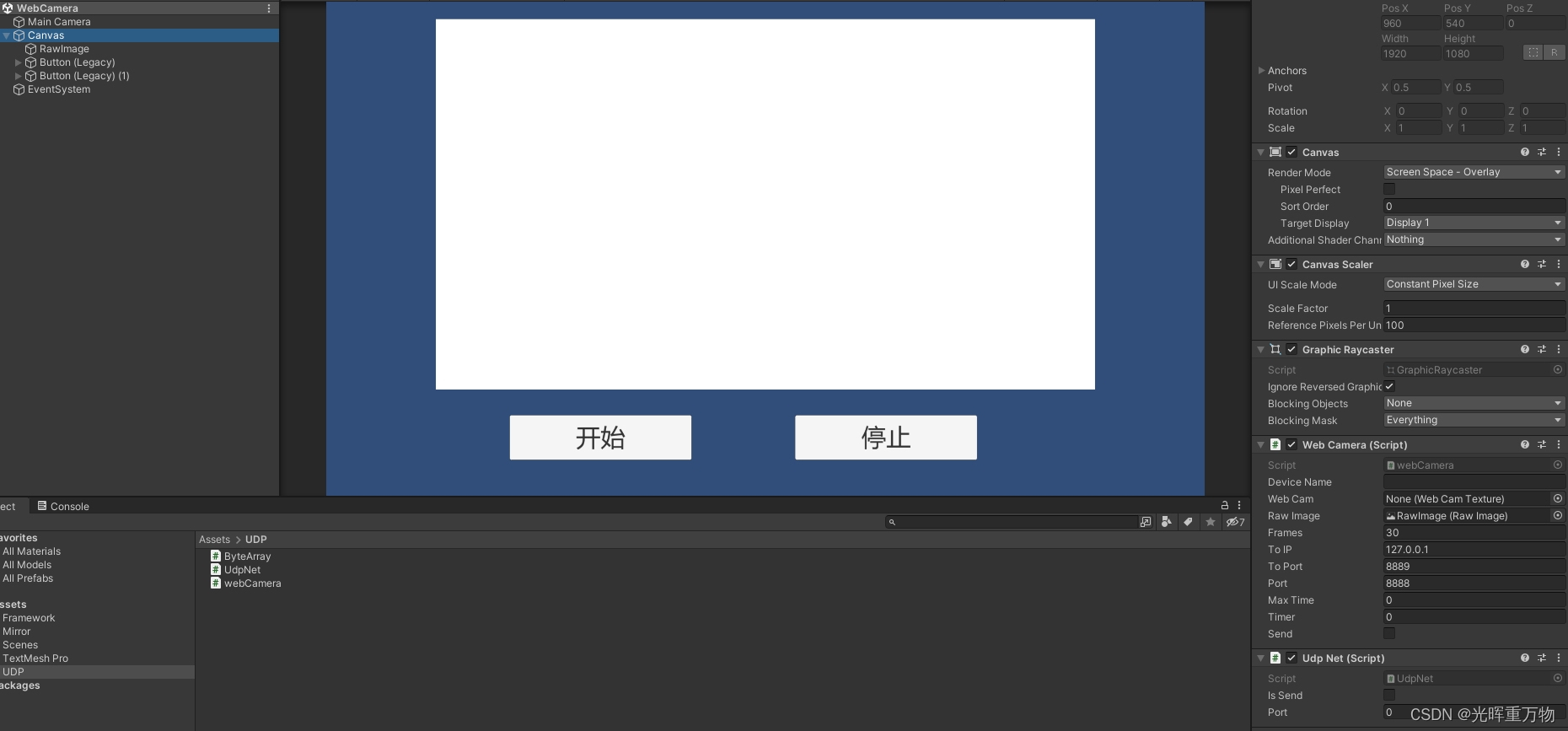
2.接收界面工程
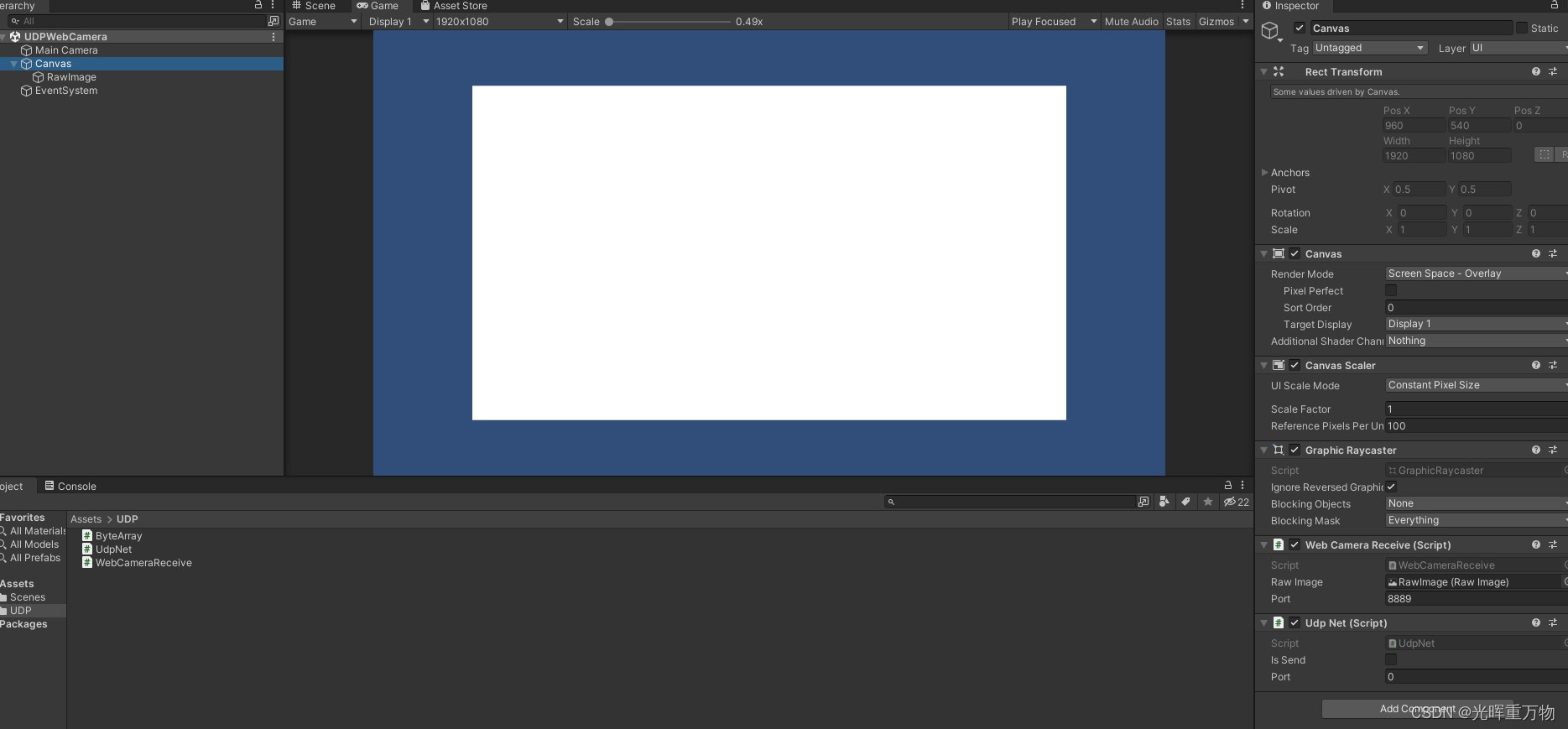
相关文章:
Untiy UDP局域网 异步发送图片
同步画面有问题,传图片吧 using System.Text; using System.Net.Sockets; using System.Collections; using System.Collections.Generic; using UnityEngine; using UnityEngine.Events; using System.Net; using System; using System.Threading.Tasks; using Sy…...
移动端H5封装一个 ScrollList 横向滚动列表组件,实现向左滑动
效果: 1.封装组件: <template><div class"scroll-list"><divclass"scroll-list-content":style"{ background, color, fontSize: size }"ref"scrollListContent"><div class"scroll…...

Docker一键安装和基本配置
一键安装脚本 注:该脚本需要root权限 curl -sSL https://get.docker.com/ | sh非root组用户赋权 sudo groupadd docker # 若使用一键安装脚本会自动创建这个组,提示已存在 sudo gpasswd -a ${USER} docker # 将当前用户添加到docker组,也…...

MVC设计思想理解和ASP.NET MVC理解
三层模式 三层模式包括:UI层,业务逻辑层,数据访问层,模型层 MVC设计思想和ASP.NET MVC理解 MVC设计思想: MVC的思想就是把我们的程序分为三个核心的模块,这三个模块的详细介绍如下: 模型(Model) :负责封装与引用程序的业务逻辑相关的数据以及对数据的处理方法。模型层有对…...
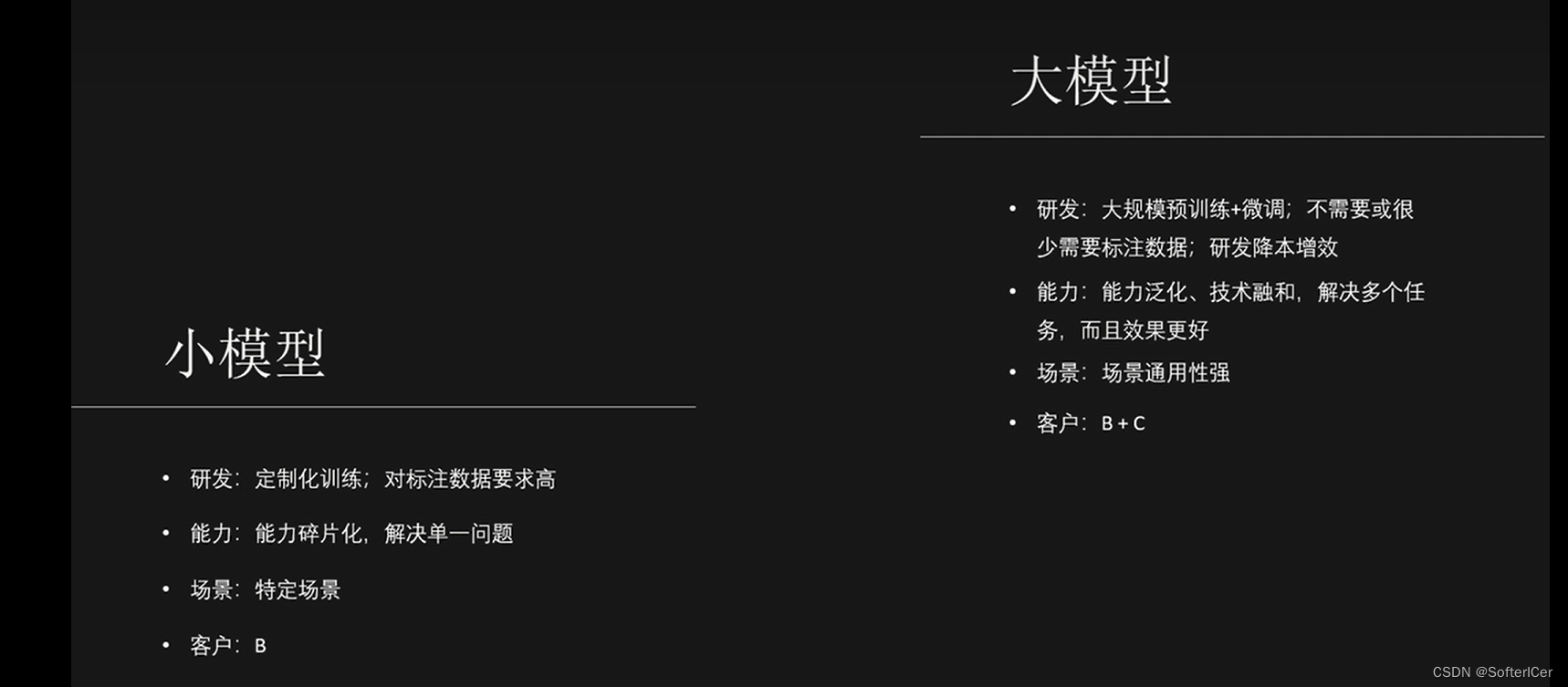
大模型应用选择对比
大模型应用选择对比 1、知识库对比:dify、fastgpt、langchatchat 2、agent构建器选择:flowise、langflow、bisheng 3、召回率提升方案...

c++STL概述
目录 STL基本概念 STL六大组件 STL的优点 STL三大组件 容器 算法 迭代器 普通的迭代器访问vector容器元素 算法for_each实现循环 迭代器指向的元素类型是自定义数据类型 迭代器指向容器 常用容器 string容器 string的基本概念 string容器的操作 string的构造函…...

利用容器技术优化DevOps流程
利用容器技术优化DevOps流程 随着云计算的快速发展,容器技术也日益流行。容器技术可以打包和分发应用程序,并实现快速部署和扩展。在DevOps流程中,容器技术可以大大优化开发、测试、部署和运维各个环节。本文将介绍如何利用容器技术优化DevO…...

91 # 实现 express 的优化处理
上一节实现 express 的请求处理,这一节来进行实现 express 的优化处理 让 layer 提供 match 方法去匹配 pathname,方便拓展让 layer 提供 handle_request 方法,方便拓展利用第三方库 methods 批量生成方法性能优化问题 进行路由懒加载&#…...
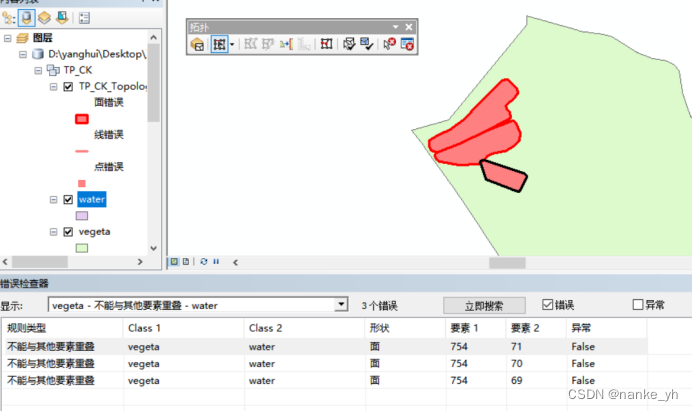
arcgis拓扑检查实现多个矢量数据之间消除重叠区域
目录 环境介绍: 操作任务: 步骤: 1、数据库和文件结构准备 2、建立拓扑规则 3、一直下一页默认参数后,进行拓扑检查 4、打开TP_CK_Topology,会自动带出拓扑要素,红色区域为拓扑错误的地方࿱…...

基于Vue+ELement搭建登陆注册页面实现后端交互
🎉🎉欢迎来到我的CSDN主页!🎉🎉 🏅我是Java方文山,一个在CSDN分享笔记的博主。📚📚 🌟推荐给大家我的专栏《ELement》。🎯🎯 …...

JS获取经纬度, 并根据经纬度得到城市信息
在JavaScript中,获取经纬度通常需要使用定位服务,比如HTML5的Geolocation API。然而拿到坐标后,将经纬度转换为城市信息,则需要使用逆地理编码服务接口,比如百度或者高德的 API, 但是他们收费都很高, 我们可以使用一些…...

mac m1 docker安装nacos
文章目录 引言I m1安装docker1.1 Docker 下载1.2 终端Docker相关命令II docker安装nacos2.1 安装nacos2.2 镜像启动see alsoMac 查看进程端口引言 使用docker方式安装是最方便的 I m1安装docker 1.1 Docker 下载 https://docs.docker.com/docker-for-mac/apple-silicon/点击…...
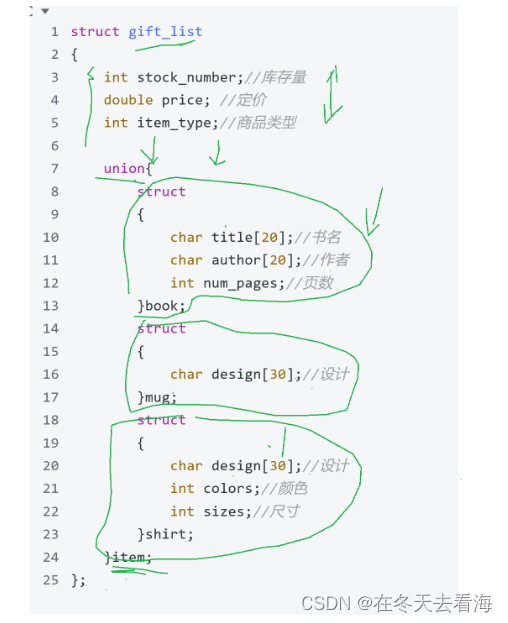
位段 联合体 枚举
Hello好久不见,今天分享的是接上次结构体没有分享完的内容,这次我们讲讲位段 枚举和联合体的概念以及他们的用法。 2.1 什么是位段 位段的声明和结构是类似的,有两个不同: 1.位段的成员必须是 int、unsigned int 或signed int 。 …...
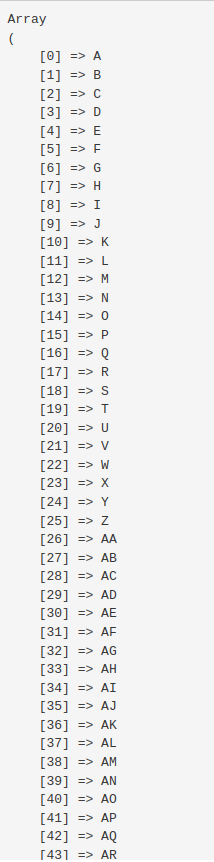
PHP循环获取Excel表头字母A-Z,当超过时输出AA,AB,AC,AD······
PHP循环获取Excel表头字母A-Z,当超过时输出AA,AB,AC,AD PHP循环生成Excel的列字母表 $count_num 26 * 27; $letter A; $arr []; while($count_num--){$arr[] $letter;$letter; }结果如下: 转为JSON更为直观: ["A","B&…...
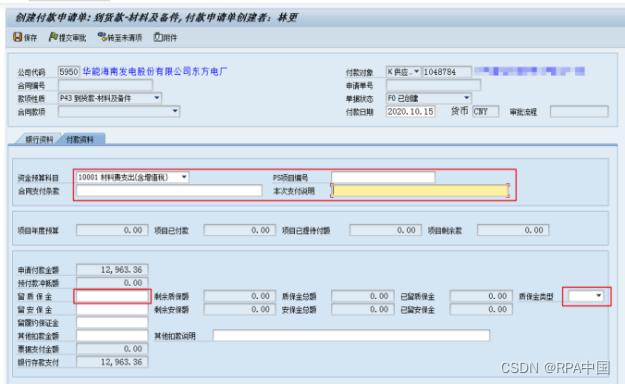
识别准确率达 95%,华能东方电厂财务机器人实践探索
摘 要:基于华能集团公司大数据与人工智能构想理念,结合东方电厂实际工作需要,财务工作要向数字化、智能化纵深推进,随着财务数字化转型和升级加速,信息化水平不断提升,以及内部信息互联互通不断加深&#x…...

代码随想录算法训练营 单调栈part03
一、柱状图中最大的矩形 84. 柱状图中最大的矩形 - 力扣(LeetCode) 单调栈很重要的性质,就是单调栈里的顺序,是从小到大还是从大到小。 栈顶和栈顶的下一个元素以及要入栈的三个元素组成了我们要求最大面积的高度和宽度&#x…...
和自定义 SQL 片段来构建查询语句。)
使用 MyBatisPlus 的注解方式进行 SQL 查询,它结合了条件构造器(Wrapper)和自定义 SQL 片段来构建查询语句。
MyBatis-Plus 是一个基于 MyBatis 的增强工具,它提供了一套方便的注解方式来进行 SQL 查询。其中,它结合了条件构造器(Wrapper)和自定义 SQL 片段来构建查询语句。 官网:条件构造器 | MyBatis-Plus 1、使用 Wrapper …...
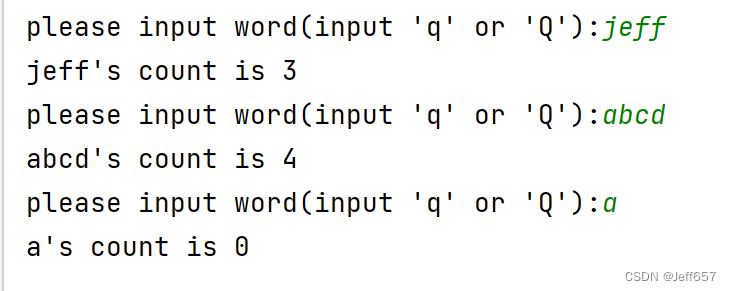
Python中统计单词出现的次数,包含(PySpark方法)
思路: 定义一个函数,使用open函数,将文本内容打开。 定义一个空字典和空列表,进行循环及条件判断操作def count_word(file_path):dict_data {} #定义一个空字典f open(file_path,"r",encoding"UTF-8")lis…...
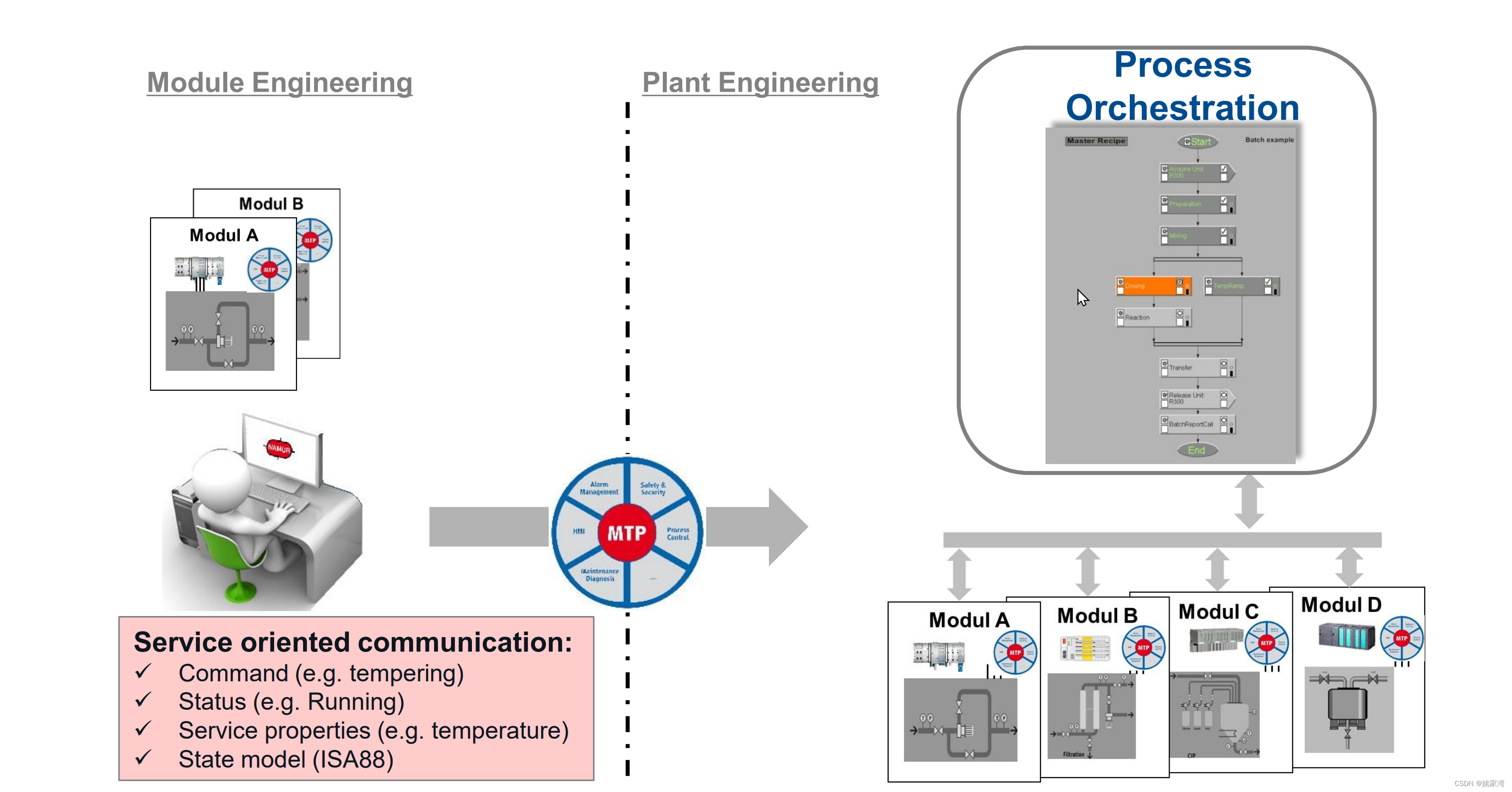
探讨基于IEC61499 的分布式 ISA Batch 控制系统
ISA SP88 是批次过程控制的标准,对应的IEC标准是IEC 61512。该标准中一个重要的部分是配方管理(Recipe Management)。 所谓配方,是根据批量产品的要求,材料设定加工工艺,加工流程和参数。类似于传统制造业的…...
)
图论16(Leetcode863.二叉树中所有距离为K的结点)
答案: /*** Definition for a binary tree node.* public class TreeNode {* int val;* TreeNode left;* TreeNode right;* TreeNode(int x) { val x; }* }*/ class Solution {public List<Integer> distanceK(TreeNode root, TreeNode tar…...

开源阅读鸿蒙版:你的私人数字图书馆,从此不再为找书发愁
开源阅读鸿蒙版:你的私人数字图书馆,从此不再为找书发愁 【免费下载链接】legado-Harmony 开源阅读鸿蒙版仓库 项目地址: https://gitcode.com/gh_mirrors/le/legado-Harmony 你是否曾经为了找一本想看的书,在十几个阅读App之间来回切…...

RP2040微控制器实现无闪烁HDMI图形显示的核心技术与实践
1. 项目概述:当RP2040遇见HDMI对于玩惯了单片机点阵屏或者SPI接口小屏的嵌入式开发者来说,让一块像树莓派Pico这样的微控制器直接输出HDMI信号到一台标准显示器,听起来多少有点“跨界”的感觉。但正是这种将低功耗微控制器与通用高清显示接口…...

32G显存消费级显卡也能搞定!LoRA+VLLM生产级部署,AI专属模型全流程实战教程
本文详细介绍了如何使用LoRA微调和vLLM推理部署,在32G消费级显卡上完成AI模型从训练到上线的全流程。内容涵盖完整代码、逐行解释以及生产级部署方案,包括数据预处理、模型加载、LoRA配置、训练参数设置、模型合并和vLLM部署等关键步骤。通过显存优化策略…...

BLDC电机场景化创新:从性能参数到系统解决方案的转型路径
1. 项目概述:在红海中寻找蓝海最近几年,BLDC(无刷直流电机)赛道可以说是热闹非凡。从家里的扫地机器人、空气循环扇,到办公室的静音风扇、电动升降桌,再到路上的两轮电动车、新能源汽车,几乎无处…...

2026届学术党必备的六大AI辅助论文方案横评
Ai论文网站排名(开题报告、文献综述、降aigc率、降重综合对比) TOP1. 千笔AI TOP2. aipasspaper TOP3. 清北论文 TOP4. 豆包 TOP5. kimi TOP6. deepseek 知网的AI内容调整,得严格依照学术规范要求,其关键要点是回归自主研究…...
)
告别PyCharm导包烦恼:一劳永逸配置Python虚拟环境(含venv/pipenv对比)
彻底告别Python依赖混乱:虚拟环境配置全指南与PyCharm深度整合 每次打开PyCharm准备大干一场时,却被各种"ModuleNotFoundError"打断思路?明明用pip安装的包,在IDE里却死活找不到?这些问题背后往往隐藏着一个…...
)
C++11(可变参数模板,emplace系列接口)
文章目录可变参数模板参数包展开emplace接口可变参数模板 c11支持可变参数模板,可以自定义模板参数的数量,可变数目的参数被称为参数包 参数包分为模板参数包和函数参数包 一个包可以包含0或多个参数,可以通过sizeof…(args)来获取参数个数&…...

FastAPI脚手架实战:从项目结构到生产部署的Python API开发指南
1. 项目概述:一个为现代API开发量身定制的FastAPI脚手架如果你正在寻找一个能让你快速启动Python后端项目,同时又不想在项目结构、配置和开发工具链上耗费太多时间的起点,那么这个基于FastAPI的应用骨架(jcardonamde/fastapi_app&…...

Gemini CLI扩展生态:AI如何重塑命令行开发与运维工作流
1. 从命令行到智能副驾:Gemini CLI 扩展生态深度解析如果你和我一样,是个常年泡在终端里的开发者或运维,那么“效率”这个词几乎刻在了骨子里。我们习惯于用脚本自动化一切,用管道连接工具,用命令行精准地操控系统。但…...

低成本私域起盘:2+1 轻量化增长模型,实体商家可直接复制落地
有人靠这套玩法,仅靠两个初始客户,就盘活了整个平台。不少做实体、做品牌的老板都有同一个困惑:活动做了一场又一场,流量拉了一波又一波,可平台始终起不来,用户留不住,复购做不起来。我问过很多…...