
WPF 实现点击按钮跳转页面功能
方法1.
配置环境
首先添加prism依赖项,配置好所有文件。需要配置的有两个文件:App.xaml.cs和App.xaml
App.xaml.cs
using System.Data;
using System.Linq;
using System.Threading.Tasks;
using System.Windows;namespace PrismDemo
{/// <summary>/// Interaction logic for App.xaml/// </summary>public partial class App : PrismApplication{protected override Window CreateShell(){return Container.Resolve<MainView>();}protected override void RegisterTypes(IContainerRegistry containerRegistry){}}
}
App.xaml
<prism:PrismApplicationx:Class="PrismDemo.App"xmlns="http://schemas.microsoft.com/winfx/2006/xaml/presentation"xmlns:x="http://schemas.microsoft.com/winfx/2006/xaml"xmlns:local="clr-namespace:PrismDemo"xmlns:prism="http://prismlibrary.com/"><Application.Resources />
</prism:PrismApplication>
在MainView.xaml中添加下面两句话,引用prism并且实现自动关联上下文,即自动加载与视图关联的视图模型
xmlns:prism="http://prismlibrary.com/"
prism:ViewModelLocator.AutoWireViewModel="True"
创建两个文件:Views和ViewModels
Views 文件夹:包含所有的 XAML 文件,用于定义应用程序的用户界面。
每个 XAML 文件都对应一个界面,如 MainWindow.xaml、SettingsView.xaml 等等。
在 Views 文件夹中通常不会包含任何代码逻辑,只包含 XAML 标记。
ViewModels 文件夹:包含所有的 ViewModel 类,用于处理视图和模型之间的交互和状态管理。
每个 ViewModel 类都对应一个视图,如 MainWindowViewModel.cs、SettingsViewModel.cs 等等。
在 ViewModels 文件夹中通常不会包含任何与界面相关的代码,只包含处理视图和模型之间交互的业务逻辑。
在 MVVM 模式中,View 和 ViewModel 之间的通信通常使用数据绑定来实现。通过将 ViewModel 的属性和命令与 View 的元素绑定,可以将 ViewModel 中的数据和行为更新到 View 中。例如,可以将 ViewModel 中的一个属性绑定到 TextBlock 的 Text 属性,将一个命令绑定到 Button 的 Command 属性。这种数据绑定机制使得 View 和 ViewModel 之间的交互变得非常方便和灵活。
MainView.xaml
此段代码是页面展示部分,它定义了两行。第一行包含三个按钮,第二行包含一个内容控件。
每个按钮绑定了一个OpenCommand命令,并传递了一个字符串参数,用于打开不同的窗口。
内容控件 ContentControl 的内容被绑定到了一个 Body 属性,用于显示窗口中的主要内容。
<Windowx:Class="PrismDemo.Views.MainView"xmlns="http://schemas.microsoft.com/winfx/2006/xaml/presentation"xmlns:x="http://schemas.microsoft.com/winfx/2006/xaml"xmlns:d="http://schemas.microsoft.com/expression/blend/2008"xmlns:local="clr-namespace:PrismDemo"xmlns:mc="http://schemas.openxmlformats.org/markup-compatibility/2006"xmlns:prism="http://prismlibrary.com/"Title="MainWindow"Width="800"Height="450"prism:ViewModelLocator.AutoWireViewModel="True"mc:Ignorable="d"><Grid><Grid.RowDefinitions><RowDefinition Height="auto" /><RowDefinition /></Grid.RowDefinitions><StackPanel Orientation="Horizontal"><ButtonMargin="5"Command="{Binding OpenCommand}"CommandParameter="ViewA"Content="打开模块A" /><ButtonMargin="5"Command="{Binding OpenCommand}"CommandParameter="ViewB"Content="打开模块B" /><ButtonMargin="5"Command="{Binding OpenCommand}"CommandParameter="ViewC"Content="打开模块C" /></StackPanel><ContentControl Grid.Row="1" Content="{Binding Body}" /></Grid>
</Window>
ViewX.xaml
Views文件夹中一共有四个.xaml文件,除了主窗口的MainView.xaml外,其他三个分别是ViewA.xaml、ViewB.xaml 和 ViewC.xaml,分别对应于点击主窗口中按钮后的转换窗口,其中只有一行文本内容。
<TextBlock FontSize="80" Text="ViewX" /> (X=A, B, C)
MainViewModel.cs
MainViewModel.cs 继承自 Prism 库中的 BindableBase 类,实现了窗口布局中用到的命令和属性。
DelegateCommand<string> OpenCommand 是一个命令属性,用于绑定窗口中的三个按钮。
这个命令属性在构造函数中被初始化为一个 DelegateCommand<string> 对象,并指定了一个参数类型为字符串的委托方法 Open。这个委托方法用于执行不同的模块打开操作。
Body 属性是一个对象属性,用于绑定窗口布局中的内容控件。它的 get 方法返回 body 字段的值,而 set 方法则将传入的值设置给 body 字段,并通过 RaisePropertyChanged() 方法通知视图更新。
Open(string obj) 方法是 OpenCommand 委托方法的实现,它接受一个字符串参数 obj,用于判断要打开哪个模块。根据参数值的不同,通过 Body 属性设置不同的视图。例如,当参数值为 "ViewA" 时,设置 Body 为一个 ViewA 的实例,从而实现了打开界面 A 的功能。
using Prism.Commands;
using Prism.Mvvm;
using PrismDemo.Views;
using System;
using System.Collections.Generic;
using System.Linq;
using System.Text;
using System.Threading.Tasks;namespace PrismDemo.ViewModels
{internal class MainViewModel:BindableBase{//负责执行不同的模块public DelegateCommand<string> OpenCommand { get; private set; }public MainViewModel(){OpenCommand = new DelegateCommand<string>(Open);}private object body;public object Body{get { return body; }set { body = value; RaisePropertyChanged(); }}private void Open(string obj){switch (obj){           case "ViewA": Body = new ViewA(); break;case "ViewB": Body = new ViewB(); break;case "ViewC": Body = new ViewC(); break;}}}
}
方法2. 使用依赖注入动态设置内容
MainView.xaml
修改内容:
<ContentControl Grid.Row="1" prism:RegionManager.RegionName="ContentRegion" />
prism:RegionManager.RegionName="ContentRegion" 属性是使用 Prism 库中的区域管理器(Region Manager)功能来定义了一个名为 "ContentRegion" 的区域。
这个区域用于管理将要显示在 <ContentControl> 控件中的内容。
在这个区域中可以动态地加载和卸载不同的视图,从而实现复杂的界面交互和布局。
在 Prism 应用程序中,我们通常使用区域管理器来动态加载和卸载不同的视图,以实现应用程序的模块化和松耦合。例如,在一个具有多个区域的应用程序中,每个区域可以单独管理自己的视图,使得应用程序的不同模块之间可以相互独立地开发、测试和维护。
下面是MainView.xaml的完整代码:
<Windowx:Class="PrismDemo.Views.MainView"xmlns="http://schemas.microsoft.com/winfx/2006/xaml/presentation"xmlns:x="http://schemas.microsoft.com/winfx/2006/xaml"xmlns:d="http://schemas.microsoft.com/expression/blend/2008"xmlns:local="clr-namespace:PrismDemo"xmlns:mc="http://schemas.openxmlformats.org/markup-compatibility/2006"xmlns:prism="http://prismlibrary.com/"Title="MainWindow"Width="800"Height="450"prism:ViewModelLocator.AutoWireViewModel="True"mc:Ignorable="d"><Grid><Grid.RowDefinitions><RowDefinition Height="auto" /><RowDefinition /></Grid.RowDefinitions><StackPanel Orientation="Horizontal"><ButtonMargin="5"Command="{Binding OpenCommand}"CommandParameter="ViewA"Content="打开模块A" /><ButtonMargin="5"Command="{Binding OpenCommand}"CommandParameter="ViewB"Content="打开模块B" /><ButtonMargin="5"Command="{Binding OpenCommand}"CommandParameter="ViewC"Content="打开模块C" /></StackPanel><ContentControl Grid.Row="1" prism:RegionManager.RegionName="ContentRegion" /></Grid>
</Window>
MainViewModel.cs
OpenCommand 属性与上面意义相同,用于在用户点击打开按钮时执行 Open 方法。
Open 方法根据传入的参数 obj 来决定要打开哪个模块,并通过区域管理器(IRegionManager)来请求加载指定模块的视图。
在构造函数中接受了一个 IRegionManager 类型的参数,用于从依赖注入容器中获取区域管理器的实例。这样,我们就可以通过注入区域管理器来使用 Prism 库中提供的区域管理器功能,从而实现对区域中的视图进行动态加载和卸载等操作。
using Prism.Commands;
using Prism.Mvvm;
using Prism.Regions;
using PrismDemo.Views;
using System;
using System.Collections.Generic;
using System.Linq;
using System.Text;
using System.Threading.Tasks;namespace PrismDemo.ViewModels
{internal class MainViewModel:BindableBase{//负责执行不同的模块public DelegateCommand<string> OpenCommand { get; private set; }private readonly IRegionManager regionManager;//IRegionManager: 主要负责管理定义的所有可用区域public MainViewModel(IRegionManager regionManager){OpenCommand = new DelegateCommand<string>(Open);this.regionManager = regionManager;}private void Open(string obj){//在这个区域通过依赖注入动态设置内容,regionManager.Regions["ContentRegion"].RequestNavigate(obj);}}
}
App.xaml.cs
修改内容:
protected override void RegisterTypes(IContainerRegistry containerRegistry)
{
containerRegistry.RegisterForNavigation<ViewA>();
containerRegistry.RegisterForNavigation<ViewB>();
containerRegistry.RegisterForNavigation<ViewC>();
}
在使用 Prism 进行开发时,通常需要在应用程序启动时注册应用程序使用的服务和视图模型等对象,这个过程就叫做注册。
在 Prism 中,使用 IContainerRegistry 接口来完成依赖注入的注册过程,
RegisterForNavigation 方法是用来注册导航对象(视图)的方法。
该方法通过传入导航目标对象类型作为泛型参数,告诉 Prism 在使用该导航时应该使用哪个视图对象。因此,调用该方法将允许我们在 Prism 中使用导航和在容器中注入视图。
具体来说,RegisterForNavigation<ViewA>() 会将类型 ViewA 注册为一个可导航的视图对象,当需要导航到 ViewA 时,Prism 会自动创建该视图对象并将其添加到对应的区域中,而无需手动实例化该对象。
通常,在应用程序启动时,我们会在 App.xaml.cs 中重写 ConfigureContainer 或 RegisterTypes 方法,从而将应用程序中需要的服务和对象注册到容器中,以便在整个应用程序中使用。
using Prism.DryIoc;
using Prism.Ioc;
using PrismDemo.Views;
using System;
using System.Collections.Generic;
using System.Configuration;
using System.Data;
using System.Linq;
using System.Threading.Tasks;
using System.Windows;
namespace PrismDemo
{public partial class App : PrismApplication{protected override Window CreateShell(){return Container.Resolve<MainView>();}protected override void RegisterTypes(IContainerRegistry containerRegistry){containerRegistry.RegisterForNavigation<ViewA>();containerRegistry.RegisterForNavigation<ViewB>();containerRegistry.RegisterForNavigation<ViewC>();      }}
}
Prism的模块化
创建多个项目,将项目输出类型设为类库。创建页面并创建类对此界面进行注册。
创建内容如下:

其中的ViewA、ViewB和MainViewModel.cs中的内容和方法2中相同。
ModuleAProfile.cs
这段代码定义了一个名为 ModuleAProfile 的类,实现了 Prism 库中的 IModule 接口。
在 Prism 中,模块是一种组织和管理功能的机制,通常使用模块将应用程序分解为可重用和独立的部分,从而简化开发和维护。
IModule 接口要求实现两个方法:RegisterTypes 和 OnInitialized。
在这个例子中,ModuleAProfile 类只实现了 RegisterTypes 方法。在该方法中,通过调用 containerRegistry.RegisterForNavigation<ViewA>() 方法来将 ViewA 类型注册为可导航的视图。在这里,RegisterForNavigation 方法是 Prism 库提供的一种方便的方法,用于在应用程序中注册可导航的视图,使其能够通过 URI 进行导航。
using ModuleA.Views;
using Prism.Ioc;
using Prism.Modularity;
using System;
using System.Collections.Generic;
using System.Linq;
using System.Text;
using System.Threading.Tasks;
namespace ModuleA
{public class ModuleAProfile : IModule{public void OnInitialized(IContainerProvider containerProvider){}public void RegisterTypes(IContainerRegistry containerRegistry){containerRegistry.RegisterForNavigation<ViewA>();}}
}
ModuleBProfile.cs
using ModuleB.Views;
using Prism.Ioc;
using Prism.Modularity;
using System;
using System.Collections.Generic;
using System.Linq;
using System.Text;
using System.Threading.Tasks;
namespace ModuleB
{public class ModuleBProfile : IModule{public void OnInitialized(IContainerProvider containerProvider){}public void RegisterTypes(IContainerRegistry containerRegistry){containerRegistry.RegisterForNavigation<ViewB>();}}
}
App.xaml.cs
创建完上面两个ModuleAProfile和ModuleB文件之后,要在主页面中加入依赖项,而此文件的主要目的是使用ConfigureModuleCatalog()方法来配置应用程序的模块目录。
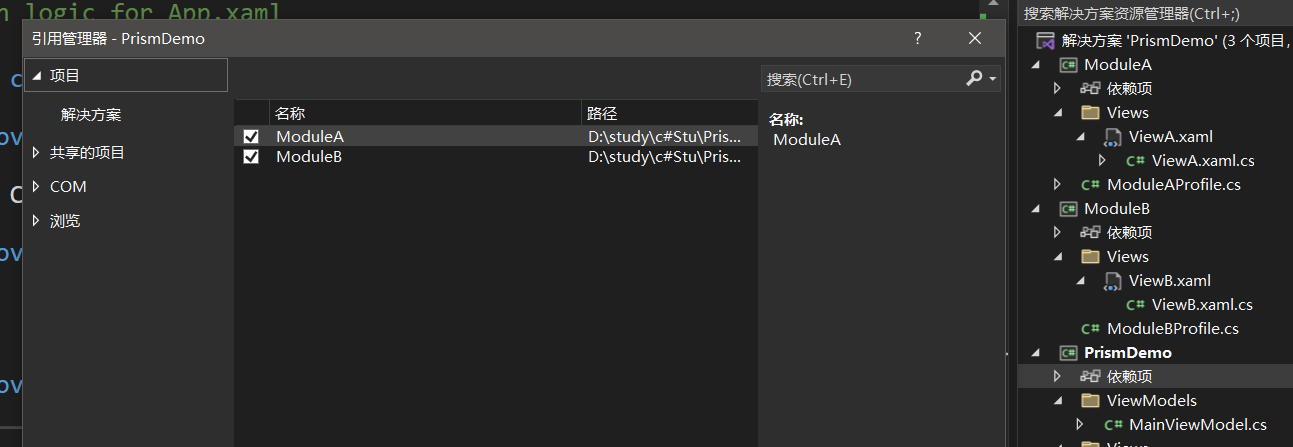
在ConfigureModuleCatalog()方法里添加了两个模块 ModuleAProfile 和 ModuleBProfile。
因此,这个应用程序使用 DryIoc 作为 IoC 容器,创建了一个主窗口,并配置了两个模块。这些模块将在应用程序启动时被加载。
using ModuleA;
using ModuleB;
using Prism.DryIoc;
using Prism.Ioc;
using Prism.Modularity;
using PrismDemo.Views;
using System;
using System.Collections.Generic;
using System.Configuration;
using System.Data;
using System.Linq;
using System.Threading.Tasks;
using System.Windows;
namespace PrismDemo
{public partial class App : PrismApplication{protected override Window CreateShell(){return Container.Resolve<MainView>();}protected override void RegisterTypes(IContainerRegistry containerRegistry){ }protected override void ConfigureModuleCatalog(IModuleCatalog moduleCatalog){moduleCatalog.AddModule<ModuleAProfile>();moduleCatalog.AddModule<ModuleBProfile>();base.ConfigureModuleCatalog(moduleCatalog);}}
}
引用ModuleAProfile 和 ModuleBProfile的第二种方式
- 不添加依赖项
- 修改App.xaml.cs
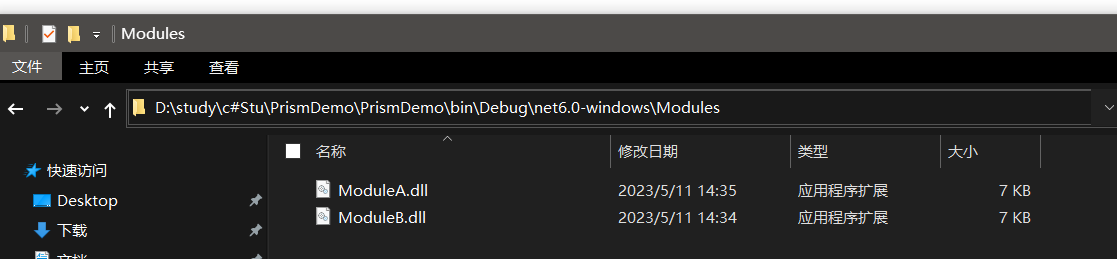
- 在主程序文件的指定位置创建文件Modules,将ModuleA和ModuleB的dll文件移动到此文件中。
此方法比上面引用方法耦合性更低,不需要指定调用哪个模块,ModuleA、ModuleB和主程序直接无直接联系。
App.xaml.cs
using Prism.DryIoc;
using Prism.Ioc;
using Prism.Modularity;
using PrismDemo.Views;
using System;
using System.Collections.Generic;
using System.Configuration;
using System.Data;
using System.Linq;
using System.Threading.Tasks;
using System.Windows;namespace PrismDemo
{/// <summary>/// Interaction logic for App.xaml/// </summary>public partial class App : PrismApplication{protected override Window CreateShell(){return Container.Resolve<MainView>();}protected override void RegisterTypes(IContainerRegistry containerRegistry){}protected override IModuleCatalog CreateModuleCatalog(){return new DirectoryModuleCatalog() { ModulePath = @".\Modules" };}}
}
文件创建位置
相关文章:
WPF 实现点击按钮跳转页面功能
方法1. 配置环境 首先添加prism依赖项,配置好所有文件。需要配置的有两个文件:App.xaml.cs和App.xaml App.xaml.cs using System.Data; using System.Linq; using System.Threading.Tasks; using System.Windows;namespace PrismDemo {/// <summa…...

关于http网络通信数据包封装的过程
当我们谈论网络通信时,数据在从源到目的地传输的过程中会通过多层网络协议。在每一层,都会添加一些头信息(和有时尾信息)来帮助处理和传输数据。这个过程被称为"封装"(Encapsulation)。简单来说&…...
关于RabbitMQ你了解多少?
关于RabbitMQ你了解多少? 文章目录 关于RabbitMQ你了解多少?基础篇同步和异步MQ技术选型介绍和安装数据隔离SpringAMQP快速入门Work queues交换机Fanout交换机Direct交换机Topic交换机 声明队列和交换机MQ消息转换器 高级篇消息可靠性问题发送者的可靠性…...

Vulkan-着色器及编译SPIR-V
1.着色器模块介绍 Vulkan着色器代码一定要用字节码格式,而不是人类可读的语法如GLSL和HLSL。这个字节码就是SPIR-V,设计用于Vulkan和OpenCL。这是一个可以用于编写图形和计算着色器的格式,但是我们主要关注的是Vulkan的图形管线。使用字节码格…...
从MVC到DDD,该如何下手重构?
作者:付政委 博客:bugstack.cn 沉淀、分享、成长,让自己和他人都能有所收获!😄 大家好,我是技术UP主小傅哥。多年的 DDD 应用,使我开了技术的眼界! MVC 旧工程腐化严重,…...

论文阅读:基于隐马尔可夫模型的蛋白质多序列比对方法研究
本文来自chatpaper Basic Information: • Title: Research on Protein Multiple Sequence Alignment Method Based on Hidden Markov Model (基于隐马尔可夫模型的蛋白质多序列比对方法研究) • Authors: Zhan Qing • Affiliation: Harbin Institute of Technology (哈尔滨工…...

Vim同时打开多个文件
分屏模式 在 Vim 中,可以同时打开多个文件并使用分屏模式来查看它们。以下是一些常见的方法和命令: 在启动 Vim 时打开多个文件 使用 -o 选项打开文件并水平分屏: vim -o file1.txt file2.txt使用 -O 选项打开文件并垂直分屏: v…...

SpringCloudStreamkafka接收jsonarray字符串失败
文章目录 场景现象问题处理 场景现象 kafka作为消息队列,作为前端设备数据到后端消费的渠道,也被多个不同微服务消费一个服务与前端边缘计算设备建立socket消息,接收实时交通事件推送,再将事件发送到kafka里面。此处使用的是Spri…...

面向对象特性分析大全集
面向对象特性分析 先进行专栏介绍 面向对象总析前提小知识分类浅析封装浅析继承浅析多态面向对象编程优点abc 核心思想实际应用总结 封装概念详解关键主要目的核心思想优点12 缺点12 Java代码实现封装特性 继承概念详解语法示例关键主要目的核心思想优点12 缺点12 Java代码实现…...
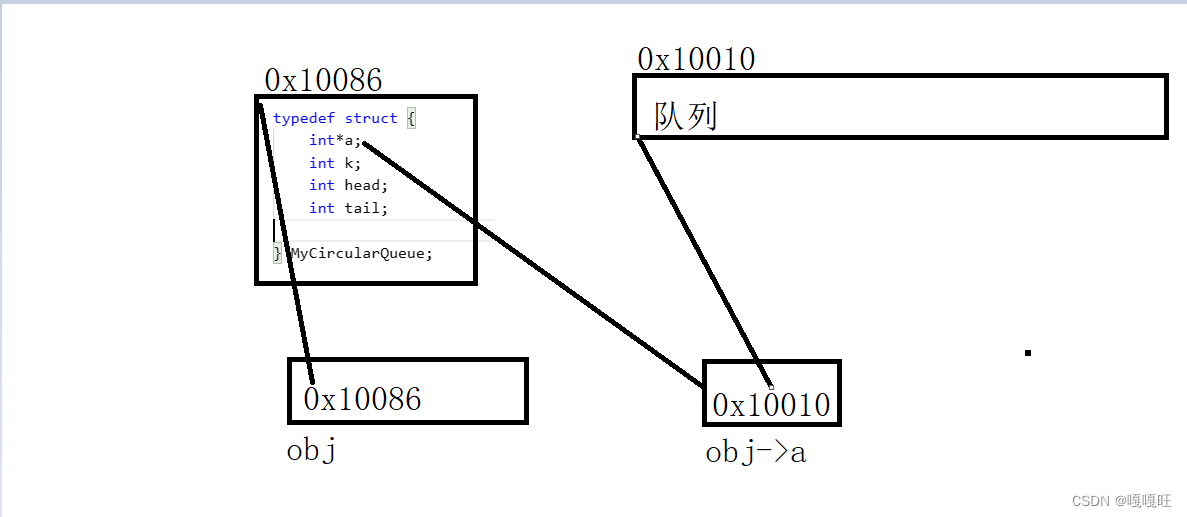
【数据结构】队列和栈
大家中秋节快乐,玩了好几天没有学习,今天分享的是栈以及队列的相关知识,以及栈和队列相关的面试题 1.栈 1.1栈的概念及结构 栈:一种特殊的线性表,其只允许在固定的一端进行插入和删除元素操作。进行数据插入和删除操作…...
之—— 条件标签函数(上))
WordPress主题开发( 十)之—— 条件标签函数(上)
这里写目录标题 什么是条件标签函数?条件标签函数的使用场景使用条件标签函数的注意事项常用的条件标签函数主页示例:is_front_page() 示例:管理后台is_admin() 示例:单个文章页面is_single() 示例:is_single(17) 示例:is_single(Hello World) 示例:is_single(hello…...

vue学习-10vue整合SpringBoot跨域请求
在Vue.js应用整合Spring Boot后端时,需要处理跨域请求。跨域请求通常发生在前端应用运行在不同的域名或端口上时,而后端服务运行在不同的域名或端口上。以下是一种处理跨域请求的常见方式: 后端(Spring Boot)配置 在…...
ElasticSearch - 基于 JavaRestClient 查询文档(match、精确、复合查询,以及排序、分页、高亮)
目录 一、基于 JavaRestClient 查询文档 1.1、查询 API 演示 1.1.1、查询基本框架 DSL 请求的对应格式 响应的解析 1.1.2、全文检索查询 1.1.3、精确查询 1.1.4、复合查询 1.1.5、排序和分页 1.1.6、高亮 一、基于 JavaRestClient 查询文档 1.1、查询 API 演示 1.1.…...
)
简易实现通讯录(2.0)
这篇文章是在上期实现的通讯录基础上,增加了自动增容的功能,也解决了一开始通讯录自动开辟一个空间,可能会浪费空间,或者是信息过多无法增容的痛点,由于我们使用的是malloc这类函数来开辟空间,我们也需要来…...
Jasypt 实现自定义加解密
如下文章已经讲解了, Jasypt 是什么,怎么集成 Jasypt,怎么使用 Jasypt。 Jasypt 开源加密库使用教程_jasyptstringencryptor-CSDN博客Jasypt 加密框架概述1、Jasypt Spring Boot 为 spring boot 应用程序中的属性源提供加密支持,…...
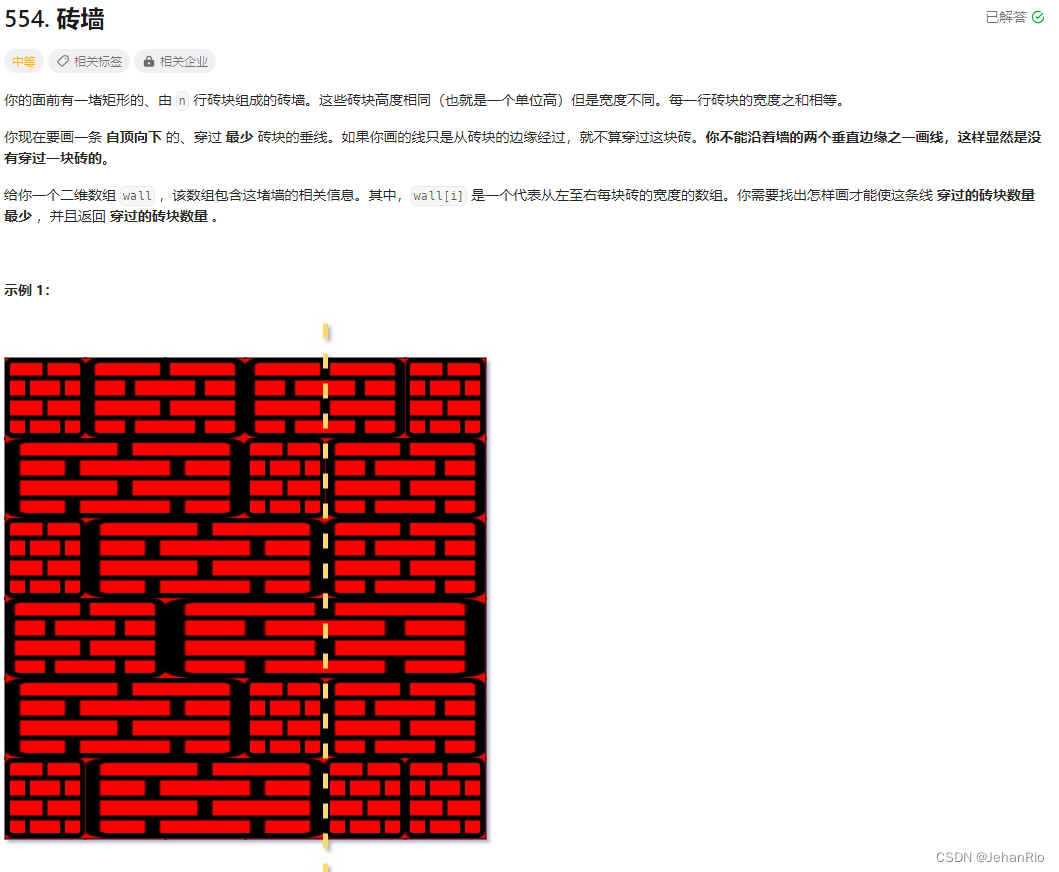
Leetcode 554. 砖墙
文章目录 题目代码(9.25 首刷自解) 题目 Leetcode 554. 砖墙 代码(9.25 首刷自解) class Solution { public:int leastBricks(vector<vector<int>>& wall) {unordered_map<int, int> mp;int count 0;for…...

Python 内置函数详解 (3) 进制转换
近期在外旅游,本篇是出发前定时发布的,不完整,旅游回来后再补充。 Python 内置函数 Python3.11共有75个内置函数,其来历和分类请参考:Python 新版本有75个内置函数,你不会不知道吧_Hann Yang的博客-CSDN博客 函数列表 abs aiter all …...
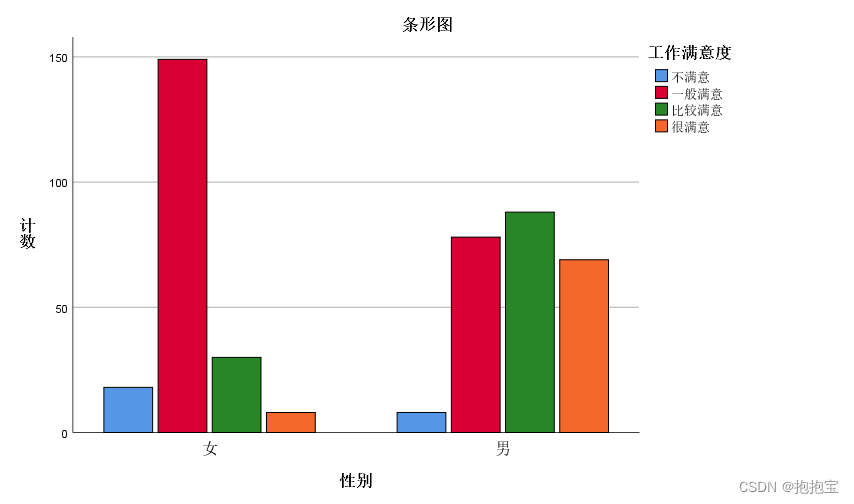
SPSS列联表分析
前言: 本专栏参考教材为《SPSS22.0从入门到精通》,由于软件版本原因,部分内容有所改变,为适应软件版本的变化,特此创作此专栏便于大家学习。本专栏使用软件为:SPSS25.0 本专栏所有的数据文件可在个人主页—…...
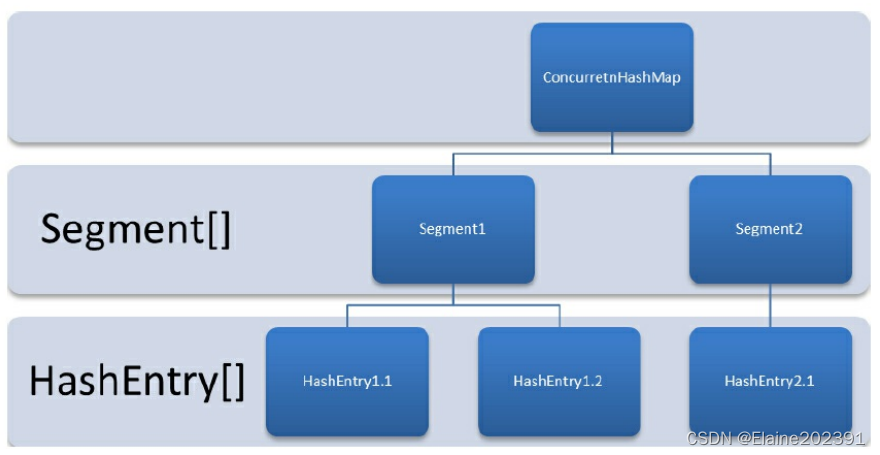
聊聊并发编程——并发容器和阻塞队列
目录 一.ConcurrentHashMap 1.为什么要使用ConcurrentHashMap? 2.ConcurrentHashMap的类图 3.ConcurrentHashMap的结构图 二.阻塞队列 Java中的7个阻塞队列 ArrayBlockingQueue:一个由数组结构组成的有界阻塞队列。 LinkedBlockingQueue…...

我庄严承诺终生不去承德旅游
虽然人微言轻,但也要尽一份力。 在此,我庄严承诺: 如果承德相关机构不返还那名"灵活就业人员"105.82万元的财产,并进行公开道歉。 我将终生不去承德旅游, 我将终生不买承德出产的任何产品。 我还将劝诫我…...

量子网络远程纠缠生成技术及其应用
1. 量子网络中的远程纠缠生成技术解析量子纠缠作为量子计算与量子通信的核心资源,其非局域特性为分布式系统提供了经典方法无法实现的协调能力。在金融高频交易、智能电网调度等对延迟极度敏感的领域,量子纠缠带来的协调优势尤为显著。基于腔量子电动力学…...

Vinkius Cloud扩展:在IDE中无缝管理MCP AI网关运行时
1. 项目概述:在IDE中管理你的AI网关运行时如果你正在开发或使用基于MCP(Model Context Protocol)的AI应用,那么你很可能已经体会过在多个AI客户端(比如Cursor、Claude Desktop、Windsurf)之间管理和维护后端…...

RustClaw:高性能网络代理的Rust实现与架构解析
1. 项目概述:一个Rust实现的Claw库最近在折腾一些网络代理和流量处理的工具链,发现很多核心组件对性能和安全性的要求越来越高。传统的C/C实现虽然快,但内存安全和并发模型上的坑,让开发和维护成本居高不下。就在这个当口…...

终极WebPShop插件:解锁Photoshop专业级WebP处理能力
终极WebPShop插件:解锁Photoshop专业级WebP处理能力 【免费下载链接】WebPShop Photoshop plug-in for opening and saving WebP images 项目地址: https://gitcode.com/gh_mirrors/we/WebPShop WebPShop是一款专为Adobe Photoshop设计的开源插件,…...

5 款实用漏洞扫描工具,网安从业者必备收藏
漏洞扫描是指基于漏洞数据库,通过扫描等手段对指定的远程或者本地计算机系统的安全脆弱性进行检测,发现可利用漏洞的一种安全检测的行为。 在漏洞扫描过程中,我们经常会借助一些漏扫工具,市面上漏扫工具众多,其中有一…...

Claude Code环境变量配置全解析:从入门到精通
1. 项目概述:Claude Code 环境变量配置生成器如果你和我一样,是 Claude Code 的深度用户,那你一定经历过这样的时刻:面对一个复杂的开发任务,想调整一下模型的思考深度(Effort Level)来平衡成本…...
)
Midjourney v7新功能全维度压测报告(v6 vs v7实测对比:提示词容错率↑47%,构图理解准确率突破92.6%)
更多请点击: https://intelliparadigm.com 第一章:Midjourney v7新功能全面解析 Midjourney v7 于2024年第三季度正式发布,标志着AI图像生成在语义理解、构图控制与跨模态一致性方面迈入新阶段。本次升级不再仅依赖提示词(prompt…...

体验Taotoken多模型聚合在内容生成任务中的效果差异
🚀 告别海外账号与网络限制!稳定直连全球优质大模型,限时半价接入中。 👉 点击领取海量免费额度 体验Taotoken多模型聚合在内容生成任务中的效果差异 在实际的开发与创作工作中,我们常常面临一个选择:针对…...

三维扫描平民化实战:从手机APP到高精度重建全流程指南
1. 项目概述:当三维扫描走下神坛几年前,如果你想获取一个真实物体的三维数字模型,那通常意味着你需要联系一家专业的三维扫描服务公司,支付一笔不菲的费用,然后等待专业人士用一台价格堪比一辆豪华轿车的设备ÿ…...

大数据量存储终极指南:10个高效数据分片技巧
大数据量存储终极指南:10个高效数据分片技巧 【免费下载链接】til :memo: Today I Learned 项目地址: https://gitcode.com/gh_mirrors/ti/til 在当今数据爆炸的时代,高效处理和存储海量数据已成为企业技术架构的核心挑战。数据分片作为一种关键的…...