
el-tree结合el-switch实现状态切换
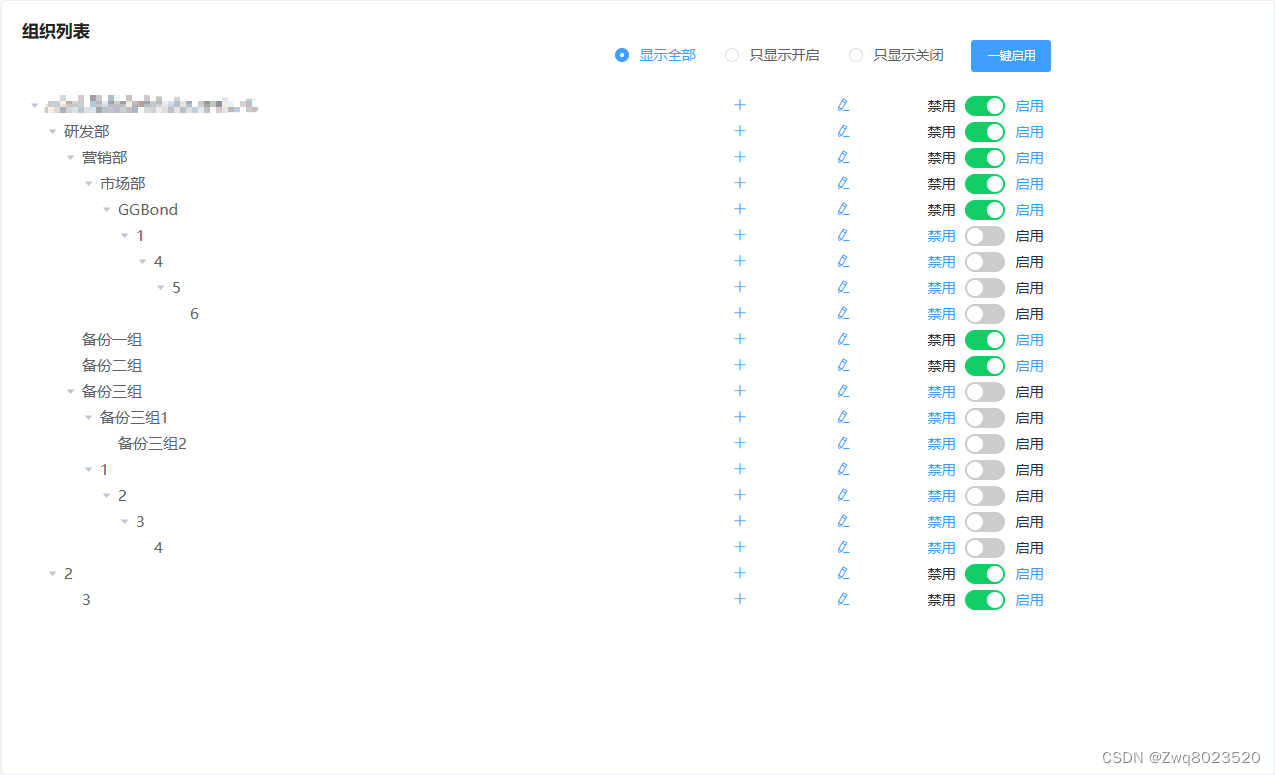
<template><div><el-col :span="24"><el-card class="tree-card"><div class="sketch_content selectFile"><span class="span_title">组织列表 </span><div style="display: flex; justify-content: flex-end; width: 55vw"><divstyle="display: flex; align-items: center; margin-right: 1.5vw"><el-radio-group v-model="filterType" @change="radioChange"><el-radio :label="'all'">显示全部</el-radio><el-radio :label="'on'">只显示开启</el-radio><el-radio :label="'off'">只显示关闭</el-radio></el-radio-group></div><el-button type="primary" size="small" @click="oneClickEnables">一键启用</el-button></div><el-treestyle="margin-top: 20px; width: 55vw":data="organizationTreeData"node-key="id"default-expand-all:expand-on-click-node="false"v-if="organizationTreeData.length !== 0 && organizationTreeData !== ''"draggable@node-click="getOrganizationList"@drag-start="handleDragStart"@allow-drop="allowDrop"@drag-end="handleDragEnd"@node-drop="handleNodeDrop"@allow-drag="allowDrag"><span class="custom-tree-node" slot-scope="{ node, data }"><span>{{ node.label }}</span><divv-if="data.type !== 1"style="display: flex;justify-content: center;align-items: center;"><el-buttontype="text"icon="el-icon-plus"class="edit"@click="showOrganizationDialog"></el-button><el-tooltipclass="item"effect="dark"content="修改组织"placement="top"><el-buttontype="text"@click="() => showEditOrganizationDialog(data)"icon="el-icon-edit"class="edit"style="margin-right: 2vw"></el-button></el-tooltip><el-switchslot="reference"style="display: block"v-model="node.data.organizeStatus"active-color="#13ce66"inactive-color="#cccccc":active-value="0":inactive-value="1"active-text="启用"inactive-text="禁用"@change="statusChange(node)"></el-switch></div></span></el-tree><divv-if="organizationTreeData.length == 0 || organizationTreeData == ''"><el-empty description="暂无组织" /><el-buttontype="primary"size="small"@click="showDialog"v-if="add">添加组织</el-button></div></div></el-card></el-col><el-dialogwidth="580px":visible.sync="addOrganizationDialogVisible":close-on-click-modal="false"@close="closeOrganizationTreeDialog"><div class="addOrganizationDialog"><span>新增组织</span></div><el-divider class="dialog_divider"></el-divider><el-form:model="organizationForm"ref="addFileBackupTaskForm"label-width="100px"style="height: auto"><el-form-item label="组织代码:" style="margin-left: -19px"><el-inputv-model="organizationForm.id"size="mini"style="width: 200px; margin-left: -170px"></el-input></el-form-item><el-form-item label="上级组织:" style="margin-left: -19px"><el-inputv-model="organizationForm.lead"size="mini"style="width: 200px; margin-left: -170px"></el-input></el-form-item><el-form-itemlabel="组织名称:"prop="fileIp"style="margin-left: -19px"><el-inputv-model="organizationForm.organizationName"placeholder="请输入组织名称"size="mini"style="width: 200px; margin-left: -170px"></el-input></el-form-item><!-- <el-form-itemlabel="上级组织:"prop="fileIp"style="margin-left: -19px"><el-selectplaceholder="请选择上级组织"style="width: 200px; margin-left: -170px"size="mini"><el-option label="部门1" value="0"></el-option><el-option label="部门2" value="1"></el-option><el-option label="生态单位1" value="2"></el-option></el-select></el-form-item> --><el-form-itemlabel="组织类型:"prop="fileType"style="margin-left: -19px"><el-selectstyle="width: 200px; margin-left: -170px"v-model="value1"@change="select"><el-optionv-for="item in options1":key="item.value":label="item.label":value="item.value"></el-option></el-select></el-form-item></el-form><el-divider></el-divider><div class="dialogClose"><el-button @click="closeOrganizationTreeDialog">取消</el-button><el-button type="primary" @click="addOrganization">确定</el-button></div></el-dialog><el-dialogwidth="580px":visible.sync="visible":close-on-click-modal="false"@close="closeOrganizationTreeDialog"><div class="addOrganizationDialog"><span>新增组织</span></div><el-divider class="dialog_divider"></el-divider><el-form:model="organizationForm"ref="addFileBackupTaskForm"label-width="100px"style="height: auto"><el-form-itemlabel="组织名称:"prop="fileIp"style="margin-left: -19px"><el-inputv-model="organizationForm.organizationName"placeholder="请输入组织名称"size="mini"style="width: 200px; margin-left: -170px"></el-input></el-form-item><el-form-itemlabel="组织类型:"prop="fileType"style="margin-left: -19px"><el-selectstyle="width: 200px; margin-left: -170px"v-model="value1"@change="select"><el-optionv-for="item in options1":key="item.value":label="item.label":value="item.value"></el-option></el-select></el-form-item></el-form><el-divider></el-divider><div class="dialogClose"><el-button @click="closeOrganizationTreeDialog">取消</el-button><el-button type="primary" @click="addOrganization1">确定</el-button></div></el-dialog><!--    组织修改模块--><el-dialogwidth="580px":visible.sync="editOrganizationDialogVisible":close-on-click-modal="false"@close="closeEditOrganizationDialog"><div class="addOrganizationDialog"><span>修改组织</span></div><el-divider class="dialog_divider"></el-divider><el-form:model="organizationForm"ref="addFileBackupTaskForm"label-width="100px"style="height: auto"><el-form-item label="组织名称" prop="fileIp" style="margin-left: -19px"><el-inputv-model="organizationForm.organizationName"placeholder="请输入组织名称"size="mini"style="width: 200px; margin-left: -170px"></el-input></el-form-item><el-form-itemlabel="组织类型"prop="fileType"style="margin-left: -19px"><el-selectv-model="value"style="width: 200px; margin-left: -170px":placeholder="placeholder"@change="change"><el-optionv-for="item in options":key="item.value":label="item.label":value="item.value"></el-option></el-select></el-form-item></el-form><el-divider></el-divider><div class="dialogClose"><el-button @click="closeEditOrganizationDialog">取消</el-button><el-button type="primary" @click="editOrganization">确定</el-button></div></el-dialog></div>
</template><script>
import {getOrganizeList,restartOrganize,forbiddenOrganize,editOrganize,addOrganize,changeOrganize,oneClickEnable,
} from '@/api/index'
let id = 1000export default {name: 'OrganizeMaintain',data() {return {value: '',see: true,placeholder: '请选择',add: true,options: [{ value: 0, label: '集团' },{ value: 1, label: '子集团' },{ value: 2, label: '公司' },{ value: 3, label: '部门' },{ value: 4, label: '生态单位' },],options1: [{ value: 0, label: '集团' },{ value: 1, label: '子集团' },{ value: 2, label: '公司' },{ value: 3, label: '部门' },{ value: 4, label: '生态单位' },],organizationTreeData: [],sectionList: [{id: 1,name: '部门1',},{id: 2,name: '部门2',},{id: 3,name: '部门3',},{id: 4,name: '生态单位',},],userList: [{id: 1,username: 'zzn',},],sectionUserList: [{id: 1,name: '用户1',},{id: 2,name: '用户2',},{id: 3,name: '用户3',},],addOrganizationDialogVisible: false,organizationForm: {organizationName: '',id: '',lead: '',},addTopOrganizationDialogVisible: false,// 节点的dataorganizationDialogData: '',editOrganizationDialogVisible: false,listTitle: '',data: [],type: 'text',node: '',organizeType: '',value1: '',addOrganizeType: '',draggedNode: null,visible: false,filterType: 'all',}},mounted() {this.getOrganizationList()getOrganizeList({ viewType: 2 })},methods: {async radioChange(value) {if (value == 'on') {this.add = falseconst res = await getOrganizeList({ viewType: 0 })this.organizationTreeData = [res.data.data[0]]} else if (value == 'off') {this.add = falseconst res = await getOrganizeList({ viewType: 1 })this.organizationTreeData = []this.organizationTreeData = [].concat(...res.data.data)console.log(this.organizationTreeData)} else {const res = await getOrganizeList({ viewType: 2 })this.organizationTreeData = [res.data.data[0]]}},getOrganizationList(data, node) {this.data = datathis.node = node// this.listTitle = data.label// }},showOrganizationDialog() {setTimeout(() => {this.organizationForm.id = this.node.data.idthis.organizationForm.lead = this.node.data.label})// this.organizationForm.id = this.node.parent.data.id// this.organizationForm.lead = this.node.parent.data.labelthis.addOrganizationDialogVisible = true},closeOrganizationTreeDialog() {this.addOrganizationDialogVisible = falsethis.visible = falsethis.organizationForm.organizationName = ''this.organizationForm.id = ''this.organizationForm.lead = ''this.value = ''this.value1 = ''},showEditOrganizationDialog() {this.editOrganizationDialogVisible = truesetTimeout(() => {this.organizationForm.organizationName = this.data.labelif (this.data.organizeType == 0) {this.placeholder = '集团'} else if (this.data.organizeType == 1) {this.placeholder = '子集团'} else if (this.data.organizeType == 2) {this.placeholder = '公司'} else if (this.data.organizeType == 3) {this.placeholder = '部门'} else if (this.data.organizeType == 4) {this.placeholder = '生态单位'}}, 0)},showDialog() {this.visible = true},closeEditOrganizationDialog() {this.editOrganizationDialogVisible = falsethis.organizationForm.organizationName = ''},// 新增组织async addOrganization() {const organizeName = this.organizationForm.organizationNameconst parentOrganize = this.organizationForm.idlet organizeType = this.addOrganizeTypeif (organizeType == '集团') {organizeType = 0} else if (organizeType == '子集团') {organizeType = 1} else if (organizeType == '公司') {organizeType = 2} else if (organizeType == '部门') {organizeType = 3} else if (organizeType == '生态单位') {organizeType = 4}addOrganize({organizeName,parentOrganize,organizeType,}).then((res) => {if (res.data.status == 200) {this.$message({message: res.data.message,type: 'success',})} else {this.$message({message: res.data.message,type: 'error',})}const newChild = {id: id++,label: this.organizationForm.organizationName,children: [],}this.data.children.push(newChild)getOrganizeList({ viewType: 2 }).then((res) => (this.organizationTreeData = [res.data.data[0]]))this.organizationForm.organizationName = ''this.value1 = ''this.value = ''this.organizationForm.id = ''this.organizationForm.lead = ''this.organizeType = ''this.addOrganizationDialogVisible = false})},async addOrganization1() {const organizeName = this.organizationForm.organizationNameconst parentOrganize = this.organizationForm.idlet organizeType = this.addOrganizeTypeif (organizeType == '集团') {organizeType = 0} else if (organizeType == '子集团') {organizeType = 1} else if (organizeType == '公司') {organizeType = 2} else if (organizeType == '部门') {organizeType = 3} else if (organizeType == '生态单位') {organizeType = 4}const res = await addOrganize({organizeName,parentOrganize,organizeType,})const newChild = {id: id++,label: this.organizationForm.organizationName,children: [],}this.data = []this.data.push(newChild)const res1 = await getOrganizeList({ viewType: 2 })this.organizationTreeData = [res1.data.data[0]]this.visible = false// this.organizationForm.organizationName = ''// this.value = ''// this.organizationForm.id = ''// this.organizationForm.lead = ''},// 组织修改async editOrganization() {this.editOrganizationDialogVisible = falseconst id = this.data.idconst organizeName = this.organizationForm.organizationNameconst organizeType = this.organizeTypethis.data.label = this.organizationForm.organizationNameeditOrganize({ id, organizeName, organizeType }).then((res) => {if (res.data.status === 200) {this.$message({message: res.data.message,type: 'success',})} else {this.$message({message: res.data.message,type: 'error',})}})const res1 = await getOrganizeList({ viewType: 2 })this.organizationTreeData = [res1.data.data[0]]},// 组织停用启用async statusChange(node) {setTimeout(() => {const organizeId = this.node.data.idconst organizeName = this.node.data.organizeNameconsole.log(node.data.organizeStatus)if (this.node.data.organizeStatus == 0) {restartOrganize({ organizeId, organizeName }).then((res) => {if (res.data.status == 200) {this.$message({message: res.data.message,type: 'success',})} else {this.$message({message: res.data.message,type: 'error',})}getOrganizeList({ viewType: 2 }).then((res) => {console.log(res.data.data[0])this.organizationTreeData = [res.data.data[0]]})})} else {forbiddenOrganize({ organizeId, organizeName }).then((res) => {if (res.data.status == 200) {this.$message({message: res.data.message,type: 'success',})} else {this.$message({message: res.data.message,type: 'error',})}getOrganizeList({ viewType: 2 }).then((res) => {this.organizationTreeData = [res.data.data[0]]})})}}, 0)},getSwitchValue(node) {// Convert numeric value to booleanreturn node.data.organizeStatus},oneClickEnables() {oneClickEnable().then((res) => {if (res.data.status == 200) {this.$message({message: res.data.message,type: 'success',})getOrganizeList({ viewType: 2 }).then((res) => {console.log(res.data.data[0])this.organizationTreeData = [res.data.data[0]]})} else {this.$message({message: res.data.message,type: 'error',})}})},// 获取修改组织类型change() {const selectedLabel = this.options.find((item) => item.value === this.value)?.valuethis.organizeType = selectedLabel},// 获取新增组织类型select() {const selectedLabel = this.options1.find((item) => item.value === this.value1)?.labelthis.addOrganizeType = selectedLabel},// 拖拽节点事件handleDragStart(draggingNode) {// 在拖拽开始时检查节点位置// 如果拖拽的节点是顶层节点并且已经有一个顶层节点存在,禁止拖拽if (draggingNode.level === 1 && this.hasTopLevelNode()) {this.draggable = false} else {this.draggable = true}},// 检查是否已经有一个顶层节点hasTopLevelNode() {return this.organizationTreeData.some((node) => node.level === 1)},handleDragEnd() {this.draggable = true},// 允许拖拽的条件allowDrop(draggingNode, dropNode, type) {// 如果拖拽的节点是顶层节点,不允许放置if (draggingNode.level === 1) {return false}// 如果拖拽的节点不是顶层节点但目标节点是顶层节点的同级,不允许放置if (draggingNode.level > 1 && dropNode.level === 1) {return false}// 其他情况允许放置return true},allowDrag(draggingNode, dropNode, type) {// 如果拖拽的节点是顶层节点,不允许放置// if (draggingNode.level === 1) {// 	return false// }// 如果拖拽的节点不是顶层节点但目标节点是顶层节点的同级,不允许放置// if (draggingNode.level > 1 && dropNode.level === 1) {// 	return false// }// 其他情况允许放置// return true},handleNodeDrop(draggingNode, dropNode, type) {// 在这里可以获取拖拽后节点的父节点const parentNode = dropNode.parentconst currentOrganize = draggingNode.data.idconst targetOrganize = dropNode.data.idchangeOrganize({ currentOrganize, targetOrganize })},},watch: {// 监听拖拽后节点的变化draggedNode(newNode) {if (newNode) {// 这里可以访问拖拽后节点的父节点const parentNode = newNode.parent}},},computed: {filteredOrganizationTreeData() {// Filter out nodes with organizeStatus !== 0 (禁用)return this.organizationTreeData.filter((node) => {return node.data.organizeStatus === 0})},},async created() {const res = await getOrganizeList({ viewType: 2 })this.organizationTreeData = [res.data.data[0]]console.log([res.data.data[0]])},
}
</script><style scoped lang="scss">
.edit {width: 5vw;
}
.custom-tree-node {flex: 1;display: flex;align-items: center;justify-content: space-between;/*font-size: 15px;*/padding-right: 8px;
}.selectFile {line-height: 19px;
}.tree-card {overflow-y: auto; /* 开启滚动显示溢出内容 */width: 90%;height: 80vh;margin-left: 4vw;overflow-x: auto;
}/*滚动条样式*/
::-webkit-scrollbar {width: 6px;
}::-webkit-scrollbar-thumb {background-color: #40b8ff;border-radius: 3px;
}.el-tree-node__label {font-size: 50px;
}.list-card {overflow-y: auto; /* 开启滚动显示溢出内容 */width: 98%;height: 80vh;
}/* 查询*/
.select-organization {margin-top: -33px;display: flex;justify-content: right;line-height: 30px;
}.findButton,
.reset {margin-top: 58px;height: 40px;width: 8%;
}.selectEvent {margin-right: 30px;margin-top: 58px;
}.list-span {font-family: 微软雅黑;font-size: 20px;height: 100px;font-weight: bold;color: #525252;display: flex;line-height: 100px;
}::v-deep .el-collapse-item__header {font-size: 17px;font-weight: bold;
}.addOrganizationDialog {font-size: 20px;text-align: left;margin-top: -105px;
}.dialog_divider {margin-top: -50px;
}.dialogClose {text-align: right;margin-top: -75px;margin-bottom: -80px;
}.span_title {display: flex;justify-content: space-between;flex-wrap: wrap;color: #222222;font-size: 17px;font-weight: bold;
}/*解决table展开时高度异常问题*/
::v-deep .el-table__header {width: 100% !important;
}::v-deep .el-table__body {width: 100% !important;
}
</style>
相关文章:
el-tree结合el-switch实现状态切换
<template><div><el-col :span"24"><el-card class"tree-card"><div class"sketch_content selectFile"><span class"span_title">组织列表 </span><div style"display: flex; jus…...
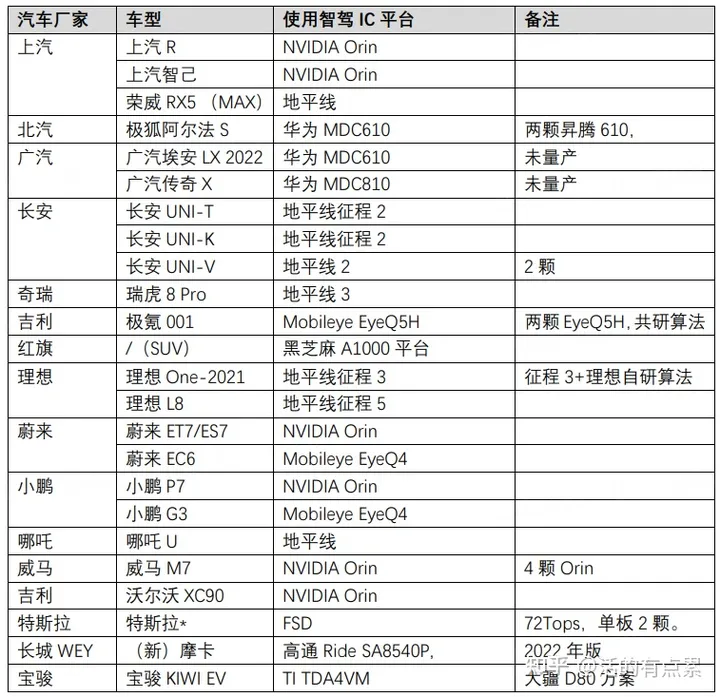
汽车智能座舱/智能驾驶SOC -1
看到华为&小康的 AITO问界M6、M7各种广告营销、宣传、测评、好评如潮水般席卷网络各APP平台。翻看了中信和海通对特斯拉M3和比亚迪元的拆解报告,也好奇华为的汽车芯片平台又能做出哪些新花样,下面是Mark开头,也学习下智能座舱和智能驾驶芯…...
2023 年爆肝将近 20 万字讲解最新 JavaEE 全栈工程师基础教程(更新中)
1. Java 语言基本概述 Java 是一种广泛使用的编程语言,由 James Gosling 在 Sun Microsystems(现在是 Oracle Corporation 的一部分)于 1995 年发表。Java 是一种静态类型的、类基础的、并发性的、面向对象的编程语言。Java 广泛应用于企业级…...
)
目标检测YOLO实战应用案例100讲-基于改进YOLOv5s的道路目标检测(续)
目录 3.3融合注意力模块 3.3.1注意力机制 3.3.2 SENet 3.3.3 CBAM 3.3.4ECA 3.3.5改进后的算法网络结构...

Laravel/Lumen 任务调度简易入门说明
前提 Laravel 中任务调度简化了服务器系统中 Cron 的操作,使得 计划任务 的实现更为简便。 这里主要以 Laravel 自带的消息队列进行说明,了解其间运行关系可以让我们更清晰的进行代码实现。 下方代码以 Lumen 9.x 框架进行举例,与 Laravel…...

目标检测 详解SSD原理,数据处理与复现
原理详解 前言 今天我们要读的这篇VGGNet(《Very Deep Convolutional Networks For Large-Scale Image Recognition》),就是在AlexNet基础上对深度对网络性能的影响做了进一步的探索。它是ImageNet 2014年亚军,相比于AlexNet&am…...
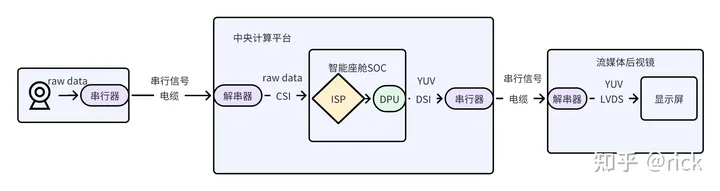
智能座舱架构与芯片- (8) 视觉篇
一、概述 相比起用于ADAS感知系统的摄像头,用于智能座舱内部的摄像头,其功能特性和性能要求相对简单。例如,OMS乘客监控摄像头,一般达到5MP即可有良好的效果。同时,OMS也可应用于车内会议系统,还应用于车内…...

uniapp、微信小程序返回上页面刷新数据
目录 前言: 方法1: 方法2: 方法3: 前言: 返回上页面刷新数据这个功能主要用于在当前页面点击跳转到另一个页面之后,在另一个页面对数据进行了操作,比如:阅读量,然后返…...
axios 请求合集
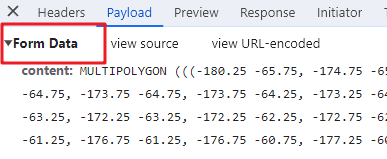
post 请求 请求负载请求参数(Request Payload) import axios from axios import qs from query-stringexport function getRoles(data){return axios.post(目标地址,data,{headers:{Content-Type: application/json,},}) }表单请求参数(Form…...
浪潮信息云峦服务器操作系统KeyarchOS体验与实践
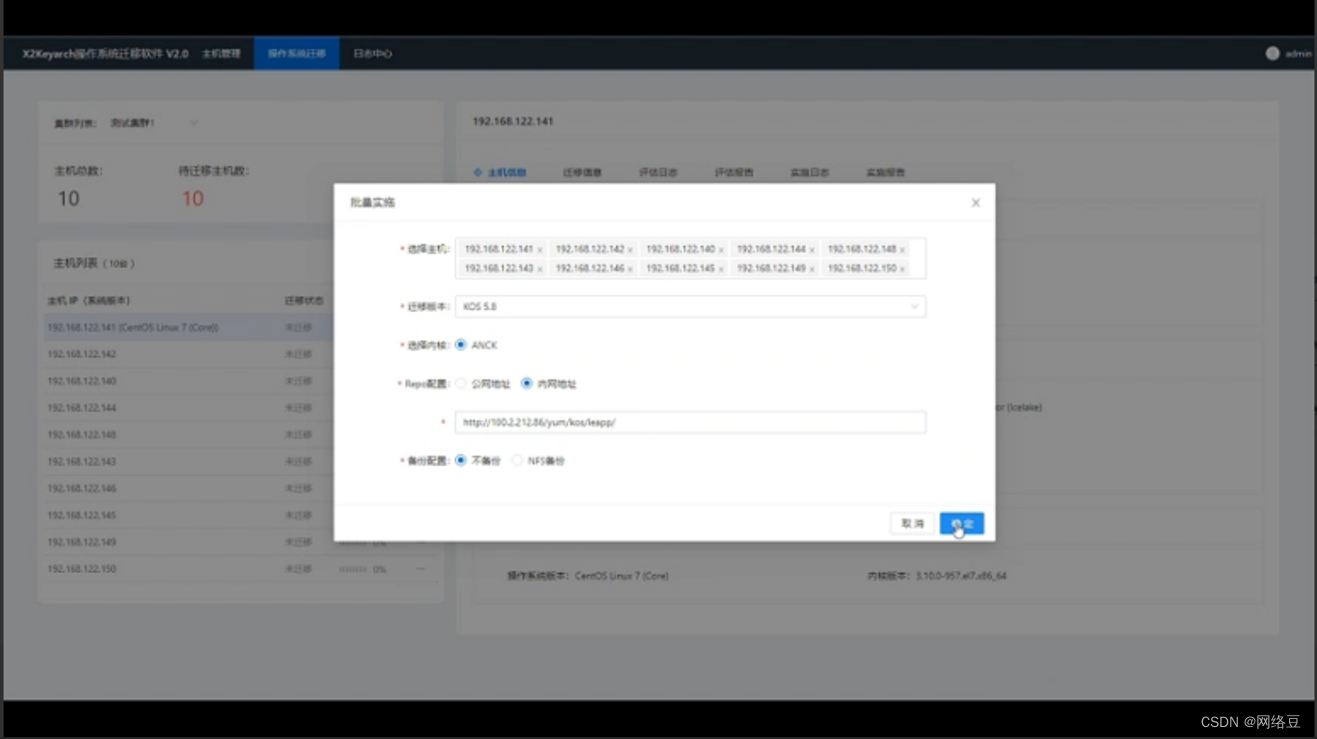
写在前面 大家好我是网络豆,一名云计算运维人员,本文将会带大家体验一下浪潮信息服务器操作系统云峦KeyarchOS。看看浪潮信息服务器操作系统云峦KeyarchOS的优势与实践操作如何。 背景了解 KeyarchOS是浪潮信息基于Linux Kernel、OpenAnolis等开源技术…...

将 Spring 微服务与 BI 工具集成:最佳实践
软件开发领域是一个不断发展的领域,新的范式和技术不断涌现。其中,微服务架构和商业智能(BI)工具的采用是两项关键进步。随着 Spring Boot 和 Spring Cloud 在构建强大的微服务方面的普及,了解这些微服务如何与 BI 工具…...
负载均衡Ribbon和Feign的使用与区别
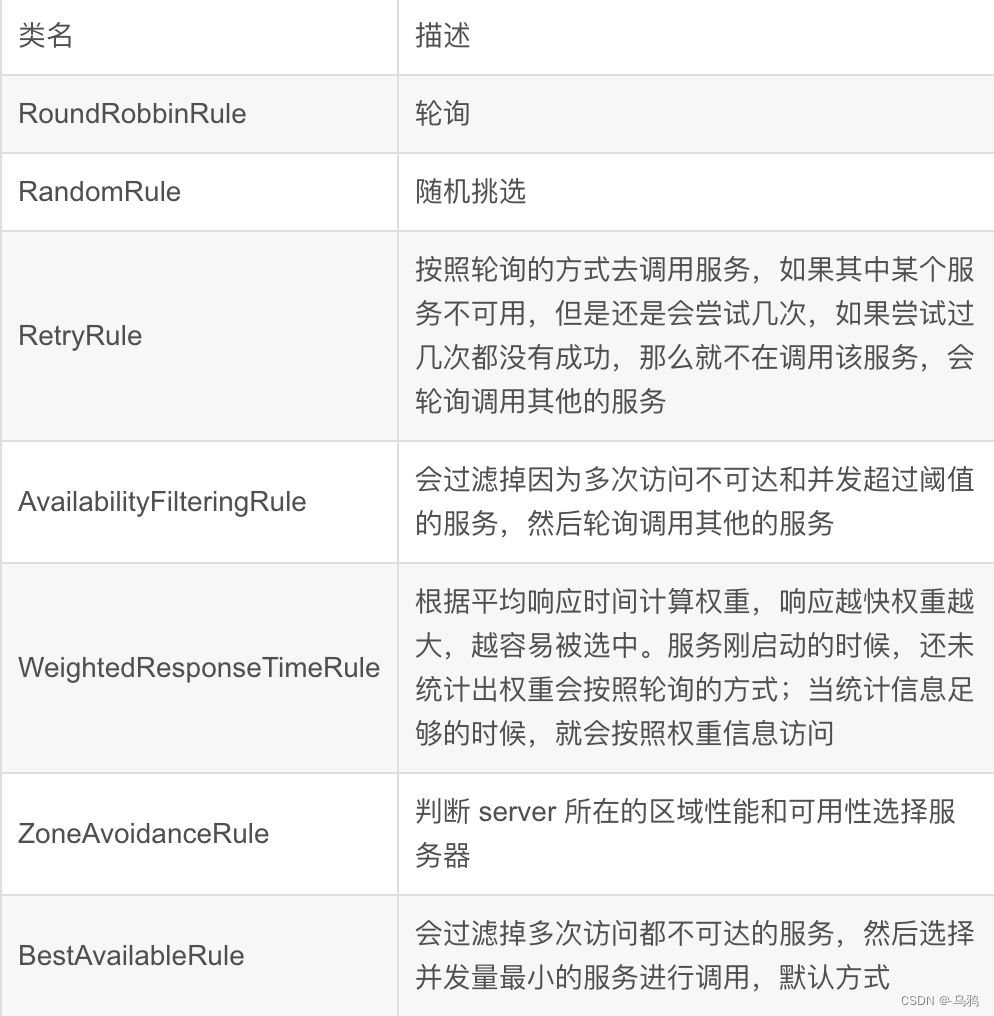
Ribbon 的介绍 Spring Cloud Ribbon 是基于Netflix Ribbon 实现的一套客户端负载均衡的工具。主要功能是提供客户端的软件负载均衡和服务调用。Ribbon 客户端组件提供一系列完善的配置项如连接超时,重试等。简单的说,就是在配置文件中列出Load Balancer…...
Python Opencv实践 - 二维码和条形码识别
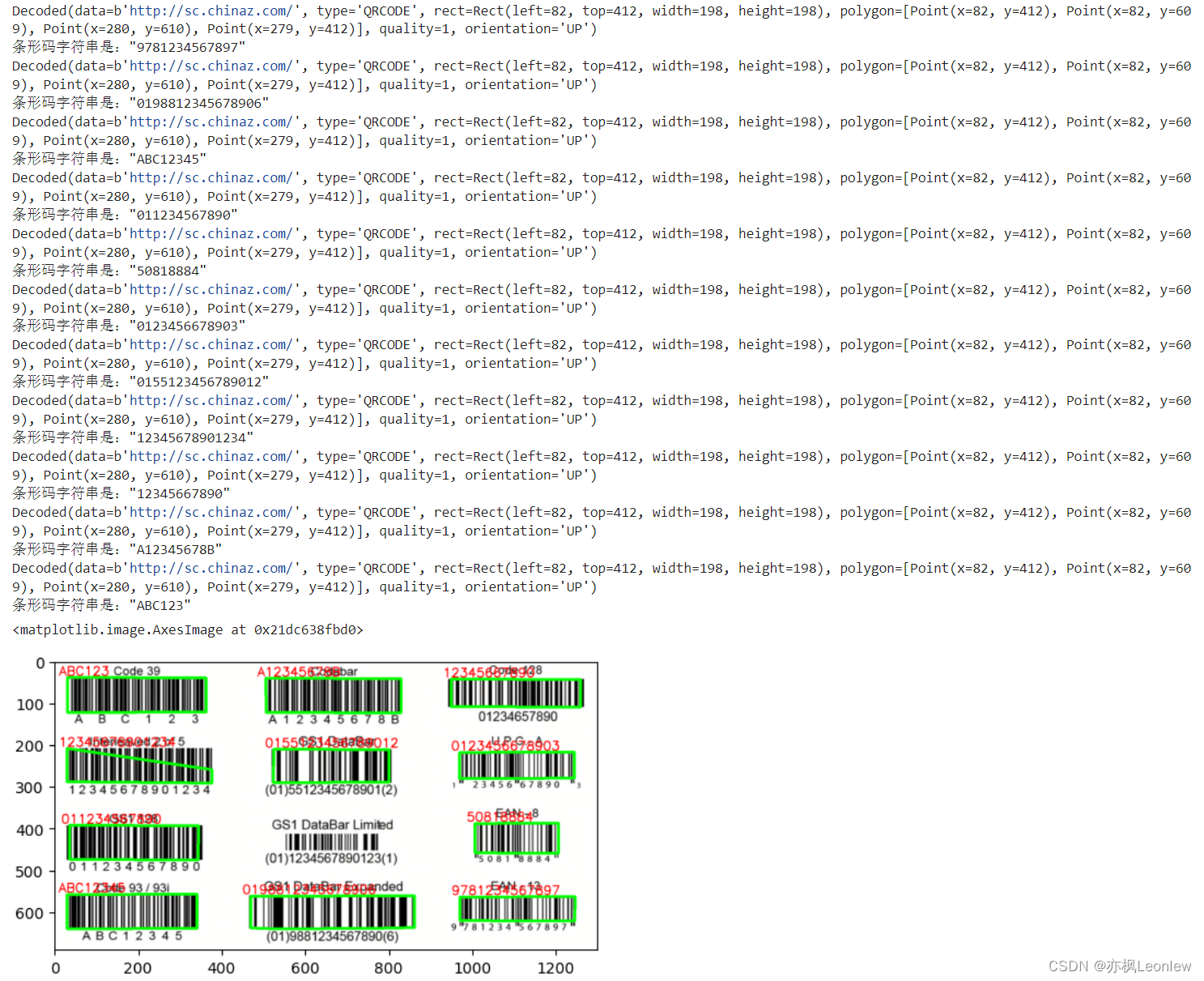
使用pyzbar模块来识别二维码和条形码。ZBar是一个开源软件,用来从图像中读取条形码,支持多种编码,比如EAN-13/UPC-A、UPC-E、EAN-8、代码128、代码39、交错2/5以及二维码。 pyzbar是python封装ZBar的模块,我们用它来做条形码和二维码的识别。…...
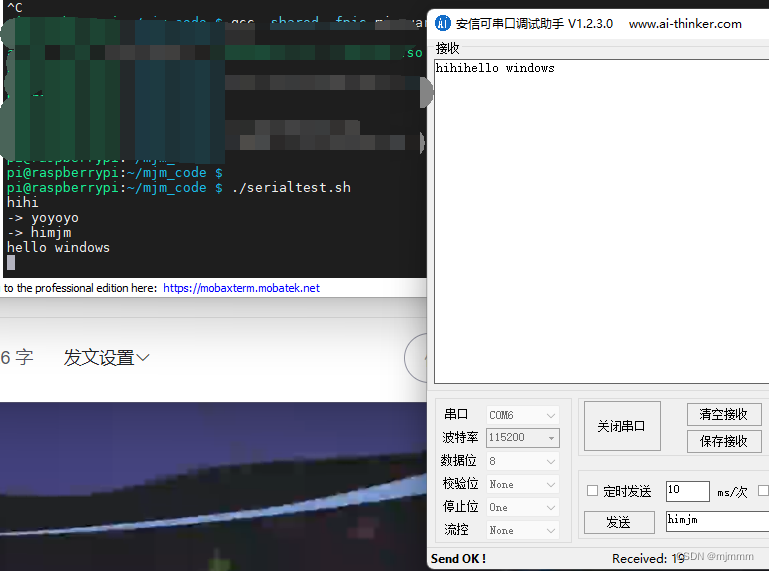
树莓派的的串口通信协议
首先,回顾一下串口的核心知识点,也是面试重点: 串口通信通常使用在多机通讯中串口通信是全双工的决定串口通信的成功与否的是 数据格式 和 波特率数据格式:1. 数据位 2.停止位 3. 奇偶校验位 树莓派恢复串口 回忆前几节树莓派刷机…...
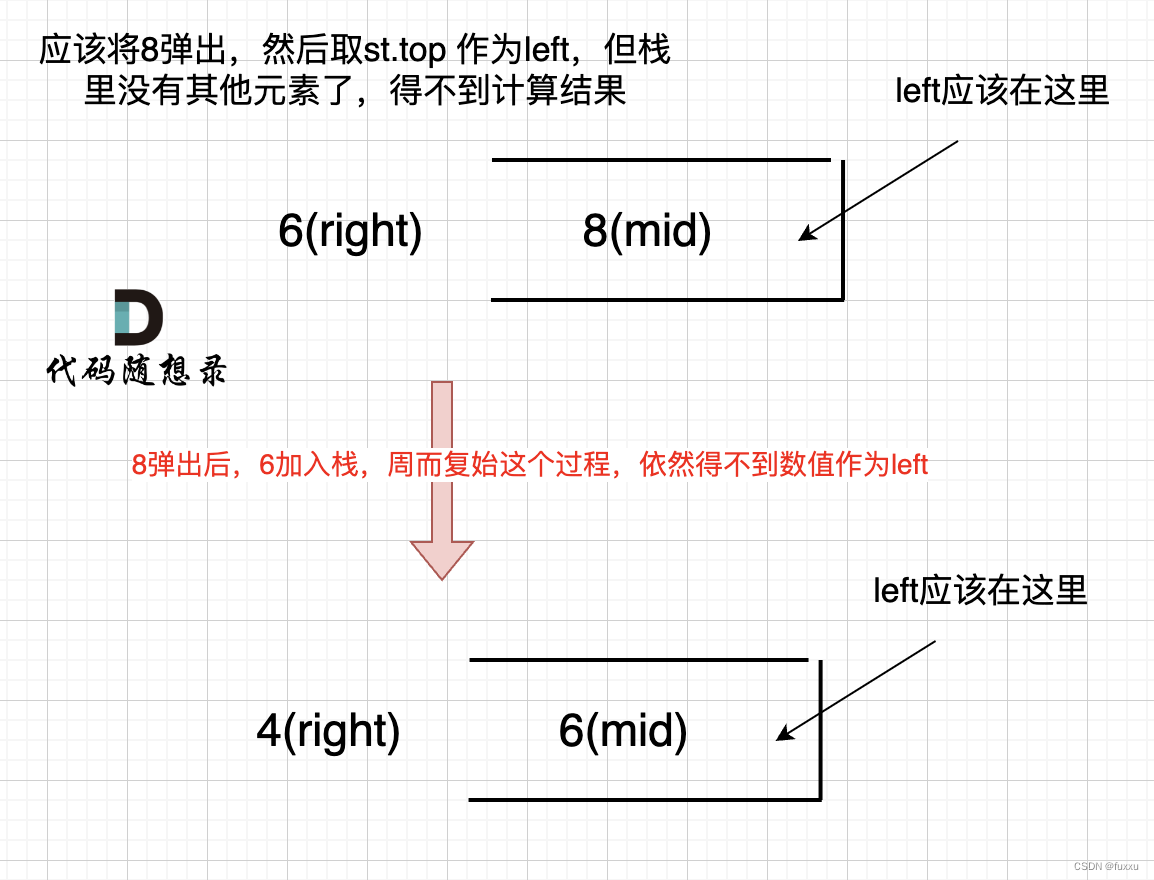
DAY60 84.柱状图中最大的矩形
84.柱状图中最大的矩形 题目要求:给定 n 个非负整数,用来表示柱状图中各个柱子的高度。每个柱子彼此相邻,且宽度为 1 。 求在该柱状图中,能够勾勒出来的矩形的最大面积。 思路 单调栈 本地单调栈的解法和接雨水的题目是遥相呼…...
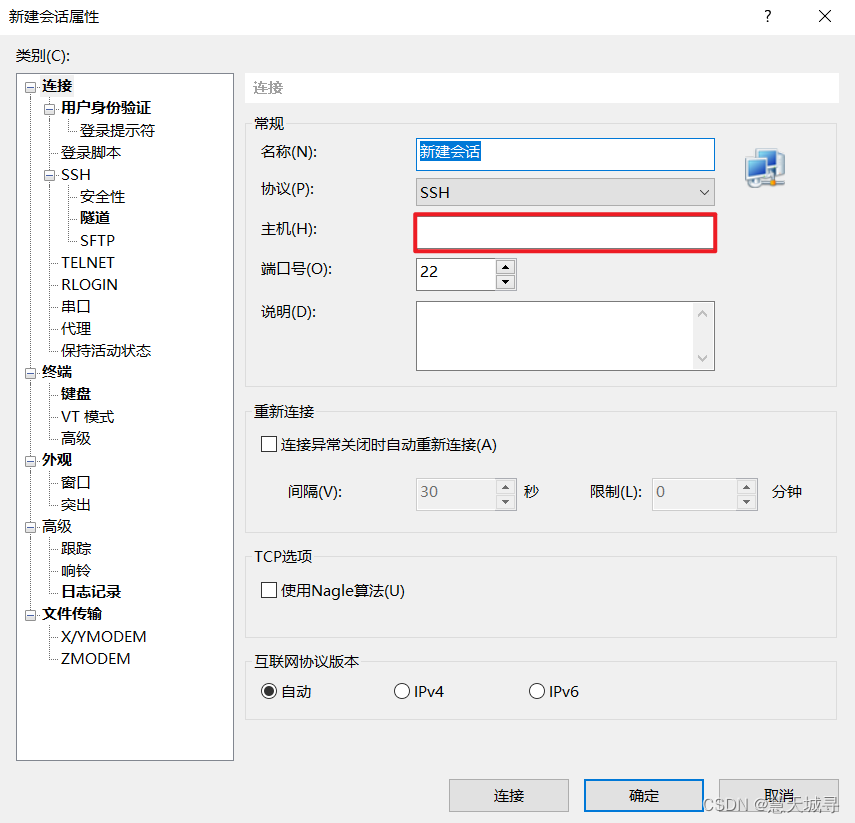
你知道Linux操作系统的前世今生吗?Linux系统又该如何搭建呢?
文章目录 前言1. Linux 是什么1.1 Unix & Linux 发展历程图1.2 Linux 的发展1.3 Linux 的发行版 2. Linux 环境搭建2.1 环境搭建方式2.2 使用云服务器 3. 使用终端软件连接到 Linux3.1 什么是终端软件3.2 下载安装 XShell3.3 使用 XShell 登陆主机 总结 前言 可能很多人都…...

674. 最长连续递增序列
给定一个未经排序的整数数组,找到最长且 连续递增的子序列,并返回该序列的长度。 连续递增的子序列 可以由两个下标 l 和 r(l < r)确定,如果对于每个 l < i < r,都有 nums[i] < nums[i 1] &a…...

DS5上ARM编译器样例工程改为GCC编译
想问一下,DS5上ARM编译器通过的样例工程,换成aarch64-none-elf-gcc工具链,是不是需要把startup.S改成gcc支持的格式呀?怎么改呢,求助大神们指点一下!谢谢!...
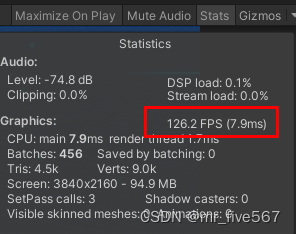
关于Unity Time.deltaTime的理解和使用
Unity中的Time.deltaTime是一个表示上一帧到当前帧所用时间的浮点数。 它可以让Unity应用程序能够以平滑的方式在不同的帧率下运行。 要深刻理解Time.deltaTime,首先得了解Unity引擎得工作原理。 Unity引擎以每秒帧数(FPS)的形式运行。 比…...

Vue3 配置全局 scss 变量
variables.scss $color: #0c8ce9;vite.config.ts // 全局css变量css: {preprocessorOptions: {scss: {additionalData: import "/styles/variables.scss";,},},},.vue 文件使用...

RV1126双摄IMX577驱动移植避坑指南:从RK3588源码到稳定运行的完整流程
RV1126双摄IMX577驱动移植实战:从RK3588源码到稳定运行的避坑全流程 在嵌入式视觉系统开发中,Rockchip RV1126凭借其出色的图像处理能力和低功耗特性,成为智能摄像头、工业检测等场景的热门选择。而索尼IMX577作为一款高性能1200万像素传感器…...
)
从PasteJacker工具看剪贴板劫持:在Kali Linux上复现一次无害攻击(仅供学习)
从PasteJacker工具看剪贴板劫持:在Kali Linux上复现一次无害攻击(仅供学习) 剪贴板劫持作为一种隐蔽性极强的攻击手段,近年来在网络安全事件中频繁出现。这种攻击利用了用户对复制粘贴操作的天然信任,通过篡改剪贴板内…...

SOAFEE:云原生技术如何重塑汽车嵌入式软件开发
1. 项目概述:当汽车软件遇上云原生如果你在汽车电子或嵌入式软件领域摸爬滚打过几年,一定对“开发-测试-集成-标定”这个漫长且昂贵的循环深有体会。一套新的ADAS算法,从云端写好代码,到最终能在实车的域控制器上稳定、安全地跑起…...

SpineMed-450K:最大脊柱多模态诊疗数据集解析与应用
1. 项目背景与核心价值脊柱疾病诊疗一直是医学影像分析领域的重点难点。传统诊疗流程中,医生需要同时参考X光、CT、MRI等多种影像数据,结合临床症状进行综合判断。这个过程中存在两个突出痛点:一是多模态数据协同分析耗时费力,二是…...
)
别再手动测XSS了!手把手教你用Burp Suite的xssValidator插件自动化检测(附PhantomJS环境配置避坑指南)
别再手动测XSS了!手把手教你用Burp Suite的xssValidator插件自动化检测(附PhantomJS环境配置避坑指南) 在Web安全测试中,XSS漏洞一直是高频出现且危害严重的问题。传统的手工测试方法不仅效率低下,还容易遗漏隐蔽的漏…...

从圣核到婴儿:复杂系统重构与核心原理的逆向工程实践
1. 项目概述:从“圣核”到“婴儿”的逆向工程之旅最近在技术社区里,一个名为“0BAB1/HOLY_CORE_COURSE”的项目引起了我的注意。这个标题本身就充满了神秘感和技术隐喻。“0BAB1”很容易让人联想到“零号婴儿”或“初始婴儿”,暗示着某种基础…...

使用Python快速调用Taotoken大模型API的完整入门教程
🚀 告别海外账号与网络限制!稳定直连全球优质大模型,限时半价接入中。 👉 点击领取海量免费额度 使用Python快速调用Taotoken大模型API的完整入门教程 对于希望快速集成大模型能力的开发者而言,直接对接多个厂商的API…...

2TB 数据库增量备份还要 200GB?KES块级永久增量备份,存储省 80%、速度快 60%
引言:增量备份比全量备份还"心虚" 作为 DBA,你一定经历过这样的尴尬时刻:“今天是增量备份日,预计耗时……嗯……大概两个小时吧。” “增量?全量才两个半小时啊?” “对……差不多吧。”这并非段…...

如何快速集成Deep Learning with Python到Web应用:Flask与FastAPI完整指南
如何快速集成Deep Learning with Python到Web应用:Flask与FastAPI完整指南 【免费下载链接】deep-learning-with-python-notebooks Jupyter notebooks for the code samples of the book "Deep Learning with Python" 项目地址: https://gitcode.com/gh…...

TinyConsole自定义主题教程:打造个性化iOS调试控制台
TinyConsole自定义主题教程:打造个性化iOS调试控制台 【免费下载链接】TinyConsole 📱💬🚦 TinyConsole is a micro-console that can help you log and display information inside an iOS application, where having a connecti…...