
高可用elasticsearch集群搭建
目录
一、环境准备
二、机器配置
2.1 创建用户
2.2 修改用户权限
2.3 解析主机名
2.4 优化最大文件数
2.5 优化最大进程数
2.6 优化虚拟内存
2.7 重载配置
三、部署
3.1 创建文件夹并赋予权限
3.2 解压安装包并赋予权限
3.3 配置环境变量
3.4 创建数据、证书存放目录并赋予权限
3.5 签发证书
3.6 设置集群多节点 HTTP 证书
3.7 解压证书并分发给其他节点
3.8 配置文件修改配置
3.9 配置文件下发给其他节点并修改
3.10 JVM参数配置
3.11 启动集群
3.12 修改HTTP登录密码
3.13 页面访问验证
3.14 服务关闭
四、安装IK分词器
一、环境准备
部署模式:uap的高可用es集群采用三节点的无主模式。
es版本:使用es版本为 v8.11.0 。
官网地址:Elasticsearch 平台 — 大规模查找实时答案 | Elastic
jdk版本:使用es内嵌的jdk21,无需额外安装jdk环境。
| IP地址 | 操作系统 | 主机名 | 角色 |
|---|---|---|---|
| 192.168.122.118 | Centos7.6 | master.vteamcloud.com | master&data节点 |
| 192.168.122.119 | Centos7.6 | node1.vteamcloud.com | master&data节点 |
| 192.168.122.120 | Centos7.6 | node2.vteamcloud.com | master&data节点 |
二、机器配置
2.1 创建用户
es不能用root用户进行部署,得在每个机器上新建一个用户,部署的步骤都在这个新用户上进行。
# 添加一个用户  elasticsearch ,密码   elasticsearch
useradd elasticsearch && echo elasticsearch|passwd --stdin elasticsearch
2.2 修改用户权限
[root@okd ~]# visudo
# 增加一行普通用户权限内容
elasticsearch ALL=(ALL) NOPASSWD:ALL
2.3 解析主机名
vim /etc/hosts# 添加下面内容
192.168.122.118  master.vteamcloud.com
192.168.122.119  node1.vteamcloud.com
192.168.122.120  node2.vteamcloud.com
2.4 优化最大文件数
vim /etc/security/limits.conf# 末尾添加下面内容
* soft nofile 65536
* hard nofile 131072
* soft nproc 2048
* hard nproc 6553
2.5 优化最大进程数
vim /etc/security/limits.d/20-nproc.conf## 末尾添加下面内容
*          soft    nproc     4096
root       soft    nproc     unlimited
2.6 优化虚拟内存
vim /etc/sysctl.conf## 添加下面内容
vm.max_map_count=262144
2.7 重载配置
sysctl -p三、部署
3.1 创建文件夹并赋予权限
mkdir -p /opt/module/
chown -R elasticsearch.elasticsearch /opt/module/
3.2 解压安装包并赋予权限
tar -xf elasticsearch-8.11.0-linux-x86_64.tar.gz -C /opt/module/
chown -R elasticsearch.elasticsearch /opt/module/elasticsearch-8.11.0
3.3 配置环境变量
vim /etc/profile## 末尾添加下面内容
export JAVA_HOME=/opt/module/elasticsearch-8.11.0/jdk
export ES_HOME=/opt/module/elasticsearch-8.11.0
export PATH=$PATH:$ES_HOME/bin:$JAVA_HOME/bin
# 刷新环境变量
source /etc/profile3.4 创建数据、证书存放目录并赋予权限
mkdir -p /opt/module/elasticsearch-8.11.0/data
mkdir -p /opt/module/elasticsearch-8.11.0/config/certs
chown -R elasticsearch:elasticsearch /opt/module/elasticsearch-8.11.0
到这一步为止,三台机器的操作是一模一样的。
3.5 签发证书
# 在第一台服务器节点 master.vteamcloud.com 设置集群多节点通信密钥
# 切换用户
su - elasticsearchcd /opt/module/elasticsearch-8.11.0/bin[elasticsearch@okd bin]$./elasticsearch-certutil cawarning: ignoring JAVA_HOME=/opt/module/elasticsearch-8.11.0/jdk; using bundled JDK
This tool assists you in the generation of X.509 certificates and certificate
signing requests for use with SSL/TLS in the Elastic stack.
The 'ca' mode generates a new 'certificate authority'
This will create a new X.509 certificate and private key that can be used
to sign certificate when running in 'cert' mode.Use the 'ca-dn' option if you wish to configure the 'distinguished name'
of the certificate authorityBy default the 'ca' mode produces a single PKCS#12 output file which holds:* The CA certificate* The CAs private keyIf you elect to generate PEM format certificates (the -pem option), then the output will
be a zip file containing individual files for the CA certificate and private keyPlease enter the desired output file [elastic-stack-ca.p12]: # 回车即可
Enter password for elastic-stack-ca.p12 :  # 回车即可# 用 ca 证书签发节点证书,过程中需按三次回车键,生成目录:es的home:/opt/elasticsearch-8.11.0/
[elasticsearch@okd bin]$ ./elasticsearch-certutil cert --ca elastic-stack-ca.p12If you specify any of the following options:* -pem (PEM formatted output)* -multiple (generate multiple certificates)* -in (generate certificates from an input file)
then the output will be be a zip file containing individual certificate/key filesEnter password for CA (elastic-stack-ca.p12) :  # 回车即可
Please enter the desired output file [elastic-certificates.p12]:  # 回车即可
Enter password for elastic-certificates.p12 :  # 回车即可Certificates written to /opt/module/elasticsearch-8.11.0/elastic-certificates.p12This file should be properly secured as it contains the private key for
your instance.
This file is a self contained file and can be copied and used 'as is'
For each Elastic product that you wish to configure, you should copy
this '.p12' file to the relevant configuration directory
and then follow the SSL configuration instructions in the product guide.For client applications, you may only need to copy the CA certificate and
configure the client to trust this certificate.# 将生成的证书文件移动到 config/certs 目录中
[elasticsearch@okd bin]$ cd /opt/module/elasticsearch-8.11.0/
[elasticsearch@okd elasticsearch-8.11.0]$ ls -l | grep "elastic-"
-rw-------  1 elasticsearch elasticsearch   3596 Feb 10 16:05 elastic-certificates.p12
-rw-------  1 elasticsearch elasticsearch   2672 Feb 10 16:03 elastic-stack-ca.p12
[elasticsearch@okd elasticsearch-8.11.0]$
[elasticsearch@okd elasticsearch-8.11.0]$ mv elastic-certificates.p12 config/certs/
[elasticsearch@okd elasticsearch-8.11.0]$ mv elastic-stack-ca.p12 config/certs/
3.6 设置集群多节点 HTTP 证书
# 签发 Https 证书
[elasticsearch@okd elasticsearch-8.11.0]$ cd /opt/module/elasticsearch-8.11.0/bin/
[elasticsearch@okd bin]$ ./elasticsearch-certutil http
warning: ignoring JAVA_HOME=/opt/module/elasticsearch-8.11.0/jdk; using bundled JDK## Elasticsearch HTTP Certificate Utility
The 'http' command guides you through the process of generating certificates
for use on the HTTP (Rest) interface for Elasticsearch.
This tool will ask you a number of questions in order to generate the right
set of files for your needs.
## Do you wish to generate a Certificate Signing Request (CSR)?
A CSR is used when you want your certificate to be created by an existing
Certificate Authority (CA) that you do not control (that is, you do not have
access to the keys for that CA).
If you are in a corporate environment with a central security team, then you
may have an existing Corporate CA that can generate your certificate for you.
Infrastructure within your organisation may already be configured to trust this
CA, so it may be easier for clients to connect to Elasticsearch if you use a
CSR and send that request to the team that controls your CA.
If you choose not to generate a CSR, this tool will generate a new certificate
for you. That certificate will be signed by a CA under your control. This is a
quick and easy way to secure your cluster with TLS, but you will need to
configure all your clients to trust that custom CA.
######################################################
# 是否生成CSR,选择 N ,不需要                           #
######################################################
Generate a CSR? [y/N]N## Do you have an existing Certificate Authority (CA) key-pair that you wish to use to sign your certificate?If you have an existing CA certificate and key, then you can use that CA to
sign your new http certificate. This allows you to use the same CA across
multiple Elasticsearch clusters which can make it easier to configure clients,
and may be easier for you to manage.If you do not have an existing CA, one will be generated for you.
######################################################
# 是否使用已经存在的CA证书,选择 y ,因为已经创建签发好了CA    #
######################################################
Use an existing CA? [y/N]y## What is the path to your CA?
Please enter the full pathname to the Certificate Authority that you wish to
use for signing your new http certificate. This can be in PKCS#12 (.p12), JKS
(.jks) or PEM (.crt, .key, .pem) format.
######################################################
# 指定CA证书的路径地址,CA Path:后写绝对路径               #
######################################################
CA Path: /opt/module/elasticsearch-8.11.0/config/certs/elastic-stack-ca.p12
Reading a PKCS12 keystore requires a password.
It is possible for the keystore's password to be blank,
in which case you can simply press <ENTER> at the prompt######################################################
# 设置密钥库的密码,直接 回车 即可                         #
######################################################
Password for elastic-stack-ca.p12:## How long should your certificates be valid?Every certificate has an expiry date. When the expiry date is reached clients
will stop trusting your certificate and TLS connections will fail.
Best practice suggests that you should either:
(a) set this to a short duration (90 - 120 days) and have automatic processes
to generate a new certificate before the old one expires, or
(b) set it to a longer duration (3 - 5 years) and then perform a manual update
a few months before it expires.You may enter the validity period in years (e.g. 3Y), months (e.g. 18M), or days (e.g. 90D)
######################################################
# 设置证书的失效时间,这里的y表示年,5y则代表失效时间5年       #
######################################################
For how long should your certificate be valid? [5y] 5y## Do you wish to generate one certificate per node?If you have multiple nodes in your cluster, then you may choose to generate a
separate certificate for each of these nodes. Each certificate will have its
own private key, and will be issued for a specific hostname or IP address.Alternatively, you may wish to generate a single certificate that is valid
across all the hostnames or addresses in your cluster.If all of your nodes will be accessed through a single domain
(e.g. node01.es.example.com, node02.es.example.com, etc) then you may find it
simpler to generate one certificate with a wildcard hostname (*.es.example.com)
and use that across all of your nodes.However, if you do not have a common domain name, and you expect to add
additional nodes to your cluster in the future, then you should generate a
certificate per node so that you can more easily generate new certificates when
you provision new nodes.######################################################
# 是否需要为每个节点都生成证书,选择 N 无需每个节点都配置证书   #
######################################################
Generate a certificate per node? [y/N]N## Which hostnames will be used to connect to your nodes?
These hostnames will be added as "DNS" names in the "Subject Alternative Name"
(SAN) field in your certificate.
You should list every hostname and variant that people will use to connect to
your cluster over http.
Do not list IP addresses here, you will be asked to enter them later.If you wish to use a wildcard certificate (for example *.es.example.com) you
can enter that here.Enter all the hostnames that you need, one per line.
######################################################
# 输入需连接集群节点主机名信息,一行输入一个IP地址,空行回车结束 #
######################################################
When you are done, press <ENTER> once more to move on to the next step.master.vteamcloud.com
node1.vteamcloud.com
node2.vteamcloud.comYou entered the following hostnames.- master.vteamcloud.com- node1.vteamcloud.com- node2.vteamcloud.com####################################################
# 确认以上是否为正确的配置,输入 Y 表示信息正确            #
####################################################
Is this correct [Y/n]Y## Which IP addresses will be used to connect to your nodes?
If your clients will ever connect to your nodes by numeric IP address, then you
can list these as valid IP "Subject Alternative Name" (SAN) fields in your
certificate.If you do not have fixed IP addresses, or not wish to support direct IP access
to your cluster then you can just press <ENTER> to skip this step.Enter all the IP addresses that you need, one per line.
####################################################
# 输入需连接集群节点IP信息,一行输入一个IP地址,空行回车结束 #
####################################################
When you are done, press <ENTER> once more to move on to the next step.192.168.122.118
192.168.122.119
192.168.122.120You entered the following IP addresses.- 192.168.122.118- 192.168.122.119- 192.168.122.120####################################################
# 确认以上是否为正确的配置,输入 Y 表示信息正确            #
####################################################
Is this correct [Y/n]Y## Other certificate options
The generated certificate will have the following additional configuration
values. These values have been selected based on a combination of the
information you have provided above and secure defaults. You should not need to
change these values unless you have specific requirements.Key Name: master.vteamcloud.com
Subject DN: CN=master.vteamcloud.com
Key Size: 2048####################################################
# 是否要更改以上这些选项,选择 N ,不更改证书选项配置       #
####################################################
Do you wish to change any of these options? [y/N]N## What password do you want for your private key(s)?Your private key(s) will be stored in a PKCS#12 keystore file named "http.p12".
This type of keystore is always password protected, but it is possible to use a
blank password.####################################################
# 是否要给证书加密,不需要加密,两次 回车 即可             #
####################################################
If you wish to use a blank password, simply press <enter> at the prompt below.
Provide a password for the "http.p12" file:  [<ENTER> for none]## Where should we save the generated files?
A number of files will be generated including your private key(s),
public certificate(s), and sample configuration options for Elastic Stack products.
These files will be included in a single zip archive.
What filename should be used for the output zip file? [/opt/module/elasticsearch-8.11.0/elasticsearch-ssl-http.zip]
Zip file written to /opt/module/elasticsearch-8.11.0/elasticsearch-ssl-http.zip
3.7 解压证书并分发给其他节点
# 解压
[elasticsearch@okd bin]$ cd /opt/module/elasticsearch-8.11.0/
[elasticsearch@okd elasticsearch-8.11.0]$ unzip elasticsearch-ssl-http.zip
# 移动证书
[elasticsearch@okd elasticsearch-8.11.0]$ mv ./elasticsearch/http.p12 config/certs/
[elasticsearch@okd elasticsearch-8.11.0]$ mv ./kibana/elasticsearch-ca.pem config/certs/# 将证书分发到其他节点02 03
[elasticsearch@okd elasticsearch-8.11.0]$ cd /opt/module/elasticsearch-8.11.0/config/certs
[elasticsearch@okd certs]$ ll
total 16
-rw------- 1 elasticsearch elasticsearch 3596 Feb 10 16:05 elastic-certificates.p12
-rw-rw-r-- 1 elasticsearch elasticsearch 1200 Feb 10 16:13 elasticsearch-ca.pem
-rw------- 1 elasticsearch elasticsearch 2672 Feb 10 16:03 elastic-stack-ca.p12
-rw-rw-r-- 1 elasticsearch elasticsearch 3652 Feb 10 16:13 http.p12
[elasticsearch@okd certs]$ scp * node1.vteamcloud.com:/opt/module/elasticsearch-8.11.0/config/certs/
[elasticsearch@okd certs]$ scp * node2.vteamcloud.com:/opt/module/elasticsearch-8.11.0/config/certs/
3.8 配置文件修改配置
[elasticsearch@okd certs]$ cd /opt/module/elasticsearch-8.11.0/config/
[elasticsearch@okd config]$ vim elasticsearch.yml
cluster.name: uap-es
node.name: es-master.vteamcloud.com
path.data: /opt/module/elasticsearch-8.11.0/data
path.logs: /opt/module/elasticsearch-8.11.0/logs
network.host: 0.0.0.0
http.port: 9200
discovery.seed_hosts: ["master.vteamcloud.com"]
cluster.initial_master_nodes: ["es-master.vteamcloud.com", "es-node1.vteamcloud.com","es-node2.vteamcloud.com"]
xpack.security.enabled: true
xpack.security.enrollment.enabled: true
xpack.security.http.ssl:enabled: truekeystore.path: /opt/module/elasticsearch-8.11.0/config/certs/http.p12keystore.password: 123456  #如果生成证书时设置了密码则要添加密码配置truststore.path: /opt/module/elasticsearch-8.11.0/config/certs/http.p12truststore.password: 123456 #如果生成证书时设置了密码则要添加密码配置
xpack.security.transport.ssl:enabled: trueverification_mode: certificatekeystore.path: /opt/module/elasticsearch-8.11.0/config/certs/elastic-certificates.p12keystore.password: 123456  #如果生成证书时设置了密码则要添加密码配置truststore.path: /opt/module/elasticsearch-8.11.0/config/certs/elastic-certificates.p12truststore.password: 123456 #如果生成证书时设置了密码则要添加密码配置
http.host: [_local_, _site_]
ingest.geoip.downloader.enabled: false
xpack.security.http.ssl.client_authentication: none
【注意】:
- xpack.security.http.ssl & xpack.security.transport.ssl后的子配置需要空一格,遵循yml的格式要求
- 如果不需要后续的http证书认证或者用户密码认证可以将xpack.security相关的功能falase关闭掉
xpack.security.http.ssl:enabled: false
xpack.security.transport.ssl:enabled: false
有些业务使用场景中,可能会遇到跨域问题,当elasticsearch需要涉及到跨域问题时,可以在配置文件中最后增加配置:
http.cors.enabled: true
http.cors.allow-origin: "*"
3.9 配置文件下发给其他节点并修改
[elasticsearch@okd elasticsearch-8.11.0]$ scp config/elasticsearch.yml node1.vteamcloud.com:/opt/module/elasticsearch-8.11.0/config/
[elasticsearch@okd elasticsearch-8.11.0]$ scp config/elasticsearch.yml node2.vteamcloud.com:/opt/module/elasticsearch-8.11.0/config/# node1修改 config/elasticsearch.yml
[elasticsearch@node1 ~]# vim /opt/module/elasticsearch-8.11.0/config/elasticsearch.yml
# 设置节点名称
node.name: es-node1.vteamcloud.com# node2修改 config/elasticsearch.yml
[elasticsearch@node2 ~]# vim /opt/module/elasticsearch-8.11.0/config/elasticsearch.yml
# 设置节点名称
node.name: es-node2.vteamcloud.com
3.10 JVM参数配置
es的本质是一个java服务,也需要jvm参数。es的jvm参数在config文件夹下的jvm.options文件中,修改此文件配置jvm参数即可。
vim jvm.options# 配置内存参数
-Xms2g
-Xmx2g
3.11 启动集群
每台节点依次启动(无顺序要求,只要多于2台,就可以启动集群,这就是es的无主模式,自动识别集群,选举master):
[elasticsearch@okd elasticsearch-8.11.0]$ /opt/module/elasticsearch-8.11.0/bin/elasticsearch  -d
[elasticsearch@es02 elasticsearch-8.11.0]$ /opt/module/elasticsearch-8.11.0/bin/elasticsearch  -d
[elasticsearch@es03 elasticsearch-8.11.0]$ /opt/module/elasticsearch-8.11.0/bin/elasticsearch  -d
3.12 修改HTTP登录密码
# 手工指定elastic的新密码 (-i参数)
[elasticsearch@okd ~]$ /opt/module/elasticsearch-8.11.0/bin/elasticsearch-reset-password -u elastic -i
warning: ignoring JAVA_HOME=/opt/module/elasticsearch-8.11.0/jdk; using bundled JDK
bThis tool will reset the password of the [elastic] user.
You will be prompted to enter the password.
Please confirm that you would like to continue [y/N]y
Did not understand answer 'by'
Please confirm that you would like to continue [y/N]yEnter password for [elastic]: # 输入用户elastic的密码
Re-enter password for [elastic]: # 输入用户elastic的密码
Password for the [elastic] user successfully reset.
3.13 页面访问验证
https://ip:9200 (注意是https)
账号密码为上面创建的:elastic / elastic的密码
3.14 服务关闭
[elasticsearch@okd ~]$ ps -ef | grep elasticsearch|grep -vE "grep|controller" |awk -F" " '{print $2}' | xargs kill -9四、安装IK分词器
将附件中ik分词器安装包放到es的plugins/ik/目录下,解压后重启es服务即可。ik目录需自己创建。
mkdir ik
unzip elasticsearch-analysis-ik-8.1.0.zip
相关文章:

高可用elasticsearch集群搭建
目录 一、环境准备 二、机器配置 2.1 创建用户 2.2 修改用户权限 2.3 解析主机名 2.4 优化最大文件数 2.5 优化最大进程数 2.6 优化虚拟内存 2.7 重载配置 三、部署 3.1 创建文件夹并赋予权限 3.2 解压安装包并赋予权限 3.3 配置环境变量 3.4 创建数据、证书存放目录并赋…...

Linux本地MinIO存储服务远程调用上传文件
🔥博客主页: 小羊失眠啦. 🎥系列专栏:《C语言》 《数据结构》 《Linux》《Cpolar》 ❤️感谢大家点赞👍收藏⭐评论✍️ 前些天发现了一个巨牛的人工智能学习网站,通俗易懂,风趣幽默,…...

C语言 子函数调malloc申请内存返回给主函数使用——可行,但要注意
一般情况,子函数中动态申请内存,将地址返回给主函数,理论上应该也是可以的,需要子函数返回动态内存地址,主函数实参是相应的地址变量即可。只不过,主函数实参传入子函数之前,可能会将指针置空&a…...

Python入门教程之条件语句与运算符优先级详解
文章目录 Python 条件语句Python运算符优先级关于Python技术储备一、Python所有方向的学习路线二、Python基础学习视频三、精品Python学习书籍四、Python工具包项目源码合集①Python工具包②Python实战案例③Python小游戏源码五、面试资料六、Python兼职渠道 Python 条件语句 …...
高通Camera HAL3: CamX、Chi-CDK要点
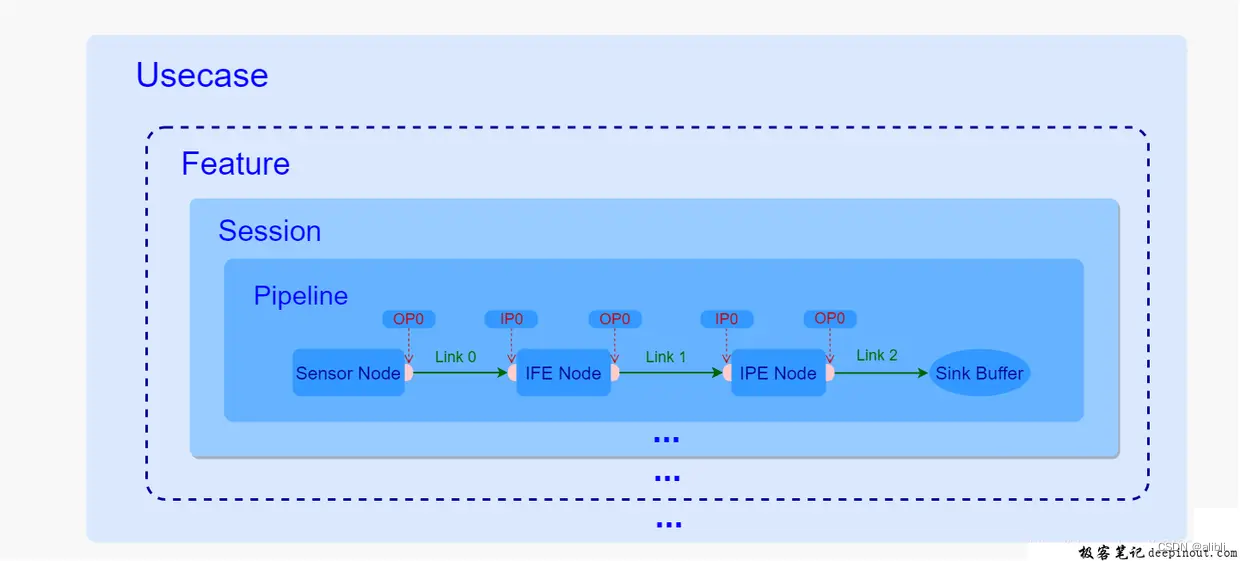
目录 一、概述 二、目录 三、CamX组件之前的关系 一、概述 高通CamX架构是高通实现的相机HAL3架构,被各OEM厂商广泛采用。 二、目录 代码位于vendor/qcom/proprietary下: camx:通用功能性接口的代码实现集合chi-cdk:可定制化…...
springboot+vue热带野生动物园景点预约门票订票系统
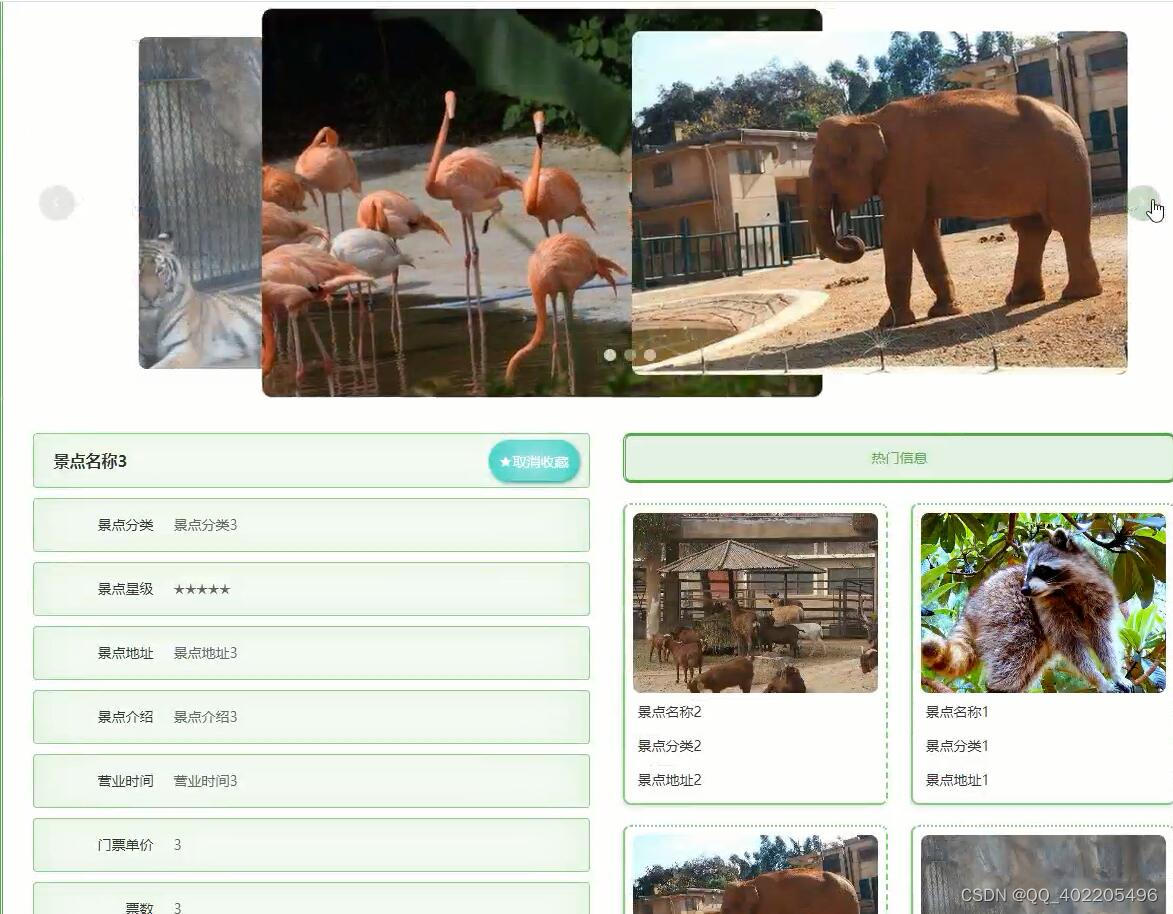
热带野生动物园景点预约订票系统为野生动物园提供景点管理服务的系统,通过登录系统,管理该野生动物园所有的景点信息、景点分类信息、野生动物园新闻、通知公告、回复会员留言等,并可以通过订单管理查看会员预定的订单信息,对订单…...

Flutter和Android的混合跳转
1、项目特点 项目是Flutter作为主工程,将Android module或SDK作为模块嵌入到flutter中,与通常所熟悉的Android(或iOS)工程将flutter 为module嵌入到工程中有所不同。 2、业务需求 任意界面间的跳转,不管是flutter页…...
CyberRT-共享内存实现
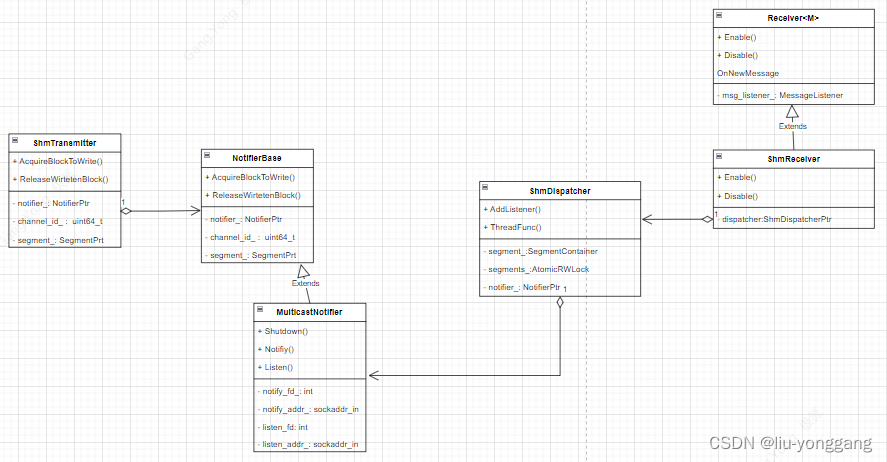
CyberRT共享内存类图 共享内存消息发布 数据用共享内存发布时,首先会创建ShmTransmitter对象,包含两个主要成员segment和notifier,Segment用于创建共享内存(上面绿色部分),Notifer 最终构建ReadableInfo通…...
linux通过串口传输文件
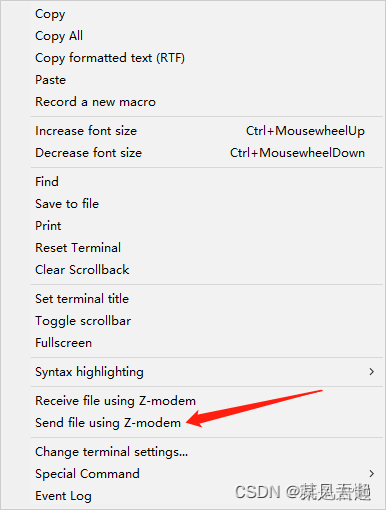
简介 在嵌入式调试过程中,我们经常会使用调试串口来查看Log或者执行指令,其实,调试串口还有另一种功能,就是传输文件,本文说明使用MobaXterm串口工具来传输文件。 环境要求 嵌入式系统需要安装lsz和lrz,…...
uniapp 打包后各静态资源加载失败的问题(背景图,字体等)
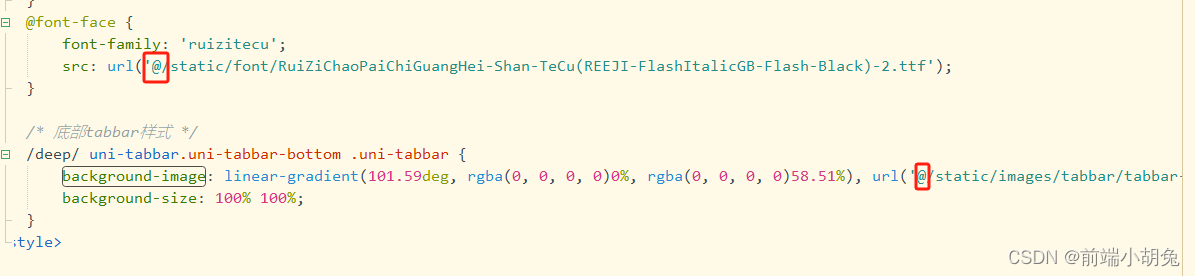
原因: 1.部署地址不在域名根目录下 解决办法(推荐办法2): 办法1.如果部署在域名的文件夹下(例如h5), 则运行的基础路径修改为/h5/ 且注意路由模式 办法2.不修改运行的基础路径(还是./), 将代码中涉及背景图(background-image)和字体资源的路径前统一加,如图: tips: 标签内s…...

关于git hooks
Git hooks 是一种在 Git 仓库中触发自定义脚本的机制。这些脚本可以在特定的 Git 操作(如提交、推送、合并等)发生时执行。通过使用 Git hooks,你可以在版本控制的不同阶段自动运行脚本,以执行一些定制化的操作。 在 Git 中&…...
mongodb数据库的常用操作语句
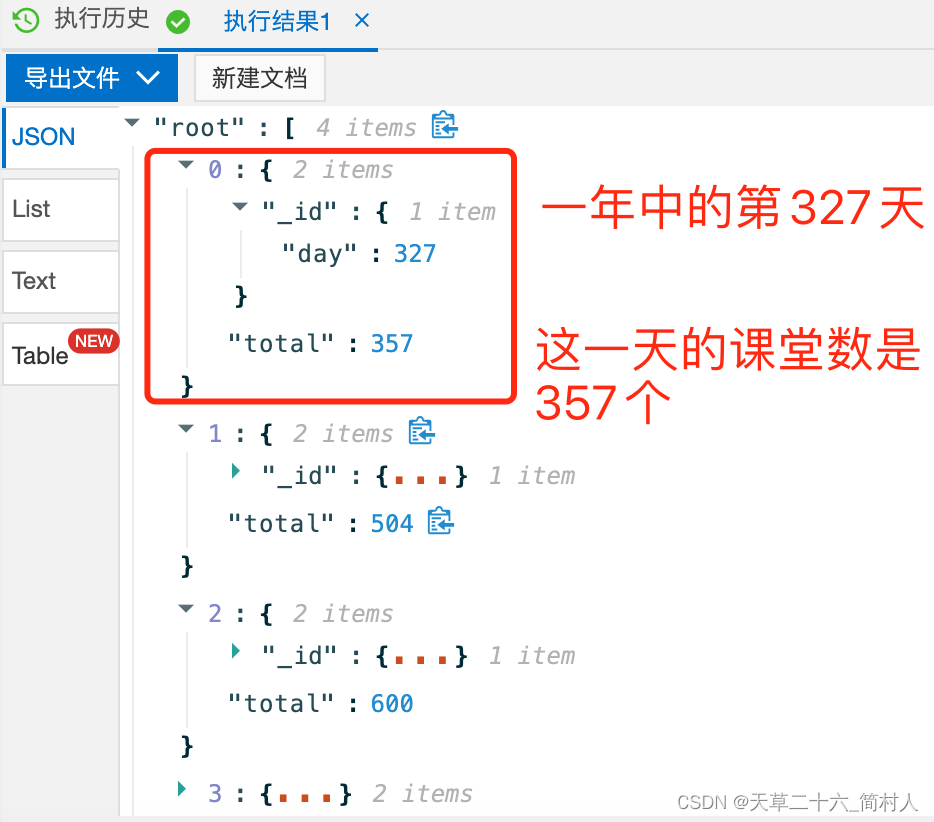
说在前面的话 本文所有的操作示例,都以集合“HistoryTaskBase”为例。 一、查询 1、时间区间 查询“通知时间”介于2019-09-01到2019-10-01之间的数据。 db.getCollection(HistoryTaskBase).find({notifyTime:{$gte:ISODate(2019-09-01T00:00:00.000Z),$lte:ISOD…...

ubuntu安装完qt后发现找不到图标
layout: post # 使用的布局(不需要改) title: Qt启动问题 # 标题 subtitle: ubuntu安装完Qt #副标题 date: 2023-11-18 # 时间 author: BY ThreeStones1029 # 作者 header-img: img/about_bg.jpg #这篇文章标题背景图片 catalog: true # 是否归档 tags: …...
 -- Buildfarm部署中的问题)
bazel远程构建(Remote Execution) -- Buildfarm部署中的问题
问题1:server报logOverdueOperation和WARNING: removed dispatched operation shard/operations/, worker报WARNING: missing queued operation: shard/operations/等问题,详情如下: Server Log INFO: DispatchedMonitor: Testin…...
论文阅读:MedSegDiff: Medical Image Segmentation with Diffusion Probabilistic Model
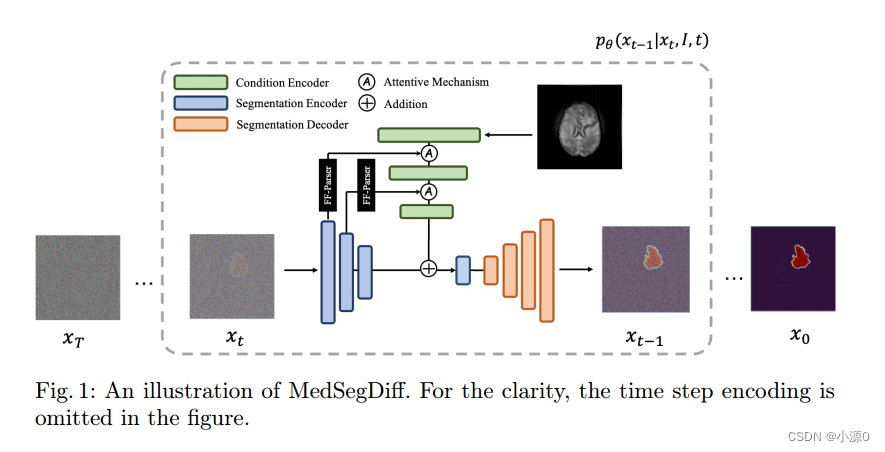
论文标题: MedSegDiff: Medical Image Segmentation with Diffusion Probabilistic Model 翻译: MedSegDiff:基于扩散概率模型的医学图像分割 名词解释: 高频分量(高频信号)对应着图像变化剧烈的部分&…...

openssl加解密-干货分享
0.需要包含的头文件和预定义常量 #include <openssl/rand.h>#include <fstream>#include <openssl/aes.h>#include <openssl/rand.h>// 加密密钥和初始化向量(IV)长度#define AES_KEY_LENGTH 32#define AES_IV_LENGTH 16 1.密…...

【考研数据结构代码题7】求一元多项式之和
题目:编写一个算法,求一元多项式之和 考纲:一元多项式的表示与相加 题型:代码填空或算法设计 难度:★★★ 参考代码 typedef struct node{float coef;//系数int exp;//次数struct node *next; }polynode; polynode *…...

python避坑指南(更新中)
os.path.join 避免连续的/,看示例即清楚,最好的避免方法是字符串首末都不要加’/: join用法 用join前面的符号将参数数组里面的字符串连接起来,注意join只有一个参数...

可以远程控制电脑桌面的软件有哪些?
随着电脑办公的普及,人们对于远程控制电脑的需求也越来越大。远程控制电脑技术能够让用户在不同地点的电脑之间进行操作和访问,能够提高工作效率。可以远程控制电脑桌面的软件有哪些? 1. 远程监控电脑软件 需要安装在被控制端电脑ÿ…...

洛谷 P1250 种树
种树 题目背景 一条街的一边有几座房子,因为环保原因居民想要在路边种些树。 题目描述 路边的地区被分割成块,并被编号成 1 , 2 , … , n 1, 2, \ldots,n 1,2,…,n。每个部分为一个单位尺寸大小并最多可种一棵树。 每个居民都想在门前种些树&#…...

从零掌握YimMenu:GTA5开源辅助工具深度配置与实战指南
从零掌握YimMenu:GTA5开源辅助工具深度配置与实战指南 【免费下载链接】YimMenu YimMenu, a GTA V menu protecting against a wide ranges of the public crashes and improving the overall experience. 项目地址: https://gitcode.com/GitHub_Trending/yi/YimM…...

告别卡顿与臃肿:G-Helper终极指南,让华硕笔记本重获新生
告别卡顿与臃肿:G-Helper终极指南,让华硕笔记本重获新生 【免费下载链接】g-helper The control app every laptop should come with. G-Helper is a fast, native tool for tuning performance, fans, GPU, battery, and RGB on any Asus laptop or han…...

如何5分钟完成Windows和Office永久激活:KMS智能激活工具完整指南
如何5分钟完成Windows和Office永久激活:KMS智能激活工具完整指南 【免费下载链接】KMS_VL_ALL_AIO Smart Activation Script 项目地址: https://gitcode.com/gh_mirrors/km/KMS_VL_ALL_AIO 对于许多Windows和Office用户来说,系统激活一直是个令人…...
)
MATLAB小白也能搞定:用FFT快速模拟菲涅尔圆孔衍射(附完整代码和参数调优心得)
MATLAB实战:用FFT轻松模拟菲涅尔圆孔衍射现象 光学仿真一直是理工科学生既向往又畏惧的领域——那些复杂的积分公式和抽象的光场分布概念,常常让人望而却步。但今天,我要分享一个好消息:即使你完全不懂菲涅尔积分的数学推导&#…...

告别试错!用Matlab controlSystemDesigner快速搞定永磁同步电机电流环PI参数
永磁同步电机电流环PI参数整定的高效可视化方法 电机控制工程师们常常面临一个共同的挑战:如何快速准确地整定电流环PI参数。传统试错法不仅耗时耗力,还严重依赖个人经验。本文将介绍一种基于Matlab controlSystemDesigner工具的高效方法,通…...

Win11Debloat:Windows 11终极优化工具,5分钟还你一个干净高效的系统
Win11Debloat:Windows 11终极优化工具,5分钟还你一个干净高效的系统 【免费下载链接】Win11Debloat A simple, lightweight PowerShell script that allows you to remove pre-installed apps, disable telemetry, as well as perform various other cha…...

5分钟搞定PS手柄连接PC:DS4Windows手柄映射软件终极攻略
5分钟搞定PS手柄连接PC:DS4Windows手柄映射软件终极攻略 【免费下载链接】DS4Windows Like those other ds4tools, but sexier 项目地址: https://gitcode.com/gh_mirrors/ds/DS4Windows 还在为PS手柄连接电脑后游戏无法识别而烦恼吗?ᾑ…...

电子对抗中的“极简主义”:单bit接收机如何用1bit数据搞定10GHz瞬时带宽测频?
电子对抗中的“极简主义”:单bit接收机如何用1bit数据搞定10GHz瞬时带宽测频? 在电子对抗这个充满技术博弈的领域,系统设计往往需要在极端性能与有限资源之间寻找精妙平衡。当我们谈论10GHz瞬时带宽这样的参数时,传统接收机方案往…...
)
用FPGA和Verilog做个带数码管显示的电子密码锁(附完整代码和仿真)
基于FPGA的智能电子密码锁设计与实现:从Verilog编码到数码管动态显示 在物联网和智能家居快速发展的今天,电子密码锁作为基础安全设备,其可靠性和用户体验至关重要。本文将带您从零开始构建一个基于FPGA的电子密码锁系统,不仅包含…...

StreamCap设计哲学:如何用Python构建一个优雅的多平台直播录制引擎
StreamCap设计哲学:如何用Python构建一个优雅的多平台直播录制引擎 【免费下载链接】StreamCap Multi-Platform Live Stream Automatic Recording Tool | 多平台直播流自动录制客户端 基于FFmpeg 支持监控/定时/转码 项目地址: https://gitcode.com/gh_mirrors/…...