
02 使用Vite创建Vue3项目
概述
A Vue project is structured similarly to a lot of modern node-based apps and contains the following:
- A package.json file
- A node_modules folder in the root of your project
- Various other configuration files are usually contained at the root level, such as vite.config.js and .eslintrc.js, since they will generally have an effect across your whole project.
Vue 项目的结构与许多基于节点的现代应用程序类似,包含以下内容:
-
package.json 文件
-
项目根目录下的 node_modules 文件夹
-
其他各种配置文件通常包含在根级别,如 vite.config.js 和 .eslintrc.js,因为它们通常会对整个项目产生影响。
By default, there is an index.html file at the root level that serves as a placeholder for loading the Vue application. You can modify this file to include header and footer scripts, such as Google Fonts or third-party JavaScript libraries that are not included as a part of your bundle.
默认情况下,根层级有一个 index.html 文件,作为加载 Vue 应用程序的占位符。您可以修改该文件以包含页眉和页脚脚本,如 Google 字体或未包含在捆绑包中的第三方 JavaScript 库。
The Vue project structure follows a pattern where you manage most of your source code within the /src directory. You can subdivide your Vue files into various folders, for example, using a components folder to store reusable Vue components. By default, Vite will create assets and components folders to code-split the default files. For beginners, it is good to follow this pattern until you get more comfortable。
Vue 项目结构遵循一种模式,即在 /src 目录中管理大部分源代码。您可以将 Vue 文件细分到不同的文件夹中,例如,使用组件文件夹来存储可重复使用的 Vue 组件。默认情况下,Vite 会创建 assets 和 components 文件夹,对默认文件进行代码分割。对于初学者来说,最好遵循这种模式,直到熟悉为止。
The public folder is a special directory containing files that need to be transferred directly to the output location.
公共文件夹是一个特殊目录,其中包含需要直接传输到输出位置的文件。
At this point, you should be somewhat familiar with how a Vue project structure looks. Next, we discuss Vue’s unique pattern – the SFC architecture.
至此,您应该对 Vue 项目的结构有了一定的了解。接下来,我们将讨论 Vue 的独特模式–SFC 架构。
创建Vite项目
这里版本推荐使用nodejs 20,可以使用nvm管理nodejs的版本:
nvm use 20
使用以下命令创建一个vue项目:
npm install -g yarn
yarn create vite c02_vite_demo --template vue
接着通过以下命令启动项目:
cd c02_vite_demo
yarn
yarn dev
SFC架构
Components are the building blocks of most modern frameworks. In general, splitting your code into component-specific chunks ensures code readability and facilitates the Don’t Repeat Yourself (DRY) principle. Vue’s SFC pattern follows this approach closely.
组件是大多数现代框架的构件。一般来说,将代码拆分成特定的组件块可确保代码的可读性,并有助于遵循 “不要重复”(DRY)原则。Vue 的 SFC 模式紧跟这种方法。
The SFC architecture centralizes the responsibility of both appearance and behavior into a single file, thus simplifying the architecture of your project.
SFC 架构将外观和行为的责任集中到一个文件中,从而简化了项目的架构。
You now can refer to your HTML, CSS, and JavaScript logic without switching files. Your default .vue file structure will be as follows:
现在,您可以在不切换文件的情况下引用 HTML、CSS 和 JavaScript 逻辑。您的默认 .vue 文件结构如下:
<script setup>
</script><template>
</template><style scoped>
</style>
A general good practice is to ensure your components file doesn’t contain more than 500 lines of code. If you encounter this situation, it’s recommended to split them into smaller reusable components. For example, in the header of your application, you may have a logo element that is reused on other pages. You would create a component such as logo.vue:
一般的良好做法是确保组件文件中的代码不超过 500 行。如果遇到这种情况,建议将其拆分成更小的可重复使用的组件。例如,在应用程序的页眉中,可能会有一个在其他页面中重复使用的徽标元素。您可以创建一个组件,如 logo.vue:
<template><img src="myLogo.png" />
</template>
In header.vue, you import the logo component into the script section and then include it as a nested component of the header component. You can achieve this by declaring it as a property of the components field:
在 header.vue 中,您需要将徽标组件导入脚本部分,然后将其作为嵌套组件包含在页眉组件中。为此,您可以将其声明为组件字段的一个属性:
<script>import logo from 'components/logo.vue'export default {components: {logo}}
</script>
In the template section, you can use the logo as a normal HTML element, as shown here:
在模板部分,您可以将徽标作为普通 HTML 元素使用,如图所示:
<template><header><a href="mywebsite.com"><logo /></a></header>
</template>
The output will be a header with the logo image rendered – and you can reuse the logo component in any other component when needed.
输出结果将是渲染了徽标图像的页眉,您可以在需要时在任何其他组件中重复使用徽标组件。
Very soon, you will have lots of these semantically structured files, which use small chunks of a reusable syntax that your team can implement across various application areas.
很快,您就会拥有大量这些语义结构文件,它们使用小块的可重用语法,您的团队可以在不同的应用领域实施这些语法。
In the next exercise, you will practice creating your first Vue component and displaying it in another component.
在下一个练习中,您将练习创建第一个 Vue 组件并将其显示在另一个组件中。
练习:构建你的第一个组件
Create another file in the components folder called Exercise1-01.vue and repeat the same step for scaffolding the Vue component:
在组件文件夹中创建另一个名为 Exercise1-01.vue 的文件,并重复同样的步骤为 Vue 组件搭建脚手架:
<template>
</template>
<script>
export default {
}
</script>
<style>
</style>
Within our Exercise1-01.vue component, compose a set of <div> tags, with an <h1> element and a heading inside the <template> tags:
在我们的 Exercise1-01.vue 组件中,编写一组 <div> 标记,在 <template> 标记内包含一个 <h1> 元素和一个标题:
<template><div><h1>My first component!</h1></div>
</template>
Inside the <style> block, add some styling as follows:
在 <style> 块中,添加一些样式如下:
<style>
h1 {font-family: 'Avenir', Helvetica, Arial,sans-serif;text-align: center;color: #2c3e50;margin-top: 60px;
}
</style>
Import our component into App.vue by using the ES6 import method and defining the component inside the components object in the <script> block. We can now reference this component inside the HTML by using its name in camelCase or kebab-case (both will work):
使用 ES6 导入方法将组件导入 App.vue,并在 <script> 块的组件对象中定义组件。现在,我们可以在 HTML 中以 camelCase 或 kebab-case 引用该组件的名称(两者均可):
<template><Exercise />
</template>
<script>
import Exercise from './components/Exercise1-01.vue'
export default {components: {Exercise,}
}
</script>
启动服务,浏览器访问:http://localhost:5173/
In this exercise, we saw how to structure Vue components using template tags, and scaffold basic Vue components using Vetur. We also created a new Vue component and reuse it in App.vue using ES6 syntax and property field components.
在本练习中,我们了解了如何使用模板标签构建 Vue 组件,以及如何使用 Vetur 构建基本的 Vue 组件。我们还创建了一个新的 Vue 组件,并在 App.vue 中使用 ES6 语法和属性字段组件对其进行了重用。
In the next section, we will gain an understanding of how to define the local state data of a component using data properties.
在下一节中,我们将了解如何使用数据属性定义组件的本地状态数据。
相关文章:

02 使用Vite创建Vue3项目
概述 A Vue project is structured similarly to a lot of modern node-based apps and contains the following: A package.json fileA node_modules folder in the root of your projectVarious other configuration files are usually contained at the root level, such …...
)
Shell三剑客:sed(简介)
一、前言 Stream EDitor:流编辑 sed 是一种在线的、非交互式的编辑器,它一次处理一行内容。处理时,把当前处理的行存储在临时缓冲区中,称为“模式空间”(pattern space),接着用sed命令处理缓冲区中的内容,处理完成后&…...

tp连接数据库
ThinkPHP内置了抽象数据库访问层,把不同的数据库操作封装起来,我们只需要使用公共的Db类进行操作,而无需针对不同的数据库写不同的代码和底层实现,Db类会自动调用相应的数据库驱动来处理。采用PDO方式,目前包含了Mysql…...
jmeter,断言:响应断言、Json断言
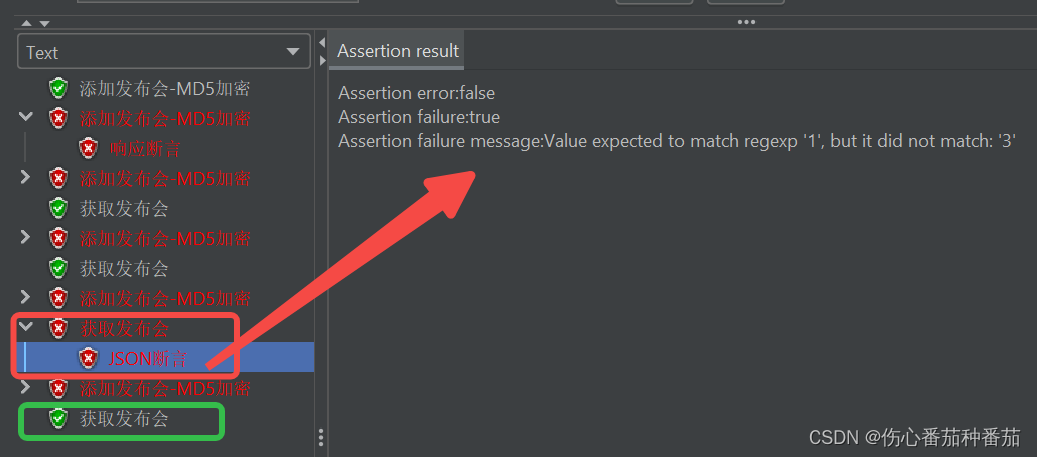
一、响应断言 接口A请求正常返回值如下: {"status": 10013, "message": "user sign timeout"} 在该接口下创建【响应断言】元件,配置如下: 若断言成功,则查看结果树的接口显示绿色,若…...

dockerfite创建镜像---INMP+wordpress
搭建dockerfile---lnmp 在192.168.10.201 使用 Docker 构建 LNMP 环境并运行 Wordpress 网站平台 [rootdocker1 opt]# mkdir nginx mysql php [rootdocker1 opt]# ls #分别拖入四个包: nginx-1.22.0.tar.gz mysql-boost-5.7.20.tar.gz php-7.1.10.tar.bz2 wor…...
服务器数据恢复—raid5热备盘未激活崩溃导致上层oracle数据丢失的数据恢复案例
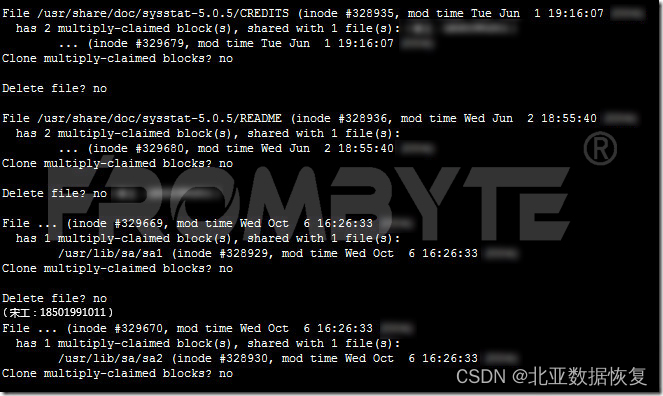
服务器数据恢复环境: 某品牌X系列服务器,4块SAS硬盘组建了一组RAID5阵列,还有1块磁盘作为热备盘使用。服务器上层安装的linux操作系统,操作系统上部署了一个基于oracle数据库的OA(oracle已经不再为该OA系统提供后续服务…...

生产派工自动化:MES系统的关键作用
随着制造业的数字化转型和智能化发展,生产派工自动化成为了提高生产效率、降低成本,并实现优质产品生产的关键要素之一。制造执行系统(MES)在派工自动化中发挥着重要作用,通过实时数据采集和智能调度,优化生…...
netty-daxin-2(netty常用事件讲解)
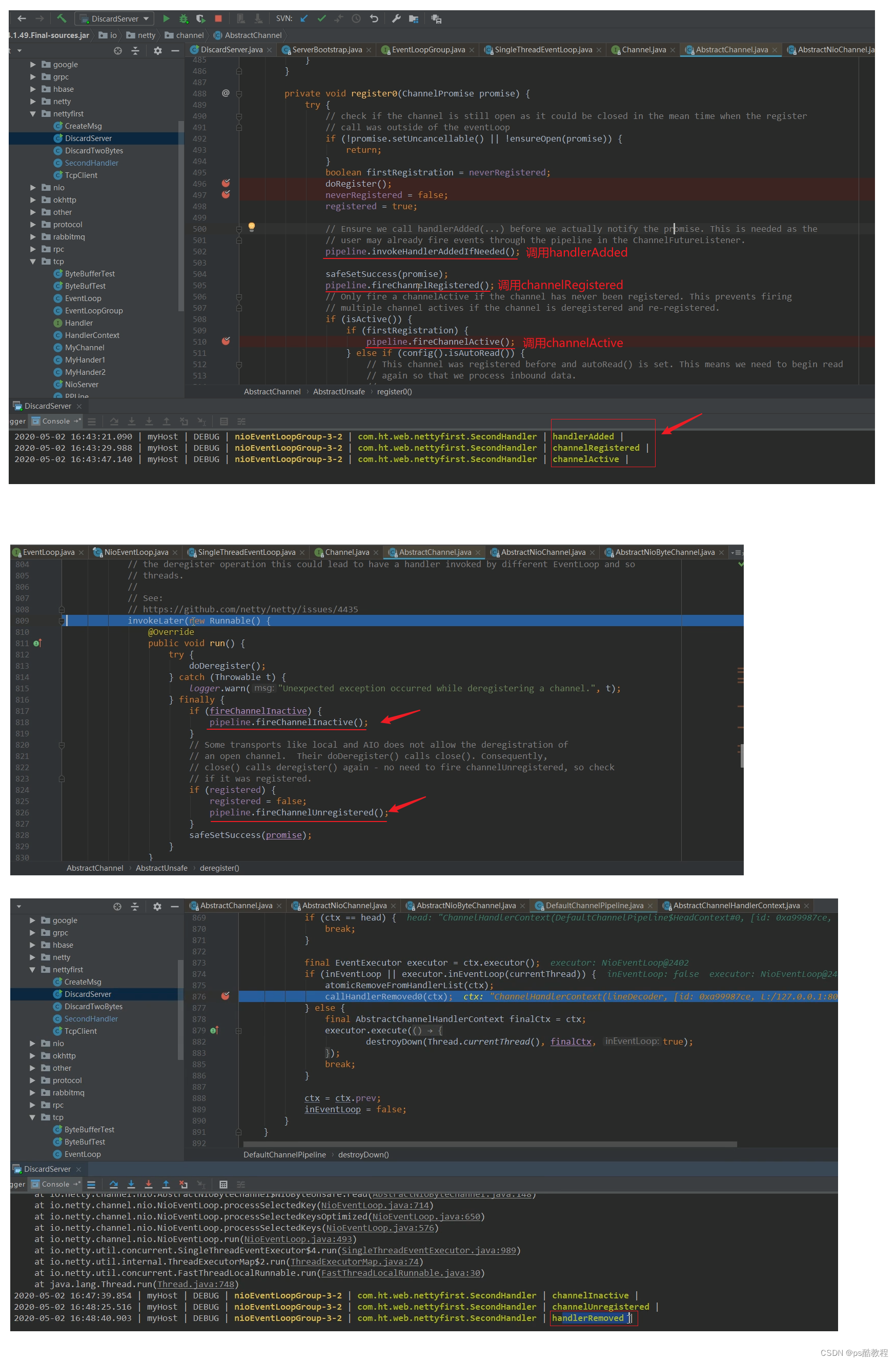
文章目录 netty常用事件讲解ChannelHandler接口ChannelHandler适配器类ChannelInboundHandler 子接口Channel 的状态调用时机ChannelHandler 生命周期示例NettServer&CustomizeInboundHandlerNettyClient测试分析 ChannelInboundHandlerAdapter适配器类SimpleChannelInboun…...

使用playbook部署k8s集群
1.部署ansible集群 使用python脚本一个简单的搭建ansible集群-CSDN博客 2.ansible命令搭建k8s: 1.主机规划: 节点IP地址操作系统配置server192.168.174.150centos7.92G2核client1192.168.174.151centos7.92G2核client2192.168.174.152centos7.92G2 …...

Python基础入门第四节,第五节课笔记
第四节 第一个条件语句 if 条件: 条件成立执行的代码1 条件成立执行的代码2 ...... else: 条件不成立执行的代码1 条件不成立执行的代码2 …… 代码如下: 身高 float(input("请输入您的身高(米):")) if 身高 >1.3:print(f您的身高是{身高},已经超过1.3米,您需…...
基于Java SSM框架实现智能停车场系统项目【项目源码+论文说明】
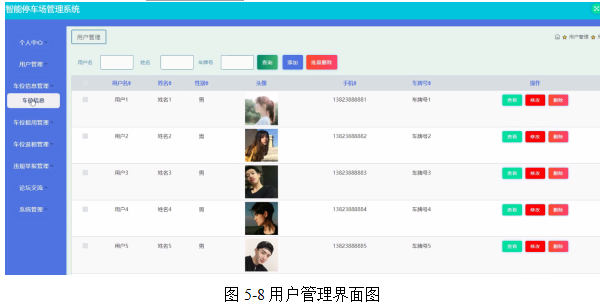
基于java的SSM框架实现智能停车场系统演示 摘要 本论文主要论述了如何使用JAVA语言开发一个智能停车场管理系统,本系统将严格按照软件开发流程进行各个阶段的工作,采用B/S架构,面向对象编程思想进行项目开发。在引言中,作者将论述…...

React系列:useEffect的使用
useEffect的使用 useEffect的第二个参数不同,useEffect的加载不同 当第二个参数为没有的时候 只在组件初始渲染和组件更新之后加载当第二个参数为[] 的时候 只在初始渲染之后加载当第二个参数为[有依赖] 的时候 只在初始渲染之后和依赖修改的时候进行加载 functi…...

Ps:形状工具 - 描边选项
在形状工具的工具选项栏或“属性”面板中,单击“设置形状描边类型” Set shape stroke type菜单图标可打开“描边选项” Stroke Options面板。 描边预设 Stroke Type 默认列出了实线、虚线和点线三种类型的描边,单击可应用。 自己创建并存储的描边类型&a…...

C#基础知识 - 变量、常量与数据类型篇
C#基础知识 - 变量、常量与数据类型篇 第3节 变量、常量与数据类型3.1 C#变量3.1.1 变量使用3.1.2 自定义变量3.1.2 接收用户输入 3.2 C#常量3.2.1 常量的使用 3.3 C#数据类型3.3.1 数据类型之值类型3.3.2 数据类型之引用类型 更多C#基础知识详解请查看:C#基础知识 …...

Java面向对象思想以及原理以及内存图解
文章目录 什么是面向对象面向对象和面向过程区别创建一个对象用什么运算符?面向对象实现伪代码面向对象三大特征类和对象的关系。 基础案例代码实现实例化创建car对象时car引用的内存图对象调用方法过程 成员变量和局部变量作用范围在内存中的位置 关于对象的引用关系简介相关…...
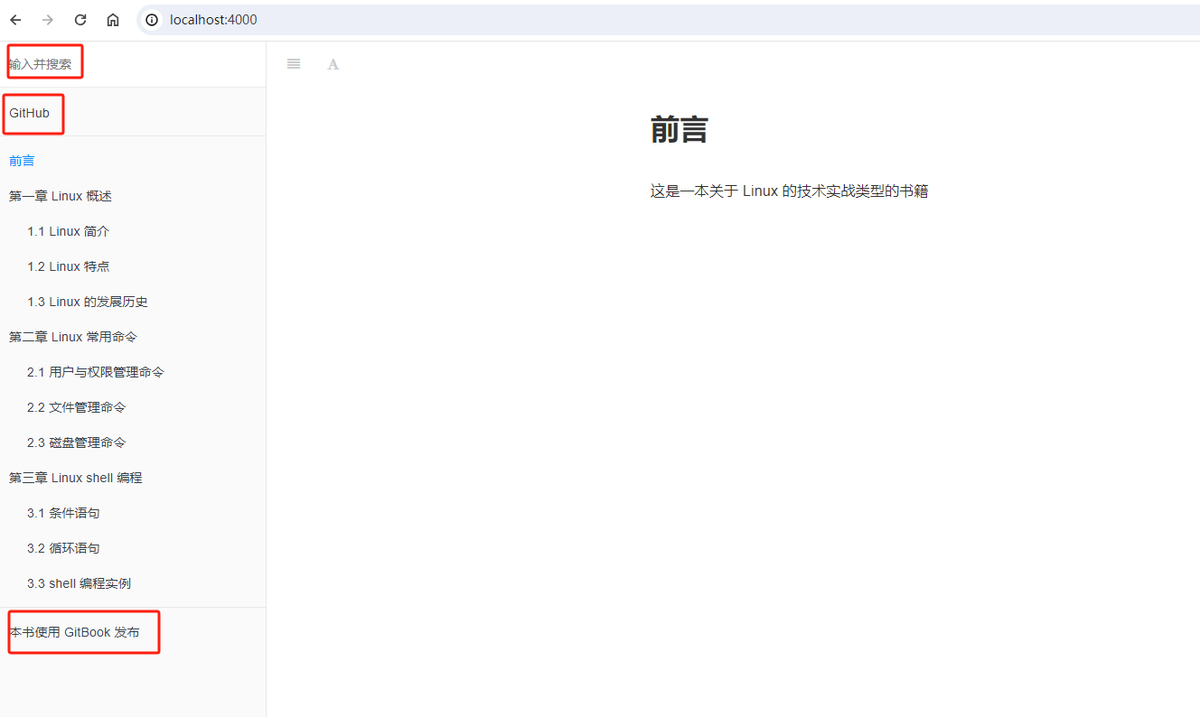
Gitbook----基于 Windows 10 系统本地安装配置 Gitbook 编写属于自己的电子书
查看原文 文章目录 一、安装 Nodejs二、安装 Gitbook三、gitbook 的使用方法四、设计电子书的目录结构五、设置 gitbook 常用配置 一、安装 Nodejs 若要在 Windows 10 系统即本地使用 Gitbook,需要安装 gitlab-cli 工具,而 gitbook-cli 工具是基于 Node…...
springMVC-Restful风格
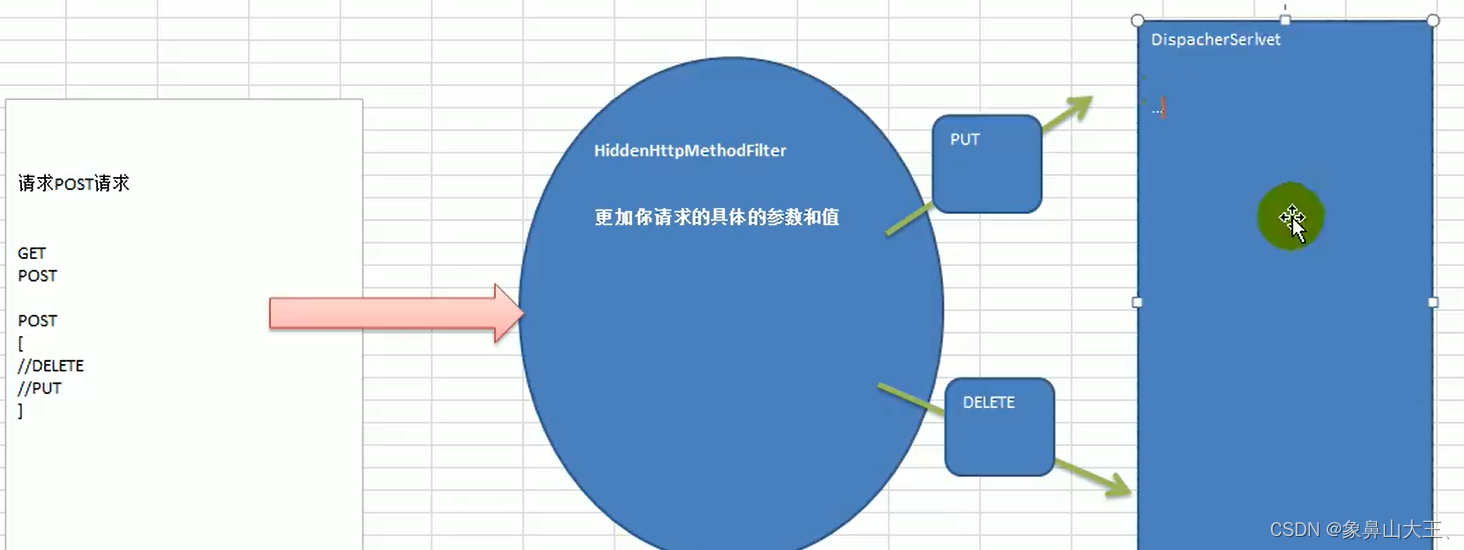
基本介绍 REST:即Representational State Transfer。(资源)表现层状态转化。是目前最流行的一种互联网软件架构。它结构清晰、符合标准、易于理解、扩展方便,所以正得到越来越多网站的采用. 1.HTTP协议里面,四个表示操…...
【OS】操作系统总复习笔记
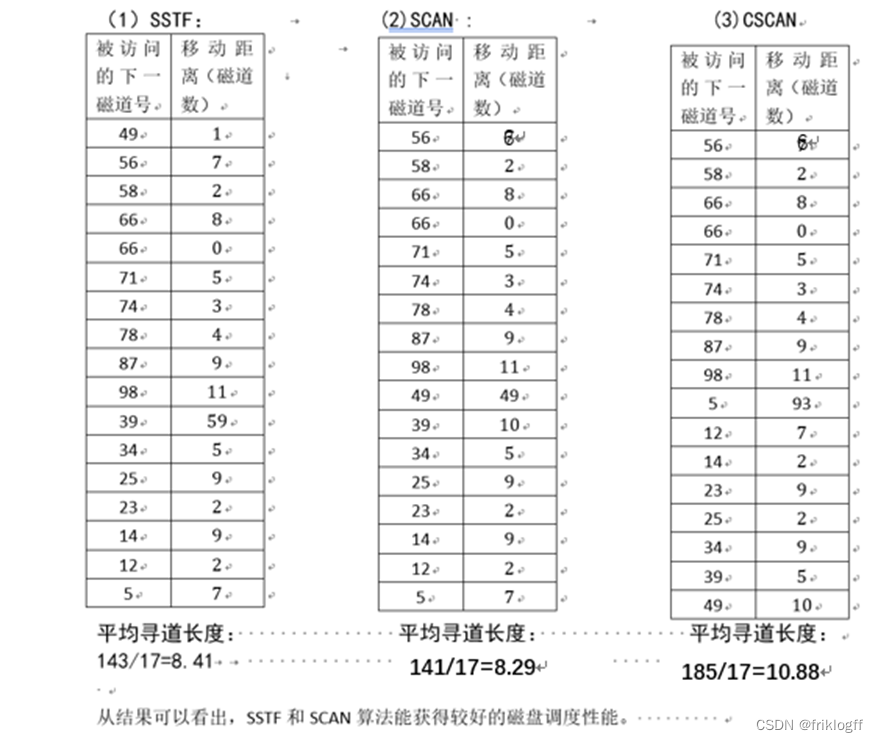
操作系统总复习 文章目录 操作系统总复习一、考试题型1. 论述分析题2. 计算题3. 应用题 二、操作系统引论(第1章)2.1 操作系统的发展过程2.2 操作系统定义2.3 操作系统的基本特性2.3.1 并发2.3.2 共享2.3.3 虚拟2.3.4 异步 2.4 OS的功能2.5 OS结构2.5 习…...

powerbuilder游标的使⽤
在某些PowerBuilder应⽤程序的开发中,您可能根本⽤不到游标这样⼀个对象。因为在其它⼯具开发中很多需⽤游标实现的⼯作,在PowerBuilder中却已有DataWin-dow来代劳了。事实上,DataWindow不仅可以替代游标进⾏从后台数据库查询多条记录的复杂操作,⽽且还远不⽌这些。但是同DataW…...
docker创建镜像 Dockerfile
目录 docker的创建镜像的方式 dockerfile形成(原理) docker的核心作用 docker的文件结构 dockerfile的语法 CMD和ENTRPOINT的区别 创建dockerfile镜像 区别 RUN命令的优化 如何把run命令写在一块 copy和ADD区别 区别 centos7 构建Apache的d…...

Unity安卓构建实战指南:解决APK真机安装闪退与构建失败
1. 这不是一本“从零开始”的书,而是一份你真正上手Unity安卓游戏开发前必须撕开的说明书我带过三届Unity实习工程师,也帮二十多个独立开发者把Demo打包进Google Play。每次看到新人在“安卓构建失败”报错里反复挣扎,或者对着“IL2CPP编译卡…...

MCP Server生产级配置:Playwright与LLM集成的避坑指南
1. 这不是又一个“Playwright入门教程”,而是一份能直接塞进CI流水线的MCP Server生产级配置实录你有没有遇到过这样的场景:团队刚决定用AI驱动自动化测试,技术选型会上大家一致看好Playwright MCP(Model Context Protocol&#…...

别再只用Service了!ROS1 Action通信保姆级教程:从导航进度条到任务取消,手把手教你实现带反馈的机器人任务
别再只用Service了!ROS1 Action通信保姆级教程:从导航进度条到任务取消,手把手教你实现带反馈的机器人任务当你的机器人正在执行一个长达10分钟的导航任务时,突然发现目标点设置错误,这时候如果只能干等着任务完成或者…...

2026年,本地精准营销高性价比服务商来袭,你还不了解一下?
在本地商业竞争日益激烈的2026年,实体店面临着诸多挑战,引流难、成本高、复购率低等问题困扰着众多商家。而中粤(广州)信息科技有限公司作为本地精准营销的高性价比服务商,正以其独特的优势和卓越的服务,为…...

为Claude Code配置稳定API源并解决访问限制
🚀 告别海外账号与网络限制!稳定直连全球优质大模型,限时半价接入中。 👉 点击领取海量免费额度 为Claude Code配置稳定API源并解决访问限制 Claude Code 作为一款强大的 AI 编程辅助工具,其原生服务在某些情况下可能…...

网安学习第24天 PHP安全——PHP反序列化
一、序列化与反序列化 1、序列化serialize() 序列化是什么?序列化就是把程序中的对象、数组、结构体等复杂数据,转换成可以存储或传输的格式。 简单说: 把“内存里的对象”变成“字符串/字节流”。 例如 PHP 中有一个对象: $u…...

基于Arduino UNO的真随机数生成与数据持久化在Tambola游戏机中的应用
1. 项目概述:用Arduino UNO打造一台全自动Tambola游戏机如果你玩过或者听说过Tambola(在印度非常流行的游戏,在欧美也叫Bingo或Housie),就知道它的核心玩法是主持人从一个装有数字球的容器中随机抽取号码,玩…...
)
Sora 2原生MP4输出不兼容Premiere Pro?揭秘H.264/H.265封装层4大隐性缺陷(附MediaInfo诊断模板+自动修复脚本)
更多请点击: https://codechina.net 第一章:Sora 2原生MP4输出不兼容Premiere Pro的根源定位 Sora 2生成的原生MP4文件虽符合ISO/IEC 14496-14规范,但其底层封装结构与Adobe Premiere Pro对时间码、元数据及视频流编码参数的严格校验逻辑存在…...

如何用Nucleus Co-Op让单机游戏变身本地多人分屏神器
如何用Nucleus Co-Op让单机游戏变身本地多人分屏神器 【免费下载链接】nucleuscoop Starts multiple instances of a game for split-screen multiplayer gaming! 项目地址: https://gitcode.com/gh_mirrors/nu/nucleuscoop 还在为想和朋友一起玩游戏却只有一台电脑而烦…...

当卫星在天上“读懂”人间:ICLR 2025 论文深度解读师玉娇、昃向辉的CS2S
把一张卫星图变成一张街景照片,就像把一个俯视棋盘拼成一面看台——不仅要摆对每一枚棋子,还要看懂整场比赛想象这样一个场景:你在城市规划部门工作,需要快速生成某条街道在不同季节、不同天气条件下的真实渲染效果,以…...