
react+redux+antd-mobile 之 记账本案例
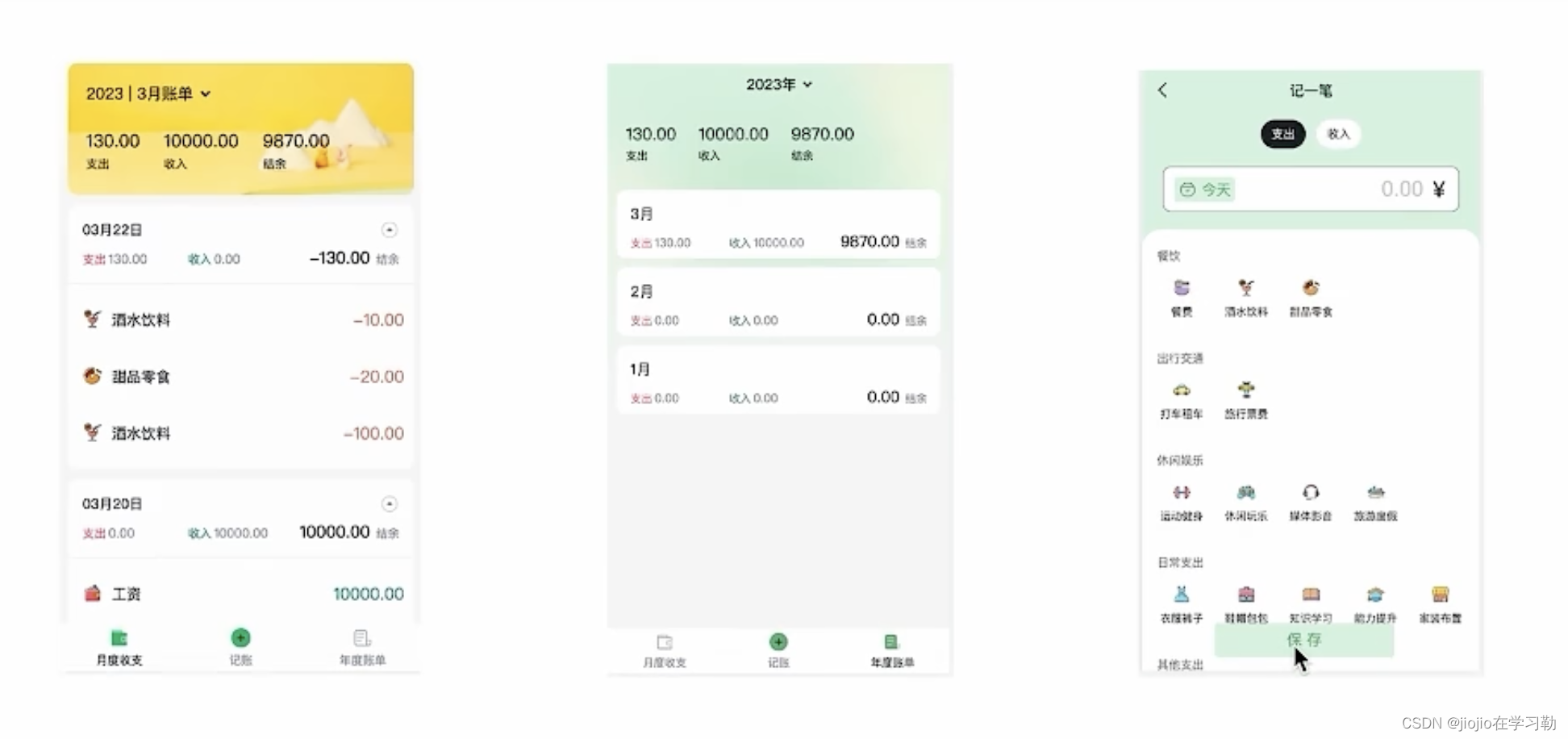
1.环境搭建
//使用CRA创建项目,并安装必要依赖,包括下列基础包
//1. Redux状态管理 -  @reduxjs/toolkit 、 react-redux
//2. 路由 - react-router-dom
//3. 时间处理 - dayjs
//4. class类名处理 - classnames
//5. 移动端组件库 - antd-mobile
//6. 请求插件 - axios
npx create-react-app react-bill-test
npm i @reduxjs/toolkit react-redux react-router-dom dayjs classnames antd-mobile axios
npm run start
2.配置别名路径@

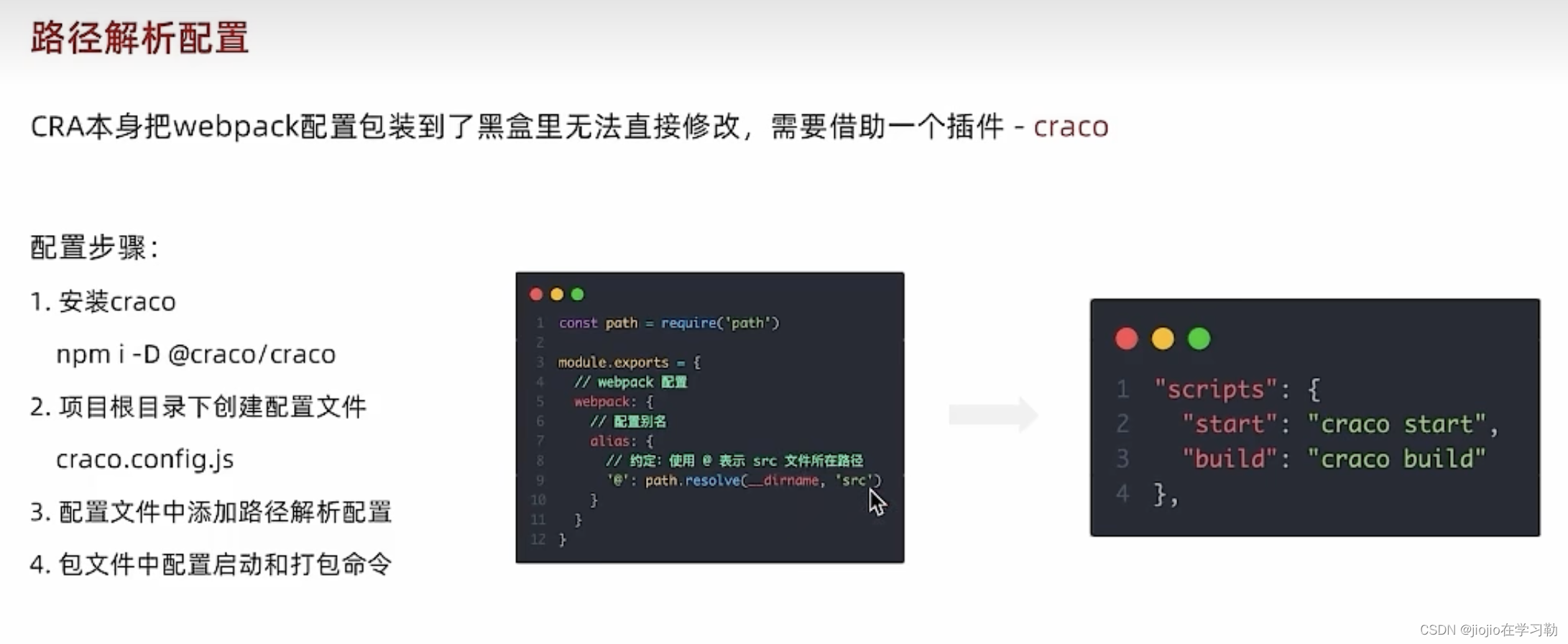
const path = require('path')module.exports = {devServer: {port: 3006},webpack: {alias: {'@': path.resolve(__dirname, 'src')}}
}
"start": "craco start","build": "craco build",
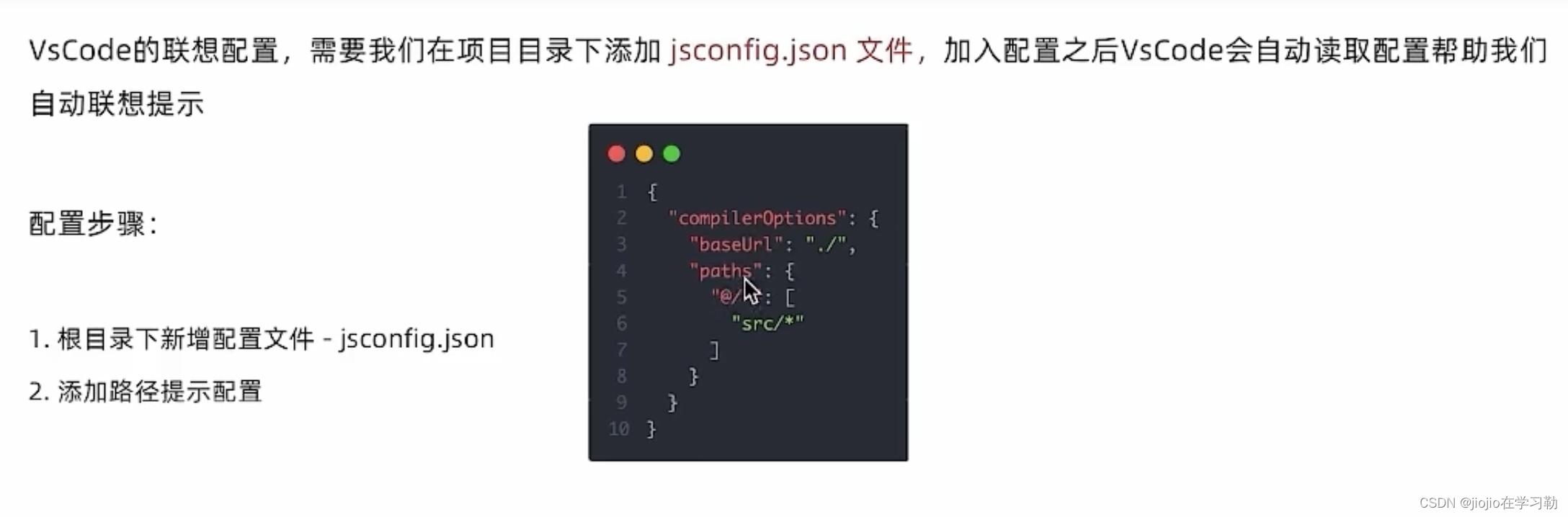
{"compilerOptions": {"baseUrl": "./","paths": {"@/*": ["src/*"]}}
}
3.json-server实现mock
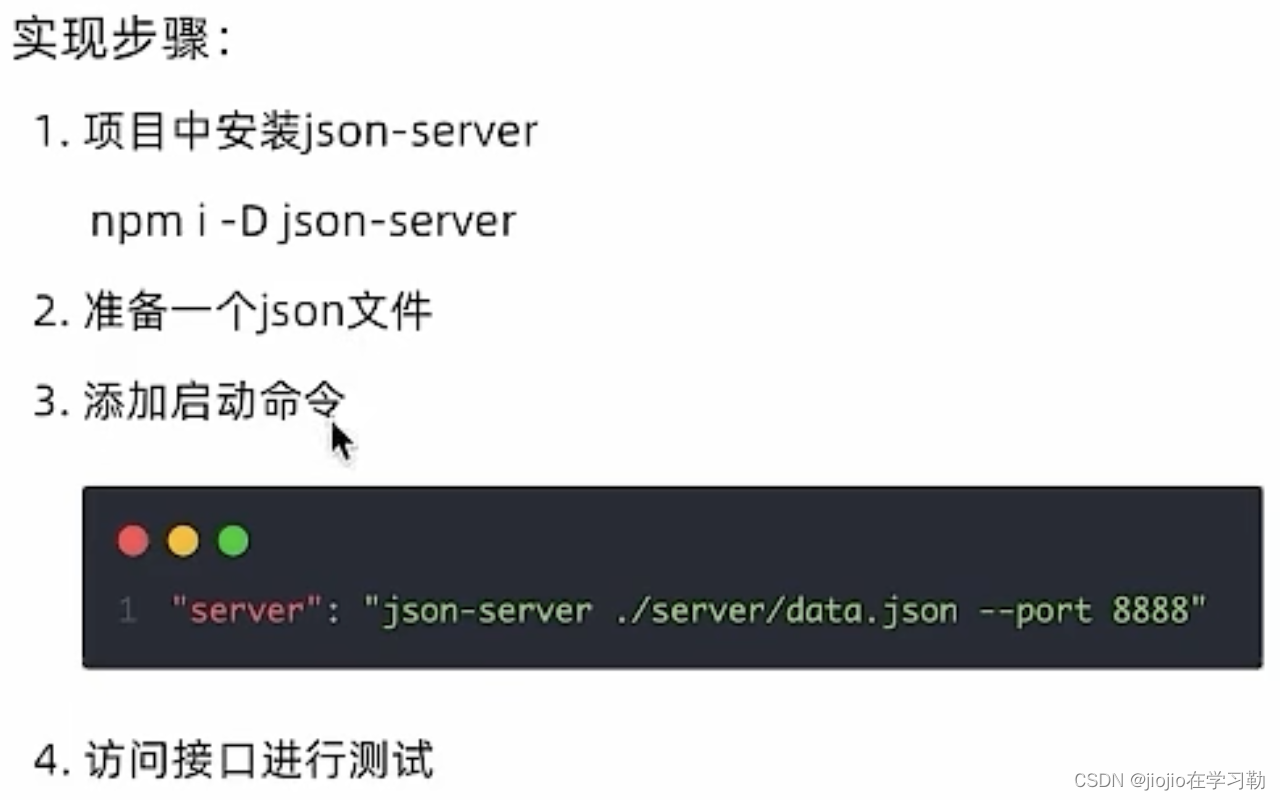
npm i -D json-server
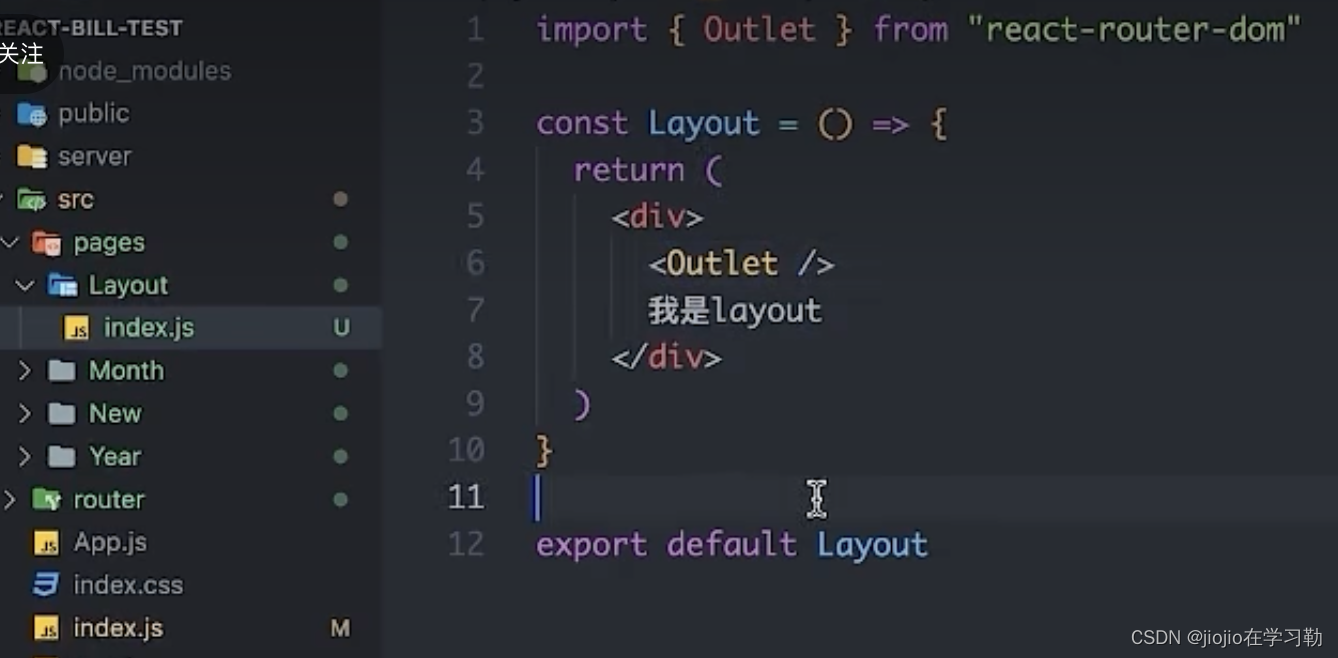
4.整体路由设计
俩个一级路由 (Layout / new)2. 俩个二级路由 (Layout - mouth/year)
//router下index.js
// 创建路由实例 绑定path element
import Layout from '@/pages/Layout'
import Month from '@/pages/Month'
import New from '@/pages/New'
import Year from '@/pages/Year'
import { createBrowserRouter } from 'react-router-dom'
const router = createBrowserRouter([{path: '/',element: <Layout />,children: [{path: 'month',element: <Month />},{path: 'year',element: <Year />}]},{path: '/new',element: <New />}
])export default router
//index.js
import React from 'react'
import ReactDOM from 'react-dom/client'
import './index.css'
import { RouterProvider } from 'react-router-dom'
import sum from '@/test'
import router from './router'
import { Provider } from 'react-redux'
const root = ReactDOM.createRoot(document.getElementById('root'))
root.render(<Provider><RouterProvider router={router} /></Provider>
)
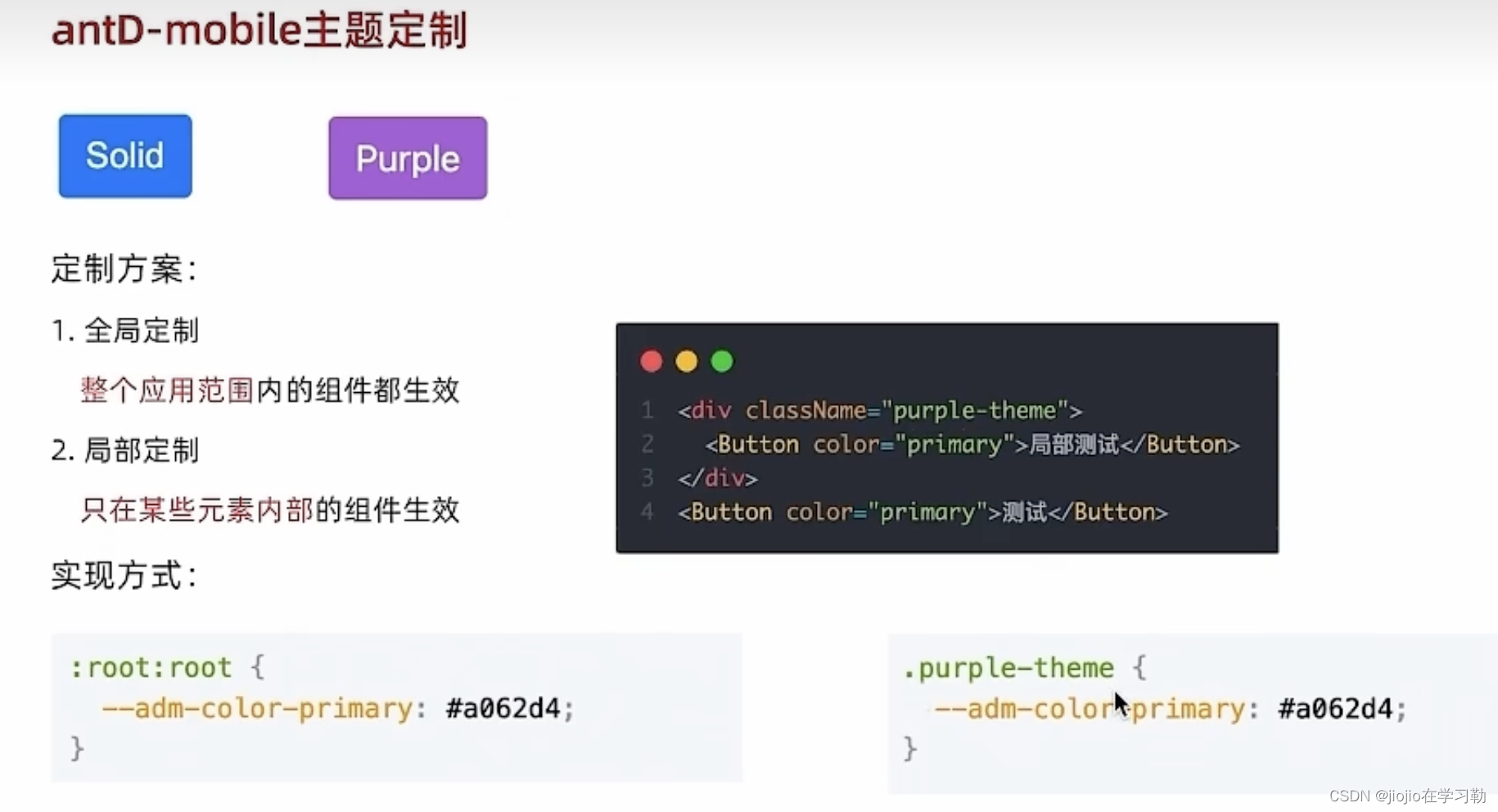
5.antD-mobile主题定制
//theme.css
:root:root {--adm-color-primary: rgb(105, 174, 120);
}/* .puple {--adm-color-primary: #a062d4;
} */
//index.js
// 导入定制主题文件
import './theme.css'
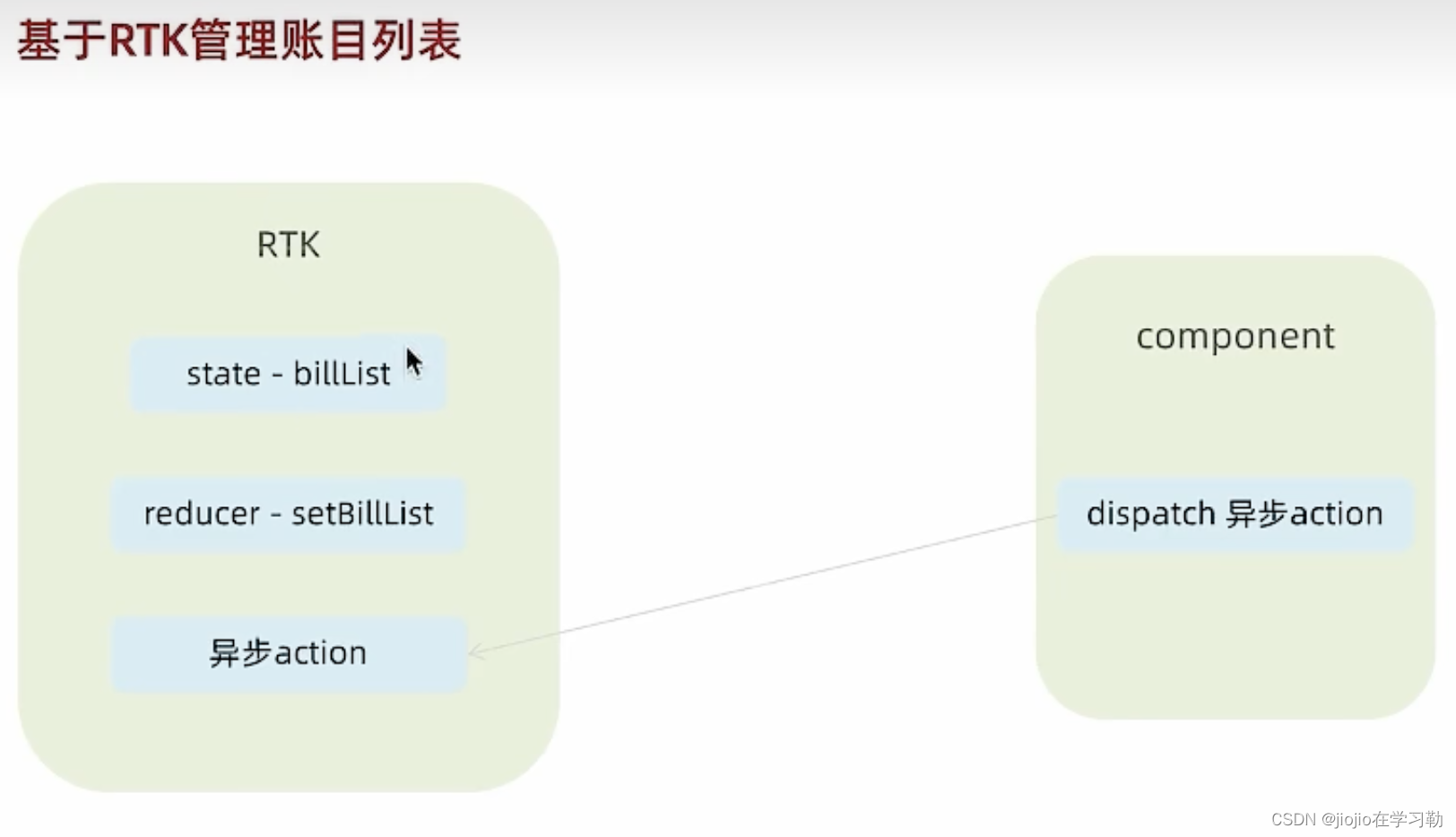
6.redux管理帐目列表
1.
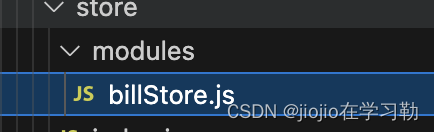
// 账单列表相关storeimport { createSlice } from '@reduxjs/toolkit'
import axios from 'axios'const billStore = createSlice({name: 'bill',// 数据状态stateinitialState: {billList: []},reducers: {// 同步修改方法setBillList (state, action) {state.billList = action.payload}}
})// 解构actionCreater函数
const { setBillList } = billStore.actions
// 编写异步
const getBillList = () => {return async (dispatch) => {// 编写异步请求const res = await axios.get('http://localhost:8888/ka')// 触发同步reducerdispatch(setBillList(res.data))}
}export { getBillList }
// 导出reducer
const reducer = billStore.reducer
export default reducer
2.store下index.js
// 组合子模块 导出store实例
import { configureStore } from '@reduxjs/toolkit'
import billReducer from './modules/billStore'const store = configureStore({reducer: {bill: billReducer}
})export default store
3.index.js
import React from 'react'
import ReactDOM from 'react-dom/client'
import './index.css'
import { RouterProvider } from 'react-router-dom'
import router from './router'
import { Provider } from 'react-redux'
import store from './store'
// 导入定制主题文件
import './theme.css'
const root = ReactDOM.createRoot(document.getElementById('root'))
root.render(<Provider store={store}><RouterProvider router={router} /></Provider>
)
4.前端项目+服务一起启动
"start": "craco start & npm run server",
7.tabBar功能实现
1.layout下index.js文件
import { TabBar } from "antd-mobile"
import { useEffect } from "react"
import { Outlet, useNavigate } from "react-router-dom"
import { useDispatch } from 'react-redux'
import { getBillList } from "@/store/modules/billStore"
import './index.scss'
import {BillOutline,CalculatorOutline,AddCircleOutline
} from 'antd-mobile-icons'const tabs = [{key: '/month',title: '月度账单',icon: <BillOutline />,},{key: '/new',title: '记账',icon: <AddCircleOutline />,},{key: '/year',title: '年度账单',icon: <CalculatorOutline />,},
]const Layout = () => {const dispatch = useDispatch()useEffect(() => {dispatch(getBillList())}, [dispatch])// 切换菜单跳转路由const navigate = useNavigate()const swithRoute = (path) => {console.log(path)navigate(path)}return (<div className="layout"><div className="container"><Outlet /></div><div className="footer"><TabBar onChange={swithRoute}>{tabs.map(item => (<TabBar.Item key={item.key} icon={item.icon} title={item.title} />))}</TabBar></div></div>)
}export default Layout
2.安装scss
npm i -D scss
8.月度账单—统计区域
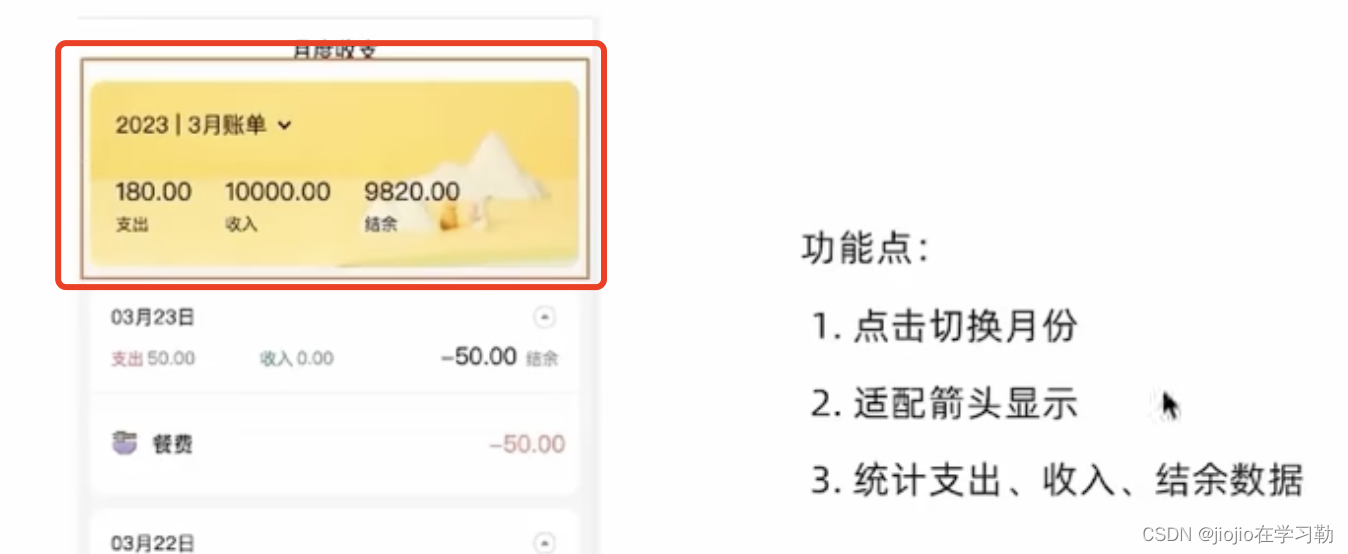
//date.json
{"ka": [{"type": "pay","money": -99,"date": "2022-10-24 10:36:42","useFor": "drinks","id": 1},{"type": "pay","money": -88,"date": "2022-10-24 10:37:51","useFor": "longdistance","id": 2},{"type": "income","money": 100,"date": "2022-10-22 00:00:00","useFor": "bonus","id": 3},{"type": "pay","money": -33,"date": "2022-09-24 16:15:41","useFor": "dessert","id": 4},{"type": "pay","money": -56,"date": "2022-10-22T05:37:06.000Z","useFor": "drinks","id": 5},{"type": "pay","money": -888,"date": "2022-10-28T08:21:42.135Z","useFor": "travel","id": 6},{"type": "income","money": 10000,"date": "2023-03-20T06:45:54.004Z","useFor": "salary","id": 7},{"type": "pay","money": -10,"date": "2023-03-22T07:17:12.531Z","useFor": "drinks","id": 8},{"type": "pay","money": -20,"date": "2023-03-22T07:51:20.421Z","useFor": "dessert","id": 9},{"type": "pay","money": -100,"date": "2023-03-22T09:18:12.898Z","useFor": "drinks","id": 17},{"type": "pay","money": -50,"date": "2023-03-23T09:11:23.312Z","useFor": "food","id": 18},{"type": "pay","money": -100,"date": "2023-04-04T03:03:15.617Z","useFor": "drinks","id": 19},{"type": "pay","money": -100,"date": "2023-04-02T16:00:00.000Z","useFor": "food","id": 20},{"type": "income","money": 10000,"date": "2023-02-28T16:00:00.000Z","useFor": "salary","id": 21}]
}
//Month下index文件
import { NavBar, DatePicker } from 'antd-mobile'
import { useEffect, useState } from 'react'
import './index.scss'
import classNames from 'classnames'
import dayjs from 'dayjs'
import { useSelector } from 'react-redux'
import { useMemo } from 'react'
import _ from 'lodash'
import DailyBill from './components/DayBill'
const Month = () => {// 按月做数据的分组const billList = useSelector(state => state.bill.billList)const monthGroup = useMemo(() => {// return出去计算之后的值return _.groupBy(billList, (item) => dayjs(item.date).format('YYYY-MM'))}, [billList])console.log(monthGroup)// 控制弹框的打开和关闭const [dateVisible, setDateVisible] = useState(false)// 控制时间显示const [currentDate, setCurrentDate] = useState(() => {return dayjs(new Date()).format('YYYY-MM')})const [currentMonthList, setMonthList] = useState([])const monthResult = useMemo(() => {// 支出  /  收入  / 结余const pay = currentMonthList.filter(item => item.type === 'pay').reduce((a, c) => a + c.money, 0)const income = currentMonthList.filter(item => item.type === 'income').reduce((a, c) => a + c.money, 0)return {pay,income,total: pay + income}}, [currentMonthList])// 初始化的时候把当前月的统计数据显示出来useEffect(() => {const nowDate = dayjs().format('YYYY-MM')// 边界值控制if (monthGroup[nowDate]) {setMonthList(monthGroup[nowDate])}}, [monthGroup])// 确认回调const onConfirm = (date) => {setDateVisible(false)// 其他逻辑console.log(date)const formatDate = dayjs(date).format('YYYY-MM')console.log(formatDate)setMonthList(monthGroup[formatDate])setCurrentDate(formatDate)}return (<div className="monthlyBill"><NavBar className="nav" backArrow={false}>月度收支</NavBar><div className="content"><div className="header">{/* 时间切换区域 */}<div className="date" onClick={() => setDateVisible(true)}><span className="text">{currentDate + ''}月账单</span>{/* 思路:根据当前弹框打开的状态控制expand类名是否存在 */}<span className={classNames('arrow', dateVisible && 'expand')}></span></div>{/* 统计区域 */}<div className='twoLineOverview'><div className="item"><span className="money">{monthResult.pay.toFixed(2)}</span><span className="type">支出</span></div><div className="item"><span className="money">{monthResult.income.toFixed(2)}</span><span className="type">收入</span></div><div className="item"><span className="money">{monthResult.total.toFixed(2)}</span><span className="type">结余</span></div></div>{/* 时间选择器 */}<DatePickerclassName="kaDate"title="记账日期"precision="month"visible={dateVisible}onCancel={() => setDateVisible(false)}onConfirm={onConfirm}onClose={() => setDateVisible(false)}max={new Date()}/></div></div></div >)
}export default Month
9.月度账单—列表区域
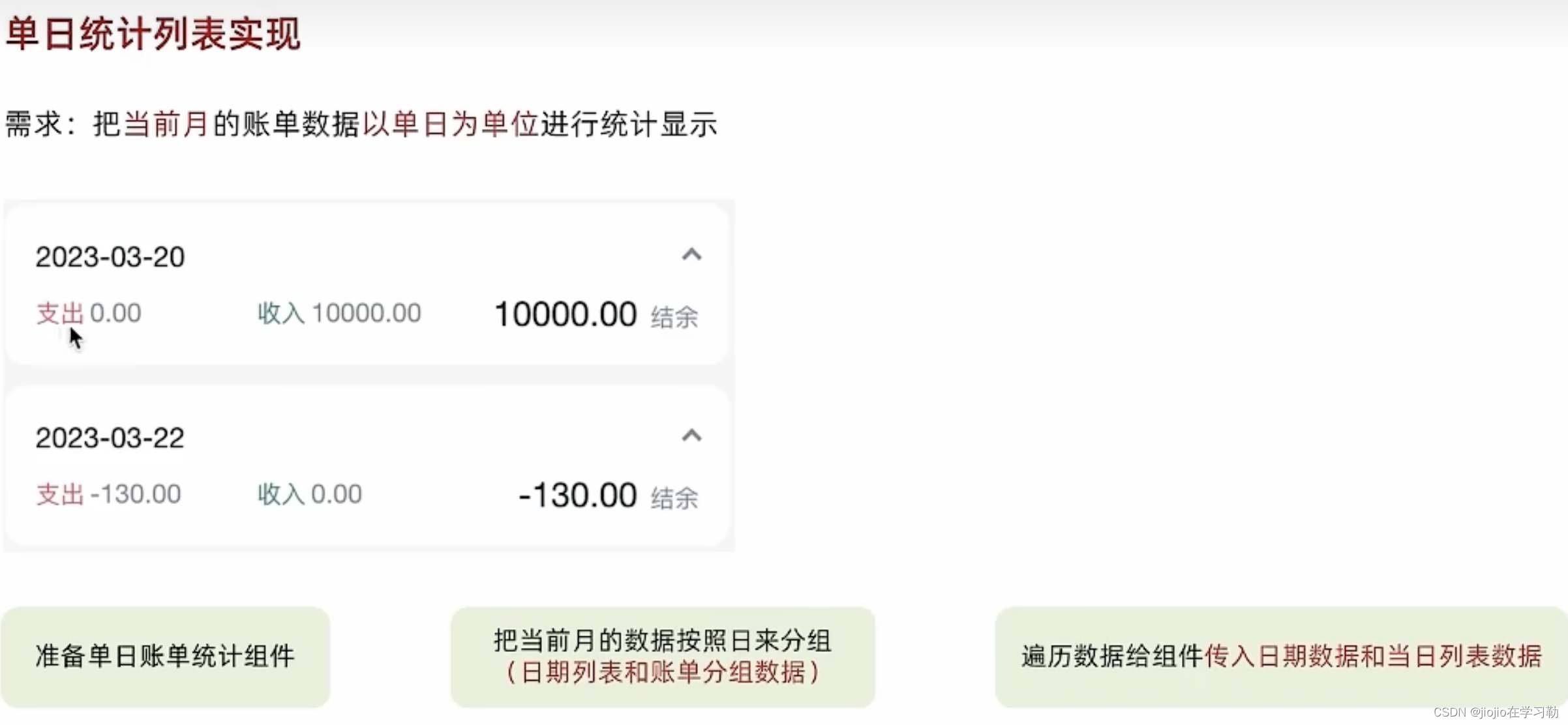
//daybill下index.js. 子组件
import classNames from 'classnames'
import './index.scss'
import { useMemo } from 'react'
import { billTypeToName } from '@/contants/index'
import { useState } from 'react'
import Icon from '@/components/Icon'
const DailyBill = ({ date, billList }) => {const dayResult = useMemo(() => {// 计算单日统计// 支出  /  收入  / 结余const pay = billList.filter(item => item.type === 'pay').reduce((a, c) => a + c.money, 0)const income = billList.filter(item => item.type === 'income').reduce((a, c) => a + c.money, 0)return {pay,income,total: pay + income}}, [billList])// 控制展开收起const [visible, setVisible] = useState(false)return (<div className={classNames('dailyBill')}><div className="header"><div className="dateIcon"><span className="date">{date}</span>{/* expand 有这个类名 展开的箭头朝上的样子 */}<span className={classNames('arrow', visible && 'expand')} onClick={() => setVisible(!visible)}></span></div><div className="oneLineOverview"><div className="pay"><span className="type">支出</span><span className="money">{dayResult.pay.toFixed(2)}</span></div><div className="income"><span className="type">收入</span><span className="money">{dayResult.income.toFixed(2)}</span></div><div className="balance"><span className="money">{dayResult.total.toFixed(2)}</span><span className="type">结余</span></div></div></div>{/* 单日列表 */}<div className="billList" style={{ display: visible ? 'block' : 'none' }}>{billList.map(item => {return (<div className="bill" key={item.id}>{/* 图标 */}<Icon type={item.useFor} /><div className="detail"><div className="billType">{billTypeToName[item.useFor]}</div></div><div className={classNames('money', item.type)}>{item.money.toFixed(2)}</div></div>)})}</div></div>)
}
export default DailyBill
//icon下idnex
const Icon = ({ type }) => {return (<imgsrc={`https://yjy-teach-oss.oss-cn-beijing.aliyuncs.com/reactbase/ka/${type}.svg`}alt="icon"style={{width: 20,height: 20,}}/>)
}export default Icon
//contants下index.js
export const billListData = {pay: [{type: 'foods',name: '餐饮',list: [{ type: 'food', name: '餐费' },{ type: 'drinks', name: '酒水饮料' },{ type: 'dessert', name: '甜品零食' },],},{type: 'taxi',name: '出行交通',list: [{ type: 'taxi', name: '打车租车' },{ type: 'longdistance', name: '旅行票费' },],},{type: 'recreation',name: '休闲娱乐',list: [{ type: 'bodybuilding', name: '运动健身' },{ type: 'game', name: '休闲玩乐' },{ type: 'audio', name: '媒体影音' },{ type: 'travel', name: '旅游度假' },],},{type: 'daily',name: '日常支出',list: [{ type: 'clothes', name: '衣服裤子' },{ type: 'bag', name: '鞋帽包包' },{ type: 'book', name: '知识学习' },{ type: 'promote', name: '能力提升' },{ type: 'home', name: '家装布置' },],},{type: 'other',name: '其他支出',list: [{ type: 'community', name: '社区缴费' }],},],income: [{type: 'professional',name: '其他支出',list: [{ type: 'salary', name: '工资' },{ type: 'overtimepay', name: '加班' },{ type: 'bonus', name: '奖金' },],},{type: 'other',name: '其他收入',list: [{ type: 'financial', name: '理财收入' },{ type: 'cashgift', name: '礼金收入' },],},],
}export const billTypeToName = Object.keys(billListData).reduce((prev, key) => {billListData[key].forEach(bill => {bill.list.forEach(item => {prev[item.type] = item.name})})return prev
}, {})
//month下index.js文件 父组件
import { NavBar, DatePicker } from 'antd-mobile'
import { useEffect, useState } from 'react'
import './index.scss'
import classNames from 'classnames'
import dayjs from 'dayjs'
import { useSelector } from 'react-redux'
import { useMemo } from 'react'
import _ from 'lodash'
import DailyBill from './components/DayBill'
const Month = () => {// 按月做数据的分组const billList = useSelector(state => state.bill.billList)const monthGroup = useMemo(() => {// return出去计算之后的值return _.groupBy(billList, (item) => dayjs(item.date).format('YYYY-MM'))}, [billList])console.log(monthGroup)// 控制弹框的打开和关闭const [dateVisible, setDateVisible] = useState(false)// 控制时间显示const [currentDate, setCurrentDate] = useState(() => {return dayjs(new Date()).format('YYYY-MM')})const [currentMonthList, setMonthList] = useState([])const monthResult = useMemo(() => {// 支出  /  收入  / 结余const pay = currentMonthList.filter(item => item.type === 'pay').reduce((a, c) => a + c.money, 0)const income = currentMonthList.filter(item => item.type === 'income').reduce((a, c) => a + c.money, 0)return {pay,income,total: pay + income}}, [currentMonthList])// 初始化的时候把当前月的统计数据显示出来useEffect(() => {const nowDate = dayjs().format('YYYY-MM')// 边界值控制if (monthGroup[nowDate]) {setMonthList(monthGroup[nowDate])}}, [monthGroup])// 确认回调const onConfirm = (date) => {setDateVisible(false)// 其他逻辑console.log(date)const formatDate = dayjs(date).format('YYYY-MM')console.log(formatDate)setMonthList(monthGroup[formatDate])setCurrentDate(formatDate)}// 当前月按照日来做分组const dayGroup = useMemo(() => {// return出去计算之后的值const groupData = _.groupBy(currentMonthList, (item) => dayjs(item.date).format('YYYY-MM-DD'))const keys = Object.keys(groupData)return {groupData,keys}}, [currentMonthList])return (<div className="monthlyBill"><NavBar className="nav" backArrow={false}>月度收支</NavBar><div className="content"><div className="header">{/* 时间切换区域 */}<div className="date" onClick={() => setDateVisible(true)}><span className="text">{currentDate + ''}月账单</span>{/* 思路:根据当前弹框打开的状态控制expand类名是否存在 */}<span className={classNames('arrow', dateVisible && 'expand')}></span></div>{/* 统计区域 */}<div className='twoLineOverview'><div className="item"><span className="money">{monthResult.pay.toFixed(2)}</span><span className="type">支出</span></div><div className="item"><span className="money">{monthResult.income.toFixed(2)}</span><span className="type">收入</span></div><div className="item"><span className="money">{monthResult.total.toFixed(2)}</span><span className="type">结余</span></div></div>{/* 时间选择器 */}<DatePickerclassName="kaDate"title="记账日期"precision="month"visible={dateVisible}onCancel={() => setDateVisible(false)}onConfirm={onConfirm}onClose={() => setDateVisible(false)}max={new Date()}/></div>{/* 单日列表统计 */}{dayGroup.keys.map(key => {return <DailyBill key={key} date={key} billList={dayGroup.groupData[key]} />})}</div></div >)
}export default Month
10.记账本—新增账单
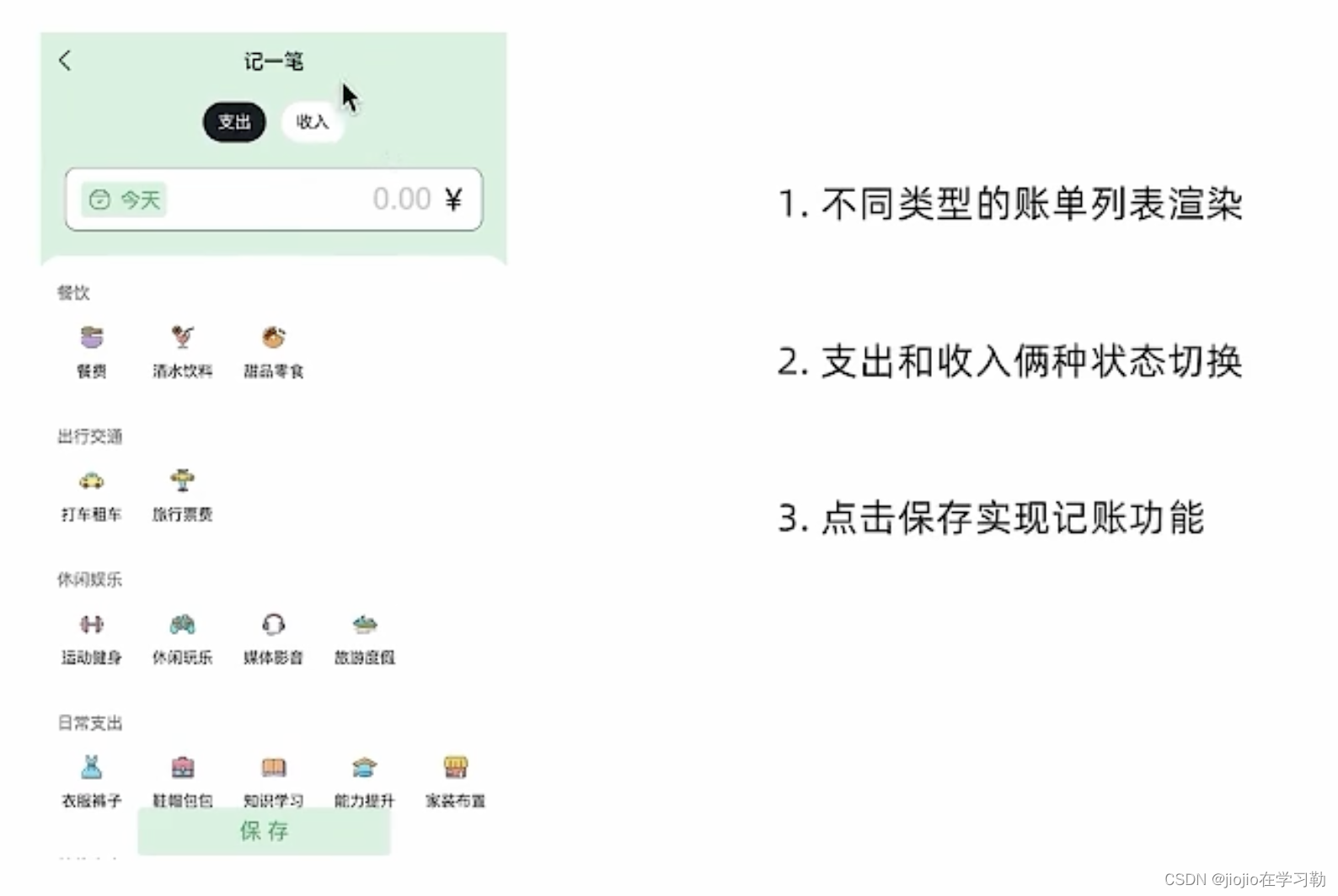
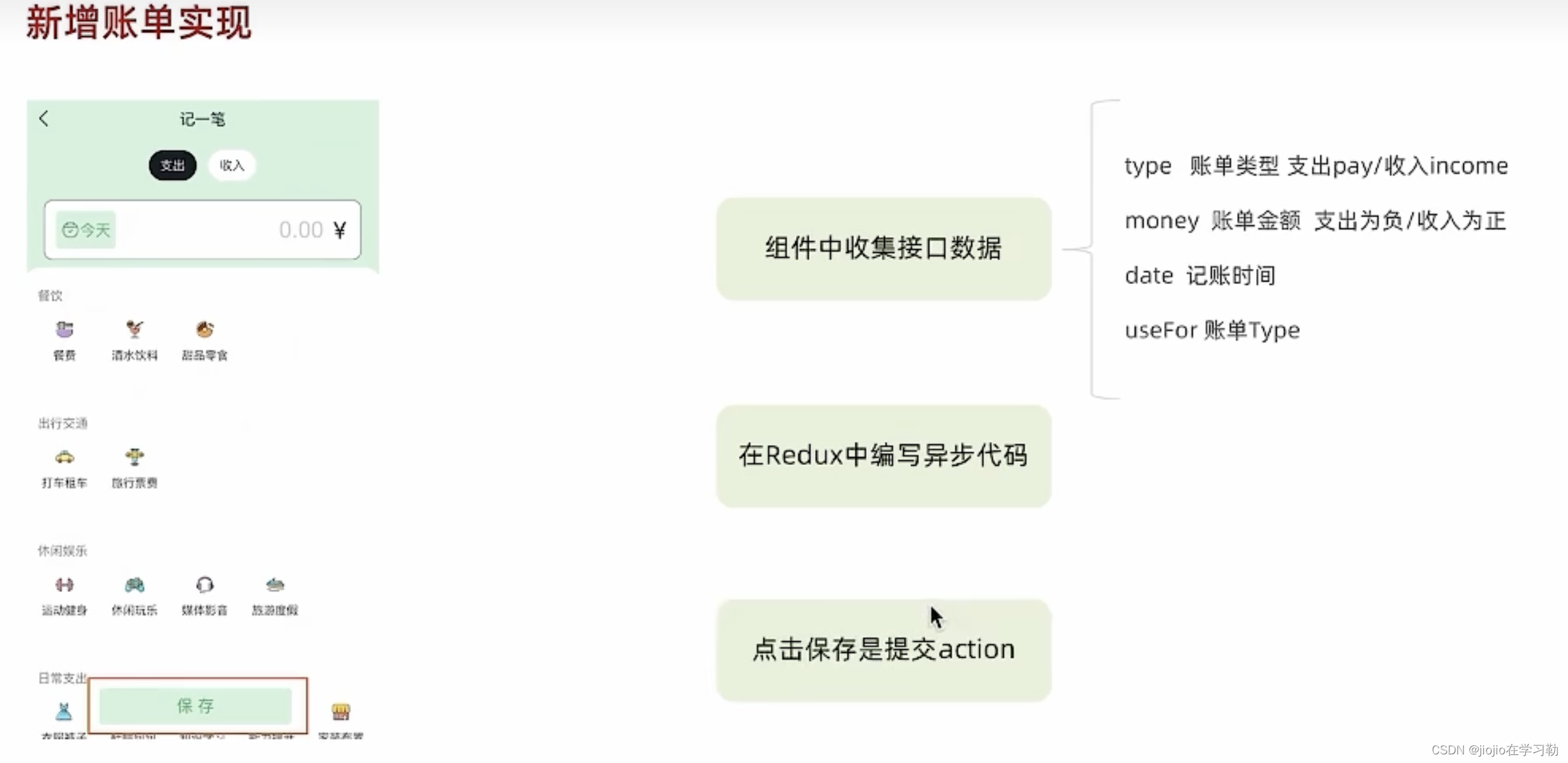
//new下index.js
import { Button, DatePicker, Input, NavBar } from 'antd-mobile'
import Icon from '@/components/Icon'
import './index.scss'
import classNames from 'classnames'
import { billListData } from '@/contants'
import { useNavigate } from 'react-router-dom'
import { useState } from 'react'
import { addBillList } from '@/store/modules/billStore'
import { useDispatch } from 'react-redux'
import dayjs from 'dayjs'const New = () => {const navigate = useNavigate()// 1. 准备一个控制收入支出的状态const [billType, setBillType] = useState('pay') // pay-支出 income-收入// 收集金额const [money, setMoney] = useState(0)const moneyChange = (value) => {setMoney(value)}// 收集账单类型const [useFor, setUseFor] = useState('')const dispatch = useDispatch()// 保存账单const saveBill = () => {// 收集表单数据const data = {type: billType,money: billType === 'pay' ? -money : +money,date: date,useFor: useFor}console.log(data)dispatch(addBillList(data))}// 存储选择的时间const [date, setDate] = useState()// 控制时间打开关闭const [dateVisible, setDateVisible] = useState(false)// 确认选择时间const dateConfirm = (value) => {console.log(value)setDate(value)setDateVisible(false)}return (<div className="keepAccounts"><NavBar className="nav" onBack={() => navigate(-1)}>记一笔</NavBar><div className="header"><div className="kaType"><Buttonshape="rounded"className={classNames(billType === 'pay' ? 'selected' : '')}onClick={() => setBillType('pay')}>支出</Button><ButtonclassName={classNames(billType === 'income' ? 'selected' : '')}shape="rounded"onClick={() => setBillType('income')}>收入</Button></div><div className="kaFormWrapper"><div className="kaForm"><div className="date"><Icon type="calendar" className="icon" /><span className="text" onClick={() => setDateVisible(true)}>{dayjs(date).format('YYYY-MM-DD')}</span>{/* 时间选择器 */}<DatePickerclassName="kaDate"title="记账日期"max={new Date()}visible={dateVisible}onConfirm={dateConfirm}/></div><div className="kaInput"><InputclassName="input"placeholder="0.00"type="number"value={money}onChange={moneyChange}/><span className="iconYuan">¥</span></div></div></div></div><div className="kaTypeList">{/* 数据区域 */}{billListData[billType].map(item => {return (<div className="kaType" key={item.type}><div className="title">{item.name}</div><div className="list">{item.list.map(item => {return (// selected<divclassName={classNames('item',useFor === item.type ? 'selected' : '')}key={item.type}onClick={() => setUseFor(item.type)}><div className="icon"><Icon type={item.type} /></div><div className="text">{item.name}</div></div>)})}</div></div>)})}</div><div className="btns"><Button className="btn save" onClick={saveBill}>保 存</Button></div></div>)
}export default New
//store下index.js
// 账单列表相关storeimport { createSlice } from '@reduxjs/toolkit'
import axios from 'axios'const billStore = createSlice({name: 'bill',// 数据状态stateinitialState: {billList: []},reducers: {// 同步修改方法setBillList (state, action) {state.billList = action.payload},// 同步添加账单方法addBill (state, action) {state.billList.push(action.payload)}}
})// 解构actionCreater函数
const { setBillList, addBill } = billStore.actions
// 编写异步
const getBillList = () => {return async (dispatch) => {// 编写异步请求const res = await axios.get('http://localhost:8888/ka')// 触发同步reducerdispatch(setBillList(res.data))}
}const addBillList = (data) => {return async (dispatch) => {// 编写异步请求const res = await axios.post('http://localhost:8888/ka', data)// 触发同步reducerdispatch(addBill(res.data))}
}export { getBillList, addBillList }
// 导出reducer
const reducer = billStore.reducerexport default reducer
相关文章:
react+redux+antd-mobile 之 记账本案例
1.环境搭建 //使用CRA创建项目,并安装必要依赖,包括下列基础包 //1. Redux状态管理 - reduxjs/toolkit 、 react-redux //2. 路由 - react-router-dom //3. 时间处理 - dayjs //4. class类名处理 - classnames //5. 移动端组件库 - antd-mobile //6. 请…...

Day22
Day22 一,生产者消费者模型 1.1,单个生产者单个消费者 public class Test01 {/*** 知识点:生产者消费者模型 - 单个生产者单个消费者* * 分析:* 产品类 - Phone:属性(brand,price)* 生产者线程 - Producer* 消费者线程 - Consumer* …...
)
Windows下linux 子系统 WSL2怎样使用usb串口(USBIPD-win4.0.0)
Windows下linux 子系统 WSL2怎样使用usb串口(USBIPD-win4.0.0) 一、widows安装二、ubuntu安装三、widows配置四、wsl配置 一、widows安装 https://github.com/dorssel/usbipd-win 直接下载最新版本的msi文件安装 二、ubuntu安装 sudo apt install lin…...

飞腾Ubantu22.04.3安装OpenNebula测试
1.概述 因OpenneBula官方镜像源只有AMD架构的镜像包不存在ARM的镜像包,借此用源码编译进行测试。 2.官网github地址 下载解压存放在服务器上: https://github.com/OpenNebula/minione/blob/master文件目录: 3.安装依赖包 sudo apt -y …...
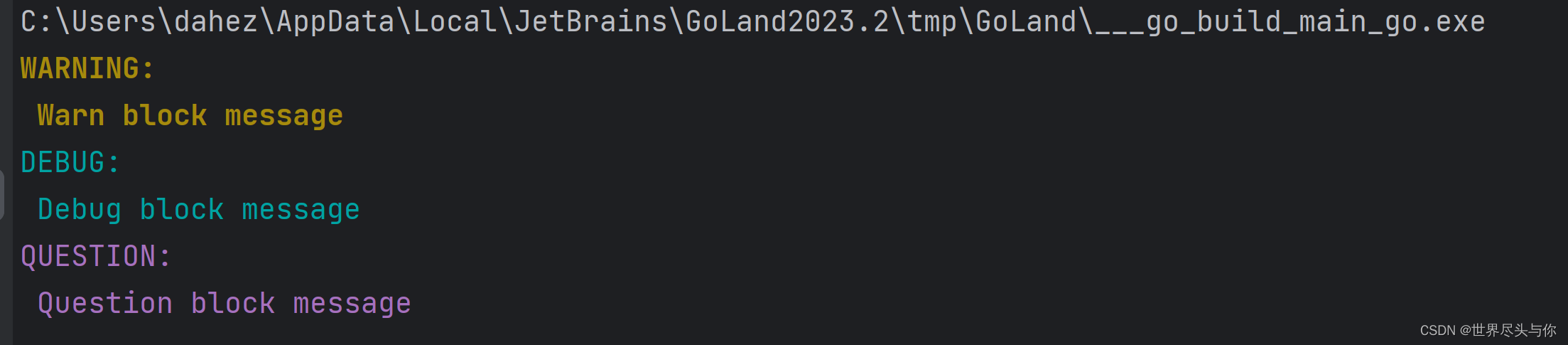
gookit/color - Go语言命令行色彩使用库教程
gookit/color - Go语言命令行色彩使用库教程 1.安装2.基础颜色(16-color)3.256色彩/RGB风格 1.安装 go get github.com/gookit/color2.基础颜色(16-color) 提供通用的API方法:Print Printf Println Sprint Sprintf 1、例如: color.Yellow.Println(&q…...

python弹奏《起风了》
代码是很大的! 其实就是python用ctypes调用Win API import ctypes import threading import time winmm = ctypes.windll.winmmclass Scale:Rest = 0C8 = 108B7 = 107A7s = 106A7 = 105G7s = 104G7 = 103F7s = 102F7 = 101E7 = 100D7s = 99D7 = 98C7s = 97C7 = 96B6 = 95A6s…...

Linux---all
Linux常用命令: Linux常用命令-CSDN博客 Linux命令大全(超详细版)_linux命令行大全-CSDN博客Linux常用命令大全(非常全面)-CSDN博客Linux 命令大全(看这一篇就足够)_linux命令-CSDN博客Linux常用命令大全——赶紧收藏…...

前端中级算法题
前端中级算法题 反转字符串 编写一个函数,接受一个字符串作为输入,并返回反转后的字符串。 示例: function reverseString(str) {return str.split().reverse().join(); }reverseString(hello); // 输出: olleh 找出数组中的最大值 编写一个函…...
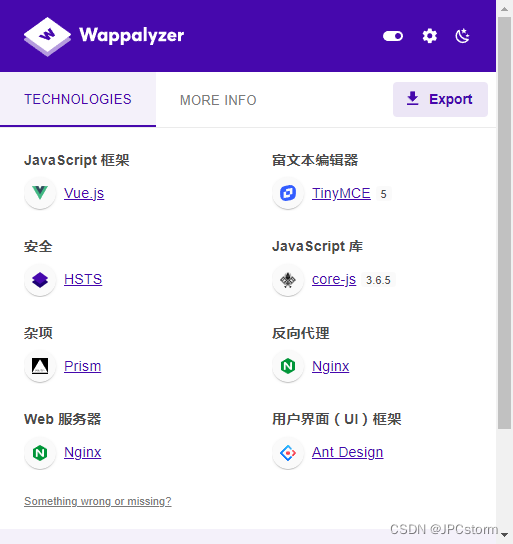
Ant Design Vue 编译后的网页特点是什么,怎么确认他是用的前端 Ant Design Vue 技术栈的呢?
Ant Design Vue 是一个前端 UI 框架,使用 Vue.js 构建。它包含了大量的预设样式和组件,如按钮、表单、表格等,可以帮助开发者快速构建出优雅且功能丰富的网页。但是,要确定一个编译后的网页是否使用了 Ant Design Vue,…...

python | PYTHON正则表达式
操作符说明实例.表示任何单个字符[]字符集,对单个字符给出取值范围[abc]表示a、b、c,[a-z]表示a到z单个字符[^ ]非字符集,对单个字符给出排除范围[^abc]表示非a或b或c的单个字符*前一个字符0次或无限次扩充abc* 表示ab,abc&#x…...
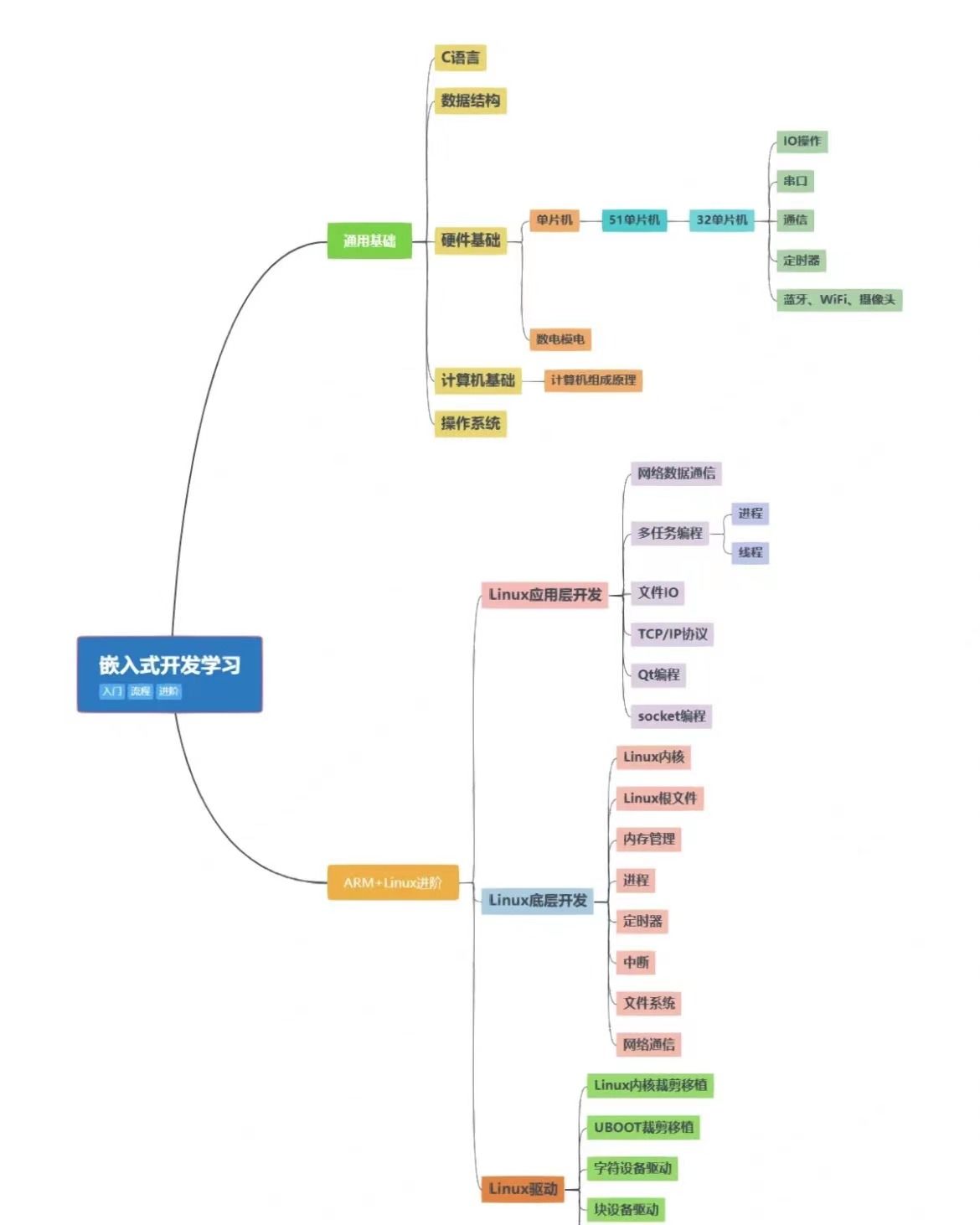
为什么大学c语言课不顺便教一下Linux,Makefile
为什么大学c语言课不顺便教一下Linux,Makefile,git,gdb等配套工具链呢? 在开始前我有一些资料,是我根据自己从业十年经验,熬夜搞了几个通宵,精心整理了一份「Linux的资料从专业入门到高级教程工具包」&…...

Go后端开发 -- main函数 变量 常量 函数
Go后端开发 – main函数 & 变量 & 常量 & 函数 文章目录 Go后端开发 -- main函数 & 变量 & 常量 & 函数一、第一个main函数1.创建工程2.main函数解析 二、变量声明1.单变量声明2.多变量声明 三、常量1.常量的定义2.优雅的常量 iota 四、函数1.函数返回…...

2023/12/30 c++ work
定义一个Person类,私有成员int age,string &name,定义一个Stu类,包含私有成员double *score,写出两个类的构造函数、析构函数、拷贝构造和拷贝赋值函数,完成对Person的运算符重载(算术运算符、条件运算…...

ctfshow——文件上传
文章目录 文件上传思路web 151web 152web 153知识点解题 web 154web 155web 156web 157web 158web 159web160web 161 文件上传思路 web 151 打开页面显示:前台校验不可靠。说明这题是前端验证。 右键查看源代码,找到与上传点有关的前端代码:…...
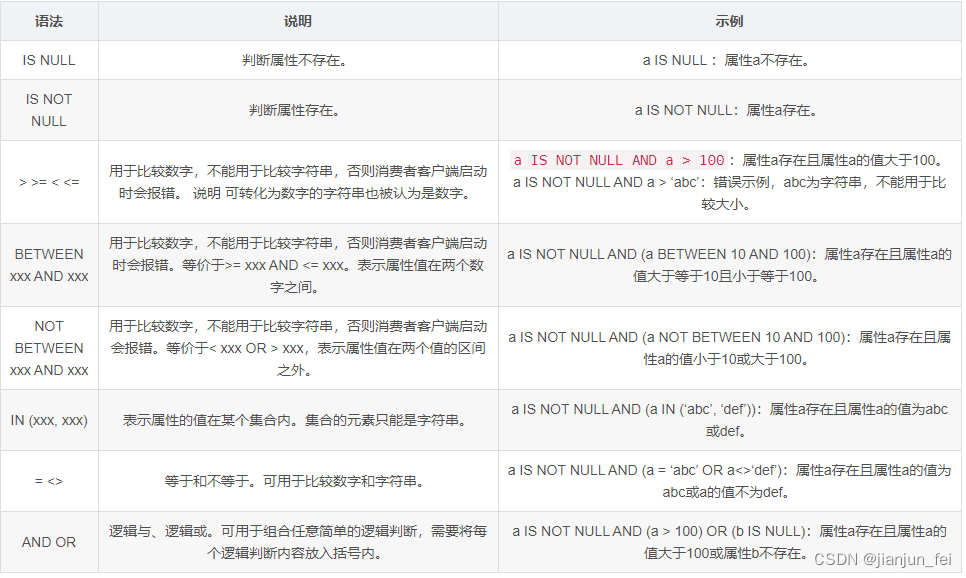
【RocketMQ每日一问】RocketMQ SQL92过滤用法以及原理?
1.生产端 public class SQLProducer {public static int count 10;public static String topic "xiao-zou-topic";public static void main(String[] args) {DefaultMQProducer producer MQUtils.createLocalProducer();IntStream.range(0, count).forEach(i -&g…...

Go语言中的包管理工具之Go Path的使用
GoLang 中常用的包管理的方式 1 )概述 常用的有三种 Go PathGo VendorGo Modules 2 )发展历程 早期go的包管理存在很大缺陷,甚至可以说没有官方统一的包管理工具 一方面官方在努力发布一些实验性的包管理工具。同时也出现了很多社区开发…...
 webview 可以在上层添加UI控件)
cocos creator(2.4.7版本) webview 可以在上层添加UI控件
实现原理:cocos本身在平台中属于view,所以可以把webview放在底层,以达到目标。 实现过程:参考 cocos creator(2.4.7版本) videoplayer 可以在上层添加UI控件() 需要增加以下过程: …...
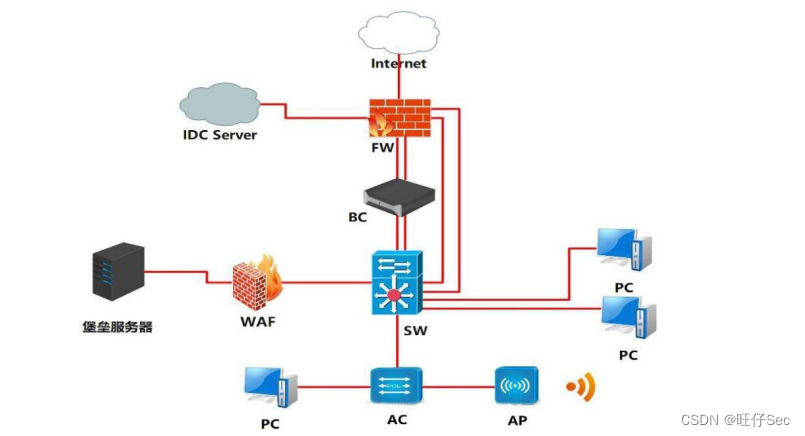
2023 年四川省职业院校技能大赛“信息安全管理与评估”样题
2023 年四川省职业院校技能大赛(高等职业教育) “信息安全管理与评估”样题 竞赛需要完成三个阶段的任务,分别完成三个模块,总分共计 1000分。三个模块内容和分值分别是: 第一阶段:模块一 网络平台搭建与设…...

ubuntu2204,mysql8.x安装
ubuntu 2204, MySQL8.x安装 sudo apt-get update sudo apt-get upgrade# 习惯性的先设置一下时区,这里我使用东八区 date -R # 若发现时间正常则无需设置tzselect# 依次选择 4 -> 10 -> 1 -> 1cp /usr/share/zoneinfo/Asia/Shanghai /etc/localtimedate -R# 同步时间…...

CG Magic分享云渲染和本地渲染之间的区别有什么?
无论是效果图渲染还是影视渲染,对于3D设计师来说都是常见的渲染方式就是云渲染和本地渲染。 本地电脑渲染是指将渲染任务分配给本地计算机进行处理,而云渲染是指将渲染任务上传至云端服务器进行处理。 对于一些初入行业的新手朋友来说,会在想…...

RAG:解锁大语言模型新能力,告别幻觉与知识陈旧!
本文深入解析了检索增强生成(RAG)架构,旨在解决传统大语言模型因知识局限而产生的幻觉、陈旧等问题。RAG通过在生成答案前检索外部知识库,提升回答的准确性和时效性。文章详细介绍了RAG的架构类型(如无微调、检索器微调…...

PRIME OS:基于React与Supabase的浏览器操作系统架构解析
1. 项目概述如果你和我一样,对“浏览器里的操作系统”这个概念着迷,同时又对市面上那些要么过于玩具化、要么复杂到无从下手的项目感到失望,那么今天聊的这个项目——PRIME OS,绝对值得你花时间深入研究。它不是一个简单的桌面模拟…...

免费抠图软件一键抠图无水印有哪些?2026年最实用工具对比测试
最近很多粉丝问我,有没有真正免费、无水印、操作简单的抠图软件?说实话,市面上的抠图工具五花八门,但真正好用的没几个。我这次花了不少时间测试了十多款抠图软件,今天就把我的真实体验分享给大家。为什么你需要一个好…...
)
别再搞混了!设备上那个RJ45口是Console调试口,不是网口(附UART转RS-232电路详解)
网络设备调试入门:解密Console口的真实身份与电路原理 刚拿到一台崭新的交换机或路由器时,许多新手会对着设备后面板上那个看似普通的RJ45接口发愣——它长得和网口几乎一模一样,但旁边却标注着"Console"。这个看似简单的接口背后&…...

怎样轻松上手yuzu模拟器:3个实用技巧帮你快速畅玩Switch游戏
怎样轻松上手yuzu模拟器:3个实用技巧帮你快速畅玩Switch游戏 【免费下载链接】yuzu 任天堂 Switch 模拟器 项目地址: https://gitcode.com/GitHub_Trending/yu/yuzu 你是不是也想在电脑上玩Switch游戏,但又觉得模拟器配置太复杂?别担心…...

3大实战场景:PX4无人机视觉定位从零部署到工业级应用
3大实战场景:PX4无人机视觉定位从零部署到工业级应用 【免费下载链接】PX4-Autopilot PX4 Autopilot Software 项目地址: https://gitcode.com/gh_mirrors/px/PX4-Autopilot PX4-Autopilot作为开源无人机飞控的标杆,其视觉定位能力正在重塑自主飞…...

深度学习提取结构光条中心线项目的对比实验与消融实验统计分析方法研究
深度学习提取结构光条中心线项目的对比实验与消融实验统计分析方法研究 1 引言 线结构光三维测量技术凭借其非接触、高精度、快速测量等优势,在工业测量、三维重建、智能制造等领域得到了广泛应用。在结构光视觉测量系统中,光条中心线的提取精度直接决定了三维重建和尺寸测…...

【Twitter算法适配型Prompt库】:2024Q2官方推荐权重结构解析+ChatGPT生成内容通过率提升67%的12个黄金句式
更多请点击: https://intelliparadigm.com 第一章:Twitter算法适配型Prompt库的演进逻辑与2024Q2权重变革本质 算法信号层重构驱动Prompt范式迁移 2024年第二季度,X(原Twitter)平台正式将Engagement Velocity Ratio&…...
)
别再手动敲表格了!用Python+PaddleOCR,5分钟搞定图片转Excel(附完整代码)
智能表格提取革命:用PaddleOCR实现图片转Excel的工业级解决方案 在数据驱动的商业环境中,每天有数百万份纸质表格、扫描文档和截图等待被数字化处理。传统的手动录入不仅效率低下,错误率高达18%-22%(国际数据公司2023年办公自动化…...

PostgreSQL游标实战:大数据处理、分页优化与性能避坑指南
1. 项目概述:为什么我们需要关注PostgreSQL游标?在数据库应用开发中,尤其是处理海量数据时,我们常常会遇到一个经典难题:如何高效、安全地遍历一个包含数百万甚至上亿条记录的结果集?直接使用SELECT * FROM…...