
cesium-水平测距
cesium测量两点间的距离
<template><div id="cesiumContainer" style="height: 100vh;"></div><div id="toolbar" style="position: fixed;top:20px;left:220px;"><el-breadcrumb><el-breadcrumb-item>量测</el-breadcrumb-item><el-breadcrumb-item>水平距离</el-breadcrumb-item></el-breadcrumb><el-row class="mb-4" style="margin-top: 15px"><el-button type="primary" @click="handleDrawPolyline">画线</el-button><el-button type="primary" @click="handleDrawPolylineCancel">清除</el-button></el-row></div><s-mousetip v-if="tip.visible">{{ tip.text }}</s-mousetip>
</template>
<script setup>
import {onMounted, ref} from "vue";
import * as Cesium from "cesium";
import InitCesium from "../js/InitCesiumHide.js";
import DrawStraightLineDistance from "@/assets/utils/measure/DrawStraightLineDistance.js";
import SMousetip from '@/view/cesiumDemo/components/s-mousetip.vue'let viewer = null;
let drawStraightLine = null;
let tip = ref({text: '',visible: false
})onMounted(() => {let initCesium = new InitCesium('cesiumContainer')viewer = initCesium.initViewer({});flyToRight2();
})const handleDrawPolyline = () => {tip.value.text = '左键点击确定起点,再次点击确定终点并结束';tip.value.visible = true;drawStraightLine = new DrawStraightLineDistance({Cesium: Cesium, viewer: viewer, callback: handleDrawPolylineEnd});drawStraightLine.startCreate();
}const handleDrawPolylineEnd = (polylineData) => {tip.value.text = '';tip.value.visible = false;
}const handleDrawPolylineCancel = () => {drawStraightLine.clear();
}const flyToRight2 = () => {let camera = viewer.scene.camera;camera.flyTo({destination: Cesium.Cartesian3.fromDegrees(115.2766, 36.5522, 1500.34),});
}
</script>
<style scoped>
#cesiumContainer {overflow: hidden;
}
</style>
<style>
.el-breadcrumb__inner {color: #ffffff !important;
}
</style>
DrawStraightLineDistance.js
/* 绘制直线  水平距离 */
class DrawStraightLineDistance {constructor(arg) {this.viewer = arg.viewer;this.Cesium = arg.Cesium;this.callback = arg.callback;this._polyline = null; //活动线this._polylineLast = null; //最后一条线this._positions = [];  //活动点this._entities_point = [];  //脏数据this._entities_md_point = [];  //脏数据this._entities_md1_point = [];  //脏数据this._entities_line = [];  //脏数据this._polylineData = null; //用于构造线数据}//返回最后活动线get line() {return this._polylineLast;}//返回线数据用于加载线getData() {return this._polylineData;}//加载线loadPolyline(data) {let that = this;let polyline = that.viewer.entities.add({polyline: {positions: data,show: true,material: that.Cesium.Color.RED,width: 3,clampToGround: true}});return polyline;}//开始创建startCreate() {let that = this;that.handler = new that.Cesium.ScreenSpaceEventHandler(that.viewer.scene.canvas);that.handler.setInputAction(function (evt) { //单击开始绘制//屏幕坐标转地形上坐标let cartesian = that.getCatesian3FromPX(evt.position);if (that._positions.length === 0) {that._positions.push(cartesian.clone());}that._positions.push(cartesian);that.createPoint(cartesian);// 绘制点if (that._positions.length > 2) {if (!that._polyline) {return;}that._positions.pop();// that._positions.push(cartesian);that.createPoint(cartesian);// 绘制点that._polylineData = that._positions.concat();that.viewer.entities.remove(that._polyline); //移除that._polyline = null;that._positions = [];let line = that.loadPolyline(that._polylineData); //加载线that._entities_line.push(line);that._polylineLast = line;if (typeof that.callback == "function") {that.callback(that._polylineData);}for (let i = 0; i < that._entities_md1_point.length; i++) {that.viewer.entities.remove(that._entities_md1_point[i]);}let distance = that.Cesium.Cartesian3.distance(that._polylineData[0], that._polylineData[1]).toFixed(2);// let midPoint = that.Cesium.Cartesian3.midpoint(that._polylineData[0], that._polylineData[1]);let midPoint = that.Cesium.BoundingSphere.fromPoints(that._polylineData).centerthat.createMdPoint(midPoint, distance);that.handler.destroy();that.handler = null;}}, that.Cesium.ScreenSpaceEventType.LEFT_CLICK);this.handler.setInputAction(function (evt) { //移动时绘制线if (that._positions.length < 1) return;let cartesian = that.getCatesian3FromPX(evt.endPosition);if (!that.Cesium.defined(that._polyline)) {that._polyline = that.createPolyline();}if (that._polyline) {that._positions.pop();that._positions.push(cartesian);}let distance = that.Cesium.Cartesian3.distance(that._positions[0], that._positions[1]).toFixed(2);// let midPoint = that.Cesium.Cartesian3.midpoint(that._polylineData[0], that._polylineData[1]);let midPoint = that.Cesium.BoundingSphere.fromPoints(that._positions).centerthat.createMdPoint11(midPoint, distance);}, that.Cesium.ScreenSpaceEventType.MOUSE_MOVE);}//创建点createPoint(cartesian) {let that = this;let point = this.viewer.entities.add({position: cartesian,point: {pixelSize: 10,color: that.Cesium.Color.YELLOW,}});that._entities_point.push(point);return point;}//创建点createMdPoint(cartesian, distance) {let that = this;let point = this.viewer.entities.add({position: cartesian,point: {pixelSize: 1,color: that.Cesium.Color.YELLOW,},label: {text: '水平距离:' + distance + '米',    //描述内容font: '14px Sans-Serif',   //字体大小 类型fillColor: that.Cesium.Color.fromCssColorString('#ffffff'),  //颜色outlineColor: that.Cesium.Color.GOLD,//设置背景颜色透明backgroundColor: new that.Cesium.Color(0, 0, 0, 0.7),//打开背景  打开背景 (不会被线段覆盖)showBackground: true,// scaleByDistance: new that.Cesium.NearFarScalar(1000, 1.0, 2000, 0.01),// disableDepthTestDistance: Number.POSITIVE_INFINITY}});that._entities_md_point.push(point);return point;}//创建点createMdPoint11(cartesian, distance) {let that = this;for (let i = 0; i < that._entities_md1_point.length; i++) {that.viewer.entities.remove(that._entities_md1_point[i]);}let point = this.viewer.entities.add({position: cartesian,point: {pixelSize: 1,color: that.Cesium.Color.YELLOW,},label: {text: '水平距离:' + distance + '米',    //描述内容font: '14px Sans-Serif',   //字体大小 类型fillColor: that.Cesium.Color.fromCssColorString('#ffffff'),  //颜色outlineColor: that.Cesium.Color.GOLD,//设置背景颜色透明backgroundColor: new that.Cesium.Color(0, 0, 0, 0.7),//打开背景  打开背景 (不会被线段覆盖)showBackground: true,// scaleByDistance: new that.Cesium.NearFarScalar(1000, 1.0, 2000, 0.01),// disableDepthTestDistance: Number.POSITIVE_INFINITY}});that._entities_md1_point.push(point);return point;}//创建线createPolyline() {let that = this;let polyline = this.viewer.entities.add({polyline: {//使用cesium的peopertypositions: new that.Cesium.CallbackProperty(function () {return that._positions}, false),show: true,material: that.Cesium.Color.RED,width: 3,clampToGround: true}});that._entities_line.push(polyline);return polyline;}//销毁destroy() {if (this.handler) {this.handler.destroy();this.handler = null;}}//清空实体对象clear() {for (let i = 0; i < this._entities_point.length; i++) {this.viewer.entities.remove(this._entities_point[i]);}for (let i = 0; i < this._entities_md_point.length; i++) {this.viewer.entities.remove(this._entities_md_point[i]);}for (let i = 0; i < this._entities_md1_point.length; i++) {this.viewer.entities.remove(this._entities_md1_point[i]);}for (let i = 0; i < this._entities_line.length; i++) {this.viewer.entities.remove(this._entities_line[i]);}this._polyline = null;this._positions = [];this._entities_point = [];  //脏数据this._entities_md_point = [];  //脏数据this._entities_md1_point = [];  //脏数据this._entities_line = [];  //脏数据this._polylineData = null; //用于构造线数据this._polylineLast = null;this.destroy();}getCatesian3FromPX(px) {let cartesian;let ray = this.viewer.camera.getPickRay(px);if (!ray) return null;cartesian = this.viewer.scene.globe.pick(ray, this.viewer.scene);return cartesian;}
}export default DrawStraightLineDistance
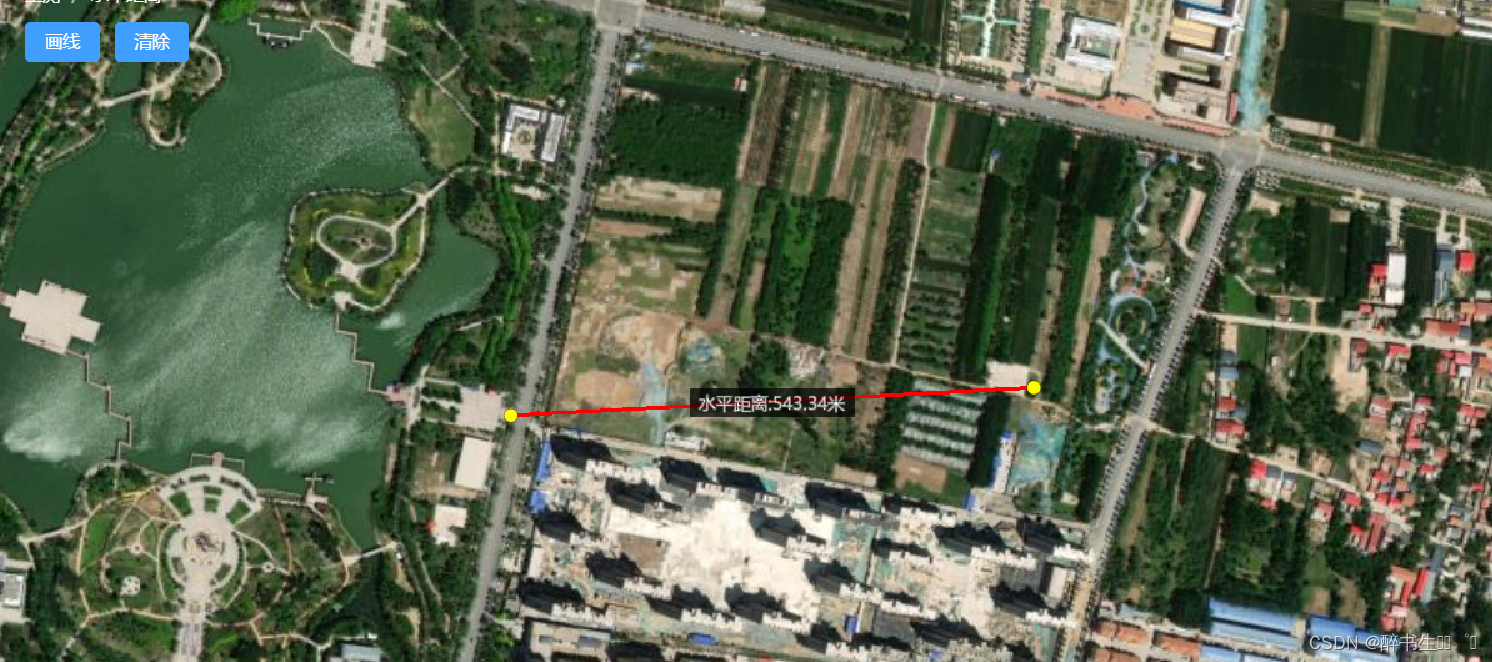
效果图
InitCesiumHide.js
import * as Cesium from "cesium";class InitCesiumHide {constructor(cesiumContainer, options) {this.cesiumContainer = cesiumContainer;}initViewer(options) {Cesium.Ion.defaultAccessToken = 'token';// 西南东北,默认显示中国Cesium.Camera.DEFAULT_VIEW_RECTANGLE = Cesium.Rectangle.fromDegrees(90, -20, 110, 90);return new Cesium.Viewer(this.cesiumContainer, {animation: false, // 隐藏动画控件baseLayerPicker: false, // 隐藏图层选择控件fullscreenButton: false, // 隐藏全屏按钮vrButton: false, // 隐藏VR按钮,默认falsegeocoder: false, // 隐藏地名查找控件  地理编码homeButton: false, // 隐藏Home按钮infoBox: false, // 隐藏点击要素之后显示的信息窗口sceneModePicker: false, // 隐藏场景模式选择控件selectionIndicator: false, // 显示实体对象选择框,默认truetimeline: false, // 隐藏时间线控件navigationHelpButton: false, // 隐藏帮助按钮scene3DOnly: true, // 每个几何实例将只在3D中呈现,以节省GPU内存shouldAnimate: true, // 开启动画自动播放sceneMode: 3, // 初始场景模式 1:2D 2:2D循环 3:3D,默认3requestRenderMode: true, // 减少Cesium渲染新帧总时间并减少Cesium在应用程序中总体CPU使用率...options});}
}export default InitCesiumHide
相关文章:
cesium-水平测距
cesium测量两点间的距离 <template><div id"cesiumContainer" style"height: 100vh;"></div><div id"toolbar" style"position: fixed;top:20px;left:220px;"><el-breadcrumb><el-breadcrumb-item&…...

【Android-Compose】手势检测实现按下、单击、双击、长按事件,以及避免频繁单击事件的简单方法
目录: 1 不需要双击事件 规避频繁单击事件2 需要双击事件(常规写法)3 后记:不建议使用上面的代码自定义按钮 1 不需要双击事件 规避频繁单击事件 var firstClickTime by remember { mutableStateOf(System.currentTimeMillis()…...
)
AUTOSAR汽车电子嵌入式编程精讲300篇-基于神经网络的CAN总线负载率优化(续)
目录 3.3 SA 算法 3.3.1 SA 算法原理 3.3.2 基于 SA 算法 CAN 总线负载率优化分析...

python爬虫6—高性能异步爬虫
如果有多个URL等待我们爬取,我们通常是一次只能爬取一个,爬取效率低,异步爬虫可以提高爬取效率,可以一次多多个URL同时同时发起请求 异步爬虫方式: 一、多线程、多进程(不建议):可以…...
日历功能——C语言
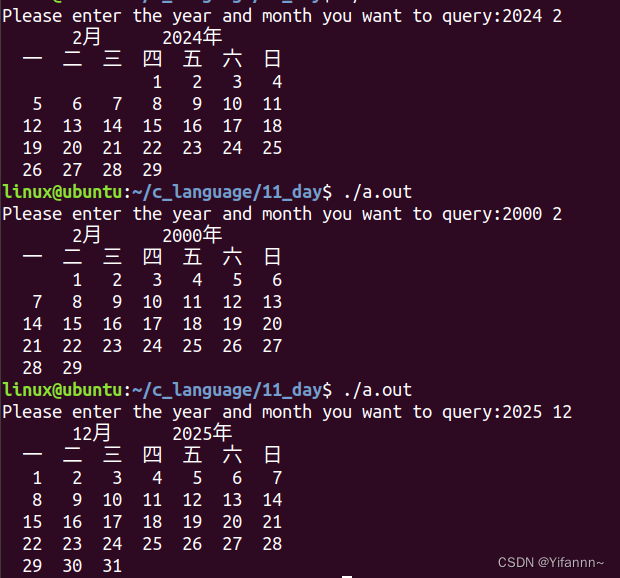
实现日历功能,输入年份月份,输出日历 #include<stdio.h>int leap_year(int year) {if(year % 4 0 && year % 100 ! 0 || year % 400 0){return 1;}else{return 0;} }int determine_year_month_day(int *day,int month,int year) {if(mo…...

GPIO中断
1.EXTI简介 EXTI是External Interrupt的缩写,指外部中断。在嵌入式系统中,外部中断是一种用于处理外部事件的机制。当外部事件发生时(比如按下按钮、传感器信号变化等),外部中断可以立即打断正在执行的程序࿰…...
springboot完成一个线上图片存放地址+实现前后端上传图片+回显
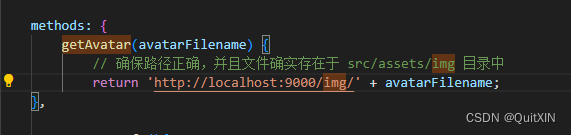
1.路径 注意路径 2.代码:(那个imagePath没什么用,懒的删了),注意你的本地文件夹要有图片,才可以在线上地址中打开查看 package com.xxx.common.config;import org.springframework.beans.factory.annotat…...

编程思维与生活琐事的内在关联及其应用价值
随着科技的日益普及和信息化时代的到来,编程作为一种现代技能,其影响已不再局限于专业领域,而是逐步渗透到人们的日常生活之中。探讨编程与生活琐事之间的关系,有助于我们更好地理解如何将技术智慧应用于日常管理,提升…...
OSPF排错
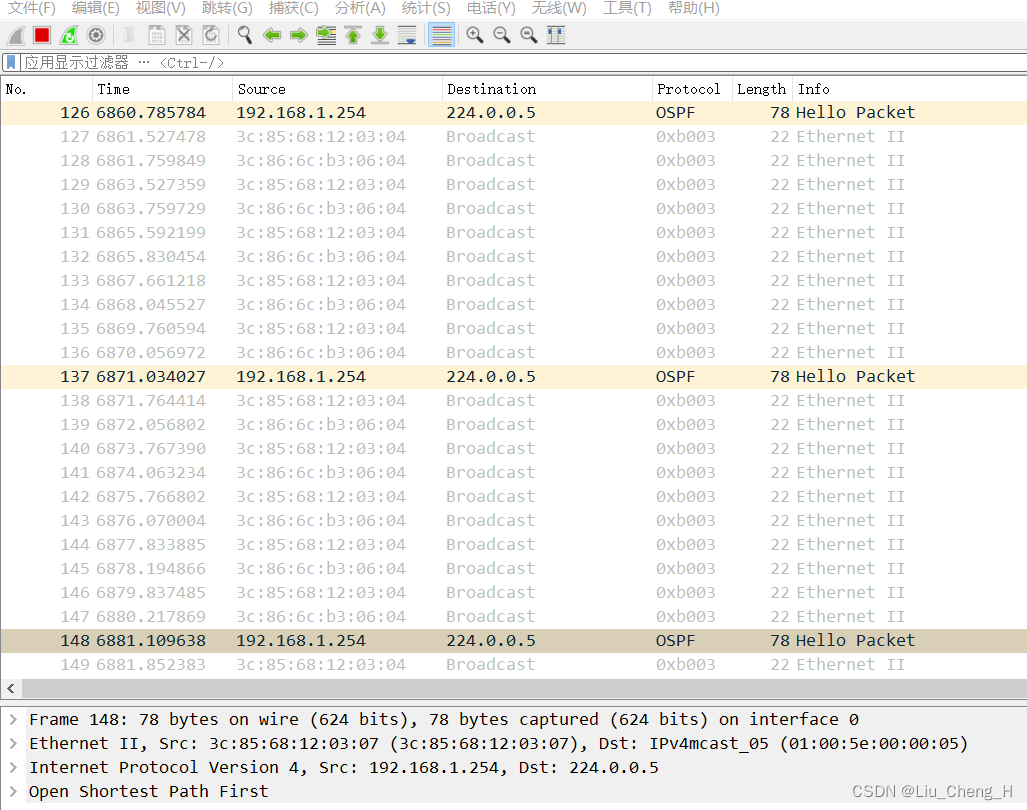
目录 实验拓扑图 实验要求 实验排错 故障一 故障现象 故障分析 故障解决 故障二 故障现象 故障分析 故障解决 故障三 故障现象 故障分析 故障解决 故障四 故障现象 故障分析 故障解决 故障五 故障现象 故障分析 故障解决 故障六 故障现象 故障分析 …...

day07-CSS高级
01-定位 作用:灵活的改变盒子在网页中的位置 实现: 1.定位模式:position 2.边偏移:设置盒子的位置 left right top bottom 相对定位 position: relative 特点: 不脱标,占用自己原来位置 显示模…...
05 MP之ActiveRecord模式+SimpleQuery
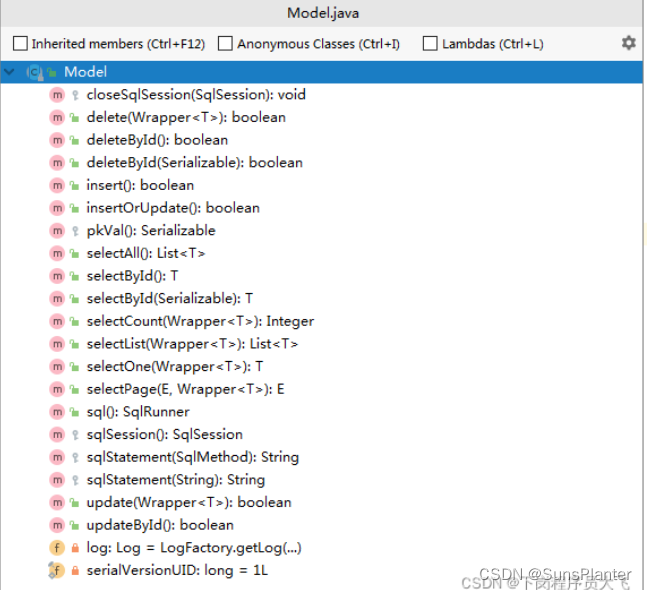
1. ActiveRecord ActiveRecord(活动记录,简称AR),是一种领域模型模式,特点是一个模型类对应关系型数据库中的一个表,而模型类的一个实例对应表中的一行记录。 其目标是通过围绕一个数据对象, 进行全部的CRUD操作。 1.1 让实体类…...
git diff查看比对两次不同时间点提交的异同
git diff查看比对两次不同时间点提交的异同 用 git diff命令: git diff commit-id-1 commit-id-2 不同commit-id在不同的时间点提交产生,因为也可以认为git diff是比对两个不同时间点的代码异同。 git diff比较不同commit版本的代码文件异同_git diff c…...
基于muduo网络库开发服务器程序和CMake构建项目 笔记
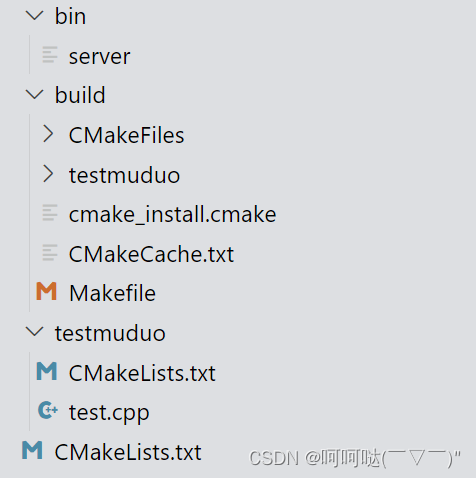
跟着施磊老师做C项目,施磊老师_腾讯课堂 (qq.com) 一、基于muduo网络库开发服务器程序 组合TcpServer对象创建EventLoop事件循环对象的指针明确TcpServer构造函数需要什么参数,输出ChatServer的构造函数在当前服务器类的构造函数当中,注册处理连接的回调函数和处理…...
)
前端支持下载模板、导入数据、导出数据(excel格式)
前言 xlsx是由SheetJS开发的一个处理excel文件的npm库,适用于前端开发者实现下载模板、导入导出excel文件等需求,演示的项目的技术栈为vue3 elementPlus 一. 引入xlsx 安装xlsx npm install xlsx引入xlsx import * as XLSX from xlsx;二. 下载模板 const han…...

编译Faiss-gpu【InterMKL】C++ 按步骤操作 基本不会有问题的 python原理相同。
编译Faiss-gpu C++ 基本介绍 使用Faiss版本【1.7.4】 该项目依赖于BLAS 组件 OpenBLAS 和 IntelMKL BLAS 【官方支持】 IntelMKL 会比 OpenBLAS 快的多。 【来自官方结论】 本机环境 Cuda :11.1 Cuda-Driver: 515 InterMKL: 2021.2.0 Faiss :1.7.4 注意:faiss仅…...

conn.execute的用法详解
conn.execute的用法详解 大家好,我是免费搭建查券返利机器人赚佣金就用微赚淘客系统3.0的小编,也是冬天不穿秋裤,天冷也要风度的程序猿!今天,我们将深入研究数据库连接中conn.execute的用法,解析它的功能、…...
 与 ReleaseBuffer() 使用详解)
GetBuffer() 与 ReleaseBuffer() 使用详解
GetBuffer() 与 ReleaseBuffer() 使用详解 大家好,我是免费搭建查券返利机器人赚佣金就用微赚淘客系统3.0的小编,也是冬天不穿秋裤,天冷也要风度的程序猿!今天,我们将深入研究在编程中常用的GetBuffer()与ReleaseBuff…...

Flink CEP(基本概念)
Flink CEP 在Flink的学习过程中,我们已经掌握了从基本原理和核心层的DataStream API到底层的处理函数,再到应用层的Table API和SQL的各种手段,可以应对实际应用开发的各种需求。然而,在实际应用中,还有一类更为复…...

[AIGC] Spring Gateway与 nacos 简介
文章目录 Spring Gateway简介主要特性优点总结 Nacos简介主要特性优点总结 Spring Gateway 简介 Spring Gateway是一个基于Spring Framework的工具,用于构建和管理微服务架构中的网关。它提供了一种简单而灵活的方式来路由和过滤请求,以及在微服务之间…...
2024-2-3-复习作业
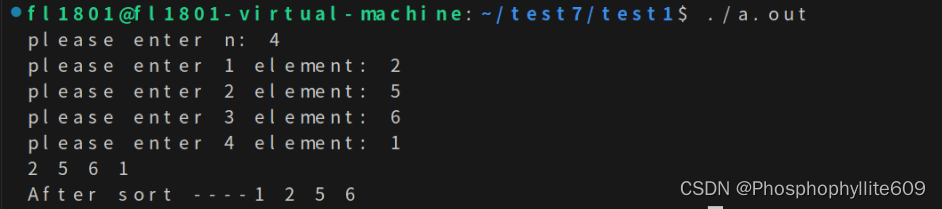
1> 要求: 效果图: 2> 要求: 效果图: 3> 要求: 效果图: 源代码: #include <stdio.h> #include <stdlib.h> typedef int datatype; typedef struct Node {datatype data…...

QuickBMS终极指南:解密游戏资源的完整解决方案
QuickBMS终极指南:解密游戏资源的完整解决方案 【免费下载链接】QuickBMS QuickBMS by aluigi - Github Mirror 项目地址: https://gitcode.com/gh_mirrors/qui/QuickBMS QuickBMS是一款功能强大的开源游戏资源提取工具,能够处理数百种压缩和加密…...

如何用clawPDF高效解决日常办公中的5大文档处理难题?
如何用clawPDF高效解决日常办公中的5大文档处理难题? 【免费下载链接】clawPDF Open Source Virtual (Network) Printer for Windows that allows you to create PDFs, OCR text, and print images, with advanced features usually available only in enterprise s…...

GHelper:重新定义华硕设备的性能控制体验 | 从技术原理到实战应用的深度解析
GHelper:重新定义华硕设备的性能控制体验 | 从技术原理到实战应用的深度解析 【免费下载链接】g-helper Lightweight, open-source control tool for ASUS laptops and ROG Ally. Manage performance modes, fans, GPU, battery, and RGB lighting across Zephyrus,…...

AI伦理测试:当算法可能产生偏见时
随着人工智能技术从实验室走向规模化应用,算法决策已深度渗透至招聘、信贷、医疗、司法、内容推荐等关乎社会公平与个人福祉的关键领域。对软件测试从业者而言,一个全新的、紧迫的挑战正摆在面前:传统的功能、性能、安全测试已不足以确保AI产…...

YOLOv5模型从Windows迁移到Linux服务器,遇到‘WindowsPath‘错误?别慌,5分钟搞定它
YOLOv5跨平台迁移实战:彻底解决WindowsPath兼容性问题 当我们将训练好的YOLOv5模型从Windows开发环境迁移到Linux生产服务器时,经常会遇到NotImplementedError: cannot instantiate WindowsPath on your system这类路径兼容性错误。这背后反映的是跨平台…...

5个提升效率技巧:Mac Mouse Fix让普通鼠标实现专业级操作体验
5个提升效率技巧:Mac Mouse Fix让普通鼠标实现专业级操作体验 【免费下载链接】mac-mouse-fix Mac Mouse Fix - Make Your $10 Mouse Better Than an Apple Trackpad! 项目地址: https://gitcode.com/GitHub_Trending/ma/mac-mouse-fix 当你在macOS系统中使用…...
修复指南:不止是打补丁)
Weblogic IIOP协议漏洞(CVE-2020-2551)修复指南:不止是打补丁
Weblogic IIOP协议漏洞深度防护指南:从补丁到立体防御 当Oracle在2020年1月发布CVE-2020-2551漏洞公告时,这个CVSS评分高达9.8的IIOP协议反序列化漏洞立刻成为企业安全团队的噩梦。作为Weblogic的核心组件之一,IIOP协议的远程代码执行风险让…...

Logisim-Evolution:用可视化设计破解数字电路学习难题的开源工具
Logisim-Evolution:用可视化设计破解数字电路学习难题的开源工具 【免费下载链接】logisim-evolution Digital logic design tool and simulator 项目地址: https://gitcode.com/gh_mirrors/lo/logisim-evolution 重新定义数字电路设计:从抽象概念…...
SVPWM——过调制区的谐波抑制策略)
电机控制-PMSM无感FOC控制(五)SVPWM——过调制区的谐波抑制策略
1. 过调制区的谐波问题从哪来? 第一次调试PMSM过调制区时,我被电机发出的尖锐噪音吓了一跳。示波器上原本光滑的正弦电流波形突然出现了明显的毛刺,THD(总谐波失真)直接从5%飙到15%。这种现象的本质,是传统…...

番茄小说下载器技术指南:从需求分析到高效应用
番茄小说下载器技术指南:从需求分析到高效应用 【免费下载链接】Tomato-Novel-Downloader 番茄小说下载器不精简版 项目地址: https://gitcode.com/gh_mirrors/to/Tomato-Novel-Downloader 在数字阅读日益普及的今天,离线获取和管理小说内容成为许…...