
(08)Hive——Join连接、谓词下推
前言
Hive-3.1.2版本支持6种join语法。分别是:inner join(内连接)、left join(左连接)、right join(右连接)、full outer join(全外连接)、left semi join(左半开连接)、cross join(交叉连接,也叫做笛卡尔乘积)。
一、Hive的Join连接
数据准备: 有两张表studentInfo、studentScore
create table if not exists studentInfo
(user_id   int comment '学生id',name      string comment '学生姓名',gender    string comment '学生性别'
)comment '学生信息表';
INSERT overwrite table studentInfo
VALUES (1, '吱吱', '男'),(2, '格格', '男'),(3, '纷纷', '女'),(4, '嘻嘻', '女'),(5, '安娜', '女');create table if not exists studentScore
(user_id   int comment '学生id',subject   string comment '学科',score     int comment '分数'
)comment '学生分数表';INSERT overwrite table studentScore
VALUES (1, '生物', 78),(2, '生物', 88),(3, '生物', 34),(4, '数学', 98),(null, '数学', 64);
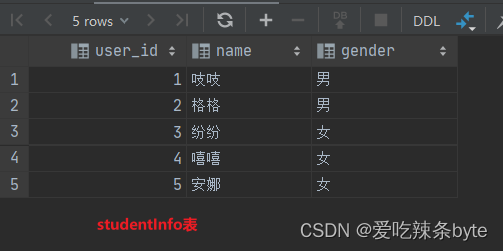
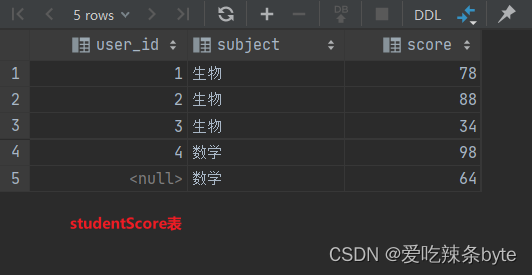
1.1 inner join 内连接
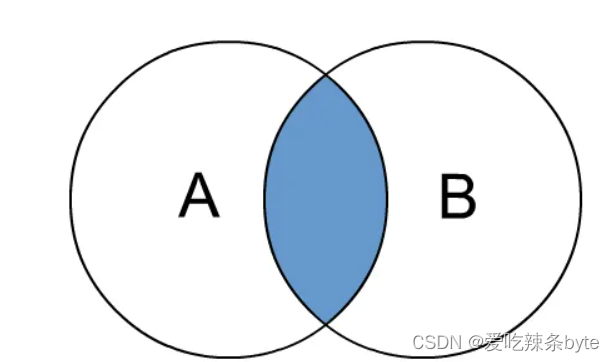
内连接是最常见的一种连接,其中inner可以省略:inner join == join ; 只有进行连接的两个表中都存在与连接条件相匹配的数据才会被留下来。
selectt1.user_id,t1.name,t1.gender,t2.subject,t2.score
from studentInfo t1inner join studentScore t2 on t1.user_id = t2.user_id
1.2 left join 左外连接
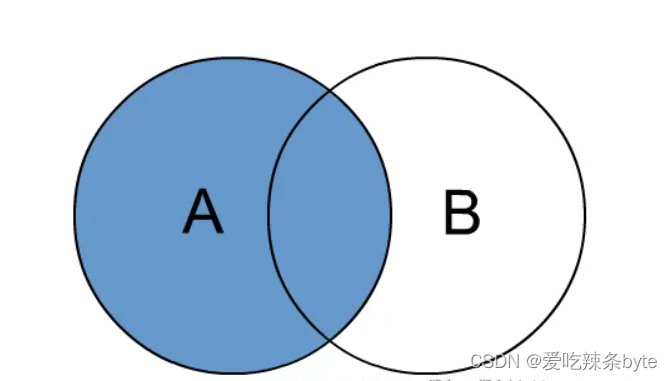
join时以左表的全部数据为准,右边与之关联;左表数据全部返回,右表关联上的显示返回,关联不上的显示null返回。
selectt1.user_id,t1.name,t1.gender,t2.user_id,t2.subject,t2.score
from studentInfo t1left  join studentScore t2 on t1.user_id = t2.user_id;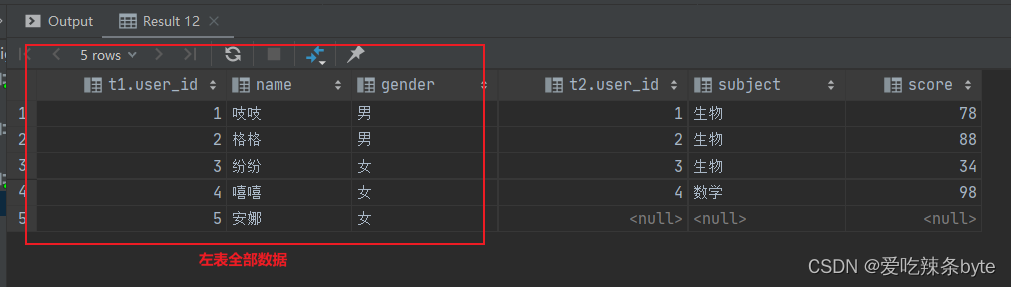
1.3 right join 右外连接
join时以右表的全部数据为准,左边与之关联;右表数据全部返回,左表关联上的显示返回,关联不上的显示null返回。
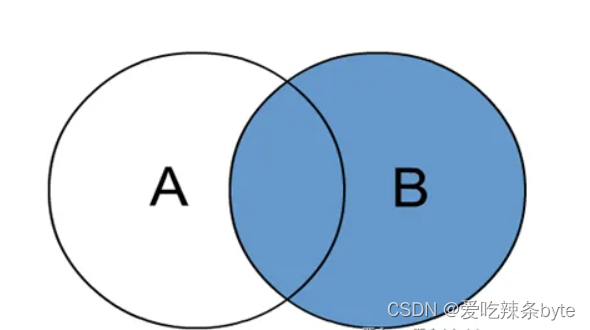
selectt2.user_id,t2.subject,t2.score,t1.user_id,t1.name,t1.gender
from studentInfo t1right  join studentScore t2on t1.user_id = t2.user_id;
1.4 full join 满外连接
包含左、右两个表的全部行,不管另外一边的表中是否存在与它们匹配的行;在功能上等价于对这两个数据集合分别进行左外连接和右外连接,然后再使用消去重复行的操作将上述两个结果集合并为一个结果集。full join 本质等价于 left join union right join;

selectt1.user_id,t1.name,t1.gender,t2.user_id,t2.subject,t2.score
from studentInfo t1full  join studentScore t2on t1.user_id = t2.user_id;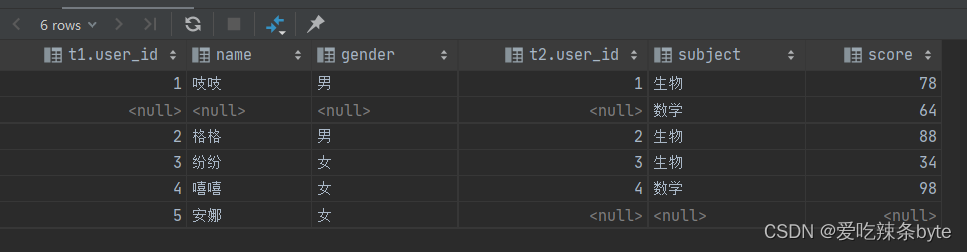
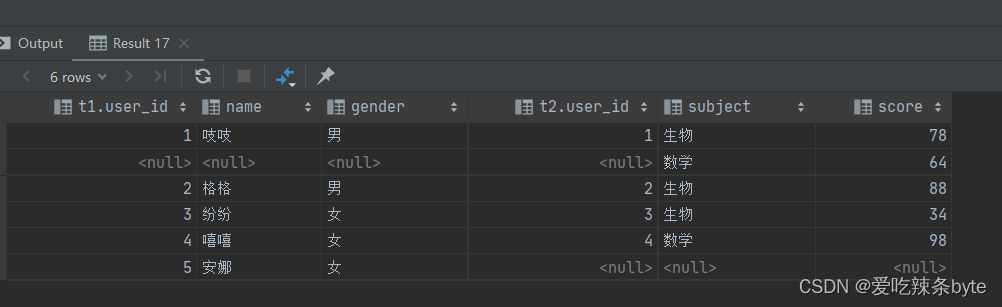
ps:full join 本质等价于 left join union right join;
selectt1.user_id,t1.name,t1.gender,t2.user_id,t2.subject,t2.score
from studentInfo t1full  join studentScore t2on t1.user_id = t2.user_id;----- 等价于下述代码selectt1.user_id as t1_user_id ,t1.name,t1.gender,t2.user_id as  t2_user_id,t2.subject,t2.score
from studentInfo t1left  join studentScore t2on t1.user_id = t2.user_id
union
selectt1.user_id as t1_user_id ,t1.name,t1.gender,t2.user_id as t2_user_id,t2.subject,t2.score
from studentInfo t1right  join studentScore t2on t1.user_id = t2.user_id
1.5 多表连接
1.6 cross join 交叉连接
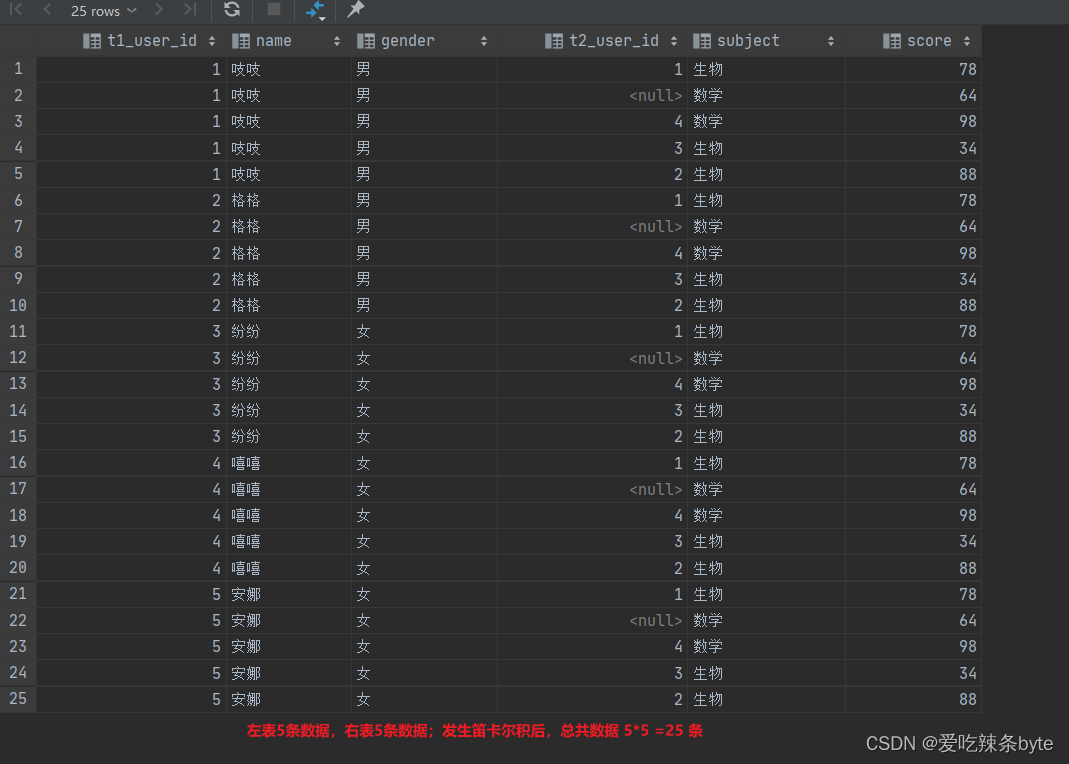
交叉连接cross join,将会返回被连接的两个表的笛卡尔积,返回结果的行数等于两个表行数的乘积 N*M。对于大表来说,cross join慎用(笛卡尔积可能会造成数据膨胀)
在SQL标准中定义的cross join就是无条件的inner join。返回两个表的笛卡尔积,无需指定关联 键。
在HiveSQL语法中,cross join 后面可以跟where子句进行过滤,或者on条件过滤。
---举例:
selectt1.user_id as t1_user_id ,t1.name,t1.gender,t2.user_id as t2_user_id,t2.subject,t2.score
from studentInfo t1, studentScore t2--- 等价于:
selectt1.user_id as t1_user_id ,t1.name,t1.gender,t2.user_id as t2_user_id,t2.subject,t2.score
from studentInfo t1join studentScore t2---等价于:
selectt1.user_id as t1_user_id ,t1.name,t1.gender,t2.user_id as t2_user_id,t2.subject,t2.score
from studentInfo t1cross  join studentScore t2
1.7 join on和where条件区别
两者之间的区别见文章:
Hive中left join 中的where 和 on的区别-CSDN博客文章浏览阅读1.2k次,点赞21次,收藏23次。Hive中left join 中的where 和 on的区别https://blog.csdn.net/SHWAITME/article/details/135892183?ops_request_misc=%257B%2522request%255Fid%2522%253A%2522170780016016800197016026%2522%252C%2522scm%2522%253A%252220140713.130102334.pc%255Fblog.%2522%257D&request_id=170780016016800197016026&biz_id=0&utm_medium=distribute.pc_search_result.none-task-blog-2~blog~first_rank_ecpm_v1~rank_v31_ecpm-1-135892183-null-null.nonecase&utm_term=where&spm=1018.2226.3001.4450
1.8 join中不能有null
-
group by字段为null,会导致结果不正确(null值也会参与group by 分组)
group by column1- join字段为null会导致结果不正确(例如:下述 t2.b字段是null值)
t1 left join t2 on t1.a=t2.a and t1.b=t2.b
1.9 join操作导致数据膨胀
select *
from a
left join b
on a.id = b.id
如果主表a的id是唯一的,副表b的id有重复值,非唯一,那当on a.id = b.id 时,就会导致数据膨胀(一条变多条)。因此两表或多表join的时候,需保证join的字段唯一性,否则会出现一对多的数据膨胀现象。
二、Hive的谓词下推
2.1 谓词下推概念
在不影响结果的情况下,尽量将过滤条件提前执行。谓词下推后,过滤条件在map端执行,减少了map端的输出,降低了数据在集群上传输的量,提升任务性能。
在hive生成的物理执行计划中,有一个配置项用于管理谓词下推是否开启。
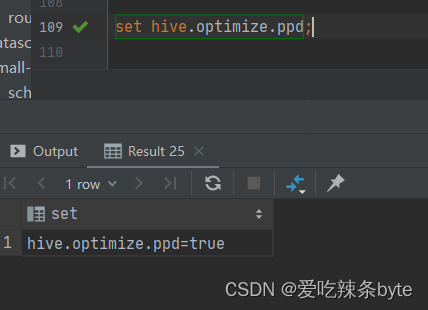
set hive.optimize.ppd=true; 默认是true
疑问:如果hive谓词下推的功能与join同时存在,那下推功能可以在哪些场景下生效?
2.2 谓词下推场景分析
数据准备:以上述两张表studentInfo、studentScore为例
查看谓词下推是否开启:set hive.optimize.ppd;
(1) inner join 内连接
- 对左表where过滤
 explain
selectt1.user_id as t1_user_id,t1.name,t1.gender,t2.user_id as t2_user_id,t2.subject,t2.score
from studentInfo t1inner join studentScore t2 on t1.user_id = t2.user_id
where t1.user_id >2
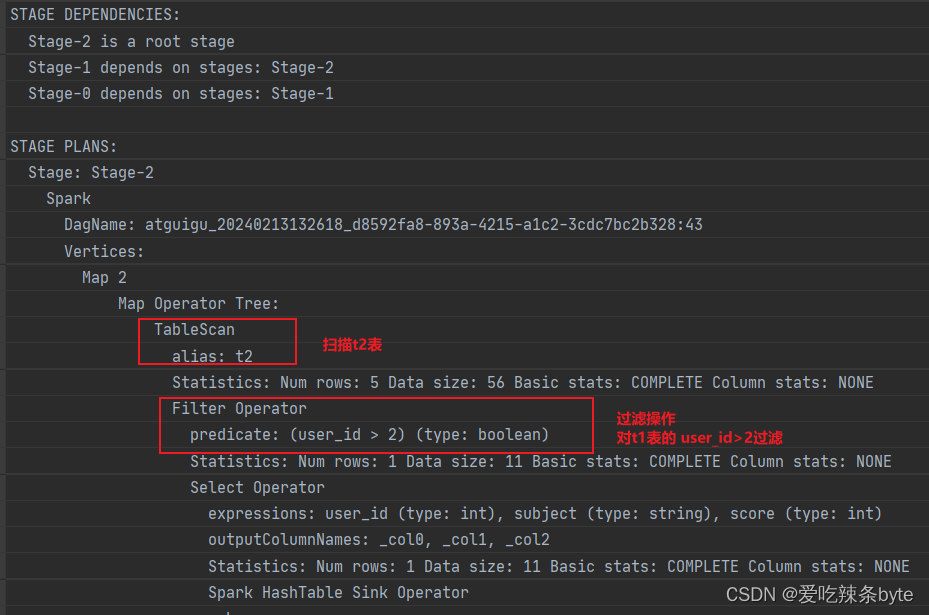
explain查看执行计划,在对t2表进行scan后,优先对t1表进行filter,过滤t1.user_id >2,即谓词下推生效。
- 对右表where过滤
 explain
selectt1.user_id as t1_user_id,t1.name,t1.gender,t2.user_id as t2_user_id,t2.subject,t2.score
from studentInfo t1inner join studentScore t2 on t1.user_id = t2.user_id
where t2.user_id is not null
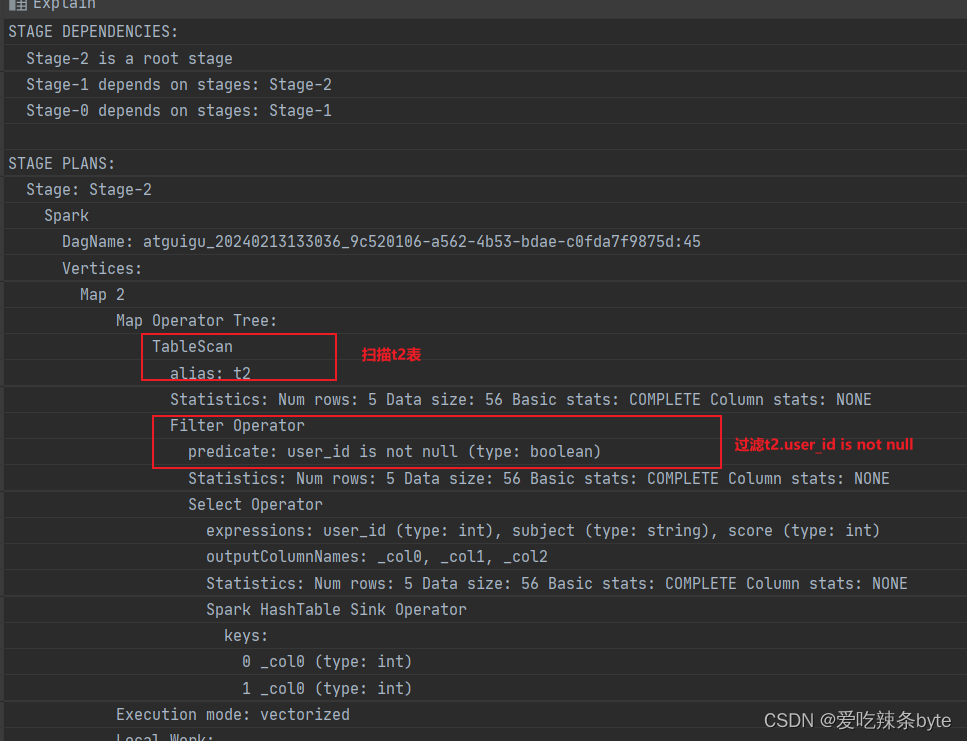
explain查看执行计划,在对t2表进行scan后,优先进行filter,过滤t2.user_id is not null,即谓词下推生效。
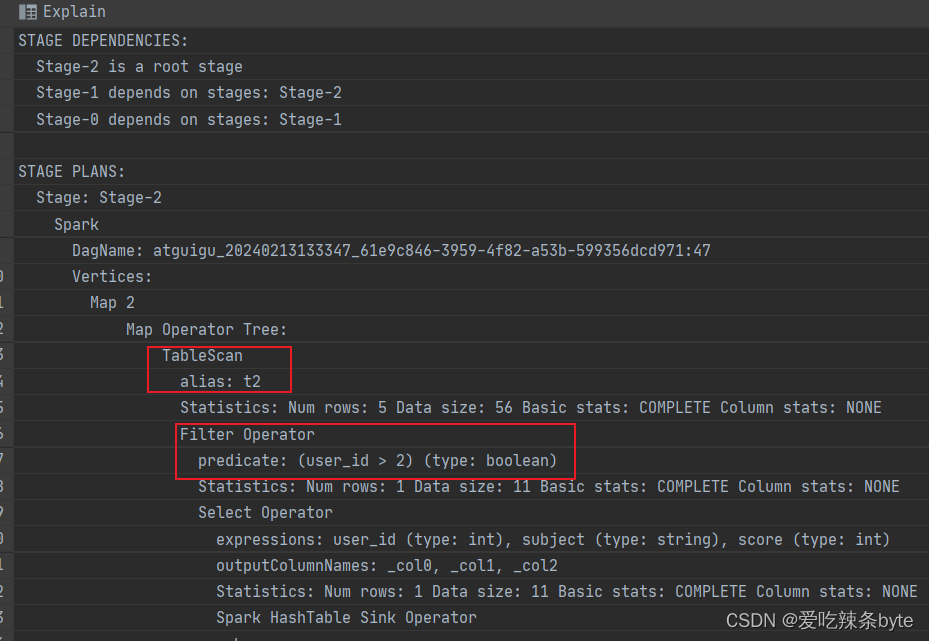
- 对左表on过滤
explain
selectt1.user_id as t1_user_id,t1.name,t1.gender,t2.user_id as t2_user_id,t2.subject,t2.score
from studentInfo t1inner join studentScore t2 on t1.user_id = t2.user_id and t1.user_id >2
explain查看执行计划,在对t2表进行scan后,优先对t1表进行filter,过滤t1.user_id >2,即谓词下推生效。
- 对右表on过滤
 explain
selectt1.user_id as t1_user_id,t1.name,t1.gender,t2.user_id as t2_user_id,t2.subject,t2.score
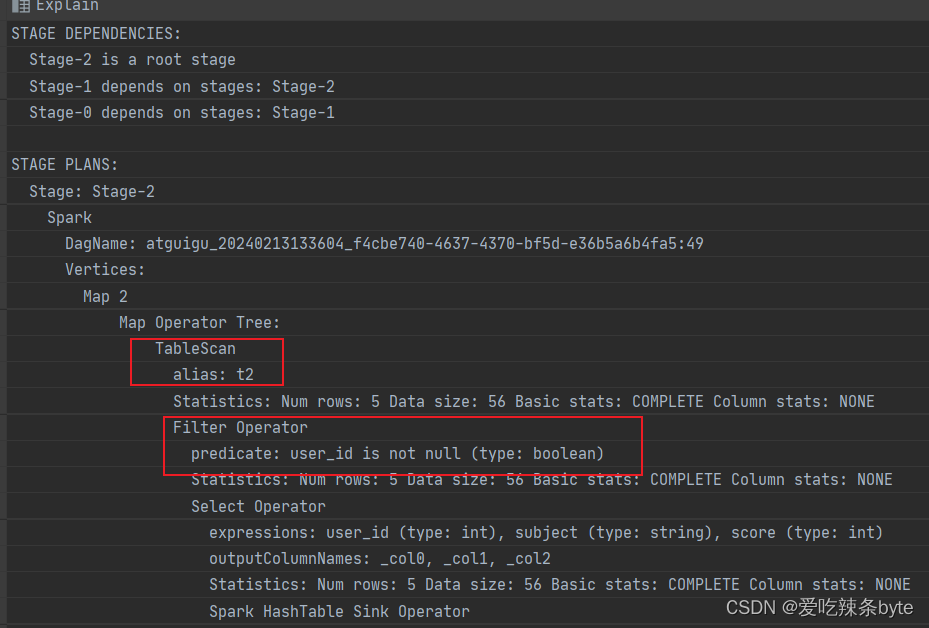
from studentInfo t1inner join studentScore t2 on t1.user_id = t2.user_id and t2.user_id is not null
explain查看执行计划,在对t2表进行scan后,优先进行filter,过滤t2.user_id is not null,即谓词下推生效。
(2) left join(right join 同理)
- 对左表where过滤
explain
selectt1.user_id,t1.name,t1.gender,t2.user_id,t2.subject,t2.score
from studentInfo t1left  join studentScore t2on t1.user_id = t2.user_id
where t1.user_id >2;
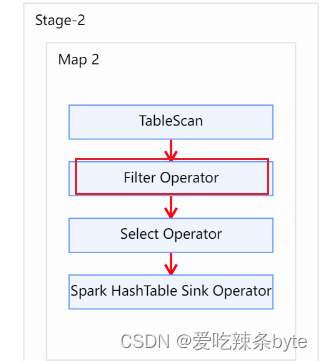
explain查看执行计划,在对t2表进行scan后,优先对t1表进行filter,过滤t1.user_id >2,即谓词下推生效。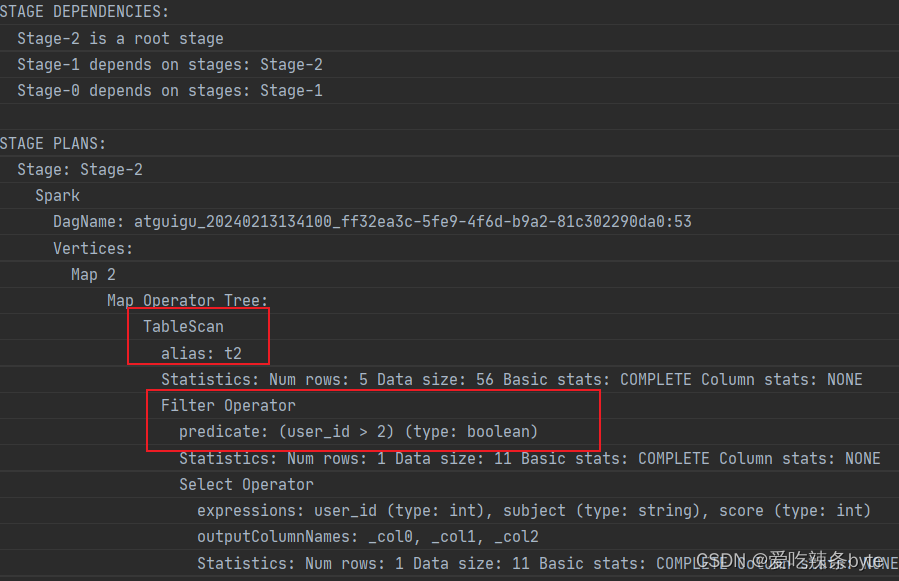
- 对右表where过滤
explain
selectt1.user_id,t1.name,t1.gender,t2.user_id,t2.subject,t2.score
from studentInfo t1left  join studentScore t2on t1.user_id = t2.user_id
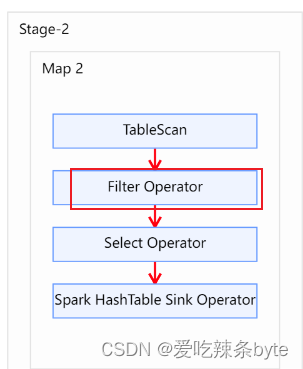
where t2.user_id is not null;
explain查看执行计划,在对t2表进行scan后,优先进行filter,过滤t2.user_id is not null,即谓词下推生效。 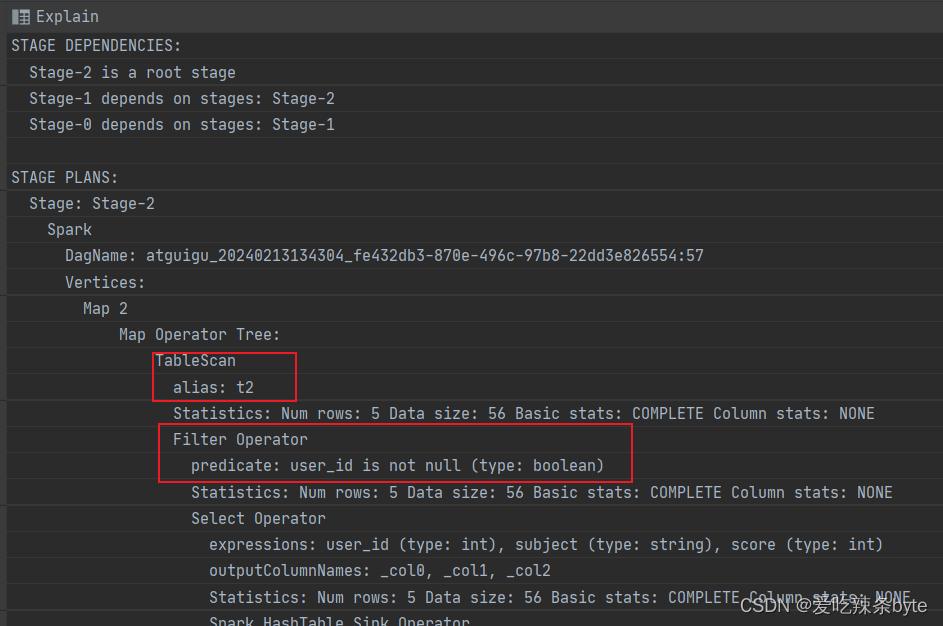
- 对左表on过滤
explain
selectt1.user_id as t1_user_id,t1.name,t1.gender,t2.user_id as t2_user_id,t2.subject,t2.score
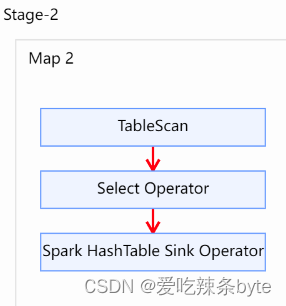
from studentInfo t1left join studentScore t2on t1.user_id = t2.user_id and t1.user_id >2explain查看执行计划,在对t2表进行scan后,在对t1表未进行filter,即谓词下推不生效。

- 对右表on过滤
explain
selectt1.user_id as t1_user_id,t1.name,t1.gender,t2.user_id as t2_user_id,t2.subject,t2.score
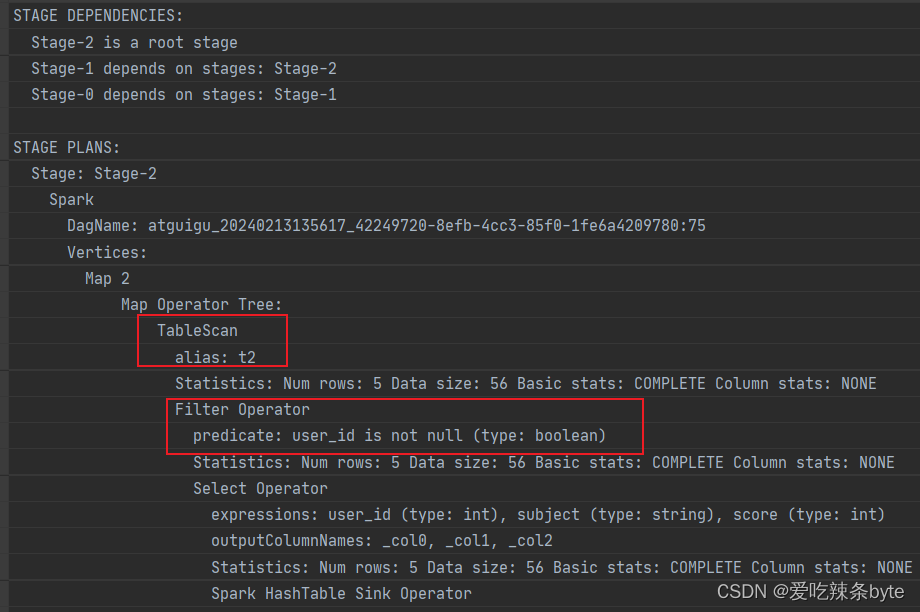
from studentInfo t1left join studentScore t2on t1.user_id = t2.user_id and t2.user_id is not null;
explain查看执行计划,在对t2表进行scan后,优先进行filter,过滤t2.user_id is not null,即谓词下推生效。
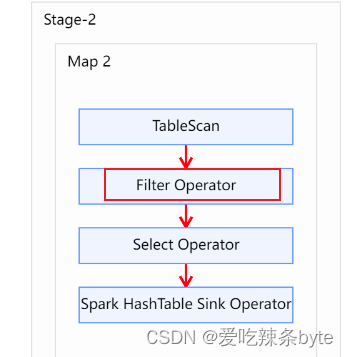
(3) full join
- 对左表where过滤
explain
selectt1.user_id as t1_user_id,t1.name,t1.gender,t2.user_id as t2_user_id,t2.subject,t2.score
from studentInfo t1full  join studentScore t2on t1.user_id = t2.user_id
where  t1.user_id >2 ;
explain查看执行计划,在对t2表进行scan后,优先对t1表进行filter,过滤t1.user_id >2,即谓词下推生效。

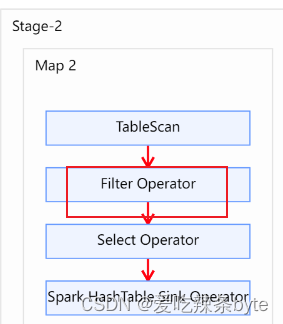
- 对右表where过滤
explain
selectt1.user_id as t1_user_id,t1.name,t1.gender,t2.user_id as t2_user_id,t2.subject,t2.score
from studentInfo t1full  join studentScore t2on t1.user_id = t2.user_id
where  t2.user_id is not null
explain查看执行计划,在对t1 表进行scan后,优先进行filter,过滤t2.user_id is not null,即谓词下推生效。
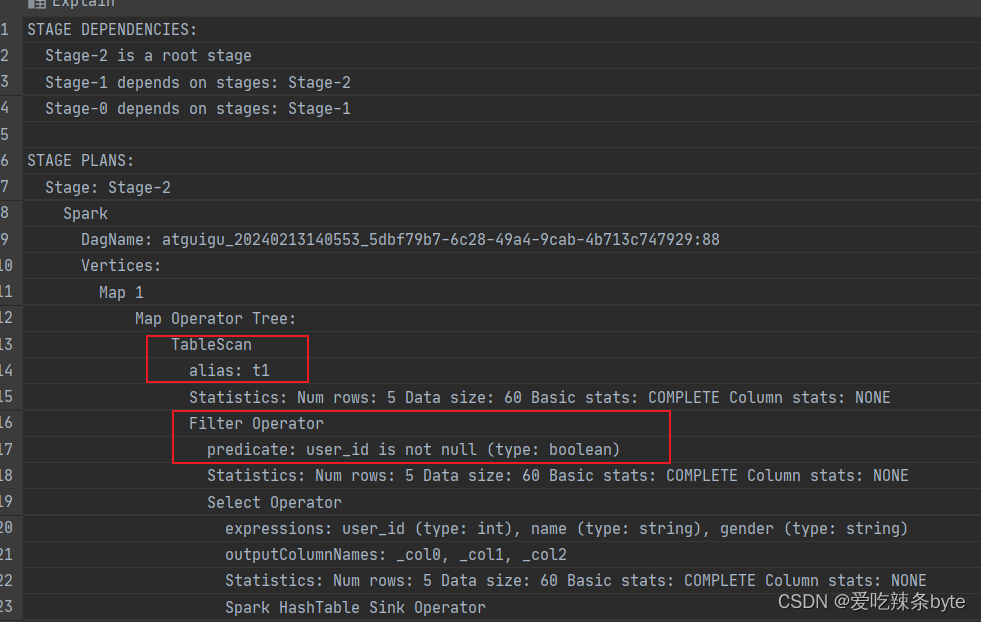
- 对左表on过滤
explain
selectt1.user_id as t1_user_id,t1.name,t1.gender,t2.user_id as t2_user_id,t2.subject,t2.score
from studentInfo t1full join studentScore t2on t1.user_id = t2.user_id and t1.user_id >2; explain查看执行计划,在对t1表进行scan后,未对t1表进行filter,即谓词下推不生效。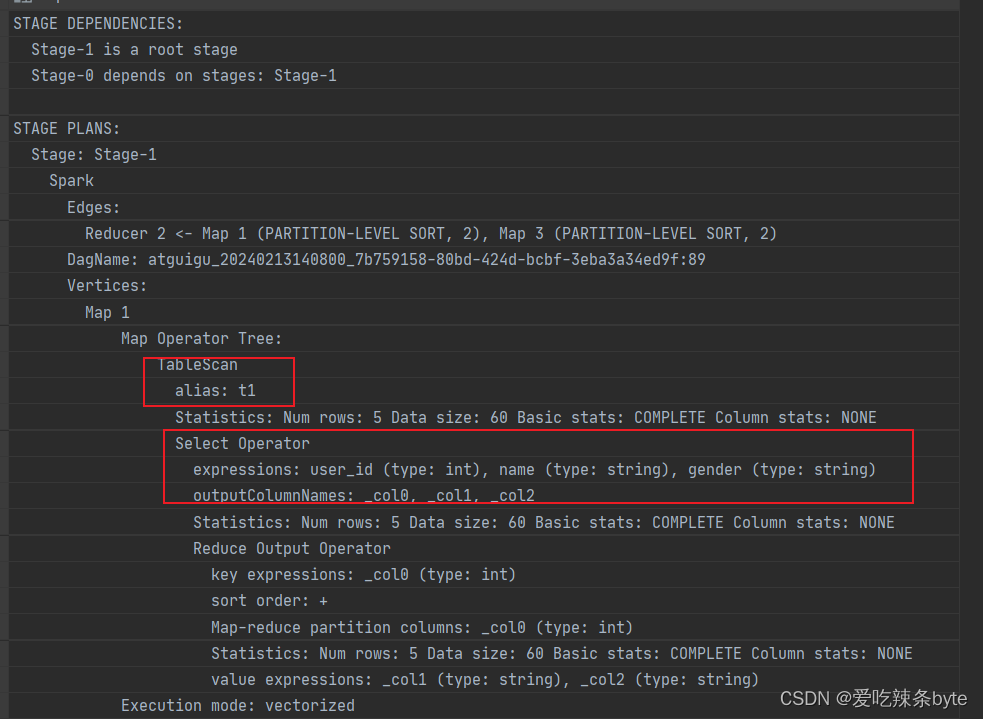
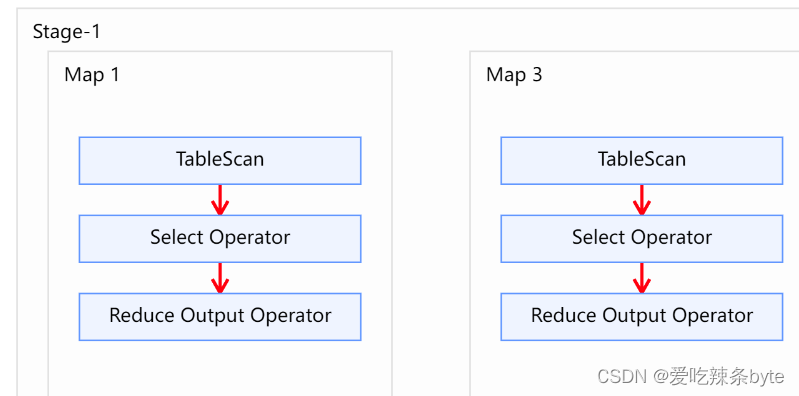
- 对右表on过滤
explain
selectt1.user_id as t1_user_id,t1.name,t1.gender,t2.user_id as t2_user_id,t2.subject,t2.score
from studentInfo t1full join studentScore t2on t1.user_id = t2.user_id and t2.user_id is not null;explain查看执行计划,在对t1表进行scan后,未对t2表未进行filter,即谓词下推不生效。
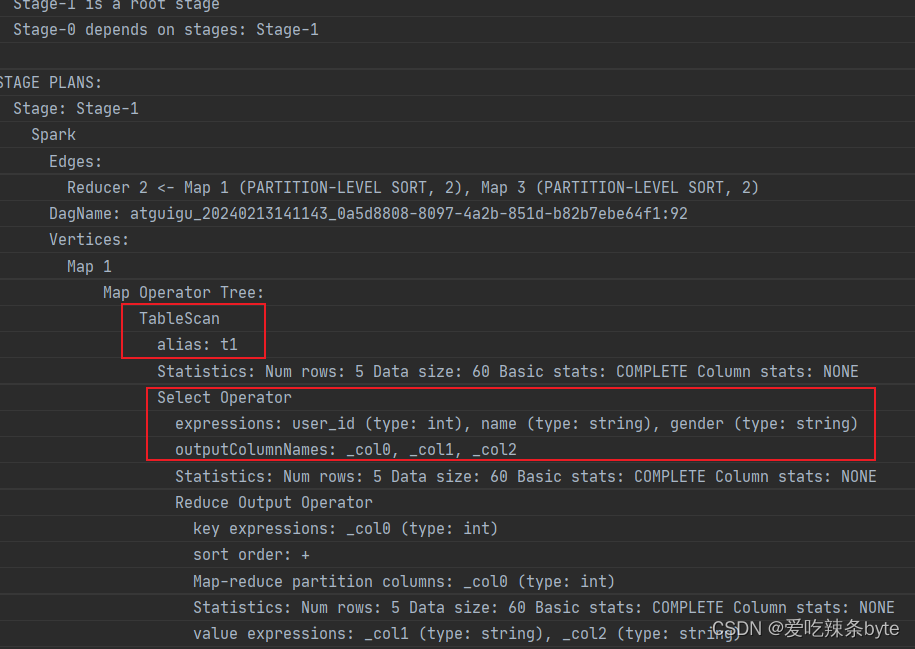
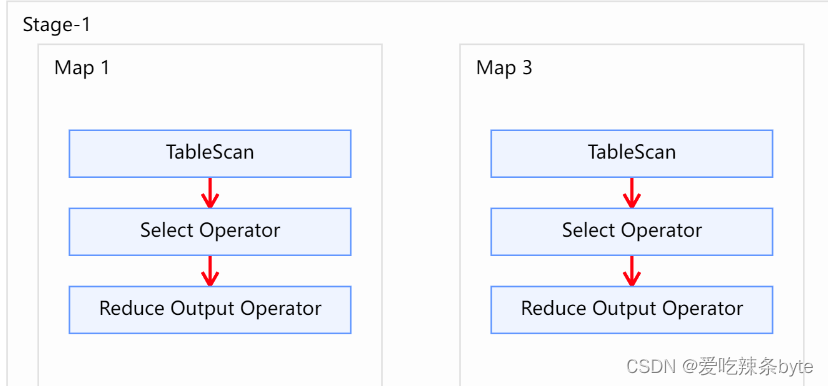
总结:
hive中谓词下推的各种场景下的生效情况如下表:
| inner join | left join | right join | full join | |||||
| 左表 | 右表 | 左表 | 右表 | 左表 | 右表 | 左表 | 右表 | |
| where条件 | √ | √ | √ | √ | √ | √ | √ | √ |
| on条件 | √ | √ | × | √ | √ | × | × | × |
三、Hive Join的数据倾斜
待补充
参考文章:
Hive的Join操作_hive join-CSDN博客
《Hive用户指南》- Hive的连接join与排序_hive 对主表排序后连接查询能保持顺序吗-CSDN博客
Hive 中的join和谓词下推_hive谓词下推-CSDN博客
相关文章:
(08)Hive——Join连接、谓词下推
前言 Hive-3.1.2版本支持6种join语法。分别是:inner join(内连接)、left join(左连接)、right join(右连接)、full outer join(全外连接)、left semi join(左…...

创新技巧|迁移到 Google Analytics 4 时如何保存历史 Universal Analytics 数据
Google Universal Analytics 从 2023 年 7 月起停止收集数据(除了付费 GA360 之外)。它被Google Analytics 4取代。为此,不少用户疑惑:是否可以将累积(历史)数据从 Google Analytics Universal 传输到 Goog…...
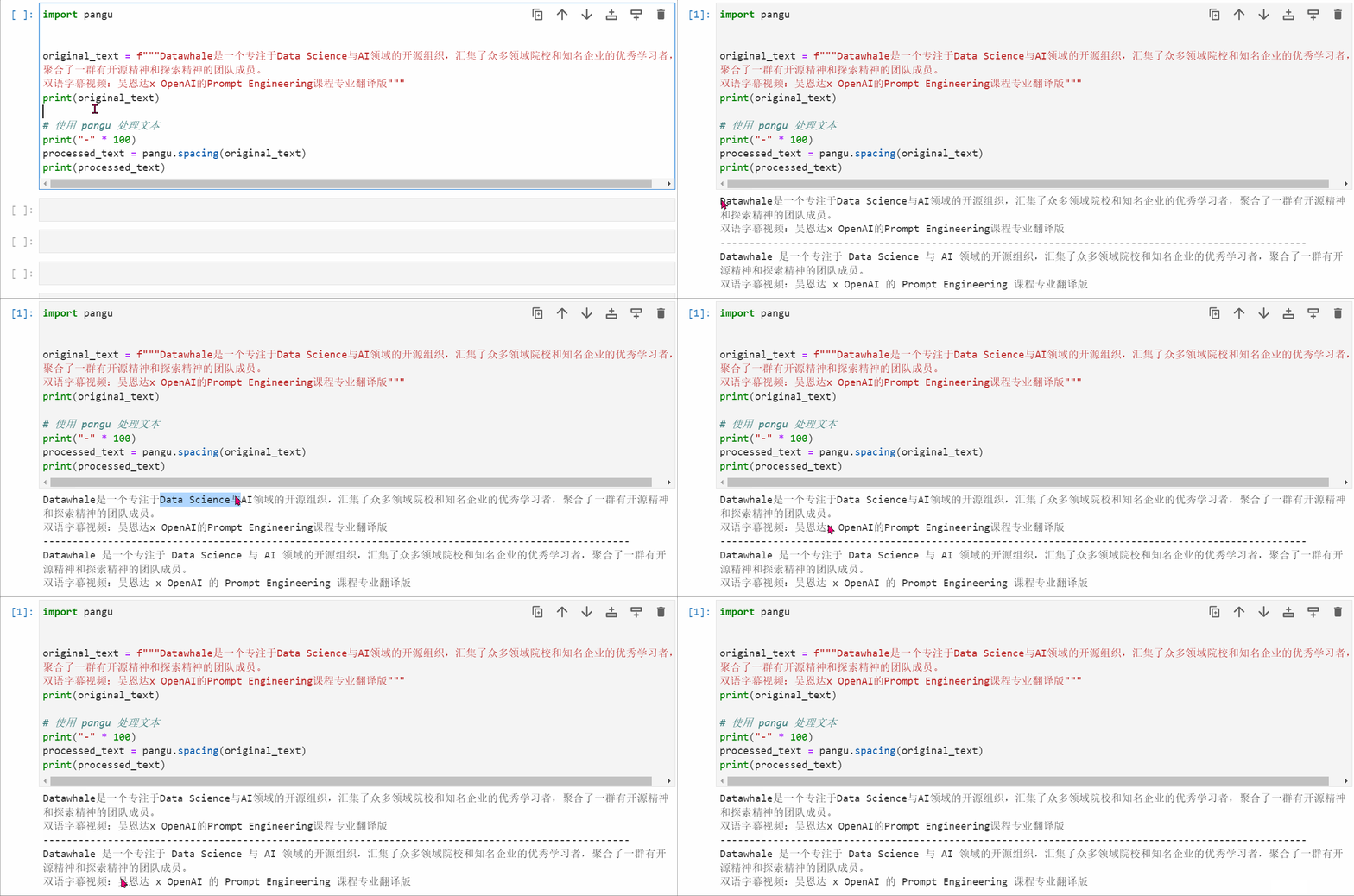
一个小而实用的 Python 包 pangu,实现在中文和半宽字符(字母、数字和符号)之间自动插入空格
🍉 CSDN 叶庭云:https://yetingyun.blog.csdn.net/ 一个小巧的库,可以避免自己重新开发功能。利用 Python 包 pangu,可以轻松实现在 CJK(中文、日文、韩文)和半宽字符(字母、数字和符号…...

openJudge | 中位数 C语言
总时间限制: 2000ms 内存限制: 65536kB 描述 中位数定义:一组数据按从小到大的顺序依次排列,处在中间位置的一个数或最中间两个数据的平均值(如果这组数的个数为奇数,则中位数为位于中间位置的那个数;如果这组数的个…...
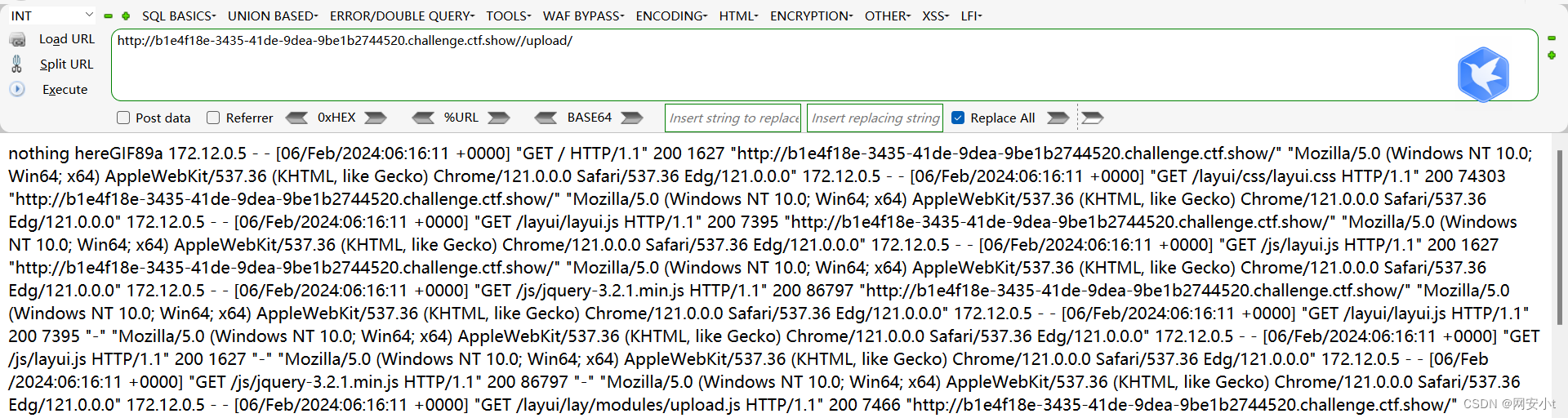
ctfshow-文件上传(web151-web161)
目录 web151 web152 web153 web154 web155 web156 web157 web158 web159 web160 web161 web151 提示前台验证不可靠 那限制条件估计就是在前端设置的 上传php小马后 弹出了窗口说不支持的格式 查看源码 这一条很关键 这种不懂直接ai搜 意思就是限制了上传类型 允许…...

cudnn免登录下载
现在要下载cuDNN,点击下载的页面后都是出现要求先加入Nvidia developers才能进行下载,但这个注册的过程非常慢,常常卡在第二个步骤,这里根据亲身的经验介绍一个可以绕过这个注册或登陆步骤的方式直接下载cuDNN。遇到此类问题的可以…...
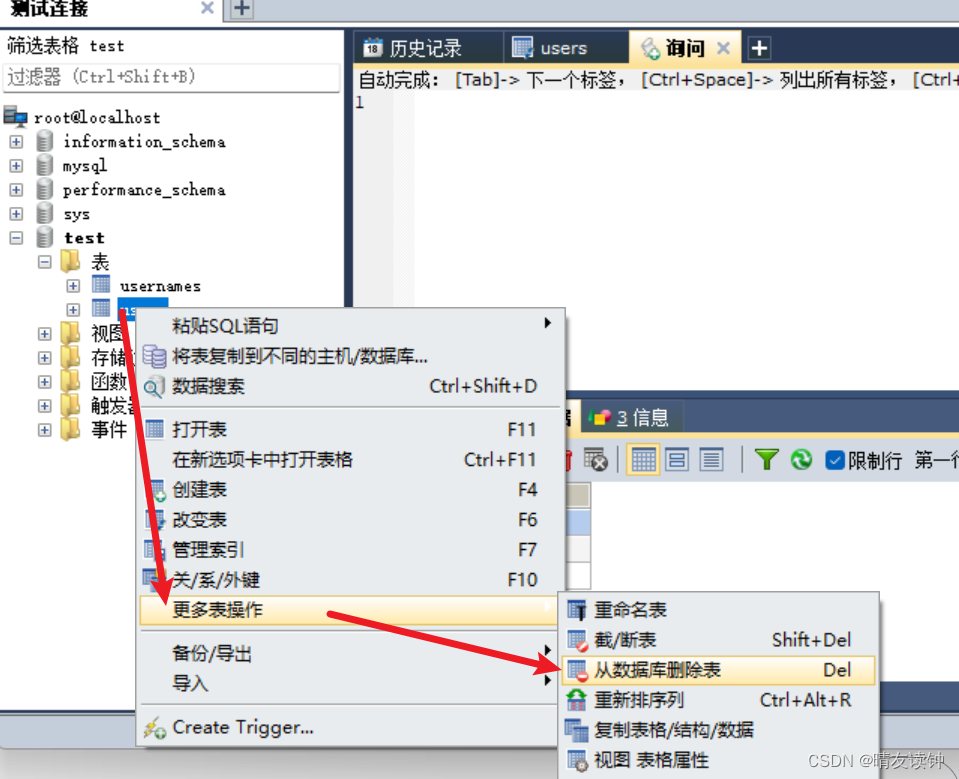
SQLyog安装配置(注册码)连接MySQL
下载资源 博主给你打包好了安装包,在网盘里,只有几Mb,防止你下载到钓鱼软件 快说谢谢博主(然后心甘情愿的点个赞~😊) SQLyog.zip 安装流程 ①下载好压缩包后并解压 ②打开文件夹,双击安装包 ③…...
java+SSM+mysql 开放式实验管理系统78512-计算机毕业设计项目选题推荐(免费领源码)
摘 要 我国高校开放式实验管理普遍存在实验设备使用率较低、管理制度不完善,实验设备共享程度不高等诸多问题。要在更大范围推行开放式实验管理,就必须在开放式实验教学管理流程中,通过引入信息化管理加大信息技术在其中的应用,才能真正发挥这种教学模式的开放性优势。 本系统…...

代码随想录算法训练营第三十三天|1005.K次取反后最大化的数组和、134.加油站、135.分发糖果
1005.K次取反后最大化的数组和 public class Solution {public int LargestSumAfterKNegations(int[] nums, int k) {int cnt0;int sum0;int minint.MaxValue;Array.Sort(nums);for(int i0;i<nums.Length;i){if(nums[i]>0){continue;}else{nums[i]-nums[i];cnt;}if(cntk…...
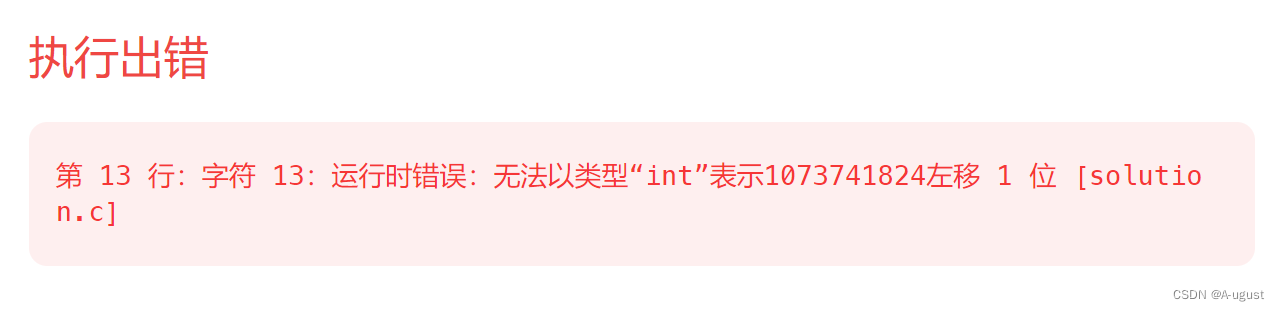
解决LeetCode编译器报错的技巧:正确处理位操作中的数据类型
一天我在leetcode上刷题时,遇到了这样的题目: 随即我写了如下的代码: int convertInteger(int A, int B) {int count 0;int C A ^ B;int flag 1;while(flag){if (C & flag){count;}flag<<1;}return count;} 但LeetCode显示如下…...
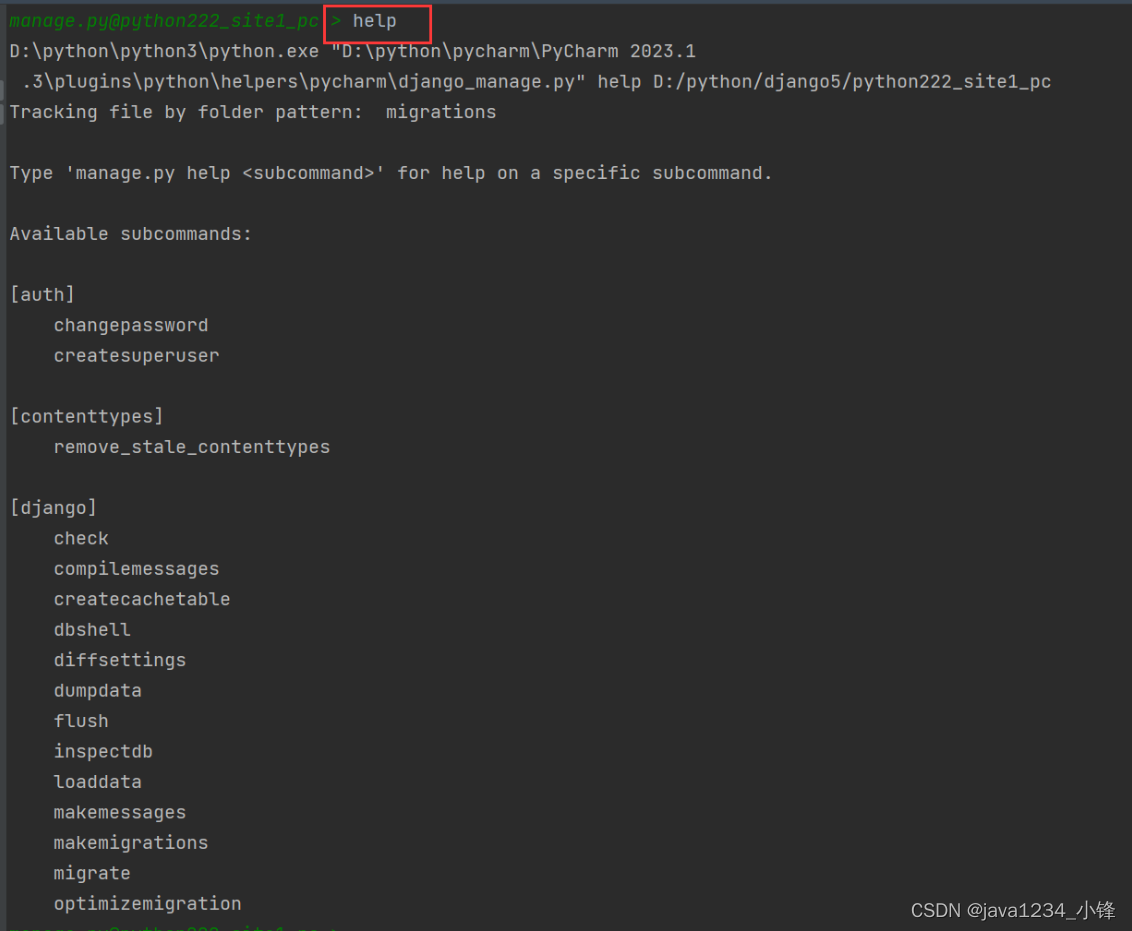
一周学会Django5 Python Web开发-Django5操作命令
锋哥原创的Python Web开发 Django5视频教程: 2024版 Django5 Python web开发 视频教程(无废话版) 玩命更新中~_哔哩哔哩_bilibili2024版 Django5 Python web开发 视频教程(无废话版) 玩命更新中~共计11条视频,包括:2024版 Django5 Python we…...
反转链表【基础算法精讲 06】
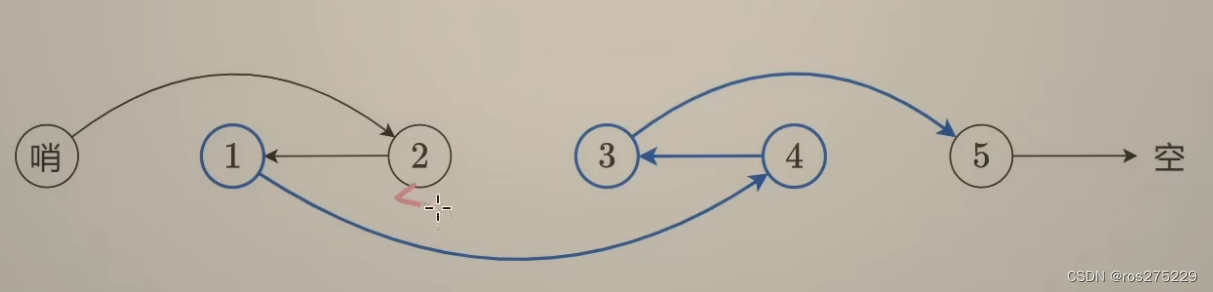
视频地址 反转链表【基础算法精讲 06】_哔哩哔哩_bilibili 概念 链表的每一个结点都包含节点值 和1指向下一个结点的next指针 , 链表的最后一个结点指向空; 206 . 反转链表 用cur记录当前遍历到的结点 , 用pre表示下一个结点 , 用nxt表示cur的下一个…...

Git 初学
目录 一、需求的产生 二、版本控制系统理解 1. 认识版本控制系统 2. 版本控制系统分类 (1)集中式版本控制系统 缺点: (2)分布式版本控制系统 三、初识 git 四、git 的使用 例:将 “ OLED文件夹 ”…...
智胜未来,新时代IT技术人风口攻略-第四版(弃稿)
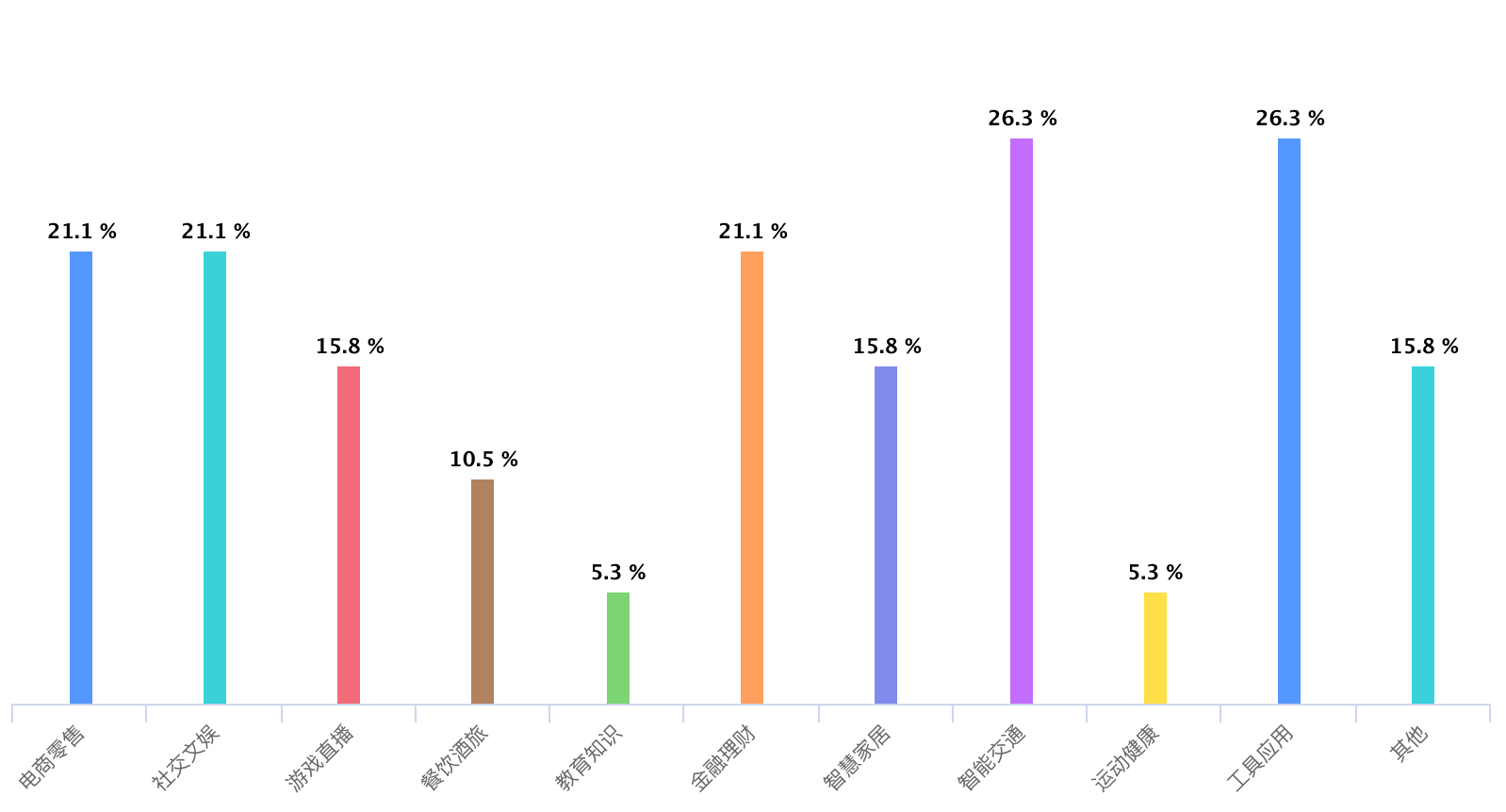
文章目录 前言鸿蒙生态科普调研人员画像高校助力鸿蒙高校鸿蒙课程开设占比教研力量并非唯一原因 企业布局规划全盘接纳仍需一段时间企业对鸿蒙的一些诉求 机构入场红利机构鸿蒙课程开设占比机构对鸿蒙的一些诉求 鸿蒙实际体验高校用户群体高度认同与影响体验企业用户群体未来可…...

渗透专用虚拟机(公开版)
0x01 工具介绍 okfafu渗透虚拟机公开版。解压密码:Mrl64Miku,压缩包大小:15.5G,解压后大小:16.5G。安装的软件已分类并在桌面中体现,也可以使用everything进行查找。包含一些常用的渗透工具以及一些基本工…...

HCIA-HarmonyOS设备开发认证V2.0-3.2.轻量系统内核基础-时间管理
目录 一、时间管理1.1、时间接口1.2、代码分析(待续...) 坚持就有收获 一、时间管理 时间管理以系统时钟为基础,给应用程序提供所有和时间有关的服务。系统时钟是由定时器/计数器产生的输出脉冲触发中断产生的,一般定义为整数或长…...
-Linux ARM驱动编程第五天-ARM Linux编程之file_operations详解 (物联技术666))
嵌入式培训机构四个月实训课程笔记(完整版)-Linux ARM驱动编程第五天-ARM Linux编程之file_operations详解 (物联技术666)
链接:https://pan.baidu.com/s/1V0E9IHSoLbpiWJsncmFgdA?pwd1688 提取码:1688 struct file_operations{ struct module *owner; // 指向拥有该结构的模块的指针,避免正在操作时被卸载,一般为初始化THIS_MODULES loff_t &#…...
第9章 网络编程
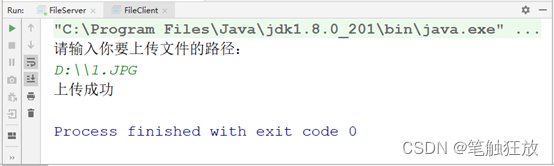
9.1 网络通信协议 通过计算机网络可以实现多台计算机连接,但是不同计算机的操作系统和硬件体系结构不同,为了提供通信支持,位于同一个网络中的计算机在进行连接和通信时必须要遵守一定的规则,这就好比在道路中行驶的汽车一定要遵…...

Python setattr函数
在Python编程中,setattr()函数是一个有用且灵活的内置函数,用于设置对象的属性值。它可以在运行时动态地设置对象的属性,无论是新建对象还是已有对象。本文将深入探讨setattr()函数的用法、语法、示例代码,并探讨其在实际编程中的…...
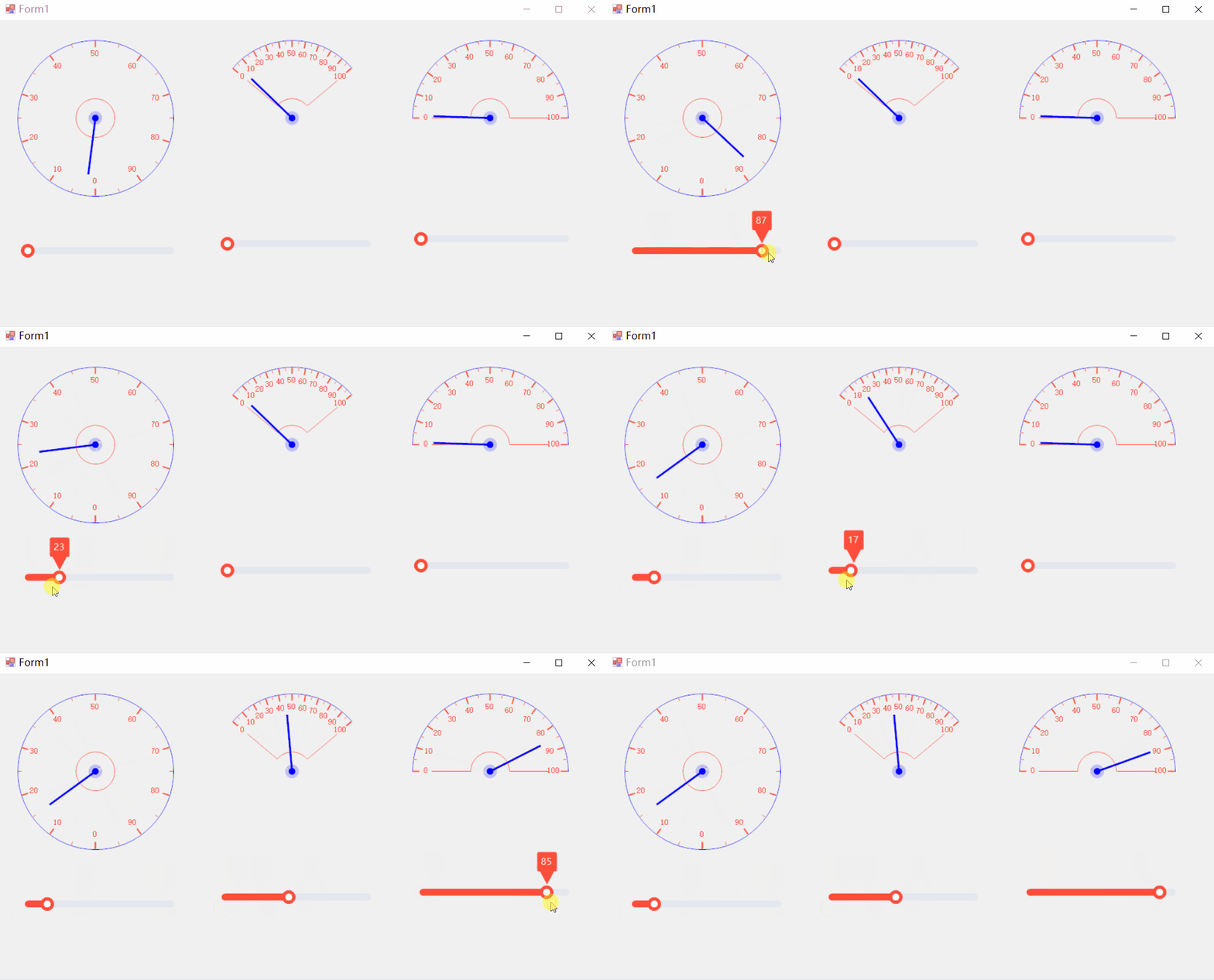
[C#]winform制作仪表盘好用的表盘控件和使用方法
【仪表盘一般创建流程】 在C#中制作仪表盘文案(通常指仪表盘上的文本、数字或指标显示)涉及到使用图形用户界面(GUI)组件,比如Windows Forms、WPF (Windows Presentation Foundation) 或 ASP.NET 等。以下是一个使用W…...

ONNXRuntime GPU推理想用BFloat16加速?手把手教你搞定PyTorch + CUDA环境配置与避坑
ONNXRuntime GPU推理想用BFloat16加速?手把手教你搞定PyTorch CUDA环境配置与避坑 在深度学习模型部署领域,BFloat16数据类型正逐渐成为提升推理性能的新宠。这种16位浮点格式保留了与32位浮点相同的指数位,在保持数值范围的同时减少了内存占…...

Excel MCP Server终极指南:让AI成为你的Excel自动化助手
Excel MCP Server终极指南:让AI成为你的Excel自动化助手 【免费下载链接】excel-mcp-server A Model Context Protocol server for Excel file manipulation 项目地址: https://gitcode.com/gh_mirrors/ex/excel-mcp-server 你是否厌倦了重复的Excel操作&…...

Ruby中文分词利器Rurima:纯Ruby实现的高性能分词引擎详解
1. 项目概述:一个为Ruby打造的现代中文分词引擎在Ruby社区里,处理中文文本一直是个有点“硌脚”的活儿。如果你做过中文搜索、内容分析或者简单的词频统计,肯定遇到过这个经典难题:怎么把一串连续的中文字符,准确地切割…...

高性能键盘映射与SOCD清理架构解析:解决游戏输入冲突的技术方案
高性能键盘映射与SOCD清理架构解析:解决游戏输入冲突的技术方案 【免费下载链接】socd Key remapper for epic gamers 项目地址: https://gitcode.com/gh_mirrors/so/socd 在竞技游戏和高速动作游戏中,键盘输入的处理方式直接影响玩家的操作精度和…...

Mantic.sh:Bash脚本实现的终端命令自动化与效率提升工具
1. 项目概述:一个为开发者打造的终端效率工具如果你和我一样,每天有超过一半的工作时间是在终端(Terminal)里度过的,那你肯定对效率工具有着近乎偏执的追求。从cd到ls,从grep到awk,我们依赖这些…...

AXI交叉开关IP核:SoC内部高并发数据传输的核心枢纽设计与实战
1. 项目概述:一个高效、可配置的片上总线交叉开关在复杂的数字系统设计,尤其是片上系统(SoC)领域,多个主设备(如CPU、DMA控制器)需要同时访问多个从设备(如内存、外设控制器…...
用户指引自助教学源码—东方仙盟)
未来之窗昭和仙君(九十三)用户指引自助教学源码—东方仙盟
代码<!DOCTYPE html> <html lang"zh-CN"> <head> <meta charset"UTF-8"> <meta http-equiv"X-UA-Compatible" content"IEedge,chrome1"> <title>你的导师-未来之窗</title> <style>*…...

n8n-claw:在自动化工作流中实现零代码网页抓取
1. 项目概述与核心价值最近在折腾自动化工作流,发现了一个挺有意思的项目,叫freddy-schuetz/n8n-claw。乍一看名字,你可能会有点懵,“n8n”我知道,是那个开源的自动化工具,但这个“claw”是啥?爪…...

WarcraftHelper:魔兽争霸3终极增强插件5分钟快速上手指南
WarcraftHelper:魔兽争霸3终极增强插件5分钟快速上手指南 【免费下载链接】WarcraftHelper Warcraft III Helper , support 1.20e, 1.24e, 1.26a, 1.27a, 1.27b 项目地址: https://gitcode.com/gh_mirrors/wa/WarcraftHelper WarcraftHelper是一款专为魔兽争…...

Linux内核升级C11标准:从C89到现代C语言的演进与实战解析
1. 项目概述:一次内核语言的“心脏移植”最近Linux内核社区的一个决定,在开发者圈子里激起了不小的波澜:计划将内核的C语言标准从使用了超过十年的C89/C90,逐步迁移到C11。这听起来可能像是一个枯燥的技术规范更新,但对…...