
Jenkins通知目标服务器拉取Harbor镜像部署
1.告诉目标服务器拉取哪个镜像
2.判断当前有没有正在运行此容器,有就删除
3.接着查看拉取的镜像目标服务器上是否已存在,有就删除
4.拉取Harbor镜像
5.运行容器
目标服务器编写脚本
创建个部署脚本
vim deploy.sh
告诉目标服务器Harbor地址、仓库、镜像、版本号、端口信息
#第一个参数,仓库地址
harbor_addr=$1
#第二个参数,仓库名
harbor_warehouse=$2
#第三个参数,镜像名
harbor_image=$3
#第四个参数,镜像版本号
image_version=$4
#第五个参数,宿主机端口号
host_port=$5
#第六个参数,容器端口号
container_port=$6#1.将参数都拼接起来,告知服务器要拉取的镜像
imageName=$harbor_addr/$harbor_warehouse/$harbor_image:$image_version#2.判断当前有没有正在运行此容器,有就删除
#获取当前容器的ID
containerId=`docker ps -a | grep ${harbor_image} | awk '{print $1}'`
#判断容器是否存在
if [ "$containerId" != "" ] ; then
docker stop $containerId
docker rm $containerId
fi#3.接着查看拉取的镜像目标服务器上是否已存在,有就删除
images=`docker images | grep ${harbor_image} | awk '{print $2}'`
#判断语句,包含我要拉取的镜像就执行删除动作
if [[ "$images" =~ $image_version ]] ; then
docker rmi $images
fi#4.拉取Harbor镜像
#登录Harbor
docker login -u admin -p Harbor12345 $harbor_addr:80/$harbor_warehouse/$harbor_image:$image_version
#拉取镜像
docker pull $imageName
#运行容器
docker run -d --name $harbor_image -p $host_port:$container_port $imageName
添加权限,让所有用户可执行脚本
chmod a+x deploy.sh
将deploy脚本移到bin目录下,让其在任何位置都能直接使用
mv deploy.sh /usr/bin/
修改Jenkins任务
在镜像推送到Harbor仓库步骤的下面,再添加一个构建后操作
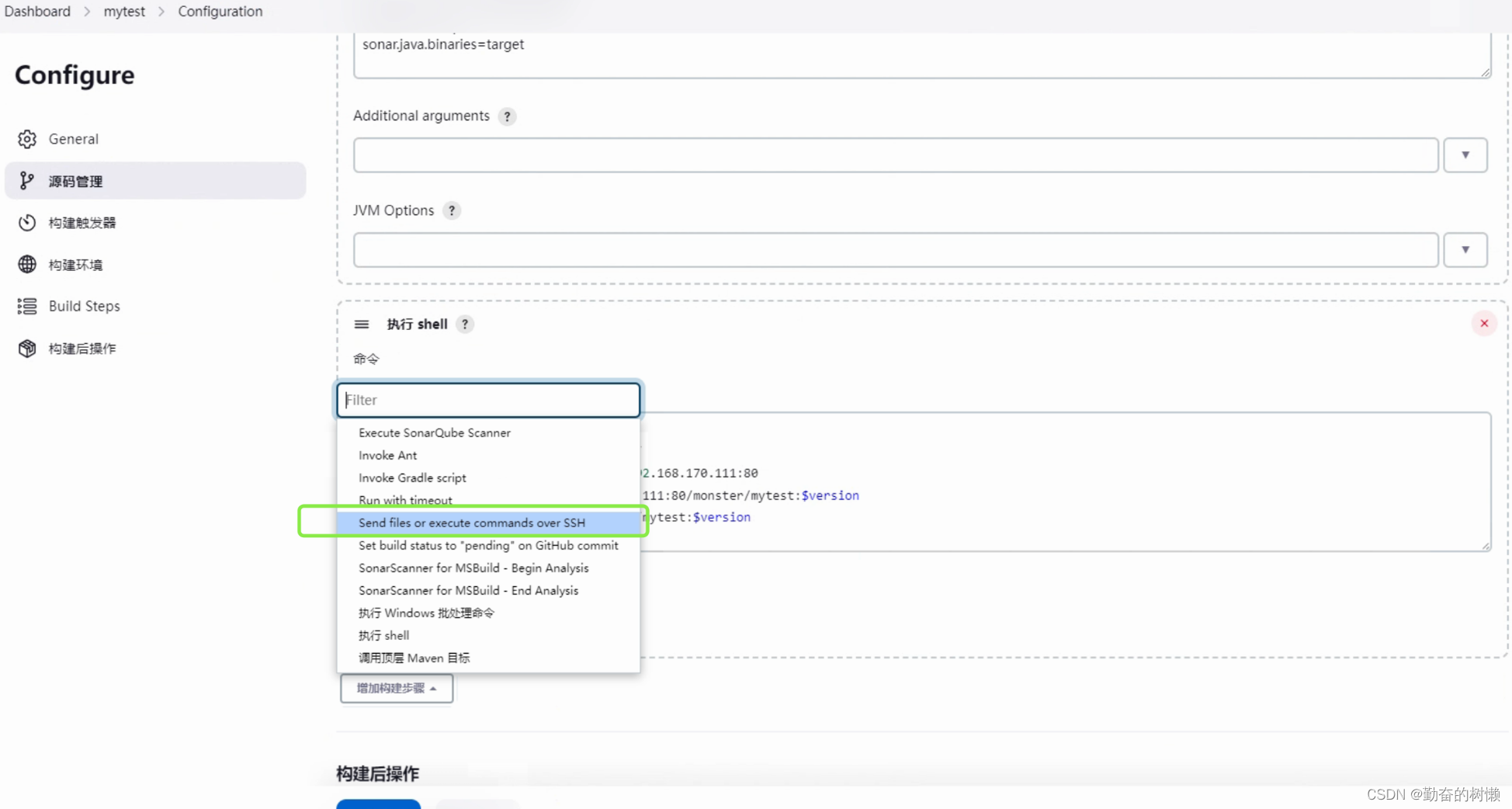
选择目标服务器,添加执行脚本和参数命令
deploy.sh 192.168.170.111:80 monster ${JOB_NAME} $version $host_port $container_port
直接deploy.sh,目标服务器放在bin目录下可以直接运行
紧跟着Harbor地址,Monster仓库
JOB_NAME就是当前Jenkins任务的名称mytest
version就是获取上面拉取的Gitlab标签版本号
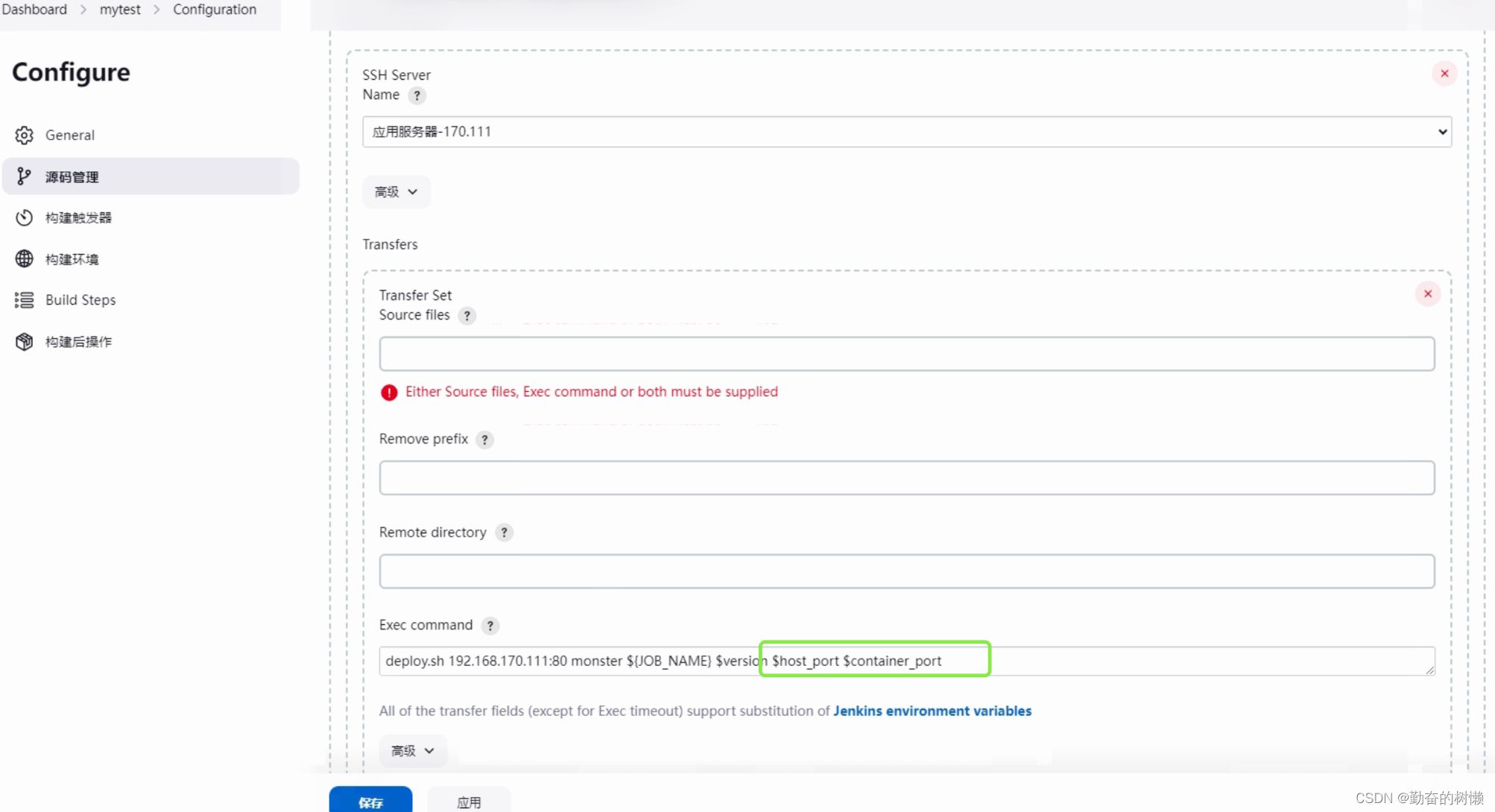
host_port、container_port两个参数现在是获取不到的
所以需要再添加两个参数,在上面的参数化构建添加字符参数
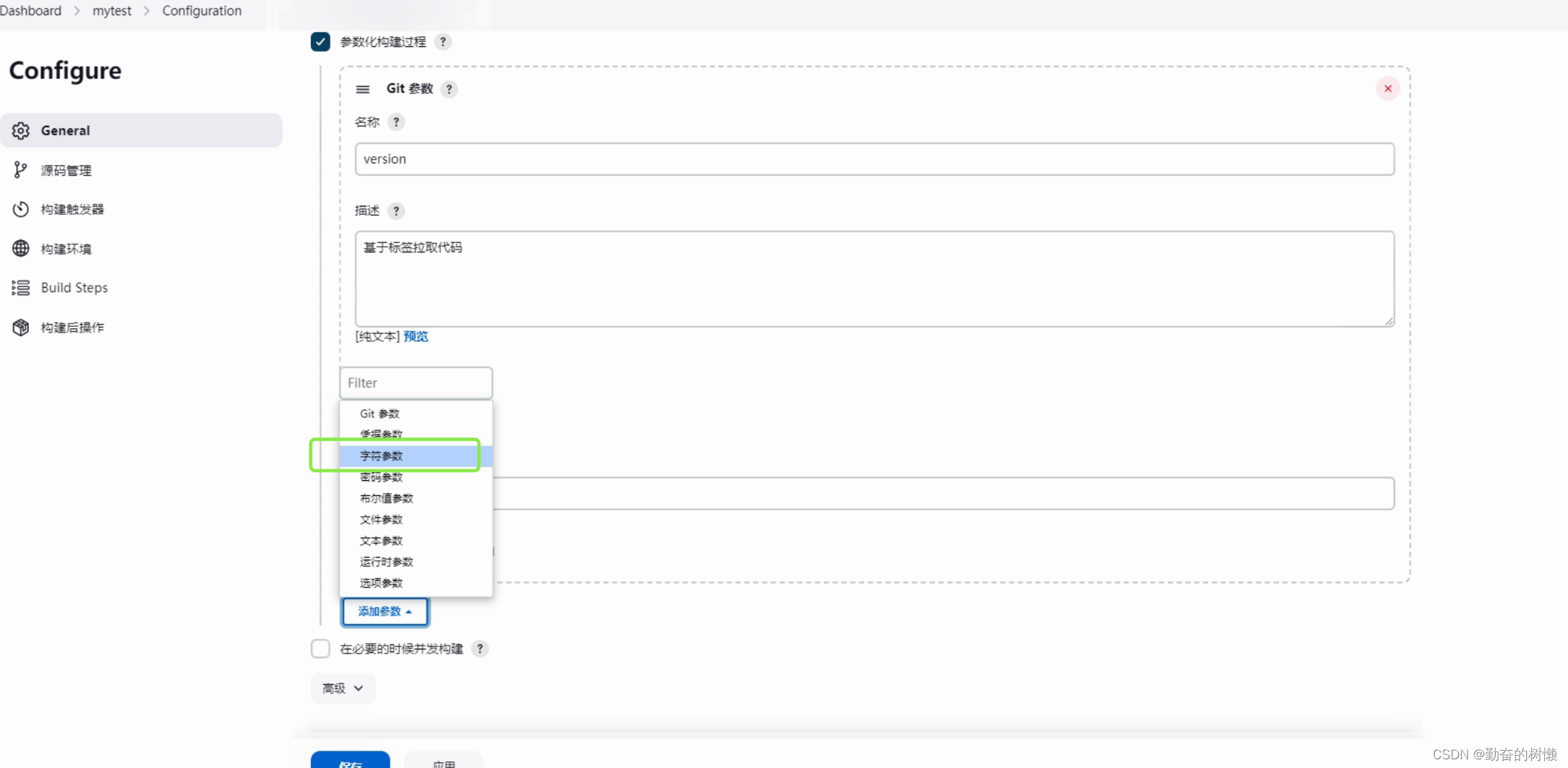
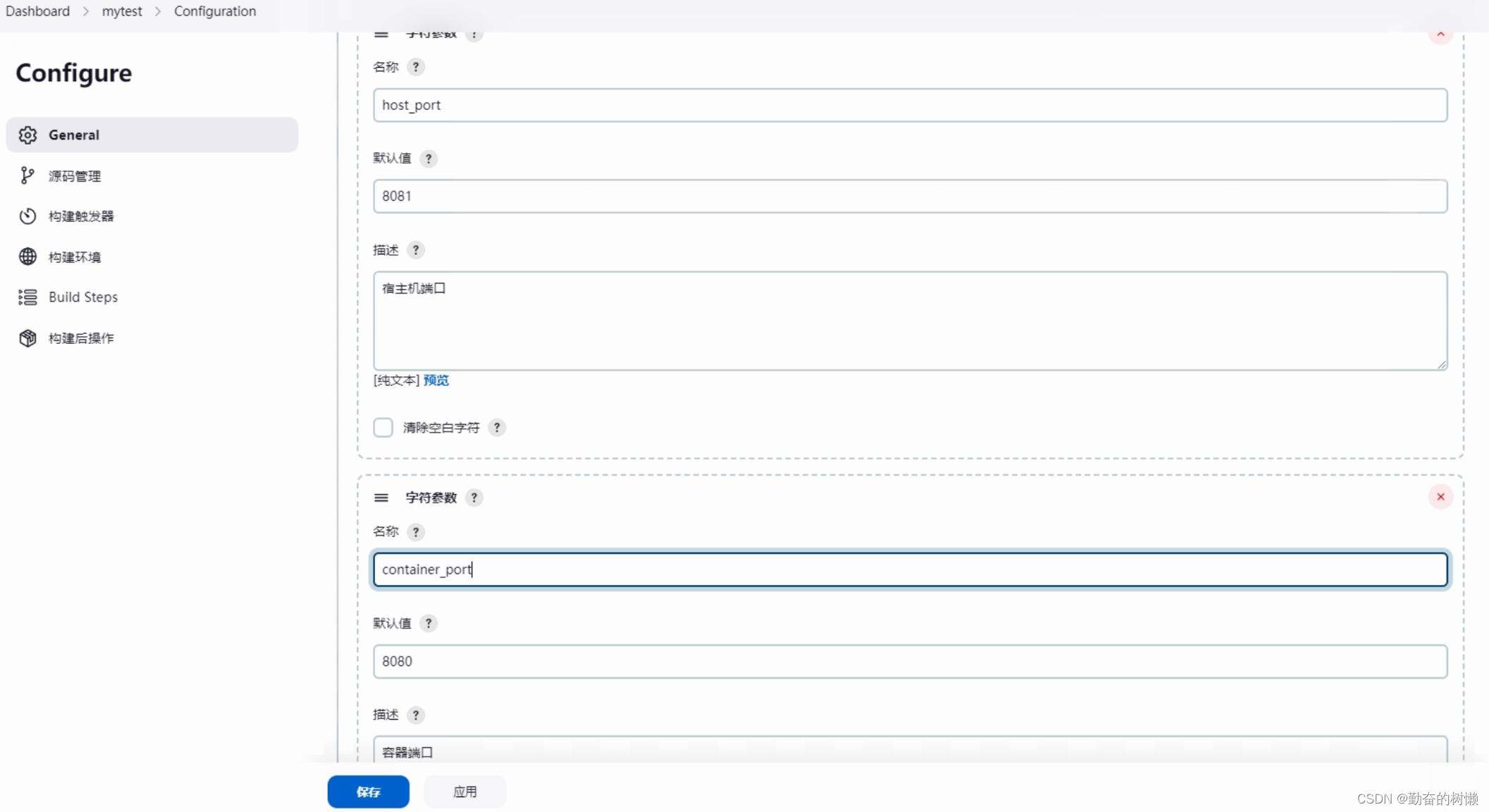
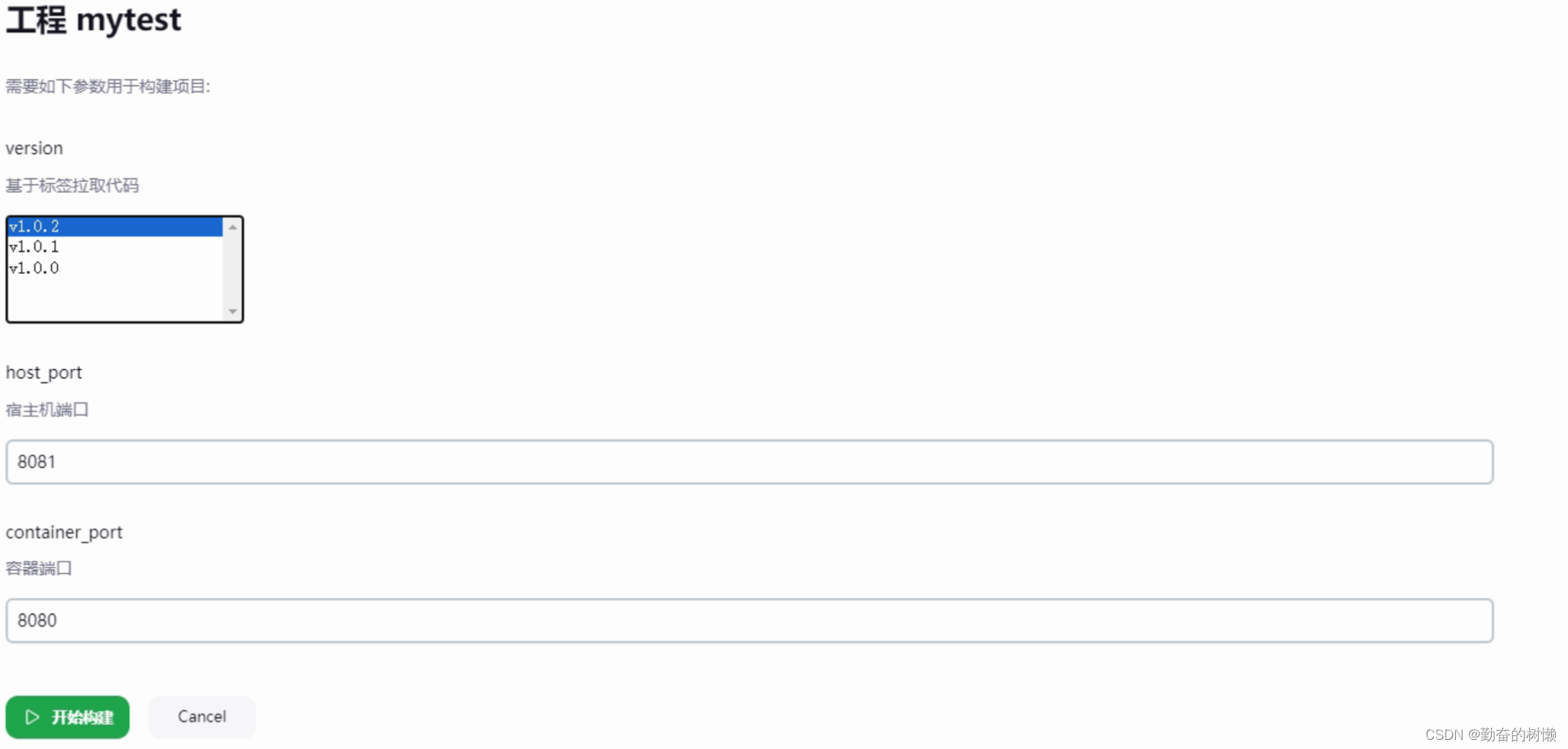
一个宿主机端口host_port,默认值8081
一个容器端口container_port,默认值8080
构建验证
开始构建,界面可以看见多了两个默认值的参数
Started by user 我是真滴帅
Running as SYSTEM
Building in workspace /var/jenkins_home/workspace/mytest
The recommended git tool is: NONE
No credentials specified> git rev-parse --resolve-git-dir /var/jenkins_home/workspace/mytest/.git # timeout=10
Fetching changes from the remote Git repository> git config remote.origin.url http://192.168.170.111:8888/root/jenkins-cicd-mytest.git # timeout=10
Fetching upstream changes from http://192.168.170.111:8888/root/jenkins-cicd-mytest.git> git --version # timeout=10> git --version # 'git version 2.30.2'> git fetch --tags --force --progress -- http://192.168.170.111:8888/root/jenkins-cicd-mytest.git +refs/heads/*:refs/remotes/origin/* # timeout=10> git rev-parse refs/remotes/origin/main^{commit} # timeout=10
Checking out Revision b92e927c41d08ab99a8ac8a462535deadc68c972 (refs/remotes/origin/main)> git config core.sparsecheckout # timeout=10> git checkout -f b92e927c41d08ab99a8ac8a462535deadc68c972 # timeout=10
Commit message: "删除docker-compose.yml,修改页面内容"> git rev-list --no-walk b92e927c41d08ab99a8ac8a462535deadc68c972 # timeout=10
[mytest] $ /bin/sh -xe /tmp/jenkins13710554383855071698.sh
+ git checkout v1.0.2
HEAD is now at b92e927 删除docker-compose.yml,修改页面内容
[mytest] $ /var/jenkins_home/tools/hudson.tasks.Maven_MavenInstallation/maven/bin/mvn clean package -DskipTests
[INFO] Scanning for projects...
[INFO]
[INFO] -------------------------< com.monster:mytest >-------------------------
[INFO] Building mytest 0.0.1-SNAPSHOT
[INFO]   from pom.xml
[INFO] --------------------------------[ jar ]---------------------------------
[WARNING] Parameter 'archive' is unknown for plugin 'spring-boot-maven-plugin:2.6.13:repackage (repackage)'
[INFO]
[INFO] --- clean:3.2.0:clean (default-clean) @ mytest ---
[INFO] Deleting /var/jenkins_home/workspace/mytest/target
[INFO]
[INFO] --- resources:3.3.1:resources (default-resources) @ mytest ---
[INFO] Copying 2 resources from src/main/resources to target/classes
[INFO]
[INFO] --- compiler:3.8.1:compile (default-compile) @ mytest ---
[INFO] Changes detected - recompiling the module!
[INFO] Compiling 4 source files to /var/jenkins_home/workspace/mytest/target/classes
[INFO]
[INFO] --- resources:3.3.1:testResources (default-testResources) @ mytest ---
[INFO] skip non existing resourceDirectory /var/jenkins_home/workspace/mytest/src/test/resources
[INFO]
[INFO] --- compiler:3.8.1:testCompile (default-testCompile) @ mytest ---
[INFO] Changes detected - recompiling the module!
[INFO] Compiling 1 source file to /var/jenkins_home/workspace/mytest/target/test-classes
[INFO]
[INFO] --- surefire:3.2.2:test (default-test) @ mytest ---
[INFO] Tests are skipped.
[INFO]
[INFO] --- jar:3.3.0:jar (default-jar) @ mytest ---
[INFO] Building jar: /var/jenkins_home/workspace/mytest/target/mytest.jar
[INFO]
[INFO] --- spring-boot:2.6.13:repackage (repackage) @ mytest ---
[INFO] Replacing main artifact with repackaged archive
[INFO] ------------------------------------------------------------------------
[INFO] BUILD SUCCESS
[INFO] ------------------------------------------------------------------------
[INFO] Total time:  2.677 s
[INFO] Finished at: 2024-03-16T17:27:43Z
[INFO] ------------------------------------------------------------------------
[mytest] $ /var/jenkins_home/sonar-scanner/bin/sonar-scanner -Dsonar.host.url=http://192.168.170.111:9000 ******** -Dsonar.projectKey=mytest -Dsonar.projectname=mytest -Dsonar.java.binaries=target -Dsonar.source=./ -Dsonar.projectBaseDir=/var/jenkins_home/workspace/mytest
INFO: Scanner configuration file: /var/jenkins_home/sonar-scanner/conf/sonar-scanner.properties
INFO: Project root configuration file: NONE
INFO: SonarScanner 5.0.1.3006
INFO: Java 17.0.7 Eclipse Adoptium (64-bit)
INFO: Linux 3.10.0-1160.el7.x86_64 amd64
INFO: User cache: /var/jenkins_home/.sonar/cache
INFO: Analyzing on SonarQube server 9.2.3
INFO: Default locale: "en", source code encoding: "UTF-8"
INFO: Load global settings
INFO: Load global settings (done) | time=614ms
INFO: Server id: 54000601-AYjKh1Zs1hD1Rss9XdjF
INFO: User cache: /var/jenkins_home/.sonar/cache
INFO: Load/download plugins
INFO: Load plugins index
INFO: Load plugins index (done) | time=218ms
INFO: Plugin [l10nzh] defines 'l10nen' as base plugin. This metadata can be removed from manifest of l10n plugins since version 5.2.
INFO: Load/download plugins (done) | time=297ms
INFO: Process project properties
INFO: Process project properties (done) | time=1ms
INFO: Execute project builders
INFO: Execute project builders (done) | time=1ms
INFO: Project key: mytest
INFO: Base dir: /var/jenkins_home/workspace/mytest
INFO: Working dir: /var/jenkins_home/workspace/mytest/.scannerwork
INFO: Load project settings for component key: 'mytest'
INFO: Load project settings for component key: 'mytest' (done) | time=191ms
INFO: Load project branches
INFO: Load project branches (done) | time=253ms
INFO: Load project pull requests
INFO: Load project pull requests (done) | time=26ms
INFO: Load branch configuration
INFO: Load branch configuration (done) | time=1ms
INFO: Auto-configuring with CI 'Jenkins'
INFO: Load quality profiles
INFO: Load quality profiles (done) | time=600ms
INFO: Auto-configuring with CI 'Jenkins'
INFO: Load active rules
INFO: Load active rules (done) | time=2826ms
INFO: Indexing files...
INFO: Project configuration:
INFO: 10 files indexed
INFO: 14 files ignored because of scm ignore settings
INFO: Quality profile for java: Easyspeed
INFO: Quality profile for web: Sonar way
INFO: Quality profile for xml: Sonar way
INFO: ------------- Run sensors on module mytest
INFO: Load metrics repository
INFO: Load metrics repository (done) | time=111ms
INFO: Sensor JavaSensor [java]
INFO: Configured Java source version (sonar.java.source): none
INFO: JavaClasspath initialization
INFO: JavaClasspath initialization (done) | time=7ms
INFO: JavaTestClasspath initialization
INFO: JavaTestClasspath initialization (done) | time=0ms
INFO: Java "Main" source files AST scan
INFO: 5 source files to be analyzed
INFO: Load project repositories
INFO: Load project repositories (done) | time=225ms
INFO: 5/5 source files have been analyzed
WARN: Dependencies/libraries were not provided for analysis of SOURCE files. The 'sonar.java.libraries' property is empty. Verify your configuration, as you might end up with less precise results.
WARN: Unresolved imports/types have been detected during analysis. Enable DEBUG mode to see them.
INFO: Java "Main" source files AST scan (done) | time=1189ms
INFO: No "Test" source files to scan.
INFO: No "Generated" source files to scan.
INFO: Sensor JavaSensor [java] (done) | time=1406ms
INFO: Sensor JaCoCo XML Report Importer [jacoco]
INFO: 'sonar.coverage.jacoco.xmlReportPaths' is not defined. Using default locations: target/site/jacoco/jacoco.xml,target/site/jacoco-it/jacoco.xml,build/reports/jacoco/test/jacocoTestReport.xml
INFO: No report imported, no coverage information will be imported by JaCoCo XML Report Importer
INFO: Sensor JaCoCo XML Report Importer [jacoco] (done) | time=2ms
INFO: Sensor CSS Rules [javascript]
WARN: Error when running: 'node -v'. Is Node.js available during analysis?
INFO: Sensor CSS Rules [javascript] (done) | time=1721ms
INFO: Sensor C# Project Type Information [csharp]
INFO: Sensor C# Project Type Information [csharp] (done) | time=1ms
INFO: Sensor C# Analysis Log [csharp]
INFO: Sensor C# Analysis Log [csharp] (done) | time=16ms
INFO: Sensor C# Properties [csharp]
INFO: Sensor C# Properties [csharp] (done) | time=0ms
INFO: Sensor SurefireSensor [java]
INFO: parsing [/var/jenkins_home/workspace/mytest/target/surefire-reports]
INFO: Sensor SurefireSensor [java] (done) | time=2ms
INFO: Sensor HTML [web]
INFO: Sensor HTML [web] (done) | time=50ms
INFO: Sensor XML Sensor [xml]
INFO: 1 source file to be analyzed
INFO: 1/1 source file has been analyzed
INFO: Sensor XML Sensor [xml] (done) | time=179ms
INFO: Sensor VB.NET Project Type Information [vbnet]
INFO: Sensor VB.NET Project Type Information [vbnet] (done) | time=1ms
INFO: Sensor VB.NET Analysis Log [vbnet]
INFO: Sensor VB.NET Analysis Log [vbnet] (done) | time=12ms
INFO: Sensor VB.NET Properties [vbnet]
INFO: Sensor VB.NET Properties [vbnet] (done) | time=0ms
INFO: Sensor com.github.mc1arke.sonarqube.plugin.scanner.ScannerPullRequestPropertySensor
INFO: Sensor com.github.mc1arke.sonarqube.plugin.scanner.ScannerPullRequestPropertySensor (done) | time=0ms
INFO: ------------- Run sensors on project
INFO: Sensor Zero Coverage Sensor
INFO: Sensor Zero Coverage Sensor (done) | time=7ms
INFO: Sensor Java CPD Block Indexer
INFO: Sensor Java CPD Block Indexer (done) | time=22ms
INFO: CPD Executor 3 files had no CPD blocks
INFO: CPD Executor Calculating CPD for 3 files
INFO: CPD Executor CPD calculation finished (done) | time=6ms
INFO: Load New Code definition
INFO: Load New Code definition (done) | time=22ms
INFO: Analysis report generated in 88ms, dir size=101.0 kB
INFO: Analysis report compressed in 25ms, zip size=24.7 kB
INFO: Analysis report uploaded in 55ms
INFO: ANALYSIS SUCCESSFUL, you can browse http://ci.hkeasyspeed.com/dashboard?id=mytest
INFO: Note that you will be able to access the updated dashboard once the server has processed the submitted analysis report
INFO: More about the report processing at http://ci.hkeasyspeed.com/api/ce/task?id=AY5IRf2h3PsONgf4Xut0
INFO: Analysis total time: 9.763 s
INFO: ------------------------------------------------------------------------
INFO: EXECUTION SUCCESS
INFO: ------------------------------------------------------------------------
INFO: Total time: 11.504s
INFO: Final Memory: 18M/67M
INFO: ------------------------------------------------------------------------
[mytest] $ /bin/sh -xe /tmp/jenkins15276106874998699608.sh
+ mv target/mytest.jar docker
+ docker build -t mytest:v1.0.2 docker/
DEPRECATED: The legacy builder is deprecated and will be removed in a future release.Install the buildx component to build images with BuildKit:https://docs.docker.com/go/buildx/Sending build context to Docker daemon  17.57MBStep 1/4 : FROM daocloud.io/library/java:8u40-jdk---> 4aefdb29fd43
Step 2/4 : COPY mytest.jar /usr/local/---> ee2b2d803137
Step 3/4 : WORKDIR /usr/local---> Running in 174dacdeaca1---> Removed intermediate container 174dacdeaca1---> 8759ed1a2fd5
Step 4/4 : CMD java -jar mytest.jar---> Running in 735d3d6093e4---> Removed intermediate container 735d3d6093e4---> 7180e79a6982
Successfully built 7180e79a6982
Successfully tagged mytest:v1.0.2
+ docker login -u admin -p Harbor12345 192.168.170.111:80
WARNING! Using --password via the CLI is insecure. Use --password-stdin.
WARNING! Your password will be stored unencrypted in /var/jenkins_home/.docker/config.json.
Configure a credential helper to remove this warning. See
https://docs.docker.com/engine/reference/commandline/login/#credentials-storeLogin Succeeded
+ docker tag mytest:v1.0.2 192.168.170.111:80/monster/mytest:v1.0.2
+ docker push 192.168.170.111:80/monster/mytest:v1.0.2
The push refers to repository [192.168.170.111:80/monster/mytest]
b4d16baca513: Preparing
50ecdabc71b7: Preparing
3e9cda2eceec: Preparing
5f70bf18a086: Preparing
5f70bf18a086: Preparing
5f70bf18a086: Preparing
bb7b60f93aea: Preparing
0ef3d186e2bd: Preparing
1e0931f30489: Preparing
5f70bf18a086: Preparing
fd97e4a10f39: Preparing
5f70bf18a086: Preparing
0ef3d186e2bd: Waiting
1e0931f30489: Waiting
fd97e4a10f39: Waiting
3e9cda2eceec: Layer already exists
bb7b60f93aea: Layer already exists
5f70bf18a086: Layer already exists
50ecdabc71b7: Layer already exists
fd97e4a10f39: Layer already exists
0ef3d186e2bd: Layer already exists
1e0931f30489: Layer already exists
b4d16baca513: Pushed
v1.0.2: digest: sha256:bdcbb6cfc266ddb11da8c16f021ecb90785546a8300582dff7c5969d044f0882 size: 2828
SSH: Connecting from host [1dc2bb3ce84f]
SSH: Connecting with configuration [应用服务器-170.111] ...
SSH: EXEC: completed after 13,608 ms
SSH: Disconnecting configuration [应用服务器-170.111] ...
SSH: Transferred 0 file(s)
Build step 'Send files or execute commands over SSH' changed build result to SUCCESS
Finished: SUCCESS

相关文章:
Jenkins通知目标服务器拉取Harbor镜像部署
1.告诉目标服务器拉取哪个镜像 2.判断当前有没有正在运行此容器,有就删除 3.接着查看拉取的镜像目标服务器上是否已存在,有就删除 4.拉取Harbor镜像 5.运行容器 目标服务器编写脚本 创建个部署脚本 vim deploy.sh告诉目标服务器Harbor地址、仓库、镜像…...

Android 13.0 系统中framework中关于Activitity的生命周期的源码讲解
1.前言 在13.0的系统rom定制化开发中,在framework中对activitity的生命周期的掌握和了解也是非常重要的,这样有利于在启动某个app的activity的页面的时候,可以 监听到是在启动 resume stop的过程,也好进行相关的功能开发,接下来就分析下Activity的相关生命周期的代码 2.…...

常见的几个Python技术难题
大家在日常开发中有没有遇到一些难题呢?计划后面出几期专题针对性的解决。大家如果有其它问题可以在评论区给出哈。 以下是几个Python技术难题的例子: 并发和多线程编程:Python的全局解释器锁(GIL)限制了多线程的并行…...

【探索Linux】—— 强大的命令行工具 P.28(网络编程套接字 —— 简单的UDP网络程序模拟实现)
阅读导航 引言一、UDP协议二、UDP网络程序模拟实现1. 预备代码⭕makefile文件⭕打印日志文件⭕打开指定的终端设备文件,并将其作为标准错误输出的目标文件描述符 2. UDP 服务器端实现(UdpServer.hpp)3. UDP 客户端实现(main函数&a…...
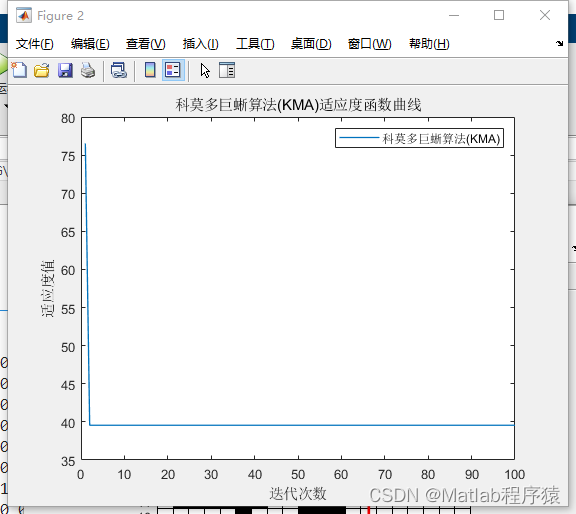
【MATLAB源码-第165期】基于matlab的科莫多巨蜥算法(KMA)机器人栅格路径规划,输出做短路径图和适应度曲线。
操作环境: MATLAB 2022a 1、算法描述 科莫多巨蜥算法(Komodo Mlipir Algorithm,简称KMA)是一种受到印尼科莫多岛上独特生物——科莫多巨蜥启发的创新算法。尽管这个算法的名称听起来很有趣,但实际上它并不是一个公认…...

【Linux】项目部署CPU彪高如何定位
1.查看所有CPU占比 使用top指令获取彪高进程的PID 2.输出进程的信息 ps H -eo pid,tid,%cpu | grep 1313 3.查看线程的信息 jstack tid nid都是十六进制的 4.进制转换 将 tid的十进制转为十六进制 找到nid 可以定位到具体位置 5.关闭程序 ps -ef | grep java kill -9 jav…...
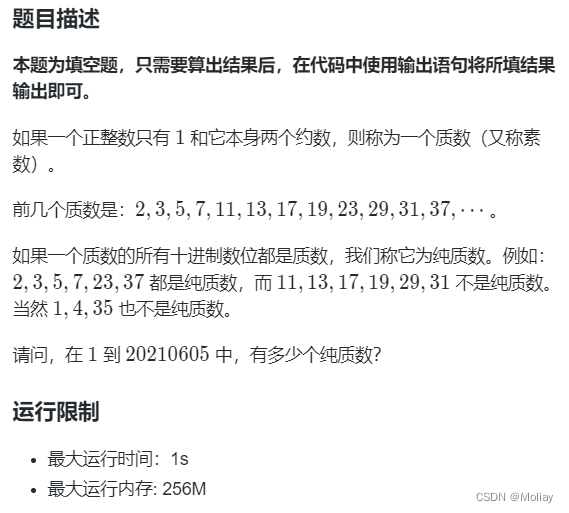
第十二届蓝桥杯大赛软件赛决赛C/C++ 研究生组-纯质数
直接判断数据过大 相对而言,由2,3,5,7组成的数更少,则先筛选出由2,3,5,7组成的数,再判断这些数中的质数个数即可 #include <iostream> using namespace std; int main() {printf("1903");…...

MyBatis面试简答题
以下是一份MyBatis的高难度简答题,共20题: 请解释MyBatis中#{}和${}的区别,并举例说明它们在实际应用中的使用场景。 MyBatis的Mapper接口是如何与XML映射文件关联的? 如何在MyBatis中实现动态SQL?请列举几种常见的动态SQL元素并解释其作用。 描述MyBatis中的ResultMap的作…...

lua 中的元表
a{ age0, __tostringfunction() { }, __callfunction() { }, } b{} a.__indexa{}//将a表中的__index指向自己 setmetatable(a,b)//将b设置为a的元表; __tostring 当子表a被当做字符串使用时会调用原表b中的__tostring方法, __call 当子表a被当做字符串使用时…...
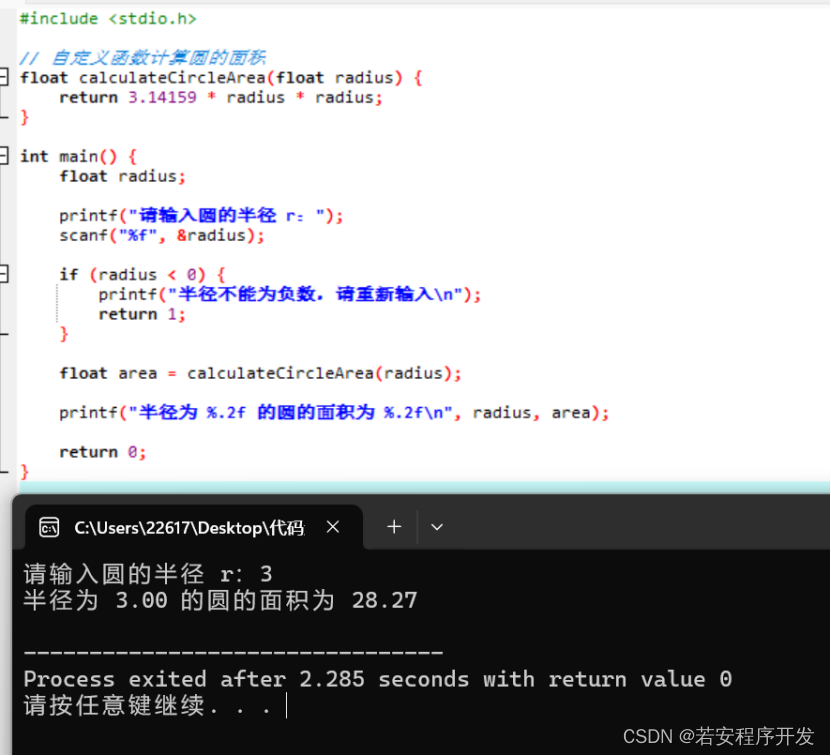
c语言综合练习题
1.编写程序实现键盘输入一个学生的学分绩点 score(合法的范围为:1.0—5.0),根据学生的学分绩点判定该学 生的奖学金的等级,判定规则如下表所示。 #include <stdio.h>int main() {float score;printf("请输入学生的学分…...
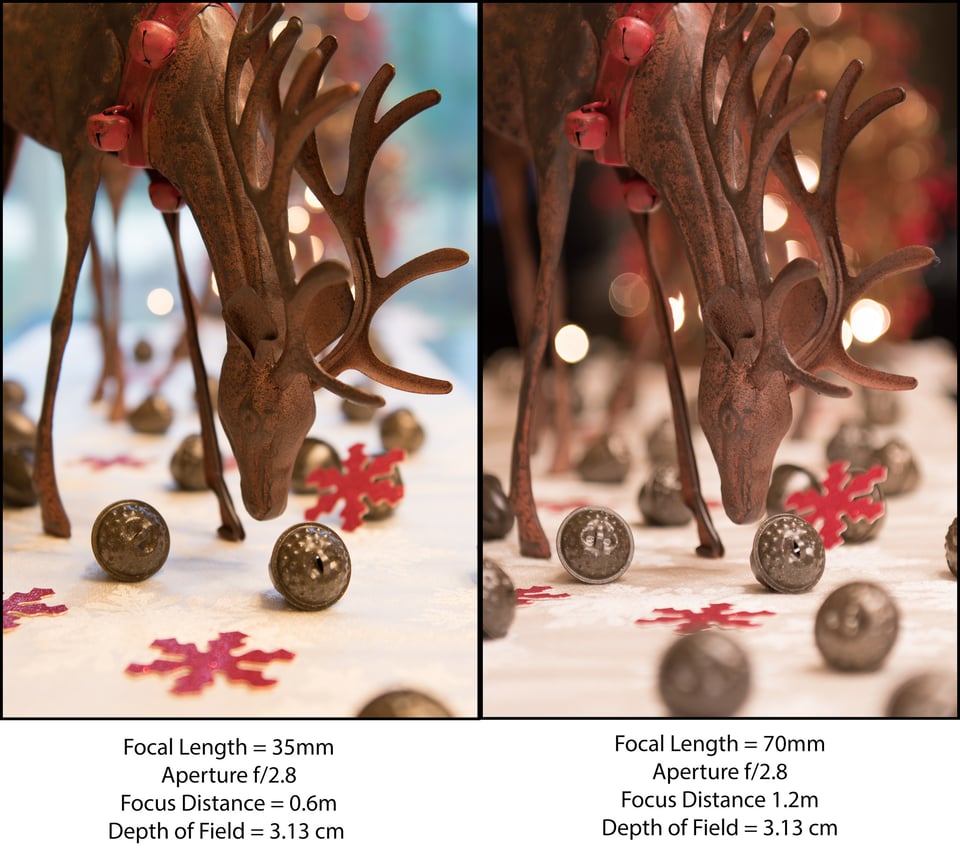
相机拍照与摄影学基础
1.相机拍照 相机可能形状和大小不同,但基本功能相同,包括快门速度、光圈和感光度,这些是摄影的通用概念。即使是一次性相机也是基于这三个理念工作的。不同类型相机在这三个概念上的唯一区别是你可以控制这些功能的程度。这三个参数被称为相…...
)
Pytorch:torch.cuda.empty_cache()
torch.cuda.empty_cache() 原理 torch.cuda.empty_cache() 是PyTorch中用来释放未被分配的缓存的内存的函数。在使用GPU进行计算时,CUDA会在内部维护一个内存缓存池,以便更快地分配和释放。但有时候,这些缓存的内存在不再需要的时候&#x…...
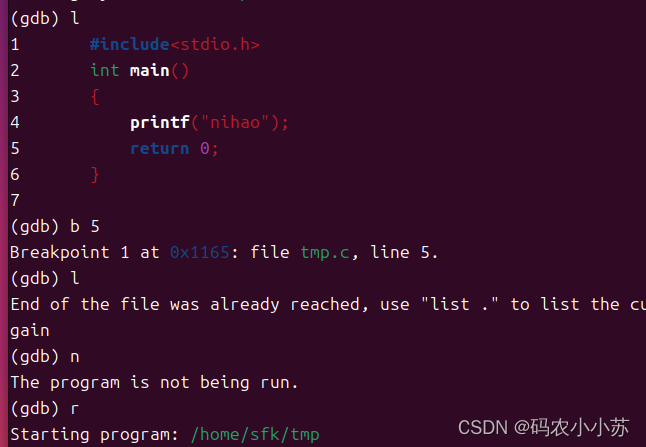
Linux--gdb调试
一.安装gdb sudo apt install gdb 二.使用gdb 三.gdb的相关操作 gdb 可执行文件名 显示代码: l 加断点: b 行号 启动程序:r(运行之前一定要加断点) 查看断点信息: info break/info b 删除断点信息:delete 断点编号 单步执行:n 打印 :p 显示:display 变量名: 退出:q …...
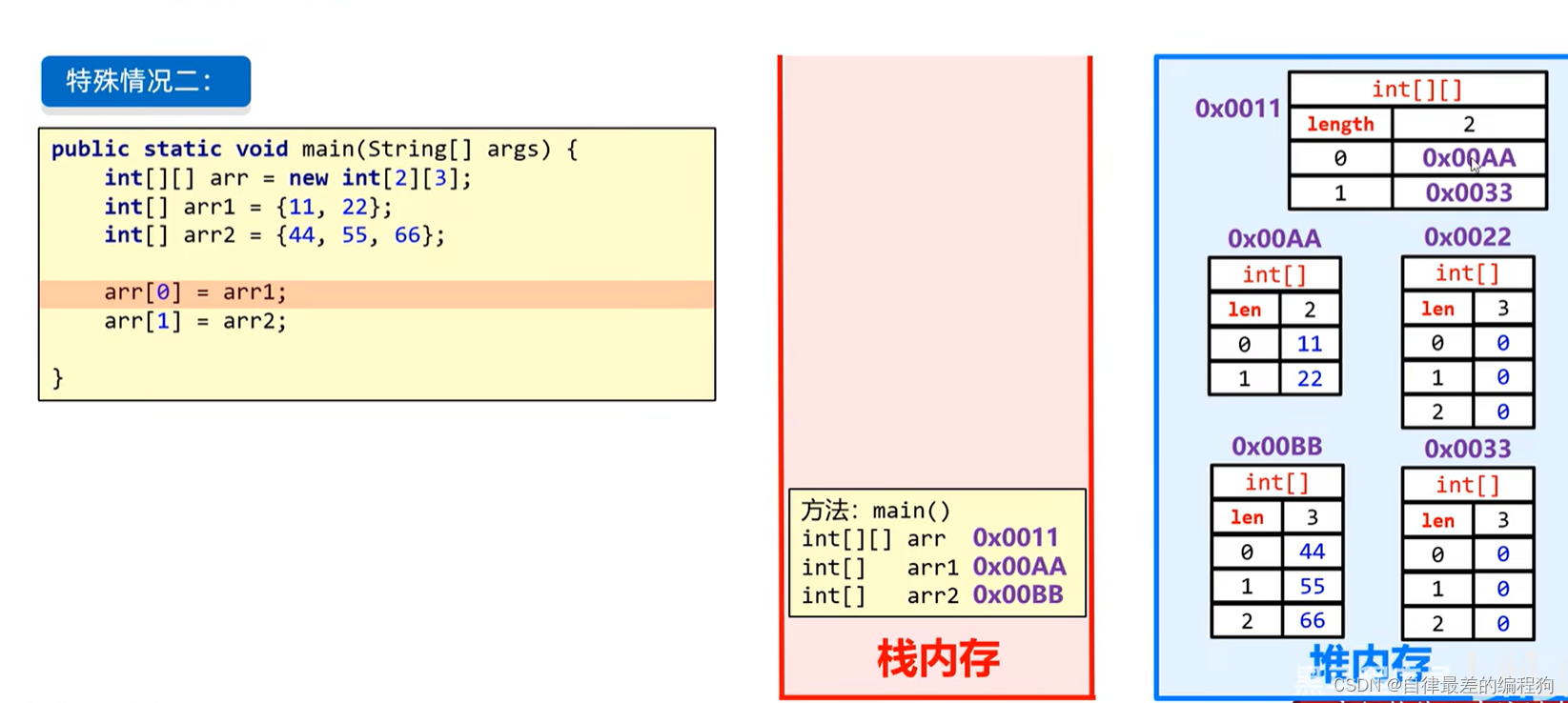
JavaSE(上)-Day6
JavaSE(上)-Day6 数组数组的定义数组的初始化打印数组分析数组索引数组内存图 方法方法的定义和调用方法的重载方法的内存图 二维数组二位数组的创建和初始化二维数组的内存图 数组 1.数组是一种容器,可以一次存储多个相同类型的数据 数组的…...
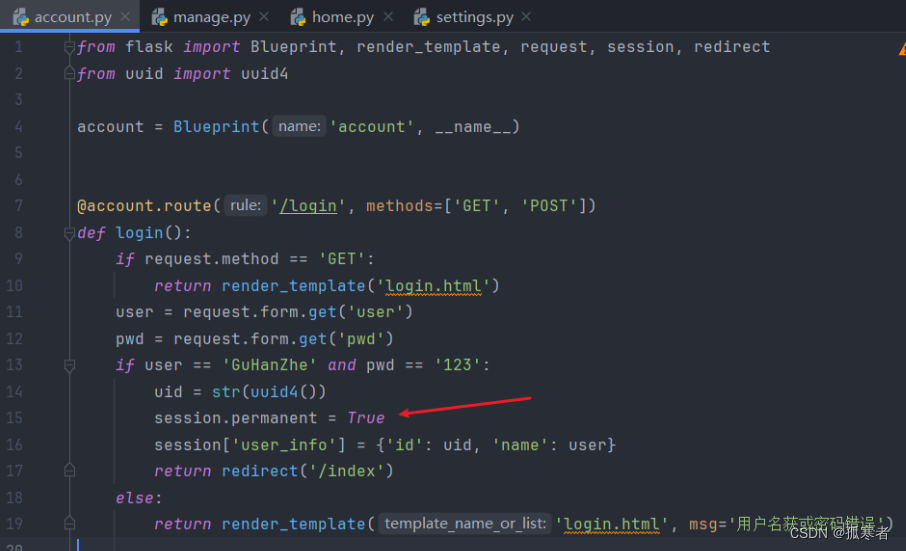
(二十五)Flask之MTVMVC架构模式Demo【重点:原生session使用及易错点!】
目录: 每篇前言:MTV&MVC构建一个基于MTV模式的Demo项目:蹦出一个问题: 每篇前言: 🏆🏆作者介绍:【孤寒者】—CSDN全栈领域优质创作者、HDZ核心组成员、华为云享专家Python全栈领…...

[ C++ ] STL---list的使用指南
目录 list简介 list的常用接口 构造函数 赋值运算符重载 迭代器 容量相关接口 元素访问接口 修改相关接口 头插push_front() 头删pop_front() 尾插push_back() 尾删pop_back() insert() erase() list的迭代器失效 list简介 1. list是可以以O(1)的时间复杂度在任意…...
数据可视化-ECharts Html项目实战(2)
在之前的文章中,我们学习了如何创建简单的折线图,条形图,柱形图并实现动态触发,最大最小平均值。想了解的朋友可以查看这篇文章。同时,希望我的文章能帮助到你,如果觉得我的文章写的不错,请留下…...

【Network Management】DCM模块唤醒网络是主动唤醒还是被动唤醒
目录 前言 正文 1.CanNm的状态机分析 2.ComM的状态机分析 3.诊断报文唤醒网络知识扩展...

yum repolist命令的介绍
yum repolist 命令在基于 Red Hat 的 Linux 发行版中用于列出当前配置的 YUM 仓库中所有可用的软件包及其版本信息。这个命令会从本地缓存中获取软件包的索引信息,并显示所有软件包的名称和版本号,而不会实际安装或更新任何软件包。 具体来说,…...
)
【日志分析】Android 运营商名称显示优先级(AlphaTag/SPN)
规则说明 MTK平台的设计,优先级:(MD)CIEV > Eons > Nitz > xml 功能代码说明 【笔记】Android Telephony 漫游SPN显示定制(Roaming Alpha Tag)-CSDN博客 日志分析 关键字:lookupOpe…...

如何在macOS上打造完美音乐体验:LyricsX歌词神器完全指南 [特殊字符]
如何在macOS上打造完美音乐体验:LyricsX歌词神器完全指南 🎵 【免费下载链接】LyricsX 🎶 Ultimate lyrics app for macOS. 项目地址: https://gitcode.com/gh_mirrors/ly/LyricsX 想要在macOS上享受完美的音乐歌词体验吗?…...

终极Align-Anything训练指南:从SFT到PPO的完整多模态对齐流程详解
终极Align-Anything训练指南:从SFT到PPO的完整多模态对齐流程详解 【免费下载链接】align-anything Align Anything: Training All-modality Model with Feedback 项目地址: https://gitcode.com/gh_mirrors/al/align-anything Align-Anything是一个强大的开…...

强力浏览器扩展:如何用Markdown Viewer优雅预览本地与在线技术文档
强力浏览器扩展:如何用Markdown Viewer优雅预览本地与在线技术文档 【免费下载链接】markdown-viewer Markdown Viewer / Browser Extension 项目地址: https://gitcode.com/gh_mirrors/ma/markdown-viewer 你是否曾经为无法直接在浏览器中查看Markdown文件而…...

树莓派4B接移动硬盘总掉盘?一文讲透USB供电‘潜规则’与固件配置真相
树莓派4B接移动硬盘频繁掉盘?深度解析USB供电机制与实战解决方案 树莓派作为一款广受欢迎的单板计算机,其USB接口的供电问题一直是开发者们讨论的热点。特别是当用户连接移动硬盘、USB网卡等高功耗设备时,经常遇到设备频繁断开连接、数据传输…...

城通网盘加速:3大创新方案实现下载性能飞跃
城通网盘加速:3大创新方案实现下载性能飞跃 【免费下载链接】ctfileGet 获取城通网盘一次性直连地址 项目地址: https://gitcode.com/gh_mirrors/ct/ctfileGet ctfileGet是一个专门用于解析城通网盘直连地址的开源工具,能够帮助用户绕过限速机制&…...

d2s-editor暗黑破坏神2存档编辑器:打造完美角色的终极Web工具
d2s-editor暗黑破坏神2存档编辑器:打造完美角色的终极Web工具 【免费下载链接】d2s-editor 项目地址: https://gitcode.com/gh_mirrors/d2/d2s-editor 你是否曾经梦想过完全掌控暗黑破坏神2的角色成长轨迹?d2s-editor暗黑破坏神2存档编辑器正是你…...

CogVideoX-2b生成策略:如何编写高效的英文描述文本
CogVideoX-2b生成策略:如何编写高效的英文描述文本 想让AI帮你拍电影吗?CogVideoX-2b就是这样一个神奇的工具。它能把你的文字描述,变成一段段生动的短视频。但很多人第一次用的时候,可能会有点懵:为什么我写的“一个…...

mysql如何删除表中的主键_使用alter table drop primary key
MySQL删除主键不能直接用DROP PRIMARY KEY,需先移除AUTO_INCREMENT属性(如存在),再执行DROP PRIMARY KEY;否则报错1075,且删后InnoDB会启用隐藏row_id导致性能与维护风险。MySQL 删除主键不能直接用 ALTER …...

Smithbox终极指南:零基础掌握魂系列游戏修改艺术 [特殊字符]
Smithbox终极指南:零基础掌握魂系列游戏修改艺术 🎮 【免费下载链接】Smithbox Smithbox is a modding tool for Elden Ring, Armored Core VI, Sekiro, Dark Souls 3, Dark Souls 2, Dark Souls, Bloodborne and Demons Souls. 项目地址: https://git…...
)
避坑指南:TM1638按键读取那些事儿(附STM32 HAL库代码与常见问题排查)
TM1638按键功能深度解析:从硬件原理到高级功能实现 引言 在嵌入式开发中,TM1638芯片因其集成了数码管显示、LED控制和按键扫描功能而广受欢迎。但很多开发者在使用按键功能时,经常会遇到各种"玄学"问题——按键时灵时不灵、误触发、…...