
apache commons-dbcp Apache Commons DBCP 软件实现数据库连接池 commons-dbcp2
DBCP组件
许多Apache项目支持与关系型数据库进行交互。为每个用户创建一个新连接可能很耗时(通常需要多秒钟的时钟时间),以执行可能需要毫秒级时间的数据库事务。对于一个公开托管在互联网上的应用程序,在同时在线用户数量可能非常大的情况下,为每个用户打开一个连接可能是不可行的。因此,开发人员通常希望在所有当前应用程序用户之间共享一组“池化”的打开连接。在任何给定时间实际执行请求的用户数量通常只是活跃用户总数的非常小的百分比,在请求处理期间是唯一需要数据库连接的时间。应用程序本身登录到DBMS,并在内部处理任何用户账户问题。
已经有几个数据库连接池可用,包括Apache产品内部和其他地方。这个Commons包提供了一个机会,来协调创建和维护一个高效、功能丰富的包,以Apache许可证发布。
commons-dbcp2依赖于commons-pool2中的代码,以提供底层的对象池机制。
不同版本
DBCP现在有四个不同的版本,支持不同版本的JDBC。
它的工作原理如下:
开发中
DBCP 2.5.0及以上版本在Java 8(JDBC 4.2)及以上版本下编译和运行。
DBCP 2.4.0在Java 7(JDBC 4.1)及以上版本下编译和运行。
运行中
应用程序运行在Java 8及以上版本的情况下,应使用DBCP 2.5.0及以上版本的二进制文件。 应用程序在Java 7下运行时应使用DBCP 2.4.0的二进制文件。 DBCP 2基于Apache Commons Pool,并提供了与DBCP 1.x相比性能增强、JMX支持以及许多其他新功能。升级到2.x的用户应该注意到Java包名称已更改,以及Maven坐标已更改,因为DBCP 2.x与DBCP 1.x不是二进制兼容的。用户还应该注意,一些配置选项(例如maxActive到maxTotal)已更名以与Commons Pool使用的新名称对齐。
入门例子
您可以从我们的下载页面下载源代码和二进制文件。
或者,您可以从中央 Maven 存储库中提取它:
maven 引入
<dependency><groupId>org.apache.commons</groupId><artifactId>commons-dbcp2</artifactId><version>2.9.0</version>
</dependency>
代码
https://github.com/apache/commons-dbcp/tree/HEAD/doc
BasicDataSourceExample
这个是最基本的例子,不涉及任何池化能力。
import java.sql.Connection;
import java.sql.ResultSet;
import java.sql.SQLException;
import java.sql.Statement;import javax.sql.DataSource;//
// Here are the dbcp-specific classes.
// Note that they are only used in the setupDataSource
// method. In normal use, your classes interact
// only with the standard JDBC API
//
import org.apache.commons.dbcp2.BasicDataSource;//
// Here's a simple example of how to use the BasicDataSource.
////
// Note that this example is very similar to the PoolingDriver
// example.//
// To compile this example, you'll want:
//  * commons-pool-2.3.jar
//  * commons-dbcp-2.1.jar
// in your classpath.
//
// To run this example, you'll want:
//  * commons-pool-2.3.jar
//  * commons-dbcp-2.1.jar
//  * commons-logging-1.2.jar
// in your classpath.
//
//
// Invoke the class using two arguments:
//  * the connect string for your underlying JDBC driver
//  * the query you'd like to execute
// You'll also want to ensure your underlying JDBC driver
// is registered.  You can use the "jdbc.drivers"
// property to do this.
//
// For example:
//  java -Djdbc.drivers=org.h2.Driver \
//       -classpath commons-pool2-2.3.jar:commons-dbcp2-2.1.jar:commons-logging-1.2.jar:h2-1.3.152.jar:. \
//       BasicDataSourceExample \
//       "jdbc:h2:~/test" \
//       "SELECT 1"
//
public class BasicDataSourceExample {public static void main(String[] args) {// First we set up the BasicDataSource.// Normally this would be handled auto-magically by// an external configuration, but in this example we'll// do it manually.//System.out.println("Setting up data source.");DataSource dataSource = setupDataSource(args[0]);System.out.println("Done.");//// Now, we can use JDBC DataSource as we normally would.//Connection conn = null;Statement stmt = null;ResultSet rset = null;try {System.out.println("Creating connection.");conn = dataSource.getConnection();System.out.println("Creating statement.");stmt = conn.createStatement();System.out.println("Executing statement.");rset = stmt.executeQuery(args[1]);System.out.println("Results:");int numcols = rset.getMetaData().getColumnCount();while(rset.next()) {for(int i=1;i<=numcols;i++) {System.out.print("\t" + rset.getString(i));}System.out.println("");}} catch (SQLException e) {e.printStackTrace();} finally {try {if (rset != null)rset.close();} catch (Exception e) {}try {if (stmt != null)stmt.close();} catch (Exception e) {}try {if (conn != null)conn.close();} catch (Exception e) {}}}public static DataSource setupDataSource(String connectURI) {BasicDataSource ds = new BasicDataSource();ds.setDriverClassName("org.h2.Driver");ds.setUrl(connectURI);return ds;}public static void printDataSourceStats(DataSource ds) {BasicDataSource bds = (BasicDataSource) ds;System.out.println("NumActive: " + bds.getNumActive());System.out.println("NumIdle: " + bds.getNumIdle());}public static void shutdownDataSource(DataSource ds) throws SQLException {BasicDataSource bds = (BasicDataSource) ds;bds.close();}
}
PoolingDataSourceExample
这里的 datasource 是池化的。
import javax.sql.DataSource;
import java.sql.Connection;
import java.sql.Statement;
import java.sql.ResultSet;
import java.sql.SQLException;//
// Here are the dbcp-specific classes.
// Note that they are only used in the setupDataSource
// method. In normal use, your classes interact
// only with the standard JDBC API
//
import org.apache.commons.pool2.ObjectPool;
import org.apache.commons.pool2.impl.GenericObjectPool;
import org.apache.commons.dbcp2.ConnectionFactory;
import org.apache.commons.dbcp2.PoolableConnection;
import org.apache.commons.dbcp2.PoolingDataSource;
import org.apache.commons.dbcp2.PoolableConnectionFactory;
import org.apache.commons.dbcp2.DriverManagerConnectionFactory;//
// Here's a simple example of how to use the PoolingDataSource.
////
// Note that this example is very similar to the PoolingDriver
// example.  In fact, you could use the same pool in both a
// PoolingDriver and a PoolingDataSource
////
// To compile this example, you'll want:
//  * commons-pool2-2.3.jar
//  * commons-dbcp2-2.1.jar
// in your classpath.
//
// To run this example, you'll want:
//  * commons-pool2-2.3.jar
//  * commons-dbcp2-2.1.jar
//  * commons-logging-1.2.jar
//  * the classes for your (underlying) JDBC driver
// in your classpath.
//
// Invoke the class using two arguments:
//  * the connect string for your underlying JDBC driver
//  * the query you'd like to execute
// You'll also want to ensure your underlying JDBC driver
// is registered.  You can use the "jdbc.drivers"
// property to do this.
//
// For example:
//  java -Djdbc.drivers=org.h2.Driver \
//       -classpath commons-pool2-2.3.jar:commons-dbcp2-2.1.jar:commons-logging-1.2.jar:h2-1.3.152.jar:. \
//       PoolingDataSourceExample \
//       "jdbc:h2:~/test" \
//       "SELECT 1"
//
public class PoolingDataSourceExample {public static void main(String[] args) {//// First we load the underlying JDBC driver.// You need this if you don't use the jdbc.drivers// system property.//System.out.println("Loading underlying JDBC driver.");try {Class.forName("org.h2.Driver");} catch (ClassNotFoundException e) {e.printStackTrace();}System.out.println("Done.");//// Then, we set up the PoolingDataSource.// Normally this would be handled auto-magically by// an external configuration, but in this example we'll// do it manually.//System.out.println("Setting up data source.");DataSource dataSource = setupDataSource(args[0]);System.out.println("Done.");//// Now, we can use JDBC DataSource as we normally would.//Connection conn = null;Statement stmt = null;ResultSet rset = null;try {System.out.println("Creating connection.");conn = dataSource.getConnection();System.out.println("Creating statement.");stmt = conn.createStatement();System.out.println("Executing statement.");rset = stmt.executeQuery(args[1]);System.out.println("Results:");int numcols = rset.getMetaData().getColumnCount();while(rset.next()) {for(int i=1;i<=numcols;i++) {System.out.print("\t" + rset.getString(i));}System.out.println("");}} catch (SQLException e) {e.printStackTrace();} finally {try {if (rset != null)rset.close();} catch (Exception e) {}try {if (stmt != null)stmt.close();} catch (Exception e) {}try {if (conn != null)conn.close();} catch (Exception e) {}}}// 这里的 datasource 是池化的。public static DataSource setupDataSource(String connectURI) {//// First, we'll create a ConnectionFactory that the// pool will use to create Connections.// We'll use the DriverManagerConnectionFactory,// using the connect string passed in the command line// arguments.//ConnectionFactory connectionFactory =new DriverManagerConnectionFactory(connectURI, null);//// Next we'll create the PoolableConnectionFactory, which wraps// the "real" Connections created by the ConnectionFactory with// the classes that implement the pooling functionality.//PoolableConnectionFactory poolableConnectionFactory =new PoolableConnectionFactory(connectionFactory, null);//// Now we'll need a ObjectPool that serves as the// actual pool of connections.//// We'll use a GenericObjectPool instance, although// any ObjectPool implementation will suffice.//ObjectPool<PoolableConnection> connectionPool =new GenericObjectPool<>(poolableConnectionFactory);// Set the factory's pool property to the owning poolpoolableConnectionFactory.setPool(connectionPool);//// Finally, we create the PoolingDriver itself,// passing in the object pool we created.//PoolingDataSource<PoolableConnection> dataSource =new PoolingDataSource<>(connectionPool);return dataSource;}
}
PoolingDriverExample.java
这里用的是 dbcp 的驱动实现池化的?
import java.sql.Connection;
import java.sql.DriverManager;
import java.sql.ResultSet;
import java.sql.SQLException;
import java.sql.Statement;import org.apache.commons.dbcp2.ConnectionFactory;
import org.apache.commons.dbcp2.DriverManagerConnectionFactory;
import org.apache.commons.dbcp2.PoolableConnection;
import org.apache.commons.dbcp2.PoolableConnectionFactory;
import org.apache.commons.dbcp2.PoolingDriver;
//
// Here are the dbcp-specific classes.
// Note that they are only used in the setupDriver
// method. In normal use, your classes interact
// only with the standard JDBC API
//
import org.apache.commons.pool2.ObjectPool;
import org.apache.commons.pool2.impl.GenericObjectPool;//
// Here's a simple example of how to use the PoolingDriver.
//// To compile this example, you'll want:
//  * commons-pool-2.3.jar
//  * commons-dbcp-2.1.jar
// in your classpath.
//
// To run this example, you'll want:
//  * commons-pool-2.3.jar
//  * commons-dbcp-2.1.jar
//  * commons-logging-1.2.jar
// in your classpath.
//
// Invoke the class using two arguments:
//  * the connect string for your underlying JDBC driver
//  * the query you'd like to execute
// You'll also want to ensure your underlying JDBC driver
// is registered.  You can use the "jdbc.drivers"
// property to do this.
//
// For example:
//  java -Djdbc.drivers=org.h2.Driver \
//       -classpath commons-pool2-2.3.jar:commons-dbcp2-2.1.jar:commons-logging-1.2.jar:h2-1.3.152.jar:. \
//       PoolingDriverExample \
//       "jdbc:h2:~/test" \
//       "SELECT 1"
//
public class PoolingDriverExample {public static void main(String[] args) {//// First we load the underlying JDBC driver.// You need this if you don't use the jdbc.drivers// system property.//System.out.println("Loading underlying JDBC driver.");try {Class.forName("org.h2.Driver");} catch (ClassNotFoundException e) {e.printStackTrace();}System.out.println("Done.");//// Then we set up and register the PoolingDriver.// Normally this would be handled auto-magically by// an external configuration, but in this example we'll// do it manually.//System.out.println("Setting up driver.");try {setupDriver(args[0]);} catch (Exception e) {e.printStackTrace();}System.out.println("Done.");//// Now, we can use JDBC as we normally would.// Using the connect string//  jdbc:apache:commons:dbcp:example// The general form being://  jdbc:apache:commons:dbcp:<name-of-pool>//Connection conn = null;Statement stmt = null;ResultSet rset = null;try {System.out.println("Creating connection.");conn = DriverManager.getConnection("jdbc:apache:commons:dbcp:example");System.out.println("Creating statement.");stmt = conn.createStatement();System.out.println("Executing statement.");rset = stmt.executeQuery(args[1]);System.out.println("Results:");int numcols = rset.getMetaData().getColumnCount();while(rset.next()) {for(int i=1;i<=numcols;i++) {System.out.print("\t" + rset.getString(i));}System.out.println("");}} catch (SQLException e) {e.printStackTrace();} finally {try {if (rset != null)rset.close();} catch (Exception e) {}try {if (stmt != null)stmt.close();} catch (Exception e) {}try {if (conn != null)conn.close();} catch (Exception e) {}}// Display some pool statisticstry {printDriverStats();} catch (Exception e) {e.printStackTrace();}// closes the pooltry {shutdownDriver();} catch (Exception e) {e.printStackTrace();}}public static void setupDriver(String connectURI) throws Exception {//// First, we'll create a ConnectionFactory that the// pool will use to create Connections.// We'll use the DriverManagerConnectionFactory,// using the connect string passed in the command line// arguments.//ConnectionFactory connectionFactory =new DriverManagerConnectionFactory(connectURI, null);//// Next, we'll create the PoolableConnectionFactory, which wraps// the "real" Connections created by the ConnectionFactory with// the classes that implement the pooling functionality.//PoolableConnectionFactory poolableConnectionFactory =new PoolableConnectionFactory(connectionFactory, null);//// Now we'll need a ObjectPool that serves as the// actual pool of connections.//// We'll use a GenericObjectPool instance, although// any ObjectPool implementation will suffice.//ObjectPool<PoolableConnection> connectionPool =new GenericObjectPool<>(poolableConnectionFactory);// Set the factory's pool property to the owning poolpoolableConnectionFactory.setPool(connectionPool);//// Finally, we create the PoolingDriver itself...//Class.forName("org.apache.commons.dbcp2.PoolingDriver");PoolingDriver driver = (PoolingDriver) DriverManager.getDriver("jdbc:apache:commons:dbcp:");//// ...and register our pool with it.//driver.registerPool("example", connectionPool);//// Now we can just use the connect string "jdbc:apache:commons:dbcp:example"// to access our pool of Connections.//}public static void printDriverStats() throws Exception {PoolingDriver driver = (PoolingDriver) DriverManager.getDriver("jdbc:apache:commons:dbcp:");ObjectPool<? extends Connection> connectionPool = driver.getConnectionPool("example");System.out.println("NumActive: " + connectionPool.getNumActive());System.out.println("NumIdle: " + connectionPool.getNumIdle());}public static void shutdownDriver() throws Exception {PoolingDriver driver = (PoolingDriver) DriverManager.getDriver("jdbc:apache:commons:dbcp:");driver.closePool("example");}
}
相关文章:

apache commons-dbcp Apache Commons DBCP 软件实现数据库连接池 commons-dbcp2
DBCP组件 许多Apache项目支持与关系型数据库进行交互。为每个用户创建一个新连接可能很耗时(通常需要多秒钟的时钟时间),以执行可能需要毫秒级时间的数据库事务。对于一个公开托管在互联网上的应用程序,在同时在线用户数量可能非…...

8.2K star!史上最强Web应用防火墙
🚩 0x01 介绍 长亭雷池SafeLine是长亭科技耗时近 10 年倾情打造的WAF(Web Application Firewall),一款敢打出口号 “不让黑客越雷池一步” 的 WAF,我愿称之为史上最强的一款Web应用防火墙,足够简单、足够好用、足够强的免费且开源…...
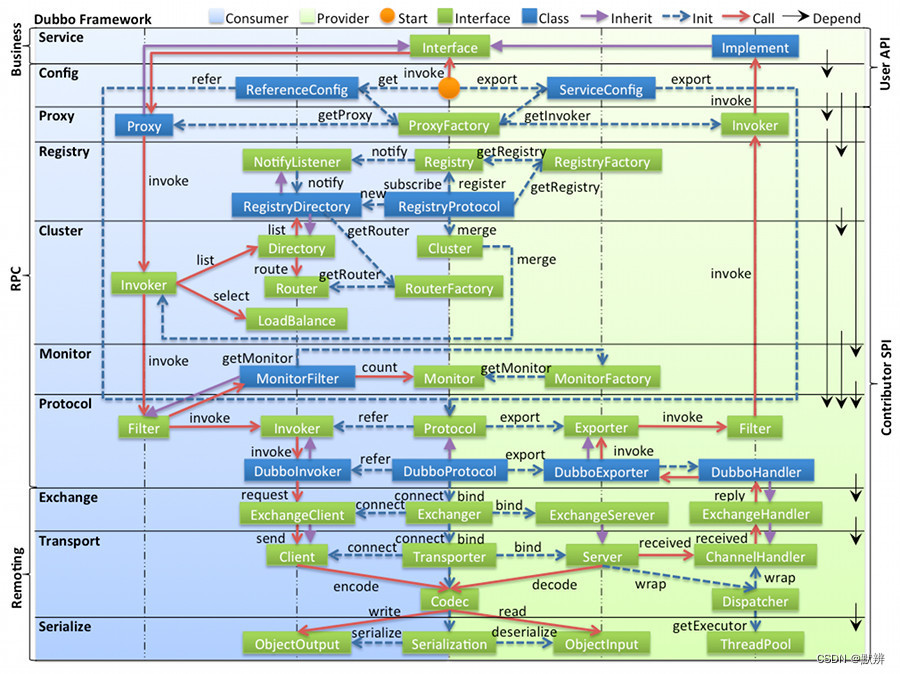
浅谈RPC的理解
浅谈RPC的理解 前言RPC体系Dubbo架构最后 前言 本文中部分知识涉及Dubbo,需要对Dubbo有一定的理解,且对源码有一定了解 如果不了解,可以参考学习我之前的文章: 浅谈Spring整合Dubbo源码(Service和Reference注解部分&am…...

JDK发布信息、历史及未来规划
1.未来规划 发布日期类型版本其它信息2026-01-20CPU25.0.2, 21.0.10, 17.0.18, 11.0.30, 8u4812025-10-21CPU25.0.1, 21.0.9, 17.0.17, 11.0.29, 8u4712025-09-16Feature*25 LTS2025-07-15CPU24.0.2, 21.0.8, 17.0.16, 11.0.28, 8u4612025-04-15CPU24.0.1, 21.0.7, 17.0.15, 1…...
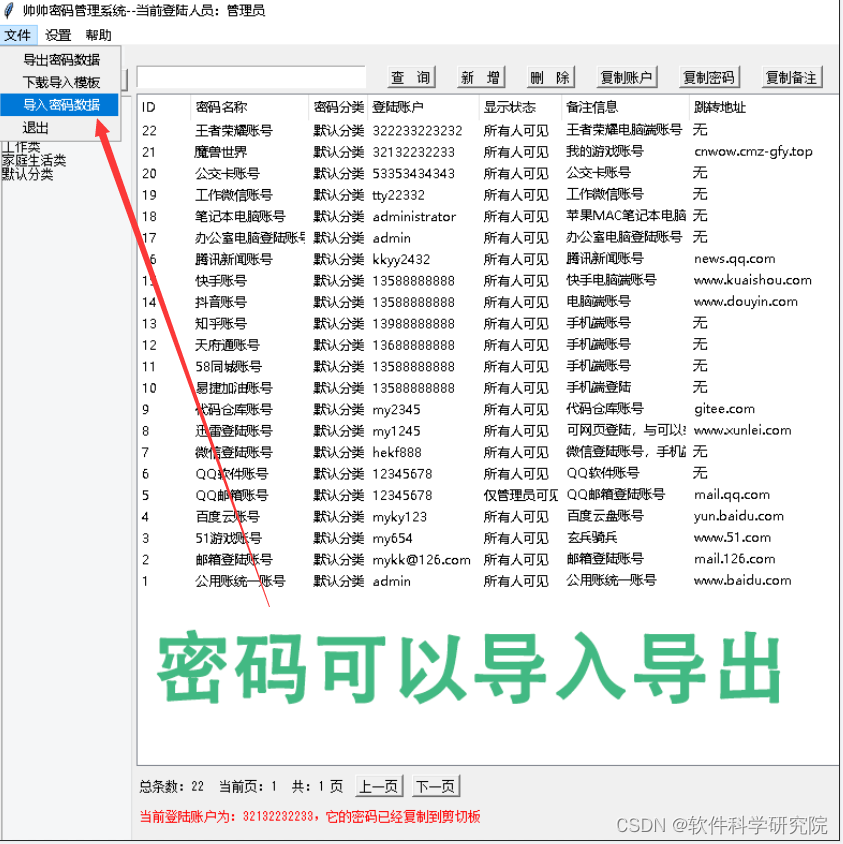
帅帅密码管理系统使用教程
在这个账号满天飞的大环境,密码太多,又容易遗忘,又不方便管理,存在记事本上,又担心泄漏。帅帅密码管理系统就是帮助你解决以上烦恼,用来帮助个人或团队管理众多的登陆密码,能够快速的查询、新增…...
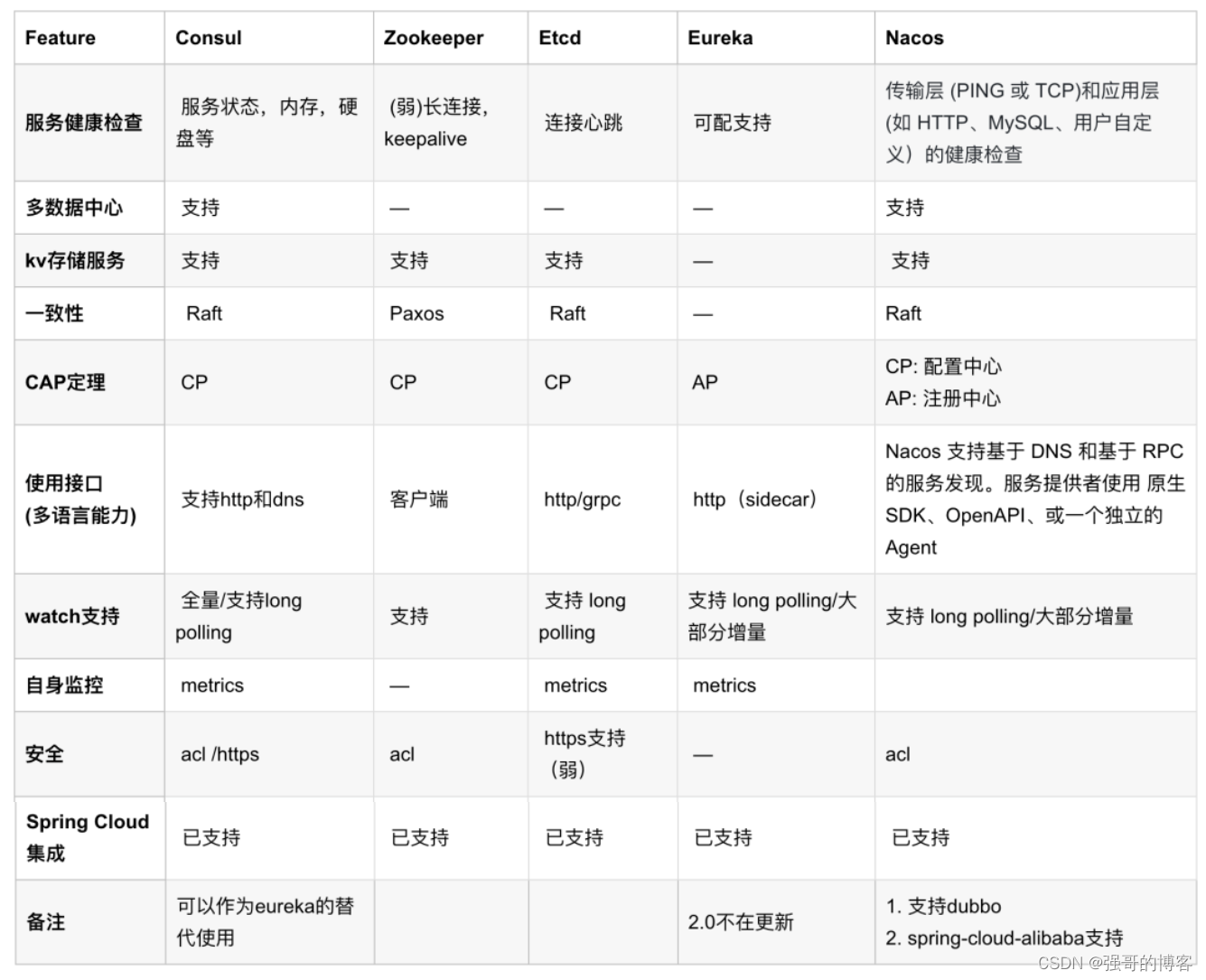
漫谈5种注册中心
01 注册中心基本概念 1.1 什么是注册中心? 注册中心主要有三种角色: 服务提供者(RPC Server):在启动时,向 Registry 注册自身服务,并向 Registry 定期发送心跳汇报存活状态。 服务消费者&…...
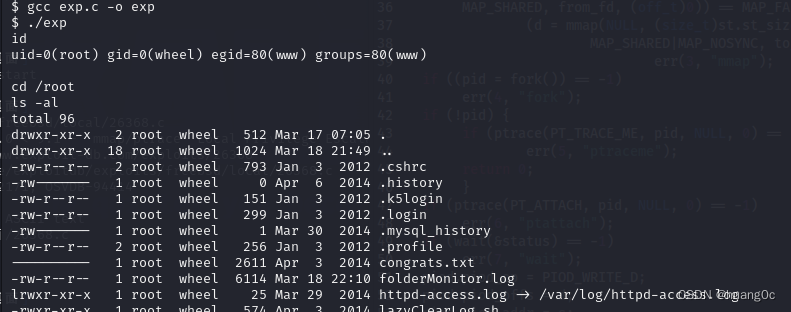
Vulnhub靶机:Kioptrix_2014
一、介绍 运行环境:Virtualbox和vmware 攻击机:kali(192.168.56.101) 靶机:Kioptrix: 2014(192.168.56.108) 目标:获取靶机root权限和flag 靶机下载地址:https://ww…...
Spring Boot整合Spring Security
Spring Boot 专栏:Spring Boot 从零单排 Spring Cloud 专栏:Spring Cloud 从零单排 GitHub:SpringBootDemo Gitee:SpringBootDemo Spring Security是针对Spring项目的安全框架,也是Spring Boot底层安全模块的默认技术…...

Rust字符串深入理解
一、概述 Rust是一种系统级语言,进行操作系统等底层应用开发,同时又具合理的抽象处理能力。在进行Rust编程时,字符串处理是程序员经常碰到的工作。本文深入解析Rust语言中字符串的使用,包括 static string,String与&a…...
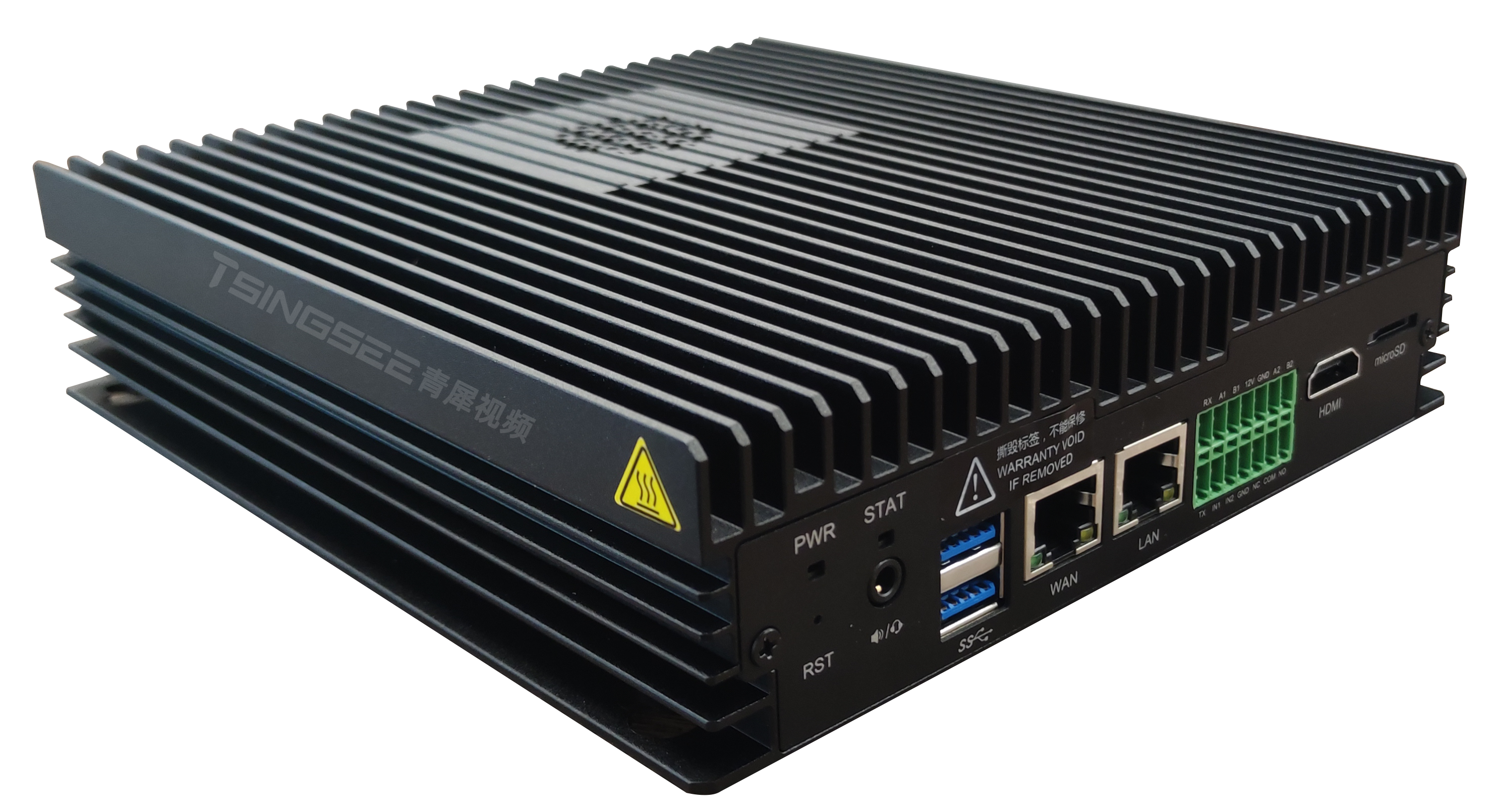
TSINGSEE青犀AI智能分析网关V4酿酒厂安全挂网AI检测算法
在酿酒行业中,安全生产一直是企业经营中至关重要的一环。为了确保酒厂生产过程中的安全,TSINGSEE青犀AI智能分析网关V4的安全挂网AI检测算法发挥了重要作用。 TSINGSEE青犀AI智能分析网关V4的安全挂网检测算法是针对酒厂里酒窖挂网行为进行智能检测与识…...

LeetCode第126场双周赛个人题解
目录 100262. 求出加密整数的和 原题链接 思路分析 AC代码 3080. 执行操作标记数组中的元素 原题链接 思路分析 AC代码 100249. 替换字符串中的问号使分数最小 原题链接 思路分析 AC代码 100241. 求出所有子序列的能量和 原题链接 思路分析 AC代码 100262. 求出…...
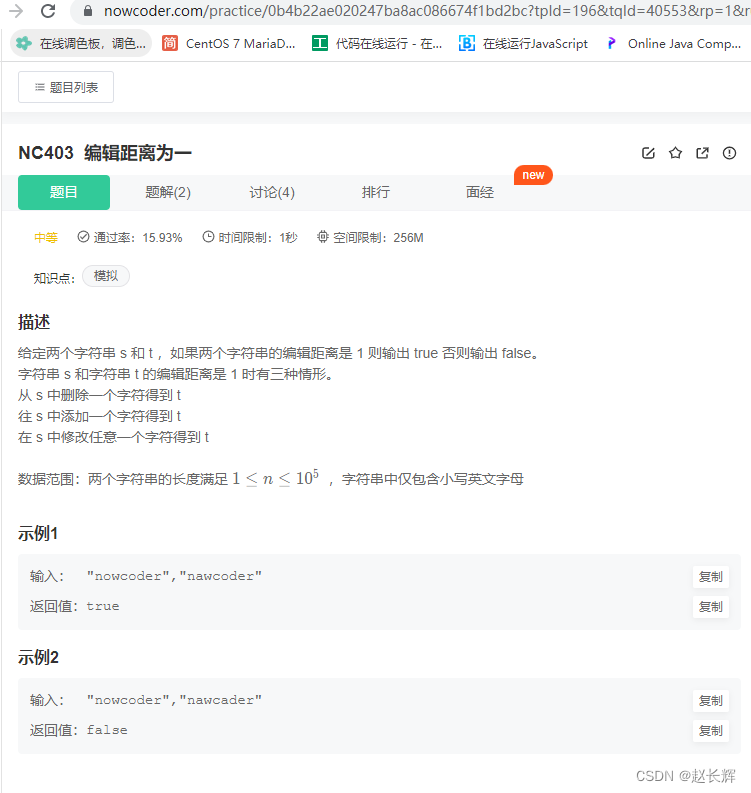
牛客NC403 编辑距离为一【中等 模拟法 Java,Go,PHP】
题目 题目链接: https://www.nowcoder.com/practice/0b4b22ae020247ba8ac086674f1bd2bc 思路 注意:必须要新增一个,或者删除一个,或者替换一个,所以不能相等1.如果s和t相等,返回false,如果s和t长度差大于1…...

C# SetWindowPos函数
在C#中,SetWindowPos函数用于设置窗口的位置和大小。 原型: [DllImport("user32.dll", SetLastError true)] [return: MarshalAs(UnmanagedType.Bool)] public static extern bool SetWindowPos(IntPtr hWnd, IntPtr hWndInsertAfter, int …...
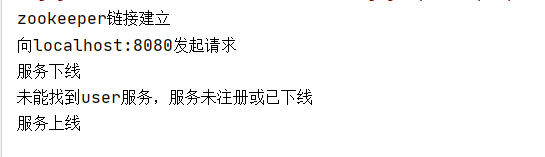
zookeeper快速入门五:用zookeeper实现服务注册与发现中心
系列: zookeeper快速入门一:zookeeper安装与启动-CSDN博客 zookeeper快速入门二:zookeeper基本概念-CSDN博客 zookeeper快速入门三:zookeeper的基本操作 zookeeper快速入门四:在java客户端中操作zookeeper-CSDN博客…...

Java 中 BitSet 类的用法
Java 中 BitSet 类的用法 API构造置位为 true清除为 false查找位反转长度运算流其他 原理底层数据结构如何工作 API 构造 无参构造 :默认为 64 个 bit 的容量 BitSet bitset new BitSet();有参构造 :设置为 n 个 bit 的容量 BitSet bitset new BitSe…...
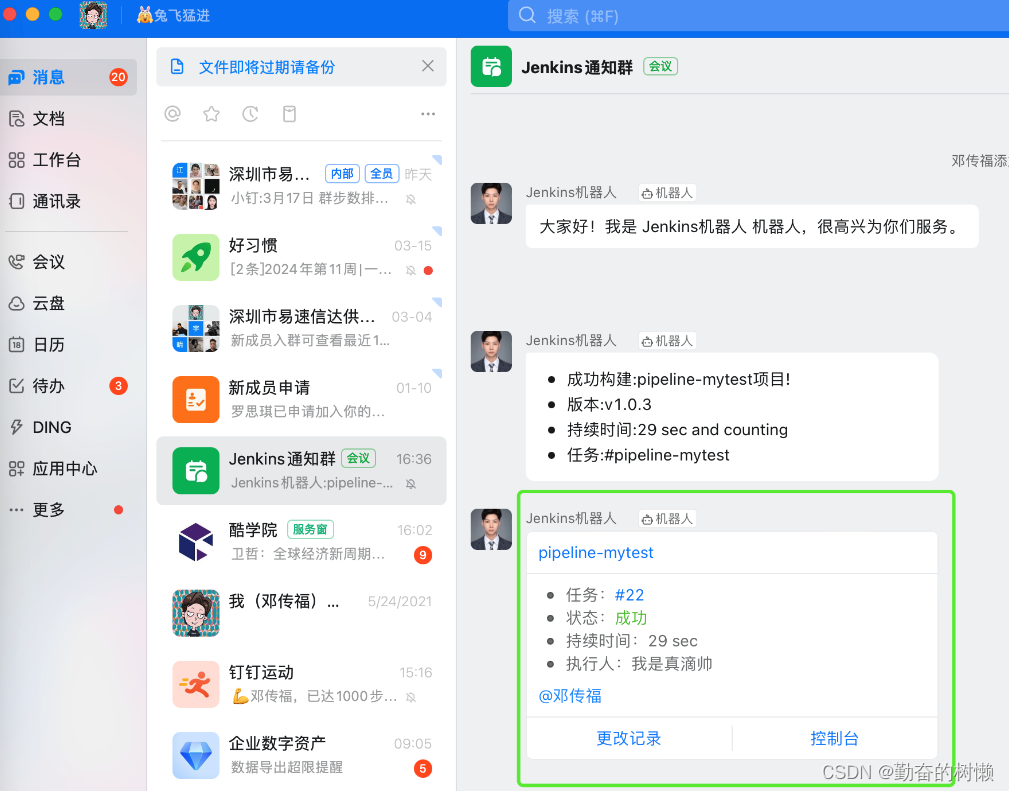
Jenkins-pipeline流水线构建完钉钉通知
添加钉钉机器人 在钉钉群设置里添加机器人拿出Webhook地址,设置关键词 Jenkins安装钉钉插件 Dashboard > 系统管理 > 插件管理,搜索构建通知,直接搜索Ding Talk也行 安装DingTalk插件,重启Jenkins 来到Dashboard > 系…...

汽车制造业供应商管理会面临哪些问题?要如何解决?
汽车行业的供应链是及其复杂的,并且呈全球化分布,企业在知识产权方面的优势很可能是阶段性的。企业需要持续保持领先,将面临巨大的挑战,尽快地将产品推向市场是保持领先的唯一途径。然而,如果没有正确的方式去实现安全…...

day28|93. 复原 IP 地址|Leetcode 78. 子集|90.子集II
Leetcode 93. 复原 IP 地址 链接:93. 复原 IP 地址 class Solution { public:vector<string> res;string path;int pointNum 0;vector<string> restoreIpAddresses(string s) {backtracking(0, s);return res;}void backtracking(int start, string …...

怎样提升小程序日活?签到抽奖可行吗?
一、 日活运营策略 小程序应该是即用即走的,每个小程序都在用户中有自己的独特定位,可能是生活日常必备(美食、团购、商城),也可能是工作办公必备(文档、打卡、工具)。 如果你想要让自己的小程…...

hive语法树分析,判断 sql语句中有没有select *
pom依赖参考以下博文java 通过 IMetaStoreClient 取 hive 元数据信息-CSDN博客1 节点处理器类 import lombok.Getter; import org.apache.hadoop.hive.ql.lib.Dispatcher; import org.apache.hadoop.hive.ql.lib.Node; import org.apache.hadoop.hive.ql.parse.ASTNode; impor…...

Win10家庭版别再卡了!保姆级教程:手动修复gpedit.msc路径,彻底关闭Antimalware Service
Win10家庭版性能优化实战:精准修复组策略路径与系统服务调优每次游戏激战正酣时突然卡顿,或是视频渲染到关键时刻系统响应迟缓,很多Win10家庭版用户都遭遇过这类困扰。任务管理器里那个名为"Antimalware Service Executable"的进程…...

Vulnhub-DC-1
1.信息收集 使用工具nmap扫描主机端口 这是Drupal是使用PHP语言编写的开源内容管理框架(CMF),它由内容管理系统(CMS)和PHP开发框架(Framework)共同构成 Web指纹扫描 发现是:drupal…...

潮州东方轻奢风全屋高定找哪家
开篇引言根据《2026年中国全屋定制行业发展报告》,潮州市全屋定制市场规模同比增长38%,其中全屋高端定制细分市场同比增长52%。目前,潮州市家庭全屋定制需求占比72%,高端定制需求占比45%。为了帮助潮州市消费者选择合规、靠谱、差…...

文件-语言-系统:基础IO-2.0——IO重定向接口,语言层缓冲区,系统级缓冲区。内核级分析!
bit::Shadow✧(≖ ◡ ≖✿ 目录 重定向接口dup2() ">" ">>" "<" 函数原型 输出重定向1和2的使用 文件描述符表 ./a.out运行: "./a.out >"默认重定向是fd 1 合并标准输入输出 缓冲区 什么是缓冲…...

CANoe诊断测试没CDD文件怎么办?手把手教你用Fault Memory窗口和CAPL脚本读取解析DTC故障码
CANoe诊断测试无CDD文件的实战解决方案:从Fault Memory到CAPL脚本全解析当CDD文件缺失或定义不清晰时,诊断测试工程师常常陷入困境。本文将深入探讨如何利用Fault Memory窗口的基础功能,并通过CAPL脚本实现更灵活、更强大的故障码读取与解析方…...

榨干Codex!OpenAI工程师亲授Codex真正用法
你可能把 Codex 当编程助手用,改改代码,跑跑测试。但它的能力远不止于此。OpenAI 的客户支持工程师 Jason(jxnlco)告诉你,Codex 其实是一套完整的电脑工作系统,从语音输入到自动化,从浏览器操控…...

别再只用递归了!用C语言栈实现非递归快速排序,内存效率提升实战
从递归到迭代:C语言栈实现非递归快速排序的工程实践 在嵌入式开发和大规模数据处理场景中,递归实现的快速排序常常面临栈溢出风险。当排序10万个元素的数组时,递归深度可能达到log₂100000≈17层,在仅有2KB栈空间的STM32F103上极易…...
提升你的图表专业度?)
从科研图表到商业报表:如何用Matplotlib的legend()提升你的图表专业度?
从科研图表到商业报表:如何用Matplotlib的legend()提升你的图表专业度? 在数据驱动的决策时代,图表不仅是科研论文中的证据载体,更是商业汇报中的说服工具。我曾见证一位生物统计学家将同一组临床试验数据呈现给三种不同受众&…...

观察不同模型在统一 API 下的响应速度与输出风格差异
🚀 告别海外账号与网络限制!稳定直连全球优质大模型,限时半价接入中。 👉 点击领取海量免费额度 观察不同模型在统一 API 下的响应速度与输出风格差异 在为大语言模型应用选择模型时,开发者通常会关注两个核心维度&am…...

使用libusb-win32驱动复活老旧USB硬件:以Elektor Magic Eye为例
1. 项目概述:让老硬件在新时代焕发新生手头有一台十多年前的《Elektor》杂志上刊登的“Magic Eye EM84”复古VFD显示屏项目,想把它接到Windows 10电脑上当个酷炫的CPU占用率显示器,却发现官方提供的“AVR309”USB驱动在新系统上彻底罢工了。这…...