
Vue基础19之插槽
Vue基础19
- 插槽
- 不使用插槽
- App.vue
- Category.vue
- 默认插槽:slot
- App.vue
- Category.vue
- 具名插槽
- App.vue
- Category.vue
- 作用域插槽
- App.vue
- Category.vue
- 总结
插槽
不使用插槽
App.vue
<template><div class="bg"><Category :listData="food"  title="美食"/><Category :listData="games" title="游戏"/><Category :listData="movies" title="电影"/></div>
</template><script>
import Category from "@/components/Category";
export default {name: "App",components: {Category},data(){return{food:["火锅","烧烤","小龙虾","牛排"],games:["红色警戒","穿越火线","劲舞团","超级玛丽"],movies:["《教父》","《拆弹专家》","《你好,李焕英》","《无间道》"]}},methods:{}
}
</script><style lang="less">
.bg{display: flex;justify-content: space-around;margin-top: 100px;
}
</style>
Category.vue
<template><div class="bg"><h1>{{title}}</h1><ul><li v-for="(item,index) in listData" :key="index">{{item}}</li></ul></div>
</template><script>export default {name: "Category",props:["listData","title"]}
</script><style scoped lang="less">
.bg{height: 500px;width: 300px;background-color: skyblue;display: inline-block;h1{background-color: orange;text-align: center;}
}
</style>
默认插槽:slot
<Category title="美食"><img src="https://s3.ax1x.com/2021/01/16/srJlq0.jpg" alt="">
</Category>
<!-- 定义一个插槽(挖个坑,等着组件的使用者进行填充) --><slot>我是一些默认值,当使用者没有传递具体结构时,我会出现</slot>
图片链接:
https://s3.ax1x.com/2021/01/16/srJlq0.jpg
视频链接:
http://clips.vorwaerts-gmbh.de/big_buck_bunny.mp4
App.vue
<template><div class="bg"><Category title="美食"><img src="https://s3.ax1x.com/2021/01/16/srJlq0.jpg" alt=""></Category><Category title="游戏"><ul><li v-for="(g,index) in games" :key="index">{{g}}</li></ul></Category><Category title="电影"><video controls src="http://clips.vorwaerts-gmbh.de/big_buck_bunny.mp4"></video></Category><Category title="测试默认情况"></Category></div>
</template><script>
import Category from "@/components/Category";
export default {name: "App",components: {Category},data(){return{food:["火锅","烧烤","小龙虾","牛排"],games:["红色警戒","穿越火线","劲舞团","超级玛丽"],movies:["《教父》","《拆弹专家》","《你好,李焕英》","《无间道》"]}},methods:{}
}
</script><style lang="less">
.bg{display: flex;justify-content: space-around;margin-top: 100px;img{width: 100%;}video{width: 100%;}
}
</style>
Category.vue
<template><div class="bg"><h1>{{title}}</h1><!-- 定义一个插槽(挖个坑,等着组件的使用者进行填充)   --><slot>我是一些默认值,当使用者没有传递具体结构时,我会出现</slot></div>
</template><script>export default {name: "Category",props:["title"]}
</script><style scoped lang="less">
.bg{height: 500px;width: 300px;background-color: skyblue;display: inline-block;h1{background-color: orange;text-align: center;}
}
</style>
具名插槽
<Category title="美食"><img slot="center" src="https://s3.ax1x.com/2021/01/16/srJlq0.jpg" alt=""><a slot="footer"  href="http://www.baidu.com" class="more">更多美食</a>
</Category>
<!-- 定义多个插槽(挖个坑,等着组件的使用者进行填充) --><slot name="center">我是一些默认值,当使用者没有传递具体结构时,我会出现</slot><slot name="footer">我是一些默认值,当使用者没有传递具体结构时,我会出现</slot>
App.vue
<template><div class="bg"><Category title="美食"><img slot="center" src="https://s3.ax1x.com/2021/01/16/srJlq0.jpg" alt=""><a slot="footer"  href="http://www.baidu.com" class="more">更多美食</a></Category><Category title="游戏"><ul slot="center"><li v-for="(g,index) in games" :key="index">{{g}}</li></ul><div slot="footer" class="foot"><a href="http://www.baidu.com/">单机游戏</a><a href="http://www.baidu.com/">网络游戏</a></div></Category><Category title="电影"><video slot="center" controls src="http://clips.vorwaerts-gmbh.de/big_buck_bunny.mp4"></video><!--  只有template标签可以使用v-slot:xxx 的形式   --><template v-slot:footer><div class="foot"><a href="http://www.baidu.com">经典</a><a href="http://www.baidu.com">热门</a><a href="http://www.baidu.com">推荐</a></div><h4 class="welcome">欢迎前来观影!</h4></template></Category></div>
</template><script>
import Category from "@/components/Category";
export default {name: "App",components: {Category},data(){return{food:["火锅","烧烤","小龙虾","牛排"],games:["红色警戒","穿越火线","劲舞团","超级玛丽"],movies:["《教父》","《拆弹专家》","《你好,李焕英》","《无间道》"]}},methods:{}
}
</script><style lang="less">
.bg{display: flex;justify-content: space-around;margin-top: 100px;img{width: 100%;}video{width: 100%;}.more{display: block;text-align: center;margin-top: 10px;}.foot{display: flex;justify-content: space-around;}.welcome{text-align: center;}
}
</style>
Category.vue
<template><div class="bg"><h1>{{title}}</h1><!-- 定义多个插槽(挖个坑,等着组件的使用者进行填充)   --><slot name="center">我是一些默认值,当使用者没有传递具体结构时,我会出现</slot><slot name="footer">我是一些默认值,当使用者没有传递具体结构时,我会出现</slot></div>
</template><script>export default {name: "Category",props:["title"]}
</script><style scoped lang="less">
.bg{height: 500px;width: 300px;background-color: skyblue;display: inline-block;h1{background-color: orange;text-align: center;}
}
</style>
作用域插槽
给使用者传值
<!-- 定义一个插槽(挖个坑,等着组件的使用者进行填充) --><slot :games="games">我是一些默认值,当使用者没有传递具体结构时,我会出现</slot>
使用者通过template中的scope获取值
<template scope="obj"><ul><li v-for="(g,index) in obj.games" :key="index">{{g}}</li></ul>
</template>
App.vue
<template><div class="bg"><Category title="游戏"><template scope="obj"><ul><li v-for="(g,index) in obj.games" :key="index">{{g}}</li></ul></template></Category><Category title="游戏"><template scope="{games}"><ol><li style="color: red;" v-for="(g,index) in games" :key="index">{{g}}</li></ol></template></Category><Category title="游戏"><template slot-scope="{games}"><h4   v-for="(g,index) in games" :key="index">{{g}}</h4></template></Category></div>
</template><script>
import Category from "@/components/Category";
export default {name: "App",components: {Category},
}
</script><style lang="less">
.bg{display: flex;justify-content: space-around;margin-top: 100px;img{width: 100%;}video{width: 100%;}.more{display: block;text-align: center;margin-top: 10px;}.foot{display: flex;justify-content: space-around;}.welcome{text-align: center;}h4{text-align: center;}
}
</style>
Category.vue
<template><div class="bg"><h1>{{title}}</h1><!-- 定义一个插槽(挖个坑,等着组件的使用者进行填充)   --><slot :games="games">我是一些默认值,当使用者没有传递具体结构时,我会出现</slot></div>
</template><script>export default {name: "Category",props:["title"],data(){return{games:["红色警戒","穿越火线","劲舞团","超级玛丽"]}}}
</script><style scoped lang="less">
.bg{height: 500px;width: 300px;background-color: skyblue;display: inline-block;h1{background-color: orange;text-align: center;}
}
</style>
总结
- 作用:让父组件可以向子组件指定位置插入html结构,也是一种组件间通信的方式,适用于
父组件===>子组件 - 分类:默认插槽、具名插槽、作用域插槽
- 使用方式:
(1)默认插槽:
父组件中:
<Category><div>html结构1</div>
</Category>
子组件中:
<template><div><!-- 定义插槽 --><slot>插槽默认内容</slot></div>
</template>
(2)具名插槽:
父组件中:
<Category><template slot="center"><div>html结构1</div></template><template v-slot:footer><div>html结构2</div></template>
</Category>
子组件中:
<template><div><!-- 定义插槽--><slot name="center">插槽默认内容...</slot><slot name="footer">插槽默认内容...</slot></div>
</template>
(3)作用域插槽
①理解:数据在组件的自身,但根据数据生成的结构需要组件的使用者来决定。(games数据在Category组件中,但使用数据所遍历出来的结构由App组件决定)
②具体编码:
父组件中:
<Category><template scope="scopeData"><!--生成的是ul列表--><ul><li v-for="g in scopeData.games" :key="g">{{g}}</li></ul></template>
</Category><Category><template slot-scope="scopeData"><!--生成的是h4标题--><h4 v-for="g in scopeData.games" :key="g">{{g}}</h4></template>
</Category>
子组件中:
<template><div><slot :games="games"></slot></div>
</template><script>export default {name: "Category",props:["title"],data(){return{games:["红色警戒","穿越火线","劲舞团","超级玛丽"]}}}
</script>
相关文章:
Vue基础19之插槽
Vue基础19插槽不使用插槽App.vueCategory.vue默认插槽:slotApp.vueCategory.vue具名插槽App.vueCategory.vue作用域插槽App.vueCategory.vue总结插槽 不使用插槽 App.vue <template><div class"bg"><Category :listData"food"…...
[Gin]框架底层实现理解(一)
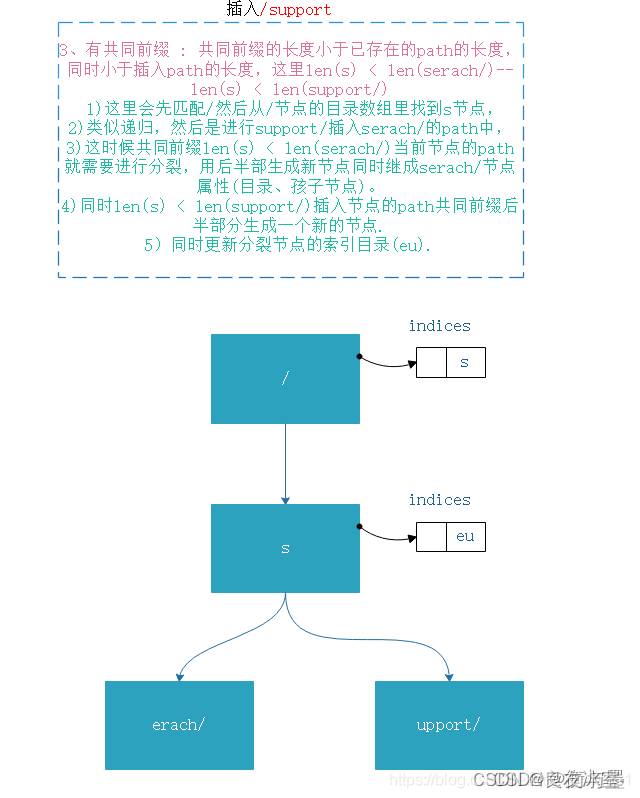
前言:路由原理———压缩字典 这边简单讲一下gin非常重要的一个基点,也就是他作为go web框架的一个亮点 也就是Trie树和压缩字典算法 gin 通过树来存储路由,讲路由的字符拆解为一个个的结点,在获取handler函数时,会…...
css3横向无限公告消息滚动功能
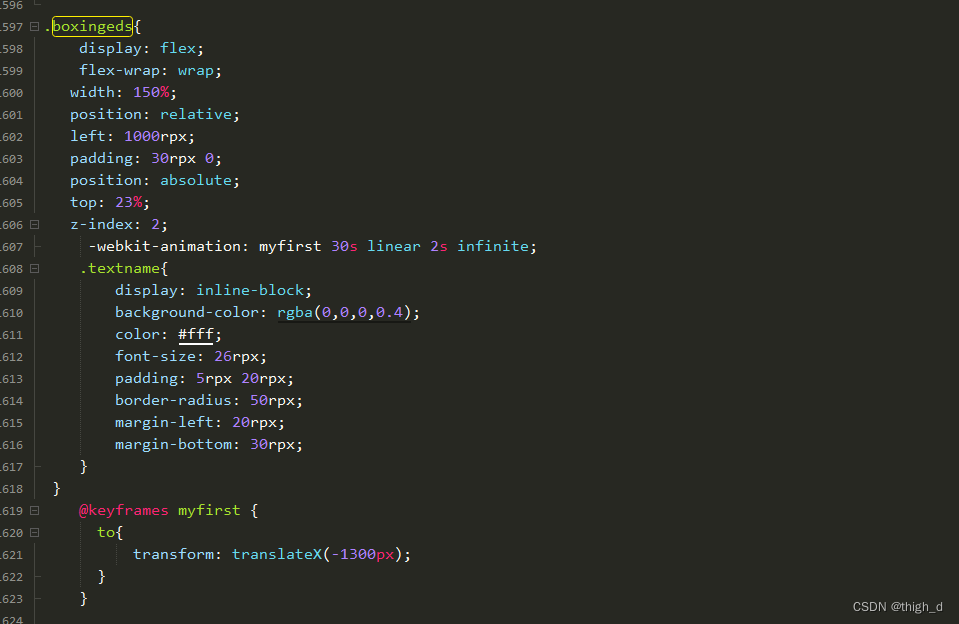
html部分 {{item}}css部分 .boxingeds{ display: flex; flex-wrap: wrap; width: 150%; position: relative; left: 1000rpx; padding: 30rpx 0; position: absolute; top: 23%; z-index: 2; -webkit-animation: myfirst 30s linear 2s infinite; .textname{ display: inlin…...
【Git】Git工作流程及使用
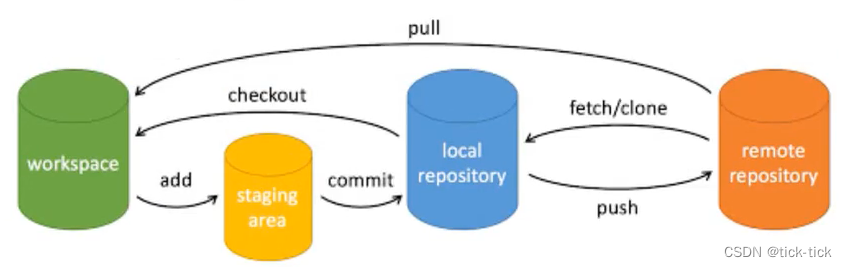
Git工作流程及使用Git工作流程与常用命令Git工作流程Git常用命令项目中使用Git的场景需求开发前的分支拉取流程,需求开发后的分支合并流程分支合并出现冲突如何解决线上出现事故代码如何回退Git工作流程与常用命令 Git工作流程 workspace:工作区 stagin…...

降本增效,合作伙伴营销助力业绩增长
事实上,SaaS品牌透过“推荐奖励计划” 带来的业务营收平均占比高达 30%。例如,Evernote超过11300万用户通过老用户推荐来到Everote;Trello每日注册用户中有35%来自用户推荐;PayPal自从推行“推荐奖励计划”以来,用户日…...
)
【独家】华为OD机试 - 运动会(C 语言解题)
最近更新的博客 华为od 2023 | 什么是华为od,od 薪资待遇,od机试题清单华为OD机试真题大全,用 Python 解华为机试题 | 机试宝典【华为OD机试】全流程解析+经验分享,题型分享,防作弊指南)华为od机试,独家整理 已参加机试人员的实战技巧文章目录 最近更新的博客使用说明本期…...

【每天学习一点新知识】JNDI注入
什么是JNDIJNDI是Java的一种API,为我们提供了查找和访问各种命名和目录服务的通用统一的接口。通过JNDI统一接口我们可以来访问各种不同类型的服务,例如远程方法调用(RMI),通用对象请求代理体系结构(CORBA&…...

Transwarp KunDB 实施方案
星环科技 KunDB 实施方案方案描述优点缺点定期全量逻辑备份基于kundb导入导出工具,定期向kundb导出全量的逻辑数据,恢复时向kundb导入最近全量的逻辑数据。如每天00:00进行一次全量逻辑备份。1. 数据可视化2.方便问题排查3.还原失败不影响数据库的运行状…...
)
Redis学习之主从复制(八)
这里写目录标题一、主从复制简介1.1原理1.2 主从复制的作用二、主从复制工作流程2.1 建立连接2.1.1 master和slave连接流程2.1.2 master和slave互联2.1.3主从断开连接(了解)2.1.4 授权访问(了解)2.2 数据同步2.3 命令传播2.3.1 命…...

mysql8.0安装
创建文件 mkdir /usr/local/mysql mkdir /usr/local/mysql/data cd /usr/local/mysql 下载 wget https://dev.mysql.com/get/Downloads/MySQL-8.0/mysql-8.0.20-linux-glibc2.12-x86_64.tar.xz 解压 xz -d mysql-8.0.20-linux-glibc2.12-x86_64.tar.xz tar xvf mysql-8.0.20-…...
前端经典面试题(有答案)
代码输出结果var a 10var obj {a: 20,say: () > {console.log(this.a)}}obj.say() var anotherObj { a: 30 } obj.say.apply(anotherObj) 输出结果:10 10我么知道,箭头函数时不绑定this的,它的this来自原其父级所处的上下文,…...

华为云服务器安装mysql连接失败问题
新买了一个华为云服务器,装了一个宝塔linux工具,很好用,很好用。安装软件,管理软件都很方便。具体怎么操作官方文档很详细,不在这里赘述了。 问题:安装好mysql,安全组开放3306端口。修改root连接…...

合作伙伴管理软件VS CRM,企业应该选择哪一个?
当涉及到管理你公司的伙伴关系和与客户的关系时,有两个主要选择:合作伙伴管理软件和CRM(客户关系管理)软件。虽然这两种工具都可以帮助你跟踪商业关系的重要信息,但它们都有各自的优势和不足。 合作伙伴管理软件是专门…...

Matter 系列 #9|乐鑫 Matter 预配置服务加速设备生产
乐鑫 Matter 系列文章 #9 目录 Matter 预配置服务 1. 设备认证 (Device Attestation) 2. 独特性 (Uniqueness) 3. 安全性 (Security) 联系我们 如今,物联网行业蓬勃发展,大量市场参与者正在积极地构建 Matter 智能设备。 乐鑫一直致…...

手把手交叉编译mysql
1.下载mysql(注意下载boost版本,这样会少一步编译) 下载mysql的时候一定要看好交叉编译工具链的版本。因为mysql 8.0需要的工具链版本较高,所以有可能不支持 查看链接如下: MySQL :: MySQL 8.0 Reference Manual :: …...

升压模块直流隔离低压转高压稳压电源5v12v24v转50V100V110V150V200V250V400V500V600V800V1000V
特点效率高达80%以上1*2英寸标准封装单电压输出价格低稳压输出工作温度: -40℃~85℃阻燃封装,满足UL94-V0 要求温度特性好可直接焊在PCB 上应用HRB W2~40W 系列模块电源是一种DC-DC升压变换器。该模块电源的输入电压分为:4.5~9V、9~18V、及18~36VDC标准&…...

LeetCode:977 有序数组平方
给你一个按 非递减顺序 排序的整数数组 nums,返回 每个数字的平方 组成的新数组,要求也按 非递减顺序 排序。 示例 1: 输入:nums [-4,-1,0,3,10] 输出:[0,1,9,16,100] 解释:平方后,数组变为 […...
)
JAVA环境配置多个环境(全,详细,简单)
下载java包:https://www.oracle.com/java/technologies/downloads (8版本稳定) 直接无脑安装java程序 (包括jdk-开发与jre-运行) 接下来是java环境配置: 创建系统变量 (用户变量也可以&#…...

10 Seata配置Nacos注册中心和配置中心
Seata配置Nacos注册中心和配置中心 Seata支持注册服务到Nacos,以及支持Seata所有配置放到Nacos配置中心,在Nacos中统一维护; 高可用(集群)模式下就需要配合Nacos来完成: 具体配置如下 注册中心 Seata-server端配置注册中心,…...

[数据库]表的增删改查进阶
●🧑个人主页:你帅你先说. ●📃欢迎点赞👍关注💡收藏💖 ●📖既选择了远方,便只顾风雨兼程。 ●🤟欢迎大家有问题随时私信我! ●🧐版权:本文由[你帅…...
)
从网页地图卡顿说起:深入理解瓦片加载与前端性能优化(Leaflet/Mapbox实战)
从网页地图卡顿说起:深入理解瓦片加载与前端性能优化(Leaflet/Mapbox实战) 当用户在地图应用中频繁缩放拖拽却遭遇卡顿、白屏时,体验会瞬间崩塌。作为前端开发者,我们该如何从底层机制入手解决这些问题?本文…...

CQDs-PEG/Biotin/@SiO2/Polymer,PEG修饰碳量子点的特性
中英文名称: CQDs-PEG,PEG修饰碳量子点 CQDs-Biotin,生物素偶联碳量子点 CQDsSiO2,二氧化硅包覆碳量子点 CQDsPolymer,聚合物包覆碳量子点 碳量子点(Carbon Quantum Dots, CQDs)作为一类新型零维…...

MATLAB 2018a/2023b实测:Libsvm安装后如何用自带数据集快速验证与跑通第一个模型
MATLAB 2018a/2023b实战:Libsvm安装后快速验证与模型跑通全流程 当你第一次在MATLAB中成功安装Libsvm后,那种兴奋感可能很快会被"接下来该做什么"的迷茫所取代。别担心,这篇文章将带你用Libsvm自带的heart_scale数据集,…...
)
AI大模型选型生死线(2026企业级部署避坑指南)
更多请点击: https://intelliparadigm.com 第一章:AI大模型选型生死线(2026企业级部署避坑指南) 企业在2026年落地AI大模型时,选型失误的代价已远超算力采购成本——模型架构错配、上下文长度硬伤、商用许可证模糊、推…...
)
【Sora 2视频集成终极指南】:ChatGPT原生调用、API对接、帧级控制与多模态工作流落地实录(2024官方SDK首曝)
更多请点击: https://intelliparadigm.com 第一章:ChatGPT Sora 2视频集成功能详解 ChatGPT Sora 2 并非官方发布的模型名称,而是社区对 OpenAI 视频生成能力演进方向的一种泛称。当前(截至 2024 年中),O…...

工程实践:AI 编程从提示词走向流水线,才需要 API 中转站
这类内容的核心判断应该换一下:用户不是先想买 API,中间才想到 Claude / Codex;很多时候正相反,是先想用 Claude / Codex 提升开发效率,才开始寻找稳定、可接入、可支付、可迁移的 API 入口。目标用户画像想把需求分析…...

告别龟速!实测字节跳动Rust镜像源rsproxy.cn,安装rust和cargo快到飞起
Rust开发者福音:字节跳动镜像源rsproxy.cn全实测与避坑指南 上周深夜两点,我盯着终端里以KB/s为单位缓慢爬升的Rust安装进度条,第5次按下了CtrlC。作为一门以"零成本抽象"著称的语言,Rust的安装体验却让国内开发者付出了…...

边缘计算实战:基于 Linux Netns 与标准海事网关抵御局域网横向攻击的物理隔离架构
摘要:扁平化局域网极易遭受 ARP 欺骗与黑客横向攻击。本文记录了在标准工业级海事网关上基于 Linux netns 构建网络物理与逻辑隔离防线的实操复盘。 导语:在实操一个远洋船载网络的安全重构项目时,我们面临一个极其严峻的威胁模型࿱…...

从愚人节实验室踩踏事件看资源分配、排队制度与群体行为管理
1. 项目概述:一个愚人节引发的实验室“踩踏事件” 在任何一个技术驱动的组织里,无论是大型研究院、芯片设计公司,还是一个初创的硬件团队,资源分配永远是一个微妙而充满博弈的话题。设备、工具、甚至是某个紧俏的软件许可证&#…...

用LDAP Browser连接OpenLDAP时,这3个配置细节坑了我一整天
用LDAP Browser连接OpenLDAP时,这3个配置细节坑了我一整天 第一次用LDAP Browser连接OpenLDAP服务器时,我本以为照着教程五分钟就能搞定,结果硬是折腾了一整天。明明服务端已经正常启动,客户端工具也装好了,但就是连不…...