
android 14 apexd分析(2)apexd 启动
1. class main进程一起启动, apexservice是他提供的binderservice,这也第二阶段的最主要的作用
/system/apex/apexd/apexd.rc?r=3c8e8603c640fc41e0406ddcf981381803447cfb#1
1 service apexd /system/bin/apexd
2     interface aidl apexservice     ----------> aidl service
3     class core
4     user root
5     group system
6     oneshot
7     disabled # does not start with the core class
8     reboot_on_failure reboot,apexd-failed
9     # CAP_CHOWN, CAP_DAC_OVERRIDE, CAP_DAC_READ_SEARCH required for apexdata snapshot & restore
10     # CAP_SYS_ADMIN is required to access device-mapper and to use mount syscall
11     capabilities CHOWN DAC_OVERRIDE DAC_READ_SEARCH FOWNER SYS_ADMIN
2. main()函数的的内容
/system/apex/apexd/apexd_main.cpp?r=3c8e8603c640fc41e0406ddcf981381803447cfb#106
106  int main(int /*argc*/, char** argv) {
.......
155    android::base::Result<android::apex::VoldCheckpointInterface>
156        vold_service_st = android::apex::VoldCheckpointInterface::Create();   ----> 获得Ivold binder service
157    android::apex::VoldCheckpointInterface* vold_service = nullptr;
158    if (!vold_service_st.ok()) {
159      LOG(ERROR) << "Could not retrieve vold service: "
160                 << vold_service_st.error();
161    } else {
162      vold_service = &*vold_service_st;
163    }
164    android::apex::Initialize(vold_service);                           ----> 获得使用Ivold的一些初始化操作
165
166    if (booting) {
167      if (auto res = android::apex::MigrateSessionsDirIfNeeded(); !res.ok()) {
168        LOG(ERROR) << "Failed to migrate sessions to /metadata partition : "
169                   << res.error();
170      }
171      android::apex::OnStart();                              ----> onstart 这其中就会 decompress compressedapex 和 ActivateApexPackages()
172    } else {
173      // TODO(b/172911822): Trying to use data apex related ApexFileRepository
174      //  apis without initializing it should throw error. Also, unit tests should
175      //  not pass without initialization.
176      // TODO(b/172911822): Consolidate this with Initialize() when
177      //  ApexFileRepository can act as cache and re-scanning is not expensive
178      android::apex::InitializeDataApex();
179    }
180    // start apexservice before ApexdLifecycle::WaitForBootStatus which waits for
181    // IApexService::markBootComplete().
182    android::apex::binder::CreateAndRegisterService();  ----> 把apexservice 添加到servicemanager中,这是个lazy service
183    android::apex::binder::StartThreadPool();
184
题外话:
想要使用apexservice命令时,需要加上-w参数,因为他是个lazyservice,-w 是start and wait的意思,调用的是sm->waitforservice这个方法:
Example:
cmd -w apexservice getAllPackages
cmd -w apexservice deactivatePackage /system/apex/com.android.virt.apex
cmd -w apexservice activatePackage /system/apex/com.android.virt.apex
compressed apex解压如下:(实际上是对origin_apex又包了一层)
com.google.android.art_compressed$ ls
AndroidManifest.xml apex_build_info.pb apex_manifest.pb apex_pubkey META-INF original_apex original stamp-cert-sha256
com.google.android.art_compressed/original_apex $ ls
AndroidManifest.xml apex_build_info.pb apex_manifest.pb apex_payload.img apex_pubkey assets META-INF stamp-cert-sha256
3.ProcessCompressedApex() 把compressed apex搞到/data/apex/decompressed/下面
其中有一个验证比较有意思拉出来单聊,其他我也没兴趣,就没细看
2990  Result<void> ValidateDecompressedApex(const ApexFile& capex,
2991                                        const ApexFile& apex) {
2992    // Decompressed APEX must have same public key as CAPEX
2993    if (capex.GetBundledPublicKey() != apex.GetBundledPublicKey()) {=========> 1 压缩包的apexpubkey和original_apex的aepxpubkey是一样的
2994      return Error()
2995             << "Public key of compressed APEX is different than original "
2996             << "APEX for " << apex.GetPath();
2997    }
2998    // Decompressed APEX must have same version as CAPEX                        2 ======>压缩包的version和original_apex的version是一样的
2999    if (capex.GetManifest().version() != apex.GetManifest().version()) {
3000      return Error()
3001             << "Compressed APEX has different version than decompressed APEX "
3002             << apex.GetPath();
3003    }
3004    // Decompressed APEX must have same root digest as what is stored in CAPEX
3005    auto apex_verity = apex.VerifyApexVerity(apex.GetBundledPublicKey());      =======> 3 首先验证decompressed apex自己的avb特性
3006    if (!apex_verity.ok() ||
3007        capex.GetManifest().capexmetadata().originalapexdigest() !=
3008            apex_verity->root_digest) {
3009      return Error() << "Root digest of " << apex.GetPath()  =======> 4 再和compressed apex的manifest的root digest对比一下,见CompressedApexMetadata
3010                     << " does not match with"
3011                     << " expected root digest in " << capex.GetPath();
3012    }
3013    return {};
3014  }
秘钥的结果一模一样,就问你牛不牛逼
python3 avbtool.py info_image --image apex_payload.img
Footer version: 1.0
Image size: 831488 bytes
Original image size: 811008 bytes
VBMeta offset: 823296
VBMeta size: 2240 bytes
--
Minimum libavb version: 1.0
Header Block: 256 bytes
Authentication Block: 576 bytes
Auxiliary Block: 1408 bytes
Public key (sha1): 184474f2094c5dcbfc923af813bebddbf3f712e8
Algorithm: SHA256_RSA4096
Rollback Index: 0
Flags: 0
Rollback Index Location: 0
Release String: 'avbtool 1.2.0'
Descriptors:Hashtree descriptor: ------------------------------------- apex 用的是hashtreeVersion of dm-verity: 1Image Size: 811008 bytes -----> 198 blocksTree Offset: 811008Tree Size: 12288 bytes ------> 3 blocksData Block Size: 4096 bytesHash Block Size: 4096 bytesFEC num roots: 0FEC offset: 0FEC size: 0 bytesHash Algorithm: sha256Partition Name: Salt: b1c8aab92b646d2d85d0553fa1d3e0bea4c7289e2b740ae6079d40a490631bc0Root Digest: 25aaef0ecde6d8d66458d20f8ff4ef808c2630410443ffec18d82d8647aa332aFlags: 0Prop: apex.key -> 'com_google_android_ipsec-image' $ cat ./apex_pubkey |sha1sum
184474f2094c5dcbfc923af813bebddbf3f712e8hashtree的size的计算从layer 1开始,所以是3 blocks, 对于sha256算法,128个data block对应一个hashtree blocklayer 2 root_hash_blk0/ \
layer 1 hash_blk_0 hash_blk_1/ \ / \
layer 0 [blk_0] ....[blk_127] [blk_128]....[blk_197]
4. ActivateApexPackages() 同上一章
5.PMS和apex的联系,用adb install apex
PMS在安装apex的时候,其实是通过apexservice 调用apexservice的
installAndActivatePackage()方法
/frameworks/base/services/core/java/com/android/server/pm/InstallingSession.java?r=3491936bce332909e2b20f7891ced303b9806925#495
495      private void processInstallRequests(boolean success, List<InstallRequest> installRequests) {
496          List<InstallRequest> apexInstallRequests = new ArrayList<>();
497          List<InstallRequest> apkInstallRequests = new ArrayList<>();
498          for (InstallRequest request : installRequests) {
499              if ((request.getInstallFlags() & PackageManager.INSTALL_APEX) != 0) {
500                  apexInstallRequests.add(request);
501              } else {
502                  apkInstallRequests.add(request);
503              }
504          }
505          // Note: supporting multi package install of both APEXes and APKs might requir some
506          // thinking to ensure atomicity of the install.
507          if (!apexInstallRequests.isEmpty() && !apkInstallRequests.isEmpty()) {
508              // This should've been caught at the validation step, but for some reason wasn't.
509              throw new IllegalStateException(
510                      "Attempted to do a multi package install of both APEXes and APKs");
511          }
512          if (!apexInstallRequests.isEmpty()) {
513              if (success) {
514                  // Since installApexPackages requires talking to external service (apexd), we
515                  // schedule to run it async. Once it finishes, it will resume the install.
516                  Thread t = new Thread(() -> installApexPackagesTraced(apexInstallRequests),  ====> 其实是调用的installAndActivatePackage()
517                          "installApexPackages");
518                  t.start();
519              } else {
520                  // Non-staged APEX installation failed somewhere before
521                  // processInstallRequestAsync. In that case just notify the observer about the
522                  // failure.
523                  InstallRequest request = apexInstallRequests.get(0);
524                  mPm.notifyInstallObserver(request);
525              }
526              return;
527          }
528
529          processApkInstallRequests(success, installRequests);          ====> 普通apk的安装
530      }adb install apex命令和结果:
$ adb install com.android.ipsec@340818020.decompressed.apex
Performing Streamed Install
Success. Reboot device to apply staged session
相关文章:
apexd 启动)
android 14 apexd分析(2)apexd 启动
1. class main进程一起启动, apexservice是他提供的binderservice,这也第二阶段的最主要的作用 /system/apex/apexd/apexd.rc?r3c8e8603c640fc41e0406ddcf981381803447cfb#1 1 service apexd /system/bin/apexd 2 interface aidl apexservice …...

微信小程序怎么制作?制作一个微信小程序需要多少钱?
随着移动互联网的快速发展,微信小程序已成为连接用户与服务的重要桥梁。它以其便捷性和易用性,为各类企业和个人提供了一个全新的展示和交易平台。那么,如何制作一个微信小程序?又需要投入多少资金呢?本文将为您提供全…...
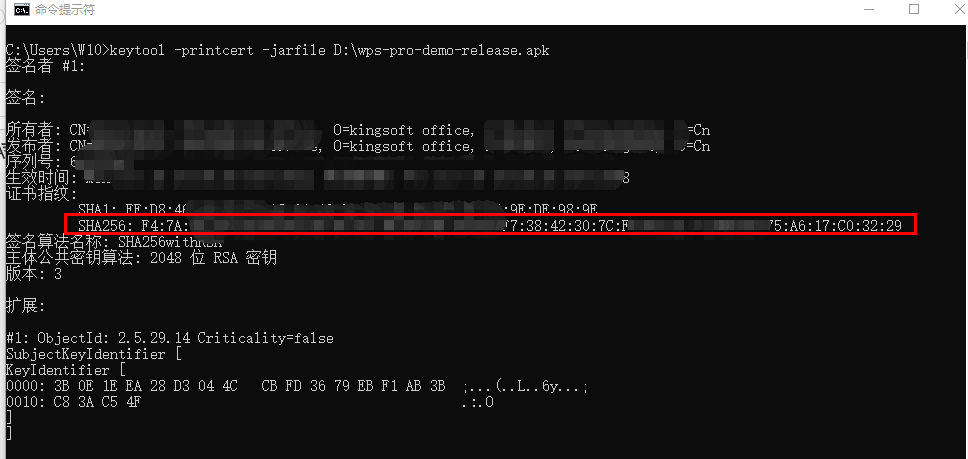
WPS二次开发专题:如何获取应用签名SHA256值
作者持续关注WPS二次开发专题系列,持续为大家带来更多有价值的WPS开发技术细节,如果能够帮助到您,请帮忙来个一键三连,更多问题请联系我(QQ:250325397) 在申请WPS SDK授权版时候需要开发者提供应用包名和签…...

Flink SQL系列之:基于Flink SQL查询Topic中序列化的Debezium数据格式字段
Flink SQL系列之:基于Flink SQL查询Topic中序列化的Debezium数据格式字段 一、表结构二、查询Topic中表的数据三、反序列化字段一、表结构 CREATE TABLE IF NOT EXISTS record_rt (id decimal(20,0) COMMENT "主键",follow_entity_type <...

【WPF应用30】WPF中的ListBox控件详解
WPF(Windows Presentation Foundation)是.NET框架的一个组成部分,用于构建桌面应用程序的用户界面。ListBox是WPF中一个非常常用的控件,用于显示一系列的项,用户可以选择单个或多个项。 1.ListBox的基本概念 ListBox…...

Chatgpt掘金之旅—有爱AI商业实战篇(二)
演示站点: https://ai.uaai.cn 对话模块 官方论坛: www.jingyuai.com 京娱AI 一、前言: 成为一名商业作者是一个蕴含着无限可能的职业选择。在当下数字化的时代,作家们有着众多的平台可以展示和推广自己的作品。无论您是对写书、文…...

AGI时代,LLM可以在AutoML哪些环节进行增强?
当下大模型技术发展如火如荼,颇有改变各行业和各领域的架势。那么对于AutoML来讲,LLM对其有哪些助力?对于这个问题,我们来问一问kimi chat,看看它怎么回答? 大型语言模型(LLM)可以在…...
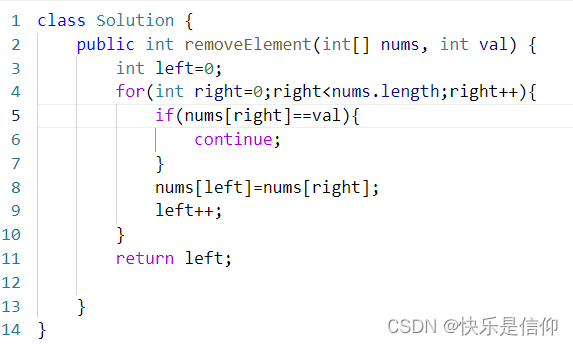
算法练习—day1
title: 算法练习—day1 date: 2024-04-03 21:49:55 tags: 算法 categories:LeetCode typora-root-url: 算法练习—day1 网址:https://red568.github.io 704. 二分查找 题目: 题目分析: 左右指针分别为[left,right],每次都取中…...
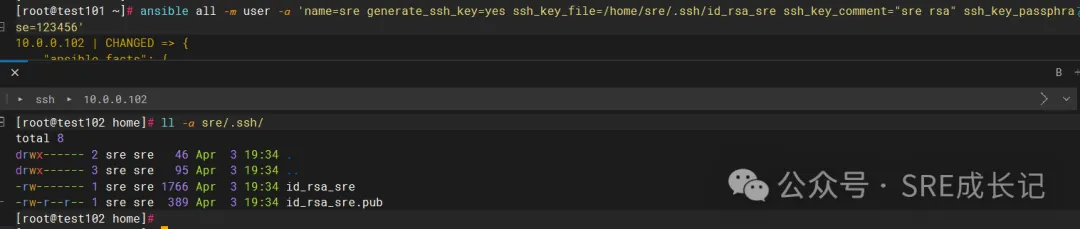
关于ansible的模块 ③
转载说明:如果您喜欢这篇文章并打算转载它,请私信作者取得授权。感谢您喜爱本文,请文明转载,谢谢。 接《关于Ansible的模块①》和《关于Ansible的模块②》,继续学习ansible的user模块。 user模块可以增、删、改linux远…...
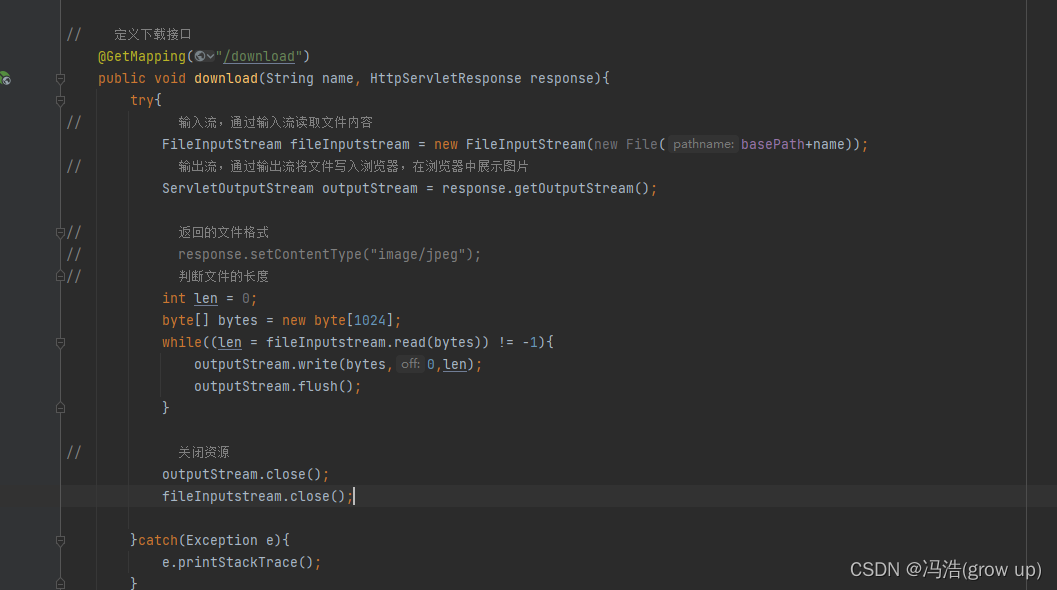
Spring Boot--文件上传和下载
文件上传和下载 前言文件上传1、以MultipartFile 接口流文件,流的名称需要和前台传过来的名称对应上2、获取到文件名称截取后缀3、为了放置文件名重复使用uuid来随机生成id后缀4、判断转存路径中是否有这个文件夹如果没有就创建5、将文件存储到转存的目录中 文件下载…...

hexo博客7:构建简单的多层安全防御体系
【hexo博客7】构建简单的多层安全防御体系 写在最前面理解全面安全策略的重要性防御常见的网络攻击1. SQL注入攻击2. 文件上传漏洞3. 跨站脚本攻击(XSS)4. 跨站请求伪造(CSRF)5. 目录遍历/本地文件包含(LFI/RFI&#x…...

《捕鱼_ue4-5输出带技能的透明通道素材到AE步骤》
《捕鱼_ue4-5输出带技能的透明通道素材到AE步骤》 2022-05-17 11:06 先看下带透明的特效素材效果1、首先在项目设置里搜索alpha,在后期处理标签设置最后一项allow through tonemapper2、在插件管理器中,搜索movie render ,加载movie render q…...
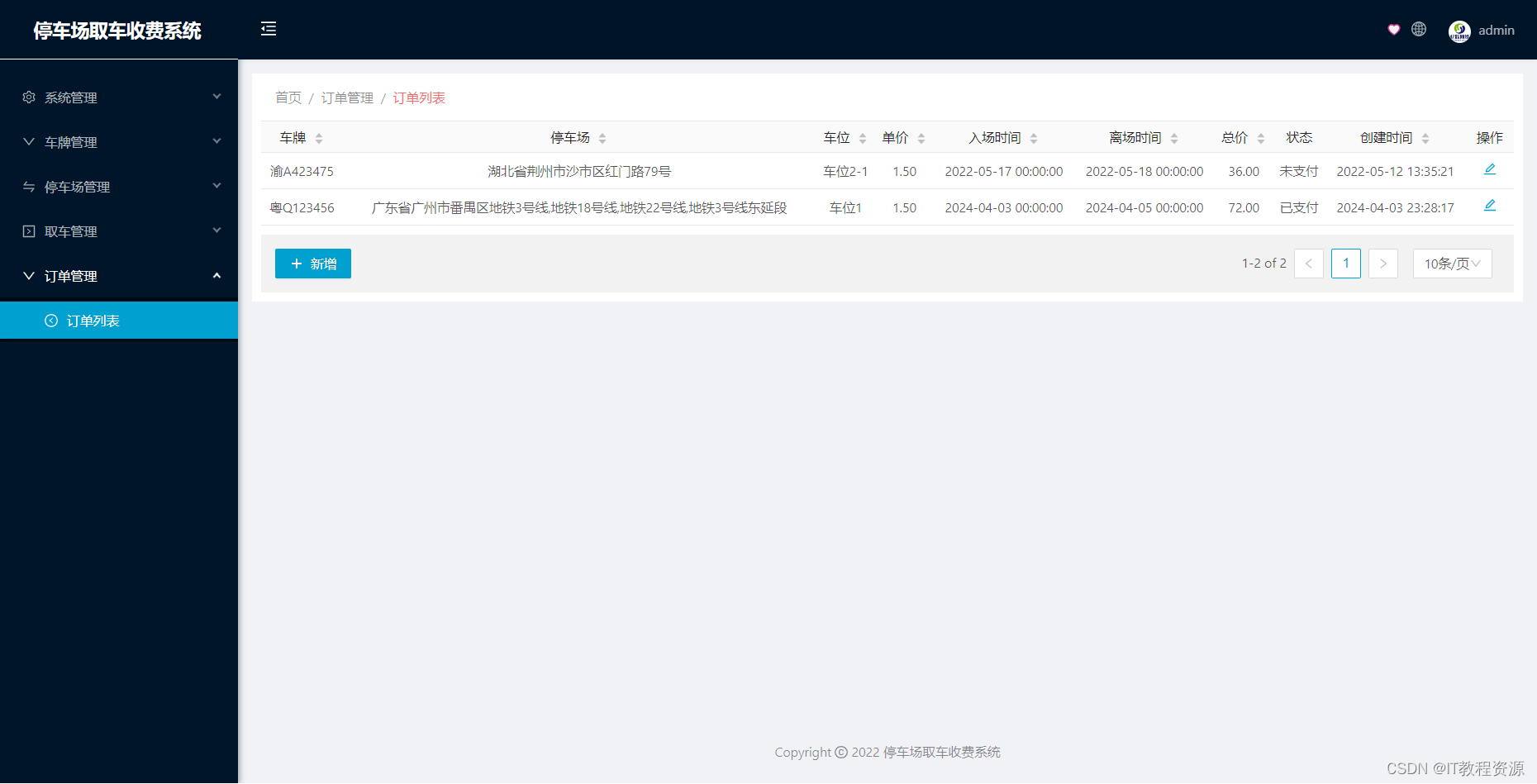
(免费分享)基于微信小程序自助停取车收费系统
本项目的开发和制作主要采用Java语言编写,SpringBoot作为项目的后端开发框架,vue作为前端的快速开发框架,主要基于ES5的语法,客户端采用微信小程序作为开发。Mysql8.0作为数据库的持久化存储。 获取完整源码: 大家点赞…...

Vue3_2024_7天【回顾上篇watch常见的后两种场景】___续
Vue3中监听多条数据的两种使用 1.watch【使用上一章写法,监听两个属性,然后执行相应操作…】 2.watchEffect【相对于使用watch,watchEffect默认页面初始加载,有点类似加配置:立即执行 immediate】 代码: …...
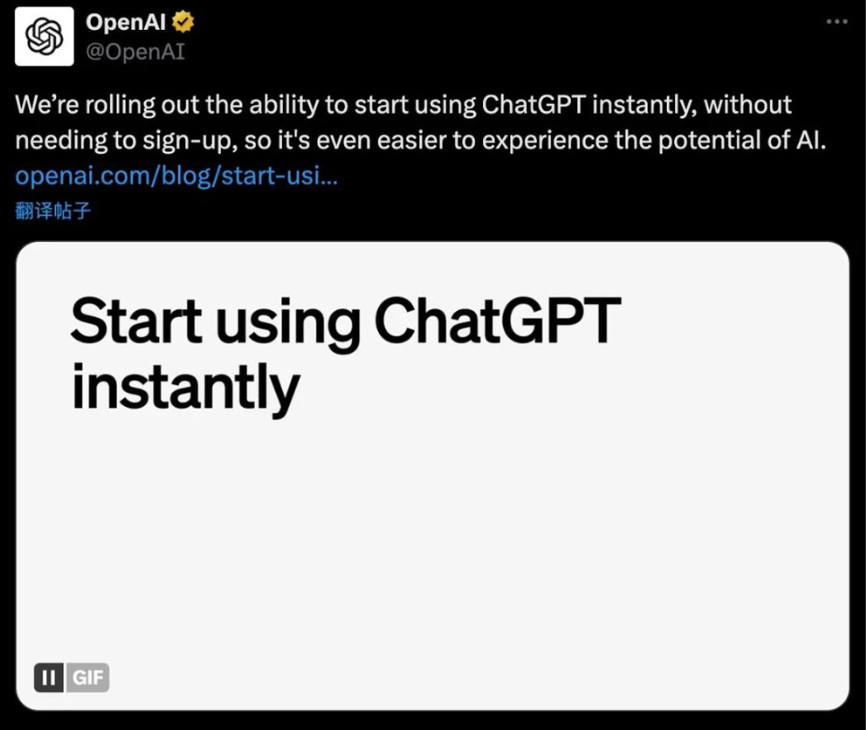
Gemini即将收费,GPT无需注册?GPT3.5白嫖和升级教程
🌐Gemini 即将开始收费 开发者“白嫖”的好日子到头了 - Gemini将开始收费,影响使用Google AI for Developers提供的Gemini API的用户。 - Gemini API将引入按量付费定价,需要注意新的服务条款。 - 用户需在5月2日之前停止使用Gemini API和Go…...
【协议篇:Http与Https】
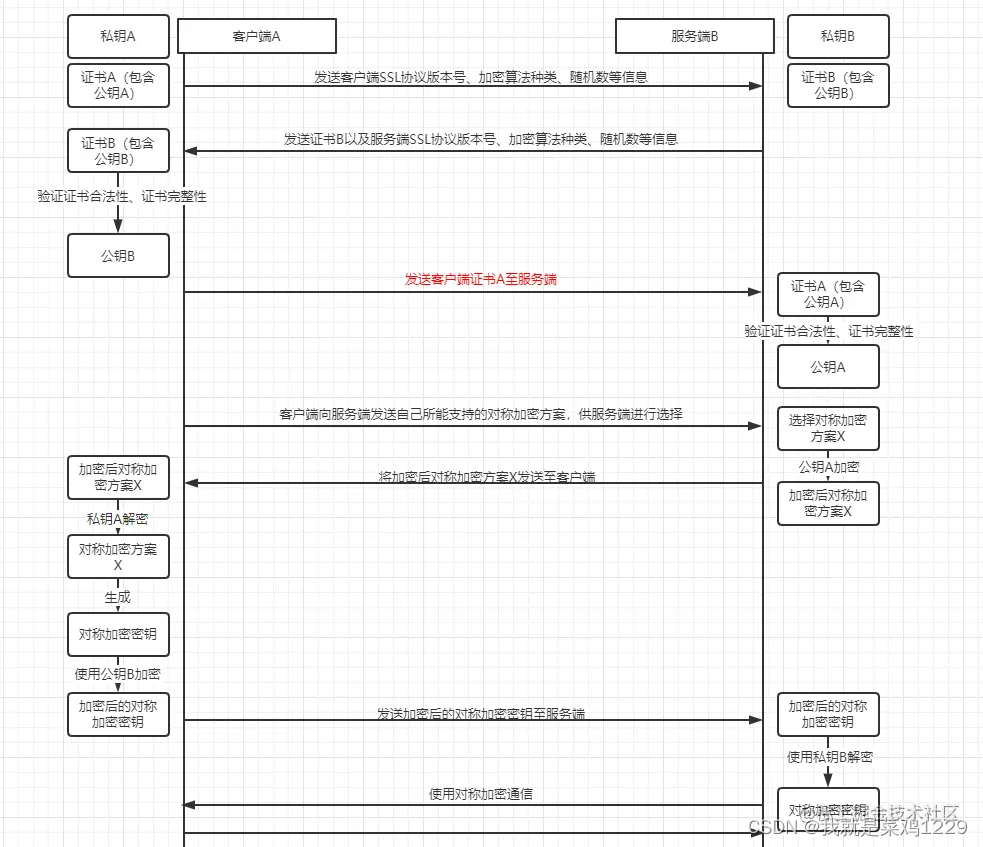
1. Http 1.1 Http的定义 超文本传输协议(Hypertext Transfer Protocol,HTTP)是用于分布式、协作式和超媒体信息系统的应用层协议。它是互联网上最广泛应用的数据通信协议之一,尤其对于万维网(WWW)服务而言…...

WPS二次开发系列:WPS SDK初始化
作者持续关注WPS二次开发专题系列,持续为大家带来更多有价值的WPS开发技术细节,如果能够帮助到您,请帮忙来个一键三连,更多问题请联系我(QQ:250325397) 本文将详细介绍WPS SDK初始化,帮您能够更…...
EXCEL地理数据处理工具(地图任务)
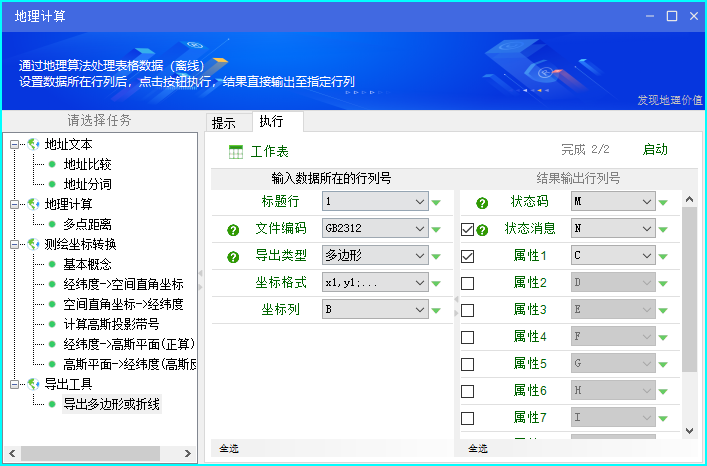
版本号 作者 修订内容 发布日期 1.0 小O 更新至0705版 2022-4-28 1.1 小O 更新至0772版 2024年4月3日 一、概述 小O地图EXCEL插件版提供基于EXCEL表格进行地理数据处理、地图可视化、地图绘图等功能,地理工具是用户使用频率很高的功能模块。地理工具能…...

软件设计原则:迪米特法则
定义 迪米特法则(Law of Demeter, LoD),又称最少知识原则,它指导我们在设计软件时,应当尽量减少对象之间的交互,一个对象应该对其他对象有尽可能少的了解。具体来说,一个对象应该只调用属于以下…...

MongoDB聚合运算符:$max
文章目录 语法使用空值和缺失值的处理数组操作数的处理 举例在$group阶段使用在$setWindowFields阶段使用在$project阶段使用 $max聚合运算符用于返回最大值。 $max对于不同的类型的值使用BSON的比较顺序。 $max可以用于下面的这些阶段: $addFields$bucket$bucket…...

Android本地AI语音助手Cliff:开源、离线与可定制的边缘计算实践
1. 项目概述:Cliff,一个运行在Android上的本地化AI语音助手最近在GitHub上看到一个挺有意思的项目,叫“Cliff-Android-Voice-Assistant”。光看名字,你大概能猜到它是一个给安卓设备用的语音助手。但和Siri、小爱同学、Google Ass…...

计算机视觉工程师必须掌握的颜色空间选型指南
1. 项目概述:为什么计算机视觉工程师必须懂颜色理论你有没有遇到过这样的情况:模型在训练集上准确率98%,一到测试集就掉到72%?调试半天发现,不是数据标注错了,也不是网络结构有问题,而是训练图像…...

JSON数据高效处理:命令行工具jsoncut的查询、过滤与投影实战
1. 项目概述:一个专为JSON数据“瘦身”的利器在前后端开发、API接口调试、数据迁移或者日志分析的日常工作中,JSON格式的数据几乎无处不在。它结构清晰、易于阅读和解析,是现代数据交换的绝对主力。但随之而来的一个常见痛点就是:…...

AI Agent Harness Engineering 未来生态:开源 vs 闭源的竞争与合作格局
AI Agent Harness Engineering 未来生态:开源 vs 闭源的竞争与合作格局 引言:AI Agent不是终点,Harness才是通用智能落地的核心阀门 1.1 从“AI大模型(LLM)元年”到“AI Agent生态元年”:技术拐点的悄然发…...

5分钟快速上手:用FanControl打造你的Windows电脑静音散热系统
5分钟快速上手:用FanControl打造你的Windows电脑静音散热系统 【免费下载链接】FanControl.Releases This is the release repository for Fan Control, a highly customizable fan controlling software for Windows. 项目地址: https://gitcode.com/GitHub_Tren…...

Ctool:一站式解决开发者的日常编码烦恼
Ctool:一站式解决开发者的日常编码烦恼 【免费下载链接】Ctool 程序开发常用工具 chrome / edge / firefox / utools / windows / linux / mac 项目地址: https://gitcode.com/gh_mirrors/ct/Ctool 在日常开发工作中,我们常常需要处理各种编码转换…...

别再到处问SQ01怎么用了!手把手教你从SQ03到SE93,搞定SAP Query自定义报表
SAP Query自定义报表实战:从零构建航班销售分析工具 每次月底做销售分析时,看着系统里那些标准报表总觉得差点意思——要么字段不全,要么格式不符合业务习惯。上周五下午,市场部的Lisa又急匆匆跑来问我:"能不能帮…...

Navicat导入Excel实战:从数据准备到成功入库的完整避坑指南
1. 数据准备:Excel规范整理实战 第一次用Navicat导入Excel时,我对着报错提示整整折腾了两小时。后来才发现,90%的问题都出在数据准备阶段。就像做饭前要洗菜切配,数据导入前也需要做好这些准备工作: 字段命名要像给变量…...

AAAI‘2026 模型记错了,检索也救不了?KG+TruthfulRAG想解决这个死结
背景介绍 近年来,大语言模型(LLM)在生成与理解任务上表现突出,但其内部“参数化知识”具有静态、滞后的特点: 面对时效性知识、专业知识、隐私知识等,模型可能缺乏覆盖;即便检索增强生成&#…...

MATLAB 2018a/2023b实测:Libsvm安装后如何用自带数据集快速验证与跑通第一个模型
MATLAB 2018a/2023b实战:Libsvm安装后快速验证与模型跑通全流程 当你第一次在MATLAB中成功安装Libsvm后,那种兴奋感可能很快会被"接下来该做什么"的迷茫所取代。别担心,这篇文章将带你用Libsvm自带的heart_scale数据集,…...