
Socket编程详解(一)服务端与客户端的双向对话
目录
预备知识
视频教程
项目前准备知识点
1、服务器端程序的编写步骤
2、客户端程序编写步骤
代码部分
1、服务端FrmServer.cs文件
2、客户端FrmClient.cs文件
3、启动文件Program.cs
结果展示
预备知识
请查阅博客http://t.csdnimg.cn/jE4Tp
视频教程
链接:https://pan.baidu.com/s/13fkwlppoP9aYcXHiFEbKGQ?pwd=cvzn
提取码:cvzn
项目前准备知识点
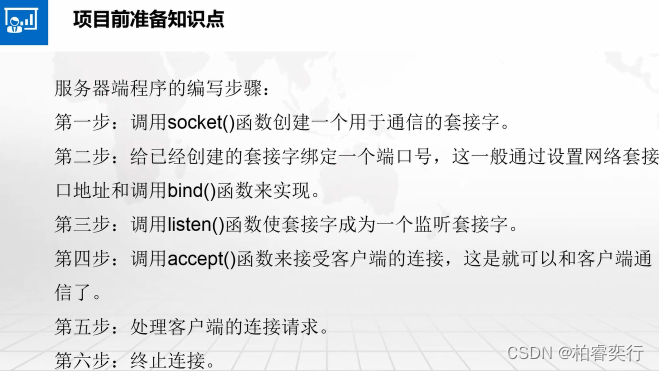
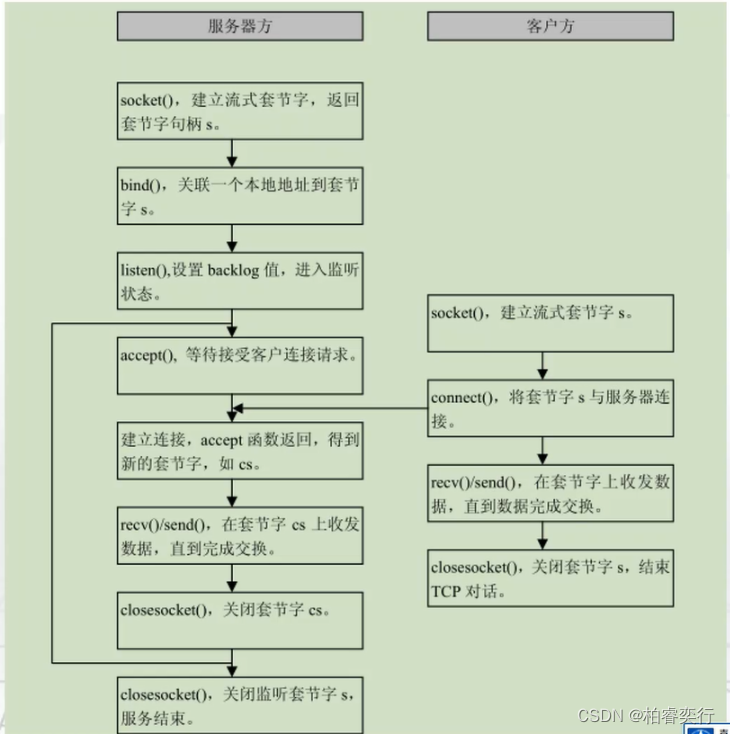
1、服务器端程序的编写步骤
第一步:调用socket()函数创建一个用于通信的套接字。
第二步:给已经创建的套接字绑定一个端口号,这一般通过设置网络套接口地址和调用bind()函数来实现。
第三步:调用listen()函数使套接字成为一个监听套接字。
第四步:调用accept()函数来接受客户端的连接,这是就可以和客户端通信了。
第五步:处理客户端的连接请求第六步:终止连接。
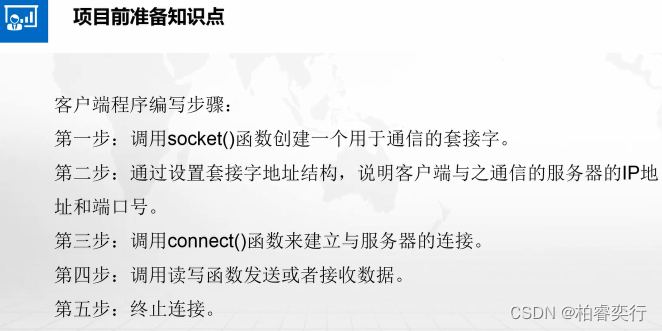
2、客户端程序编写步骤
第一步:调用socket()函数创建一个用于通信的套接字。
第二步:通过设置套接字地址结构,说明客户端与之通信的服务器的IP地址和端口号。
第三步:调用connect()函数来建立与服务器的连接。
第四步:调用读写函数发送或者接收数据。
第五步:终止连接。
代码部分
1、服务端FrmServer.cs文件
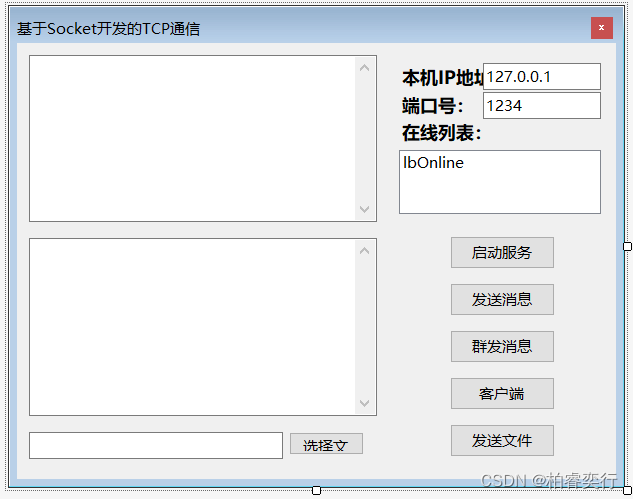
FrmServer.cs窗体
using System;
using System.Collections.Generic;
using System.ComponentModel;
using System.Data;
using System.Drawing;
using System.IO;
using System.Linq;
using System.Net;
using System.Net.Sockets;
using System.Text;
using System.Threading;
using System.Threading.Tasks;
using System.Windows.Forms;namespace SocketTCP
{//声明委托delegate void AddOnLineDelegate(string str, bool bl);//声明委托delegate void RecMsgDelegate(string str);public partial class FrmTCPServer : Form{public FrmTCPServer(){InitializeComponent();myAddOnline = AddOnline;myRcvMsg = RecMsg;myFileSave = FileSave;}//创建套接字Socket sock = null;//创建负责监听客户端连接的线程Thread threadListen = null;//创建URL与Socket的字典集合Dictionary<string, Socket> DicSocket = new Dictionary<string, Socket>();AddOnLineDelegate myAddOnline;RecMsgDelegate myRcvMsg;FileSaveDelegate myFileSave;#region 开始监听/// <summary>/// 开始监听/// </summary>/// <param name="sender"></param>/// <param name="e"></param>private void btn_StartServer_Click(object sender, EventArgs e){//创建负责监听的套接字,注意其中参数:IPV4 字节流 TCPsock = new Socket(AddressFamily.InterNetwork, SocketType.Stream, ProtocolType.Tcp);IPAddress address = IPAddress.Parse(this.txt_IP.Text.Trim());//根据IPAddress以及端口号创建IPE对象IPEndPoint endpoint = new IPEndPoint(address, int.Parse(this.txt_Port.Text.Trim()));try{sock.Bind(endpoint);Invoke(myRcvMsg, "服务器开启成功!");MessageBox.Show("开启服务成功!", "打开服务");}catch (Exception ex){MessageBox.Show("开启服务失败" + ex.Message, "打开服务");return;}sock.Listen(10);threadListen = new Thread(ListenConnecting);threadListen.IsBackground = true;threadListen.Start();this.btn_StartServer.Enabled = false;}#endregion#region 监听线程/// <summary>/// 监听线程/// </summary>private void ListenConnecting(){while (true){//一旦监听到一个客户端的连接,将会创建一个与该客户端连接的套接字Socket sockClient = sock.Accept();string client = sockClient.RemoteEndPoint.ToString();DicSocket.Add(client, sockClient);Invoke(myAddOnline, client, true);Invoke(myRcvMsg, client + "上线了!");//开启接受线程Thread thr = new Thread(ReceiveMsg);thr.IsBackground = true;thr.Start(sockClient);}}#endregion#region 接收线程/// <summary>/// 接收线程/// </summary>/// <param name="sockClient"></param>private void ReceiveMsg(object sockClient){Socket sckclient = sockClient as Socket;while (true){//定义一个2M缓冲区byte[] arrMsgRec = new byte[1024 * 1024 * 2];int length = -1;try{length = sckclient.Receive(arrMsgRec);}catch (Exception){string str = sckclient.RemoteEndPoint.ToString();Invoke(myRcvMsg, str + "下线了!");//从列表中移除URLInvoke(myAddOnline, str, false);DicSocket.Remove(str);break;}if (length == 0){string str = sckclient.RemoteEndPoint.ToString();Invoke(myRcvMsg, str + "下线了!");//从列表中移除URLInvoke(myAddOnline, str, false);DicSocket.Remove(str);break;}else{if (arrMsgRec[0] == 0){string strMsg = Encoding.UTF8.GetString(arrMsgRec, 1, length-1);string Msg = "[接收]     " + sckclient.RemoteEndPoint.ToString() + "     " + strMsg;Invoke(myRcvMsg, Msg);}if (arrMsgRec[0] == 1){Invoke(myFileSave, arrMsgRec,length);}}}}#endregion#region 委托方法体private void AddOnline(string url, bool bl){if (bl){this.lbOnline.Items.Add(url);}else{this.lbOnline.Items.Remove(url);}}private void RecMsg(string str){this.txt_Rcv.AppendText(str + Environment.NewLine);}private void FileSave(byte[] bt, int length){try{SaveFileDialog sfd = new SaveFileDialog();sfd.Filter = "word files(*.docx)|*.docx|txt files(*.txt)|*.txt|xls files(*.xls)|*.xls|All files(*.*)|*.*";if (sfd.ShowDialog() == DialogResult.OK){string fileSavePath = sfd.FileName;using (FileStream fs = new FileStream(fileSavePath, FileMode.Create)){fs.Write(bt, 1, length - 1);Invoke(new Action(() => this.txt_Rcv.AppendText("[保存]     保存文件成功" + fileSavePath + Environment.NewLine)));}}}catch (Exception ex){MessageBox.Show("保存异常" + ex.Message, "保存文件出现异常");}}#endregion#region 发送消息/// <summary>/// 发送消息/// </summary>/// <param name="sender"></param>/// <param name="e"></param>private void btn_SendToSingle_Click(object sender, EventArgs e){string StrMsg = this.txt_Send.Text.Trim();byte[] arrMsg = Encoding.UTF8.GetBytes(StrMsg);byte[] arrSend = new byte[arrMsg.Length + 1];arrSend[0] = 0;Buffer.BlockCopy(arrMsg, 0, arrSend, 1, arrMsg.Length);if (this.lbOnline.SelectedItems.Count == 0){MessageBox.Show("请选择你要发送的对象!", "发送提示");return;}else{foreach (string item in this.lbOnline.SelectedItems){DicSocket[item].Send(arrSend);string Msg = "[发送]     " + item + "     " + StrMsg;Invoke(myRcvMsg, Msg);}}}#endregion#region 群发消息/// <summary>/// 群发消息/// </summary>/// <param name="sender"></param>/// <param name="e"></param>private void btn_SendToAll_Click(object sender, EventArgs e){string StrMsg = this.txt_Send.Text.Trim();byte[] arrMsg = Encoding.UTF8.GetBytes(StrMsg);byte[] arrSend = new byte[arrMsg.Length + 1];arrSend[0] = 0;Buffer.BlockCopy(arrMsg, 0, arrSend, 1, arrMsg.Length);foreach (string item in this.DicSocket.Keys){DicSocket[item].Send(arrSend);string Msg = "[发送]     " + item + "     " + StrMsg;Invoke(myRcvMsg, Msg);}Invoke(myRcvMsg, "[群发]     群发完毕!");}#endregion#region 打开客户端/// <summary>/// 打开客户端/// </summary>/// <param name="sender"></param>/// <param name="e"></param>private void btn_Client_Click(object sender, EventArgs e){FrmTCPClient objFrm = new FrmTCPClient();objFrm.Show();}#endregion#region 选择文件/// <summary>/// 选择文件/// </summary>/// <param name="sender"></param>/// <param name="e"></param>private void btn_SelectFile_Click(object sender, EventArgs e){OpenFileDialog ofd = new OpenFileDialog();ofd.InitialDirectory = "D:\\";if (ofd.ShowDialog() == DialogResult.OK){this.txt_SelectFile.Text = ofd.FileName;}}#endregion#region 发送文件/// <summary>/// 发送文件/// </summary>/// <param name="sender"></param>/// <param name="e"></param>private void btn_SendFile_Click(object sender, EventArgs e){if (string.IsNullOrEmpty(txt_SelectFile.Text)){MessageBox.Show("请选择您要发送的文件!", "发送文件提示");return;}string online = this.lbOnline.Text.Trim();if (string.IsNullOrEmpty(online)){MessageBox.Show("请选择您要发送的对象!", "发送文件提示");return;}using (FileStream fs = new FileStream(txt_SelectFile.Text, FileMode.Open)){string filename = Path.GetFileName(txt_SelectFile.Text);string StrMsg = "发送文件为:" + filename;byte[] arrMsg = Encoding.UTF8.GetBytes(StrMsg);byte[] arrSend= new byte[arrMsg.Length + 1];arrSend[0] =0;Buffer.BlockCopy(arrMsg, 0, arrSend, 1, arrMsg.Length);DicSocket[online].Send(arrSend);byte[] arrfileSend = new byte[1024 * 1024 * 2];int length = fs.Read(arrfileSend, 0, arrfileSend.Length);byte[] arrfile = new byte[length + 1];arrfile[0] = 1;Buffer.BlockCopy(arrfileSend, 0, arrfile, 1, length);DicSocket[online].Send(arrfile);}}#endregion}
}
2、客户端FrmClient.cs文件
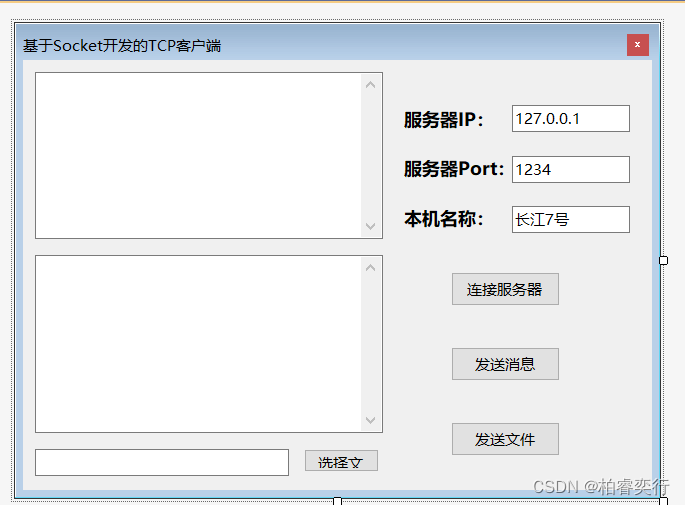
FrmClient.cs窗体
using System;
using System.Collections.Generic;
using System.ComponentModel;
using System.Data;
using System.Drawing;
using System.IO;
using System.Linq;
using System.Net;
using System.Net.Sockets;
using System.Text;
using System.Threading;
using System.Threading.Tasks;
using System.Windows.Forms;namespace SocketTCP
{delegate void FileSaveDelegate(byte[] bt,int length);public partial class FrmTCPClient : Form{public FrmTCPClient(){InitializeComponent();MyFileSave = FileSave;}//Socket对象Socket sockClient = null;//接收线程Thread thrClient = null;//运行标志位private bool IsRunning = true;//文件保存委托对象FileSaveDelegate MyFileSave;#region 连接服务器/// <summary>/// 连接服务器/// </summary>/// <param name="sender"></param>/// <param name="e"></param>private void btn_Connect_Click(object sender, EventArgs e){IPAddress address = IPAddress.Parse(this.txt_IP.Text.Trim());IPEndPoint Ipe = new IPEndPoint(address, int.Parse(this.txt_Port.Text.Trim()));sockClient = new Socket(AddressFamily.InterNetwork, SocketType.Stream, ProtocolType.Tcp);try{this.txt_Rcv.AppendText("与服务器连接中......" + Environment.NewLine);sockClient.Connect(Ipe);}catch (Exception ex){MessageBox.Show("连接失败" + ex.Message, "建立连接");return;}this.txt_Rcv.AppendText("与服务器连接成功" + Environment.NewLine);this.btn_Connect.Enabled = false;thrClient = new Thread(ReceiceMsg);thrClient.IsBackground = true;thrClient.Start();}#endregion#region 接收消息/// <summary>/// 接收消息/// </summary>private void ReceiceMsg(){while (IsRunning){//定义一个2M缓冲区byte[] arrMsgRec = new byte[1024 * 1024 * 2];int length = -1;try{length = sockClient.Receive(arrMsgRec);}catch (SocketException){break;}catch (Exception ex){Invoke(new Action(() => this.txt_Rcv.AppendText("断开连接" + ex.Message + Environment.NewLine)));break;}if (length > 0){//表示接受到的为消息类型if (arrMsgRec[0] == 0){string strMsg = Encoding.UTF8.GetString(arrMsgRec, 1, length-1);string Msg = "[接收]     " + strMsg + Environment.NewLine;Invoke(new Action(() => this.txt_Rcv.AppendText(Msg)));}//表示接收到的为文件类型if (arrMsgRec[0] == 1){Invoke(MyFileSave, arrMsgRec,length);}}}}#endregion#region 委托方法体private void FileSave(byte[] bt, int length){try{SaveFileDialog sfd = new SaveFileDialog();sfd.Filter = "word files(*.docx)|*.docx|txt files(*.txt)|*.txt|xls files(*.xls)|*.xls|All files(*.*)|*.*";if (sfd.ShowDialog() == DialogResult.OK){string fileSavePath = sfd.FileName;using (FileStream fs = new FileStream(fileSavePath, FileMode.Create)){fs.Write(bt, 1, length - 1);Invoke(new Action(() => this.txt_Rcv.AppendText("[保存]     保存文件成功" + fileSavePath+Environment.NewLine)));}}}catch (Exception ex){MessageBox.Show("保存异常" + ex.Message, "保存文件出现异常");}}#endregion#region 发送消息/// <summary>/// 发送消息/// </summary>/// <param name="sender"></param>/// <param name="e"></param>private void btn_Send_Click(object sender, EventArgs e){string strMsg = "来自" + this.txt_Name.Text.Trim() + ":  " + this.txt_Send.Text.Trim();byte[] arrMsg = Encoding.UTF8.GetBytes(strMsg);byte[] arrSend = new byte[arrMsg.Length + 1];arrSend[0] = 0;Buffer.BlockCopy(arrMsg, 0, arrSend, 1, arrMsg.Length);sockClient.Send(arrSend);Invoke(new Action(() => this.txt_Rcv.AppendText("[发送]     " + this.txt_Send.Text.Trim() + Environment.NewLine)));}#endregion#region 窗体关闭事件/// <summary>/// 窗体关闭事件/// </summary>/// <param name="sender"></param>/// <param name="e"></param>private void FrmTCPClient_FormClosing(object sender, FormClosingEventArgs e){IsRunning = false;sockClient?.Close();}#endregion#region 选择文件/// <summary>/// 选择文件/// </summary>/// <param name="sender"></param>/// <param name="e"></param>private void btn_SelectFile_Click(object sender, EventArgs e){OpenFileDialog ofd = new OpenFileDialog();ofd.InitialDirectory = "D:\\";if (ofd.ShowDialog() == DialogResult.OK){this.txt_SelectFile.Text = ofd.FileName;}}#endregion#region 发送文件/// <summary>/// 发送文件/// </summary>/// <param name="sender"></param>/// <param name="e"></param>private void btn_SendFile_Click(object sender, EventArgs e){if (string.IsNullOrEmpty(txt_SelectFile.Text)){MessageBox.Show("请选择您要发送的文件!", "发送文件提示");return;}using (FileStream fs = new FileStream(txt_SelectFile.Text, FileMode.Open)){string filename = Path.GetFileName(txt_SelectFile.Text);string StrMsg = "发送文件为:" + filename;byte[] arrMsg = Encoding.UTF8.GetBytes(StrMsg);byte[] arrSend = new byte[arrMsg.Length + 1];arrSend[0] = 0;Buffer.BlockCopy(arrMsg, 0, arrSend, 1, arrMsg.Length);sockClient.Send(arrSend);byte[] arrfileSend = new byte[1024 * 1024 * 2];int length = fs.Read(arrfileSend, 0, arrfileSend.Length);byte[] arrfile = new byte[length + 1];arrfile[0] = 1;Buffer.BlockCopy(arrfileSend, 0, arrfile, 1, length);sockClient.Send(arrfile);}}#endregion}
}
3、启动文件Program.cs
using System;
using System.Collections.Generic;
using System.Linq;
using System.Threading.Tasks;
using System.Windows.Forms;namespace SocketTCP
{static class Program{/// <summary>/// 应用程序的主入口点。/// </summary>[STAThread]static void Main(){Application.EnableVisualStyles();Application.SetCompatibleTextRenderingDefault(false);Application.Run(new FrmTCPServer());}}
}
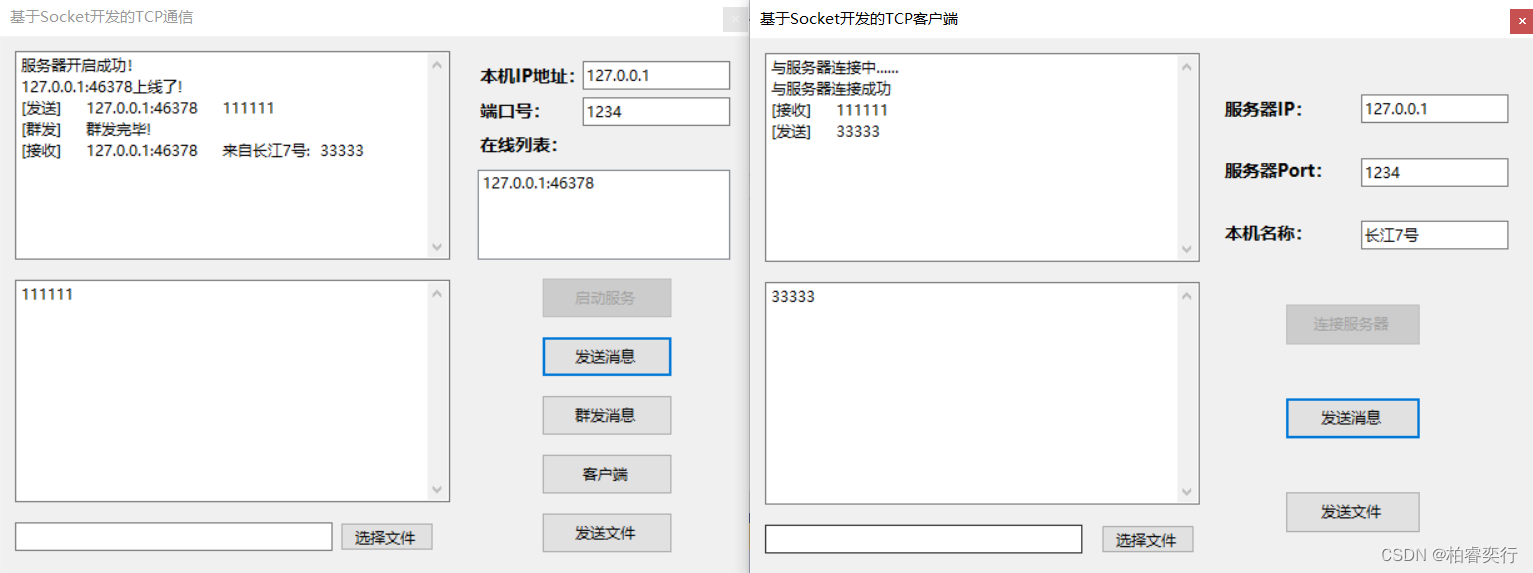
结果展示
相关文章:
Socket编程详解(一)服务端与客户端的双向对话
目录 预备知识 视频教程 项目前准备知识点 1、服务器端程序的编写步骤 2、客户端程序编写步骤 代码部分 1、服务端FrmServer.cs文件 2、客户端FrmClient.cs文件 3、启动文件Program.cs 结果展示 预备知识 请查阅博客http://t.csdnimg.cn/jE4Tp 视频教程 链接&#…...
)
使用Python实现深度学习模型:强化学习与深度Q网络(DQN)
深度Q网络(Deep Q-Network,DQN)是结合深度学习与强化学习的一种方法,用于解决复杂的决策问题。本文将详细介绍如何使用Python实现DQN,主要包括以下几个方面: 强化学习简介DQN算法简介环境搭建DQN模型实现模型训练与评估1. 强化学习简介 强化学习是一种训练智能体(agent…...

Py-Spy、Scalene 和 VizTracer 的对比分析
在前几篇文章中,我们详细介绍了如何使用 py-spy、scalene 和 viztracer 进行性能分析和优化。今天,我们将对这三个性能分析工具进行详细对比,帮助你选择最适合你的工具。 工具简介 Py-Spy: 实时性能分析:Py-Spy 可以…...

软考架构师考试内容
软考系统架构设计师考试是中国计算机技术与软件专业技术资格(水平)考试(简称软考)中的一项高级资格考试,旨在评估考生是否具备系统架构设计的能力。根据提供的参考资料,考试内容主要包括以下几个方面&#…...

【MySQL基础篇】概述及SQL指令:DDL及DML
数据库是一个按照数据结构来组织、存储和管理数据的仓库。以下是对数据库概念的详细解释:定义与基本概念: 数据库是长期存储在计算机内的、有组织的、可共享的、统一管理的大量数据的集合。 数据库不仅仅是数据的简单堆积,而是遵循一定的规则…...
计算机网络 —— 网络字节序
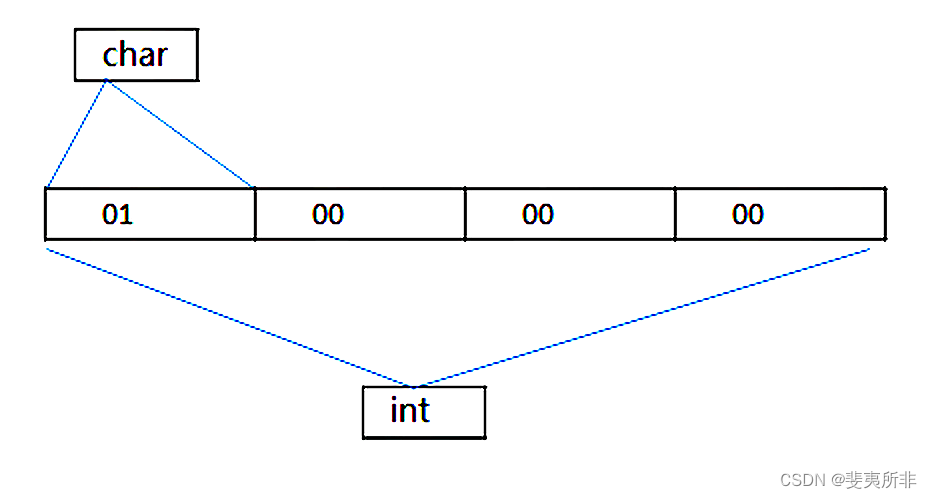
网络字节序 1、网络字节序 (Network Byte Order)和本机转换 1、大端、小端字节序 “大端” 和” 小端” 表示多字节值的哪一端存储在该值的起始地址处;小端存储在起始地址处,即是小端字节序;大端存储在起始地址处,即是大端字节…...

区块链不可能三角
区块链不可能三角:探索去中心化、安全与可扩展性的权衡 引言 区块链技术自诞生以来,以其去中心化、透明、安全等特点吸引了全球的关注,成为金融科技领域的重要革新力量。然而,随着区块链应用的日益广泛,一个核心问题…...
新手第一个漏洞复现:MS17-010(永恒之蓝)
文章目录 漏洞原理漏洞影响范围复现环境复现步骤 漏洞原理 漏洞出现在Windows SMB v1中的内核态函数srv!SrvOs2FeaListToNt在处理FEA(File Extended Attributes)转换时。该函数在将FEA list转换成NTFEA(Windows NT FEA)list前&am…...

代码随想录Day64
98.所有可达路径 题目:98. 所有可达路径 (kamacoder.com) 思路:果断放弃 答案 import java.util.*;public class Main {private static List<List<Integer>> adjList;private static List<List<Integer>> allPaths;private sta…...

Angular 指令
Angular 指令是 Angular 框架中的一项核心功能,它允许开发人员扩展 HTML 的功能,并创建可复用的组件和行为。以下是一些常见的 Angular 指令: 1. 组件指令 (Component Directives) 组件指令是最常用的一种指令,用于创建可复用的 U…...

移动端 UI 风格,书写华丽篇章
移动端 UI 风格,书写华丽篇章...
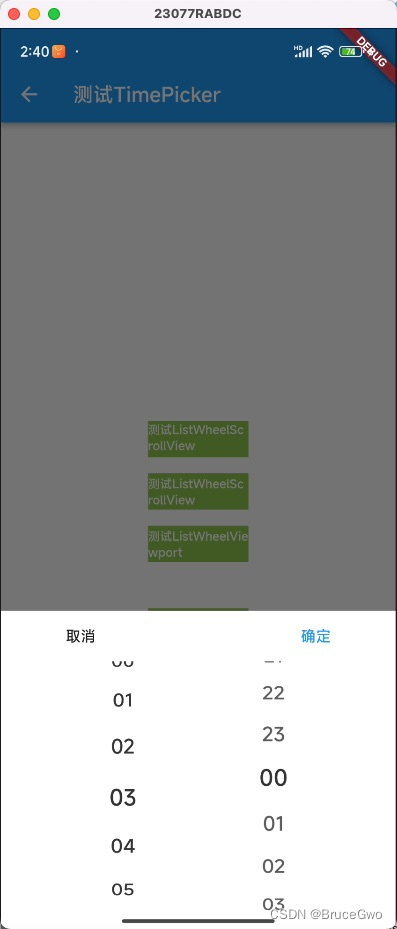
flutter开发实战-ListWheelScrollView与自定义TimePicker时间选择器
flutter开发实战-ListWheelScrollView与自定义TimePicker 最近在使用时间选择器的时候,需要自定义一个TimePicker效果,当然这里就使用了ListWheelScrollView。ListWheelScrollView与ListView类似,但ListWheelScrollView渲染效果类似滚筒效果…...

stable diffusion 模型和lora融合
炜哥的AI学习笔记——SuperMerger插件学习 - 哔哩哔哩接下来学习的插件名字叫做 SuperMerger,它的作用正如其名,可以融合大模型或者 LoRA,一般来说会结合之前的插件 LoRA Block Weight 使用,在调整完成 LoRA 模型的权重后使用改插件进行重新打包。除了 LoRA ,Checkpoint 也…...

Spring Boot中的分布式缓存方案
Spring Boot中的分布式缓存方案 大家好,我是免费搭建查券返利机器人省钱赚佣金就用微赚淘客系统3.0的小编,也是冬天不穿秋裤,天冷也要风度的程序猿!今天我们将探讨在Spring Boot应用中实现分布式缓存的方案,以提升系统…...
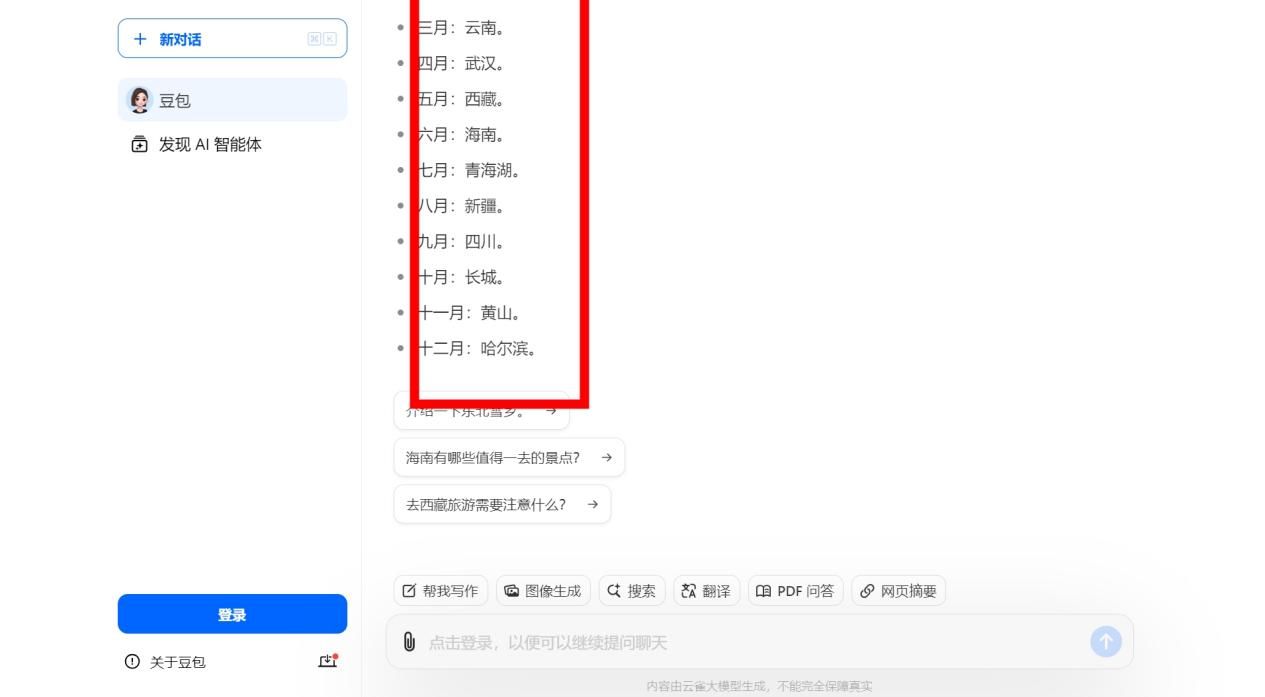
AI写作革命:如何用AI工具轻松搞定700+学科的论文?
不知道大家有没有发现,随着人工智能技术的快速发展,AI工具正逐渐渗透到我们日常生活的各个方面,极大地提高了我们的工作和学习效率。无论是AI写作、AI绘画、AI思维导图,还是AI幻灯片制作,这些工具已成为我们不可或缺的…...
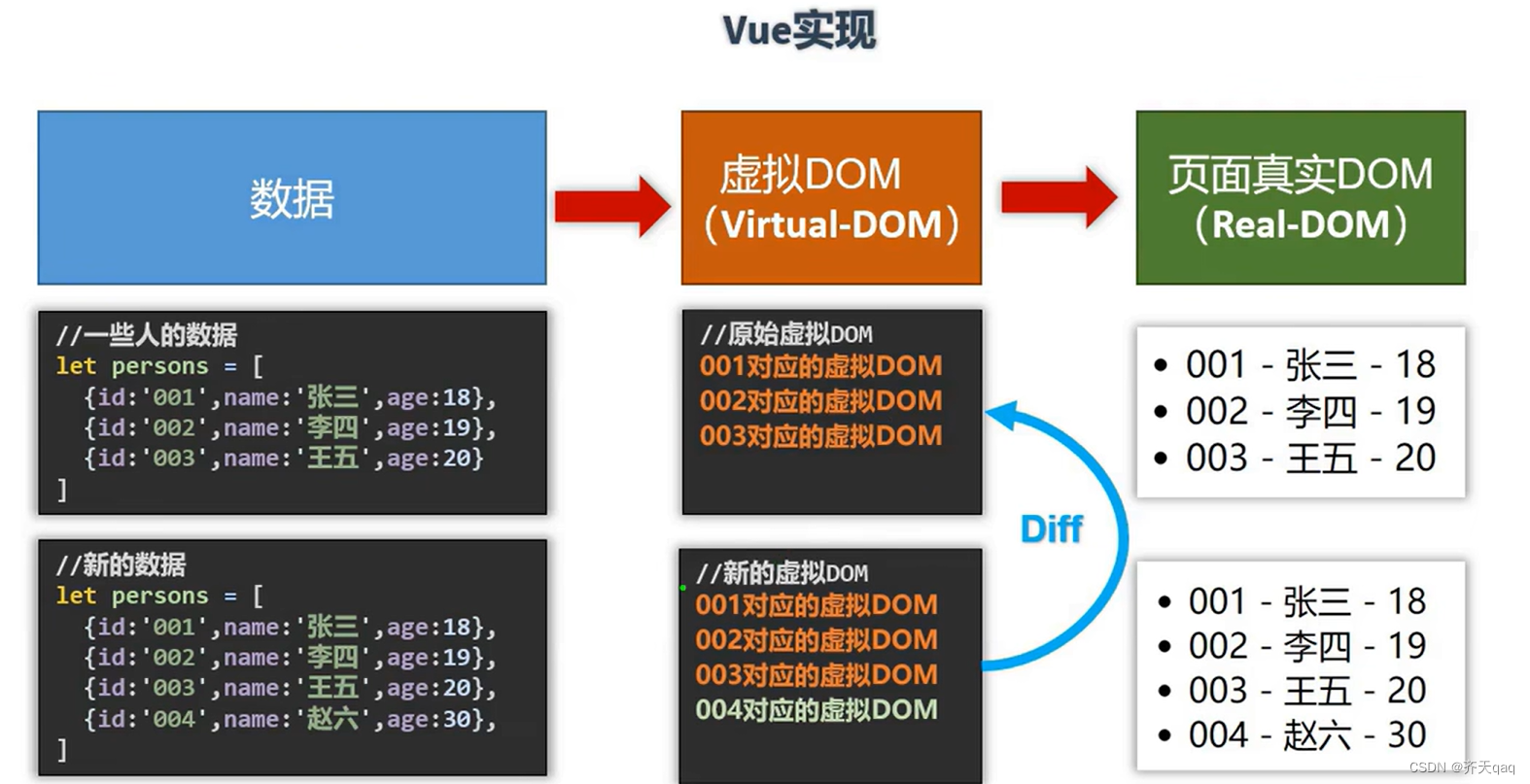
v-for中key的原理以及用法
在 Vue.js 中,v-for 指令用于基于源数据多次渲染元素或模板块。当使用 v-for 渲染列表时,为每个列表项提供一个唯一的 key 属性是非常重要的。key 的主要作用是帮助 Vue 跟踪每个节点的身份,从而重用和重新排序现有元素。 先来张原理图&#…...
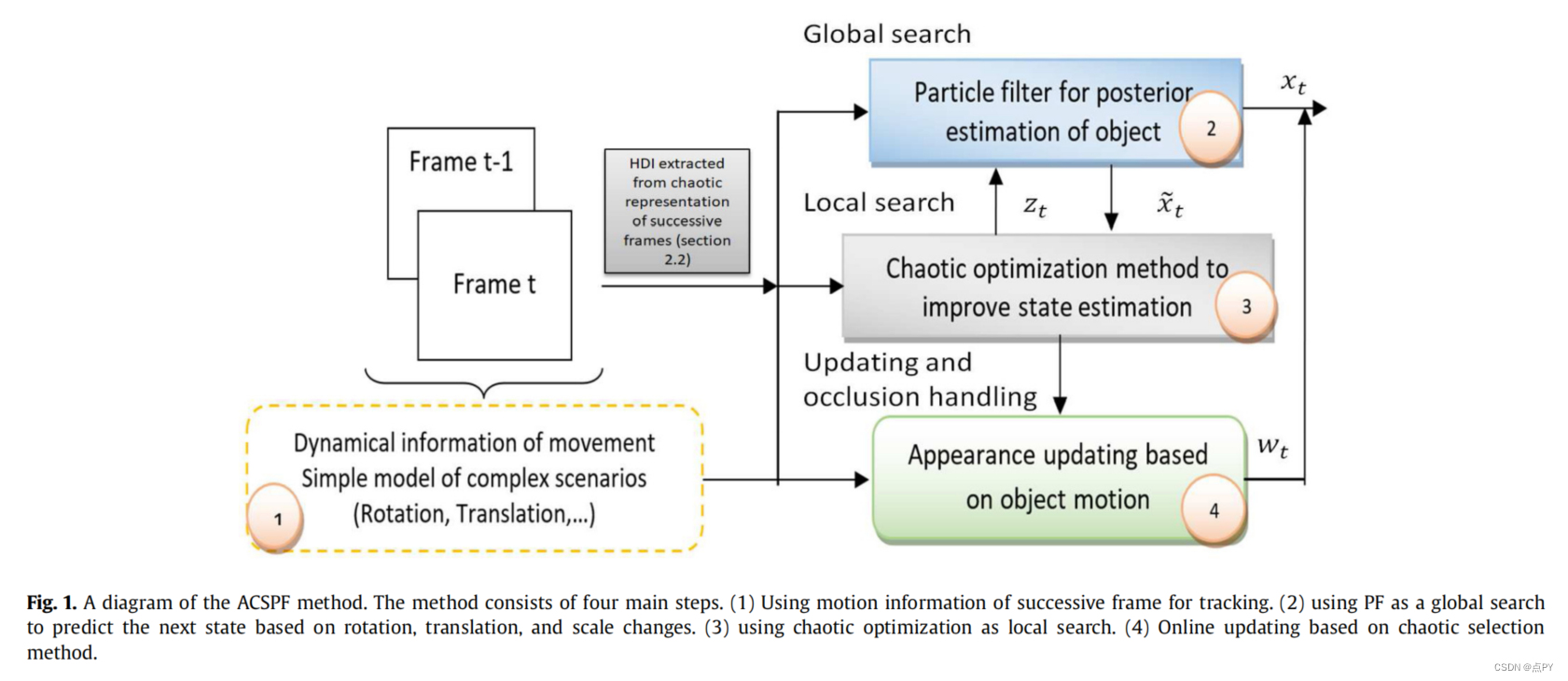
基于强化学习的目标跟踪论文合集
文章目录 2020UAV Maneuvering Target Tracking in Uncertain Environments Based on Deep Reinforcement Learning and Meta-LearningUAV Target Tracking in Urban Environments Using Deep Reinforcement Learning 2021Research on Vehicle Dispatch Problem Based on Kuhn-…...
高质量AIGC/ChatGPT/大模型资料分享
2023年要说科技圈什么最火爆,一定是ChatGPT、AIGC(人工智能生成内容)和大型语言模型。这些技术前沿如同科技世界的新潮流,巨浪拍岸,引发各界关注。ChatGPT的互动性和逼真度让人们瞠目,它能与用户展开流畅对…...

使用Python进行Socket接口测试
大家好,在现代软件开发中,网络通信是不可或缺的一部分。无论是传输数据、获取信息还是实现实时通讯,都离不开可靠的网络连接和有效的数据交换机制。而在网络编程的基础中,Socket(套接字)技术扮演了重要角色…...

C++编程逻辑讲解step by step:存折和信用卡类。
题目 存折和信用卡类,信用卡是一种存折,可以透支,可以存款。 代码 #include<iostream> #include<string> using namespace std; class passbook {public: passbook(string nam,int n,float m) {namenam; numn; balancem; } vo…...

百度 Agent 安全中心:构筑企业智能体的安全底座
本文整理自 2026 年 5 月 14 日 Create2026 百度 AI 开发者大会 - Agent Infra 专题论坛,百度智能云云安全产品总经理聂科峰的同名主题演讲。在 AI 生产力加速进化的时代,Agent 正在从「会说」快速演进到「会做」。从 Chatbot、Copilot,到能够…...

NY352固态MT29F32T08GWLBHD6-24QJ:B
NY352固态MT29F32T08GWLBHD6-24QJ:B从你的笔记本到高性能服务器,从智能仪表到工业机器人,一块灵魂级的存储芯片往往决定了系统的稳定与寿命。在众多闪存颗粒中,MT29F32T08GWLBHD6-24QJ:B 无疑是最具代表性的存在之一。它看似不起眼࿰…...

避坑指南:UE5 GAS技能系统中,角色转向功能的两种实现方案与接口设计思考
UE5 GAS技能系统中角色转向功能的架构设计与实战优化 在动作角色扮演游戏开发中,技能释放时的角色朝向处理往往成为影响战斗体验的关键细节。当火球需要精准飞向目标、剑刃应当准确劈砍敌人时,角色朝向的瞬间调整不仅关乎视觉表现,更直接影响…...

ARM嵌入式项目存储选型指南:从eMMC到SD卡,如何平衡性能、可靠性与成本
1. 项目概述:为什么存储选型是ARM嵌入式项目的“命门”?干了十几年嵌入式开发,从早期的ARM7、ARM9到现在的Cortex-A系列,经手的项目少说也有上百个。我发现一个很有意思的现象:很多工程师在选型时,CPU主频、…...
)
小米手机解锁BL保姆级教程:无需社区5级,用PHP脚本绕过HyperOS限制(附常见错误码解决)
小米手机解锁BL实战指南:突破HyperOS限制的完整方案 手里的小米13升级到HyperOS后,解锁Bootloader突然变得遥不可及?社区等级5和答题门槛让不少技术爱好者望而却步。本文将带你深入探索一种巧妙的技术方案,无需满足小米社区的苛刻…...

Sitara处理器PRU-ICSS架构解析:工业自动化信息传输系统设计实战
1. 项目概述:工业自动化中的信息传输挑战与Sitara方案在工业自动化领域,信息传输的实时性、可靠性与灵活性,直接决定了生产线的“智商”与“反应速度”。想象一下,一条高速运转的汽水装瓶线,如果无法在毫秒级内感知到原…...

BENTLY NEVADA 330980-51-00传感器测量系统
BENTLY NEVADA 330980-51-00 是一款本特利内华达出品的传感器测量系统,专用于旋转机械的振动、位移及转速监测,广泛应用于汽轮机、压缩机、风机等关键设备。中间:15条产品特点330980-51-00 采用涡流传感器原理,非接触测量…...

无参考视频质量评估:AI如何在没有标准答案时评判视频画质
1. 项目概述:当AI成为视频的“质检员”在视频内容爆炸式增长的今天,我们每天都会接触到海量的视频流——从手机随手拍的短视频,到专业制作的影视剧,再到监控摄像头24小时不间断的记录。你有没有想过,这些视频的“画质”…...

Perplexity计算原理与业务落地脱节?——资深算法架构师亲授7步校准法,避免模型上线翻车
更多请点击: https://codechina.net 第一章:Perplexity的本质定义与数学直觉 Perplexity(困惑度)是衡量概率模型对未知序列预测能力的核心指标,其本质是交叉熵的指数形式,直观反映了模型在面对真实数据时的…...

ETT数据集实战:如何用油温预测优化电网负载与设备维护策略
ETT数据集实战:如何用油温预测优化电网负载与设备维护策略 当一座城市的电网在盛夏午后突然崩溃,背后往往隐藏着变压器油温失控的连锁反应。去年某沿海城市电网的故障分析报告显示,超过60%的突发停电事件与变压器过热直接相关——这个数据让行…...