
OKHttp 源码解析(二)拦截器
游戏SDK架构设计之代码实现——网络框架
OKHttp 源码解析(一)
OKHttp 源码解析(二)拦截器
前言
上一篇解读了OKHttp 的基本框架源码,其中 OKHttp 发送请求的核心是调用 getResponseWithInterceptorChain 构建拦截器链,遍历拦截器,执行请求,执行完成时返回结果。这篇看一下 OKHttp 的拦截器链。
本文查看 OKHttp 源码的版本是 3.4.2.
OkHttp 的拦截器使用了责任链设计模式,使得每个处理者都有机会处理请求,关于责任链设计模式的介绍见文章:
拦截器源码解析
无论是同步请求还是异步请求,OkHttp 都是先调用 getResponseWithInterceptorChain 方法。添加拦截器的顺序就是执行的顺序。
private Response getResponseWithInterceptorChain() throws IOException {// Build a full stack of interceptors.List<Interceptor> interceptors = new ArrayList<>();// 添加开发者自定义的拦截器interceptors.addAll(client.interceptors());// 失败重连拦截器interceptors.add(retryAndFollowUpInterceptor);// 桥接和适配器interceptors.add(new BridgeInterceptor(client.cookieJar()));//缓存interceptors.add(new CacheInterceptor(client.internalCache()));// 链接interceptors.add(new ConnectInterceptor(client));if (!retryAndFollowUpInterceptor.isForWebSocket()) {// 网络interceptors.addAll(client.networkInterceptors());}// 请求服务interceptors.add(new CallServerInterceptor(retryAndFollowUpInterceptor.isForWebSocket()));// 创建拦截器链Interceptor.Chain chain = new RealInterceptorChain(interceptors, null, null, null, 0, originalRequest);// 拦截器链执行结果return chain.proceed(originalRequest);}
1、开发者自定义的拦截器
OkHttp 允许开发者自定义拦截器并优先执行开发者定义的拦截器。具体做法如下
-
定义拦截器实现 OkHttp 的拦截器接口
Interceptorpublic class RetryInterceptor implements Interceptor {public Response intercept(Chain chain) throws IOException {// ...} }// 官网解释:观察、修改并潜在地短路发出的请求和返回的相应响应。 // 通常,拦截器会添加、删除或转换请求或响应的标头。 public interface Interceptor {// 实现方法,处理请求Response intercept(Chain chain) throws IOException;// 处理者串成的链:责任链模式中的一个角色,让每个处理者都有机会处理请求interface Chain {// 获取当前的请求Request request();// 处理请求Response proceed(Request request) throws IOException;// 网络链接Connection connection();} } -
通过
OkHttpClient的addInterceptor接口添加到拦截器列表里public Builder addInterceptor(Interceptor interceptor) {interceptors.add(interceptor);return this; }
2、RetryAndFollowUpInterceptor 重试重定向拦截器
RetryAndFollowUpInterceptor 在调用 newCall 时,返回 RealCall 对象时创建。
protected RealCall(OkHttpClient client, Request originalRequest) {this.client = client;this.originalRequest = originalRequest;this.retryAndFollowUpInterceptor = new RetryAndFollowUpInterceptor(client);}
/*** This interceptor recovers from failures and follows redirects as necessary. It may throw an* {@link IOException} if the call was canceled.
主要管理请求重试次数和重定向的*/
public final class RetryAndFollowUpInterceptor implements Interceptor {/*** How many redirects and auth challenges should we attempt? Chrome follows 21 redirects; Firefox,* curl, and wget follow 20; Safari follows 16; and HTTP/1.0 recommends 5.*/// 定义最大重试和重定向次数private static final int MAX_FOLLOW_UPS = 20;@Override public Response intercept(Chain chain) throws IOException {Request request = chain.request();// 这是一个路由、链接池和流的调用逻辑管理类,负责调度协调streamAllocation = new StreamAllocation(client.connectionPool(), createAddress(request.url()));int followUpCount = 0;Response priorResponse = null;// 无限循环while (true) {// 如果取消掉,释放链接池if (canceled) {streamAllocation.release();throw new IOException("Canceled");}Response response = null;boolean releaseConnection = true;try {// 执行拦截器链,获取结果response = ((RealInterceptorChain) chain).proceed(request, streamAllocation, null, null);releaseConnection = false;} catch (RouteException e) {// The attempt to connect via a route failed. The request will not have been sent.// 通过 recover 方法判断是否需要进行重试,否则中断此次循环,开始下一次循环// 如果是一些永久故障,则不尝试。1.设置了不允许重试,2.不可再次发送请求异常, 3. 致命的异常 4.没有更多的路由可以尝试if (!recover(e.getLastConnectException(), true, request)) throw e.getLastConnectException();releaseConnection = false;continue;} catch (IOException e) {// An attempt to communicate with a server failed. The request may have been sent.// 处理同上if (!recover(e, false, request)) throw e;releaseConnection = false;continue;} finally {// We're throwing an unchecked exception. Release any resources.// 不是以上异常情况,不进行重试if (releaseConnection) {streamAllocation.streamFailed(null);streamAllocation.release();}}// Attach the prior response if it exists. Such responses never have a body.// 关联前一个响应: 责任链模式的特点之一,之前的请求结果统一返回if (priorResponse != null) {response = response.newBuilder().priorResponse(priorResponse.newBuilder().body(null).build()).build();}// 处理重定向Request followUp = followUpRequest(response);// 不需要重定向,此次请求结束,释放资源if (followUp == null) {if (!forWebSocket) {streamAllocation.release();}return response;}closeQuietly(response.body());
// 重定向次数限制,超过一定次数抛出异常if (++followUpCount > MAX_FOLLOW_UPS) {streamAllocation.release();throw new ProtocolException("Too many follow-up requests: " + followUpCount);}if (followUp.body() instanceof UnrepeatableRequestBody) {throw new HttpRetryException("Cannot retry streamed HTTP body", response.code());}if (!sameConnection(response, followUp.url())) {streamAllocation.release();streamAllocation = new StreamAllocation(client.connectionPool(), createAddress(followUp.url()));} else if (streamAllocation.stream() != null) {throw new IllegalStateException("Closing the body of " + response+ " didn't close its backing stream. Bad interceptor?");}request = followUp;priorResponse = response;}}}
followUpRequest 根据结果响应码处理是否需要重定向。
当服务端数据迁移网址以后,客户端使用原地址请求数据时,服务端会将迁移后的新地址通过 header 返回给客户端,同时携带 3 开头的错误码通知客户端目标地址已修改,需要重定向地址。
客户端收到后根据响应码和新地址重新发出请求,获取目标数据。
/*** Figures out the HTTP request to make in response to receiving {@code userResponse}. This will* either add authentication headers, follow redirects or handle a client request timeout. If a* follow-up is either unnecessary or not applicable, this returns null.*/private Request followUpRequest(Response userResponse) throws IOException {if (userResponse == null) throw new IllegalStateException();Connection connection = streamAllocation.connection();Route route = connection != null? connection.route(): null;int responseCode = userResponse.code();final String method = userResponse.request().method();switch (responseCode) {//407 客户端使用HTTP代理服务器,需要代理身份认证case HTTP_PROXY_AUTH:Proxy selectedProxy = route != null? route.proxy(): client.proxy();if (selectedProxy.type() != Proxy.Type.HTTP) {throw new ProtocolException("Received HTTP_PROXY_AUTH (407) code while not using proxy");}return client.proxyAuthenticator().authenticate(route, userResponse);// 401 身份验证,服务器需要验证者身份,case HTTP_UNAUTHORIZED:return client.authenticator().authenticate(route, userResponse);// 3xx :重定向case HTTP_PERM_REDIRECT: case HTTP_TEMP_REDIRECT:// "If the 307 or 308 status code is received in response to a request other than GET// or HEAD, the user agent MUST NOT automatically redirect the request"
// 看以上注释:307、308 ,除 get 、head 外,不会重定向if (!method.equals("GET") && !method.equals("HEAD")) {return null;}// fall-throughcase HTTP_MULT_CHOICE: //300case HTTP_MOVED_PERM: //301case HTTP_MOVED_TEMP: // 302case HTTP_SEE_OTHER: //303// Does the client allow redirects?   客户端是否允许重定向if (!client.followRedirects()) return null;String location = userResponse.header("Location");if (location == null) return null;// 将旧地址替换为新地址HttpUrl url = userResponse.request().url().resolve(location);// Don't follow redirects to unsupported protocols.if (url == null) return null;// If configured, don't follow redirects between SSL and non-SSL.// http 和 https 之间的切换,不允许重定向boolean sameScheme = url.scheme().equals(userResponse.request().url().scheme());if (!sameScheme && !client.followSslRedirects()) return null;// Redirects don't include a request body.Request.Builder requestBuilder = userResponse.request().newBuilder();if (HttpMethod.permitsRequestBody(method)) {// 除 PROPFIND 之外的所有请求都应重定向到 GET 请求。if (HttpMethod.redirectsToGet(method)) {requestBuilder.method("GET", null);} else {requestBuilder.method(method, null);}// 将请求体中有关body的信息删除requestBuilder.removeHeader("Transfer-Encoding");requestBuilder.removeHeader("Content-Length");requestBuilder.removeHeader("Content-Type");}// When redirecting across hosts, drop all authentication headers. This// is potentially annoying to the application layer since they have no// way to retain them.// 当跨主机重定向时,删除请求头Authorization身份验证信息if (!sameConnection(userResponse, url)) {requestBuilder.removeHeader("Authorization");}return requestBuilder.url(url).build();
// 4xx 不是重定向case HTTP_CLIENT_TIMEOUT:// 408's are rare in practice, but some servers like HAProxy use this response code. The// spec says that we may repeat the request without modifications. Modern browsers also// repeat the request (even non-idempotent ones.)// 408 很少见。但一些服务器(如 HAProxy)使用此响应代码。 规范说我们可以不加修改地重复请求。 现代浏览器也会重复请求(甚至是非幂等的)。if (userResponse.request().body() instanceof UnrepeatableRequestBody) {return null;}return userResponse.request();default:return null;}}
重试重定向拦截器总结:
- 开始一个无限循环,调用之后的拦截器获取响应结果
response = ((RealInterceptorChain) chain).proceed(request, streamAllocation, null, null); - 请求或链接过程中抛出异常,在异常内通过
recover方法判断是否需要重试。否则返回priorResponse(链接之前的response)。 - 根据响应码判断是否需要重定向
followUpRequest - 不需要重定向结束请求,返回响应,释放资源,需要重定向执行有限次数重定向,超过一定次数抛出异常。
3、BridgeInterceptor桥连接拦截器
桥梁拦截器是应用程序和HTTP网络的桥梁。根据用户请求构建网络请求,发送到服务器。将服务器的响应转换为用户能够识别的响应。
public final class BridgeInterceptor implements Interceptor {private final CookieJar cookieJar;public BridgeInterceptor(CookieJar cookieJar) {this.cookieJar = cookieJar;}@Override public Response intercept(Chain chain) throws IOException {Request userRequest = chain.request();Request.Builder requestBuilder = userRequest.newBuilder();RequestBody body = userRequest.body();if (body != null) { // 请求体不为空时,将请求体设置到请求头中MediaType contentType = body.contentType();if (contentType != null) {requestBuilder.header("Content-Type", contentType.toString());}long contentLength = body.contentLength();if (contentLength != -1) {requestBuilder.header("Content-Length", Long.toString(contentLength));requestBuilder.removeHeader("Transfer-Encoding");} else {
// 请求长度不确定时,使用分块传输 chunked,减少资源消耗,提高效率requestBuilder.header("Transfer-Encoding", "chunked");requestBuilder.removeHeader("Content-Length");}}
// 向header中添加 url 域名if (userRequest.header("Host") == null) {requestBuilder.header("Host", hostHeader(userRequest.url(), false));}
// 默认设置长链接。长链接就是在 tcp 发送完消息后不关闭连接,而是持续连接,
// 因为TCP 连接需要三次握手四次挥手,为节省资源减少消耗,在后续传输中重用if (userRequest.header("Connection") == null) {requestBuilder.header("Connection", "Keep-Alive");}// If we add an "Accept-Encoding: gzip" header field we're responsible for also decompressing// the transfer stream.boolean transparentGzip = false;if (userRequest.header("Accept-Encoding") == null) {transparentGzip = true;requestBuilder.header("Accept-Encoding", "gzip");}// 获取 客户端的cookie信息List<Cookie> cookies = cookieJar.loadForRequest(userRequest.url());if (!cookies.isEmpty()) {requestBuilder.header("Cookie", cookieHeader(cookies));}
// 请求的用户信息if (userRequest.header("User-Agent") == null) {requestBuilder.header("User-Agent", Version.userAgent());}Response networkResponse = chain.proceed(requestBuilder.build());
// 根据返回的信息是否保存到cookie中
// CookieJar.NO_COOKIES 或者没有要保存的信息时,不保存
// 否则调用 saveFromResponse ,由客户端保存HttpHeaders.receiveHeaders(cookieJar, userRequest.url(), networkResponse.headers());Response.Builder responseBuilder = networkResponse.newBuilder().request(userRequest);
// 如果有响应体且是gzip类型,将响应体解压为 gzip 对象if (transparentGzip&& "gzip".equalsIgnoreCase(networkResponse.header("Content-Encoding"))&& HttpHeaders.hasBody(networkResponse)) {GzipSource responseBody = new GzipSource(networkResponse.body().source());Headers strippedHeaders = networkResponse.headers().newBuilder().removeAll("Content-Encoding").removeAll("Content-Length").build();responseBuilder.headers(strippedHeaders);responseBuilder.body(new RealResponseBody(strippedHeaders, Okio.buffer(responseBody)));}return responseBuilder.build();}
BridgeInterceptor桥连接拦截器总结:
- 添加请求头,将用户请求转换为能够进行网络访问的请求。
- 执行拦截器链的下一个拦截器方法。
- 获取响应,将响应转成应用可识别的response。
4、CacheInterceptor缓存拦截器
public final class CacheInterceptor implements Interceptor {public CacheInterceptor(InternalCache cache) {this.cache = cache;}@Override public Response intercept(Chain chain) throws IOException {
// 如果客户端实现缓存对象,则根据url获取本地缓存对象Response cacheCandidate = cache != null? cache.get(chain.request()): null;long now = System.currentTimeMillis();// 获取缓存策略对象,见下方介绍CacheStrategy strategy = new CacheStrategy.Factory(now, chain.request(), cacheCandidate).get();Request networkRequest = strategy.networkRequest;Response cacheResponse = strategy.cacheResponse;if (cache != null) {cache.trackResponse(strategy);}if (cacheCandidate != null && cacheResponse == null) {closeQuietly(cacheCandidate.body()); // The cache candidate wasn't applicable. Close it.}// If we're forbidden from using the network and the cache is insufficient, fail.
// 不需要访问网络也不需要缓存,返回 504if (networkRequest == null && cacheResponse == null) {return new Response.Builder().request(chain.request()).protocol(Protocol.HTTP_1_1).code(504).message("Unsatisfiable Request (only-if-cached)").body(EMPTY_BODY).sentRequestAtMillis(-1L).receivedResponseAtMillis(System.currentTimeMillis()).build();}// If we don't need the network, we're done.
// 网络请求是空的,返回响应if (networkRequest == null) {return cacheResponse.newBuilder().cacheResponse(stripBody(cacheResponse)).build();}Response networkResponse = null;try {
// 执行请求networkResponse = chain.proceed(networkRequest);} finally {// If we're crashing on I/O or otherwise, don't leak the cache body.if (networkResponse == null && cacheCandidate != null) {closeQuietly(cacheCandidate.body());}}// If we have a cache response too, then we're doing a conditional get.
// 本地缓存不为空,可以继续使用本地资源if (cacheResponse != null) {if (validate(cacheResponse, networkResponse)) {Response response = cacheResponse.newBuilder().headers(combine(cacheResponse.headers(), networkResponse.headers())).cacheResponse(stripBody(cacheResponse)).networkResponse(stripBody(networkResponse)).build();networkResponse.body().close();// Update the cache after combining headers but before stripping the// Content-Encoding header (as performed by initContentStream()).cache.trackConditionalCacheHit();cache.update(cacheResponse, response);return response;} else {closeQuietly(cacheResponse.body());}}Response response = networkResponse.newBuilder().cacheResponse(stripBody(cacheResponse)).networkResponse(stripBody(networkResponse)).build();if (HttpHeaders.hasBody(response)) {CacheRequest cacheRequest = maybeCache(response, networkResponse.request(), cache);response = cacheWritingResponse(cacheRequest, response);}return response;}}
- 判断本地是否有缓存;
- 根据
缓存策略对象
public Factory(long nowMillis, Request request, Response cacheResponse) {this.nowMillis = nowMillis;this.request = request;this.cacheResponse = cacheResponse;if (cacheResponse != null) {
// 发送请问的时间this.sentRequestMillis = cacheResponse.sentRequestAtMillis();
// 获取响应的时间
// 记录时间是为了计算当前缓存是否有效this.receivedResponseMillis = cacheResponse.receivedResponseAtMillis();Headers headers = cacheResponse.headers();for (int i = 0, size = headers.size(); i < size; i++) {String fieldName = headers.name(i);String value = headers.value(i);// 请求发送时间if ("Date".equalsIgnoreCase(fieldName)) {servedDate = HttpDate.parse(value);servedDateString = value;
// 缓存过期时间} else if ("Expires".equalsIgnoreCase(fieldName)) {expires = HttpDate.parse(value);
// 目标资源最后修改时间} else if ("Last-Modified".equalsIgnoreCase(fieldName)) {lastModified = HttpDate.parse(value);lastModifiedString = value;
// 目标资源的标识,如果目标资源被修改过之后,标识会变,客户端需要用标识对比是否一致,不一致说明资源已被修改,需要重新请求} else if ("ETag".equalsIgnoreCase(fieldName)) {etag = value;
// 缓存的年龄} else if ("Age".equalsIgnoreCase(fieldName)) {ageSeconds = HttpHeaders.parseSeconds(value, -1);}}}
}// 获取缓存策略对象
public CacheStrategy get() {CacheStrategy candidate = getCandidate();// 如果需要网络请求,且客户端只取缓存信息,条件冲突返回一个if (candidate.networkRequest != null && request.cacheControl().onlyIfCached()) {// We're forbidden from using the network and the cache is insufficient.return new CacheStrategy(null, null);}return candidate;}
根据不同的条件返回缓存策略对象(重点)
private CacheStrategy getCandidate() {// No cached response.
//没有缓存,请求网络if (cacheResponse == null) {return new CacheStrategy(request, null);}// Drop the cached response if it's missing a required handshake.
// 缺少需要的握手,删除缓存的响应if (request.isHttps() && cacheResponse.handshake() == null) {return new CacheStrategy(request, null);}// If this response shouldn't have been stored, it should never be used// as a response source. This check should be redundant as long as the// persistence store is well-behaved and the rules are constant./*凡是响应码为200, 203, 204, 300, 301, 404, 405, 410, 414, 501, 308,若请求头或响应头中不包含noStore(不允许存储缓存),返回true凡是响应码为303,307,响应头中包含Expires(值为缓存过期时间),或Cache-Control中带有max-age,public,private其中一个,同样不包含noStore,返回true否则,一律返回false*/if (!isCacheable(cacheResponse, request)) {return new CacheStrategy(request, null);}/*  Cache-Control:noCache,请求头信息,noCache并不是表面看起来的不缓存数据,数据也会进行缓存,只是每次在使用本地缓存前需要先进行一次网络请求验证缓存If-Modified-Since:请求头中携带的存储客户端缓存最后修改的时间,服务器将实际文件修改时间与请求头中时间进行对比,若相同返回304码表示目标资源未更改,客户端可以使用本地缓存,若不同返回200,同时将目标资源返回给客户端If-None-Match:与If-Modified-Since类似作用,value为缓存资源的ETag值(资源唯一标识),到服务端时同样会进行比较,相同返回304,不同返回目标资源*/
// 请求包含noCache请求头或If-Modified-Since或者有If-None-Match,访问网络CacheControl requestCaching = request.cacheControl();if (requestCaching.noCache() ||hasConditions(request)) {return new CacheStrategy(request, null);}// 缓存产生到现在的时间long ageMillis = cacheResponseAge();
// 响应缓存最小可用时间long freshMillis = computeFreshnessLifetime();if (requestCaching.maxAgeSeconds() != -1) {freshMillis = Math.min(freshMillis,SECONDS.toMillis(requestCaching.maxAgeSeconds()));}
//客户端设置的缓存剩余有效可用时间long minFreshMillis = 0;if (requestCaching.minFreshSeconds() != -1) {minFreshMillis =SECONDS.toMillis(requestCaching.minFreshSeconds());}
// 修改过期后还可以使用的时长,未设置时表示过期多久都可以使用long maxStaleMillis = 0;CacheControl responseCaching = cacheResponse.cacheControl();if (!responseCaching.mustRevalidate() && requestCaching.maxStaleSeconds() != -1) {maxStaleMillis =SECONDS.toMillis(requestCaching.maxStaleSeconds());}
// 如果不需要访问网络,且缓存年龄+客户端认为的最小缓存有效时间<缓存实际有效时长+缓存后仍可使用时长 ————> 可以使用缓存if (!responseCaching.noCache() && ageMillis + minFreshMillis < freshMillis + maxStaleMillis) {Response.Builder builder = cacheResponse.newBuilder();
// 缓存年龄+客户端认为的最小缓存有效时间 超过响应缓存的最小有效时间if (ageMillis + minFreshMillis >= freshMillis) {builder.addHeader("Warning", "110 HttpURLConnection \"Response is stale\"");}
// 缓存年龄超过1天且没有设置过时间,抛出警告long oneDayMillis = 24 * 60 * 60 * 1000L;if (ageMillis > oneDayMillis && isFreshnessLifetimeHeuristic()) {builder.addHeader("Warning", "113 HttpURLConnection \"Heuristic expiration\"");}return new CacheStrategy(null, builder.build());}// Find a condition to add to the request. If the condition is satisfied, the response body// will not be transmitted.
// 需要请求网络,请求网络,验证头信息String conditionName;String conditionValue;if (etag != null) {conditionName = "If-None-Match";conditionValue = etag;} else if (lastModified != null) {conditionName = "If-Modified-Since";conditionValue = lastModifiedString;} else if (servedDate != null) {conditionName = "If-Modified-Since";conditionValue = servedDateString;} else {return new CacheStrategy(request, null); // No condition! Make a regular request.}Headers.Builder conditionalRequestHeaders = request.headers().newBuilder();Internal.instance.addLenient(conditionalRequestHeaders, conditionName, conditionValue);Request conditionalRequest = request.newBuilder().headers(conditionalRequestHeaders.build()).build();return new CacheStrategy(conditionalRequest, cacheResponse);
}
缓存拦截器作用:是请求网络获取新数据还是使用缓存的数据,缓存拦截器的核心在于返回一个什么样的缓存策略。
5、ConnectInterceptor 链接拦截器
@Override public Response intercept(Chain chain) throws IOException {RealInterceptorChain realChain = (RealInterceptorChain) chain;Request request = realChain.request();
// 获取一个 StreamAllocationStreamAllocation streamAllocation = realChain.streamAllocation();// We need the network to satisfy this request. Possibly for validating a conditional GET.boolean doExtensiveHealthChecks = !request.method().equals("GET");
// 创建获取一个健康的链接 findHealthyConnectionHttpStream httpStream = streamAllocation.newStream(client, doExtensiveHealthChecks);RealConnection connection = streamAllocation.connection();return realChain.proceed(request, streamAllocation, httpStream, connection);
}private RealConnection findHealthyConnection(int connectTimeout, int readTimeout,int writeTimeout, boolean connectionRetryEnabled, boolean doExtensiveHealthChecks)throws IOException {
// 无限循环获取 connection 链接while (true) {RealConnection candidate = findConnection(connectTimeout, readTimeout, writeTimeout,connectionRetryEnabled);// If this is a brand new connection, we can skip the extensive health checks.
// 如果是一个没有过链接记录的链接,无需检查,直接返回synchronized (connectionPool) {if (candidate.successCount == 0) {return candidate;}}// Do a (potentially slow) check to confirm that the pooled connection is still good. If it// isn't, take it out of the pool and start again.
// 检查查找到的链接是否健康,比如是否已经closed、shutdown、outputshutdown,链接是否超时等问题if (!candidate.isHealthy(doExtensiveHealthChecks)) {noNewStreams();continue;}return candidate;}}
**StreamAllocation:**是链接、流、路由之间的桥梁。官方解释如下
连接:到远程服务器的物理套接字连接。 这些建立起来可能很慢,因此有必要能够取消当前正在连接的连接。
流:在连接上分层的逻辑 HTTP 请求/响应对。 每个连接都有自己的分配限制,它定义了该连接可以承载多少个并发流。 HTTP/1.x 连接一次可以携带 1 个流,SPDY 和 HTTP/2 通常携带多个。
调用:流的逻辑序列,通常是初始请求及其后续请求。 我们更愿意将单个呼叫的所有流保持在同一连接上,以获得更好的行为和位置。
此类的实例代表调用,在一个或多个连接上使用一个或多个流。 此类具有用于释放上述每个资源的 API:
noNewStreams() 防止连接在未来被用于新的流。 在 Connection: close 标头之后或连接可能不一致时使用它。
streamFinished() 从此分配中释放活动流。 请注意,在给定时间只有一个流可能处于活动状态,因此有必要在使用 newStream() 创建后续流之前调用 streamFinished()。
release() 删除呼叫对连接的保持。 请注意,如果仍然存在流,这不会立即释放连接。 当调用完成但其响应主体尚未完全消耗时,就会发生这种情况。
支持异步取消。
ConnectionPool :管理 HTTP 和 SPDY 连接的重用以减少网络延迟。 共享同一地址的 HTTP 请求可能共享一个连接。 此类实现了哪些连接保持打开以供将来使用的策略。
public ConnectionPool() {
// 一个连接池最多有个 5 个空闲链接,每个链接超出 5 分钟无动作被移除this(5, 5, TimeUnit.MINUTES);
}
// 循环遍历获取连接
RealConnection get(Address address, StreamAllocation streamAllocation) {assert (Thread.holdsLock(this));for (RealConnection connection : connections) {
// 1.达到最大不可复用限制
// 2.保证和上次请求的是一个地址
// 3.链接不能添加新的流if (connection.allocations.size() < connection.allocationLimit&& address.equals(connection.route().address)&& !connection.noNewStreams) {streamAllocation.acquire(connection);return connection;}}return null;}// 放入链接
void put(RealConnection connection) {assert (Thread.holdsLock(this));
// 先判断是否有需要清理的连接 if (!cleanupRunning) {cleanupRunning = true;
// 执行清理回收算法。
// 内部逻辑:找到最不活跃的连接,当空闲的连接超过5个后删除这个不活跃的连接。
// 内部是死循环,当所有连接都是活跃状态时,暂停执行回收机制,直到池中无连接。executor.execute(cleanupRunnable);}
// 将连接添加到连接池connections.add(connection);}
连接拦截器:
- 根据地址、证书、DNS 、最大限制流、超空闲时间等条件确定一个连接是否能复用。
- 创建一个新的连接。
相关文章:
拦截器)
OKHttp 源码解析(二)拦截器
游戏SDK架构设计之代码实现——网络框架 OKHttp 源码解析(一) OKHttp 源码解析(二)拦截器 前言 上一篇解读了OKHttp 的基本框架源码,其中 OKHttp 发送请求的核心是调用 getResponseWithInterceptorChain 构建拦截器链…...
如何修改设置浏览器内核模式
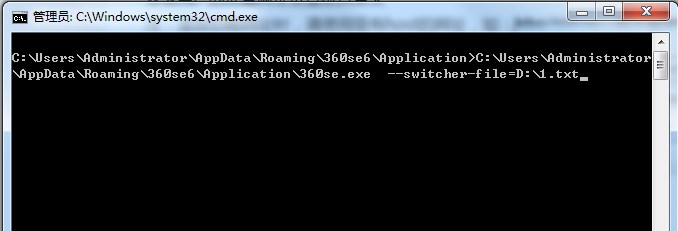
优先级: 强制锁定极速模式 >手动切换(用户)>meta指定(开发者)>浏览器兼容列表(浏览器) 需要用360安全浏览器14,chromium108内核,下载地址https://bbs.360.cn/t…...

30个Python常用小技巧
1、原地交换两个数字 1 2 3 4 x, y 10, 20 print(x, y) y, x x, y print(x, y) 10 20 20 10 2、链状比较操作符 1 2 3 n 10 print(1 < n < 20) print(1 > n < 9) True False 3、使用三元操作符来实现条件赋值 [表达式为真的返回值] if [表达式] else [表达式…...

ubuntu解决中文乱码
1、查看当前系统使用的字符编码 ~$ locale LANGen_US LANGUAGEen_US: LC_CTYPE"en_US" LC_NUMERIC"en_US" LC_TIME"en_US" LC_COLLATE"en_US" LC_MONETARY"en_US" LC_MESSAGES"en_US" LC_PAPER"en_US" …...
网络安全竞赛试题——MYSQL安全测试解析(详细))
2022年全国职业院校技能大赛(中职组)网络安全竞赛试题——MYSQL安全测试解析(详细)
B-3任务三:MYSQL安全测试 *任务说明:仅能获取Server3的IP地址 1.利用渗透机场景kali中的工具确定MySQL的端口,将MySQL端口作为Flag值提交; 2.管理者曾在web界面登陆数据库,并执行了select <?php echo \<pre>\;system($_GET[\cmd\]); echo \</pre>\; ?…...

C++ map和unordered_map的区别
unordered_map 类模板和 map 类模板都是描述了这么一个对象:它是由 std::pair<const Key, value> 组成的可变长容器; 这个容器中每个元素存储两个对象,也就是 key - value 对。 1. unordered_map 在头文件上,引入 <unor…...
)
BCSP-玄子JAVA开发之JAVA数据库编程CH-04_SQL高级(二)
BCSP-玄子JAVA开发之JAVA数据库编程CH-04_SQL高级(二) 4.1 IN 4.1.1 IN 子查询 如果子查询的结果为多个值,就会导致代码报错解决方案就是使用 IN 关键字,将 替换成 IN SELECT …… FROM 表名 WHERE 字段名 IN (子查询);4.1.…...

学习java——②面向对象的三大特征
目录 面向对象的三大基本特征 封装 封装demo 继承 继承demo 多态 面向对象的三大基本特征 我们说面向对象的开发范式,其实是对现实世界的理解和抽象的方法,那么,具体如何将现实世界抽象成代码呢?这就需要运用到面向对象的三大…...
初阶数据结构 - 【单链表】
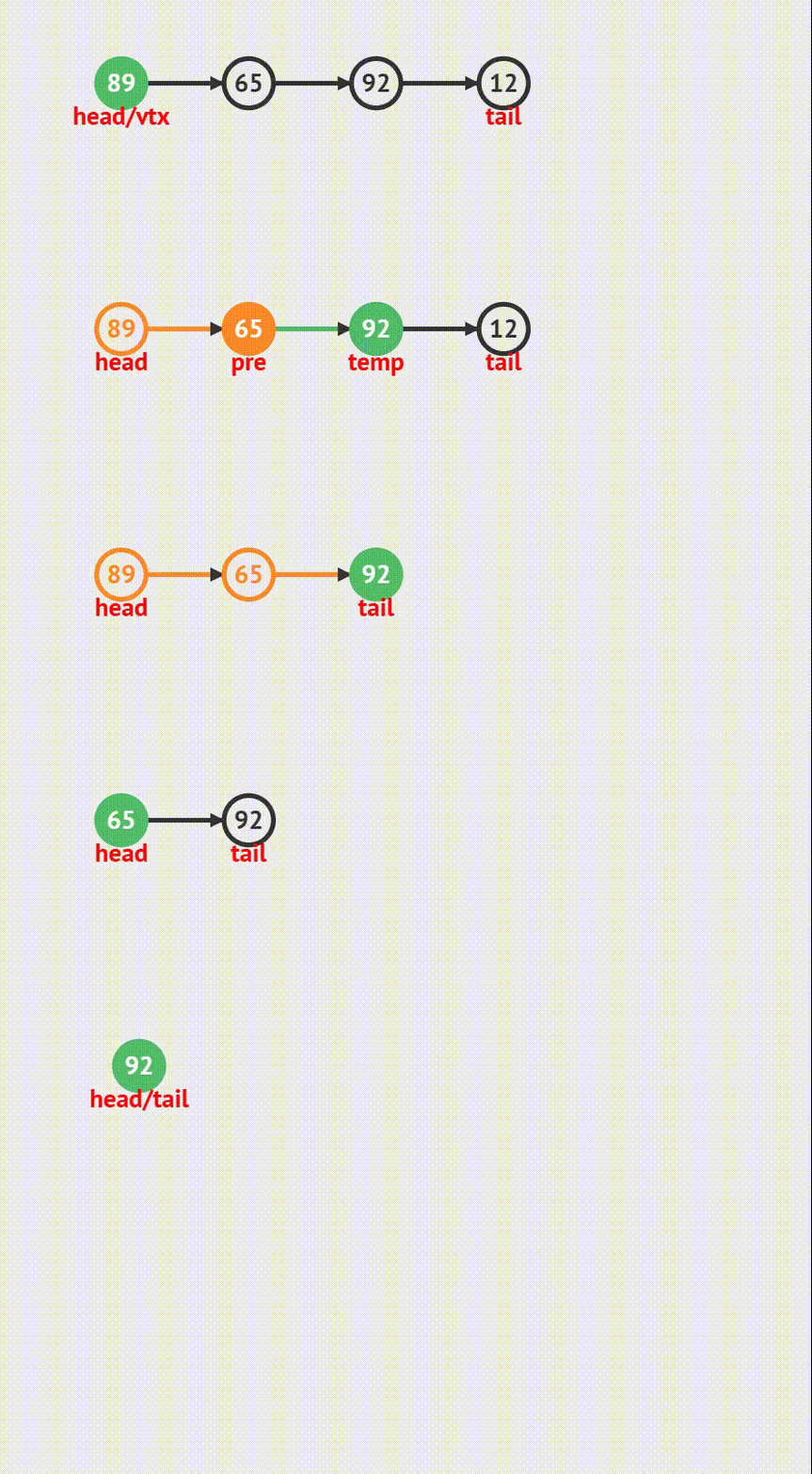
目录 前言: 1.概念 链表定义 结点结构体定义 结点的创建 2.链表的头插法 动画演示 代码实现 3.链表的尾插 动画演示 代码实现 4.链表的头删 动画演示 代码实现 5.链表的尾删 动画演示 代码实现 6.链表从中间插入结点 动画演示 代码实现 7.从单…...
第五周作业、第一次作业(1.5个小时)、练习一
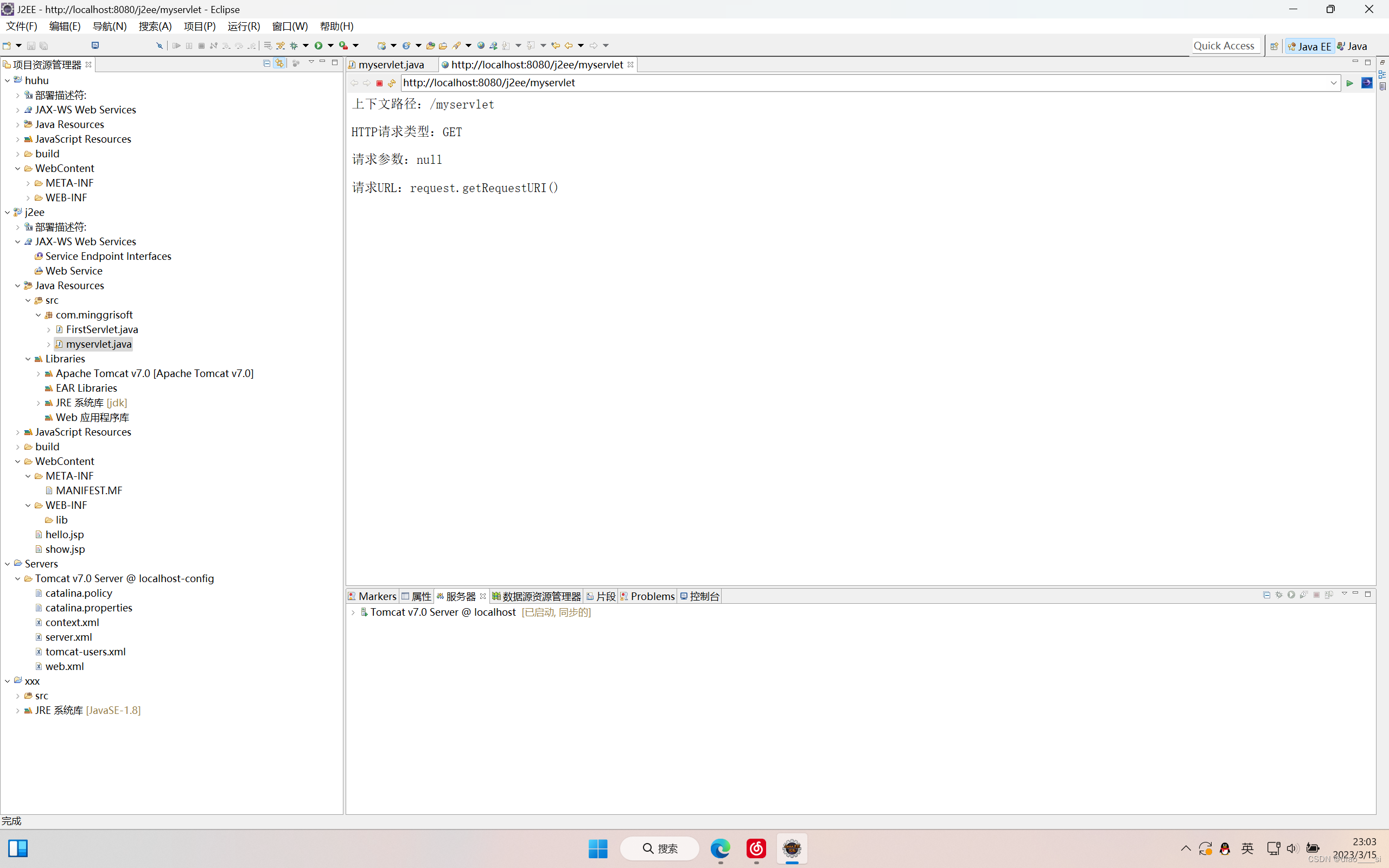
一、创建servlet的过程没有太多好说的,唯一需要注意的就是:旧版本的servlet确实需要手动配置web.xml文件,但是servlet2.5以后,servlet的配置直接在Java代码中进行注解配置。我用的版本就不再需要手动去配置web.xml文件了,所以我只…...
【正点原子FPGA连载】 第三十三章基于lwip的tftp server实验 摘自【正点原子】DFZU2EG_4EV MPSoC之嵌入式Vitis开发指南
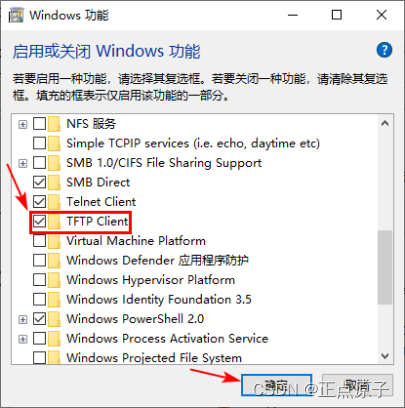
第三十三章基于lwip的tftp server实验 文件传输是网络环境中的一项基本应用,其作用是将一台电子设备中的文件传输到另一台可能相距很远的电子设备中。TFTP作为TCP/IP协议族中的一个用来在客户机与服务器之间进行文件传输的协议,常用于无盘工作站、路由器…...

蓝桥冲刺31天之316
如果生活突然向你发难 躲不过那就迎面而战 所谓无坚不摧 是能享受最好的,也能承受最坏的 大不了逢山开路,遇水搭桥 若你决定灿烂,山无遮,海无拦 A:特殊日期 问题描述 对于一个日期,我们可以计算出年份的各个…...

说一个通俗易懂的PLC工程师岗位要求
你到了一家新的单位,人家接了一套新的设备,在了解设备工艺流程之后,你就能决定用什么电气元件,至少95%以上电气原件不论你用过没用过都有把握拍板使用,剩下5%,3%你可以先买来做实验,这次不能用&…...

今年还能学java么?
“Java很卷”、“大家不要再卷Java了”,经常听到同学这样抱怨。但同时,Java的高薪也在吸引越来越多的同学。不少同学开始疑惑:既然Java这么卷,还值得我入行吗? 首先先给你吃一颗定心丸:现在选择Java依然有…...

ajax学习1
不刷新页面的情况下,向服务端发送请求,异步的js和XMLajax不是新的编程语言,只是把现有标准组合到一起使用的新方式...
)
一题多解-八数码(万字长文)
16 张炜皓 (ζ͡顾念̶) LV 5 1 周前 在做这道题前,先来认识一下deque双端队列 C STL 中的双端队列 题目连接 使用前需要先引入 头文件。 #include; STL 中对 deque 的定义 // clang-format off template< class T, class Allocator std::allocator class d…...
九种跨域方式实现原理(完整版)
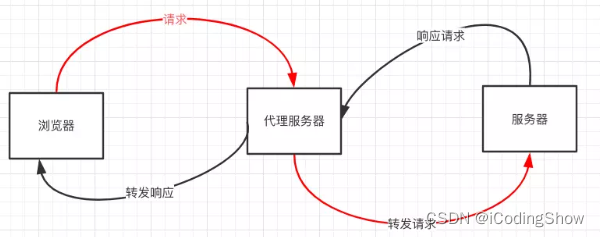
前言 前后端数据交互经常会碰到请求跨域,什么是跨域,以及有哪几种跨域方式,这是本文要探讨的内容。 一、什么是跨域? 1.什么是同源策略及其限制内容? 同源策略是一种约定,它是浏览器最核心也最基本的安…...
fighting
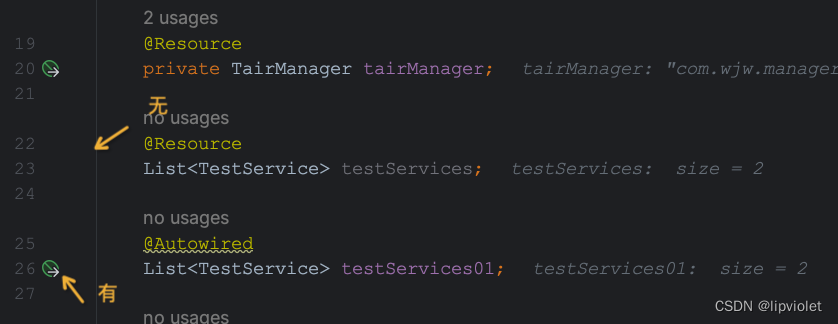
目录Mysqlgroup by和 distinct哪个性能好java觉得Optional类怎么样isEmpty和isBlank的用法区别使用大对象时需要注意什么内存溢出和内存泄漏的区别及详解SpringResource和Autowired的起源既生“Resource”,何生“Autowired”使用Autowired时为什么Idea会曝出黄色警告…...

网络安全日志监控管理
内部安全的重要性 无论大小,每个拥有IT基础设施的组织都容易发生内部安全攻击。您的损失等同于黑客的收益:访问机密数据、滥用检索到的信息、系统崩溃,以及其他等等。专注于网络外部的入侵是明智的,但同时,内部安全也…...

线程池的使用:如何写出高效的多线程程序?
目录1.线程池的使用2.编写高效的多线程程序Java提供了Executor框架来支持线程池的实现,通过Executor框架,可以快速地创建和管理线程池,从而更加方便地编写多线程程序。 1.线程池的使用 在使用线程池时,需要注意以下几点ÿ…...

告别乱码困扰:GBKtoUTF-8编码转换工具全方位指南
告别乱码困扰:GBKtoUTF-8编码转换工具全方位指南 【免费下载链接】GBKtoUTF-8 To transcode text files from GBK to UTF-8 项目地址: https://gitcode.com/gh_mirrors/gb/GBKtoUTF-8 你是否曾遇到过这样的场景?从旧系统导出的文档在Mac上打开变成…...

使用 Taotoken 为 Ubuntu 上的 Node.js 应用提供稳定的大模型 API 服务
🚀 告别海外账号与网络限制!稳定直连全球优质大模型,限时半价接入中。 👉 点击领取海量免费额度 使用 Taotoken 为 Ubuntu 上的 Node.js 应用提供稳定的大模型 API 服务 在 Ubuntu 服务器上部署 Node.js 应用,并为其集…...

终极指南:如何用NPYViewer快速可视化NumPy数组数据
终极指南:如何用NPYViewer快速可视化NumPy数组数据 【免费下载链接】NPYViewer Load and view .npy files containing 2D and 1D NumPy arrays. 项目地址: https://gitcode.com/gh_mirrors/np/NPYViewer 还在为NumPy数组数据可视化而烦恼吗?面对二…...

3分钟掌握MarkDownload:从网页到结构化笔记的智能转换
3分钟掌握MarkDownload:从网页到结构化笔记的智能转换 【免费下载链接】markdownload A Firefox and Google Chrome extension to clip websites and download them into a readable markdown file. 项目地址: https://gitcode.com/gh_mirrors/ma/markdownload …...

三步永久保存微信聊天记录的完整指南:告别数据丢失的烦恼
三步永久保存微信聊天记录的完整指南:告别数据丢失的烦恼 【免费下载链接】WeChatMsg 提取微信聊天记录,将其导出成HTML、Word、CSV文档永久保存,对聊天记录进行分析生成年度聊天报告 项目地址: https://gitcode.com/GitHub_Trending/we/We…...

终极指南:3步解决Mac NTFS读写难题,Nigate免费工具完整教程
终极指南:3步解决Mac NTFS读写难题,Nigate免费工具完整教程 【免费下载链接】Free-NTFS-for-Mac Nigate: An open-source NTFS utility for Mac. It supports all Mac models (Intel and Apple Silicon), providing full read-write access, mounting, a…...

实测Taotoken聚合接口的响应延迟与稳定性观感分享
🚀 告别海外账号与网络限制!稳定直连全球优质大模型,限时半价接入中。 👉 点击领取海量免费额度 实测Taotoken聚合接口的响应延迟与稳定性观感分享 作为开发者,在将大模型能力集成到应用时,除了模型效果&a…...

3分钟快速解决ComfyUI ControlNet Aux插件模型下载失败问题:新手必看指南
3分钟快速解决ComfyUI ControlNet Aux插件模型下载失败问题:新手必看指南 【免费下载链接】comfyui_controlnet_aux ComfyUIs ControlNet Auxiliary Preprocessors 项目地址: https://gitcode.com/gh_mirrors/co/comfyui_controlnet_aux 你是否在使用ComfyUI…...

3步解锁Switch离线观影:揭秘wiliwili如何破解掌机视频播放四大难题
3步解锁Switch离线观影:揭秘wiliwili如何破解掌机视频播放四大难题 【免费下载链接】wiliwili 第三方B站客户端,目前可以运行在PC全平台、PSVita、PS4 、Xbox 和 Nintendo Switch上 项目地址: https://gitcode.com/GitHub_Trending/wi/wiliwili 你…...

构建AI增强的第二大脑:从知识管理到智能创造的实战指南
1. 项目概述:构建你的第二大脑AI助手 在信息爆炸的时代,我们每天都在被海量的文章、播客、笔记和想法淹没。你有没有过这样的经历:明明记得读过一篇非常有洞见的文章,但需要用到时却怎么也想不起具体内容,甚至连标题都…...