
流畅!HTMLCSS打造网格方块加载动画
效果演示
这个动画的效果是五个方块在网格中上下移动,模拟了一个连续的加载过程。每个方块的动画都是独立的,但是它们的时间间隔和路径被设计为相互协调,以创建出流畅的动画效果。

HTML
<div class="loadingspinner"><div id="square1"></div><div id="square2"></div><div id="square3"></div><div id="square4"></div><div id="square5"></div>
</div>
- loadingspinner:包含所有方块的容器。
- square1 到 square5:这五个div元素代表动画中的五个方块,每个方块都将通过CSS进行样式化和动画化。
CSS
.loadingspinner {--square: 26px;--offset: 30px;--duration: 2.4s;--delay: 0.2s;--timing-function: ease-in-out;--in-duration: 0.4s;--in-delay: 0.1s;--in-timing-function: ease-out;width: calc(3 * var(--offset) + var(--square));height: calc(2 * var(--offset) + var(--square));padding: 0px;margin-left: auto;margin-right: auto;margin-top: 10px;margin-bottom: 30px;position: relative;
}.loadingspinner div {display: inline-block;background: darkorange;/*background: var(--text-color);*//*box-shadow: 1px 1px 1px rgba(0, 0, 0, 0.4);*/border: none;border-radius: 2px;width: var(--square);height: var(--square);position: absolute;padding: 0px;margin: 0px;font-size: 6pt;color: black;
}.loadingspinner #square1 {left: calc(0 * var(--offset));top: calc(0 * var(--offset));animation: square1 var(--duration) var(--delay) var(--timing-function) infinite,squarefadein var(--in-duration) calc(1 * var(--in-delay)) var(--in-timing-function) both;
}.loadingspinner #square2 {left: calc(0 * var(--offset));top: calc(1 * var(--offset));animation: square2 var(--duration) var(--delay) var(--timing-function) infinite,squarefadein var(--in-duration) calc(1 * var(--in-delay)) var(--in-timing-function) both;
}.loadingspinner #square3 {left: calc(1 * var(--offset));top: calc(1 * var(--offset));animation: square3 var(--duration) var(--delay) var(--timing-function) infinite,squarefadein var(--in-duration) calc(2 * var(--in-delay)) var(--in-timing-function) both;
}.loadingspinner #square4 {left: calc(2 * var(--offset));top: calc(1 * var(--offset));animation: square4 var(--duration) var(--delay) var(--timing-function) infinite,squarefadein var(--in-duration) calc(3 * var(--in-delay)) var(--in-timing-function) both;
}.loadingspinner #square5 {left: calc(3 * var(--offset));top: calc(1 * var(--offset));animation: square5 var(--duration) var(--delay) var(--timing-function) infinite,squarefadein var(--in-duration) calc(4 * var(--in-delay)) var(--in-timing-function) both;
}@keyframes square1 {0% {left: calc(0 * var(--offset));top: calc(0 * var(--offset));}8.333% {left: calc(0 * var(--offset));top: calc(1 * var(--offset));}100% {left: calc(0 * var(--offset));top: calc(1 * var(--offset));}
}@keyframes square2 {0% {left: calc(0 * var(--offset));top: calc(1 * var(--offset));}8.333% {left: calc(0 * var(--offset));top: calc(2 * var(--offset));}16.67% {left: calc(1 * var(--offset));top: calc(2 * var(--offset));}25.00% {left: calc(1 * var(--offset));top: calc(1 * var(--offset));}83.33% {left: calc(1 * var(--offset));top: calc(1 * var(--offset));}91.67% {left: calc(1 * var(--offset));top: calc(0 * var(--offset));}100% {left: calc(0 * var(--offset));top: calc(0 * var(--offset));}
}@keyframes square3 {0%,100% {left: calc(1 * var(--offset));top: calc(1 * var(--offset));}16.67% {left: calc(1 * var(--offset));top: calc(1 * var(--offset));}25.00% {left: calc(1 * var(--offset));top: calc(0 * var(--offset));}33.33% {left: calc(2 * var(--offset));top: calc(0 * var(--offset));}41.67% {left: calc(2 * var(--offset));top: calc(1 * var(--offset));}66.67% {left: calc(2 * var(--offset));top: calc(1 * var(--offset));}75.00% {left: calc(2 * var(--offset));top: calc(2 * var(--offset));}83.33% {left: calc(1 * var(--offset));top: calc(2 * var(--offset));}91.67% {left: calc(1 * var(--offset));top: calc(1 * var(--offset));}
}@keyframes square4 {0% {left: calc(2 * var(--offset));top: calc(1 * var(--offset));}33.33% {left: calc(2 * var(--offset));top: calc(1 * var(--offset));}41.67% {left: calc(2 * var(--offset));top: calc(2 * var(--offset));}50.00% {left: calc(3 * var(--offset));top: calc(2 * var(--offset));}58.33% {left: calc(3 * var(--offset));top: calc(1 * var(--offset));}100% {left: calc(3 * var(--offset));top: calc(1 * var(--offset));}
}@keyframes square5 {0% {left: calc(3 * var(--offset));top: calc(1 * var(--offset));}50.00% {left: calc(3 * var(--offset));top: calc(1 * var(--offset));}58.33% {left: calc(3 * var(--offset));top: calc(0 * var(--offset));}66.67% {left: calc(2 * var(--offset));top: calc(0 * var(--offset));}75.00% {left: calc(2 * var(--offset));top: calc(1 * var(--offset));}100% {left: calc(2 * var(--offset));top: calc(1 * var(--offset));}
}@keyframes squarefadein {0% {transform: scale(0.75);opacity: 0.0;}100% {transform: scale(1.0);opacity: 1.0;}
}
- .loadingspinner:定义了容器的尺寸和位置。使用了CSS变量来控制方块的大小、间距、动画持续时间等。
- .loadingspinner div:为所有方块设置了基本的样式,包括背景颜色、尺寸和位置。
- #square1 到 #square5:为每个方块定义了特定的动画和初始位置。
- @keyframes square1 到 @keyframes square5:定义了每个方块的动画路径,包括它们在容器内的水平和垂直移动。
- @keyframes squarefadein:定义了一个淡入效果,使得方块在动画开始时逐渐放大并变得不透明。
相关文章:
流畅!HTMLCSS打造网格方块加载动画
效果演示 这个动画的效果是五个方块在网格中上下移动,模拟了一个连续的加载过程。每个方块的动画都是独立的,但是它们的时间间隔和路径被设计为相互协调,以创建出流畅的动画效果。 HTML <div class"loadingspinner"><…...
linux命令之top(Linux Command Top)
💝💝💝欢迎来到我的博客,很高兴能够在这里和您见面!希望您在这里可以感受到一份轻松愉快的氛围,不仅可以获得有趣的内容和知识,也可以畅所欲言、分享您的想法和见解。 本人主要分享计算机核心技…...
笔记)
数据结构-希尔排序(ShellSort)笔记
看动画理解 【数据结构】八大排序(超详解附动图源码)_数据结构排序-CSDN博客 一 基本思想 先选定一个整数gap,把待排序文件中所有记录分成gap个组,所有距离为gap的记录分在同一组内,并对每一组内的元素进行排序。 然后将gap逐渐减小重复上…...
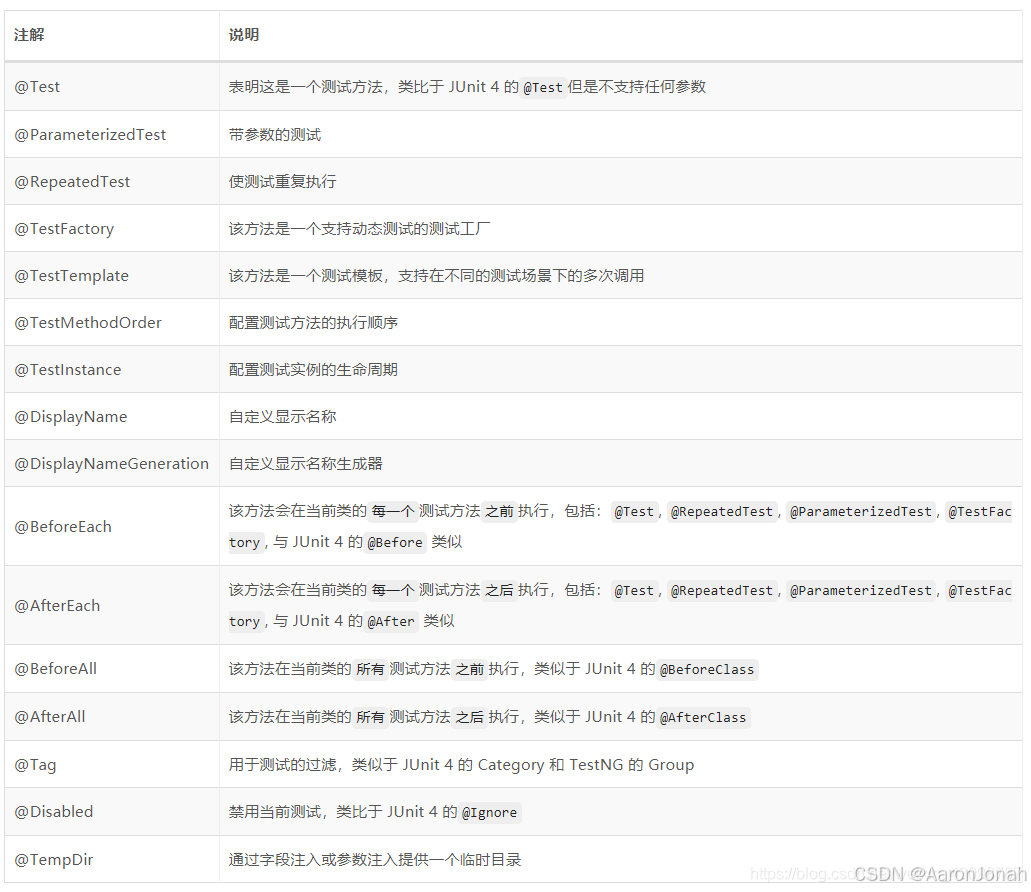
Junit + Mockito保姆级集成测试实践
一、做好单测,慢即是快 对于单元测试的看法,业界同仁理解多有不同,尤其是在业务变化快速的互联网行业,通常的问题主要有,必须要做吗?做到多少合适?现在没做不也挺好的吗?甚至一些大…...

软件项目管理要点
一.项目管理 1.盈亏平衡分析 销售额固定成本可变成本税费利润 当利润为0的时候就是盈亏平衡点。 2.范围管理 范围定义的输入包括:项目章程、项目范围管理计划、组织过程资产、批准的变更申请。 3.时间管理 项目时间管理中的过程包括活动定义、活动排序、活动的资…...

ESP8266 连接 MQTT 服务器EMQX 连接MQTTX
目录 1.先用有一台自己的云服务器 2. 使用FinalShell连接阿里云云服务器ECS 3.安装宝塔 4.在云服务器打开8888端口 5.使用外网面板地址打开宝塔面板 6.安装Docker 7.下载emqx 8.打开emqxWeb 界面 9.下载MQTTX 10.EMQX加一个客户端 11.开始通信 12.加入单片机ESP8266 …...

Python中如何处理异常情况?
1、Python中如何处理异常情况? 在Python中,处理异常情况通常使用try/except语句。try语句块包含可能会引发异常的代码,而except语句块包含处理异常的代码。如果try块中的代码引发了异常,控制流将立即转到相应的except块。 以下是…...

openpnp - 在openpnp中单独测试相机
文章目录 openpnp - 在openpnp中单独测试相机概述笔记END openpnp - 在openpnp中单独测试相机 概述 底部相机的位置不合适, 重新做了零件,准备先确定一下相机和吸嘴的距离是多少才合适。 如果在设备上直接实验,那么拆装调整相机挺麻烦的。 准备直接在电…...

Spark窗口函数
1、 Spark中的窗口函数 窗口就是单纯在行后面加一个列 可以套多个窗口函数,但彼此之间不能相互引用,是独立的 窗口函数会产生shuffle over就是用来划分窗口的 (1) 分组聚合里面的函数,基…...

Idea、VS Code 如何安装Fitten Code插件使用
博主主页:【南鸢1.0】 本文专栏:JAVA 目录 编辑 简介 所用工具 1、Idea如何安装插件 1.idea下载插件 2.需要从外部下载然后在安装, 2、VS Code如何安装插件 总结 简介 Fitten Code是由非十大模型驱动的AI编程助手,它可以自动生成代…...

elasticsearch7.x在k8s中的部署
一、说明 二、思路 三、部署 1、建nfs服务器 2、建持久卷 3、部署elasticsearch 四、附件 ?pv.yaml内容 elasticsearch.yaml内容 一、说明 本文章内容主要的参考来源是https://www.cnblogs.com/javashop-docs/p/12410845.html,但参考文献中的elasticsearc…...

校园社团信息管理平台:Spring Boot技术实战指南
3系统分析 3.1可行性分析 通过对本校园社团信息管理系统实行的目的初步调查和分析,提出可行性方案并对其一一进行论证。我们在这里主要从技术可行性、经济可行性、操作可行性等方面进行分析。 3.1.1技术可行性 本校园社团信息管理系统采用SSM框架,JAVA作…...

【Linux】从内核角度理解 TCP 的 全连接队列(以及什么是 TCP 抓包)
文章目录 概念引入理解全连接队列内核方面理解Tcp抓包方法注意事项 概念引入 我们知道,TCP的三次握手是由TCP协议 自动处理的,建立连接的过程与用户是否进行accept无关,accept()的作用主要是为当前连接创建一个套接字,用于进行后…...
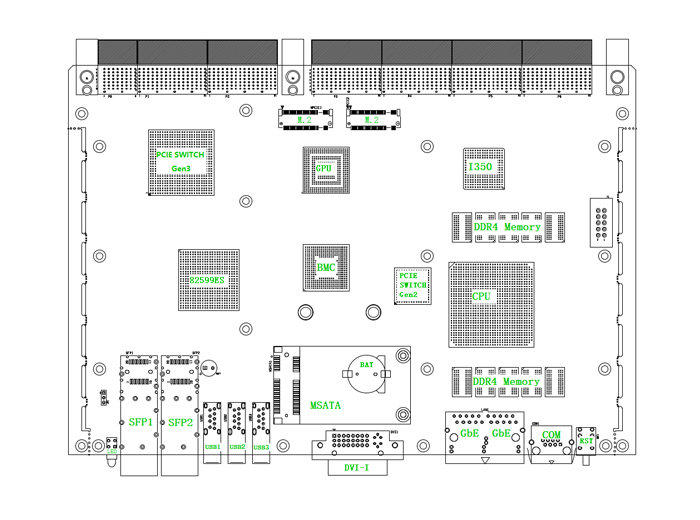
太速科技-712-6U VPX飞腾处理器刀片计算机
6U VPX飞腾处理器刀片计算机 一、产品概述 该产品是一款基于国产飞腾FT-2000四核处理器或D2000八核处理器的高性能6U VPX刀片式计算机。产品提供了可支持全网状交换的高速数据通道,其中P1、P2均支持1个PCIe x16 Gen3或2个PCIe x8 Gen3或4个PCIe x4 Gen3总…...
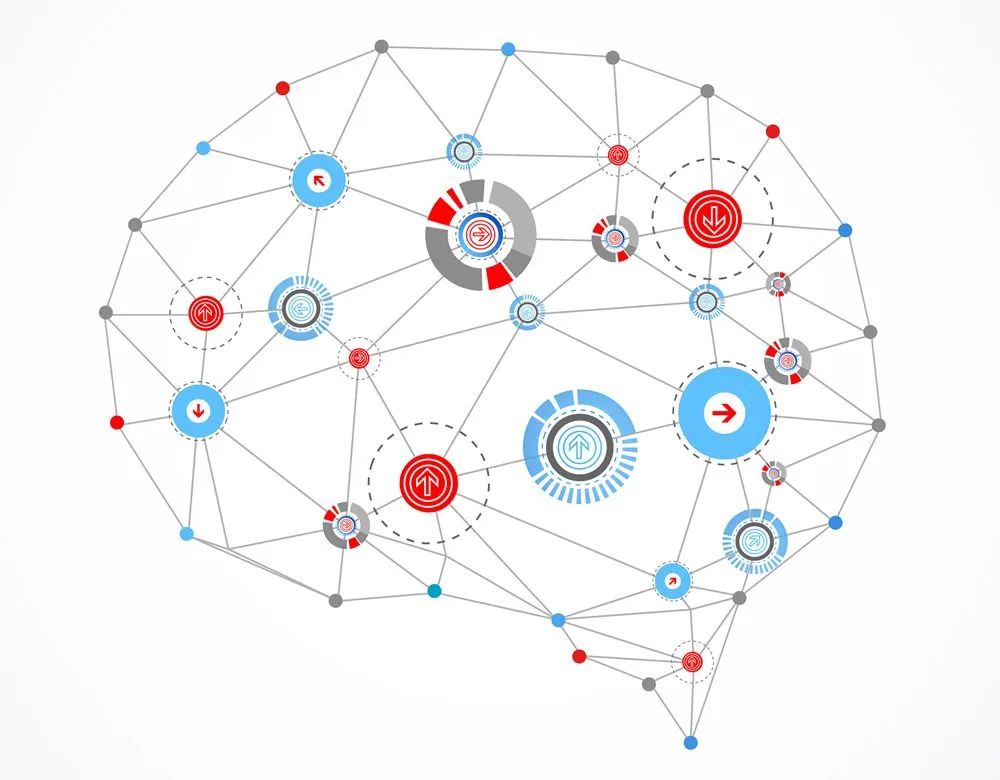
深度学习(八) TensorFlow、PyTorch、Keras框架大比拼(8/10)
一、深度学习框架概述 深度学习框架在当今人工智能和机器学习领域中占据着至关重要的地位。其中,TensorFlow 由 Google 开发,自 2015 年发布以来,凭借其灵活的计算图、自动微分功能以及跨平台支持等特点,迅速成为主流深度学习框架…...

thinkphp中命令行工具think使用,可用于快速生成控制器,模型,中间件等
在使用tp框架的时候tp内置了一个think的命令行工具, 这个工具可以帮助我们快速的生成控制器,模型,中间件的代码。 这个工具就和laravel中的 artisan 的作用都差不多,只是名称不同而已。 tp中常用的命令行工具: 1. 快…...
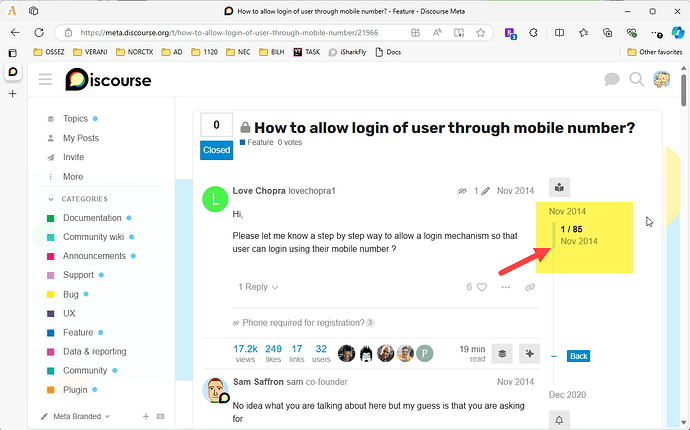
Discourse 是否支持手机注册
Discourse 能不能使用手机进行注册? 功能总结 简答来说,Discourse 不能使用手机注册,Discourse 也没有提供这个功能。 这个功能多是需要 SSO 来实现。 比如说华为的那个社区,他们自己做了一个自己的用户管理 SSO,然…...

软件测试学习笔记丨Flask框架-请求与响应
本文转自测试人社区,原文链接:https://ceshiren.com/t/topic/23408 请求方法 from flask import Flaskapp Flask(__name__)app.route("/cases", methods["get"]) def get_case():return {"code": 0, "msg": &…...

【C++笔记】list结构剖析及其模拟实现
【C笔记】list结构剖析及其模拟实现 🔥个人主页:大白的编程日记 🔥专栏:C笔记 文章目录 【C笔记】list结构剖析及其模拟实现前言一 .list的结构及其介绍1.1list的结构1.2list的使用1.3迭代器划分 二.list的模拟实现2.1 list结构…...

C#进阶1
C#进阶1 本文章主要介绍C#的进阶知识,如反射,特性.... 参考视频链接 原码 文章目录 C#进阶1反射步骤泛型反射调用方法 获取属性 特性特性的定义步骤扩展枚举练习 反射 在 C# 中,反射(Reflection)是一种强大的机制&a…...

Android截图限制终极解决方案:如何绕过FLAG_SECURE实现自由截屏
Android截图限制终极解决方案:如何绕过FLAG_SECURE实现自由截屏 【免费下载链接】DisableFlagSecure 项目地址: https://gitcode.com/gh_mirrors/dis/DisableFlagSecure 你是否曾在使用银行APP时想要截屏保存交易记录,却发现屏幕一片漆黑&#x…...
)
游戏开发团队必须立即升级的语音合成栈:Llama-3-TTS开源模型实测对比(RTX 4090 vs. Snapdragon 8 Gen3)
更多请点击: https://codechina.net 第一章:AI语音合成在游戏开发中的应用 AI语音合成(Text-to-Speech, TTS)正深刻重塑游戏叙事、角色交互与本地化工作流。相比传统预录语音,实时TTS可动态生成符合上下文语境、情绪状…...

如何快速找回被遗忘的压缩包密码?ArchivePasswordTestTool终极指南
如何快速找回被遗忘的压缩包密码?ArchivePasswordTestTool终极指南 【免费下载链接】ArchivePasswordTestTool 利用7zip测试压缩包的功能 对加密压缩包进行自动化测试密码 项目地址: https://gitcode.com/gh_mirrors/ar/ArchivePasswordTestTool 你是否曾经面…...

3分钟解决阅读APP书源问题:高质量书源一键导入指南
3分钟解决阅读APP书源问题:高质量书源一键导入指南 【免费下载链接】Yuedu 📚「阅读」自用书源分享 项目地址: https://gitcode.com/gh_mirrors/yu/Yuedu 还在为找不到稳定的小说书源而烦恼吗?是否经常遇到书源失效、加载缓慢的问题&a…...

如何在Hermes Agent项目中自定义Provider接入Taotoken多模型服务
🚀 告别海外账号与网络限制!稳定直连全球优质大模型,限时半价接入中。 👉 点击领取海量免费额度 如何在Hermes Agent项目中自定义Provider接入Taotoken多模型服务 Hermes Agent 是一个功能强大的AI代理框架,它允许开发…...

拆解国产FPGA的HDMI显示链路:从PGL22G的TMDS编码到MS7200接收芯片的完整信号流分析
国产FPGA的HDMI显示链路深度解析:从PGL22G的TMDS编码到MS7200接收芯片全流程 在当今国产芯片崛起的浪潮中,紫光同创PGL22G FPGA以其出色的性价比和完整的生态支持,成为许多视频处理项目的首选。本文将带您深入理解一个完整的HDMI显示链路如何…...

MapStruct实战:手把手教你处理SpringBoot API中的字段名不一致问题
MapStruct实战:SpringBoot API字段名不一致的优雅解决方案 在SpringBoot开发中,前后端数据交互时经常遇到字段命名规范不一致的问题。数据库使用user_name,前端却要求userName;或者需要隐藏敏感字段如password,转换成*…...

读写锁:高并发场景的“读写分离“利器
在电商大促期间,商品详情页的访问量是平时的100倍,但商品信息每小时只更新一次。如何让成千上万的用户同时浏览商品,又能在管理员更新价格时保证数据一致性?答案就是:读写锁。 一、读写锁:为什么它能提升10…...

InfluxDB Studio:如何用一款工具解决时间序列数据库管理的三大痛点
InfluxDB Studio:如何用一款工具解决时间序列数据库管理的三大痛点 【免费下载链接】InfluxDBStudio InfluxDB Studio is a UI management tool for the InfluxDB time series database. 项目地址: https://gitcode.com/gh_mirrors/in/InfluxDBStudio 时间序…...

如何5分钟掌握LDDC歌词工具:面向音乐爱好者的终极歌词管理指南
如何5分钟掌握LDDC歌词工具:面向音乐爱好者的终极歌词管理指南 【免费下载链接】LDDC 简单易用的精准歌词(逐字歌词/卡拉OK歌词)下载匹配工具|A simple and user-friendly tool for downloading and matching precise lyrics (word-by-word lyrics/Karaoke lyrics) …...