
python游戏设计---飞机大战
1.前言
上次做飞机大战游戏有人这么说:

好好好!今天必须整一个,今天我们来详细讲解一下,底部找素材文件下载!!!
2.游戏制作
目录如下:

1.导入的包
import pygame
import sys
import traceback
import myplane
import enemy
import bullet
import supply
2.游戏初始化
该游戏的大体框架是两部分内容:一部分是基于pygame.sprite.Sprite这个父类,创建各种各样的派生类,比如子弹类,敌机类。第二部分是创建主程序类PlaneGame,使用前面各种类来实现具体的游戏功能。
首先先来看类PlaneGame的创建过程:
from pygame.locals import *
from random import *pygame.init()
pygame.mixer.init()bg_size = width, height = 480, 700
screen = pygame.display.set_mode(bg_size)
pygame.display.set_caption("飞机大战 -- FishC Demo")background = pygame.image.load("images/background.png").convert()BLACK = (0, 0, 0)
WHITE = (255, 255, 255)
GREEN = (0, 255, 0)
RED = (255, 0, 0)
3.载入游戏音乐
pygame.mixer.music.load("sound/game_music.ogg")
pygame.mixer.music.set_volume(0.2)
bullet_sound = pygame.mixer.Sound("sound/bullet.wav")
bullet_sound.set_volume(0.2)
bomb_sound = pygame.mixer.Sound("sound/use_bomb.wav")
bomb_sound.set_volume(0.2)
supply_sound = pygame.mixer.Sound("sound/supply.wav")
supply_sound.set_volume(0.2)
get_bomb_sound = pygame.mixer.Sound("sound/get_bomb.wav")
get_bomb_sound.set_volume(0.2)
get_bullet_sound = pygame.mixer.Sound("sound/get_bullet.wav")
get_bullet_sound.set_volume(0.2)
upgrade_sound = pygame.mixer.Sound("sound/upgrade.wav")
upgrade_sound.set_volume(0.2)
enemy3_fly_sound = pygame.mixer.Sound("sound/enemy3_flying.wav")
enemy3_fly_sound.set_volume(0.2)
enemy1_down_sound = pygame.mixer.Sound("sound/enemy1_down.wav")
enemy1_down_sound.set_volume(0.2)
enemy2_down_sound = pygame.mixer.Sound("sound/enemy2_down.wav")
enemy2_down_sound.set_volume(0.2)
enemy3_down_sound = pygame.mixer.Sound("sound/enemy3_down.wav")
enemy3_down_sound.set_volume(0.5)
me_down_sound = pygame.mixer.Sound("sound/me_down.wav")
me_down_sound.set_volume(0.2)
)pygame.time.Clock用于刷新帧率
要使用时钟对象需要两步:①在游戏初始化创建一个时钟对象;②在游戏循环中让时钟对象调用tick(帧率)方法
2)pygame.event.get()可以得到用户当前所做动作的时间列表(代码相对比较固定)

3.1 生成我方飞机
def main():pygame.mixer.music.play(-1)me = myplane.MyPlane(bg_size)enemies = pygame.sprite.Group()
3.2 生成敌方小飞机
small_enemies = pygame.sprite.Group()add_small_enemies(small_enemies, enemies, 15)3.3 生成敌方中型飞机与大型飞机
mid_enemies = pygame.sprite.Group()add_mid_enemies(mid_enemies, enemies, 4)big_enemies = pygame.sprite.Group()add_big_enemies(big_enemies, enemies, 2)3.4 生成子弹
# 生成普通子弹bullet1 = []bullet1_index = 0BULLET1_NUM = 4for i in range(BULLET1_NUM):bullet1.append(bullet.Bullet1(me.rect.midtop))# 生成超级子弹bullet2 = []bullet2_index = 0BULLET2_NUM = 8for i in range(BULLET2_NUM//2):bullet2.append(bullet.Bullet2((me.rect.centerx-33, me.rect.centery)))bullet2.append(bullet.Bullet2((me.rect.centerx+30, me.rect.centery)))clock = pygame.time.Clock()4.琐碎的游戏规则
#中弹图片索引e1_destroy_index = 0e2_destroy_index = 0e3_destroy_index = 0me_destroy_index = 0# 统计得分score = 0score_font = pygame.font.Font("font/font.ttf", 36)# 标志是否暂停游戏paused = Falsepause_nor_image = pygame.image.load("images/pause_nor.png").convert_alpha()pause_pressed_image = pygame.image.load("images/pause_pressed.png").convert_alpha()resume_nor_image = pygame.image.load("images/resume_nor.png").convert_alpha()resume_pressed_image = pygame.image.load("images/resume_pressed.png").convert_alpha()paused_rect = pause_nor_image.get_rect()paused_rect.left, paused_rect.top = width - paused_rect.width - 10, 10paused_image = pause_nor_image# 设置难度级别level = 1# 全屏炸弹bomb_image = pygame.image.load("images/bomb.png").convert_alpha()bomb_rect = bomb_image.get_rect()bomb_font = pygame.font.Font("font/font.ttf", 48)bomb_num = 3# 每30秒发放一个补给包bullet_supply = supply.Bullet_Supply(bg_size)bomb_supply = supply.Bomb_Supply(bg_size)SUPPLY_TIME = USEREVENTpygame.time.set_timer(SUPPLY_TIME, 30 * 1000)# 超级子弹定时器DOUBLE_BULLET_TIME = USEREVENT + 1# 标志是否使用超级子弹is_double_bullet = False# 解除我方无敌状态定时器INVINCIBLE_TIME = USEREVENT + 2# 生命数量life_image = pygame.image.load("images/life.png").convert_alpha()life_rect = life_image.get_rect()life_num = 3# 用于阻止重复打开记录文件recorded = False5.结束游戏
# 绘制游戏结束画面elif life_num == 0:# 背景音乐停止pygame.mixer.music.stop()# 停止全部音效pygame.mixer.stop()# 停止发放补给pygame.time.set_timer(SUPPLY_TIME, 0)if not recorded:recorded = True# 读取历史最高得分with open("record.txt", "r") as f:record_score = int(f.read())# 如果玩家得分高于历史最高得分,则存档if score > record_score:with open("record.txt", "w") as f:f.write(str(score))# 绘制结束画面record_score_text = score_font.render("Best : %d" % record_score, True, (255, 255, 255))screen.blit(record_score_text, (50, 50))gameover_text1 = gameover_font.render("Your Score", True, (255, 255, 255))gameover_text1_rect = gameover_text1.get_rect()gameover_text1_rect.left, gameover_text1_rect.top = \(width - gameover_text1_rect.width) // 2, height // 3screen.blit(gameover_text1, gameover_text1_rect)gameover_text2 = gameover_font.render(str(score), True, (255, 255, 255))gameover_text2_rect = gameover_text2.get_rect()gameover_text2_rect.left, gameover_text2_rect.top = \(width - gameover_text2_rect.width) // 2, \gameover_text1_rect.bottom + 10screen.blit(gameover_text2, gameover_text2_rect)again_rect.left, again_rect.top = \(width - again_rect.width) // 2, \gameover_text2_rect.bottom + 50screen.blit(again_image, again_rect)gameover_rect.left, gameover_rect.top = \(width - again_rect.width) // 2, \again_rect.bottom + 10screen.blit(gameover_image, gameover_rect)# 检测用户的鼠标操作# 如果用户按下鼠标左键if pygame.mouse.get_pressed()[0]:# 获取鼠标坐标pos = pygame.mouse.get_pos()# 如果用户点击“重新开始”if again_rect.left < pos[0] < again_rect.right and \again_rect.top < pos[1] < again_rect.bottom:# 调用main函数,重新开始游戏main()# 如果用户点击“结束游戏” elif gameover_rect.left < pos[0] < gameover_rect.right and \gameover_rect.top < pos[1] < gameover_rect.bottom:# 退出游戏pygame.quit()sys.exit() # 绘制暂停按钮screen.blit(paused_image, paused_rect)# 切换图片if not(delay % 5):switch_image = not switch_imagedelay -= 1if not delay:delay = 100pygame.display.flip()clock.tick(60)if __name__ == "__main__":try:main()except SystemExit:passexcept:traceback.print_exc()pygame.quit()input()3.核心完整代码
# main.py
import pygame
import sys
import traceback
import myplane
import enemy
import bullet
import supplyfrom pygame.locals import *
from random import *pygame.init()
pygame.mixer.init()bg_size = width, height = 480, 700
screen = pygame.display.set_mode(bg_size)
pygame.display.set_caption("飞机大战 -- FishC Demo")background = pygame.image.load("images/background.png").convert()BLACK = (0, 0, 0)
WHITE = (255, 255, 255)
GREEN = (0, 255, 0)
RED = (255, 0, 0)# 载入游戏音乐
pygame.mixer.music.load("sound/game_music.ogg")
pygame.mixer.music.set_volume(0.2)
bullet_sound = pygame.mixer.Sound("sound/bullet.wav")
bullet_sound.set_volume(0.2)
bomb_sound = pygame.mixer.Sound("sound/use_bomb.wav")
bomb_sound.set_volume(0.2)
supply_sound = pygame.mixer.Sound("sound/supply.wav")
supply_sound.set_volume(0.2)
get_bomb_sound = pygame.mixer.Sound("sound/get_bomb.wav")
get_bomb_sound.set_volume(0.2)
get_bullet_sound = pygame.mixer.Sound("sound/get_bullet.wav")
get_bullet_sound.set_volume(0.2)
upgrade_sound = pygame.mixer.Sound("sound/upgrade.wav")
upgrade_sound.set_volume(0.2)
enemy3_fly_sound = pygame.mixer.Sound("sound/enemy3_flying.wav")
enemy3_fly_sound.set_volume(0.2)
enemy1_down_sound = pygame.mixer.Sound("sound/enemy1_down.wav")
enemy1_down_sound.set_volume(0.2)
enemy2_down_sound = pygame.mixer.Sound("sound/enemy2_down.wav")
enemy2_down_sound.set_volume(0.2)
enemy3_down_sound = pygame.mixer.Sound("sound/enemy3_down.wav")
enemy3_down_sound.set_volume(0.5)
me_down_sound = pygame.mixer.Sound("sound/me_down.wav")
me_down_sound.set_volume(0.2)def add_small_enemies(group1, group2, num):for i in range(num):e1 = enemy.SmallEnemy(bg_size)group1.add(e1)group2.add(e1)def add_mid_enemies(group1, group2, num):for i in range(num):e2 = enemy.MidEnemy(bg_size)group1.add(e2)group2.add(e2)def add_big_enemies(group1, group2, num):for i in range(num):e3 = enemy.BigEnemy(bg_size)group1.add(e3)group2.add(e3)def inc_speed(target, inc):for each in target:each.speed += incdef main():pygame.mixer.music.play(-1)# 生成我方飞机me = myplane.MyPlane(bg_size)enemies = pygame.sprite.Group()# 生成敌方小型飞机small_enemies = pygame.sprite.Group()add_small_enemies(small_enemies, enemies, 15)# 生成敌方中型飞机mid_enemies = pygame.sprite.Group()add_mid_enemies(mid_enemies, enemies, 4)# 生成敌方大型飞机big_enemies = pygame.sprite.Group()add_big_enemies(big_enemies, enemies, 2)# 生成普通子弹bullet1 = []bullet1_index = 0BULLET1_NUM = 4for i in range(BULLET1_NUM):bullet1.append(bullet.Bullet1(me.rect.midtop))# 生成超级子弹bullet2 = []bullet2_index = 0BULLET2_NUM = 8for i in range(BULLET2_NUM//2):bullet2.append(bullet.Bullet2((me.rect.centerx-33, me.rect.centery)))bullet2.append(bullet.Bullet2((me.rect.centerx+30, me.rect.centery)))clock = pygame.time.Clock()# 中弹图片索引e1_destroy_index = 0e2_destroy_index = 0e3_destroy_index = 0me_destroy_index = 0# 统计得分score = 0score_font = pygame.font.Font("font/font.ttf", 36)# 标志是否暂停游戏paused = Falsepause_nor_image = pygame.image.load("images/pause_nor.png").convert_alpha()pause_pressed_image = pygame.image.load("images/pause_pressed.png").convert_alpha()resume_nor_image = pygame.image.load("images/resume_nor.png").convert_alpha()resume_pressed_image = pygame.image.load("images/resume_pressed.png").convert_alpha()paused_rect = pause_nor_image.get_rect()paused_rect.left, paused_rect.top = width - paused_rect.width - 10, 10paused_image = pause_nor_image# 设置难度级别level = 1# 全屏炸弹bomb_image = pygame.image.load("images/bomb.png").convert_alpha()bomb_rect = bomb_image.get_rect()bomb_font = pygame.font.Font("font/font.ttf", 48)bomb_num = 3# 每30秒发放一个补给包bullet_supply = supply.Bullet_Supply(bg_size)bomb_supply = supply.Bomb_Supply(bg_size)SUPPLY_TIME = USEREVENTpygame.time.set_timer(SUPPLY_TIME, 30 * 1000)# 超级子弹定时器DOUBLE_BULLET_TIME = USEREVENT + 1# 标志是否使用超级子弹is_double_bullet = False# 解除我方无敌状态定时器INVINCIBLE_TIME = USEREVENT + 2# 生命数量life_image = pygame.image.load("images/life.png").convert_alpha()life_rect = life_image.get_rect()life_num = 3# 用于阻止重复打开记录文件recorded = False# 游戏结束画面gameover_font = pygame.font.Font("font/font.TTF", 48)again_image = pygame.image.load("images/again.png").convert_alpha()again_rect = again_image.get_rect()gameover_image = pygame.image.load("images/gameover.png").convert_alpha()gameover_rect = gameover_image.get_rect()# 用于切换图片switch_image = True# 用于延迟delay = 100running = Truewhile running:for event in pygame.event.get():if event.type == QUIT:pygame.quit()sys.exit()elif event.type == MOUSEBUTTONDOWN:if event.button == 1 and paused_rect.collidepoint(event.pos):paused = not pausedif paused:pygame.time.set_timer(SUPPLY_TIME, 0)pygame.mixer.music.pause()pygame.mixer.pause()else:pygame.time.set_timer(SUPPLY_TIME, 30 * 1000)pygame.mixer.music.unpause()pygame.mixer.unpause()elif event.type == MOUSEMOTION:if paused_rect.collidepoint(event.pos):if paused:paused_image = resume_pressed_imageelse:paused_image = pause_pressed_imageelse:if paused:paused_image = resume_nor_imageelse:paused_image = pause_nor_imageelif event.type == KEYDOWN:if event.key == K_SPACE:if bomb_num:bomb_num -= 1bomb_sound.play()for each in enemies:if each.rect.bottom > 0:each.active = Falseelif event.type == SUPPLY_TIME:supply_sound.play()if choice([True, False]):bomb_supply.reset()else:bullet_supply.reset()elif event.type == DOUBLE_BULLET_TIME:is_double_bullet = Falsepygame.time.set_timer(DOUBLE_BULLET_TIME, 0)elif event.type == INVINCIBLE_TIME:me.invincible = Falsepygame.time.set_timer(INVINCIBLE_TIME, 0)# 根据用户的得分增加难度if level == 1 and score > 50000:level = 2upgrade_sound.play()# 增加3架小型敌机、2架中型敌机和1架大型敌机add_small_enemies(small_enemies, enemies, 3)add_mid_enemies(mid_enemies, enemies, 2)add_big_enemies(big_enemies, enemies, 1)# 提升小型敌机的速度inc_speed(small_enemies, 1)elif level == 2 and score > 300000:level = 3upgrade_sound.play()# 增加5架小型敌机、3架中型敌机和2架大型敌机add_small_enemies(small_enemies, enemies, 5)add_mid_enemies(mid_enemies, enemies, 3)add_big_enemies(big_enemies, enemies, 2)# 提升小型敌机的速度inc_speed(small_enemies, 1)inc_speed(mid_enemies, 1)elif level == 3 and score > 600000:level = 4upgrade_sound.play()# 增加5架小型敌机、3架中型敌机和2架大型敌机add_small_enemies(small_enemies, enemies, 5)add_mid_enemies(mid_enemies, enemies, 3)add_big_enemies(big_enemies, enemies, 2)# 提升小型敌机的速度inc_speed(small_enemies, 1)inc_speed(mid_enemies, 1)elif level == 4 and score > 1000000:level = 5upgrade_sound.play()# 增加5架小型敌机、3架中型敌机和2架大型敌机add_small_enemies(small_enemies, enemies, 5)add_mid_enemies(mid_enemies, enemies, 3)add_big_enemies(big_enemies, enemies, 2)# 提升小型敌机的速度inc_speed(small_enemies, 1)inc_speed(mid_enemies, 1)screen.blit(background, (0, 0))if life_num and not paused:# 检测用户的键盘操作key_pressed = pygame.key.get_pressed()if key_pressed[K_w] or key_pressed[K_UP]:me.moveUp()if key_pressed[K_s] or key_pressed[K_DOWN]:me.moveDown()if key_pressed[K_a] or key_pressed[K_LEFT]:me.moveLeft()if key_pressed[K_d] or key_pressed[K_RIGHT]:me.moveRight()# 绘制全屏炸弹补给并检测是否获得if bomb_supply.active:bomb_supply.move()screen.blit(bomb_supply.image, bomb_supply.rect)if pygame.sprite.collide_mask(bomb_supply, me):get_bomb_sound.play()if bomb_num < 3:bomb_num += 1bomb_supply.active = False# 绘制超级子弹补给并检测是否获得if bullet_supply.active:bullet_supply.move()screen.blit(bullet_supply.image, bullet_supply.rect)if pygame.sprite.collide_mask(bullet_supply, me):get_bullet_sound.play()is_double_bullet = Truepygame.time.set_timer(DOUBLE_BULLET_TIME, 18 * 1000)bullet_supply.active = False# 发射子弹if not(delay % 10):bullet_sound.play()if is_double_bullet:bullets = bullet2bullets[bullet2_index].reset((me.rect.centerx-33, me.rect.centery))bullets[bullet2_index+1].reset((me.rect.centerx+30, me.rect.centery))bullet2_index = (bullet2_index + 2) % BULLET2_NUMelse:bullets = bullet1bullets[bullet1_index].reset(me.rect.midtop)bullet1_index = (bullet1_index + 1) % BULLET1_NUM# 检测子弹是否击中敌机for b in bullets:if b.active:b.move()screen.blit(b.image, b.rect)enemy_hit = pygame.sprite.spritecollide(b, enemies, False, pygame.sprite.collide_mask)if enemy_hit:b.active = Falsefor e in enemy_hit:if e in mid_enemies or e in big_enemies:e.hit = Truee.energy -= 1if e.energy == 0:e.active = Falseelse:e.active = False# 绘制大型敌机for each in big_enemies:if each.active:each.move()if each.hit:screen.blit(each.image_hit, each.rect)each.hit = Falseelse:if switch_image:screen.blit(each.image1, each.rect)else:screen.blit(each.image2, each.rect)# 绘制血槽pygame.draw.line(screen, BLACK, \(each.rect.left, each.rect.top - 5), \(each.rect.right, each.rect.top - 5), \2)# 当生命大于20%显示绿色,否则显示红色energy_remain = each.energy / enemy.BigEnemy.energyif energy_remain > 0.2:energy_color = GREENelse:energy_color = REDpygame.draw.line(screen, energy_color, \(each.rect.left, each.rect.top - 5), \(each.rect.left + each.rect.width * energy_remain, \each.rect.top - 5), 2)# 即将出现在画面中,播放音效if each.rect.bottom == -50:enemy3_fly_sound.play(-1)else:# 毁灭if not(delay % 3):if e3_destroy_index == 0:enemy3_down_sound.play()screen.blit(each.destroy_images[e3_destroy_index], each.rect)e3_destroy_index = (e3_destroy_index + 1) % 6if e3_destroy_index == 0:enemy3_fly_sound.stop()score += 10000each.reset()# 绘制中型敌机:for each in mid_enemies:if each.active:each.move()if each.hit:screen.blit(each.image_hit, each.rect)each.hit = Falseelse:screen.blit(each.image, each.rect)# 绘制血槽pygame.draw.line(screen, BLACK, \(each.rect.left, each.rect.top - 5), \(each.rect.right, each.rect.top - 5), \2)# 当生命大于20%显示绿色,否则显示红色energy_remain = each.energy / enemy.MidEnemy.energyif energy_remain > 0.2:energy_color = GREENelse:energy_color = REDpygame.draw.line(screen, energy_color, \(each.rect.left, each.rect.top - 5), \(each.rect.left + each.rect.width * energy_remain, \each.rect.top - 5), 2)else:# 毁灭if not(delay % 3):if e2_destroy_index == 0:enemy2_down_sound.play()screen.blit(each.destroy_images[e2_destroy_index], each.rect)e2_destroy_index = (e2_destroy_index + 1) % 4if e2_destroy_index == 0:score += 6000each.reset()# 绘制小型敌机:for each in small_enemies:if each.active:each.move()screen.blit(each.image, each.rect)else:# 毁灭if not(delay % 3):if e1_destroy_index == 0:enemy1_down_sound.play()screen.blit(each.destroy_images[e1_destroy_index], each.rect)e1_destroy_index = (e1_destroy_index + 1) % 4if e1_destroy_index == 0:score += 1000each.reset()# 检测我方飞机是否被撞enemies_down = pygame.sprite.spritecollide(me, enemies, False, pygame.sprite.collide_mask)if enemies_down and not me.invincible:me.active = Falsefor e in enemies_down:e.active = False# 绘制我方飞机if me.active:if switch_image:screen.blit(me.image1, me.rect)else:screen.blit(me.image2, me.rect)else:# 毁灭if not(delay % 3):if me_destroy_index == 0:me_down_sound.play()screen.blit(me.destroy_images[me_destroy_index], me.rect)me_destroy_index = (me_destroy_index + 1) % 4if me_destroy_index == 0:life_num -= 1me.reset()pygame.time.set_timer(INVINCIBLE_TIME, 3 * 1000)# 绘制全屏炸弹数量bomb_text = bomb_font.render("× %d" % bomb_num, True, WHITE)text_rect = bomb_text.get_rect()screen.blit(bomb_image, (10, height - 10 - bomb_rect.height))screen.blit(bomb_text, (20 + bomb_rect.width, height - 5 - text_rect.height))# 绘制剩余生命数量if life_num:for i in range(life_num):screen.blit(life_image, \(width-10-(i+1)*life_rect.width, \height-10-life_rect.height))# 绘制得分score_text = score_font.render("Score : %s" % str(score), True, WHITE)screen.blit(score_text, (10, 5))# 绘制游戏结束画面elif life_num == 0:# 背景音乐停止pygame.mixer.music.stop()# 停止全部音效pygame.mixer.stop()# 停止发放补给pygame.time.set_timer(SUPPLY_TIME, 0)if not recorded:recorded = True# 读取历史最高得分with open("record.txt", "r") as f:record_score = int(f.read())# 如果玩家得分高于历史最高得分,则存档if score > record_score:with open("record.txt", "w") as f:f.write(str(score))# 绘制结束画面record_score_text = score_font.render("Best : %d" % record_score, True, (255, 255, 255))screen.blit(record_score_text, (50, 50))gameover_text1 = gameover_font.render("Your Score", True, (255, 255, 255))gameover_text1_rect = gameover_text1.get_rect()gameover_text1_rect.left, gameover_text1_rect.top = \(width - gameover_text1_rect.width) // 2, height // 3screen.blit(gameover_text1, gameover_text1_rect)gameover_text2 = gameover_font.render(str(score), True, (255, 255, 255))gameover_text2_rect = gameover_text2.get_rect()gameover_text2_rect.left, gameover_text2_rect.top = \(width - gameover_text2_rect.width) // 2, \gameover_text1_rect.bottom + 10screen.blit(gameover_text2, gameover_text2_rect)again_rect.left, again_rect.top = \(width - again_rect.width) // 2, \gameover_text2_rect.bottom + 50screen.blit(again_image, again_rect)gameover_rect.left, gameover_rect.top = \(width - again_rect.width) // 2, \again_rect.bottom + 10screen.blit(gameover_image, gameover_rect)# 检测用户的鼠标操作# 如果用户按下鼠标左键if pygame.mouse.get_pressed()[0]:# 获取鼠标坐标pos = pygame.mouse.get_pos()# 如果用户点击“重新开始”if again_rect.left < pos[0] < again_rect.right and \again_rect.top < pos[1] < again_rect.bottom:# 调用main函数,重新开始游戏main()# 如果用户点击“结束游戏”            elif gameover_rect.left < pos[0] < gameover_rect.right and \gameover_rect.top < pos[1] < gameover_rect.bottom:# 退出游戏pygame.quit()sys.exit()      # 绘制暂停按钮screen.blit(paused_image, paused_rect)# 切换图片if not(delay % 5):switch_image = not switch_imagedelay -= 1if not delay:delay = 100pygame.display.flip()clock.tick(60)if __name__ == "__main__":try:main()except SystemExit:passexcept:traceback.print_exc()pygame.quit()input()
4.游戏效果

5.点击下方下载
飞机大战:无限子弹 https://gitcode.com/open-source-toolkit/cd3d7/overview
相关文章:
python游戏设计---飞机大战
1.前言 上次做飞机大战游戏有人这么说: 好好好!今天必须整一个,今天我们来详细讲解一下,底部找素材文件下载!!! 2.游戏制作 目录如下: 1.导入的包 import pygame import sys imp…...
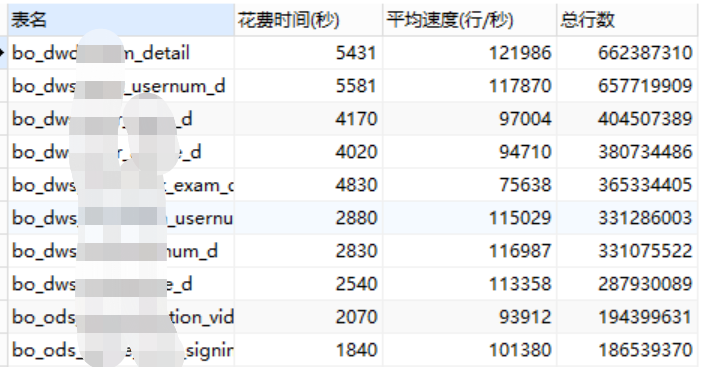
13TB的StarRocks大数据库迁移过程
公司有一套StarRocks的大数据库在大股东的腾讯云环境中,通过腾讯云的对等连接打通,通过dolphinscheduler调度datax离线抽取数据和SQL计算汇总,还有在大股东的特有的Flink集群环境,该环境开发了flink开发程序包部署,实时…...

HTTP代理有那些常见的安全协议?
在数据采集领域,HTTP代理扮演着至关重要的角色,它不仅帮助我们访问互联网资源,还涉及到数据的安全传输。了解HTTP代理中常见的安全协议对于保护数据安全、提高数据采集效率至关重要。那么,有哪些安全协议是在HTTP代理中常用的呢&a…...

Kylin Server V10 下基于Kraft模式搭建Kafka集群
一、Kraft 模式与 ZooKeeper 模式简介 在Kafka 2.8 之前,Kafka 重度依赖 ZooKeeper 集群做元数据管理、Controller 的选举等(统称为共识服务);当ZooKeeper 集群性能发生抖动时,Kafka 的性能也会受到很大的影响。如下图所示: 在 Kafka 2.8 之后,引入了基于 Raft …...

tauri使用github action打包编译多个平台arm架构和inter架构包踩坑记录
这些error的坑,肯定是很多人不想看到的,我的开源软件PakePlus是使用tauri开发的,PakePlus是一个界面化将任何网站打包为轻量级跨平台软件的程序,利用Tauri轻松构建轻量级多端桌面应用和多端手机应用,为了实现发布的时候…...
)
Python爬虫与窗口实现翻译小工具(仅限学习交流)
Python爬虫与窗口实现翻译小工具(仅限学习交流) 在工作中,遇到一个不懂的单词时,就会去网页找对应的翻译,我们可以用Python爬虫与窗口配合,制作一个简易的翻译小工具,不需要打开网页,自动把翻译结果显示出来。 整个过程比较简单。 # This is a sample Python script. …...

紫光展锐联合上汽海外发布量产车型,赋能汽车智能化
当前,智能汽车产业迎来重大变局,随着人工智能、5G、大数据等新一代信息技术的迅猛发展,智能网联汽车正呈现强劲发展势头。 11月26日,在2024紫光展锐全球合作伙伴大会汽车电子生态论坛上,紫光展锐与上汽海外出行联合发…...

Maven 打包出现问题解决方案
我执行 mvn install 报如下错误 可是我在 web 模块中能正确引用到 common 的类,于是我把 web 引用到的 common 中的类先移动到 web 模块中,然后把 common 模块的类都删掉,然后再次执行 mvn install,结果报错如下: [ERROR] Faile…...

第四话:JS中的eval函数
theme: channing-cyan 1.不要使用eval! 如果你从来都没有用到过eval这个函数,甚至你都不知道这个函数的作用。那么我只能说:你做了一件正确的事情 o.O 虽然我这篇文章要说一下eval函数的一些能力和注意点,但是我希望࿰…...

歇一歇,写写段子
无聊的日子都在写段子1.0 中学的时候喜欢看意林之类的杂志, 里面的作者用乱七八糟的理由跑去旅游,然后说“阻碍你脚步的永远只有逃离的勇气和对生活的热爱”, 我觉得太对了,可惜 12306 付款方式里没有勇气和热爱,不…...

TypeScript (一)运行环境配置,数据类型,可选类型,联合类型,type与interface,交叉类型,断言as,字面量类型,类型缩小
文章目录 一、认识TS1.1 JS 存在的问题1.2 TS的出现1.3 TS运行环境运行ts的三种方式 1.4 变量声明1.5 类型推断 二、数据类型2.1 JS数据类型(1) 数组Array(2) 对象Object(3) 其他类型 2.2 TS特有数据类型(1) any类型(2) unknown类型(3) void类型(4) never (了解)(5) tuple类型 …...

Linux Find 命令详情解释
文件查找 普通查询find /etc -maxdepth 1 -type f -name "pa*"命令 目录... 查找深度 类型 文件名称包含 # -type文件类型:f表示文件,不指定类型的话,文件和目录都会查找# -maxdepth查找深度:目录层级的意思࿰…...

2024年认证杯SPSSPRO杯数学建模A题(第一阶段)保暖纤维的保暖能力全过程文档及程序
2024年认证杯SPSSPRO杯数学建模 A题 保暖纤维的保暖能力 原题再现: 冬装最重要的作用是保暖,也就是阻挡温暖的人体与寒冷环境之间的热量传递。人们在不同款式的棉衣中会填充保暖材料,从古已有之的棉花、羽绒到近年来各种各样的人造纤维。不…...
)
Milvus python库 pymilvus 常用操作详解之Collection(下)
上篇博客 Milvus python库 pymilvus 常用操作详解之Collection(上) 主要介绍了 pymilvus 库中Collection集合的相关概念以及创建过程的代码实现,现在我们要在该基础上实现对于collection中插入数据的混合检索(基于dense vector 和…...

李飞飞:Agent AI 多模态交互的前沿探索
发布于:2024 年 11 月 27 日 星期三 北京 #RAG #李飞飞 #Agent #多模态 #大模型 Agent AI在多模态交互方面展现出巨大潜力,通过整合各类技术,在游戏、机器人、医疗等领域广泛应用。如游戏中优化NPC行为,机器人领域实现多模态操作等。然而,其面临数据隐私、偏见、可解释性…...

[October 2019]Twice SQL Injection
有一个登录框和一个注册页面,题目也说这个是二次注入,那么就用二次注入的payload就行 1 union select database()# //爆库 1 union select group_concat(table_name) from information_schema.tables where table_schemactftraining# //爆表 1 union …...

Python爬虫——城市数据分析与市场潜能计算(Pandas库)
使用Python进行城市市场潜能分析 简介 本教程将指导您如何使用Python和Pandas库来处理城市数据,包括GDP、面积和城市间距离。我们将计算每个城市的市场潜能,这有助于了解各城市的经济影响力。 步骤 1: 准备环境 确保您的环境中安装了Python和以下库&…...

如何搭建JMeter分布式集群环境来进行性能测试
在性能测试中,当面对海量用户请求的压力测试时,单机模式的JMeter往往力不从心。如何通过分布式集群环境,充分发挥JMeter的性能测试能力?这正是许多测试工程师在面临高并发、海量数据时最关注的问题。那么,如何轻松搭建…...

【Halcon】 derivate_gauss
1、derivate_gauss Halcon中的derivate_gauss算子是一个功能强大的图像处理工具,它通过将图像与高斯函数的导数进行卷积,来计算各种图像特征。这些特征在图像分析、物体识别、图像增强等领域具有广泛的应用。 参数解释 Sigma:高斯函数的标准差,用于控制平滑的程度。Sigma…...

stm32中systick时钟pinlv和系统节拍频率有什么区别,二者有无影响?
在STM32中,SysTick时钟频率和系统节拍频率是两个不同的概念,它们之间存在区别,并且这种区别会对系统的运行产生一定的影响。以下是对这两个概念的详细解释以及它们之间关系的探讨: 一、SysTick时钟频率 定义:SysTick…...

Godot 4.0桌面应用开发实战:跨平台GUI工程化落地指南
1. 这不是游戏引擎的“副业”,而是桌面开发的新路径很多人第一次看到“用Godot做桌面应用”时,下意识会皱眉:一个标榜“2D/3D游戏开发”的引擎,去碰文件管理器、RSS阅读器、本地笔记工具这类传统桌面软件?是不是大炮打…...

如何高效构建金融数据采集与分析工作流:AKShare深度应用指南
如何高效构建金融数据采集与分析工作流:AKShare深度应用指南 【免费下载链接】akshare AKShare is an elegant and simple financial data interface library for Python, built for human beings! 开源财经数据接口库 项目地址: https://gitcode.com/gh_mirrors/…...

5分钟掌握BOTW存档编辑器:打造你的完美塞尔达传说冒险
5分钟掌握BOTW存档编辑器:打造你的完美塞尔达传说冒险 【免费下载链接】BOTW-Save-Editor-GUI A Work in Progress Save Editor for BOTW 项目地址: https://gitcode.com/gh_mirrors/bo/BOTW-Save-Editor-GUI 想在《塞尔达传说:旷野之息》中自由探…...

百度网盘直链解析:告别限速的Python神器实战指南
百度网盘直链解析:告别限速的Python神器实战指南 【免费下载链接】baidu-wangpan-parse 获取百度网盘分享文件的下载地址 项目地址: https://gitcode.com/gh_mirrors/ba/baidu-wangpan-parse 你是否曾经面对百度网盘几十KB的下载速度感到绝望?当你…...

KMS_VL_ALL_AIO:开源智能激活工具让Windows和Office激活变得简单
KMS_VL_ALL_AIO:开源智能激活工具让Windows和Office激活变得简单 【免费下载链接】KMS_VL_ALL_AIO Smart Activation Script 项目地址: https://gitcode.com/gh_mirrors/km/KMS_VL_ALL_AIO 还在为Windows系统未激活的水印烦恼吗?Office软件频繁弹…...

如何在Windows上快速安装苹果设备驱动:告别连接烦恼的完整指南
如何在Windows上快速安装苹果设备驱动:告别连接烦恼的完整指南 【免费下载链接】Apple-Mobile-Drivers-Installer Powershell script to easily install Apple USB and Mobile Device Ethernet (USB Tethering) drivers on Windows! 项目地址: https://gitcode.co…...

三步改造智能音箱:让普通设备拥有ChatGPT级别对话能力的零代码方案
三步改造智能音箱:让普通设备拥有ChatGPT级别对话能力的零代码方案 【免费下载链接】mi-gpt 🏠 将小爱音箱接入 ChatGPT 和豆包,改造成你的专属语音助手。 项目地址: https://gitcode.com/GitHub_Trending/mi/mi-gpt 您是否曾觉得家中…...

DouYinBot 抖音无水印视频解析工具:3分钟快速搭建个人解析服务
DouYinBot 抖音无水印视频解析工具:3分钟快速搭建个人解析服务 【免费下载链接】DouYinBot 该项目仅自用,不提供抖音视频下载 项目地址: https://gitcode.com/gh_mirrors/do/DouYinBot 在抖音内容创作日益普及的今天,如何快速获取无水…...

3步完成SQLite到MySQL数据库迁移:智能转换工具实战指南
3步完成SQLite到MySQL数据库迁移:智能转换工具实战指南 【免费下载链接】sqlite-to-mysql Script to convert and add sqlite3 database into a mysql/mariadb database 项目地址: https://gitcode.com/gh_mirrors/sq/sqlite-to-mysql 在开发项目从原型到生产…...

QKeyMapper终极指南:免费开源按键映射工具,5分钟让你的键盘鼠标手柄随心所欲
QKeyMapper终极指南:免费开源按键映射工具,5分钟让你的键盘鼠标手柄随心所欲 【免费下载链接】QKeyMapper [按键映射工具] QKeyMapper,Qt开发Win10&Win11可用,不修改注册表、不需重新启动系统,可立即生效和停止。支…...