
基于Pycharm与数据库的新闻管理系统(3)MongoDB
pip3 install pymongo
1.连接到MongoDB数据库
文件地址:db/mongo_db.py
从 pymongo 模块中导入 MongoClient 类;创建 MongoClient 的一个实例,该实例尝试使用提供的MongoDB连接字符串连接到MongoDB服务器。
from pymongo import MongoClient
client = MongoClient('mongodb://admin:admin123456@localhost:27017')
2.新闻添加
2.1 创建操作类
文件地址:db/mongo_news_dao.py
新闻数据进行交互,并定义了两个方法用于与MongoDB数据库中的新闻数据进行交互。
from db.mongo_db import client
class MongoNewsDao:#添加函数正文记录def insert(self,title,content):try:client.news.news.insert_one({"title":title,"content":content})except Exception as e:print(e)#查找新闻正文主键def search_id(self,title):try:news = client.news.news.find_one({"title":title})return str(news["_id"])except Exception as e:print(e)
2.2 创建业务类
文件地址:service/news_service.py
处理新闻的添加操作,这个类依赖于 MongoNewsDao 类:
来与 MongoDB 和 MySQL 数据库同时进行交互。
# 导入新闻dao模块
from db.mongo_news_dao import MongoNewsDao
# 创建新闻业务类
class NewsService:#实例化新闻Dao对象__mongo_news_dao = MongoNewsDao()#添加新闻def insert_news(self,title,editor_id,type_id,👉content👈,is_top):👉#将添加的新闻写入到mongodb数据库中后self.__mongo_news_dao.insert(title,content)#获得新闻id值content_id = self.__mongo_news_dao.search_id(title)👈#将新闻信息添加至mysql中self.__news_dao.insert_news(title, editor_id, type_id, content_id, is_top)
2.3 实现数据库添加操作
实现交互式的Python脚本,用于发表新闻。
这个脚本允许用户输入新闻标题、选择新闻类型、输入新闻内容和置顶级别,并最终提交新闻。
if opt == "1.发表新闻":os.system("cls")title = input("\n\t新闻标题")userid = __user_service.search_userid(username)result = __type_service.search_list()for index in range(len(result)):one = result[index]print(Fore.LIGHTBLUE_EX, "\n\t%d.%s" % (index + 1, one[1]))print(Style.RESET_ALL)opt = input("\n\t类型编号:")type_id = result[int(opt) - 1][0]👉# 添加新闻内容path = input("\n\t输入文件路径:")file = open(path, "r", encoding="utf-8")content = file.read()file.close()👈is_top = input("\n\t置顶级别(0-5):")is_commit = input("\n\t是否提交(Y/N):")if is_commit == 'y' or is_commit == 'Y':__news_service.insert_news(title, userid, type_id, content, is_top)print("\n\t保存成功(3秒后自动返回)")time.sleep(3)3.新闻更改
3.1 根据新闻id查询新闻内容
from db.mysql_db import pool
class NewsDao:  #根据新闻id查询新闻内容def search_content_id(self,page):try:# 获得连接项conn = pool.get_connection()# 获得游标cursor = conn.cursor()# 创建sqlsql = """ SELECT content_id FROM t_news where id=%s """# 执行sqlcursor.execute(sql,[id])# 获得查询结果result = cursor.fetchone()[0]return result# 返回获得结果except Exception as e:print(e)finally:if "conn" in dir():conn.close()
3.2 根据id修改新闻内容
from db.mongo_db import client
from bson.objectid import ObjectId
class MongoNewsDao:# 根据id修改新闻内容def update(self, id, title, content):try:client.news.news.update_one({"_id":ObjectId(id)},{"$set":{"title":title,"content":content}})except Exception as e:print(e)
3.3 更新修改新闻信息
from db.news_dao import NewsDao
from db.redis_news_dao import RedisNewsDao
from db.mongo_news_dao import MongoNewsDao
class NewsService:#更新修改新闻信息def update(self,id,title,type_id,👉content,👈is_top):👉content_id = self.__news_dao.search_content_id(id)self.__mongo_news_dao.update(content_id,title,content)👈self.__news_dao.update(id,title,type_id,content_id,is_top)self.delete_cache(id)#删除缓存中修改的新闻信息
3.4 实现数据库更改操作
elif int(opt) >= 1 and int(opt) <= 5:
news_id = result[int(opt) - 1][0]
result = __news_service.search_by_id(news_id)
title = result[0]
type = result[1]
is_top = result[2]
print("\n\t新闻原标题:%s" % (title))
new_title = input("\n\t新标题")
print("\n\t新闻原类型:%s" % (type))
result = __type_service.search_list()
for index in range(len(result)):t = result[index]print(Fore.LIGHTBLUE_EX, "\n\t%d.%s" % (index + 1, t[1]))
print(Style.RESET_ALL)
opt = input("\n\t类型编号:")
new_type = result[int(opt) - 1][0]
# content_id = 10
👉# 修改新闻正文
path = input("\n\t输入文件路径:")
file = open(path, "r", encoding="utf-8")
content = file.read()
file.close()👈
print("原置顶级别%s" % (is_top))
new_is_top = input("\n\t置顶级别(0-5):")
is_commit = input("\n\t是否提交?(Y/N)")
if is_commit == 'y' or is_commit == 'Y':__news_service.update(news_id, new_title, new_type,👉content,👈 new_is_top)print("\n\t保存成功(3秒自动返回)")time.sleep(3)
4. 新闻获取
4.1 根据正文id获取正文信息
文件地址:db/mongo_news_dao.py
from db.mongo_db import client
from bson.objectid import ObjectId
class MongoNewsDao:#根据正文id获取正文信息def search_content_by_id(self,id):try:news = client.news.news.find_one({"_id":ObjectId(id)})return news["content"]except Exception as e:print(e)
4.2 根据新闻内容id查找新闻内容信息
文件地址:service/news_service.py
from db.mongo_news_dao import MongoNewsDao
class NewsService:#根据新闻内容id查找新闻内容信息def search_content_by_id(self,id):content = self.__mongo_news_dao.search_content_by_id(id)return content
4.3 实现数据库查询操作
文件地址:app_py.py
elif int(opt) >= 1 and int(opt) <= 5:
# 获得新闻id值
news_id = result[int(opt) - 1][0]  # 获得对应行数及列
# 调用news_service的审批函数
__news_service.update_unreview_news(news_id)
# 12.24 新闻缓存
result = __news_service.search_cache(news_id)
title = result[0]
username = result[1]
type = result[2]
content_id = result[3]
# 查询新闻正文👇
# content = "100"
content = __news_service.search_content_by_id(content_id)
is_top = result[4]👆
create_time = str(result[5])
__news_service.cache_news(news_id, title, username, type, content, is_top, create_time)
5.新闻清除
5.1 根据id删除新闻信息
文件地址:db/mongo_news_dao.py
from db.mongo_db import client
from bson.objectid import ObjectId
class MongoNewsDao:#根据id删除新闻信息def delete_content_by_id(self,id):try:client.news.news.delete_one({"_id":ObjectId(id)})except Exception as e:print(e)
5.2 清除新闻
文件地址:service/news_service.py
from db.news_dao import NewsDao
from db.redis_news_dao import RedisNewsDao
from db.mongo_news_dao import MongoNewsDao
class NewsService:#删除新闻def delete_news(self,id):content_id = self.__news_dao.search_content_id(id)self.__news_dao.delete_by_id(content_id)self.__news_dao.delete_by_id(id)
相关文章:
MongoDB)
基于Pycharm与数据库的新闻管理系统(3)MongoDB
pip3 install pymongo 1.连接到MongoDB数据库 文件地址:db/mongo_db.py 从 pymongo 模块中导入 MongoClient 类;创建 MongoClient 的一个实例,该实例尝试使用提供的MongoDB连接字符串连接到MongoDB服务器。 from pymongo import MongoClie…...

WebRtc webrtc-streamer部署
文章目录 本文档只是为了留档方便以后工作运维,或者给同事分享文档内容比较简陋命令也不是特别全,不适合小白观看,如有不懂可以私信,上班期间都是在得 WebRtc webrtc-streamer 部署 docker run -p 8000:8000 -it mpromonet/webrt…...

CVPR-2024 | 具身导航模型大一统!NaviLLM:学习迈向具身导航的通用模型
作者:Duo Zheng, Shijia Huang, Lin Zhao, Yiwu Zhong, Liwei Wang 单位:香港中文大学,上海人工智能实验室,感知与交互智能中心 论文链接:Towards Learning a Generalist Model for Embodied Navigation(…...

CAN201 Introduction to Networking(计算机网络)Pt.2 传输层
文章目录 3. Transport Layer(传输层)3.1 Multiplexing and demultiplexing(多路复用和多路分解)3.2 Connectionless transport:UDP3.3 Principles of reliable data transfer3.4 Pipelined communication3.5 TCP: con…...

git仓库多人协作新建分支 合并到主分支流程详解
在多人协作的 Git 仓库中,新建分支并最终将其合并到主分支的流程是为了实现团队协作、提高代码的可管理性、确保代码质量,并且避免多人同时修改同一部分代码导致冲突。以下是这个流程的目的和具体步骤。 目录 1. 在 master 上新建一个分支 2. 进行功能…...

Visual Studio 使用 GitHub Copilot 与 IntelliCode 辅助编码 【AI辅助开发系列】
🎀🎀🎀【AI辅助编程系列】🎀🎀🎀 Visual Studio 使用 GitHub Copilot 与 IntelliCode 辅助编码Visual Studio 安装和管理 GitHub CopilotVisual Studio 使用 GitHub Copilot 扩展Visual Studio 使用 GitHu…...

【时间之外】IT人求职和创业应知【74】-运维机器人
目录 OpenAI最强推理模型o3发布,AGI测试能力暴涨 英伟达宣布收购以色列AI初创企业Runai 汤姆猫首款AI机器人产品明日发售 心勿贪,贵知足。 感谢所有打开这个页面的朋友。人生不如意,开越野车去撒野,会害了自己,不如…...

高阶:基于Python paddleocr库 提取pdf 文档高亮显示的内容
预览 第1步:理解基本结构和导入必要的库 # 1. 首先导入需要的库 import os # 用于处理文件和路径 import cv2 # 用于图像处理 import numpy as np # 用于数值计算 from paddleocr import PaddleOCR # 用于文字识别 from pdf2image import convert_from_path #…...

STM32项目之环境空气质量检测系统软件设计
目录 前言一、软件需求概述二、需求实现思路1.软件开发工具准备2.温湿度实时监测功能3.空气质量实时监测功能(目前硬件没有买该模块,暂未实现)4.实时时间功能5.视觉、听觉报警功能6.WIFI云平台连接,远程查看数据功能(待…...

重温设计模式--原型模式
文章目录 原型模式定义原型模式UML图优点缺点使用场景C 代码示例深拷贝、浅拷贝 原型模式定义 用原型实例指定创建对象的种类,并且通过拷贝这些原型创建新的对象; 核心中的核心就是 克隆clone ,后面讲 原型模式是一种创建型设计模式,它的主要…...

输变电资质分一级、二级,新办从二级开始,三级已取消
输变电工程专业承包资质分为一级.二级.三级。 一、输变电工程专业承包一级资质标准:1、企业资产净资产5000万元以上。2、企业主要人员(1)机电工程专业一级注册建设师不少于10人。(2)技术负责人…...

浏览器http缓存问题
一、什么是浏览器缓存 浏览器将请求过的资源(html、js、css、img)等,根据缓存机制,拷贝一份副本存储在浏览器的内存或者磁盘上。如果下一次请求的url相同时则根据缓存机制决定是读取内存或者磁盘上的数据还是去服务器请求资源文件…...

结构化Prompt:让大模型更智能的秘诀
一、结构化提示词 1. 什么是结构化? 结构化: 对信息进行组织,使其遵循特定的模式和规则,从而方便有效理解信息。结构化的思想在各类文本中都得到了广泛应用,例如文章、书籍中都使用了标题、子标题、段落等语法结构。结构化 Prompt 的思维方…...

威联通NAS部署openwrt软路由保姆级教程附镜像文件
创作立场:原创不易,拒绝搬运~ hello 大家好,我是你们的老伙伴,稳重的大王~ 本期教程为大家分享,怎么在NAS里面部署软路由,下面是软路由的镜像文件,有两个版本,400M的是定制版~ Sh…...
-谢希仁》期末考试复习题和答案(总结整理))
《计算机网络(第7版)-谢希仁》期末考试复习题和答案(总结整理)
目录 前言: 一、选择题。 二、填空题。 三、名词解释。 四、简答题。 前言: 这个自动标题自己带了序号,一开始想全部选项和题号都改过来的,结果一看一百多个全是,懒得改了 一、选择题。 1、广域网覆盖的地理范围…...
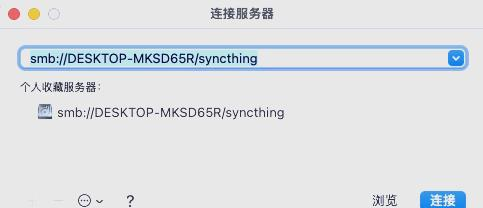
windows和mac共享文件夹访问教程
mac共享文件夹,windows访问: mac上开启文件夹共享,并添加文件夹和用户,然后windows 上 在windows上快捷键 win r 打开运行,按如下格式输入mac设备的IP地址: 就可以访问了: windows共享文件夹…...

【PPTist】网格线、对齐线、标尺
前言:本篇文章介绍辅助我们摆放元素位置的几个功能 一、网格线功能 网格线主要是用来辅助我们对齐元素的,右键可以选择使用哪种网格线,以及关闭和打开 显示效果就是图中的这种效果。但是强迫症有点难受,它底部没对齐啊啊啊 不…...

Leetcode3218. 切蛋糕的最小总开销 I
题目描述: 有一个 m x n 大小的矩形蛋糕,需要切成 1 x 1 的小块。 给你整数 m ,n 和两个数组: horizontalCut 的大小为 m - 1 ,其中 horizontalCut[i] 表示沿着水平线 i 切蛋糕的开销。verticalCut 的大小为 n - 1 …...

ECCV-2024 | 指令不够用、大模型来生成!BEVInstructor:基于BEV感知和大模型的视觉语言导航指令生成
作者:Sheng Fan, Rui Liu, Wenguan Wang, and Yi Yang 单位:浙江大学 原文链接:Navigation Instruction Generation with BEV Perception and Large Language Models (https://link.springer.com/chapter/10.1007/978-3-031-726…...

【UE5.3.2 】引擎中安装RiderLink插件
Rider会提示你安装这个插件选择在引擎中安装 Running AutomationTool... Using bundled DotNet SDK version: 6.0.302 Starting AutomationTool... Parsing command line: BuildPlugin -Unversioned -Plugin=C:\Users\zhangbin\AppData\Local\...

嵌入式软件架构设计:从顺序执行到RTOS
1. 嵌入式软件架构概述在单片机开发领域,很多初学者往往只关注功能实现而忽视了代码架构设计。作为一名经历过多个嵌入式项目的开发者,我深刻体会到良好的架构设计对项目可维护性和扩展性的重要性。当代码量超过5000行时,没有架构的程序就会变…...

激光技术在多物理场耦合应用中的案例分析:从增材制造到激光打孔与抛光的研究实例集萃
激关相关的模型,视频增材制造.mph 激光焊接.mph run- 激光熔覆-可行.mph 激光烧蚀.mph 激光熔铸.mph 激光打孔飞溅-较好-原始.mph 激光打孔.mph激光打孔飞溅-较好-原始.mph 案例7-激光打孔榕池(2).mp4 案例7-激光打孔熔池(3).mp4 …...

医学图像分类与诊断数据集5040张VOC+YOLO
医学图像分类与诊断数据集5040张VOCYOLO数据集格式:Pascal VOC格式YOLO格式(不包含分割路径的txt文件,仅仅包含jpg图片以及对应的VOC格式xml文件和yolo格式txt文件) 图片数量(jpg文件个数):5040 标注数量(xml文件个数):5040 标注数…...

IP-vlan实验报告
一、 实验拓扑二、 实验思路完成二层 vlan 的划分,实现二层隔离三层 IP 配置DHCP 配置三、 测试划分接口情况(display port vlan active)SW1:(截图)SW2:(截图)SW3:(截图)…...
)
ParaView实战:5分钟搞定热流图单元格体积计算(附Python脚本)
ParaView热流分析实战:从单元格体积计算到三维可视化全流程指南 在计算流体力学和热传导分析中,准确获取网格单元的体积数据是后续量化分析的基础。许多工程师在处理复杂几何体的热流分布时,常常陷入繁琐的手动计算或复杂的编程工作中。实际上…...

2025届最火的六大降重复率助手推荐
Ai论文网站排名(开题报告、文献综述、降aigc率、降重综合对比) TOP1. 千笔AI TOP2. aipasspaper TOP3. 清北论文 TOP4. 豆包 TOP5. kimi TOP6. deepseek 能降低AIGC检测率的关键之处在于模拟人类写作所具备的自然性以及逻辑跳跃。其一,…...

opencv透视变换实战:从算法原理到图像矫正的完整实现
1. 透视变换的数学原理与生活场景 第一次接触透视变换时,我盯着那些数学公式看了整整一个下午。直到有天在咖啡厅看到服务员端盘子,突然就明白了——这就像把倾斜的餐盘拍平的过程。想象你从侧面45度角拍了一张餐盘照片,透视变换就是把这个斜…...

Repomix性能基准测试:不同规模代码库表现终极指南
Repomix性能基准测试:不同规模代码库表现终极指南 【免费下载链接】repomix 📦 Repomix is a powerful tool that packs your entire repository into a single, AI-friendly file. Perfect for when you need to feed your codebase to Large Language …...

实时控制循环示例
LCC-S无线电能传输pi移相控制输出电压,效果很棒 SS结构,与其他低阶高阶拓扑也可以做 SS拓扑最近在捣鼓无线电能传输系统时,意外发现LCC-S拓扑搭配π型移相控制,输出效果堪比美颜相机里的磨皮功能。这货不仅能把输出电压纹波压得比…...

实战指南:基于快马平台用PostgreSQL的JSONB字段构建灵活的产品管理系统
今天想和大家分享一个实战项目经验:如何用PostgreSQL的JSONB字段为电商网站构建灵活的产品管理系统。这个方案特别适合产品属性差异大的场景,比如同时卖手机和书籍的电商平台。 为什么选择JSONB字段 电商网站经常遇到一个头疼问题:不同品类的…...