
三次输错密码后,系统是怎么做到不让我继续尝试的?
故事背景
忘记密码这件事,相信绝大多数人都遇到过,输一次错一次,错到几次以上,就不允许你继续尝试了。
但当你尝试重置密码,又发现新密码不能和原密码重复:

相信此刻心情只能用一张图形容:

虽然,但是,密码还是很重要的,顺便我有了一个问题:三次输错密码后,系统是怎么做到不让我继续尝试的?
我想了想,有如下几个问题需要搞定
- 是只有输错密码才锁定,还是账户名和密码任何一个输错就锁定?
- 输错之后也不是完全冻结,为啥隔了几分钟又可以重新输了?
- 技术栈到底麻不麻烦?
去网上搜了搜,也问了下ChatGPT,找到一套解决方案:SpringBoot+Redis+Lua脚本。
这套方案也不算新,很早就有人在用了,不过难得是自己想到的问题和解法,就记录一下吧。
顺便回答一下上面的三个问题:
- 锁定的是IP,不是输入的账户名或者密码,也就是说任一一个输错3次就会被锁定
- Redis的Lua脚本中实现了key过期策略,当key消失时锁定自然也就消失了
- 技术栈同SpringBoot+Redis+Lua脚本
那么自己动手实现一下
前端部分
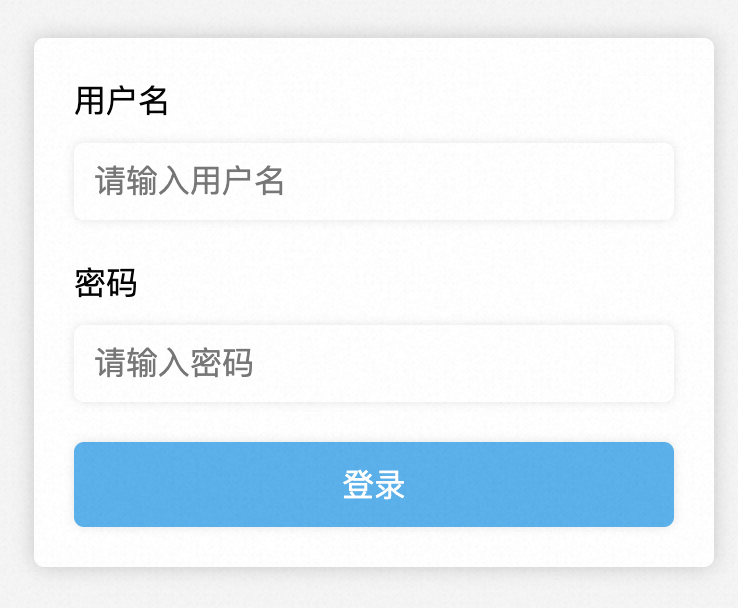
首先写一个账密输入页面,使用很简单HTML加表单提交
<!DOCTYPE html>
<html>
<head><title>登录页面</title><style>body {background-color: #F5F5F5;}form {width: 300px;margin: 0 auto;margin-top: 100px;padding: 20px;background-color: white;border-radius: 5px;box-shadow: 0 0 10px rgba(0,0,0,0.2);}label {display: block;margin-bottom: 10px;}input[type="text"], input[type="password"] {border: none;padding: 10px;margin-bottom: 20px;border-radius: 5px;box-shadow: 0 0 5px rgba(0,0,0,0.1);width: 100%;box-sizing: border-box;font-size: 16px;}input[type="submit"] {background-color: #30B0F0;color: white;border: none;padding: 10px;border-radius: 5px;box-shadow: 0 0 5px rgba(0,0,0,0.1);width: 100%;font-size: 16px;cursor: pointer;}input[type="submit"]:hover {background-color: #1C90D6;}</style>
</head>
<body><form action="http://localhost:8080/login" method="get"><label for="username">用户名</label><input type="text" id="username" name="username" placeholder="请输入用户名" required><label for="password">密码</label><input type="password" id="password" name="password" placeholder="请输入密码" required><input type="submit" value="登录"></form>
</body>
</html>
效果如下:
后端部分
技术选型分析
首先我们画一个流程图来分析一下这个登录限制流程

从流程图上看,首先访问次数的统计与判断不是在登录逻辑执行后,而是执行前就加1了;
其次登录逻辑的成功与失败并不会影响到次数的统计;
最后还有一点流程图上没有体现出来,这个次数的统计是有过期时间的,当过期之后又可以重新登录了。
那为什么是Redis+Lua脚本呢?
Redis的选择不难看出,这个流程比较重要的是存在一个用来计数的变量,这个变量既要满足分布式读写需求,还要满足全局递增或递减的需求,那Redis的
incr方法是最优选了。
那为什么需要Lua脚本呢?流程上在验证用户操作前有些操作,如图:
这里至少有3步Redis的操作,get、incr、expire,如果全放到应用里面来操作,有点慢且浪费资源。

Lua脚本的优点如下:
- 减少网络开销。可以将多个请求通过脚本的形式一次发送,减少网络时延。
- 原子操作。Redis会将整个脚本作为一个整体执行,中间不会被其他请求插入。因此在脚本运行过程中无需担心会出现竞态条件,无需使用事务。
- 复用。客户端发送的脚本会永久存在redis中,这样其他客户端可以复用这一脚本,而不需要使用代码完成相同的逻辑。
最后为了增加功能的复用性,我打算使用Java注解的方式实现这个功能。
代码实现
项目结构如下

配置文件
pom.xml
<?xml version="1.0" encoding="UTF-8"?>
<project xmlns="http://maven.apache.org/POM/4.0.0" xmlns:xsi="http://www.w3.org/2001/XMLSchema-instance"xsi:schemaLocation="http://maven.apache.org/POM/4.0.0 https://maven.apache.org/xsd/maven-4.0.0.xsd"><modelVersion>4.0.0</modelVersion><parent><groupId>org.springframework.boot</groupId><artifactId>spring-boot-starter-parent</artifactId><version>2.7.11</version><relativePath/> <!-- lookup parent from repository --></parent><groupId>com.example</groupId><artifactId>LoginLimit</artifactId><version>0.0.1-SNAPSHOT</version><name>LoginLimit</name><description>Demo project for Spring Boot</description><properties><java.version>1.8</java.version></properties><dependencies><dependency><groupId>org.springframework.boot</groupId><artifactId>spring-boot-starter-web</artifactId></dependency><dependency><groupId>org.springframework.boot</groupId><artifactId>spring-boot-starter-test</artifactId><scope>test</scope></dependency><!-- redis --><dependency><groupId>org.springframework.boot</groupId><artifactId>spring-boot-starter-data-redis</artifactId></dependency><!-- Jedis --><dependency><groupId>redis.clients</groupId><artifactId>jedis</artifactId></dependency><!--切面依赖 --><dependency><groupId>org.aspectj</groupId><artifactId>aspectjweaver</artifactId></dependency><!-- commons-lang3 --><dependency><groupId>org.apache.commons</groupId><artifactId>commons-lang3</artifactId></dependency><!-- guava --><dependency><groupId>com.google.guava</groupId><artifactId>guava</artifactId><version>23.0</version></dependency><!-- lombok --><dependency><groupId>org.projectlombok</groupId><artifactId>lombok</artifactId><optional>true</optional></dependency></dependencies><build><plugins><plugin><groupId>org.springframework.boot</groupId><artifactId>spring-boot-maven-plugin</artifactId></plugin></plugins></build></project>
application.properties
## Redis配置
spring.redis.host=127.0.0.1
spring.redis.port=6379
spring.redis.password=
spring.redis.timeout=1000
## Jedis配置
spring.redis.jedis.pool.min-idle=0
spring.redis.jedis.pool.max-idle=500
spring.redis.jedis.pool.max-active=2000
spring.redis.jedis.pool.max-wait=10000
注解部分
LimitCount.java
package com.example.loginlimit.annotation;import java.lang.annotation.ElementType;
import java.lang.annotation.Retention;
import java.lang.annotation.RetentionPolicy;
import java.lang.annotation.Target;/*** 次数限制注解* 作用在接口方法上*/
@Target(ElementType.METHOD)
@Retention(RetentionPolicy.RUNTIME)
public @interface LimitCount {/*** 资源名称,用于描述接口功能*/String name() default "";/*** 资源 key*/String key() default "";/*** key prefix** @return*/String prefix() default "";/*** 时间的,单位秒* 默认60s过期*/int period() default 60;/*** 限制访问次数* 默认3次*/int count() default 3;
}
核心处理逻辑类:LimitCountAspect.java
package com.example.loginlimit.aspect;import java.io.Serializable;
import java.lang.reflect.Method;
import java.util.Objects;import javax.servlet.http.HttpServletRequest;import com.example.loginlimit.annotation.LimitCount;
import com.example.loginlimit.util.IPUtil;
import com.google.common.collect.ImmutableList;
import lombok.extern.slf4j.Slf4j;
import org.apache.commons.lang3.StringUtils;
import org.aspectj.lang.ProceedingJoinPoint;
import org.aspectj.lang.annotation.Around;
import org.aspectj.lang.annotation.Aspect;
import org.aspectj.lang.annotation.Pointcut;
import org.aspectj.lang.reflect.MethodSignature;
import org.springframework.beans.factory.annotation.Autowired;
import org.springframework.data.redis.core.RedisTemplate;
import org.springframework.data.redis.core.script.DefaultRedisScript;
import org.springframework.data.redis.core.script.RedisScript;
import org.springframework.stereotype.Component;
import org.springframework.web.context.request.RequestContextHolder;
import org.springframework.web.context.request.ServletRequestAttributes;@Slf4j
@Aspect
@Component
public class LimitCountAspect {private final RedisTemplate<String, Serializable> limitRedisTemplate;@Autowiredpublic LimitCountAspect(RedisTemplate<String, Serializable> limitRedisTemplate) {this.limitRedisTemplate = limitRedisTemplate;}@Pointcut("@annotation(com.example.loginlimit.annotation.LimitCount)")public void pointcut() {// do nothing}@Around("pointcut()")public Object around(ProceedingJoinPoint point) throws Throwable {HttpServletRequest request = ((ServletRequestAttributes)Objects.requireNonNull(RequestContextHolder.getRequestAttributes())).getRequest();MethodSignature signature = (MethodSignature)point.getSignature();Method method = signature.getMethod();LimitCount annotation = method.getAnnotation(LimitCount.class);//注解名称String name = annotation.name();//注解keyString key = annotation.key();//访问IPString ip = IPUtil.getIpAddr(request);//过期时间int limitPeriod = annotation.period();//过期次数int limitCount = annotation.count();ImmutableList<String> keys = ImmutableList.of(StringUtils.join(annotation.prefix() + "_", key, ip));String luaScript = buildLuaScript();RedisScript<Number> redisScript = new DefaultRedisScript<>(luaScript, Number.class);Number count = limitRedisTemplate.execute(redisScript, keys, limitCount, limitPeriod);log.info("IP:{} 第 {} 次访问key为 {},描述为 [{}] 的接口", ip, count, keys, name);if (count != null && count.intValue() <= limitCount) {return point.proceed();} else {return "接口访问超出频率限制";}}/*** 限流脚本* 调用的时候不超过阈值,则直接返回并执行计算器自加。** @return lua脚本*/private String buildLuaScript() {return "local c" +"\nc = redis.call('get',KEYS[1])" +"\nif c and tonumber(c) > tonumber(ARGV[1]) then" +"\nreturn c;" +"\nend" +"\nc = redis.call('incr',KEYS[1])" +"\nif tonumber(c) == 1 then" +"\nredis.call('expire',KEYS[1],ARGV[2])" +"\nend" +"\nreturn c;";}}
获取IP地址的功能我写了一个工具类IPUtil.java,代码如下:
package com.example.loginlimit.util;import javax.servlet.http.HttpServletRequest;public class IPUtil {private static final String UNKNOWN = "unknown";protected IPUtil() {}/*** 获取 IP地址* 使用 Nginx等反向代理软件, 则不能通过 request.getRemoteAddr()获取 IP地址* 如果使用了多级反向代理的话,X-Forwarded-For的值并不止一个,而是一串IP地址,* X-Forwarded-For中第一个非 unknown的有效IP字符串,则为真实IP地址*/public static String getIpAddr(HttpServletRequest request) {String ip = request.getHeader("x-forwarded-for");if (ip == null || ip.length() == 0 || UNKNOWN.equalsIgnoreCase(ip)) {ip = request.getHeader("Proxy-Client-IP");}if (ip == null || ip.length() == 0 || UNKNOWN.equalsIgnoreCase(ip)) {ip = request.getHeader("WL-Proxy-Client-IP");}if (ip == null || ip.length() == 0 || UNKNOWN.equalsIgnoreCase(ip)) {ip = request.getRemoteAddr();}return "0:0:0:0:0:0:0:1".equals(ip) ? "127.0.0.1" : ip;}}
另外就是Lua限流脚本的说明,脚本代码如下:
private String buildLuaScript() {return "local c" +"\nc = redis.call('get',KEYS[1])" +"\nif c and tonumber(c) > tonumber(ARGV[1]) then" +"\nreturn c;" +"\nend" +"\nc = redis.call('incr',KEYS[1])" +"\nif tonumber(c) == 1 then" +"\nredis.call('expire',KEYS[1],ARGV[2])" +"\nend" +"\nreturn c;";}
这段脚本有一个判断,
tonumber(c) > tonumber(ARGV[1])这行表示如果当前key 的值大于了limitCount,直接返回;否则调用incr方法进行累加1,且调用expire方法设置过期时间。
最后就是RedisConfig.java,代码如下:
package com.example.loginlimit.config;import java.io.IOException;
import java.io.Serializable;
import java.time.Duration;
import java.util.Arrays;import com.fasterxml.jackson.core.JsonProcessingException;
import com.fasterxml.jackson.databind.ObjectMapper;
import org.apache.commons.lang3.StringUtils;
import org.springframework.beans.factory.annotation.Value;
import org.springframework.boot.autoconfigure.condition.ConditionalOnMissingBean;
import org.springframework.cache.CacheManager;
import org.springframework.cache.annotation.CachingConfigurerSupport;
import org.springframework.cache.interceptor.KeyGenerator;
import org.springframework.context.annotation.Bean;
import org.springframework.context.annotation.Configuration;
import org.springframework.data.redis.cache.RedisCacheManager;
import org.springframework.data.redis.connection.RedisConnectionFactory;
import org.springframework.data.redis.connection.RedisPassword;
import org.springframework.data.redis.connection.RedisStandaloneConfiguration;
import org.springframework.data.redis.connection.jedis.JedisClientConfiguration;
import org.springframework.data.redis.connection.jedis.JedisConnectionFactory;
import org.springframework.data.redis.core.RedisTemplate;
import org.springframework.data.redis.core.StringRedisTemplate;
import org.springframework.data.redis.serializer.GenericJackson2JsonRedisSerializer;
import org.springframework.data.redis.serializer.RedisSerializer;
import org.springframework.data.redis.serializer.SerializationException;
import org.springframework.data.redis.serializer.StringRedisSerializer;
import redis.clients.jedis.JedisPool;
import redis.clients.jedis.JedisPoolConfig;@Configuration
public class RedisConfig extends CachingConfigurerSupport {@Value("${spring.redis.host}")private String host;@Value("${spring.redis.port}")private int port;@Value("${spring.redis.password}")private String password;@Value("${spring.redis.timeout}")private int timeout;@Value("${spring.redis.jedis.pool.max-idle}")private int maxIdle;@Value("${spring.redis.jedis.pool.max-wait}")private long maxWaitMillis;@Value("${spring.redis.database:0}")private int database;@Beanpublic JedisPool redisPoolFactory() {JedisPoolConfig jedisPoolConfig = new JedisPoolConfig();jedisPoolConfig.setMaxIdle(maxIdle);jedisPoolConfig.setMaxWaitMillis(maxWaitMillis);if (StringUtils.isNotBlank(password)) {return new JedisPool(jedisPoolConfig, host, port, timeout, password, database);} else {return new JedisPool(jedisPoolConfig, host, port, timeout, null, database);}}@BeanJedisConnectionFactory jedisConnectionFactory() {RedisStandaloneConfiguration redisStandaloneConfiguration = new RedisStandaloneConfiguration();redisStandaloneConfiguration.setHostName(host);redisStandaloneConfiguration.setPort(port);redisStandaloneConfiguration.setPassword(RedisPassword.of(password));redisStandaloneConfiguration.setDatabase(database);JedisClientConfiguration.JedisClientConfigurationBuilder jedisClientConfiguration = JedisClientConfiguration.builder();jedisClientConfiguration.connectTimeout(Duration.ofMillis(timeout));jedisClientConfiguration.usePooling();return new JedisConnectionFactory(redisStandaloneConfiguration, jedisClientConfiguration.build());}@Bean(name = "redisTemplate")@SuppressWarnings({"rawtypes"})@ConditionalOnMissingBean(name = "redisTemplate")public RedisTemplate<Object, Object> redisTemplate(RedisConnectionFactory redisConnectionFactory) {RedisTemplate<Object, Object> template = new RedisTemplate<>();//使用 fastjson 序列化JacksonRedisSerializer jacksonRedisSerializer = new JacksonRedisSerializer<>(Object.class);// value 值的序列化采用 fastJsonRedisSerializertemplate.setValueSerializer(jacksonRedisSerializer);template.setHashValueSerializer(jacksonRedisSerializer);// key 的序列化采用 StringRedisSerializertemplate.setKeySerializer(new StringRedisSerializer());template.setHashKeySerializer(new StringRedisSerializer());template.setConnectionFactory(redisConnectionFactory);return template;}//缓存管理器@Beanpublic CacheManager cacheManager(RedisConnectionFactory redisConnectionFactory) {RedisCacheManager.RedisCacheManagerBuilder builder = RedisCacheManager.RedisCacheManagerBuilder.fromConnectionFactory(redisConnectionFactory);return builder.build();}@Bean@ConditionalOnMissingBean(StringRedisTemplate.class)public StringRedisTemplate stringRedisTemplate(RedisConnectionFactory redisConnectionFactory) {StringRedisTemplate template = new StringRedisTemplate();template.setConnectionFactory(redisConnectionFactory);return template;}@Beanpublic KeyGenerator wiselyKeyGenerator() {return (target, method, params) -> {StringBuilder sb = new StringBuilder();sb.append(target.getClass().getName());sb.append(method.getName());Arrays.stream(params).map(Object::toString).forEach(sb::append);return sb.toString();};}@Beanpublic RedisTemplate<String, Serializable> limitRedisTemplate(RedisConnectionFactory redisConnectionFactory) {RedisTemplate<String, Serializable> template = new RedisTemplate<>();template.setKeySerializer(new StringRedisSerializer());template.setValueSerializer(new GenericJackson2JsonRedisSerializer());template.setConnectionFactory(redisConnectionFactory);return template;}
}class JacksonRedisSerializer<T> implements RedisSerializer<T> {private Class<T> clazz;private ObjectMapper mapper;JacksonRedisSerializer(Class<T> clazz) {super();this.clazz = clazz;this.mapper = new ObjectMapper();mapper.enableDefaultTyping(ObjectMapper.DefaultTyping.NON_FINAL);}@Overridepublic byte[] serialize(T t) throws SerializationException {try {return mapper.writeValueAsBytes(t);} catch (JsonProcessingException e) {e.printStackTrace();return null;}}@Overridepublic T deserialize(byte[] bytes) throws SerializationException {if (bytes.length <= 0) {return null;}try {return mapper.readValue(bytes, clazz);} catch (IOException e) {e.printStackTrace();return null;}}
}
LoginController.java
package com.example.loginlimit.controller;import javax.servlet.http.HttpServletRequest;import com.example.loginlimit.annotation.LimitCount;
import lombok.extern.slf4j.Slf4j;
import org.apache.commons.lang3.StringUtils;
import org.springframework.web.bind.annotation.GetMapping;
import org.springframework.web.bind.annotation.RequestParam;
import org.springframework.web.bind.annotation.RestController;@Slf4j
@RestController
public class LoginController {@GetMapping("/login")@LimitCount(key = "login", name = "登录接口", prefix = "limit")public String login(@RequestParam(required = true) String username,@RequestParam(required = true) String password, HttpServletRequest request) throws Exception {if (StringUtils.equals("张三", username) && StringUtils.equals("123456", password)) {return "登录成功";}return "账户名或密码错误";}}
LoginLimitApplication.java
package com.example.loginlimit;import org.springframework.boot.SpringApplication;
import org.springframework.boot.autoconfigure.SpringBootApplication;@SpringBootApplication
public class LoginLimitApplication {public static void main(String[] args) {SpringApplication.run(LoginLimitApplication.class, args);}}
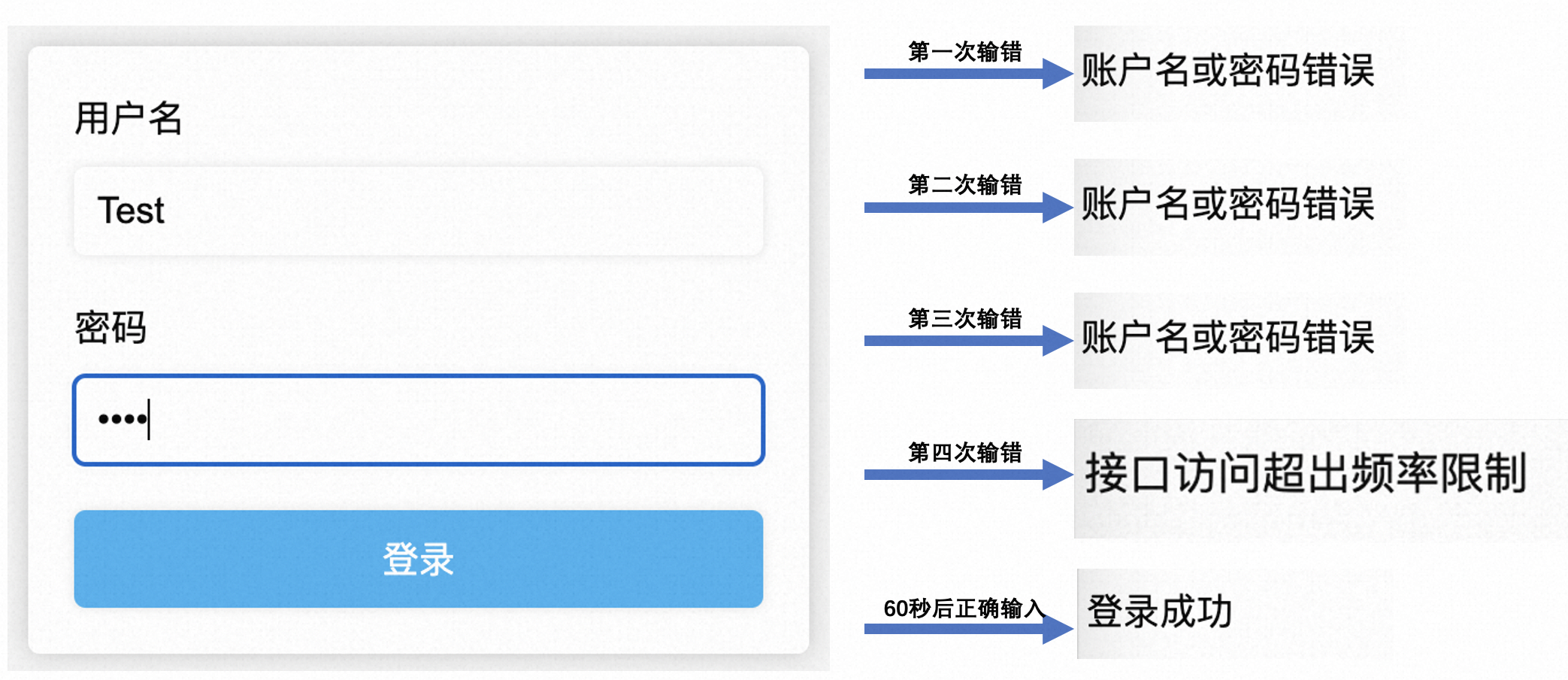
演示一下效果
上面这套限流的逻辑感觉用在小型或中型的项目上应该问题不大,不过目前的登录很少有直接锁定账号不能输入的,一般都是弹出一个验证码框,让你输入验证码再提交。我觉得用我这套逻辑改改应该不成问题,核心还是接口尝试次数的限制嘛!刚好我还写过SpringBoot生成图形验证码的文章:SpringBoot整合kaptcha实现图片验证码功能,哪天再来试试这套逻辑~
相关文章:
三次输错密码后,系统是怎么做到不让我继续尝试的?
故事背景 忘记密码这件事,相信绝大多数人都遇到过,输一次错一次,错到几次以上,就不允许你继续尝试了。 但当你尝试重置密码,又发现新密码不能和原密码重复: 相信此刻心情只能用一张图形容: 虽…...
医学影像系统源码,三维后处理和重建 PACS源码
医学影像系统源码,三维后处理和重建 PACS源码 医学影像系统由PACS系统、RIS系统组成,提供与HIS的接口(HL7或其他类型)。 主要功能介绍 信息预约登记 支持对患者、检查项目、申请医生、申请单据、设备等信息进行管理。且支持检查…...
)
golang汇编之函数(四)
基本语法 函数标识符通过TEXT汇编指令定义,表示该行开始的指令定义在TEXT内存段。TEXT语句后的指令一般对应函数的实现,但是对于TEXT指令本身来说并不关心后面是否有指令。我个人觉得TEXT和LABEL定义的符号是类似的,区别只是LABEL是用于跳转…...

成都爱尔李晓峰主任:眼睛干到发出求救信号,快注意!
眼睛总感觉痒痒的,时不时干涩、酸胀、畏光? 它在提醒你,它太干了救救它! 干眼如何判断? 干眼症是由于泪液的质和量异常或者泪液的流体动力学障碍而导致眼表无法保持湿润的一种眼病。会发生眼睛干涩、酸胀、畏光、灼热感、异物感、看东西容易…...

HiEV独家 | 比亚迪高阶智驾终于来了 ,新款汉首发,多车型将搭载
作者 | 德新 编辑 | 马波 比亚迪上马高阶辅助驾驶,首先从高速NOA开始。 HiEV获悉,今年第三季度,比亚迪将在新的 汉车型 上,搭载高速领航辅助驾驶功能(俗称高速NOA)。继汉之后,王朝系列唐…...
全面解析Linux指令和权限管理
目录 一.指令再讲解1.时间相关的指令2.find等搜索指令与grep指令3.打包和压缩相关的指令4.一些其他指令与热键二.Linux权限1.Linux的权限管理2.文件类型与权限设置3.目录的权限与粘滞位 一.指令再讲解 1.时间相关的指令 date指令: date 用法:date [OPTION]… [FOR…...

C++ enum 和enum class
文章目录 C enum 和 enum class共同点区别 C enum 和 enum class 在C中, enum 是一种定义枚举类型的方法。 一个枚举是一个整数值的命名集合。 可以通过以下方式创建一个枚举类型: enum Color {RED,GREEN,BLUE };这里我们定义了一个名为 Color 的枚举类…...
设计模式之中介者模式
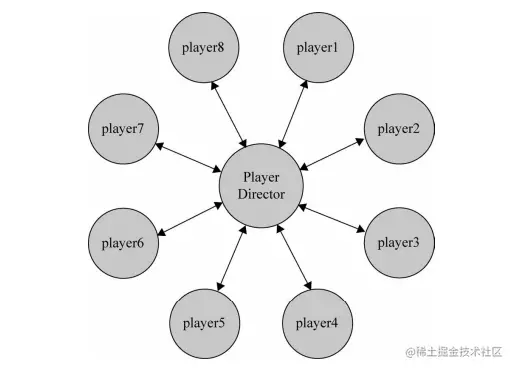
参考资料 曾探《JavaScript设计模式与开发实践》;「设计模式 JavaScript 描述」中介者模式JavaScript 设计模式之中介者模式 定义 在我们生活的世界中,每个人每个物体之间都会产生一些错综复杂的联系。在应用程序里也是一样,程序由大大小小…...
DJ5-8 磁盘存储器的性能和调度
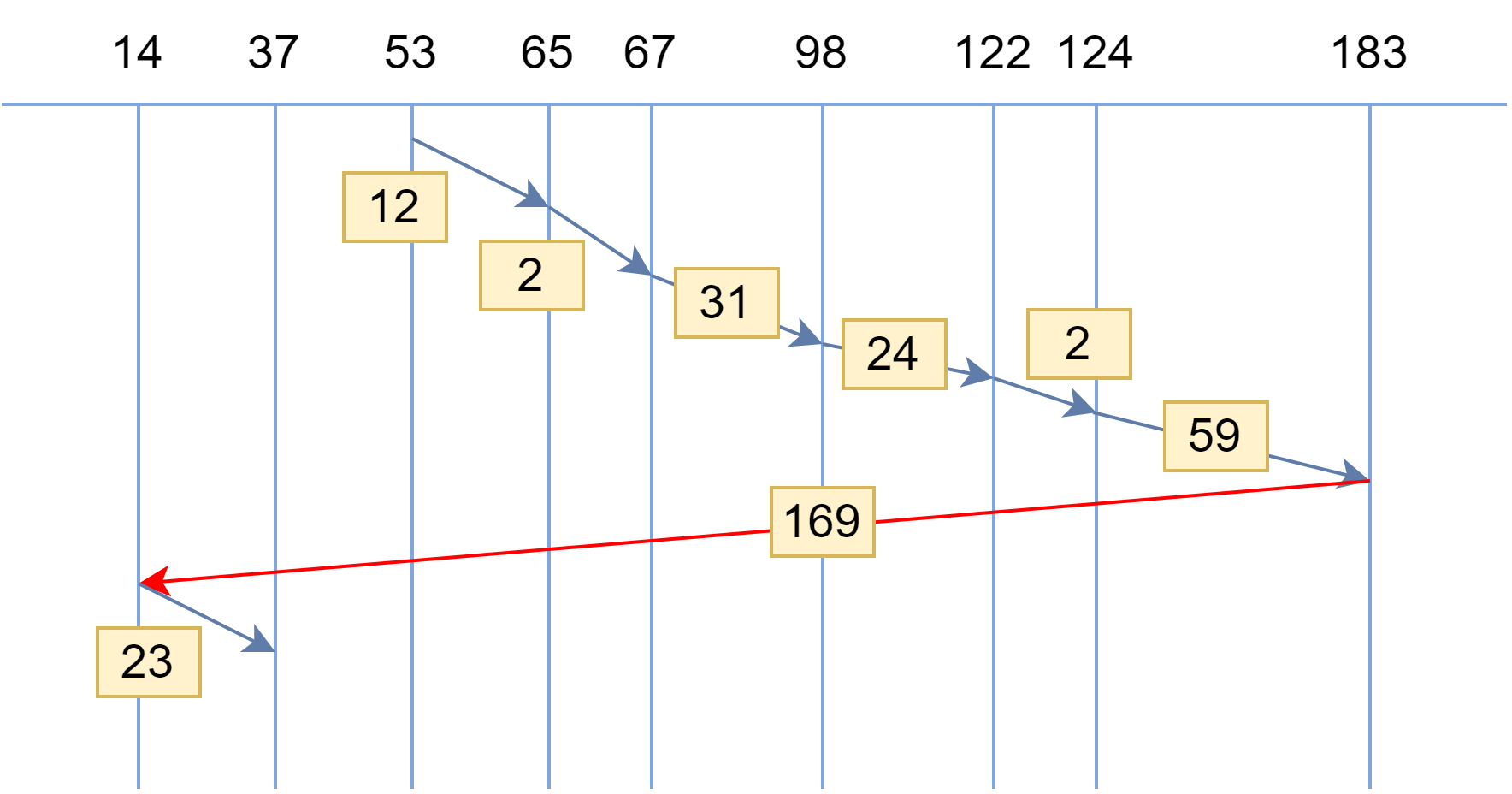
目录 5.8.1 磁盘性能简述 1、磁盘的结构和布局 2、磁盘的类型 3、磁盘数据的组织和格式 4、磁盘的访问过程 5、磁盘访问时间 5.8.2 磁盘调度算法 1、先来先服务 FCFS 2、最短寻道时间优先 SSTF 3、扫描算法(电梯算法)SCAN 4、循环扫描算法 …...

springboot+vue留守儿童爱心网站(源码+文档)
风定落花生,歌声逐流水,大家好我是风歌,混迹在java圈的辛苦码农。今天要和大家聊的是一款基于springboot的留守儿童爱心网站。项目源码以及部署相关请联系风歌,文末附上联系信息 。 💕💕作者:风…...
数字设计小思 - 谈谈非理想时钟的时钟偏差
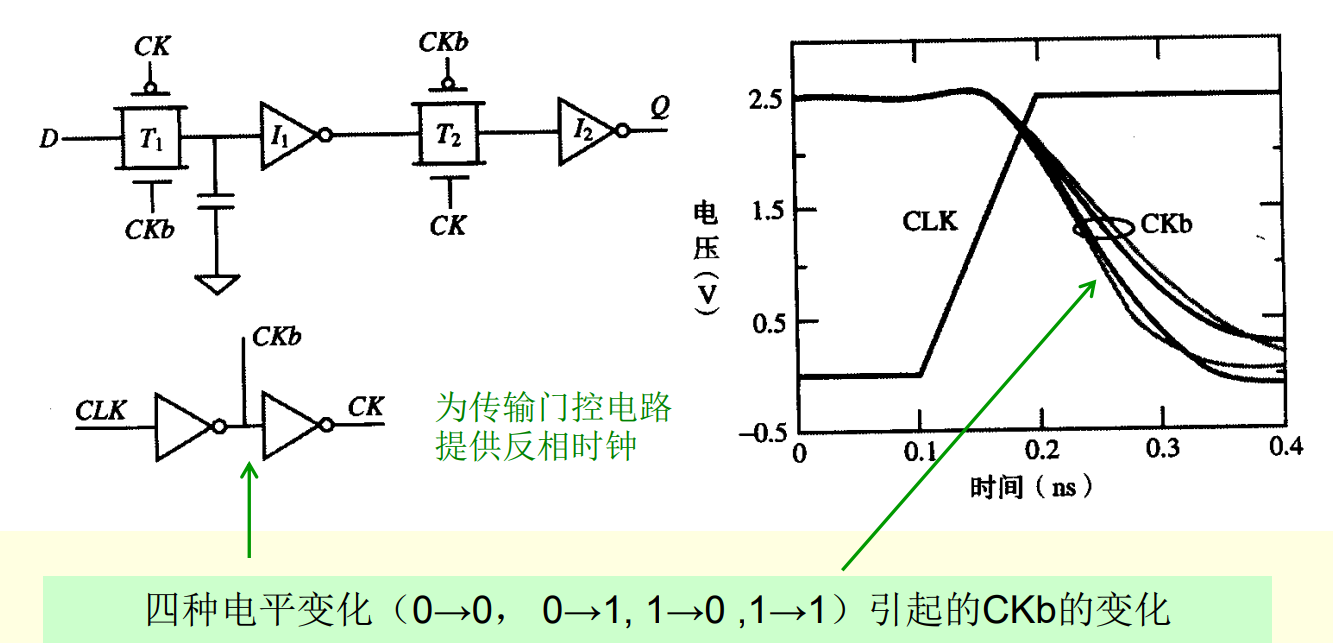
写在前面 本系列整理数字系统设计的相关知识体系架构,为了方便后续自己查阅与求职准备。在FPGA和ASIC设计中,时钟信号的好坏很大程度上影响了整个系统的稳定性,本文主要介绍了数字设计中的非理想时钟的偏差来源与影响。 (本文长…...
智慧厕所引导系统的应用
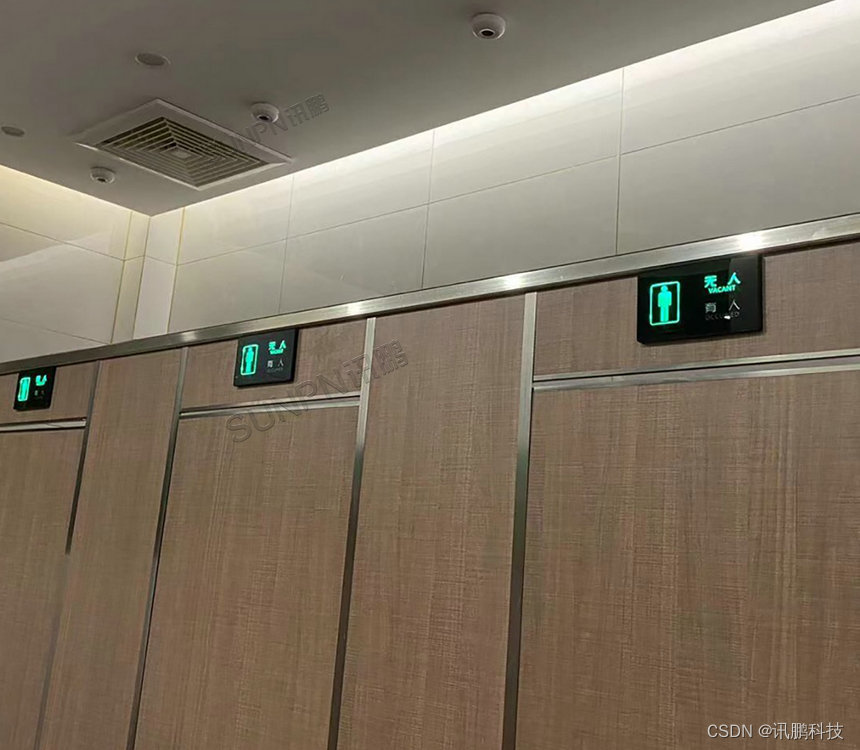
智慧公厕引导系统是一种基于智能化技术的公厕管理系统,可以为如厕者提供更加便捷、舒适、安全的如厕环境和服务,同时也可以引导如厕者文明如厕,营造文明公厕的氛围。智慧公厕引导系统可以通过智能引导屏、手机小程序等方式,为如厕…...
眼球追踪、HDR、VST,从代码挖掘Valve下一代VR头显
擅长爆料、挖掘线索的Brad Lynch,此前发布了Quest Pro等设备的线索文章引发关注。近期,又公布一系列与“Valve Deckard”VR头显相关消息,比如支持眼球追踪、HDR、VST透视、Wi-Fi网络等等。在SteamVR 1.26.1测试版更新、Steam用户端、Gamesc…...
【MYSQL】聚合函数和单表/多表查询练习、子查询、内外连接
目录 1.聚合函数 1.1.group by子句 1.2.having语句 2.单表查询 2.2单表查询 3.多表查询 3.2.子查询 5.内链接 6.外连接 1.聚合函数 函数说明count返回查询到的数据的数量sum返回查询到的数据的总和avg返回查询到的数据的平均值max返回查询到的数据的最大值min返回查询…...
分布式数据库集成解决方案
分布式数据库集成解决方案 分析访问部署扩展.1 以界面方式创建数据库(采用DBCA) # 背景 由于公司业务的发展,要求在其它三个城市设立货仓,处理发货业务。公司本部运行着一套用Sybase数据库的MIS系统可以实现发货,该系统…...

如何配置静态路由?这个实例详解交换机的静态路由配置
一、什么是静态路由 静态路由是一种路由的方式,它需要通过手动配置。静态路由与动态路由不同,静态路由是固定的,不会改变。一般来说,静态路由是由网络管理员逐项加入路由表,简单来说,就是需要手动添加的。…...

OpenCV教程——图像操作。读写像素值,与/或/非/异或操作,ROI
1.读取像素值 我们可以通过mat.ptr<uchar>()获取图像某一行像素数组的指针。因此如果想要读取点(x50,y0)(⚠️即(row0,col50))的像素值,可以这样做:mat.ptr<uchar>(0)[50]。 在本节将介绍另外几种直接读…...
Winforms不可见组件开发
Winforms不可见组件开发 首先介绍基本知识,有很多的朋友搞不清楚Component与Control之间的区别,比较简单形象的区别有下面两点: 1、Component在运行时不能呈现UI,而Control可以在运行时呈现UI。 2、Component是贴在容器Container上的,而Control则是贴…...

静态链接库与动态链接库
静态链接库与动态链接库 一、从源程序到可执行文件二、编译、链接和装入三、静态链接库与动态链接库四、静态链接库与动态链接库的制作与使用1.静态库的制作及使用2.动态库的制作及使用 一、从源程序到可执行文件 由于计算机无法直接理解和执行高级语言(C、C、Java…...

ffmpeg 抓取一帧数据
FFmpeg功能比较强大,这里记录一条从摄像机抓拍的一条命令: ffmpeg.exe -i rtsp://admin:hisense2021192.168.1.64:554/live0.264 -r 1 -ss 00:00:00 -t 00:00:01 -f image2 image.jpg ; ---执行成功。 这是一条网络摄像机的抓图命令,其实就…...

基于Arduino的模块化DIY智能时钟:从RTC到RGB LED的完整实现
1. 项目概述:打造一台高度可定制的DIY RGB LED时钟如果你和我一样,对市面上千篇一律的电子钟感到审美疲劳,同时又对Arduino和电子DIY充满热情,那么这个项目可能就是为你准备的。我们不是在简单地组装一个套件,而是在亲…...

如何在macOS上免费解锁QQ音乐加密文件:完整指南
如何在macOS上免费解锁QQ音乐加密文件:完整指南 【免费下载链接】QMCDecode QQ音乐QMC格式转换为普通格式(qmcflac转flac,qmc0,qmc3转mp3, mflac,mflac0等转flac),仅支持macOS,可自动识别到QQ音乐下载目录,默认转换结果…...

【DeepSeek架构评审功能深度解密】:20年架构师亲授3大避坑指南与5步落地 checklist
更多请点击: https://kaifayun.com 第一章:DeepSeek架构评审功能全景概览 DeepSeek架构评审功能是一套面向大模型系统设计与工程落地的自动化分析框架,聚焦于模型结构合理性、计算图优化潜力、内存访问模式、算子兼容性及部署约束等多维度评…...

碧蓝航线自动化脚本终极指南:3小时学会全自动游戏管理
碧蓝航线自动化脚本终极指南:3小时学会全自动游戏管理 【免费下载链接】AzurLaneAutoScript Azur Lane bot (CN/EN/JP/TW) 碧蓝航线脚本 | 无缝委托科研,全自动大世界 项目地址: https://gitcode.com/gh_mirrors/az/AzurLaneAutoScript 还在为碧蓝…...

航空发动机叶片三维扫描-诺斯顿
航空发动机叶片作为发动机的核心动力部件,其精度与性能直接决定发动机的推力、燃油效率及运行安全性,三维扫描技术作为航空制造领域的核心数字化手段,已广泛应用于叶片全生命周期的多个关键环节。其应用涵盖叶片研发设计阶段的逆向工程&#…...

如何利用开源工具Unlock-Music解决音乐平台加密格式兼容问题
如何利用开源工具Unlock-Music解决音乐平台加密格式兼容问题 【免费下载链接】unlock-music 在浏览器中解锁加密的音乐文件。原仓库: 1. https://github.com/unlock-music/unlock-music ;2. https://git.unlock-music.dev/um/web 项目地址: https://gi…...

AI算法工程师如何进行模型部署?这2个工具+3个技巧,快速上线
对于软件测试从业者来说,模型部署并不是一个陌生的概念——随着AI功能逐渐渗透到各类应用软件中,测试工程师不仅需要验证模型输出的准确性,更需要理解部署流程对模型稳定性、响应速度和结果一致性的影响。很多测试同学会有这样的困惑…...

ComfyUI-Manager完全指南:掌握AI工作流管理的核心技术
ComfyUI-Manager完全指南:掌握AI工作流管理的核心技术 【免费下载链接】ComfyUI-Manager ComfyUI-Manager is an extension designed to enhance the usability of ComfyUI. It offers management functions to install, remove, disable, and enable various custo…...

CentOS 8/Stream 8系统DNF换源后,安装软件还是慢?试试这几个排查命令和优化技巧
CentOS 8/Stream 8系统DNF换源后安装缓慢的深度排查与优化指南当你已经按照教程将CentOS 8/Stream 8的DNF源切换为国内镜像,却发现软件安装速度依然不尽如人意时,这种体验确实令人沮丧。作为长期使用CentOS系统的技术专家,我完全理解这种&quo…...

你的差异基因结果可靠吗?用MetaVolcanoR给多个GEO数据集做一次‘交叉验证’吧
你的差异基因结果可靠吗?用MetaVolcanoR给多个GEO数据集做一次"交叉验证"当你在GEO数据库中下载了三个肺癌研究的差异表达结果,却发现三个DEG列表的重叠基因不到20%——这种令人沮丧的场景每天都在全球实验室上演。单项研究的差异分析结果就像…...