
Java I/O之文件系统
一、全文概览
在学习文件系统之前,需要了解下Java在I/O上的发展史:在Java7之前,打开和读取文件需要编写特别笨拙的代码,涉及到很多的InputStream、OutputStream等组合起来使用,每次在使用时或许都需要查一下文档才能记得如何打开一个文件;而在Java 7面世后,这些被人诟病的设计得到了巨大的改进,这些新元素被打包放在了java.nio.file之下。这个包对Java对文件的操作提升到了可以与其他编程语言媲美的程度。
本篇文章就主要学习记录下操作文件的两个基本组件:
- 文件或目录的路径-Path
- 文件本身-File
二、组件一:Path(路径)
1、Path简介
Path对象代表的是一个文件或目录的路径,它是在不同的操作系统和文件系统之上的抽象。它的目的是,我们不必要注意底层的操作系统,我们的代码不需要重写就能在不同的操作系统上工作 —来自:《OnJava-基础篇》
2、Path创建
介绍完Path出现的目的后,我们再来看下如果获取Path。正是java.nio.file.Paths类下重载的static get方法,这个方法的参数可以是接受一个String序列(也就是全路径,系统能够找到的);也可以是一个统一的资源标识符(URI),然后将其转换为Path
下面是对Path以及Files工具类的使用示例
package com.markus.java.file;import com.markus.java.file.constant.FileConstant;import java.io.File;
import java.io.IOException;
import java.net.URI;
import java.nio.file.FileSystems;
import java.nio.file.Files;
import java.nio.file.Path;
import java.nio.file.Paths;/*** @Author: zhangchenglong06* @Date: 2023/2/7* @Description:*/
public class PathInfo {static void show(String id, Object p) {System.out.println(id + p);}static void info(Path path) {show("toString: \n", path);// 路径是否存在show("Exists: ", Files.exists(path));// 是否是常规文件,也就是我们常规意义上的文件,例如.txt .png等,而非目录show("RegularFile: ", Files.isRegularFile(path));// 是否是目录show("Directory: ", Files.isDirectory(path));// 展示绝对路径show("Absolute: ", path.toAbsolutePath());// 展示文件名(最后一级)show("FileName: ", path.getFileName());// 展示父路径show("Parent: ", path.getParent());// 展示根路径show("Root: ", path.getRoot());System.out.println("****************************************************************************************");}public static void main(String[] args) {System.out.println(System.getProperty("os.name"));info(FileSystems.getDefault().getPath(""));info(Paths.get("io/src/main/resources", "file", "file.txt"));Path path = Paths.get(FileConstant.CURRENT_BASE_PATH, "/PathInfo.java");info(path);Path ap = path.toAbsolutePath();info(ap);info(ap.getParent());try {info(ap.toRealPath());} catch (IOException e) {System.out.println(e);}URI uri = path.toUri();System.out.println("URI:\n" + uri);Path pathUri = Paths.get(uri);System.out.println(Files.exists(pathUri));// 不要被骗了File f = ap.toFile();}
}
/** 输出* Mac OS X* toString:** Exists: true* RegularFile: false* Directory: true* Absolute: /Users/zhangchenglong/IdeaProjects/OnJava8-Examples* FileName:* Parent: null* Root: null* ***************************************************************************************** toString:* io/src/main/resources/file/file.txt* Exists: false* RegularFile: false* Directory: false* Absolute: /Users/zhangchenglong/IdeaProjects/OnJava8-Examples/io/src/main/resources/file/file.txt* FileName: file.txt* Parent: io/src/main/resources/file* Root: null* ***************************************************************************************** toString:* io/src/main/java/com/markus/java/file/PathInfo.java* Exists: true* RegularFile: true* Directory: false* Absolute: /Users/zhangchenglong/IdeaProjects/OnJava8-Examples/io/src/main/java/com/markus/java/file/PathInfo.java* FileName: PathInfo.java* Parent: io/src/main/java/com/markus/java/file* Root: null* ***************************************************************************************** toString:* /Users/zhangchenglong/IdeaProjects/OnJava8-Examples/io/src/main/java/com/markus/java/file/PathInfo.java* Exists: true* RegularFile: true* Directory: false* Absolute: /Users/zhangchenglong/IdeaProjects/OnJava8-Examples/io/src/main/java/com/markus/java/file/PathInfo.java* FileName: PathInfo.java* Parent: /Users/zhangchenglong/IdeaProjects/OnJava8-Examples/io/src/main/java/com/markus/java/file* Root: /* ***************************************************************************************** toString:* /Users/zhangchenglong/IdeaProjects/OnJava8-Examples/io/src/main/java/com/markus/java/file* Exists: true* RegularFile: false* Directory: true* Absolute: /Users/zhangchenglong/IdeaProjects/OnJava8-Examples/io/src/main/java/com/markus/java/file* FileName: file* Parent: /Users/zhangchenglong/IdeaProjects/OnJava8-Examples/io/src/main/java/com/markus/java* Root: /* ***************************************************************************************** toString:* /Users/zhangchenglong/IdeaProjects/OnJava8-Examples/io/src/main/java/com/markus/java/file/PathInfo.java* Exists: true* RegularFile: true* Directory: false* Absolute: /Users/zhangchenglong/IdeaProjects/OnJava8-Examples/io/src/main/java/com/markus/java/file/PathInfo.java* FileName: PathInfo.java* Parent: /Users/zhangchenglong/IdeaProjects/OnJava8-Examples/io/src/main/java/com/markus/java/file* Root: /* ***************************************************************************************** URI:* file:///Users/zhangchenglong/IdeaProjects/OnJava8-Examples/io/src/main/java/com/markus/java/file/PathInfo.java* true** Process finished with exit code 0*/
3、Path片段
所谓Path片段即是Path对象路径的各个部分,例如/Users/zhangchenglong/IdeaProjects/OnJava8-Examples/io/src/main/java/com/markus/java中每个//之间的内容都是一个片段
package com.markus.java.file;import com.markus.java.file.constant.FileConstant;import java.nio.file.Path;
import java.nio.file.Paths;/*** @Author: zhangchenglong06* @Date: 2023/2/7* @Description:*/
public class PartsOfPaths {public static void main(String[] args) {System.out.println(System.getProperty("os.name"));Path p = Paths.get(FileConstant.CURRENT_BASE_PATH, "/PartsOfPaths.java");for (int i = 0; i < p.getNameCount(); i++) {System.out.println(p.getName(i));}System.out.println("ends with '.java': " + p.endsWith(".java"));for (Path path : p) {System.out.print(path + ": ");System.out.print(p.startsWith(path) + " : ");System.out.println(p.endsWith(path));}System.out.println("Starts with " + p.toAbsolutePath().getRoot() + " " + p.toAbsolutePath().startsWith(p.toAbsolutePath().getRoot()));}
}
/** 输出* Mac OS X* io* src* main* java* com* markus* java* file* PartsOfPaths.java* ends with '.java': false* io: true : false* src: false : false* main: false : false* java: false : false* com: false : false* markus: false : false* java: false : false* file: false : false* PartsOfPaths.java: false : true* Starts with / true*/
我们还可以对片段进行添加和删除,需要学习api如下:
- Path#relativize : 在路径首部删除基准路径形成新的路径
- Path#normalize : 删除冗余名称元素的路径
- Path#resolve : 在Path对象后面增加路径片段
package com.markus.java.file;import com.markus.java.file.constant.FileConstant;import java.io.IOException;
import java.nio.file.Path;
import java.nio.file.Paths;/*** @Author: zhangchenglong06* @Date: 2023/2/8* @Description: 添加或删除路径片段* relativize 删除基准路径* resolve 增加路径*/
public class AddAndSubtractPaths {static Path base = Paths.get("..", "..", "..").toAbsolutePath().normalize();static void show(int id, Path result) {if (result.isAbsolute()) {// result 在 路径首部删除base基准路径形成新的路径System.out.println("(" + id + ")r" + base.relativize(result));} else {System.out.println("(" + id + ")" + result);}try {System.out.println("RealPath: " + result.toRealPath());} catch (IOException e) {System.out.println(e);}}public static void main(String[] args) {System.out.println(System.getProperty("os.name"));System.out.println(base);Path p = Paths.get(FileConstant.CURRENT_BASE_PATH, "/AddAndSubtractPaths.java").toAbsolutePath();show(1, p);Path convoluted = p.getParent().getParent().resolve("strings").resolve("..").resolve(p.getParent().getFileName());show(2, convoluted);show(3, convoluted.normalize());Path p2 = Paths.get("..", "..");show(4, p2);// normalize 意为删除了冗余名称元素的路径// 例如 ./ 直接删除即可// 例如 strings/../ 直接删除两个元素即可show(5, p2.normalize());show(6, p2.toAbsolutePath());Path p3 = Paths.get(".").toAbsolutePath();// p3在自身路径后面追加p2组成新的路径Path p4 = p3.resolve(p2);show(7, p4);show(8, p4.normalize());Path p5 = Paths.get("").toAbsolutePath();show(9, p5);show(10, p5.resolveSibling("strings"));show(11, Paths.get("nonexistent"));}
}
/** 输出*  Mac OS X* /Users* (1)rzhangchenglong/IdeaProjects/OnJava8-Examples/io/src/main/java/com/markus/java/file/AddAndSubtractPaths.java* RealPath: /Users/zhangchenglong/IdeaProjects/OnJava8-Examples/io/src/main/java/com/markus/java/file/AddAndSubtractPaths.java* (2)rzhangchenglong/IdeaProjects/OnJava8-Examples/io/src/main/java/com/markus/java/strings/../file* java.nio.file.NoSuchFileException: /Users/zhangchenglong/IdeaProjects/OnJava8-Examples/io/src/main/java/com/markus/java/strings/../file* (3)rzhangchenglong/IdeaProjects/OnJava8-Examples/io/src/main/java/com/markus/java/file* RealPath: /Users/zhangchenglong/IdeaProjects/OnJava8-Examples/io/src/main/java/com/markus/java/file* (4)../..* RealPath: /Users/zhangchenglong* (5)../..* RealPath: /Users/zhangchenglong* (6)rzhangchenglong/IdeaProjects/OnJava8-Examples/../..* RealPath: /Users/zhangchenglong* (7)rzhangchenglong/IdeaProjects/OnJava8-Examples/./../..* RealPath: /Users/zhangchenglong* (8)rzhangchenglong* RealPath: /Users/zhangchenglong* (9)rzhangchenglong/IdeaProjects/OnJava8-Examples* RealPath: /Users/zhangchenglong/IdeaProjects/OnJava8-Examples* (10)rzhangchenglong/IdeaProjects/strings* java.nio.file.NoSuchFileException: /Users/zhangchenglong/IdeaProjects/strings* (11)nonexistent* java.nio.file.NoSuchFileException: nonexistent*/
4、删除目录
Files工具类包含了操作目录和文件所需要的大部分操作,但其中缺乏删除目录树的工具方法,这里我们做个删除目录树工具的练习
package com.markus.java.file;import java.io.IOException;
import java.nio.file.FileVisitResult;
import java.nio.file.Files;
import java.nio.file.Path;
import java.nio.file.SimpleFileVisitor;
import java.nio.file.attribute.BasicFileAttributes;/*** @Author: zhangchenglong06* @Date: 2023/2/9* @Description:*/
public class RmDir {public static void rmdir(Path dir) throws IOException {Files.walkFileTree(dir, new SimpleFileVisitor<Path>() {/*** 在这个目录下的每个文件上运行* @param file* @param attrs* @return* @throws IOException*/@Overridepublic FileVisitResult visitFile(Path file, BasicFileAttributes attrs) throws IOException {Files.delete(file);return FileVisitResult.CONTINUE;}/*** 先进入当前目录下的文件和目录(包括所有的子目录),最后在当前目录上运行* @param dir* @param exc* @return* @throws IOException*/@Overridepublic FileVisitResult postVisitDirectory(Path dir, IOException exc) throws IOException {Files.delete(dir);return FileVisitResult.CONTINUE;}/*** 先在当前目录上运行,然后进入这个目录下的文件和目录* @param dir* @param attrs* @return* @throws IOException*/@Overridepublic FileVisitResult preVisitDirectory(Path dir, BasicFileAttributes attrs) throws IOException {return super.preVisitDirectory(dir, attrs);}/*** 当文件无法访问时调用* @param file* @param exc* @return* @throws IOException*/@Overridepublic FileVisitResult visitFileFailed(Path file, IOException exc) throws IOException {return super.visitFileFailed(file, exc);}});}
}
下面来检验下删除工具的有效性
package com.markus.java.file;import java.io.IOException;
import java.nio.file.FileSystems;
import java.nio.file.Files;
import java.nio.file.Path;
import java.nio.file.Paths;
import java.util.Arrays;
import java.util.Collections;
import java.util.List;import static com.markus.java.file.constant.FileConstant.CURRENT_BASE_PATH;/*** @Author: zhangchenglong06* @Date: 2023/2/9* @Description:*/
public class Directories {static Path test = Paths.get(CURRENT_BASE_PATH, "test");static String sep = FileSystems.getDefault().getSeparator();static List<String> parts = Arrays.asList("foo", "bar", "baz", "bag");static Path makeVariant() {// 移动指定列表的元素 distance 位// 例如 [1, 2, 3, 4, 5] 执行Collections.rotate(list.subList(1,4),1)// 结果 [1, 4, 3, 4, 5]Collections.rotate(parts, 1);return Paths.get(CURRENT_BASE_PATH, "test", String.join(sep, parts));}static void refreshTestDir() throws IOException {// 如果文件存在则删除,否则创建目录if (Files.exists(test)) {RmDir.rmdir(test);}if (!Files.exists(test)) {Files.createDirectory(test);}}static void populateTestDir() throws IOException {for (int i = 0; i < parts.size(); i++) {Path variant = makeVariant();if (!Files.exists(variant)) {Files.createDirectories(variant);Files.copy(Paths.get(CURRENT_BASE_PATH, "Directories.java"), variant.resolve("File" + i + ".txt"));Files.createTempFile(variant, null, null);}}}public static void main(String[] args) throws IOException {// 刷新测试目录refreshTestDir();// 在test路径下增加Hello.txt文件路径 并创建此路径文件Files.createFile(test.resolve("Hello.txt"));// 创建文件Path variant = makeVariant();try {// 创建一级目录的函数,当创建多级目录时会抛出文件不存在的异常Files.createDirectory(variant);} catch (Exception e) {System.out.println("Nope, that doesn't work." + e);}populateTestDir();Path tempDir = Files.createTempDirectory(test, "DIR_");Files.createTempFile(tempDir, "pre", ".non");// newDirectoryStream 只显示指定目录下的子目录或文件Files.newDirectoryStream(test).forEach(System.out::println);System.out.println("********************");// walk 可以浏览指定目录下的所有内容(目录树)Files.walk(test).forEach(System.out::println);}
}
/** 控制台* Nope, that doesn't work.java.nio.file.NoSuchFileException: io/src/main/java/com/markus/java/file/test/bag/foo/bar/baz* io/src/main/java/com/markus/java/file/test/DIR_260744175083605522* io/src/main/java/com/markus/java/file/test/foo* io/src/main/java/com/markus/java/file/test/baz* io/src/main/java/com/markus/java/file/test/bar* io/src/main/java/com/markus/java/file/test/bag* io/src/main/java/com/markus/java/file/test/Hello.txt* ********************* io/src/main/java/com/markus/java/file/test* io/src/main/java/com/markus/java/file/test/DIR_260744175083605522* io/src/main/java/com/markus/java/file/test/DIR_260744175083605522/pre7111318949801779914.non* io/src/main/java/com/markus/java/file/test/foo* io/src/main/java/com/markus/java/file/test/foo/bar* io/src/main/java/com/markus/java/file/test/foo/bar/baz* io/src/main/java/com/markus/java/file/test/foo/bar/baz/bag* io/src/main/java/com/markus/java/file/test/foo/bar/baz/bag/File2.txt* io/src/main/java/com/markus/java/file/test/foo/bar/baz/bag/2694156263661518806.tmp* io/src/main/java/com/markus/java/file/test/baz* io/src/main/java/com/markus/java/file/test/baz/bag* io/src/main/java/com/markus/java/file/test/baz/bag/foo* io/src/main/java/com/markus/java/file/test/baz/bag/foo/bar* io/src/main/java/com/markus/java/file/test/baz/bag/foo/bar/File0.txt* io/src/main/java/com/markus/java/file/test/baz/bag/foo/bar/6305328343447758907.tmp* io/src/main/java/com/markus/java/file/test/bar* io/src/main/java/com/markus/java/file/test/bar/baz* io/src/main/java/com/markus/java/file/test/bar/baz/bag* io/src/main/java/com/markus/java/file/test/bar/baz/bag/foo* io/src/main/java/com/markus/java/file/test/bar/baz/bag/foo/File1.txt* io/src/main/java/com/markus/java/file/test/bar/baz/bag/foo/5478658539929705751.tmp* io/src/main/java/com/markus/java/file/test/bag* io/src/main/java/com/markus/java/file/test/bag/foo* io/src/main/java/com/markus/java/file/test/bag/foo/bar* io/src/main/java/com/markus/java/file/test/bag/foo/bar/baz* io/src/main/java/com/markus/java/file/test/bag/foo/bar/baz/File3.txt* io/src/main/java/com/markus/java/file/test/bag/foo/bar/baz/5014150493260271159.tmp* io/src/main/java/com/markus/java/file/test/Hello.txt*/
5、Path监听和查找
FileSystems(文件系统)可以获得两个的API:
- WatchService: 监听Path
- TreeMatcher: 查找Path
下面我们看下代码示例:
- WatchService
package com.markus.java.file;import com.markus.java.file.constant.FileConstant;import java.io.IOException;
import java.nio.file.*;
import java.util.concurrent.Executors;
import java.util.concurrent.TimeUnit;import static java.nio.file.StandardWatchEventKinds.ENTRY_DELETE;/*** @Author: zhangchenglong06* @Date: 2023/2/10* @Description:*/
public class PathWatcher {static Path test = Paths.get(FileConstant.CURRENT_BASE_PATH, "test");static void delTxtFiles() {try {Files.walk(test).filter(f -> f.toString().endsWith(".txt")).forEach(f -> {System.out.println("deleting " + f);try {Files.delete(f);} catch (IOException e) {throw new RuntimeException(e);}});} catch (IOException e) {throw new RuntimeException(e);}}public static void main(String[] args) throws IOException, InterruptedException {// 刷新目录Directories.refreshTestDir();// 创建目录下的文件Directories.populateTestDir();Files.createFile(test.resolve("Hello.txt"));WatchService watcher = FileSystems.getDefault().newWatchService();// 只能监听到当前目录下操作,子目录下的文件操作不会被监听到test.register(watcher, ENTRY_DELETE);Executors.newSingleThreadScheduledExecutor().schedule(PathWatcher::delTxtFiles, 250, TimeUnit.MILLISECONDS);WatchKey key = watcher.take();for (WatchEvent<?> evt : key.pollEvents()) {System.out.println("evt.context(): " + evt.context() +"\nevt.count(): " + evt.count() +"\nevt.kind(): " + evt.kind());System.exit(0);}}
}
/** 控制台* deleting io/src/main/java/com/markus/java/file/test/foo/bar/baz/bag/File3.txt* deleting io/src/main/java/com/markus/java/file/test/baz/bag/foo/bar/File1.txt* deleting io/src/main/java/com/markus/java/file/test/bar/baz/bag/foo/File2.txt* deleting io/src/main/java/com/markus/java/file/test/bag/foo/bar/baz/File0.txt* deleting io/src/main/java/com/markus/java/file/test/Hello.txt* evt.context(): Hello.txt* evt.count(): 1* evt.kind(): ENTRY_DELETE*/
上面的代码会有个缺陷,就是它只能监听到当前目录的操作,而无法查找当前目录下所有的子目录的操作行为,如果想监听整个目录树,则必须在整个树的每个子目录上设置一个WatchService
package com.markus.java.file;import com.markus.java.file.constant.FileConstant;import java.io.IOException;
import java.nio.file.*;
import java.util.concurrent.Executors;import static java.nio.file.StandardWatchEventKinds.ENTRY_DELETE;/*** @Author: zhangchenglong06* @Date: 2023/2/10* @Description:*/
public class TreeWatcher {static void watchDir(Path dir) {try {WatchService watcher = FileSystems.getDefault().newWatchService();dir.register(watcher, ENTRY_DELETE);Executors.newSingleThreadScheduledExecutor().submit(() -> {try {WatchKey key = watcher.take();for (WatchEvent<?> evt : key.pollEvents()) {System.out.println("evt.context(): " + evt.context() +"\nevt.count(): " + evt.count() +"\nevt.kind(): " + evt.kind());System.exit(0);}} catch (InterruptedException e) {return;}});} catch (IOException e) {throw new RuntimeException(e);}}public static void main(String[] args) throws IOException {Directories.refreshTestDir();Directories.populateTestDir();Files.walk(Paths.get(FileConstant.CURRENT_BASE_PATH, "test")).filter(Files::isDirectory).forEach(TreeWatcher::watchDir);PathWatcher.delTxtFiles();}
}
/** 控制台* deleting io/src/main/java/com/markus/java/file/test/foo/bar/baz/bag/File3.txt* deleting io/src/main/java/com/markus/java/file/test/baz/bag/foo/bar/File1.txt* deleting io/src/main/java/com/markus/java/file/test/bar/baz/bag/foo/File2.txt* deleting io/src/main/java/com/markus/java/file/test/bag/foo/bar/baz/File0.txt* evt.context(): File1.txt* evt.count(): 1* evt.kind(): ENTRY_DELETE* evt.context(): File0.txt* evt.count(): 1* evt.kind(): ENTRY_DELETE*/
- PathMatcher
package com.markus.java.file;import com.markus.java.file.constant.FileConstant;import java.io.IOException;
import java.nio.file.*;/*** @Author: zhangchenglong06* @Date: 2023/2/10* @Description:*/
public class Find {public static void main(String[] args) throws IOException {Path test = Paths.get(FileConstant.CURRENT_BASE_PATH, "test");Directories.refreshTestDir();Directories.populateTestDir();Files.createDirectory(test.resolve("dir.tmp"));PathMatcher matcher = FileSystems.getDefault().getPathMatcher("glob:**/*.{tmp,txt}");Files.walk(test).filter(matcher::matches).forEach(System.out::println);System.out.println("*******************");PathMatcher matcher2 = FileSystems.getDefault().getPathMatcher("glob:*.tmp");Files.walk(test).map(Path::getFileName).filter(matcher2::matches).forEach(System.out::println);System.out.println("*******************");Files.walk(test).filter(Files::isRegularFile).map(Path::getFileName).filter(matcher2::matches).forEach(System.out::println);}
}
/** 控制台* io/src/main/java/com/markus/java/file/test/foo/bar/baz/bag/File3.txt* io/src/main/java/com/markus/java/file/test/foo/bar/baz/bag/2767500121528410890.tmp* io/src/main/java/com/markus/java/file/test/baz/bag/foo/bar/File1.txt* io/src/main/java/com/markus/java/file/test/baz/bag/foo/bar/5789074899285883862.tmp* io/src/main/java/com/markus/java/file/test/dir.tmp* io/src/main/java/com/markus/java/file/test/bar/baz/bag/foo/File2.txt* io/src/main/java/com/markus/java/file/test/bar/baz/bag/foo/5458649986440731775.tmp* io/src/main/java/com/markus/java/file/test/bag/foo/bar/baz/File0.txt* io/src/main/java/com/markus/java/file/test/bag/foo/bar/baz/5568292198534480479.tmp* ******************** 2767500121528410890.tmp* 5789074899285883862.tmp* dir.tmp* 5458649986440731775.tmp* 5568292198534480479.tmp* ******************** 2767500121528410890.tmp* 5789074899285883862.tmp* 5458649986440731775.tmp* 5568292198534480479.tmp*/
三、组件二:File(文件)
在上面,主要学习记录了对路径目录的操作,现在来学习下如果操作文件本身的内容,也就是如何进行读写文件:
- 通过Files.readAllLines 可以一次性的读入整个文件,生成一个List<String>。ps:这里不建议一次性读入大文件,会撑爆内存的
package com.markus.java.file;import java.io.IOException;
import java.nio.file.Files;
import java.nio.file.Paths;/*** @author: markus* @date: 2023/2/15 10:39 PM* @Description:* @Blog: https://markuszhang.com* It's my honor to share what I've learned with you!*/
public class ListOfLines {public static void main(String[] args) throws IOException {Files.readAllLines(Paths.get("io/src/main/resources/file_writer.txt")).forEach(System.out::println);}
}
/** 控制台* Hello,IO*/
- 通过Files.write可以将byte数组或任何实现了Iterable接口的类的对象写入文件
package com.markus.java.file;import com.markus.java.file.constant.FileConstant;import java.io.IOException;
import java.nio.charset.Charset;
import java.nio.file.Files;
import java.nio.file.Paths;
import java.util.List;
import java.util.Random;/*** @author: markus* @date: 2023/2/16 10:33 PM* @Description:* @Blog: https://markuszhang.com* It's my honor to share what I've learned with you!*/
public class Writing {static Random rand = new Random(47);static final int SIZE = 1000;public static void main(String[] args) throws IOException {// 将字节写入一个文件byte[] bytes = new byte[SIZE];rand.nextBytes(bytes);
//        Files.write(Paths.get(FileConstant.CURRENT_BASE_PATH, "bytes.txt"), bytes, Charset.forName("charset"));Files.write(Paths.get(FileConstant.CURRENT_BASE_PATH, "bytes.txt"), bytes);System.out.println("bytes.txt: " + Files.size(Paths.get(FileConstant.CURRENT_BASE_PATH, "bytes.txt")));// 将实现了Iterable接口的类的对象写入一个文件List<String> lines = Files.readAllLines(Paths.get("io/src/main/resources/file_writer.txt"));Files.write(Paths.get("io/src/main/resources/file_writer.txt"), lines);System.out.println("file_writer.txt: " + Files.size(Paths.get("io/src/main/resources/file_writer.txt")));}
}
/*** 控制台* bytes.txt: 1000* file_writer.txt: 9*/
- 通过Files.lines可以很方便的将一个文件变为一个由行组成的Stream,这样可以应对当文件非常大,而我们只需要文件的一部分时,进行读取,而非全部读入内存当中
package com.markus.java.file;import com.markus.java.file.constant.FileConstant;import java.io.IOException;
import java.nio.file.Files;
import java.nio.file.Paths;/*** @author: markus* @date: 2023/2/16 10:47 PM* @Description:* @Blog: https://markuszhang.com* It's my honor to share what I've learned with you!*/
public class ReadLineStream {public static void main(String[] args) throws IOException {Files.lines(Paths.get(FileConstant.CURRENT_BASE_PATH, "PathInfo.java")).skip(13).findFirst().ifPresent(System.out::println);}
}
/** 控制台*  * @Author: zhangchenglong06*/
- 通过Files.lines我们也可以实现由行组成的输入流来在流中完成读取、处理、写入等操作
package com.markus.java.file;import com.markus.java.file.constant.FileConstant;import java.io.IOException;
import java.io.PrintWriter;
import java.nio.file.Files;
import java.nio.file.Paths;
import java.util.stream.Stream;/*** @author: markus* @date: 2023/2/16 10:52 PM* @Description:* @Blog: https://markuszhang.com* It's my honor to share what I've learned with you!*/
public class StreamInAndOut {public static void main(String[] args) {try (Stream<String> input = Files.lines(Paths.get(FileConstant.CURRENT_BASE_PATH, "StreamInAndOut.java"));PrintWriter writer = new PrintWriter(FileConstant.CURRENT_BASE_PATH + "StreamInAndOut.txt");) {input.map(String::toUpperCase).forEachOrdered(writer::println);} catch (IOException e) {e.printStackTrace();}}
}
四、全文总结
本文记录了基于Path、Paths、File、Files等抽象对文件、目录相关的操作,摒弃了传统的Java I/O操作类,它使得我们对文件等的操作更加简单,它屏蔽了用户与底层的交互,也使得代码可以跨平台运行。
相关文章:

Java I/O之文件系统
一、全文概览 在学习文件系统之前,需要了解下Java在I/O上的发展史:在Java7之前,打开和读取文件需要编写特别笨拙的代码,涉及到很多的InputStream、OutputStream等组合起来使用,每次在使用时或许都需要查一下文档才能记…...

Mysql元数据获取方法(information_schema绕过方法)
前提:如果waf或其它过滤了information_schema关键字,那我们该如何获取元数据呢?能够代替information_schema的有:sys.schema_auto_increment_columnssys.schema_table_statistics_with_bufferx$schema_table_statistics_with_buff…...

Eclipse快捷键
* 1.补全代码的声明:alt /* 2.快速修复: ctrl 1 * 3.批量导包:ctrl shift o* 4.使用单行注释:ctrl /* 5.使用多行注释: ctrl shift / * 6.取消多行注释:ctrl shift \* 7.复制指定行的代码:ctrl a…...
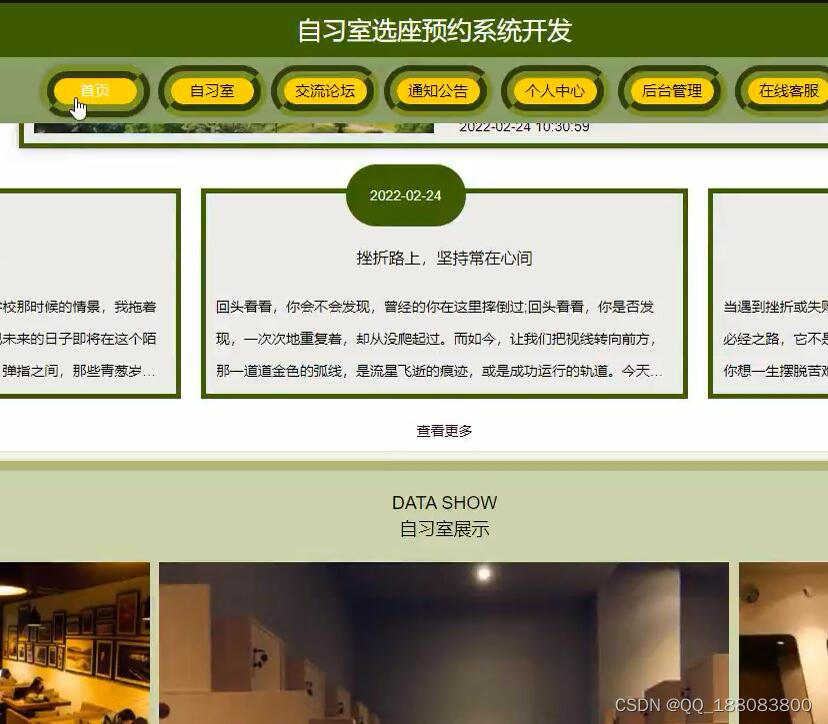
java ssm自习室选座预约系统开发springmvc
人工管理显然已无法应对时代的变化,而自习室选座预约系统开发能很好地解决这一问题,既能提高人力物力,又能提高预约选座的知名度,取代人工管理是必然趋势。 本自习室选座预约系统开发以SSM作为框架,JSP技术,…...

分享我从功能测试转型到测试开发的真实故事
由于这段时间我面试了很多家公司,也经历了之前公司的不愉快。所以我想写一篇文章来分享一下自己的面试体会。希望能对我在之后的工作或者面试中有一些帮助,也希望能帮助到正在找工作的你。 找工作 我们总是草率地进入一个自己不了解的公司工作…...

TypeScript快速入门———(二)TypeScript常用类型
文章目录概述1 类型注解2 常用基础类型概述3.原始类型4 数组类型5 类型别名6.函数类型7 对象类型8 接口9 元组10 类型推论11 类型断言12 字面量类型13 枚举14 any 类型15 typeof概述 TypeScript 是 JS 的超集,TS 提供了 JS 的所有功能,并且额外的增加了…...
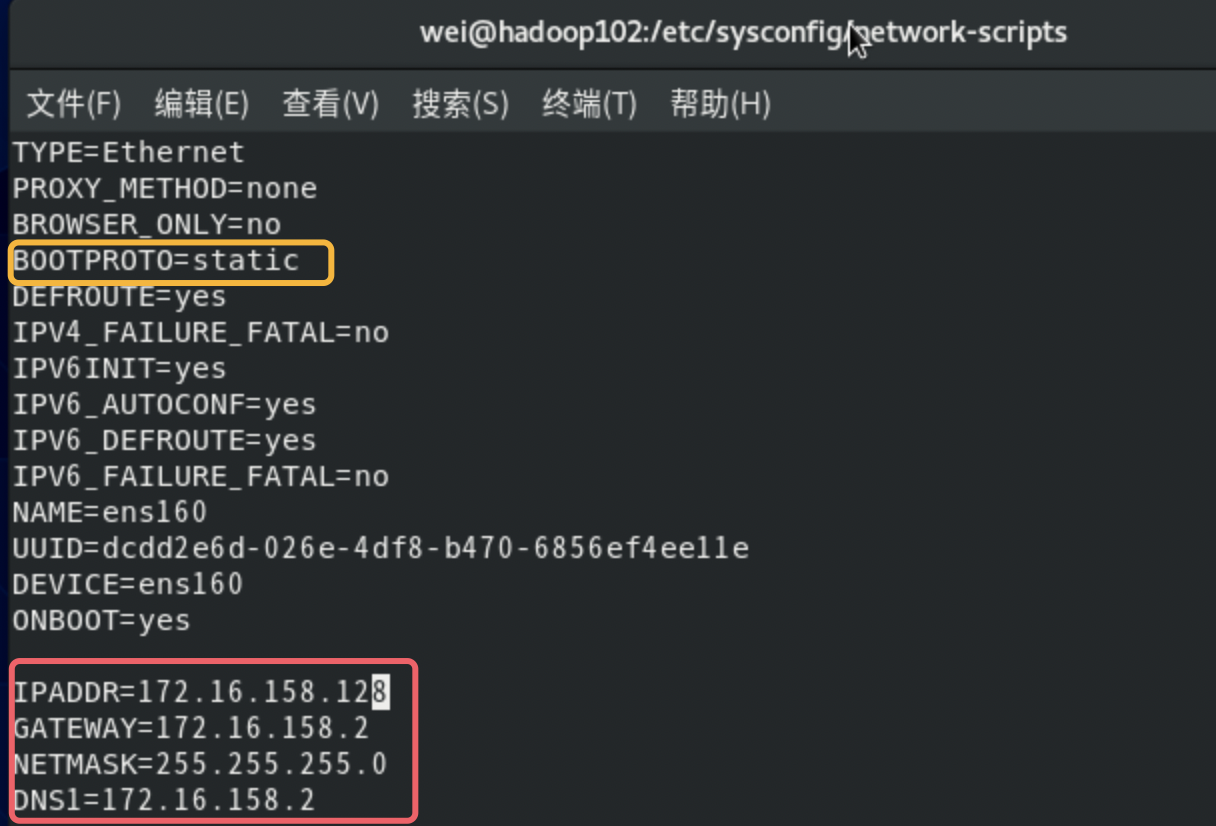
Mac M1 使用Centos8➕VMware Fusion进行静态网络配置
大部分的流程网络上面都有当我们已经下载好mac m1版的Centos8链接: https://pan.baidu.com/s/1UTl4Lo-_c17s-PDj3dA6kA 提取码: 7xh2 和VMware Fusionhttps://www.vmware.com/cn/products/fusion.html之后就可以进行安装了在导入过后 记得将硬盘和内存都设置好了 记得在关机状态…...

RadGraph: Extracting Clinical Entities and Relations from Radiology Reports代码
文章来源:NeurIPS 文章类别:IE(Information Extraction) RadGraph主要基于dygie,主要文件为inference.py。 inference.py: 1、get_file_list(data_path) def get_file_list(path):file_list [item for item in glob.glob(f&q…...

13. OPenGL与QT界面元素交互控制图形渲染
1. 说明: 前面文章中讲到的 OPenGL 渲染都是在页面加载完成即立刻渲染的,如果向控制图形渲染的时间,可以在QT界面中添加一些元素来进行控制。此时需要用到OPenGL当中的makeCurrent(),update(),doneCurrent()函数。 效果展示: ope…...

高通平台开发系列讲解(USB篇)libuvc详解
文章目录 一、什么是UVC二、UVC拓扑结构三、libuvc的预览时序图沉淀、分享、成长,让自己和他人都能有所收获!😄 📢本篇文章将介绍libuvc。 一、什么是UVC UVC,全称为:USB video(device) class。 UVC是微软与另外几家设备厂商联合推出的为USB视频捕获设备定义的协议标…...

ICC2:set_route_opt_target_endpoints
route_opt阶段通过指定endpoint/driver pin list的方式执行incremental优化。 set_route_opt_target_endpoints [-setup_endpoints file] [-setup_endpoints_collection pin_list] [-hold_endpoints file] [-hold_endpoints_collection pin_list] [-ldrc_objects fil…...

5、小程序面试题
1, 小程序页面有哪些生命周期函数onLoad: 页面加载onReady: 页面初次渲染完成onShow: 页面显示onHide: 页面隐藏onUnload: 页面卸载2, 一页小程序页面有哪些文件组成,分别有什么作用.wxml: 使用微信框架设计的一套组件构建页面结构.wxss: 用于设置页面样式, 和css基本一致.js :…...

Java特殊操作流
6 特殊操作流 6.1 标注输入输出流 System类中有两个静态的成员变量: public static final InputStream in:标准输入流,通常该流对应于键盘输入或由主机环境或用户指定的另一个输入源public static final PrintStream out:标准输…...

如何用SCRM销售管理系统管理销售和做销售管理
每一家企业都在找适合自己公司的销售管理方法,实现销售目标和努力提高业绩。 我们常说,做好销售管理有很多路径和方法,但我们不知道从哪里开始?每个阶段我们该怎么办?如何有效管理销售团队?好的企企业微信…...

分享117个HTML婚纱模板,总有一款适合您
分享117个HTML婚纱模板,总有一款适合您 117个HTML婚纱模板下载链接:https://pan.baidu.com/s/1cC3I5cfh91-KmQj4nfSoPA?pwd9hod 提取码:9hod Python采集代码下载链接:采集代码.zip - 蓝奏云 import os import shutil import …...
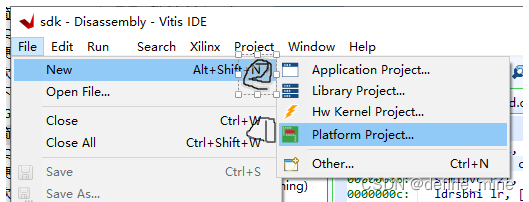
VIVADO2022 sdk 工程创建流程
正点原子uart历程复现 create block design(起名 为System) -> open block design -> 号/IP catalog 中搜索zynq 双击打开, 将和pl相关的时钟都干掉 再auto 布线一下 把herarchy中的sources 中的system.bd右键、 无脑下一步导出 如…...

【MyBatis】源码学习 02 - Java 元注解以及 MyBatis @Param 注解分析
文章目录前言参考目录学习笔记1、Java 注解1.1、Java 元注解1.2、Java ElementType 枚举值1.3、自定义注解2、Param 注解分析2.1、Param 注解2.2、测试方法2.3、流程分析(重点:ParamNameResolver)前言 本文内容对应的是书本第 7 章的内容&am…...
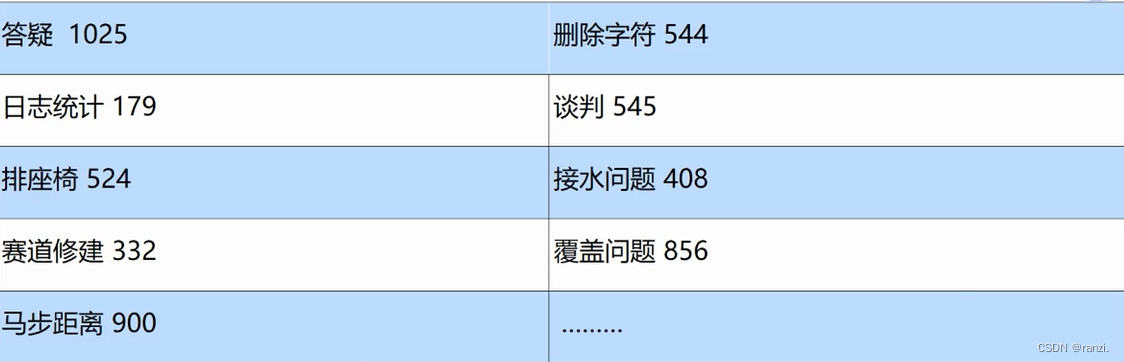
贪心算法-蓝桥杯
一、贪心算法的优缺点优点:1.容易理解:生活常见。2.操作简单:在每一步都选局部最优。3.效率高: 复杂度常常是O(1)的。缺点:1.局部最优不一定是全局最优。二、例子: 最少硬币问题硬币面值1、2、5。支付13元,要求硬币数量最少。贪心法: (1) 5元…...

zookeeper 复习 ---- chapter03
zookeeper 复习 ---- chapter03如何创建 zookeeper 对象 要求: 1:知道这几个构造参数 2:知道每一个参数的含义 ZooKeeper(String connectString, int sessionTimeout, Watcher watcher) ZooKeeper(String connectString, int sessionTimeout…...
1.PostgreSQL
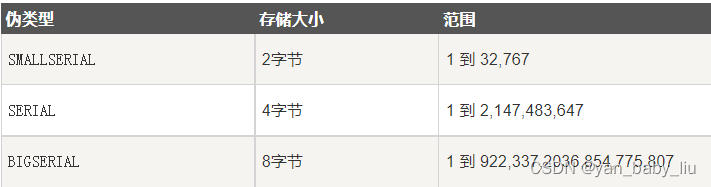
文章目录LIMITWITH 和RECURSIVEPostgreSQL 约束PostgreSQL AUTO INCREMENT(自动增长)PostgreSQL PRIVILEGES(权限)GRANT语法LIMIT SELECT * FROM COMPANY LIMIT 3 OFFSET 2;WITH 和RECURSIVE WITH RECURSIVE t(a,b) AS (VALUES (…...

2026届最火的AI写作平台推荐榜单
Ai论文网站排名(开题报告、文献综述、降aigc率、降重综合对比) TOP1. 千笔AI TOP2. aipasspaper TOP3. 清北论文 TOP4. 豆包 TOP5. kimi TOP6. deepseek 因学术写作要求持续提高,论文AI工具成了学生和研究人员的关键辅助办法࿰…...

BetterGI原神自动化助手:告别重复操作,智能游戏体验的完整指南
BetterGI原神自动化助手:告别重复操作,智能游戏体验的完整指南 【免费下载链接】better-genshin-impact 📦BetterGI 更好的原神 - 自动拾取 | 自动剧情 | 全自动钓鱼(AI) | 全自动七圣召唤 | 自动伐木 | 自动刷本 | 自动采集/挖矿/锄地 | 一…...

Transformer架构优化实战2026:注意力机制、KV Cache与推理加速完整指南
Transformer架构诞生已近十年,但它的工程优化故事才刚刚开始。2026年,理解并掌握Transformer的核心优化技术,是每个LLM工程师的必修课。一、为什么Transformer的优化如此重要一个7B参数的LLM在A100上推理时,如果没有优化ÿ…...
进行多工况多个时间步车速预测(含模型描述及部分示例代码)专栏近期有大量优惠 还请多多点一下关注 加油 谢谢 你的鼓励是我前行的动力 谢谢支持 加)
项目介绍 MATLAB实现基于长短期记忆网络(LSTM)进行多工况多个时间步车速预测(含模型描述及部分示例代码)专栏近期有大量优惠 还请多多点一下关注 加油 谢谢 你的鼓励是我前行的动力 谢谢支持 加
MATLAB实现基于长短期记忆网络(LSTM)进行多工况多个时间步车速预测的详细项目实例 请注意此篇内容只是一个项目介绍 更多详细内容可直接联系博主本人 或者访问对应标题的完整博客或者文档下载页面(含完整的程序,GUI设计和代码详…...

从HDLbits做题到项目实战:一个简单状态机的四种写法,哪种综合出来的时序报告最好?
状态机编码风格实战评测:四种写法对综合结果的影响深度解析 在数字电路设计中,状态机(FSM)作为控制逻辑的核心组件,其编码风格直接影响着最终实现的时序性能、资源占用和功耗表现。许多工程师在仿真阶段验证功能正确后,往往发现实…...

OBS多路推流插件:打破平台壁垒,实现直播内容最大化触达
OBS多路推流插件:打破平台壁垒,实现直播内容最大化触达 【免费下载链接】obs-multi-rtmp OBS複数サイト同時配信プラグイン 项目地址: https://gitcode.com/gh_mirrors/ob/obs-multi-rtmp 想象一下,你正在直播一场重要的产品发布会&am…...

[具身智能-628]:树莓派 4B/5、RK3568/RK3588 开发板的语音传感器接口
树莓派 4B/5、RK3568/RK3588 开发板连接语音传感器(麦克风),主要通过 I2S/PDM/TDM 数字接口、USB、模拟 Mic 口、HAT / 扩展板 四大类方式。下面按平台详细说明硬件接口、引脚定义与常用方案。一、树莓派 4B / 5 语音接口1. 板载原生接口无板…...

构建企业内部知识库问答机器人时的API聚合与降本思考
🚀 告别海外账号与网络限制!稳定直连全球优质大模型,限时半价接入中。 👉 点击领取海量免费额度 构建企业内部知识库问答机器人时的API聚合与降本思考 1. 场景与挑战 许多企业希望利用大语言模型构建一个能够理解并回答内部文档…...

别再傻傻用Word翻译论文了!实测4款文档翻译工具,翻译狗和搜狗谁更香?
论文翻译工具终极对决:如何高效处理英文文献而不踩坑? 凌晨三点,电脑屏幕的蓝光打在脸上,眼前的英文文献仿佛天书。距离课程论文提交只剩12小时,而导师要求的文献综述还一字未动——这场景对研究生来说再熟悉不过。传统…...

DPlayer架构深度解析:现代HTML5弹幕视频播放器的设计哲学与实践
DPlayer架构深度解析:现代HTML5弹幕视频播放器的设计哲学与实践 【免费下载链接】DPlayer :lollipop: Wow, such a lovely HTML5 danmaku video player 项目地址: https://gitcode.com/gh_mirrors/dp/DPlayer 在视频内容成为互联网主流媒介的今天,…...