
Sass 常用的功能!
Sass 常用功能
Sass 功能有很多,这边只列举一些比较常用的。
嵌套规则 (Nested Rules)
Sass 允许将一套 CSS 样式嵌套进另一套样式中,内层的样式将它外层的选择器作为父选择器。
编译前
.box {.box1 {background-color: red;}.box2 {background-color: blueviolet;}
}
编译后
.box .box1 {background-color: red;
}
.box .box2 {background-color: blueviolet;
}
.box .box3 {background-color: blue;
}
父选择器 & (Referencing Parent Selectors: &)
在嵌套 CSS 规则时,有时也需要直接使用嵌套外层的父选择器。
编译前
button {width: 100px;height: 30px;&:hover {background-color: red;}
}
编译后
button {width: 100px;height: 30px;
}
button:hover {background-color: red;
}
属性嵌套 (Nested Properties)
有些 CSS 属性遵循相同的命名空间 ( namespace ),比如 font-family , font-size , font-weight 都以 font 作为属性的命名空间。为了便于管理这样的属性,同时也为了避免了重复输入,Sass 允许将属性嵌套在命名空间中。
编译前
.my-content {padding: {top: 10px;right: 10px;bottom: 10px;left: 10px;}font: {size: 30px;weight: bold;}
}
编译后
.my-content {padding-top: 10px;padding-right: 10px;padding-bottom: 10px;padding-left: 10px;font-size: 30px;font-weight: bold;
}
注释 /* / 与 // (Comments: / */ and //)
单行注释不会被编译到 css 文件中,多行注释中可以使用差值语句 “``” ,类型 ES6 的模板字符串。
单行注释
编译前
// These comments are only one line long each.
// They won't appear in the CSS output,
// since they use the single-line comment syntax..my-content {width: 100%;height: 100%;
}
编译后
.my-content {width: 100%;height: 100%;
}
多行注释
编译前
/* This comment is* several lines long.* since it uses the CSS comment syntax,* it will appear in the CSS output. */.my-content {width: 100%;height: 100%;
}
编译后
/* This comment is* several lines long.* since it uses the CSS comment syntax,* it will appear in the CSS output. */
.my-content {width: 100%;height: 100%;
}
变量 $ (Variables: $)
编译前
$width: 100px;
$height: 100px;.box {width: $width;height: $height;
}
编译后
.box {width: 100px;height: 100px;
}
运算 (Operations)
编译前
.box {width: 100px + 100px;height: 200px / 2;background-color: royalblue;
}
编译后
.box {width: 200px;height: 100px;background-color: royalblue;
}
插值语句 #{} (Interpolation: #{})
编译前
$name: box;
$attr: background;.box {.#{$name}1 {width: 100px;height: 100px;#{$attr}-color: red;}.#{$name}2 {width: 100px;height: 100px;#{$attr}-color: blueviolet;}.#{$name}3 {width: 100px;height: 100px;#{$attr}-color: blue;}
}
编译后
.box .box1 {width: 100px;height: 100px;background-color: red;
}
.box .box2 {width: 100px;height: 100px;background-color: blueviolet;
}
.box .box3 {width: 100px;height: 100px;background-color: blue;
}
@import
Sass 拓展了 @import 的功能,允许其导入 SCSS 或 Sass 文件。被导入的文件将合并编译到同一个 CSS 文件中,另外,被导入的文件中所包含的变量或者混合指令 ( mixin ) 都可以在导入的文件中使用。
编译前(base.scss)
@import './reset.scss';.box {.#{$name}1 {width: 100px;height: 100px;#{$attr}-color: red;}.#{$name}2 {width: 100px;height: 100px;#{$attr}-color: blueviolet;}.#{$name}3 {width: 100px;height: 100px;#{$attr}-color: blue;}
}
编译前(reset.scss)
* {margin: 0;padding: 0;
}$name: box;
$attr: background;
编译后(base.css)
* {margin: 0;padding: 0;
}.box .box1 {width: 100px;height: 100px;background-color: red;
}
.box .box2 {width: 100px;height: 100px;background-color: blueviolet;
}
.box .box3 {width: 100px;height: 100px;background-color: blue;
}
嵌套 @import
编译前(base.scss)
.box {@import 'box';
}
编译前(box.scss)
.box1 {width: 100px;height: 100px;background-color: red;
}.box2 {width: 100px;height: 100px;background-color: blue;
}.box3 {width: 100px;height: 100px;background-color: blueviolet;
}
编译后(base.css)
.box .box1 {width: 100px;height: 100px;background-color: red;
}
.box .box2 {width: 100px;height: 100px;background-color: red;
}
.box .box3 {width: 100px;height: 100px;background-color: red;
}
@extend
编译前
.box {width: 100px;height: 100px;
}.box {.box1 {@extend .box;background-color: red;}.box2 {@extend .box;background-color: blueviolet;}.box3 {@extend .box;background-color: blue;}
}
编译后
.box,
.box .box1,
.box .box2,
.box .box3 {width: 100px;height: 100px;
}.box .box1 {background-color: red;
}
.box .box2 {background-color: blueviolet;
}
.box .box3 {background-color: blue;
}
@if
当 @if 的表达式返回值不是 false 或者 null 时,条件成立,输出 {} 内的代码。
编译前
$type: monster;p {@if $type == ocean {color: blue;} @else if $type == matador {color: red;} @else if $type == monster {color: green;} @else {color: black;}
}
编译后
p {color: green;
}
@for
@for 指令可以在限制的范围内重复输出格式,每次按要求(变量的值)对输出结果做出变动。这个指令包含两种格式:@for $var from “start” through “end”,或者 @for $var from “start” to “end” 。
区别在于 through 与 to 的含义:当使用 through 时,条件范围包含 “start” 与 “end” 的值,而使用 to 时条件范围只包含 “start” 的值不包含 “end” 的值。另外, $var 可以是任何变量,比如 $i ; “start” 和 “end” 必须是整数值。
编译前
@for $i from 1 through 3 {.item-#{$i} {width: 2em * $i;}
}
编译后
.item-1 {width: 2em;
}.item-2 {width: 4em;
}.item-3 {width: 6em;
}
@each
@each 指令的格式是 $var in “list”, $var 可以是任何变量名,比如 $length 或者 n a m e ,而 " l i s t " 是一连串的值,也就是值列表。 @ e a c h 是一个循环语句, name,而 "list" 是一连串的值,也就是值列表。@each是一个循环语句, name,而"list"是一连串的值,也就是值列表。@each是一个循环语句,key、$value、相当于 javascript 中的对象键值对,名字可以自定义。
编译前
@each $key, $value in (h1: 2em, h2: 1.5em, h3: 1.2em) {#{$key} {font-size: $value;}
}
编译后
h1 {font-size: 2em;
}h2 {font-size: 1.5em;
}h3 {font-size: 1.2em;
}
@while
@while 指令重复输出格式直到表达式返回结果为 false。这样可以实现比 @for 更复杂的循环,只是很少会用到。
编译前
$i: 3;
@while $i > 0 {.item-#{$i} {width: 2em * $i;}$i: $i - 1;
}
编译后
.item-3 {width: 6em;
}.item-2 {width: 4em;
}.item-1 {width: 2em;
}
混合指令 @mixin & @include
使用 @mixin 指令定义混合样式,使用 @include 指令引用混合样式,格式是在其后添加混合名称,以及需要的参数(可选)。
编译前
@mixin box {width: 100px;height: 100px;
}.box {.box1 {@include box;background-color: red;}.box2 {@include box;background-color: blueviolet;}.box3 {@include box;background-color: blue;}
}
编译后
.box .box1 {width: 100px;height: 100px;background-color: red;
}
.box .box2 {width: 100px;height: 100px;background-color: blueviolet;
}
.box .box3 {width: 100px;height: 100px;background-color: blue;
}
参数 (Arguments)
参数用于给混合指令中的样式设定变量,并且赋值使用。在定义混合指令的时候,按照变量的格式,通过逗号分隔,将参数写进圆括号里。引用指令时,按照参数的顺序,再将所赋的值对应写进括号。
编译前
@mixin box($color) {width: 100px;height: 100px;background-color: $color;
}.box {.box1 {@include box(red);}.box2 {@include box(blueviolet);}.box3 {@include box(blue);}
}
编译后
.box .box1 {width: 100px;height: 100px;background-color: red;
}
.box .box2 {width: 100px;height: 100px;background-color: blueviolet;
}
.box .box3 {width: 100px;height: 100px;background-color: blue;
}
函数指令 (Function Directives)
Sass 支持自定义函数,并能在任何属性值或 Sass script 中使用。
编译前
@function box-width($width) {@return $width * 2;
}.box {.box1 {width: box-width(100px);height: 100px;background-color: red;}.box2 {width: box-width(100px);height: 100px;background-color: blueviolet;}.box3 {width: box-width(100px);height: 100px;background-color: blue;}
}
编译后
.box .box1 {width: 200px;height: 100px;background-color: red;
}
.box .box2 {width: 200px;height: 100px;background-color: blueviolet;
}
.box .box3 {width: 200px;height: 100px;background-color: blue;
}
原文链接:菜园前端
相关文章:

Sass 常用的功能!
Sass 常用功能 Sass 功能有很多,这边只列举一些比较常用的。 嵌套规则 (Nested Rules) Sass 允许将一套 CSS 样式嵌套进另一套样式中,内层的样式将它外层的选择器作为父选择器。 编译前 .box {.box1 {background-color: red;}.box2 {background-col…...

chmod命令详细使用说明
chmod命令详细使用说明 chmod是Unix和类Unix系统上用于更改文件或目录权限的命令。它是"change mode"的缩写。在Linux和其他类Unix操作系统中,文件和目录具有权限位,用来控制哪些用户可以访问、读取、写入或执行它们。chmod命令允许用户修改这…...

ICC2如何计算Gate Count?
我正在「拾陆楼」和朋友们讨论有趣的话题,你⼀起来吧?知识星球入口 我们认为gate count等于standard cell(非physical only)总面积 / 最小驱动二输入与非门面积。 ICC2没有专门的命令去报告gate count,只能自己计算,使用report_d…...
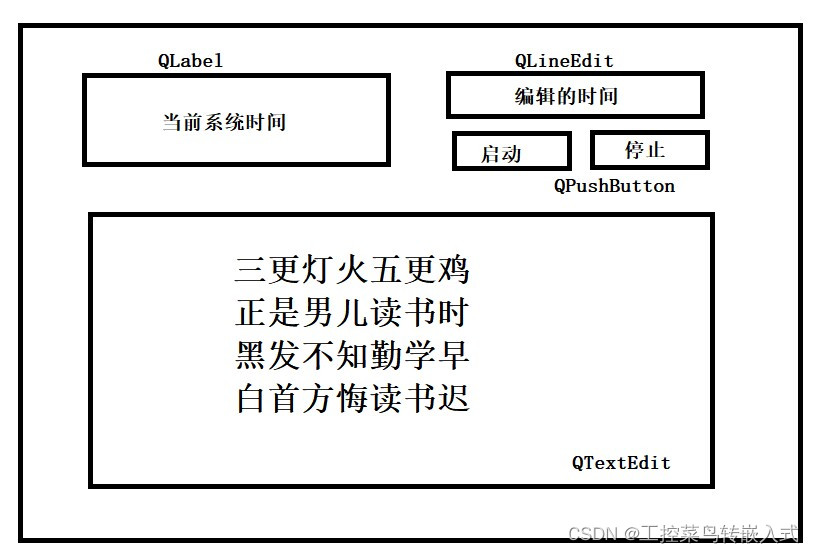
Qtday3作业
作业 头文件 #ifndef WIDGET_H #define WIDGET_H#include <QPushButton> #include <QTextToSpeech> #include <QWidget> #include <QDebug> #include <QTimer> //定时器类 #include <QTime> //时间类 #include <QTimerEvent>…...

全球程序员需要知道的50+网址,有多少你第一次听说?
作为程序员,需要知道的50网址,有多少你第一次听说 GitHub (github.com): 最大的代码托管平台,开源项目和代码分享的社区。程序员可以在这里找到各种有趣的项目,参与开源贡献或托管自己的代码。 Stack Overflow (stackoverflow.co…...
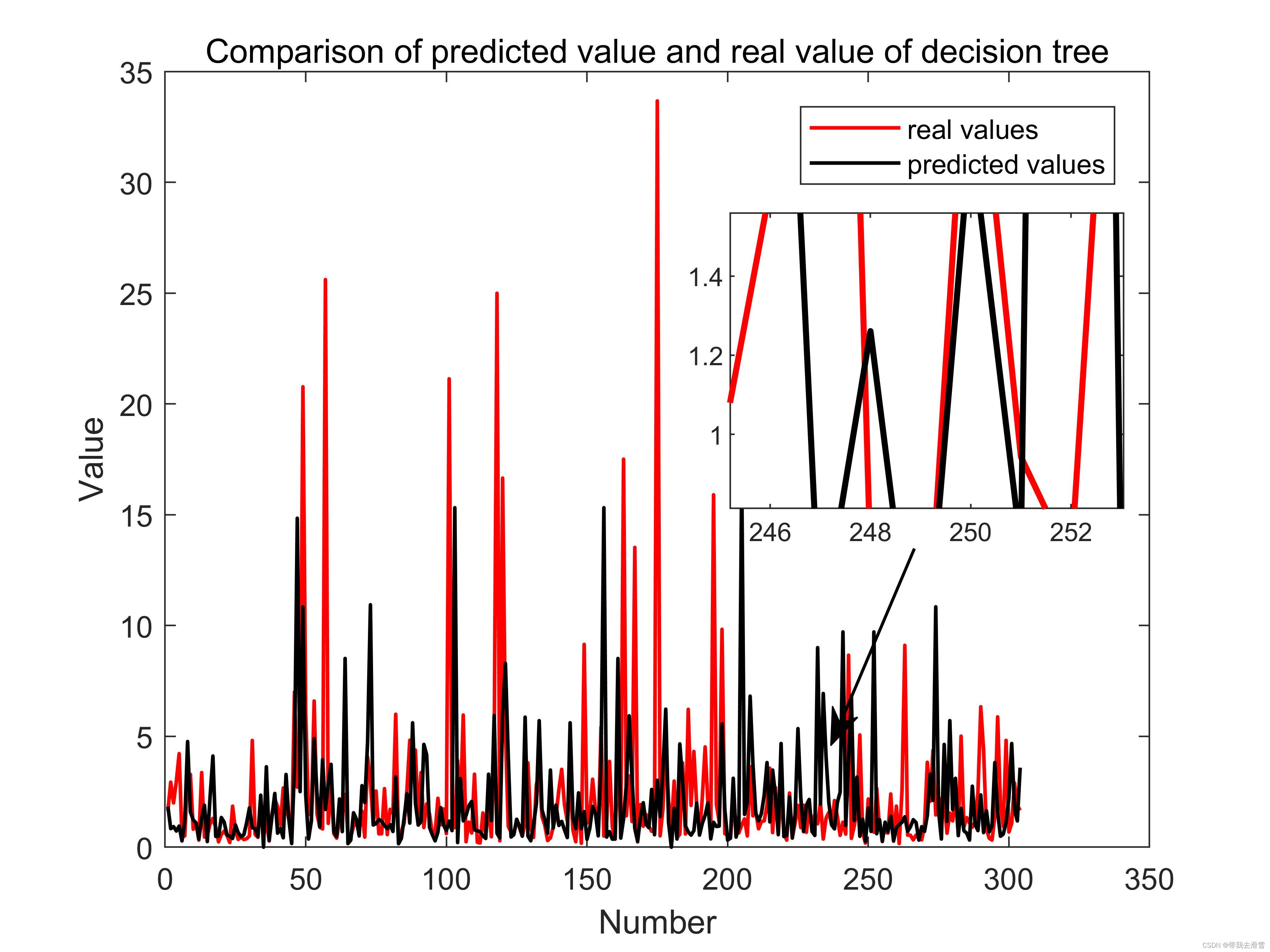
Matlab中实现对一幅图上的局部区域进行放大
大家好,我是带我去滑雪! 局部放大图可以展示图像中的细节信息,使图像更加直观和精美,此次使用magnify工具实现对绘制的figure选择区域绘制,图像效果如下: 1、基本图像绘制 这里选择绘制一个散点图ÿ…...
mysql-速成补充
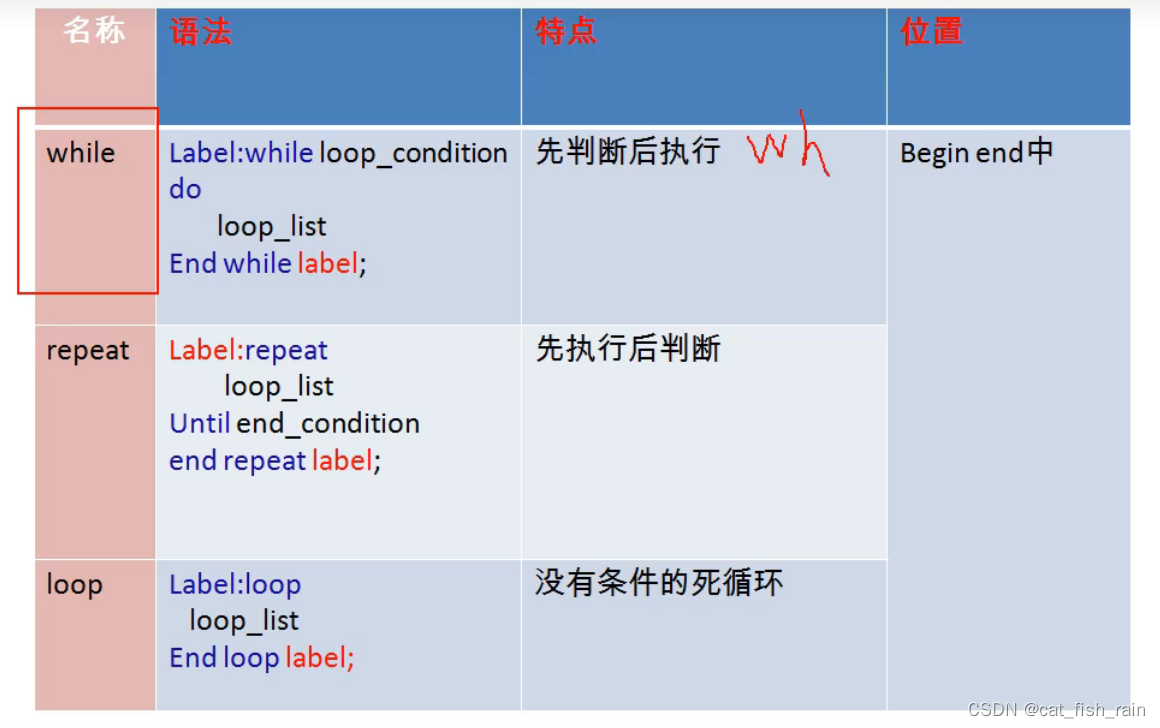
目录 1.演示事务 编辑 1.1 read-uncommitted 1.2 read-committed 1.3 repeatable read 1.4 幻读 1.5 serializable 1.6 savepoint 2 变量 2.1 语法 2.2 举例 3 存储过程和函数 3.1 特点和语法 3.2 举例 4.函数 4.1 语法 4.2 举例 5 流程控制 5.1 分…...
微信小程序,商城底部工具栏的实现
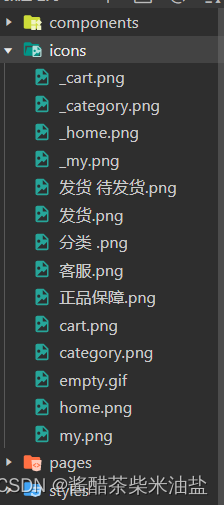
效果演示: 前提条件: 去阿里云矢量图标,下载8个图标,四个黑,四个红,如图: 新建文件夹icons,把图标放到该文件夹,然后把该文件夹移动到该项目的文件夹里面。如图所示 app…...
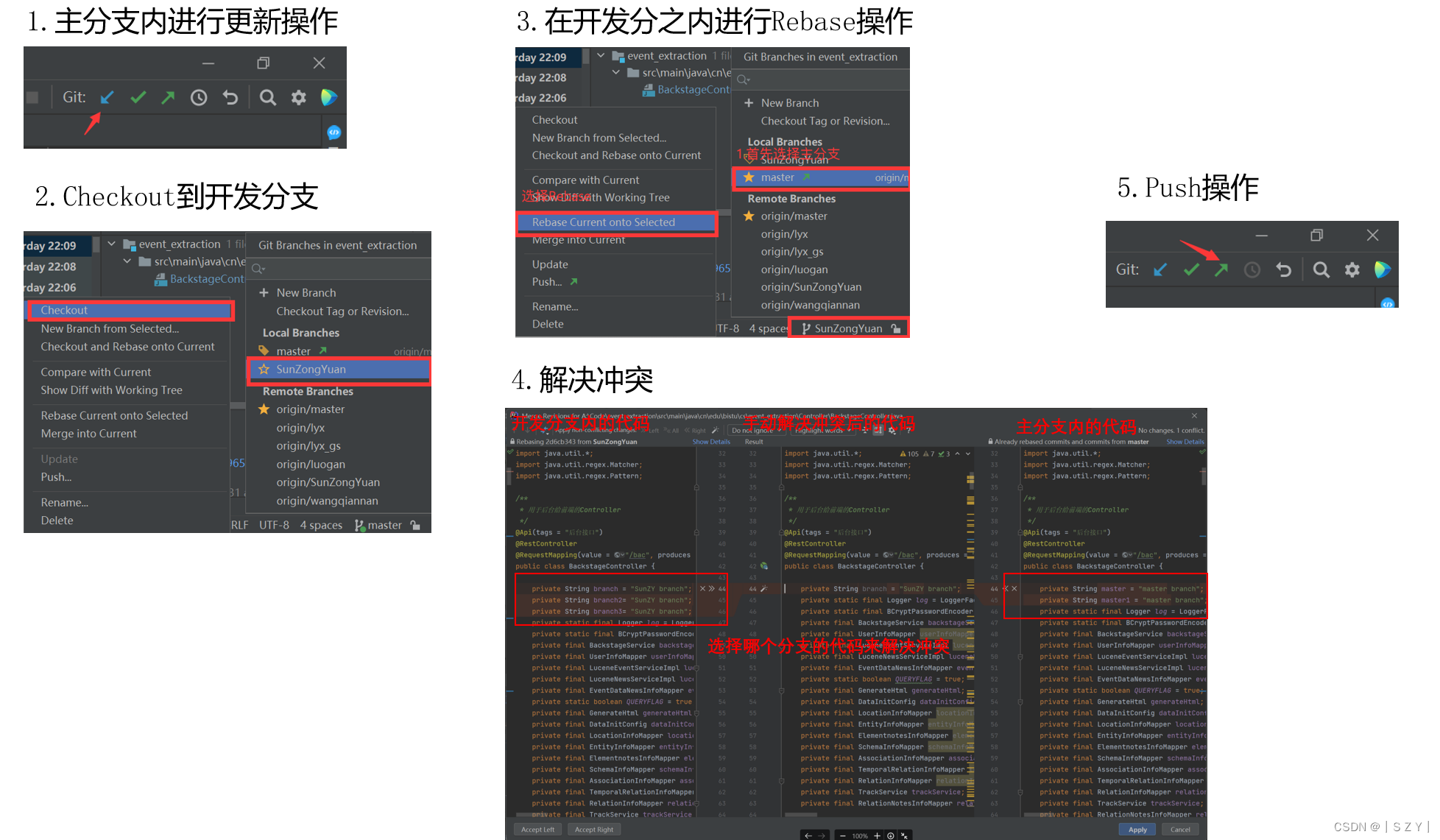
Lab———Git使用指北
Lab———Git使用指北 🤖:使用IDEA Git插件实际工作流程 💡 本文从实际使用的角度出发,以IDEA Git插件为基本讲述了如果使用IDEA的Git插件来解决实际开发中的协作开发问题。本文从 远程仓库中拉取项目,在本地分支进行开发&#x…...

ChatGPT的工作原理:从输入到输出
🌷🍁 博主 libin9iOak带您 Go to New World.✨🍁 🦄 个人主页——libin9iOak的博客🎐 🐳 《面试题大全》 文章图文并茂🦕生动形象🦖简单易学!欢迎大家来踩踩~ἳ…...
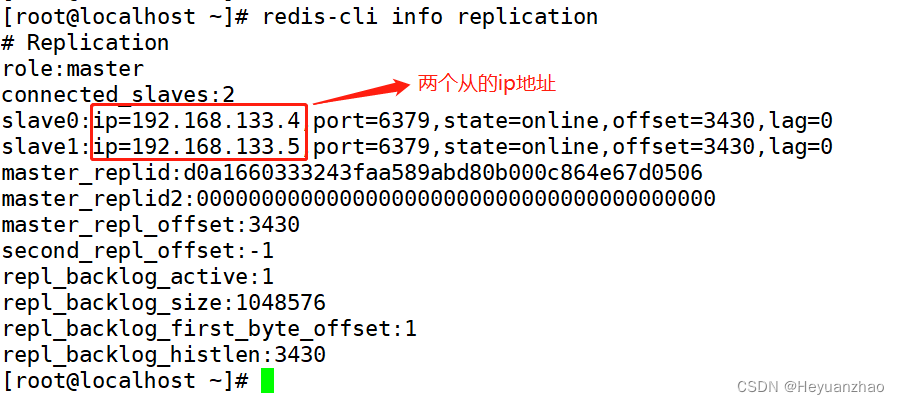
redis数据库与主从复制
目录 一 基本操作 二 执行流程 三 reids持久化 四 rdb和aof持久化的过程 五 为什么会有内存碎片 六 redis组从复制 一 基本操作 set :存放数据 例如 set 键值 内容 set k kokoko k就是键值 kokoko就是内容 get:获取数据 例如 get k 就会出来 k对应的数据 keys 查询键…...
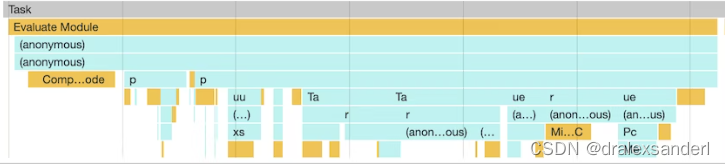
js加载和长任务
js加载和长任务 本文将讲解以下浏览器如何加载js,并介绍一些可以提高网页加载速度的方法。 Evaluate Script 如果我们在devtools的performance中分析过网站的加载性能,可能会看到一个很长的任务,叫做Evaluate Script. 在这种情况下&#x…...

利用Stable diffusion Ai 制作艺术二维码超详细参数和教程
大家有没有发现最近这段时间网上出现了各种各样的AI艺术二维码,这种二维码的出现,简直是对二维码的“颠覆式创新”,直接把传统的二维码提升了一个维度!作为设计师的我们怎么可以不会呢? 今天就教大家怎么制作这种超有艺…...
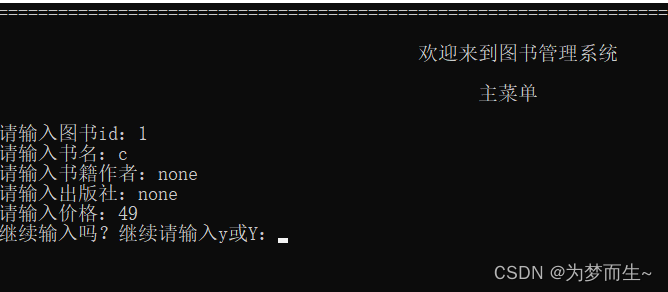
【C语言课程设计】图书管理系统
引言: 图书管理系统是一个重要的信息管理系统,对于图书馆和书店等机构来说,它能够方便地管理图书的录入、显示、查询、修改和删除等操作。本实验基于C语言开发了一个简单的图书管理系统,通过账户名和密码进行系统访问和权限控制&a…...
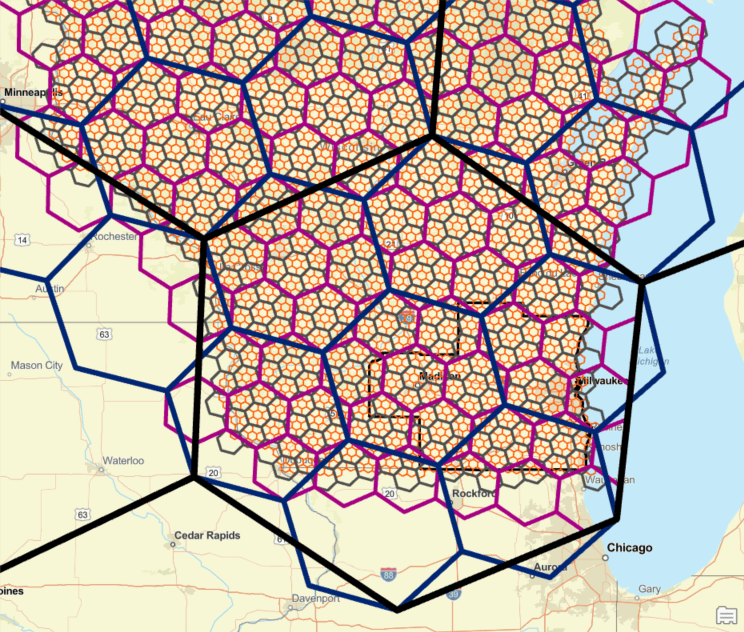
在 ArcGIS Pro 中使用 H3 创建蜂窝六边形
H3是Uber开发的分层索引系统,它使用六边形来平铺地球表面。H3在二十面体(一个具有20个三角形面和12个顶点的形状)上构建其六边形网格。由于仅用六边形不可能平铺二十面体,因此每个分辨率需要12个五边形来完成网格。分层索引网格意味着每个六边形都可以细分为子单元六边形。…...
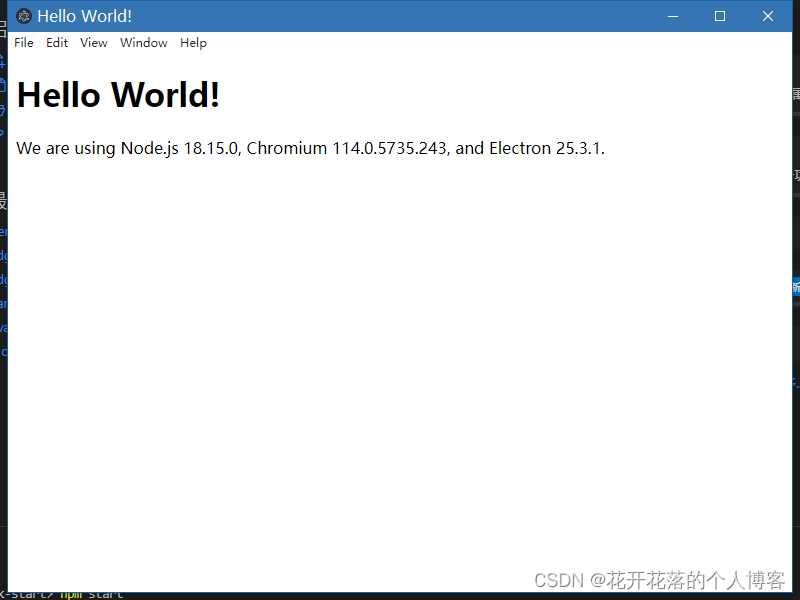
创建Electron项目
一、使用vite 构建 electron项目 npm init vitelatest Need to install the following packages:create-vitelatest Ok to proceed? (y) y √ Project name: ... CertificateDownload √ Package name: ... certificatedownload √ Select a framework: Vue √ Select a var…...
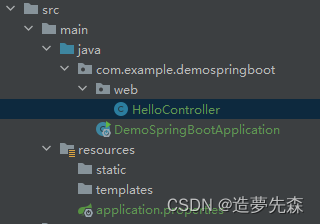
Spring Boot实践一
一、Spring Boot简介 Spring Boot是一个基于Spring框架的快速开发应用程序的工具。它提供了一种快速、方便的方式来创建基于Spring的应用程序,而无需繁琐的配置。Spring Boot通过自动配置和约定大于配置的方式,使得开发者可以更加专注于业务逻辑的实现&…...

简单认识NoSQL的Redis配置与优化
文章目录 一、关系型数据库与非关系型数据库1、关系型数据库:2、非关系型数据库3、关系型数据库和非关系型数据库区别:4、非关系型数据库应用场景 二.Redis1、简介2、优点:3、Redis为什么这么快? 三、Redis 安装部署1、安装配置2、…...

开发一个RISC-V上的操作系统(二)—— 系统引导程序(Bootloader)
目录 文章传送门 一、什么是Bootloader 二、简单的启动程序 三、上板测试 文章传送门 开发一个RISC-V上的操作系统(一)—— 环境搭建_riscv开发环境_Patarw_Li的博客-CSDN博客 开发一个RISC-V上的操作系统(二)—— 系统引导…...

Git安装与学习
Git学习网站 Git安装教程 镜像网站 https://registry.npmmirror.com/binary.html 镜像下载是网站对服务器的一个保护措施之一,就是A站点下载的数据同 B站点下载的数据完全一样,b站点就是A站点的一面镜子。 所以镜像下载下来和原站点一摸一样。...

SwitchyOmega+Burp无感抓包实战:解决HTTPS拦截与流量路由难题
1. 为什么“无感抓包”是BurpSuite日常使用的分水岭刚接触Web安全测试的朋友常有个错觉:装上Burp Suite,配好代理,打开浏览器,点几下网页——流量就该自动进来了。结果现实是:首页打不开、登录态丢失、HTTPS报错满屏、…...

HFSS仿真结果怎么看?以T型波导为例,读懂S参数与电场动态图
HFSS仿真结果深度解析:从S参数到电场动态图的实战指南当你第一次在HFSS中完成T型波导仿真后,面对满屏的曲线和彩色云图,是否感到既兴奋又困惑?那些起伏的S参数曲线究竟告诉你什么信息?电场图中跳跃的颜色又代表怎样的物…...

从电磁炉到户外电源:拆解单相SVPWM如何让你的逆变器更安静、更高效
从电磁炉到户外电源:单相SVPWM如何实现静音与高效的双重突破当你深夜用电磁炉煮面时,是否曾被突然的蜂鸣声吓一跳?或是发现户外电源给设备充电时,散热风扇的噪音盖过了山林鸟鸣?这些常见问题背后,隐藏着一个…...

自制极低频电流探头:负电阻补偿原理与低频方波测量实践
1. 项目概述:为极低频电流测量而生在电子测试领域,电流探头是个再常见不过的工具,无论是排查开关电源的纹波,还是分析电机驱动的波形,都离不开它。但如果你尝试用市面上常见的电流探头去观察一个频率低至几赫兹&#x…...

危急时刻的六条基本安全提示
人机协作,AI模型:Deepseek 仅供参考 危急时刻的六条基本安全提示 以下内容仅为通用性安全建议,供在紧急情况下保持冷静、保护自身安全时参考。所有建议均基于常理和公共安全常识,不包含任何具体操作细节或可能被不当使用的信息…...

输电线路在线监测系统|架空线路安全运行的“第一道防线“!
输电线路微气象监测站是专为高压输电线路、电网廊道、杆塔运维量身打造的专利级一体化微气象智能监测设备。依托双专利超声波探测技术、六要素集成传感架构、无启动风速高精测量、智能抗干扰稳控系统,实现输电线路沿线气象24小时全自动捕捉、动态实时监测、大风风险…...
)
从单体到事件驱动的生死跃迁:DeepSeek架构委员会认证的6阶段迁移路线图(含风险热力图与回滚触发阈值表)
更多请点击: https://codechina.net 第一章:从单体到事件驱动的生死跃迁:DeepSeek架构委员会认证的6阶段迁移路线图(含风险热力图与回滚触发阈值表) 向事件驱动架构(EDA)演进不是功能迭代&…...

Taotoken用量看板功能详解,助你洞察团队AI资源消耗模式
🚀 告别海外账号与网络限制!稳定直连全球优质大模型,限时半价接入中。 👉 点击领取海量免费额度 Taotoken用量看板功能详解,助你洞察团队AI资源消耗模式 对于技术管理者或项目负责人而言,清晰了解团队的AI…...

第2章 谁在危险中——被AI替代的五类程序员
第2章 谁在危险中——被AI替代的五类程序员 核心问题:哪些程序员最容易被AI替代?背后的原因是什么? 2.1 问题定义:一场正在发生的结构性塌陷 2.1.1 数据不会说谎 2026年1月12日,Ravio发布了一份让整个科技圈沉默的报告:过去一年,初级开发者岗位招聘量暴跌73%。 不是…...

前馈补偿技术:用数字预失真驯服放大器非线性失真
1. 项目概述:用前馈补偿驯服放大器失真在音频发烧友和硬件工程师的圈子里,追求“高保真”几乎是一种信仰。我们总希望从扬声器里传出的声音,是录音现场或音乐制作人意图的完美复刻,纤毫毕现,不带一丝杂质。然而&#x…...